



Skip to content
  • Home
  • Aktuell
  • Tags
  • 0 Ungelesen 0
  • Kategorien
  • Unreplied
  • Beliebt
  • GitHub
  • Docu
  • Hilfe
Skins
  • Light
  • Brite
  • Cerulean
  • Cosmo
  • Flatly
  • Journal
  • Litera
  • Lumen
  • Lux
  • Materia
  • Minty
  • Morph
  • Pulse
  • Sandstone
  • Simplex
  • Sketchy
  • Spacelab
  • United
  • Yeti
  • Zephyr
  • Dark
  • Cyborg
  • Darkly
  • Quartz
  • Slate
  • Solar
  • Superhero
  • Vapor

  • Standard: (Kein Skin)
  • Kein Skin
Einklappen
ioBroker Logo

Community Forum

donate donate
  1. ioBroker Community Home
  2. Deutsch
  3. ioBroker Allgemein
  4. Multihost

NEWS

  • UPDATE 31.10.: Amazon Alexa - ioBroker Skill läuft aus ?
    apollon77A
    apollon77
    48
    3
    8.7k

  • Monatsrückblick – September 2025
    BluefoxB
    Bluefox
    13
    1
    2.2k

  • Neues Video "KI im Smart Home" - ioBroker plus n8n
    BluefoxB
    Bluefox
    16
    1
    3.2k

Multihost

Geplant Angeheftet Gesperrt Verschoben ioBroker Allgemein
72 Beiträge 6 Kommentatoren 3.3k Aufrufe 4 Watching
  • Älteste zuerst
  • Neuste zuerst
  • Meiste Stimmen
Antworten
  • In einem neuen Thema antworten
Anmelden zum Antworten
Dieses Thema wurde gelöscht. Nur Nutzer mit entsprechenden Rechten können es sehen.
  • Thomas BraunT Thomas Braun

    @ostseeskipper sagte in Multihost:

    sudo iobroker

    Zuerst hilft es dir, den iobroker NICHT mit sudo zu beharken...

    Fix das:

    iobroker stop
    iobroker fix
    iobroker start
    
    O Offline
    O Offline
    ostseeskipper
    schrieb am zuletzt editiert von
    #61

    @thomas-braun
    auf beiden geräten ?

    Thomas BraunT 1 Antwort Letzte Antwort
    0
    • O ostseeskipper

      @thomas-braun
      auf beiden geräten ?

      Thomas BraunT Online
      Thomas BraunT Online
      Thomas Braun
      Most Active
      schrieb am zuletzt editiert von
      #62

      @ostseeskipper

      Ja, wenn du in beiden Systemen mit sudo rumgesaut hast.

      Linux-Werkzeugkasten:
      https://forum.iobroker.net/topic/42952/der-kleine-iobroker-linux-werkzeugkasten
      NodeJS Fixer Skript:
      https://forum.iobroker.net/topic/68035/iob-node-fix-skript
      iob_diag: curl -sLf -o diag.sh https://iobroker.net/diag.sh && bash diag.sh

      O 1 Antwort Letzte Antwort
      0
      • Thomas BraunT Thomas Braun

        @ostseeskipper

        Ja, wenn du in beiden Systemen mit sudo rumgesaut hast.

        O Offline
        O Offline
        ostseeskipper
        schrieb am zuletzt editiert von ostseeskipper
        #63

        @thomas-braun

        im docker geht kein iobroker stop
        warte mal mit pkill -u iobroker ging das
        japp

        Thomas BraunT 1 Antwort Letzte Antwort
        0
        • O ostseeskipper

          @thomas-braun

          im docker geht kein iobroker stop
          warte mal mit pkill -u iobroker ging das
          japp

          Thomas BraunT Online
          Thomas BraunT Online
          Thomas Braun
          Most Active
          schrieb am zuletzt editiert von
          #64

          @ostseeskipper

          Stimmt. Das wird da mit pkill irgendwie gestoppt. Ich fahre aber keine Containerschiffe durch die Gegend, kann ich nix weiter zu sagen.

          Linux-Werkzeugkasten:
          https://forum.iobroker.net/topic/42952/der-kleine-iobroker-linux-werkzeugkasten
          NodeJS Fixer Skript:
          https://forum.iobroker.net/topic/68035/iob-node-fix-skript
          iob_diag: curl -sLf -o diag.sh https://iobroker.net/diag.sh && bash diag.sh

          O 1 Antwort Letzte Antwort
          0
          • Thomas BraunT Thomas Braun

            @ostseeskipper

            Stimmt. Das wird da mit pkill irgendwie gestoppt. Ich fahre aber keine Containerschiffe durch die Gegend, kann ich nix weiter zu sagen.

            O Offline
            O Offline
            ostseeskipper
            schrieb am zuletzt editiert von
            #65

            @thomas-braun

            keine besserung:

            pi@iobroker-pi:~ $ iobroker multihost browse
            No Multihost server found. Make sure iobroker is running on the host where you enabled multihost discovery (and it is not this host)!
            
            
            root@buanet-iobroker1:/opt/iobroker# iobroker restart                                                                                                                         
            iobroker controller daemon is not running                                                                                                                                     
            Starting iobroker controller daemon...                                                                                                                                        
            iobroker controller daemon started. PID: 1655                                                                                                                                 
            root@buanet-iobroker1:/opt/iobroker# iobroker multihost enable                                                                                                                
            Multihost discovery server activated on this host. If iobroker is currently not running please start befeore trying to discover this host.                                    
            Important: Multihost discovery works with UDP packets. Make sure they are routed correctly in your network. If you use Docker you also need to configure this correctly.      
            Multihost discovery will be automatically deactivated after 15 minutes. If you want to activate it permanently use the --persist flag                                         
            Discovery authentication activated.                                                                                                                                           
            Enter secret phrase for connection:                                                                                                                                           
            Repeat secret phrase for connection:                                                                                                                                          
            Please check the binding of the configured file server to allow remote connections.                                                                                           
            Please restart ioBroker for the changes to take effect: "iobroker restart"                                                                                                    
                                                                                                                                                                                          
                                                                                                                                                                                          
            Multihost discovery server: enabled                                                                                                                                           
            Discovery authentication:   enabled                                                                                                                                           
            Persistent activation:      disabled                                                                                                                                          
            Objects:                    file on 0.0.0.0                                                                                                                                   
            States:                     file on 0.0.0.0  
            
            O 1 Antwort Letzte Antwort
            0
            • O ostseeskipper

              @thomas-braun

              keine besserung:

              pi@iobroker-pi:~ $ iobroker multihost browse
              No Multihost server found. Make sure iobroker is running on the host where you enabled multihost discovery (and it is not this host)!
              
              
              root@buanet-iobroker1:/opt/iobroker# iobroker restart                                                                                                                         
              iobroker controller daemon is not running                                                                                                                                     
              Starting iobroker controller daemon...                                                                                                                                        
              iobroker controller daemon started. PID: 1655                                                                                                                                 
              root@buanet-iobroker1:/opt/iobroker# iobroker multihost enable                                                                                                                
              Multihost discovery server activated on this host. If iobroker is currently not running please start befeore trying to discover this host.                                    
              Important: Multihost discovery works with UDP packets. Make sure they are routed correctly in your network. If you use Docker you also need to configure this correctly.      
              Multihost discovery will be automatically deactivated after 15 minutes. If you want to activate it permanently use the --persist flag                                         
              Discovery authentication activated.                                                                                                                                           
              Enter secret phrase for connection:                                                                                                                                           
              Repeat secret phrase for connection:                                                                                                                                          
              Please check the binding of the configured file server to allow remote connections.                                                                                           
              Please restart ioBroker for the changes to take effect: "iobroker restart"                                                                                                    
                                                                                                                                                                                            
                                                                                                                                                                                            
              Multihost discovery server: enabled                                                                                                                                           
              Discovery authentication:   enabled                                                                                                                                           
              Persistent activation:      disabled                                                                                                                                          
              Objects:                    file on 0.0.0.0                                                                                                                                   
              States:                     file on 0.0.0.0  
              
              O Offline
              O Offline
              ostseeskipper
              schrieb am zuletzt editiert von
              #66

              und restart ist auch gemacht

              root@buanet-iobroker1:/opt/iobroker# iobroker restart                                                                                                                         
              iobroker controller daemon is not running                                                                                                                                     
              Starting iobroker controller daemon...                                                                                                                                        
              iobroker controller daemon started. PID: 1655                                                                                                                                 
              root@buanet-iobroker1:/opt/iobroker# iobroker multihost enable                                                                                                                
              Multihost discovery server activated on this host. If iobroker is currently not running please start befeore trying to discover this host.                                    
              Important: Multihost discovery works with UDP packets. Make sure they are routed correctly in your network. If you use Docker you also need to configure this correctly.      
              Multihost discovery will be automatically deactivated after 15 minutes. If you want to activate it permanently use the --persist flag                                         
              Discovery authentication activated.                                                                                                                                           
              Enter secret phrase for connection:                                                                                                                                           
              Repeat secret phrase for connection:                                                                                                                                          
              Please check the binding of the configured file server to allow remote connections.                                                                                           
              Please restart ioBroker for the changes to take effect: "iobroker restart"                                                                                                    
                                                                                                                                                                                            
                                                                                                                                                                                            
              Multihost discovery server: enabled                                                                                                                                           
              Discovery authentication:   enabled                                                                                                                                           
              Persistent activation:      disabled                                                                                                                                          
              Objects:                    file on 0.0.0.0                                                                                                                                   
              States:                     file on 0.0.0.0  
              
              Thomas BraunT 1 Antwort Letzte Antwort
              0
              • O ostseeskipper

                und restart ist auch gemacht

                root@buanet-iobroker1:/opt/iobroker# iobroker restart                                                                                                                         
                iobroker controller daemon is not running                                                                                                                                     
                Starting iobroker controller daemon...                                                                                                                                        
                iobroker controller daemon started. PID: 1655                                                                                                                                 
                root@buanet-iobroker1:/opt/iobroker# iobroker multihost enable                                                                                                                
                Multihost discovery server activated on this host. If iobroker is currently not running please start befeore trying to discover this host.                                    
                Important: Multihost discovery works with UDP packets. Make sure they are routed correctly in your network. If you use Docker you also need to configure this correctly.      
                Multihost discovery will be automatically deactivated after 15 minutes. If you want to activate it permanently use the --persist flag                                         
                Discovery authentication activated.                                                                                                                                           
                Enter secret phrase for connection:                                                                                                                                           
                Repeat secret phrase for connection:                                                                                                                                          
                Please check the binding of the configured file server to allow remote connections.                                                                                           
                Please restart ioBroker for the changes to take effect: "iobroker restart"                                                                                                    
                                                                                                                                                                                              
                                                                                                                                                                                              
                Multihost discovery server: enabled                                                                                                                                           
                Discovery authentication:   enabled                                                                                                                                           
                Persistent activation:      disabled                                                                                                                                          
                Objects:                    file on 0.0.0.0                                                                                                                                   
                States:                     file on 0.0.0.0  
                
                Thomas BraunT Online
                Thomas BraunT Online
                Thomas Braun
                Most Active
                schrieb am zuletzt editiert von
                #67

                @ostseeskipper

                Ich mach das immer danach:

                https://www.iobroker.net/#de/documentation/config/multihost.md

                Linux-Werkzeugkasten:
                https://forum.iobroker.net/topic/42952/der-kleine-iobroker-linux-werkzeugkasten
                NodeJS Fixer Skript:
                https://forum.iobroker.net/topic/68035/iob-node-fix-skript
                iob_diag: curl -sLf -o diag.sh https://iobroker.net/diag.sh && bash diag.sh

                HomoranH O 3 Antworten Letzte Antwort
                0
                • Thomas BraunT Thomas Braun

                  @ostseeskipper

                  Ich mach das immer danach:

                  https://www.iobroker.net/#de/documentation/config/multihost.md

                  HomoranH Nicht stören
                  HomoranH Nicht stören
                  Homoran
                  Global Moderator Administrators
                  schrieb am zuletzt editiert von
                  #68

                  @thomas-braun sagte in Multihost:

                  @ostseeskipper

                  Ich mach das immer danach:

                  https://www.iobroker.net/#de/documentation/config/multihost.md

                  aber ein dicker Container muss wahrscheinlich im Hafen freigegeben werden

                  kein Support per PN! - Fragen im Forum stellen - es gibt fast nichts, was nicht auch für andere interessant ist.

                  Benutzt das Voting rechts unten im Beitrag wenn er euch geholfen hat.

                  der Installationsfixer: curl -fsL https://iobroker.net/fix.sh | bash -

                  1 Antwort Letzte Antwort
                  0
                  • Thomas BraunT Thomas Braun

                    @ostseeskipper

                    Ich mach das immer danach:

                    https://www.iobroker.net/#de/documentation/config/multihost.md

                    O Offline
                    O Offline
                    ostseeskipper
                    schrieb am zuletzt editiert von
                    #69

                    @thomas-braun said in Multihost:

                    Ich mach das immer danach:
                    https://www.iobroker.net/#de/documentation/config/multihost.md

                    Das hatte ich ausprobiert, im Master wurde nichts angezeigt aber die Weboberfläche vom Slave war wie erwartet weg.
                    Sämtliche Befehle per Putty an iobroker wurden mit immer den gleichen Fehlermeldungen zur Port zu 9000 und 9001 beantwortet.

                    @Homoran : im Doker läuft auf dem Master noch nicht viel, bin mir aber ziemlich sicher das Port 9000 und 9001 nicht benutzt werden und auch die Synology Firewall lässt durch. An was denkst du bei "muss wahrscheinlich im Hafen freigegeben werden" ?

                    HomoranH 1 Antwort Letzte Antwort
                    0
                    • O ostseeskipper

                      @thomas-braun said in Multihost:

                      Ich mach das immer danach:
                      https://www.iobroker.net/#de/documentation/config/multihost.md

                      Das hatte ich ausprobiert, im Master wurde nichts angezeigt aber die Weboberfläche vom Slave war wie erwartet weg.
                      Sämtliche Befehle per Putty an iobroker wurden mit immer den gleichen Fehlermeldungen zur Port zu 9000 und 9001 beantwortet.

                      @Homoran : im Doker läuft auf dem Master noch nicht viel, bin mir aber ziemlich sicher das Port 9000 und 9001 nicht benutzt werden und auch die Synology Firewall lässt durch. An was denkst du bei "muss wahrscheinlich im Hafen freigegeben werden" ?

                      HomoranH Nicht stören
                      HomoranH Nicht stören
                      Homoran
                      Global Moderator Administrators
                      schrieb am zuletzt editiert von
                      #70

                      @ostseeskipper sagte in Multihost:

                      muss wahrscheinlich im Hafen freigegeben werden

                      hast du schon erkannt.
                      Ich habe keine Ahnung von den Blechbüchsen.
                      Aber da müssen doch die Ports durchgereicht werden

                      kein Support per PN! - Fragen im Forum stellen - es gibt fast nichts, was nicht auch für andere interessant ist.

                      Benutzt das Voting rechts unten im Beitrag wenn er euch geholfen hat.

                      der Installationsfixer: curl -fsL https://iobroker.net/fix.sh | bash -

                      O 1 Antwort Letzte Antwort
                      0
                      • HomoranH Homoran

                        @ostseeskipper sagte in Multihost:

                        muss wahrscheinlich im Hafen freigegeben werden

                        hast du schon erkannt.
                        Ich habe keine Ahnung von den Blechbüchsen.
                        Aber da müssen doch die Ports durchgereicht werden

                        O Offline
                        O Offline
                        ostseeskipper
                        schrieb am zuletzt editiert von
                        #71

                        @homoran
                        Die Ports und wie sie durchgereicht werden kann man definieren.
                        Man muss jeden einzelnen definieren
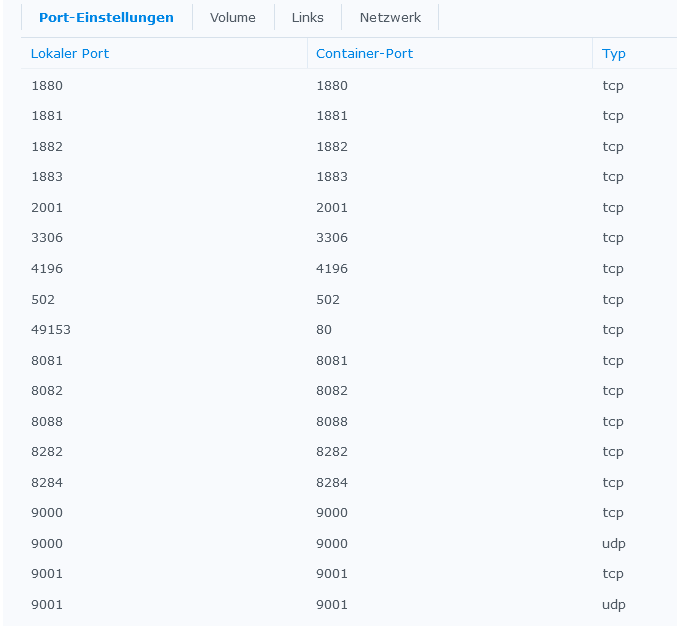
                        8989847c-1c14-46f6-ab4e-272e914d6fe5-grafik.png

                        Ich bin nun nicht er Kommandozeilen Kenner.
                        Gibts nen Aufruf wie das gegengerät quasi auf nem bestimmten Port anpingen kann?

                        1 Antwort Letzte Antwort
                        0
                        • Thomas BraunT Thomas Braun

                          @ostseeskipper

                          Ich mach das immer danach:

                          https://www.iobroker.net/#de/documentation/config/multihost.md

                          O Offline
                          O Offline
                          ostseeskipper
                          schrieb am zuletzt editiert von
                          #72

                          @thomas-braun und @Homoran
                          Habe die Herausforderung unter Docker auf der Synology nun wie folgt gelöst.
                          Mit Portainer ein Netzwerk(IP30) mit einer IP angelegt (aus dem Adresskreis des Slave falls mehrere Subnetze)
                          Den iobroker Container diese Netzwerk(IP30) und zusätzlich zum Bridge Netzwerk zugewiesen.
                          Danach nach Anleitung zum Einrichten Multihost verfahren.:blush:

                          1 Antwort Letzte Antwort
                          0
                          Antworten
                          • In einem neuen Thema antworten
                          Anmelden zum Antworten
                          • Älteste zuerst
                          • Neuste zuerst
                          • Meiste Stimmen


                          Support us

                          ioBroker
                          Community Adapters
                          Donate
                          FAQ Cloud / IOT
                          HowTo: Node.js-Update
                          HowTo: Backup/Restore
                          Downloads
                          BLOG

                          891

                          Online

                          32.4k

                          Benutzer

                          81.5k

                          Themen

                          1.3m

                          Beiträge
                          Community
                          Impressum | Datenschutz-Bestimmungen | Nutzungsbedingungen | Einwilligungseinstellungen
                          ioBroker Community 2014-2025
                          logo
                          • Anmelden

                          • Du hast noch kein Konto? Registrieren

                          • Anmelden oder registrieren, um zu suchen
                          • Erster Beitrag
                            Letzter Beitrag
                          0
                          • Home
                          • Aktuell
                          • Tags
                          • Ungelesen 0
                          • Kategorien
                          • Unreplied
                          • Beliebt
                          • GitHub
                          • Docu
                          • Hilfe