




Alpha Testing: OCPP Wallbox Adapter
-
@foxriver76 Habe derzeit 2 Wallboxen vom selben Typ (Terra AC) kann aber gerne mal zum test eine ausknipsen, auch mit 0.0.10 lässt sich der Ladestrom bei mir noch nicht begrenzen.
Siehe Status beim Laden :
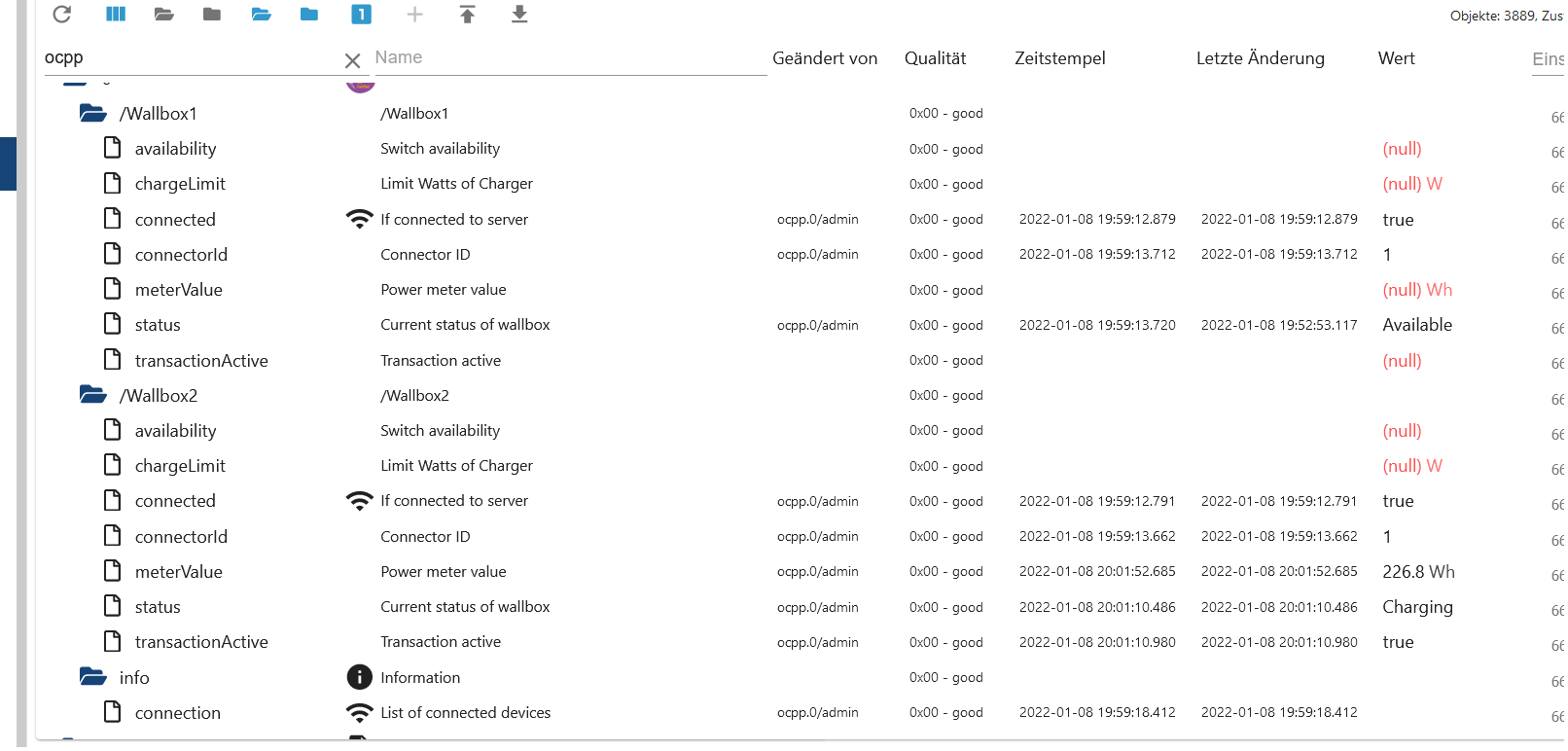
Anschließend setze ich z.B. auf 1000Wroot@r01iobroker:/opt/iobroker# iobroker debug ocpp.0 Debugger listening on ws://127.0.0.1:9229/3fd01a6b-c1ce-4df3-aae5-4ce6ce4bdaea For help, see: https://nodejs.org/en/docs/inspector 2022-01-08 19:59:17.972 - debug: ocpp.0 (16802) Redis Objects: Use Redis connection: 127.0.0.1:9001 2022-01-08 19:59:18.015 - debug: ocpp.0 (16802) Objects client ready ... initialize now 2022-01-08 19:59:18.019 - debug: ocpp.0 (16802) Objects create System PubSub Client 2022-01-08 19:59:18.021 - debug: ocpp.0 (16802) Objects create User PubSub Client 2022-01-08 19:59:18.022 - debug: ocpp.0 (16802) Objects client initialize lua scripts 2022-01-08 19:59:18.054 - debug: ocpp.0 (16802) Objects connected to redis: 127.0.0.1:9001 2022-01-08 19:59:18.067 - debug: ocpp.0 (16802) objectDB connected 2022-01-08 19:59:18.070 - debug: ocpp.0 (16802) Redis States: Use Redis connection: 127.0.0.1:9000 2022-01-08 19:59:18.080 - debug: ocpp.0 (16802) States create System PubSub Client 2022-01-08 19:59:18.081 - debug: ocpp.0 (16802) States create User PubSub Client 2022-01-08 19:59:18.090 - debug: ocpp.0 (16802) States connected to redis: 127.0.0.1:9000 2022-01-08 19:59:18.091 - debug: ocpp.0 (16802) statesDB connected 2022-01-08 19:59:18.313 - info: ocpp.0 (16802) starting. Version 0.0.10 in /opt/iobroker/node_modules/iobroker.ocpp, node: v14.16.1, js-controller: 3.3.22 2022-01-08 19:59:18.375 - info: ocpp.0 (16802) Starting OCPP Server 2022-01-08 19:59:18.533 - info: ocpp.0 (16802) Server listening on port 9221 2022-01-08 20:02:20.703 - debug: ocpp.0 (16802) Sending SetChargingProfile for /Wallbox2 2022-01-08 20:02:20.707 - error: ocpp.0 (16802) Cannot execute command "chargeLimit" for "/Wallbox2": Cannot read property 'connection' of undefinedDer Port 9221 ist auch ein Anzeigefehler. Der OCPP läuft auf Port 9220
root@r01iobroker:~# netstat -tulpen | grep 9220
tcp6       0      0 :::9220                 :::*                    LISTEN      1001       101480611  16668/io.ocpp.0
root@r01iobroker:~# netstat -tulpen | grep 9221
tcp6       0      0 :::9221                 :::*                    LISTEN      1001       101481823  16802/io.ocpp.0
root@r01iobroker:~#
Der Befehl kommt definitiv an der Wallbox an. Siehe Dump :
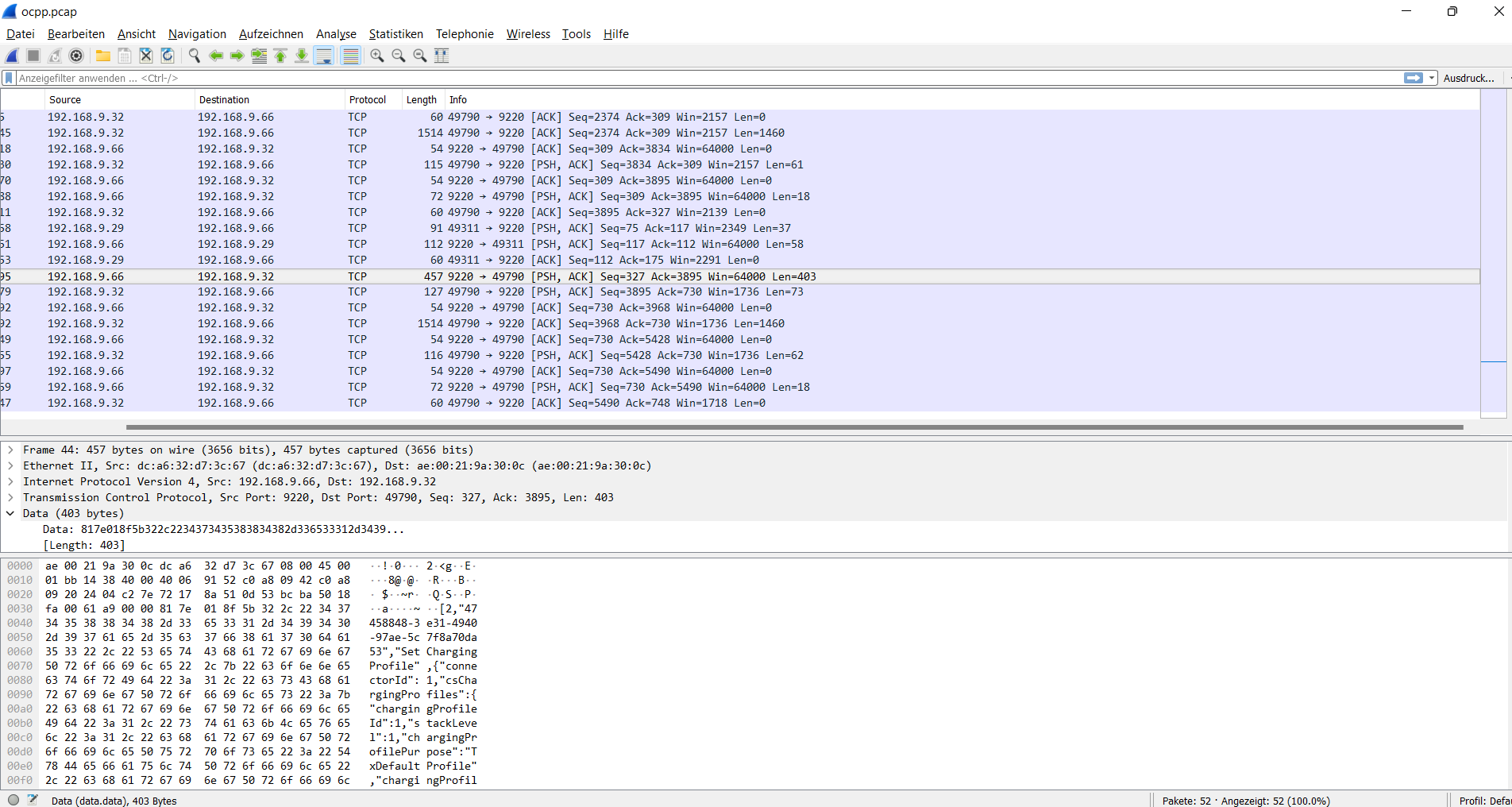
[ocpp.pcap](/assets/uploads/files/1641669332456-ocpp.pcap)@schwimbi hm mir erschleicht sich das Gefühl dass da was doppelt läuft bei dir. Es wird versucht der Port den du angibst zu holen wenn der nicht verfügbar ist, bekommt der Adapter einen anderen. Zeig mal
ps -aux | grep ocpp.Ich glaube auf 9220 läuft eine alte Adapterversion und auf 9221 die aktuelle.
-
@schwimbi hm mir erschleicht sich das Gefühl dass da was doppelt läuft bei dir. Es wird versucht der Port den du angibst zu holen wenn der nicht verfügbar ist, bekommt der Adapter einen anderen. Zeig mal
ps -aux | grep ocpp.Ich glaube auf 9220 läuft eine alte Adapterversion und auf 9221 die aktuelle.
root@r01iobroker:/opt/iobroker# ps -aux | grep ocpp ps -aux | grep ocpp iobroker 16668 0.2 0.6 174764 55172 ? Sl 19:58 0:06 io.ocpp.0 root 18667 0.0 0.0 4900 1604 pts/1 R+ 20:37 0:00 grep ocpp root@r01iobroker:/opt/iobroker# iobroker debug ocpp.0 Debugger listening on ws://127.0.0.1:9229/cf2ab54a-5cc5-46e5-9b01-23eb14959444 For help, see: https://nodejs.org/en/docs/inspector 2022-01-08 20:37:59.256 - debug: ocpp.0 (18685) Redis Objects: Use Redis connection: 127.0.0.1:9001 2022-01-08 20:37:59.298 - debug: ocpp.0 (18685) Objects client ready ... initialize now 2022-01-08 20:37:59.301 - debug: ocpp.0 (18685) Objects create System PubSub Client 2022-01-08 20:37:59.303 - debug: ocpp.0 (18685) Objects create User PubSub Client 2022-01-08 20:37:59.305 - debug: ocpp.0 (18685) Objects client initialize lua scripts 2022-01-08 20:37:59.327 - debug: ocpp.0 (18685) Objects connected to redis: 127.0.0.1:9001 2022-01-08 20:37:59.337 - debug: ocpp.0 (18685) objectDB connected 2022-01-08 20:37:59.340 - debug: ocpp.0 (18685) Redis States: Use Redis connection: 127.0.0.1:9000 2022-01-08 20:37:59.350 - debug: ocpp.0 (18685) States create System PubSub Client 2022-01-08 20:37:59.351 - debug: ocpp.0 (18685) States create User PubSub Client 2022-01-08 20:37:59.360 - debug: ocpp.0 (18685) States connected to redis: 127.0.0.1:9000 2022-01-08 20:37:59.361 - debug: ocpp.0 (18685) statesDB connected 2022-01-08 20:37:59.603 - info: ocpp.0 (18685) starting. Version 0.0.10 in /opt/iobroker/node_modules/iobroker.ocpp, node: v14.16.1, js-controller: 3.3.22 2022-01-08 20:37:59.669 - info: ocpp.0 (18685) Starting OCPP Server 2022-01-08 20:37:59.830 - info: ocpp.0 (18685) Server listening on port 9221 -
root@r01iobroker:/opt/iobroker# ps -aux | grep ocpp ps -aux | grep ocpp iobroker 16668 0.2 0.6 174764 55172 ? Sl 19:58 0:06 io.ocpp.0 root 18667 0.0 0.0 4900 1604 pts/1 R+ 20:37 0:00 grep ocpp root@r01iobroker:/opt/iobroker# iobroker debug ocpp.0 Debugger listening on ws://127.0.0.1:9229/cf2ab54a-5cc5-46e5-9b01-23eb14959444 For help, see: https://nodejs.org/en/docs/inspector 2022-01-08 20:37:59.256 - debug: ocpp.0 (18685) Redis Objects: Use Redis connection: 127.0.0.1:9001 2022-01-08 20:37:59.298 - debug: ocpp.0 (18685) Objects client ready ... initialize now 2022-01-08 20:37:59.301 - debug: ocpp.0 (18685) Objects create System PubSub Client 2022-01-08 20:37:59.303 - debug: ocpp.0 (18685) Objects create User PubSub Client 2022-01-08 20:37:59.305 - debug: ocpp.0 (18685) Objects client initialize lua scripts 2022-01-08 20:37:59.327 - debug: ocpp.0 (18685) Objects connected to redis: 127.0.0.1:9001 2022-01-08 20:37:59.337 - debug: ocpp.0 (18685) objectDB connected 2022-01-08 20:37:59.340 - debug: ocpp.0 (18685) Redis States: Use Redis connection: 127.0.0.1:9000 2022-01-08 20:37:59.350 - debug: ocpp.0 (18685) States create System PubSub Client 2022-01-08 20:37:59.351 - debug: ocpp.0 (18685) States create User PubSub Client 2022-01-08 20:37:59.360 - debug: ocpp.0 (18685) States connected to redis: 127.0.0.1:9000 2022-01-08 20:37:59.361 - debug: ocpp.0 (18685) statesDB connected 2022-01-08 20:37:59.603 - info: ocpp.0 (18685) starting. Version 0.0.10 in /opt/iobroker/node_modules/iobroker.ocpp, node: v14.16.1, js-controller: 3.3.22 2022-01-08 20:37:59.669 - info: ocpp.0 (18685) Starting OCPP Server 2022-01-08 20:37:59.830 - info: ocpp.0 (18685) Server listening on port 9221@foxriver76 Auch nach löschen selbes Bild
root@r01iobroker:/opt/iobroker# iobroker delete ocpp Delete adapter "ocpp" host.r01iobroker Counted 1 instances of ocpp host.r01iobroker Counted 1 meta of ocpp host.r01iobroker Counted 1 adapter for ocpp host.r01iobroker Counted 2 devices of ocpp host.r01iobroker Counted 1 channels of ocpp host.r01iobroker Counted 15 states of ocpp host.r01iobroker Counted 14 states of system.adapter.ocpp host.r01iobroker Counted 10 states (io.ocpp.*) from states host.r01iobroker Counted 14 states (system.adapter.ocpp.*) from states host.r01iobroker file ocpp.admin deleted host.r01iobroker object ocpp deleted host.r01iobroker object ocpp.admin deleted host.r01iobroker Deleting 35 object(s). host.r01iobroker Deleting 24 state(s). npm uninstall iobroker.ocpp --loglevel error --prefix "/opt/iobroker" (System call) root@r01iobroker:/opt/iobroker# iobroker delete ocpp Delete adapter "ocpp" host.r01iobroker Counted 2 states (system.adapter.ocpp.*) from states host.r01iobroker object ocpp deleted host.r01iobroker object ocpp.admin deleted host.r01iobroker Deleting 2 state(s). Error deleting adapter ocpp from disk: Error: Cannot find module 'iobroker.ocpp/io-package.json' Require stack: - /opt/iobroker/node_modules/iobroker.js-controller/lib/setup/setupInstall.js - /opt/iobroker/node_modules/iobroker.js-controller/lib/setup.js - /opt/iobroker/node_modules/iobroker.js-controller/iobroker.js You might have to delete it yourself! root@r01iobroker:/opt/iobroker# root@r01iobroker:/opt/iobroker# iobroker delete ocpp Delete adapter "ocpp" host.r01iobroker object ocpp deleted host.r01iobroker object ocpp.admin deleted Error deleting adapter ocpp from disk: Error: Cannot find module 'iobroker.ocpp/io-package.json' Require stack: - /opt/iobroker/node_modules/iobroker.js-controller/lib/setup/setupInstall.js - /opt/iobroker/node_modules/iobroker.js-controller/lib/setup.js - /opt/iobroker/node_modules/iobroker.js-controller/iobroker.js You might have to delete it yourself! root@r01iobroker:/opt/iobroker# iobroker --help iobroker [command] Commands: iobroker setup Setup ioBroker iobroker start Starts the js-controller iobroker stop stops the js-controller iobroker restart Restarts js-controller iobroker debug <adapter>[.<instance>] Starts a Node.js debugging session for the adapter instance iobroker info Shows the host info iobroker logs [<adapter>] Monitor log iobroker add <adapter> [desiredNumber] Add instance of adapter iobroker install <adapter> Installs a specified adapter iobroker rebuild <adapter>|self Rebuilds a specified adapter iobroker url <url> [<name>] Install adapter from specified url, e.g. GitHub iobroker del <adapter> Remove adapter from system iobroker del <adapter>.<instance> Remove adapter instance iobroker update [<repositoryUrl>] Update repository and list adapters iobroker upgrade Upgrade management iobroker upload Upload management iobroker object Object management iobroker state State management iobroker message <adapter>[.instance] <command> [<message>] Send message to adapter instance/s iobroker list <type> [<filter>] List all entries, like objects iobroker chmod <mode> <file> Change file rights iobroker chown <user> <group> <file> Change file ownership iobroker touch <file> Touch file iobroker rm <file> Remove file iobroker file File management iobroker user User commands iobroker group group management iobroker host <hostname> Set host to given hostname iobroker set <adapter>.<instance> Change settings of adapter config iobroker license <license.file or license.text> Update license by given file iobroker cert Certificate management iobroker clean <yes> Clears all objects and states iobroker backup Create backup iobroker restore <backup name or path> Restore a specified backup iobroker validate <backup name or path> Validate a specified backup iobroker status [all|<adapter>.<instance>] Status of ioBroker or adapter instance iobroker repo [<name>] Show repo information iobroker uuid Show uuid of the installation iobroker unsetup Reset license, installation secret and language iobroker fix Execute the installation fixer script, this updates your ioBroker installation iobroker multihost Multihost management iobroker compact compact group management iobroker plugin Plugin management iobroker version [<adapter>] Show version of js-controller or specified adapter Options: --help Show help [boolean] -v, --version Show version [boolean] root@r01iobroker:/opt/iobroker# iobroker url https://github.com/foxriver76/ioBroker.ocpp.git install foxriver76/ioBroker.ocpp#4289b3596edcaf652fc73ac30e578e8b2d642046 NPM version: 6.14.12 npm install foxriver76/ioBroker.ocpp#4289b3596edcaf652fc73ac30e578e8b2d642046 --loglevel error --prefix "/opt/iobroker" (System call) upload [1] ocpp.admin /opt/iobroker/node_modules/iobroker.ocpp/admin/ocpp.png ocpp.png image/png upload [0] ocpp.admin /opt/iobroker/node_modules/iobroker.ocpp/admin/jsonConfig.json jsonConfig.json application/json root@r01iobroker:/opt/iobroker# iobroker add ocpp 0 host.r01iobroker create instance ocpp host.r01iobroker object ocpp.0.info.connection created host.r01iobroker object ocpp.0.info created host.r01iobroker object system.adapter.ocpp.0.logLevel created host.r01iobroker object system.adapter.ocpp.0.sigKill created host.r01iobroker object system.adapter.ocpp.0.eventLoopLag created host.r01iobroker object system.adapter.ocpp.0.outputCount created host.r01iobroker object system.adapter.ocpp.0.inputCount created host.r01iobroker object system.adapter.ocpp.0.uptime created host.r01iobroker object system.adapter.ocpp.0.memRss created host.r01iobroker object system.adapter.ocpp.0.memHeapTotal created host.r01iobroker object system.adapter.ocpp.0.memHeapUsed created host.r01iobroker object system.adapter.ocpp.0.cputime created host.r01iobroker object system.adapter.ocpp.0.cpu created host.r01iobroker object system.adapter.ocpp.0.compactMode created host.r01iobroker object system.adapter.ocpp.0.connected created host.r01iobroker object system.adapter.ocpp.0.alive created host.r01iobroker Set default value of ocpp.0.info.connection: false host.r01iobroker object system.adapter.ocpp.0 created root@r01iobroker:/opt/iobroker# iobroker debug ocpp Debugger listening on ws://127.0.0.1:9229/ee93151f-d543-4b2a-90fd-467048a45342 For help, see: https://nodejs.org/en/docs/inspector 2022-01-08 20:42:47.300 - debug: ocpp.0 (19156) Redis Objects: Use Redis connection: 127.0.0.1:9001 2022-01-08 20:42:47.341 - debug: ocpp.0 (19156) Objects client ready ... initialize now 2022-01-08 20:42:47.344 - debug: ocpp.0 (19156) Objects create System PubSub Client 2022-01-08 20:42:47.346 - debug: ocpp.0 (19156) Objects create User PubSub Client 2022-01-08 20:42:47.348 - debug: ocpp.0 (19156) Objects client initialize lua scripts 2022-01-08 20:42:47.369 - debug: ocpp.0 (19156) Objects connected to redis: 127.0.0.1:9001 2022-01-08 20:42:47.379 - debug: ocpp.0 (19156) objectDB connected 2022-01-08 20:42:47.382 - debug: ocpp.0 (19156) Redis States: Use Redis connection: 127.0.0.1:9000 2022-01-08 20:42:47.391 - debug: ocpp.0 (19156) States create System PubSub Client 2022-01-08 20:42:47.392 - debug: ocpp.0 (19156) States create User PubSub Client 2022-01-08 20:42:47.401 - debug: ocpp.0 (19156) States connected to redis: 127.0.0.1:9000 2022-01-08 20:42:47.402 - debug: ocpp.0 (19156) statesDB connected 2022-01-08 20:42:47.635 - info: ocpp.0 (19156) starting. Version 0.1.0 in /opt/iobroker/node_modules/iobroker.ocpp, node: v14.16.1, js-controller: 3.3.22 2022-01-08 20:42:47.716 - info: ocpp.0 (19156) Starting OCPP Server 2022-01-08 20:42:47.932 - info: ocpp.0 (19156) Server listening on port 9221 ^C2022-01-08 20:43:12.378 - info: ocpp.0 (19156) Terminated (START_IMMEDIATELY_AFTER_STOP): Without reason root@r01iobroker:/opt/iobroker# netstat -tulpen netstat -tulpen Aktive Internetverbindungen (Nur Server) Proto Recv-Q Send-Q Local Address Foreign Address State Benutzer Inode PID/Program name tcp 0 0 127.0.0.1:9000 0.0.0.0:* LISTEN 1001 98523589 6879/iobroker.js-co tcp 0 0 127.0.0.1:9001 0.0.0.0:* LISTEN 1001 98525495 6879/iobroker.js-co tcp 0 0 0.0.0.0:8400 0.0.0.0:* LISTEN 1001 98529908 7790/io.jarvis.0 tcp 0 0 0.0.0.0:22 0.0.0.0:* LISTEN 0 17020 569/sshd tcp 0 0 0.0.0.0:1880 0.0.0.0:* LISTEN 1001 98525781 6989/node-red tcp 0 0 127.0.0.1:8088 0.0.0.0:* LISTEN 109 18850 551/influxd tcp6 0 0 :::9220 :::* LISTEN 1001 101512715 19128/io.ocpp.0 tcp6 0 0 :::3493 :::* LISTEN 0 18577 570/upsd tcp6 0 0 :::61991 :::* LISTEN 1001 98524130 7199/io.harmony.0 tcp6 0 0 :::80 :::* LISTEN 0 88171095 22017/apache2 tcp6 0 0 :::8081 :::* LISTEN 1001 98526271 6900/io.admin.0 tcp6 0 0 :::8082 :::* LISTEN 1001 98530587 7760/io.web.0 tcp6 0 0 :::8084 :::* LISTEN 1001 98528674 7724/io.socketio.0 tcp6 0 0 :::8086 :::* LISTEN 109 19556 551/influxd tcp6 0 0 :::22 :::* LISTEN 0 17022 569/sshd tcp6 0 0 :::8087 :::* LISTEN 1001 98530472 7681/io.simple-api. tcp6 0 0 :::7070 :::* LISTEN 0 89507854 24843/./evcc udp 0 0 0.0.0.0:61991 0.0.0.0:* 1001 98524131 7199/io.harmony.0 udp 0 0 0.0.0.0:68 0.0.0.0:* 0 17580 545/dhcpcd udp 0 0 169.254.82.229:123 0.0.0.0:* 110 46523 563/ntpd udp 0 0 192.168.9.66:123 0.0.0.0:* 110 46498 563/ntpd udp 0 0 127.0.0.1:123 0.0.0.0:* 0 18556 563/ntpd udp 0 0 0.0.0.0:123 0.0.0.0:* 0 18552 563/ntpd udp 0 0 192.168.9.66:56973 0.0.0.0:* 1001 98528776 7775/io.knx.0 udp 0 0 0.0.0.0:5353 0.0.0.0:* 108 15744 377/avahi-daemon: r udp 0 0 0.0.0.0:34726 0.0.0.0:* 1001 100990480 6989/node-red udp 0 0 0.0.0.0:59876 0.0.0.0:* 108 15746 377/avahi-daemon: r udp6 0 0 :::35402 :::* 108 15747 377/avahi-daemon: r udp6 0 0 fe80::aefd:1a34:1b8:123 :::* 0 18562 563/ntpd udp6 0 0 ::1:123 :::* 0 18560 563/ntpd udp6 0 0 :::123 :::* 0 18549 563/ntpd udp6 0 0 :::5353 :::* 108 15745 377/avahi-daemon: r root@r01iobroker:/opt/iobroker# netstat -tulpen | grep 9220 tcp6 0 0 :::9220 :::* LISTEN 1001 101512715 19128/io.ocpp.0 root@r01iobroker:/opt/iobroker# netstat -tulpen | grep 9221 root@r01iobroker:/opt/iobroker# iobroker debug ocpp Debugger listening on ws://127.0.0.1:9229/7761b669-a80d-405d-af76-81bc3231996e For help, see: https://nodejs.org/en/docs/inspector 2022-01-08 20:43:30.046 - debug: ocpp.0 (19233) Redis Objects: Use Redis connection: 127.0.0.1:9001 2022-01-08 20:43:30.086 - debug: ocpp.0 (19233) Objects client ready ... initialize now 2022-01-08 20:43:30.090 - debug: ocpp.0 (19233) Objects create System PubSub Client 2022-01-08 20:43:30.092 - debug: ocpp.0 (19233) Objects create User PubSub Client 2022-01-08 20:43:30.094 - debug: ocpp.0 (19233) Objects client initialize lua scripts 2022-01-08 20:43:30.117 - debug: ocpp.0 (19233) Objects connected to redis: 127.0.0.1:9001 2022-01-08 20:43:30.127 - debug: ocpp.0 (19233) objectDB connected 2022-01-08 20:43:30.130 - debug: ocpp.0 (19233) Redis States: Use Redis connection: 127.0.0.1:9000 2022-01-08 20:43:30.139 - debug: ocpp.0 (19233) States create System PubSub Client 2022-01-08 20:43:30.140 - debug: ocpp.0 (19233) States create User PubSub Client 2022-01-08 20:43:30.149 - debug: ocpp.0 (19233) States connected to redis: 127.0.0.1:9000 2022-01-08 20:43:30.150 - debug: ocpp.0 (19233) statesDB connected 2022-01-08 20:43:30.369 - info: ocpp.0 (19233) starting. Version 0.1.0 in /opt/iobroker/node_modules/iobroker.ocpp, node: v14.16.1, js-controller: 3.3.22 2022-01-08 20:43:30.435 - info: ocpp.0 (19233) Starting OCPP Server 2022-01-08 20:43:30.672 - info: ocpp.0 (19233) Server listening on port 9221 -
root@r01iobroker:/opt/iobroker# ps -aux | grep ocpp ps -aux | grep ocpp iobroker 16668 0.2 0.6 174764 55172 ? Sl 19:58 0:06 io.ocpp.0 root 18667 0.0 0.0 4900 1604 pts/1 R+ 20:37 0:00 grep ocpp root@r01iobroker:/opt/iobroker# iobroker debug ocpp.0 Debugger listening on ws://127.0.0.1:9229/cf2ab54a-5cc5-46e5-9b01-23eb14959444 For help, see: https://nodejs.org/en/docs/inspector 2022-01-08 20:37:59.256 - debug: ocpp.0 (18685) Redis Objects: Use Redis connection: 127.0.0.1:9001 2022-01-08 20:37:59.298 - debug: ocpp.0 (18685) Objects client ready ... initialize now 2022-01-08 20:37:59.301 - debug: ocpp.0 (18685) Objects create System PubSub Client 2022-01-08 20:37:59.303 - debug: ocpp.0 (18685) Objects create User PubSub Client 2022-01-08 20:37:59.305 - debug: ocpp.0 (18685) Objects client initialize lua scripts 2022-01-08 20:37:59.327 - debug: ocpp.0 (18685) Objects connected to redis: 127.0.0.1:9001 2022-01-08 20:37:59.337 - debug: ocpp.0 (18685) objectDB connected 2022-01-08 20:37:59.340 - debug: ocpp.0 (18685) Redis States: Use Redis connection: 127.0.0.1:9000 2022-01-08 20:37:59.350 - debug: ocpp.0 (18685) States create System PubSub Client 2022-01-08 20:37:59.351 - debug: ocpp.0 (18685) States create User PubSub Client 2022-01-08 20:37:59.360 - debug: ocpp.0 (18685) States connected to redis: 127.0.0.1:9000 2022-01-08 20:37:59.361 - debug: ocpp.0 (18685) statesDB connected 2022-01-08 20:37:59.603 - info: ocpp.0 (18685) starting. Version 0.0.10 in /opt/iobroker/node_modules/iobroker.ocpp, node: v14.16.1, js-controller: 3.3.22 2022-01-08 20:37:59.669 - info: ocpp.0 (18685) Starting OCPP Server 2022-01-08 20:37:59.830 - info: ocpp.0 (18685) Server listening on port 9221@schwimbi Ja genau, kann ich bei mir auch beobachten, sobald du den debug Prozess startest, startet ein separater Prozess, der laufende Adapter wird nicht beendet.
Bevor du den Adapter mit debug startest, darf kein Adapter-Prozess laufen. Sprich vorher beenden. Mit
ps -aux | grep ocppchecken, dass kein Prozess läuft, dann kannst du mit debug den Adapter starten.Ansonsten kannst du aber auch einfach über die GUI checken ohne den debug Prozess zu starten.
-
@schwimbi Ja genau, kann ich bei mir auch beobachten, sobald du den debug Prozess startest, startet ein separater Prozess, der laufende Adapter wird nicht beendet.
Bevor du den Adapter mit debug startest, darf kein Adapter-Prozess laufen. Sprich vorher beenden. Mit
ps -aux | grep ocppchecken, dass kein Prozess läuft, dann kannst du mit debug den Adapter starten.Ansonsten kannst du aber auch einfach über die GUI checken ohne den debug Prozess zu starten.
@foxriver76 ok verstehe,
ocpp.0
	19984	2022-01-08 20:59:21.219	info	Received Status Notification from "/Wallbox2": SuspendedEV
ocpp.0
	19984	2022-01-08 20:59:12.294	info	Received MeterValues from "/Wallbox2"
ocpp.0
	19984	2022-01-08 20:58:40.304	info	Received MeterValues from "/Wallbox2"
ocpp.0
	19984	2022-01-08 20:58:08.345	info	Received MeterValues from "/Wallbox2"
ocpp.0
	19984	2022-01-08 20:57:36.442	info	Received MeterValues from "/Wallbox2"
ocpp.0
	19984	2022-01-08 20:57:04.450	info	Received MeterValues from "/Wallbox2"
ocpp.0
	19984	2022-01-08 20:56:32.562	info	Received MeterValues from "/Wallbox2"
ocpp.0
	19984	2022-01-08 20:56:00.273	info	Received MeterValues from "/Wallbox2"
ocpp.0
	19984	2022-01-08 20:55:28.330	info	Received MeterValues from "/Wallbox2"
ocpp.0
	19984	2022-01-08 20:54:56.433	info	Received MeterValues from "/Wallbox2"
ocpp.0
	19984	2022-01-08 20:54:47.170	info	Received Status Notification from "/Wallbox2": Charging
Der Befehl kommt an der Wallbox an, scheint Sie leider nicht zu interessieren.
....F[BA7.....L3.......AHA@......CXCF3..FMBA	......
.CXCF"......J.......FMBA....F[BA%C.>.<.>..[3,"9847448",{}].~.z[3,"e0871be0-f9c2-43bc-af1d-9bae420299aa",{"connectorId":1,"csChargingProfiles":{"chargingProfileId":1,"stackLevel":1,"chargingProfilePurpose":"TxDefaultProfile","chargingProfileKind":"Recurring","recurrencyKind":"Daily","chargingSchedule":{"duration":86400,"startSchedule":"2013-01-01T00:00Z","chargingRateUnit":"W","chargingSchedulePeriod":[{"startPeriod":0,"limit":1234}]}}}].~.z[3,"375218b3-0dee-4fa6-8ca2-34d8f667c1a0",{"connectorId":1,"csChargingProfiles":{"chargingProfileId":1,"stackLevel":1,"chargingProfilePurpose":"TxDefaultProfile","chargingProfileKind":"Recurring","recurrencyKind":"Daily","chargingSchedule":{"duration":86400,"startSchedule":"2013-01-01T00:00Z","chargingRateUnit":"W","chargingSchedulePeriod":[{"startPeriod":0,"limit":1111}]}}}]....abcd:PODCURUTPVRCNCF,....4.....FMB.F.

.....+.F[BRHA@........
..+.F[BRHA@.....2....CXC?.@.
.......F[BAVQPQIQSNTY6R][W[^RZMTQR9FMBA.......5.
..F[B8.C.....A^A@QVTLZTCNCF.

....F[BA7.....L3.......AHA@......CXCF3..FMBA	......
.CXCF7
.....FMBA.	...CXCF-SN*CNCF..
.CXCF7@.HA.A.....CXCFPWMVR@ODC..
Trace -> ocpp2.pcap
-
@foxriver76 ok verstehe,
ocpp.0
	19984	2022-01-08 20:59:21.219	info	Received Status Notification from "/Wallbox2": SuspendedEV
ocpp.0
	19984	2022-01-08 20:59:12.294	info	Received MeterValues from "/Wallbox2"
ocpp.0
	19984	2022-01-08 20:58:40.304	info	Received MeterValues from "/Wallbox2"
ocpp.0
	19984	2022-01-08 20:58:08.345	info	Received MeterValues from "/Wallbox2"
ocpp.0
	19984	2022-01-08 20:57:36.442	info	Received MeterValues from "/Wallbox2"
ocpp.0
	19984	2022-01-08 20:57:04.450	info	Received MeterValues from "/Wallbox2"
ocpp.0
	19984	2022-01-08 20:56:32.562	info	Received MeterValues from "/Wallbox2"
ocpp.0
	19984	2022-01-08 20:56:00.273	info	Received MeterValues from "/Wallbox2"
ocpp.0
	19984	2022-01-08 20:55:28.330	info	Received MeterValues from "/Wallbox2"
ocpp.0
	19984	2022-01-08 20:54:56.433	info	Received MeterValues from "/Wallbox2"
ocpp.0
	19984	2022-01-08 20:54:47.170	info	Received Status Notification from "/Wallbox2": Charging
Der Befehl kommt an der Wallbox an, scheint Sie leider nicht zu interessieren.
....F[BA7.....L3.......AHA@......CXCF3..FMBA	......
.CXCF"......J.......FMBA....F[BA%C.>.<.>..[3,"9847448",{}].~.z[3,"e0871be0-f9c2-43bc-af1d-9bae420299aa",{"connectorId":1,"csChargingProfiles":{"chargingProfileId":1,"stackLevel":1,"chargingProfilePurpose":"TxDefaultProfile","chargingProfileKind":"Recurring","recurrencyKind":"Daily","chargingSchedule":{"duration":86400,"startSchedule":"2013-01-01T00:00Z","chargingRateUnit":"W","chargingSchedulePeriod":[{"startPeriod":0,"limit":1234}]}}}].~.z[3,"375218b3-0dee-4fa6-8ca2-34d8f667c1a0",{"connectorId":1,"csChargingProfiles":{"chargingProfileId":1,"stackLevel":1,"chargingProfilePurpose":"TxDefaultProfile","chargingProfileKind":"Recurring","recurrencyKind":"Daily","chargingSchedule":{"duration":86400,"startSchedule":"2013-01-01T00:00Z","chargingRateUnit":"W","chargingSchedulePeriod":[{"startPeriod":0,"limit":1111}]}}}]....abcd:PODCURUTPVRCNCF,....4.....FMB.F.

.....+.F[BRHA@........
..+.F[BRHA@.....2....CXC?.@.
.......F[BAVQPQIQSNTY6R][W[^RZMTQR9FMBA.......5.
..F[B8.C.....A^A@QVTLZTCNCF.

....F[BA7.....L3.......AHA@......CXCF3..FMBA	......
.CXCF7
.....FMBA.	...CXCF-SN*CNCF..
.CXCF7@.HA.A.....CXCFPWMVR@ODC..
Trace -> ocpp2.pcap
@schwimbi Dann ist meine Befürchtung dass es bei dir auch nicht implementiert ist, so deute ich das zumindest bei meiner Pulsar:
Einige der myWallbox-Funktionen sind weiterhin verfügbar, wenn OCPP aktiviert ist. Sie können vom
Charge Point Operator (CPO) über die myWallbox-App oder das Portal durchgeführt werden:
• Überwachung des Ladezustands
• Anonyme Ladesitzungen
• Power Sharing einstellen
• Power Boost einstellen
• MID-Messgerät einstellen
• Die Stromgrenze einstellen
• Die Ladesoftware aktualisieren
• Neustart (Neustart des Ladegeräts)
• Wiederherstellen (Werksbedingungen)
• Zeitpläne für das Aufladen einstellen
• TN/TT-Erdungssystem einstellenHeißt für mich, dass sich diese Dinge nicht über OCPP sondern nur über die herstellereigene App steuern lassen.
Siehe https://support.wallbox.com/wp-content/uploads/2021/02/DE_OCPP_AKTIVIERUNGSANLEITUNG.pdf Seite 15.
Für deine WB habe ich auf die schnelle keine OCPP Infos gefunden.
Leider ist das eines der wichtigsten Funktionen und ich kann es nicht ganz nachvollziehen warum es nicht implementiert ist.
Um mal nicht ganz auszuschließen, dass der Fehler auf Adapterseite liegt schaue ichnochmal in die Beschreibung für
setChargePointProfileob ich da etwas übersehen habe. -
@foxriver76 ok verstehe,
ocpp.0
	19984	2022-01-08 20:59:21.219	info	Received Status Notification from "/Wallbox2": SuspendedEV
ocpp.0
	19984	2022-01-08 20:59:12.294	info	Received MeterValues from "/Wallbox2"
ocpp.0
	19984	2022-01-08 20:58:40.304	info	Received MeterValues from "/Wallbox2"
ocpp.0
	19984	2022-01-08 20:58:08.345	info	Received MeterValues from "/Wallbox2"
ocpp.0
	19984	2022-01-08 20:57:36.442	info	Received MeterValues from "/Wallbox2"
ocpp.0
	19984	2022-01-08 20:57:04.450	info	Received MeterValues from "/Wallbox2"
ocpp.0
	19984	2022-01-08 20:56:32.562	info	Received MeterValues from "/Wallbox2"
ocpp.0
	19984	2022-01-08 20:56:00.273	info	Received MeterValues from "/Wallbox2"
ocpp.0
	19984	2022-01-08 20:55:28.330	info	Received MeterValues from "/Wallbox2"
ocpp.0
	19984	2022-01-08 20:54:56.433	info	Received MeterValues from "/Wallbox2"
ocpp.0
	19984	2022-01-08 20:54:47.170	info	Received Status Notification from "/Wallbox2": Charging
Der Befehl kommt an der Wallbox an, scheint Sie leider nicht zu interessieren.
....F[BA7.....L3.......AHA@......CXCF3..FMBA	......
.CXCF"......J.......FMBA....F[BA%C.>.<.>..[3,"9847448",{}].~.z[3,"e0871be0-f9c2-43bc-af1d-9bae420299aa",{"connectorId":1,"csChargingProfiles":{"chargingProfileId":1,"stackLevel":1,"chargingProfilePurpose":"TxDefaultProfile","chargingProfileKind":"Recurring","recurrencyKind":"Daily","chargingSchedule":{"duration":86400,"startSchedule":"2013-01-01T00:00Z","chargingRateUnit":"W","chargingSchedulePeriod":[{"startPeriod":0,"limit":1234}]}}}].~.z[3,"375218b3-0dee-4fa6-8ca2-34d8f667c1a0",{"connectorId":1,"csChargingProfiles":{"chargingProfileId":1,"stackLevel":1,"chargingProfilePurpose":"TxDefaultProfile","chargingProfileKind":"Recurring","recurrencyKind":"Daily","chargingSchedule":{"duration":86400,"startSchedule":"2013-01-01T00:00Z","chargingRateUnit":"W","chargingSchedulePeriod":[{"startPeriod":0,"limit":1111}]}}}]....abcd:PODCURUTPVRCNCF,....4.....FMB.F.

.....+.F[BRHA@........
..+.F[BRHA@.....2....CXC?.@.
.......F[BAVQPQIQSNTY6R][W[^RZMTQR9FMBA.......5.
..F[B8.C.....A^A@QVTLZTCNCF.

....F[BA7.....L3.......AHA@......CXCF3..FMBA	......
.CXCF7
.....FMBA.	...CXCF-SN*CNCF..
.CXCF7@.HA.A.....CXCFPWMVR@ODC..
Trace -> ocpp2.pcap
@foxriver76 Gerade nochmal probiert wenn nur 1 Wallbox aktiv ist. Funktioniert leider auch nicht mit der ABB Terra AC :(
-
Wobei laut https://www.ampcontrol.io/post/3-tricks-to-implement-smart-charging-with-ocpp-1-6 Trick 1 das Diagramm auf unsere setChargingProfile eine Antwort mit der Config kommen sollte, das passiert bei mir definitiv nicht.
Vorgehensweise wäre dann aber
Starten des Ladevorgangs -> dann setzen des Limitsdann beobachten obs ne Auswirkung hatte. -
Wobei laut https://www.ampcontrol.io/post/3-tricks-to-implement-smart-charging-with-ocpp-1-6 Trick 1 das Diagramm auf unsere setChargingProfile eine Antwort mit der Config kommen sollte, das passiert bei mir definitiv nicht.
Vorgehensweise wäre dann aber
Starten des Ladevorgangs -> dann setzen des Limitsdann beobachten obs ne Auswirkung hatte.@foxriver76 said in Alpha Testing: OCPP Wallbox Adapter:
Wobei laut https://www.ampcontrol.io/post/3-tricks-to-implement-smart-charging-with-ocpp-1-6 Trick 1 das Diagramm auf unsere setChargingProfile eine Antwort mit der Config kommen sollte, das passiert bei mir definitiv nicht.
Vorgehensweise wäre dann aber
Starten des Ladevorgangs -> dann setzen des Limitsdann beobachten obs ne Auswirkung hatte.Hm, das wäre denkbar :( habe ABB dazu angeschrieben.
Im Home Assistant Github haben Sie ähnliche Vermutungen : https://github.com/lbbrhzn/ocpp/discussions/217#discussioncomment-1738220 -
@foxriver76 said in Alpha Testing: OCPP Wallbox Adapter:
Wobei laut https://www.ampcontrol.io/post/3-tricks-to-implement-smart-charging-with-ocpp-1-6 Trick 1 das Diagramm auf unsere setChargingProfile eine Antwort mit der Config kommen sollte, das passiert bei mir definitiv nicht.
Vorgehensweise wäre dann aber
Starten des Ladevorgangs -> dann setzen des Limitsdann beobachten obs ne Auswirkung hatte.Hm, das wäre denkbar :( habe ABB dazu angeschrieben.
Im Home Assistant Github haben Sie ähnliche Vermutungen : https://github.com/lbbrhzn/ocpp/discussions/217#discussioncomment-1738220@foxriver76 Lt. https://github.com/lbbrhzn/ocpp/files/7806205/Terra.AC.OCPP.1.6.Implementation.overview._v1.5.-.external.pdf scheint es aber doch möglich zu sein :/ hm
-
@foxriver76 Lt. https://github.com/lbbrhzn/ocpp/files/7806205/Terra.AC.OCPP.1.6.Implementation.overview._v1.5.-.external.pdf scheint es aber doch möglich zu sein :/ hm
@schwimbi Ich habe jetzt mal noch versucht die Config anzufordern, meine WB ignoriert aber leider auch diese Anforderung. Villt. kommt da bei dir was zurück, wird dann als Warning geloggt wenn darauf eine Antwort kommt. In der Config steht eigentlich welche Profile unterstützt werden von der WB. Gerne mal die Version von GitHub probieren.
-
@schwimbi Ich habe jetzt mal noch versucht die Config anzufordern, meine WB ignoriert aber leider auch diese Anforderung. Villt. kommt da bei dir was zurück, wird dann als Warning geloggt wenn darauf eine Antwort kommt. In der Config steht eigentlich welche Profile unterstützt werden von der WB. Gerne mal die Version von GitHub probieren.
Hm, da kommt bei mir auch wenig :(
ocpp.0 22864 2022-01-09 08:49:30.522 info Requesting GetConfiguration from "/Wallbox2" ocpp.0 22864 2022-01-09 08:49:30.192 info Requesting GetConfiguration from "/Wallbox1" ocpp.0 22864 2022-01-09 08:49:29.520 info Requesting MeterValues from "/Wallbox2" ocpp.0 22864 2022-01-09 08:49:29.516 info Received Status Notification from "/Wallbox2": Finishing ocpp.0 22864 2022-01-09 08:49:29.188 info Requesting MeterValues from "/Wallbox1" ocpp.0 22864 2022-01-09 08:49:29.154 info Received Status Notification from "/Wallbox1": Available ocpp.0 22864 2022-01-09 08:49:29.017 info Received Status Notification from "/Wallbox2": Available ocpp.0 22864 2022-01-09 08:49:28.654 info Received Status Notification from "/Wallbox1": Available ocpp.0 22864 2022-01-09 08:49:28.595 info Received boot notification from "/Wallbox2" ocpp.0 22864 2022-01-09 08:49:28.517 info Requesting StatusNotification from "/Wallbox2" ocpp.0 22864 2022-01-09 08:49:28.516 info New device connected: "/Wallbox2" ocpp.0 22864 2022-01-09 08:49:28.310 info Received boot notification from "/Wallbox1" ocpp.0 22864 2022-01-09 08:49:28.166 info Requesting StatusNotification from "/Wallbox1" ocpp.0 22864 2022-01-09 08:49:28.164 info New device connected: "/Wallbox1" ocpp.0 22864 2022-01-09 08:49:27.643 info Connection from /Wallbox1 with credentials {"name":"Wallbox1","pass":"ocpp"} and protocol: http ocpp.0 22864 2022-01-09 08:49:27.563 info Connection from /Wallbox2 with credentials {"name":"Wallbox2","pass":"ocpp"} and protocol: http ocpp.0 22864 2022-01-09 08:48:43.743 info Server listening on port 9220 ocpp.0 22864 2022-01-09 08:48:43.685 info Starting OCPP Server ocpp.0 22864 2022-01-09 08:48:43.649 info starting. Version 0.1.0 in /opt/iobroker/node_modules/iobroker.ocpp, node: v14.16.1, js-controller: 3.3.22 -
Hm, da kommt bei mir auch wenig :(
ocpp.0 22864 2022-01-09 08:49:30.522 info Requesting GetConfiguration from "/Wallbox2" ocpp.0 22864 2022-01-09 08:49:30.192 info Requesting GetConfiguration from "/Wallbox1" ocpp.0 22864 2022-01-09 08:49:29.520 info Requesting MeterValues from "/Wallbox2" ocpp.0 22864 2022-01-09 08:49:29.516 info Received Status Notification from "/Wallbox2": Finishing ocpp.0 22864 2022-01-09 08:49:29.188 info Requesting MeterValues from "/Wallbox1" ocpp.0 22864 2022-01-09 08:49:29.154 info Received Status Notification from "/Wallbox1": Available ocpp.0 22864 2022-01-09 08:49:29.017 info Received Status Notification from "/Wallbox2": Available ocpp.0 22864 2022-01-09 08:49:28.654 info Received Status Notification from "/Wallbox1": Available ocpp.0 22864 2022-01-09 08:49:28.595 info Received boot notification from "/Wallbox2" ocpp.0 22864 2022-01-09 08:49:28.517 info Requesting StatusNotification from "/Wallbox2" ocpp.0 22864 2022-01-09 08:49:28.516 info New device connected: "/Wallbox2" ocpp.0 22864 2022-01-09 08:49:28.310 info Received boot notification from "/Wallbox1" ocpp.0 22864 2022-01-09 08:49:28.166 info Requesting StatusNotification from "/Wallbox1" ocpp.0 22864 2022-01-09 08:49:28.164 info New device connected: "/Wallbox1" ocpp.0 22864 2022-01-09 08:49:27.643 info Connection from /Wallbox1 with credentials {"name":"Wallbox1","pass":"ocpp"} and protocol: http ocpp.0 22864 2022-01-09 08:49:27.563 info Connection from /Wallbox2 with credentials {"name":"Wallbox2","pass":"ocpp"} and protocol: http ocpp.0 22864 2022-01-09 08:48:43.743 info Server listening on port 9220 ocpp.0 22864 2022-01-09 08:48:43.685 info Starting OCPP Server ocpp.0 22864 2022-01-09 08:48:43.649 info starting. Version 0.1.0 in /opt/iobroker/node_modules/iobroker.ocpp, node: v14.16.1, js-controller: 3.3.22 -
@schwimbi Kannst du mit der Version noch Transaktionen starten? Irgendwie mag meine WB nicht mehr so recht reagieren.
Habe noch nen Fehler gefunden dass das Limit bei Transaktionsstart nicht mitgegeben wurde.
@foxriver76 Kann ich nicht genau sagen.
Anbei der Output
ocpp.0
	22864	2022-01-09 12:35:36.531	info	Received MeterValues from "/Wallbox2"
ocpp.0
	22864	2022-01-09 12:35:04.578	info	Received MeterValues from "/Wallbox2"
ocpp.0
	22864	2022-01-09 12:34:32.645	info	Received MeterValues from "/Wallbox2"
ocpp.0
	22864	2022-01-09 12:34:00.742	info	Received MeterValues from "/Wallbox2"
ocpp.0
	22864	2022-01-09 12:33:51.352	info	Received Start transaction from "/Wallbox2"
ocpp.0
	22864	2022-01-09 12:33:50.852	info	Received Status Notification from "/Wallbox2": Charging
ocpp.0
	22864	2022-01-09 12:33:50.089	info	Received Status Notification from "/Wallbox2": SuspendedEV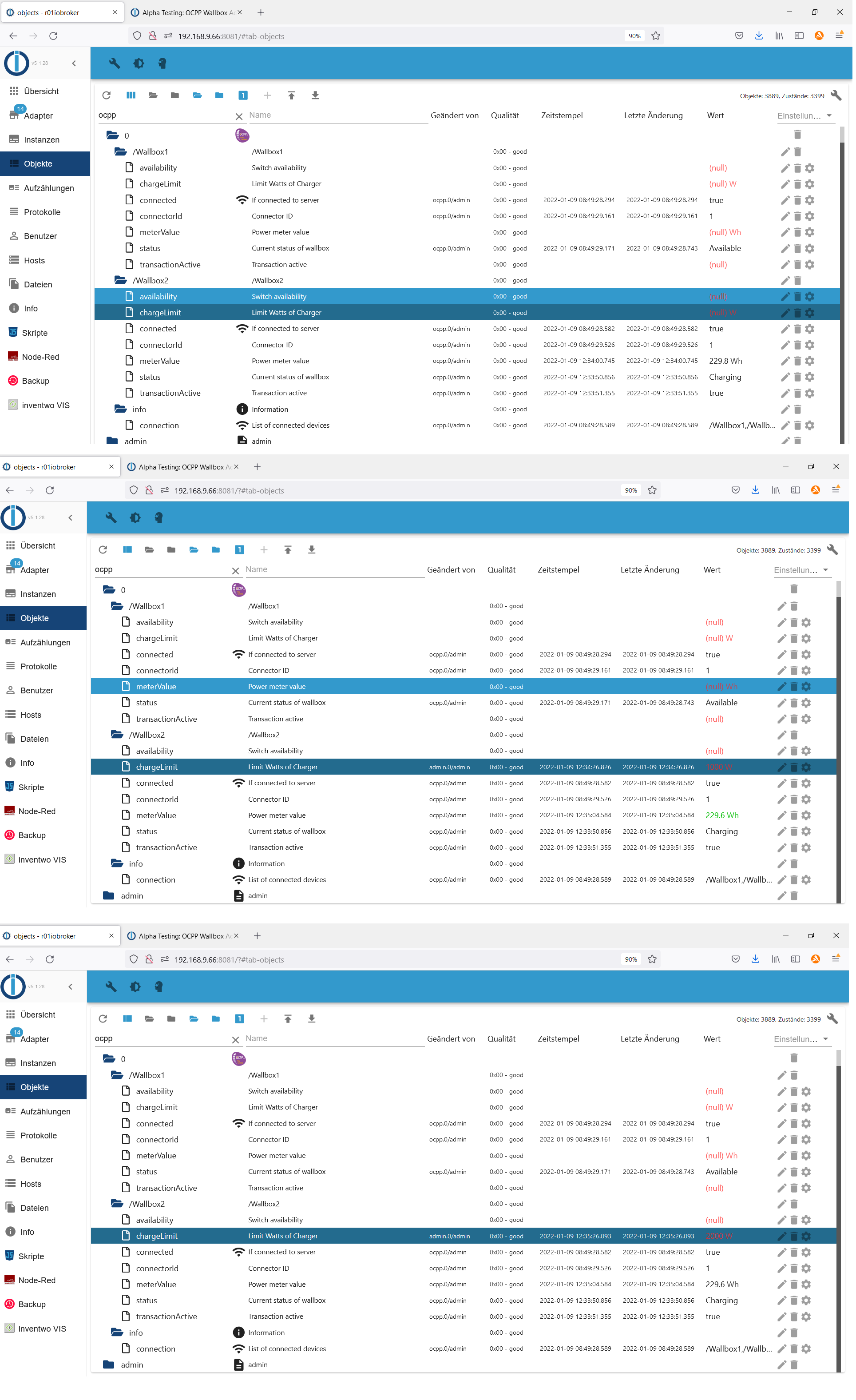
-
@foxriver76 Kann ich nicht genau sagen.
Anbei der Output
ocpp.0 22864 2022-01-09 12:35:36.531 info Received MeterValues from "/Wallbox2" ocpp.0 22864 2022-01-09 12:35:04.578 info Received MeterValues from "/Wallbox2" ocpp.0 22864 2022-01-09 12:34:32.645 info Received MeterValues from "/Wallbox2" ocpp.0 22864 2022-01-09 12:34:00.742 info Received MeterValues from "/Wallbox2" ocpp.0 22864 2022-01-09 12:33:51.352 info Received Start transaction from "/Wallbox2" ocpp.0 22864 2022-01-09 12:33:50.852 info Received Status Notification from "/Wallbox2": Charging ocpp.0 22864 2022-01-09 12:33:50.089 info Received Status Notification from "/Wallbox2": SuspendedEV@foxriver76 Nochmaliger log mit Version von 12:39
ocpp.0 2059 2022-01-09 12:43:06.065 info Received MeterValues from "/Wallbox2" ocpp.0 2059 2022-01-09 12:42:35.951 info Sending GetConfiguration to "/Wallbox2" ocpp.0 2059 2022-01-09 12:42:35.484 info Received MeterValues from "/Wallbox2" ocpp.0 2059 2022-01-09 12:42:34.946 info Requesting MeterValues from "/Wallbox2" ocpp.0 2059 2022-01-09 12:42:34.941 info Received Status Notification from "/Wallbox2": Charging ocpp.0 2059 2022-01-09 12:42:34.919 info Sending GetConfiguration to "/Wallbox1" ocpp.0 2059 2022-01-09 12:42:34.440 info Received Status Notification from "/Wallbox2": Unavailable ocpp.0 2059 2022-01-09 12:42:34.074 info Received boot notification from "/Wallbox2" ocpp.0 2059 2022-01-09 12:42:33.942 info Requesting StatusNotification from "/Wallbox2" ocpp.0 2059 2022-01-09 12:42:33.941 info New device connected: "/Wallbox2" ocpp.0 2059 2022-01-09 12:42:33.914 info Requesting MeterValues from "/Wallbox1" ocpp.0 2059 2022-01-09 12:42:33.889 info Received Status Notification from "/Wallbox1": Available ocpp.0 2059 2022-01-09 12:42:33.388 info Received Status Notification from "/Wallbox1": Available ocpp.0 2059 2022-01-09 12:42:33.010 info Received boot notification from "/Wallbox1" ocpp.0 2059 2022-01-09 12:42:32.994 info Connection from "/Wallbox2" with credentials "{"name":"Wallbox2","pass":"ocpp"}" and protocol: "http" ocpp.0 2059 2022-01-09 12:42:32.899 info Requesting StatusNotification from "/Wallbox1" ocpp.0 2059 2022-01-09 12:42:32.897 info New device connected: "/Wallbox1" ocpp.0 2059 2022-01-09 12:42:32.622 info Connection from "/Wallbox1" with credentials "{"name":"Wallbox1","pass":"ocpp"}" and protocol: "http" ocpp.0 2059 2022-01-09 12:42:01.478 info Server listening on port 9220 ocpp.0 2059 2022-01-09 12:42:01.413 info Starting OCPP Server ocpp.0 2059 2022-01-09 12:42:01.377 info starting. Version 0.1.0 in /opt/iobroker/node_modules/iobroker.ocpp, node: v14.16.1, js-controller: 3.3.22 ocpp.0 22864 2022-01-09 12:40:28.742 info Terminated (ADAPTER_REQUESTED_TERMINATION): Without reason ocpp.0 22864 2022-01-09 12:40:28.741 info terminating -
@foxriver76 Kann ich nicht genau sagen.
Anbei der Output
ocpp.0 22864 2022-01-09 12:35:36.531 info Received MeterValues from "/Wallbox2" ocpp.0 22864 2022-01-09 12:35:04.578 info Received MeterValues from "/Wallbox2" ocpp.0 22864 2022-01-09 12:34:32.645 info Received MeterValues from "/Wallbox2" ocpp.0 22864 2022-01-09 12:34:00.742 info Received MeterValues from "/Wallbox2" ocpp.0 22864 2022-01-09 12:33:51.352 info Received Start transaction from "/Wallbox2" ocpp.0 22864 2022-01-09 12:33:50.852 info Received Status Notification from "/Wallbox2": Charging ocpp.0 22864 2022-01-09 12:33:50.089 info Received Status Notification from "/Wallbox2": SuspendedEV -
@schwimbi Ja das schaut gut aus, dann lokales Problem bei mir. ;-)
Aber das Ladelimit wird wohl nach wie vor nicht angezogen?
@foxriver76 Leider nein :(
-
@foxriver76 Lt. https://github.com/lbbrhzn/ocpp/files/7806205/Terra.AC.OCPP.1.6.Implementation.overview._v1.5.-.external.pdf scheint es aber doch möglich zu sein :/ hm
@schwimbi sagte in Alpha Testing: OCPP Wallbox Adapter:
@foxriver76 Lt. https://github.com/lbbrhzn/ocpp/files/7806205/Terra.AC.OCPP.1.6.Implementation.overview._v1.5.-.external.pdf scheint es aber doch möglich zu sein :/ hm
Ab Firmware 1.x, welche läuft denn bei dir?
-
Ah holy.. ich habs..
Das mit der Configuration klappt zwar immer noch nicht, wäre mir sehr wichtig dass das noch klappt, aber ich kann bei meinem Charger die Ladeleistung ändern. Denke bei dir wird es auch gehen @schwimbi
Hatte den State damals default auf Watt programmiert, man kann W/A mitgeben, habe jetzt bei dir in der Beschreibung gesehen, dass nur Ampere gehen. Pushe gleich. den
chargeLimitstate ein mal löschen sonst bleibt der Name falsch, da die Einheit mit im Namen steht. -
Ah holy.. ich habs..
Das mit der Configuration klappt zwar immer noch nicht, wäre mir sehr wichtig dass das noch klappt, aber ich kann bei meinem Charger die Ladeleistung ändern. Denke bei dir wird es auch gehen @schwimbi
Hatte den State damals default auf Watt programmiert, man kann W/A mitgeben, habe jetzt bei dir in der Beschreibung gesehen, dass nur Ampere gehen. Pushe gleich. den
chargeLimitstate ein mal löschen sonst bleibt der Name falsch, da die Einheit mit im Namen steht.@foxriver76 Firmware ist v1.3
Derzeit funktioniert das mit A(mpere) noch nicht :(
Tesla lädt mit 11kW/16A, setzen auf niedrigeren Wert bleibt ohne Wirkungocpp.0 10368 2022-01-09 15:35:27.944 info Received MeterValues from "/Wallbox2" ocpp.0 10368 2022-01-09 15:34:56.001 info Received MeterValues from "/Wallbox2" ocpp.0 10368 2022-01-09 15:34:24.049 info Received MeterValues from "/Wallbox2" ocpp.0 10368 2022-01-09 15:33:51.810 info Received MeterValues from "/Wallbox2" ocpp.0 10368 2022-01-09 15:33:19.877 info Received MeterValues from "/Wallbox2" ocpp.0 10368 2022-01-09 15:32:47.936 info Received MeterValues from "/Wallbox2" ocpp.0 10368 2022-01-09 15:32:28.525 info Received Status Notification from "/Wallbox2": Charging ocpp.0 10368 2022-01-09 15:31:29.817 info Received Status Notification from "/Wallbox2": SuspendedEV ocpp.0 10368 2022-01-09 15:31:12.086 info Received MeterValues from "/Wallbox2" ocpp.0 10368 2022-01-09 15:30:44.061 info Sending GetConfiguration to "/Wallbox2" ocpp.0 10368 2022-01-09 15:30:43.599 info Sending GetConfiguration to "/Wallbox1" ocpp.0 10368 2022-01-09 15:30:42.560 info Received MeterValues from "/Wallbox2" ocpp.0 10368 2022-01-09 15:30:42.099 info Requesting MeterValues from "/Wallbox1" ocpp.0 10368 2022-01-09 15:30:42.098 info Received Status Notification from "/Wallbox1": Available ocpp.0 10368 2022-01-09 15:30:42.058 info Received Status Notification from "/Wallbox2": Charging ocpp.0 10368 2022-01-09 15:30:41.782 info Requesting MeterValues from "/Wallbox2" ocpp.0 10368 2022-01-09 15:30:41.599 info Received Status Notification from "/Wallbox1": Available ocpp.0 10368 2022-01-09 15:30:41.561 info Received Status Notification from "/Wallbox2": Unavailable ocpp.0 10368 2022-01-09 15:30:40.746 info Received boot notification from "/Wallbox1" ocpp.0 10368 2022-01-09 15:30:40.600 info Requesting StatusNotification from "/Wallbox1" ocpp.0 10368 2022-01-09 15:30:40.599 info New device connected: "/Wallbox1" ocpp.0 10368 2022-01-09 15:30:40.395 info Received boot notification from "/Wallbox2" ocpp.0 10368 2022-01-09 15:30:40.286 info Requesting StatusNotification from "/Wallbox2" ocpp.0 10368 2022-01-09 15:30:40.284 info New device connected: "/Wallbox2" ocpp.0 10368 2022-01-09 15:30:40.069 info Connection from "/Wallbox2" with credentials "{"name":"Wallbox2","pass":"ocpp"}" and protocol: "http" ocpp.0 10368 2022-01-09 15:30:40.060 info Connection from "/Wallbox1" with credentials "{"name":"Wallbox1","pass":"ocpp"}" and protocol: "http" ocpp.0 10368 2022-01-09 15:30:12.495 info Server listening on port 9220 ocpp.0 10368 2022-01-09 15:30:12.418 info Starting OCPP Server ocpp.0 10368 2022-01-09 15:30:12.361 info starting. Version 0.2.0 in /opt/iobroker/node_modules/iobroker.ocpp, node: v14.16.1, js-controller: 3.3.22

Hey! Du scheinst an dieser Unterhaltung interessiert zu sein, hast aber noch kein Konto.
Hast du es satt, bei jedem Besuch durch die gleichen Beiträge zu scrollen? Wenn du dich für ein Konto anmeldest, kommst du immer genau dorthin zurück, wo du zuvor warst, und kannst dich über neue Antworten benachrichtigen lassen (entweder per E-Mail oder Push-Benachrichtigung). Du kannst auch Lesezeichen speichern und Beiträge positiv bewerten, um anderen Community-Mitgliedern deine Wertschätzung zu zeigen.
Mit deinem Input könnte dieser Beitrag noch besser werden 💗
Registrieren AnmeldenSupport us
293
Online33.0k
Benutzer83.6k
Themen1.3m
Beiträge