
NEWS




Alpha Testing: OCPP Wallbox Adapter
-
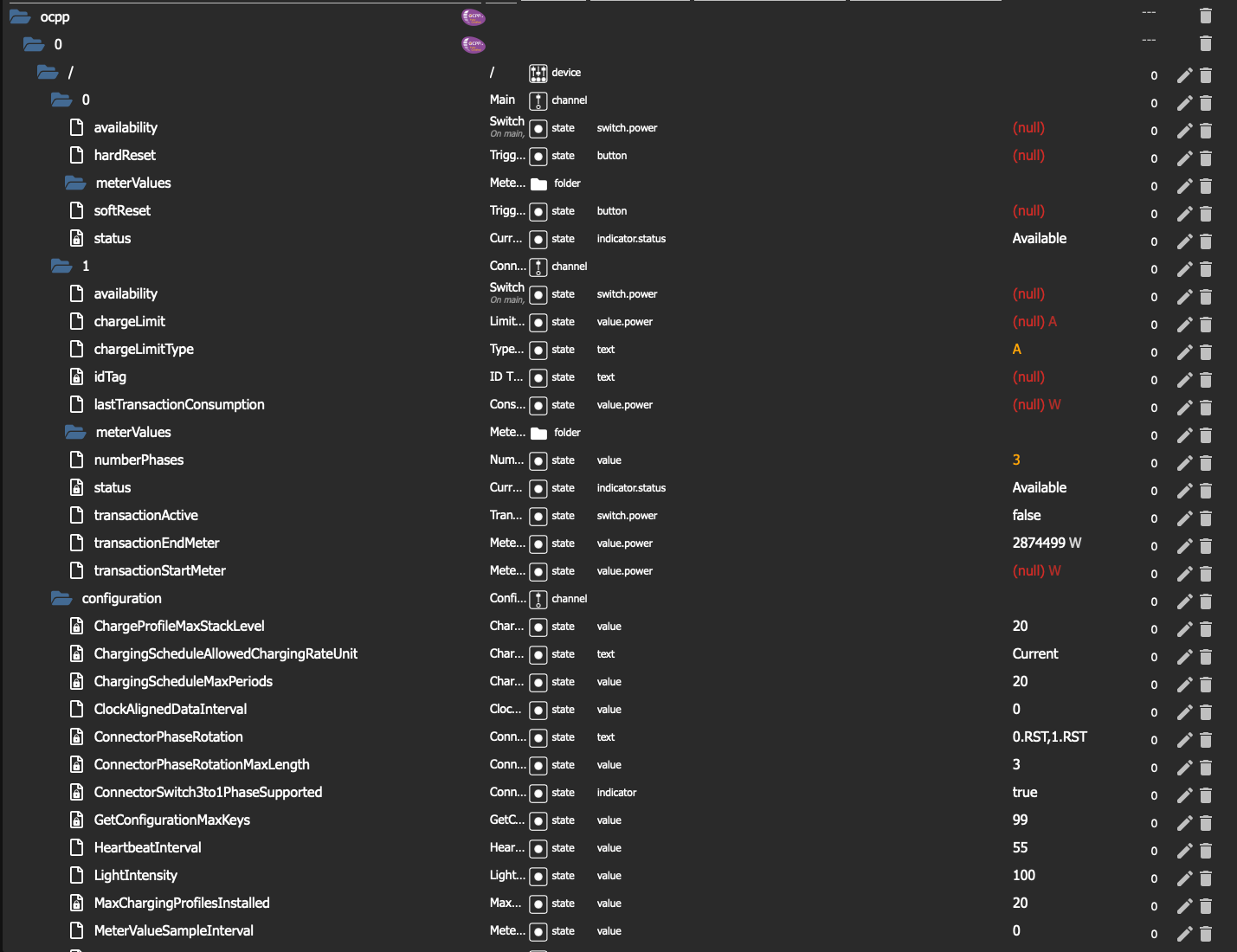
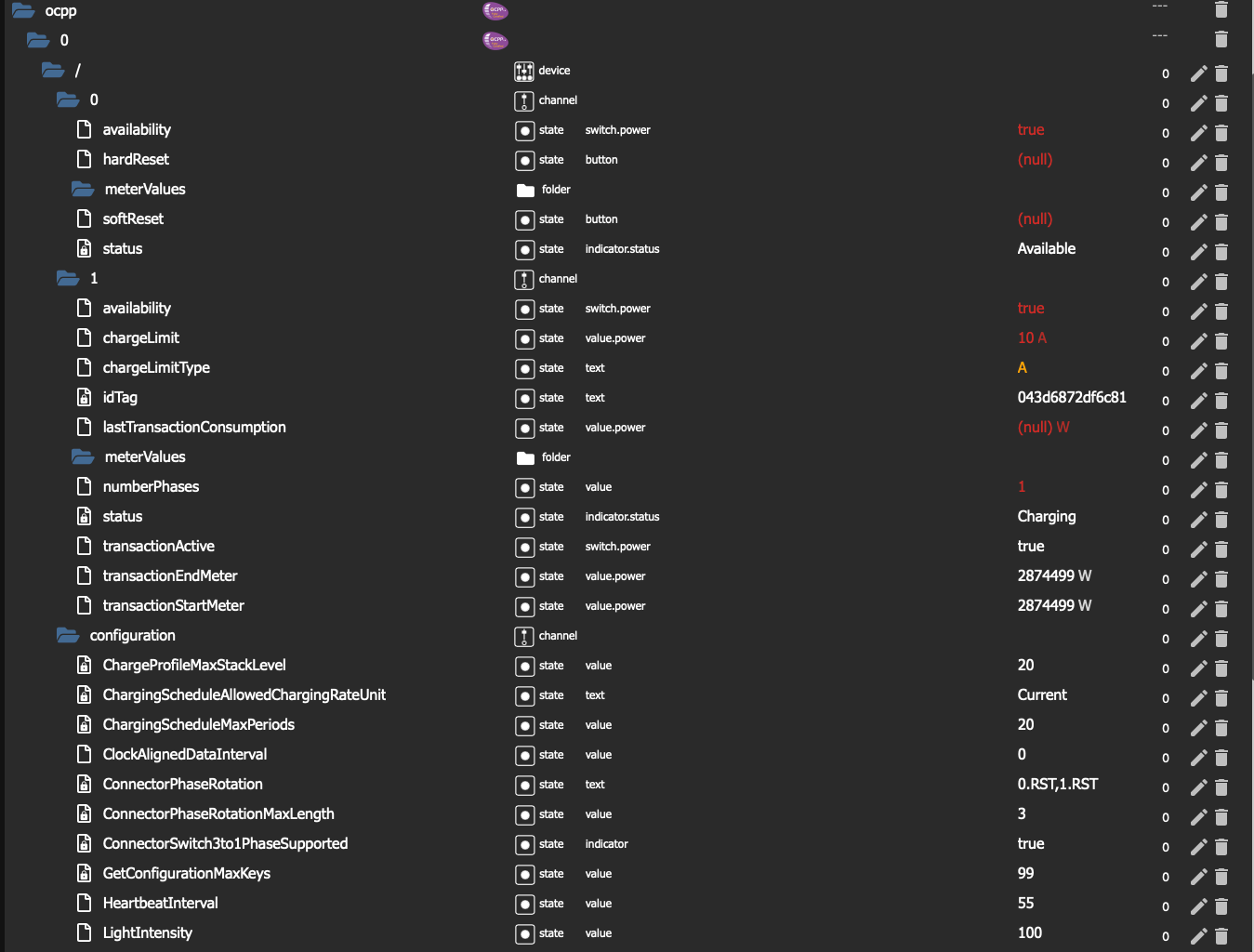
@foxriver76 habe die 0.12.1 installiert und eingerichtet. Es tauchen schon deutlich mehr Werte auf! Allerdings klappt das dynamische Laden leider nicht mehr. Vorher konnte ich bei "chargeLimit" die Ampere eingeben und er hat sie anstandslos übernommen. Jetzt werden sie nicht mehr übernommen.
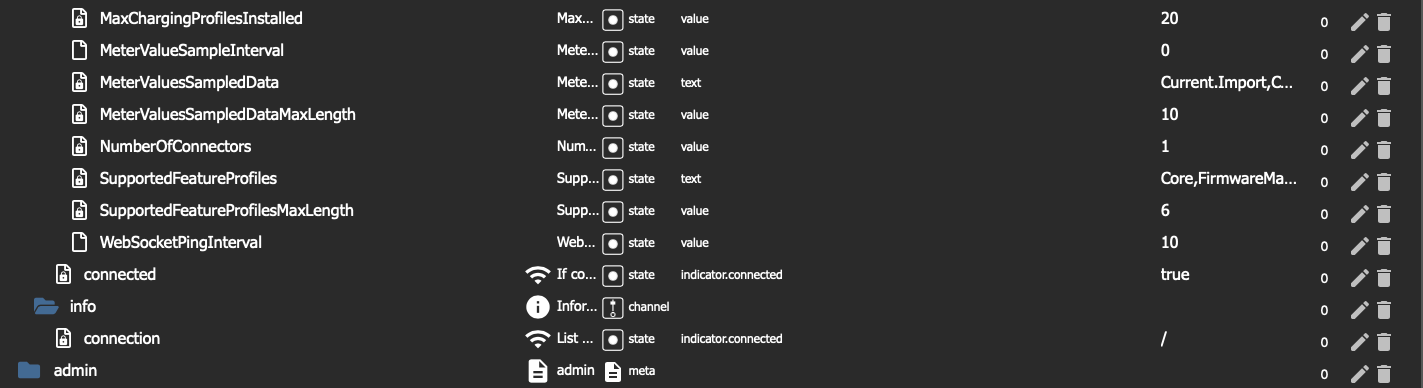
So sieht es vor dem anschließen des Autos aus:
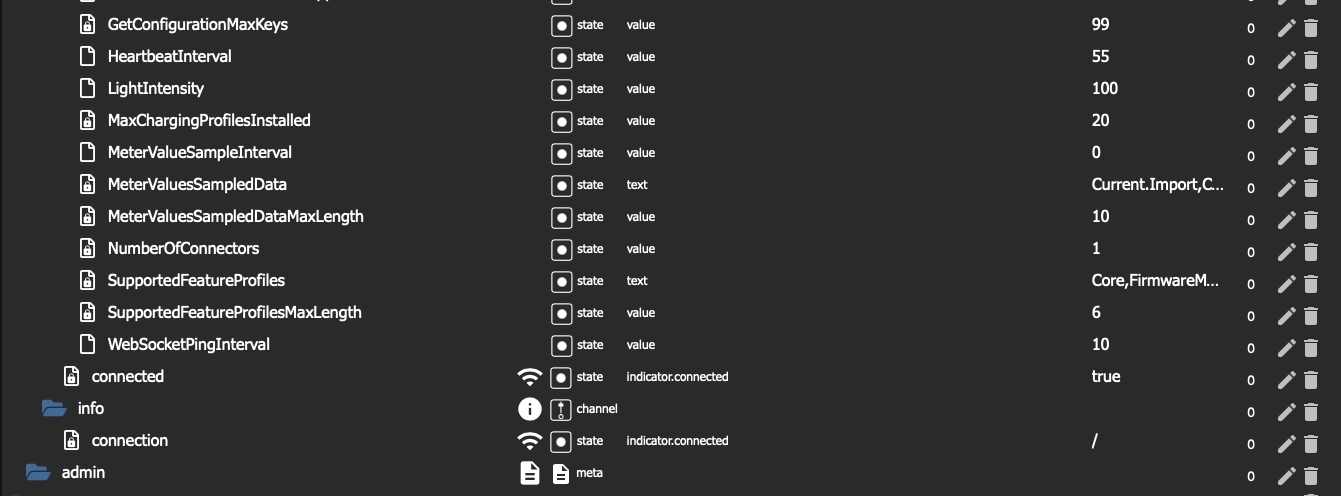
So sieht es nach dem Anschließen aus:
Das sagt die Log dazu:
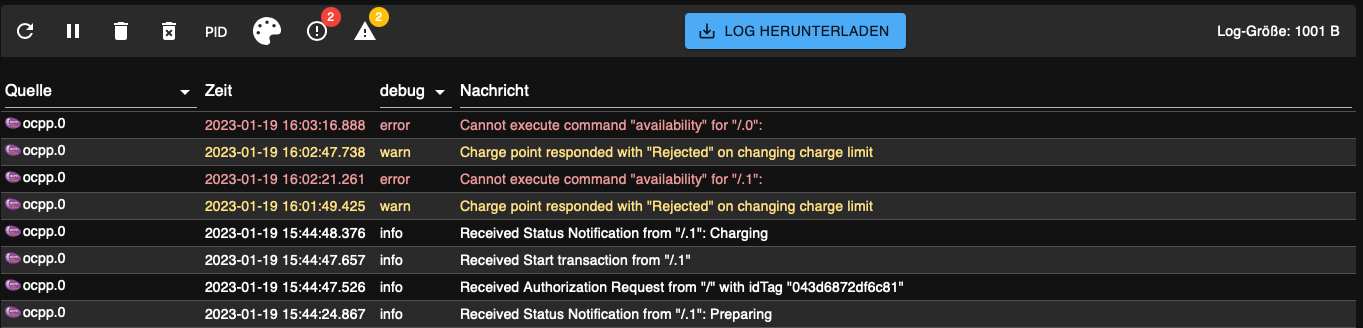
Falls die Debug Datei noch was bringt, bräuchte ich einmal Hilfe wo ich diese finde... :)
Grüße!
-
@frank11 Bitte 0.12.2 testen
-
@foxriver76 Bingo, dann werde ich mal eine der RFID-Karten versuchen, die nicht Masterkarte sind.

Wo sollte die ID der Karte beim Laden gespeichert werden?
Ich habe die der Mastercard nirgendwo gefunden. -
@frank11 die aktive ID wird im Channel 1 angezeigt (also im jeweils ladenden Connector), da unterschiedliche Connectoren durch unterschiedliche IDs freigegeben sein können.
Der Datenpunkt heißt
idTag. -
@foxriver76 OK, da hat die Wallbox für die Zeit des Ladens eine 0 geschrieben, eine am Anfang, die zweite am Ende.
Vielleicht weil das eine Masterkarte war?
-
@frank11 vielleicht.. was die RFID chips angeht habe ich keine Ahnung, teste gerne mal eine andere. Meine unterstützt das nicht.
-
@foxriver76Vor allem werde ich eine testen, die ohne Online-Verbindung zu DaheimLaden oder OCPP nicht funktioniert. Mal sehen ob da dann ein Fehler erscheint.
-
@frank11 so lange auth List leer ist nimmt der Adapter alle Verbindungen an. Wenn du in den State 0 schreibst dann nur noch die 0.
@foxriver76 said in Alpha Testing: OCPP Wallbox Adapter:
@frank11 so lange auth List leer ist nimmt der Adapter alle Verbindungen an. Wenn du in den State 0 schreibst dann nur noch die 0.
Das stimmt nicht ganz. Wenn authList leer ist und es ist eine RFID-Karte in der Wallbox hinterlegt dann lässt der Adapter auch nur die RFID-Karte zu. So funktioniert das zumindest bei mir. Wenn ich aber eine RFID-Karte in der AuthList eintrage und die nicht in der Wallbox hinterlegt ist dann lässt der Apdater die ebenfalls zu.
Also beide Möglichkeiten funktionieren einwandfrei. -
@foxriver76 said in Alpha Testing: OCPP Wallbox Adapter:
@frank11 so lange auth List leer ist nimmt der Adapter alle Verbindungen an. Wenn du in den State 0 schreibst dann nur noch die 0.
Das stimmt nicht ganz. Wenn authList leer ist und es ist eine RFID-Karte in der Wallbox hinterlegt dann lässt der Adapter auch nur die RFID-Karte zu. So funktioniert das zumindest bei mir. Wenn ich aber eine RFID-Karte in der AuthList eintrage und die nicht in der Wallbox hinterlegt ist dann lässt der Apdater die ebenfalls zu.
Also beide Möglichkeiten funktionieren einwandfrei.@fl4sh-0 das kommt drauf an ob die WB ein Auth Request schickt an den Adapter. Code-technisch wenn authList
nullist, lässt der Adapter alle Anfragen durch. Falls im State ein String (auch leer) steht, werden nur die enthaltenen Tags erlaubt. Wenn die Tags in der WB hinterlegt sind kann es sein dass diese kein Auth Request schickt.Sollte jeweils sowas geloggt werden
Received Authorization Request from "${connection.url}" with idTag "${authCommand.idTag}und bei ablehnen zusätzlichID Tag "${authCommand.idTag}" has been rejected -
@foxriver76 said in Alpha Testing: OCPP Wallbox Adapter:
@frank11 so lange auth List leer ist nimmt der Adapter alle Verbindungen an. Wenn du in den State 0 schreibst dann nur noch die 0.
Das stimmt nicht ganz. Wenn authList leer ist und es ist eine RFID-Karte in der Wallbox hinterlegt dann lässt der Adapter auch nur die RFID-Karte zu. So funktioniert das zumindest bei mir. Wenn ich aber eine RFID-Karte in der AuthList eintrage und die nicht in der Wallbox hinterlegt ist dann lässt der Apdater die ebenfalls zu.
Also beide Möglichkeiten funktionieren einwandfrei.@fl4sh-0 Genau so hab ich das auch erlebt. Es gibt zwei Masterkarten, die funktionieren jetzt gerade, und die beiden "Online"-Karten für (laut DaheimLaden) getrennte Abrechnungen funktioniert nicht. Eine davon wollte ich nämlich von Anfang an nutzen, die hat die Wallbox aber nicht angenommen, weil ich die ja in der DaheimLaden-Cloud hinterlegt habe, aber die WB mit meinem ioBroker verbunden habe anstatt mit der Cloud.
-
@fl4sh-0 das kommt drauf an ob die WB ein Auth Request schickt an den Adapter. Code-technisch wenn authList
nullist, lässt der Adapter alle Anfragen durch. Falls im State ein String (auch leer) steht, werden nur die enthaltenen Tags erlaubt. Wenn die Tags in der WB hinterlegt sind kann es sein dass diese kein Auth Request schickt.Sollte jeweils sowas geloggt werden
Received Authorization Request from "${connection.url}" with idTag "${authCommand.idTag}und bei ablehnen zusätzlichID Tag "${authCommand.idTag}" has been rejected@foxriver76 Im Log steht nichts, wahrscheinlich weil die Masterkarte keine Autorisierung im Backend anfordert.
-
@fl4sh-0 das kommt drauf an ob die WB ein Auth Request schickt an den Adapter. Code-technisch wenn authList
nullist, lässt der Adapter alle Anfragen durch. Falls im State ein String (auch leer) steht, werden nur die enthaltenen Tags erlaubt. Wenn die Tags in der WB hinterlegt sind kann es sein dass diese kein Auth Request schickt.Sollte jeweils sowas geloggt werden
Received Authorization Request from "${connection.url}" with idTag "${authCommand.idTag}und bei ablehnen zusätzlichID Tag "${authCommand.idTag}" has been rejected@foxriver76 said in Alpha Testing: OCPP Wallbox Adapter:
@fl4sh-0 das kommt drauf an ob die WB ein Auth Request schickt an den Adapter. Code-technisch wenn authList
nullist, lässt der Adapter alle Anfragen durch. Falls im State ein String (auch leer) steht, werden nur die enthaltenen Tags erlaubt. Wenn die Tags in der WB hinterlegt sind kann es sein dass diese kein Auth Request schickt.Sollte jeweils sowas geloggt werden
Received Authorization Request from "${connection.url}" with idTag "${authCommand.idTag}und bei ablehnen zusätzlichID Tag "${authCommand.idTag}" has been rejectedJa genau, die Meldung ist auch in meinem Log vorhanden. Zumindestens die hier:
ID Tag "${authCommand.idTag}" has been rejected -
@jrlohni Evtl. lehnt die WB ab, da du von 3 phasigen auf 1 phasiges Laden wechselt. Die Möglichkeit ist neu und eigentlich die einzige Änderung zu vorher, dass wir die Anzahl an Phasen mitsenden.
Hast du diesen Punkt in der Config?
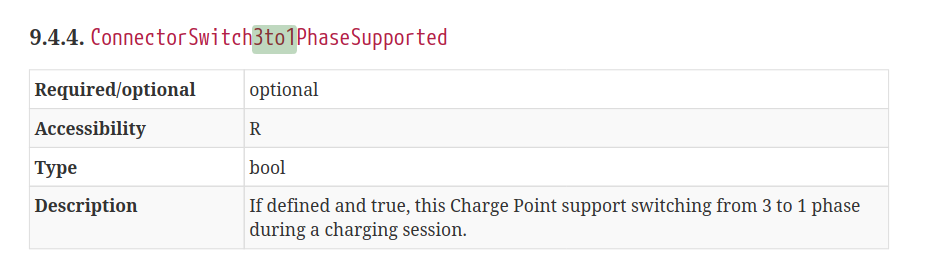
@foxriver76 Leider bekomme ich keine Config von der Station... Oder wo wäre die abgelegt? Ist doch richtig das du die mit runterlädst beim verbinden, oder?
Die Einstellung von MeterValueSampleInterval hat es gebracht! Danke dafür!
Allerdings lässt sich in dieser Version keine Leistung oder Strom mehr anpassen. Bei der 0.4.x (war es ja im Anfang bei mir... ging das alles noch)
Mein Protokoll sagt zur Phasenumschaltung nur:
Cannot execute command "numberPhrases" for "/.1": No chargeLimit set.
Das chargeLimit kann ich aber auch nicht setzen.Zu "authList" sagt er mir:
Removing LocalAuthListManagement functionality as unsupportedGrüße!
-
@fl4sh-0 das kommt drauf an ob die WB ein Auth Request schickt an den Adapter. Code-technisch wenn authList
nullist, lässt der Adapter alle Anfragen durch. Falls im State ein String (auch leer) steht, werden nur die enthaltenen Tags erlaubt. Wenn die Tags in der WB hinterlegt sind kann es sein dass diese kein Auth Request schickt.Sollte jeweils sowas geloggt werden
Received Authorization Request from "${connection.url}" with idTag "${authCommand.idTag}und bei ablehnen zusätzlichID Tag "${authCommand.idTag}" has been rejected@foxriver76 Ahh, perfekt.
2023-01-23 17:31:39.285 - info: ocpp.0 (1106987) Received Authorization Request from "/21178131966125" with idTag "hier steht eine ID"
Ich trage das idTag dann mal in die authList ein und schaue, ob die beiden Masterkarten und die zweite Online-Karte funktionieren.
Wenn jemand die ID kennt, bringt das aber auch nicht viel, oder gibt es da wohl noch eine zweite Authentifzierung die man nicht sieht?
Jetzt geht es erstmal an Grafana, dass ich nur die Datenpunkte sehe, wo auch das idTag passt. Scheint nicht so simpel zu sein.
-
@frank11 sagte in Alpha Testing: OCPP Wallbox Adapter:
Wenn jemand die ID kennt, bringt das aber auch nicht viel, oder gibt es da wohl noch eine zweite Authentifzierung die man nicht sieht?
Ich denke nicht, dass das jemanden was bringt. Weiß allerdings nicht wie die RFID Tags da genau funktionieren etc. vermutlich ist es mit größerem Afuwand möglich einen Chip so zu programmieren, dass er die gleiche ID ausstrahlt und damit an deiner WB lädt, allerdings ist das Risiko mmn äußerst gering und erfordert viel kriminelle Energie für ne villt. kostenfreie Ladung :rolling_on_the_floor_laughing:
-
@jrlohni sagte in Alpha Testing: OCPP Wallbox Adapter:
Mein Protokoll sagt zur Phasenumschaltung nur:
Cannot execute command "numberPhrases" for "/.1": No chargeLimit set.Ist das kopiert? Weil da ein Typo drin ist, der codetechnisch nicht existieren sollte. "numberPhrases"
Ja, man kann die Anzahl der Phasen nur mitgeben, wenn man auch ein
chargeLimitsetzt.Das chargeLimit kann ich aber auch nicht setzen.
Wieso?
Zu "authList" sagt er mir:
Removing LocalAuthListManagement functionality as unsupportedDann wird es laut Config nicht supported, solltest du bei den supported Profiles sehen können.
Leider bekomme ich keine Config von der Station... Oder wo wäre die abgelegt? Ist doch richtig das du die mit runterlädst beim verbinden, oder?
Es sollte einen channel geben
ocpp.0.<wb-name>.configurationansonsten sollte es eine Fehlermeldung geben. -
Seit gestern Abend ist mein Auto im Schnarchlademodus mit 4,1kW.
Wenn ich versuche, das chargeLimit auf 16A zu setzen, erscheint dieser Fehler:
Cannot execute command "chargeLimit" for "/21178121966125.1": Timeout for message 565b916f-e60f-4559-83e9-2dc74145d1ce
-
Seit gestern Abend ist mein Auto im Schnarchlademodus mit 4,1kW.
Wenn ich versuche, das chargeLimit auf 16A zu setzen, erscheint dieser Fehler:
Cannot execute command "chargeLimit" for "/21178121966125.1": Timeout for message 565b916f-e60f-4559-83e9-2dc74145d1ce
-
@frank11 vermutlich nicht nur beim senden des charge limits? Oder gehen andere Befehle noch?
@foxriver76 Na geil, mal wieder ganz unbewusst auf Englisch geswitcht. :-)
Ja genau. ich habe ioBroker mal neu gestartet, dann ging es wieder.
Die ersten Fehler kamen eine Stunde bevor ich überhaupt zu Hause war:
2023-01-26 14:05:40.911 - info: ocpp.0 (1106987) Received Status Notification from "/21178121966125.1": Available
2023-01-26 14:10:40.927 - info: ocpp.0 (1106987) Received Status Notification from "/21178121966125.1": Available
2023-01-26 14:15:40.921 - info: ocpp.0 (1106987) Received Status Notification from "/21178121966125.1": Available
2023-01-26 14:20:40.931 - info: ocpp.0 (1106987) Received Status Notification from "/21178121966125.1": Available
2023-01-26 14:23:10.889 - warn: ocpp.0 (1106987) Client "/21178121966125" timed out
2023-01-26 14:25:46.987 - info: ocpp.0 (1106987) New device connected: "/21178121966125"
2023-01-26 14:25:48.059 - info: ocpp.0 (1106987) Requesting BootNotification from "/21178121966125"
2023-01-26 14:26:18.068 - warn: ocpp.0 (1106987) Could not request states of "/21178121966125": Timeout for message ffa77cb5-08a9-481f-b88a-6b8c82a3f5bd
2023-01-26 14:26:18.069 - info: ocpp.0 (1106987) Sending GetConfiguration to "/21178121966125"
2023-01-26 14:26:48.076 - error: ocpp.0 (1106987) Could not request configuration of /21178121966125: Timeout for message aedefd37-2d5a-49d4-9a40-6589e8682af8
2023-01-26 14:27:17.058 - warn: ocpp.0 (1106987) Client "/21178121966125" timed out
2023-01-26 14:38:21.150 - info: ocpp.0 (1106987) New valid connection from "/21178121966125" (http/ocpp1.6)
2023-01-26 14:38:21.970 - info: ocpp.0 (1106987) New device connected: "/21178121966125"
2023-01-26 14:38:22.052 - info: ocpp.0 (1106987) Received boot notification from "/21178121966125"
2023-01-26 14:38:22.397 - info: ocpp.0 (1106987) Received Status Notification from "/21178121966125.1": Available
2023-01-26 14:38:23.053 - info: ocpp.0 (1106987) Requesting StatusNotification from "/21178121966125"
2023-01-26 14:38:23.360 - info: ocpp.0 (1106987) Received Status Notification from "/21178121966125.1": Available
2023-01-26 14:38:24.309 - info: ocpp.0 (1106987) Requesting MeterValues from "/21178121966125"
2023-01-26 14:38:24.720 - info: ocpp.0 (1106987) Received MeterValues from "/21178121966125.1"
2023-01-26 14:38:25.446 - info: ocpp.0 (1106987) Sending GetConfiguration to "/21178121966125"
2023-01-26 14:38:26.054 - info: ocpp.0 (1106987) Supported profiles by client "/21178121966125" are "Core,Local Auth List Management,Reservation,Smart Charging,Remote Trigger"
2023-01-26 14:43:22.999 - info: ocpp.0 (1106987) Received Status Notification from "/21178121966125.1": Available
2023-01-26 14:48:22.986 - info: ocpp.0 (1106987) Received Status Notification from "/21178121966125.1": Available
2023-01-26 14:53:22.927 - info: ocpp.0 (1106987) Received Status Notification from "/21178121966125.1": Available
2023-01-26 14:58:32.017 - warn: ocpp.0 (1106987) Client "/21178121966125" timed out
2023-01-26 15:00:35.149 - info: ocpp.0 (1106987) New device connected: "/21178121966125"
2023-01-26 15:00:35.198 - info: ocpp.0 (1106987) Received Status Notification from "/21178121966125.1": Available
2023-01-26 15:00:36.209 - info: ocpp.0 (1106987) Requesting BootNotification from "/21178121966125"
2023-01-26 15:01:06.213 - warn: ocpp.0 (1106987) Could not request states of "/21178121966125": Timeout for message a11d3196-971d-4471-bb7f-b607c9524555
2023-01-26 15:01:06.214 - info: ocpp.0 (1106987) Sending GetConfiguration to "/21178121966125"
2023-01-26 15:01:36.218 - error: ocpp.0 (1106987) Could not request configuration of /21178121966125: Timeout for message 88424f98-55f7-4532-9114-0b3a5c2838d9
2023-01-26 15:02:05.209 - warn: ocpp.0 (1106987) Client "/21178121966125" timed out
2023-01-26 16:10:20.931 - info: ocpp.0 (1106987) New valid connection from "/21178121966125" (http/ocpp1.6)
2023-01-26 16:10:21.605 - info: ocpp.0 (1106987) New device connected: "/21178121966125"
2023-01-26 16:10:21.689 - info: ocpp.0 (1106987) Received boot notification from "/21178121966125"
2023-01-26 16:10:22.030 - info: ocpp.0 (1106987) Received Status Notification from "/21178121966125.1": Available
2023-01-26 16:10:22.689 - info: ocpp.0 (1106987) Requesting StatusNotification from "/21178121966125"
2023-01-26 16:10:22.852 - info: ocpp.0 (1106987) Received Status Notification from "/21178121966125.1": Available
2023-01-26 16:10:23.797 - info: ocpp.0 (1106987) Requesting MeterValues from "/21178121966125"
2023-01-26 16:10:24.176 - info: ocpp.0 (1106987) Received MeterValues from "/21178121966125.1"
2023-01-26 16:10:24.906 - info: ocpp.0 (1106987) Sending GetConfiguration to "/21178121966125"
2023-01-26 16:10:25.461 - info: ocpp.0 (1106987) Supported profiles by client "/21178121966125" are "Core,Local Auth List Management,Reservation,Smart Charging,Remote Trigger"
2023-01-26 16:15:22.641 - info: ocpp.0 (1106987) Received Status Notification from "/21178121966125.1": Available
2023-01-26 16:20:22.651 - info: ocpp.0 (1106987) Received Status Notification from "/21178121966125.1": Available
2023-01-26 16:25:22.661 - info: ocpp.0 (1106987) Received Status Notification from "/21178121966125.1": Available
2023-01-26 16:30:22.613 - info: ocpp.0 (1106987) Received Status Notification from "/21178121966125.1": Available
2023-01-26 16:35:22.667 - info: ocpp.0 (1106987) Received Status Notification from "/21178121966125.1": Available
2023-01-26 16:40:22.681 - info: ocpp.0 (1106987) Received Status Notification from "/21178121966125.1": Available
2023-01-26 16:45:22.618 - info: ocpp.0 (1106987) Received Status Notification from "/21178121966125.1": Available
2023-01-26 16:50:22.629 - info: ocpp.0 (1106987) Received Status Notification from "/21178121966125.1": Available
2023-01-26 16:55:22.670 - info: ocpp.0 (1106987) Received Status Notification from "/21178121966125.1": Available
2023-01-26 17:00:22.654 - info: ocpp.0 (1106987) Received Status Notification from "/21178121966125.1": Available
2023-01-26 17:05:22.658 - info: ocpp.0 (1106987) Received Status Notification from "/21178121966125.1": Available
2023-01-26 17:10:22.667 - info: ocpp.0 (1106987) Received Status Notification from "/21178121966125.1": Available
2023-01-26 17:15:22.636 - info: ocpp.0 (1106987) Received Status Notification from "/21178121966125.1": Available
2023-01-26 17:17:20.261 - info: ocpp.0 (1106987) Received Status Notification from "/21178121966125.1": Preparing
2023-01-26 17:17:26.298 - info: ocpp.0 (1106987) Received Authorization Request from "/21178121966125" with idTag "*****"
2023-01-26 17:17:26.432 - info: ocpp.0 (1106987) Received Start transaction from "/21178121966125.1"
2023-01-26 17:17:28.548 - info: ocpp.0 (1106987) Received Status Notification from "/21178121966125.1": Charging
2023-01-26 17:17:33.056 - info: ocpp.0 (1106987) Received MeterValues from "/21178121966125.1"
2023-01-26 17:17:37.971 - info: ocpp.0 (1106987) Received MeterValues from "/21178121966125.1"
2023-01-26 17:17:42.910 - info: ocpp.0 (1106987) Received MeterValues from "/21178121966125.1"
2023-01-26 17:17:47.865 - info: ocpp.0 (1106987) Received MeterValues from "/21178121966125.1"
2023-01-26 17:17:52.882 - info: ocpp.0 (1106987) Received MeterValues from "/21178121966125.1"
2023-01-26 17:17:57.903 - info: ocpp.0 (1106987) Received MeterValues from "/21178121966125.1" -
@foxriver76 Na geil, mal wieder ganz unbewusst auf Englisch geswitcht. :-)
Ja genau. ich habe ioBroker mal neu gestartet, dann ging es wieder.
Die ersten Fehler kamen eine Stunde bevor ich überhaupt zu Hause war:
2023-01-26 14:05:40.911 - info: ocpp.0 (1106987) Received Status Notification from "/21178121966125.1": Available
2023-01-26 14:10:40.927 - info: ocpp.0 (1106987) Received Status Notification from "/21178121966125.1": Available
2023-01-26 14:15:40.921 - info: ocpp.0 (1106987) Received Status Notification from "/21178121966125.1": Available
2023-01-26 14:20:40.931 - info: ocpp.0 (1106987) Received Status Notification from "/21178121966125.1": Available
2023-01-26 14:23:10.889 - warn: ocpp.0 (1106987) Client "/21178121966125" timed out
2023-01-26 14:25:46.987 - info: ocpp.0 (1106987) New device connected: "/21178121966125"
2023-01-26 14:25:48.059 - info: ocpp.0 (1106987) Requesting BootNotification from "/21178121966125"
2023-01-26 14:26:18.068 - warn: ocpp.0 (1106987) Could not request states of "/21178121966125": Timeout for message ffa77cb5-08a9-481f-b88a-6b8c82a3f5bd
2023-01-26 14:26:18.069 - info: ocpp.0 (1106987) Sending GetConfiguration to "/21178121966125"
2023-01-26 14:26:48.076 - error: ocpp.0 (1106987) Could not request configuration of /21178121966125: Timeout for message aedefd37-2d5a-49d4-9a40-6589e8682af8
2023-01-26 14:27:17.058 - warn: ocpp.0 (1106987) Client "/21178121966125" timed out
2023-01-26 14:38:21.150 - info: ocpp.0 (1106987) New valid connection from "/21178121966125" (http/ocpp1.6)
2023-01-26 14:38:21.970 - info: ocpp.0 (1106987) New device connected: "/21178121966125"
2023-01-26 14:38:22.052 - info: ocpp.0 (1106987) Received boot notification from "/21178121966125"
2023-01-26 14:38:22.397 - info: ocpp.0 (1106987) Received Status Notification from "/21178121966125.1": Available
2023-01-26 14:38:23.053 - info: ocpp.0 (1106987) Requesting StatusNotification from "/21178121966125"
2023-01-26 14:38:23.360 - info: ocpp.0 (1106987) Received Status Notification from "/21178121966125.1": Available
2023-01-26 14:38:24.309 - info: ocpp.0 (1106987) Requesting MeterValues from "/21178121966125"
2023-01-26 14:38:24.720 - info: ocpp.0 (1106987) Received MeterValues from "/21178121966125.1"
2023-01-26 14:38:25.446 - info: ocpp.0 (1106987) Sending GetConfiguration to "/21178121966125"
2023-01-26 14:38:26.054 - info: ocpp.0 (1106987) Supported profiles by client "/21178121966125" are "Core,Local Auth List Management,Reservation,Smart Charging,Remote Trigger"
2023-01-26 14:43:22.999 - info: ocpp.0 (1106987) Received Status Notification from "/21178121966125.1": Available
2023-01-26 14:48:22.986 - info: ocpp.0 (1106987) Received Status Notification from "/21178121966125.1": Available
2023-01-26 14:53:22.927 - info: ocpp.0 (1106987) Received Status Notification from "/21178121966125.1": Available
2023-01-26 14:58:32.017 - warn: ocpp.0 (1106987) Client "/21178121966125" timed out
2023-01-26 15:00:35.149 - info: ocpp.0 (1106987) New device connected: "/21178121966125"
2023-01-26 15:00:35.198 - info: ocpp.0 (1106987) Received Status Notification from "/21178121966125.1": Available
2023-01-26 15:00:36.209 - info: ocpp.0 (1106987) Requesting BootNotification from "/21178121966125"
2023-01-26 15:01:06.213 - warn: ocpp.0 (1106987) Could not request states of "/21178121966125": Timeout for message a11d3196-971d-4471-bb7f-b607c9524555
2023-01-26 15:01:06.214 - info: ocpp.0 (1106987) Sending GetConfiguration to "/21178121966125"
2023-01-26 15:01:36.218 - error: ocpp.0 (1106987) Could not request configuration of /21178121966125: Timeout for message 88424f98-55f7-4532-9114-0b3a5c2838d9
2023-01-26 15:02:05.209 - warn: ocpp.0 (1106987) Client "/21178121966125" timed out
2023-01-26 16:10:20.931 - info: ocpp.0 (1106987) New valid connection from "/21178121966125" (http/ocpp1.6)
2023-01-26 16:10:21.605 - info: ocpp.0 (1106987) New device connected: "/21178121966125"
2023-01-26 16:10:21.689 - info: ocpp.0 (1106987) Received boot notification from "/21178121966125"
2023-01-26 16:10:22.030 - info: ocpp.0 (1106987) Received Status Notification from "/21178121966125.1": Available
2023-01-26 16:10:22.689 - info: ocpp.0 (1106987) Requesting StatusNotification from "/21178121966125"
2023-01-26 16:10:22.852 - info: ocpp.0 (1106987) Received Status Notification from "/21178121966125.1": Available
2023-01-26 16:10:23.797 - info: ocpp.0 (1106987) Requesting MeterValues from "/21178121966125"
2023-01-26 16:10:24.176 - info: ocpp.0 (1106987) Received MeterValues from "/21178121966125.1"
2023-01-26 16:10:24.906 - info: ocpp.0 (1106987) Sending GetConfiguration to "/21178121966125"
2023-01-26 16:10:25.461 - info: ocpp.0 (1106987) Supported profiles by client "/21178121966125" are "Core,Local Auth List Management,Reservation,Smart Charging,Remote Trigger"
2023-01-26 16:15:22.641 - info: ocpp.0 (1106987) Received Status Notification from "/21178121966125.1": Available
2023-01-26 16:20:22.651 - info: ocpp.0 (1106987) Received Status Notification from "/21178121966125.1": Available
2023-01-26 16:25:22.661 - info: ocpp.0 (1106987) Received Status Notification from "/21178121966125.1": Available
2023-01-26 16:30:22.613 - info: ocpp.0 (1106987) Received Status Notification from "/21178121966125.1": Available
2023-01-26 16:35:22.667 - info: ocpp.0 (1106987) Received Status Notification from "/21178121966125.1": Available
2023-01-26 16:40:22.681 - info: ocpp.0 (1106987) Received Status Notification from "/21178121966125.1": Available
2023-01-26 16:45:22.618 - info: ocpp.0 (1106987) Received Status Notification from "/21178121966125.1": Available
2023-01-26 16:50:22.629 - info: ocpp.0 (1106987) Received Status Notification from "/21178121966125.1": Available
2023-01-26 16:55:22.670 - info: ocpp.0 (1106987) Received Status Notification from "/21178121966125.1": Available
2023-01-26 17:00:22.654 - info: ocpp.0 (1106987) Received Status Notification from "/21178121966125.1": Available
2023-01-26 17:05:22.658 - info: ocpp.0 (1106987) Received Status Notification from "/21178121966125.1": Available
2023-01-26 17:10:22.667 - info: ocpp.0 (1106987) Received Status Notification from "/21178121966125.1": Available
2023-01-26 17:15:22.636 - info: ocpp.0 (1106987) Received Status Notification from "/21178121966125.1": Available
2023-01-26 17:17:20.261 - info: ocpp.0 (1106987) Received Status Notification from "/21178121966125.1": Preparing
2023-01-26 17:17:26.298 - info: ocpp.0 (1106987) Received Authorization Request from "/21178121966125" with idTag "*****"
2023-01-26 17:17:26.432 - info: ocpp.0 (1106987) Received Start transaction from "/21178121966125.1"
2023-01-26 17:17:28.548 - info: ocpp.0 (1106987) Received Status Notification from "/21178121966125.1": Charging
2023-01-26 17:17:33.056 - info: ocpp.0 (1106987) Received MeterValues from "/21178121966125.1"
2023-01-26 17:17:37.971 - info: ocpp.0 (1106987) Received MeterValues from "/21178121966125.1"
2023-01-26 17:17:42.910 - info: ocpp.0 (1106987) Received MeterValues from "/21178121966125.1"
2023-01-26 17:17:47.865 - info: ocpp.0 (1106987) Received MeterValues from "/21178121966125.1"
2023-01-26 17:17:52.882 - info: ocpp.0 (1106987) Received MeterValues from "/21178121966125.1"
2023-01-26 17:17:57.903 - info: ocpp.0 (1106987) Received MeterValues from "/21178121966125.1"

Support us
694
Online32.5k
Users81.7k
Topics1.3m
Posts