Skip to content
  • Home
  • Recent
  • Tags
  • 0 Unread 0
  • Categories
  • Unreplied
  • Popular
  • GitHub
  • Docu
  • Hilfe
Skins
  • Light
  • Brite
  • Cerulean
  • Cosmo
  • Flatly
  • Journal
  • Litera
  • Lumen
  • Lux
  • Materia
  • Minty
  • Morph
  • Pulse
  • Sandstone
  • Simplex
  • Sketchy
  • Spacelab
  • United
  • Yeti
  • Zephyr
  • Dark
  • Cyborg
  • Darkly
  • Quartz
  • Slate
  • Solar
  • Superhero
  • Vapor

  • Default (No Skin)
  • No Skin
Collapse
ioBroker Logo

Community Forum

donate donate
  1. ioBroker Community Home
  2. Deutsch
  3. Tester
  4. Alpha Testing: OCPP Wallbox Adapter

NEWS

  • Neuer Blogbeitrag: Monatsrückblick - Dezember 2025 🎄
    BluefoxB
    Bluefox
    5
    1
    44

  • Weihnachtsangebot 2025! 🎄
    BluefoxB
    Bluefox
    24
    1
    1.4k

  • UPDATE 31.10.: Amazon Alexa - ioBroker Skill läuft aus ?
    apollon77A
    apollon77
    48
    3
    9.3k

Alpha Testing: OCPP Wallbox Adapter

Scheduled Pinned Locked Moved Tester
ocppwallboxadapter
448 Posts 49 Posters 117.7k Views 47 Watching
  • Oldest to Newest
  • Newest to Oldest
  • Most Votes
Reply
  • Reply as topic
Log in to reply
This topic has been deleted. Only users with topic management privileges can see it.
  • foxriver76F foxriver76

    @meister-mopper So einen Start benötige ich auf debug wie

    ocpp.0	2022-09-20 15:43:54.143	debug	Sending RemoteStartTransaction for http://192_168_178_80:9220/EVB-XXXXXXXXX: {"connectorId":1,"idTag":"XXXXXXXXX"}
    

    Die Zeile nur wenn es fehlschlägt, sprich Adapter auf Loglevel Debug stellen und dann eine Transaktion starten. Was ja nicht gehen sollte.

    Meister MopperM Offline
    Meister MopperM Offline
    Meister Mopper
    wrote on last edited by
    #229

    @foxriver76

    Ich habe die Instanz so eingestellt:

    205bff3c-9ebc-4c7f-ae20-d902bf8e9b08-grafik.png

    Es kommt aber nicht mehr als:

    ocpp.0	2022-09-20 16:30:53.680	error	Cannot execute command "transactionActive" for "http://192_168_178_80:9220/EVB-XXXXXXXXX": Sender's message does not comply with protocol specification.
    

    Woran liegt das?

    Proxmox und HA

    foxriver76F 1 Reply Last reply
    0
    • Meister MopperM Meister Mopper

      @foxriver76

      Ich habe die Instanz so eingestellt:

      205bff3c-9ebc-4c7f-ae20-d902bf8e9b08-grafik.png

      Es kommt aber nicht mehr als:

      ocpp.0	2022-09-20 16:30:53.680	error	Cannot execute command "transactionActive" for "http://192_168_178_80:9220/EVB-XXXXXXXXX": Sender's message does not comply with protocol specification.
      

      Woran liegt das?

      foxriver76F Offline
      foxriver76F Offline
      foxriver76
      Developer
      wrote on last edited by foxriver76
      #230

      @meister-mopper hm komisch, da sollte auf jeden fall ein debug log kommen.

      Kannst du mal bitte auf 0.7.0 updaten, es sollte ein State erstellt werden chargeLimitType da solltest du zwischen A und W wählen können. Bitte mal prüfen, dass bei Änderung sich die Einheit vom chargeLimit State ändert.

      Falls das tut mal z. B. auf W stellen und 8000 in den chargeLimit State schreiben und dann nochmal transactionActive triggern. Und bitte alles auf debug nach Möglichkeit.

      Videotutorials & mehr

      Hier könnt ihr mich unterstützen.

      Meister MopperM 1 Reply Last reply
      0
      • foxriver76F foxriver76

        @meister-mopper hm komisch, da sollte auf jeden fall ein debug log kommen.

        Kannst du mal bitte auf 0.7.0 updaten, es sollte ein State erstellt werden chargeLimitType da solltest du zwischen A und W wählen können. Bitte mal prüfen, dass bei Änderung sich die Einheit vom chargeLimit State ändert.

        Falls das tut mal z. B. auf W stellen und 8000 in den chargeLimit State schreiben und dann nochmal transactionActive triggern. Und bitte alles auf debug nach Möglichkeit.

        Meister MopperM Offline
        Meister MopperM Offline
        Meister Mopper
        wrote on last edited by Meister Mopper
        #231

        @foxriver76

        Update auf 0.7.0:

        $ iobroker url https://github.com/foxriver76/ioBroker.ocpp.git --host rpizigbee --debug
        install foxriver76/ioBroker.ocpp#a7c06c513c0e8c6272a10deddd07152bc6efbed7
        NPM version: 8.15.0
        Installing foxriver76/ioBroker.ocpp#a7c06c513c0e8c6272a10deddd07152bc6efbed7... (System call)
        npm WARN skipping integrity check for git dependency ssh://git@github.com/foxriver76/ioBroker.ocpp.git
        npm WARN deprecated joi-date-extensions@1.2.0: This module has moved and is now available at @hapi/joi-date. Please update your dependencies as this version is no longer maintained an may contain bugs and security issues.
        npm WARN deprecated hoek@5.0.4: This version has been deprecated in accordance with the hapi support policy (hapi.im/support). Please upgrade to the latest version to get the best features, bug fixes, and security patches. If you are unable to upgrade at this time, paid support is available for older versions (hapi.im/commercial).
        npm WARN deprecated hoek@6.1.3: This module has moved and is now available at @hapi/hoek. Please update your dependencies as this version is no longer maintained an may contain bugs and security issues.
        npm WARN deprecated joi@13.7.0: This version has been deprecated in accordance with the hapi support policy (hapi.im/support). Please upgrade to the latest version to get the best features, bug fixes, and security patches. If you are unable to upgrade at this time, paid support is available for older versions (hapi.im/commercial).
        added 8 packages, and changed 51 packages in 2m88 packages are looking for funding run `npm fund` for details
        upload [1] ocpp.admin /opt/iobroker/node_modules/iobroker.ocpp/admin/jsonConfig.json jsonConfig.json application/json
        upload [0] ocpp.admin /opt/iobroker/node_modules/iobroker.ocpp/admin/ocpp.png ocpp.png image/png
        Update "system.adapter.ocpp.0"
        Process exited with code 0
        

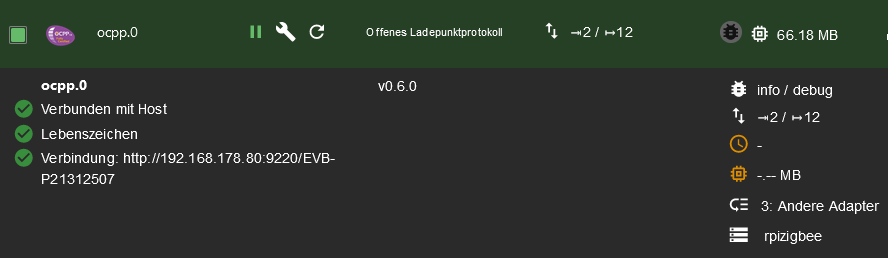
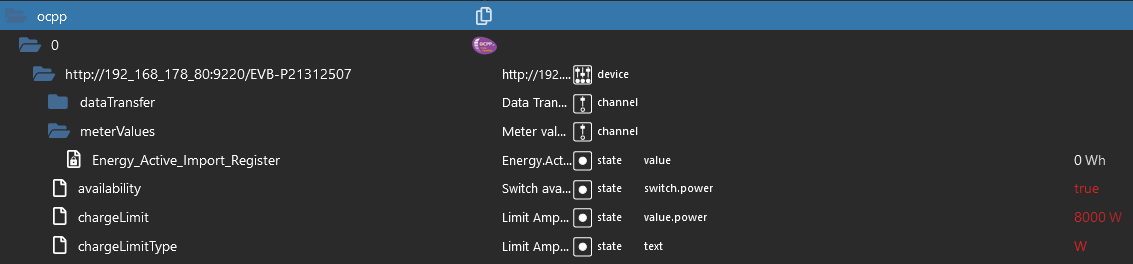
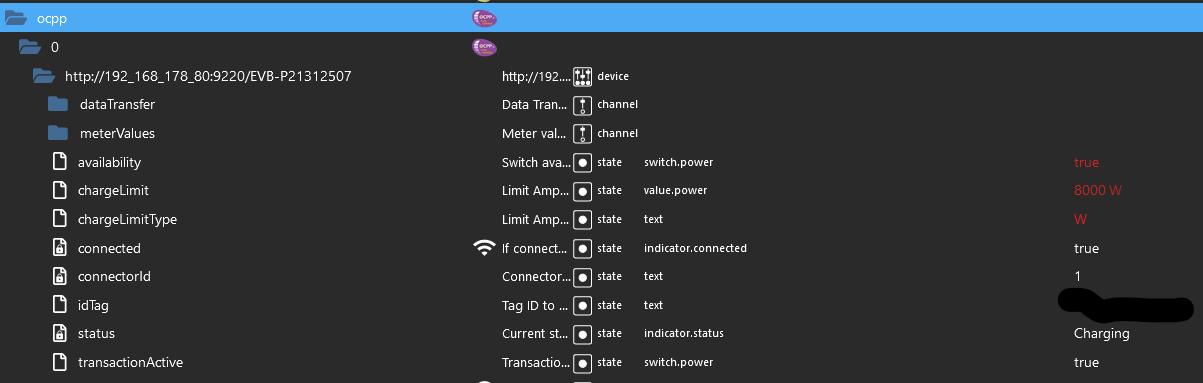
        Ich kann auf Watt umstellen, die Einheit ändert sich auch. Allerdings beginnt der Ladevorgang nach transactionActive nicht und ich musste mit dem rfid chip direkt an der Wallbox das Laden starten.
        00f9dfec-ebff-4192-b22d-bef32259cf48-grafik.png

        Hier Energy_Active_Import_Register
        ffa7ce40-55d1-44ee-b0ec-5028ee474167-grafik.png

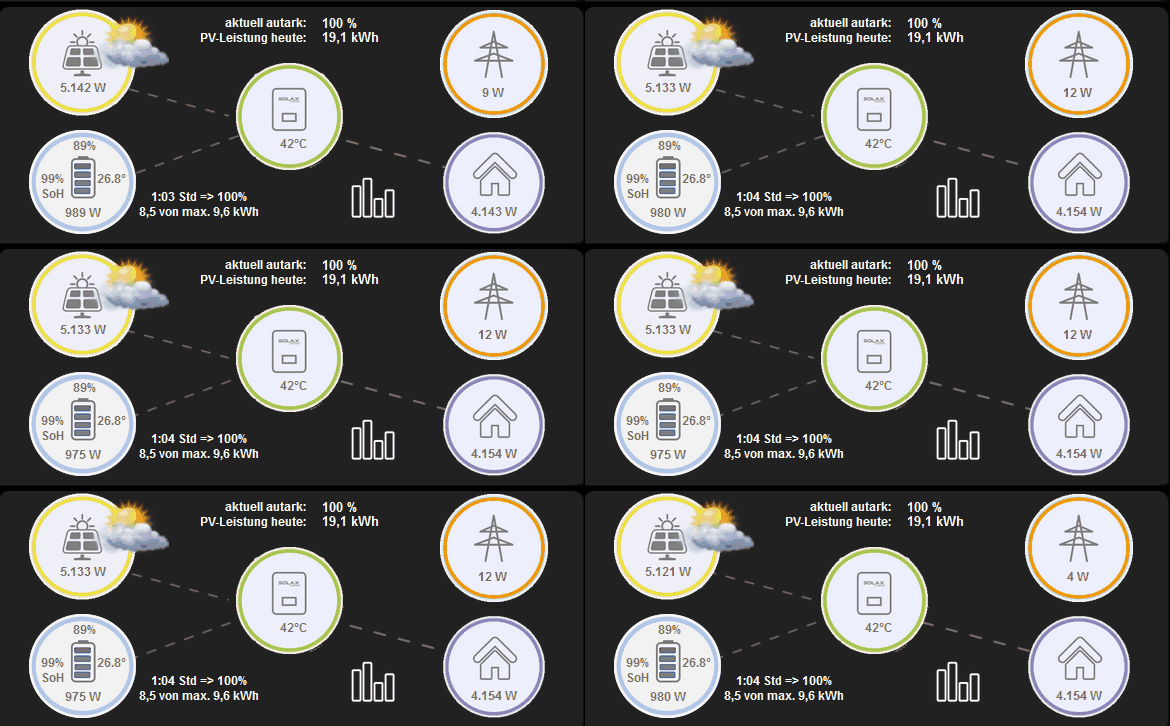
        So sieht es dann aus (das Haus benötigt ca. 500 W):
        Verbrauch.gif

        Hier noch das log:

        ocpp.0	2022-09-21 15:26:58.566	info	New valid connection from "http://192.168.178.80:9220/EVB-XXXXXXXXX" (http/ocpp1.6)
        ocpp.0	2022-09-21 15:41:35.643	info	Received Status Notification from "http://192.168.178.80:9220/EVB-XXXXXXXXX": Preparing
        ocpp.0	2022-09-21 15:41:35.727	info	Received DataTransfer from "http://192.168.178.80:9220/EVB-XXXXXXXXX" with id "evbStatusNotification": 1,Preparing,NoError,No error.,0,Green,0,{20,7984,100},{0,0},{B,11940,10012,61568},0,0,300,2022-09-21T13:41:35Z,0,3,{0,0,0,0,0,0,0,0,0},220,1,1,112,0,230,900,0
        ocpp.0	2022-09-21 15:41:42.522	info	Received Authorization Request from "http://192.168.178.80:9220/EVB-XXXXXXXXX"
        ocpp.0	2022-09-21 15:41:44.670	info	Received Status Notification from "http://192.168.178.80:9220/EVB-XXXXXXXXX": Preparing
        ocpp.0	2022-09-21 15:41:44.716	info	Received DataTransfer from "http://192.168.178.80:9220/EVB-XXXXXXXXX" with id "evbStatusNotification": 1,Preparing,NoError,No error.,0,Off,1,{20,7984,100},{0,0},{B,11936,9146,61568},0,0,300,2022-09-21T13:41:44Z,0,3,{0,0,0,0,0,0,0,0,0},220,0,0,125,0,230,900,0
        ocpp.0	2022-09-21 15:41:46.974	info	Received Status Notification from "http://192.168.178.80:9220/EVB-XXXXXXXXX": SuspendedEVSE
        ocpp.0	2022-09-21 15:41:47.178	info	Received Status Notification from "http://192.168.178.80:9220/EVB-XXXXXXXXX": SuspendedEV
        ocpp.0	2022-09-21 15:41:49.463	info	Received Start transaction from "http://192.168.178.80:9220/EVB-XXXXXXXXX"
        ocpp.0	2022-09-21 15:41:50.480	info	Received Status Notification from "http://192.168.178.80:9220/EVB-XXXXXXXXX": Charging
        ocpp.0	2022-09-21 15:41:54.388	info	Received DataTransfer from "http://192.168.178.80:9220/EVB-XXXXXXXXX" with id "evbStatusNotification": 1,SuspendedEVSE,NoError,No error.,0,Yellow,1,{20,7984,10},{0,0},{B,11937,8736,9416},0,0,300,2022-09-21T13:41:46Z,1,3,{0,0,0,0,0,0,0,0,0},220,0,0,125,0,230,60,0
        ocpp.0	2022-09-21 15:41:59.374	info	Received DataTransfer from "http://192.168.178.80:9220/EVB-XXXXXXXXX" with id "evbStatusNotification": 1,SuspendedEV,NoError,No error.,0,Yellow,1,{20,7984,10},{0,0},{B,11938,8652,12128},0,0,300,2022-09-21T13:41:46Z,1,3,{0,0,0,0,0,0,0,0,0},220,0,0,125,0,230,60,0
        ocpp.0	2022-09-21 15:42:04.372	info	Received DataTransfer from "http://192.168.178.80:9220/EVB-XXXXXXXXX" with id "evbStatusNotification": 1,Charging,NoError,No error.,1,Blue,1,{20,7984,26},{0,0},{C,11936,5868,12131},0,0,300,2022-09-21T13:41:50Z,1,3,{0,0,0,0,0,0,0,0,0},220,2,0,114,0,230,160,0
        ocpp.0	2022-09-21 15:56:51.319	info	Received MeterValues from "http://192.168.178.80:9220/EVB-XXXXXXXXX"
        ocpp.0	2022-09-21 15:56:56.363	info	Received DataTransfer from "http://192.168.178.80:9220/EVB-XXXXXXXXX" with id "evbStatusNotification": 1,Charging,NoError,No error.,1,Blue,1,{20,7984,26},{0,0},{C,11936,6044,12112},0,0,310,2022-09-21T13:56:50Z,1,3,{0,0,0,0,0,0,0,0,0},240,16,4,112,0,260,160,0
        ocpp.0	2022-09-21 16:11:53.660	info	Received MeterValues from "http://192.168.178.80:9220/EVB-XXXXXXXXX"
        ocpp.0	2022-09-21 16:11:58.377	info	Received DataTransfer from "http://192.168.178.80:9220/EVB-XXXXXXXXX" with id "evbStatusNotification": 1,Charging,NoError,No error.,1,Blue,1,{20,7984,26},{0,0},{C,11936,6043,12112},0,0,330,2022-09-21T14:11:53Z,1,3,{0,0,0,0,0,0,0,0,0},260,15,4,112,0,290,160,0
        ocpp.0	2022-09-21 16:12:43.852	info	Got terminate signal TERMINATE_YOURSELF
        ocpp.0	2022-09-21 16:12:43.861	info	terminating
        ocpp.0	2022-09-21 16:12:43.862	info	Terminated (ADAPTER_REQUESTED_TERMINATION): Without reason
        ocpp.0	2022-09-21 16:12:49.701	info	starting. Version 0.7.0 (non-npm: foxriver76/ioBroker.ocpp#a7c06c513c0e8c6272a10deddd07152bc6efbed7) in /opt/iobroker/node_modules/iobroker.ocpp, node: v16.17.0, js-controller: 4.0.23
        ocpp.0	2022-09-21 16:12:49.743	info	Starting OCPP Server
        ocpp.0	2022-09-21 16:12:49.815	info	Server listening on port 9220
        ocpp.0	2022-09-21 16:13:23.494	info	New valid connection from "http://192.168.178.80:9220/EVB-XXXXXXXXX" (http/ocpp1.6)
        ocpp.0	2022-09-21 16:13:23.551	info	New device connected: "http://192.168.178.80:9220/EVB-XXXXXXXXX"
        ocpp.0	2022-09-21 16:13:23.555	info	Requesting BootNotification from "http://192.168.178.80:9220/EVB-XXXXXXXXX"
        ocpp.0	2022-09-21 16:13:24.595	info	Requesting StatusNotification from "http://192.168.178.80:9220/EVB-XXXXXXXXX"
        ocpp.0	2022-09-21 16:13:28.345	info	Received boot notification from "http://192.168.178.80:9220/EVB-XXXXXXXXX"
        ocpp.0	2022-09-21 16:13:28.600	info	Received Status Notification from "http://192.168.178.80:9220/EVB-XXXXXXXXX": Charging
        ocpp.0	2022-09-21 16:13:33.486	info	Received DataTransfer from "http://192.168.178.80:9220/EVB-XXXXXXXXX" with id "evbStatusNotification": 1,Charging,NoError,No error.,1,Blue,1,{20,7984,26},{0,0},{C,11936,6041,12112},0,0,330,2022-09-21T14:13:28Z,1,3,{0,0,0,0,0,0,0,0,0},260,15,4,112,0,290,160,0
        ocpp.0	2022-09-21 16:13:54.604	warn	Could not request states of "http://192.168.178.80:9220/EVB-XXXXXXXXX": Timeout for message 17557d23-e18f-4a14-89f4-3147f46615ff
        ocpp.0	2022-09-21 16:14:32.775	info	Loglevel changed from "info" to "silly"
        ocpp.0	2022-09-21 16:15:18.339	debug	{"commandOcpp":"Heartbeat"}
        ocpp.0	2022-09-21 16:15:18.341	debug	Received heartbeat from "http://192.168.178.80:9220/EVB-XXXXXXXXX"
        ocpp.0	2022-09-21 16:15:59.639	debug	Sending RemoteStopTransaction for http://192_168_178_80:9220/EVB-XXXXXXXXX
        ocpp.0	2022-09-21 16:16:05.078	debug	{"transactionId":1,"idTag":"048EAB728E6781","timestamp":"2022-09-21T14:16:04Z","meterStop":0,"reason":"Remote","commandOcpp":"StopTransaction"}
        ocpp.0	2022-09-21 16:16:05.079	info	Received stop transaction from "http://192.168.178.80:9220/EVB-XXXXXXXXX"
        ocpp.0	2022-09-21 16:16:05.695	debug	{"connectorId":1,"status":"Finishing","errorCode":"NoError","timestamp":"2022-09-21T14:16:05Z","commandOcpp":"StatusNotification"}
        ocpp.0	2022-09-21 16:16:05.696	info	Received Status Notification from "http://192.168.178.80:9220/EVB-XXXXXXXXX": Finishing
        ocpp.0	2022-09-21 16:16:09.338	debug	{"vendorId":"EV-BOX","messageId":"evbStatusNotification","data":"1,Finishing,NoError,No error.,0,Green,0,{20,7984,100},{0,0},{C,11936,6156,61596},0,0,330,2022-09-21T14:16:05Z,0,3,{0,0,0,0,0,0,0,0,0},260,9,3,112,0,300,900,0","commandOcpp":"DataTransfer"}
        ocpp.0	2022-09-21 16:16:09.339	info	Received DataTransfer from "http://192.168.178.80:9220/EVB-XXXXXXXXX" with id "evbStatusNotification": 1,Finishing,NoError,No error.,0,Green,0,{20,7984,100},{0,0},{C,11936,6156,61596},0,0,330,2022-09-21T14:16:05Z,0,3,{0,0,0,0,0,0,0,0,0},260,9,3,112,0,300,900,0
        ocpp.0	2022-09-21 16:16:13.327	debug	{"commandOcpp":"Heartbeat"}
        ocpp.0	2022-09-21 16:16:13.327	debug	Received heartbeat from "http://192.168.178.80:9220/EVB-XXXXXXXXX"
        ocpp.0	2022-09-21 16:16:29.359	debug	Sending SetChargingProfile for http://192_168_178_80:9220/EVB-XXXXXXXXX
        ocpp.0	2022-09-21 16:16:29.518	error	Cannot execute command "chargeLimit" for "http://192_168_178_80:9220/EVB-XXXXXXXXX": Sender's message does not comply with protocol specification.
        ocpp.0	2022-09-21 16:16:40.054	debug	Sending RemoteStartTransaction for http://192_168_178_80:9220/EVB-XXXXXXXXX: {"connectorId":1,"idTag":"048BEAB728E6781","chargingProfile":{"chargingProfileId":1,"stackLevel":0,"chargingProfilePurpose":"TxDefaultProfile","chargingProfileKind":"Recurring","recurrencyKind":"Daily","chargingSchedule":{"duration":86400,"startSchedule":"2013-01-01T00:00Z","chargingRateUnit":"W","chargingSchedulePeriod":[{"startPeriod":0,"limit":8000}]}}}
        ocpp.0	2022-09-21 16:16:40.436	error	Cannot execute command "transactionActive" for "http://192_168_178_80:9220/EVB-XXXXXXXXX": Sender's message does not comply with protocol specification.
        ocpp.0	2022-09-21 16:17:01.444	debug	Sending RemoteStopTransaction for http://192_168_178_80:9220/EVB-XXXXXXXXX
        ocpp.0	2022-09-21 16:17:05.951	debug	Sending ChangeAvailability for http://192_168_178_80:9220/EVB-XXXXXXXXX: Inoperative
        ocpp.0	2022-09-21 16:17:06.349	debug	{"connectorId":1,"status":"Unavailable","errorCode":"NoError","timestamp":"2022-09-21T14:17:06Z","commandOcpp":"StatusNotification"}
        ocpp.0	2022-09-21 16:17:06.350	info	Received Status Notification from "http://192.168.178.80:9220/EVB-XXXXXXXXX": Unavailable
        ocpp.0	2022-09-21 16:17:06.398	debug	{"vendorId":"EV-BOX","messageId":"evbStatusNotification","data":"1,Unavailable,NoError,No error.,0,Red,0,{20,7984,100},{0,0},{B,11934,9132,61568},0,0,330,2022-09-21T14:17:06Z,0,3,{0,0,0,0,0,0,0,0,0},260,1,1,112,0,300,900,0","commandOcpp":"DataTransfer"}
        ocpp.0	2022-09-21 16:17:06.400	info	Received DataTransfer from "http://192.168.178.80:9220/EVB-XXXXXXXXX" with id "evbStatusNotification": 1,Unavailable,NoError,No error.,0,Red,0,{20,7984,100},{0,0},{B,11934,9132,61568},0,0,330,2022-09-21T14:17:06Z,0,3,{0,0,0,0,0,0,0,0,0},260,1,1,112,0,300,900,0
        ocpp.0	2022-09-21 16:17:08.314	debug	{"commandOcpp":"Heartbeat"}
        ocpp.0	2022-09-21 16:17:08.315	debug	Received heartbeat from "http://192.168.178.80:9220/EVB-XXXXXXXXX"
        ocpp.0	2022-09-21 16:17:12.444	debug	Sending ChangeAvailability for http://192_168_178_80:9220/EVB-XXXXXXXXX: Operative
        ocpp.0	2022-09-21 16:17:12.772	debug	{"connectorId":1,"status":"Finishing","errorCode":"NoError","timestamp":"2022-09-21T14:17:12Z","commandOcpp":"StatusNotification"}
        ocpp.0	2022-09-21 16:17:12.773	info	Received Status Notification from "http://192.168.178.80:9220/EVB-XXXXXXXXX": Finishing
        ocpp.0	2022-09-21 16:17:12.890	debug	{"vendorId":"EV-BOX","messageId":"evbStatusNotification","data":"1,Finishing,NoError,No error.,0,Green,0,{20,7984,100},{0,0},{B,11935,9132,61568},0,0,330,2022-09-21T14:17:12Z,0,3,{0,0,0,0,0,0,0,0,0},260,1,2,112,0,300,900,0","commandOcpp":"DataTransfer"}
        ocpp.0	2022-09-21 16:17:12.891	info	Received DataTransfer from "http://192.168.178.80:9220/EVB-XXXXXXXXX" with id "evbStatusNotification": 1,Finishing,NoError,No error.,0,Green,0,{20,7984,100},{0,0},{B,11935,9132,61568},0,0,330,2022-09-21T14:17:12Z,0,3,{0,0,0,0,0,0,0,0,0},260,1,2,112,0,300,900,0
        ocpp.0	2022-09-21 16:17:20.473	debug	Sending RemoteStartTransaction for http://192_168_178_80:9220/EVB-XXXXXXXXX: {"connectorId":1,"idTag":"048BEAB728E6781","chargingProfile":{"chargingProfileId":1,"stackLevel":0,"chargingProfilePurpose":"TxDefaultProfile","chargingProfileKind":"Recurring","recurrencyKind":"Daily","chargingSchedule":{"duration":86400,"startSchedule":"2013-01-01T00:00Z","chargingRateUnit":"W","chargingSchedulePeriod":[{"startPeriod":0,"limit":8000}]}}}
        ocpp.0	2022-09-21 16:17:20.616	error	Cannot execute command "transactionActive" for "http://192_168_178_80:9220/EVB-XXXXXXXXX": Sender's message does not comply with protocol specification.
        ocpp.0	2022-09-21 16:18:03.322	debug	{"commandOcpp":"Heartbeat"}
        ocpp.0	2022-09-21 16:18:03.322	debug	Received heartbeat from "http://192.168.178.80:9220/EVB-XXXXXXXXX"
        ocpp.0	2022-09-21 16:18:33.622	debug	{"idTag":"048EAB728E6781","commandOcpp":"Authorize"}
        ocpp.0	2022-09-21 16:18:33.623	info	Received Authorization Request from "http://192.168.178.80:9220/EVB-XXXXXXXXX"
        ocpp.0	2022-09-21 16:18:36.216	debug	{"connectorId":1,"status":"Preparing","errorCode":"NoError","timestamp":"2022-09-21T14:18:35Z","commandOcpp":"StatusNotification"}
        ocpp.0	2022-09-21 16:18:36.217	info	Received Status Notification from "http://192.168.178.80:9220/EVB-XXXXXXXXX": Preparing
        ocpp.0	2022-09-21 16:18:36.273	debug	{"vendorId":"EV-BOX","messageId":"evbStatusNotification","data":"1,Preparing,NoError,No error.,0,Off,1,{20,7984,100},{0,0},{B,11936,9132,61568},0,0,330,2022-09-21T14:18:35Z,0,3,{0,0,0,0,0,0,0,0,0},260,0,0,125,0,300,900,0","commandOcpp":"DataTransfer"}
        ocpp.0	2022-09-21 16:18:36.274	info	Received DataTransfer from "http://192.168.178.80:9220/EVB-XXXXXXXXX" with id "evbStatusNotification": 1,Preparing,NoError,No error.,0,Off,1,{20,7984,100},{0,0},{B,11936,9132,61568},0,0,330,2022-09-21T14:18:35Z,0,3,{0,0,0,0,0,0,0,0,0},260,0,0,125,0,300,900,0
        ocpp.0	2022-09-21 16:18:37.696	debug	{"connectorId":1,"status":"SuspendedEVSE","errorCode":"NoError","info":"B;330","timestamp":"2022-09-21T14:18:37Z","commandOcpp":"StatusNotification"}
        ocpp.0	2022-09-21 16:18:37.697	info	Received Status Notification from "http://192.168.178.80:9220/EVB-XXXXXXXXX": SuspendedEVSE
        ocpp.0	2022-09-21 16:18:37.887	debug	{"connectorId":1,"status":"SuspendedEV","errorCode":"NoError","info":"B;330","timestamp":"2022-09-21T14:18:37Z","commandOcpp":"StatusNotification"}
        ocpp.0	2022-09-21 16:18:37.888	info	Received Status Notification from "http://192.168.178.80:9220/EVB-XXXXXXXXX": SuspendedEV
        ocpp.0	2022-09-21 16:18:40.327	debug	{"connectorId":1,"idTag":"048EAB728E6781","timestamp":"2022-09-21T14:18:36Z","meterStart":0,"commandOcpp":"StartTransaction"}
        ocpp.0	2022-09-21 16:18:40.328	info	Received Start transaction from "http://192.168.178.80:9220/EVB-XXXXXXXXX"
        ocpp.0	2022-09-21 16:18:42.407	debug	{"connectorId":1,"status":"Charging","errorCode":"NoError","info":"C;330","timestamp":"2022-09-21T14:18:42Z","commandOcpp":"StatusNotification"}
        ocpp.0	2022-09-21 16:18:42.408	info	Received Status Notification from "http://192.168.178.80:9220/EVB-XXXXXXXXX": Charging
        ocpp.0	2022-09-21 16:18:45.345	debug	{"vendorId":"EV-BOX","messageId":"evbStatusNotification","data":"1,SuspendedEVSE,NoError,No error.,0,Yellow,1,{20,7983,10},{0,0},{B,11936,8752,8393},0,0,330,2022-09-21T14:18:37Z,1,3,{0,0,0,0,0,0,0,0,0},260,0,0,125,0,300,60,0","commandOcpp":"DataTransfer"}
        ocpp.0	2022-09-21 16:18:45.346	info	Received DataTransfer from "http://192.168.178.80:9220/EVB-XXXXXXXXX" with id "evbStatusNotification": 1,SuspendedEVSE,NoError,No error.,0,Yellow,1,{20,7983,10},{0,0},{B,11936,8752,8393},0,0,330,2022-09-21T14:18:37Z,1,3,{0,0,0,0,0,0,0,0,0},260,0,0,125,0,300,60,0
        ocpp.0	2022-09-21 16:18:50.344	debug	{"vendorId":"EV-BOX","messageId":"evbStatusNotification","data":"1,SuspendedEV,NoError,No error.,0,Yellow,1,{20,7984,10},{0,0},{B,11936,8639,12153},0,0,330,2022-09-21T14:18:37Z,1,3,{0,0,0,0,0,0,0,0,0},260,0,0,125,0,300,60,0","commandOcpp":"DataTransfer"}
        ocpp.0	2022-09-21 16:18:50.345	info	Received DataTransfer from "http://192.168.178.80:9220/EVB-XXXXXXXXX" with id "evbStatusNotification": 1,SuspendedEV,NoError,No error.,0,Yellow,1,{20,7984,10},{0,0},{B,11936,8639,12153},0,0,330,2022-09-21T14:18:37Z,1,3,{0,0,0,0,0,0,0,0,0},260,0,0,125,0,300,60,0
        ocpp.0	2022-09-21 16:18:55.345	debug	{"vendorId":"EV-BOX","messageId":"evbStatusNotification","data":"1,Charging,NoError,No error.,1,Blue,1,{20,7984,10},{0,0},{C,11936,5852,12160},0,0,330,2022-09-21T14:18:42Z,1,3,{0,0,0,0,0,0,0,0,0},260,1,0,117,0,300,60,0","commandOcpp":"DataTransfer"}
        ocpp.0	2022-09-21 16:18:55.346	info	Received DataTransfer from "http://192.168.178.80:9220/EVB-XXXXXXXXX" with id "evbStatusNotification": 1,Charging,NoError,No error.,1,Blue,1,{20,7984,10},{0,0},{C,11936,5852,12160},0,0,330,2022-09-21T14:18:42Z,1,3,{0,0,0,0,0,0,0,0,0},260,1,0,117,0,300,60,0
        ocpp.0	2022-09-21 16:18:58.336	debug	{"commandOcpp":"Heartbeat"}
        ocpp.0	2022-09-21 16:18:58.338	debug	Received heartbeat from "http://192.168.178.80:9220/EVB-XXXXXXXXX"
        

        Proxmox und HA

        foxriver76F 1 Reply Last reply
        0
        • Meister MopperM Meister Mopper

          @foxriver76

          Update auf 0.7.0:

          $ iobroker url https://github.com/foxriver76/ioBroker.ocpp.git --host rpizigbee --debug
          install foxriver76/ioBroker.ocpp#a7c06c513c0e8c6272a10deddd07152bc6efbed7
          NPM version: 8.15.0
          Installing foxriver76/ioBroker.ocpp#a7c06c513c0e8c6272a10deddd07152bc6efbed7... (System call)
          npm WARN skipping integrity check for git dependency ssh://git@github.com/foxriver76/ioBroker.ocpp.git
          npm WARN deprecated joi-date-extensions@1.2.0: This module has moved and is now available at @hapi/joi-date. Please update your dependencies as this version is no longer maintained an may contain bugs and security issues.
          npm WARN deprecated hoek@5.0.4: This version has been deprecated in accordance with the hapi support policy (hapi.im/support). Please upgrade to the latest version to get the best features, bug fixes, and security patches. If you are unable to upgrade at this time, paid support is available for older versions (hapi.im/commercial).
          npm WARN deprecated hoek@6.1.3: This module has moved and is now available at @hapi/hoek. Please update your dependencies as this version is no longer maintained an may contain bugs and security issues.
          npm WARN deprecated joi@13.7.0: This version has been deprecated in accordance with the hapi support policy (hapi.im/support). Please upgrade to the latest version to get the best features, bug fixes, and security patches. If you are unable to upgrade at this time, paid support is available for older versions (hapi.im/commercial).
          added 8 packages, and changed 51 packages in 2m88 packages are looking for funding run `npm fund` for details
          upload [1] ocpp.admin /opt/iobroker/node_modules/iobroker.ocpp/admin/jsonConfig.json jsonConfig.json application/json
          upload [0] ocpp.admin /opt/iobroker/node_modules/iobroker.ocpp/admin/ocpp.png ocpp.png image/png
          Update "system.adapter.ocpp.0"
          Process exited with code 0
          

          Ich kann auf Watt umstellen, die Einheit ändert sich auch. Allerdings beginnt der Ladevorgang nach transactionActive nicht und ich musste mit dem rfid chip direkt an der Wallbox das Laden starten.
          00f9dfec-ebff-4192-b22d-bef32259cf48-grafik.png

          Hier Energy_Active_Import_Register
          ffa7ce40-55d1-44ee-b0ec-5028ee474167-grafik.png

          So sieht es dann aus (das Haus benötigt ca. 500 W):

          Verbrauch.gif

          Hier noch das log:

          ocpp.0	2022-09-21 15:26:58.566	info	New valid connection from "http://192.168.178.80:9220/EVB-XXXXXXXXX" (http/ocpp1.6)
          ocpp.0	2022-09-21 15:41:35.643	info	Received Status Notification from "http://192.168.178.80:9220/EVB-XXXXXXXXX": Preparing
          ocpp.0	2022-09-21 15:41:35.727	info	Received DataTransfer from "http://192.168.178.80:9220/EVB-XXXXXXXXX" with id "evbStatusNotification": 1,Preparing,NoError,No error.,0,Green,0,{20,7984,100},{0,0},{B,11940,10012,61568},0,0,300,2022-09-21T13:41:35Z,0,3,{0,0,0,0,0,0,0,0,0},220,1,1,112,0,230,900,0
          ocpp.0	2022-09-21 15:41:42.522	info	Received Authorization Request from "http://192.168.178.80:9220/EVB-XXXXXXXXX"
          ocpp.0	2022-09-21 15:41:44.670	info	Received Status Notification from "http://192.168.178.80:9220/EVB-XXXXXXXXX": Preparing
          ocpp.0	2022-09-21 15:41:44.716	info	Received DataTransfer from "http://192.168.178.80:9220/EVB-XXXXXXXXX" with id "evbStatusNotification": 1,Preparing,NoError,No error.,0,Off,1,{20,7984,100},{0,0},{B,11936,9146,61568},0,0,300,2022-09-21T13:41:44Z,0,3,{0,0,0,0,0,0,0,0,0},220,0,0,125,0,230,900,0
          ocpp.0	2022-09-21 15:41:46.974	info	Received Status Notification from "http://192.168.178.80:9220/EVB-XXXXXXXXX": SuspendedEVSE
          ocpp.0	2022-09-21 15:41:47.178	info	Received Status Notification from "http://192.168.178.80:9220/EVB-XXXXXXXXX": SuspendedEV
          ocpp.0	2022-09-21 15:41:49.463	info	Received Start transaction from "http://192.168.178.80:9220/EVB-XXXXXXXXX"
          ocpp.0	2022-09-21 15:41:50.480	info	Received Status Notification from "http://192.168.178.80:9220/EVB-XXXXXXXXX": Charging
          ocpp.0	2022-09-21 15:41:54.388	info	Received DataTransfer from "http://192.168.178.80:9220/EVB-XXXXXXXXX" with id "evbStatusNotification": 1,SuspendedEVSE,NoError,No error.,0,Yellow,1,{20,7984,10},{0,0},{B,11937,8736,9416},0,0,300,2022-09-21T13:41:46Z,1,3,{0,0,0,0,0,0,0,0,0},220,0,0,125,0,230,60,0
          ocpp.0	2022-09-21 15:41:59.374	info	Received DataTransfer from "http://192.168.178.80:9220/EVB-XXXXXXXXX" with id "evbStatusNotification": 1,SuspendedEV,NoError,No error.,0,Yellow,1,{20,7984,10},{0,0},{B,11938,8652,12128},0,0,300,2022-09-21T13:41:46Z,1,3,{0,0,0,0,0,0,0,0,0},220,0,0,125,0,230,60,0
          ocpp.0	2022-09-21 15:42:04.372	info	Received DataTransfer from "http://192.168.178.80:9220/EVB-XXXXXXXXX" with id "evbStatusNotification": 1,Charging,NoError,No error.,1,Blue,1,{20,7984,26},{0,0},{C,11936,5868,12131},0,0,300,2022-09-21T13:41:50Z,1,3,{0,0,0,0,0,0,0,0,0},220,2,0,114,0,230,160,0
          ocpp.0	2022-09-21 15:56:51.319	info	Received MeterValues from "http://192.168.178.80:9220/EVB-XXXXXXXXX"
          ocpp.0	2022-09-21 15:56:56.363	info	Received DataTransfer from "http://192.168.178.80:9220/EVB-XXXXXXXXX" with id "evbStatusNotification": 1,Charging,NoError,No error.,1,Blue,1,{20,7984,26},{0,0},{C,11936,6044,12112},0,0,310,2022-09-21T13:56:50Z,1,3,{0,0,0,0,0,0,0,0,0},240,16,4,112,0,260,160,0
          ocpp.0	2022-09-21 16:11:53.660	info	Received MeterValues from "http://192.168.178.80:9220/EVB-XXXXXXXXX"
          ocpp.0	2022-09-21 16:11:58.377	info	Received DataTransfer from "http://192.168.178.80:9220/EVB-XXXXXXXXX" with id "evbStatusNotification": 1,Charging,NoError,No error.,1,Blue,1,{20,7984,26},{0,0},{C,11936,6043,12112},0,0,330,2022-09-21T14:11:53Z,1,3,{0,0,0,0,0,0,0,0,0},260,15,4,112,0,290,160,0
          ocpp.0	2022-09-21 16:12:43.852	info	Got terminate signal TERMINATE_YOURSELF
          ocpp.0	2022-09-21 16:12:43.861	info	terminating
          ocpp.0	2022-09-21 16:12:43.862	info	Terminated (ADAPTER_REQUESTED_TERMINATION): Without reason
          ocpp.0	2022-09-21 16:12:49.701	info	starting. Version 0.7.0 (non-npm: foxriver76/ioBroker.ocpp#a7c06c513c0e8c6272a10deddd07152bc6efbed7) in /opt/iobroker/node_modules/iobroker.ocpp, node: v16.17.0, js-controller: 4.0.23
          ocpp.0	2022-09-21 16:12:49.743	info	Starting OCPP Server
          ocpp.0	2022-09-21 16:12:49.815	info	Server listening on port 9220
          ocpp.0	2022-09-21 16:13:23.494	info	New valid connection from "http://192.168.178.80:9220/EVB-XXXXXXXXX" (http/ocpp1.6)
          ocpp.0	2022-09-21 16:13:23.551	info	New device connected: "http://192.168.178.80:9220/EVB-XXXXXXXXX"
          ocpp.0	2022-09-21 16:13:23.555	info	Requesting BootNotification from "http://192.168.178.80:9220/EVB-XXXXXXXXX"
          ocpp.0	2022-09-21 16:13:24.595	info	Requesting StatusNotification from "http://192.168.178.80:9220/EVB-XXXXXXXXX"
          ocpp.0	2022-09-21 16:13:28.345	info	Received boot notification from "http://192.168.178.80:9220/EVB-XXXXXXXXX"
          ocpp.0	2022-09-21 16:13:28.600	info	Received Status Notification from "http://192.168.178.80:9220/EVB-XXXXXXXXX": Charging
          ocpp.0	2022-09-21 16:13:33.486	info	Received DataTransfer from "http://192.168.178.80:9220/EVB-XXXXXXXXX" with id "evbStatusNotification": 1,Charging,NoError,No error.,1,Blue,1,{20,7984,26},{0,0},{C,11936,6041,12112},0,0,330,2022-09-21T14:13:28Z,1,3,{0,0,0,0,0,0,0,0,0},260,15,4,112,0,290,160,0
          ocpp.0	2022-09-21 16:13:54.604	warn	Could not request states of "http://192.168.178.80:9220/EVB-XXXXXXXXX": Timeout for message 17557d23-e18f-4a14-89f4-3147f46615ff
          ocpp.0	2022-09-21 16:14:32.775	info	Loglevel changed from "info" to "silly"
          ocpp.0	2022-09-21 16:15:18.339	debug	{"commandOcpp":"Heartbeat"}
          ocpp.0	2022-09-21 16:15:18.341	debug	Received heartbeat from "http://192.168.178.80:9220/EVB-XXXXXXXXX"
          ocpp.0	2022-09-21 16:15:59.639	debug	Sending RemoteStopTransaction for http://192_168_178_80:9220/EVB-XXXXXXXXX
          ocpp.0	2022-09-21 16:16:05.078	debug	{"transactionId":1,"idTag":"048EAB728E6781","timestamp":"2022-09-21T14:16:04Z","meterStop":0,"reason":"Remote","commandOcpp":"StopTransaction"}
          ocpp.0	2022-09-21 16:16:05.079	info	Received stop transaction from "http://192.168.178.80:9220/EVB-XXXXXXXXX"
          ocpp.0	2022-09-21 16:16:05.695	debug	{"connectorId":1,"status":"Finishing","errorCode":"NoError","timestamp":"2022-09-21T14:16:05Z","commandOcpp":"StatusNotification"}
          ocpp.0	2022-09-21 16:16:05.696	info	Received Status Notification from "http://192.168.178.80:9220/EVB-XXXXXXXXX": Finishing
          ocpp.0	2022-09-21 16:16:09.338	debug	{"vendorId":"EV-BOX","messageId":"evbStatusNotification","data":"1,Finishing,NoError,No error.,0,Green,0,{20,7984,100},{0,0},{C,11936,6156,61596},0,0,330,2022-09-21T14:16:05Z,0,3,{0,0,0,0,0,0,0,0,0},260,9,3,112,0,300,900,0","commandOcpp":"DataTransfer"}
          ocpp.0	2022-09-21 16:16:09.339	info	Received DataTransfer from "http://192.168.178.80:9220/EVB-XXXXXXXXX" with id "evbStatusNotification": 1,Finishing,NoError,No error.,0,Green,0,{20,7984,100},{0,0},{C,11936,6156,61596},0,0,330,2022-09-21T14:16:05Z,0,3,{0,0,0,0,0,0,0,0,0},260,9,3,112,0,300,900,0
          ocpp.0	2022-09-21 16:16:13.327	debug	{"commandOcpp":"Heartbeat"}
          ocpp.0	2022-09-21 16:16:13.327	debug	Received heartbeat from "http://192.168.178.80:9220/EVB-XXXXXXXXX"
          ocpp.0	2022-09-21 16:16:29.359	debug	Sending SetChargingProfile for http://192_168_178_80:9220/EVB-XXXXXXXXX
          ocpp.0	2022-09-21 16:16:29.518	error	Cannot execute command "chargeLimit" for "http://192_168_178_80:9220/EVB-XXXXXXXXX": Sender's message does not comply with protocol specification.
          ocpp.0	2022-09-21 16:16:40.054	debug	Sending RemoteStartTransaction for http://192_168_178_80:9220/EVB-XXXXXXXXX: {"connectorId":1,"idTag":"048BEAB728E6781","chargingProfile":{"chargingProfileId":1,"stackLevel":0,"chargingProfilePurpose":"TxDefaultProfile","chargingProfileKind":"Recurring","recurrencyKind":"Daily","chargingSchedule":{"duration":86400,"startSchedule":"2013-01-01T00:00Z","chargingRateUnit":"W","chargingSchedulePeriod":[{"startPeriod":0,"limit":8000}]}}}
          ocpp.0	2022-09-21 16:16:40.436	error	Cannot execute command "transactionActive" for "http://192_168_178_80:9220/EVB-XXXXXXXXX": Sender's message does not comply with protocol specification.
          ocpp.0	2022-09-21 16:17:01.444	debug	Sending RemoteStopTransaction for http://192_168_178_80:9220/EVB-XXXXXXXXX
          ocpp.0	2022-09-21 16:17:05.951	debug	Sending ChangeAvailability for http://192_168_178_80:9220/EVB-XXXXXXXXX: Inoperative
          ocpp.0	2022-09-21 16:17:06.349	debug	{"connectorId":1,"status":"Unavailable","errorCode":"NoError","timestamp":"2022-09-21T14:17:06Z","commandOcpp":"StatusNotification"}
          ocpp.0	2022-09-21 16:17:06.350	info	Received Status Notification from "http://192.168.178.80:9220/EVB-XXXXXXXXX": Unavailable
          ocpp.0	2022-09-21 16:17:06.398	debug	{"vendorId":"EV-BOX","messageId":"evbStatusNotification","data":"1,Unavailable,NoError,No error.,0,Red,0,{20,7984,100},{0,0},{B,11934,9132,61568},0,0,330,2022-09-21T14:17:06Z,0,3,{0,0,0,0,0,0,0,0,0},260,1,1,112,0,300,900,0","commandOcpp":"DataTransfer"}
          ocpp.0	2022-09-21 16:17:06.400	info	Received DataTransfer from "http://192.168.178.80:9220/EVB-XXXXXXXXX" with id "evbStatusNotification": 1,Unavailable,NoError,No error.,0,Red,0,{20,7984,100},{0,0},{B,11934,9132,61568},0,0,330,2022-09-21T14:17:06Z,0,3,{0,0,0,0,0,0,0,0,0},260,1,1,112,0,300,900,0
          ocpp.0	2022-09-21 16:17:08.314	debug	{"commandOcpp":"Heartbeat"}
          ocpp.0	2022-09-21 16:17:08.315	debug	Received heartbeat from "http://192.168.178.80:9220/EVB-XXXXXXXXX"
          ocpp.0	2022-09-21 16:17:12.444	debug	Sending ChangeAvailability for http://192_168_178_80:9220/EVB-XXXXXXXXX: Operative
          ocpp.0	2022-09-21 16:17:12.772	debug	{"connectorId":1,"status":"Finishing","errorCode":"NoError","timestamp":"2022-09-21T14:17:12Z","commandOcpp":"StatusNotification"}
          ocpp.0	2022-09-21 16:17:12.773	info	Received Status Notification from "http://192.168.178.80:9220/EVB-XXXXXXXXX": Finishing
          ocpp.0	2022-09-21 16:17:12.890	debug	{"vendorId":"EV-BOX","messageId":"evbStatusNotification","data":"1,Finishing,NoError,No error.,0,Green,0,{20,7984,100},{0,0},{B,11935,9132,61568},0,0,330,2022-09-21T14:17:12Z,0,3,{0,0,0,0,0,0,0,0,0},260,1,2,112,0,300,900,0","commandOcpp":"DataTransfer"}
          ocpp.0	2022-09-21 16:17:12.891	info	Received DataTransfer from "http://192.168.178.80:9220/EVB-XXXXXXXXX" with id "evbStatusNotification": 1,Finishing,NoError,No error.,0,Green,0,{20,7984,100},{0,0},{B,11935,9132,61568},0,0,330,2022-09-21T14:17:12Z,0,3,{0,0,0,0,0,0,0,0,0},260,1,2,112,0,300,900,0
          ocpp.0	2022-09-21 16:17:20.473	debug	Sending RemoteStartTransaction for http://192_168_178_80:9220/EVB-XXXXXXXXX: {"connectorId":1,"idTag":"048BEAB728E6781","chargingProfile":{"chargingProfileId":1,"stackLevel":0,"chargingProfilePurpose":"TxDefaultProfile","chargingProfileKind":"Recurring","recurrencyKind":"Daily","chargingSchedule":{"duration":86400,"startSchedule":"2013-01-01T00:00Z","chargingRateUnit":"W","chargingSchedulePeriod":[{"startPeriod":0,"limit":8000}]}}}
          ocpp.0	2022-09-21 16:17:20.616	error	Cannot execute command "transactionActive" for "http://192_168_178_80:9220/EVB-XXXXXXXXX": Sender's message does not comply with protocol specification.
          ocpp.0	2022-09-21 16:18:03.322	debug	{"commandOcpp":"Heartbeat"}
          ocpp.0	2022-09-21 16:18:03.322	debug	Received heartbeat from "http://192.168.178.80:9220/EVB-XXXXXXXXX"
          ocpp.0	2022-09-21 16:18:33.622	debug	{"idTag":"048EAB728E6781","commandOcpp":"Authorize"}
          ocpp.0	2022-09-21 16:18:33.623	info	Received Authorization Request from "http://192.168.178.80:9220/EVB-XXXXXXXXX"
          ocpp.0	2022-09-21 16:18:36.216	debug	{"connectorId":1,"status":"Preparing","errorCode":"NoError","timestamp":"2022-09-21T14:18:35Z","commandOcpp":"StatusNotification"}
          ocpp.0	2022-09-21 16:18:36.217	info	Received Status Notification from "http://192.168.178.80:9220/EVB-XXXXXXXXX": Preparing
          ocpp.0	2022-09-21 16:18:36.273	debug	{"vendorId":"EV-BOX","messageId":"evbStatusNotification","data":"1,Preparing,NoError,No error.,0,Off,1,{20,7984,100},{0,0},{B,11936,9132,61568},0,0,330,2022-09-21T14:18:35Z,0,3,{0,0,0,0,0,0,0,0,0},260,0,0,125,0,300,900,0","commandOcpp":"DataTransfer"}
          ocpp.0	2022-09-21 16:18:36.274	info	Received DataTransfer from "http://192.168.178.80:9220/EVB-XXXXXXXXX" with id "evbStatusNotification": 1,Preparing,NoError,No error.,0,Off,1,{20,7984,100},{0,0},{B,11936,9132,61568},0,0,330,2022-09-21T14:18:35Z,0,3,{0,0,0,0,0,0,0,0,0},260,0,0,125,0,300,900,0
          ocpp.0	2022-09-21 16:18:37.696	debug	{"connectorId":1,"status":"SuspendedEVSE","errorCode":"NoError","info":"B;330","timestamp":"2022-09-21T14:18:37Z","commandOcpp":"StatusNotification"}
          ocpp.0	2022-09-21 16:18:37.697	info	Received Status Notification from "http://192.168.178.80:9220/EVB-XXXXXXXXX": SuspendedEVSE
          ocpp.0	2022-09-21 16:18:37.887	debug	{"connectorId":1,"status":"SuspendedEV","errorCode":"NoError","info":"B;330","timestamp":"2022-09-21T14:18:37Z","commandOcpp":"StatusNotification"}
          ocpp.0	2022-09-21 16:18:37.888	info	Received Status Notification from "http://192.168.178.80:9220/EVB-XXXXXXXXX": SuspendedEV
          ocpp.0	2022-09-21 16:18:40.327	debug	{"connectorId":1,"idTag":"048EAB728E6781","timestamp":"2022-09-21T14:18:36Z","meterStart":0,"commandOcpp":"StartTransaction"}
          ocpp.0	2022-09-21 16:18:40.328	info	Received Start transaction from "http://192.168.178.80:9220/EVB-XXXXXXXXX"
          ocpp.0	2022-09-21 16:18:42.407	debug	{"connectorId":1,"status":"Charging","errorCode":"NoError","info":"C;330","timestamp":"2022-09-21T14:18:42Z","commandOcpp":"StatusNotification"}
          ocpp.0	2022-09-21 16:18:42.408	info	Received Status Notification from "http://192.168.178.80:9220/EVB-XXXXXXXXX": Charging
          ocpp.0	2022-09-21 16:18:45.345	debug	{"vendorId":"EV-BOX","messageId":"evbStatusNotification","data":"1,SuspendedEVSE,NoError,No error.,0,Yellow,1,{20,7983,10},{0,0},{B,11936,8752,8393},0,0,330,2022-09-21T14:18:37Z,1,3,{0,0,0,0,0,0,0,0,0},260,0,0,125,0,300,60,0","commandOcpp":"DataTransfer"}
          ocpp.0	2022-09-21 16:18:45.346	info	Received DataTransfer from "http://192.168.178.80:9220/EVB-XXXXXXXXX" with id "evbStatusNotification": 1,SuspendedEVSE,NoError,No error.,0,Yellow,1,{20,7983,10},{0,0},{B,11936,8752,8393},0,0,330,2022-09-21T14:18:37Z,1,3,{0,0,0,0,0,0,0,0,0},260,0,0,125,0,300,60,0
          ocpp.0	2022-09-21 16:18:50.344	debug	{"vendorId":"EV-BOX","messageId":"evbStatusNotification","data":"1,SuspendedEV,NoError,No error.,0,Yellow,1,{20,7984,10},{0,0},{B,11936,8639,12153},0,0,330,2022-09-21T14:18:37Z,1,3,{0,0,0,0,0,0,0,0,0},260,0,0,125,0,300,60,0","commandOcpp":"DataTransfer"}
          ocpp.0	2022-09-21 16:18:50.345	info	Received DataTransfer from "http://192.168.178.80:9220/EVB-XXXXXXXXX" with id "evbStatusNotification": 1,SuspendedEV,NoError,No error.,0,Yellow,1,{20,7984,10},{0,0},{B,11936,8639,12153},0,0,330,2022-09-21T14:18:37Z,1,3,{0,0,0,0,0,0,0,0,0},260,0,0,125,0,300,60,0
          ocpp.0	2022-09-21 16:18:55.345	debug	{"vendorId":"EV-BOX","messageId":"evbStatusNotification","data":"1,Charging,NoError,No error.,1,Blue,1,{20,7984,10},{0,0},{C,11936,5852,12160},0,0,330,2022-09-21T14:18:42Z,1,3,{0,0,0,0,0,0,0,0,0},260,1,0,117,0,300,60,0","commandOcpp":"DataTransfer"}
          ocpp.0	2022-09-21 16:18:55.346	info	Received DataTransfer from "http://192.168.178.80:9220/EVB-XXXXXXXXX" with id "evbStatusNotification": 1,Charging,NoError,No error.,1,Blue,1,{20,7984,10},{0,0},{C,11936,5852,12160},0,0,330,2022-09-21T14:18:42Z,1,3,{0,0,0,0,0,0,0,0,0},260,1,0,117,0,300,60,0
          ocpp.0	2022-09-21 16:18:58.336	debug	{"commandOcpp":"Heartbeat"}
          ocpp.0	2022-09-21 16:18:58.338	debug	Received heartbeat from "http://192.168.178.80:9220/EVB-XXXXXXXXX"
          

          foxriver76F Offline
          foxriver76F Offline
          foxriver76
          Developer
          wrote on last edited by
          #232

          @meister-mopper hm Schade, dann scheint die WB kein Anpassung der Ladeleistung zu unterstützen, schreib einfach mal in den State für chargeLimit ein String oder null rein, dann sollte er es gehen natürlich nach wie vor ohne Ladeleistungsanpassung.

          Videotutorials & mehr

          Hier könnt ihr mich unterstützen.

          Meister MopperM 1 Reply Last reply
          0
          • foxriver76F foxriver76

            @meister-mopper hm Schade, dann scheint die WB kein Anpassung der Ladeleistung zu unterstützen, schreib einfach mal in den State für chargeLimit ein String oder null rein, dann sollte er es gehen natürlich nach wie vor ohne Ladeleistungsanpassung.

            Meister MopperM Offline
            Meister MopperM Offline
            Meister Mopper
            wrote on last edited by
            #233

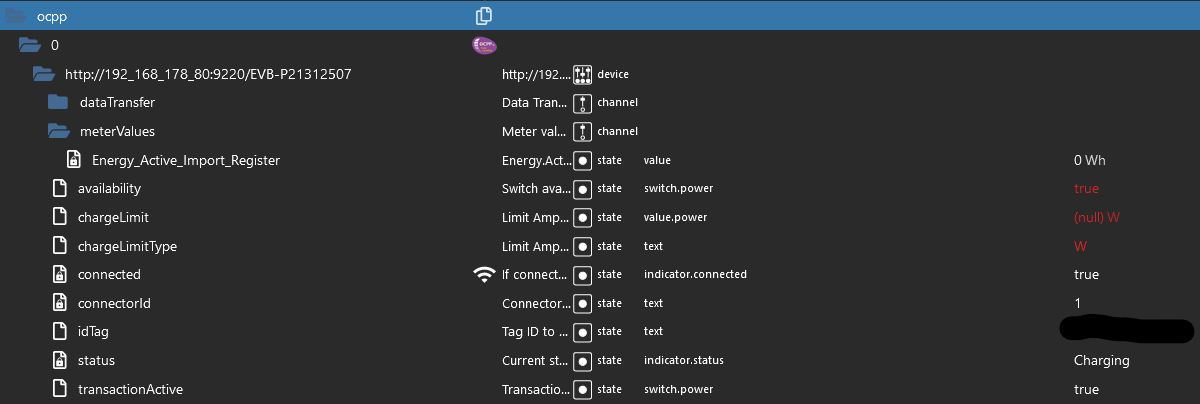
            @foxriver76
            Jup, funktioniert. Die Ladeleistung wollte ich aber ohnehin nicht geregelt haben. Bei meiner Konstellation sind 3.600 W genau richtig.
            beb41230-add3-44be-9537-c7dcd0958cc9-grafik.png

            Proxmox und HA

            1 Reply Last reply
            0
            • Meister MopperM Offline
              Meister MopperM Offline
              Meister Mopper
              wrote on last edited by
              #234

              @foxriver76

              Hier noch ein wenig Futter für Alpha.

              Gestern und heute reproduzierbar:

              Das Beenden eines Ladevorgangs ist wegen timeout nicht möglich. Erst nach einem Neustart des Adapters kann ich beenden.

              Hier das log:

              ocpp.0	2022-10-05 17:46:46.971	error	Cannot execute command "transactionActive" for "http://192_168_178_80:9220/XXXXXXXXX": Timeout for message b95c484c-4bdc-48cf-9553-98a1958e427b
              ocpp.0	2022-10-05 17:47:18.755	info	Got terminate signal TERMINATE_YOURSELF
              ocpp.0	2022-10-05 17:47:18.936	info	terminating
              ocpp.0	2022-10-05 17:47:18.938	info	Terminated (ADAPTER_REQUESTED_TERMINATION): Without reason
              ocpp.0	2022-10-05 17:47:24.009	debug	Redis Objects: Use Redis connection: 192.168.178.10:9001
              ocpp.0	2022-10-05 17:47:24.071	debug	Objects client ready ... initialize now
              ocpp.0	2022-10-05 17:47:24.073	debug	Objects create System PubSub Client
              ocpp.0	2022-10-05 17:47:24.075	debug	Objects create User PubSub Client
              ocpp.0	2022-10-05 17:47:24.175	debug	Objects client initialize lua scripts
              ocpp.0	2022-10-05 17:47:24.184	debug	Objects connected to redis: 192.168.178.10:9001
              ocpp.0	2022-10-05 17:47:24.236	debug	Redis States: Use Redis connection: 192.168.178.10:6379
              ocpp.0	2022-10-05 17:47:24.246	debug	States create System PubSub Client
              ocpp.0	2022-10-05 17:47:24.248	debug	States create User PubSub Client
              ocpp.0	2022-10-05 17:47:24.260	debug	States connected to redis: 192.168.178.10:6379
              ocpp.0	2022-10-05 17:47:24.434	info	starting. Version 0.7.0 in /opt/iobroker/node_modules/iobroker.ocpp, node: v16.17.1, js-controller: 4.0.23
              ocpp.0	2022-10-05 17:47:24.476	info	Starting OCPP Server
              ocpp.0	2022-10-05 17:47:24.514	info	Server listening on port 9220
              ocpp.0	2022-10-05 17:47:58.342	debug	Connection from "http://192.168.178.80:9220/XXXXXXXXX" with credentials "undefined", protocol: "http", OCPP: ocpp1.6
              ocpp.0	2022-10-05 17:47:58.344	info	New valid connection from "http://192.168.178.80:9220/XXXXXXXXX" (http/ocpp1.6)
              ocpp.0	2022-10-05 17:47:58.395	info	New device connected: "http://192.168.178.80:9220/XXXXXXXXX"
              ocpp.0	2022-10-05 17:47:58.397	info	Requesting BootNotification from "http://192.168.178.80:9220/XXXXXXXXX"
              ocpp.0	2022-10-05 17:47:58.479	debug	{"commandOcpp":"Heartbeat"}
              ocpp.0	2022-10-05 17:47:58.480	debug	Received heartbeat from "http://192.168.178.80:9220/XXXXXXXXX"
              ocpp.0	2022-10-05 17:47:59.433	info	Requesting StatusNotification from "http://192.168.178.80:9220/XXXXXXXXX"
              ocpp.0	2022-10-05 17:48:03.308	debug	{"chargePointVendor":"EV-BOX","chargePointModel":"G4E-WIFI","chargePointSerialNumber":"21312507","firmwareVersion":"P0422B0422v0.211223_U6.0.0-050","commandOcpp":"BootNotification"}
              ocpp.0	2022-10-05 17:48:03.309	info	Received boot notification from "http://192.168.178.80:9220/XXXXXXXXX"
              ocpp.0	2022-10-05 17:48:03.782	debug	{"connectorId":1,"status":"Charging","errorCode":"NoError","info":"C;370","timestamp":"2022-10-05T15:48:03Z","commandOcpp":"StatusNotification"}
              ocpp.0	2022-10-05 17:48:03.783	info	Received Status Notification from "http://192.168.178.80:9220/XXXXXXXXX": Charging
              ocpp.0	2022-10-05 17:48:08.325	debug	{"vendorId":"EV-BOX","messageId":"evbStatusNotification","data":"1,Charging,NoError,No error.,1,Blue,1,{20,7984,26},{0,0},{C,11920,6044,12159},0,0,370,2022-10-05T15:48:03Z,1,3,{0,0,0,0,0,0,0,0,0},300,14,5,113,0,360,160,0","commandOcpp":"DataTransfer"}
              ocpp.0	2022-10-05 17:48:08.326	info	Received DataTransfer from "http://192.168.178.80:9220/XXXXXXXXX" with id "evbStatusNotification": 1,Charging,NoError,No error.,1,Blue,1,{20,7984,26},{0,0},{C,11920,6044,12159},0,0,370,2022-10-05T15:48:03Z,1,3,{0,0,0,0,0,0,0,0,0},300,14,5,113,0,360,160,0
              ocpp.0	2022-10-05 17:48:29.439	warn	Could not request states of "http://192.168.178.80:9220/XXXXXXXXX": Timeout for message 3dbb5093-d330-4511-86e4-6e16480013ec
              ocpp.0	2022-10-05 17:48:30.797	debug	Sending RemoteStopTransaction for http://192_168_178_80:9220/XXXXXXXXX
              ocpp.0	2022-10-05 17:48:36.144	debug	{"transactionId":1,"idTag":"048EAB728E6781","timestamp":"2022-10-05T15:48:35Z","meterStop":0,"reason":"Remote","commandOcpp":"StopTransaction"}
              ocpp.0	2022-10-05 17:48:36.145	info	Received stop transaction from "http://192.168.178.80:9220/XXXXXXXXX"
              ocpp.0	2022-10-05 17:48:36.956	debug	{"connectorId":1,"status":"Finishing","errorCode":"NoError","timestamp":"2022-10-05T15:48:36Z","commandOcpp":"StatusNotification"}
              ocpp.0	2022-10-05 17:48:36.957	info	Received Status Notification from "http://192.168.178.80:9220/XXXXXXXXX": Finishing
              ocpp.0	2022-10-05 17:48:40.315	debug	{"vendorId":"EV-BOX","messageId":"evbStatusNotification","data":"1,Finishing,NoError,No error.,0,Green,0,{20,7984,100},{0,0},{C,11920,6156,61616},0,0,370,2022-10-05T15:48:36Z,0,3,{0,0,0,0,0,0,0,0,0},310,13,4,113,0,360,900,0","commandOcpp":"DataTransfer"}
              ocpp.0	2022-10-05 17:48:40.316	info	Received DataTransfer from "http://192.168.178.80:9220/XXXXXXXXX" with id "evbStatusNotification": 1,Finishing,NoError,No error.,0,Green,0,{20,7984,100},{0,0},{C,11920,6156,61616},0,0,370,2022-10-05T15:48:36Z,0,3,{0,0,0,0,0,0,0,0,0},310,13,4,113,0,360,900,0
              

              Proxmox und HA

              foxriver76F 1 Reply Last reply
              0
              • Meister MopperM Meister Mopper

                @foxriver76

                Hier noch ein wenig Futter für Alpha.

                Gestern und heute reproduzierbar:

                Das Beenden eines Ladevorgangs ist wegen timeout nicht möglich. Erst nach einem Neustart des Adapters kann ich beenden.

                Hier das log:

                ocpp.0	2022-10-05 17:46:46.971	error	Cannot execute command "transactionActive" for "http://192_168_178_80:9220/XXXXXXXXX": Timeout for message b95c484c-4bdc-48cf-9553-98a1958e427b
                ocpp.0	2022-10-05 17:47:18.755	info	Got terminate signal TERMINATE_YOURSELF
                ocpp.0	2022-10-05 17:47:18.936	info	terminating
                ocpp.0	2022-10-05 17:47:18.938	info	Terminated (ADAPTER_REQUESTED_TERMINATION): Without reason
                ocpp.0	2022-10-05 17:47:24.009	debug	Redis Objects: Use Redis connection: 192.168.178.10:9001
                ocpp.0	2022-10-05 17:47:24.071	debug	Objects client ready ... initialize now
                ocpp.0	2022-10-05 17:47:24.073	debug	Objects create System PubSub Client
                ocpp.0	2022-10-05 17:47:24.075	debug	Objects create User PubSub Client
                ocpp.0	2022-10-05 17:47:24.175	debug	Objects client initialize lua scripts
                ocpp.0	2022-10-05 17:47:24.184	debug	Objects connected to redis: 192.168.178.10:9001
                ocpp.0	2022-10-05 17:47:24.236	debug	Redis States: Use Redis connection: 192.168.178.10:6379
                ocpp.0	2022-10-05 17:47:24.246	debug	States create System PubSub Client
                ocpp.0	2022-10-05 17:47:24.248	debug	States create User PubSub Client
                ocpp.0	2022-10-05 17:47:24.260	debug	States connected to redis: 192.168.178.10:6379
                ocpp.0	2022-10-05 17:47:24.434	info	starting. Version 0.7.0 in /opt/iobroker/node_modules/iobroker.ocpp, node: v16.17.1, js-controller: 4.0.23
                ocpp.0	2022-10-05 17:47:24.476	info	Starting OCPP Server
                ocpp.0	2022-10-05 17:47:24.514	info	Server listening on port 9220
                ocpp.0	2022-10-05 17:47:58.342	debug	Connection from "http://192.168.178.80:9220/XXXXXXXXX" with credentials "undefined", protocol: "http", OCPP: ocpp1.6
                ocpp.0	2022-10-05 17:47:58.344	info	New valid connection from "http://192.168.178.80:9220/XXXXXXXXX" (http/ocpp1.6)
                ocpp.0	2022-10-05 17:47:58.395	info	New device connected: "http://192.168.178.80:9220/XXXXXXXXX"
                ocpp.0	2022-10-05 17:47:58.397	info	Requesting BootNotification from "http://192.168.178.80:9220/XXXXXXXXX"
                ocpp.0	2022-10-05 17:47:58.479	debug	{"commandOcpp":"Heartbeat"}
                ocpp.0	2022-10-05 17:47:58.480	debug	Received heartbeat from "http://192.168.178.80:9220/XXXXXXXXX"
                ocpp.0	2022-10-05 17:47:59.433	info	Requesting StatusNotification from "http://192.168.178.80:9220/XXXXXXXXX"
                ocpp.0	2022-10-05 17:48:03.308	debug	{"chargePointVendor":"EV-BOX","chargePointModel":"G4E-WIFI","chargePointSerialNumber":"21312507","firmwareVersion":"P0422B0422v0.211223_U6.0.0-050","commandOcpp":"BootNotification"}
                ocpp.0	2022-10-05 17:48:03.309	info	Received boot notification from "http://192.168.178.80:9220/XXXXXXXXX"
                ocpp.0	2022-10-05 17:48:03.782	debug	{"connectorId":1,"status":"Charging","errorCode":"NoError","info":"C;370","timestamp":"2022-10-05T15:48:03Z","commandOcpp":"StatusNotification"}
                ocpp.0	2022-10-05 17:48:03.783	info	Received Status Notification from "http://192.168.178.80:9220/XXXXXXXXX": Charging
                ocpp.0	2022-10-05 17:48:08.325	debug	{"vendorId":"EV-BOX","messageId":"evbStatusNotification","data":"1,Charging,NoError,No error.,1,Blue,1,{20,7984,26},{0,0},{C,11920,6044,12159},0,0,370,2022-10-05T15:48:03Z,1,3,{0,0,0,0,0,0,0,0,0},300,14,5,113,0,360,160,0","commandOcpp":"DataTransfer"}
                ocpp.0	2022-10-05 17:48:08.326	info	Received DataTransfer from "http://192.168.178.80:9220/XXXXXXXXX" with id "evbStatusNotification": 1,Charging,NoError,No error.,1,Blue,1,{20,7984,26},{0,0},{C,11920,6044,12159},0,0,370,2022-10-05T15:48:03Z,1,3,{0,0,0,0,0,0,0,0,0},300,14,5,113,0,360,160,0
                ocpp.0	2022-10-05 17:48:29.439	warn	Could not request states of "http://192.168.178.80:9220/XXXXXXXXX": Timeout for message 3dbb5093-d330-4511-86e4-6e16480013ec
                ocpp.0	2022-10-05 17:48:30.797	debug	Sending RemoteStopTransaction for http://192_168_178_80:9220/XXXXXXXXX
                ocpp.0	2022-10-05 17:48:36.144	debug	{"transactionId":1,"idTag":"048EAB728E6781","timestamp":"2022-10-05T15:48:35Z","meterStop":0,"reason":"Remote","commandOcpp":"StopTransaction"}
                ocpp.0	2022-10-05 17:48:36.145	info	Received stop transaction from "http://192.168.178.80:9220/XXXXXXXXX"
                ocpp.0	2022-10-05 17:48:36.956	debug	{"connectorId":1,"status":"Finishing","errorCode":"NoError","timestamp":"2022-10-05T15:48:36Z","commandOcpp":"StatusNotification"}
                ocpp.0	2022-10-05 17:48:36.957	info	Received Status Notification from "http://192.168.178.80:9220/XXXXXXXXX": Finishing
                ocpp.0	2022-10-05 17:48:40.315	debug	{"vendorId":"EV-BOX","messageId":"evbStatusNotification","data":"1,Finishing,NoError,No error.,0,Green,0,{20,7984,100},{0,0},{C,11920,6156,61616},0,0,370,2022-10-05T15:48:36Z,0,3,{0,0,0,0,0,0,0,0,0},310,13,4,113,0,360,900,0","commandOcpp":"DataTransfer"}
                ocpp.0	2022-10-05 17:48:40.316	info	Received DataTransfer from "http://192.168.178.80:9220/XXXXXXXXX" with id "evbStatusNotification": 1,Finishing,NoError,No error.,0,Green,0,{20,7984,100},{0,0},{C,11920,6156,61616},0,0,370,2022-10-05T15:48:36Z,0,3,{0,0,0,0,0,0,0,0,0},310,13,4,113,0,360,900,0
                
                foxriver76F Offline
                foxriver76F Offline
                foxriver76
                Developer
                wrote on last edited by
                #235

                @meister-mopper Die 0.8.0 fixed das eventuell. Die Struktur hat sich allerdings geändert um Charger mit mehreren Connectoren zu unterstützen.

                Videotutorials & mehr

                Hier könnt ihr mich unterstützen.

                1 Reply Last reply
                0
                • Meister MopperM Offline
                  Meister MopperM Offline
                  Meister Mopper
                  wrote on last edited by
                  #236

                  @foxriver76

                  Konnte heute mal wieder testen:
                  Version 0.8.0

                  Ein Ladestart war erst möglich, nachdem ich den Adapter gestoppt, den kompletten Objektbaum gelöscht und den Adapter neu gestartet hatte.

                  Bei Ladestopp tat sich nichts ( because no active transaction found), also habe ich versucht, available auf false zu stellen. Auch nichts. Letztlich habe ich den Stecker gezogen.

                  ocpp.0	2022-10-28 16:19:20.562	debug	Sending RemoteStopTransaction for http://192_168_178_80:9220/XXXXXXXXX.1
                  ocpp.0	2022-10-28 16:19:20.563	warn	Cannot stop transaction on http://192_168_178_80:9220/EVB-XXXXXXXXX.1, because no active transaction found
                  ocpp.0	2022-10-28 16:19:30.904	debug	Sending ChangeAvailability for http://192_168_178_80:9220/EVB-XXXXXXXXX.1: Inoperative
                  ocpp.0	2022-10-28 16:19:31.257	debug	{"connectorId":1,"status":"Charging","errorCode":"NoError","info":"C;400","timestamp":"2022-10-28T14:19:30Z","commandOcpp":"StatusNotification"}
                  ocpp.0	2022-10-28 16:19:31.259	info	Received Status Notification from "http://192.168.178.80:9220/EVB-XXXXXXXXX.1": Charging
                  

                  Proxmox und HA

                  SoeniS 1 Reply Last reply
                  0
                  • Meister MopperM Meister Mopper

                    @foxriver76

                    Konnte heute mal wieder testen:
                    Version 0.8.0

                    Ein Ladestart war erst möglich, nachdem ich den Adapter gestoppt, den kompletten Objektbaum gelöscht und den Adapter neu gestartet hatte.

                    Bei Ladestopp tat sich nichts ( because no active transaction found), also habe ich versucht, available auf false zu stellen. Auch nichts. Letztlich habe ich den Stecker gezogen.

                    ocpp.0	2022-10-28 16:19:20.562	debug	Sending RemoteStopTransaction for http://192_168_178_80:9220/XXXXXXXXX.1
                    ocpp.0	2022-10-28 16:19:20.563	warn	Cannot stop transaction on http://192_168_178_80:9220/EVB-XXXXXXXXX.1, because no active transaction found
                    ocpp.0	2022-10-28 16:19:30.904	debug	Sending ChangeAvailability for http://192_168_178_80:9220/EVB-XXXXXXXXX.1: Inoperative
                    ocpp.0	2022-10-28 16:19:31.257	debug	{"connectorId":1,"status":"Charging","errorCode":"NoError","info":"C;400","timestamp":"2022-10-28T14:19:30Z","commandOcpp":"StatusNotification"}
                    ocpp.0	2022-10-28 16:19:31.259	info	Received Status Notification from "http://192.168.178.80:9220/EVB-XXXXXXXXX.1": Charging
                    
                    SoeniS Offline
                    SoeniS Offline
                    Soeni
                    wrote on last edited by
                    #237

                    hallo, ich würde gerne den GO-E Charger testen und habe den adapter eingerichtet. Im Go E habe ich die Adresse mit Port eingetragen. Der Go E meldet keine Verbindung. Gibt es eine Debugmöglichkeit? Bin ich der erste, der den Go E testet?

                    Meister MopperM 1 Reply Last reply
                    0
                    • SoeniS Soeni

                      hallo, ich würde gerne den GO-E Charger testen und habe den adapter eingerichtet. Im Go E habe ich die Adresse mit Port eingetragen. Der Go E meldet keine Verbindung. Gibt es eine Debugmöglichkeit? Bin ich der erste, der den Go E testet?

                      Meister MopperM Offline
                      Meister MopperM Offline
                      Meister Mopper
                      wrote on last edited by
                      #238

                      @soeni

                      Wie hast Du denn die Adresse mit Port eingetragen? Ich musste die IP bei meiner EVbox mit ws:// eintragen.

                      Proxmox und HA

                      SoeniS 1 Reply Last reply
                      0
                      • Meister MopperM Meister Mopper

                        @soeni

                        Wie hast Du denn die Adresse mit Port eingetragen? Ich musste die IP bei meiner EVbox mit ws:// eintragen.

                        SoeniS Offline
                        SoeniS Offline
                        Soeni
                        wrote on last edited by
                        #239

                        @meister-mopper

                        Wunderbar, das war es. Damit kann ich bestätigen, dass es mit dem Go E auch geht. Zumindest die initiale Verbindung. Daten sehen erst mal mau aus, ich muss aber erst mal einen Ladevorgang starten um das zu beurteilen. Vielen dank in jedem Fall schon mal.

                        1 Reply Last reply
                        0
                        • F Offline
                          F Offline
                          frank11
                          wrote on last edited by frank11
                          #240

                          Erstmal vielen Dank für den Adapter @foxriver76 , funktioniert sehr gut.

                          Ich nutze den DaheimLader Touch und der scheint auch ausreichend Daten zu liefern.
                          Das einzige was mich stört, ist: Daten kommen nur in kurzen Intervallen, wenn das Laden aktiv ist.
                          Die KeepAlive-Meldungen kommen zwar regelmäßig auch außerhalb des Ladezyklus, aber keine Daten, außer ich starte den Adapter neu, kann ich das beeinflussen?

                          Ich möchte auch Daten sehen, wenn kein Auto geladen wird.

                          Geht das? Wenn ja, wie?

                          foxriver76F 1 Reply Last reply
                          0
                          • F frank11

                            Erstmal vielen Dank für den Adapter @foxriver76 , funktioniert sehr gut.

                            Ich nutze den DaheimLader Touch und der scheint auch ausreichend Daten zu liefern.
                            Das einzige was mich stört, ist: Daten kommen nur in kurzen Intervallen, wenn das Laden aktiv ist.
                            Die KeepAlive-Meldungen kommen zwar regelmäßig auch außerhalb des Ladezyklus, aber keine Daten, außer ich starte den Adapter neu, kann ich das beeinflussen?

                            Ich möchte auch Daten sehen, wenn kein Auto geladen wird.

                            Geht das? Wenn ja, wie?

                            foxriver76F Offline
                            foxriver76F Offline
                            foxriver76
                            Developer
                            wrote on last edited by
                            #241

                            @frank11 Aktuell kann man die Konfiguration der WB, wie oft reported wird etc. leider nicht ändern. Leider scheint die Library nicht korrekt mit der Konfig zu interagieren. Ich habe in einem Issue mir mal noch eine andere Lib vermerkt, grundsätzlich ist die Idee, Sachen wie das Report Intervall etc ändern zu können. Nur die Zeit fehlt wie so oft um die andere Lib mal zu testen.

                            Videotutorials & mehr

                            Hier könnt ihr mich unterstützen.

                            F 1 Reply Last reply
                            0
                            • foxriver76F foxriver76

                              @frank11 Aktuell kann man die Konfiguration der WB, wie oft reported wird etc. leider nicht ändern. Leider scheint die Library nicht korrekt mit der Konfig zu interagieren. Ich habe in einem Issue mir mal noch eine andere Lib vermerkt, grundsätzlich ist die Idee, Sachen wie das Report Intervall etc ändern zu können. Nur die Zeit fehlt wie so oft um die andere Lib mal zu testen.

                              F Offline
                              F Offline
                              frank11
                              wrote on last edited by
                              #242

                              @foxriver76 Alles klar, verstehe.

                              Ich warte dann einfach. :-D

                              Mir reicht das im Moment wie es ist, um meinen Stromverbrauch mit Grafana an meinen Arbeitgeber zu reporten für die Abrechnung.

                              Alles andere ist Nice to have.

                              1 Reply Last reply
                              0
                              • foxriver76F foxriver76

                                @meister-mopper kannst du den Change mal rückgängig machen, hier https://github.com/foxriver76/ioBroker.ocpp/blob/48303d5b08f18682ed681038d614133990a50c1e/src/main.ts#L520 ein W statt einem A rein schreibe, den chargeLimit state unter Objekte mit einer sinnvollen Wattbegrenzung beschreiben und dann nochmal starten. Evtl. benötigt die WB die Begrenzung in Watt, ich finde leider keine Spezifikation. Falls es das ist, kann ich es einbauen.

                                G Offline
                                G Offline
                                gklank
                                wrote on last edited by gklank
                                #243

                                @foxriver76 Hallo,

                                ich bin absolut neu mit dem IOBroker unterwegs, daher doch noch etliche Lücken.
                                Gerne nehme ich Tips oder Instruktionen auf...

                                Ich möchte von meinen Node-Red Lösungen auf den IOBroker umzustellen.
                                Da das Wenige was ich mit der Wallbox machen will, bzw. mit Node-Red gemacht habe, lässt mich hier schon noch hoffen...
                                Letztendlich möchte ich den aktuelle Verbrauch auslesen, was schon geht, passt!!!
                                Allerdings möchte ich auch die Ladeleistung einstellen können.

                                Ich benutze die Wallbox von Mennekes:
                                Amtron Professional PNC 22 C2, Wallbox 1385202

                                Ich habe den ocpp Adapter installiert und bekomme die Verbindung zu meiner Wallbox:
                                ocpp.0 2022-12-10 21:51:13.653 info Received MeterValues from "/ocpp/1365202.00069"
                                ocpp.0 2022-12-10 21:51:12.730 info Received Status Notification from "/ocpp/1365202.00069": Available
                                ocpp.0 2022-12-10 21:51:12.612 info Received Status Notification from "/ocpp/1365202.00069": Available
                                ocpp.0 2022-12-10 21:51:09.666 info Sending GetConfiguration to "/ocpp/1365202.00069"
                                ocpp.0 2022-12-10 21:51:08.811 info Received MeterValues from "/ocpp/1365202.00069"
                                ocpp.0 2022-12-10 21:51:08.712 info Received Status Notification from "/ocpp/1365202.00069": Available
                                ocpp.0 2022-12-10 21:51:08.578 info Requesting MeterValues from "/ocpp/1365202.00069"
                                ocpp.0 2022-12-10 21:51:08.568 info Received Status Notification from "/ocpp/1365202.00069": Available
                                ocpp.0 2022-12-10 21:51:08.431 info Received Status Notification from "/ocpp/1365202.00069": Available
                                ocpp.0 2022-12-10 21:51:08.142 info Received Status Notification from "/ocpp/1365202.00069": Available
                                ocpp.0 2022-12-10 21:51:08.002 info Received Status Notification from "/ocpp/1365202.00069": Available
                                ocpp.0 2022-12-10 21:51:07.610 info Received boot notification from "/ocpp/1365202.00069"
                                ocpp.0 2022-12-10 21:51:07.508 info Requesting StatusNotification from "/ocpp/1365202.00069"
                                ocpp.0 2022-12-10 21:51:07.506 info New device connected: "/ocpp/1365202.00069"
                                ocpp.0 2022-12-10 21:51:07.323 info New valid connection from "/ocpp/1365202.00069" (http/ocpp1.6)

                                Um die Ladeleistung einzustellen muss man dem einen Parameter die entsprechende Amperezahl mitgeben:
                                Ich meine sogar, dass es nur ein String ist, dann entsprechend 6 Ampere für 3,6 kW, oder eben 16 für 11 kW, oder 32 A für 22 kW.

                                Dies schicke ich wie folgt über die Nodered-Node an die Wallbox:
                                Eingepackt in dieses Array:
                                Wert = "6"
                                ger[0] = 2;
                                ger[1] = "b797fb70-3a57-11ed-b390-c15e4f34211c";
                                ger[2] = "ChangeConfiguration";
                                ger[3] = {
                                key: "OperatorCurrentLimit",
                                readonly: false,
                                value: power
                                }

                                Der ger[1] hat sicherlich keinerlei Bedeutung als irgendein aktueller Schlüssel für dieses Kommando.
                                Da habe ich schon alles Mögliche geschickt, ohne dass es weder negativ noch positiv auffiel.

                                Letztendlich muss halt der "key: "OperatorCurrentLimit" auf die entsprechende Amperezahl gesetzt werden.

                                Diesen Key gibt es aber in dem entsprechenden Objekt im IOBroker nicht.

                                Ich würde jetzt meinen, dass ich den mal "frech" anlegen sollte und dann darüber den Wert ändern.
                                Bzw. gerade mal gemacht:

                                Sieht dann so aus:
                                {
                                "common": {
                                "name": "OperatorCurrentLimit",
                                "desc": "Manuell erzeugt",
                                "role": "state",
                                "type": "number",
                                "read": true,
                                "write": true,
                                "def": ""
                                },
                                "type": "state",
                                "native": {},
                                "_id": "ocpp.0./ocpp/1365202_00069.OperatorCurrentLimit",
                                "acl": {
                                "object": 1636,
                                "state": 1636,
                                "owner": "system.user.admin",
                                "ownerGroup": "system.group.administrator"
                                },
                                "from": "system.adapter.admin.0",
                                "user": "system.user.admin",
                                "ts": 1670707273587
                                }

                                Aber wenn ich jetzt einen anderen Wert im iobroker eintrage und speichere, dann sehe ich im Protokoll keinen Traffic zur Wallbox hin.
                                Dementsprechend wird auch die Änderung nicht bestätigt und steht somit verständlicherweise auf "false".

                                Und in der Wallbox ist der OperatorCurrentLimit nicht verändert.

                                Ich weiß, ein etwas wildes Probieren...

                                Habt Ihr mir noch einige Tipps bzw. Instruktionen?

                                Grüße

                                Gerhard

                                G G 2 Replies Last reply
                                0
                                • G gklank

                                  @foxriver76 Hallo,

                                  ich bin absolut neu mit dem IOBroker unterwegs, daher doch noch etliche Lücken.
                                  Gerne nehme ich Tips oder Instruktionen auf...

                                  Ich möchte von meinen Node-Red Lösungen auf den IOBroker umzustellen.
                                  Da das Wenige was ich mit der Wallbox machen will, bzw. mit Node-Red gemacht habe, lässt mich hier schon noch hoffen...
                                  Letztendlich möchte ich den aktuelle Verbrauch auslesen, was schon geht, passt!!!
                                  Allerdings möchte ich auch die Ladeleistung einstellen können.

                                  Ich benutze die Wallbox von Mennekes:
                                  Amtron Professional PNC 22 C2, Wallbox 1385202

                                  Ich habe den ocpp Adapter installiert und bekomme die Verbindung zu meiner Wallbox:
                                  ocpp.0 2022-12-10 21:51:13.653 info Received MeterValues from "/ocpp/1365202.00069"
                                  ocpp.0 2022-12-10 21:51:12.730 info Received Status Notification from "/ocpp/1365202.00069": Available
                                  ocpp.0 2022-12-10 21:51:12.612 info Received Status Notification from "/ocpp/1365202.00069": Available
                                  ocpp.0 2022-12-10 21:51:09.666 info Sending GetConfiguration to "/ocpp/1365202.00069"
                                  ocpp.0 2022-12-10 21:51:08.811 info Received MeterValues from "/ocpp/1365202.00069"
                                  ocpp.0 2022-12-10 21:51:08.712 info Received Status Notification from "/ocpp/1365202.00069": Available
                                  ocpp.0 2022-12-10 21:51:08.578 info Requesting MeterValues from "/ocpp/1365202.00069"
                                  ocpp.0 2022-12-10 21:51:08.568 info Received Status Notification from "/ocpp/1365202.00069": Available
                                  ocpp.0 2022-12-10 21:51:08.431 info Received Status Notification from "/ocpp/1365202.00069": Available
                                  ocpp.0 2022-12-10 21:51:08.142 info Received Status Notification from "/ocpp/1365202.00069": Available
                                  ocpp.0 2022-12-10 21:51:08.002 info Received Status Notification from "/ocpp/1365202.00069": Available
                                  ocpp.0 2022-12-10 21:51:07.610 info Received boot notification from "/ocpp/1365202.00069"
                                  ocpp.0 2022-12-10 21:51:07.508 info Requesting StatusNotification from "/ocpp/1365202.00069"
                                  ocpp.0 2022-12-10 21:51:07.506 info New device connected: "/ocpp/1365202.00069"
                                  ocpp.0 2022-12-10 21:51:07.323 info New valid connection from "/ocpp/1365202.00069" (http/ocpp1.6)

                                  Um die Ladeleistung einzustellen muss man dem einen Parameter die entsprechende Amperezahl mitgeben:
                                  Ich meine sogar, dass es nur ein String ist, dann entsprechend 6 Ampere für 3,6 kW, oder eben 16 für 11 kW, oder 32 A für 22 kW.

                                  Dies schicke ich wie folgt über die Nodered-Node an die Wallbox:
                                  Eingepackt in dieses Array:
                                  Wert = "6"
                                  ger[0] = 2;
                                  ger[1] = "b797fb70-3a57-11ed-b390-c15e4f34211c";
                                  ger[2] = "ChangeConfiguration";
                                  ger[3] = {
                                  key: "OperatorCurrentLimit",
                                  readonly: false,
                                  value: power
                                  }

                                  Der ger[1] hat sicherlich keinerlei Bedeutung als irgendein aktueller Schlüssel für dieses Kommando.
                                  Da habe ich schon alles Mögliche geschickt, ohne dass es weder negativ noch positiv auffiel.

                                  Letztendlich muss halt der "key: "OperatorCurrentLimit" auf die entsprechende Amperezahl gesetzt werden.

                                  Diesen Key gibt es aber in dem entsprechenden Objekt im IOBroker nicht.

                                  Ich würde jetzt meinen, dass ich den mal "frech" anlegen sollte und dann darüber den Wert ändern.
                                  Bzw. gerade mal gemacht:

                                  Sieht dann so aus:
                                  {
                                  "common": {
                                  "name": "OperatorCurrentLimit",
                                  "desc": "Manuell erzeugt",
                                  "role": "state",
                                  "type": "number",
                                  "read": true,
                                  "write": true,
                                  "def": ""
                                  },
                                  "type": "state",
                                  "native": {},
                                  "_id": "ocpp.0./ocpp/1365202_00069.OperatorCurrentLimit",
                                  "acl": {
                                  "object": 1636,
                                  "state": 1636,
                                  "owner": "system.user.admin",
                                  "ownerGroup": "system.group.administrator"
                                  },
                                  "from": "system.adapter.admin.0",
                                  "user": "system.user.admin",
                                  "ts": 1670707273587
                                  }

                                  Aber wenn ich jetzt einen anderen Wert im iobroker eintrage und speichere, dann sehe ich im Protokoll keinen Traffic zur Wallbox hin.
                                  Dementsprechend wird auch die Änderung nicht bestätigt und steht somit verständlicherweise auf "false".

                                  Und in der Wallbox ist der OperatorCurrentLimit nicht verändert.

                                  Ich weiß, ein etwas wildes Probieren...

                                  Habt Ihr mir noch einige Tipps bzw. Instruktionen?

                                  Grüße

                                  Gerhard

                                  G Offline
                                  G Offline
                                  gklank
                                  wrote on last edited by
                                  #244

                                  @gklank Hallo,

                                  ich habe den Loglevel umgestellt und kann jetzt die Message zur Wallbox sehen.
                                  Aber eben keine Rückmeldung zur vermeintlichen Änderung des OperatorCurrentLimits, zwecks Leistungsbeschränkung:

                                  ocpp.0 2022-12-12 01:10:45.451 debug Received heartbeat from "/ocpp/1365202.00069"
                                  ocpp.0 2022-12-12 01:10:45.450 debug {"commandOcpp":"Heartbeat"}
                                  ocpp.0 2022-12-12 01:10:20.331 silly States user redis pmessage ocpp.0.*/ocpp.0./ocpp/1365202_00069.1.OperatorCurrentLimit:{"val":"6","ack":false,"ts":1670803820327,"q":0,"from":"system.adapter.admin.0","user":"system.user.admin","lc":1670803820327}

                                  Grüße

                                  Gerhard

                                  G 1 Reply Last reply
                                  0
                                  • S Offline
                                    S Offline
                                    sunny9999
                                    wrote on last edited by
                                    #245

                                    Hallo @all.......
                                    hab eine Charge Amps Aura Wallbox ( 2 Ausgänge a 22kw)
                                    Die Daten kommen von deren Cloud, hab denen die Daten meines Servers gegeben kommt über wss Protokoll sauber über nen NGINX rein.....
                                    Adapter ist grün
                                    Datepunkte wurden angelegt (für beide Ladeports)
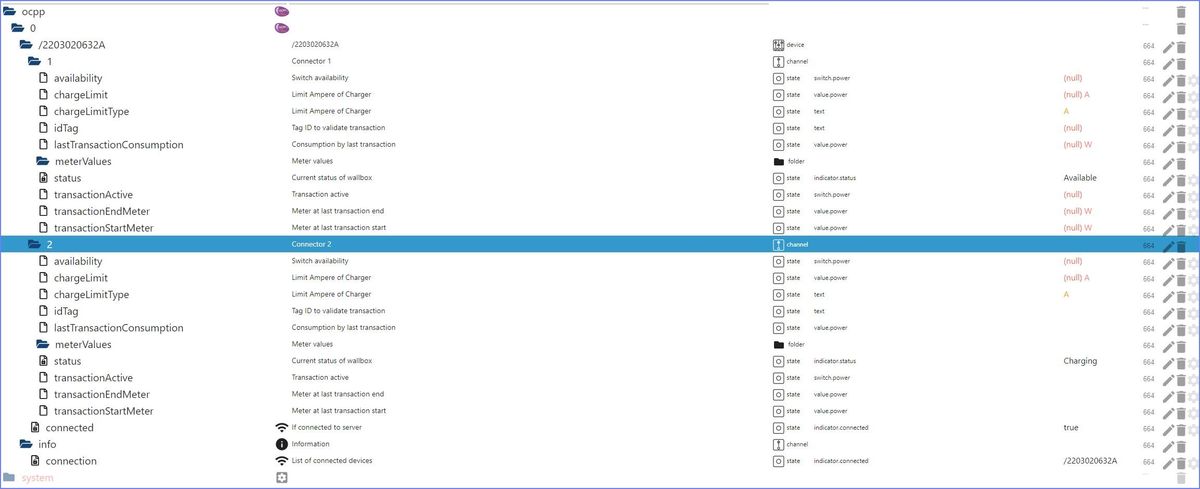
                                    ObjektScreenshot 2022-12-12 101452.jpg
                                    Der hat für den Meter aber ein Verzeichnis angelegt ??
                                    Insgesamt kommen aber keine Daten rein...??
                                    Error Log sieht wie folgt aus :
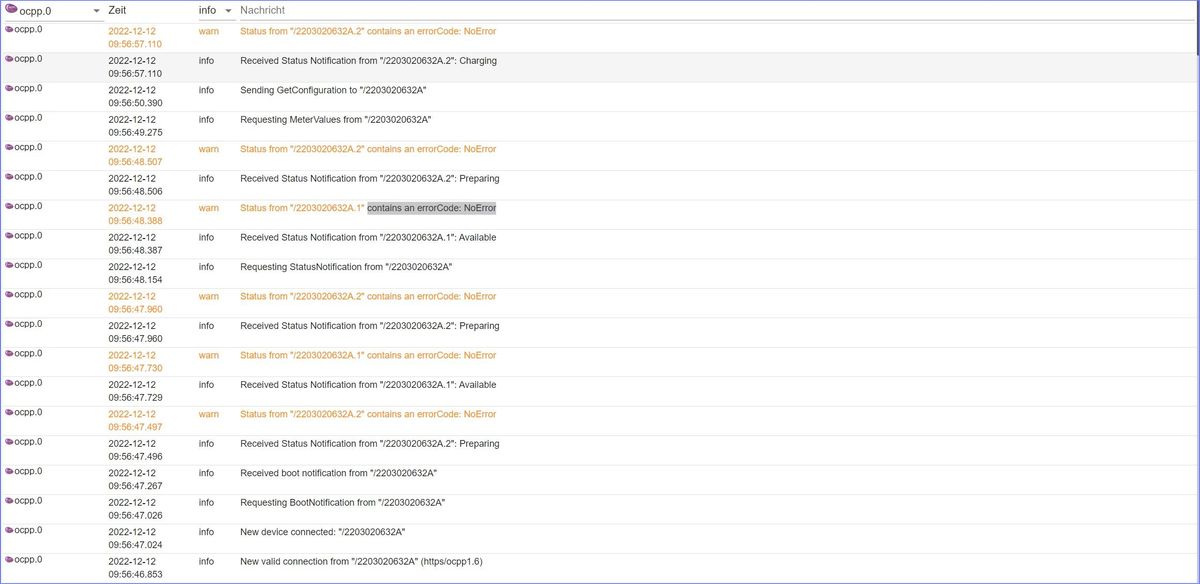
                                    LogScreenshot 2022-12-12 101437.jpg
                                    Jemand eine Idee wie bzw. wo der Bug liegt ?
                                    Danke und thxs
                                    Sunny

                                    H 1 Reply Last reply
                                    0
                                    • S sunny9999

                                      Hallo @all.......
                                      hab eine Charge Amps Aura Wallbox ( 2 Ausgänge a 22kw)
                                      Die Daten kommen von deren Cloud, hab denen die Daten meines Servers gegeben kommt über wss Protokoll sauber über nen NGINX rein.....
                                      Adapter ist grün
                                      Datepunkte wurden angelegt (für beide Ladeports)
                                      ObjektScreenshot 2022-12-12 101452.jpg
                                      Der hat für den Meter aber ein Verzeichnis angelegt ??
                                      Insgesamt kommen aber keine Daten rein...??
                                      Error Log sieht wie folgt aus :
                                      LogScreenshot 2022-12-12 101437.jpg
                                      Jemand eine Idee wie bzw. wo der Bug liegt ?
                                      Danke und thxs
                                      Sunny

                                      H Offline
                                      H Offline
                                      hansano
                                      wrote on last edited by hansano
                                      #246

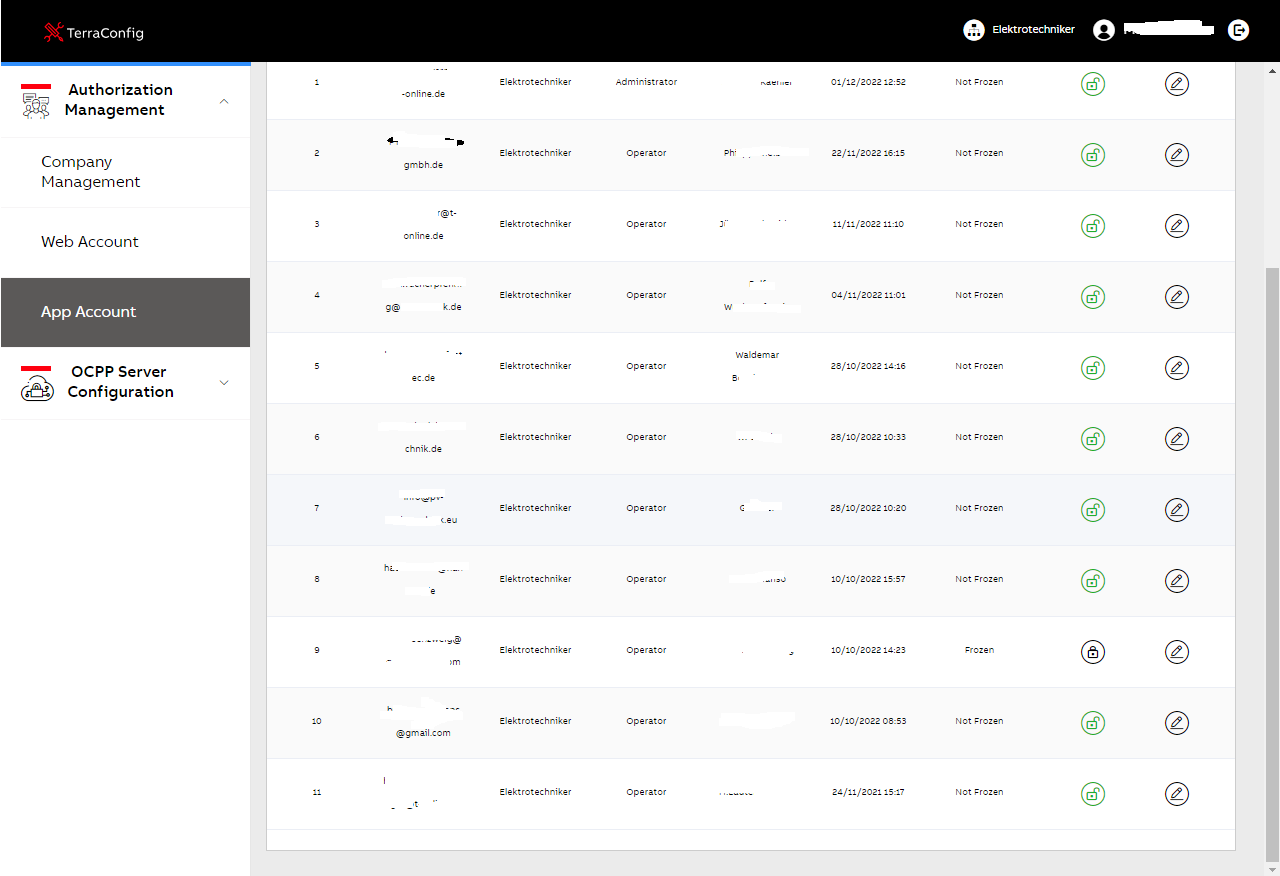
                                      Ich habe Zugangsdaten für die Config-App und das Webportal von ABB bekommen. Soweit so gut.

                                      Ist das normal das ich andere Web-Accounts einsehen und andere App-Accounts sogar sperren/editieren kann? Ich kann sogar neue Accounts anlegen. Einen hab ich mir mal gegönnt. Also wer einen Account brauch, kann sich bei mir melden :). Ist wohl die neue Art Kosten zu sparen bei ABB.
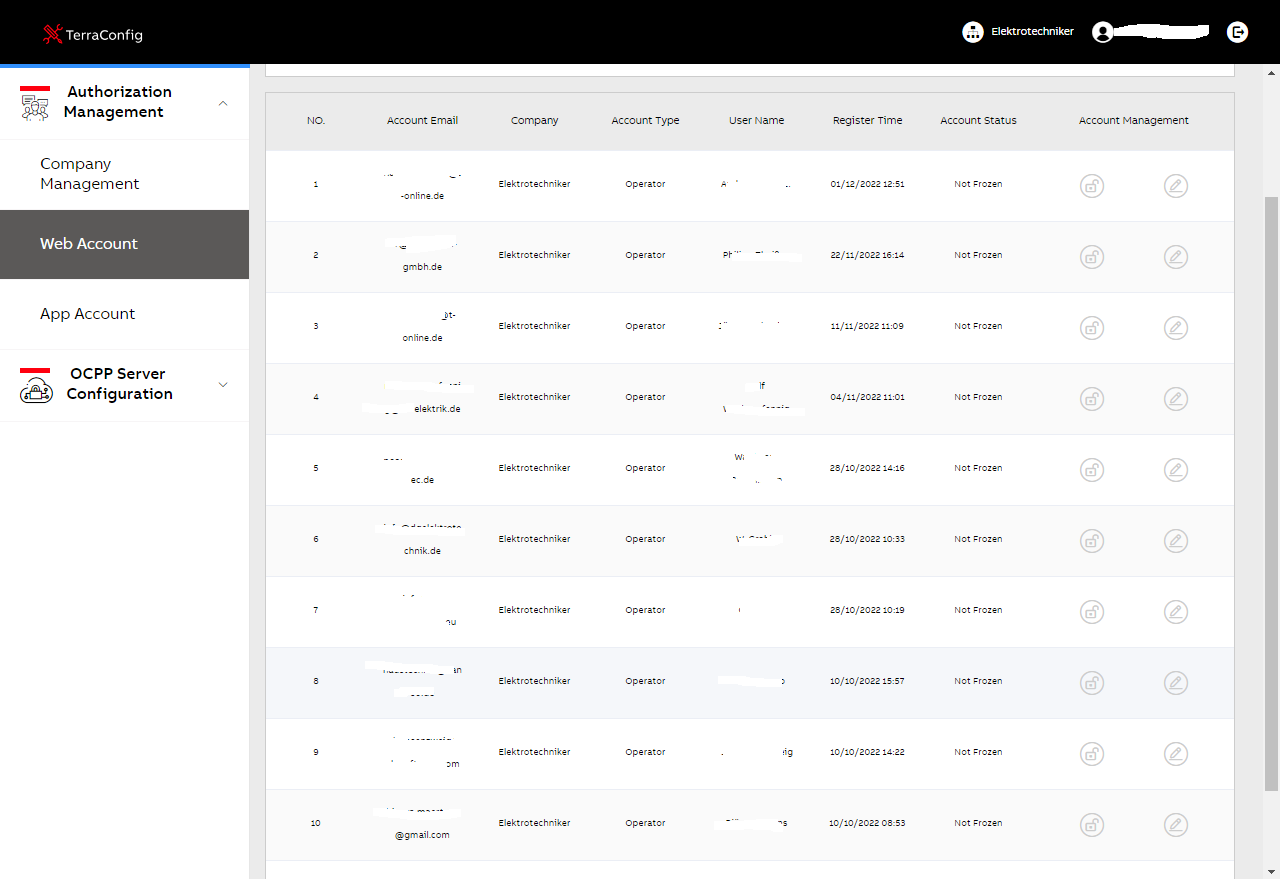
                                      Unbenannt1.png

                                      Unbenannt.png

                                      Denke eher nicht oder?

                                      @sunny9999
                                      sorry, versehentlich als Reply auf deinen Post

                                      1 Reply Last reply
                                      1
                                      • G gklank

                                        @gklank Hallo,

                                        ich habe den Loglevel umgestellt und kann jetzt die Message zur Wallbox sehen.
                                        Aber eben keine Rückmeldung zur vermeintlichen Änderung des OperatorCurrentLimits, zwecks Leistungsbeschränkung:

                                        ocpp.0 2022-12-12 01:10:45.451 debug Received heartbeat from "/ocpp/1365202.00069"
                                        ocpp.0 2022-12-12 01:10:45.450 debug {"commandOcpp":"Heartbeat"}
                                        ocpp.0 2022-12-12 01:10:20.331 silly States user redis pmessage ocpp.0.*/ocpp.0./ocpp/1365202_00069.1.OperatorCurrentLimit:{"val":"6","ack":false,"ts":1670803820327,"q":0,"from":"system.adapter.admin.0","user":"system.user.admin","lc":1670803820327}

                                        Grüße

                                        Gerhard

                                        G Offline
                                        G Offline
                                        gklank
                                        wrote on last edited by
                                        #247

                                        @gklank Hallo,

                                        um unnötige Arbeit für das ocpp Adapter zu vermeiden:

                                        • das Modbus Adapter funktioniert mit der "Amtron Professional PNC 22 C2, Wallbox 1385202" zumindestens in der Form, wie ich damit umgehen möchte.
                                          D.h. ich kann die Leistung der aktuellen Ladung auslesen, kann die Ladeleistung ändern - auch in der Ladephase - und weitere Informartionen auslesen...

                                        Eine gute Erklärung für den Modbus Adapter fand ich hier:
                                        https://www.youtube.com/watch?v=K-95q0sJ0G8&t=378s

                                        Danke an den Kollegen, der den Youtube dafür erstellt hat!!!

                                        • hoffentlich ist dies keine Werbung oder vielleicht nicht ok den Link hier reinzustellen.
                                          Wenn falsch, dann sorry und die Bitte den Link dann rauszulöschen.

                                        Zusätzlich hatte ich noch eine falsche "Annahme" zur Leistungssteuerung der Wallbox.
                                        Hier der funktionierende Tipp:

                                        • den "OPERATOR_CURRENT_LIMIT" ist für den passenden Leistungsbezug, der Wert der maximal aus der Wand kommt
                                          dieser Wert kann nur über das Webfrontend oder ocpp geändert werden.
                                          den wollte ich zur Steuerung der Ladeleistung verwenden, was mit modbus nicht geht, bzw. dazu gar nicht gedacht ist.
                                        • der "Steuerdatenpunkt" um die Ladung temporär zu stoppen (Wert = 0) oder zu verändern (6A für 3.6kW, 16A für 11kW, 32A für 22kW) wird über "HEMS_CURRENT_LIMIT" mit Register 1000 gesteuert

                                        Somit habe ich jetzt die Steuerung für mich wie ich sie brauche.

                                        Vielen Dank für die hier versuchte Hilfe.

                                        Grüße

                                        Gerhard

                                        1 Reply Last reply
                                        0
                                        • B Offline
                                          B Offline
                                          baeckerman83
                                          wrote on last edited by baeckerman83
                                          #248

                                          Gibt es Neuigkeiten dazu ob ich bei einer ABB Wallbox die Phasen an und ausschalten kann? Mein neues Auto kann auch jetzt drei phasig laden, ich möchte manchmal aber nur ganz langsam laden. Hatte mal gelesen das geht (noch) nicht.


                                          1 Reply Last reply
                                          0
                                          Reply
                                          • Reply as topic
                                          Log in to reply
                                          • Oldest to Newest
                                          • Newest to Oldest
                                          • Most Votes


                                          Support us

                                          ioBroker
                                          Community Adapters
                                          Donate

                                          366

                                          Online

                                          32.5k

                                          Users

                                          81.7k

                                          Topics

                                          1.3m

                                          Posts
                                          Community
                                          Impressum | Datenschutz-Bestimmungen | Nutzungsbedingungen | Einwilligungseinstellungen
                                          ioBroker Community 2014-2025
                                          logo
                                          • Login

                                          • Don't have an account? Register

                                          • Login or register to search.
                                          • First post
                                            Last post
                                          0
                                          • Home
                                          • Recent
                                          • Tags
                                          • Unread 0
                                          • Categories
                                          • Unreplied
                                          • Popular
                                          • GitHub
                                          • Docu
                                          • Hilfe