Skip to content
  • Home
  • Recent
  • Tags
  • 0 Unread 0
  • Categories
  • Unreplied
  • Popular
  • GitHub
  • Docu
  • Hilfe
Skins
  • Light
  • Brite
  • Cerulean
  • Cosmo
  • Flatly
  • Journal
  • Litera
  • Lumen
  • Lux
  • Materia
  • Minty
  • Morph
  • Pulse
  • Sandstone
  • Simplex
  • Sketchy
  • Spacelab
  • United
  • Yeti
  • Zephyr
  • Dark
  • Cyborg
  • Darkly
  • Quartz
  • Slate
  • Solar
  • Superhero
  • Vapor

  • Default (No Skin)
  • No Skin
Collapse
ioBroker Logo

Community Forum

donate donate
  1. ioBroker Community Home
  2. Deutsch
  3. ioBroker Allgemein
  4. [HowTo] ioBroker unter Docker auf Synology DiskStation
NEWS

  • Jahresrückblick 2025 – unser neuer Blogbeitrag ist online! ✨
    BluefoxB
    Bluefox
    17
    1
    2.2k

  • Neuer Blogbeitrag: Monatsrückblick - Dezember 2025 🎄
    BluefoxB
    Bluefox
    13
    1
    950

  • Weihnachtsangebot 2025! 🎄
    BluefoxB
    Bluefox
    25
    1
    2.2k

[HowTo] ioBroker unter Docker auf Synology DiskStation
Scheduled Pinned Locked Moved ioBroker Allgemein
iobrokerdockerbuanetsynologydiskstation
2.9k Posts 248 Posters 1.7m Views 123 Watching
  • Oldest to Newest
  • Newest to Oldest
  • Most Votes
Reply
  • Reply as topic
Log in to reply
This topic has been deleted. Only users with topic management privileges can see it.
  • ? A Former User

    @drapo

    alternativ, je nach Image und installed packages, geht auch ifconfig, hier aus meinem iobroker-buanet-docker auf der Synology mit Macvlan

    root@iobroker:/opt/iobroker# ifconfig
    eth0: flags=4163<UP,BROADCAST,RUNNING,MULTICAST>  mtu 1500
            inet 10.1.1.2  netmask 255.255.0.0  broadcast 10.1.255.255
            ether 02:42:0a:01:01:02  txqueuelen 0  (Ethernet)
            RX packets 407228172  bytes 448604921189 (417.7 GiB)
            RX errors 0  dropped 0  overruns 0  frame 0
            TX packets 418855706  bytes 98027655080 (91.2 GiB)
            TX errors 0  dropped 0 overruns 0  carrier 0  collisions 0
    
    lo: flags=73<UP,LOOPBACK,RUNNING>  mtu 65536
            inet 127.0.0.1  netmask 255.0.0.0
            loop  txqueuelen 1  (Local Loopback)
            RX packets 235876  bytes 28289967 (26.9 MiB)
            RX errors 0  dropped 0  overruns 0  frame 0
            TX packets 235876  bytes 28289967 (26.9 MiB)
            TX errors 0  dropped 0 overruns 0  carrier 0  collisions 0
    
    root@iobroker:/opt/iobroker# 
    
    D Offline
    D Offline
    drapo
    wrote on last edited by
    #2840

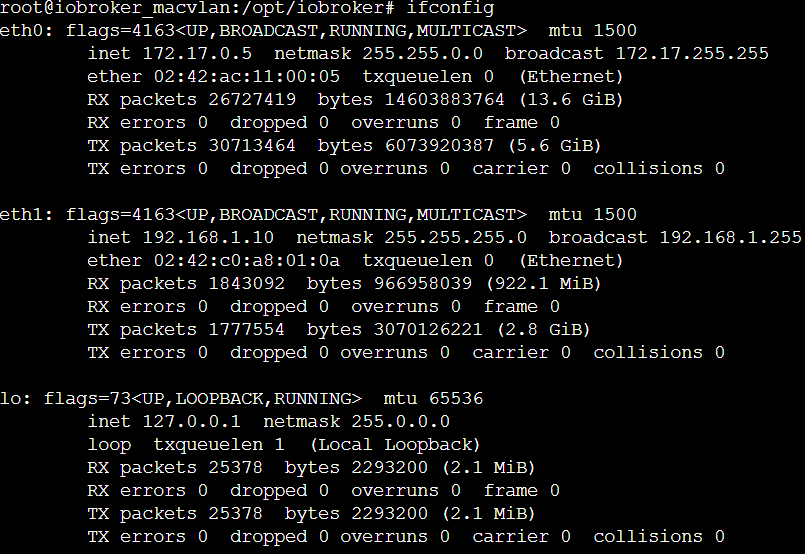
    @ilovegym ok das sieht so aus

    836a712f-fdbe-42f7-90d0-add7b97490a2-grafik.png

    ich habe bei meiner diskstation 2 netzwerkanschlüsse die als bond konfiguriert wurden.

    Mein Problem ist, dass ich von dem neuen mediola adapter auf dem port 1902 und 1901 udp broadcasts empfangen sollte. aber die kommen nicht an. ich weiss jetzt grad nicht was ich noch tun soll. hättest du einen vorschlag?

    ? OliverIOO Samson71S 3 Replies Last reply
    0
    • D drapo

      @ilovegym ok das sieht so aus

      836a712f-fdbe-42f7-90d0-add7b97490a2-grafik.png

      ich habe bei meiner diskstation 2 netzwerkanschlüsse die als bond konfiguriert wurden.

      Mein Problem ist, dass ich von dem neuen mediola adapter auf dem port 1902 und 1901 udp broadcasts empfangen sollte. aber die kommen nicht an. ich weiss jetzt grad nicht was ich noch tun soll. hättest du einen vorschlag?

      ? Offline
      ? Offline
      A Former User
      wrote on last edited by A Former User
      #2841

      @drapo

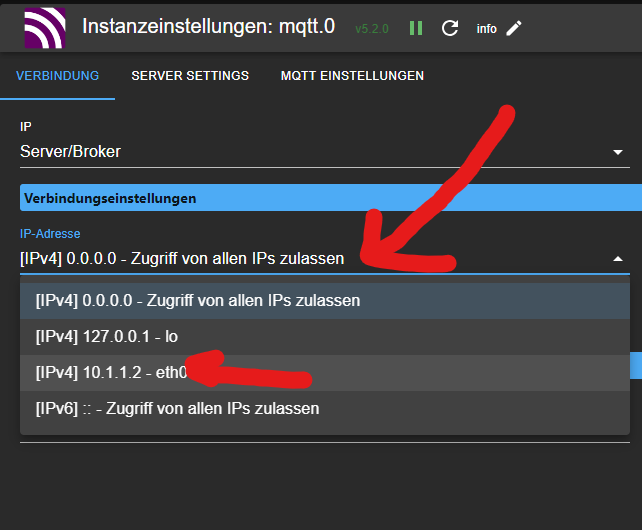
      von dem Adapter hab ich keinen Plan, aber er sollte so konfiguriert werden, dass er nur auf Port 192.168.1.10 ( eth1) lauscht, und nicht auf dem 172.er ...

      evtl ist das da so wie im mqtt?
      83bf99fb-4e26-4253-8cc3-5c5cf44c4772-image.png

      1 Reply Last reply
      0
      • D drapo

        @ilovegym ok das sieht so aus

        836a712f-fdbe-42f7-90d0-add7b97490a2-grafik.png

        ich habe bei meiner diskstation 2 netzwerkanschlüsse die als bond konfiguriert wurden.

        Mein Problem ist, dass ich von dem neuen mediola adapter auf dem port 1902 und 1901 udp broadcasts empfangen sollte. aber die kommen nicht an. ich weiss jetzt grad nicht was ich noch tun soll. hättest du einen vorschlag?

        OliverIOO Offline
        OliverIOO Offline
        OliverIO
        wrote on last edited by
        #2842

        @drapo

        netzwerkseitig sieht alles gut aus
        ip und broadcast adresse passen zusammen

        der broadcast sender muss sich im gleichen netzsegment befinden wie der empfänger
        broadcast geht immer nur innerhalb eines segments

        bei macvlan gibt es noch die besonderheit, das wenn der sender/empfänger der host ist und der sender/empfänger ein container ist, die sich nicht erreichen können.
        man muss dazu einen link einrichten

        https://collabnix.com/2-minutes-to-docker-macvlan-networking-a-beginners-guide/#:~:text=Enabling Container to Host Communication

        Meine Adapter und Widgets
        TVProgram, SqueezeboxRPC, OpenLiga, RSSFeed, MyTime,, pi-hole2, vis-json-template, skiinfo, vis-mapwidgets, vis-2-widgets-rssfeed
        Links im Profil

        D 1 Reply Last reply
        0
        • D drapo

          @ilovegym ok das sieht so aus

          836a712f-fdbe-42f7-90d0-add7b97490a2-grafik.png

          ich habe bei meiner diskstation 2 netzwerkanschlüsse die als bond konfiguriert wurden.

          Mein Problem ist, dass ich von dem neuen mediola adapter auf dem port 1902 und 1901 udp broadcasts empfangen sollte. aber die kommen nicht an. ich weiss jetzt grad nicht was ich noch tun soll. hättest du einen vorschlag?

          Samson71S Offline
          Samson71S Offline
          Samson71
          Global Moderator
          wrote on last edited by
          #2843

          @drapo sagte in [HowTo] ioBroker unter Docker auf Synology DiskStation:

          ich habe bei meiner diskstation 2 netzwerkanschlüsse die als bond konfiguriert wurden.

          Mehr ein Schuss ins Blaue:
          Hast Du mal mit deaktiviertem/aufgehobenem Bond probiert und zum Testen mal einen Anschluss abgeschaltet?
          Beim Bonding sind ja 2 Seiten im Boot. Zum einen die Syno und zum anderen der Switch, an dem die beiden Ports der Syno hängen. Nicht dass es am Ende am Switch (warum auch immer) klemmt.

          Markus

          Bitte beachten:
          Hinweise für gute Forenbeiträge
          Maßnahmen zum Schutz des Forums

          1 Reply Last reply
          0
          • ? Offline
            ? Offline
            A Former User
            wrote on last edited by
            #2844

            @oliverio @drapo

            Oliver, richtig, hatte ich ganz vergessen, mein Script (hab ich irgendwo aus dem Netz..) in der Syno sieht so aus, steht auf
            Ausfuehren als root, alle 15 min, wenn fehlgeschlagen Email-Benachrichtung.

            #!/bin/sh
            if ip link | grep "mac1@ovs_eth3" > /dev/null; then
            
             echo "Device mac1 existiert"
            
            else
            
             echo "Device mac1 anlegen"
             ip link del mac1
             ip link add mac1 link ovs_eth3 type macvlan mode bridge
             ip addr add 10.1.1.9/28 dev mac1
             ip link set mac1 up
             ip route add 10.1.1.9 dev mac1
            
            fi


            Die 10.1.1.9 ist die MacVlan IP, ovs_eth3 das Interface der Syno, das script schaut so alle 15min, ob die Mac noch exestiert und falls nicht, wird sie angelegt. Damit hast du bei einem Reboot oder Verlust der Mac(Interface neu gestartet) keine Arbeit.

            OliverIOO 1 Reply Last reply
            0
            • ? A Former User

              @oliverio @drapo

              Oliver, richtig, hatte ich ganz vergessen, mein Script (hab ich irgendwo aus dem Netz..) in der Syno sieht so aus, steht auf
              Ausfuehren als root, alle 15 min, wenn fehlgeschlagen Email-Benachrichtung.

              #!/bin/sh
              if ip link | grep "mac1@ovs_eth3" > /dev/null; then
              
               echo "Device mac1 existiert"
              
              else
              
               echo "Device mac1 anlegen"
               ip link del mac1
               ip link add mac1 link ovs_eth3 type macvlan mode bridge
               ip addr add 10.1.1.9/28 dev mac1
               ip link set mac1 up
               ip route add 10.1.1.9 dev mac1
              
              fi


              Die 10.1.1.9 ist die MacVlan IP, ovs_eth3 das Interface der Syno, das script schaut so alle 15min, ob die Mac noch exestiert und falls nicht, wird sie angelegt. Damit hast du bei einem Reboot oder Verlust der Mac(Interface neu gestartet) keine Arbeit.

              OliverIOO Offline
              OliverIOO Offline
              OliverIO
              wrote on last edited by
              #2845

              @ilovegym

              besser ist das skript in das verzeichnis
              /etc/network/if-up.d/dockermacvlan
              zu legen

              #!/bin/sh
              
              if [ "$IFACE" = "enp3s0" ]; then
                  ip link add macvlan0 link enp3s0 type macvlan mode bridge
                  ip addr add 192.168.1.80/28 dev macvlan0
                  ip link set macvlan0 up
              fi


              das wird dann automatisch ausgeführt, sobal ein netzwerkdevice zur verfügung steht.

              Meine Adapter und Widgets
              TVProgram, SqueezeboxRPC, OpenLiga, RSSFeed, MyTime,, pi-hole2, vis-json-template, skiinfo, vis-mapwidgets, vis-2-widgets-rssfeed
              Links im Profil

              1 Reply Last reply
              0
              • OliverIOO Offline
                OliverIOO Offline
                OliverIO
                wrote on last edited by
                #2846

                werden thread hier findet und das verzeichnis bei sich aber nicht findet:
                nicht alle distributionen verwenden den networkmanager.

                daher muss dann nach anderen alternativen gesucht werden, wie ein userscript auf basis eines ereignisses ausgeführt werden kann.
                für DSM werden hier ein paar sachen diskutiert
                https://community.synology.com/enu/forum/11/post/133969?page=1&sort=oldest

                Meine Adapter und Widgets
                TVProgram, SqueezeboxRPC, OpenLiga, RSSFeed, MyTime,, pi-hole2, vis-json-template, skiinfo, vis-mapwidgets, vis-2-widgets-rssfeed
                Links im Profil

                1 Reply Last reply
                0
                • OliverIOO OliverIO

                  @drapo

                  netzwerkseitig sieht alles gut aus
                  ip und broadcast adresse passen zusammen

                  der broadcast sender muss sich im gleichen netzsegment befinden wie der empfänger
                  broadcast geht immer nur innerhalb eines segments

                  bei macvlan gibt es noch die besonderheit, das wenn der sender/empfänger der host ist und der sender/empfänger ein container ist, die sich nicht erreichen können.
                  man muss dazu einen link einrichten

                  https://collabnix.com/2-minutes-to-docker-macvlan-networking-a-beginners-guide/#:~:text=Enabling Container to Host Communication

                  D Offline
                  D Offline
                  drapo
                  wrote on last edited by
                  #2847

                  @oliverio den link hab ich eingerichtet ist aber nicht das problem. Da es in diesem fall nicht der host ist welcher mit dem container kommunizieren muss

                  ? 1 Reply Last reply
                  0
                  • D drapo

                    @oliverio den link hab ich eingerichtet ist aber nicht das problem. Da es in diesem fall nicht der host ist welcher mit dem container kommunizieren muss

                    ? Offline
                    ? Offline
                    A Former User
                    wrote on last edited by
                    #2848

                    @drapo

                    Brauchst du die 172.er Schnittstelle? Schalt die mal ab…

                    D 1 Reply Last reply
                    0
                    • ? A Former User

                      @drapo

                      Brauchst du die 172.er Schnittstelle? Schalt die mal ab…

                      D Offline
                      D Offline
                      drapo
                      wrote on last edited by
                      #2849

                      @ilovegym bevor ich das tu. nur dass ich das richtig verstehe. die 172. Schnittstelle ist für die Kommunikation von Conatinern untereinander korrekt? Wenn ich die abschalte haben container untereinander keine Kommunikation mehr stimmt das?
                      Bei mir läuft noch Redis auf einem eigenen Container. Kann der dann noch mit dem iobroker kommunizieren wenn ich die 172. Schnittstelle ausschalte?

                      1 Reply Last reply
                      0
                      • ? Offline
                        ? Offline
                        A Former User
                        wrote on last edited by
                        #2850

                        @drapo

                        ja dann geht’s nicht… lass den an.
                        Kann man den Adapter nicht richtig konfigurieren, wie bei mqtt, und vielen anderen?
                        Was sagt denn der Developer dazu?

                        D 1 Reply Last reply
                        0
                        • ? A Former User

                          @drapo

                          ja dann geht’s nicht… lass den an.
                          Kann man den Adapter nicht richtig konfigurieren, wie bei mqtt, und vielen anderen?
                          Was sagt denn der Developer dazu?

                          D Offline
                          D Offline
                          drapo
                          wrote on last edited by
                          #2851

                          @ilovegym ich hab ihn angeschrieben. warte noch auf rückmeldung.

                          1 Reply Last reply
                          0
                          • ? Offline
                            ? Offline
                            A Former User
                            wrote on last edited by
                            #2852

                            @andre

                            folgende Ausgangssituation:
                            Synology 1 - Docker iobroker (macvlan) (v9.0.1), redis(host), alles in Portainer gemanaged
                            iobroker laeuft als Master, Slave ist ein iobroker LXC in Proxmox auf ner anderen Maschine, keine Probleme.

                            Synology 2 - Docker iobroker (macvlan) (v9.0.1)
                            startet alleine mit json/json ohne probleme. Dieser soll jetzt aber auch ein Slave von iobroker-Syno1 werden.
                            Vorgehensweise, lt. doku
                            in der Console den maintenance mode on, iob setup custom, alles auf den redis-host (ich hab das schon bestimmt 50x auch mit anderen Systemen gemacht), maintenance mode off, Docker neu starten...
                            Normalweise sollte der neue iobroker als Slave auftauchen, macht er nur in den Objekten, und der Container beendet sich mit "stop iobroker first"

                            
                            --------------------------------------------------------------------------------
                            -------------------------     2024-01-22 10:53:00      -------------------------
                            --------------------------------------------------------------------------------
                            -----                                                                      -----
                            ----- ██╗  ██████╗  ██████╗  ██████╗   ██████╗  ██╗  ██╗ ███████╗ ██████╗  -----
                            ----- ██║ ██╔═══██╗ ██╔══██╗ ██╔══██╗ ██╔═══██╗ ██║ ██╔╝ ██╔════╝ ██╔══██╗ -----
                            ----- ██║ ██║   ██║ ██████╔╝ ██████╔╝ ██║   ██║ █████╔╝  █████╗   ██████╔╝ -----
                            ----- ██║ ██║   ██║ ██╔══██╗ ██╔══██╗ ██║   ██║ ██╔═██╗  ██╔══╝   ██╔══██╗ -----
                            ----- ██║ ╚██████╔╝ ██████╔╝ ██║  ██║ ╚██████╔╝ ██║  ██╗ ███████╗ ██║  ██║ -----
                            ----- ╚═╝  ╚═════╝  ╚═════╝  ╚═╝  ╚═╝  ╚═════╝  ╚═╝  ╚═╝ ╚══════╝ ╚═╝  ╚═╝ -----
                            -----                                                                      -----
                            -----              Welcome to your ioBroker Docker container!              -----
                            -----                    Startupscript is now running!                     -----
                            -----                          Please be patient!                          -----
                            --------------------------------------------------------------------------------
                            
                            --------------------------------------------------------------------------------
                            -----                          System Information                          -----
                            -----                    arch:                x86_64                       -----
                            -----                    hostname:            iobrokerDS                   -----
                            -----                                                                      -----
                            -----                          Version Information                         -----
                            -----                    image:               v9.0.1                       -----
                            -----                    build:               2023-12-24T23:44:38+00:00    -----
                            -----                    node:                v18.19.0                     -----
                            -----                    npm:                 10.2.3                       -----
                            -----                                                                      -----
                            -----                        Environment Variables                         -----
                            -----                    AVAHI:               true                         -----
                            -----                    DEBUG:               false                        -----
                            -----                    IOB_OBJECTSDB_TYPE:  redis                        -----
                            -----                    IOB_OBJECTSDB_HOST:  10.10.2.10                   -----
                            -----                    IOB_OBJECTSDB_PORT:  6379                         -----
                            -----                    IOB_STATESDB_TYPE:   redis                        -----
                            -----                    IOB_STATESDB_HOST:   10.10.2.10                   -----
                            -----                    IOB_STATESDB_PORT:   6379                         -----
                            -----                    PACKAGES:            nano libfontconfig           -----
                            -----                    SETGID:              1000                         -----
                            -----                    SETUID:              1000                         -----
                            --------------------------------------------------------------------------------
                            
                            --------------------------------------------------------------------------------
                            -----                   Step 1 of 5: Preparing container                   -----
                            --------------------------------------------------------------------------------
                            
                            Updating Linux packages on first run... Done.
                            
                            
                            PACKAGES is set. Installing the following additional Linux packages: nano libfontconfig
                            
                            nano is not installed. Installing... Done.
                            libfontconfig is not installed. Installing... Done.
                            
                            
                            Registering maintenance script as command... Done.
                            
                            --------------------------------------------------------------------------------
                            -----             Step 2 of 5: Detecting ioBroker installation             -----
                            --------------------------------------------------------------------------------
                            
                            Existing installation of ioBroker detected in "/opt/iobroker".
                            
                            --------------------------------------------------------------------------------
                            -----             Step 3 of 5: Checking ioBroker installation              -----
                            --------------------------------------------------------------------------------
                            
                            (Re)setting permissions (This might take a while! Please be patient!)... Done.
                            
                            Configuring custom objects db...
                            IOB_OBJECTSDB_TYPE is available and value meets detected ioBroker installation.
                            IOB_OBJECTSDB_HOST is available and value meets detected ioBroker installation.
                            IOB_OBJECTSDB_PORT is available and value meets detected ioBroker installation.
                            Done.
                            
                            Configuring custom states db...
                            IOB_STATESDB_TYPE is available and value meets detected ioBroker installation.
                            IOB_STATESDB_HOST is available and value meets detected ioBroker installation.
                            IOB_STATESDB_PORT is available and value meets detected ioBroker installation.
                            Done.
                            
                            Checking Database connection... Done.
                            
                            Hostname in ioBroker does not match the hostname of this container.
                            Cannot execute changes on running system. Stop iobroker first.
                            Updating hostname to "iobrokerDS"... 


                            Frage:
                            das aktivieren von "multihost on" im Docker geht nicht, da sich iobroker beendet und der ganze Container dann haengt. Starte ich den Container dann neu, ist natuerlich multihost "slave verbindungen zulassen" wieder deaktiviert...
                            Lt. Doku soll das bei Redis ja auch garnicht notwendig sein, mit nem LXC/VM unter Proxmox hatte ich da nie probleme.

                            andreA 1 Reply Last reply
                            0
                            • ? A Former User

                              @andre

                              folgende Ausgangssituation:
                              Synology 1 - Docker iobroker (macvlan) (v9.0.1), redis(host), alles in Portainer gemanaged
                              iobroker laeuft als Master, Slave ist ein iobroker LXC in Proxmox auf ner anderen Maschine, keine Probleme.

                              Synology 2 - Docker iobroker (macvlan) (v9.0.1)
                              startet alleine mit json/json ohne probleme. Dieser soll jetzt aber auch ein Slave von iobroker-Syno1 werden.
                              Vorgehensweise, lt. doku
                              in der Console den maintenance mode on, iob setup custom, alles auf den redis-host (ich hab das schon bestimmt 50x auch mit anderen Systemen gemacht), maintenance mode off, Docker neu starten...
                              Normalweise sollte der neue iobroker als Slave auftauchen, macht er nur in den Objekten, und der Container beendet sich mit "stop iobroker first"

                              
                              --------------------------------------------------------------------------------
                              -------------------------     2024-01-22 10:53:00      -------------------------
                              --------------------------------------------------------------------------------
                              -----                                                                      -----
                              ----- ██╗  ██████╗  ██████╗  ██████╗   ██████╗  ██╗  ██╗ ███████╗ ██████╗  -----
                              ----- ██║ ██╔═══██╗ ██╔══██╗ ██╔══██╗ ██╔═══██╗ ██║ ██╔╝ ██╔════╝ ██╔══██╗ -----
                              ----- ██║ ██║   ██║ ██████╔╝ ██████╔╝ ██║   ██║ █████╔╝  █████╗   ██████╔╝ -----
                              ----- ██║ ██║   ██║ ██╔══██╗ ██╔══██╗ ██║   ██║ ██╔═██╗  ██╔══╝   ██╔══██╗ -----
                              ----- ██║ ╚██████╔╝ ██████╔╝ ██║  ██║ ╚██████╔╝ ██║  ██╗ ███████╗ ██║  ██║ -----
                              ----- ╚═╝  ╚═════╝  ╚═════╝  ╚═╝  ╚═╝  ╚═════╝  ╚═╝  ╚═╝ ╚══════╝ ╚═╝  ╚═╝ -----
                              -----                                                                      -----
                              -----              Welcome to your ioBroker Docker container!              -----
                              -----                    Startupscript is now running!                     -----
                              -----                          Please be patient!                          -----
                              --------------------------------------------------------------------------------
                              
                              --------------------------------------------------------------------------------
                              -----                          System Information                          -----
                              -----                    arch:                x86_64                       -----
                              -----                    hostname:            iobrokerDS                   -----
                              -----                                                                      -----
                              -----                          Version Information                         -----
                              -----                    image:               v9.0.1                       -----
                              -----                    build:               2023-12-24T23:44:38+00:00    -----
                              -----                    node:                v18.19.0                     -----
                              -----                    npm:                 10.2.3                       -----
                              -----                                                                      -----
                              -----                        Environment Variables                         -----
                              -----                    AVAHI:               true                         -----
                              -----                    DEBUG:               false                        -----
                              -----                    IOB_OBJECTSDB_TYPE:  redis                        -----
                              -----                    IOB_OBJECTSDB_HOST:  10.10.2.10                   -----
                              -----                    IOB_OBJECTSDB_PORT:  6379                         -----
                              -----                    IOB_STATESDB_TYPE:   redis                        -----
                              -----                    IOB_STATESDB_HOST:   10.10.2.10                   -----
                              -----                    IOB_STATESDB_PORT:   6379                         -----
                              -----                    PACKAGES:            nano libfontconfig           -----
                              -----                    SETGID:              1000                         -----
                              -----                    SETUID:              1000                         -----
                              --------------------------------------------------------------------------------
                              
                              --------------------------------------------------------------------------------
                              -----                   Step 1 of 5: Preparing container                   -----
                              --------------------------------------------------------------------------------
                              
                              Updating Linux packages on first run... Done.
                              
                              
                              PACKAGES is set. Installing the following additional Linux packages: nano libfontconfig
                              
                              nano is not installed. Installing... Done.
                              libfontconfig is not installed. Installing... Done.
                              
                              
                              Registering maintenance script as command... Done.
                              
                              --------------------------------------------------------------------------------
                              -----             Step 2 of 5: Detecting ioBroker installation             -----
                              --------------------------------------------------------------------------------
                              
                              Existing installation of ioBroker detected in "/opt/iobroker".
                              
                              --------------------------------------------------------------------------------
                              -----             Step 3 of 5: Checking ioBroker installation              -----
                              --------------------------------------------------------------------------------
                              
                              (Re)setting permissions (This might take a while! Please be patient!)... Done.
                              
                              Configuring custom objects db...
                              IOB_OBJECTSDB_TYPE is available and value meets detected ioBroker installation.
                              IOB_OBJECTSDB_HOST is available and value meets detected ioBroker installation.
                              IOB_OBJECTSDB_PORT is available and value meets detected ioBroker installation.
                              Done.
                              
                              Configuring custom states db...
                              IOB_STATESDB_TYPE is available and value meets detected ioBroker installation.
                              IOB_STATESDB_HOST is available and value meets detected ioBroker installation.
                              IOB_STATESDB_PORT is available and value meets detected ioBroker installation.
                              Done.
                              
                              Checking Database connection... Done.
                              
                              Hostname in ioBroker does not match the hostname of this container.
                              Cannot execute changes on running system. Stop iobroker first.
                              Updating hostname to "iobrokerDS"... 


                              Frage:
                              das aktivieren von "multihost on" im Docker geht nicht, da sich iobroker beendet und der ganze Container dann haengt. Starte ich den Container dann neu, ist natuerlich multihost "slave verbindungen zulassen" wieder deaktiviert...
                              Lt. Doku soll das bei Redis ja auch garnicht notwendig sein, mit nem LXC/VM unter Proxmox hatte ich da nie probleme.

                              andreA Offline
                              andreA Offline
                              andre
                              Developer
                              wrote on last edited by
                              #2853

                              @ilovegym Liegt vielleicht daran, dass du deinem Container in der Config nicht gesagt hast, dass er ein Slave sein soll. Zumindest fehlt laut Log die Umgebungsvariable "IOB_MULTIHOST".
                              Wenn ich deinen Fall richtig verstehe, dann sollte die ja auf Slave stehen. Dann würde er auch nicht versuchen den Hostnamen zu ändern... Außerdem ist es immer hilfreich in solch einem Fall "DEBUG" = "true" zu setzen. Gerade bei dem Multihost-Gedöns habe ich reichlich Logging eingebaut...

                              MfG,
                              André

                              Bitte keine Support-Fragen per PN! Nutzt die öffentliche Kanäle damit auch andere von den Antworten profitieren können!

                              ? 1 Reply Last reply
                              0
                              • andreA andre

                                @ilovegym Liegt vielleicht daran, dass du deinem Container in der Config nicht gesagt hast, dass er ein Slave sein soll. Zumindest fehlt laut Log die Umgebungsvariable "IOB_MULTIHOST".
                                Wenn ich deinen Fall richtig verstehe, dann sollte die ja auf Slave stehen. Dann würde er auch nicht versuchen den Hostnamen zu ändern... Außerdem ist es immer hilfreich in solch einem Fall "DEBUG" = "true" zu setzen. Gerade bei dem Multihost-Gedöns habe ich reichlich Logging eingebaut...

                                MfG,
                                André

                                ? Offline
                                ? Offline
                                A Former User
                                wrote on last edited by
                                #2854

                                @andre

                                Danke, die Env hab ich tatsächlich übersehen.. 🙈🙈🙈

                                Kaum macht man‘s richtig, funktioniert es… 😀😀👍👍👍👍👍

                                1 Reply Last reply
                                0
                                Reply
                                • Reply as topic
                                Log in to reply
                                • Oldest to Newest
                                • Newest to Oldest
                                • Most Votes


                                Support us

                                ioBroker
                                Community Adapters
                                Donate
                                FAQ Cloud / IOT
                                HowTo: Node.js-Update
                                HowTo: Backup/Restore
                                Downloads
                                BLOG

                                315

                                Online

                                32.6k

                                Users

                                82.2k

                                Topics

                                1.3m

                                Posts
                                Community
                                Impressum | Datenschutz-Bestimmungen | Nutzungsbedingungen | Einwilligungseinstellungen
                                ioBroker Community 2014-2025
                                logo
                                • Login

                                • Don't have an account? Register

                                • Login or register to search.
                                • First post
                                  Last post
                                0
                                • Home
                                • Recent
                                • Tags
                                • Unread 0
                                • Categories
                                • Unreplied
                                • Popular
                                • GitHub
                                • Docu
                                • Hilfe