
NEWS




Neuinstallation nicht möglich
-
Ich glaube @wendy2702 hatte das mal auf OMV laufen. Vielleicht hat er einen heißen Tipp.
-
Ich glaube @wendy2702 hatte das mal auf OMV laufen. Vielleicht hat er einen heißen Tipp.
@thomas-braun danke für die info
-
Hallo
dann werd ich meinen leidensweg mal ganz von vorne beschreiben.
bisher hatte ich iobroker unter docker laufen (buanet). nach vielen schwierigkeiten lief es am ende. jetzt hab ich eine photovoltaikanlage bekommen und hab mir zum auslesen der stromzähler einen raspi zugelegt. jetzt wollte ich umstellen auf host und slave. dabei hab ich mir mein iobroker-master unter docker so zerlegt das ich es nicht mehr zum laufen bringe. auch neuer container mit zurückspielen des backups ging nicht. also container still gelegt und iobroker auf meinem nas (openmediavault, debian) auf der konsole neu angelegt. aber neues problem.
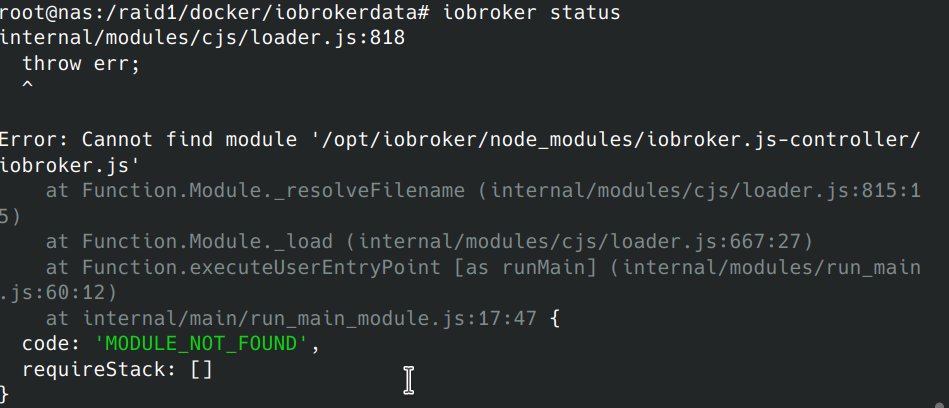
also nach der meldung kann er nicht die datei iobroker.js finden.
das letzte was ich gefunden habe istroot@nas:~# npm install ioBroker/ioBroker.js-controller
und das ergebnis:npm WARN deprecated request@2.88.2: request has been deprecated, see https://github.com/request/request/issues/3142 npm WARN deprecated har-validator@5.1.5: this library is no longer supported npm WARN deprecated uuid@3.4.0: Please upgrade to version 7 or higher. Older versions may use Math.random() in certain circumstances, which is known to be problematic. See https://v8.dev/blog/math-random for details. > iobroker.js-controller@4.0.0 preinstall /root/node_modules/iobroker.js-controller > node lib/preinstallCheck.js NPM version: 6.14.14 > unix-dgram@2.0.3 install /root/node_modules/unix-dgram > node-gyp rebuild make: Verzeichnis „/root/node_modules/unix-dgram/build“ wird betreten CXX(target) Release/obj.target/unix_dgram/src/unix_dgram.o In file included from ../../nan/nan.h:58, from ../src/unix_dgram.cc:5: /root/.cache/node-gyp/12.22.5/include/node/node.h:736:43: warning: cast between incompatible function types from ‘void (*)(v8::Local<v8::Object>)’ to ‘node::addon_register_func’ {aka ‘void (*)(v8::Local<v8::Object>, v8::Local<v8::Value>, void*)’} [-Wcast-function-type] (node::addon_register_func) (regfunc), \ ^ /root/.cache/node-gyp/12.22.5/include/node/node.h:770:3: note: in expansion of macro ‘NODE_MODULE_X’ NODE_MODULE_X(modname, regfunc, NULL, 0) // NOLINT (readability/null_usage) ^~~~~~~~~~~~~ ../src/unix_dgram.cc:404:1: note: in expansion of macro ‘NODE_MODULE’ NODE_MODULE(unix_dgram, Initialize) ^~~~~~~~~~~ SOLINK_MODULE(target) Release/obj.target/unix_dgram.node COPY Release/unix_dgram.node make: Verzeichnis „/root/node_modules/unix-dgram/build“ wird verlassen > ursa-optional@0.9.10 install /root/node_modules/ursa-optional > node rebuild.js ursaNative bindings compilation fail. This is not an issue. Modules that depend on it will use fallbacks. > diskusage@1.1.3 install /root/node_modules/diskusage > node-gyp rebuild make: Verzeichnis „/root/node_modules/diskusage/build“ wird betreten CXX(target) Release/obj.target/diskusage/src/main.o In file included from ../../nan/nan.h:58, from ../src/main.cpp:3: /root/.cache/node-gyp/12.22.5/include/node/node.h:736:43: warning: cast between incompatible function types from ‘void (*)(v8::Local<v8::Object>)’ to ‘node::addon_register_func’ {aka ‘void (*)(v8::Local<v8::Object>, v8::Local<v8::Value>, void*)’} [-Wcast-function-type] (node::addon_register_func) (regfunc), \ ^ /root/.cache/node-gyp/12.22.5/include/node/node.h:770:3: note: in expansion of macro ‘NODE_MODULE_X’ NODE_MODULE_X(modname, regfunc, NULL, 0) // NOLINT (readability/null_usage) ^~~~~~~~~~~~~ ../src/main.cpp:42:1: note: in expansion of macro ‘NODE_MODULE’ NODE_MODULE(diskusage, Init) ^~~~~~~~~~~ CXX(target) Release/obj.target/diskusage/src/diskusage_posix.o SOLINK_MODULE(target) Release/obj.target/diskusage.node COPY Release/diskusage.node make: Verzeichnis „/root/node_modules/diskusage/build“ wird verlassen > iobroker.js-controller@4.0.0 install /root/node_modules/iobroker.js-controller > node iobroker.js setup first creating conf/iobroker.json Could not connect to states database at 127.0.0.1:9000 (invalid protocol). Please make sure the configured IP and port points to a host running JS-Controller >= 2.0. and that the port is not occupied by other software! Could not connect to states database at 127.0.0.1:9000 (invalid protocol). Please make sure the configured IP and port points to a host running JS-Controller >= 2.0. and that the port is not occupied by other software! Server Cannot load /root/iobroker-data/objects.json: Database file /root/iobroker-data/objects.json does not exists.. We try last Backup! Server Cannot load /root/iobroker-data/states.json: Database file /root/iobroker-data/states.json does not exists.. We try last Backup! Server Cannot load /root/iobroker-data/objects.json.bak: Database file /root/iobroker-data/objects.json.bak does not exists.. Continue with empty dataset! Server If this is no Migration or initial start please restore the last backup from /root/iobroker-data/backup-objects Server Cannot load /root/iobroker-data/states.json.bak: Database file /root/iobroker-data/states.json.bak does not exists.. Continue with empty dataset! Server If this is no Migration or initial start please restore the last backup from /root/iobroker-data/backup-objects Cannot read system.config: null (OK when migrating or restoring) No connection to databases possible ... npm WARN optional SKIPPING OPTIONAL DEPENDENCY: fsevents@~2.3.2 (node_modules/chokidar/node_modules/fsevents): npm WARN notsup SKIPPING OPTIONAL DEPENDENCY: Unsupported platform for fsevents@2.3.2: wanted {"os":"darwin","arch":"any"} (current: {"os":"linux","arch":"x64"}) npm WARN enoent ENOENT: no such file or directory, open '/root/package.json' npm WARN root No description npm WARN root No repository field. npm WARN root No README data npm WARN root No license field. npm ERR! code ELIFECYCLE npm ERR! errno 22 npm ERR! iobroker.js-controller@4.0.0 install: `node iobroker.js setup first` npm ERR! Exit status 22 npm ERR! npm ERR! Failed at the iobroker.js-controller@4.0.0 install script. npm ERR! This is probably not a problem with npm. There is likely additional logging output above. npm ERR! A complete log of this run can be found in: npm ERR! /root/.npm/_logs/2021-08-22T13_44_28_332Z-debug.logMOD-Edit: Code in code-tags gesetzt!
sorry, anders weis ich nicht wie ich das alles hier reinbringen kann.
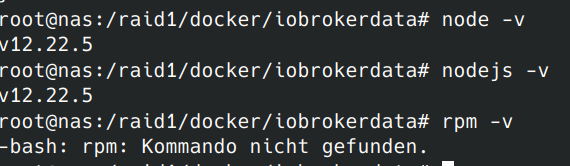
ich hoffe mir kann jemand helfen, was braucht ihr noch an infos?@nr5lebt also ich starte mal hier. … es steht da Port 9000 ist falsches Protokoll. Daher mal die erste Frage: was läuft da auf Port 9000??? Mach das weg. IoBroker neu Installation braucht Port 9000 und 9001. kannst du danach ändern aber erstmal braucht man es. Das ist ggf schon der Grund das es nicht installiert wird weil die setup Routine nicht ausgeführt werden kann. Und würde erklären das es nicht da ist
-
@nr5lebt also ich starte mal hier. … es steht da Port 9000 ist falsches Protokoll. Daher mal die erste Frage: was läuft da auf Port 9000??? Mach das weg. IoBroker neu Installation braucht Port 9000 und 9001. kannst du danach ändern aber erstmal braucht man es. Das ist ggf schon der Grund das es nicht installiert wird weil die setup Routine nicht ausgeführt werden kann. Und würde erklären das es nicht da ist
-
@apollon77 danke
da läuft portainer drauf
werd mich jetzt mal drum kümmern -
Ich glaube @wendy2702 hatte das mal auf OMV laufen. Vielleicht hat er einen heißen Tipp.
@thomas-braun sagte in Neuinstallation nicht möglich:
Ich glaube @wendy2702 hatte das mal auf OMV laufen. Vielleicht hat er einen heißen Tipp.
Du hast recht.... hatte ich mal... ganz zu Anfang und meine Erinnerung ist leider zu Schwach.
Kann mich erinnern das ich Probleme hatte... aber nicht mehr im Detail und auch nicht mehr an die Lösungen.
Könnte aber noch irgendwo in den untiefen des Forums stehen :-)
-
@homoran und das kommt bei iobroker status
root@nas:~# iobroker status
internal/modules/cjs/loader.js:818
  throw err;
  ^

Error: Cannot find module '/opt/iobroker/node_modules/iobroker.js-controller/iobroker.js'
    at Function.Module._resolveFilename (internal/modules/cjs/loader.js:815:15)
    at Function.Module._load (internal/modules/cjs/loader.js:667:27)
    at Function.executeUserEntryPoint [as runMain] (internal/modules/run_main.js:60:12)
    at internal/main/run_main_module.js:17:47 {
  code: 'MODULE_NOT_FOUND',
  requireStack: []
}
MOD-Edit: Code in code-tags gesetzt!
-
@nr5lebt, ich habe wohl das gleiche Problem, weiß aber auch nicht mehr weiter. IoBrober auf Raspi neu aufgesetzt, komme aber absolut nicht weiter. Hast Du es bereits lösen können?
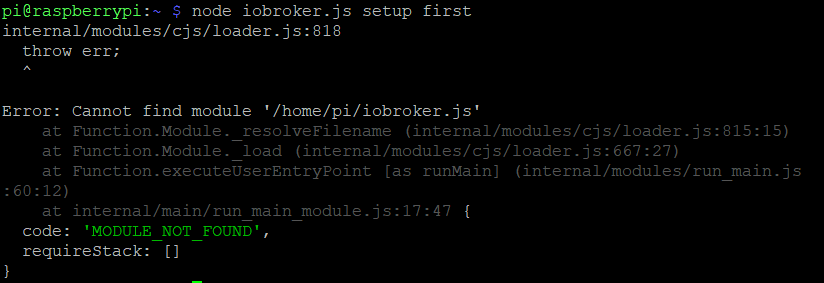
@renesen Aaaaaalso ....
ioBroker ist normalerweise in /opt/iobroekr und nicht in /home/pi installiert.
Weiterhin ... Wer hat Dir diesen Befehl gegeben?
Also wechsle mal ins richtige verzeichnis und rufe "iobroker setup first" auf
Am besten danach "iobroker fix"
-
@renesen Aaaaaalso ....
ioBroker ist normalerweise in /opt/iobroekr und nicht in /home/pi installiert.
Weiterhin ... Wer hat Dir diesen Befehl gegeben?
Also wechsle mal ins richtige verzeichnis und rufe "iobroker setup first" auf
Am besten danach "iobroker fix"
@apollon77 vielen Dank für den Hinweis. Ich werde mich weiter "durchhangeln" und mache erstmal hier weiter, da die gleiche Meldung kommt...
https://forum.iobroker.net/topic/22867/how-to-node-js-für-iobroker-richtig-updaten -
@apollon77 vielen Dank für den Hinweis. Ich werde mich weiter "durchhangeln" und mache erstmal hier weiter, da die gleiche Meldung kommt...
https://forum.iobroker.net/topic/22867/how-to-node-js-für-iobroker-richtig-updaten@renesen sagte in Neuinstallation nicht möglich:
mache erstmal hier weiter
das mag eine Baustelle sein, aber die Frage von @apollon77 ist durchaus berechtigt:
@apollon77 sagte in Neuinstallation nicht möglich:
Wer hat Dir diesen Befehl gegeben?
dein Befehl in der ersten Zeile des Screenshots (demnächst bitte als Text in-Code-tags, dann kann man den auch kopieren!) ist mehr als ungewöhnlich.
Da besteht leider die Gefahr, dass du irgendwo eine sehr fragliche Anleitung her hast, in der noch mehr Blödsinn gemacht wird



397
Online32.5k
Users81.6k
Topics1.3m
Posts