
NEWS




[gelöst] Probleme bei Brother DCP mit Parser auslesen
-
@sigi234 sagte in Probleme bei Brother DCP mit Parser auslesen:
Würde auf 600000 umstellen
Habe ich grundsätzlich eh, aber jetzt zum Testen wollte ich es etwas perfomanter :-)
@homoran sagte in Probleme bei Brother DCP mit Parser auslesen:
so muss sein!
Setze es gleich um und gebe dann Abschlussfeedback!
@metaxa und immer vor dem Speichern sicherstellen, dass auf number (.) eingestellt ist
kein Support per PN! - Fragen im Forum stellen - es gibt fast nichts, was nicht auch für andere interessant ist.
Benutzt das Voting rechts unten im Beitrag wenn er euch geholfen hat.
der Installationsfixer: curl -fsL https://iobroker.net/fix.sh | bash -
-
FEEDBACK:
Nachträglich betrachtet, war das Löschen der alten Regeln scheinbar die entscheidende Lösung (danke @Homoran). Blöd ist halt nur, dass man mind. 1 Regel drinnen haben muss, sonst kann man nicht speichern. Müsste man eine Dummyrule drinnen haben, die nix anstellt. Eventuell genügt auch nur ein Name, ich hab´s nicht probiert.So sieht es jetzt aus:
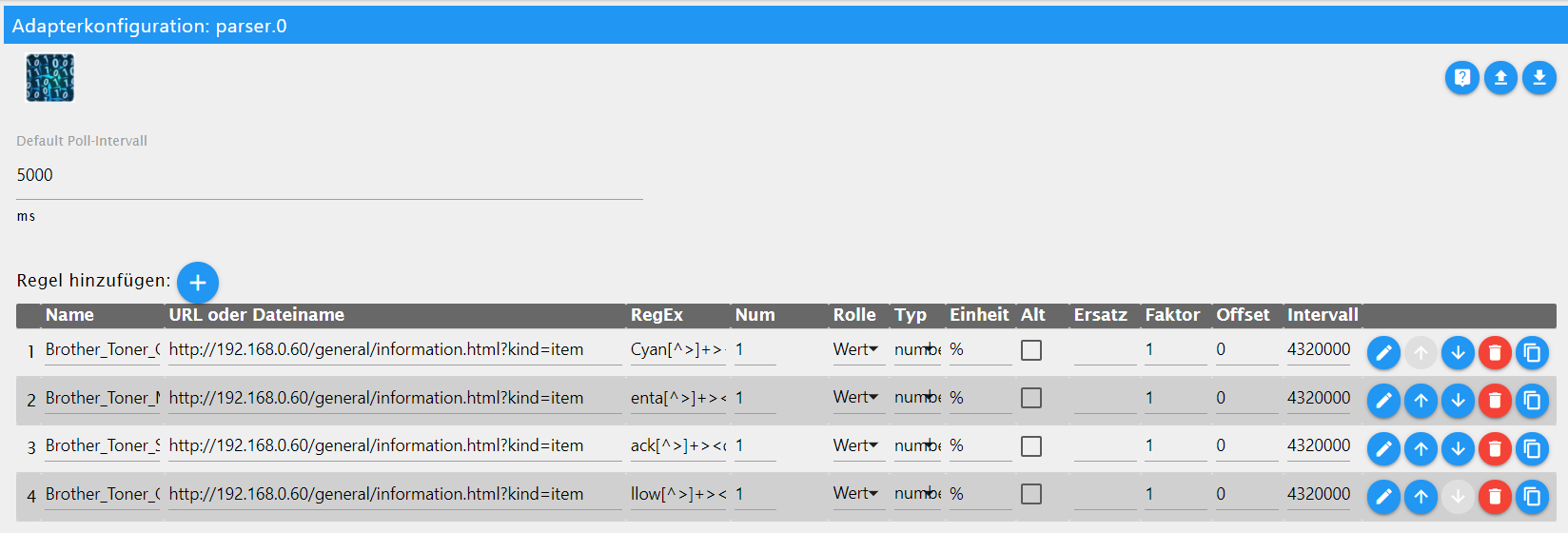
Cyan[^>]+><dd>(\d+)
enta[^>]+><dd>(\d+)
ack[^>]+><dd>(\d+)
llow[^>]+><dd>(\d+)
Danke im Speziellen dir Rainer und habe noch paar schöne Stunden im trockenen Garten :sun_with_face: :sunny: .
LG und schönen Sonntag liebes Forum,
mxa -
Ich habe auch einen Brother Farblaser Drucker und wollte die Toner Füllstände über den Parser auslesen. Wenn ich aber die Einstellungen vom letzten Beitrag nehme, ließt er bei mir aus wie oft welcher Toner gewechselt wurde. Kann mir da einer vielleicht helfen?
Lieben Gruß
Carsten -
Ich habe auch einen Brother Farblaser Drucker und wollte die Toner Füllstände über den Parser auslesen. Wenn ich aber die Einstellungen vom letzten Beitrag nehme, ließt er bei mir aus wie oft welcher Toner gewechselt wurde. Kann mir da einer vielleicht helfen?
Lieben Gruß
Carsten@holst4you sagte in [gelöst] Probleme bei Brother DCP mit Parser auslesen:
Wenn ich aber die Einstellungen vom letzten Beitrag nehme, ließt er bei mir aus wie oft welcher Toner gewechselt wurde.
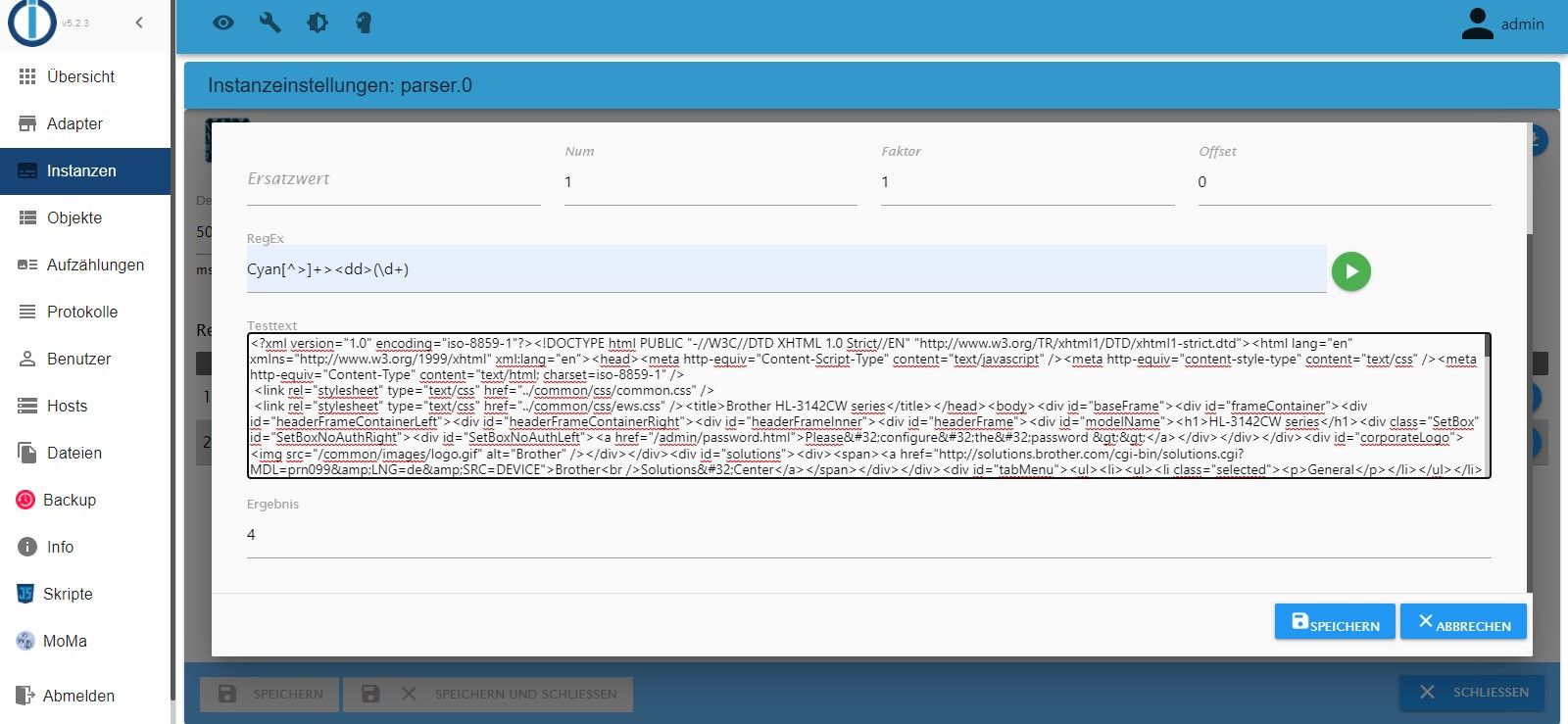
hast du auch num=1 eingestellt?
ansonsten braucht es den Quelltext aus dem Regeleditor sowie einen Screenshot was da als "Lösung" gefunden wird
-
Hallo danke für deine schnelle Antwort. bei num habe ich einer 1 drin stehen.
<?xml version="1.0" encoding="iso-8859-1"?><!DOCTYPE html PUBLIC "-//W3C//DTD XHTML 1.0 Strict//EN" "http://www.w3.org/TR/xhtml1/DTD/xhtml1-strict.dtd"><html lang="en" xmlns="http://www.w3.org/1999/xhtml" xml:lang="en"><head><meta http-equiv="Content-Script-Type" content="text/javascript" /><meta http-equiv="content-style-type" content="text/css" /><meta http-equiv="Content-Type" content="text/html; charset=iso-8859-1" /> <link rel="stylesheet" type="text/css" href="../common/css/common.css" /> <link rel="stylesheet" type="text/css" href="../common/css/ews.css" /><title>Brother HL-3142CW series</title></head><body><div id="baseFrame"><div id="frameContainer"><div id="headerFrameContainerLeft"><div id="headerFrameContainerRight"><div id="headerFrameInner"><div id="headerFrame"><div id="modelName"><h1>HL-3142CW series</h1><div class="SetBox" id="SetBoxNoAuthRight"><div id="SetBoxNoAuthLeft"><a href="/admin/password.html">Please configure the password >></a></div></div></div><div id="corporateLogo"><img src="/common/images/logo.gif" alt="Brother" /></div></div><div id="solutions"><div><span><a href="http://solutions.brother.com/cgi-bin/solutions.cgi?MDL=prn099&LNG=de&SRC=DEVICE">Brother<br />Solutions Center</a></span></div></div><div id="tabMenu"><ul><li><ul><li class="selected"><p>General</p></li></ul></li><li><ul><li><a href="/print/print.html">Print</a></li></ul></li><li><ul><li><a href="/admin/password.html">Administrator</a></li></ul></li><li><ul><li><a href="/net/net/net.html">Network</a></li></ul></li></ul></div></div></div></div><div id="mainFrameContainer"><div id="mainFrameTopLeft"><div id="mainFrameTopRight"><div id="mainFrameTopInner"><div id="subTabMenu"> </div></div></div></div><div id="mainFrameInner"><div id="subMenu"><div><a href="/general/status.html">Status</a></div><div><a href="/general/reflesh.html" class="subPage">Auto Refresh Interval</a></div><div class="selected"><div class="top"><div class="bottom"><a href="/general/information.html?kind=item">Maintenance Information</a></div></div></div><div><a href="/general/lists.html">Lists/Reports</a></div><div><a href="/general/find.html">Find Device</a></div><div><a href="/general/contact.html">Contact & Location</a></div><div><a href="/general/sleep.html">Sleep Time</a></div><div><a href="/general/powerdown.html">Auto Power Off</a></div><div><a href="/general/language.html">Language</a></div><div><a href="/general/panel.html">Panel</a></div></div><div id="rightFrameContainer"><div id="rightFrame"><div id="mainContent"><div id="pageTitle"><h2>Maintenance Information</h2></div><div id="pageContents"><form method="post" action="/etc/mnt_info.csv"><div><input type="hidden" id="pageid" name="pageid" value="3" /></div><div class="contentsGroup"><h3>Node Information</h3><dl class="items"><dt>Model Name</dt><dd>Brother HL-3142CW series</dd><dt>Serial no.</dt><dd>E74549M5J224718</dd><dt>Main Firmware Version</dt><dd>1.06</dd><dt>Sub1 Firmware Version</dt><dd>1.02</dd><dt>Memory Size</dt><dd>64<span class="unit">MB</span></dd></dl></div><div class="contentsGroup"><h3>Device Status</h3><dl class="items"><dt>Page Counter</dt><dd>5496</dd><dt class="subhead"><span>Color</span></dt><dd>5144</dd><dt class="subhead"><span>B&W</span></dt><dd>352</dd><dt>Image Count Total</dt><dd>16424</dd><dt class="subhead"><span>Cyan</span></dt><dd>3332</dd><dt class="subhead"><span>Magenta</span></dt><dd>3392</dd><dt class="subhead"><span>Yellow</span></dt><dd>4322</dd><dt class="subhead"><span>Black</span></dt><dd>5378</dd><dt>Drum Count</dt><dd></dd><dt class="subhead"><span>Cyan</span></dt><dd>5496</dd><dt class="subhead"><span>Magenta</span></dt><dd>5496</dd><dt class="subhead"><span>Yellow</span></dt><dd>5496</dd><dt class="subhead"><span>Black</span></dt><dd>5496</dd></dl></div><div class="contentsGroup"><h3>Remaining Life</h3><dl class="items"><dt>Drum Unit Cyan (C)*</dt><dd>9504<span class="unit">pages</span></dd><dt>(% of Life Remaining)</dt><dd>(64.00%)</dd><dt>Drum Unit Magenta (M)*</dt><dd>9504<span class="unit">pages</span></dd><dt>(% of Life Remaining)</dt><dd>(64.00%)</dd><dt>Drum Unit Yellow (Y)*</dt><dd>9504<span class="unit">pages</span></dd><dt>(% of Life Remaining)</dt><dd>(64.00%)</dd><dt>Drum Unit Black (BK)*</dt><dd>9504<span class="unit">pages</span></dd><dt>(% of Life Remaining)</dt><dd>(64.00%)</dd><dt>Belt Unit</dt><dd>40189<span class="unit">pages</span></dd><dt>(% of Life Remaining)</dt><dd>(81.00%)</dd><dt>Fuser Unit</dt><dd>44504<span class="unit">pages</span></dd><dt>(% of Life Remaining)</dt><dd>(90.00%)</dd><dt>Paper Feeding Kit 1</dt><dd>44506<span class="unit">pages</span></dd><dt>(% of Life Remaining)</dt><dd>(90.00%)</dd><dt>Toner Cyan (C)**</dt><dd>(70.00%)</dd><dt>Toner Magenta (M)**</dt><dd>(70.00%)</dd><dt>Toner Yellow (Y)**</dt><dd>(70.00%)</dd><dt>Toner Black (BK)**</dt><dd>(10.00%)</dd></dl></div><div class="contentsGroup"><h3>Total Pages Printed</h3><dl class="items"><dt>A4/Letter</dt><dd>5464<span class="unit">pages</span></dd><dt>Legal/Folio</dt><dd>0<span class="unit">pages</span></dd><dt>B5/Executive</dt><dd>0<span class="unit">pages</span></dd><dt>Envelopes</dt><dd>0<span class="unit">pages</span></dd><dt>A5</dt><dd>1<span class="unit">pages</span></dd><dt>Others</dt><dd>31<span class="unit">pages</span></dd></dl></div><div class="contentsGroup"><h3>Total Pages Printed</h3><dl class="items"><dt>Plain/Thin/Recycled</dt><dd>5469<span class="unit">pages</span></dd><dt>Thick/Thicker/Bond</dt><dd>0<span class="unit">pages</span></dd><dt>Envelopes/Env. Thick/Env. Thin</dt><dd>0<span class="unit">pages</span></dd><dt>Label</dt><dd>0<span class="unit">pages</span></dd><dt>Hagaki</dt><dd>0<span class="unit">pages</span></dd><dt>Glossy</dt><dd>27<span class="unit">pages</span></dd></dl></div><div class="contentsGroup"><h3>Replace Count</h3><dl class="items"><dt>Toner Cyan (C)</dt><dd>4</dd><dt>Toner Magenta (M)</dt><dd>4</dd><dt>Toner Yellow (Y)</dt><dd>4</dd><dt>Toner Black (BK)</dt><dd>5</dd><dt>Drum Unit Cyan (C)</dt><dd>0</dd><dt>Drum Unit Magenta (M)</dt><dd>0</dd><dt>Drum Unit Yellow (Y)</dt><dd>0</dd><dt>Drum Unit Black (BK)</dt><dd>0</dd><dt>Belt Unit</dt><dd>0</dd><dt>Fuser Unit</dt><dd>0</dd><dt>Paper Feeding Kit 1</dt><dd>0</dd><dt>Waste Toner Box</dt><dd>0</dd></dl></div><div class="contentsGroup"><dl class="items"><dt>Total Paper Jams</dt><dd>18</dd></dl><dl class="items"><dt>Jam Manual Feed</dt><dd>0</dd><dt>Jam Tray 1</dt><dd>9</dd><dt>Jam Inside</dt><dd>4</dd><dt>Jam Rear</dt><dd>5</dd></dl></div><div class="contentsGroup"><h3>Error History(last 10 errors)</h3><table class="list errorHistory" summary="Error History"><tbody><tr><th>1</th><td>Trommel !</td><td>Page : 5472</td></tr><tr><th>2</th><td>Trommel !</td><td>Page : 5472</td></tr><tr><th>3</th><td>Farbeinstell.</td><td>Page : 5448</td></tr><tr><th>4</th><td>Stau Zufuhr 1</td><td>Page : 5389</td></tr><tr><th>5</th><td>Farbeinstell.</td><td>Page : 5280</td></tr><tr><th>6</th><td>Stau Zufuhr 1</td><td>Page : 5224</td></tr><tr><th>7</th><td>Stau hinten</td><td>Page : 5213</td></tr><tr><th>8</th><td>Toner ersetzen (Y)</td><td>Page : 4956</td></tr><tr><th>9</th><td>Wenig Toner :M</td><td>Page : 4817</td></tr><tr><th>10</th><td>Fehler:Druck E1</td><td>Page : 4716</td></tr></tbody></table></div><div class="contentsGroup"><p class="noteMessage">*Based on A4/Letter printing<br />**Remaining life will vary depending on the types of documents printed, their coverage and device usage.<br /></p></div><div class="contentsGroup"><p class="noteMessage">You can convert this Maintenance Information page to a CSV file format.<br />Click Submit to create the CSV file</p></div><div class="contentsButtons"><input type="submit" value="Submit" /></div></form></div></div></div></div></div><div id="mainFrameBottomLeft"><div id="mainFrameBottomRight"><div id="mainFrameBottomInner"></div></div></div></div><div id="footerFrameContainer"><div id="copyright">Copyright(C) 2000-2013 Brother Industries, Ltd. All Rights Reserved.</div><div id="topBack"><a href="#">Top<img src="/common/images/ic_pt.gif" alt="Top" /></a></div></div></div></div></body></html> -
@holst4you sagte in [gelöst] Probleme bei Brother DCP mit Parser auslesen:
Wenn ich aber die Einstellungen vom letzten Beitrag nehme, ließt er bei mir aus wie oft welcher Toner gewechselt wurde.
hast du auch num=1 eingestellt?
ansonsten braucht es den Quelltext aus dem Regeleditor sowie einen Screenshot was da als "Lösung" gefunden wird
@homoran sagte in [gelöst] Probleme bei Brother DCP mit Parser auslesen:
sowie einen Screenshot was da als "Lösung" gefunden wird
bitte nachreichen
ääähm...
welche regexes nutzt du denn?habe gerade getestet, da müsste eines der drei Werte bei rauskommen
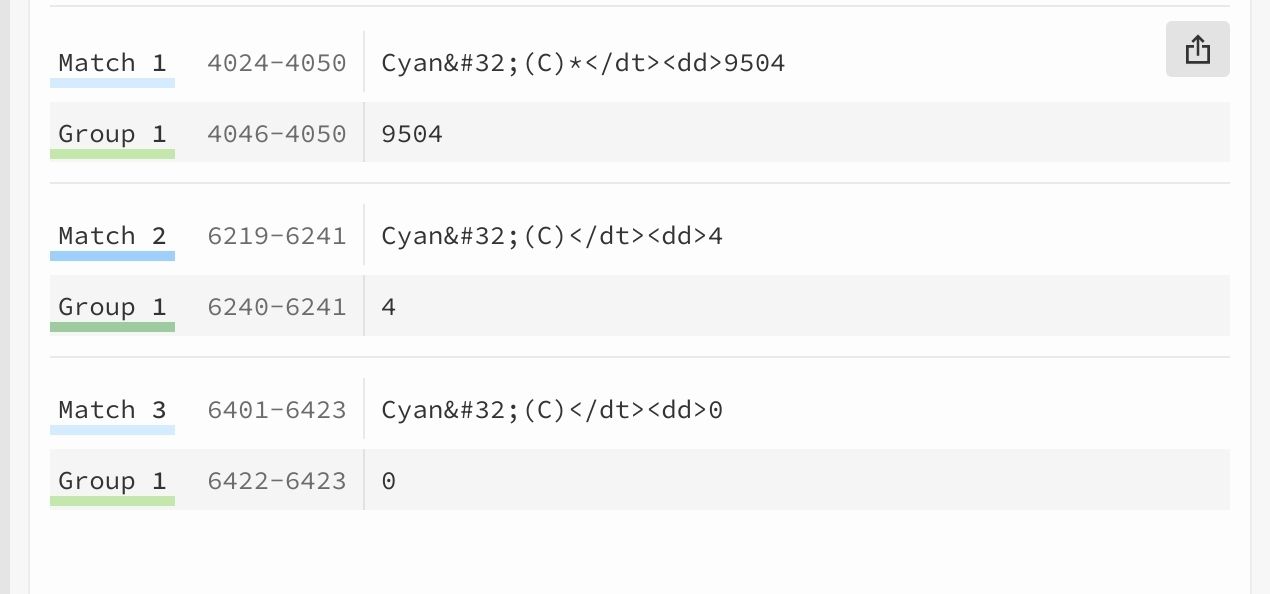
was kommt bei dir bei cyan?
-
@holst4you danke.
ja die 4 ist ok.hast du mal eben den Wert der rauskommen sollte?
-
@holst4you sagte in [gelöst] Probleme bei Brother DCP mit Parser auslesen:
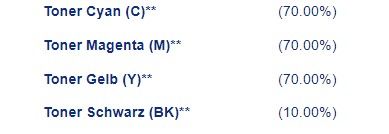
ok, dann suche ich mal danach.
bin aber schon im Bett und nur am Tablet. -
ok, du hast andere Angaben
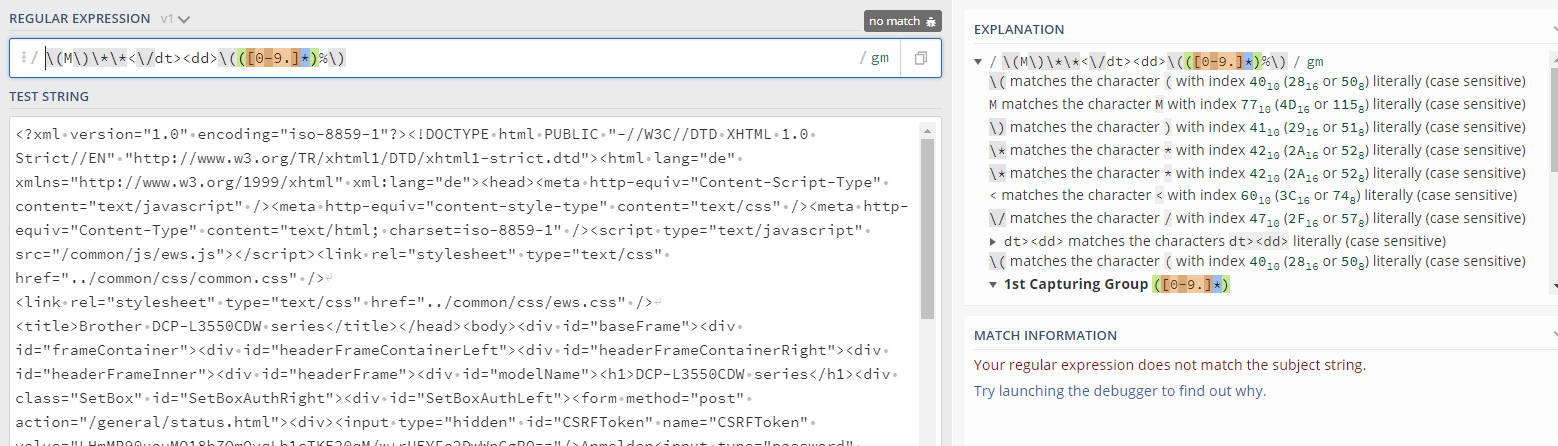
Cyan[^>]+><dd>\(([\d\.]+)NUM=0
und entsprechend für die anderen Farben
-
@holst4you sagte in [gelöst] Probleme bei Brother DCP mit Parser auslesen:
Vielen Dank es funktioniert!
:+1:Klar doch :joy:
Viel Spaß




376
Online32.7k
Users82.3k
Topics1.3m
Posts