




[gelöst] Restore von grafana und influx geht nicht
-
Also, wenn ich die Wiederherstellung von influx starte, löscht er das Verzeichnis influxDBtmp und legt es gleich wieder neu an. Als Besitzer steht dort root.
Mit grafana passiert das gleiche.
-
Zeige mal die rechte von /opt/iobroker/backups
ls -la /opt/iobroker/backupsDen
iobroker fixwürde ich auch mal laufen lassenpi@ioBroker-Master:~ $ ls -la /opt/iobroker/backups insgesamt 1417248 drwxrwxrwx 2 root root 40960 Jul 14 11:22 . drwxrwxr-x+ 8 iobroker iobroker 4096 Jul 14 10:56 .. -rwxrwxrwx 1 root root 11408 Jul 2 02:09 grafana_2021_07_02-02_09_13_backupiobroker.tar.gz -rwxrwxrwx 1 root root 6548 Jul 3 02:52 grafana_2021_07_03-02_52_54_backupiobroker.tar.gz -rwxrwxrwx 1 root root 11444 Jul 4 02:04 grafana_2021_07_04-02_04_10_backupiobroker.tar.gz -rwxrwxrwx 1 root root 11415 Jul 5 02:04 grafana_2021_07_05-02_04_23_backupiobroker.tar.gz -rwxrwxrwx 1 root root 11419 Jul 6 02:04 grafana_2021_07_06-02_04_08_backupiobroker.tar.gz -rwxrwxrwx 1 root root 11411 Jul 7 02:04 grafana_2021_07_07-02_04_16_backupiobroker.tar.gz -rwxrwxrwx 1 root root 11440 Jul 8 02:04 grafana_2021_07_08-02_04_15_backupiobroker.tar.gz -rwxrwxrwx 1 root root 11423 Jul 9 02:04 grafana_2021_07_09-02_04_17_backupiobroker.tar.gz -rwxrwxrwx 1 root root 11441 Jul 10 02:04 grafana_2021_07_10-02_04_20_backupiobroker.tar.gz -rwxrwxrwx 1 root root 11430 Jul 11 02:04 grafana_2021_07_11-02_04_17_backupiobroker.tar.gz -rwxrwxrwx 1 root root 9689 Jul 14 10:29 grafana_2021_07_14-10_29_25_backupiobroker.tar.gz drwxrwxrwx 2 root root 0 Jul 14 11:22 grafana_tmp -rwxrwxrwx 1 root root 126735305 Jul 2 02:08 influxDB_2021_07_02-02_01_49_backupiobroker.tar.gz -rwxrwxrwx 1 root root 127791647 Jul 3 02:52 influxDB_2021_07_03-02_01_49_backupiobroker.tar.gz -rwxrwxrwx 1 root root 128609110 Jul 4 02:03 influxDB_2021_07_04-02_01_49_backupiobroker.tar.gz -rwxrwxrwx 1 root root 129466916 Jul 5 02:03 influxDB_2021_07_05-02_01_49_backupiobroker.tar.gz -rwxrwxrwx 1 root root 133015118 Jul 6 02:03 influxDB_2021_07_06-02_01_49_backupiobroker.tar.gz -rwxrwxrwx 1 root root 133857638 Jul 7 02:03 influxDB_2021_07_07-02_01_49_backupiobroker.tar.gz -rwxrwxrwx 1 root root 134698969 Jul 8 02:03 influxDB_2021_07_08-02_01_49_backupiobroker.tar.gz -rwxrwxrwx 1 root root 138201422 Jul 9 02:03 influxDB_2021_07_09-02_01_49_backupiobroker.tar.gz -rwxrwxrwx 1 root root 139023554 Jul 10 02:03 influxDB_2021_07_10-02_01_49_backupiobroker.tar.gz -rwxrwxrwx 1 root root 139858164 Jul 11 02:03 influxDB_2021_07_11-02_01_49_backupiobroker.tar.gz -rwxrwxrwx 1 root root 29529203 Jul 14 10:29 influxDB_2021_07_14-10_28_45_backupiobroker.tar.gz drwxrwxrwx 2 root root 0 Jul 14 11:22 influxDBtmp -rwxrwxrwx 1 root root 8199244 Jul 2 02:01 iobroker_2021_07_02-02_01_40_backupiobroker.tar.gz -rwxrwxrwx 1 root root 8201135 Jul 3 02:01 iobroker_2021_07_03-02_01_40_backupiobroker.tar.gz -rwxrwxrwx 1 root root 8200856 Jul 4 02:01 iobroker_2021_07_04-02_01_40_backupiobroker.tar.gz -rwxrwxrwx 1 root root 8200697 Jul 5 02:01 iobroker_2021_07_05-02_01_40_backupiobroker.tar.gz -rwxrwxrwx 1 root root 8200311 Jul 6 02:01 iobroker_2021_07_06-02_01_40_backupiobroker.tar.gz -rwxrwxrwx 1 root root 8204811 Jul 7 02:01 iobroker_2021_07_07-02_01_40_backupiobroker.tar.gz -rwxrwxrwx 1 root root 8206793 Jul 8 02:01 iobroker_2021_07_08-02_01_40_backupiobroker.tar.gz -rwxrwxrwx 1 root root 8206163 Jul 9 02:01 iobroker_2021_07_09-02_01_40_backupiobroker.tar.gz -rwxrwxrwx 1 root root 8202290 Jul 10 02:01 iobroker_2021_07_10-02_01_40_backupiobroker.tar.gz -rwxrwxrwx 1 root root 8202265 Jul 11 02:01 iobroker_2021_07_11-02_01_40_backupiobroker.tar.gz -rwxrwxrwx 1 root root 8212503 Jul 14 10:28 iobroker_2021_07_14-10_28_35_backupiobroker.tar.gz pi@ioBroker-Master:~ $Wenn ich den iobroker fix laufen lasse kommt das hier.
pi@ioBroker-Master:~ $ iobroker fix library: loaded Library version=2021-04-07 ========================================================================== Welcome to the ioBroker installation fixer! Script version: 2021-04-07 You might need to enter your password a couple of times. ========================================================================== ========================================================================== Installing prerequisites (1/3) ========================================================================== OK:1 http://raspbian.raspberrypi.org/raspbian buster InRelease OK:2 http://archive.raspberrypi.org/debian buster InRelease OK:3 https://deb.nodesource.com/node_12.x buster InRelease OK:4 https://repos.influxdata.com/debian buster InRelease Paketlisten werden gelesen... Fertig Installed gcc-c++ ========================================================================== Checking ioBroker user and directory permissions (2/3) ========================================================================== Created /etc/sudoers.d/iobroker Fixing directory permissions... This system does not support setting default permissions. Do not use npm to manually install adapters unless you know what you are doing! ========================================================================== Checking autostart (3/3) ========================================================================== Enabling autostart... Autostart enabled! ========================================================================== Your installation was fixed successfully Run iobroker start to start ioBroker again! ========================================================================== pi@ioBroker-Master:~ $Die Natur braucht nicht unseren Schutz, sie braucht unsere Abwesenheit.
-
pi@ioBroker-Master:~ $ ls -la /opt/iobroker/backups
insgesamt 1417248
drwxrwxrwx  2 root     root         40960 Jul 14 11:22 .
drwxrwxr-x+ 8 iobroker iobroker      4096 Jul 14 10:56 ..
-rwxrwxrwx  1 root     root         11408 Jul  2 02:09 grafana_2021_07_02-02_09_13_backupiobroker.tar.gz
-rwxrwxrwx  1 root     root          6548 Jul  3 02:52 grafana_2021_07_03-02_52_54_backupiobroker.tar.gz
-rwxrwxrwx  1 root     root         11444 Jul  4 02:04 grafana_2021_07_04-02_04_10_backupiobroker.tar.gz
-rwxrwxrwx  1 root     root         11415 Jul  5 02:04 grafana_2021_07_05-02_04_23_backupiobroker.tar.gz
-rwxrwxrwx  1 root     root         11419 Jul  6 02:04 grafana_2021_07_06-02_04_08_backupiobroker.tar.gz
-rwxrwxrwx  1 root     root         11411 Jul  7 02:04 grafana_2021_07_07-02_04_16_backupiobroker.tar.gz
-rwxrwxrwx  1 root     root         11440 Jul  8 02:04 grafana_2021_07_08-02_04_15_backupiobroker.tar.gz
-rwxrwxrwx  1 root     root         11423 Jul  9 02:04 grafana_2021_07_09-02_04_17_backupiobroker.tar.gz
-rwxrwxrwx  1 root     root         11441 Jul 10 02:04 grafana_2021_07_10-02_04_20_backupiobroker.tar.gz
-rwxrwxrwx  1 root     root         11430 Jul 11 02:04 grafana_2021_07_11-02_04_17_backupiobroker.tar.gz
-rwxrwxrwx  1 root     root          9689 Jul 14 10:29 grafana_2021_07_14-10_29_25_backupiobroker.tar.gz
drwxrwxrwx  2 root     root             0 Jul 14 11:22 grafana_tmp
-rwxrwxrwx  1 root     root     126735305 Jul  2 02:08 influxDB_2021_07_02-02_01_49_backupiobroker.tar.gz
-rwxrwxrwx  1 root     root     127791647 Jul  3 02:52 influxDB_2021_07_03-02_01_49_backupiobroker.tar.gz
-rwxrwxrwx  1 root     root     128609110 Jul  4 02:03 influxDB_2021_07_04-02_01_49_backupiobroker.tar.gz
-rwxrwxrwx  1 root     root     129466916 Jul  5 02:03 influxDB_2021_07_05-02_01_49_backupiobroker.tar.gz
-rwxrwxrwx  1 root     root     133015118 Jul  6 02:03 influxDB_2021_07_06-02_01_49_backupiobroker.tar.gz
-rwxrwxrwx  1 root     root     133857638 Jul  7 02:03 influxDB_2021_07_07-02_01_49_backupiobroker.tar.gz
-rwxrwxrwx  1 root     root     134698969 Jul  8 02:03 influxDB_2021_07_08-02_01_49_backupiobroker.tar.gz
-rwxrwxrwx  1 root     root     138201422 Jul  9 02:03 influxDB_2021_07_09-02_01_49_backupiobroker.tar.gz
-rwxrwxrwx  1 root     root     139023554 Jul 10 02:03 influxDB_2021_07_10-02_01_49_backupiobroker.tar.gz
-rwxrwxrwx  1 root     root     139858164 Jul 11 02:03 influxDB_2021_07_11-02_01_49_backupiobroker.tar.gz
-rwxrwxrwx  1 root     root      29529203 Jul 14 10:29 influxDB_2021_07_14-10_28_45_backupiobroker.tar.gz
drwxrwxrwx  2 root     root             0 Jul 14 11:22 influxDBtmp
-rwxrwxrwx  1 root     root       8199244 Jul  2 02:01 iobroker_2021_07_02-02_01_40_backupiobroker.tar.gz
-rwxrwxrwx  1 root     root       8201135 Jul  3 02:01 iobroker_2021_07_03-02_01_40_backupiobroker.tar.gz
-rwxrwxrwx  1 root     root       8200856 Jul  4 02:01 iobroker_2021_07_04-02_01_40_backupiobroker.tar.gz
-rwxrwxrwx  1 root     root       8200697 Jul  5 02:01 iobroker_2021_07_05-02_01_40_backupiobroker.tar.gz
-rwxrwxrwx  1 root     root       8200311 Jul  6 02:01 iobroker_2021_07_06-02_01_40_backupiobroker.tar.gz
-rwxrwxrwx  1 root     root       8204811 Jul  7 02:01 iobroker_2021_07_07-02_01_40_backupiobroker.tar.gz
-rwxrwxrwx  1 root     root       8206793 Jul  8 02:01 iobroker_2021_07_08-02_01_40_backupiobroker.tar.gz
-rwxrwxrwx  1 root     root       8206163 Jul  9 02:01 iobroker_2021_07_09-02_01_40_backupiobroker.tar.gz
-rwxrwxrwx  1 root     root       8202290 Jul 10 02:01 iobroker_2021_07_10-02_01_40_backupiobroker.tar.gz
-rwxrwxrwx  1 root     root       8202265 Jul 11 02:01 iobroker_2021_07_11-02_01_40_backupiobroker.tar.gz
-rwxrwxrwx  1 root     root       8212503 Jul 14 10:28 iobroker_2021_07_14-10_28_35_backupiobroker.tar.gz
pi@ioBroker-Master:~ $
Wenn ich den iobroker fix laufen lasse kommt das hier.
pi@ioBroker-Master:~ $ iobroker fix library: loaded Library version=2021-04-07 ========================================================================== Welcome to the ioBroker installation fixer! Script version: 2021-04-07 You might need to enter your password a couple of times. ========================================================================== ========================================================================== Installing prerequisites (1/3) ========================================================================== OK:1 http://raspbian.raspberrypi.org/raspbian buster InRelease OK:2 http://archive.raspberrypi.org/debian buster InRelease OK:3 https://deb.nodesource.com/node_12.x buster InRelease OK:4 https://repos.influxdata.com/debian buster InRelease Paketlisten werden gelesen... Fertig Installed gcc-c++ ========================================================================== Checking ioBroker user and directory permissions (2/3) ========================================================================== Created /etc/sudoers.d/iobroker Fixing directory permissions... This system does not support setting default permissions. Do not use npm to manually install adapters unless you know what you are doing! ========================================================================== Checking autostart (3/3) ========================================================================== Enabling autostart... Autostart enabled! ========================================================================== Your installation was fixed successfully Run iobroker start to start ioBroker again! ========================================================================== pi@ioBroker-Master:~ $@beowolf Da ist aber einiges schief bei dir.
Hast du iobroker als root installiert?Versuche mal folgendes
sudo chmod 755 /opt/iobroker/backups
sudo chmod 755 /opt/iobroker/backups/
sudo chmod 755 /opt/iobroker/backups/*
sudo chown iobroker:iobroker /opt/iobroker/backups
sudo chown iobroker:iobroker /opt/iobroker/backups/
sudo chown iobroker:iobroker /opt/iobroker/backups/*
Dann bitte nochmal die Ausgabe von
ls -la /opt/iobroker/backupsposten -
@beowolf Da ist aber einiges schief bei dir.
Hast du iobroker als root installiert?Versuche mal folgendes
sudo chmod 755 /opt/iobroker/backups
sudo chmod 755 /opt/iobroker/backups/
sudo chmod 755 /opt/iobroker/backups/*
sudo chown iobroker:iobroker /opt/iobroker/backups
sudo chown iobroker:iobroker /opt/iobroker/backups/
sudo chown iobroker:iobroker /opt/iobroker/backups/*
Dann bitte nochmal die Ausgabe von
ls -la /opt/iobroker/backupspostenpi@ioBroker-Master:/ $ ls -la /opt/iobroker/backups insgesamt 1417248 drwxrwxrwx 2 root root 40960 Jul 14 12:50 . drwxrwxr-x+ 8 iobroker iobroker 4096 Jul 14 11:34 .. -rwxrwxrwx 1 root root 11408 Jul 2 02:09 grafana_2021_07_02-02_09_13_backupiobroker.tar.gz -rwxrwxrwx 1 root root 6548 Jul 3 02:52 grafana_2021_07_03-02_52_54_backupiobroker.tar.gz -rwxrwxrwx 1 root root 11444 Jul 4 02:04 grafana_2021_07_04-02_04_10_backupiobroker.tar.gz -rwxrwxrwx 1 root root 11415 Jul 5 02:04 grafana_2021_07_05-02_04_23_backupiobroker.tar.gz -rwxrwxrwx 1 root root 11419 Jul 6 02:04 grafana_2021_07_06-02_04_08_backupiobroker.tar.gz -rwxrwxrwx 1 root root 11411 Jul 7 02:04 grafana_2021_07_07-02_04_16_backupiobroker.tar.gz -rwxrwxrwx 1 root root 11440 Jul 8 02:04 grafana_2021_07_08-02_04_15_backupiobroker.tar.gz -rwxrwxrwx 1 root root 11423 Jul 9 02:04 grafana_2021_07_09-02_04_17_backupiobroker.tar.gz -rwxrwxrwx 1 root root 11441 Jul 10 02:04 grafana_2021_07_10-02_04_20_backupiobroker.tar.gz -rwxrwxrwx 1 root root 11430 Jul 11 02:04 grafana_2021_07_11-02_04_17_backupiobroker.tar.gz -rwxrwxrwx 1 root root 9689 Jul 14 10:29 grafana_2021_07_14-10_29_25_backupiobroker.tar.gz drwxrwxrwx 2 root root 0 Jul 14 12:50 grafana_tmp -rwxrwxrwx 1 root root 126735305 Jul 2 02:08 influxDB_2021_07_02-02_01_49_backupiobroker.tar.g z -rwxrwxrwx 1 root root 127791647 Jul 3 02:52 influxDB_2021_07_03-02_01_49_backupiobroker.tar.g z -rwxrwxrwx 1 root root 128609110 Jul 4 02:03 influxDB_2021_07_04-02_01_49_backupiobroker.tar.g z -rwxrwxrwx 1 root root 129466916 Jul 5 02:03 influxDB_2021_07_05-02_01_49_backupiobroker.tar.g z -rwxrwxrwx 1 root root 133015118 Jul 6 02:03 influxDB_2021_07_06-02_01_49_backupiobroker.tar.g z -rwxrwxrwx 1 root root 133857638 Jul 7 02:03 influxDB_2021_07_07-02_01_49_backupiobroker.tar.g z -rwxrwxrwx 1 root root 134698969 Jul 8 02:03 influxDB_2021_07_08-02_01_49_backupiobroker.tar.g z -rwxrwxrwx 1 root root 138201422 Jul 9 02:03 influxDB_2021_07_09-02_01_49_backupiobroker.tar.g z -rwxrwxrwx 1 root root 139023554 Jul 10 02:03 influxDB_2021_07_10-02_01_49_backupiobroker.tar.g z -rwxrwxrwx 1 root root 139858164 Jul 11 02:03 influxDB_2021_07_11-02_01_49_backupiobroker.tar.g z -rwxrwxrwx 1 root root 29529203 Jul 14 10:29 influxDB_2021_07_14-10_28_45_backupiobroker.tar.g z drwxrwxrwx 2 root root 0 Jul 14 11:22 influxDBtmp -rwxrwxrwx 1 root root 8199244 Jul 2 02:01 iobroker_2021_07_02-02_01_40_backupiobroker.tar.g z -rwxrwxrwx 1 root root 8201135 Jul 3 02:01 iobroker_2021_07_03-02_01_40_backupiobroker.tar.g z -rwxrwxrwx 1 root root 8200856 Jul 4 02:01 iobroker_2021_07_04-02_01_40_backupiobroker.tar.g z -rwxrwxrwx 1 root root 8200697 Jul 5 02:01 iobroker_2021_07_05-02_01_40_backupiobroker.tar.g z -rwxrwxrwx 1 root root 8200311 Jul 6 02:01 iobroker_2021_07_06-02_01_40_backupiobroker.tar.g z -rwxrwxrwx 1 root root 8204811 Jul 7 02:01 iobroker_2021_07_07-02_01_40_backupiobroker.tar.g z -rwxrwxrwx 1 root root 8206793 Jul 8 02:01 iobroker_2021_07_08-02_01_40_backupiobroker.tar.g z -rwxrwxrwx 1 root root 8206163 Jul 9 02:01 iobroker_2021_07_09-02_01_40_backupiobroker.tar.g z -rwxrwxrwx 1 root root 8202290 Jul 10 02:01 iobroker_2021_07_10-02_01_40_backupiobroker.tar.g z -rwxrwxrwx 1 root root 8202265 Jul 11 02:01 iobroker_2021_07_11-02_01_40_backupiobroker.tar.g z -rwxrwxrwx 1 root root 8212503 Jul 14 10:28 iobroker_2021_07_14-10_28_35_backupiobroker.tar.g z pi@ioBroker-Master:/ $ -
@beowolf Da ist aber einiges schief bei dir.
Hast du iobroker als root installiert?Versuche mal folgendes
sudo chmod 755 /opt/iobroker/backups
sudo chmod 755 /opt/iobroker/backups/
sudo chmod 755 /opt/iobroker/backups/*
sudo chown iobroker:iobroker /opt/iobroker/backups
sudo chown iobroker:iobroker /opt/iobroker/backups/
sudo chown iobroker:iobroker /opt/iobroker/backups/*
Dann bitte nochmal die Ausgabe von
ls -la /opt/iobroker/backupsposten -
@simatec sagte in Restore von grafana und influx geht nicht:
Hast du iobroker als root installiert?
Ich habe iobroker ganz normal nach Anleitung installiert.
Ach ja,
das Steht in dem Fenster bei der Wiederherstellung
Started restore ...
[DEBUG] [grafana] - Start Grafana Restore ...
[DEBUG] [grafana] - filename for restore: /opt/iobroker/backups/grafana_2021_07_14-10_29_25_backupiobroker.tar.gz
[DEBUG] [grafana] - old Grafana tmp directory was successfully deleted
[DEBUG] [grafana] - Grafana tmp directory created: /opt/iobroker/backups/grafana_tmp
[DEBUG] [grafana] - start decompress
[ERROR] [grafana] - Grafana restore not completed
[ERROR] [grafana] - Error: EPERM: operation not permitted, utime '/opt/iobroker/backups/grafana_tmp/'
[EXIT] 0
und
Started restore ...
[DEBUG] [influxDB] - Try deleting the old InfluxDB tmp directory
[DEBUG] [influxDB] - InfluxDB old tmp directory was successfully deleted
[DEBUG] [influxDB] - Created tmp directory
[DEBUG] [influxDB] - Start infuxDB Restore ...
[ERROR] [influxDB] - Error: EPERM: operation not permitted, utime '/opt/iobroker/backups/influxDBtmp/'
[ERROR] [influxDB] - infuxDB Restore not completed
[EXIT] 0
[DEBUG] [influxDB] - influxdb.0 is stopped
Der Restore von iobroker funktioniert ganz normal.
Die Natur braucht nicht unseren Schutz, sie braucht unsere Abwesenheit.
-
Ach ja,
das Steht in dem Fenster bei der Wiederherstellung
Started restore ...
[DEBUG] [grafana] - Start Grafana Restore ...
[DEBUG] [grafana] - filename for restore: /opt/iobroker/backups/grafana_2021_07_14-10_29_25_backupiobroker.tar.gz
[DEBUG] [grafana] - old Grafana tmp directory was successfully deleted
[DEBUG] [grafana] - Grafana tmp directory created: /opt/iobroker/backups/grafana_tmp
[DEBUG] [grafana] - start decompress
[ERROR] [grafana] - Grafana restore not completed
[ERROR] [grafana] - Error: EPERM: operation not permitted, utime '/opt/iobroker/backups/grafana_tmp/'
[EXIT] 0
und
Started restore ...
[DEBUG] [influxDB] - Try deleting the old InfluxDB tmp directory
[DEBUG] [influxDB] - InfluxDB old tmp directory was successfully deleted
[DEBUG] [influxDB] - Created tmp directory
[DEBUG] [influxDB] - Start infuxDB Restore ...
[ERROR] [influxDB] - Error: EPERM: operation not permitted, utime '/opt/iobroker/backups/influxDBtmp/'
[ERROR] [influxDB] - infuxDB Restore not completed
[EXIT] 0
[DEBUG] [influxDB] - influxdb.0 is stopped
Der Restore von iobroker funktioniert ganz normal.
-
@beowolf Hast du die Befehle ausgeführt?
Hier ist immer noch root der Besitzer.Wie führst du den restore aus? Lokal oder NAS?
-
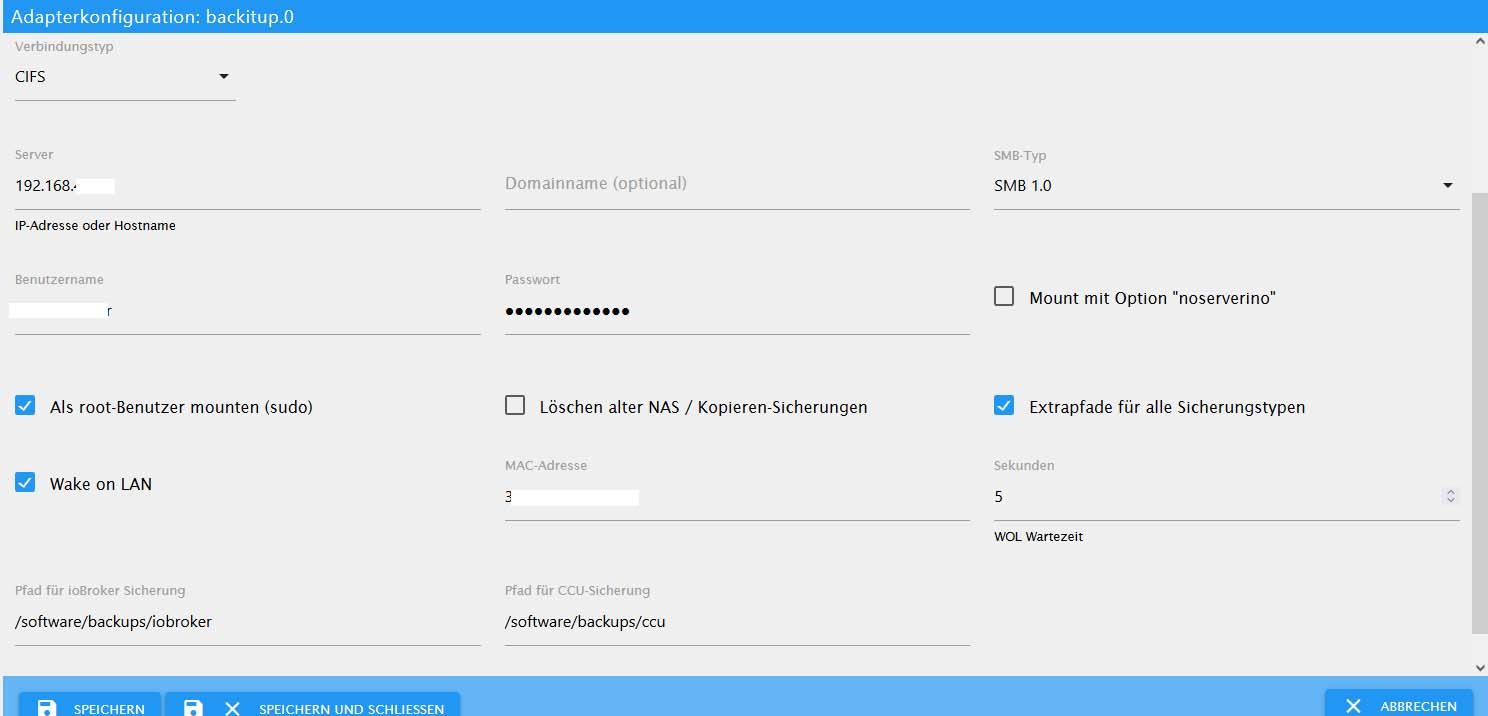
@beowolf OK, das erklärt die rechte ... Das sind die rechte vom NAS.
Was hast du für ein NAS und wie sieht deine Konfiguration dazu aus -
@beowolf Aktiviere mal die "noserverino" Option
Im Anschluss teste mal höhere SMB Versionen.
Ich kenne den Homeserver nicht, aber smb 1 ist schon recht veraltet.@simatec
So, jetzt haben die Verzeichnisse den richtigen Eigetümer.Wenn ich nun versuche Grafana und Influx wieder herszustellen, kommen diese Meldungen.
Grafana
Started restore ...
[DEBUG] [grafana] - Start Grafana Restore ...
[DEBUG] [grafana] - filename for restore: /opt/iobroker/backups/grafana_2021_07_11-02_04_17_backupiobroker.tar.gz
[DEBUG] [grafana] - Grafana tmp directory created: /opt/iobroker/backups/grafana_tmp
[DEBUG] [grafana] - start decompress
[DEBUG] [grafana] - Grafana request started
[DEBUG] [grafana] - Grafana is available ... Status: 200
[DEBUG] [grafana] - Try to Restore: /opt/iobroker/backups/grafana_tmp/datasource/InfluxDB.json
[DEBUG] [grafana] - cannot restore datasource "InfluxDB": "data source with the same name already exists"
[DEBUG] [grafana] - Try to Restore: /opt/iobroker/backups/grafana_tmp/dashboards/olheizung.json
[DEBUG] [grafana] - Try to Restore: /opt/iobroker/backups/grafana_tmp/dashboards/pflanzbeet-pflox.json
[DEBUG] [grafana] - Try to Restore: /opt/iobroker/backups/grafana_tmp/dashboards/pflanzkasten-pflox.json
[DEBUG] [grafana] - Try to Restore: /opt/iobroker/backups/grafana_tmp/dashboards/pflanzstreifen-garage.json
[DEBUG] [grafana] - Try to Restore: /opt/iobroker/backups/grafana_tmp/dashboards/rosenpflanzkasten.json
[DEBUG] [grafana] - Try to Restore: /opt/iobroker/backups/grafana_tmp/dashboards/umweltdaten.json
[DEBUG] [grafana] - Try to Restore: /opt/iobroker/backups/grafana_tmp/dashboards/vorgarten.json
[DEBUG] [grafana] - Try to Restore: /opt/iobroker/backups/grafana_tmp/dashboards/wasserspiel.json
[DEBUG] [grafana] - Try to Restore: /opt/iobroker/backups/grafana_tmp/dashboards/wohnhaus.json
[DEBUG] [grafana] - Try to Restore: /opt/iobroker/backups/grafana_tmp/dashboards/dachgeschoss.json
[DEBUG] [grafana] - Try to Restore: /opt/iobroker/backups/grafana_tmp/dashboards/erdgeschoss.json
[DEBUG] [grafana] - Try to Restore: /opt/iobroker/backups/grafana_tmp/dashboards/obergeschoss.json
[DEBUG] [grafana] - Try to Restore: /opt/iobroker/backups/grafana_tmp/dashboards/phase-1.json
[DEBUG] [grafana] - cannot restore dashboard "wasserspiel": {"message":"Access denied to save dashboard"}
[DEBUG] [grafana] - cannot restore dashboard "pflanzkasten-pflox": {"message":"Access denied to save dashboard"}
[DEBUG] [grafana] - cannot restore dashboard "pflanzstreifen-garage": {"message":"Access denied to save dashboard"}
[DEBUG] [grafana] - cannot restore dashboard "rosenpflanzkasten": {"message":"Access denied to save dashboard"}
[DEBUG] [grafana] - cannot restore dashboard "pflanzbeet-pflox": {"message":"Access denied to save dashboard"}
[DEBUG] [grafana] - cannot restore dashboard "phase-1": {"message":"Access denied to save dashboard"}
[DEBUG] [grafana] - cannot restore dashboard "vorgarten": {"message":"Access denied to save dashboard"}
[DEBUG] [grafana] - cannot restore dashboard "wohnhaus": {"message":"Dashboard cannot be changed to a folder"}
[DEBUG] [grafana] - cannot restore dashboard "dachgeschoss": {"message":"Access denied to save dashboard"}
[DEBUG] [grafana] - cannot restore dashboard "olheizung": {"message":"Access denied to save dashboard"}
[DEBUG] [grafana] - cannot restore dashboard "obergeschoss": {"message":"Access denied to save dashboard"}
[DEBUG] [grafana] - cannot restore dashboard "erdgeschoss": {"message":"Access denied to save dashboard"}
[DEBUG] [grafana] - cannot restore dashboard "umweltdaten": {"message":"Access denied to save dashboard"}
[DEBUG] [grafana] - Grafana request ended
[DEBUG] [grafana] - Try deleting the Grafana tmp directory
[DEBUG] [grafana] - Grafana tmp directory was successfully deleted
[DEBUG] [grafana] - Grafana Restore completed successfully
[EXIT] Grafana restore done
influx
Started restore ...
[DEBUG] [influxDB] - Created tmp directory
[DEBUG] [influxDB] - Start infuxDB Restore ...
[DEBUG] [influxDB] - influxdb.0 is stopped
[ERROR] [influxDB] - 2021/07/14 20:02:19 error updating meta: DB metadata not changed. database may already exist
restore: DB metadata not changed. database may already exist

[DEBUG] [influxDB] - Try deleting the InfluxDB tmp directory
[DEBUG] [influxDB] - InfluxDB tmp directory was successfully deleted
[DEBUG] [influxDB] - infuxDB Restore completed successfully
[EXIT] influxDB restore done
[DEBUG] [influxDB] - influxdb.0 started
Die Natur braucht nicht unseren Schutz, sie braucht unsere Abwesenheit.
-
@simatec
So, jetzt haben die Verzeichnisse den richtigen Eigetümer.Wenn ich nun versuche Grafana und Influx wieder herszustellen, kommen diese Meldungen.
Grafana
Started restore ...
[DEBUG] [grafana] - Start Grafana Restore ...
[DEBUG] [grafana] - filename for restore: /opt/iobroker/backups/grafana_2021_07_11-02_04_17_backupiobroker.tar.gz
[DEBUG] [grafana] - Grafana tmp directory created: /opt/iobroker/backups/grafana_tmp
[DEBUG] [grafana] - start decompress
[DEBUG] [grafana] - Grafana request started
[DEBUG] [grafana] - Grafana is available ... Status: 200
[DEBUG] [grafana] - Try to Restore: /opt/iobroker/backups/grafana_tmp/datasource/InfluxDB.json
[DEBUG] [grafana] - cannot restore datasource "InfluxDB": "data source with the same name already exists"
[DEBUG] [grafana] - Try to Restore: /opt/iobroker/backups/grafana_tmp/dashboards/olheizung.json
[DEBUG] [grafana] - Try to Restore: /opt/iobroker/backups/grafana_tmp/dashboards/pflanzbeet-pflox.json
[DEBUG] [grafana] - Try to Restore: /opt/iobroker/backups/grafana_tmp/dashboards/pflanzkasten-pflox.json
[DEBUG] [grafana] - Try to Restore: /opt/iobroker/backups/grafana_tmp/dashboards/pflanzstreifen-garage.json
[DEBUG] [grafana] - Try to Restore: /opt/iobroker/backups/grafana_tmp/dashboards/rosenpflanzkasten.json
[DEBUG] [grafana] - Try to Restore: /opt/iobroker/backups/grafana_tmp/dashboards/umweltdaten.json
[DEBUG] [grafana] - Try to Restore: /opt/iobroker/backups/grafana_tmp/dashboards/vorgarten.json
[DEBUG] [grafana] - Try to Restore: /opt/iobroker/backups/grafana_tmp/dashboards/wasserspiel.json
[DEBUG] [grafana] - Try to Restore: /opt/iobroker/backups/grafana_tmp/dashboards/wohnhaus.json
[DEBUG] [grafana] - Try to Restore: /opt/iobroker/backups/grafana_tmp/dashboards/dachgeschoss.json
[DEBUG] [grafana] - Try to Restore: /opt/iobroker/backups/grafana_tmp/dashboards/erdgeschoss.json
[DEBUG] [grafana] - Try to Restore: /opt/iobroker/backups/grafana_tmp/dashboards/obergeschoss.json
[DEBUG] [grafana] - Try to Restore: /opt/iobroker/backups/grafana_tmp/dashboards/phase-1.json
[DEBUG] [grafana] - cannot restore dashboard "wasserspiel": {"message":"Access denied to save dashboard"}
[DEBUG] [grafana] - cannot restore dashboard "pflanzkasten-pflox": {"message":"Access denied to save dashboard"}
[DEBUG] [grafana] - cannot restore dashboard "pflanzstreifen-garage": {"message":"Access denied to save dashboard"}
[DEBUG] [grafana] - cannot restore dashboard "rosenpflanzkasten": {"message":"Access denied to save dashboard"}
[DEBUG] [grafana] - cannot restore dashboard "pflanzbeet-pflox": {"message":"Access denied to save dashboard"}
[DEBUG] [grafana] - cannot restore dashboard "phase-1": {"message":"Access denied to save dashboard"}
[DEBUG] [grafana] - cannot restore dashboard "vorgarten": {"message":"Access denied to save dashboard"}
[DEBUG] [grafana] - cannot restore dashboard "wohnhaus": {"message":"Dashboard cannot be changed to a folder"}
[DEBUG] [grafana] - cannot restore dashboard "dachgeschoss": {"message":"Access denied to save dashboard"}
[DEBUG] [grafana] - cannot restore dashboard "olheizung": {"message":"Access denied to save dashboard"}
[DEBUG] [grafana] - cannot restore dashboard "obergeschoss": {"message":"Access denied to save dashboard"}
[DEBUG] [grafana] - cannot restore dashboard "erdgeschoss": {"message":"Access denied to save dashboard"}
[DEBUG] [grafana] - cannot restore dashboard "umweltdaten": {"message":"Access denied to save dashboard"}
[DEBUG] [grafana] - Grafana request ended
[DEBUG] [grafana] - Try deleting the Grafana tmp directory
[DEBUG] [grafana] - Grafana tmp directory was successfully deleted
[DEBUG] [grafana] - Grafana Restore completed successfully
[EXIT] Grafana restore done
influx
Started restore ... [DEBUG] [influxDB] - Created tmp directory [DEBUG] [influxDB] - Start infuxDB Restore ... [DEBUG] [influxDB] - influxdb.0 is stopped [ERROR] [influxDB] - 2021/07/14 20:02:19 error updating meta: DB metadata not changed. database may already exist restore: DB metadata not changed. database may already exist [DEBUG] [influxDB] - Try deleting the InfluxDB tmp directory [DEBUG] [influxDB] - InfluxDB tmp directory was successfully deleted [DEBUG] [influxDB] - infuxDB Restore completed successfully [EXIT] influxDB restore done [DEBUG] [influxDB] - influxdb.0 started@beowolf
Fpr den Grafana Restore brauchst du einen API Key mit vollen Admin Rechten.
Erzeuge dazu einen neuen Key und stelle dabei die Rechte dementsprechend ein.Beim Influx Restore darf die DB nicht existieren.
Bitte vorher den Influx Adapter stoppen und die Datenbank löschen. -
Ok, alles gemacht.
Alles mist wieder da. Vielen Dank für die Hilfe.
Was jetzt nicht geht, ist aber auch egal, ist die Wiederherstellung direkt vom NAS.
Ich muß die Backupdateien erst local speichern und dann abrufen. Das geht dann.
Grüße
ManfredDie Natur braucht nicht unseren Schutz, sie braucht unsere Abwesenheit.
-
Ok, alles gemacht.
Alles mist wieder da. Vielen Dank für die Hilfe.
Was jetzt nicht geht, ist aber auch egal, ist die Wiederherstellung direkt vom NAS.
Ich muß die Backupdateien erst local speichern und dann abrufen. Das geht dann.
Grüße
Manfred@beowolf sagte in Restore von grafana und influx geht nicht:
NAS
Da müsstest du mit den Rechten auf deinem NAS schauen. Mit großer Wahrscheinlichkeit fehlen da bestimmte Schreibrechte
-
Ok, alles gemacht.
Alles mist wieder da. Vielen Dank für die Hilfe.
Was jetzt nicht geht, ist aber auch egal, ist die Wiederherstellung direkt vom NAS.
Ich muß die Backupdateien erst local speichern und dann abrufen. Das geht dann.
Grüße
Manfred@beowolf sagte in Restore von grafana und influx geht nicht:
Alles mist wieder da. Vielen Dank für die Hilfe.
Kannst du bitte das Thema auf [gelöst] setzen.
-
@beowolf sagte in Restore von grafana und influx geht nicht:
NAS
Da müsstest du mit den Rechten auf deinem NAS schauen. Mit großer Wahrscheinlichkeit fehlen da bestimmte Schreibrechte
@simatec sagte in Restore von grafana und influx geht nicht:
@beowolf sagte in Restore von grafana und influx geht nicht:
NAS
Da müsstest du mit den Rechten auf deinem NAS schauen. Mit großer Wahrscheinlichkeit fehlen da bestimmte Schreibrechte
Aber warum funktioniert dann die Sicherung? Da werden alle Dateien in die entsprechenden Ordner geschrieben.
-
Die Einstellung (+ Grafana und infuxDB)
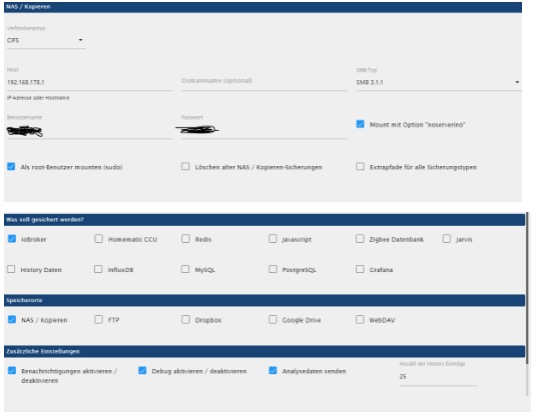
Nas wie auch Fritzbox (oder Raspberry) von Strom ziehen oder reboot .
iobroker fix ausführen. Hat bei mir funktioniert Wiederherstellung direkt vom NAS. -
Die Einstellung (+ Grafana und infuxDB)
Nas wie auch Fritzbox (oder Raspberry) von Strom ziehen oder reboot .
iobroker fix ausführen. Hat bei mir funktioniert Wiederherstellung direkt vom NAS.@arnold sagte in [[gelöst]
Nas wie auch Fritzbox (oder Raspberry) von Strom ziehen oder reboot .
Hallo Arnold,
ist sicher ein gut gemeinter Rat - aber sowohl einen NAS als auch einen Raspberry einfach vom "Strom" ziehen ist eine wirklich blöde Idee. Vor allem dann, wenn etwas mit einem Backup nicht funktioniert.
Es wäre nicht das erste Mal, das ein Raspberry es mit Unmut aufnimmt, wenn man ihm den Stecker zieht.
Bei einem Testsystem mag das ja noch ok sein. Bei einem System welches eingesetzt wird ist das absolut nicht zu empfehlen.
Grüße
Manfred

Hey! Du scheinst an dieser Unterhaltung interessiert zu sein, hast aber noch kein Konto.
Hast du es satt, bei jedem Besuch durch die gleichen Beiträge zu scrollen? Wenn du dich für ein Konto anmeldest, kommst du immer genau dorthin zurück, wo du zuvor warst, und kannst dich über neue Antworten benachrichtigen lassen (entweder per E-Mail oder Push-Benachrichtigung). Du kannst auch Lesezeichen speichern und Beiträge positiv bewerten, um anderen Community-Mitgliedern deine Wertschätzung zu zeigen.
Mit deinem Input könnte dieser Beitrag noch besser werden 💗
Registrieren Anmelden448
Online33.0k
Benutzer83.6k
Themen1.3m
Beiträge