



Skip to content
  • Home
  • Recent
  • Tags
  • 0 Unread 0
  • Categories
  • Unreplied
  • Popular
  • GitHub
  • Docu
  • Hilfe
Skins
  • Light
  • Brite
  • Cerulean
  • Cosmo
  • Flatly
  • Journal
  • Litera
  • Lumen
  • Lux
  • Materia
  • Minty
  • Morph
  • Pulse
  • Sandstone
  • Simplex
  • Sketchy
  • Spacelab
  • United
  • Yeti
  • Zephyr
  • Dark
  • Cyborg
  • Darkly
  • Quartz
  • Slate
  • Solar
  • Superhero
  • Vapor

  • Default (No Skin)
  • No Skin
Collapse
ioBroker Logo

Community Forum

donate donate
  1. ioBroker Community Home
  2. Deutsch
  3. Skripten / Logik
  4. JavaScript
  5. Binance API ausgeführte Trades / Fill Orders auslesen

NEWS

  • Monatsrückblick Januar/Februar 2026 ist online!
    BluefoxB
    Bluefox
    17
    1
    567

  • Jahresrückblick 2025 – unser neuer Blogbeitrag ist online! ✨
    BluefoxB
    Bluefox
    17
    1
    5.5k

  • Neuer Blogbeitrag: Monatsrückblick - Dezember 2025 🎄
    BluefoxB
    Bluefox
    13
    1
    1.4k

Binance API ausgeführte Trades / Fill Orders auslesen

Scheduled Pinned Locked Moved JavaScript
12 Posts 2 Posters 1.4k Views 2 Watching
  • Oldest to Newest
  • Newest to Oldest
  • Most Votes
Reply
  • Reply as topic
Log in to reply
This topic has been deleted. Only users with topic management privileges can see it.
  • P Offline
    P Offline
    PeterM1894
    wrote on last edited by
    #3

    danke für deine schnelle Antwort.. ich werde das einmal so ausprobieren.

    "Der Adapter ist doch vor 18 Tagen noch geändert worden"
    ich hatte Kartax angeschrieben und der hatte geantwortet, dass er nicht mehr mit iobroker arbeitet und deshalb nicht mehr weiter entwickelt?

    lg
    Peter

    1 Reply Last reply
    0
    • P Offline
      P Offline
      PeterM1894
      wrote on last edited by
      #4

      Könntest du noch einmal helfen?

      Ich habe folgenden Curl-Befehl eingeben, erhalte aber eine Fehlermeldung:

      curl -H "X-MBX-APIKEY:meinAPI Key" -X GET 'https://api.binance.com/api/v3/allOrders &signature=
      meinSecretKey'

      <html><body><h2>404 Not found</h2></body></html

      Ich möchte gern die Anzahl der offenen Orders auslesen. :cry:

      Liebe Grüße
      Peter

      M 1 Reply Last reply
      0
      • P PeterM1894

        Könntest du noch einmal helfen?

        Ich habe folgenden Curl-Befehl eingeben, erhalte aber eine Fehlermeldung:

        curl -H "X-MBX-APIKEY:meinAPI Key" -X GET 'https://api.binance.com/api/v3/allOrders &signature=
        meinSecretKey'

        <html><body><h2>404 Not found</h2></body></html

        Ich möchte gern die Anzahl der offenen Orders auslesen. :cry:

        Liebe Grüße
        Peter

        M Online
        M Online
        MCU
        wrote on last edited by MCU
        #5

        @peterm1894
        'https://api.binance.com/api/v3/allOrders?signature=meinSecretKey'
        Fragezeichen vergessen.
        Soweit ich das verstande habe gehört da auch die ?symbol=LTCBTC rein?
        Dann wäre es:
        'https://api.binance.com/api/v3/allOrders?symbol=LTCBTC&signature=meinSecretKey'

        Wenn da was kommt, zeig mal das Ergebnis.

        NUC i7 64GB mit Proxmox ---- Jarvis Infos Aktualisierungen der Doku auf Instagram verfolgen -> mcuiobroker Instagram
        Wenn Euch mein Vorschlag geholfen hat, bitte rechts "^" klicken.

        1 Reply Last reply
        0
        • P Offline
          P Offline
          PeterM1894
          wrote on last edited by
          #6

          Ich habe deinen Vorschlag ausprobiert und erhalte folgende Fehlermeldung:

          CODE:
          curl -H "X-MBX-APIKEY:meinAPI Key" -X GET 'https://api.binance.com/api/v3/allOrders?symbol=BTCBUSD&signature=meinSecretKey'

          Fehlermeldung:
          {"code":-1102,"msg":"Mandatory parameter 'timestamp' was not sent, was empty/null, or malformed."}

          Danach habe ich „Timestamp“ eingefügt und erhalte folgende Fehlermeldung:

          CODE:
          curl -H "X-MBX-APIKEY:meinAPI Key" -X GET 'https://api.binance.com/api/v3/allOrders?symbol=BTCBUSD&timestamp=1499827319559&signature=meinSecretKey'

          Fehlermeldung:
          {"code":-1021,"msg":"Timestamp for this request is outside of the recvWindow."}

          Ahh... so schwer hatte ich mir das nicht vorgestellt :cry:

          M 1 Reply Last reply
          0
          • P PeterM1894

            Ich habe deinen Vorschlag ausprobiert und erhalte folgende Fehlermeldung:

            CODE:
            curl -H "X-MBX-APIKEY:meinAPI Key" -X GET 'https://api.binance.com/api/v3/allOrders?symbol=BTCBUSD&signature=meinSecretKey'

            Fehlermeldung:
            {"code":-1102,"msg":"Mandatory parameter 'timestamp' was not sent, was empty/null, or malformed."}

            Danach habe ich „Timestamp“ eingefügt und erhalte folgende Fehlermeldung:

            CODE:
            curl -H "X-MBX-APIKEY:meinAPI Key" -X GET 'https://api.binance.com/api/v3/allOrders?symbol=BTCBUSD&timestamp=1499827319559&signature=meinSecretKey'

            Fehlermeldung:
            {"code":-1021,"msg":"Timestamp for this request is outside of the recvWindow."}

            Ahh... so schwer hatte ich mir das nicht vorgestellt :cry:

            M Online
            M Online
            MCU
            wrote on last edited by MCU
            #7

            @peterm1894 timestamp JETZT:
            f7f73c1d-b395-4b60-9624-8ed023206bdd-image.png
            00c8bfd4-f4ef-4da8-bcfd-537c9ec1c1b0-image.png
            Deine angegebene Zeit war von 2017:

            497d8bc3-c915-4ba6-993c-5e4ad6d9c504-image.png
            2d68b178-c7ff-4b07-9bbb-6267b2aa2310-image.png
            Wenn man den richtigen Weg hat, kann man es durch Blockly oder javascript etwas einfacher machen.
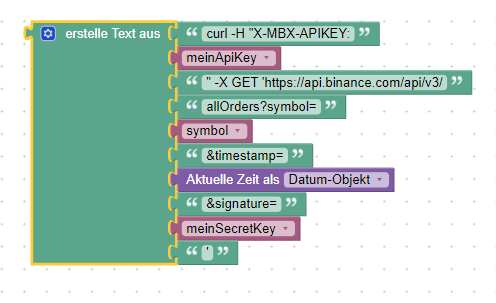
            5997e8e0-631c-4d56-9c35-f2122e6cece2-image.png

            <block xmlns="https://developers.google.com/blockly/xml" type="text_join" id=".gdM0B;H{zDF(.2A~$ze" x="-312.1111450195308" y="162.8888702392577">
              <mutation items="10"></mutation>
              <value name="ADD0">
                <block type="text" id="B,zws~}D7bJ#om2hq+:4">
                  <field name="TEXT">curl -H "X-MBX-APIKEY:</field>
                </block>
              </value>
              <value name="ADD1">
                <block type="variables_get" id="rSGGuMB(iMKkb.IU*df4">
                  <field name="VAR" id="(j2plG$Y(%]`yQ=aET[3">meinApiKey</field>
                </block>
              </value>
              <value name="ADD2">
                <block type="text" id="eo-Z-tAo;-ZwzzrAlY-L">
                  <field name="TEXT">" -X GET 'https://api.binance.com/api/v3/</field>
                </block>
              </value>
              <value name="ADD3">
                <block type="text" id="oEu4Pt?,9Y{q]=,Ov1zc">
                  <field name="TEXT">allOrders?symbol=</field>
                </block>
              </value>
              <value name="ADD4">
                <block type="variables_get" id="Q#H7XT1H[y]okf8PqH-,">
                  <field name="VAR" id="h`vxk%kkst+l+6Xc9,^;">symbol</field>
                </block>
              </value>
              <value name="ADD5">
                <block type="text" id="AM[}xrRgo1]VjZt83+g#">
                  <field name="TEXT">&amp;timestamp=</field>
                </block>
              </value>
              <value name="ADD6">
                <block type="time_get" id="vP6mz9BgS^^Q34:Y@ah.">
                  <mutation xmlns="http://www.w3.org/1999/xhtml" format="false" language="false"></mutation>
                  <field name="OPTION">object</field>
                </block>
              </value>
              <value name="ADD7">
                <block type="text" id="{L^kPNk(S.|W%LbW26^|">
                  <field name="TEXT">&amp;signature=</field>
                </block>
              </value>
              <value name="ADD8">
                <block type="variables_get" id="7K6]-yB4fyW}bF=sFV=J">
                  <field name="VAR" id="VOx.7s{OQv{48=JbG3jt">meinSecretKey</field>
                </block>
              </value>
              <value name="ADD9">
                <block type="text" id="z;zhlFA)vE`Eeh+db7py">
                  <field name="TEXT">'</field>
                </block>
              </value>
            </block>
            

            Die Variablen müssen natürlich vorher definiert werden.

            NUC i7 64GB mit Proxmox ---- Jarvis Infos Aktualisierungen der Doku auf Instagram verfolgen -> mcuiobroker Instagram
            Wenn Euch mein Vorschlag geholfen hat, bitte rechts "^" klicken.

            1 Reply Last reply
            0
            • P Offline
              P Offline
              PeterM1894
              wrote on last edited by PeterM1894
              #8

              Hallo MCU,

              ich habe dein Blockly eingefügt und mit meinen Daten ergänzt.

              <xml xmlns="https://developers.google.com/blockly/xml">
                <variables>
                  <variable id="(j2plG$Y(%]`yQ=aET[3">meinApiKey</variable>
                  <variable id="VOx.7s{OQv{48=JbG3jt">meinSecretKey</variable>
                  <variable id="h`vxk%kkst+l+6Xc9,^;">symbol</variable>
                  <variable id="=IK+ZIjb40nXFN0x61/+">curl-Befehl</variable>
                  <variable id=")uj8Z)MWhW{khTsW3qKH">result</variable>
                </variables>
                <block type="variables_set" id="PoblWj|6;g7we}({BH01" x="1213" y="-63">
                  <field name="VAR" id="(j2plG$Y(%]`yQ=aET[3">meinApiKey</field>
                  <value name="VALUE">
                    <block type="text" id="_DzFqjh|J#@!2i9%y`o!">
                      <field name="TEXT">meinAPIkey</field>
                    </block>
                  </value>
                  <next>
                    <block type="variables_set" id="v.-GdE;q@W}||FUu;paB">
                      <field name="VAR" id="VOx.7s{OQv{48=JbG3jt">meinSecretKey</field>
                      <value name="VALUE">
                        <block type="text" id="p$52es)fb+$t*/KN^z)t">
                          <field name="TEXT">meinSECRETkey</field>
                        </block>
                      </value>
                      <next>
                        <block type="variables_set" id="+SNC{=Y=HR!AwU(pt-K*">
                          <field name="VAR" id="h`vxk%kkst+l+6Xc9,^;">symbol</field>
                          <value name="VALUE">
                            <block type="text" id="ld@g;t_]y9*TS@ra/@Dn">
                              <field name="TEXT">BTCBUSD</field>
                            </block>
                          </value>
                          <next>
                            <block type="variables_set" id="c2S:QlbWC+i~F(/K,8^]">
                              <field name="VAR" id="=IK+ZIjb40nXFN0x61/+">curl-Befehl</field>
                              <value name="VALUE">
                                <block type="text_join" id="a)019IYFILQ(d5*D^ya}">
                                  <mutation items="11"></mutation>
                                  <value name="ADD0">
                                    <block type="text" id="G@]U?*BPXz/Fj7{7X0zP">
                                      <field name="TEXT">curl -H "X-MBX-APIKEY: </field>
                                    </block>
                                  </value>
                                  <value name="ADD1">
                                    <block type="variables_get" id="c~dcK@VBc~sDi__SKQ4@">
                                      <field name="VAR" id="(j2plG$Y(%]`yQ=aET[3">meinApiKey</field>
                                    </block>
                                  </value>
                                  <value name="ADD2">
                                    <block type="text" id="un,)v5SUO1=`dJw;7]sV">
                                      <field name="TEXT">" -X GET 'https://api.binance.com/api/v3/</field>
                                    </block>
                                  </value>
                                  <value name="ADD3">
                                    <block type="text" id="|XgfXVlB8|meGESOT*B]">
                                      <field name="TEXT">allOrders</field>
                                    </block>
                                  </value>
                                  <value name="ADD4">
                                    <block type="text" id="}Fb`3%Ov5MaS^(`9tq_J">
                                      <field name="TEXT">?symbol=</field>
                                    </block>
                                  </value>
                                  <value name="ADD5">
                                    <block type="variables_get" id="N)C[4]EmuL3AC7euEkRM">
                                      <field name="VAR" id="h`vxk%kkst+l+6Xc9,^;">symbol</field>
                                    </block>
                                  </value>
                                  <value name="ADD6">
                                    <block type="text" id="i$EawR,W!?-FR2}Ek3Om">
                                      <field name="TEXT">&amp;timestamp=</field>
                                    </block>
                                  </value>
                                  <value name="ADD7">
                                    <block type="time_get" id="td/wwz`yt/0:B][lzorc">
                                      <mutation xmlns="http://www.w3.org/1999/xhtml" format="false" language="false"></mutation>
                                      <field name="OPTION">object</field>
                                    </block>
                                  </value>
                                  <value name="ADD8">
                                    <block type="text" id="u!7vk]6A!3Gkf=+jz!Md">
                                      <field name="TEXT">&amp;signature=</field>
                                    </block>
                                  </value>
                                  <value name="ADD9">
                                    <block type="variables_get" id="73^@=%s3lWRw99,eH6k*">
                                      <field name="VAR" id="VOx.7s{OQv{48=JbG3jt">meinSecretKey</field>
                                    </block>
                                  </value>
                                  <value name="ADD10">
                                    <block type="text" id="u}nLm-W7P0pKeo._nR.M">
                                      <field name="TEXT">'</field>
                                    </block>
                                  </value>
                                </block>
                              </value>
                              <next>
                                <block type="exec" id="0xxdob=y}g-I%W~xz@GW">
                                  <mutation xmlns="http://www.w3.org/1999/xhtml" with_statement="true"></mutation>
                                  <field name="WITH_STATEMENT">TRUE</field>
                                  <field name="LOG"></field>
                                  <value name="COMMAND">
                                    <shadow type="text">
                                      <field name="TEXT">curl -H "X-MBX-APIKEY: kaWeQf4fa9LLHzd8Lg6i2KwQT6jZHRWjkadNlym5XoYWQ2KJLVXiIKoPnnkbBuJV"  -X GET 'https://api.binance.com/api/v3/allOrders?symbol=BTCBUSD&amp;timestamp=1499827319559&amp;signature=H0MD66rhiCyhK0n45B1p0YmK1aGIAfiJLdwfkO1fK4g5aXW4gd6pZNZMQ2pC0dvx'</field>
                                    </shadow>
                                    <block type="variables_get" id="tIG}nPXVR#}|/3XMA3,;">
                                      <field name="VAR" id="=IK+ZIjb40nXFN0x61/+">curl-Befehl</field>
                                    </block>
                                  </value>
                                  <statement name="STATEMENT">
                                    <block type="debug" id="MT7[[,Dkr)IzPH?W0^[|">
                                      <field name="Severity">log</field>
                                      <value name="TEXT">
                                        <shadow type="text">
                                          <field name="TEXT">gemacht</field>
                                        </shadow>
                                        <block type="variables_get" id="8S_}t},J,CM:Q@4He0^r">
                                          <field name="VAR" id="=IK+ZIjb40nXFN0x61/+">curl-Befehl</field>
                                        </block>
                                      </value>
                                      <next>
                                        <block type="debug" id="9rZ9@9OYd}*(:h5al*+2">
                                          <field name="Severity">log</field>
                                          <value name="TEXT">
                                            <shadow type="text">
                                              <field name="TEXT">gemacht</field>
                                            </shadow>
                                            <block type="text" id="c+4$(Sgx.6E|U4``rP,^">
                                              <field name="TEXT">####################</field>
                                            </block>
                                          </value>
                                          <next>
                                            <block type="debug" id="O-AmX*[FKObu9|L9tWeo">
                                              <field name="Severity">log</field>
                                              <value name="TEXT">
                                                <shadow type="text">
                                                  <field name="TEXT">gemacht</field>
                                                </shadow>
                                                <block type="variables_get" id="xq{TrE5oR;KCF@)$YIv(">
                                                  <field name="VAR" id=")uj8Z)MWhW{khTsW3qKH">result</field>
                                                </block>
                                              </value>
                                            </block>
                                          </next>
                                        </block>
                                      </next>
                                    </block>
                                  </statement>
                                </block>
                              </next>
                            </block>
                          </next>
                        </block>
                      </next>
                    </block>
                  </next>
                </block>
              </xml>
              

              Be der Ausführung erhalte dann aber die Fehlermeldung:

              {"code":-1022,"msg":"Signature for this request is not valid."}

              Den Secret-Key habe ich kontrolliert, dieser ist korrekt?
              Bei einer Webrecherche bin ich auf folgendes gestoßen, werd aber nicht richtig schlau daraus:

              Signature isn't the secret key. Please read the docs regarding signature generation.
              https://github.com/binance-exchange/binance-signature-examples

              Danke für deine Hilfe. :+1:

              lg

              M 1 Reply Last reply
              0
              • P PeterM1894

                Hallo MCU,

                ich habe dein Blockly eingefügt und mit meinen Daten ergänzt.

                <xml xmlns="https://developers.google.com/blockly/xml">
                  <variables>
                    <variable id="(j2plG$Y(%]`yQ=aET[3">meinApiKey</variable>
                    <variable id="VOx.7s{OQv{48=JbG3jt">meinSecretKey</variable>
                    <variable id="h`vxk%kkst+l+6Xc9,^;">symbol</variable>
                    <variable id="=IK+ZIjb40nXFN0x61/+">curl-Befehl</variable>
                    <variable id=")uj8Z)MWhW{khTsW3qKH">result</variable>
                  </variables>
                  <block type="variables_set" id="PoblWj|6;g7we}({BH01" x="1213" y="-63">
                    <field name="VAR" id="(j2plG$Y(%]`yQ=aET[3">meinApiKey</field>
                    <value name="VALUE">
                      <block type="text" id="_DzFqjh|J#@!2i9%y`o!">
                        <field name="TEXT">meinAPIkey</field>
                      </block>
                    </value>
                    <next>
                      <block type="variables_set" id="v.-GdE;q@W}||FUu;paB">
                        <field name="VAR" id="VOx.7s{OQv{48=JbG3jt">meinSecretKey</field>
                        <value name="VALUE">
                          <block type="text" id="p$52es)fb+$t*/KN^z)t">
                            <field name="TEXT">meinSECRETkey</field>
                          </block>
                        </value>
                        <next>
                          <block type="variables_set" id="+SNC{=Y=HR!AwU(pt-K*">
                            <field name="VAR" id="h`vxk%kkst+l+6Xc9,^;">symbol</field>
                            <value name="VALUE">
                              <block type="text" id="ld@g;t_]y9*TS@ra/@Dn">
                                <field name="TEXT">BTCBUSD</field>
                              </block>
                            </value>
                            <next>
                              <block type="variables_set" id="c2S:QlbWC+i~F(/K,8^]">
                                <field name="VAR" id="=IK+ZIjb40nXFN0x61/+">curl-Befehl</field>
                                <value name="VALUE">
                                  <block type="text_join" id="a)019IYFILQ(d5*D^ya}">
                                    <mutation items="11"></mutation>
                                    <value name="ADD0">
                                      <block type="text" id="G@]U?*BPXz/Fj7{7X0zP">
                                        <field name="TEXT">curl -H "X-MBX-APIKEY: </field>
                                      </block>
                                    </value>
                                    <value name="ADD1">
                                      <block type="variables_get" id="c~dcK@VBc~sDi__SKQ4@">
                                        <field name="VAR" id="(j2plG$Y(%]`yQ=aET[3">meinApiKey</field>
                                      </block>
                                    </value>
                                    <value name="ADD2">
                                      <block type="text" id="un,)v5SUO1=`dJw;7]sV">
                                        <field name="TEXT">" -X GET 'https://api.binance.com/api/v3/</field>
                                      </block>
                                    </value>
                                    <value name="ADD3">
                                      <block type="text" id="|XgfXVlB8|meGESOT*B]">
                                        <field name="TEXT">allOrders</field>
                                      </block>
                                    </value>
                                    <value name="ADD4">
                                      <block type="text" id="}Fb`3%Ov5MaS^(`9tq_J">
                                        <field name="TEXT">?symbol=</field>
                                      </block>
                                    </value>
                                    <value name="ADD5">
                                      <block type="variables_get" id="N)C[4]EmuL3AC7euEkRM">
                                        <field name="VAR" id="h`vxk%kkst+l+6Xc9,^;">symbol</field>
                                      </block>
                                    </value>
                                    <value name="ADD6">
                                      <block type="text" id="i$EawR,W!?-FR2}Ek3Om">
                                        <field name="TEXT">&amp;timestamp=</field>
                                      </block>
                                    </value>
                                    <value name="ADD7">
                                      <block type="time_get" id="td/wwz`yt/0:B][lzorc">
                                        <mutation xmlns="http://www.w3.org/1999/xhtml" format="false" language="false"></mutation>
                                        <field name="OPTION">object</field>
                                      </block>
                                    </value>
                                    <value name="ADD8">
                                      <block type="text" id="u!7vk]6A!3Gkf=+jz!Md">
                                        <field name="TEXT">&amp;signature=</field>
                                      </block>
                                    </value>
                                    <value name="ADD9">
                                      <block type="variables_get" id="73^@=%s3lWRw99,eH6k*">
                                        <field name="VAR" id="VOx.7s{OQv{48=JbG3jt">meinSecretKey</field>
                                      </block>
                                    </value>
                                    <value name="ADD10">
                                      <block type="text" id="u}nLm-W7P0pKeo._nR.M">
                                        <field name="TEXT">'</field>
                                      </block>
                                    </value>
                                  </block>
                                </value>
                                <next>
                                  <block type="exec" id="0xxdob=y}g-I%W~xz@GW">
                                    <mutation xmlns="http://www.w3.org/1999/xhtml" with_statement="true"></mutation>
                                    <field name="WITH_STATEMENT">TRUE</field>
                                    <field name="LOG"></field>
                                    <value name="COMMAND">
                                      <shadow type="text">
                                        <field name="TEXT">curl -H "X-MBX-APIKEY: kaWeQf4fa9LLHzd8Lg6i2KwQT6jZHRWjkadNlym5XoYWQ2KJLVXiIKoPnnkbBuJV"  -X GET 'https://api.binance.com/api/v3/allOrders?symbol=BTCBUSD&amp;timestamp=1499827319559&amp;signature=H0MD66rhiCyhK0n45B1p0YmK1aGIAfiJLdwfkO1fK4g5aXW4gd6pZNZMQ2pC0dvx'</field>
                                      </shadow>
                                      <block type="variables_get" id="tIG}nPXVR#}|/3XMA3,;">
                                        <field name="VAR" id="=IK+ZIjb40nXFN0x61/+">curl-Befehl</field>
                                      </block>
                                    </value>
                                    <statement name="STATEMENT">
                                      <block type="debug" id="MT7[[,Dkr)IzPH?W0^[|">
                                        <field name="Severity">log</field>
                                        <value name="TEXT">
                                          <shadow type="text">
                                            <field name="TEXT">gemacht</field>
                                          </shadow>
                                          <block type="variables_get" id="8S_}t},J,CM:Q@4He0^r">
                                            <field name="VAR" id="=IK+ZIjb40nXFN0x61/+">curl-Befehl</field>
                                          </block>
                                        </value>
                                        <next>
                                          <block type="debug" id="9rZ9@9OYd}*(:h5al*+2">
                                            <field name="Severity">log</field>
                                            <value name="TEXT">
                                              <shadow type="text">
                                                <field name="TEXT">gemacht</field>
                                              </shadow>
                                              <block type="text" id="c+4$(Sgx.6E|U4``rP,^">
                                                <field name="TEXT">####################</field>
                                              </block>
                                            </value>
                                            <next>
                                              <block type="debug" id="O-AmX*[FKObu9|L9tWeo">
                                                <field name="Severity">log</field>
                                                <value name="TEXT">
                                                  <shadow type="text">
                                                    <field name="TEXT">gemacht</field>
                                                  </shadow>
                                                  <block type="variables_get" id="xq{TrE5oR;KCF@)$YIv(">
                                                    <field name="VAR" id=")uj8Z)MWhW{khTsW3qKH">result</field>
                                                  </block>
                                                </value>
                                              </block>
                                            </next>
                                          </block>
                                        </next>
                                      </block>
                                    </statement>
                                  </block>
                                </next>
                              </block>
                            </next>
                          </block>
                        </next>
                      </block>
                    </next>
                  </block>
                </xml>
                

                Be der Ausführung erhalte dann aber die Fehlermeldung:

                {"code":-1022,"msg":"Signature for this request is not valid."}

                Den Secret-Key habe ich kontrolliert, dieser ist korrekt?
                Bei einer Webrecherche bin ich auf folgendes gestoßen, werd aber nicht richtig schlau daraus:

                Signature isn't the secret key. Please read the docs regarding signature generation.
                https://github.com/binance-exchange/binance-signature-examples

                Danke für deine Hilfe. :+1:

                lg

                M Online
                M Online
                MCU
                wrote on last edited by
                #9

                @peterm1894 Da steig ich dann auch nicht mehr durch. Ob man den SecretKey vorher kryptisch aufbereiten muss?

                https://github.com/binance-exchange/binance-signature-examples/blob/master/nodejs/signature.js

                Vielleicht kann Dir da der Entwickler vom Adapter weiterhelfen?
                Du kannst auf diesen Thread hinweisen und vielleicht sieht er, wo das Problem ist?

                NUC i7 64GB mit Proxmox ---- Jarvis Infos Aktualisierungen der Doku auf Instagram verfolgen -> mcuiobroker Instagram
                Wenn Euch mein Vorschlag geholfen hat, bitte rechts "^" klicken.

                P 1 Reply Last reply
                0
                • M MCU

                  @peterm1894 Da steig ich dann auch nicht mehr durch. Ob man den SecretKey vorher kryptisch aufbereiten muss?

                  https://github.com/binance-exchange/binance-signature-examples/blob/master/nodejs/signature.js

                  Vielleicht kann Dir da der Entwickler vom Adapter weiterhelfen?
                  Du kannst auf diesen Thread hinweisen und vielleicht sieht er, wo das Problem ist?

                  P Offline
                  P Offline
                  PeterM1894
                  wrote on last edited by
                  #10

                  @mcu
                  ich schau noch einmal... falls ich eine Lösung habe Poste ich sie hier.

                  Danke.

                  1 Reply Last reply
                  1
                  • P Offline
                    P Offline
                    PeterM1894
                    wrote on last edited by
                    #11

                    ich habe jetzt noch folgendes gefunden:
                    https://github.com/binance-exchange/binance-signature-examples/blob/master/nodejs/signature.js

                    const crypto = require('crypto');
                    
                    const query_string = 'timestamp=1578963600000';
                    const apiSecret = 'NhqPtmdSJYdKjVHjA7PZj4Mge3R5YNiP1e3UZjInClVN65XAbvqqM6A7H5fATj0j';
                    
                    function signature(query_string) {
                        return crypto
                            .createHmac('sha256', apiSecret)
                            .update(query_string)
                            .digest('hex');
                    }
                    
                    console.log("hashing the string: ");
                    console.log(query_string);
                    console.log("and return:");
                    console.log(signature(query_string));
                    
                    console.log("\n");
                    
                    const another_query = 'symbol=LTCBTC&side=BUY&type=LIMIT&timeInForce=GTC&quantity=1&price=0.1&recvWindow=5000&timestamp=1499827319559';
                    console.log("hashing the string: ");
                    console.log(another_query);
                    console.log("and return:");
                    console.log(signature(another_query));
                    

                    Weißt du wie ich "console.log(signature(another_query))" in eine Variable bekomme?

                    M 1 Reply Last reply
                    0
                    • P PeterM1894

                      ich habe jetzt noch folgendes gefunden:
                      https://github.com/binance-exchange/binance-signature-examples/blob/master/nodejs/signature.js

                      const crypto = require('crypto');
                      
                      const query_string = 'timestamp=1578963600000';
                      const apiSecret = 'NhqPtmdSJYdKjVHjA7PZj4Mge3R5YNiP1e3UZjInClVN65XAbvqqM6A7H5fATj0j';
                      
                      function signature(query_string) {
                          return crypto
                              .createHmac('sha256', apiSecret)
                              .update(query_string)
                              .digest('hex');
                      }
                      
                      console.log("hashing the string: ");
                      console.log(query_string);
                      console.log("and return:");
                      console.log(signature(query_string));
                      
                      console.log("\n");
                      
                      const another_query = 'symbol=LTCBTC&side=BUY&type=LIMIT&timeInForce=GTC&quantity=1&price=0.1&recvWindow=5000&timestamp=1499827319559';
                      console.log("hashing the string: ");
                      console.log(another_query);
                      console.log("and return:");
                      console.log(signature(another_query));
                      

                      Weißt du wie ich "console.log(signature(another_query))" in eine Variable bekomme?

                      M Online
                      M Online
                      MCU
                      wrote on last edited by
                      #12

                      @peterm1894 Das ist ja der Link den ich dir geschickt hatte.

                      var newSignature = signature(another_query);
                      

                      NUC i7 64GB mit Proxmox ---- Jarvis Infos Aktualisierungen der Doku auf Instagram verfolgen -> mcuiobroker Instagram
                      Wenn Euch mein Vorschlag geholfen hat, bitte rechts "^" klicken.

                      1 Reply Last reply
                      0
                      Reply
                      • Reply as topic
                      Log in to reply
                      • Oldest to Newest
                      • Newest to Oldest
                      • Most Votes


                      Support us

                      ioBroker
                      Community Adapters
                      Donate

                      551

                      Online

                      32.7k

                      Users

                      82.6k

                      Topics

                      1.3m

                      Posts
                      Community
                      Impressum | Datenschutz-Bestimmungen | Nutzungsbedingungen | Einwilligungseinstellungen
                      ioBroker Community 2014-2025
                      logo
                      • Login

                      • Don't have an account? Register

                      • Login or register to search.
                      • First post
                        Last post
                      0
                      • Home
                      • Recent
                      • Tags
                      • Unread 0
                      • Categories
                      • Unreplied
                      • Popular
                      • GitHub
                      • Docu
                      • Hilfe

