Skip to content
  • Home
  • Aktuell
  • Tags
  • 0 Ungelesen 0
  • Kategorien
  • Unreplied
  • Beliebt
  • GitHub
  • Docu
  • Hilfe
Skins
  • Light
  • Brite
  • Cerulean
  • Cosmo
  • Flatly
  • Journal
  • Litera
  • Lumen
  • Lux
  • Materia
  • Minty
  • Morph
  • Pulse
  • Sandstone
  • Simplex
  • Sketchy
  • Spacelab
  • United
  • Yeti
  • Zephyr
  • Dark
  • Cyborg
  • Darkly
  • Quartz
  • Slate
  • Solar
  • Superhero
  • Vapor

  • Standard: (Kein Skin)
  • Kein Skin
Einklappen
ioBroker Logo

Community Forum

donate donate
  1. ioBroker Community Home
  2. Deutsch
  3. Skripten / Logik
  4. JavaScript
  5. Binance API ausgeführte Trades / Fill Orders auslesen

NEWS

  • Neuer Blogbeitrag: Monatsrückblick - Dezember 2025 🎄
    BluefoxB
    Bluefox
    5
    1
    40

  • Weihnachtsangebot 2025! 🎄
    BluefoxB
    Bluefox
    24
    1
    1.4k

  • UPDATE 31.10.: Amazon Alexa - ioBroker Skill läuft aus ?
    apollon77A
    apollon77
    48
    3
    9.3k

Binance API ausgeführte Trades / Fill Orders auslesen

Geplant Angeheftet Gesperrt Verschoben JavaScript
12 Beiträge 2 Kommentatoren 1.2k Aufrufe 2 Watching
  • Älteste zuerst
  • Neuste zuerst
  • Meiste Stimmen
Antworten
  • In einem neuen Thema antworten
Anmelden zum Antworten
Dieses Thema wurde gelöscht. Nur Nutzer mit entsprechenden Rechten können es sehen.
  • P Offline
    P Offline
    PeterM1894
    schrieb am zuletzt editiert von
    #1

    Ich suche Hilfe,
    ich möchte in iobroker die ausgeführten Trades / Fill Orders auslesen, um damit eine Push-Benachrichtigung anstoßen zu können?

    Offizielle Seite von Binance:
    https://binance-docs.github.io/apidocs/spot/en/#general-api-information

    Leider bin ich totaler Anfänger und habe keine Ahnung wie das in JavaScript funktionieren könnte.

    Der „ioBroker.binance“ Adapter wird ja leider nicht weiterentwickelt, kann diese Daten aber auch nicht zu Verfügung stellen.

    Kann jemand helfen?:+1:

    Liebe Grüße
    Peter :blush:

    M 1 Antwort Letzte Antwort
    0
    • P PeterM1894

      Ich suche Hilfe,
      ich möchte in iobroker die ausgeführten Trades / Fill Orders auslesen, um damit eine Push-Benachrichtigung anstoßen zu können?

      Offizielle Seite von Binance:
      https://binance-docs.github.io/apidocs/spot/en/#general-api-information

      Leider bin ich totaler Anfänger und habe keine Ahnung wie das in JavaScript funktionieren könnte.

      Der „ioBroker.binance“ Adapter wird ja leider nicht weiterentwickelt, kann diese Daten aber auch nicht zu Verfügung stellen.

      Kann jemand helfen?:+1:

      Liebe Grüße
      Peter :blush:

      M Online
      M Online
      MCU
      schrieb am zuletzt editiert von MCU
      #2

      @peterm1894
      b7dd9650-0f76-420d-bd35-ef459c6f72dd-image.png
      1e3ae516-4973-4748-905f-09a9c2b66b99-image.png
      Musst Deine entsprechenden Werte anpassen und dann bekommst du eine JSON zurück:
      In meinem Fall:

      e43dfdef-eaf0-4451-811b-6c3f44d10a11-image.png
      Der Adapter ist doch vor 18 Tagen noch geändert worden:

      7587f34f-1198-40a4-bc72-f890de0e8bdf-image.png

      NUC i7 64GB mit Proxmox ---- Jarvis Infos Aktualisierungen der Doku auf Instagram verfolgen -> mcuiobroker Instagram
      Wenn Euch mein Vorschlag geholfen hat, bitte rechts "^" klicken.

      1 Antwort Letzte Antwort
      0
      • P Offline
        P Offline
        PeterM1894
        schrieb am zuletzt editiert von
        #3

        danke für deine schnelle Antwort.. ich werde das einmal so ausprobieren.

        "Der Adapter ist doch vor 18 Tagen noch geändert worden"
        ich hatte Kartax angeschrieben und der hatte geantwortet, dass er nicht mehr mit iobroker arbeitet und deshalb nicht mehr weiter entwickelt?

        lg
        Peter

        1 Antwort Letzte Antwort
        0
        • P Offline
          P Offline
          PeterM1894
          schrieb am zuletzt editiert von
          #4

          Könntest du noch einmal helfen?

          Ich habe folgenden Curl-Befehl eingeben, erhalte aber eine Fehlermeldung:

          curl -H "X-MBX-APIKEY:meinAPI Key" -X GET 'https://api.binance.com/api/v3/allOrders &signature=
          meinSecretKey'

          <html><body><h2>404 Not found</h2></body></html

          Ich möchte gern die Anzahl der offenen Orders auslesen. :cry:

          Liebe Grüße
          Peter

          M 1 Antwort Letzte Antwort
          0
          • P PeterM1894

            Könntest du noch einmal helfen?

            Ich habe folgenden Curl-Befehl eingeben, erhalte aber eine Fehlermeldung:

            curl -H "X-MBX-APIKEY:meinAPI Key" -X GET 'https://api.binance.com/api/v3/allOrders &signature=
            meinSecretKey'

            <html><body><h2>404 Not found</h2></body></html

            Ich möchte gern die Anzahl der offenen Orders auslesen. :cry:

            Liebe Grüße
            Peter

            M Online
            M Online
            MCU
            schrieb am zuletzt editiert von MCU
            #5

            @peterm1894
            'https://api.binance.com/api/v3/allOrders?signature=meinSecretKey'
            Fragezeichen vergessen.
            Soweit ich das verstande habe gehört da auch die ?symbol=LTCBTC rein?
            Dann wäre es:
            'https://api.binance.com/api/v3/allOrders?symbol=LTCBTC&signature=meinSecretKey'

            Wenn da was kommt, zeig mal das Ergebnis.

            NUC i7 64GB mit Proxmox ---- Jarvis Infos Aktualisierungen der Doku auf Instagram verfolgen -> mcuiobroker Instagram
            Wenn Euch mein Vorschlag geholfen hat, bitte rechts "^" klicken.

            1 Antwort Letzte Antwort
            0
            • P Offline
              P Offline
              PeterM1894
              schrieb am zuletzt editiert von
              #6

              Ich habe deinen Vorschlag ausprobiert und erhalte folgende Fehlermeldung:

              CODE:
              curl -H "X-MBX-APIKEY:meinAPI Key" -X GET 'https://api.binance.com/api/v3/allOrders?symbol=BTCBUSD&signature=meinSecretKey'

              Fehlermeldung:
              {"code":-1102,"msg":"Mandatory parameter 'timestamp' was not sent, was empty/null, or malformed."}

              Danach habe ich „Timestamp“ eingefügt und erhalte folgende Fehlermeldung:

              CODE:
              curl -H "X-MBX-APIKEY:meinAPI Key" -X GET 'https://api.binance.com/api/v3/allOrders?symbol=BTCBUSD&timestamp=1499827319559&signature=meinSecretKey'

              Fehlermeldung:
              {"code":-1021,"msg":"Timestamp for this request is outside of the recvWindow."}

              Ahh... so schwer hatte ich mir das nicht vorgestellt :cry:

              M 1 Antwort Letzte Antwort
              0
              • P PeterM1894

                Ich habe deinen Vorschlag ausprobiert und erhalte folgende Fehlermeldung:

                CODE:
                curl -H "X-MBX-APIKEY:meinAPI Key" -X GET 'https://api.binance.com/api/v3/allOrders?symbol=BTCBUSD&signature=meinSecretKey'

                Fehlermeldung:
                {"code":-1102,"msg":"Mandatory parameter 'timestamp' was not sent, was empty/null, or malformed."}

                Danach habe ich „Timestamp“ eingefügt und erhalte folgende Fehlermeldung:

                CODE:
                curl -H "X-MBX-APIKEY:meinAPI Key" -X GET 'https://api.binance.com/api/v3/allOrders?symbol=BTCBUSD&timestamp=1499827319559&signature=meinSecretKey'

                Fehlermeldung:
                {"code":-1021,"msg":"Timestamp for this request is outside of the recvWindow."}

                Ahh... so schwer hatte ich mir das nicht vorgestellt :cry:

                M Online
                M Online
                MCU
                schrieb am zuletzt editiert von MCU
                #7

                @peterm1894 timestamp JETZT:
                f7f73c1d-b395-4b60-9624-8ed023206bdd-image.png
                00c8bfd4-f4ef-4da8-bcfd-537c9ec1c1b0-image.png
                Deine angegebene Zeit war von 2017:

                497d8bc3-c915-4ba6-993c-5e4ad6d9c504-image.png
                2d68b178-c7ff-4b07-9bbb-6267b2aa2310-image.png
                Wenn man den richtigen Weg hat, kann man es durch Blockly oder javascript etwas einfacher machen.
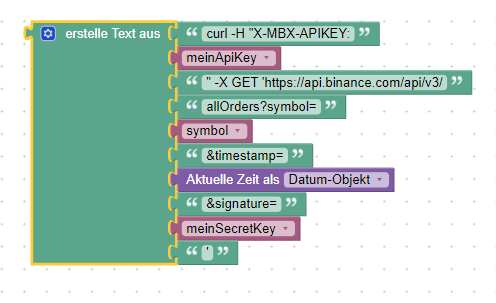
                5997e8e0-631c-4d56-9c35-f2122e6cece2-image.png

                <block xmlns="https://developers.google.com/blockly/xml" type="text_join" id=".gdM0B;H{zDF(.2A~$ze" x="-312.1111450195308" y="162.8888702392577">
                  <mutation items="10"></mutation>
                  <value name="ADD0">
                    <block type="text" id="B,zws~}D7bJ#om2hq+:4">
                      <field name="TEXT">curl -H "X-MBX-APIKEY:</field>
                    </block>
                  </value>
                  <value name="ADD1">
                    <block type="variables_get" id="rSGGuMB(iMKkb.IU*df4">
                      <field name="VAR" id="(j2plG$Y(%]`yQ=aET[3">meinApiKey</field>
                    </block>
                  </value>
                  <value name="ADD2">
                    <block type="text" id="eo-Z-tAo;-ZwzzrAlY-L">
                      <field name="TEXT">" -X GET 'https://api.binance.com/api/v3/</field>
                    </block>
                  </value>
                  <value name="ADD3">
                    <block type="text" id="oEu4Pt?,9Y{q]=,Ov1zc">
                      <field name="TEXT">allOrders?symbol=</field>
                    </block>
                  </value>
                  <value name="ADD4">
                    <block type="variables_get" id="Q#H7XT1H[y]okf8PqH-,">
                      <field name="VAR" id="h`vxk%kkst+l+6Xc9,^;">symbol</field>
                    </block>
                  </value>
                  <value name="ADD5">
                    <block type="text" id="AM[}xrRgo1]VjZt83+g#">
                      <field name="TEXT">&amp;timestamp=</field>
                    </block>
                  </value>
                  <value name="ADD6">
                    <block type="time_get" id="vP6mz9BgS^^Q34:Y@ah.">
                      <mutation xmlns="http://www.w3.org/1999/xhtml" format="false" language="false"></mutation>
                      <field name="OPTION">object</field>
                    </block>
                  </value>
                  <value name="ADD7">
                    <block type="text" id="{L^kPNk(S.|W%LbW26^|">
                      <field name="TEXT">&amp;signature=</field>
                    </block>
                  </value>
                  <value name="ADD8">
                    <block type="variables_get" id="7K6]-yB4fyW}bF=sFV=J">
                      <field name="VAR" id="VOx.7s{OQv{48=JbG3jt">meinSecretKey</field>
                    </block>
                  </value>
                  <value name="ADD9">
                    <block type="text" id="z;zhlFA)vE`Eeh+db7py">
                      <field name="TEXT">'</field>
                    </block>
                  </value>
                </block>
                

                Die Variablen müssen natürlich vorher definiert werden.

                NUC i7 64GB mit Proxmox ---- Jarvis Infos Aktualisierungen der Doku auf Instagram verfolgen -> mcuiobroker Instagram
                Wenn Euch mein Vorschlag geholfen hat, bitte rechts "^" klicken.

                1 Antwort Letzte Antwort
                0
                • P Offline
                  P Offline
                  PeterM1894
                  schrieb am zuletzt editiert von PeterM1894
                  #8

                  Hallo MCU,

                  ich habe dein Blockly eingefügt und mit meinen Daten ergänzt.

                  <xml xmlns="https://developers.google.com/blockly/xml">
                    <variables>
                      <variable id="(j2plG$Y(%]`yQ=aET[3">meinApiKey</variable>
                      <variable id="VOx.7s{OQv{48=JbG3jt">meinSecretKey</variable>
                      <variable id="h`vxk%kkst+l+6Xc9,^;">symbol</variable>
                      <variable id="=IK+ZIjb40nXFN0x61/+">curl-Befehl</variable>
                      <variable id=")uj8Z)MWhW{khTsW3qKH">result</variable>
                    </variables>
                    <block type="variables_set" id="PoblWj|6;g7we}({BH01" x="1213" y="-63">
                      <field name="VAR" id="(j2plG$Y(%]`yQ=aET[3">meinApiKey</field>
                      <value name="VALUE">
                        <block type="text" id="_DzFqjh|J#@!2i9%y`o!">
                          <field name="TEXT">meinAPIkey</field>
                        </block>
                      </value>
                      <next>
                        <block type="variables_set" id="v.-GdE;q@W}||FUu;paB">
                          <field name="VAR" id="VOx.7s{OQv{48=JbG3jt">meinSecretKey</field>
                          <value name="VALUE">
                            <block type="text" id="p$52es)fb+$t*/KN^z)t">
                              <field name="TEXT">meinSECRETkey</field>
                            </block>
                          </value>
                          <next>
                            <block type="variables_set" id="+SNC{=Y=HR!AwU(pt-K*">
                              <field name="VAR" id="h`vxk%kkst+l+6Xc9,^;">symbol</field>
                              <value name="VALUE">
                                <block type="text" id="ld@g;t_]y9*TS@ra/@Dn">
                                  <field name="TEXT">BTCBUSD</field>
                                </block>
                              </value>
                              <next>
                                <block type="variables_set" id="c2S:QlbWC+i~F(/K,8^]">
                                  <field name="VAR" id="=IK+ZIjb40nXFN0x61/+">curl-Befehl</field>
                                  <value name="VALUE">
                                    <block type="text_join" id="a)019IYFILQ(d5*D^ya}">
                                      <mutation items="11"></mutation>
                                      <value name="ADD0">
                                        <block type="text" id="G@]U?*BPXz/Fj7{7X0zP">
                                          <field name="TEXT">curl -H "X-MBX-APIKEY: </field>
                                        </block>
                                      </value>
                                      <value name="ADD1">
                                        <block type="variables_get" id="c~dcK@VBc~sDi__SKQ4@">
                                          <field name="VAR" id="(j2plG$Y(%]`yQ=aET[3">meinApiKey</field>
                                        </block>
                                      </value>
                                      <value name="ADD2">
                                        <block type="text" id="un,)v5SUO1=`dJw;7]sV">
                                          <field name="TEXT">" -X GET 'https://api.binance.com/api/v3/</field>
                                        </block>
                                      </value>
                                      <value name="ADD3">
                                        <block type="text" id="|XgfXVlB8|meGESOT*B]">
                                          <field name="TEXT">allOrders</field>
                                        </block>
                                      </value>
                                      <value name="ADD4">
                                        <block type="text" id="}Fb`3%Ov5MaS^(`9tq_J">
                                          <field name="TEXT">?symbol=</field>
                                        </block>
                                      </value>
                                      <value name="ADD5">
                                        <block type="variables_get" id="N)C[4]EmuL3AC7euEkRM">
                                          <field name="VAR" id="h`vxk%kkst+l+6Xc9,^;">symbol</field>
                                        </block>
                                      </value>
                                      <value name="ADD6">
                                        <block type="text" id="i$EawR,W!?-FR2}Ek3Om">
                                          <field name="TEXT">&amp;timestamp=</field>
                                        </block>
                                      </value>
                                      <value name="ADD7">
                                        <block type="time_get" id="td/wwz`yt/0:B][lzorc">
                                          <mutation xmlns="http://www.w3.org/1999/xhtml" format="false" language="false"></mutation>
                                          <field name="OPTION">object</field>
                                        </block>
                                      </value>
                                      <value name="ADD8">
                                        <block type="text" id="u!7vk]6A!3Gkf=+jz!Md">
                                          <field name="TEXT">&amp;signature=</field>
                                        </block>
                                      </value>
                                      <value name="ADD9">
                                        <block type="variables_get" id="73^@=%s3lWRw99,eH6k*">
                                          <field name="VAR" id="VOx.7s{OQv{48=JbG3jt">meinSecretKey</field>
                                        </block>
                                      </value>
                                      <value name="ADD10">
                                        <block type="text" id="u}nLm-W7P0pKeo._nR.M">
                                          <field name="TEXT">'</field>
                                        </block>
                                      </value>
                                    </block>
                                  </value>
                                  <next>
                                    <block type="exec" id="0xxdob=y}g-I%W~xz@GW">
                                      <mutation xmlns="http://www.w3.org/1999/xhtml" with_statement="true"></mutation>
                                      <field name="WITH_STATEMENT">TRUE</field>
                                      <field name="LOG"></field>
                                      <value name="COMMAND">
                                        <shadow type="text">
                                          <field name="TEXT">curl -H "X-MBX-APIKEY: kaWeQf4fa9LLHzd8Lg6i2KwQT6jZHRWjkadNlym5XoYWQ2KJLVXiIKoPnnkbBuJV"  -X GET 'https://api.binance.com/api/v3/allOrders?symbol=BTCBUSD&amp;timestamp=1499827319559&amp;signature=H0MD66rhiCyhK0n45B1p0YmK1aGIAfiJLdwfkO1fK4g5aXW4gd6pZNZMQ2pC0dvx'</field>
                                        </shadow>
                                        <block type="variables_get" id="tIG}nPXVR#}|/3XMA3,;">
                                          <field name="VAR" id="=IK+ZIjb40nXFN0x61/+">curl-Befehl</field>
                                        </block>
                                      </value>
                                      <statement name="STATEMENT">
                                        <block type="debug" id="MT7[[,Dkr)IzPH?W0^[|">
                                          <field name="Severity">log</field>
                                          <value name="TEXT">
                                            <shadow type="text">
                                              <field name="TEXT">gemacht</field>
                                            </shadow>
                                            <block type="variables_get" id="8S_}t},J,CM:Q@4He0^r">
                                              <field name="VAR" id="=IK+ZIjb40nXFN0x61/+">curl-Befehl</field>
                                            </block>
                                          </value>
                                          <next>
                                            <block type="debug" id="9rZ9@9OYd}*(:h5al*+2">
                                              <field name="Severity">log</field>
                                              <value name="TEXT">
                                                <shadow type="text">
                                                  <field name="TEXT">gemacht</field>
                                                </shadow>
                                                <block type="text" id="c+4$(Sgx.6E|U4``rP,^">
                                                  <field name="TEXT">####################</field>
                                                </block>
                                              </value>
                                              <next>
                                                <block type="debug" id="O-AmX*[FKObu9|L9tWeo">
                                                  <field name="Severity">log</field>
                                                  <value name="TEXT">
                                                    <shadow type="text">
                                                      <field name="TEXT">gemacht</field>
                                                    </shadow>
                                                    <block type="variables_get" id="xq{TrE5oR;KCF@)$YIv(">
                                                      <field name="VAR" id=")uj8Z)MWhW{khTsW3qKH">result</field>
                                                    </block>
                                                  </value>
                                                </block>
                                              </next>
                                            </block>
                                          </next>
                                        </block>
                                      </statement>
                                    </block>
                                  </next>
                                </block>
                              </next>
                            </block>
                          </next>
                        </block>
                      </next>
                    </block>
                  </xml>
                  

                  Be der Ausführung erhalte dann aber die Fehlermeldung:

                  {"code":-1022,"msg":"Signature for this request is not valid."}

                  Den Secret-Key habe ich kontrolliert, dieser ist korrekt?
                  Bei einer Webrecherche bin ich auf folgendes gestoßen, werd aber nicht richtig schlau daraus:

                  Signature isn't the secret key. Please read the docs regarding signature generation.
                  https://github.com/binance-exchange/binance-signature-examples

                  Danke für deine Hilfe. :+1:

                  lg

                  M 1 Antwort Letzte Antwort
                  0
                  • P PeterM1894

                    Hallo MCU,

                    ich habe dein Blockly eingefügt und mit meinen Daten ergänzt.

                    <xml xmlns="https://developers.google.com/blockly/xml">
                      <variables>
                        <variable id="(j2plG$Y(%]`yQ=aET[3">meinApiKey</variable>
                        <variable id="VOx.7s{OQv{48=JbG3jt">meinSecretKey</variable>
                        <variable id="h`vxk%kkst+l+6Xc9,^;">symbol</variable>
                        <variable id="=IK+ZIjb40nXFN0x61/+">curl-Befehl</variable>
                        <variable id=")uj8Z)MWhW{khTsW3qKH">result</variable>
                      </variables>
                      <block type="variables_set" id="PoblWj|6;g7we}({BH01" x="1213" y="-63">
                        <field name="VAR" id="(j2plG$Y(%]`yQ=aET[3">meinApiKey</field>
                        <value name="VALUE">
                          <block type="text" id="_DzFqjh|J#@!2i9%y`o!">
                            <field name="TEXT">meinAPIkey</field>
                          </block>
                        </value>
                        <next>
                          <block type="variables_set" id="v.-GdE;q@W}||FUu;paB">
                            <field name="VAR" id="VOx.7s{OQv{48=JbG3jt">meinSecretKey</field>
                            <value name="VALUE">
                              <block type="text" id="p$52es)fb+$t*/KN^z)t">
                                <field name="TEXT">meinSECRETkey</field>
                              </block>
                            </value>
                            <next>
                              <block type="variables_set" id="+SNC{=Y=HR!AwU(pt-K*">
                                <field name="VAR" id="h`vxk%kkst+l+6Xc9,^;">symbol</field>
                                <value name="VALUE">
                                  <block type="text" id="ld@g;t_]y9*TS@ra/@Dn">
                                    <field name="TEXT">BTCBUSD</field>
                                  </block>
                                </value>
                                <next>
                                  <block type="variables_set" id="c2S:QlbWC+i~F(/K,8^]">
                                    <field name="VAR" id="=IK+ZIjb40nXFN0x61/+">curl-Befehl</field>
                                    <value name="VALUE">
                                      <block type="text_join" id="a)019IYFILQ(d5*D^ya}">
                                        <mutation items="11"></mutation>
                                        <value name="ADD0">
                                          <block type="text" id="G@]U?*BPXz/Fj7{7X0zP">
                                            <field name="TEXT">curl -H "X-MBX-APIKEY: </field>
                                          </block>
                                        </value>
                                        <value name="ADD1">
                                          <block type="variables_get" id="c~dcK@VBc~sDi__SKQ4@">
                                            <field name="VAR" id="(j2plG$Y(%]`yQ=aET[3">meinApiKey</field>
                                          </block>
                                        </value>
                                        <value name="ADD2">
                                          <block type="text" id="un,)v5SUO1=`dJw;7]sV">
                                            <field name="TEXT">" -X GET 'https://api.binance.com/api/v3/</field>
                                          </block>
                                        </value>
                                        <value name="ADD3">
                                          <block type="text" id="|XgfXVlB8|meGESOT*B]">
                                            <field name="TEXT">allOrders</field>
                                          </block>
                                        </value>
                                        <value name="ADD4">
                                          <block type="text" id="}Fb`3%Ov5MaS^(`9tq_J">
                                            <field name="TEXT">?symbol=</field>
                                          </block>
                                        </value>
                                        <value name="ADD5">
                                          <block type="variables_get" id="N)C[4]EmuL3AC7euEkRM">
                                            <field name="VAR" id="h`vxk%kkst+l+6Xc9,^;">symbol</field>
                                          </block>
                                        </value>
                                        <value name="ADD6">
                                          <block type="text" id="i$EawR,W!?-FR2}Ek3Om">
                                            <field name="TEXT">&amp;timestamp=</field>
                                          </block>
                                        </value>
                                        <value name="ADD7">
                                          <block type="time_get" id="td/wwz`yt/0:B][lzorc">
                                            <mutation xmlns="http://www.w3.org/1999/xhtml" format="false" language="false"></mutation>
                                            <field name="OPTION">object</field>
                                          </block>
                                        </value>
                                        <value name="ADD8">
                                          <block type="text" id="u!7vk]6A!3Gkf=+jz!Md">
                                            <field name="TEXT">&amp;signature=</field>
                                          </block>
                                        </value>
                                        <value name="ADD9">
                                          <block type="variables_get" id="73^@=%s3lWRw99,eH6k*">
                                            <field name="VAR" id="VOx.7s{OQv{48=JbG3jt">meinSecretKey</field>
                                          </block>
                                        </value>
                                        <value name="ADD10">
                                          <block type="text" id="u}nLm-W7P0pKeo._nR.M">
                                            <field name="TEXT">'</field>
                                          </block>
                                        </value>
                                      </block>
                                    </value>
                                    <next>
                                      <block type="exec" id="0xxdob=y}g-I%W~xz@GW">
                                        <mutation xmlns="http://www.w3.org/1999/xhtml" with_statement="true"></mutation>
                                        <field name="WITH_STATEMENT">TRUE</field>
                                        <field name="LOG"></field>
                                        <value name="COMMAND">
                                          <shadow type="text">
                                            <field name="TEXT">curl -H "X-MBX-APIKEY: kaWeQf4fa9LLHzd8Lg6i2KwQT6jZHRWjkadNlym5XoYWQ2KJLVXiIKoPnnkbBuJV"  -X GET 'https://api.binance.com/api/v3/allOrders?symbol=BTCBUSD&amp;timestamp=1499827319559&amp;signature=H0MD66rhiCyhK0n45B1p0YmK1aGIAfiJLdwfkO1fK4g5aXW4gd6pZNZMQ2pC0dvx'</field>
                                          </shadow>
                                          <block type="variables_get" id="tIG}nPXVR#}|/3XMA3,;">
                                            <field name="VAR" id="=IK+ZIjb40nXFN0x61/+">curl-Befehl</field>
                                          </block>
                                        </value>
                                        <statement name="STATEMENT">
                                          <block type="debug" id="MT7[[,Dkr)IzPH?W0^[|">
                                            <field name="Severity">log</field>
                                            <value name="TEXT">
                                              <shadow type="text">
                                                <field name="TEXT">gemacht</field>
                                              </shadow>
                                              <block type="variables_get" id="8S_}t},J,CM:Q@4He0^r">
                                                <field name="VAR" id="=IK+ZIjb40nXFN0x61/+">curl-Befehl</field>
                                              </block>
                                            </value>
                                            <next>
                                              <block type="debug" id="9rZ9@9OYd}*(:h5al*+2">
                                                <field name="Severity">log</field>
                                                <value name="TEXT">
                                                  <shadow type="text">
                                                    <field name="TEXT">gemacht</field>
                                                  </shadow>
                                                  <block type="text" id="c+4$(Sgx.6E|U4``rP,^">
                                                    <field name="TEXT">####################</field>
                                                  </block>
                                                </value>
                                                <next>
                                                  <block type="debug" id="O-AmX*[FKObu9|L9tWeo">
                                                    <field name="Severity">log</field>
                                                    <value name="TEXT">
                                                      <shadow type="text">
                                                        <field name="TEXT">gemacht</field>
                                                      </shadow>
                                                      <block type="variables_get" id="xq{TrE5oR;KCF@)$YIv(">
                                                        <field name="VAR" id=")uj8Z)MWhW{khTsW3qKH">result</field>
                                                      </block>
                                                    </value>
                                                  </block>
                                                </next>
                                              </block>
                                            </next>
                                          </block>
                                        </statement>
                                      </block>
                                    </next>
                                  </block>
                                </next>
                              </block>
                            </next>
                          </block>
                        </next>
                      </block>
                    </xml>
                    

                    Be der Ausführung erhalte dann aber die Fehlermeldung:

                    {"code":-1022,"msg":"Signature for this request is not valid."}

                    Den Secret-Key habe ich kontrolliert, dieser ist korrekt?
                    Bei einer Webrecherche bin ich auf folgendes gestoßen, werd aber nicht richtig schlau daraus:

                    Signature isn't the secret key. Please read the docs regarding signature generation.
                    https://github.com/binance-exchange/binance-signature-examples

                    Danke für deine Hilfe. :+1:

                    lg

                    M Online
                    M Online
                    MCU
                    schrieb am zuletzt editiert von
                    #9

                    @peterm1894 Da steig ich dann auch nicht mehr durch. Ob man den SecretKey vorher kryptisch aufbereiten muss?

                    https://github.com/binance-exchange/binance-signature-examples/blob/master/nodejs/signature.js

                    Vielleicht kann Dir da der Entwickler vom Adapter weiterhelfen?
                    Du kannst auf diesen Thread hinweisen und vielleicht sieht er, wo das Problem ist?

                    NUC i7 64GB mit Proxmox ---- Jarvis Infos Aktualisierungen der Doku auf Instagram verfolgen -> mcuiobroker Instagram
                    Wenn Euch mein Vorschlag geholfen hat, bitte rechts "^" klicken.

                    P 1 Antwort Letzte Antwort
                    0
                    • M MCU

                      @peterm1894 Da steig ich dann auch nicht mehr durch. Ob man den SecretKey vorher kryptisch aufbereiten muss?

                      https://github.com/binance-exchange/binance-signature-examples/blob/master/nodejs/signature.js

                      Vielleicht kann Dir da der Entwickler vom Adapter weiterhelfen?
                      Du kannst auf diesen Thread hinweisen und vielleicht sieht er, wo das Problem ist?

                      P Offline
                      P Offline
                      PeterM1894
                      schrieb am zuletzt editiert von
                      #10

                      @mcu
                      ich schau noch einmal... falls ich eine Lösung habe Poste ich sie hier.

                      Danke.

                      1 Antwort Letzte Antwort
                      1
                      • P Offline
                        P Offline
                        PeterM1894
                        schrieb am zuletzt editiert von
                        #11

                        ich habe jetzt noch folgendes gefunden:
                        https://github.com/binance-exchange/binance-signature-examples/blob/master/nodejs/signature.js

                        const crypto = require('crypto');
                        
                        const query_string = 'timestamp=1578963600000';
                        const apiSecret = 'NhqPtmdSJYdKjVHjA7PZj4Mge3R5YNiP1e3UZjInClVN65XAbvqqM6A7H5fATj0j';
                        
                        function signature(query_string) {
                            return crypto
                                .createHmac('sha256', apiSecret)
                                .update(query_string)
                                .digest('hex');
                        }
                        
                        console.log("hashing the string: ");
                        console.log(query_string);
                        console.log("and return:");
                        console.log(signature(query_string));
                        
                        console.log("\n");
                        
                        const another_query = 'symbol=LTCBTC&side=BUY&type=LIMIT&timeInForce=GTC&quantity=1&price=0.1&recvWindow=5000&timestamp=1499827319559';
                        console.log("hashing the string: ");
                        console.log(another_query);
                        console.log("and return:");
                        console.log(signature(another_query));
                        

                        Weißt du wie ich "console.log(signature(another_query))" in eine Variable bekomme?

                        M 1 Antwort Letzte Antwort
                        0
                        • P PeterM1894

                          ich habe jetzt noch folgendes gefunden:
                          https://github.com/binance-exchange/binance-signature-examples/blob/master/nodejs/signature.js

                          const crypto = require('crypto');
                          
                          const query_string = 'timestamp=1578963600000';
                          const apiSecret = 'NhqPtmdSJYdKjVHjA7PZj4Mge3R5YNiP1e3UZjInClVN65XAbvqqM6A7H5fATj0j';
                          
                          function signature(query_string) {
                              return crypto
                                  .createHmac('sha256', apiSecret)
                                  .update(query_string)
                                  .digest('hex');
                          }
                          
                          console.log("hashing the string: ");
                          console.log(query_string);
                          console.log("and return:");
                          console.log(signature(query_string));
                          
                          console.log("\n");
                          
                          const another_query = 'symbol=LTCBTC&side=BUY&type=LIMIT&timeInForce=GTC&quantity=1&price=0.1&recvWindow=5000&timestamp=1499827319559';
                          console.log("hashing the string: ");
                          console.log(another_query);
                          console.log("and return:");
                          console.log(signature(another_query));
                          

                          Weißt du wie ich "console.log(signature(another_query))" in eine Variable bekomme?

                          M Online
                          M Online
                          MCU
                          schrieb am zuletzt editiert von
                          #12

                          @peterm1894 Das ist ja der Link den ich dir geschickt hatte.

                          var newSignature = signature(another_query);
                          

                          NUC i7 64GB mit Proxmox ---- Jarvis Infos Aktualisierungen der Doku auf Instagram verfolgen -> mcuiobroker Instagram
                          Wenn Euch mein Vorschlag geholfen hat, bitte rechts "^" klicken.

                          1 Antwort Letzte Antwort
                          0
                          Antworten
                          • In einem neuen Thema antworten
                          Anmelden zum Antworten
                          • Älteste zuerst
                          • Neuste zuerst
                          • Meiste Stimmen


                          Support us

                          ioBroker
                          Community Adapters
                          Donate

                          601

                          Online

                          32.5k

                          Benutzer

                          81.7k

                          Themen

                          1.3m

                          Beiträge
                          Community
                          Impressum | Datenschutz-Bestimmungen | Nutzungsbedingungen | Einwilligungseinstellungen
                          ioBroker Community 2014-2025
                          logo
                          • Anmelden

                          • Du hast noch kein Konto? Registrieren

                          • Anmelden oder registrieren, um zu suchen
                          • Erster Beitrag
                            Letzter Beitrag
                          0
                          • Home
                          • Aktuell
                          • Tags
                          • Ungelesen 0
                          • Kategorien
                          • Unreplied
                          • Beliebt
                          • GitHub
                          • Docu
                          • Hilfe