
NEWS




Iobroker Logging zu syslog
-
Mir ist gerade aufgefallen das mein syslog server die 'warn' Meldungen von ioBroker nicht mitbekommt.
Alle anderen severity levels gehen.Kann das daran liegen weil der server das level 'Warning' erwartet?
Gibt es eine config Möglichkeit das iobrker aus 'warn' level 'warning' macht? -
Mir ist gerade aufgefallen das mein syslog server die 'warn' Meldungen von ioBroker nicht mitbekommt.
Alle anderen severity levels gehen.Kann das daran liegen weil der server das level 'Warning' erwartet?
Gibt es eine config Möglichkeit das iobrker aus 'warn' level 'warning' macht?@scrounger hast du hierzu eine Lösung gefunden? Ich hab auch ne SYNO und würde gern starten, das LOG entsprechend bei mir im Protokoll-Server mit aufzuzeichnen.
Danke dir und vG, ThorstenUDM Pro, Intel NUC - ioBroker in Proxmox-VM, PiHole+Grafana&Influx+TasmoAdmin in LXCs, Raspberry Pi3 (als CCU), Zigbee-Stick Sonoff, Synology DS918+
-
@scrounger hast du hierzu eine Lösung gefunden? Ich hab auch ne SYNO und würde gern starten, das LOG entsprechend bei mir im Protokoll-Server mit aufzuzeichnen.
Danke dir und vG, Thorsten -
Ist zwar schon alt der Fred, aber ich denke SysLog ist nach wie vor für den ein oder Anderen von Interesse, also fasse ich das mal zusammen.
Ich logge alle Syslogs meiner Systeme auf einem Synology NAS mit LogCenter, daher wollte ich den ioBroker auch dort mit drin sehen.
Das waren bei mir die dazu erforderlichen Schritte:sudo npm install winston-syslogdann
sudo nano /opt/iobroker/iobroker-data/iobroker.jsonIn der Datei die Zeilen 4 und 5 entsprechend mit "true" und der IP eures Syslog Servers anpassen und die Zeilen 7 und 9 einfügen
 },
      "syslog1": {
        "type": "syslog",
        "enabled": true,
        "host": "192.168.178.85",
        "hostComment": "The host running syslogd, defaults to localhost.",
        "port":        "514",
        "portComment": "The port on the host that syslog is running on, default$
        "pid":         "0",
        "protocol":    "udp4",
        "protocolComment": "The network protocol to log over (e.g. tcp4, udp4, $
        "pathComment": "The path to the syslog dgram socket (i.e. /dev/log or /$
        "facilityComment": "Syslog facility to use (Default: local0).",
        "localhost": "iobroker",
        "localhostComment": "Host to indicate that log messages are coming from$
        "sysLogTypeComment": "The type of the syslog protocol to use (Default: $
        "app_nameComment": "The name of the application (Default: process.title$
        "eolComment": "The end of line character to be added to the end of the $
      }
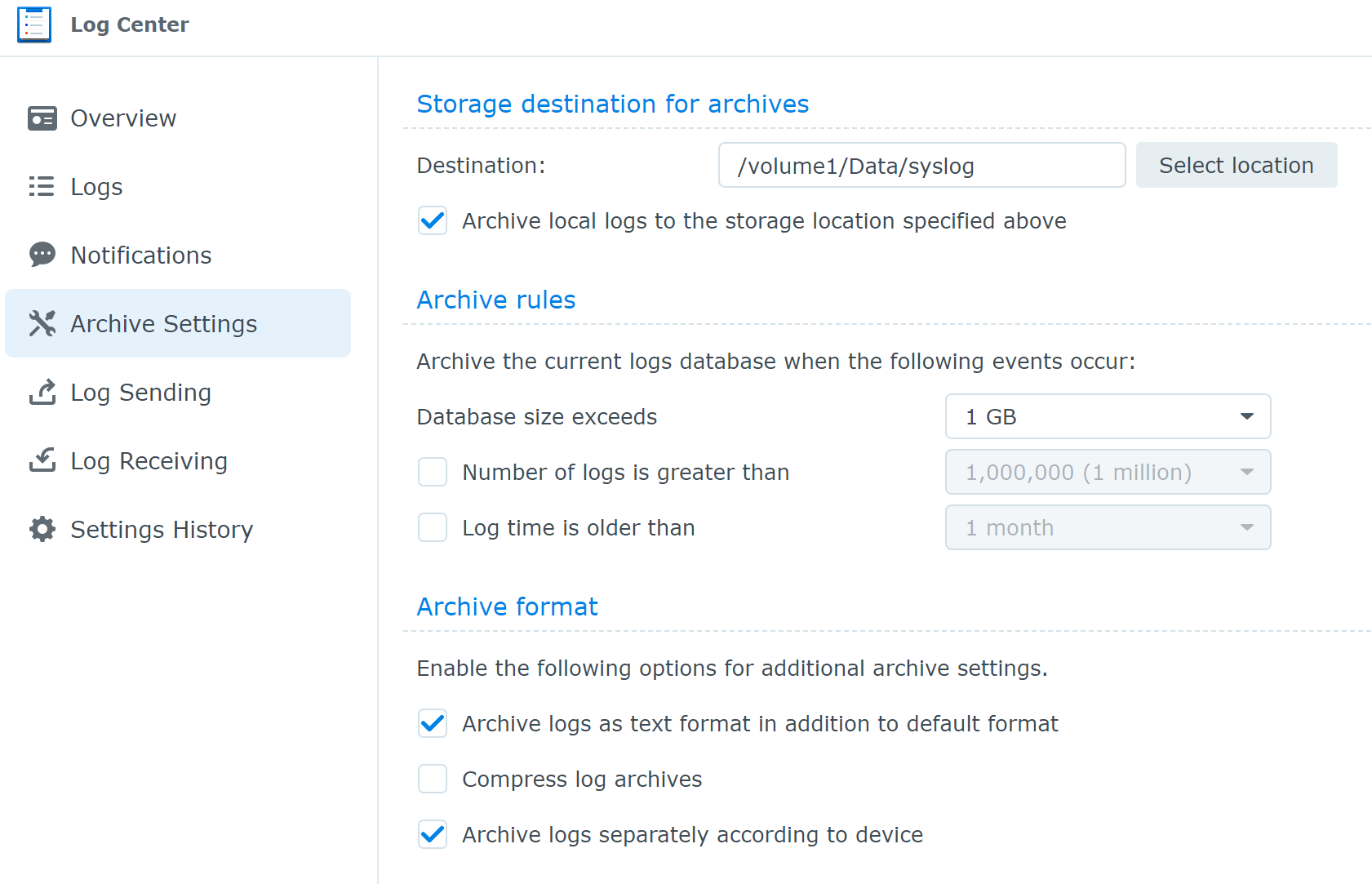
Im Synololgy NAS LogCenter, "Achive Settings" setzen
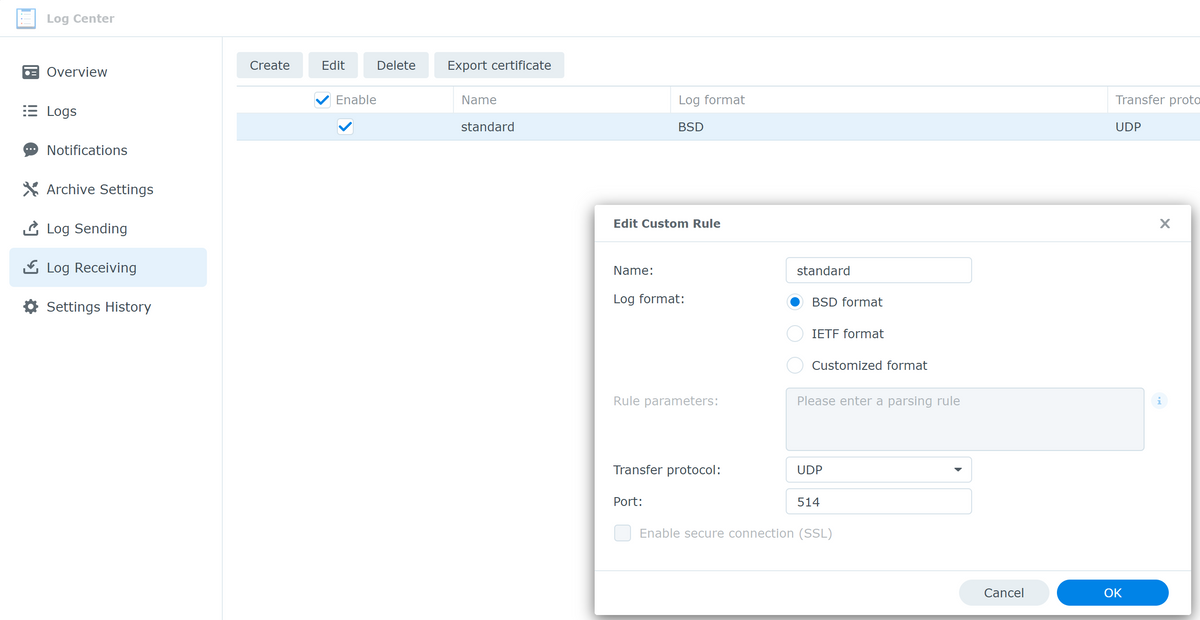
und unter "Log Receiving" eine Regel anlegen,
Den ioBroker neu starten
iobroker restartDas war es schon, das LogCenter in der Syno bekommt jetzt die Meldungen vom iobroker, auch die Warnungen

@apollon77 weisst Du ob damit das gesamte logging vom ioBroker auf den syslog server verschoben wird, oder ist das syslog quasi doppelt, d.h. der ioBroker logged selbst immern noch auch lokal?
-
Ist zwar schon alt der Fred, aber ich denke SysLog ist nach wie vor für den ein oder Anderen von Interesse, also fasse ich das mal zusammen.
Ich logge alle Syslogs meiner Systeme auf einem Synology NAS mit LogCenter, daher wollte ich den ioBroker auch dort mit drin sehen.
Das waren bei mir die dazu erforderlichen Schritte:sudo npm install winston-syslogdann
sudo nano /opt/iobroker/iobroker-data/iobroker.jsonIn der Datei die Zeilen 4 und 5 entsprechend mit "true" und der IP eures Syslog Servers anpassen und die Zeilen 7 und 9 einfügen
 },
      "syslog1": {
        "type": "syslog",
        "enabled": true,
        "host": "192.168.178.85",
        "hostComment": "The host running syslogd, defaults to localhost.",
        "port":        "514",
        "portComment": "The port on the host that syslog is running on, default$
        "pid":         "0",
        "protocol":    "udp4",
        "protocolComment": "The network protocol to log over (e.g. tcp4, udp4, $
        "pathComment": "The path to the syslog dgram socket (i.e. /dev/log or /$
        "facilityComment": "Syslog facility to use (Default: local0).",
        "localhost": "iobroker",
        "localhostComment": "Host to indicate that log messages are coming from$
        "sysLogTypeComment": "The type of the syslog protocol to use (Default: $
        "app_nameComment": "The name of the application (Default: process.title$
        "eolComment": "The end of line character to be added to the end of the $
      }
Im Synololgy NAS LogCenter, "Achive Settings" setzen
und unter "Log Receiving" eine Regel anlegen,
Den ioBroker neu starten
iobroker restartDas war es schon, das LogCenter in der Syno bekommt jetzt die Meldungen vom iobroker, auch die Warnungen
@apollon77 weisst Du ob damit das gesamte logging vom ioBroker auf den syslog server verschoben wird, oder ist das syslog quasi doppelt, d.h. der ioBroker logged selbst immern noch auch lokal?
@aiouh also das npm install von Winston-syslog hätte an sich nicht nötig sein sollen und du hast jetzt ein extraneous Paket. Sollte jetzt aber kein Beinbruch sein.
Sonst schau ins iobroker.json. Da ist definiert welches logging aktiv ist. Wenn du unter log bei „file“ nichts geändert hast loggt er jetzt beides. Im zweifel kannst du file noch ausschalten.
Ansonsten geht die konfig inzwischen auch per Admin unter „hosts“. Da muss keiner mehr ans json file. Aber es geht beides.
-
@aiouh also das npm install von Winston-syslog hätte an sich nicht nötig sein sollen und du hast jetzt ein extraneous Paket. Sollte jetzt aber kein Beinbruch sein.
Sonst schau ins iobroker.json. Da ist definiert welches logging aktiv ist. Wenn du unter log bei „file“ nichts geändert hast loggt er jetzt beides. Im zweifel kannst du file noch ausschalten.
Ansonsten geht die konfig inzwischen auch per Admin unter „hosts“. Da muss keiner mehr ans json file. Aber es geht beides.
@apollon77 Ok danke, wieder was gelernt.


318
Online32.6k
Users82.2k
Topics1.3m
Posts