Skip to content
  • Home
  • Recent
  • Tags
  • 0 Unread 0
  • Categories
  • Unreplied
  • Popular
  • GitHub
  • Docu
  • Hilfe
Skins
  • Light
  • Brite
  • Cerulean
  • Cosmo
  • Flatly
  • Journal
  • Litera
  • Lumen
  • Lux
  • Materia
  • Minty
  • Morph
  • Pulse
  • Sandstone
  • Simplex
  • Sketchy
  • Spacelab
  • United
  • Yeti
  • Zephyr
  • Dark
  • Cyborg
  • Darkly
  • Quartz
  • Slate
  • Solar
  • Superhero
  • Vapor

  • Default (No Skin)
  • No Skin
Collapse
ioBroker Logo

Community Forum

donate donate
  1. ioBroker Community Home
  2. Deutsch
  3. Tester
  4. Test Adapter Linux Control v1.x.x

NEWS

  • Jahresrückblick 2025 – unser neuer Blogbeitrag ist online! ✨
    BluefoxB
    Bluefox
    16
    1
    1.9k

  • Neuer Blogbeitrag: Monatsrückblick - Dezember 2025 🎄
    BluefoxB
    Bluefox
    13
    1
    899

  • Weihnachtsangebot 2025! 🎄
    BluefoxB
    Bluefox
    25
    1
    2.2k

Test Adapter Linux Control v1.x.x

Scheduled Pinned Locked Moved Tester
adaptercontrolhardwarelinuxsteuern
715 Posts 73 Posters 183.1k Views 66 Watching
  • Oldest to Newest
  • Newest to Oldest
  • Most Votes
Reply
  • Reply as topic
Log in to reply
This topic has been deleted. Only users with topic management privileges can see it.
  • Stephan SchleichS Stephan Schleich

    @Scrounger

    linux-control.0	2020-12-30 06:49:18.603	debug	(2333) getting data from ioBrokerPi (192.168.178.200:22) -> not enabled!
    linux-control.0	2020-12-30 06:49:18.603	debug	(2333) [refreshHost] Pi-hole (192.168.178.205:22): button 'linux-control.0.Pi-hole.refresh' subscribed
    linux-control.0	2020-12-30 06:49:18.549	debug	(2333) [getConnection] Host 'Pi-hole' (192.168.178.205:22) ping result: {"host":"unknown","alive":false,"output":"","time":"unknown","times":[],"min":"unknown","max":"unknown","avg":"unknown","stddev
    linux-control.0	2020-12-30 06:49:18.549	info	(2333) [getConnection] Host 'Pi-hole' (192.168.178.205:22) seems not to be online
    linux-control.0	2020-12-30 06:49:18.544	info	(2333) getting data from Pi-hole (192.168.178.205:22, Adapter start)
    linux-control.0	2020-12-30 06:49:18.544	debug	(2333) [refreshHost] ioBroker (192.168.178.200:22): button 'linux-control.0.ioBroker.refresh' subscribed
    linux-control.0	2020-12-30 06:49:18.532	debug	(2333) [getConnection] Host 'ioBroker' (192.168.178.200:22) ping result: {"host":"unknown","alive":false,"output":"","time":"unknown","times":[],"min":"unknown","max":"unknown","avg":"unknown","stdde
    linux-control.0	2020-12-30 06:49:18.531	info	(2333) [getConnection] Host 'ioBroker' (192.168.178.200:22) seems not to be online
    linux-control.0	2020-12-30 06:49:18.507	info	(2333) getting data from ioBroker (192.168.178.200:22, Adapter start)
    linux-control.0	2020-12-30 06:49:18.506	debug	(2333) [refreshHost] Proxmox (192.168.178.199:22): button 'linux-control.0.Proxmox.refresh' subscribed
    linux-control.0	2020-12-30 06:49:18.444	debug	(2333) [getConnection] Host 'Proxmox' (192.168.178.199:22) ping result: {"host":"unknown","alive":false,"output":"","time":"unknown","times":[],"min":"unknown","max":"unknown","avg":"unknown","stddev
    linux-control.0	2020-12-30 06:49:18.443	info	(2333) [getConnection] Host 'Proxmox' (192.168.178.199:22) seems not to be online
    linux-control.0	2020-12-30 06:49:18.431	info	(2333) getting data from Proxmox (192.168.178.199:22, Adapter start)
    linux-control.0	2020-12-30 06:49:18.414	info	(2333) starting. Version 1.1.1 in /opt/iobroker/node_modules/iobroker.linux-control, node: v12.20.0, js-controller: 3.1.6
    linux-control.0	2020-12-30 06:49:18.367	info	(2333) Plugin sentry Sentry Plugin disabled for this process because sending of statistic data is disabled for the system
    linux-control.0	2020-12-30 06:49:18.365	debug	(2333) Plugin sentry Initialize Plugin (enabled=true)
    linux-control.0	2020-12-30 06:49:18.069	debug	(2333) statesDB connected
    linux-control.0	2020-12-30 06:49:18.069	debug	(2333) States connected to redis: 127.0.0.1:9000
    linux-control.0	2020-12-30 06:49:18.063	debug	(2333) States create System PubSub Client
    linux-control.0	2020-12-30 06:49:18.062	debug	(2333) States create User PubSub Client
    linux-control.0	2020-12-30 06:49:18.058	debug	(2333) Redis States: Use Redis connection: 127.0.0.1:9000
    linux-control.0	2020-12-30 06:49:18.058	debug	(2333) objectDB connected
    linux-control.0	2020-12-30 06:49:18.055	debug	(2333) Objects connected to redis: 127.0.0.1:9001
    linux-control.0	2020-12-30 06:49:18.047	debug	(2333) Objects client initialize lua scripts
    linux-control.0	2020-12-30 06:49:18.046	debug	(2333) Objects create User PubSub Client
    linux-control.0	2020-12-30 06:49:18.046	debug	(2333) Objects create System PubSub Client
    linux-control.0	2020-12-30 06:49:18.045	debug	(2333) Objects client ready ... initialize now
    linux-control.0	2020-12-30 06:49:18.027	debug	(2333) Redis Objects: Use Redis connection: 127.0.0.1:9001
    linux-control.0	2020-12-30 06:49:14.710	info	(31817) Terminated (ADAPTER_REQUESTED_TERMINATION): Without reason
    linux-control.0	2020-12-30 06:49:14.710	info	(31817) terminating
    linux-control.0	2020-12-30 06:49:14.710	info	(31817) cleaned everything up...
    linux-control.0	2020-12-30 06:49:14.709	info	(31817) Got terminate signal TERMINATE_YOURSELF
    
    ScroungerS Offline
    ScroungerS Offline
    Scrounger
    Developer
    wrote on last edited by
    #252

    @Stephan-Schleich

    Leider nicht das vollständige log, das brauch ich aber...
    linux-control.0 2020-12-30 06:49:18.444 debug (2333) [getConnection] Host 'Proxmox' (192.168.178.199:22) ping result: {"host":"unknown","alive":false,"output":"","time":"unknown","times":[],"min":"unknown","max":"unknown","avg":"unknown","stddev

    Funktioniert bei Dir der ping adapter?

    Stephan SchleichS 1 Reply Last reply
    0
    • ScroungerS Scrounger

      @Stephan-Schleich

      Leider nicht das vollständige log, das brauch ich aber...
      linux-control.0 2020-12-30 06:49:18.444 debug (2333) [getConnection] Host 'Proxmox' (192.168.178.199:22) ping result: {"host":"unknown","alive":false,"output":"","time":"unknown","times":[],"min":"unknown","max":"unknown","avg":"unknown","stddev

      Funktioniert bei Dir der ping adapter?

      Stephan SchleichS Offline
      Stephan SchleichS Offline
      Stephan Schleich
      wrote on last edited by Stephan Schleich
      #253

      @Scrounger Ich hatte nicht mehr zum kopieren, war 1:1 ausm Log nachm Restart
      Den Ping Adapter hab ich gerade mal installiert, und dieser kann auch nicht pingen O_o

      Nach "sudo apt-get install iputils-ping --reinstall" an allen LXC Debian Buster Containern + Reboot funktioniert es nun.

      ScroungerS 2 Replies Last reply
      1
      • Stephan SchleichS Stephan Schleich

        @Scrounger Ich hatte nicht mehr zum kopieren, war 1:1 ausm Log nachm Restart
        Den Ping Adapter hab ich gerade mal installiert, und dieser kann auch nicht pingen O_o

        Nach "sudo apt-get install iputils-ping --reinstall" an allen LXC Debian Buster Containern + Reboot funktioniert es nun.

        ScroungerS Offline
        ScroungerS Offline
        Scrounger
        Developer
        wrote on last edited by
        #254

        @Stephan-Schleich sagte in Test Adapter Linux Control v1.x.x:

        @Scrounger Ich hatte nicht mehr zum kopieren, war 1:1 ausm Log nachm Restart

        Nö das ist der log ausm admin, deshlab abgeschnitten. Ich brauch das log aus iobroker/log/xy.log.

        Stephan SchleichS 1 Reply Last reply
        0
        • ScroungerS Scrounger

          @Stephan-Schleich sagte in Test Adapter Linux Control v1.x.x:

          @Scrounger Ich hatte nicht mehr zum kopieren, war 1:1 ausm Log nachm Restart

          Nö das ist der log ausm admin, deshlab abgeschnitten. Ich brauch das log aus iobroker/log/xy.log.

          Stephan SchleichS Offline
          Stephan SchleichS Offline
          Stephan Schleich
          wrote on last edited by Stephan Schleich
          #255

          @Scrounger alles klar, merk ich mir für die Zukunft. Aber nun gehts ja :)

          ScroungerS 1 Reply Last reply
          0
          • Stephan SchleichS Stephan Schleich

            @Scrounger alles klar, merk ich mir für die Zukunft. Aber nun gehts ja :)

            ScroungerS Offline
            ScroungerS Offline
            Scrounger
            Developer
            wrote on last edited by
            #256

            @Stephan-Schleich sagte in Test Adapter Linux Control v1.x.x:

            Aber nun gehts ja :)

            Perfekt, habs gleich mal mit in die Doku aufgenommen.

            Stephan SchleichS 1 Reply Last reply
            1
            • ScroungerS Scrounger

              @Stephan-Schleich sagte in Test Adapter Linux Control v1.x.x:

              Aber nun gehts ja :)

              Perfekt, habs gleich mal mit in die Doku aufgenommen.

              Stephan SchleichS Offline
              Stephan SchleichS Offline
              Stephan Schleich
              wrote on last edited by
              #257

              @Scrounger Bei mir war aber scheinbar zwingend ein reboot erforderlich, vllt sollte man das noch mit ergänzen?

              1 Reply Last reply
              0
              • ScroungerS Scrounger
                Aktuelle Test Version 1.1.2
                Veröffentlichungsdatum 12.08.2020
                Github Link https://github.com/Scrounger/ioBroker.linux-control

                Hallo zusammen,

                ich habe einen kleinen Adapter geschrieben, mit dem Ihr Eure Linux Geräte / VMs / LXCs mittels ssh Zugriff steuern und Informationen auslesen.

                Folgende Funktionen bietet der Adapter:

                • ssh login über Benutzer und Passwort oder per RSA Key (empfohlen!)

                • vordefinierte Datenpunkte, um das System zu steuern (Stopp, Reboot, Updates starten, etc.) und Informationen (Services, Updates, Neustart notwendig, etc.) auszulesen
                  Wichtig: Da es viele verschiedene Linux Distrubutionen gibt, ist es mir nicht möglich diese Funktionen für alle bereitzustellen, Support und Test von mir gibt es nur für Debian 10 und Ubuntu 18 / 20 LTS!

                • Informationen zu Ordner (Größe, Anzahl Dateien, letzte Änderung) auslesen

                • Meine Befehle - hier könnt Ihr Eure eigenen ganz individuellen Befehle ausführen lassen und z.B. einen Befehl ausführen oder Informationen in einen selbstdefinierten Datenpunkt zu schreiben.

                Alle notwendigen Informationen findet ihr in der Dokumentation.

                Vielen Dank fürs Testen!

                P.S.: Sollte die Tage auch im Latest sein.

                SegwayS Offline
                SegwayS Offline
                Segway
                wrote on last edited by
                #258

                @Scrounger

                So, ich habe mal die Export / Import genutzt, da ich den Adapter auf ein anderes System umziehe !
                Dabei sind mir 2 Sachen aufgefallen:

                1. Wenn ich den json importiert habe, dann gibt die Oberfläche mir NICHT den Button speichern und schliessen frei ! Somit wird die geladene Konfiguration gar nicht abgespeichert. (Workaround: einfach unter Meine Befehle einen DP anlegen dann kommt der Button)

                2. Anscheinend werden Username / Passwörter nicht richtig übernommen. Er kann sich mit den Clients nicht verbinden. Gebe ich manuell nochmal Username / Passwort ein, dann kann er sich connecten. Scheint aber auch nicht bei Allen zu sein ?

                Gruß Dirk
                Intel Proxmox Cluster (3x NUC) mit Debian & Proxmox / IoB als VM unter Debian / 60+ Adapter installiert

                ScroungerS 1 Reply Last reply
                0
                • SegwayS Segway

                  @Scrounger

                  So, ich habe mal die Export / Import genutzt, da ich den Adapter auf ein anderes System umziehe !
                  Dabei sind mir 2 Sachen aufgefallen:

                  1. Wenn ich den json importiert habe, dann gibt die Oberfläche mir NICHT den Button speichern und schliessen frei ! Somit wird die geladene Konfiguration gar nicht abgespeichert. (Workaround: einfach unter Meine Befehle einen DP anlegen dann kommt der Button)

                  2. Anscheinend werden Username / Passwörter nicht richtig übernommen. Er kann sich mit den Clients nicht verbinden. Gebe ich manuell nochmal Username / Passwort ein, dann kann er sich connecten. Scheint aber auch nicht bei Allen zu sein ?

                  ScroungerS Offline
                  ScroungerS Offline
                  Scrounger
                  Developer
                  wrote on last edited by
                  #259

                  @Segway sagte in Test Adapter Linux Control v1.x.x:

                  1. Wenn ich den json importiert habe, dann gibt die Oberfläche mir NICHT den Button speichern und schliessen frei ! Somit wird die geladene Konfiguration gar nicht abgespeichert. (Workaround: einfach unter Meine Befehle einen DP anlegen dann kommt der Button)

                  Kann ich bestätigen, bitte erstell dazu ein issue

                  1. Anscheinend werden Username / Passwörter nicht richtig übernommen. Er kann sich mit den Clients nicht verbinden. Gebe ich manuell nochmal Username / Passwort ein, dann kann er sich connecten. Scheint aber auch nicht bei Allen zu sein ?

                  Passwörter werden nicht übernommen, da diese nicht im klartext abgespeichert werden sollten - Sicherheit!
                  Wenn das System gewechselt wird, ist auch der iob Schlüssel anders und deshalb werden die PWs nicht korrekt entschlüsselt.

                  1 Reply Last reply
                  0
                  • U Offline
                    U Offline
                    UncleB
                    wrote on last edited by
                    #260

                    Mahlzeit zusammen, genialer Adapter :)
                    Ich versetze meinen Rechner im die Bereitschaft "suspend"
                    Das funktioniert mit einem eigenen Befehl auch sehr gut "sudo -S pm-suspend"
                    Nun würde ich den Rechner über einen einfachen Taster gerne "wecken" finde hierzu keinen Befehl..
                    Vermutlich funktioniert das nur über WOL? Oder horcht der Rechner im Bereitschaftsmodus auf iwelche Befehle?

                    liv-in-skyL 1 Reply Last reply
                    0
                    • U UncleB

                      Mahlzeit zusammen, genialer Adapter :)
                      Ich versetze meinen Rechner im die Bereitschaft "suspend"
                      Das funktioniert mit einem eigenen Befehl auch sehr gut "sudo -S pm-suspend"
                      Nun würde ich den Rechner über einen einfachen Taster gerne "wecken" finde hierzu keinen Befehl..
                      Vermutlich funktioniert das nur über WOL? Oder horcht der Rechner im Bereitschaftsmodus auf iwelche Befehle?

                      liv-in-skyL Offline
                      liv-in-skyL Offline
                      liv-in-sky
                      wrote on last edited by
                      #261

                      @UncleB sollte nur über wol gehen oder geräte schalter

                      nach einem gelösten Thread wäre es sinnvoll dies in der Überschrift des ersten Posts einzutragen [gelöst]-... Bitte benutzt das Voting rechts unten im Beitrag wenn er euch geholfen hat. Forum-Tools: PicPick https://picpick.app/en/download/ und ScreenToGif https://www.screentogif.com/downloads.html

                      1 Reply Last reply
                      0
                      • dirk1962D Offline
                        dirk1962D Offline
                        dirk1962
                        wrote on last edited by
                        #262

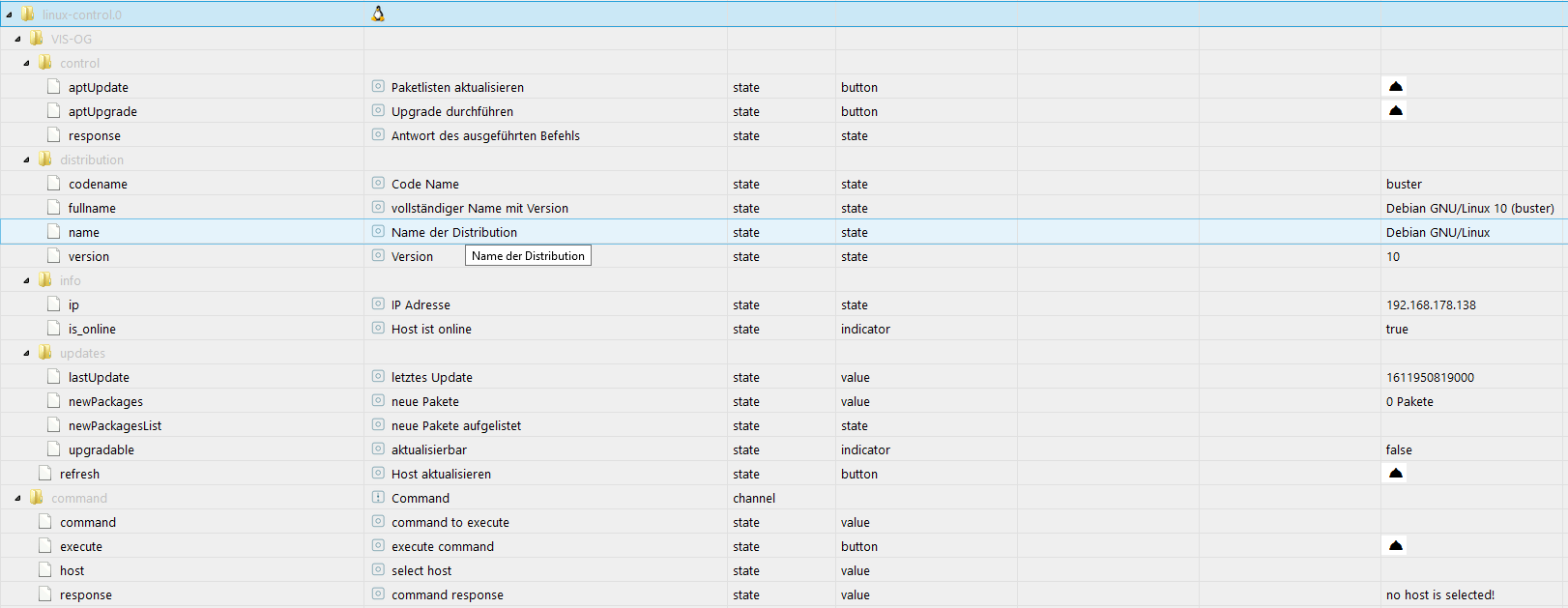
                        Hallo @Scrounger, ich habe unter Proxmox einmal ioBroker in einer VM und einmal im Container installiert.
                        In der VM zeigt linux-control an, dass Proxmox online ist.

                        VM.png

                        2021-01-27 13:01:53.783 - info: host.ioBroker stopInstance system.adapter.linux-control.0 (force=false, process=true)
                        2021-01-27 13:01:53.787 - info: linux-control.0 (10410) Got terminate signal TERMINATE_YOURSELF
                        2021-01-27 13:01:53.787 - info: linux-control.0 (10410) cleaned everything up...
                        2021-01-27 13:01:53.788 - info: linux-control.0 (10410) terminating
                        2021-01-27 13:01:53.788 - debug: linux-control.0 (10410) Plugin sentry destroyed
                        2021-01-27 13:01:53.788 - info: linux-control.0 (10410) Terminated (ADAPTER_REQUESTED_TERMINATION): Without reason
                        2021-01-27 13:01:53.827 - info: host.ioBroker stopInstance system.adapter.linux-control.0 send kill signal
                        2021-01-27 13:01:54.312 - info: host.ioBroker instance system.adapter.linux-control.0 terminated with code 11 (ADAPTER_REQUESTED_TERMINATION)
                        2021-01-27 13:01:56.851 - info: host.ioBroker instance system.adapter.linux-control.0 started with pid 10426
                        2021-01-27 13:01:57.208 - debug: linux-control.0 (10426) Redis Objects: Use Redis connection: 127.0.0.1:9001
                        2021-01-27 13:01:57.219 - debug: linux-control.0 (10426) Objects client ready ... initialize now
                        2021-01-27 13:01:57.220 - debug: linux-control.0 (10426) Objects create System PubSub Client
                        2021-01-27 13:01:57.221 - debug: linux-control.0 (10426) Objects create User PubSub Client
                        2021-01-27 13:01:57.221 - debug: linux-control.0 (10426) Objects client initialize lua scripts
                        2021-01-27 13:01:57.225 - debug: linux-control.0 (10426) Objects connected to redis: 127.0.0.1:9001
                        2021-01-27 13:01:57.229 - debug: linux-control.0 (10426) objectDB connected
                        2021-01-27 13:01:57.230 - debug: linux-control.0 (10426) Redis States: Use Redis connection: 127.0.0.1:9000
                        2021-01-27 13:01:57.237 - debug: linux-control.0 (10426) States create System PubSub Client
                        2021-01-27 13:01:57.238 - debug: linux-control.0 (10426) States create User PubSub Client
                        2021-01-27 13:01:57.240 - debug: linux-control.0 (10426) States connected to redis: 127.0.0.1:9000
                        2021-01-27 13:01:57.241 - debug: linux-control.0 (10426) statesDB connected
                        2021-01-27 13:01:57.300 - debug: linux-control.0 (10426) Plugin sentry Initialize Plugin (enabled=true)
                        2021-01-27 13:01:57.370 - info: linux-control.0 (10426) starting. Version 1.1.2 in /opt/iobroker/node_modules/iobroker.linux-control, node: v12.20.1, js-controller: 3.2.11
                        2021-01-27 13:01:57.397 - info: linux-control.0 (10426) getting data from Proxmox (192.168.1.102:22, Adapter start)
                        2021-01-27 13:01:57.464 - debug: linux-control.0 (10426) [distributionInfo] Proxmox (192.168.1.102:22): send command: 'cat /etc/os-release'
                        2021-01-27 13:01:57.571 - debug: linux-control.0 (10426) [distributionInfo] Proxmox (192.168.1.102:22): response stdout: PRETTY_NAME="Debian GNU/Linux 10 (buster)"
                        NAME="Debian GNU/Linux"
                        VERSION_ID="10"
                        VERSION="10 (buster)"
                        VERSION_CODENAME=buster
                        ID=debian
                        HOME_URL="https://www.debian.org/"
                        SUPPORT_URL="https://www.debian.org/support"
                        BUG_REPORT_URL="https://bugs.debian.org/"
                        2021-01-27 13:01:57.580 - debug: linux-control.0 (10426) [distributionInfo] Proxmox (192.168.1.102:22): csvToJson result: [{"prop":"PRETTY_NAME","val":"Debian GNU/Linux 10 (buster)"},{"prop":"NAME","val":"Debian GNU/Linux"},{"prop":"VERSION_ID","val":"10"},{"prop":"VERSION","val":"10 (buster)"},{"prop":"VERSION_CODENAME","val":"buster"},{"prop":"ID","val":"debian"},{"prop":"HOME_URL","val":"https://www.debian.org/"},{"prop":"SUPPORT_URL","val":"https://www.debian.org/support"},{"prop":"BUG_REPORT_URL","val":"https://bugs.debian.org/"}]
                        2021-01-27 13:01:57.588 - debug: linux-control.0 (10426) [cmdAptUpdate] Proxmox (192.168.1.102:22): send command: 'apt-get update'
                        2021-01-27 13:01:58.831 - debug: linux-control.0 (10426) [cmdAptUpdate] Proxmox (192.168.1.102:22): response stdout: Hit:1 http://security.debian.org buster/updates InRelease
                        Hit:2 http://ftp.de.debian.org/debian buster InRelease
                        Hit:3 http://security.debian.org/debian-security buster/updates InRelease
                        Hit:4 http://ftp.de.debian.org/debian buster-updates InRelease
                        Hit:5 http://download.proxmox.com/debian/pve buster InRelease
                        Reading package lists...
                        2021-01-27 13:01:58.832 - debug: linux-control.0 (10426) [cmdAptUpdate] Proxmox (192.168.1.102:22): send command: 'apt-get --just-print upgrade 2>&1 | perl -ne 'if (/Inst\s([\w,\-,\d,\.,~,:,\+]+)\s\[([\w,\-,\d,\.,~,:,\+]+)\]\s\(([\w,\-,\d,\.,~,:,\+]+)\)? /i) {print "$1,$2,$3\n"}' | column -s " " -t'
                        2021-01-27 13:01:59.145 - debug: linux-control.0 (10426) [cmdAptUpdate] Proxmox (192.168.1.102:22): response stdout:
                        2021-01-27 13:01:59.145 - debug: linux-control.0 (10426) [cmdAptUpdate] Proxmox (192.168.1.102:22): Proxmox.updates.newPackages: 0
                        2021-01-27 13:01:59.148 - debug: linux-control.0 (10426) [cmdAptUpdate] Proxmox (192.168.1.102:22): Proxmox.updates.upgradable: false
                        2021-01-27 13:01:59.152 - debug: linux-control.0 (10426) [cmdAptUpdate] Proxmox (192.168.1.102:22): send command: 'dpkg-query -f '${db-fsys:Last-Modified}
                        ' -W | sort -nr | head -1'
                        2021-01-27 13:01:59.165 - debug: linux-control.0 (10426) [cmdAptUpdate] Proxmox (192.168.1.102:22): response stdout: 1611500573
                        2021-01-27 13:01:59.166 - debug: linux-control.0 (10426) [cmdAptUpdate] Proxmox (192.168.1.102:22): Proxmox.updates.lastUpdate: 1611500573000 -> 24.01.2021 16:02
                        2021-01-27 13:01:59.213 - debug: linux-control.0 (10426) [servicesInfo] Proxmox (192.168.1.102:22): no datapoints selected -> removing existing datapoints
                        2021-01-27 13:01:59.218 - debug: linux-control.0 (10426) [needrestart] Proxmox (192.168.1.102:22): no datapoints selected -> removing existing datapoints
                        2021-01-27 13:01:59.222 - info: linux-control.0 (10426) successful received data from Proxmox (192.168.1.102:22)
                        2021-01-27 13:01:59.228 - debug: linux-control.0 (10426) [refreshHost] Proxmox (192.168.1.102:22): button 'linux-control.0.Proxmox.refresh' subscribed
                        2021-01-27 13:01:59.229 - debug: linux-control.0 (10426) [refreshHost] Proxmox (192.168.1.102:22): button 'linux-control.0.Proxmox.control.aptUpdate' subscribed
                        2021-01-27 13:01:59.229 - debug: linux-control.0 (10426) [refreshHost] Proxmox (192.168.1.102:22): button 'linux-control.0.Proxmox.control.aptUpgrade' subscribed


                        Im Container zeigt linux-control an, dass Proxmox offline ist.

                        LXC.png

                        2021-01-27 12:07:20.066 - info: host.ioBroker stopInstance system.adapter.linux-control.0 (force=false, process=true)
                        2021-01-27 12:07:20.070 - info: host.ioBroker stopInstance system.adapter.linux-control.0 send kill signal
                        2021-01-27 12:07:20.070 - info: linux-control.0 (22741) Got terminate signal TERMINATE_YOURSELF
                        2021-01-27 12:07:20.070 - info: linux-control.0 (22741) cleaned everything up...
                        2021-01-27 12:07:20.071 - info: linux-control.0 (22741) terminating
                        2021-01-27 12:07:20.071 - debug: linux-control.0 (22741) Plugin sentry destroyed
                        2021-01-27 12:07:20.071 - info: linux-control.0 (22741) Terminated (ADAPTER_REQUESTED_TERMINATION): Without reason
                        2021-01-27 12:07:20.638 - info: host.ioBroker instance system.adapter.linux-control.0 terminated with code 11 (ADAPTER_REQUESTED_TERMINATION)
                        2021-01-27 12:07:23.148 - info: host.ioBroker instance system.adapter.linux-control.0 started with pid 22795
                        2021-01-27 12:07:23.494 - debug: linux-control.0 (22795) Redis Objects: Use Redis connection: 127.0.0.1:9001
                        2021-01-27 12:07:23.507 - debug: linux-control.0 (22795) Objects client ready ... initialize now
                        2021-01-27 12:07:23.508 - debug: linux-control.0 (22795) Objects create System PubSub Client
                        2021-01-27 12:07:23.509 - debug: linux-control.0 (22795) Objects create User PubSub Client
                        2021-01-27 12:07:23.509 - debug: linux-control.0 (22795) Objects client initialize lua scripts
                        2021-01-27 12:07:23.524 - debug: linux-control.0 (22795) Objects connected to redis: 127.0.0.1:9001
                        2021-01-27 12:07:23.528 - debug: linux-control.0 (22795) objectDB connected
                        2021-01-27 12:07:23.529 - debug: linux-control.0 (22795) Redis States: Use Redis connection: 127.0.0.1:9000
                        2021-01-27 12:07:23.536 - debug: linux-control.0 (22795) States create System PubSub Client
                        2021-01-27 12:07:23.537 - debug: linux-control.0 (22795) States create User PubSub Client
                        2021-01-27 12:07:23.546 - debug: linux-control.0 (22795) States connected to redis: 127.0.0.1:9000
                        2021-01-27 12:07:23.546 - debug: linux-control.0 (22795) statesDB connected
                        2021-01-27 12:07:23.714 - debug: linux-control.0 (22795) Plugin sentry Initialize Plugin (enabled=true)
                        2021-01-27 12:07:23.784 - info: linux-control.0 (22795) starting. Version 1.1.2 in /opt/iobroker/node_modules/iobroker.linux-control, node: v12.20.1, js-controller: 3.2.11
                        2021-01-27 12:07:23.806 - info: linux-control.0 (22795) getting data from Proxmox (192.168.1.102:22, Adapter start)
                        2021-01-27 12:07:23.814 - info: linux-control.0 (22795) [getConnection] Host 'Proxmox' (192.168.1.102:22) seems not to be online
                        2021-01-27 12:07:23.815 - debug: linux-control.0 (22795) [getConnection] Host 'Proxmox' (192.168.1.102:22) ping result: {"host":"unknown","alive":false,"output":"","time":"unknown","times":[],"min":"unknown","max":"unknown","avg":"unknown","stddev":"unknown","packetLoss":"unknown"}
                        2021-01-27 12:07:23.872 - debug: linux-control.0 (22795) [refreshHost] Proxmox (192.168.1.102:22): button 'linux-control.0.Proxmox.refresh' subscribed


                        VM und Container sind mit Debian 10.7.0-amd64.
                        Du hast doch iobroker auch im Container und bei Dir funktioniert es wie ich am Material Design Widget von Dir gesehen habe. Hast Du eine Idee, warum es bei mir nicht funktioniert?

                        NUC8i5 mit Proxmox; Raspberrymatic in VM, iobroker, Motioneye, infuxDB und Grafana in CT.

                        ScroungerS 1 Reply Last reply
                        0
                        • dirk1962D dirk1962

                          Hallo @Scrounger, ich habe unter Proxmox einmal ioBroker in einer VM und einmal im Container installiert.
                          In der VM zeigt linux-control an, dass Proxmox online ist.
                          VM.png

                          2021-01-27 13:01:53.783 - info: host.ioBroker stopInstance system.adapter.linux-control.0 (force=false, process=true)
                          2021-01-27 13:01:53.787 - info: linux-control.0 (10410) Got terminate signal TERMINATE_YOURSELF
                          2021-01-27 13:01:53.787 - info: linux-control.0 (10410) cleaned everything up...
                          2021-01-27 13:01:53.788 - info: linux-control.0 (10410) terminating
                          2021-01-27 13:01:53.788 - debug: linux-control.0 (10410) Plugin sentry destroyed
                          2021-01-27 13:01:53.788 - info: linux-control.0 (10410) Terminated (ADAPTER_REQUESTED_TERMINATION): Without reason
                          2021-01-27 13:01:53.827 - info: host.ioBroker stopInstance system.adapter.linux-control.0 send kill signal
                          2021-01-27 13:01:54.312 - info: host.ioBroker instance system.adapter.linux-control.0 terminated with code 11 (ADAPTER_REQUESTED_TERMINATION)
                          2021-01-27 13:01:56.851 - info: host.ioBroker instance system.adapter.linux-control.0 started with pid 10426
                          2021-01-27 13:01:57.208 - debug: linux-control.0 (10426) Redis Objects: Use Redis connection: 127.0.0.1:9001
                          2021-01-27 13:01:57.219 - debug: linux-control.0 (10426) Objects client ready ... initialize now
                          2021-01-27 13:01:57.220 - debug: linux-control.0 (10426) Objects create System PubSub Client
                          2021-01-27 13:01:57.221 - debug: linux-control.0 (10426) Objects create User PubSub Client
                          2021-01-27 13:01:57.221 - debug: linux-control.0 (10426) Objects client initialize lua scripts
                          2021-01-27 13:01:57.225 - debug: linux-control.0 (10426) Objects connected to redis: 127.0.0.1:9001
                          2021-01-27 13:01:57.229 - debug: linux-control.0 (10426) objectDB connected
                          2021-01-27 13:01:57.230 - debug: linux-control.0 (10426) Redis States: Use Redis connection: 127.0.0.1:9000
                          2021-01-27 13:01:57.237 - debug: linux-control.0 (10426) States create System PubSub Client
                          2021-01-27 13:01:57.238 - debug: linux-control.0 (10426) States create User PubSub Client
                          2021-01-27 13:01:57.240 - debug: linux-control.0 (10426) States connected to redis: 127.0.0.1:9000
                          2021-01-27 13:01:57.241 - debug: linux-control.0 (10426) statesDB connected
                          2021-01-27 13:01:57.300 - debug: linux-control.0 (10426) Plugin sentry Initialize Plugin (enabled=true)
                          2021-01-27 13:01:57.370 - info: linux-control.0 (10426) starting. Version 1.1.2 in /opt/iobroker/node_modules/iobroker.linux-control, node: v12.20.1, js-controller: 3.2.11
                          2021-01-27 13:01:57.397 - info: linux-control.0 (10426) getting data from Proxmox (192.168.1.102:22, Adapter start)
                          2021-01-27 13:01:57.464 - debug: linux-control.0 (10426) [distributionInfo] Proxmox (192.168.1.102:22): send command: 'cat /etc/os-release'
                          2021-01-27 13:01:57.571 - debug: linux-control.0 (10426) [distributionInfo] Proxmox (192.168.1.102:22): response stdout: PRETTY_NAME="Debian GNU/Linux 10 (buster)"
                          NAME="Debian GNU/Linux"
                          VERSION_ID="10"
                          VERSION="10 (buster)"
                          VERSION_CODENAME=buster
                          ID=debian
                          HOME_URL="https://www.debian.org/"
                          SUPPORT_URL="https://www.debian.org/support"
                          BUG_REPORT_URL="https://bugs.debian.org/"
                          2021-01-27 13:01:57.580 - debug: linux-control.0 (10426) [distributionInfo] Proxmox (192.168.1.102:22): csvToJson result: [{"prop":"PRETTY_NAME","val":"Debian GNU/Linux 10 (buster)"},{"prop":"NAME","val":"Debian GNU/Linux"},{"prop":"VERSION_ID","val":"10"},{"prop":"VERSION","val":"10 (buster)"},{"prop":"VERSION_CODENAME","val":"buster"},{"prop":"ID","val":"debian"},{"prop":"HOME_URL","val":"https://www.debian.org/"},{"prop":"SUPPORT_URL","val":"https://www.debian.org/support"},{"prop":"BUG_REPORT_URL","val":"https://bugs.debian.org/"}]
                          2021-01-27 13:01:57.588 - debug: linux-control.0 (10426) [cmdAptUpdate] Proxmox (192.168.1.102:22): send command: 'apt-get update'
                          2021-01-27 13:01:58.831 - debug: linux-control.0 (10426) [cmdAptUpdate] Proxmox (192.168.1.102:22): response stdout: Hit:1 http://security.debian.org buster/updates InRelease
                          Hit:2 http://ftp.de.debian.org/debian buster InRelease
                          Hit:3 http://security.debian.org/debian-security buster/updates InRelease
                          Hit:4 http://ftp.de.debian.org/debian buster-updates InRelease
                          Hit:5 http://download.proxmox.com/debian/pve buster InRelease
                          Reading package lists...
                          2021-01-27 13:01:58.832 - debug: linux-control.0 (10426) [cmdAptUpdate] Proxmox (192.168.1.102:22): send command: 'apt-get --just-print upgrade 2>&1 | perl -ne 'if (/Inst\s([\w,\-,\d,\.,~,:,\+]+)\s\[([\w,\-,\d,\.,~,:,\+]+)\]\s\(([\w,\-,\d,\.,~,:,\+]+)\)? /i) {print "$1,$2,$3\n"}' | column -s " " -t'
                          2021-01-27 13:01:59.145 - debug: linux-control.0 (10426) [cmdAptUpdate] Proxmox (192.168.1.102:22): response stdout:
                          2021-01-27 13:01:59.145 - debug: linux-control.0 (10426) [cmdAptUpdate] Proxmox (192.168.1.102:22): Proxmox.updates.newPackages: 0
                          2021-01-27 13:01:59.148 - debug: linux-control.0 (10426) [cmdAptUpdate] Proxmox (192.168.1.102:22): Proxmox.updates.upgradable: false
                          2021-01-27 13:01:59.152 - debug: linux-control.0 (10426) [cmdAptUpdate] Proxmox (192.168.1.102:22): send command: 'dpkg-query -f '${db-fsys:Last-Modified}
                          ' -W | sort -nr | head -1'
                          2021-01-27 13:01:59.165 - debug: linux-control.0 (10426) [cmdAptUpdate] Proxmox (192.168.1.102:22): response stdout: 1611500573
                          2021-01-27 13:01:59.166 - debug: linux-control.0 (10426) [cmdAptUpdate] Proxmox (192.168.1.102:22): Proxmox.updates.lastUpdate: 1611500573000 -> 24.01.2021 16:02
                          2021-01-27 13:01:59.213 - debug: linux-control.0 (10426) [servicesInfo] Proxmox (192.168.1.102:22): no datapoints selected -> removing existing datapoints
                          2021-01-27 13:01:59.218 - debug: linux-control.0 (10426) [needrestart] Proxmox (192.168.1.102:22): no datapoints selected -> removing existing datapoints
                          2021-01-27 13:01:59.222 - info: linux-control.0 (10426) successful received data from Proxmox (192.168.1.102:22)
                          2021-01-27 13:01:59.228 - debug: linux-control.0 (10426) [refreshHost] Proxmox (192.168.1.102:22): button 'linux-control.0.Proxmox.refresh' subscribed
                          2021-01-27 13:01:59.229 - debug: linux-control.0 (10426) [refreshHost] Proxmox (192.168.1.102:22): button 'linux-control.0.Proxmox.control.aptUpdate' subscribed
                          2021-01-27 13:01:59.229 - debug: linux-control.0 (10426) [refreshHost] Proxmox (192.168.1.102:22): button 'linux-control.0.Proxmox.control.aptUpgrade' subscribed


                          Im Container zeigt linux-control an, dass Proxmox offline ist.
                          LXC.png

                          2021-01-27 12:07:20.066 - info: host.ioBroker stopInstance system.adapter.linux-control.0 (force=false, process=true)
                          2021-01-27 12:07:20.070 - info: host.ioBroker stopInstance system.adapter.linux-control.0 send kill signal
                          2021-01-27 12:07:20.070 - info: linux-control.0 (22741) Got terminate signal TERMINATE_YOURSELF
                          2021-01-27 12:07:20.070 - info: linux-control.0 (22741) cleaned everything up...
                          2021-01-27 12:07:20.071 - info: linux-control.0 (22741) terminating
                          2021-01-27 12:07:20.071 - debug: linux-control.0 (22741) Plugin sentry destroyed
                          2021-01-27 12:07:20.071 - info: linux-control.0 (22741) Terminated (ADAPTER_REQUESTED_TERMINATION): Without reason
                          2021-01-27 12:07:20.638 - info: host.ioBroker instance system.adapter.linux-control.0 terminated with code 11 (ADAPTER_REQUESTED_TERMINATION)
                          2021-01-27 12:07:23.148 - info: host.ioBroker instance system.adapter.linux-control.0 started with pid 22795
                          2021-01-27 12:07:23.494 - debug: linux-control.0 (22795) Redis Objects: Use Redis connection: 127.0.0.1:9001
                          2021-01-27 12:07:23.507 - debug: linux-control.0 (22795) Objects client ready ... initialize now
                          2021-01-27 12:07:23.508 - debug: linux-control.0 (22795) Objects create System PubSub Client
                          2021-01-27 12:07:23.509 - debug: linux-control.0 (22795) Objects create User PubSub Client
                          2021-01-27 12:07:23.509 - debug: linux-control.0 (22795) Objects client initialize lua scripts
                          2021-01-27 12:07:23.524 - debug: linux-control.0 (22795) Objects connected to redis: 127.0.0.1:9001
                          2021-01-27 12:07:23.528 - debug: linux-control.0 (22795) objectDB connected
                          2021-01-27 12:07:23.529 - debug: linux-control.0 (22795) Redis States: Use Redis connection: 127.0.0.1:9000
                          2021-01-27 12:07:23.536 - debug: linux-control.0 (22795) States create System PubSub Client
                          2021-01-27 12:07:23.537 - debug: linux-control.0 (22795) States create User PubSub Client
                          2021-01-27 12:07:23.546 - debug: linux-control.0 (22795) States connected to redis: 127.0.0.1:9000
                          2021-01-27 12:07:23.546 - debug: linux-control.0 (22795) statesDB connected
                          2021-01-27 12:07:23.714 - debug: linux-control.0 (22795) Plugin sentry Initialize Plugin (enabled=true)
                          2021-01-27 12:07:23.784 - info: linux-control.0 (22795) starting. Version 1.1.2 in /opt/iobroker/node_modules/iobroker.linux-control, node: v12.20.1, js-controller: 3.2.11
                          2021-01-27 12:07:23.806 - info: linux-control.0 (22795) getting data from Proxmox (192.168.1.102:22, Adapter start)
                          2021-01-27 12:07:23.814 - info: linux-control.0 (22795) [getConnection] Host 'Proxmox' (192.168.1.102:22) seems not to be online
                          2021-01-27 12:07:23.815 - debug: linux-control.0 (22795) [getConnection] Host 'Proxmox' (192.168.1.102:22) ping result: {"host":"unknown","alive":false,"output":"","time":"unknown","times":[],"min":"unknown","max":"unknown","avg":"unknown","stddev":"unknown","packetLoss":"unknown"}
                          2021-01-27 12:07:23.872 - debug: linux-control.0 (22795) [refreshHost] Proxmox (192.168.1.102:22): button 'linux-control.0.Proxmox.refresh' subscribed


                          VM und Container sind mit Debian 10.7.0-amd64.
                          Du hast doch iobroker auch im Container und bei Dir funktioniert es wie ich am Material Design Widget von Dir gesehen habe. Hast Du eine Idee, warum es bei mir nicht funktioniert?

                          ScroungerS Offline
                          ScroungerS Offline
                          Scrounger
                          Developer
                          wrote on last edited by Scrounger
                          #263

                          @dirk1962
                          Ja ber mein lxc läuft auf ubunut 20 basis.

                          Schätze es dieses Problem, da er den nicht anpingen kann, gleiches wird auch beim ping adapter wahscheinlich der Fall sein:
                          https://github.com/Scrounger/ioBroker.linux-control#known-issues

                          Schau mal weiter oben hier, da gabs das thema schon.

                          dirk1962D 1 Reply Last reply
                          1
                          • ScroungerS Scrounger

                            @dirk1962
                            Ja ber mein lxc läuft auf ubunut 20 basis.

                            Schätze es dieses Problem, da er den nicht anpingen kann, gleiches wird auch beim ping adapter wahscheinlich der Fall sein:
                            https://github.com/Scrounger/ioBroker.linux-control#known-issues

                            Schau mal weiter oben hier, da gabs das thema schon.

                            dirk1962D Offline
                            dirk1962D Offline
                            dirk1962
                            wrote on last edited by
                            #264

                            @scrounger Danke für die schnelle Rückmeldung. Dann mach ich den Container mit Ubuntu.

                            NUC8i5 mit Proxmox; Raspberrymatic in VM, iobroker, Motioneye, infuxDB und Grafana in CT.

                            ScroungerS 1 Reply Last reply
                            0
                            • dirk1962D dirk1962

                              @scrounger Danke für die schnelle Rückmeldung. Dann mach ich den Container mit Ubuntu.

                              ScroungerS Offline
                              ScroungerS Offline
                              Scrounger
                              Developer
                              wrote on last edited by
                              #265

                              @dirk1962 installiert doch einfach iputils-ping. Dann sollte es gehen

                              dirk1962D 1 Reply Last reply
                              0
                              • ScroungerS Scrounger

                                @dirk1962 installiert doch einfach iputils-ping. Dann sollte es gehen

                                dirk1962D Offline
                                dirk1962D Offline
                                dirk1962
                                wrote on last edited by
                                #266

                                @scrounger das ist schon installiert. Muss ich dann noch was machen?

                                NUC8i5 mit Proxmox; Raspberrymatic in VM, iobroker, Motioneye, infuxDB und Grafana in CT.

                                ScroungerS 1 Reply Last reply
                                0
                                • dirk1962D dirk1962

                                  @scrounger das ist schon installiert. Muss ich dann noch was machen?

                                  ScroungerS Offline
                                  ScroungerS Offline
                                  Scrounger
                                  Developer
                                  wrote on last edited by
                                  #267

                                  @dirk1962
                                  Da ich das problem nicht kenne, kann ich nicht viel dazu sagen, aber hier gabs genau das gleiche thema:
                                  https://forum.iobroker.net/topic/35870/test-adapter-linux-control-v1-x-x/253?_=1611757704506

                                  dirk1962D 1 Reply Last reply
                                  1
                                  • ScroungerS Scrounger

                                    @dirk1962
                                    Da ich das problem nicht kenne, kann ich nicht viel dazu sagen, aber hier gabs genau das gleiche thema:
                                    https://forum.iobroker.net/topic/35870/test-adapter-linux-control-v1-x-x/253?_=1611757704506

                                    dirk1962D Offline
                                    dirk1962D Offline
                                    dirk1962
                                    wrote on last edited by
                                    #268

                                    @scrounger ... und damit hat es auch bei mir funktioniert.
                                    Vielen Dank :+1: .

                                    NUC8i5 mit Proxmox; Raspberrymatic in VM, iobroker, Motioneye, infuxDB und Grafana in CT.

                                    1 Reply Last reply
                                    0
                                    • wendy2702W Offline
                                      wendy2702W Offline
                                      wendy2702
                                      wrote on last edited by
                                      #269

                                      Abend zusammen.

                                      Ich ziehe gerade meine Wanddisplays von WIN nach Linux um und wollte den Adpater nutzen um display off / on zu schalten.

                                      Dazu habe ich den befehl hier eingetragen:

                                      9ab8d24a-8f35-4f66-8cfb-0d5578b815e2-grafik.png

                                      Ich hatte gedacht einen Datenpunkt mit einem Button dafür zu erhalten, oder wie rufe ich den Befehl sonst auf?
                                      685144fd-ddcf-443b-ba2c-d9bdf7bc0504-grafik.png

                                      Muss ich an anderer Stelle noch etwas im Adapter konfigurieren?

                                      Danke und Gruß

                                      Bitte keine Fragen per PN, die gehören ins Forum!

                                      Benutzt das Voting rechts unten im Beitrag wenn er euch geholfen hat.

                                      liv-in-skyL 1 Reply Last reply
                                      0
                                      • wendy2702W wendy2702

                                        Abend zusammen.

                                        Ich ziehe gerade meine Wanddisplays von WIN nach Linux um und wollte den Adpater nutzen um display off / on zu schalten.

                                        Dazu habe ich den befehl hier eingetragen:

                                        9ab8d24a-8f35-4f66-8cfb-0d5578b815e2-grafik.png

                                        Ich hatte gedacht einen Datenpunkt mit einem Button dafür zu erhalten, oder wie rufe ich den Befehl sonst auf?

                                        685144fd-ddcf-443b-ba2c-d9bdf7bc0504-grafik.png

                                        Muss ich an anderer Stelle noch etwas im Adapter konfigurieren?

                                        Danke und Gruß

                                        liv-in-skyL Offline
                                        liv-in-skyL Offline
                                        liv-in-sky
                                        wrote on last edited by liv-in-sky
                                        #270

                                        @wendy2702 sagte in Test Adapter Linux Control v1.x.x:

                                        azu habe ich den befehl hier eingetragen:

                                        du musst button auswählen anstatt zeichenkette

                                        nach einem gelösten Thread wäre es sinnvoll dies in der Überschrift des ersten Posts einzutragen [gelöst]-... Bitte benutzt das Voting rechts unten im Beitrag wenn er euch geholfen hat. Forum-Tools: PicPick https://picpick.app/en/download/ und ScreenToGif https://www.screentogif.com/downloads.html

                                        wendy2702W 1 Reply Last reply
                                        1
                                        • liv-in-skyL liv-in-sky

                                          @wendy2702 sagte in Test Adapter Linux Control v1.x.x:

                                          azu habe ich den befehl hier eingetragen:

                                          du musst button auswählen anstatt zeichenkette

                                          wendy2702W Offline
                                          wendy2702W Offline
                                          wendy2702
                                          wrote on last edited by
                                          #271

                                          @liv-in-sky Klappt natürlich!

                                          Vielen Dank und schönen Abend.

                                          Bitte keine Fragen per PN, die gehören ins Forum!

                                          Benutzt das Voting rechts unten im Beitrag wenn er euch geholfen hat.

                                          liv-in-skyL 1 Reply Last reply
                                          0
                                          Reply
                                          • Reply as topic
                                          Log in to reply
                                          • Oldest to Newest
                                          • Newest to Oldest
                                          • Most Votes


                                          Support us

                                          ioBroker
                                          Community Adapters
                                          Donate

                                          764

                                          Online

                                          32.6k

                                          Users

                                          82.2k

                                          Topics

                                          1.3m

                                          Posts
                                          Community
                                          Impressum | Datenschutz-Bestimmungen | Nutzungsbedingungen | Einwilligungseinstellungen
                                          ioBroker Community 2014-2025
                                          logo
                                          • Login

                                          • Don't have an account? Register

                                          • Login or register to search.
                                          • First post
                                            Last post
                                          0
                                          • Home
                                          • Recent
                                          • Tags
                                          • Unread 0
                                          • Categories
                                          • Unreplied
                                          • Popular
                                          • GitHub
                                          • Docu
                                          • Hilfe