



Skip to content
  • Home
  • Recent
  • Tags
  • 0 Unread 0
  • Categories
  • Unreplied
  • Popular
  • GitHub
  • Docu
  • Hilfe
Skins
  • Light
  • Brite
  • Cerulean
  • Cosmo
  • Flatly
  • Journal
  • Litera
  • Lumen
  • Lux
  • Materia
  • Minty
  • Morph
  • Pulse
  • Sandstone
  • Simplex
  • Sketchy
  • Spacelab
  • United
  • Yeti
  • Zephyr
  • Dark
  • Cyborg
  • Darkly
  • Quartz
  • Slate
  • Solar
  • Superhero
  • Vapor

  • Default (No Skin)
  • No Skin
Collapse
ioBroker Logo

Community Forum

donate donate
  1. ioBroker Community Home
  2. Deutsch
  3. Skripten / Logik
  4. MQTT String generell aufteilen?

NEWS

  • Monatsrückblick Januar/Februar 2026 ist online!
    BluefoxB
    Bluefox
    12
    1
    127

  • Jahresrückblick 2025 – unser neuer Blogbeitrag ist online! ✨
    BluefoxB
    Bluefox
    17
    1
    4.3k

  • Neuer Blogbeitrag: Monatsrückblick - Dezember 2025 🎄
    BluefoxB
    Bluefox
    13
    1
    1.2k

MQTT String generell aufteilen?

Scheduled Pinned Locked Moved Skripten / Logik
javascript
28 Posts 7 Posters 4.0k Views 8 Watching
  • Oldest to Newest
  • Newest to Oldest
  • Most Votes
Reply
  • Reply as topic
Log in to reply
This topic has been deleted. Only users with topic management privileges can see it.
  • B Offline
    B Offline
    butsch
    wrote on last edited by
    #17

    @frostnatt sagte in MQTT String generell aufteilen?:

                                                                                                                                const JSPath = "javascript.0"                              // JS- Pfad                                                                                                                                                                            const parsedStatesPath   = JSPath + ".zigbee2mqtt"         // Pfad fuer geparste States                                                                                                                                                                            const zigbee2mqttJsonPath = "mqtt.0.zigbee2mqtt"           //Pfad fuer zigbee2mqtt Json Objekte                                                                                                                                                                            let IDs = [];                                                                                                                                                                                                                                                                                                                                                                                                                                                                                                                                      $("[id=" + zigbee2mqttJsonPath + ".*]").each(function (id) {                                                                                                                                                                                IDs.push(id)                                                                                                                                                                            })                                                                                                                                                                            on({id: IDs, change: "ne"}, function (obj) {                                                                                                                                                                                let JsonObj = JSON.parse(obj.state.val)                                                                                                                                                                                Object.keys(JsonObj).forEach(function(key){                                                                                                                                                                                    let currState = obj.id.replace(zigbee2mqttJsonPath, parsedStatesPath) + "." + key                                                                                                                                                                                    if (getState(currState).notExist){                                                                                                                                                                                        createState(currState, JsonObj[key], {read: true, write: true, type: typeof(JsonObj[key]), name: '' , desc: ''},function(){                                                                                                                                                                                            setState(currState, JsonObj[key]);                                                                                                                                                                                    })                                                                                                                                                                                    }else {                                                                                                                                                                                        setState(currState, JsonObj[key])                                                                                                                                                                                    };                                                                                                                                                                                })                                                                                                                                                                            })                                            
    

    Vielen Dank, jetzt passt es!

    1 Reply Last reply
    0
    • F frostnatt

      @butsch
      Habe das Problem gefixt, das Script wirft keine Warnings mehr bei mir.

      const JSPath = "javascript.0"                              // JS- Pfad
      const parsedStatesPath   = JSPath + ".zigbee2mqtt"         // Pfad fuer geparste States
      const zigbee2mqttJsonPath = "mqtt.0.zigbee2mqtt"           //Pfad fuer zigbee2mqtt Json Objekte
      let IDs = [];
      
      
      $("[id=" + zigbee2mqttJsonPath + ".*]").each(function (id) {
          IDs.push(id)
      })
      on({id: IDs, change: "ne"}, function (obj) {
          let JsonObj = JSON.parse(obj.state.val)
          Object.keys(JsonObj).forEach(function(key){
              let currState = obj.id.replace(zigbee2mqttJsonPath, parsedStatesPath) + "." + key
              if (getState(currState).notExist){
                  createState(currState, JsonObj[key], {read: true, write: true, type: typeof(JsonObj[key]), name: '' , desc: ''},function(){
                      setState(currState, JsonObj[key]);
              })
              }else {
                  setState(currState, JsonObj[key])
              };
          })
      })
      
      metaxaM Offline
      metaxaM Offline
      metaxa
      wrote on last edited by metaxa
      #18

      @frostnatt sagte in MQTT String generell aufteilen?:

      @butsch
      Habe das Problem gefixt, das Script wirft keine Warnings mehr bei mir.

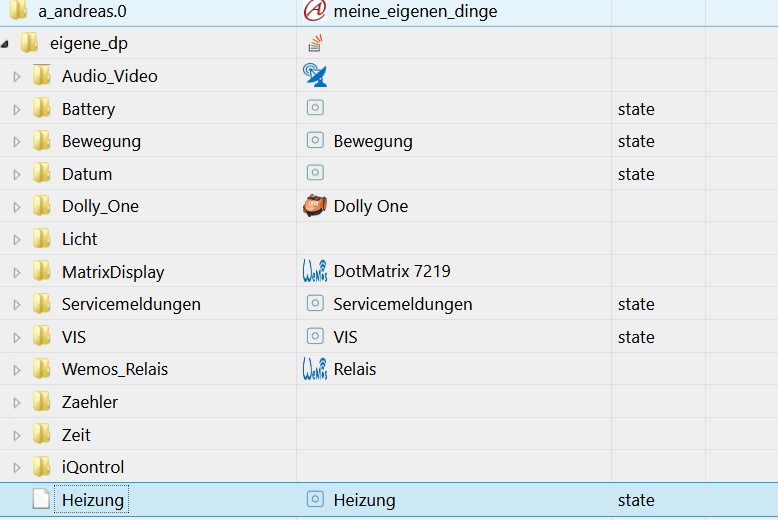
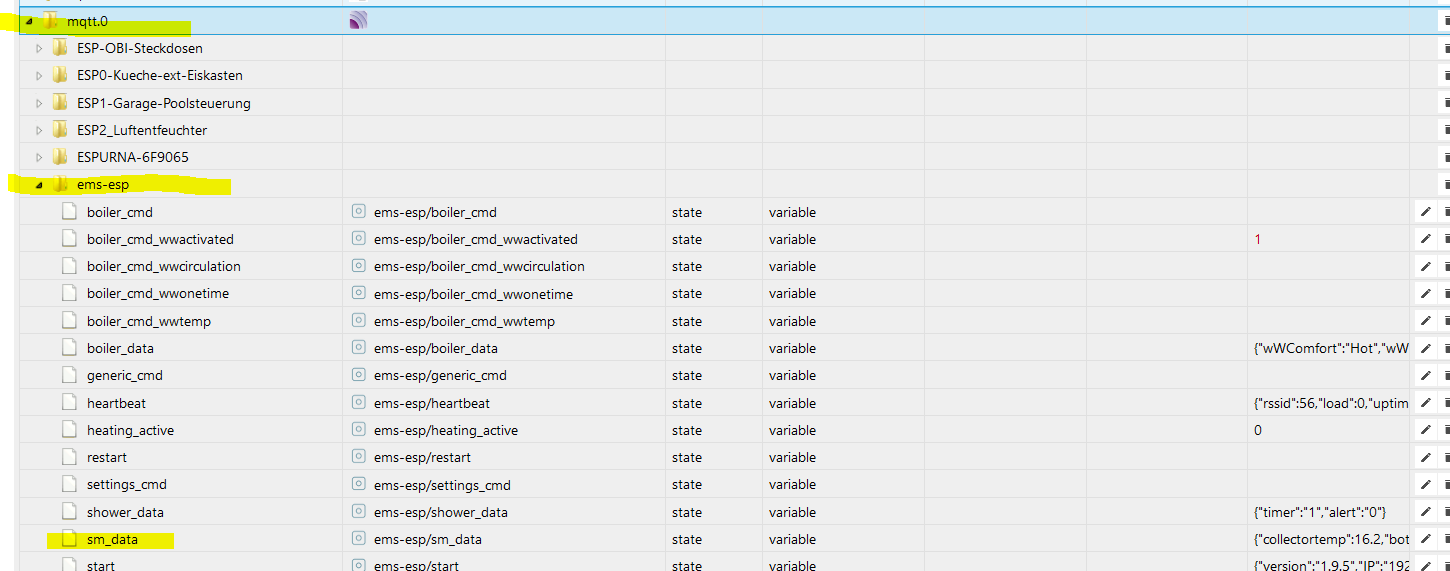
      Jetzt habe ich primitiv geglaubt, ich kann mir das Script stehlen, ein wenig anpassen und es läuft..... war ein Irrglaube. Kannst du mir vielleicht bitte helfen?

      schedule("* * * * *", function (){       //alle Minuten
      
      const JSPath = "a_andreas.0.eigene_dp"					// JS- Pfad
      const parsedStatesPath   = JSPath + ".Heizung"			// Pfad fuer geparste States
      const JsonPath = "mqtt.0.ems-esp.sm_data"				// Pfad fuer Json Objekte
      
      let IDs = [];
      
      $("[id=" + JsonPath + ".*]").each(function (id) {
          IDs.push(id)
      })
      
      on({id: IDs, change: "ne"}, function (obj) {
          let JsonObj = JSON.parse(obj.state.val)
          Object.keys(JsonObj).forEach(function(key){
              let currState = obj.id.replace(JsonPath, parsedStatesPath) + "." + key
             if (getState(currState).notExist){
                  createState(currState, JsonObj[key], {read: true, write: true, type: typeof(JsonObj[key]), name: '' , desc: ''},function(){
                      setState(currState, JsonObj[key]);
              })
              }else {
                  setState(currState, JsonObj[key])
              };
          })
      })
      })
      

      fd4394d7-4b1e-448c-955b-8616c922e63c-grafik.png
      57556ad1-405f-438e-89b7-12d95f228838-grafik.png

      {"collectortemp":16,"bottomtemp":57.8,"pump":"off","pumpWorkMin":30500,"energylasthour":0}
      

      Leider tut sich nix ........ bitte um Unterstützung!

      Finde deine Lösung mit dynamischen DP echt genial!!!!
      LG, mxa

      paul53P 1 Reply Last reply
      0
      • metaxaM metaxa

        @frostnatt sagte in MQTT String generell aufteilen?:

        @butsch
        Habe das Problem gefixt, das Script wirft keine Warnings mehr bei mir.

        Jetzt habe ich primitiv geglaubt, ich kann mir das Script stehlen, ein wenig anpassen und es läuft..... war ein Irrglaube. Kannst du mir vielleicht bitte helfen?

        schedule("* * * * *", function (){       //alle Minuten
        
        const JSPath = "a_andreas.0.eigene_dp"					// JS- Pfad
        const parsedStatesPath   = JSPath + ".Heizung"			// Pfad fuer geparste States
        const JsonPath = "mqtt.0.ems-esp.sm_data"				// Pfad fuer Json Objekte
        
        let IDs = [];
        
        $("[id=" + JsonPath + ".*]").each(function (id) {
            IDs.push(id)
        })
        
        on({id: IDs, change: "ne"}, function (obj) {
            let JsonObj = JSON.parse(obj.state.val)
            Object.keys(JsonObj).forEach(function(key){
                let currState = obj.id.replace(JsonPath, parsedStatesPath) + "." + key
               if (getState(currState).notExist){
                    createState(currState, JsonObj[key], {read: true, write: true, type: typeof(JsonObj[key]), name: '' , desc: ''},function(){
                        setState(currState, JsonObj[key]);
                })
                }else {
                    setState(currState, JsonObj[key])
                };
            })
        })
        })
        

        fd4394d7-4b1e-448c-955b-8616c922e63c-grafik.png
        57556ad1-405f-438e-89b7-12d95f228838-grafik.png

        {"collectortemp":16,"bottomtemp":57.8,"pump":"off","pumpWorkMin":30500,"energylasthour":0}
        

        Leider tut sich nix ........ bitte um Unterstützung!

        Finde deine Lösung mit dynamischen DP echt genial!!!!
        LG, mxa

        paul53P Offline
        paul53P Offline
        paul53
        wrote on last edited by paul53
        #19

        @metaxa sagte:

        Leider tut sich nix

        Mit createState() kann man keine Datenpunkte unter "a_andreas.0.eigene_dp" erstellen.
        Außerdem: Was soll das schedule() drumherum ? Damit wird jede Minute ein neuer Trigger erzeugt.

        Bitte verzichtet auf Chat-Nachrichten, denn die Handhabung ist grauenhaft !
        Produktiv: RPi 2 mit S.USV, HM-MOD-RPI und SLC-USB-Stick mit root fs

        metaxaM 1 Reply Last reply
        1
        • paul53P paul53

          @metaxa sagte:

          Leider tut sich nix

          Mit createState() kann man keine Datenpunkte unter "a_andreas.0.eigene_dp" erstellen.
          Außerdem: Was soll das schedule() drumherum ? Damit wird jede Minute ein neuer Trigger erzeugt.

          metaxaM Offline
          metaxaM Offline
          metaxa
          wrote on last edited by metaxa
          #20

          @paul53 sagte in MQTT String generell aufteilen?:

          @metaxa sagte:

          Leider tut sich nix

          Mit createState() kann man keine Datenpunkte unter "a_andreas.0.eigene_dp" erstellen.

          Hi Paul,
          ich habs geändert ... aber es tut sich auch nix.

          // schedule("* * * * *", function (){       //alle Minuten
          
          const JSPath = "javascript.0"					// JS- Pfad
          const parsedStatesPath   = JSPath + ".Heizung"			// Pfad fuer geparste States
          const JsonPath = "mqtt.0.ems-esp.sm_data"				// Pfad fuer Json Objekte


          Hättest bitte noch eine Idee?

          Ups ...... hatte ich nicht gesehen: Ich will mit dem Shedule, dass das Script alle Minuten zum Testen ausgeführt wird.

          paul53P 1 Reply Last reply
          0
          • metaxaM metaxa

            @paul53 sagte in MQTT String generell aufteilen?:

            @metaxa sagte:

            Leider tut sich nix

            Mit createState() kann man keine Datenpunkte unter "a_andreas.0.eigene_dp" erstellen.

            Hi Paul,
            ich habs geändert ... aber es tut sich auch nix.

            // schedule("* * * * *", function (){       //alle Minuten
            
            const JSPath = "javascript.0"					// JS- Pfad
            const parsedStatesPath   = JSPath + ".Heizung"			// Pfad fuer geparste States
            const JsonPath = "mqtt.0.ems-esp.sm_data"				// Pfad fuer Json Objekte


            Hättest bitte noch eine Idee?

            Ups ...... hatte ich nicht gesehen: Ich will mit dem Shedule, dass das Script alle Minuten zum Testen ausgeführt wird.

            paul53P Offline
            paul53P Offline
            paul53
            wrote on last edited by paul53
            #21

            @metaxa sagte:

            Hättest bitte noch eine Idee?

            Du willst einen bestimmten Datenpunkt parsen. Dazu braucht man kein Array of IDs.

            const idJson = 'mqtt.0.ems-esp.sm_data';
            const path = 'Heizung.';
            const js = 'javascript.' + instance + '.';
            
            on(idJson, function(dp) { // triggert bei Wertänderung
               let obj = JSON.parse(dp.state.val);
               for(let prop in obj) {
                  if(existsState(js + path + prop)) setState(path + prop, obj[prop], true);
                  else createState(path + prop, obj[prop], {type: typeof obj[prop]});
               }
            });
            

            Bei den Datenpunkten mit Zahlenwerten solltest Du noch manuell die "unit" hinzufügen, denn das geht nicht automatisch.

            Bitte verzichtet auf Chat-Nachrichten, denn die Handhabung ist grauenhaft !
            Produktiv: RPi 2 mit S.USV, HM-MOD-RPI und SLC-USB-Stick mit root fs

            metaxaM 1 Reply Last reply
            1
            • paul53P paul53

              @metaxa sagte:

              Hättest bitte noch eine Idee?

              Du willst einen bestimmten Datenpunkt parsen. Dazu braucht man kein Array of IDs.

              const idJson = 'mqtt.0.ems-esp.sm_data';
              const path = 'Heizung.';
              const js = 'javascript.' + instance + '.';
              
              on(idJson, function(dp) { // triggert bei Wertänderung
                 let obj = JSON.parse(dp.state.val);
                 for(let prop in obj) {
                    if(existsState(js + path + prop)) setState(path + prop, obj[prop], true);
                    else createState(path + prop, obj[prop], {type: typeof obj[prop]});
                 }
              });
              

              Bei den Datenpunkten mit Zahlenwerten solltest Du noch manuell die "unit" hinzufügen, denn das geht nicht automatisch.

              metaxaM Offline
              metaxaM Offline
              metaxa
              wrote on last edited by
              #22

              @paul53 Ich werde es nie lernen und vestehen, danke Paul!
              Ich versuche es zu kapieren, aber ich komm nicht weit genug. Paar Fragen noch bitte

              1. wer oder was triggert das Script?
              2. habe ich Chance meine eigene Struktur zu verwenden ("a_andreas.0.eigene_dp")

              Ups, sehe gerade noch eine Änderung von dir, baue ich gleich ein - wird sicher Sinn machen, wenn ich auch nicht verstehe welchen :-)

              Danke Paul für deine Zeit!

              paul53P 1 Reply Last reply
              0
              • metaxaM metaxa

                @paul53 Ich werde es nie lernen und vestehen, danke Paul!
                Ich versuche es zu kapieren, aber ich komm nicht weit genug. Paar Fragen noch bitte

                1. wer oder was triggert das Script?
                2. habe ich Chance meine eigene Struktur zu verwenden ("a_andreas.0.eigene_dp")

                Ups, sehe gerade noch eine Änderung von dir, baue ich gleich ein - wird sicher Sinn machen, wenn ich auch nicht verstehe welchen :-)

                Danke Paul für deine Zeit!

                paul53P Offline
                paul53P Offline
                paul53
                wrote on last edited by
                #23

                @metaxa sagte:

                wer oder was triggert das Script?

                Getriggert wird bei einer Wertänderung des Datenpunktes 'mqtt.0.ems-esp.sm_data'.

                @metaxa sagte in MQTT String generell aufteilen?:

                habe ich Chance meine eigene Struktur zu verwenden ("a_andreas.0.eigene_dp")

                Ja, aber nicht mit createState() , sondern mit setObject() und setState() im Callback.

                Bitte verzichtet auf Chat-Nachrichten, denn die Handhabung ist grauenhaft !
                Produktiv: RPi 2 mit S.USV, HM-MOD-RPI und SLC-USB-Stick mit root fs

                metaxaM 1 Reply Last reply
                1
                • paul53P paul53

                  @metaxa sagte:

                  wer oder was triggert das Script?

                  Getriggert wird bei einer Wertänderung des Datenpunktes 'mqtt.0.ems-esp.sm_data'.

                  @metaxa sagte in MQTT String generell aufteilen?:

                  habe ich Chance meine eigene Struktur zu verwenden ("a_andreas.0.eigene_dp")

                  Ja, aber nicht mit createState() , sondern mit setObject() und setState() im Callback.

                  metaxaM Offline
                  metaxaM Offline
                  metaxa
                  wrote on last edited by metaxa
                  #24

                  @paul53 :-) //

                  Da hatte ich doch schon mal was gebastelt, jetzt ist es mir auch klar warum :-)

                  createState("javascript.0.scriptDatenPunkte.Sprit_AT.Tankstelle_"+index+".Index", 0,{type: 'number', name: 'ID', read: true, write: true});
                          setState("javascript.0.scriptDatenPunkte.Sprit_AT.Tankstelle_"+index+".Index", gasStation[index].id);
                  

                  Muss mich nochmals reinfuchsen. Ahhh, is doch was anderes ....... ich fuchse .....

                  Zum 27sten mal, danke dir Paul!
                  mxa

                  paul53P 1 Reply Last reply
                  0
                  • metaxaM metaxa

                    @paul53 :-) //

                    Da hatte ich doch schon mal was gebastelt, jetzt ist es mir auch klar warum :-)

                    createState("javascript.0.scriptDatenPunkte.Sprit_AT.Tankstelle_"+index+".Index", 0,{type: 'number', name: 'ID', read: true, write: true});
                            setState("javascript.0.scriptDatenPunkte.Sprit_AT.Tankstelle_"+index+".Index", gasStation[index].id);
                    

                    Muss mich nochmals reinfuchsen. Ahhh, is doch was anderes ....... ich fuchse .....

                    Zum 27sten mal, danke dir Paul!
                    mxa

                    paul53P Offline
                    paul53P Offline
                    paul53
                    wrote on last edited by
                    #25

                    @metaxa sagte:

                    Muss mich nochmals reinfuchsen.

                    Anregung

                    Bitte verzichtet auf Chat-Nachrichten, denn die Handhabung ist grauenhaft !
                    Produktiv: RPi 2 mit S.USV, HM-MOD-RPI und SLC-USB-Stick mit root fs

                    metaxaM 1 Reply Last reply
                    1
                    • paul53P paul53

                      @metaxa sagte:

                      Muss mich nochmals reinfuchsen.

                      Anregung

                      metaxaM Offline
                      metaxaM Offline
                      metaxa
                      wrote on last edited by
                      #26

                      @paul53 sagte in MQTT String generell aufteilen?:

                      Anregung

                      Üner diesen Thread stolperte ich schon mal, danke für den Link. Um das zu behirnen brauche ich wohl nochmals einen 1 monatigen "Lockdown". Das ist schon ein hartes Stück Brot.

                      LG, mxa

                      1 Reply Last reply
                      0
                      • R Offline
                        R Offline
                        Rushmed
                        Most Active
                        wrote on last edited by
                        #27

                        Hallo, ich habe mir das Script von oben geschnappt und angepasst.

                        Script:

                        const JSPath = "0_userdata.0"                              // JS- Pfad
                        const parsedStatesPath   = JSPath + ".cam_kueche"         // Pfad fuer geparste States
                        const zigbee2mqttJsonPath = "mqtt.0.cam_kueche"           //Pfad fuer zigbee2mqtt Json Objekte
                        let IDs = [];
                        
                        
                        $("[id=" + zigbee2mqttJsonPath + ".*]").each(function (id) {
                            IDs.push(id)
                        })
                        on({id: IDs, change: "ne"}, function (obj) {
                            let JsonObj = JSON.parse(obj.state.val)
                            Object.keys(JsonObj).forEach(function(key){
                                let currState = obj.id.replace(zigbee2mqttJsonPath, parsedStatesPath) + "." + key
                                if (getState(currState).notExist){
                                    createState(currState, JsonObj[key], {read: true, write: true, type: typeof(JsonObj[key]), name: '' , desc: ''},function(){
                                        setState(currState, JsonObj[key]);
                                })
                                }else {
                                    setState(currState, JsonObj[key])
                                };
                            })
                        })
                        

                        Im Datenpunkt steht bspw. dieser Wert:

                        {"start":"2020-11-07T16:06:12+0100","end":"2020-11-07T16:07:12+0100","files":[ "2020Y11M07D16H/07M00S60.mp4", "2020Y11M07D16H/06M10S50.mp4", "2020Y11M07D16H/05M00S60.mp4" ]}
                        

                        Das Script legt die Datenpunkte an und befüllt sie auch.

                        2b416f36-f3fe-4dfc-924b-9a9659759285-grafik.png

                        Im Log passier allerdings folgendes:

                        javascript.0	2020-11-07 16:06:15.130	error	(17569) at processImmediate (internal/timers.js:461:21)
                        javascript.0	2020-11-07 16:06:15.130	error	(17569) at Immediate._onImmediate (/opt/iobroker/node_modules/iobroker.js-controller/lib/adapter.js:5384:37)
                        javascript.0	2020-11-07 16:06:15.130	error	(17569) at Object.stateChange (/opt/iobroker/node_modules/iobroker.javascript/main.js:463:25)
                        javascript.0	2020-11-07 16:06:15.129	error	(17569) at Object.callback (/opt/iobroker/node_modules/iobroker.javascript/lib/sandbox.js:1065:38)
                        javascript.0	2020-11-07 16:06:15.129	error	(17569) at Object.<anonymous> (script.js.Parsing.cam_kueche:11:24)
                        javascript.0	2020-11-07 16:06:15.129	error	(17569) at JSON.parse (<anonymous>:null:null)
                        javascript.0	2020-11-07 16:06:15.128	error	(17569) Error in callback: SyntaxError: Unexpected token � in JSON at position 0
                        

                        Kann mir jemand helfen die Fehlermeldungen zu verstehen?

                        R 1 Reply Last reply
                        0
                        • R Rushmed

                          Hallo, ich habe mir das Script von oben geschnappt und angepasst.

                          Script:

                          const JSPath = "0_userdata.0"                              // JS- Pfad
                          const parsedStatesPath   = JSPath + ".cam_kueche"         // Pfad fuer geparste States
                          const zigbee2mqttJsonPath = "mqtt.0.cam_kueche"           //Pfad fuer zigbee2mqtt Json Objekte
                          let IDs = [];
                          
                          
                          $("[id=" + zigbee2mqttJsonPath + ".*]").each(function (id) {
                              IDs.push(id)
                          })
                          on({id: IDs, change: "ne"}, function (obj) {
                              let JsonObj = JSON.parse(obj.state.val)
                              Object.keys(JsonObj).forEach(function(key){
                                  let currState = obj.id.replace(zigbee2mqttJsonPath, parsedStatesPath) + "." + key
                                  if (getState(currState).notExist){
                                      createState(currState, JsonObj[key], {read: true, write: true, type: typeof(JsonObj[key]), name: '' , desc: ''},function(){
                                          setState(currState, JsonObj[key]);
                                  })
                                  }else {
                                      setState(currState, JsonObj[key])
                                  };
                              })
                          })
                          

                          Im Datenpunkt steht bspw. dieser Wert:

                          {"start":"2020-11-07T16:06:12+0100","end":"2020-11-07T16:07:12+0100","files":[ "2020Y11M07D16H/07M00S60.mp4", "2020Y11M07D16H/06M10S50.mp4", "2020Y11M07D16H/05M00S60.mp4" ]}
                          

                          Das Script legt die Datenpunkte an und befüllt sie auch.
                          2b416f36-f3fe-4dfc-924b-9a9659759285-grafik.png

                          Im Log passier allerdings folgendes:

                          javascript.0	2020-11-07 16:06:15.130	error	(17569) at processImmediate (internal/timers.js:461:21)
                          javascript.0	2020-11-07 16:06:15.130	error	(17569) at Immediate._onImmediate (/opt/iobroker/node_modules/iobroker.js-controller/lib/adapter.js:5384:37)
                          javascript.0	2020-11-07 16:06:15.130	error	(17569) at Object.stateChange (/opt/iobroker/node_modules/iobroker.javascript/main.js:463:25)
                          javascript.0	2020-11-07 16:06:15.129	error	(17569) at Object.callback (/opt/iobroker/node_modules/iobroker.javascript/lib/sandbox.js:1065:38)
                          javascript.0	2020-11-07 16:06:15.129	error	(17569) at Object.<anonymous> (script.js.Parsing.cam_kueche:11:24)
                          javascript.0	2020-11-07 16:06:15.129	error	(17569) at JSON.parse (<anonymous>:null:null)
                          javascript.0	2020-11-07 16:06:15.128	error	(17569) Error in callback: SyntaxError: Unexpected token � in JSON at position 0
                          

                          Kann mir jemand helfen die Fehlermeldungen zu verstehen?

                          R Offline
                          R Offline
                          Rushmed
                          Most Active
                          wrote on last edited by
                          #28

                          @Rushmed Hat niemand ne Idee?

                          1 Reply Last reply
                          0
                          Reply
                          • Reply as topic
                          Log in to reply
                          • Oldest to Newest
                          • Newest to Oldest
                          • Most Votes


                          Support us

                          ioBroker
                          Community Adapters
                          Donate

                          565

                          Online

                          32.7k

                          Users

                          82.4k

                          Topics

                          1.3m

                          Posts
                          Community
                          Impressum | Datenschutz-Bestimmungen | Nutzungsbedingungen | Einwilligungseinstellungen
                          ioBroker Community 2014-2025
                          logo
                          • Login

                          • Don't have an account? Register

                          • Login or register to search.
                          • First post
                            Last post
                          0
                          • Home
                          • Recent
                          • Tags
                          • Unread 0
                          • Categories
                          • Unreplied
                          • Popular
                          • GitHub
                          • Docu
                          • Hilfe