
NEWS




MQTT String generell aufteilen?
-
@butsch
Habe das Problem gefixt, das Script wirft keine Warnings mehr bei mir.const JSPath = "javascript.0" // JS- Pfad const parsedStatesPath = JSPath + ".zigbee2mqtt" // Pfad fuer geparste States const zigbee2mqttJsonPath = "mqtt.0.zigbee2mqtt" //Pfad fuer zigbee2mqtt Json Objekte let IDs = []; $("[id=" + zigbee2mqttJsonPath + ".*]").each(function (id) { IDs.push(id) }) on({id: IDs, change: "ne"}, function (obj) { let JsonObj = JSON.parse(obj.state.val) Object.keys(JsonObj).forEach(function(key){ let currState = obj.id.replace(zigbee2mqttJsonPath, parsedStatesPath) + "." + key if (getState(currState).notExist){ createState(currState, JsonObj[key], {read: true, write: true, type: typeof(JsonObj[key]), name: '' , desc: ''},function(){ setState(currState, JsonObj[key]); }) }else { setState(currState, JsonObj[key]) }; }) }) -
@frostnatt sagte in MQTT String generell aufteilen?:
const JSPath = "javascript.0" // JS- Pfad const parsedStatesPath = JSPath + ".zigbee2mqtt" // Pfad fuer geparste States const zigbee2mqttJsonPath = "mqtt.0.zigbee2mqtt" //Pfad fuer zigbee2mqtt Json Objekte let IDs = []; $("[id=" + zigbee2mqttJsonPath + ".*]").each(function (id) { IDs.push(id) }) on({id: IDs, change: "ne"}, function (obj) { let JsonObj = JSON.parse(obj.state.val) Object.keys(JsonObj).forEach(function(key){ let currState = obj.id.replace(zigbee2mqttJsonPath, parsedStatesPath) + "." + key if (getState(currState).notExist){ createState(currState, JsonObj[key], {read: true, write: true, type: typeof(JsonObj[key]), name: '' , desc: ''},function(){ setState(currState, JsonObj[key]); }) }else { setState(currState, JsonObj[key]) }; }) })Vielen Dank, jetzt passt es!
-
@butsch
Habe das Problem gefixt, das Script wirft keine Warnings mehr bei mir.const JSPath = "javascript.0" // JS- Pfad const parsedStatesPath = JSPath + ".zigbee2mqtt" // Pfad fuer geparste States const zigbee2mqttJsonPath = "mqtt.0.zigbee2mqtt" //Pfad fuer zigbee2mqtt Json Objekte let IDs = []; $("[id=" + zigbee2mqttJsonPath + ".*]").each(function (id) { IDs.push(id) }) on({id: IDs, change: "ne"}, function (obj) { let JsonObj = JSON.parse(obj.state.val) Object.keys(JsonObj).forEach(function(key){ let currState = obj.id.replace(zigbee2mqttJsonPath, parsedStatesPath) + "." + key if (getState(currState).notExist){ createState(currState, JsonObj[key], {read: true, write: true, type: typeof(JsonObj[key]), name: '' , desc: ''},function(){ setState(currState, JsonObj[key]); }) }else { setState(currState, JsonObj[key]) }; }) })@frostnatt sagte in MQTT String generell aufteilen?:
@butsch
Habe das Problem gefixt, das Script wirft keine Warnings mehr bei mir.Jetzt habe ich primitiv geglaubt, ich kann mir das Script stehlen, ein wenig anpassen und es läuft..... war ein Irrglaube. Kannst du mir vielleicht bitte helfen?
schedule("* * * * *", function (){       //alle Minuten

const JSPath = "a_andreas.0.eigene_dp"					// JS- Pfad
const parsedStatesPath   = JSPath + ".Heizung"			// Pfad fuer geparste States
const JsonPath = "mqtt.0.ems-esp.sm_data"				// Pfad fuer Json Objekte

let IDs = [];

$("[id=" + JsonPath + ".*]").each(function (id) {
    IDs.push(id)
})

on({id: IDs, change: "ne"}, function (obj) {
    let JsonObj = JSON.parse(obj.state.val)
    Object.keys(JsonObj).forEach(function(key){
        let currState = obj.id.replace(JsonPath, parsedStatesPath) + "." + key
       if (getState(currState).notExist){
            createState(currState, JsonObj[key], {read: true, write: true, type: typeof(JsonObj[key]), name: '' , desc: ''},function(){
                setState(currState, JsonObj[key]);
        })
        }else {
            setState(currState, JsonObj[key])
        };
    })
})
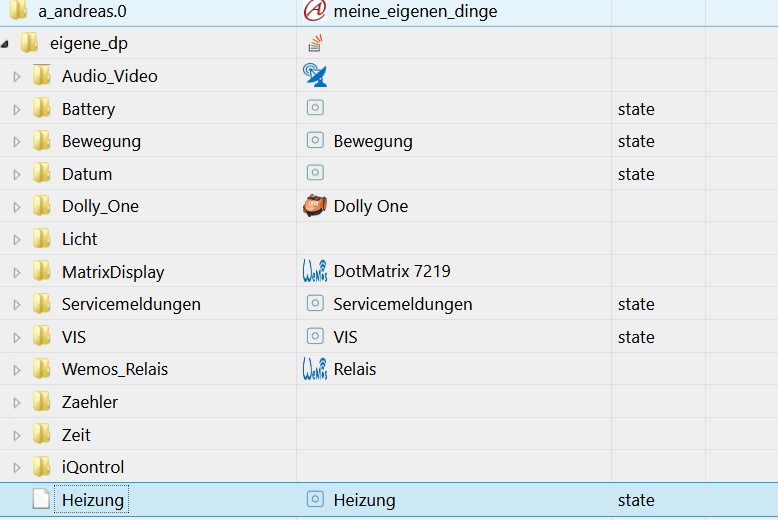
})
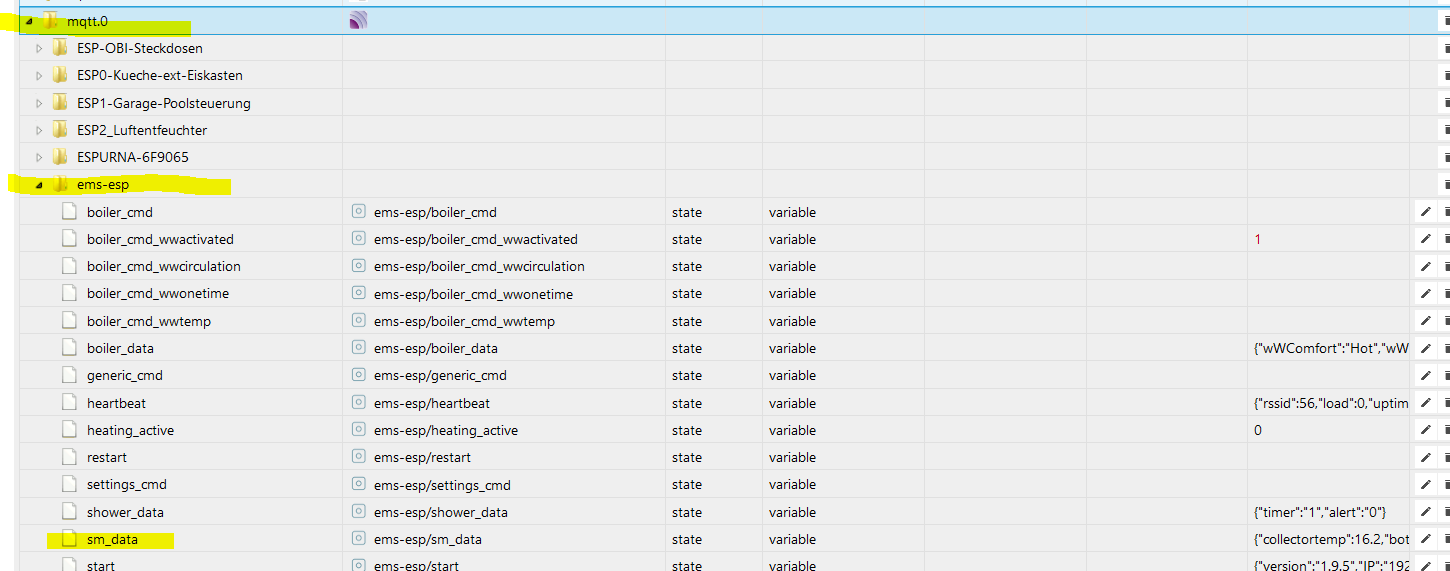
{"collectortemp":16,"bottomtemp":57.8,"pump":"off","pumpWorkMin":30500,"energylasthour":0}Leider tut sich nix ........ bitte um Unterstützung!
Finde deine Lösung mit dynamischen DP echt genial!!!!
LG, mxa -
@frostnatt sagte in MQTT String generell aufteilen?:
@butsch
Habe das Problem gefixt, das Script wirft keine Warnings mehr bei mir.Jetzt habe ich primitiv geglaubt, ich kann mir das Script stehlen, ein wenig anpassen und es läuft..... war ein Irrglaube. Kannst du mir vielleicht bitte helfen?
schedule("* * * * *", function (){       //alle Minuten

const JSPath = "a_andreas.0.eigene_dp"					// JS- Pfad
const parsedStatesPath   = JSPath + ".Heizung"			// Pfad fuer geparste States
const JsonPath = "mqtt.0.ems-esp.sm_data"				// Pfad fuer Json Objekte

let IDs = [];

$("[id=" + JsonPath + ".*]").each(function (id) {
    IDs.push(id)
})

on({id: IDs, change: "ne"}, function (obj) {
    let JsonObj = JSON.parse(obj.state.val)
    Object.keys(JsonObj).forEach(function(key){
        let currState = obj.id.replace(JsonPath, parsedStatesPath) + "." + key
       if (getState(currState).notExist){
            createState(currState, JsonObj[key], {read: true, write: true, type: typeof(JsonObj[key]), name: '' , desc: ''},function(){
                setState(currState, JsonObj[key]);
        })
        }else {
            setState(currState, JsonObj[key])
        };
    })
})
})
{"collectortemp":16,"bottomtemp":57.8,"pump":"off","pumpWorkMin":30500,"energylasthour":0}Leider tut sich nix ........ bitte um Unterstützung!
Finde deine Lösung mit dynamischen DP echt genial!!!!
LG, mxa@metaxa sagte:
Leider tut sich nix
Mit createState() kann man keine Datenpunkte unter "a_andreas.0.eigene_dp" erstellen.
Außerdem: Was soll das schedule() drumherum ? Damit wird jede Minute ein neuer Trigger erzeugt.Bitte verzichtet auf Chat-Nachrichten, denn die Handhabung ist grauenhaft !
Produktiv: Asus PN42 / N100 / 8 GB / 500 GB; Proxmox mit 2 VM (iob / openCCU) -
@metaxa sagte:
Leider tut sich nix
Mit createState() kann man keine Datenpunkte unter "a_andreas.0.eigene_dp" erstellen.
Außerdem: Was soll das schedule() drumherum ? Damit wird jede Minute ein neuer Trigger erzeugt.@paul53 sagte in MQTT String generell aufteilen?:
@metaxa sagte:
Leider tut sich nix
Mit createState() kann man keine Datenpunkte unter "a_andreas.0.eigene_dp" erstellen.
Hi Paul,
ich habs geändert ... aber es tut sich auch nix.// schedule("* * * * *", function (){ //alle Minuten const JSPath = "javascript.0" // JS- Pfad const parsedStatesPath = JSPath + ".Heizung" // Pfad fuer geparste States const JsonPath = "mqtt.0.ems-esp.sm_data" // Pfad fuer Json ObjekteHättest bitte noch eine Idee?
Ups ...... hatte ich nicht gesehen: Ich will mit dem Shedule, dass das Script alle Minuten zum Testen ausgeführt wird.
-
@paul53 sagte in MQTT String generell aufteilen?:
@metaxa sagte:
Leider tut sich nix
Mit createState() kann man keine Datenpunkte unter "a_andreas.0.eigene_dp" erstellen.
Hi Paul,
ich habs geändert ... aber es tut sich auch nix.// schedule("* * * * *", function (){ //alle Minuten const JSPath = "javascript.0" // JS- Pfad const parsedStatesPath = JSPath + ".Heizung" // Pfad fuer geparste States const JsonPath = "mqtt.0.ems-esp.sm_data" // Pfad fuer Json ObjekteHättest bitte noch eine Idee?
Ups ...... hatte ich nicht gesehen: Ich will mit dem Shedule, dass das Script alle Minuten zum Testen ausgeführt wird.
@metaxa sagte:
Hättest bitte noch eine Idee?
Du willst einen bestimmten Datenpunkt parsen. Dazu braucht man kein Array of IDs.
const idJson = 'mqtt.0.ems-esp.sm_data';
const path = 'Heizung.';
const js = 'javascript.' + instance + '.';

on(idJson, function(dp) { // triggert bei Wertänderung
   let obj = JSON.parse(dp.state.val);
   for(let prop in obj) {
      if(existsState(js + path + prop)) setState(path + prop, obj[prop], true);
      else createState(path + prop, obj[prop], {type: typeof obj[prop]});
   }
});
Bei den Datenpunkten mit Zahlenwerten solltest Du noch manuell die "unit" hinzufügen, denn das geht nicht automatisch.
Bitte verzichtet auf Chat-Nachrichten, denn die Handhabung ist grauenhaft !
Produktiv: Asus PN42 / N100 / 8 GB / 500 GB; Proxmox mit 2 VM (iob / openCCU) -
@metaxa sagte:
Hättest bitte noch eine Idee?
Du willst einen bestimmten Datenpunkt parsen. Dazu braucht man kein Array of IDs.
const idJson = 'mqtt.0.ems-esp.sm_data';
const path = 'Heizung.';
const js = 'javascript.' + instance + '.';

on(idJson, function(dp) { // triggert bei Wertänderung
   let obj = JSON.parse(dp.state.val);
   for(let prop in obj) {
      if(existsState(js + path + prop)) setState(path + prop, obj[prop], true);
      else createState(path + prop, obj[prop], {type: typeof obj[prop]});
   }
});
Bei den Datenpunkten mit Zahlenwerten solltest Du noch manuell die "unit" hinzufügen, denn das geht nicht automatisch.
@paul53 Ich werde es nie lernen und vestehen, danke Paul!
Ich versuche es zu kapieren, aber ich komm nicht weit genug. Paar Fragen noch bitte- wer oder was triggert das Script?
- habe ich Chance meine eigene Struktur zu verwenden ("a_andreas.0.eigene_dp")
Ups, sehe gerade noch eine Änderung von dir, baue ich gleich ein - wird sicher Sinn machen, wenn ich auch nicht verstehe welchen :-)
Danke Paul für deine Zeit!
-
@paul53 Ich werde es nie lernen und vestehen, danke Paul!
Ich versuche es zu kapieren, aber ich komm nicht weit genug. Paar Fragen noch bitte- wer oder was triggert das Script?
- habe ich Chance meine eigene Struktur zu verwenden ("a_andreas.0.eigene_dp")
Ups, sehe gerade noch eine Änderung von dir, baue ich gleich ein - wird sicher Sinn machen, wenn ich auch nicht verstehe welchen :-)
Danke Paul für deine Zeit!
@metaxa sagte:
wer oder was triggert das Script?
Getriggert wird bei einer Wertänderung des Datenpunktes 'mqtt.0.ems-esp.sm_data'.
@metaxa sagte in MQTT String generell aufteilen?:
habe ich Chance meine eigene Struktur zu verwenden ("a_andreas.0.eigene_dp")
Ja, aber nicht mit createState() , sondern mit setObject() und setState() im Callback.
Bitte verzichtet auf Chat-Nachrichten, denn die Handhabung ist grauenhaft !
Produktiv: Asus PN42 / N100 / 8 GB / 500 GB; Proxmox mit 2 VM (iob / openCCU) -
@metaxa sagte:
wer oder was triggert das Script?
Getriggert wird bei einer Wertänderung des Datenpunktes 'mqtt.0.ems-esp.sm_data'.
@metaxa sagte in MQTT String generell aufteilen?:
habe ich Chance meine eigene Struktur zu verwenden ("a_andreas.0.eigene_dp")
Ja, aber nicht mit createState() , sondern mit setObject() und setState() im Callback.
@paul53 :-) //
Da hatte ich doch schon mal was gebastelt, jetzt ist es mir auch klar warum :-)
createState("javascript.0.scriptDatenPunkte.Sprit_AT.Tankstelle_"+index+".Index", 0,{type: 'number', name: 'ID', read: true, write: true});
        setState("javascript.0.scriptDatenPunkte.Sprit_AT.Tankstelle_"+index+".Index", gasStation[index].id);
Muss mich nochmals reinfuchsen. Ahhh, is doch was anderes ....... ich fuchse .....
Zum 27sten mal, danke dir Paul!
mxa -
@paul53 :-) //
Da hatte ich doch schon mal was gebastelt, jetzt ist es mir auch klar warum :-)
createState("javascript.0.scriptDatenPunkte.Sprit_AT.Tankstelle_"+index+".Index", 0,{type: 'number', name: 'ID', read: true, write: true});
        setState("javascript.0.scriptDatenPunkte.Sprit_AT.Tankstelle_"+index+".Index", gasStation[index].id);
Muss mich nochmals reinfuchsen. Ahhh, is doch was anderes ....... ich fuchse .....
Zum 27sten mal, danke dir Paul!
mxa -
@paul53 sagte in MQTT String generell aufteilen?:
Anregung
Üner diesen Thread stolperte ich schon mal, danke für den Link. Um das zu behirnen brauche ich wohl nochmals einen 1 monatigen "Lockdown". Das ist schon ein hartes Stück Brot.
LG, mxa
-
Hallo, ich habe mir das Script von oben geschnappt und angepasst.
Script:
const JSPath = "0_userdata.0"                              // JS- Pfad
const parsedStatesPath   = JSPath + ".cam_kueche"         // Pfad fuer geparste States
const zigbee2mqttJsonPath = "mqtt.0.cam_kueche"           //Pfad fuer zigbee2mqtt Json Objekte
let IDs = [];


$("[id=" + zigbee2mqttJsonPath + ".*]").each(function (id) {
    IDs.push(id)
})
on({id: IDs, change: "ne"}, function (obj) {
    let JsonObj = JSON.parse(obj.state.val)
    Object.keys(JsonObj).forEach(function(key){
        let currState = obj.id.replace(zigbee2mqttJsonPath, parsedStatesPath) + "." + key
        if (getState(currState).notExist){
            createState(currState, JsonObj[key], {read: true, write: true, type: typeof(JsonObj[key]), name: '' , desc: ''},function(){
                setState(currState, JsonObj[key]);
        })
        }else {
            setState(currState, JsonObj[key])
        };
    })
})
Im Datenpunkt steht bspw. dieser Wert:
{"start":"2020-11-07T16:06:12+0100","end":"2020-11-07T16:07:12+0100","files":[ "2020Y11M07D16H/07M00S60.mp4", "2020Y11M07D16H/06M10S50.mp4", "2020Y11M07D16H/05M00S60.mp4" ]}Das Script legt die Datenpunkte an und befüllt sie auch.

Im Log passier allerdings folgendes:
javascript.0	2020-11-07 16:06:15.130	error	(17569) at processImmediate (internal/timers.js:461:21)
javascript.0	2020-11-07 16:06:15.130	error	(17569) at Immediate._onImmediate (/opt/iobroker/node_modules/iobroker.js-controller/lib/adapter.js:5384:37)
javascript.0	2020-11-07 16:06:15.130	error	(17569) at Object.stateChange (/opt/iobroker/node_modules/iobroker.javascript/main.js:463:25)
javascript.0	2020-11-07 16:06:15.129	error	(17569) at Object.callback (/opt/iobroker/node_modules/iobroker.javascript/lib/sandbox.js:1065:38)
javascript.0	2020-11-07 16:06:15.129	error	(17569) at Object.<anonymous> (script.js.Parsing.cam_kueche:11:24)
javascript.0	2020-11-07 16:06:15.129	error	(17569) at JSON.parse (<anonymous>:null:null)
javascript.0	2020-11-07 16:06:15.128	error	(17569) Error in callback: SyntaxError: Unexpected token � in JSON at position 0
Kann mir jemand helfen die Fehlermeldungen zu verstehen?
-
Hallo, ich habe mir das Script von oben geschnappt und angepasst.
Script:
const JSPath = "0_userdata.0"                              // JS- Pfad
const parsedStatesPath   = JSPath + ".cam_kueche"         // Pfad fuer geparste States
const zigbee2mqttJsonPath = "mqtt.0.cam_kueche"           //Pfad fuer zigbee2mqtt Json Objekte
let IDs = [];


$("[id=" + zigbee2mqttJsonPath + ".*]").each(function (id) {
    IDs.push(id)
})
on({id: IDs, change: "ne"}, function (obj) {
    let JsonObj = JSON.parse(obj.state.val)
    Object.keys(JsonObj).forEach(function(key){
        let currState = obj.id.replace(zigbee2mqttJsonPath, parsedStatesPath) + "." + key
        if (getState(currState).notExist){
            createState(currState, JsonObj[key], {read: true, write: true, type: typeof(JsonObj[key]), name: '' , desc: ''},function(){
                setState(currState, JsonObj[key]);
        })
        }else {
            setState(currState, JsonObj[key])
        };
    })
})
Im Datenpunkt steht bspw. dieser Wert:
{"start":"2020-11-07T16:06:12+0100","end":"2020-11-07T16:07:12+0100","files":[ "2020Y11M07D16H/07M00S60.mp4", "2020Y11M07D16H/06M10S50.mp4", "2020Y11M07D16H/05M00S60.mp4" ]}Das Script legt die Datenpunkte an und befüllt sie auch.
Im Log passier allerdings folgendes:
javascript.0	2020-11-07 16:06:15.130	error	(17569) at processImmediate (internal/timers.js:461:21)
javascript.0	2020-11-07 16:06:15.130	error	(17569) at Immediate._onImmediate (/opt/iobroker/node_modules/iobroker.js-controller/lib/adapter.js:5384:37)
javascript.0	2020-11-07 16:06:15.130	error	(17569) at Object.stateChange (/opt/iobroker/node_modules/iobroker.javascript/main.js:463:25)
javascript.0	2020-11-07 16:06:15.129	error	(17569) at Object.callback (/opt/iobroker/node_modules/iobroker.javascript/lib/sandbox.js:1065:38)
javascript.0	2020-11-07 16:06:15.129	error	(17569) at Object.<anonymous> (script.js.Parsing.cam_kueche:11:24)
javascript.0	2020-11-07 16:06:15.129	error	(17569) at JSON.parse (<anonymous>:null:null)
javascript.0	2020-11-07 16:06:15.128	error	(17569) Error in callback: SyntaxError: Unexpected token � in JSON at position 0
Kann mir jemand helfen die Fehlermeldungen zu verstehen?


Hey! Du scheinst an dieser Unterhaltung interessiert zu sein, hast aber noch kein Konto.
Hast du es satt, bei jedem Besuch durch die gleichen Beiträge zu scrollen? Wenn du dich für ein Konto anmeldest, kommst du immer genau dorthin zurück, wo du zuvor warst, und kannst dich über neue Antworten benachrichtigen lassen (entweder per E-Mail oder Push-Benachrichtigung). Du kannst auch Lesezeichen speichern und Beiträge positiv bewerten, um anderen Community-Mitgliedern deine Wertschätzung zu zeigen.
Mit deinem Input könnte dieser Beitrag noch besser werden 💗
Registrieren AnmeldenSupport us
450
Online33.1k
Benutzende83.7k
Themen1.3m
Beiträge