Skip to content
  • Home
  • Recent
  • Tags
  • 0 Unread 0
  • Categories
  • Unreplied
  • Popular
  • GitHub
  • Docu
  • Hilfe
Skins
  • Light
  • Brite
  • Cerulean
  • Cosmo
  • Flatly
  • Journal
  • Litera
  • Lumen
  • Lux
  • Materia
  • Minty
  • Morph
  • Pulse
  • Sandstone
  • Simplex
  • Sketchy
  • Spacelab
  • United
  • Yeti
  • Zephyr
  • Dark
  • Cyborg
  • Darkly
  • Quartz
  • Slate
  • Solar
  • Superhero
  • Vapor

  • Default (No Skin)
  • No Skin
Collapse
ioBroker Logo

Community Forum

donate donate
  1. ioBroker Community Home
  2. Deutsch
  3. Skripten / Logik
  4. Blockly
  5. [gelöst] Gerät per Mac Adr & Blockly ansprechen
NEWS

  • UPDATE 31.10.: Amazon Alexa - ioBroker Skill läuft aus ?
    apollon77A
    apollon77
    48
    3
    8.9k

  • Monatsrückblick – September 2025
    BluefoxB
    Bluefox
    13
    1
    2.3k

  • Neues Video "KI im Smart Home" - ioBroker plus n8n
    BluefoxB
    Bluefox
    16
    1
    3.4k

[gelöst] Gerät per Mac Adr & Blockly ansprechen

Scheduled Pinned Locked Moved Blockly
158 Posts 8 Posters 15.7k Views 5 Watching
  • Oldest to Newest
  • Newest to Oldest
  • Most Votes
Reply
  • Reply as topic
Log in to reply
This topic has been deleted. Only users with topic management privileges can see it.
  • AphofisA Aphofis

    @fastfoot ok
    upgrade zieht sich

    F Offline
    F Offline
    fastfoot
    wrote on last edited by
    #81

    @Aphofis sagte in Gerät per Mac Adr & Blockly ansprechen:

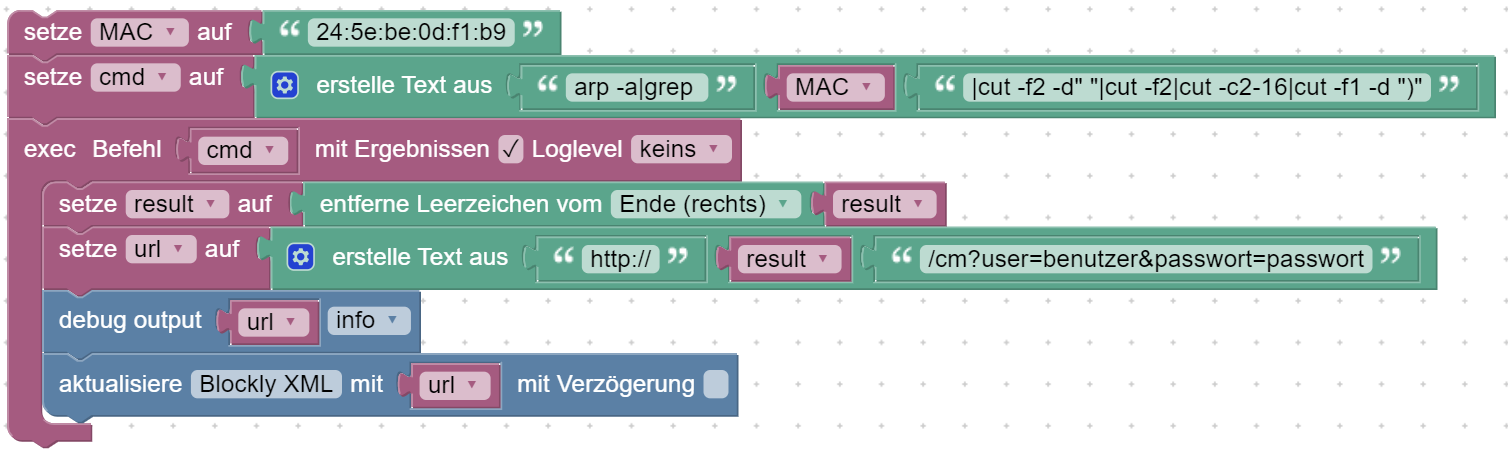
    @fastfoot ok
    upgrade zieht sich

    mich wundert jetzt trotzdem wieso du kein Ergebnis hattest, wenn das Blockly eine kleine Mac hatte. In deinem Post früher war die 2c:xxxx jedenfalls gelistet. Aber deshalb erstmal auf der Konsole, wenn da der Name kommt, wird dieses Kommando in das Blockly übernommen, dann sehen wir weiter(Der Name sollte auch funktionieren, statt ip, macht den Befehl einfacher, bzw. kürzer)

    iobroker läuft unter Docker auf QNAP TS-451+
    SkriptRecovery: https://forum.iobroker.net/post/930558

    AphofisA 2 Replies Last reply
    0
    • F fastfoot

      @Aphofis sagte in Gerät per Mac Adr & Blockly ansprechen:

      @fastfoot ok
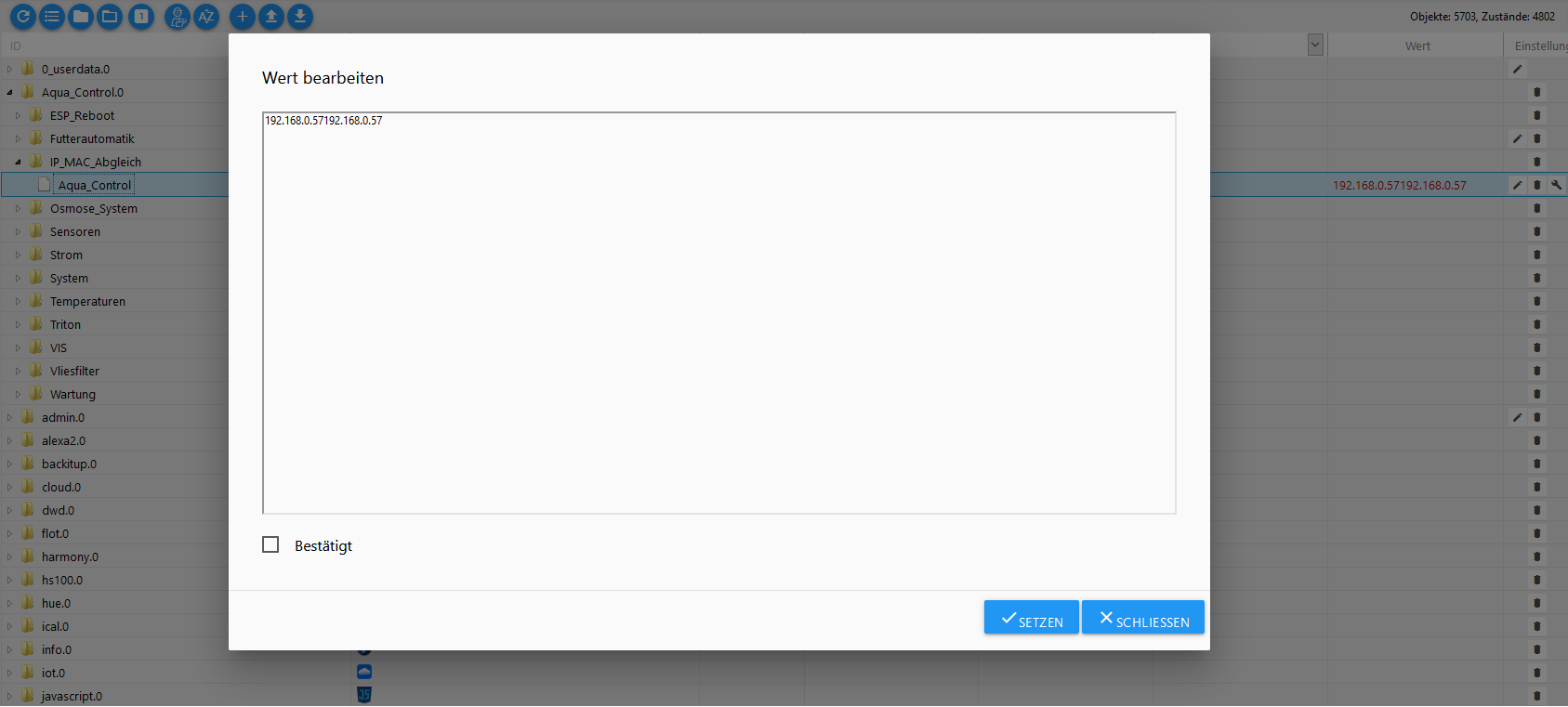
      upgrade zieht sich

      mich wundert jetzt trotzdem wieso du kein Ergebnis hattest, wenn das Blockly eine kleine Mac hatte. In deinem Post früher war die 2c:xxxx jedenfalls gelistet. Aber deshalb erstmal auf der Konsole, wenn da der Name kommt, wird dieses Kommando in das Blockly übernommen, dann sehen wir weiter(Der Name sollte auch funktionieren, statt ip, macht den Befehl einfacher, bzw. kürzer)

      AphofisA Offline
      AphofisA Offline
      Aphofis
      wrote on last edited by
      #82

      @fastfoot
      :cold_sweat: :cold_sweat: :cold_sweat: wenn dann mal das upgrade zu ende wäre

      1 Reply Last reply
      0
      • F fastfoot

        @Aphofis sagte in Gerät per Mac Adr & Blockly ansprechen:

        @fastfoot ok
        upgrade zieht sich

        mich wundert jetzt trotzdem wieso du kein Ergebnis hattest, wenn das Blockly eine kleine Mac hatte. In deinem Post früher war die 2c:xxxx jedenfalls gelistet. Aber deshalb erstmal auf der Konsole, wenn da der Name kommt, wird dieses Kommando in das Blockly übernommen, dann sehen wir weiter(Der Name sollte auch funktionieren, statt ip, macht den Befehl einfacher, bzw. kürzer)

        AphofisA Offline
        AphofisA Offline
        Aphofis
        wrote on last edited by Aphofis
        #83

        @fastfoot

        yeah yeah yeah
        die Ausgabe in der Log ist endlich da!
        Hatte dein Blockly noch mal kopiert und neu erstellt

        javascript.0	2020-06-23 22:37:20.064	info	/cm?user=benutzer&passwort=passwort
        javascript.0	2020-06-23 22:37:20.064	info	192.168.0.57
        

        nur im Datenpunkt wird jetzt das angezeigt

        http://192.168.0.57192.168.0.57/cm?user=benutzer&passwort=passwort
        

        kann man da nicht nur die IP Adresse anzeugen lassen!?

        F 1 Reply Last reply
        0
        • AphofisA Aphofis

          @fastfoot

          yeah yeah yeah
          die Ausgabe in der Log ist endlich da!
          Hatte dein Blockly noch mal kopiert und neu erstellt

          javascript.0	2020-06-23 22:37:20.064	info	/cm?user=benutzer&passwort=passwort
          javascript.0	2020-06-23 22:37:20.064	info	192.168.0.57
          

          nur im Datenpunkt wird jetzt das angezeigt

          http://192.168.0.57192.168.0.57/cm?user=benutzer&passwort=passwort
          

          kann man da nicht nur die IP Adresse anzeugen lassen!?

          F Offline
          F Offline
          fastfoot
          wrote on last edited by
          #84

          @Aphofis sagte in Gerät per Mac Adr & Blockly ansprechen:

          @fastfoot

          yeah yeah yeah
          die Ausgabe in der Log ist endlich da!
          Hatte dein Blockly noch mal kopiert und neu erstellt

          javascript.0	2020-06-23 22:37:20.064	info	/cm?user=benutzer&passwort=passwort
          javascript.0	2020-06-23 22:37:20.064	info	192.168.0.57
          

          nur im Datenpunkt wird jetzt das angezeigt

          http://192.168.0.57192.168.0.57/cm?user=benutzer&passwort=passwort
          

          kann man da nicht nur die IP Adresse anzeugen lassen!?

          Die IP ist in der Variablen result. Du musst noch einen Fehler drin haben, poste mal dein XML

          iobroker läuft unter Docker auf QNAP TS-451+
          SkriptRecovery: https://forum.iobroker.net/post/930558

          AphofisA 2 Replies Last reply
          0
          • F fastfoot

            @Aphofis sagte in Gerät per Mac Adr & Blockly ansprechen:

            @fastfoot

            yeah yeah yeah
            die Ausgabe in der Log ist endlich da!
            Hatte dein Blockly noch mal kopiert und neu erstellt

            javascript.0	2020-06-23 22:37:20.064	info	/cm?user=benutzer&passwort=passwort
            javascript.0	2020-06-23 22:37:20.064	info	192.168.0.57
            

            nur im Datenpunkt wird jetzt das angezeigt

            http://192.168.0.57192.168.0.57/cm?user=benutzer&passwort=passwort
            

            kann man da nicht nur die IP Adresse anzeugen lassen!?

            Die IP ist in der Variablen result. Du musst noch einen Fehler drin haben, poste mal dein XML

            AphofisA Offline
            AphofisA Offline
            Aphofis
            wrote on last edited by
            #85

            @fastfoot

            <xml xmlns="https://developers.google.com/blockly/xml">
              <variables>
                <variable id="aQubq9Vy-qj1gT{2OW;x">MAC</variable>
                <variable id="@[II(5R#h[a47`qET5k.">cmd</variable>
                <variable id="0@Y{~/hRy0d:vMQ1kCo@">url</variable>
                <variable id="Fk6H`kq}eo!FPH!Ld2Ii">result</variable>
              </variables>
              <block type="variables_set" id="Gj`MNS[$a0S:B!TUcx-%" x="38" y="138">
                <field name="VAR" id="aQubq9Vy-qj1gT{2OW;x">MAC</field>
                <value name="VALUE">
                  <block type="text" id="V?)NQY:Z1bfh@J6KO8xg">
                    <field name="TEXT">2c:f4:32:57:b7:14</field>
                  </block>
                </value>
                <next>
                  <block type="variables_set" id="$c5Ud:#38C(q.uOF_;YC">
                    <field name="VAR" id="@[II(5R#h[a47`qET5k.">cmd</field>
                    <value name="VALUE">
                      <block type="text_join" id="2t+}?FeN#iG0J=~8q#|w" inline="true">
                        <mutation items="3"></mutation>
                        <value name="ADD0">
                          <block type="text" id="w;^U.Vi%Z+6O=_j{oVD(">
                            <field name="TEXT">arp -a|grep </field>
                          </block>
                        </value>
                        <value name="ADD1">
                          <block type="variables_get" id="tH;y-cdpJdNS0#XCa8{X">
                            <field name="VAR" id="aQubq9Vy-qj1gT{2OW;x">MAC</field>
                          </block>
                        </value>
                        <value name="ADD2">
                          <block type="text" id="/t^Hm3;6![lRLzr3V@FX">
                            <field name="TEXT">|cut -f2 -d" "|cut -f2|cut -c2-16|cut -f1 -d ")"</field>
                          </block>
                        </value>
                      </block>
                    </value>
                    <next>
                      <block type="exec" id="Ra4`1SB0/Eog44pt9iJZ" inline="true">
                        <mutation xmlns="http://www.w3.org/1999/xhtml" with_statement="true"></mutation>
                        <field name="WITH_STATEMENT">TRUE</field>
                        <field name="LOG"></field>
                        <value name="COMMAND">
                          <shadow type="text" id="@QX{2frW2vhyd`CI;c:s">
                            <field name="TEXT">arp -a|grep 24:5e:be:0d:f1:b9|cut -f2 -d" "|cut -f2|cut -c2-16|cut -f1 -d ")"</field>
                          </shadow>
                          <block type="variables_get" id="|uJ{n?p{=za?mcVLIRON">
                            <field name="VAR" id="@[II(5R#h[a47`qET5k.">cmd</field>
                          </block>
                        </value>
                        <statement name="STATEMENT">
                          <block type="variables_set" id="2;J*T*TpGNH`Ml_U^%63">
                            <field name="VAR" id="0@Y{~/hRy0d:vMQ1kCo@">url</field>
                            <value name="VALUE">
                              <block type="text_join" id="uNUY7tNxUZ3!oh#}bHXB" inline="true">
                                <mutation items="3"></mutation>
                                <value name="ADD0">
                                  <block type="text" id="2GJK-1Bvmp)s6NC9.,:2">
                                    <field name="TEXT">http://</field>
                                  </block>
                                </value>
                                <value name="ADD1">
                                  <block type="variables_get" id="/Dkdf,;.$]{U?-+%6q]I">
                                    <field name="VAR" id="Fk6H`kq}eo!FPH!Ld2Ii">result</field>
                                  </block>
                                </value>
                                <value name="ADD2">
                                  <block type="text" id="W[)hj~HEq7,*GOK28V%|">
                                    <field name="TEXT">/cm?user=benutzer&amp;passwort=passwort</field>
                                  </block>
                                </value>
                              </block>
                            </value>
                            <next>
                              <block type="debug" id="?{mh|9:IPCBzf@bm4g=y" inline="true">
                                <field name="Severity">log</field>
                                <value name="TEXT">
                                  <shadow type="text" id="g/_Y3S(JG]HJS{wR6YI[">
                                    <field name="TEXT">test</field>
                                  </shadow>
                                  <block type="variables_get" id="63@w*D4._cHwf:)n~#Nh">
                                    <field name="VAR" id="0@Y{~/hRy0d:vMQ1kCo@">url</field>
                                  </block>
                                </value>
                                <next>
                                  <block type="update" id="QIux{@Cmil$IGVm2^=AS">
                                    <mutation xmlns="http://www.w3.org/1999/xhtml" delay_input="false"></mutation>
                                    <field name="OID">Aqua_Control.0.IP_MAC_Abgleich.Aqua_Control</field>
                                    <field name="WITH_DELAY">FALSE</field>
                                    <value name="VALUE">
                                      <block type="variables_get" id="o09,K@:bm8P/u6/rKMsj">
                                        <field name="VAR" id="0@Y{~/hRy0d:vMQ1kCo@">url</field>
                                      </block>
                                    </value>
                                  </block>
                                </next>
                              </block>
                            </next>
                          </block>
                        </statement>
                      </block>
                    </next>
                  </block>
                </next>
              </block>
            </xml>
            
            F 1 Reply Last reply
            0
            • AphofisA Aphofis

              @fastfoot

              <xml xmlns="https://developers.google.com/blockly/xml">
                <variables>
                  <variable id="aQubq9Vy-qj1gT{2OW;x">MAC</variable>
                  <variable id="@[II(5R#h[a47`qET5k.">cmd</variable>
                  <variable id="0@Y{~/hRy0d:vMQ1kCo@">url</variable>
                  <variable id="Fk6H`kq}eo!FPH!Ld2Ii">result</variable>
                </variables>
                <block type="variables_set" id="Gj`MNS[$a0S:B!TUcx-%" x="38" y="138">
                  <field name="VAR" id="aQubq9Vy-qj1gT{2OW;x">MAC</field>
                  <value name="VALUE">
                    <block type="text" id="V?)NQY:Z1bfh@J6KO8xg">
                      <field name="TEXT">2c:f4:32:57:b7:14</field>
                    </block>
                  </value>
                  <next>
                    <block type="variables_set" id="$c5Ud:#38C(q.uOF_;YC">
                      <field name="VAR" id="@[II(5R#h[a47`qET5k.">cmd</field>
                      <value name="VALUE">
                        <block type="text_join" id="2t+}?FeN#iG0J=~8q#|w" inline="true">
                          <mutation items="3"></mutation>
                          <value name="ADD0">
                            <block type="text" id="w;^U.Vi%Z+6O=_j{oVD(">
                              <field name="TEXT">arp -a|grep </field>
                            </block>
                          </value>
                          <value name="ADD1">
                            <block type="variables_get" id="tH;y-cdpJdNS0#XCa8{X">
                              <field name="VAR" id="aQubq9Vy-qj1gT{2OW;x">MAC</field>
                            </block>
                          </value>
                          <value name="ADD2">
                            <block type="text" id="/t^Hm3;6![lRLzr3V@FX">
                              <field name="TEXT">|cut -f2 -d" "|cut -f2|cut -c2-16|cut -f1 -d ")"</field>
                            </block>
                          </value>
                        </block>
                      </value>
                      <next>
                        <block type="exec" id="Ra4`1SB0/Eog44pt9iJZ" inline="true">
                          <mutation xmlns="http://www.w3.org/1999/xhtml" with_statement="true"></mutation>
                          <field name="WITH_STATEMENT">TRUE</field>
                          <field name="LOG"></field>
                          <value name="COMMAND">
                            <shadow type="text" id="@QX{2frW2vhyd`CI;c:s">
                              <field name="TEXT">arp -a|grep 24:5e:be:0d:f1:b9|cut -f2 -d" "|cut -f2|cut -c2-16|cut -f1 -d ")"</field>
                            </shadow>
                            <block type="variables_get" id="|uJ{n?p{=za?mcVLIRON">
                              <field name="VAR" id="@[II(5R#h[a47`qET5k.">cmd</field>
                            </block>
                          </value>
                          <statement name="STATEMENT">
                            <block type="variables_set" id="2;J*T*TpGNH`Ml_U^%63">
                              <field name="VAR" id="0@Y{~/hRy0d:vMQ1kCo@">url</field>
                              <value name="VALUE">
                                <block type="text_join" id="uNUY7tNxUZ3!oh#}bHXB" inline="true">
                                  <mutation items="3"></mutation>
                                  <value name="ADD0">
                                    <block type="text" id="2GJK-1Bvmp)s6NC9.,:2">
                                      <field name="TEXT">http://</field>
                                    </block>
                                  </value>
                                  <value name="ADD1">
                                    <block type="variables_get" id="/Dkdf,;.$]{U?-+%6q]I">
                                      <field name="VAR" id="Fk6H`kq}eo!FPH!Ld2Ii">result</field>
                                    </block>
                                  </value>
                                  <value name="ADD2">
                                    <block type="text" id="W[)hj~HEq7,*GOK28V%|">
                                      <field name="TEXT">/cm?user=benutzer&amp;passwort=passwort</field>
                                    </block>
                                  </value>
                                </block>
                              </value>
                              <next>
                                <block type="debug" id="?{mh|9:IPCBzf@bm4g=y" inline="true">
                                  <field name="Severity">log</field>
                                  <value name="TEXT">
                                    <shadow type="text" id="g/_Y3S(JG]HJS{wR6YI[">
                                      <field name="TEXT">test</field>
                                    </shadow>
                                    <block type="variables_get" id="63@w*D4._cHwf:)n~#Nh">
                                      <field name="VAR" id="0@Y{~/hRy0d:vMQ1kCo@">url</field>
                                    </block>
                                  </value>
                                  <next>
                                    <block type="update" id="QIux{@Cmil$IGVm2^=AS">
                                      <mutation xmlns="http://www.w3.org/1999/xhtml" delay_input="false"></mutation>
                                      <field name="OID">Aqua_Control.0.IP_MAC_Abgleich.Aqua_Control</field>
                                      <field name="WITH_DELAY">FALSE</field>
                                      <value name="VALUE">
                                        <block type="variables_get" id="o09,K@:bm8P/u6/rKMsj">
                                          <field name="VAR" id="0@Y{~/hRy0d:vMQ1kCo@">url</field>
                                        </block>
                                      </value>
                                    </block>
                                  </next>
                                </block>
                              </next>
                            </block>
                          </statement>
                        </block>
                      </next>
                    </block>
                  </next>
                </block>
              </xml>
              
              F Offline
              F Offline
              fastfoot
              wrote on last edited by
              #86

              @Aphofis
              Kann ich nicht nachvollziehen, steht bei mir so da. Außer: An result wird wohl noch ein LF angehangen, das sollte im Log wie ein Leerzeichen aussehen. Abhilfe schafft ein 'Entferne Leerzeichen....' Block aus Text

              iobroker läuft unter Docker auf QNAP TS-451+
              SkriptRecovery: https://forum.iobroker.net/post/930558

              AphofisA 1 Reply Last reply
              0
              • F fastfoot

                @Aphofis sagte in Gerät per Mac Adr & Blockly ansprechen:

                @fastfoot

                yeah yeah yeah
                die Ausgabe in der Log ist endlich da!
                Hatte dein Blockly noch mal kopiert und neu erstellt

                javascript.0	2020-06-23 22:37:20.064	info	/cm?user=benutzer&passwort=passwort
                javascript.0	2020-06-23 22:37:20.064	info	192.168.0.57
                

                nur im Datenpunkt wird jetzt das angezeigt

                http://192.168.0.57192.168.0.57/cm?user=benutzer&passwort=passwort
                

                kann man da nicht nur die IP Adresse anzeugen lassen!?

                Die IP ist in der Variablen result. Du musst noch einen Fehler drin haben, poste mal dein XML

                AphofisA Offline
                AphofisA Offline
                Aphofis
                wrote on last edited by
                #87

                @fastfoot
                ist nur die Frage warum im Datenpunkt zweimal die IP ausgegeben wird!

                192.168.0.57192.168.0.57
                
                F 1 Reply Last reply
                0
                • F fastfoot

                  @Aphofis
                  Kann ich nicht nachvollziehen, steht bei mir so da. Außer: An result wird wohl noch ein LF angehangen, das sollte im Log wie ein Leerzeichen aussehen. Abhilfe schafft ein 'Entferne Leerzeichen....' Block aus Text

                  AphofisA Offline
                  AphofisA Offline
                  Aphofis
                  wrote on last edited by
                  #88

                  @fastfoot
                  wohin muss den der block

                  F 1 Reply Last reply
                  0
                  • AphofisA Aphofis

                    @fastfoot
                    wohin muss den der block

                    F Offline
                    F Offline
                    fastfoot
                    wrote on last edited by
                    #89

                    @Aphofis sagte in Gerät per Mac Adr & Blockly ansprechen:

                    @fastfoot
                    wohin muss den der block

                    MAC_zu_IP2.PNG

                    <xml xmlns="https://developers.google.com/blockly/xml">
                     <variables>
                       <variable id="aQubq9Vy-qj1gT{2OW;x">MAC</variable>
                       <variable id="@[II(5R#h[a47`qET5k.">cmd</variable>
                       <variable id="Fk6H`kq}eo!FPH!Ld2Ii">result</variable>
                       <variable id="0@Y{~/hRy0d:vMQ1kCo@">url</variable>
                     </variables>
                     <block type="variables_set" id="Gj`MNS[$a0S:B!TUcx-%" x="38" y="138">
                       <field name="VAR" id="aQubq9Vy-qj1gT{2OW;x">MAC</field>
                       <value name="VALUE">
                         <block type="text" id="V?)NQY:Z1bfh@J6KO8xg">
                           <field name="TEXT">24:5e:be:0d:f1:b9</field>
                         </block>
                       </value>
                       <next>
                         <block type="variables_set" id="$c5Ud:#38C(q.uOF_;YC">
                           <field name="VAR" id="@[II(5R#h[a47`qET5k.">cmd</field>
                           <value name="VALUE">
                             <block type="text_join" id="2t+}?FeN#iG0J=~8q#|w" inline="true">
                               <mutation items="3"></mutation>
                               <value name="ADD0">
                                 <block type="text" id="w;^U.Vi%Z+6O=_j{oVD(">
                                   <field name="TEXT">arp -a|grep </field>
                                 </block>
                               </value>
                               <value name="ADD1">
                                 <block type="variables_get" id="tH;y-cdpJdNS0#XCa8{X">
                                   <field name="VAR" id="aQubq9Vy-qj1gT{2OW;x">MAC</field>
                                 </block>
                               </value>
                               <value name="ADD2">
                                 <block type="text" id="/t^Hm3;6![lRLzr3V@FX">
                                   <field name="TEXT">|cut -f2 -d" "|cut -f2|cut -c2-16|cut -f1 -d ")"</field>
                                 </block>
                               </value>
                             </block>
                           </value>
                           <next>
                             <block type="exec" id="Ra4`1SB0/Eog44pt9iJZ" inline="true">
                               <mutation xmlns="http://www.w3.org/1999/xhtml" with_statement="true"></mutation>
                               <field name="WITH_STATEMENT">TRUE</field>
                               <field name="LOG"></field>
                               <value name="COMMAND">
                                 <shadow type="text" id="@QX{2frW2vhyd`CI;c:s">
                                   <field name="TEXT">arp -a|grep 24:5e:be:0d:f1:b9|cut -f2 -d" "|cut -f2|cut -c2-16|cut -f1 -d ")"</field>
                                 </shadow>
                                 <block type="variables_get" id="|uJ{n?p{=za?mcVLIRON">
                                   <field name="VAR" id="@[II(5R#h[a47`qET5k.">cmd</field>
                                 </block>
                               </value>
                               <statement name="STATEMENT">
                                 <block type="variables_set" id="?iyp2/H]@8^4[PC2zLRB">
                                   <field name="VAR" id="Fk6H`kq}eo!FPH!Ld2Ii">result</field>
                                   <value name="VALUE">
                                     <block type="text_trim" id="n^cdC!!B_}1rfyX0Jf54">
                                       <field name="MODE">RIGHT</field>
                                       <value name="TEXT">
                                         <shadow type="text">
                                           <field name="TEXT">abc</field>
                                         </shadow>
                                         <block type="variables_get" id=",|hfzf!Nd.fM|aAqMvS3">
                                           <field name="VAR" id="Fk6H`kq}eo!FPH!Ld2Ii">result</field>
                                         </block>
                                       </value>
                                     </block>
                                   </value>
                                   <next>
                                     <block type="variables_set" id="2;J*T*TpGNH`Ml_U^%63">
                                       <field name="VAR" id="0@Y{~/hRy0d:vMQ1kCo@">url</field>
                                       <value name="VALUE">
                                         <block type="text_join" id="uNUY7tNxUZ3!oh#}bHXB" inline="true">
                                           <mutation items="3"></mutation>
                                           <value name="ADD0">
                                             <block type="text" id="2GJK-1Bvmp)s6NC9.,:2">
                                               <field name="TEXT">http://</field>
                                             </block>
                                           </value>
                                           <value name="ADD1">
                                             <block type="variables_get" id="/Dkdf,;.$]{U?-+%6q]I">
                                               <field name="VAR" id="Fk6H`kq}eo!FPH!Ld2Ii">result</field>
                                             </block>
                                           </value>
                                           <value name="ADD2">
                                             <block type="text" id="W[)hj~HEq7,*GOK28V%|">
                                               <field name="TEXT">/cm?user=benutzer&amp;passwort=passwort</field>
                                             </block>
                                           </value>
                                         </block>
                                       </value>
                                       <next>
                                         <block type="debug" id="?{mh|9:IPCBzf@bm4g=y" inline="true">
                                           <field name="Severity">log</field>
                                           <value name="TEXT">
                                             <shadow type="text" id="g/_Y3S(JG]HJS{wR6YI[">
                                               <field name="TEXT">test</field>
                                             </shadow>
                                             <block type="variables_get" id="63@w*D4._cHwf:)n~#Nh">
                                               <field name="VAR" id="0@Y{~/hRy0d:vMQ1kCo@">url</field>
                                             </block>
                                           </value>
                                           <next>
                                             <block type="update" id="QIux{@Cmil$IGVm2^=AS">
                                               <mutation xmlns="http://www.w3.org/1999/xhtml" delay_input="false"></mutation>
                                               <field name="OID">0_userdata.0.BlocklyXML</field>
                                               <field name="WITH_DELAY">FALSE</field>
                                               <value name="VALUE">
                                                 <block type="variables_get" id="o09,K@:bm8P/u6/rKMsj">
                                                   <field name="VAR" id="0@Y{~/hRy0d:vMQ1kCo@">url</field>
                                                 </block>
                                               </value>
                                             </block>
                                           </next>
                                         </block>
                                       </next>
                                     </block>
                                   </next>
                                 </block>
                               </statement>
                             </block>
                           </next>
                         </block>
                       </next>
                     </block>
                    </xml>
                    

                    iobroker läuft unter Docker auf QNAP TS-451+
                    SkriptRecovery: https://forum.iobroker.net/post/930558

                    AphofisA 1 Reply Last reply
                    0
                    • AphofisA Aphofis

                      @fastfoot
                      ist nur die Frage warum im Datenpunkt zweimal die IP ausgegeben wird!

                      192.168.0.57192.168.0.57
                      
                      F Offline
                      F Offline
                      fastfoot
                      wrote on last edited by
                      #90

                      @Aphofis sagte in Gerät per Mac Adr & Blockly ansprechen:

                      @fastfoot
                      ist nur die Frage warum im Datenpunkt zweimal die IP ausgegeben wird!

                      192.168.0.57192.168.0.57
                      

                      was sagt denn der LOG, bzw wenn du den DP kopierst? Ist vlt nur eine Sache der Optik, bei mir ist das nicht! Auch nicht mit deinem Blockly

                      iobroker läuft unter Docker auf QNAP TS-451+
                      SkriptRecovery: https://forum.iobroker.net/post/930558

                      1 Reply Last reply
                      0
                      • F fastfoot

                        @Aphofis sagte in Gerät per Mac Adr & Blockly ansprechen:

                        @fastfoot
                        wohin muss den der block

                        MAC_zu_IP2.PNG

                        <xml xmlns="https://developers.google.com/blockly/xml">
                         <variables>
                           <variable id="aQubq9Vy-qj1gT{2OW;x">MAC</variable>
                           <variable id="@[II(5R#h[a47`qET5k.">cmd</variable>
                           <variable id="Fk6H`kq}eo!FPH!Ld2Ii">result</variable>
                           <variable id="0@Y{~/hRy0d:vMQ1kCo@">url</variable>
                         </variables>
                         <block type="variables_set" id="Gj`MNS[$a0S:B!TUcx-%" x="38" y="138">
                           <field name="VAR" id="aQubq9Vy-qj1gT{2OW;x">MAC</field>
                           <value name="VALUE">
                             <block type="text" id="V?)NQY:Z1bfh@J6KO8xg">
                               <field name="TEXT">24:5e:be:0d:f1:b9</field>
                             </block>
                           </value>
                           <next>
                             <block type="variables_set" id="$c5Ud:#38C(q.uOF_;YC">
                               <field name="VAR" id="@[II(5R#h[a47`qET5k.">cmd</field>
                               <value name="VALUE">
                                 <block type="text_join" id="2t+}?FeN#iG0J=~8q#|w" inline="true">
                                   <mutation items="3"></mutation>
                                   <value name="ADD0">
                                     <block type="text" id="w;^U.Vi%Z+6O=_j{oVD(">
                                       <field name="TEXT">arp -a|grep </field>
                                     </block>
                                   </value>
                                   <value name="ADD1">
                                     <block type="variables_get" id="tH;y-cdpJdNS0#XCa8{X">
                                       <field name="VAR" id="aQubq9Vy-qj1gT{2OW;x">MAC</field>
                                     </block>
                                   </value>
                                   <value name="ADD2">
                                     <block type="text" id="/t^Hm3;6![lRLzr3V@FX">
                                       <field name="TEXT">|cut -f2 -d" "|cut -f2|cut -c2-16|cut -f1 -d ")"</field>
                                     </block>
                                   </value>
                                 </block>
                               </value>
                               <next>
                                 <block type="exec" id="Ra4`1SB0/Eog44pt9iJZ" inline="true">
                                   <mutation xmlns="http://www.w3.org/1999/xhtml" with_statement="true"></mutation>
                                   <field name="WITH_STATEMENT">TRUE</field>
                                   <field name="LOG"></field>
                                   <value name="COMMAND">
                                     <shadow type="text" id="@QX{2frW2vhyd`CI;c:s">
                                       <field name="TEXT">arp -a|grep 24:5e:be:0d:f1:b9|cut -f2 -d" "|cut -f2|cut -c2-16|cut -f1 -d ")"</field>
                                     </shadow>
                                     <block type="variables_get" id="|uJ{n?p{=za?mcVLIRON">
                                       <field name="VAR" id="@[II(5R#h[a47`qET5k.">cmd</field>
                                     </block>
                                   </value>
                                   <statement name="STATEMENT">
                                     <block type="variables_set" id="?iyp2/H]@8^4[PC2zLRB">
                                       <field name="VAR" id="Fk6H`kq}eo!FPH!Ld2Ii">result</field>
                                       <value name="VALUE">
                                         <block type="text_trim" id="n^cdC!!B_}1rfyX0Jf54">
                                           <field name="MODE">RIGHT</field>
                                           <value name="TEXT">
                                             <shadow type="text">
                                               <field name="TEXT">abc</field>
                                             </shadow>
                                             <block type="variables_get" id=",|hfzf!Nd.fM|aAqMvS3">
                                               <field name="VAR" id="Fk6H`kq}eo!FPH!Ld2Ii">result</field>
                                             </block>
                                           </value>
                                         </block>
                                       </value>
                                       <next>
                                         <block type="variables_set" id="2;J*T*TpGNH`Ml_U^%63">
                                           <field name="VAR" id="0@Y{~/hRy0d:vMQ1kCo@">url</field>
                                           <value name="VALUE">
                                             <block type="text_join" id="uNUY7tNxUZ3!oh#}bHXB" inline="true">
                                               <mutation items="3"></mutation>
                                               <value name="ADD0">
                                                 <block type="text" id="2GJK-1Bvmp)s6NC9.,:2">
                                                   <field name="TEXT">http://</field>
                                                 </block>
                                               </value>
                                               <value name="ADD1">
                                                 <block type="variables_get" id="/Dkdf,;.$]{U?-+%6q]I">
                                                   <field name="VAR" id="Fk6H`kq}eo!FPH!Ld2Ii">result</field>
                                                 </block>
                                               </value>
                                               <value name="ADD2">
                                                 <block type="text" id="W[)hj~HEq7,*GOK28V%|">
                                                   <field name="TEXT">/cm?user=benutzer&amp;passwort=passwort</field>
                                                 </block>
                                               </value>
                                             </block>
                                           </value>
                                           <next>
                                             <block type="debug" id="?{mh|9:IPCBzf@bm4g=y" inline="true">
                                               <field name="Severity">log</field>
                                               <value name="TEXT">
                                                 <shadow type="text" id="g/_Y3S(JG]HJS{wR6YI[">
                                                   <field name="TEXT">test</field>
                                                 </shadow>
                                                 <block type="variables_get" id="63@w*D4._cHwf:)n~#Nh">
                                                   <field name="VAR" id="0@Y{~/hRy0d:vMQ1kCo@">url</field>
                                                 </block>
                                               </value>
                                               <next>
                                                 <block type="update" id="QIux{@Cmil$IGVm2^=AS">
                                                   <mutation xmlns="http://www.w3.org/1999/xhtml" delay_input="false"></mutation>
                                                   <field name="OID">0_userdata.0.BlocklyXML</field>
                                                   <field name="WITH_DELAY">FALSE</field>
                                                   <value name="VALUE">
                                                     <block type="variables_get" id="o09,K@:bm8P/u6/rKMsj">
                                                       <field name="VAR" id="0@Y{~/hRy0d:vMQ1kCo@">url</field>
                                                     </block>
                                                   </value>
                                                 </block>
                                               </next>
                                             </block>
                                           </next>
                                         </block>
                                       </next>
                                     </block>
                                   </statement>
                                 </block>
                               </next>
                             </block>
                           </next>
                         </block>
                        </xml>
                        

                        AphofisA Offline
                        AphofisA Offline
                        Aphofis
                        wrote on last edited by Aphofis
                        #91

                        @fastfoot sagte in Gerät per Mac Adr & Blockly ansprechen:

                        <xml xmlns="https://developers.google.com/blockly/xml">

                        jetzt kommen fehler!!!
                        der erste Blockly war besser nur das halt im datenpunkt die IP doppelt angegeben ist

                        javascript.0	2020-06-23 23:07:29.237	warn	(31412) at Pipe._handle.close (net.js:607:12)
                        javascript.0	2020-06-23 23:07:29.237	warn	(31412) at Socket.EventEmitter.emit (domain.js:448:20)
                        javascript.0	2020-06-23 23:07:29.236	warn	(31412) at Socket.emit (events.js:198:13)
                        javascript.0	2020-06-23 23:07:29.235	warn	(31412) at Socket.stream.socket.on (internal/child_process.js:389:11)
                        javascript.0	2020-06-23 23:07:29.234	warn	(31412) at maybeClose (internal/child_process.js:982:16)
                        javascript.0	2020-06-23 23:07:29.233	warn	(31412) at ChildProcess.EventEmitter.emit (domain.js:448:20)
                        javascript.0	2020-06-23 23:07:29.232	warn	(31412) at ChildProcess.emit (events.js:198:13)
                        javascript.0	2020-06-23 23:07:29.231	warn	(31412) at ChildProcess.exithandler (child_process.js:285:7)
                        javascript.0	2020-06-23 23:07:29.230	warn	(31412) at script.js.ESP_Reboot.Aqu_Control_IP_Abfrage:10:3
                        javascript.0	2020-06-23 23:07:29.229	warn	(31412) at setState (/opt/iobroker/node_modules/iobroker.javascript/lib/sandbox.js:1355:20)
                        javascript.0	2020-06-23 23:07:29.225	warn	(31412) You are assigning a string to the state "Aqua_Control.0.IP_MAC_Abgleich.Aqua_Control" which expects a number. Please fix your code to use a number or change the state type to string. This war
                        javascript.0	2020-06-23 23:07:29.224	info	192.168.0.57/cm?user=benutzer&passwort=passwort
                        javascript.0	2020-06-23 23:07:29.224	info	(31412) script.js.ESP_Reboot.Aqu_Control_IP_Abfrage: http://192.168.0.57
                        javascript.0	2020-06-23 23:07:29.188	info	(31412) script.js.ESP_Reboot.Aqu_Control_IP_Abfrage: registered 0 subscriptions and 0 schedules
                        javascript.0	2020-06-23 23:07:29.146	info	(31412) Start javascript script.js.ESP_Reboot.Aqu_Control_IP_Abfrage
                        javascript.0	2020-06-23 23:07:28.224	info	(31412) Stop script script.js.ESP_Reboot.Aqu_Control_IP_Abfrage
                        

                        Kopierte Datenpunkt Ausgabe ist so:

                        192.168.0.57192.168.0.57
                        
                        F 1 Reply Last reply
                        0
                        • AphofisA Aphofis

                          @fastfoot sagte in Gerät per Mac Adr & Blockly ansprechen:

                          <xml xmlns="https://developers.google.com/blockly/xml">

                          jetzt kommen fehler!!!
                          der erste Blockly war besser nur das halt im datenpunkt die IP doppelt angegeben ist

                          javascript.0	2020-06-23 23:07:29.237	warn	(31412) at Pipe._handle.close (net.js:607:12)
                          javascript.0	2020-06-23 23:07:29.237	warn	(31412) at Socket.EventEmitter.emit (domain.js:448:20)
                          javascript.0	2020-06-23 23:07:29.236	warn	(31412) at Socket.emit (events.js:198:13)
                          javascript.0	2020-06-23 23:07:29.235	warn	(31412) at Socket.stream.socket.on (internal/child_process.js:389:11)
                          javascript.0	2020-06-23 23:07:29.234	warn	(31412) at maybeClose (internal/child_process.js:982:16)
                          javascript.0	2020-06-23 23:07:29.233	warn	(31412) at ChildProcess.EventEmitter.emit (domain.js:448:20)
                          javascript.0	2020-06-23 23:07:29.232	warn	(31412) at ChildProcess.emit (events.js:198:13)
                          javascript.0	2020-06-23 23:07:29.231	warn	(31412) at ChildProcess.exithandler (child_process.js:285:7)
                          javascript.0	2020-06-23 23:07:29.230	warn	(31412) at script.js.ESP_Reboot.Aqu_Control_IP_Abfrage:10:3
                          javascript.0	2020-06-23 23:07:29.229	warn	(31412) at setState (/opt/iobroker/node_modules/iobroker.javascript/lib/sandbox.js:1355:20)
                          javascript.0	2020-06-23 23:07:29.225	warn	(31412) You are assigning a string to the state "Aqua_Control.0.IP_MAC_Abgleich.Aqua_Control" which expects a number. Please fix your code to use a number or change the state type to string. This war
                          javascript.0	2020-06-23 23:07:29.224	info	192.168.0.57/cm?user=benutzer&passwort=passwort
                          javascript.0	2020-06-23 23:07:29.224	info	(31412) script.js.ESP_Reboot.Aqu_Control_IP_Abfrage: http://192.168.0.57
                          javascript.0	2020-06-23 23:07:29.188	info	(31412) script.js.ESP_Reboot.Aqu_Control_IP_Abfrage: registered 0 subscriptions and 0 schedules
                          javascript.0	2020-06-23 23:07:29.146	info	(31412) Start javascript script.js.ESP_Reboot.Aqu_Control_IP_Abfrage
                          javascript.0	2020-06-23 23:07:28.224	info	(31412) Stop script script.js.ESP_Reboot.Aqu_Control_IP_Abfrage
                          

                          Kopierte Datenpunkt Ausgabe ist so:

                          192.168.0.57192.168.0.57
                          
                          F Offline
                          F Offline
                          fastfoot
                          wrote on last edited by
                          #92

                          @Aphofis
                          das liegt an deinem DP!!! auch die reine IP ist ein string und keine number. Musst du abändern, ist dann evtl auch der Grund für das doppelte Erscheinen

                          iobroker läuft unter Docker auf QNAP TS-451+
                          SkriptRecovery: https://forum.iobroker.net/post/930558

                          AphofisA 1 Reply Last reply
                          0
                          • F fastfoot

                            @Aphofis
                            das liegt an deinem DP!!! auch die reine IP ist ein string und keine number. Musst du abändern, ist dann evtl auch der Grund für das doppelte Erscheinen

                            AphofisA Offline
                            AphofisA Offline
                            Aphofis
                            wrote on last edited by Aphofis
                            #93

                            @fastfoot
                            Ich prüfe
                            klappt nicht am besten wir machen morgen weiter!

                            F 1 Reply Last reply
                            0
                            • AphofisA Aphofis

                              @fastfoot
                              Ich prüfe
                              klappt nicht am besten wir machen morgen weiter!

                              F Offline
                              F Offline
                              fastfoot
                              wrote on last edited by
                              #94

                              @Aphofis sagte in Gerät per Mac Adr & Blockly ansprechen:

                              @fastfoot
                              Ich prüfe
                              klappt nicht am besten wir machen morgen weiter!

                              im RAW unter common den type von number nach string abändern, das sollte es tun

                              iobroker läuft unter Docker auf QNAP TS-451+
                              SkriptRecovery: https://forum.iobroker.net/post/930558

                              AphofisA 1 Reply Last reply
                              0
                              • F fastfoot

                                @Aphofis sagte in Gerät per Mac Adr & Blockly ansprechen:

                                @fastfoot
                                Ich prüfe
                                klappt nicht am besten wir machen morgen weiter!

                                im RAW unter common den type von number nach string abändern, das sollte es tun

                                AphofisA Offline
                                AphofisA Offline
                                Aphofis
                                wrote on last edited by
                                #95

                                @fastfoot
                                ist so trotzdessen doppelte IP

                                Aqua_Control	state     IP MAC Abgleich.Aqua_Control      state	       string			192.168.0.57 192.168.0.57 
                                
                                F 1 Reply Last reply
                                0
                                • AphofisA Aphofis

                                  @fastfoot
                                  ist so trotzdessen doppelte IP

                                  Aqua_Control	state     IP MAC Abgleich.Aqua_Control      state	       string			192.168.0.57 192.168.0.57 
                                  
                                  F Offline
                                  F Offline
                                  fastfoot
                                  wrote on last edited by
                                  #96

                                  @Aphofis sagte in Gerät per Mac Adr & Blockly ansprechen:

                                  @fastfoot
                                  ist so trotzdessen doppelte IP

                                  Aqua_Control	state     IP MAC Abgleich.Aqua_Control      state	       string			192.168.0.57 192.168.0.57 
                                  

                                  und im LOG ist der Fehler weg?

                                  iobroker läuft unter Docker auf QNAP TS-451+
                                  SkriptRecovery: https://forum.iobroker.net/post/930558

                                  AphofisA 1 Reply Last reply
                                  0
                                  • F fastfoot

                                    @Aphofis sagte in Gerät per Mac Adr & Blockly ansprechen:

                                    @fastfoot
                                    ist so trotzdessen doppelte IP

                                    Aqua_Control	state     IP MAC Abgleich.Aqua_Control      state	       string			192.168.0.57 192.168.0.57 
                                    

                                    und im LOG ist der Fehler weg?

                                    AphofisA Offline
                                    AphofisA Offline
                                    Aphofis
                                    wrote on last edited by Aphofis
                                    #97

                                    @fastfoot
                                    In der LOG stehts so da:

                                    javascript.0	2020-06-23 23:30:26.524	info	192.168.0.57
                                    javascript.0	2020-06-23 23:30:26.524	info	(31412) script.js.ESP_Reboot.Aqu_Control_IP_Abfrage: http://192.168.0.57
                                    javascript.0	2020-06-23 23:30:26.481	info	(31412) script.js.ESP_Reboot.Aqu_Control_IP_Abfrage: registered 0 subscriptions and 0 schedules
                                    javascript.0	2020-06-23 23:30:26.456	info	(31412) Start javascript script.js.ESP_Reboot.Aqu_Control_IP_Abfrage
                                    

                                    so ist es komplett ab dem stoppen

                                    javascript.0	2020-06-23 23:30:26.524	info	/cm?user=benutzer&passwort=passwort
                                    javascript.0	2020-06-23 23:30:26.524	info	192.168.0.57
                                    javascript.0	2020-06-23 23:30:26.524	info	(31412) script.js.ESP_Reboot.Aqu_Control_IP_Abfrage: http://192.168.0.57
                                    javascript.0	2020-06-23 23:30:26.481	info	(31412) script.js.ESP_Reboot.Aqu_Control_IP_Abfrage: registered 0 subscriptions and 0 schedules
                                    javascript.0	2020-06-23 23:30:26.456	info	(31412) Start javascript script.js.ESP_Reboot.Aqu_Control_IP_Abfrage
                                    javascript.0	2020-06-23 23:30:25.485	info	(31412) Stop script script.js.ESP_Reboot.Aqu_Control_IP_Abfrage
                                    
                                    F 1 Reply Last reply
                                    0
                                    • AphofisA Aphofis

                                      @fastfoot
                                      In der LOG stehts so da:

                                      javascript.0	2020-06-23 23:30:26.524	info	192.168.0.57
                                      javascript.0	2020-06-23 23:30:26.524	info	(31412) script.js.ESP_Reboot.Aqu_Control_IP_Abfrage: http://192.168.0.57
                                      javascript.0	2020-06-23 23:30:26.481	info	(31412) script.js.ESP_Reboot.Aqu_Control_IP_Abfrage: registered 0 subscriptions and 0 schedules
                                      javascript.0	2020-06-23 23:30:26.456	info	(31412) Start javascript script.js.ESP_Reboot.Aqu_Control_IP_Abfrage
                                      

                                      so ist es komplett ab dem stoppen

                                      javascript.0	2020-06-23 23:30:26.524	info	/cm?user=benutzer&passwort=passwort
                                      javascript.0	2020-06-23 23:30:26.524	info	192.168.0.57
                                      javascript.0	2020-06-23 23:30:26.524	info	(31412) script.js.ESP_Reboot.Aqu_Control_IP_Abfrage: http://192.168.0.57
                                      javascript.0	2020-06-23 23:30:26.481	info	(31412) script.js.ESP_Reboot.Aqu_Control_IP_Abfrage: registered 0 subscriptions and 0 schedules
                                      javascript.0	2020-06-23 23:30:26.456	info	(31412) Start javascript script.js.ESP_Reboot.Aqu_Control_IP_Abfrage
                                      javascript.0	2020-06-23 23:30:25.485	info	(31412) Stop script script.js.ESP_Reboot.Aqu_Control_IP_Abfrage
                                      
                                      F Offline
                                      F Offline
                                      fastfoot
                                      wrote on last edited by
                                      #98

                                      @Aphofis
                                      wenn du in den state reinklickst, ist es dann auch so? Kann eig. nicht sein

                                      iobroker läuft unter Docker auf QNAP TS-451+
                                      SkriptRecovery: https://forum.iobroker.net/post/930558

                                      AphofisA 1 Reply Last reply
                                      0
                                      • F fastfoot

                                        @Aphofis
                                        wenn du in den state reinklickst, ist es dann auch so? Kann eig. nicht sein

                                        AphofisA Offline
                                        AphofisA Offline
                                        Aphofis
                                        wrote on last edited by
                                        #99

                                        @fastfoot Unbenannt.png

                                        F 1 Reply Last reply
                                        0
                                        • AphofisA Aphofis

                                          @fastfoot Unbenannt.png

                                          F Offline
                                          F Offline
                                          fastfoot
                                          wrote on last edited by
                                          #100

                                          @Aphofis
                                          probier mal noch die role zu ändern

                                            "common": {
                                              "name": "Aqua_Control.0.IP_MAC_Abgleich.Aqua_Control",
                                              "role": "text",
                                              "type": "string",


                                          iobroker läuft unter Docker auf QNAP TS-451+
                                          SkriptRecovery: https://forum.iobroker.net/post/930558

                                          AphofisA 1 Reply Last reply
                                          0
                                          Reply
                                          • Reply as topic
                                          Log in to reply
                                          • Oldest to Newest
                                          • Newest to Oldest
                                          • Most Votes


                                          Support us

                                          ioBroker
                                          Community Adapters
                                          Donate

                                          791

                                          Online

                                          32.4k

                                          Users

                                          81.6k

                                          Topics

                                          1.3m

                                          Posts
                                          Community
                                          Impressum | Datenschutz-Bestimmungen | Nutzungsbedingungen | Einwilligungseinstellungen
                                          ioBroker Community 2014-2025
                                          logo
                                          • Login

                                          • Don't have an account? Register

                                          • Login or register to search.
                                          • First post
                                            Last post
                                          0
                                          • Home
                                          • Recent
                                          • Tags
                                          • Unread 0
                                          • Categories
                                          • Unreplied
                                          • Popular
                                          • GitHub
                                          • Docu
                                          • Hilfe