




Amazon Dash Button für ioBroker nutzen
-
log dich an der konsole an
sudo nano /opt/iobroker/node_modules/iobroker.amazon-dash/main.jsdor deine MAC adresse hinten drann eintragen
00FC8Bkomma nicht vergessen…
mit strg+x kannst du den editor verlassen..speichern nicht vergessen
-
Hallo Zusammen,
würde gerne meinen Amazon Dash nicht nur für Hundefutter nutzen bekommen den adapter aber nicht zum Laufen, ich habe bereits die https://github.com/PArns/ioBroker.amazo … /README.md befolgt sowie http://www.iobroker.net/docu/?page_id=5510&lang=de versucht leider ohne Erfolg. Python 3, node v6.11.2, npm v3.10.10.
Synology DS 216play ohne Docker
$ ./iobroker add amazon-dash
npm install iobroker.amazon-dash --production --prefix "/opt/iobroker" (System call)
npm
 WARN lifecycle iobroker.amazon-dash@0.2.7~preinstall: cannot run in wd %s %s (wd=%s) iobroker.amazon-dash@0.2.7 apt-get install libpcap-dev -y || true /opt/iobroker/node_modules/.staging/iobroker.amazon-dash-eb5038e9
gyp
 ERR! build error
gyp ERR! stack Error: not found: makegyp ERR! stack
     at getNotFoundError (/usr/local/lib/node_modules/npm/node_modules/which/which.js:14:12)gyp ERR! stack     at F (/usr/local/lib/node_modules/npm/node_modules/which/which.js:69:19)
gyp

ERR! stack     at E (/usr/local/lib/node_modules/npm/node_modules/which/which.js:81:29)gyp ERR! stack
     at /usr/local/lib/node_modules/npm/node_modules/which/which.js:90:16gyp ERR!
 stack     at /usr/local/lib/node_modules/npm/node_modules/which/node_modules/isexe/index.js:44:5gyp ERR! stack     at /usr/local/lib/node_modules/npm/node_modules/which/node_modules/isexe/access.js:8:5
gyp ERR!
 stack     at FSReqWrap.oncomplete (fs.js:123:15)gyp
ERR! System
 Linux 3.10.102gyp ERR! command "/volume1/@appstore/Node.js_v6/usr/local/bin/node" "/usr/local/lib/node_modules/npm/node_modules/node-gyp/bin/node-gyp.js" "rebuild"
gyp ERR! cwd /opt/iobroker/node_modules/bufferutil
gyp ERR! node -v v6.11.2
gyp ERR! node-gyp -v v3.4.0
gyp ERR! not ok

node-pre-gyp

ERR!

Tried to download(404): https://github.com/EmergingTechnologyAdvisors/node-serialport/releases/download/4.0.7/serialport-v4.0.7-node-v48-linux-arm.tar.gz
 node-pre-gyp
 ERR! Pre-built binaries not found for serialport@4.0.7 and node@6.11.2 (node-v48 ABI) (falling back to source compile with node-gyp)
gyp

ERR!
 build error gyp ERR! stack Error: not found: make
gyp ERR! stack     at getNotFoundError (/volume1/@appstore/Node.js_v6/usr/local/lib/node_modules/npm/node_modules/which/which.js:14:12)
gyp ERR! stack
     at F (/volume1/@appstore/Node.js_v6/usr/local/lib/node_modules/npm/node_modules/which/which.js:69:19)
gyp ERR! stack     at E (/volume1/@appstore/Node.js_v6/usr/local/lib/node_modules/npm/node_modules/which/which.js:81:29)gyp ERR! stack     at /volume1/@appstore/Node.js_v6/usr/local/lib/node_modules/npm/node_modules/which/which.js:90:16
gyp ERR! stack     at /volume1/@appstore/Node.js_v6/usr/local/lib/node_modules/npm/node_modules/which/node_modules/isexe/index.js:44:5
gyp ERR! stack     at /volume1/@appstore/Node.js_v6/usr/local/lib/node_modules/npm/node_modules/which/node_modules/isexe/access.js:8:5
gyp ERR! stack     at FSReqWrap.oncomplete (fs.js:123:15)
gyp ERR! System Linux 3.10.102
gyp ERR! command "/volume1/@appstore/Node.js_v6/usr/local/bin/node" "/volume1/@appstore/Node.js_v6/usr/local/lib/node_modules/npm/node_modules/node-gyp/bin/node-gyp.js" "build" "--fallback-to-build" "--module=/opt/iobroker/node_modules/serialport/build/Release/serialport.node" "--module_name=serialport" "--module_path=/opt/iobroker/node_modules/serialport/build/Release"
gyp ERR! cwd /opt/iobroker/node_modules/serialport
gyp ERR! node -v v6.11.2
gyp ERR! node-gyp -v v3.4.0
gyp ERR! not ok
node-pre-gyp ERR! build error
node-pre-gyp ERR! stack Error: Failed to execute '/volume1/@appstore/Node.js_v6/usr/local/bin/node /volume1/@appstore/Node.js_v6/usr/local/lib/node_modules/npm/node_modules/node-gyp/bin/node-gyp.js build --fallback-to-build --module=/opt/iobroker/node_modules/serialport/build/Release/serialport.node --module_name=serialport --module_path=/opt/iobroker/node_modules/serialport/build/Release' (1)
node-pre-gyp ERR! stack     at ChildProcess. <anonymous>(/opt/iobroker/node_modules/serialport/node_modules/node-pre-gyp/lib/util/compile.js:83:29)
node-pre-gyp ERR! stack     at emitTwo (events.js:106:13)
node-pre-gyp ERR! stack     at ChildProcess.emit (events.js:191:7)
node-pre-gyp ERR! stack     at maybeClose (internal/child_process.js:891:16)
node-pre-gyp ERR! stack     at Process.ChildProcess._handle.onexit (internal/child_process.js:226:5)
node-pre-gyp ERR! System Linux 3.10.102
node-pre-gyp ERR! command "/volume1/@appstore/Node.js_v6/usr/local/bin/node" "/opt/iobroker/node_modules/serialport/node_modules/.bin/node-pre-gyp" "install" "--fallback-to-build"
node-pre-gyp ERR! cwd /opt/iobroker/node_modules/serialport
node-pre-gyp ERR! node -v v6.11.2
node-pre-gyp ERR! node-pre-gyp -v v0.6.32
node-pre-gyp ERR! not ok

gyp

ERR!
build error

gyp ERR! stack Error: not found: makegyp ERR! stack     at getNotFoundError (/usr/local/lib/node_modules/npm/node_modules/which/which.js:14:12)
gyp ERR! stack     at F (/usr/local/lib/node_modules/npm/node_modules/which/which.js:69:19)
gyp ERR! stack     at E (/usr/local/lib/node_modules/npm/node_modules/which/which.js:81:29)
gyp ERR! stack     at /usr/local/lib/node_modules/npm/node_modules/which/which.js:90:16
gyp ERR! stack     at /usr/local/lib/node_modules/npm/node_modules/which/node_modules/isexe/index.js:44:5
gyp ERR! stack     at /usr/local/lib/node_modules/npm/node_modules/which/node_modules/isexe/access.js:8:5
gyp ERR! stack     at FSReqWrap.oncomplete (fs.js:123:15)
gyp ERR! System Linux 3.10.102
gyp ERR! command "/volume1/@appstore/Node.js_v6/usr/local/bin/node" "/usr/local/lib/node_modules/npm/node_modules/node-gyp/bin/node-gyp.js" "rebuild"
gyp ERR! cwd /opt/iobroker/node_modules/socketwatcher
gyp ERR! node -v v6.11.2
gyp ERR! node-gyp -v v3.4.0
gyp ERR! not ok

npm
 WARN
 optional SKIPPING OPTIONAL DEPENDENCY: bufferutil@1.1.0 (node_modules/bufferutil):npm WARN optional SKIPPING OPTIONAL DEPENDENCY: bufferutil@1.1.0 install: `node-gyp rebuild`
npm WARN
optional SKIPPING OPTIONAL DEPENDENCY: Exit status 1npm WARN
optional SKIPPING OPTIONAL DEPENDENCY: serialport@4.0.7 (node_modules/serialport):npm WARN optional SKIPPING OPTIONAL DEPENDENCY: serialport@4.0.7 install: `node-pre-gyp install --fallback-to-build`
npm WARN optional SKIPPING OPTIONAL DEPENDENCY: Exit status 1

npm
 ERR! Linux 3.10.102
npm
 ERR!
argv "/volume1/@appstore/Node.js_v6/usr/local/bin/node" "/usr/local/bin/npm" "install" "iobroker.amazon-dash" "--production" "--prefix" "/opt/iobroker"npm ERR!
 node v6.11.2npm ERR! npm  v3.10.10
npm ERR! code ELIFECYCLE

npm ERR! socketwatcher@0.3.0 install: `node-gyp rebuild`
npm ERR! Exit status 1
npm ERR!
npm ERR! Failed at the socketwatcher@0.3.0 install script 'node-gyp rebuild'.
npm ERR! Make sure you have the latest version of node.js and npm installed.
npm ERR! If you do, this is most likely a problem with the socketwatcher package,
npm ERR! not with npm itself.
npm ERR!
 Tell the author that this fails on your system:npm ERR!     node-gyp rebuild
npm ERR! You can get information on how to open an issue for this project with:
npm ERR!     npm bugs socketwatcher
npm ERR! Or if that isn't available, you can get their info via:

npm ERR!     npm owner ls socketwatchernpm ERR! There is likely additional logging output above.

npm ERR! Please include the following file with any support request:npm ERR!     /npm-debug.log

host.NAS0815 install adapter amazon-dash
npm install iobroker.amazon-dash --production --prefix "/opt/iobroker" (System call)
npm WARN lifecycle iobroker.amazon-dash@0.2.7~preinstall: cannot run in wd %s %s (wd=%s) iobroker.amazon-dash@0.2.7 apt-get install libpcap-dev -y || true /opt/iobroker/node_modules/.staging/iobroker.amazon-dash-eb5038e9
gyp
 ERR! build error gyp ERR! stack Error: not found: make
gyp ERR! stack     at getNotFoundError (/usr/local/lib/node_modules/npm/node_modules/which/which.js:14:12)
gyp ERR! stack     at F (/usr/local/lib/node_modules/npm/node_modules/which/which.js:69:19)
gyp ERR! stack     at E (/usr/local/lib/node_modules/npm/node_modules/which/which.js:81:29)
gyp ERR! stack     at /usr/local/lib/node_modules/npm/node_modules/which/which.js:90:16
gyp ERR! stack     at /usr/local/lib/node_modules/npm/node_modules/which/node_modules/isexe/index.js:44:5
gyp ERR! stack     at /usr/local/lib/node_modules/npm/node_modules/which/node_modules/isexe/access.js:8:5
gyp ERR! stack     at FSReqWrap.oncomplete (fs.js:123:15)
gyp ERR! System Linux 3.10.102
gyp ERR! command "/volume1/@appstore/Node.js_v6/usr/local/bin/node" "/usr/local/lib/node_modules/npm/node_modules/node-gyp/bin/node-gyp.js" "rebuild"
gyp ERR! cwd /opt/iobroker/node_modules/bufferutil
gyp ERR! node -v v6.11.2
gyp ERR! node-gyp -v v3.4.0
gyp ERR! not ok

node-pre-gyp
 ERR! Tried to download(404): https://github.com/EmergingTechnologyAdvisors/node-serialport/releases/download/4.0.7/serialport-v4.0.7-node-v48-linux-arm.tar.gz node-pre-gyp ERR! Pre-built binaries not found for serialport@4.0.7 and node@6.11.2 (node-v48 ABI) (falling back to source compile with node-gyp)

gyp
 ERR! build error gyp ERR! stack Error: not found: make
gyp ERR! stack     at getNotFoundError (/volume1/@appstore/Node.js_v6/usr/local/lib/node_modules/npm/node_modules/which/which.js:14:12)
gyp ERR! stack     at F (/volume1/@appstore/Node.js_v6/usr/local/lib/node_modules/npm/node_modules/which/which.js:69:19)
gyp ERR! stack     at E (/volume1/@appstore/Node.js_v6/usr/local/lib/node_modules/npm/node_modules/which/which.js:81:29)
gyp ERR! stack     at /volume1/@appstore/Node.js_v6/usr/local/lib/node_modules/npm/node_modules/which/which.js:90:16
gyp ERR! stack     at /volume1/@appstore/Node.js_v6/usr/local/lib/node_modules/npm/node_modules/which/node_modules/isexe/index.js:44:5
gyp ERR! stack     at /volume1/@appstore/Node.js_v6/usr/local/lib/node_modules/npm/node_modules/which/node_modules/isexe/access.js:8:5
gyp ERR! stack     at FSReqWrap.oncomplete (fs.js:123:15)
gyp ERR! System Linux 3.10.102
gyp ERR! command "/volume1/@appstore/Node.js_v6/usr/local/bin/node" "/volume1/@appstore/Node.js_v6/usr/local/lib/node_modules/npm/node_modules/node-gyp/bin/node-gyp.js" "build" "--fallback-to-build" "--module=/opt/iobroker/node_modules/serialport/build/Release/serialport.node" "--module_name=serialport" "--module_path=/opt/iobroker/node_modules/serialport/build/Release"
gyp ERR! cwd /opt/iobroker/node_modules/serialport
gyp ERR! node -v v6.11.2
gyp ERR! node-gyp -v v3.4.0
gyp ERR! not ok
node-pre-gyp ERR! build error
node-pre-gyp ERR! stack Error: Failed to execute '/volume1/@appstore/Node.js_v6/usr/local/bin/node /volume1/@appstore/Node.js_v6/usr/local/lib/node_modules/npm/node_modules/node-gyp/bin/node-gyp.js build --fallback-to-build --module=/opt/iobroker/node_modules/serialport/build/Release/serialport.node --module_name=serialport --module_path=/opt/iobroker/node_modules/serialport/build/Release' (1)
node-pre-gyp ERR! stack     at ChildProcess. <anonymous>(/opt/iobroker/node_modules/serialport/node_modules/node-pre-gyp/lib/util/compile.js:83:29)
node-pre-gyp ERR! stack     at emitTwo (events.js:106:13)
node-pre-gyp ERR! stack     at ChildProcess.emit (events.js:191:7)
node-pre-gyp ERR! stack     at maybeClose (internal/child_process.js:891:16)
node-pre-gyp ERR! stack     at Process.ChildProcess._handle.onexit (internal/child_process.js:226:5)
node-pre-gyp ERR! System Linux 3.10.102
node-pre-gyp ERR! command "/volume1/@appstore/Node.js_v6/usr/local/bin/node" "/opt/iobroker/node_modules/serialport/node_modules/.bin/node-pre-gyp" "install" "--fallback-to-build"
node-pre-gyp ERR! cwd /opt/iobroker/node_modules/serialport
node-pre-gyp ERR! node -v v6.11.2
node-pre-gyp ERR! node-pre-gyp -v v0.6.32
node-pre-gyp ERR! not ok

gyp
 ERR! build error gyp ERR! stack Error: not found: make
gyp ERR! stack     at getNotFoundError (/usr/local/lib/node_modules/npm/node_modules/which/which.js:14:12)
gyp ERR! stack     at F (/usr/local/lib/node_modules/npm/node_modules/which/which.js:69:19)
gyp ERR! stack     at E (/usr/local/lib/node_modules/npm/node_modules/which/which.js:81:29)
gyp ERR! stack     at /usr/local/lib/node_modules/npm/node_modules/which/which.js:90:16
gyp ERR! stack     at /usr/local/lib/node_modules/npm/node_modules/which/node_modules/isexe/index.js:44:5
gyp ERR! stack     at /usr/local/lib/node_modules/npm/node_modules/which/node_modules/isexe/access.js:8:5
gyp ERR! stack     at FSReqWrap.oncomplete (fs.js:123:15)
gyp ERR! System Linux 3.10.102
gyp ERR! command "/volume1/@appstore/Node.js_v6/usr/local/bin/node" "/usr/local/lib/node_modules/npm/node_modules/node-gyp/bin/node-gyp.js" "rebuild"
gyp ERR! cwd /opt/iobroker/node_modules/socketwatcher
gyp ERR! node -v v6.11.2
gyp ERR! node-gyp -v v3.4.0
gyp ERR! not ok

npm
 WARN optional SKIPPING OPTIONAL DEPENDENCY: bufferutil@1.1.0 (node_modules/bufferutil):npm WARN optional SKIPPING OPTIONAL DEPENDENCY: bufferutil@1.1.0 install: `node-gyp rebuild`
npm WARN optional SKIPPING OPTIONAL DEPENDENCY: Exit status 1
npm WARN optional SKIPPING OPTIONAL DEPENDENCY: serialport@4.0.7 (node_modules/serialport):
npm WARN optional SKIPPING OPTIONAL DEPENDENCY: serialport@4.0.7 install: `node-pre-gyp install --fallback-to-build`
npm WARN optional SKIPPING OPTIONAL DEPENDENCY: Exit status 1

npm ERR! Linux 3.10.102
npm ERR! argv "/volume1/@appstore/Node.js_v6/usr/local/bin/node" "/usr/local/bin/npm" "install" "iobroker.amazon-dash" "--production" "--prefix" "/opt/iobroker"npm ERR! node v6.11.2
npm ERR! npm  v3.10.10
npm ERR! code
 ELIFECYCLE
npm ERR! socketwatcher@0.3.0 install: `node-gyp rebuild`
npm ERR! Exit status 1
npm ERR!
npm ERR! Failed at the socketwatcher@0.3.0 install script 'node-gyp rebuild'.
npm ERR! Make sure you have the latest version of node.js and npm installed.
npm ERR! If you do, this is most likely a problem with the socketwatcher package,
npm ERR! not with npm itself.
npm ERR! Tell the author that this fails on your system:
npm ERR!     node-gyp rebuild
npm ERR! You can get information on how to open an issue for this project with:
npm ERR!     npm bugs socketwatcher
npm ERR! Or if that isn't available, you can get their info via:

npm ERR!     npm owner ls socketwatchernpm
ERR! There is likely additional logging output above.
npm ERR! Please include the following file with any support request:
npm ERR!     /npm-debug.log

host.NAS0815 install adapter amazon-dash
npm install iobroker.amazon-dash --production --prefix "/opt/iobroker" (System call)
npm
 WARN lifecycle iobroker.amazon-dash@0.2.7~preinstall: cannot run in wd %s %s (wd=%s) iobroker.amazon-dash@0.2.7 apt-get install libpcap-dev -y || true /opt/iobroker/node_modules/.staging/iobroker.amazon-dash-eb5038e9
gyp
 ERR! build error gyp ERR! stack Error: not found: make
gyp ERR! stack     at getNotFoundError (/usr/local/lib/node_modules/npm/node_modules/which/which.js:14:12)
gyp ERR! stack     at F (/usr/local/lib/node_modules/npm/node_modules/which/which.js:69:19)
gyp ERR! stack     at E (/usr/local/lib/node_modules/npm/node_modules/which/which.js:81:29)
gyp ERR! stack     at /usr/local/lib/node_modules/npm/node_modules/which/which.js:90:16
gyp ERR! stack     at /usr/local/lib/node_modules/npm/node_modules/which/node_modules/isexe/index.js:44:5
gyp ERR! stack     at /usr/local/lib/node_modules/npm/node_modules/which/node_modules/isexe/access.js:8:5
gyp ERR! stack     at FSReqWrap.oncomplete (fs.js:123:15)
gyp ERR! System Linux 3.10.102
gyp ERR! command "/volume1/@appstore/Node.js_v6/usr/local/bin/node" "/usr/local/lib/node_modules/npm/node_modules/node-gyp/bin/node-gyp.js" "rebuild"
gyp ERR! cwd /opt/iobroker/node_modules/bufferutil
gyp ERR! node -v v6.11.2
gyp ERR! node-gyp -v v3.4.0
gyp ERR! not ok

node-pre-gyp

ERR! Tried to download(404): https://github.com/EmergingTechnologyAdvisors/node-serialport/releases/download/4.0.7/serialport-v4.0.7-node-v48-linux-arm.tar.gz node-pre-gyp ERR! Pre-built binaries not found for serialport@4.0.7 and node@6.11.2 (node-v48 ABI) (falling back to source compile with node-gyp)

gyp ERR! build error
gyp ERR! stack Error: not found: makegyp ERR! stack     at getNotFoundError (/volume1/@appstore/Node.js_v6/usr/local/lib/node_modules/npm/node_modules/which/which.js:14:12)
gyp ERR! stack     at F (/volume1/@appstore/Node.js_v6/usr/local/lib/node_modules/npm/node_modules/which/which.js:69:19)
gyp ERR! stack     at E (/volume1/@appstore/Node.js_v6/usr/local/lib/node_modules/npm/node_modules/which/which.js:81:29)
gyp ERR! stack     at /volume1/@appstore/Node.js_v6/usr/local/lib/node_modules/npm/node_modules/which/which.js:90:16
gyp ERR! stack     at /volume1/@appstore/Node.js_v6/usr/local/lib/node_modules/npm/node_modules/which/node_modules/isexe/index.js:44:5
gyp ERR! stack     at /volume1/@appstore/Node.js_v6/usr/local/lib/node_modules/npm/node_modules/which/node_modules/isexe/access.js:8:5
gyp ERR! stack     at FSReqWrap.oncomplete (fs.js:123:15)
gyp ERR! System Linux 3.10.102
gyp ERR! command "/volume1/@appstore/Node.js_v6/usr/local/bin/node" "/volume1/@appstore/Node.js_v6/usr/local/lib/node_modules/npm/node_modules/node-gyp/bin/node-gyp.js" "build" "--fallback-to-build" "--module=/opt/iobroker/node_modules/serialport/build/Release/serialport.node" "--module_name=serialport" "--module_path=/opt/iobroker/node_modules/serialport/build/Release"
gyp ERR! cwd /opt/iobroker/node_modules/serialport
gyp ERR! node -v v6.11.2
gyp ERR! node-gyp -v v3.4.0
gyp ERR! not ok

node-pre-gyp ERR! build error node-pre-gyp ERR! stack Error: Failed to execute '/volume1/@appstore/Node.js_v6/usr/local/bin/node /volume1/@appstore/Node.js_v6/usr/local/lib/node_modules/npm/node_modules/node-gyp/bin/node-gyp.js build --fallback-to-build --module=/opt/iobroker/node_modules/serialport/build/Release/serialport.node --module_name=serialport --module_path=/opt/iobroker/node_modules/serialport/build/Release' (1)
node-pre-gyp ERR! stack     at ChildProcess. <anonymous>(/opt/iobroker/node_modules/serialport/node_modules/node-pre-gyp/lib/util/compile.js:83:29)
node-pre-gyp ERR! stack     at emitTwo (events.js:106:13)
node-pre-gyp ERR! stack     at ChildProcess.emit (events.js:191:7)
node-pre-gyp ERR! stack     at maybeClose (internal/child_process.js:891:16)
node-pre-gyp ERR! stack     at Process.ChildProcess._handle.onexit (internal/child_process.js:226:5)
node-pre-gyp ERR! System Linux 3.10.102
node-pre-gyp ERR! command "/volume1/@appstore/Node.js_v6/usr/local/bin/node" "/opt/iobroker/node_modules/serialport/node_modules/.bin/node-pre-gyp" "install" "--fallback-to-build"
node-pre-gyp ERR! cwd /opt/iobroker/node_modules/serialport
node-pre-gyp ERR! node -v v6.11.2
node-pre-gyp ERR! node-pre-gyp -v v0.6.32
node-pre-gyp ERR! not ok

gyp

ERR!

build error
 gyp ERR! stack Error: not found: make
gyp ERR! stack     at getNotFoundError (/usr/local/lib/node_modules/npm/node_modules/which/which.js:14:12)
gyp ERR! stack     at F (/usr/local/lib/node_modules/npm/node_modules/which/which.js:69:19)
gyp ERR! stack     at E (/usr/local/lib/node_modules/npm/node_modules/which/which.js:81:29)
gyp ERR! stack     at /usr/local/lib/node_modules/npm/node_modules/which/which.js:90:16
gyp ERR! stack     at /usr/local/lib/node_modules/npm/node_modules/which/node_modules/isexe/index.js:44:5
gyp ERR! stack     at /usr/local/lib/node_modules/npm/node_modules/which/node_modules/isexe/access.js:8:5
gyp ERR! stack     at FSReqWrap.oncomplete (fs.js:123:15)
gyp ERR! System Linux 3.10.102
gyp ERR! command "/volume1/@appstore/Node.js_v6/usr/local/bin/node" "/usr/local/lib/node_modules/npm/node_modules/node-gyp/bin/node-gyp.js" "rebuild"
gyp ERR! cwd /opt/iobroker/node_modules/socketwatcher
gyp ERR! node -v v6.11.2
gyp ERR! node-gyp -v v3.4.0
gyp ERR! not ok

npm
 WARN optional SKIPPING OPTIONAL DEPENDENCY: bufferutil@1.1.0 (node_modules/bufferutil):npm WARN optional SKIPPING OPTIONAL DEPENDENCY: bufferutil@1.1.0 install: `node-gyp rebuild`
npm WARN optional SKIPPING OPTIONAL DEPENDENCY: Exit status 1
npm WARN optional SKIPPING OPTIONAL DEPENDENCY: serialport@4.0.7 (node_modules/serialport):
npm WARN optional SKIPPING OPTIONAL DEPENDENCY: serialport@4.0.7 install: `node-pre-gyp install --fallback-to-build`
npm WARN optional SKIPPING OPTIONAL DEPENDENCY: Exit status 1
npm ERR! Linux 3.10.102
npm ERR! argv "/volume1/@appstore/Node.js_v6/usr/local/bin/node" "/usr/local/bin/npm" "install" "iobroker.amazon-dash" "--production" "--prefix" "/opt/iobroker"
npm ERR! node v6.11.2
npm ERR! npm  v3.10.10
npm ERR! code ELIFECYCLE

npm ERR! socketwatcher@0.3.0 install: `node-gyp rebuild`
npm ERR! Exit status 1
npm ERR!
npm ERR! Failed at the socketwatcher@0.3.0 install script 'node-gyp rebuild'.
npm ERR! Make sure you have the latest version of node.js and npm installed.
npm ERR! If you do, this is most likely a problem with the socketwatcher package,
npm ERR! not with npm itself.
npm ERR! Tell the author that this fails on your system:
npm ERR!     node-gyp rebuild
npm ERR! You can get information on how to open an issue for this project with:
npm ERR!     npm bugs socketwatcher
npm ERR! Or if that isn't available, you can get their info via:

npm ERR!     npm owner ls socketwatchernpm ERR!
 There is likely additional logging output above.

npm ERR!
 Please include the following file with any support request:npm ERR!
     /npm-debug.log
host.NAS0815 install adapter amazon-dash
ERROR: host.NAS0815 Cannot install amazon-dash
ERROR: process exited with code 13</anonymous></anonymous></anonymous>
vielen DAnk
-
Hallo Zusammen,
würde gerne meinen Amazon Dash nicht nur für Hundefutter nutzen bekommen den adapter aber nicht zum Laufen, ich habe bereits die https://github.com/PArns/ioBroker.amazo … /README.md befolgt sowie http://www.iobroker.net/docu/?page_id=5510&lang=de versucht leider ohne Erfolg. Python 3, node v6.11.2, npm v3.10.10.
Synology DS 216play ohne Docker
vielen DAnk `
Verusch mal

apt-get install libpcap-dev

Gruß Christian
-
!
@arteck:
! > die MAC ist so wie ich das sehe nicht im Adapter eingetragendu könntest probeweise diesen erweitern
stoppe den iobroker
öffne die datei /iobroker/node_modules/iobroker.amazon-dash/main.js
dort findest du ein array mit den MAC adressen ganz am anfang
var MACs = [
    "747548",
    "F0D2F1",
    "8871E5",
    "74C246",
    "F0272D",
    "34D270",
    "0C47C9",
    "A002DC",
    "AC63BE",
    "44650D",
    "50F5DA",
    "84D6D0",
    "B47C9C",
    "FCA667"
];
ersetzte es durch diese
var MACs = [
    "747548",
    "F0D2F1",
    "8871E5",
    "74C246",
    "F0272D",
    "34D270",
    "0C47C9",
    "A002DC",
    "AC63BE",
    "44650D",
    "50F5DA",
    "84D6D0",
    "B47C9C",
    "FCA667",
    "40B4CD"
];
speichern und iobroker wieder starten…
der adapter sollte jetzt auch deine MAC kennen
bedenke bitte aktualisierst du diesen Adapter ist deine Änderung wieder futsch
! <size size="100">habe gerade einen Button neu geliefert bekommen und in die main.js eintragen müssen….
! FC65DE
! Vielleicht kann es jemand in das nächste Update einpflegen ?!</size> ` -
****<size size="100">habe gerade einen Button neu geliefert bekommen und in die main.js eintragen müssen….
FC65DE
Vielleicht kann es jemand in das nächste Update einpflegen ?!</size>**** `
<size size="150">braucht man nicht mehr ich habe den Adapter erweitert.. die kannst du jetzt auch im admin eintragen</size>
-
das ist die 'Fehlermeldung in Putty
4853_screencapture_1146656_1439455891_0.png -
****<size size="100">habe gerade einen Button neu geliefert bekommen und in die main.js eintragen müssen….
FC65DE
Vielleicht kann es jemand in das nächste Update einpflegen ?!</size>**** `
<size size="150">braucht man nicht mehr ich habe den Adapter erweitert.. die kannst du jetzt auch im admin eintragen</size> `
ok wo meinst Du was eintragen ? Hast Du mir ein Screenshot ?
-
kann es evtl. an ein fehlendes Paket liegen?
4853_screencapture_20719906_1762444215_0.png -
****<size size="100">habe gerade einen Button neu geliefert bekommen und in die main.js eintragen müssen….
FC65DE
Vielleicht kann es jemand in das nächste Update einpflegen ?!</size>**** `
<size size="150">braucht man nicht mehr ich habe den Adapter erweitert.. die kannst du jetzt auch im admin eintragen</size> `
ok wo meinst Du was eintragen ? Hast Du mir ein Screenshot ? `
jetzt komm wo konfiguriert man adapter ??
-
Guten Abend,
ich muss zugeben nicht alle 15 Seiten gelesen zu haben. Dazu habe ich aber auf anderen Seiten Anleitungen gesehen und habe ein Paar Verständnisfragen zum Dash Button.
1. Man muss sie über die Amazon App einrichten ?
2. Dazu brauch man einen Prime Account?
3. Der Button braucht immer vollen Internetzugriff ?
4. Er sendet, auch ohne eingetragenes Produkt Daten an Amazon ?
Beste Grüße.
ToBo
-
die 15 Seiten solltest du lesen wenn was nicht funktioniert wobei es sich hier auch nur auf ewtl. nicht vorhanden sein einer Library reduziert
1. Man muss sie über die Amazon App einrichten ? `
ja muss man2. Dazu brauch man einen Prime Account? `
nein muss du nicht3. Der Button braucht immer vollen Internetzugriff ? `
nein der Button wird im WLAN eingebunden das wars4. Er sendet, auch ohne eingetragenes Produkt Daten an Amazon ? `
nein -
4. Er sendet, auch ohne eingetragenes Produkt Daten an Amazon ?
neinDoch, zumindest wird versucht eine Verbindung ins Internet aufzubauen.
Das kann ich im Log meiner Firewall sehen. Habe den Zugriff nach extern dort aber unterbunden und funktioniert im WLAN dann problemlos weiter.
Jedesmal wenn ich einen Button drücke meldet er sich im WLAN an und versucht nach Hause zu telefonieren.
Dies sieht man, ohne die Firewallsperre, dann auch in der App als Meldung.
Was da nun genau übertragen werden soll, habe ich dann aber nicht weiter untersucht.
-
4. Er sendet, auch ohne eingetragenes Produkt Daten an Amazon ?
neinDoch, zumindest wird versucht eine Verbindung ins Internet aufzubauen.
Das kann ich im Log meiner Firewall sehen. Habe den Zugriff nach extern dort aber unterbunden und funktioniert im WLAN dann problemlos weiter.
Jedesmal wenn ich einen Button drücke meldet er sich im WLAN an und versucht nach Hause zu telefonieren.
Dies sieht man, ohne die Firewallsperre, dann auch in der App als Meldung.
Was da nun genau übertragen werden soll, habe ich dann aber nicht weiter untersucht. `
es wird versucht das eingetragene Produkt zu bestellen da aber nichts eingetragen ist… meldet der knopp sich nur bei amazon als "ehh ich will was bestellen"
du hast recht das kannst du unterbinden wenn du dn knopp in den Router Einstellungen exkludierst
-
<size size="150">braucht man nicht mehr ich habe den Adapter erweitert.. die kannst du jetzt auch im admin eintragen</size> `
ok wo meinst Du was eintragen ? Hast Du mir ein Screenshot ? `
jetzt komm wo konfiguriert man adapter ?? `
Na ja das ist mir schon klar, aber es ist für mich trotzdem nicht ersichtlich wo Du ( ich ) das eintragen soll
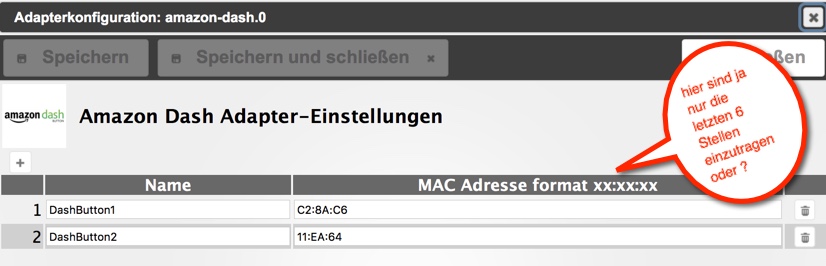
meine Komplette MAC Adresse lautet z.B. 00:FC:8B:C2:8A:C6.
Deshalb bin ich darüber gestolpert ?!
-
Hallo,
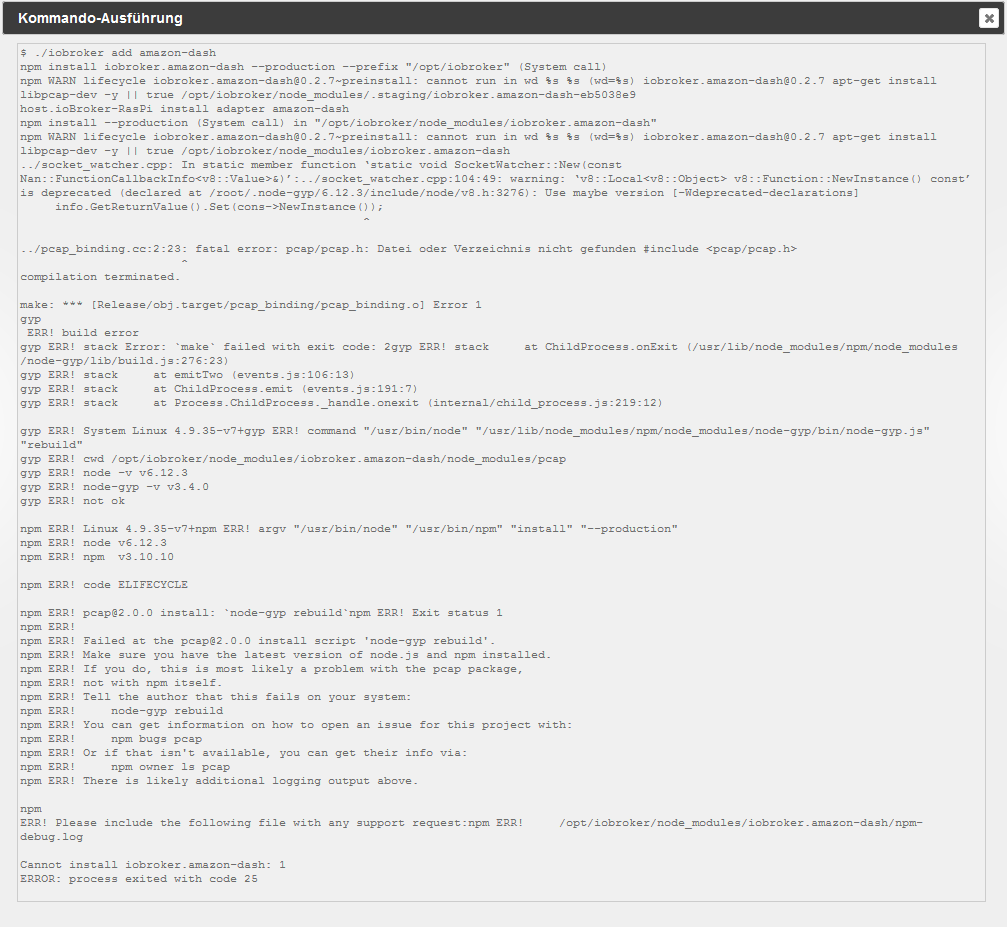
leider bekomme ich bei der Installation folgende Fehlermeldung:
Unbenannt.PNG
Kann mir jmd. weiterhelfen? `
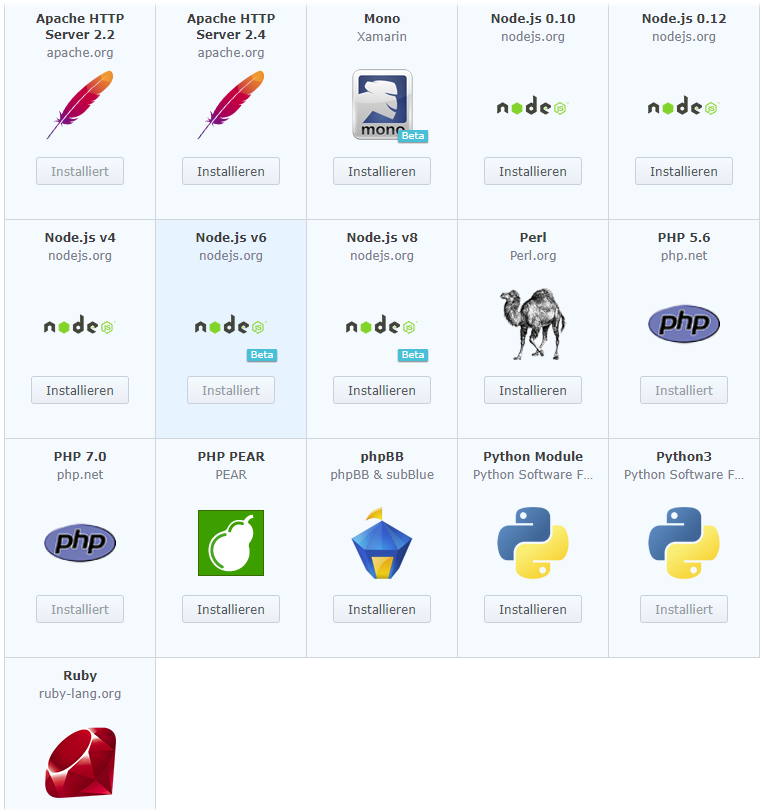
Ergänzend dazu: libcav ist installiert :-/





547
Online32.7k
Users82.4k
Topics1.3m
Posts