
NEWS




jarvis v2.2.0 - just another remarkable vis

-
@dslraser sagte in jarvis - just another remarkable vis:
Ich glaube sie States sehen anders aus ?
ah jo, hab ich überlesen. Das ist ja ein anderer Adapter, kein hm-rpc, oder?
@w00dst0ck Könntest du mir das Mapping der Datenpunkte auflisten?Nachfolgend das Mapping des hm-rpc:
{

	// lights
	"light": {
		"hmip-brc2": {
			"power": {
				"state": ".3.STATE",
				"action": ".4.STATE"
			}
		},
		"hmip-bdt": {
			"level": {
				"state": ".3.LEVEL",
				"action": ".4.LEVEL"
			}
		},
		"hm-lc-sw1pbu-fm": {
			"power": {
				"state": ".1.STATE",
				"action": ".1.STATE"
			}
		}
	},

	// heatings
	"heating": {
		"hmip-bwth": {
			"temperature": {
				"state": ".1.ACTUAL_TEMPERATURE"
			},
			"setTemperature": {
				"state": ".1.SET_POINT_TEMPERATURE",
				"action": ".1.SET_POINT_TEMPERATURE"
			},
			"humidity": {
				"state": ".1.HUMIDITY"
			},
			"boost": {
				"state": ".1.BOOST_MODE",
				"action": ".1.BOOST_MODE"
			}
		},
		"hmip-wth-2": {
			"temperature": {
				"state": ".1.ACTUAL_TEMPERATURE"
			},
			"setTemperature": {
				"state": ".1.SET_POINT_TEMPERATURE",
				"action": ".1.SET_POINT_TEMPERATURE"
			},
			"humidity": {
				"state": ".1.HUMIDITY"
			},
			"boost": {
				"state": ".1.BOOST_MODE",
				"action": ".1.BOOST_MODE"
			}
		},
		"hm-cc-rt-dn": {
			"temperature": {
				"state": ".4.ACTUAL_TEMPERATURE"
			},
			"setTemperature": {
				"state": ".4.SET_TEMPERATURE",
				"action": ".4.SET_TEMPERATURE"
			},
			"boost": {
				"state": ".4.BOOST_MODE",
				"action": ".4.BOOST_MODE"
			}
		}
	},

	// blinds
	"blind": {
		"hmip-broll": {
			"level": {
				"state": ".3.LEVEL",
				"action": ".4.LEVEL"
			},
			"level2": {
				"state": ".3.LEVEL2",
				"action": ".4.LEVEL2"
			},
			"activity": {
				"state": ".3.ACTIVITY_STATE",
				"action": ".4.STOP"
			}
		},
		"hm-lc-bl1-fm": {
			"level": {
				"state": ".1.LEVEL",
				"action": ".1.LEVEL"
			},
			"activity": {
				"state": ".1.WORKING",
				"action": ".1.STOP"
			}
		},
		"hm-lc-bl1pbu-fm": {
			"level": {
				"state": ".1.LEVEL",
				"action": ".1.LEVEL"
			},
			"activity": {
				"state": ".1.WORKING",
				"action": ".1.STOP"
			}
		}
	},

	// windows
	"window": {
		"hmip-swdo": {
			"open": {
				"state": ".1.STATE",
				"display": {
					"0": "CLOSED",
					"1": "OPEN"
				}
			}
		},
		"hmip-srh": {
			"open": {
				"state": ".1.STATE",
				"display": {
					"0": "CLOSED",
					"1": "TILTED",
					"2": "OPEN"
				}
			}
		},
		"hm-sec-sco": {
			"open": {
				"state": ".1.STATE"
			}
		},
		"hm-sec-sc-2": {
			"open": {
				"state": ".1.STATE"
			}
		}
	},

	// sockets
	"socket": {
		"hmip-ps": {
			"power": {
				"state": ".3.STATE"
			}
		},
		"hmip-psm": {
			"power": {
				"state": ".3.STATE"
			},
			"meter": {
				"state": ".6.POWER"
			}
		}
	},

	// motions or presence
	"motion": {
		"hmip-smi55": {
			"motion": {
				"state": ".3.MOTION"
			},
			"illumination": {
				"state": ".3.ILLUMINATION"
			}
		},
		"hmip-smi": {
			"motion": {
				"state": ".1.MOTION"
			},
			"illumination": {
				"state": ".1.ILLUMINATION"
			}
		},
		"hmip-smo-a": {
			"motion": {
				"state": ".1.MOTION"
			},
			"illumination": {
				"state": ".1.ILLUMINATION"
			}
		},
		"hmip-sam": {
			"motion": {
				"state": ".1.MOTION"
			},
			"illumination": {
				"state": ".1.ILLUMINATION"
			}
		},
		"hmip-spi": {
			"presence": {
				"state": ".1.PRESENCE_DETECTION_STATE"
			},
			"illumination": {
				"state": ".1.ILLUMINATION"
			}
		}
	},

	// weather station
	"weather-station": {
		"hmip-stho-a": {
			"temperature": {
				"state": ".1.ACTUAL_TEMPERATURE"
			},
			"humidity": {
				"state": ".1.HUMIDITY"
			}
		},
		"hmip-swo-b": {
			"humidity": {
				"state": ".1.HUMIDITY"
			},
			"wind": {
				"state": ".1.WIND_SPEED"
			},
			"temperature": {
				"state": ".1.ACTUAL_TEMPERATURE"
			},
			"illumination": {
				"state": ".1.ILLUMINATION"
			},
			"sunshineduration": {
				"state": ".1.SUNSHINEDURATION"
			}
		}
	},

	// other
	"other": {
		"hmip-wrc2": {
			"PRESS_LONG_BOTTOM": {
				"state": ".1.PRESS_LONG",
				"action": ".1.PRESS_LONG"
			},
			"PRESS_SHORT_BOTTOM": {
				"state": ".1.PRESS_SHORT",
				"action": ".1.PRESS_SHORT"
			},
			"PRESS_LONG_TOP": {
				"state": ".2.PRESS_LONG",
				"action": ".2.PRESS_LONG"
			},
			"PRESS_SHORT_TOP": {
				"state": ".2.PRESS_SHORT",
				"action": ".2.PRESS_SHORT"
			}
		}
	}
}
Meine Adapter: https://zefau.github.io/iobroker/
-
@dslraser sagte in jarvis - just another remarkable vis:
Ich glaube sie States sehen anders aus ?
ah jo, hab ich überlesen. Das ist ja ein anderer Adapter, kein hm-rpc, oder?
@w00dst0ck Könntest du mir das Mapping der Datenpunkte auflisten?Nachfolgend das Mapping des hm-rpc:
{ // lights "light": { "hmip-brc2": { "power": { "state": ".3.STATE", "action": ".4.STATE" } }, "hmip-bdt": { "level": { "state": ".3.LEVEL", "action": ".4.LEVEL" } }, "hm-lc-sw1pbu-fm": { "power": { "state": ".1.STATE", "action": ".1.STATE" } } }, // heatings "heating": { "hmip-bwth": { "temperature": { "state": ".1.ACTUAL_TEMPERATURE" }, "setTemperature": { "state": ".1.SET_POINT_TEMPERATURE", "action": ".1.SET_POINT_TEMPERATURE" }, "humidity": { "state": ".1.HUMIDITY" }, "boost": { "state": ".1.BOOST_MODE", "action": ".1.BOOST_MODE" } }, "hmip-wth-2": { "temperature": { "state": ".1.ACTUAL_TEMPERATURE" }, "setTemperature": { "state": ".1.SET_POINT_TEMPERATURE", "action": ".1.SET_POINT_TEMPERATURE" }, "humidity": { "state": ".1.HUMIDITY" }, "boost": { "state": ".1.BOOST_MODE", "action": ".1.BOOST_MODE" } }, "hm-cc-rt-dn": { "temperature": { "state": ".4.ACTUAL_TEMPERATURE" }, "setTemperature": { "state": ".4.SET_TEMPERATURE", "action": ".4.SET_TEMPERATURE" }, "boost": { "state": ".4.BOOST_MODE", "action": ".4.BOOST_MODE" } } }, // blinds "blind": { "hmip-broll": { "level": { "state": ".3.LEVEL", "action": ".4.LEVEL" }, "level2": { "state": ".3.LEVEL2", "action": ".4.LEVEL2" }, "activity": { "state": ".3.ACTIVITY_STATE", "action": ".4.STOP" } }, "hm-lc-bl1-fm": { "level": { "state": ".1.LEVEL", "action": ".1.LEVEL" }, "activity": { "state": ".1.WORKING", "action": ".1.STOP" } }, "hm-lc-bl1pbu-fm": { "level": { "state": ".1.LEVEL", "action": ".1.LEVEL" }, "activity": { "state": ".1.WORKING", "action": ".1.STOP" } } }, // windows "window": { "hmip-swdo": { "open": { "state": ".1.STATE", "display": { "0": "CLOSED", "1": "OPEN" } } }, "hmip-srh": { "open": { "state": ".1.STATE", "display": { "0": "CLOSED", "1": "TILTED", "2": "OPEN" } } }, "hm-sec-sco": { "open": { "state": ".1.STATE" } }, "hm-sec-sc-2": { "open": { "state": ".1.STATE" } } }, // sockets "socket": { "hmip-ps": { "power": { "state": ".3.STATE" } }, "hmip-psm": { "power": { "state": ".3.STATE" }, "meter": { "state": ".6.POWER" } } }, // motions or presence "motion": { "hmip-smi55": { "motion": { "state": ".3.MOTION" }, "illumination": { "state": ".3.ILLUMINATION" } }, "hmip-smi": { "motion": { "state": ".1.MOTION" }, "illumination": { "state": ".1.ILLUMINATION" } }, "hmip-smo-a": { "motion": { "state": ".1.MOTION" }, "illumination": { "state": ".1.ILLUMINATION" } }, "hmip-sam": { "motion": { "state": ".1.MOTION" }, "illumination": { "state": ".1.ILLUMINATION" } }, "hmip-spi": { "presence": { "state": ".1.PRESENCE_DETECTION_STATE" }, "illumination": { "state": ".1.ILLUMINATION" } } }, // weather station "weather-station": { "hmip-stho-a": { "temperature": { "state": ".1.ACTUAL_TEMPERATURE" }, "humidity": { "state": ".1.HUMIDITY" } }, "hmip-swo-b": { "humidity": { "state": ".1.HUMIDITY" }, "wind": { "state": ".1.WIND_SPEED" }, "temperature": { "state": ".1.ACTUAL_TEMPERATURE" }, "illumination": { "state": ".1.ILLUMINATION" }, "sunshineduration": { "state": ".1.SUNSHINEDURATION" } } }, // other "other": { "hmip-wrc2": { "PRESS_LONG_BOTTOM": { "state": ".1.PRESS_LONG", "action": ".1.PRESS_LONG" }, "PRESS_SHORT_BOTTOM": { "state": ".1.PRESS_SHORT", "action": ".1.PRESS_SHORT" }, "PRESS_LONG_TOP": { "state": ".2.PRESS_LONG", "action": ".2.PRESS_LONG" }, "PRESS_SHORT_TOP": { "state": ".2.PRESS_SHORT", "action": ".2.PRESS_SHORT" } } } }@Zefau
Das kann ich heute Abend gerne nachreichen.
Bin noch unterwegs und auf dem Smartphone ist mir das zu mühsam. 😀Kann es eigentlich sein, dass die Auswahl der Gewerke noch nicht komplett verfügbar ist? Mir werden im Dropdown-Menü viel weniger angezeigt als die im Wiki aufgelisteten.
-
Danke für den Darkmode!
Ich habe mal im Wiki geschaut wie ich einzelne Punkte (Hintergrund, Hintergrund der Widgets) selbst definieren kann. Leider finde ich konkreten Befehle dafür nicht
@WW1983 sagte in jarvis - just another remarkable vis:
Ich habe mal im Wiki geschaut wie ich einzelne Punkte (Hintergrund, Hintergrund der Widgets) selbst definieren kann. Leider finde ich konkreten Befehle dafür nicht
Ne, geht auch nicht. War laut Feature Request auch nicht angefragt. ;)
Ich mach mal ein neues auf: https://github.com/Zefau/ioBroker.jarvis/issues/147
-
@WW1983 sagte in jarvis - just another remarkable vis:
Ich habe mal im Wiki geschaut wie ich einzelne Punkte (Hintergrund, Hintergrund der Widgets) selbst definieren kann. Leider finde ich konkreten Befehle dafür nicht
Ne, geht auch nicht. War laut Feature Request auch nicht angefragt. ;)
Ich mach mal ein neues auf: https://github.com/Zefau/ioBroker.jarvis/issues/147
@Zefau said in jarvis - just another remarkable vis:
@WW1983 sagte in jarvis - just another remarkable vis:
Ich habe mal im Wiki geschaut wie ich einzelne Punkte (Hintergrund, Hintergrund der Widgets) selbst definieren kann. Leider finde ich konkreten Befehle dafür nicht
Ne, geht auch nicht. War laut Feature Request auch nicht angefragt. ;)
Ich mach mal ein neues auf: https://github.com/Zefau/ioBroker.jarvis/issues/147
Ne ne. War es auch nicht. Dachte ich kann das über die Experteneinstellung anpassen
-
@Zefau said in jarvis - just another remarkable vis:
@WW1983 sagte in jarvis - just another remarkable vis:
Ich habe mal im Wiki geschaut wie ich einzelne Punkte (Hintergrund, Hintergrund der Widgets) selbst definieren kann. Leider finde ich konkreten Befehle dafür nicht
Ne, geht auch nicht. War laut Feature Request auch nicht angefragt. ;)
Ich mach mal ein neues auf: https://github.com/Zefau/ioBroker.jarvis/issues/147
Ne ne. War es auch nicht. Dachte ich kann das über die Experteneinstellung anpassen
@WW1983 sagte in jarvis - just another remarkable vis:
Ne ne. War es auch nicht. Dachte ich kann das über die Experteneinstellung anpassen
Das geht theoretisch, das ist richtig. Die benutzerspezifischen Angaben überschreiben das Standard-Theme (https://material-ui.com/customization/default-theme/#explore).
-
@WW1983 sagte in jarvis - just another remarkable vis:
Ne ne. War es auch nicht. Dachte ich kann das über die Experteneinstellung anpassen
Das geht theoretisch, das ist richtig. Die benutzerspezifischen Angaben überschreiben das Standard-Theme (https://material-ui.com/customization/default-theme/#explore).
@Zefau said in jarvis - just another remarkable vis:
@WW1983 sagte in jarvis - just another remarkable vis:
Ne ne. War es auch nicht. Dachte ich kann das über die Experteneinstellung anpassen
Das geht theoretisch, das ist richtig. Die benutzerspezifischen Angaben überschreiben das Standard-Theme (https://material-ui.com/customization/default-theme/#explore).
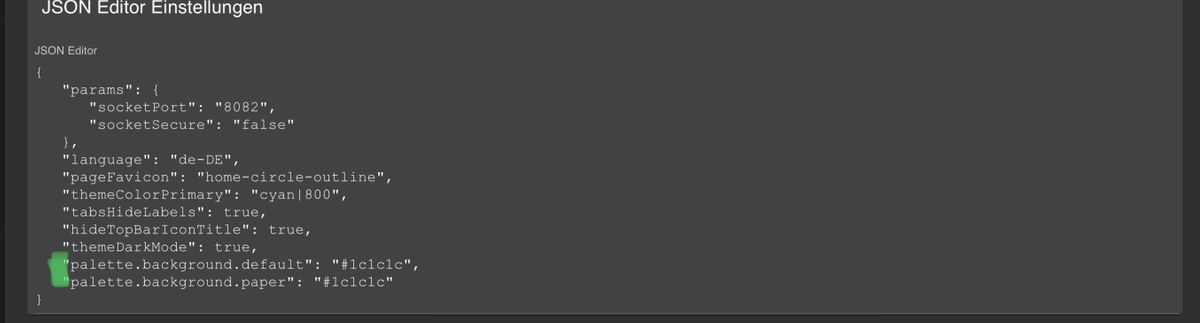
Komisch. Irgendwie funktioniert das nicht:
-
Hochkant Ansicht
Current width: smQueransicht
Current width: mdIch hoffe du meinst das.?
Es wird immer nur die halbe Breite angezeigt@dos1973 sagte in jarvis - just another remarkable vis:
Ich hoffe du meinst das.?
Es wird immer nur die halbe Breite angezeigtJo, das meinte ich. Ich hab jetzt mit
1.1.0-beta.16die Einstellungen erweitern (https://github.com/Zefau/ioBroker.jarvis/issues/134). Du kannst nun selbst die maximalen Spalten je Bildschirmgröße definieren. Sofern mehr Spalten in der Layout-Konfiguration sind, werden diese bei der jeweilgen Layout-Größe umgebrochen.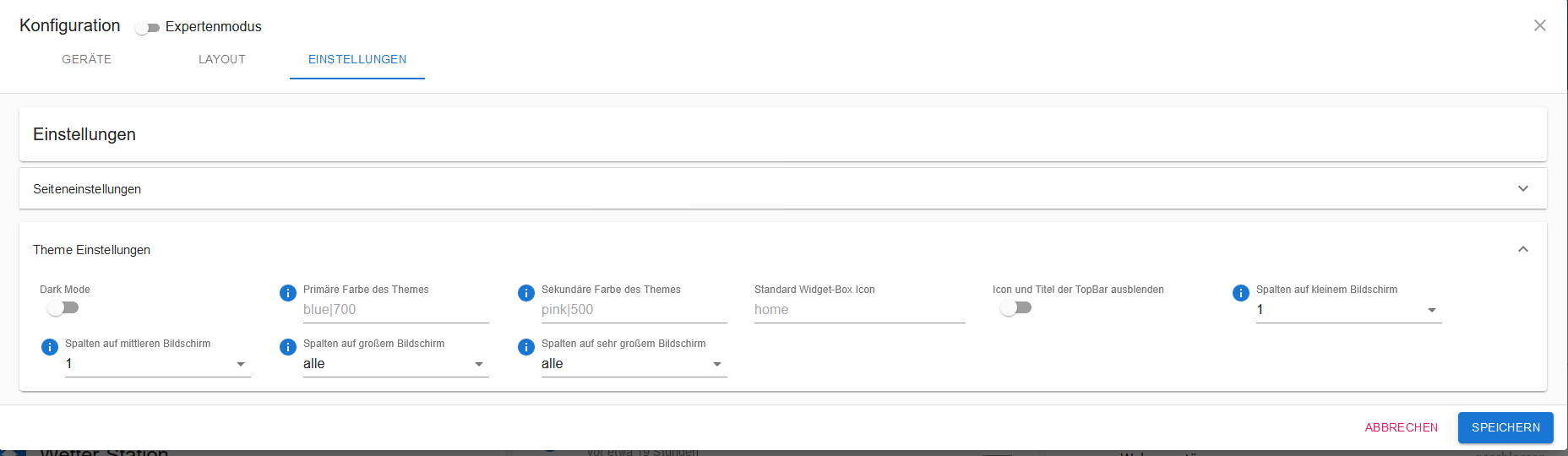
-
@Zefau said in jarvis - just another remarkable vis:
@WW1983 sagte in jarvis - just another remarkable vis:
Ne ne. War es auch nicht. Dachte ich kann das über die Experteneinstellung anpassen
Das geht theoretisch, das ist richtig. Die benutzerspezifischen Angaben überschreiben das Standard-Theme (https://material-ui.com/customization/default-theme/#explore).
Komisch. Irgendwie funktioniert das nicht:
@WW1983 sagte in jarvis - just another remarkable vis:
Komisch. Irgendwie funktioniert das nicht:
Versuch mal die
1.1.0-beta.17und dann wie im Wiki (https://github.com/Zefau/ioBroker.jarvis/wiki/de-Settings#einstellung-theme-) beschrieben:{ ... andere Einstellungen ... "theme":{ "palette":{ "background":{ "default":"#f00" } } } }Also nicht mit Punkt, sondern als Objekt.
-
@Zefau
Das kann ich heute Abend gerne nachreichen.
Bin noch unterwegs und auf dem Smartphone ist mir das zu mühsam. 😀Kann es eigentlich sein, dass die Auswahl der Gewerke noch nicht komplett verfügbar ist? Mir werden im Dropdown-Menü viel weniger angezeigt als die im Wiki aufgelisteten.
@w00dst0ck sagte in jarvis - just another remarkable vis:
Kann es eigentlich sein, dass die Auswahl der Gewerke noch nicht komplett verfügbar ist? Mir werden im Dropdown-Menü viel weniger angezeigt als die im Wiki aufgelisteten.
Das Wiki bezieht sich bereits auf
v1.1.x. Dort kommen einige neue Gewerke hinzu. -
@WW1983 sagte in jarvis - just another remarkable vis:
Hab einen Darstellungsfehler
Du nutzt da Safari, oder?
@Zefau said in jarvis - just another remarkable vis:
@WW1983 sagte in jarvis - just another remarkable vis:
Hab einen Darstellungsfehler
Du nutzt da Safari, oder?
Hast du wegen dem Darstellungsfehler der Map vom Vacuum Cleaner schauen können?
-
@Zefau Ist es möglich die Größe der Icons von den Geräten zu ändern? Ich dachte es könnte über Icon Stil funktionieren. Habe da folgendes eingetragen:
{"0":{"color":"black","fontSize":"48"},"1":{"color":"red","fontSize":"48"},"2":{"color":"green","fontSize":"48"}}
Die Farbe ändert sich, die Größe leider nicht.
Oder ist das gar nicht vorgesehen?Edit: Ich habe „px“ hinter den Zahlen vergessen. Es muss 48px heisen. Jetzt funktioniert es.
-
@dos1973 sagte in jarvis - just another remarkable vis:
Ich hoffe du meinst das.?
Es wird immer nur die halbe Breite angezeigtJo, das meinte ich. Ich hab jetzt mit
1.1.0-beta.16die Einstellungen erweitern (https://github.com/Zefau/ioBroker.jarvis/issues/134). Du kannst nun selbst die maximalen Spalten je Bildschirmgröße definieren. Sofern mehr Spalten in der Layout-Konfiguration sind, werden diese bei der jeweilgen Layout-Größe umgebrochen.@Zefau
Ich weiss leider nicht wie ich Beta 16 installieren kann. Also was ich bei der „Katze“ als Link/ Adresse angeben soll. Ansonsten wird mir als letzte die 1.06 angebotenEdit:
Hat sich wohl erledigt, habe einfach nochmals die aktuellste drüberinstalliert... -
@Zefau Ist es möglich die Anzeige wann ein Datenpunkt das letzte mal aktualisiert wurde, zu unterdrücken?
@SWeimar sagte in jarvis - just another remarkable vis:
@Zefau Ist es möglich die Anzeige wann ein Datenpunkt das letzte mal aktualisiert wurde, zu unterdrücken?
Würde ich z.Teil auch besser finden, da sich die Anzeigen sonst verschieben.
-
@Zefau Ist es möglich die Anzeige wann ein Datenpunkt das letzte mal aktualisiert wurde, zu unterdrücken?
@SWeimar sagte in jarvis - just another remarkable vis:
Ist es möglich die Anzeige wann ein Datenpunkt das letzte mal aktualisiert wurde, zu unterdrücken?
@dslraser sagte in jarvis - just another remarkable vis:
Würde ich z.Teil auch besser finden, da sich die Anzeigen sonst verschieben.
Funktioniert mit
v1.1.0-beta.18. -
@Zefau said in jarvis - just another remarkable vis:
@WW1983 CustomHTML Modul, da es HTML ist und kein reines Image
Hab einen Darstellungsfehler
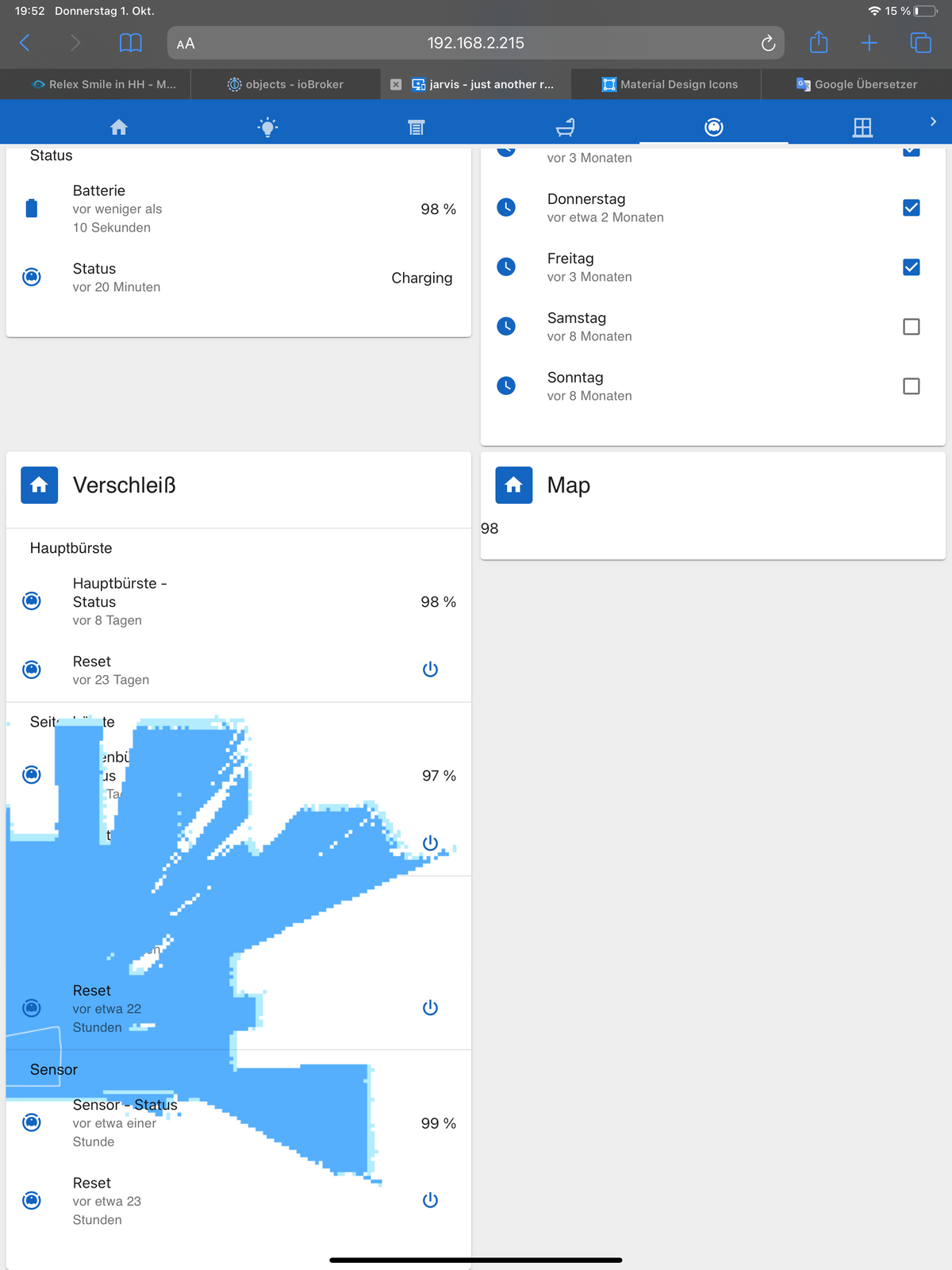
@WW1983 sagte in jarvis - just another remarkable vis:
Hab einen Darstellungsfehler
Ich kann es bei mir nicht nachstellen (iPad Air mit Safari). Wenn du das Widget "Map" raus nimmst, dann sieht es ganz normal aus? Also die Konfiguration des Widgets "Verschleiß" hat auf die fehlerhafte Anzeige keinen Einfluss?
Meine Adapter: https://zefau.github.io/iobroker/
-
@WW1983 sagte in jarvis - just another remarkable vis:
Hab einen Darstellungsfehler
Ich kann es bei mir nicht nachstellen (iPad Air mit Safari). Wenn du das Widget "Map" raus nimmst, dann sieht es ganz normal aus? Also die Konfiguration des Widgets "Verschleiß" hat auf die fehlerhafte Anzeige keinen Einfluss?
@Zefau said in jarvis - just another remarkable vis:
@WW1983 sagte in jarvis - just another remarkable vis:
Hab einen Darstellungsfehler
Ich kann es bei mir nicht nachstellen (iPad Air mit Safari). Wenn du das Widget "Map" raus nimmst, dann sieht es ganz normal aus? Also die Konfiguration des Widgets "Verschleiß" hat auf die fehlerhafte Anzeige keinen Einfluss?
Ja genau. Das liegt tatsächlich an dem HTML Widget
-
@WW1983 sagte in jarvis - just another remarkable vis:
Hab einen Darstellungsfehler
Ich kann es bei mir nicht nachstellen (iPad Air mit Safari). Wenn du das Widget "Map" raus nimmst, dann sieht es ganz normal aus? Also die Konfiguration des Widgets "Verschleiß" hat auf die fehlerhafte Anzeige keinen Einfluss?
-
@WW1983 sagte in jarvis - just another remarkable vis:
Ja genau. Das liegt tatsächlich an dem HTML Widget
Versuch nochmal mit
v1.1.0-beta.19@Zefau said in jarvis - just another remarkable vis:
@WW1983 sagte in jarvis - just another remarkable vis:
Ja genau. Das liegt tatsächlich an dem HTML Widget
Versuch nochmal mit
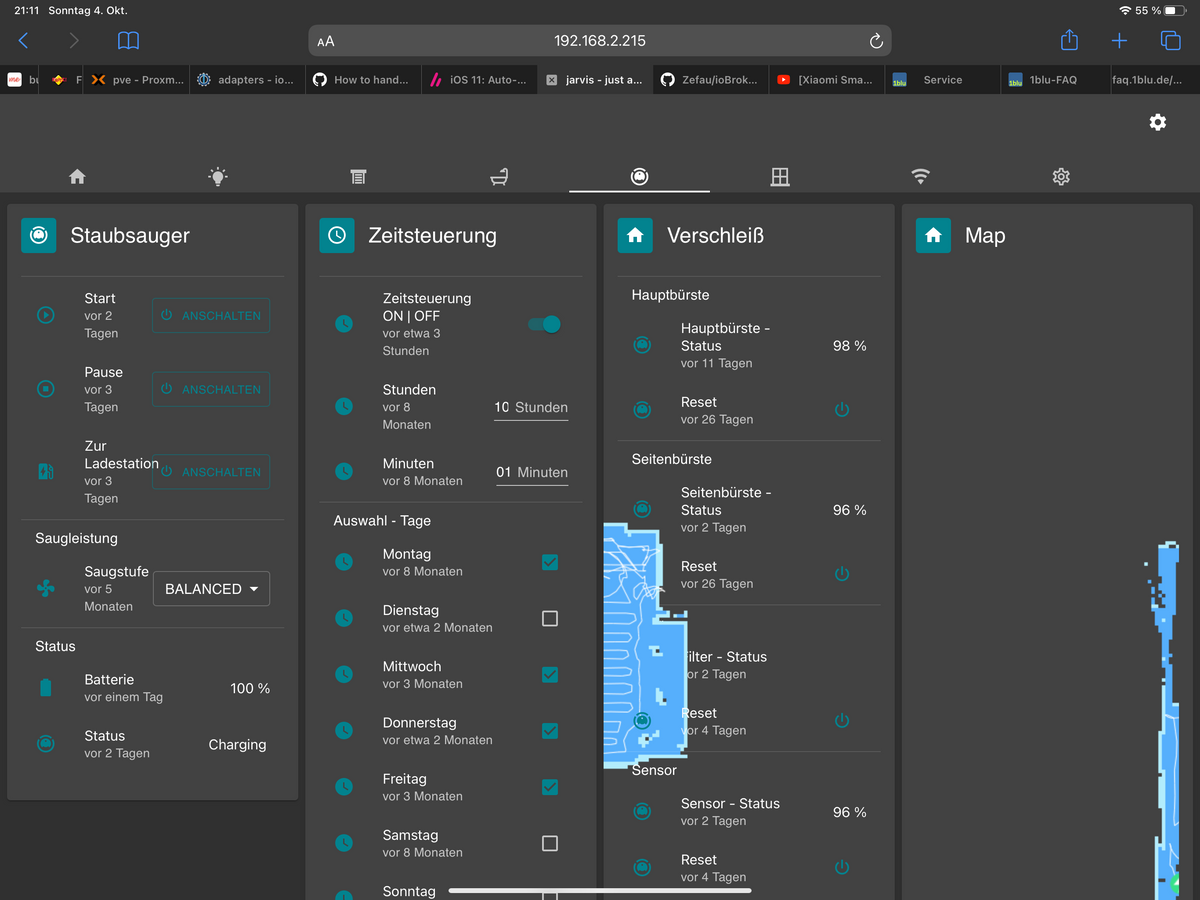
v1.1.0-beta.19Leider noch nicht funktioniert




Support us
846
Online32.4k
Users81.5k
Topics1.3m
Posts