
NEWS




eBus Adapter Vaillant
-
Ich habe mal irgendwo gelesen, dass der MQTT zum verarbeiten der Daten zuständig sein soll, jedoch bin ich mir da nicht sicher.
Hast du also das installieren der Konfigdateien nicht durchgeführt?
wget https://github.com/john30/ebusd-configuration/releases/download/v2.1.1/ebusd-configuration-2.1.b143f39-de_all.debWenn du den Befehl
ebusctl infoWas zeigt denn dann die Konsole an? In meinem Fall, mit installierten Konfigs, sehe ich schon das diese geladen wurden.
-
Ich habe mal irgendwo gelesen, dass der MQTT zum verarbeiten der Daten zuständig sein soll, jedoch bin ich mir da nicht sicher.
Hast du also das installieren der Konfigdateien nicht durchgeführt?
wget https://github.com/john30/ebusd-configuration/releases/download/v2.1.1/ebusd-configuration-2.1.b143f39-de_all.debWenn du den Befehl
ebusctl infoWas zeigt denn dann die Konsole an? In meinem Fall, mit installierten Konfigs, sehe ich schon das diese geladen wurden.
@Harry Nein, ich habe keine configdatei geladen. Bei mir sieht das Ganze dann so aus...
pi@raspberrypi:~ $ ebusctl info version: ebusd 3.4.v3.3-51-g57eae05 update check: revision v3.4 available signal: acquired symbol rate: 23 max symbol rate: 138 reconnects: 0 masters: 4 messages: 6 conditional: 0 poll: 0 update: 0 address 03: master #11 address 08: slave #11, scanned "MF=Vaillant;ID=HMU01;SW=0304;HW=8802" address 10: master #2 address 15: slave #2, scanned "MF=Vaillant;ID=70000;SW=0419;HW=4603" address 31: master #8, ebusd address 36: slave #8, ebusd address 52: slave, scanned "MF=Vaillant;ID=VR_70;SW=0109;HW=2903" address 71: master #9 address 76: slave #9, scanned "MF=Vaillant;ID=VWZIO;SW=0111;HW=0103" address e3: slave, scanned "MF=Vaillant;ID=FMU00;SW=0202;HW=6502" address e8: slave, scanned "MF=Vaillant;ID=FMU00;SW=0202;HW=6502" -
@Harry Nein, ich habe keine configdatei geladen. Bei mir sieht das Ganze dann so aus...
pi@raspberrypi:~ $ ebusctl info version: ebusd 3.4.v3.3-51-g57eae05 update check: revision v3.4 available signal: acquired symbol rate: 23 max symbol rate: 138 reconnects: 0 masters: 4 messages: 6 conditional: 0 poll: 0 update: 0 address 03: master #11 address 08: slave #11, scanned "MF=Vaillant;ID=HMU01;SW=0304;HW=8802" address 10: master #2 address 15: slave #2, scanned "MF=Vaillant;ID=70000;SW=0419;HW=4603" address 31: master #8, ebusd address 36: slave #8, ebusd address 52: slave, scanned "MF=Vaillant;ID=VR_70;SW=0109;HW=2903" address 71: master #9 address 76: slave #9, scanned "MF=Vaillant;ID=VWZIO;SW=0111;HW=0103" address e3: slave, scanned "MF=Vaillant;ID=FMU00;SW=0202;HW=6502" address e8: slave, scanned "MF=Vaillant;ID=FMU00;SW=0202;HW=6502"@xxx_turbo_xxx Wie sieht das bei dir aus?
Mich macht das langsam echt wahnsinnig. :-) Es steht so vieles im Netz geschrieben aber nix bringt mich voran... Mir fehlen da leider die Grundkenntnisse in Sachen Linux, etc. Und eBus für Dummies hab ich noch nicht gefunden :-(
-
@Harry Nein, ich habe keine configdatei geladen. Bei mir sieht das Ganze dann so aus...
pi@raspberrypi:~ $ ebusctl info version: ebusd 3.4.v3.3-51-g57eae05 update check: revision v3.4 available signal: acquired symbol rate: 23 max symbol rate: 138 reconnects: 0 masters: 4 messages: 6 conditional: 0 poll: 0 update: 0 address 03: master #11 address 08: slave #11, scanned "MF=Vaillant;ID=HMU01;SW=0304;HW=8802" address 10: master #2 address 15: slave #2, scanned "MF=Vaillant;ID=70000;SW=0419;HW=4603" address 31: master #8, ebusd address 36: slave #8, ebusd address 52: slave, scanned "MF=Vaillant;ID=VR_70;SW=0109;HW=2903" address 71: master #9 address 76: slave #9, scanned "MF=Vaillant;ID=VWZIO;SW=0111;HW=0103" address e3: slave, scanned "MF=Vaillant;ID=FMU00;SW=0202;HW=6502" address e8: slave, scanned "MF=Vaillant;ID=FMU00;SW=0202;HW=6502"@xxx_turbo_xxx
So sieht das bei mir auch aus.
Wenn ich jedoch das eingebeebusd --checkconfig --scanconfigDann bekomme ich angezeigt das die CVS Dateien gelesen wurden.
Ich habe das jetzt mal einfach aus dem Netzt kopiert, weil ich nicht am Raspi sitze.address 03: master #3 address 08: slave #3, scanned "MF=Vaillant;ID=BAI00;SW=0518;HW=7401", loaded "vaillant/08.bai.HW7401.csv" address 10: master #6 address 15: slave #6, scanned "MF=Vaillant;ID=43000;SW=0215;HW=2002", loaded "vaillant/15.430.csv" -
@xxx_turbo_xxx
So sieht das bei mir auch aus.
Wenn ich jedoch das eingebeebusd --checkconfig --scanconfigDann bekomme ich angezeigt das die CVS Dateien gelesen wurden.
Ich habe das jetzt mal einfach aus dem Netzt kopiert, weil ich nicht am Raspi sitze.address 03: master #3 address 08: slave #3, scanned "MF=Vaillant;ID=BAI00;SW=0518;HW=7401", loaded "vaillant/08.bai.HW7401.csv" address 10: master #6 address 15: slave #6, scanned "MF=Vaillant;ID=43000;SW=0215;HW=2002", loaded "vaillant/15.430.csv"@Harry said in eBus Adapter Vaillant:
ebusd --checkconfig --scanconfig
das sähe dann so aus...
pi@raspberrypi:~ $ ebusd --checkconfig --scanconfig 2020-01-27 20:28:34.072 [main notice] ebusd 3.4.v3.3-51-g57eae05 performing configuration check... 2020-01-27 20:28:34.478 [main notice] found messages: 11 (0 conditional on 0 conditions, 0 poll, 4 update) 2020-01-27 20:28:34.478 [main notice] ebusd stopped -
Ich tippe mal in Blaue.
Versuch wirklich mal die Configs zu installieren. Bei mir sieht das definitiv anders aus.wget https://github.com/john30/ebusd-configuration/releases/download/v2.1.1/ebusd-configuration-2.1.b143f39-de_all.deb sudo dpkg -i --force-overwrite ebusd-configuration-2.1.b143f39-de_all.deb -
Wenn ich
service ebus statusEingebe sieht das bei mir so aus...
ebusd.service - ebusd, the daemon for communication with eBUS heating systems. Loaded: loaded (/lib/systemd/system/ebusd.service; enabled; vendor preset: enabled) Active: active (running) since Mon 2020-01-27 16:46:46 GMT; 3h 51min ago Process: 18130 ExecStart=/usr/bin/ebusd $EBUSD_OPTS (code=exited, status=0/SUCCESS) Main PID: 18131 (ebusd) Tasks: 4 (limit: 4915) Memory: 2.7M CGroup: /system.slice/ebusd.service └─18131 /usr/bin/ebusd --configpath=/etc/ebusd -d /dev/ttyUSB2 -p 8888 --latency=0 --recInteressant ist dass der Ordner /etc/ebusd leer ist. In dem sollten die configs liegen!?
-
Wenn ich
service ebus statusEingebe sieht das bei mir so aus...
ebusd.service - ebusd, the daemon for communication with eBUS heating systems. Loaded: loaded (/lib/systemd/system/ebusd.service; enabled; vendor preset: enabled) Active: active (running) since Mon 2020-01-27 16:46:46 GMT; 3h 51min ago Process: 18130 ExecStart=/usr/bin/ebusd $EBUSD_OPTS (code=exited, status=0/SUCCESS) Main PID: 18131 (ebusd) Tasks: 4 (limit: 4915) Memory: 2.7M CGroup: /system.slice/ebusd.service └─18131 /usr/bin/ebusd --configpath=/etc/ebusd -d /dev/ttyUSB2 -p 8888 --latency=0 --recInteressant ist dass der Ordner /etc/ebusd leer ist. In dem sollten die configs liegen!?
@xxx_turbo_xxx
Das kann ich erst morgen prüfen.
Wie gesagt, ich habe das so verstanden, das in den Configs die Definition der Binär Codes in einen Klartext sind.Manchmal meine ich das auch nur ich so einen am Brett habe, die Heizung mit dem IOBroker zu verbinden.
Alle anderen geben sich mit nem Lichtschalter zufrieden...:grimacing:Du siehst ja auch an meinen Log, dass er die Configs lädt.
Warum sollte er sie laden, wenn er sie nicht braucht? -
@xxx_turbo_xxx
Das kann ich erst morgen prüfen.
Wie gesagt, ich habe das so verstanden, das in den Configs die Definition der Binär Codes in einen Klartext sind.Manchmal meine ich das auch nur ich so einen am Brett habe, die Heizung mit dem IOBroker zu verbinden.
Alle anderen geben sich mit nem Lichtschalter zufrieden...:grimacing:Du siehst ja auch an meinen Log, dass er die Configs lädt.
Warum sollte er sie laden, wenn er sie nicht braucht?@Harry Hab das versucht mit den config files
hier ein Auszug aus dem ebus logfile...
Wie es aussieht kann das System die HEX codes nicht zuordnen. :-(
2020-01-28 08:09:54.010 [bus notice] scan e3: ;Vaillant;FMU00;0202;6502 2020-01-28 08:09:54.010 [update notice] store e3 ident: done 2020-01-28 08:09:54.010 [update notice] sent scan-read scan.e3 QQ=31: Vaillant;FMU00;0202;6502 2020-01-28 08:09:54.010 [bus notice] scan e3: ;Vaillant;FMU00;0202;6502 2020-01-28 08:09:54.212 [main error] unable to load scan config e3: list files in vaillant ERR: element not found 2020-01-28 08:09:54.212 [main error] scan config e3: ERR: element not found 2020-01-28 08:09:56.398 [update notice] received unknown MS cmd: 1052b523040201015b / 020155 2020-01-28 08:09:57.072 [update notice] sent scan-read scan.e8 QQ=31: Vaillant;FMU00;0202;6502 2020-01-28 08:09:57.072 [bus notice] scan e8: ;Vaillant;FMU00;0202;6502 2020-01-28 08:09:58.316 [update notice] received unknown MS cmd: 7108b507030bffff / 0101 2020-01-28 08:10:00.258 [bus notice] scan ec: ;Vaillant;70000;0419;4603 2020-01-28 08:10:00.258 [update notice] store ec ident: done 2020-01-28 08:10:00.258 [update notice] sent scan-read scan.ec QQ=31: Vaillant;70000;0419;4603 2020-01-28 08:10:00.258 [bus notice] scan ec: ;Vaillant;70000;0419;4603 2020-01-28 08:10:00.518 [update notice] received unknown MS cmd: 7108b5110107 / 056471000109 2020-01-28 08:10:02.037 [main error] unable to load scan config ec: list files in vaillant ERR: element not found 2020-01-28 08:10:02.037 [main error] scan config ec: ERR: element not found 2020-01-28 08:10:03.986 [update notice] received unknown MS cmd: 1052b523040201015b / 020155 2020-01-28 08:10:04.110 [update notice] received unknown MS cmd: 03e8b512060b5802460200 / 0b5902450201ffffffffff00 2020-01-28 08:10:05.858 [update notice] received unknown MS cmd: 7108b507030bffff / 0101 2020-01-28 08:10:08.533 [update notice] received unknown MS cmd: 7108b5110107 / 056471000109 2020-01-28 08:10:10.987 [update notice] received unknown MS cmd: 1076b5110101 / 09ffff1d00ff5a000053 2020-01-28 08:10:11.233 [update notice] received unknown MS cmd: 1052b523040201015b / 020155 2020-01-28 08:10:11.496 [update notice] received unknown MS cmd: 1076b512030f0001 / 07d2020099021603 2020-01-28 08:10:11.774 [update notice] received unknown MS cmd: 1076b51303040d00 / 0a0d000300000003000300 2020-01-28 08:10:12.019 [update notice] received unknown MS cmd: 1052b523040201015b / 020155 2020-01-28 08:10:12.312 [update notice] received unknown MS cmd: 1052b5230103 / 0f00800080008000809a022a02c87d00 2020-01-28 08:10:12.556 [update notice] received unknown MS cmd: 1052b523040201015b / 020155 2020-01-28 08:10:12.770 [update notice] received unknown BC cmd: 10feb5160301d001 2020-01-28 08:10:13.016 [update notice] received unknown MS cmd: 1052b523040201013e / 020155 2020-01-28 08:10:13.281 [update notice] received unknown MS cmd: 1008b5100900004cffffff060000 / 0101 2020-01-28 08:10:13.526 [update notice] received unknown MS cmd: 1052b523040201013e / 020155 2020-01-28 08:10:13.802 [update notice] received unknown MS cmd: 1076b51303040d00 / 0a0d000300000003000300 2020-01-28 08:10:14.065 [update notice] received unknown MS cmd: 1076b51009000000ffffff050000 / 0101 2020-01-28 08:10:14.233 [update notice] received unknown MS cmd: 03e8b512060b5802460200 / 0b5502450201ffffffffff00 2020-01-28 08:10:14.394 [update notice] received unknown MS cmd: 1052b523040201013e / 020155 2020-01-28 08:10:14.651 [update notice] received unknown MS cmd: 1052b523080100ff0000ffff00 / 0101 2020-01-28 08:10:14.860 [update notice] received unknown BC cmd: 10feb505025c00 2020-01-28 08:10:15.106 [update notice] received unknown MS cmd: 1052b523040201013e / 020155 2020-01-28 08:10:15.375 [update notice] received unknown MS cmd: 1076b5040100 / 0a0316100928010220c001 2020-01-28 08:10:15.609 [update notice] received unknown BC cmd: 10feb516080054090928010220 2020-01-28 08:10:15.849 [update notice] received unknown MS cmd: 1008b507020944 / 026101 2020-01-28 08:10:15.964 [update notice] received unknown MS cmd: 7108b507030bffff / 0101 2020-01-28 08:10:16.124 [update notice] received unknown MS cmd: 1052b523040201013e / 020155 2020-01-28 08:10:16.390 [update notice] received unknown MS cmd: 1008b5110101 / 09544a0080ffff0100ff 2020-01-28 08:10:16.514 [update notice] received unknown MS cmd: 7108b5110107 / 050071000109 2020-01-28 08:10:16.674 [update notice] received unknown MS cmd: 1052b523040201013e / 0201e7 2020-01-28 08:10:16.951 [update notice] received unknown MS cmd: 1076b51303040d00 / 0a0d000300000003000300 2020-01-28 08:10:17.197 [update notice] received unknown MS cmd: 1052b523040201013e / 0201e7 2020-01-28 08:10:17.460 [update notice] received unknown MS cmd: 1076b5110101 / 09ffff1c00ff5a000053 2020-01-28 08:10:17.725 [update notice] received unknown MS cmd: 1076b512030f0001 / 07d202009c021603 2020-01-28 08:10:18.017 [update notice] received unknown MS cmd: 1052b5230103 / 0f00800080008000809c022902c87d00 2020-01-28 08:10:18.284 [update notice] received unknown MS cmd: 1008b5100900004cffffff060000 / 0101 2020-01-28 08:10:18.541 [update notice] received unknown MS cmd: 1052b523080100ff0000ffff00 / 0101 2020-01-28 08:10:18.787 [update notice] received unknown MS cmd: 1052b523040201013e / 0201e7 2020-01-28 08:10:19.044 [update notice] received unknown MS cmd: 1052b523080100ff0000ffff00 / 0101 2020-01-28 08:10:19.289 [update notice] received unknown MS cmd: 1052b523040201013e / 0201e7 -
@Harry Hab das versucht mit den config files
hier ein Auszug aus dem ebus logfile...
Wie es aussieht kann das System die HEX codes nicht zuordnen. :-(
2020-01-28 08:09:54.010 [bus notice] scan e3: ;Vaillant;FMU00;0202;6502 2020-01-28 08:09:54.010 [update notice] store e3 ident: done 2020-01-28 08:09:54.010 [update notice] sent scan-read scan.e3 QQ=31: Vaillant;FMU00;0202;6502 2020-01-28 08:09:54.010 [bus notice] scan e3: ;Vaillant;FMU00;0202;6502 2020-01-28 08:09:54.212 [main error] unable to load scan config e3: list files in vaillant ERR: element not found 2020-01-28 08:09:54.212 [main error] scan config e3: ERR: element not found 2020-01-28 08:09:56.398 [update notice] received unknown MS cmd: 1052b523040201015b / 020155 2020-01-28 08:09:57.072 [update notice] sent scan-read scan.e8 QQ=31: Vaillant;FMU00;0202;6502 2020-01-28 08:09:57.072 [bus notice] scan e8: ;Vaillant;FMU00;0202;6502 2020-01-28 08:09:58.316 [update notice] received unknown MS cmd: 7108b507030bffff / 0101 2020-01-28 08:10:00.258 [bus notice] scan ec: ;Vaillant;70000;0419;4603 2020-01-28 08:10:00.258 [update notice] store ec ident: done 2020-01-28 08:10:00.258 [update notice] sent scan-read scan.ec QQ=31: Vaillant;70000;0419;4603 2020-01-28 08:10:00.258 [bus notice] scan ec: ;Vaillant;70000;0419;4603 2020-01-28 08:10:00.518 [update notice] received unknown MS cmd: 7108b5110107 / 056471000109 2020-01-28 08:10:02.037 [main error] unable to load scan config ec: list files in vaillant ERR: element not found 2020-01-28 08:10:02.037 [main error] scan config ec: ERR: element not found 2020-01-28 08:10:03.986 [update notice] received unknown MS cmd: 1052b523040201015b / 020155 2020-01-28 08:10:04.110 [update notice] received unknown MS cmd: 03e8b512060b5802460200 / 0b5902450201ffffffffff00 2020-01-28 08:10:05.858 [update notice] received unknown MS cmd: 7108b507030bffff / 0101 2020-01-28 08:10:08.533 [update notice] received unknown MS cmd: 7108b5110107 / 056471000109 2020-01-28 08:10:10.987 [update notice] received unknown MS cmd: 1076b5110101 / 09ffff1d00ff5a000053 2020-01-28 08:10:11.233 [update notice] received unknown MS cmd: 1052b523040201015b / 020155 2020-01-28 08:10:11.496 [update notice] received unknown MS cmd: 1076b512030f0001 / 07d2020099021603 2020-01-28 08:10:11.774 [update notice] received unknown MS cmd: 1076b51303040d00 / 0a0d000300000003000300 2020-01-28 08:10:12.019 [update notice] received unknown MS cmd: 1052b523040201015b / 020155 2020-01-28 08:10:12.312 [update notice] received unknown MS cmd: 1052b5230103 / 0f00800080008000809a022a02c87d00 2020-01-28 08:10:12.556 [update notice] received unknown MS cmd: 1052b523040201015b / 020155 2020-01-28 08:10:12.770 [update notice] received unknown BC cmd: 10feb5160301d001 2020-01-28 08:10:13.016 [update notice] received unknown MS cmd: 1052b523040201013e / 020155 2020-01-28 08:10:13.281 [update notice] received unknown MS cmd: 1008b5100900004cffffff060000 / 0101 2020-01-28 08:10:13.526 [update notice] received unknown MS cmd: 1052b523040201013e / 020155 2020-01-28 08:10:13.802 [update notice] received unknown MS cmd: 1076b51303040d00 / 0a0d000300000003000300 2020-01-28 08:10:14.065 [update notice] received unknown MS cmd: 1076b51009000000ffffff050000 / 0101 2020-01-28 08:10:14.233 [update notice] received unknown MS cmd: 03e8b512060b5802460200 / 0b5502450201ffffffffff00 2020-01-28 08:10:14.394 [update notice] received unknown MS cmd: 1052b523040201013e / 020155 2020-01-28 08:10:14.651 [update notice] received unknown MS cmd: 1052b523080100ff0000ffff00 / 0101 2020-01-28 08:10:14.860 [update notice] received unknown BC cmd: 10feb505025c00 2020-01-28 08:10:15.106 [update notice] received unknown MS cmd: 1052b523040201013e / 020155 2020-01-28 08:10:15.375 [update notice] received unknown MS cmd: 1076b5040100 / 0a0316100928010220c001 2020-01-28 08:10:15.609 [update notice] received unknown BC cmd: 10feb516080054090928010220 2020-01-28 08:10:15.849 [update notice] received unknown MS cmd: 1008b507020944 / 026101 2020-01-28 08:10:15.964 [update notice] received unknown MS cmd: 7108b507030bffff / 0101 2020-01-28 08:10:16.124 [update notice] received unknown MS cmd: 1052b523040201013e / 020155 2020-01-28 08:10:16.390 [update notice] received unknown MS cmd: 1008b5110101 / 09544a0080ffff0100ff 2020-01-28 08:10:16.514 [update notice] received unknown MS cmd: 7108b5110107 / 050071000109 2020-01-28 08:10:16.674 [update notice] received unknown MS cmd: 1052b523040201013e / 0201e7 2020-01-28 08:10:16.951 [update notice] received unknown MS cmd: 1076b51303040d00 / 0a0d000300000003000300 2020-01-28 08:10:17.197 [update notice] received unknown MS cmd: 1052b523040201013e / 0201e7 2020-01-28 08:10:17.460 [update notice] received unknown MS cmd: 1076b5110101 / 09ffff1c00ff5a000053 2020-01-28 08:10:17.725 [update notice] received unknown MS cmd: 1076b512030f0001 / 07d202009c021603 2020-01-28 08:10:18.017 [update notice] received unknown MS cmd: 1052b5230103 / 0f00800080008000809c022902c87d00 2020-01-28 08:10:18.284 [update notice] received unknown MS cmd: 1008b5100900004cffffff060000 / 0101 2020-01-28 08:10:18.541 [update notice] received unknown MS cmd: 1052b523080100ff0000ffff00 / 0101 2020-01-28 08:10:18.787 [update notice] received unknown MS cmd: 1052b523040201013e / 0201e7 2020-01-28 08:10:19.044 [update notice] received unknown MS cmd: 1052b523080100ff0000ffff00 / 0101 2020-01-28 08:10:19.289 [update notice] received unknown MS cmd: 1052b523040201013e / 0201e7 -
@xxx_turbo_xxx
Das sehe ich auch so aber es kommen Daten an, das ist ja schon mal viel wert.
Wie hast du die Configs installiert? Passt der Pfad wo die Configs liegen?@Harry Hab es so gemacht wie von dir vorgeschlagen
wget https://github.com/john30/ebusd-configuration/releases/download/v2.1.1/ebusd-configuration-2.1.b143f39-de_all.deb sudo dpkg -i --force-overwrite ebusd-configuration-2.1.b143f39-de_all.debHab manuell noch eine 15.700.csv hinzugefügt.
die Frage ist nun... Welches Verzeichnis muss ich nun für die config in /etc/default/ebusd eintragen?
/etc/ebusd oder /etc/ebusd/vaillant
-
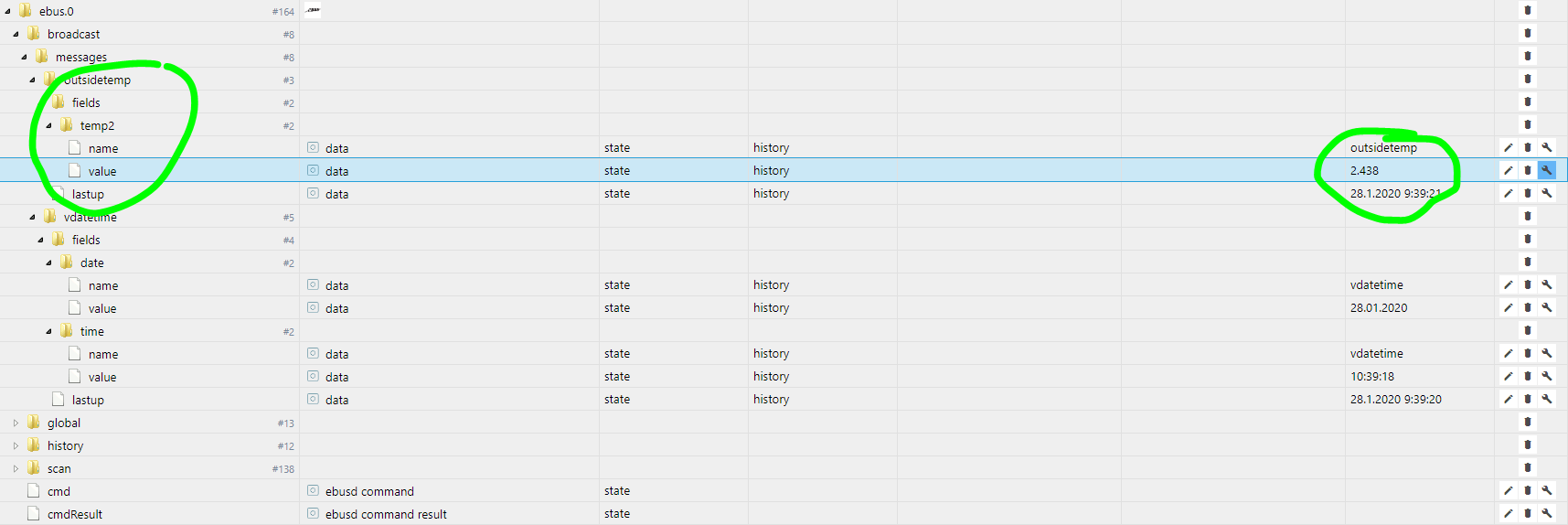
Bekomme nun zumindest eine Hand voll Werte. Allerdings werden diese nicht upgedatet.
Interessieren würde mich aber wie ich zu weiteren Werten komme.
Temperaturen der Heizung hauptsächlich...
-
Bekomme nun zumindest eine Hand voll Werte. Allerdings werden diese nicht upgedatet.
Interessieren würde mich aber wie ich zu weiteren Werten komme.
Temperaturen der Heizung hauptsächlich...
-
@xxx_turbo_xxx
Das eigentlich updaten kann man in der Instanz vom EBus einstellen.
Da gibt es doch diesen Schraubenschlüssel und dort kann man eine Intervall einstellen.@Harry Ja, der steht auf 10 sec aber es tut sich nix...
-
Es läuft!!!
Hab das ebusd file geändert und jetzt kommen nach und nach immer mehr Daten an!
EBUSD_OPTS="--configpath=http://ebusd.eu/config/ -d /dev/ttyUSB2 -p 8888 --latency=0 --receivetimeout=100000 -l /var/log/ebusd.log --scanconfig=full --httpport=8889 --htmlpath=/var/ebusd/html" -
Es läuft!!!
Hab das ebusd file geändert und jetzt kommen nach und nach immer mehr Daten an!
EBUSD_OPTS="--configpath=http://ebusd.eu/config/ -d /dev/ttyUSB2 -p 8888 --latency=0 --receivetimeout=100000 -l /var/log/ebusd.log --scanconfig=full --httpport=8889 --htmlpath=/var/ebusd/html"@xxx_turbo_xxx
Ja super ! Jetzt muss ich meinen noch in den Griff bekommen.
Irgendwo ist jetzt bei mir der Wurm drin -
Es läuft!!!
Hab das ebusd file geändert und jetzt kommen nach und nach immer mehr Daten an!
EBUSD_OPTS="--configpath=http://ebusd.eu/config/ -d /dev/ttyUSB2 -p 8888 --latency=0 --receivetimeout=100000 -l /var/log/ebusd.log --scanconfig=full --httpport=8889 --htmlpath=/var/ebusd/html" -
@xxx_turbo_xxx
Hallo Turbo,
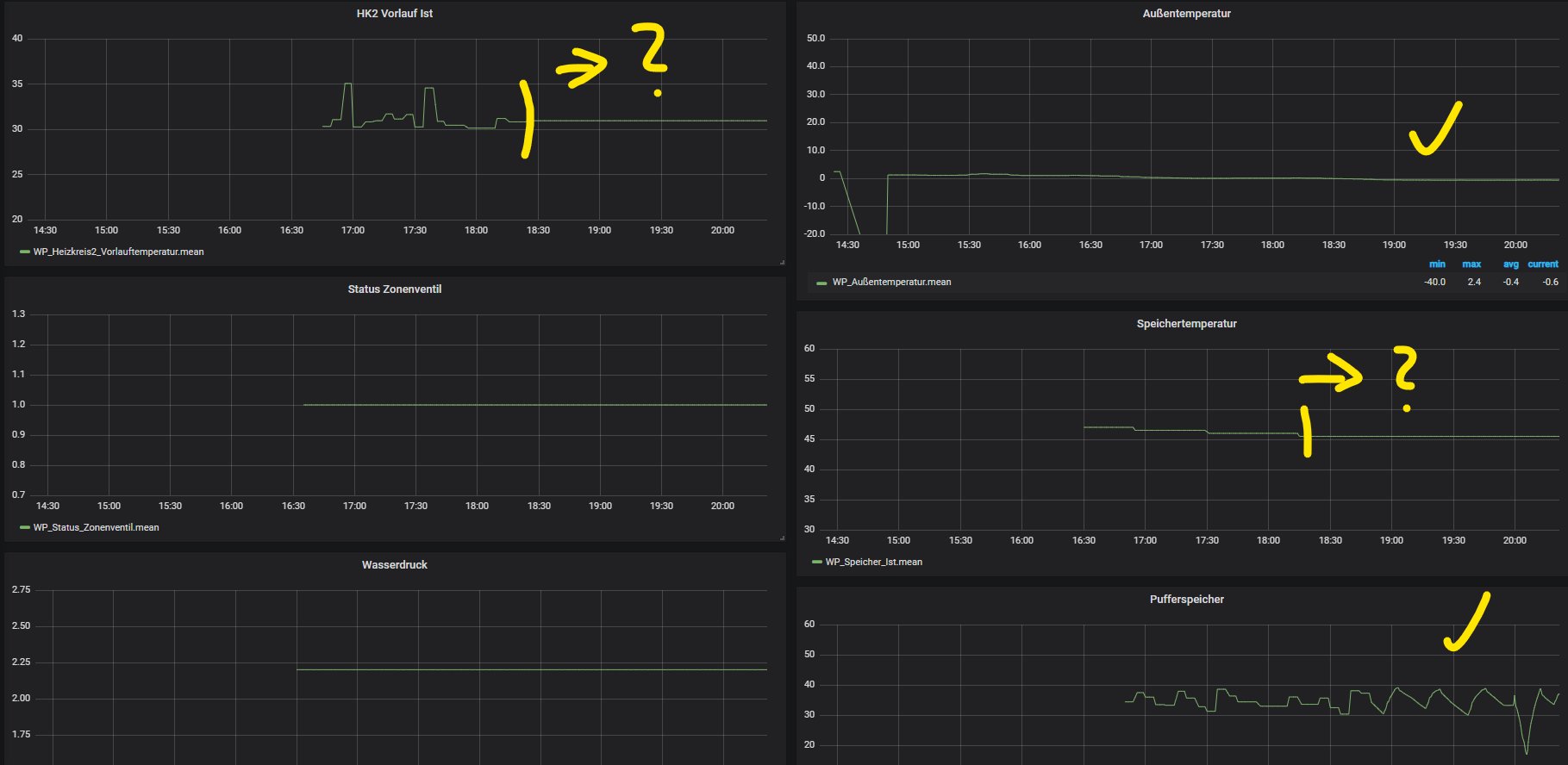
gibt es irgendwo ein Konfigurations Datei, die ich mit Nano öffnen muss um EDUSD_OPTS zu editieren. Wenn ja, wo finden ich die?@Harry Ich hab das System noch immernoch nicht 100% verstanden! Manche Daten kommen einwandfrei (Außentemperatur, Pufferspeicher), manche hängen seit 18:20(Vorlauftemperatur, Speichertemperatur)!?
Ja, die Datei gibt es...
sudo nano /etc/default/ebusd -
@Harry Ich hab das System noch immernoch nicht 100% verstanden! Manche Daten kommen einwandfrei (Außentemperatur, Pufferspeicher), manche hängen seit 18:20(Vorlauftemperatur, Speichertemperatur)!?
Ja, die Datei gibt es...
sudo nano /etc/default/ebusd@xxx_turbo_xxx
Ich hoffe dass ich mein System heute auch ans Laufen bekomme und dann gucke ich mir das mal an.
Wenn ich den Parameter --latency sehe, vielleicht hat der was damit zu tun.
Ich habe auch mal gelesen, das man das Poti abgleiche muss weil sonst manche Daten vom Bus verschluckt werden.
Vielleicht ist das ja bei dir der Fall.
Guck mal hier: [https://wiki.fhem.de/wiki/EBUS](link url) , da gibt es einen Bereich "Poti abgleichen".EBUSD_OPTS="--configpath=http://ebusd.eu/config/ -d /dev/ttyUSB2 -p 8888 --latency=0 --receivetimeout=100000 -l /var/log/ebusd.log --scanconfig=full --httpport=8889 --htmlpath=/var/ebusd/html" -
@Harry Ich hab das System noch immernoch nicht 100% verstanden! Manche Daten kommen einwandfrei (Außentemperatur, Pufferspeicher), manche hängen seit 18:20(Vorlauftemperatur, Speichertemperatur)!?
Ja, die Datei gibt es...
sudo nano /etc/default/ebusd@xxx_turbo_xxx
Hast du noch was rausgefunden bezüglich der Daten?
Ich habe mich gestern auch mal wieder mit dem Raspi beschäftigt.
Der Ebus läuft, IOBroker greift auch auf die Daten zu aber irgendwas ist faul weil ich nur überall "false" sehe.
Sprich die Kommunikation scheint zu funktionieren aber irgendwie ist ein Pfad oder sowas nicht korrekt gesetzt.
Hast du einen anderen Pfad bei der Installation angegeben?

672
Online32.6k
Users82.3k
Topics1.3m
Posts