




Web Adapter/ mobile Zugriff aus WAN

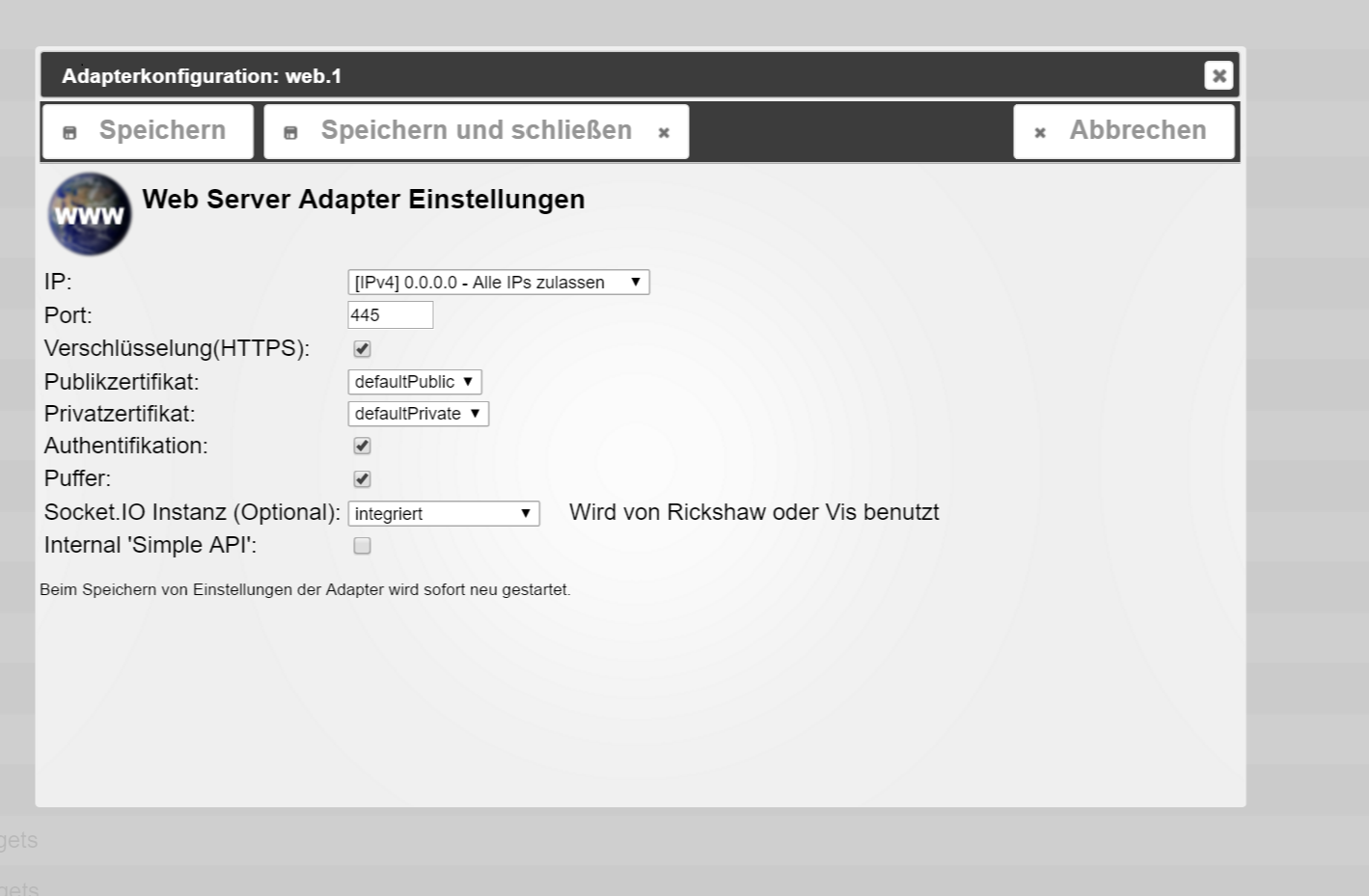
-
root@cubietruck:~# netstat -n -a | grep 445
tcp 0 0 0.0.0.0:445 0.0.0.0:* LISTEN
tcp 0 0 127.0.0.1:44452 127.0.0.1:9000 TIME_WAIT
tcp 0 0 127.0.0.1:9000 127.0.0.1:44584 TIME_WAIT
tcp 0 0 127.0.0.1:44525 127.0.0.1:9000 TIME_WAIT
tcp 0 0 127.0.0.1:9000 127.0.0.1:44451 TIME_WAIT
tcp 0 0 127.0.0.1:44517 127.0.0.1:9000 TIME_WAIT
tcp 0 0 127.0.0.1:44515 127.0.0.1:9000 TIME_WAIT
tcp 0 0 127.0.0.1:44556 127.0.0.1:9000 TIME_WAIT
tcp 0 0 127.0.0.1:44553 127.0.0.1:9000 TIME_WAIT
tcp 0 0 127.0.0.1:44506 127.0.0.1:9000 TIME_WAIT
tcp 0 0 127.0.0.1:45445 127.0.0.1:9000 TIME_WAIT
tcp 0 0 127.0.0.1:9000 127.0.0.1:44453 TIME_WAIT
tcp 0 0 127.0.0.1:44529 127.0.0.1:9000 TIME_WAIT
tcp 0 0 127.0.0.1:44561 127.0.0.1:9000 TIME_WAIT
tcp 0 0 127.0.0.1:44501 127.0.0.1:9000 TIME_WAIT
tcp 0 0 127.0.0.1:9000 127.0.0.1:44557 TIME_WAIT
tcp 0 0 127.0.0.1:9000 127.0.0.1:44509 TIME_WAIT
tcp 0 0 127.0.0.1:9000 127.0.0.1:44574 TIME_WAIT
tcp 0 0 127.0.0.1:44559 127.0.0.1:9000 TIME_WAIT
tcp 0 0 127.0.0.1:9000 127.0.0.1:44513 TIME_WAIT
tcp 0 0 127.0.0.1:44539 127.0.0.1:9000 TIME_WAIT
tcp 0 0 127.0.0.1:44547 127.0.0.1:9000 TIME_WAIT
tcp 0 0 127.0.0.1:44540 127.0.0.1:9000 TIME_WAIT
tcp 0 0 127.0.0.1:9000 127.0.0.1:44585 TIME_WAIT
tcp 0 0 127.0.0.1:44589 127.0.0.1:9000 TIME_WAIT
tcp 0 0 127.0.0.1:44522 127.0.0.1:9000 TIME_WAIT
tcp 0 0 127.0.0.1:9000 127.0.0.1:44503 TIME_WAIT
tcp 0 0 127.0.0.1:44548 127.0.0.1:9000 TIME_WAIT
tcp 0 0 127.0.0.1:44591 127.0.0.1:9000 TIME_WAIT
tcp 0 0 127.0.0.1:44555 127.0.0.1:9000 TIME_WAIT
tcp 0 0 127.0.0.1:9000 127.0.0.1:44536 TIME_WAIT
tcp 0 0 127.0.0.1:44550 127.0.0.1:9000 TIME_WAIT
tcp 0 0 127.0.0.1:9000 127.0.0.1:44583 TIME_WAIT
tcp 0 0 127.0.0.1:44526 127.0.0.1:9000 TIME_WAIT
tcp 0 0 127.0.0.1:9000 127.0.0.1:44590 TIME_WAIT
tcp 0 0 127.0.0.1:44519 127.0.0.1:9000 TIME_WAIT
tcp 0 0 127.0.0.1:9000 127.0.0.1:44560 TIME_WAIT
tcp 0 0 127.0.0.1:9000 127.0.0.1:44580 TIME_WAIT
tcp 0 0 127.0.0.1:9000 127.0.0.1:44537 TIME_WAIT
tcp 0 0 127.0.0.1:9000 127.0.0.1:44456 TIME_WAIT
tcp 0 0 127.0.0.1:9000 127.0.0.1:44579 TIME_WAIT
tcp 0 0 127.0.0.1:44534 127.0.0.1:9000 TIME_WAIT
tcp 0 0 127.0.0.1:9000 127.0.0.1:44455 TIME_WAIT
tcp 0 0 127.0.0.1:9000 127.0.0.1:44568 TIME_WAIT
tcp 0 0 127.0.0.1:44528 127.0.0.1:9000 TIME_WAIT
tcp 0 0 127.0.0.1:44457 127.0.0.1:9000 TIME_WAIT
tcp 0 0 127.0.0.1:44551 127.0.0.1:9000 TIME_WAIT
tcp 0 0 127.0.0.1:9000 127.0.0.1:44549 TIME_WAIT
tcp 0 0 127.0.0.1:9000 127.0.0.1:44575 TIME_WAIT
tcp 0 0 127.0.0.1:44523 127.0.0.1:9000 TIME_WAIT
tcp 0 0 127.0.0.1:9000 127.0.0.1:44552 TIME_WAIT
tcp 0 0 127.0.0.1:44445 127.0.0.1:9000 TIME_WAIT
tcp 0 0 127.0.0.1:44507 127.0.0.1:9000 TIME_WAIT
tcp 0 0 127.0.0.1:9000 127.0.0.1:44546 TIME_WAIT
tcp 0 0 127.0.0.1:44500 127.0.0.1:9000 TIME_WAIT
tcp 0 0 127.0.0.1:44535 127.0.0.1:9000 TIME_WAIT
tcp 0 0 127.0.0.1:44543 127.0.0.1:9000 TIME_WAIT
tcp 0 0 127.0.0.1:9000 127.0.0.1:44597 TIME_WAIT
tcp 0 0 127.0.0.1:9000 127.0.0.1:44531 TIME_WAIT
tcp 0 0 127.0.0.1:44454 127.0.0.1:9000 TIME_WAIT
tcp 0 0 127.0.0.1:44554 127.0.0.1:9000 TIME_WAIT
tcp 0 0 127.0.0.1:44599 127.0.0.1:9000 TIME_WAIT
tcp 0 0 127.0.0.1:44518 127.0.0.1:9000 TIME_WAIT
tcp 0 0 127.0.0.1:9000 127.0.0.1:44558 TIME_WAIT
tcp 0 0 127.0.0.1:9000 127.0.0.1:44458 TIME_WAIT
tcp 0 0 127.0.0.1:9000 127.0.0.1:44572 TIME_WAIT
tcp 0 0 127.0.0.1:9000 127.0.0.1:44562 TIME_WAIT
tcp 0 0 127.0.0.1:9000 127.0.0.1:44578 TIME_WAIT
tcp 0 0 127.0.0.1:9000 127.0.0.1:44459 TIME_WAIT
tcp 0 0 127.0.0.1:44542 127.0.0.1:9000 TIME_WAIT
tcp 0 0 127.0.0.1:44594 127.0.0.1:9000 TIME_WAIT
tcp 0 0 127.0.0.1:9000 127.0.0.1:44544 TIME_WAIT
tcp 0 0 127.0.0.1:44545 127.0.0.1:9000 TIME_WAIT
tcp 0 0 127.0.0.1:44569 127.0.0.1:9000 TIME_WAIT
tcp 0 0 127.0.0.1:44538 127.0.0.1:9000 TIME_WAIT
tcp 0 0 127.0.0.1:9000 127.0.0.1:44588 TIME_WAIT
tcp 0 0 127.0.0.1:44504 127.0.0.1:9000 TIME_WAIT
tcp 0 0 127.0.0.1:44596 127.0.0.1:9000 TIME_WAIT
tcp 0 0 127.0.0.1:9000 127.0.0.1:44530 TIME_WAIT
tcp 0 0 127.0.0.1:9000 127.0.0.1:44450 TIME_WAIT
tcp 0 0 127.0.0.1:9000 127.0.0.1:44595 TIME_WAIT
tcp 0 0 127.0.0.1:9000 127.0.0.1:44576 TIME_WAIT
tcp 0 0 127.0.0.1:44541 127.0.0.1:9000 TIME_WAIT
tcp6 0 0 :::445 :::* LISTEN
STREAM CONNECTED 4445root@cubietruck:~#
5 min später:
root@cubietruck:~# netstat -n -a | grep 445
tcp 0 0 0.0.0.0:445 0.0.0.0:* LISTEN
tcp 0 0 127.0.0.1:9001 127.0.0.1:54451 TIME_WAIT
tcp 0 0 127.0.0.1:54456 127.0.0.1:9001 TIME_WAIT
tcp 0 0 127.0.0.1:47445 127.0.0.1:9000 TIME_WAIT
tcp 0 0 127.0.0.1:9001 127.0.0.1:54450 TIME_WAIT
tcp6 0 0 :::445 :::* LISTEN
STREAM CONNECTED 4445root@cubietruck:~#
wenn ich versuche auf mobile :445 mit dem Browser zuzugreifen
root@cubietruck:~# netstat -n -a | grep 445
tcp 0 0 0.0.0.0:445 0.0.0.0:* LISTEN
tcp 0 0 192.168.192.250:445 192.168.192.61:50185 ESTABLISHED
tcp 0 0 127.0.0.1:47445 127.0.0.1:9000 TIME_WAIT
tcp 0 0 127.0.0.1:49445 127.0.0.1:9000 TIME_WAIT
tcp 0 0 192.168.192.250:445 192.168.192.61:50186 ESTABLISHED
tcp 0 0 127.0.0.1:48445 127.0.0.1:9000 TIME_WAIT
tcp6 0 0 :::445 :::* LISTEN
STREAM CONNECTED 4445root@cubietruck:~#
scheint ja so als wen die verbindung steht
tcp 0 0 192.168.192.250:445 192.168.192.61:50185 ESTABLISHED
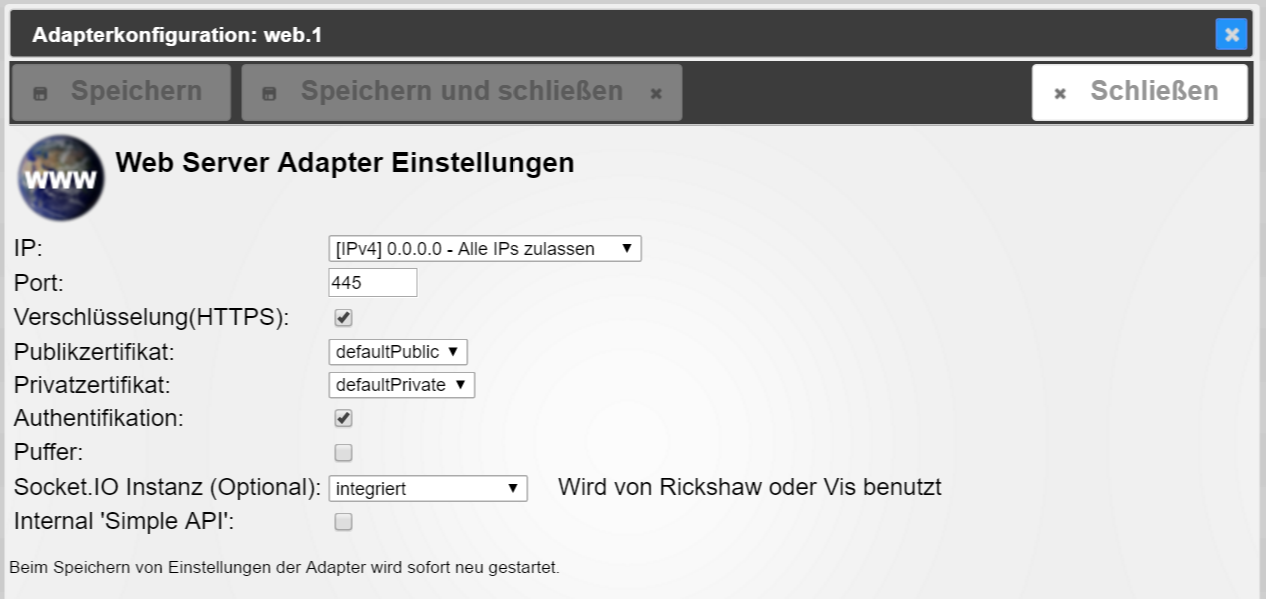
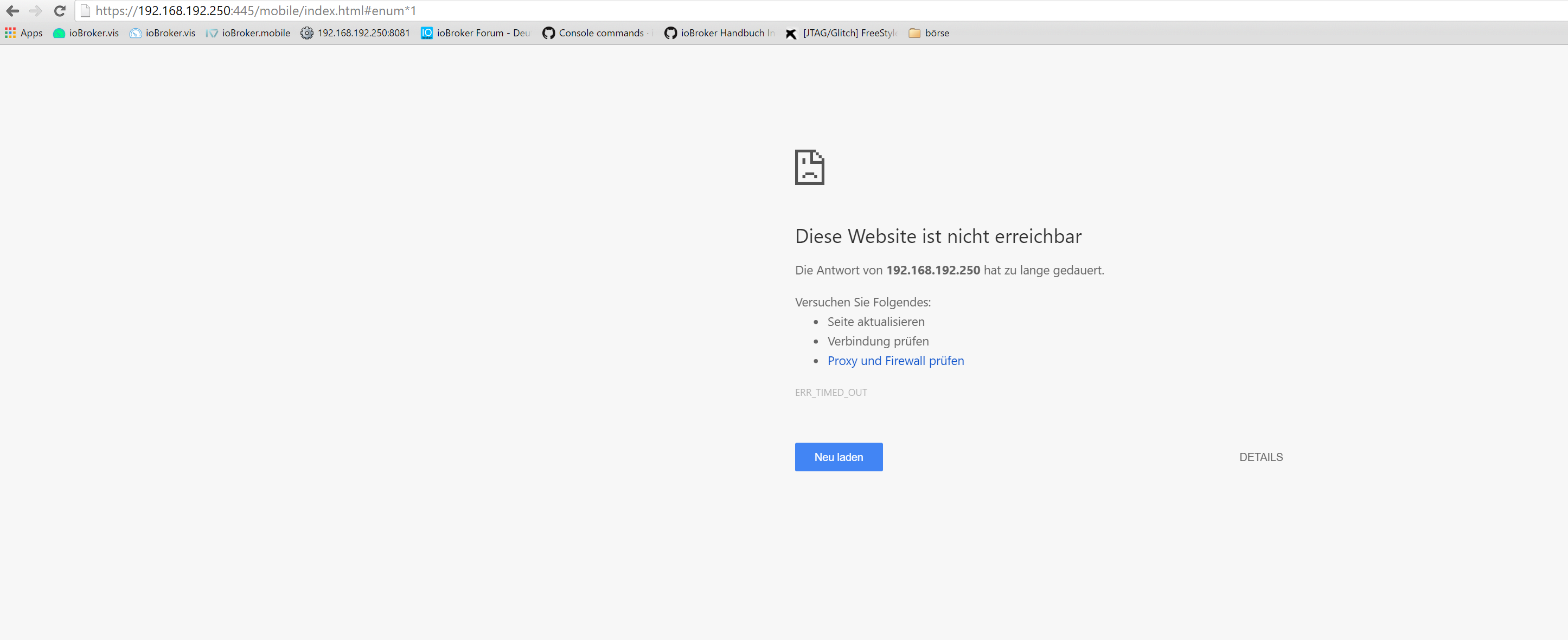
-
ok, also
port 446 ohne https geht und ich bekomme zugriff vom browser:
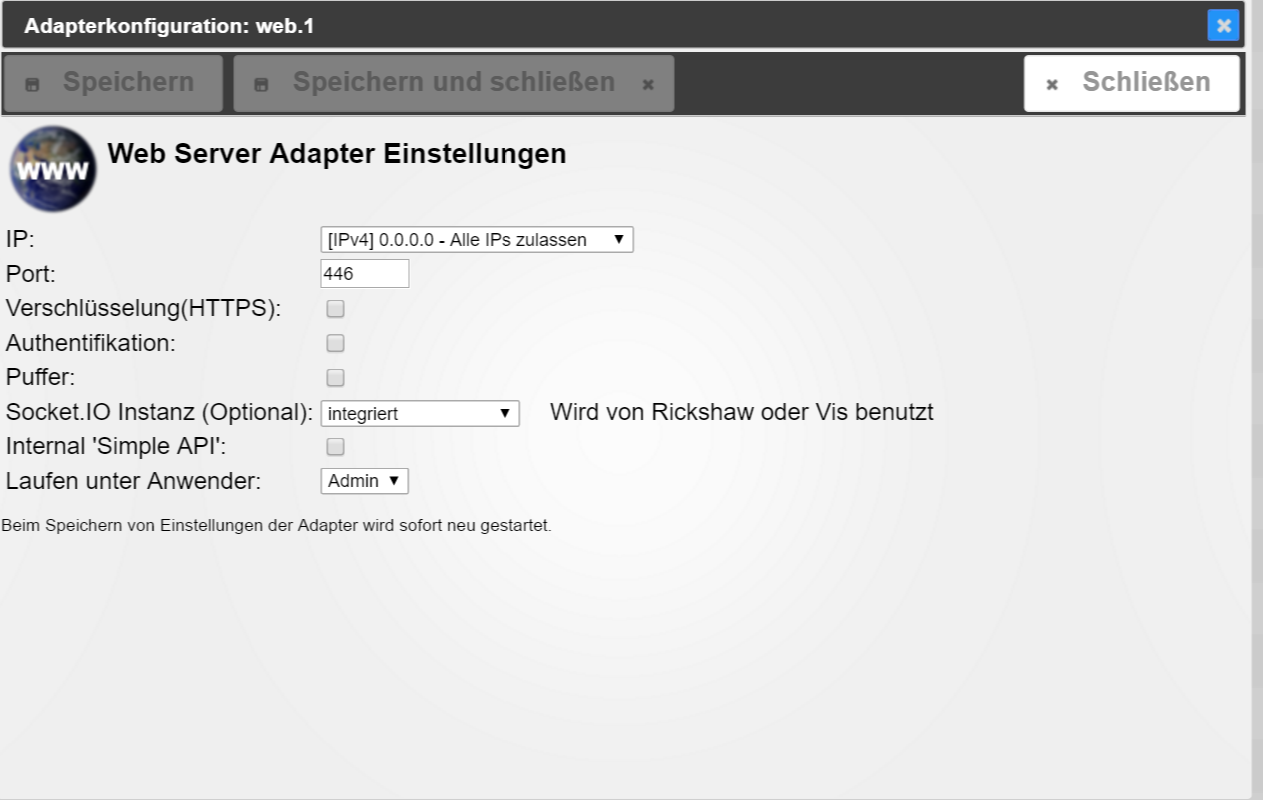
setzte ich jetzt das häckchen bei https , kommt keine verbindung zustande, neustart hab ich versucht
root@cubietruck:~# netstat -n -a | grep 446
tcp 0 0 0.0.0.0:446 0.0.0.0:* LISTEN
tcp 0 0 192.168.192.250:446 192.168.192.61:50538 TIME_WAIT
tcp 0 0 192.168.192.250:446 192.168.192.61:50544 TIME_WAIT
tcp 0 0 192.168.192.250:446 192.168.192.61:50518 TIME_WAIT
tcp 0 0 192.168.192.250:446 192.168.192.61:50534 TIME_WAIT
tcp 0 0 192.168.192.250:446 192.168.192.61:50535 TIME_WAIT
tcp 0 0 192.168.192.250:446 192.168.192.61:50523 TIME_WAIT
tcp 0 0 192.168.192.250:446 192.168.192.61:50504 TIME_WAIT
tcp 0 0 192.168.192.250:446 192.168.192.61:50546 TIME_WAIT
tcp 0 0 192.168.192.250:446 192.168.192.61:50526 TIME_WAIT
tcp 0 0 192.168.192.250:446 192.168.192.61:50525 TIME_WAIT
tcp 0 0 192.168.192.250:446 192.168.192.61:50527 TIME_WAIT
tcp 0 0 192.168.192.250:446 192.168.192.61:50532 TIME_WAIT
tcp 0 0 192.168.192.250:446 192.168.192.61:50528 TIME_WAIT
tcp 0 0 192.168.192.250:446 192.168.192.61:50510 TIME_WAIT
tcp 0 0 192.168.192.250:446 192.168.192.61:50519 TIME_WAIT
tcp 0 0 127.0.0.1:53446 127.0.0.1:9000 TIME_WAIT
tcp 0 0 192.168.192.250:446 192.168.192.61:50547 TIME_WAIT
tcp 0 0 192.168.192.250:446 192.168.192.61:50506 TIME_WAIT
tcp 0 0 192.168.192.250:446 192.168.192.61:50529 TIME_WAIT
tcp 0 0 192.168.192.250:446 192.168.192.61:50533 TIME_WAIT
tcp 0 0 192.168.192.250:446 192.168.192.61:50543 TIME_WAIT
tcp 0 0 192.168.192.250:446 192.168.192.61:50530 TIME_WAIT
tcp 0 0 192.168.192.250:446 192.168.192.61:50512 TIME_WAIT
tcp 0 0 192.168.192.250:446 192.168.192.61:50542 TIME_WAIT
tcp 0 0 192.168.192.250:446 192.168.192.61:50522 TIME_WAIT
tcp 0 0 192.168.192.250:446 192.168.192.61:50520 TIME_WAIT
tcp 0 0 192.168.192.250:446 192.168.192.61:50503 TIME_WAIT
tcp 0 0 192.168.192.250:446 192.168.192.61:50540 TIME_WAIT
tcp 0 0 192.168.192.250:446 192.168.192.61:50531 TIME_WAIT
tcp 0 0 192.168.192.250:446 192.168.192.61:50545 TIME_WAIT
tcp 0 0 192.168.192.250:446 192.168.192.61:50539 TIME_WAIT
tcp 0 0 192.168.192.250:446 192.168.192.61:50517 TIME_WAIT
tcp 0 0 192.168.192.250:446 192.168.192.61:50507 TIME_WAIT
tcp 0 0 192.168.192.250:446 192.168.192.61:50521 TIME_WAIT
tcp 0 0 192.168.192.250:446 192.168.192.61:50511 TIME_WAIT
tcp 0 0 192.168.192.250:446 192.168.192.61:50536 TIME_WAIT
tcp 0 0 192.168.192.250:446 192.168.192.61:50537 TIME_WAIT
tcp 0 0 192.168.192.250:446 192.168.192.61:50541 TIME_WAIT
tcp 0 0 192.168.192.250:446 192.168.192.61:50548 TIME_WAIT
tcp 0 0 192.168.192.250:446 192.168.192.61:50524 TIME_WAIT
root@cubietruck:~#
-
ok, also
port 446 ohne https geht und ich bekomme zugriff vom browser:
filename="2016-06-26 (3).png" index="0">~~
setzte ich jetzt das häckchen bei https , kommt keine verbindung zustande, neustart hab ich versucht
root@cubietruck:~# netstat -n -a | grep 446
tcp 0 0 0.0.0.0:446 0.0.0.0:* LISTEN
tcp 0 0 192.168.192.250:446 192.168.192.61:50538 TIME_WAIT
tcp 0 0 192.168.192.250:446 192.168.192.61:50544 TIME_WAIT
tcp 0 0 192.168.192.250:446 192.168.192.61:50518 TIME_WAIT
tcp 0 0 192.168.192.250:446 192.168.192.61:50534 TIME_WAIT
tcp 0 0 192.168.192.250:446 192.168.192.61:50535 TIME_WAIT
tcp 0 0 192.168.192.250:446 192.168.192.61:50523 TIME_WAIT
tcp 0 0 192.168.192.250:446 192.168.192.61:50504 TIME_WAIT
tcp 0 0 192.168.192.250:446 192.168.192.61:50546 TIME_WAIT
tcp 0 0 192.168.192.250:446 192.168.192.61:50526 TIME_WAIT
tcp 0 0 192.168.192.250:446 192.168.192.61:50525 TIME_WAIT
tcp 0 0 192.168.192.250:446 192.168.192.61:50527 TIME_WAIT
tcp 0 0 192.168.192.250:446 192.168.192.61:50532 TIME_WAIT
tcp 0 0 192.168.192.250:446 192.168.192.61:50528 TIME_WAIT
tcp 0 0 192.168.192.250:446 192.168.192.61:50510 TIME_WAIT
tcp 0 0 192.168.192.250:446 192.168.192.61:50519 TIME_WAIT
tcp 0 0 127.0.0.1:53446 127.0.0.1:9000 TIME_WAIT
tcp 0 0 192.168.192.250:446 192.168.192.61:50547 TIME_WAIT
tcp 0 0 192.168.192.250:446 192.168.192.61:50506 TIME_WAIT
tcp 0 0 192.168.192.250:446 192.168.192.61:50529 TIME_WAIT
tcp 0 0 192.168.192.250:446 192.168.192.61:50533 TIME_WAIT
tcp 0 0 192.168.192.250:446 192.168.192.61:50543 TIME_WAIT
tcp 0 0 192.168.192.250:446 192.168.192.61:50530 TIME_WAIT
tcp 0 0 192.168.192.250:446 192.168.192.61:50512 TIME_WAIT
tcp 0 0 192.168.192.250:446 192.168.192.61:50542 TIME_WAIT
tcp 0 0 192.168.192.250:446 192.168.192.61:50522 TIME_WAIT
tcp 0 0 192.168.192.250:446 192.168.192.61:50520 TIME_WAIT
tcp 0 0 192.168.192.250:446 192.168.192.61:50503 TIME_WAIT
tcp 0 0 192.168.192.250:446 192.168.192.61:50540 TIME_WAIT
tcp 0 0 192.168.192.250:446 192.168.192.61:50531 TIME_WAIT
tcp 0 0 192.168.192.250:446 192.168.192.61:50545 TIME_WAIT
tcp 0 0 192.168.192.250:446 192.168.192.61:50539 TIME_WAIT
tcp 0 0 192.168.192.250:446 192.168.192.61:50517 TIME_WAIT
tcp 0 0 192.168.192.250:446 192.168.192.61:50507 TIME_WAIT
tcp 0 0 192.168.192.250:446 192.168.192.61:50521 TIME_WAIT
tcp 0 0 192.168.192.250:446 192.168.192.61:50511 TIME_WAIT
tcp 0 0 192.168.192.250:446 192.168.192.61:50536 TIME_WAIT
tcp 0 0 192.168.192.250:446 192.168.192.61:50537 TIME_WAIT
tcp 0 0 192.168.192.250:446 192.168.192.61:50541 TIME_WAIT
tcp 0 0 192.168.192.250:446 192.168.192.61:50548 TIME_WAIT
tcp 0 0 192.168.192.250:446 192.168.192.61:50524 TIME_WAIT
root@cubietruck:~# `
Wenn https eingeschaltet öffnest du die Seite dann mit http://* oder https://* ?
Ohne das "s" geht's schief da der Browser nicht weiß das er Secure connecten muss
-
Ne ich öffne mit
https://
Zwei Post's weiter oben hab ich den Browser mit Adressleiste angefügt `
Ok sorry übersehen….
Dann würde ich mal auf Certificate tippen.
-
Instanz = OK
-
Port erreichbar = OK, geht ja ohne https
Dann fällt mir sonst auch nichts mehr ein
Sent from my iPhone using Tapatalk
-
-
-
Aber was muss ich neuinstallieren um die Zertifikate neu zu bekommen `
Falls Zertifikate spinnen, dann sollte man was im Log sehen.Immerhin die Zertifikate (self-signed) liegen noch hier:
-
so ich bin wieder ein schritt weiter :
ich komme nun bis zur Anmeldung ,
https://192.168.192.250:446/mobile/index.html
auf der nächsten seite dann :
File index.html not found: permissionError
ich habe ein user test angelegt , gebe ich ein falsches PW ein sagt er es mir auch ….
-
so ich bin wieder ein schritt weiter :
ich komme nun bis zur Anmeldung ,
https://192.168.192.250:446/mobile/index.html
auf der nächsten seite dann :
File index.html not found: permissionError
ich habe ein user test angelegt , gebe ich ein falsches PW ein sagt er es mir auch …. `
Probier mal erst mit "admin" (Pass: "iobroker") anzumelden. -
okay hat geklappt, super
wie kann ich jetzt aber ein user erstellen? `
Du hast schon richtig gemacht. Aber dein User darf nichts.Du musst da eine Gruppe erzeugen und die Rechte da einstellen.
Danach musst diesen User zur Gruppe hinzufügen.
Was muss User können?
-

Hey! Du scheinst an dieser Unterhaltung interessiert zu sein, hast aber noch kein Konto.
Hast du es satt, bei jedem Besuch durch die gleichen Beiträge zu scrollen? Wenn du dich für ein Konto anmeldest, kommst du immer genau dorthin zurück, wo du zuvor warst, und kannst dich über neue Antworten benachrichtigen lassen (entweder per E-Mail oder Push-Benachrichtigung). Du kannst auch Lesezeichen speichern und Beiträge positiv bewerten, um anderen Community-Mitgliedern deine Wertschätzung zu zeigen.
Mit deinem Input könnte dieser Beitrag noch besser werden 💗
Registrieren Anmelden435
Online33.0k
Benutzer83.5k
Themen1.3m
Beiträge