Skip to content
  • Home
  • Recent
  • Tags
  • 0 Unread 0
  • Categories
  • Unreplied
  • Popular
  • GitHub
  • Docu
  • Hilfe
Skins
  • Light
  • Brite
  • Cerulean
  • Cosmo
  • Flatly
  • Journal
  • Litera
  • Lumen
  • Lux
  • Materia
  • Minty
  • Morph
  • Pulse
  • Sandstone
  • Simplex
  • Sketchy
  • Spacelab
  • United
  • Yeti
  • Zephyr
  • Dark
  • Cyborg
  • Darkly
  • Quartz
  • Slate
  • Solar
  • Superhero
  • Vapor

  • Default (No Skin)
  • No Skin
Collapse
ioBroker Logo

Community Forum

donate donate
  1. ioBroker Community Home
  2. Deutsch
  3. Tester
  4. Test Adapter VW Connect für VW, ID, Audi, Seat, Skoda
NEWS

  • Monatsrückblick Januar/Februar 2026 ist online!
    BluefoxB
    Bluefox
    18
    1
    805

  • Jahresrückblick 2025 – unser neuer Blogbeitrag ist online! ✨
    BluefoxB
    Bluefox
    18
    1
    6.3k

  • Neuer Blogbeitrag: Monatsrückblick - Dezember 2025 🎄
    BluefoxB
    Bluefox
    13
    1
    1.6k

Test Adapter VW Connect für VW, ID, Audi, Seat, Skoda
Scheduled Pinned Locked Moved Tester
audiid.3myaudiseatskodaskoda connectvolkswagenvw idwe connectwecharge
3.3k Posts 418 Posters 1.8m Views 366 Watching
  • Oldest to Newest
  • Newest to Oldest
  • Most Votes
Reply
  • Reply as topic
Log in to reply
This topic has been deleted. Only users with topic management privileges can see it.
  • B Offline
    B Offline
    brupas
    wrote on last edited by
    #208

    Hallo allerseits
    Da ich nun in meinem Kodiaq das Connect eingerichtet habe, musste ich natürlich diesen adapter installieren 😊
    Auf den ersten Blick scheint es zu funktionieren. Wollte zum testen die Standheizung einschalten. Kriege dann jedoch diese error.
    jemand eine Idee?

    Bildschirmfoto 2020-05-24 um 15.11.37.png

    T 1 Reply Last reply
    0
    • B brupas

      Hallo allerseits
      Da ich nun in meinem Kodiaq das Connect eingerichtet habe, musste ich natürlich diesen adapter installieren 😊
      Auf den ersten Blick scheint es zu funktionieren. Wollte zum testen die Standheizung einschalten. Kriege dann jedoch diese error.
      jemand eine Idee?

      Bildschirmfoto 2020-05-24 um 15.11.37.png

      T Offline
      T Offline
      tombox
      wrote on last edited by
      #209

      @brupas hast du den sPIN eingegeben

      B 1 Reply Last reply
      0
      • T tombox

        @brupas hast du den sPIN eingegeben

        B Offline
        B Offline
        brupas
        wrote on last edited by
        #210

        @tombox ja habe ich gemacht. Soeben nochmals kontrolliert.

        FredFF 1 Reply Last reply
        0
        • B brupas

          @tombox ja habe ich gemacht. Soeben nochmals kontrolliert.

          FredFF Online
          FredFF Online
          FredF
          Most Active Forum Testing
          wrote on last edited by
          #211

          @tombox
          Ich versuche nun seit längerem Daten vom Adapter zu bekommen. Leider auch mit 0.0.16 bisher erfolglos...
          Fehler 403 und 409 was bedeuten die?
          Login scheint zu klappen, Adapter ist auch grün und die Vehicle ID ist auch in den Objekten zu sehen.
          Daten sind in der App vorhanden. Es ist ein Passat.

          Kann man aus dem debug Log was erkennen?


          2020-05-24 16:42:03.689 - info: host.ioBrokerLife instance system.adapter.vw-connect.0 started with pid 26130
          2020-05-24 16:42:04.530 - debug: vw-connect.0 (26130) Redis Objects: Use Redis connection: 0.0.0.0:9001
          2020-05-24 16:42:04.547 - debug: vw-connect.0 (26130) Objects client ready ... initialize now
          2020-05-24 16:42:04.548 - debug: vw-connect.0 (26130) Objects create System PubSub Client
          2020-05-24 16:42:04.549 - debug: vw-connect.0 (26130) Objects create User PubSub Client
          2020-05-24 16:42:04.549 - debug: vw-connect.0 (26130) Objects client initialize lua scripts
          2020-05-24 16:42:04.563 - debug: vw-connect.0 (26130) Objects connected to redis: 0.0.0.0:9001
          2020-05-24 16:42:04.566 - debug: vw-connect.0 (26130) objectDB connected
          2020-05-24 16:42:04.567 - debug: vw-connect.0 (26130) Redis States: Use Redis connection: 0.0.0.0:9000
          2020-05-24 16:42:04.572 - debug: vw-connect.0 (26130) States create User PubSub Client
          2020-05-24 16:42:04.573 - debug: vw-connect.0 (26130) States create System PubSub Client
          2020-05-24 16:42:04.581 - debug: vw-connect.0 (26130) States connected to redis: 0.0.0.0:9000
          2020-05-24 16:42:04.581 - debug: vw-connect.0 (26130) statesDB connected
          2020-05-24 16:42:04.938 - info: vw-connect.0 (26130) starting. Version 0.0.16 in /opt/iobroker/node_modules/iobroker.vw-connect, node: v10.19.0
          2020-05-24 16:42:05.577 - debug: vw-connect.0 (26130) parseEmailForm
          2020-05-24 16:42:05.980 - debug: vw-connect.0 (26130) parsePasswordForm
          2020-05-24 16:42:06.366 - debug: vw-connect.0 (26130) ""
          2020-05-24 16:42:06.366 - debug: vw-connect.0 (26130) {"date":"Sun, 24 May 2020 14:42:06 GMT","content-length":"0","connection":"close","cache-control":"no-cache, no-store, max-age=0, must-revalidate","content-language":"en","expires":"0","location":"https://identity.vwgroup.io/oidc/v1/oauth/sso?clientId=9496332b-ea03-4091-a224-8c746b885068@apps_vw-dilab_com&relayState=e8fa0fd7522e62ed6fae044202f258b42aa67585&userId=c8be6aa5-a7d6-4f59-bf43-6537eab513b0&HMAC=b728d7970d34309086bdaae699558f749fee27760db9a0046d09055d30f4bb5d","pragma":"no-cache","strict-transport-security":"max-age=31536000 ; includeSubDomains","x-content-type-options":"nosniff","x-frame-options":"DENY","x-vcap-request-id":"47357ee4-b08c-4fbc-404b-c0dc8c3da1ce","x-xss-protection":"1; mode=block"}
          2020-05-24 16:42:07.030 - debug: vw-connect.0 (26130) Error: Invalid protocol: carnet:
          2020-05-24 16:42:07.484 - debug: vw-connect.0 (26130) Login successful
          2020-05-24 16:42:07.484 - debug: vw-connect.0 (26130) getData
          2020-05-24 16:42:07.692 - debug: vw-connect.0 (26130) {"firstName":"xxx","lastName":"xxx ","salutation":"SALUTATION:MR","preferredContactChannel":"MARKETING_BLOCKADES:MOBILE","nickname":"xxx","businessIdentifierType":"BUSINESS_IDENTIFIER_TYPE:MBB_ID","businessIdentifierValue":"7jUNVnGNxIN7mqBgFOnIPzgLIsU","addresses":[{"country":"DE","usageType":"ADDRESS_USAGE_TYPE:HOME_ADDRESS","uuid":"4dd05dce-b874-417e-905d-ceb874b17e12","_updated":"2020-05-24T10:05:28.264Z","primary":true,"name":"xxx xxx","street":"xxx","housenumber":"11","zipCode":"xxx","city":"xxx","type":"ADDRESS_TYPE:v1.address.GermanAddress"},{"country":"DE","usageType":"ADDRESS_USAGE_TYPE:BILLING_ADDRESS","uuid":"0c5906f0-81fd-4e9f-80bf-cb147ed125e6","_updated":"2020-05-08T11:31:55.560Z","primary":false,"name":"xxx xxx","street":"xxx","housenumber":"11","zipCode":"xxx","city":"xxx","type":"ADDRESS_TYPE:v1.address.GermanAddress"}],"userIsPrivateIndicator":false,"preferredLanguage":"de"}
          2020-05-24 16:42:07.917 - debug: vw-connect.0 (26130) {"userVehicles":{"vehicle":["xxxx"]}}
          2020-05-24 16:42:08.242 - error: vw-connect.0 (26130) 403
          2020-05-24 16:42:08.242 - error: vw-connect.0 (26130) status update Failed
          2020-05-24 16:42:09.039 - debug: vw-connect.0 (26130) system.adapter.admin.0: logging true
          2020-05-24 16:42:09.189 - error: vw-connect.0 (26130) 409
          2020-05-24 16:42:09.189 - error: vw-connect.0 (26130) {"error":{"errorCode":"gw.error.unknown","description":"Invalid backend error"}}
          2020-05-24 16:42:09.189 - error: vw-connect.0 (26130) get vehicle data Failed

          Das vielleicht ein Problem:

          2020-05-24 16:42:07.030 - debug: vw-connect.0 (26130) Error: Invalid protocol: carnet:
          
          T B 2 Replies Last reply
          0
          • FredFF FredF

            @tombox
            Ich versuche nun seit längerem Daten vom Adapter zu bekommen. Leider auch mit 0.0.16 bisher erfolglos...
            Fehler 403 und 409 was bedeuten die?
            Login scheint zu klappen, Adapter ist auch grün und die Vehicle ID ist auch in den Objekten zu sehen.
            Daten sind in der App vorhanden. Es ist ein Passat.

            Kann man aus dem debug Log was erkennen?


            2020-05-24 16:42:03.689 - info: host.ioBrokerLife instance system.adapter.vw-connect.0 started with pid 26130
            2020-05-24 16:42:04.530 - debug: vw-connect.0 (26130) Redis Objects: Use Redis connection: 0.0.0.0:9001
            2020-05-24 16:42:04.547 - debug: vw-connect.0 (26130) Objects client ready ... initialize now
            2020-05-24 16:42:04.548 - debug: vw-connect.0 (26130) Objects create System PubSub Client
            2020-05-24 16:42:04.549 - debug: vw-connect.0 (26130) Objects create User PubSub Client
            2020-05-24 16:42:04.549 - debug: vw-connect.0 (26130) Objects client initialize lua scripts
            2020-05-24 16:42:04.563 - debug: vw-connect.0 (26130) Objects connected to redis: 0.0.0.0:9001
            2020-05-24 16:42:04.566 - debug: vw-connect.0 (26130) objectDB connected
            2020-05-24 16:42:04.567 - debug: vw-connect.0 (26130) Redis States: Use Redis connection: 0.0.0.0:9000
            2020-05-24 16:42:04.572 - debug: vw-connect.0 (26130) States create User PubSub Client
            2020-05-24 16:42:04.573 - debug: vw-connect.0 (26130) States create System PubSub Client
            2020-05-24 16:42:04.581 - debug: vw-connect.0 (26130) States connected to redis: 0.0.0.0:9000
            2020-05-24 16:42:04.581 - debug: vw-connect.0 (26130) statesDB connected
            2020-05-24 16:42:04.938 - info: vw-connect.0 (26130) starting. Version 0.0.16 in /opt/iobroker/node_modules/iobroker.vw-connect, node: v10.19.0
            2020-05-24 16:42:05.577 - debug: vw-connect.0 (26130) parseEmailForm
            2020-05-24 16:42:05.980 - debug: vw-connect.0 (26130) parsePasswordForm
            2020-05-24 16:42:06.366 - debug: vw-connect.0 (26130) ""
            2020-05-24 16:42:06.366 - debug: vw-connect.0 (26130) {"date":"Sun, 24 May 2020 14:42:06 GMT","content-length":"0","connection":"close","cache-control":"no-cache, no-store, max-age=0, must-revalidate","content-language":"en","expires":"0","location":"https://identity.vwgroup.io/oidc/v1/oauth/sso?clientId=9496332b-ea03-4091-a224-8c746b885068@apps_vw-dilab_com&relayState=e8fa0fd7522e62ed6fae044202f258b42aa67585&userId=c8be6aa5-a7d6-4f59-bf43-6537eab513b0&HMAC=b728d7970d34309086bdaae699558f749fee27760db9a0046d09055d30f4bb5d","pragma":"no-cache","strict-transport-security":"max-age=31536000 ; includeSubDomains","x-content-type-options":"nosniff","x-frame-options":"DENY","x-vcap-request-id":"47357ee4-b08c-4fbc-404b-c0dc8c3da1ce","x-xss-protection":"1; mode=block"}
            2020-05-24 16:42:07.030 - debug: vw-connect.0 (26130) Error: Invalid protocol: carnet:
            2020-05-24 16:42:07.484 - debug: vw-connect.0 (26130) Login successful
            2020-05-24 16:42:07.484 - debug: vw-connect.0 (26130) getData
            2020-05-24 16:42:07.692 - debug: vw-connect.0 (26130) {"firstName":"xxx","lastName":"xxx ","salutation":"SALUTATION:MR","preferredContactChannel":"MARKETING_BLOCKADES:MOBILE","nickname":"xxx","businessIdentifierType":"BUSINESS_IDENTIFIER_TYPE:MBB_ID","businessIdentifierValue":"7jUNVnGNxIN7mqBgFOnIPzgLIsU","addresses":[{"country":"DE","usageType":"ADDRESS_USAGE_TYPE:HOME_ADDRESS","uuid":"4dd05dce-b874-417e-905d-ceb874b17e12","_updated":"2020-05-24T10:05:28.264Z","primary":true,"name":"xxx xxx","street":"xxx","housenumber":"11","zipCode":"xxx","city":"xxx","type":"ADDRESS_TYPE:v1.address.GermanAddress"},{"country":"DE","usageType":"ADDRESS_USAGE_TYPE:BILLING_ADDRESS","uuid":"0c5906f0-81fd-4e9f-80bf-cb147ed125e6","_updated":"2020-05-08T11:31:55.560Z","primary":false,"name":"xxx xxx","street":"xxx","housenumber":"11","zipCode":"xxx","city":"xxx","type":"ADDRESS_TYPE:v1.address.GermanAddress"}],"userIsPrivateIndicator":false,"preferredLanguage":"de"}
            2020-05-24 16:42:07.917 - debug: vw-connect.0 (26130) {"userVehicles":{"vehicle":["xxxx"]}}
            2020-05-24 16:42:08.242 - error: vw-connect.0 (26130) 403
            2020-05-24 16:42:08.242 - error: vw-connect.0 (26130) status update Failed
            2020-05-24 16:42:09.039 - debug: vw-connect.0 (26130) system.adapter.admin.0: logging true
            2020-05-24 16:42:09.189 - error: vw-connect.0 (26130) 409
            2020-05-24 16:42:09.189 - error: vw-connect.0 (26130) {"error":{"errorCode":"gw.error.unknown","description":"Invalid backend error"}}
            2020-05-24 16:42:09.189 - error: vw-connect.0 (26130) get vehicle data Failed

            Das vielleicht ein Problem:

            2020-05-24 16:42:07.030 - debug: vw-connect.0 (26130) Error: Invalid protocol: carnet:
            
            T Offline
            T Offline
            tombox
            wrote on last edited by
            #212

            @FredF kannst du mir mal eine pn schreiben?

            1 Reply Last reply
            0
            • FredFF FredF

              @tombox
              Ich versuche nun seit längerem Daten vom Adapter zu bekommen. Leider auch mit 0.0.16 bisher erfolglos...
              Fehler 403 und 409 was bedeuten die?
              Login scheint zu klappen, Adapter ist auch grün und die Vehicle ID ist auch in den Objekten zu sehen.
              Daten sind in der App vorhanden. Es ist ein Passat.

              Kann man aus dem debug Log was erkennen?


              2020-05-24 16:42:03.689 - info: host.ioBrokerLife instance system.adapter.vw-connect.0 started with pid 26130
              2020-05-24 16:42:04.530 - debug: vw-connect.0 (26130) Redis Objects: Use Redis connection: 0.0.0.0:9001
              2020-05-24 16:42:04.547 - debug: vw-connect.0 (26130) Objects client ready ... initialize now
              2020-05-24 16:42:04.548 - debug: vw-connect.0 (26130) Objects create System PubSub Client
              2020-05-24 16:42:04.549 - debug: vw-connect.0 (26130) Objects create User PubSub Client
              2020-05-24 16:42:04.549 - debug: vw-connect.0 (26130) Objects client initialize lua scripts
              2020-05-24 16:42:04.563 - debug: vw-connect.0 (26130) Objects connected to redis: 0.0.0.0:9001
              2020-05-24 16:42:04.566 - debug: vw-connect.0 (26130) objectDB connected
              2020-05-24 16:42:04.567 - debug: vw-connect.0 (26130) Redis States: Use Redis connection: 0.0.0.0:9000
              2020-05-24 16:42:04.572 - debug: vw-connect.0 (26130) States create User PubSub Client
              2020-05-24 16:42:04.573 - debug: vw-connect.0 (26130) States create System PubSub Client
              2020-05-24 16:42:04.581 - debug: vw-connect.0 (26130) States connected to redis: 0.0.0.0:9000
              2020-05-24 16:42:04.581 - debug: vw-connect.0 (26130) statesDB connected
              2020-05-24 16:42:04.938 - info: vw-connect.0 (26130) starting. Version 0.0.16 in /opt/iobroker/node_modules/iobroker.vw-connect, node: v10.19.0
              2020-05-24 16:42:05.577 - debug: vw-connect.0 (26130) parseEmailForm
              2020-05-24 16:42:05.980 - debug: vw-connect.0 (26130) parsePasswordForm
              2020-05-24 16:42:06.366 - debug: vw-connect.0 (26130) ""
              2020-05-24 16:42:06.366 - debug: vw-connect.0 (26130) {"date":"Sun, 24 May 2020 14:42:06 GMT","content-length":"0","connection":"close","cache-control":"no-cache, no-store, max-age=0, must-revalidate","content-language":"en","expires":"0","location":"https://identity.vwgroup.io/oidc/v1/oauth/sso?clientId=9496332b-ea03-4091-a224-8c746b885068@apps_vw-dilab_com&relayState=e8fa0fd7522e62ed6fae044202f258b42aa67585&userId=c8be6aa5-a7d6-4f59-bf43-6537eab513b0&HMAC=b728d7970d34309086bdaae699558f749fee27760db9a0046d09055d30f4bb5d","pragma":"no-cache","strict-transport-security":"max-age=31536000 ; includeSubDomains","x-content-type-options":"nosniff","x-frame-options":"DENY","x-vcap-request-id":"47357ee4-b08c-4fbc-404b-c0dc8c3da1ce","x-xss-protection":"1; mode=block"}
              2020-05-24 16:42:07.030 - debug: vw-connect.0 (26130) Error: Invalid protocol: carnet:
              2020-05-24 16:42:07.484 - debug: vw-connect.0 (26130) Login successful
              2020-05-24 16:42:07.484 - debug: vw-connect.0 (26130) getData
              2020-05-24 16:42:07.692 - debug: vw-connect.0 (26130) {"firstName":"xxx","lastName":"xxx ","salutation":"SALUTATION:MR","preferredContactChannel":"MARKETING_BLOCKADES:MOBILE","nickname":"xxx","businessIdentifierType":"BUSINESS_IDENTIFIER_TYPE:MBB_ID","businessIdentifierValue":"7jUNVnGNxIN7mqBgFOnIPzgLIsU","addresses":[{"country":"DE","usageType":"ADDRESS_USAGE_TYPE:HOME_ADDRESS","uuid":"4dd05dce-b874-417e-905d-ceb874b17e12","_updated":"2020-05-24T10:05:28.264Z","primary":true,"name":"xxx xxx","street":"xxx","housenumber":"11","zipCode":"xxx","city":"xxx","type":"ADDRESS_TYPE:v1.address.GermanAddress"},{"country":"DE","usageType":"ADDRESS_USAGE_TYPE:BILLING_ADDRESS","uuid":"0c5906f0-81fd-4e9f-80bf-cb147ed125e6","_updated":"2020-05-08T11:31:55.560Z","primary":false,"name":"xxx xxx","street":"xxx","housenumber":"11","zipCode":"xxx","city":"xxx","type":"ADDRESS_TYPE:v1.address.GermanAddress"}],"userIsPrivateIndicator":false,"preferredLanguage":"de"}
              2020-05-24 16:42:07.917 - debug: vw-connect.0 (26130) {"userVehicles":{"vehicle":["xxxx"]}}
              2020-05-24 16:42:08.242 - error: vw-connect.0 (26130) 403
              2020-05-24 16:42:08.242 - error: vw-connect.0 (26130) status update Failed
              2020-05-24 16:42:09.039 - debug: vw-connect.0 (26130) system.adapter.admin.0: logging true
              2020-05-24 16:42:09.189 - error: vw-connect.0 (26130) 409
              2020-05-24 16:42:09.189 - error: vw-connect.0 (26130) {"error":{"errorCode":"gw.error.unknown","description":"Invalid backend error"}}
              2020-05-24 16:42:09.189 - error: vw-connect.0 (26130) get vehicle data Failed

              Das vielleicht ein Problem:

              2020-05-24 16:42:07.030 - debug: vw-connect.0 (26130) Error: Invalid protocol: carnet:
              
              B Offline
              B Offline
              brupas
              wrote on last edited by
              #213

              @FredF die Error‘s habe ich bei mir auch

              9DAFC700-BD48-42FB-AF09-3CAE1A0B5915.jpeg

              1 Reply Last reply
              0
              • J Offline
                J Offline
                Jaschkopf
                wrote on last edited by
                #214

                Servus. Leider läuft der Adapter bei mir nicht mehr seitdem ich Node von 10 auf 12 geupdated habe. Hier ein Auszug aus dem Log:

                2020-05-25 20:27:58.472 - info: host.raspberrypi iobroker add vw-connect --host raspberrypi
                2020-05-25 20:28:00.985 - info: host.raspberrypi iobroker NPM version: 6.14.4
                2020-05-25 20:28:00.988 - info: host.raspberrypi iobroker npm install iobroker.vw-connect@0.0.16 --loglevel error --prefix "/opt/iobroker" (System call)
                2020-05-25 20:29:24.452 - info: host.raspberrypi iobroker host.raspberrypi install adapter vw-connect
                2020-05-25 20:29:24.699 - info: host.raspberrypi iobroker upload [4] vw-connect.admin /opt/iobroker/node_modules/iobroker.vw-connect/admin/words.js words.js application/javascript
                2020-05-25 20:29:24.805 - info: host.raspberrypi iobroker upload [3] vw-connect.admin /opt/iobroker/node_modules/iobroker.vw-connect/admin/vw-connect.png vw-connect.png image/png
                2020-05-25 20:29:24.864 - info: host.raspberrypi iobroker upload [2] vw-connect.admin /opt/iobroker/node_modules/iobroker.vw-connect/admin/style.css style.css text/css
                2020-05-25 20:29:24.920 - info: host.raspberrypi iobroker upload [1] vw-connect.admin /opt/iobroker/node_modules/iobroker.vw-connect/admin/index_m.html index_m.html text/html
                2020-05-25 20:29:24.976 - info: host.raspberrypi iobroker upload [0] vw-connect.admin /opt/iobroker/node_modules/iobroker.vw-connect/admin/admin.d.ts admin.d.ts video/mp2t
                2020-05-25 20:29:25.188 - info: host.raspberrypi iobroker host.raspberrypi object system.adapter.vw-connect created/updated
                2020-05-25 20:29:25.285 - info: host.raspberrypi iobroker host.raspberrypi create instance vw-connect
                2020-05-25 20:29:25.295 - info: host.raspberrypi iobroker host.raspberrypi object vw-connect.0.info.connection created
                2020-05-25 20:29:25.326 - info: host.raspberrypi iobroker host.raspberrypi object vw-connect.0.info created
                2020-05-25 20:29:25.356 - info: host.raspberrypi iobroker host.raspberrypi object system.adapter.vw-connect.0.sigKill created
                2020-05-25 20:29:25.389 - info: host.raspberrypi iobroker host.raspberrypi object system.adapter.vw-connect.0.eventLoopLag created
                2020-05-25 20:29:25.423 - info: host.raspberrypi iobroker host.raspberrypi object system.adapter.vw-connect.0.outputCount created
                2020-05-25 20:29:25.456 - info: host.raspberrypi iobroker host.raspberrypi object system.adapter.vw-connect.0.inputCount created
                2020-05-25 20:29:25.490 - info: host.raspberrypi iobroker host.raspberrypi object system.adapter.vw-connect.0.uptime created
                2020-05-25 20:29:25.565 - info: host.raspberrypi iobroker host.raspberrypi object system.adapter.vw-connect.0.memRss created
                2020-05-25 20:29:25.595 - info: host.raspberrypi iobroker host.raspberrypi object system.adapter.vw-connect.0.memHeapTotal created
                2020-05-25 20:29:25.627 - info: host.raspberrypi iobroker host.raspberrypi object system.adapter.vw-connect.0.memHeapUsed created
                2020-05-25 20:29:25.658 - info: host.raspberrypi iobroker host.raspberrypi object system.adapter.vw-connect.0.cputime created
                2020-05-25 20:29:25.689 - info: host.raspberrypi iobroker host.raspberrypi object system.adapter.vw-connect.0.cpu created
                2020-05-25 20:29:25.721 - info: host.raspberrypi iobroker host.raspberrypi object system.adapter.vw-connect.0.compactMode created
                2020-05-25 20:29:25.753 - info: host.raspberrypi iobroker host.raspberrypi object system.adapter.vw-connect.0.connected created
                2020-05-25 20:29:25.784 - info: host.raspberrypi iobroker host.raspberrypi object system.adapter.vw-connect.0.alive created
                2020-05-25 20:29:25.817 - info: host.raspberrypi iobroker host.raspberrypi Set default value of vw-connect.0.info.connection: false
                2020-05-25 20:29:25.855 - info: host.raspberrypi iobroker host.raspberrypi object system.adapter.vw-connect.0 created
                2020-05-25 20:29:26.865 - info: host.raspberrypi iobroker exit 0
                2020-05-25 20:29:28.900 - info: host.raspberrypi instance system.adapter.vw-connect.0 started with pid 24407
                2020-05-25 20:29:30.257 - error: host.raspberrypi Caught by controller[0]: internal/modules/cjs/loader.js:1183
                2020-05-25 20:29:30.258 - error: host.raspberrypi Caught by controller[0]: return process.dlopen(module, path.toNamespacedPath(filename));
                2020-05-25 20:29:30.258 - error: host.raspberrypi Caught by controller[0]: ^
                2020-05-25 20:29:30.259 - error: host.raspberrypi Caught by controller[0]: Error: The module '/opt/iobroker/node_modules/canvas/build/Release/canvas.node'
                2020-05-25 20:29:30.259 - error: host.raspberrypi Caught by controller[0]: was compiled against a different Node.js version using
                2020-05-25 20:29:30.259 - error: host.raspberrypi Caught by controller[0]: NODE_MODULE_VERSION 64. This version of Node.js requires
                2020-05-25 20:29:30.259 - error: host.raspberrypi Caught by controller[0]: NODE_MODULE_VERSION 72. Please try re-compiling or re-installing
                2020-05-25 20:29:30.259 - error: host.raspberrypi Caught by controller[0]: the module (for instance, using `npm rebuild` or `npm install`).
                2020-05-25 20:29:30.260 - error: host.raspberrypi Caught by controller[0]: at Object.Module._extensions..node (internal/modules/cjs/loader.js:1183:18)
                2020-05-25 20:29:30.260 - error: host.raspberrypi Caught by controller[0]: at Module.load (internal/modules/cjs/loader.js:977:32)
                2020-05-25 20:29:30.260 - error: host.raspberrypi Caught by controller[0]: at Function.Module._load (internal/modules/cjs/loader.js:877:14)
                2020-05-25 20:29:30.261 - error: host.raspberrypi Caught by controller[0]: at Module.require (internal/modules/cjs/loader.js:1019:19)
                2020-05-25 20:29:30.261 - error: host.raspberrypi Caught by controller[0]: at require (internal/modules/cjs/helpers.js:77:18)
                2020-05-25 20:29:30.261 - error: host.raspberrypi Caught by controller[0]: at Object. (/opt/iobroker/node_modules/canvas/lib/bindings.js:3:18)
                2020-05-25 20:29:30.261 - error: host.raspberrypi Caught by controller[0]: at Module._compile (internal/modules/cjs/loader.js:1133:30)
                2020-05-25 20:29:30.262 - error: host.raspberrypi Caught by controller[0]: at Object.Module._extensions..js (internal/modules/cjs/loader.js:1153:10)
                2020-05-25 20:29:30.262 - error: host.raspberrypi Caught by controller[0]: at Module.load (internal/modules/cjs/loader.js:977:32)
                2020-05-25 20:29:30.262 - error: host.raspberrypi Caught by controller[0]: at Function.Module._load (internal/modules/cjs/loader.js:877:14)
                2020-05-25 20:29:30.263 - error: host.raspberrypi instance system.adapter.vw-connect.0 terminated with code 1 (JS_CONTROLLER_STOPPED)
                2020-05-25 20:29:30.263 - info: host.raspberrypi Adapter system.adapter.vw-connect.0 needs rebuild and will be restarted afterwards.
                2020-05-25 20:29:30.264 - info: host.raspberrypi system.adapter.vw-connect.0 will be rebuilt
                2020-05-25 20:29:30.265 - warn: host.raspberrypi adapter "vw-connect" seems to be installed for a different version of Node.js. Trying to rebuild it... 1 attempt
                2020-05-25 20:29:30.265 - info: host.raspberrypi iobroker rebuild vw-connect
                2020-05-25 20:29:30.867 - info: host.raspberrypi iobroker npm-rebuild: npm rebuild --loglevel error (System call) in "/opt/iobroker/node_modules/iobroker.vw-connect"
                2020-05-25 20:29:31.878 - info: host.raspberrypi iobroker npm-rebuild:
                2020-05-25 20:29:31.879 - info: host.raspberrypi iobroker npm-rebuild: Rebuild vw-connect done
                2020-05-25 20:29:32.887 - info: host.raspberrypi iobroker npm-rebuild: exit 0
                2020-05-25 20:29:32.924 - info: host.raspberrypi instance system.adapter.vw-connect.0 started with pid 24449
                2020-05-25 20:29:34.001 - error: host.raspberrypi Caught by controller[0]: internal/modules/cjs/loader.js:1183
                2020-05-25 20:29:34.002 - error: host.raspberrypi Caught by controller[0]: return process.dlopen(module, path.toNamespacedPath(filename));
                2020-05-25 20:29:34.002 - error: host.raspberrypi Caught by controller[0]: ^
                2020-05-25 20:29:34.002 - error: host.raspberrypi Caught by controller[0]: Error: The module '/opt/iobroker/node_modules/canvas/build/Release/canvas.node'
                2020-05-25 20:29:34.002 - error: host.raspberrypi Caught by controller[0]: was compiled against a different Node.js version using
                2020-05-25 20:29:34.002 - error: host.raspberrypi Caught by controller[0]: NODE_MODULE_VERSION 64. This version of Node.js requires
                2020-05-25 20:29:34.002 - error: host.raspberrypi Caught by controller[0]: NODE_MODULE_VERSION 72. Please try re-compiling or re-installing
                2020-05-25 20:29:34.003 - error: host.raspberrypi Caught by controller[0]: the module (for instance, using `npm rebuild` or `npm install`).
                2020-05-25 20:29:34.003 - error: host.raspberrypi Caught by controller[0]: at Object.Module._extensions..node (internal/modules/cjs/loader.js:1183:18)
                2020-05-25 20:29:34.003 - error: host.raspberrypi Caught by controller[0]: at Module.load (internal/modules/cjs/loader.js:977:32)
                2020-05-25 20:29:34.003 - error: host.raspberrypi Caught by controller[0]: at Function.Module._load (internal/modules/cjs/loader.js:877:14)
                2020-05-25 20:29:34.003 - error: host.raspberrypi Caught by controller[0]: at Module.require (internal/modules/cjs/loader.js:1019:19)
                2020-05-25 20:29:34.003 - error: host.raspberrypi Caught by controller[0]: at require (internal/modules/cjs/helpers.js:77:18)
                2020-05-25 20:29:34.004 - error: host.raspberrypi Caught by controller[0]: at Object. (/opt/iobroker/node_modules/canvas/lib/bindings.js:3:18)
                2020-05-25 20:29:34.004 - error: host.raspberrypi Caught by controller[0]: at Module._compile (internal/modules/cjs/loader.js:1133:30)
                2020-05-25 20:29:34.004 - error: host.raspberrypi Caught by controller[0]: at Object.Module._extensions..js (internal/modules/cjs/loader.js:1153:10)
                2020-05-25 20:29:34.004 - error: host.raspberrypi Caught by controller[0]: at Module.load (internal/modules/cjs/loader.js:977:32)
                2020-05-25 20:29:34.004 - error: host.raspberrypi Caught by controller[0]: at Function.Module._load (internal/modules/cjs/loader.js:877:14)
                2020-05-25 20:29:34.005 - error: host.raspberrypi instance system.adapter.vw-connect.0 terminated with code 1 (JS_CONTROLLER_STOPPED)
                2020-05-25 20:29:34.005 - info: host.raspberrypi Adapter system.adapter.vw-connect.0 needs rebuild and will be restarted afterwards.
                2020-05-25 20:29:34.005 - info: host.raspberrypi system.adapter.vw-connect.0 will be rebuilt
                

                Liegt das an meinem System oder läuft der Adapter momentan nicht auf Node 12?

                Gruß Jaschkopf

                T 1 Reply Last reply
                0
                • J Jaschkopf

                  Servus. Leider läuft der Adapter bei mir nicht mehr seitdem ich Node von 10 auf 12 geupdated habe. Hier ein Auszug aus dem Log:

                  2020-05-25 20:27:58.472 - info: host.raspberrypi iobroker add vw-connect --host raspberrypi
                  2020-05-25 20:28:00.985 - info: host.raspberrypi iobroker NPM version: 6.14.4
                  2020-05-25 20:28:00.988 - info: host.raspberrypi iobroker npm install iobroker.vw-connect@0.0.16 --loglevel error --prefix "/opt/iobroker" (System call)
                  2020-05-25 20:29:24.452 - info: host.raspberrypi iobroker host.raspberrypi install adapter vw-connect
                  2020-05-25 20:29:24.699 - info: host.raspberrypi iobroker upload [4] vw-connect.admin /opt/iobroker/node_modules/iobroker.vw-connect/admin/words.js words.js application/javascript
                  2020-05-25 20:29:24.805 - info: host.raspberrypi iobroker upload [3] vw-connect.admin /opt/iobroker/node_modules/iobroker.vw-connect/admin/vw-connect.png vw-connect.png image/png
                  2020-05-25 20:29:24.864 - info: host.raspberrypi iobroker upload [2] vw-connect.admin /opt/iobroker/node_modules/iobroker.vw-connect/admin/style.css style.css text/css
                  2020-05-25 20:29:24.920 - info: host.raspberrypi iobroker upload [1] vw-connect.admin /opt/iobroker/node_modules/iobroker.vw-connect/admin/index_m.html index_m.html text/html
                  2020-05-25 20:29:24.976 - info: host.raspberrypi iobroker upload [0] vw-connect.admin /opt/iobroker/node_modules/iobroker.vw-connect/admin/admin.d.ts admin.d.ts video/mp2t
                  2020-05-25 20:29:25.188 - info: host.raspberrypi iobroker host.raspberrypi object system.adapter.vw-connect created/updated
                  2020-05-25 20:29:25.285 - info: host.raspberrypi iobroker host.raspberrypi create instance vw-connect
                  2020-05-25 20:29:25.295 - info: host.raspberrypi iobroker host.raspberrypi object vw-connect.0.info.connection created
                  2020-05-25 20:29:25.326 - info: host.raspberrypi iobroker host.raspberrypi object vw-connect.0.info created
                  2020-05-25 20:29:25.356 - info: host.raspberrypi iobroker host.raspberrypi object system.adapter.vw-connect.0.sigKill created
                  2020-05-25 20:29:25.389 - info: host.raspberrypi iobroker host.raspberrypi object system.adapter.vw-connect.0.eventLoopLag created
                  2020-05-25 20:29:25.423 - info: host.raspberrypi iobroker host.raspberrypi object system.adapter.vw-connect.0.outputCount created
                  2020-05-25 20:29:25.456 - info: host.raspberrypi iobroker host.raspberrypi object system.adapter.vw-connect.0.inputCount created
                  2020-05-25 20:29:25.490 - info: host.raspberrypi iobroker host.raspberrypi object system.adapter.vw-connect.0.uptime created
                  2020-05-25 20:29:25.565 - info: host.raspberrypi iobroker host.raspberrypi object system.adapter.vw-connect.0.memRss created
                  2020-05-25 20:29:25.595 - info: host.raspberrypi iobroker host.raspberrypi object system.adapter.vw-connect.0.memHeapTotal created
                  2020-05-25 20:29:25.627 - info: host.raspberrypi iobroker host.raspberrypi object system.adapter.vw-connect.0.memHeapUsed created
                  2020-05-25 20:29:25.658 - info: host.raspberrypi iobroker host.raspberrypi object system.adapter.vw-connect.0.cputime created
                  2020-05-25 20:29:25.689 - info: host.raspberrypi iobroker host.raspberrypi object system.adapter.vw-connect.0.cpu created
                  2020-05-25 20:29:25.721 - info: host.raspberrypi iobroker host.raspberrypi object system.adapter.vw-connect.0.compactMode created
                  2020-05-25 20:29:25.753 - info: host.raspberrypi iobroker host.raspberrypi object system.adapter.vw-connect.0.connected created
                  2020-05-25 20:29:25.784 - info: host.raspberrypi iobroker host.raspberrypi object system.adapter.vw-connect.0.alive created
                  2020-05-25 20:29:25.817 - info: host.raspberrypi iobroker host.raspberrypi Set default value of vw-connect.0.info.connection: false
                  2020-05-25 20:29:25.855 - info: host.raspberrypi iobroker host.raspberrypi object system.adapter.vw-connect.0 created
                  2020-05-25 20:29:26.865 - info: host.raspberrypi iobroker exit 0
                  2020-05-25 20:29:28.900 - info: host.raspberrypi instance system.adapter.vw-connect.0 started with pid 24407
                  2020-05-25 20:29:30.257 - error: host.raspberrypi Caught by controller[0]: internal/modules/cjs/loader.js:1183
                  2020-05-25 20:29:30.258 - error: host.raspberrypi Caught by controller[0]: return process.dlopen(module, path.toNamespacedPath(filename));
                  2020-05-25 20:29:30.258 - error: host.raspberrypi Caught by controller[0]: ^
                  2020-05-25 20:29:30.259 - error: host.raspberrypi Caught by controller[0]: Error: The module '/opt/iobroker/node_modules/canvas/build/Release/canvas.node'
                  2020-05-25 20:29:30.259 - error: host.raspberrypi Caught by controller[0]: was compiled against a different Node.js version using
                  2020-05-25 20:29:30.259 - error: host.raspberrypi Caught by controller[0]: NODE_MODULE_VERSION 64. This version of Node.js requires
                  2020-05-25 20:29:30.259 - error: host.raspberrypi Caught by controller[0]: NODE_MODULE_VERSION 72. Please try re-compiling or re-installing
                  2020-05-25 20:29:30.259 - error: host.raspberrypi Caught by controller[0]: the module (for instance, using `npm rebuild` or `npm install`).
                  2020-05-25 20:29:30.260 - error: host.raspberrypi Caught by controller[0]: at Object.Module._extensions..node (internal/modules/cjs/loader.js:1183:18)
                  2020-05-25 20:29:30.260 - error: host.raspberrypi Caught by controller[0]: at Module.load (internal/modules/cjs/loader.js:977:32)
                  2020-05-25 20:29:30.260 - error: host.raspberrypi Caught by controller[0]: at Function.Module._load (internal/modules/cjs/loader.js:877:14)
                  2020-05-25 20:29:30.261 - error: host.raspberrypi Caught by controller[0]: at Module.require (internal/modules/cjs/loader.js:1019:19)
                  2020-05-25 20:29:30.261 - error: host.raspberrypi Caught by controller[0]: at require (internal/modules/cjs/helpers.js:77:18)
                  2020-05-25 20:29:30.261 - error: host.raspberrypi Caught by controller[0]: at Object. (/opt/iobroker/node_modules/canvas/lib/bindings.js:3:18)
                  2020-05-25 20:29:30.261 - error: host.raspberrypi Caught by controller[0]: at Module._compile (internal/modules/cjs/loader.js:1133:30)
                  2020-05-25 20:29:30.262 - error: host.raspberrypi Caught by controller[0]: at Object.Module._extensions..js (internal/modules/cjs/loader.js:1153:10)
                  2020-05-25 20:29:30.262 - error: host.raspberrypi Caught by controller[0]: at Module.load (internal/modules/cjs/loader.js:977:32)
                  2020-05-25 20:29:30.262 - error: host.raspberrypi Caught by controller[0]: at Function.Module._load (internal/modules/cjs/loader.js:877:14)
                  2020-05-25 20:29:30.263 - error: host.raspberrypi instance system.adapter.vw-connect.0 terminated with code 1 (JS_CONTROLLER_STOPPED)
                  2020-05-25 20:29:30.263 - info: host.raspberrypi Adapter system.adapter.vw-connect.0 needs rebuild and will be restarted afterwards.
                  2020-05-25 20:29:30.264 - info: host.raspberrypi system.adapter.vw-connect.0 will be rebuilt
                  2020-05-25 20:29:30.265 - warn: host.raspberrypi adapter "vw-connect" seems to be installed for a different version of Node.js. Trying to rebuild it... 1 attempt
                  2020-05-25 20:29:30.265 - info: host.raspberrypi iobroker rebuild vw-connect
                  2020-05-25 20:29:30.867 - info: host.raspberrypi iobroker npm-rebuild: npm rebuild --loglevel error (System call) in "/opt/iobroker/node_modules/iobroker.vw-connect"
                  2020-05-25 20:29:31.878 - info: host.raspberrypi iobroker npm-rebuild:
                  2020-05-25 20:29:31.879 - info: host.raspberrypi iobroker npm-rebuild: Rebuild vw-connect done
                  2020-05-25 20:29:32.887 - info: host.raspberrypi iobroker npm-rebuild: exit 0
                  2020-05-25 20:29:32.924 - info: host.raspberrypi instance system.adapter.vw-connect.0 started with pid 24449
                  2020-05-25 20:29:34.001 - error: host.raspberrypi Caught by controller[0]: internal/modules/cjs/loader.js:1183
                  2020-05-25 20:29:34.002 - error: host.raspberrypi Caught by controller[0]: return process.dlopen(module, path.toNamespacedPath(filename));
                  2020-05-25 20:29:34.002 - error: host.raspberrypi Caught by controller[0]: ^
                  2020-05-25 20:29:34.002 - error: host.raspberrypi Caught by controller[0]: Error: The module '/opt/iobroker/node_modules/canvas/build/Release/canvas.node'
                  2020-05-25 20:29:34.002 - error: host.raspberrypi Caught by controller[0]: was compiled against a different Node.js version using
                  2020-05-25 20:29:34.002 - error: host.raspberrypi Caught by controller[0]: NODE_MODULE_VERSION 64. This version of Node.js requires
                  2020-05-25 20:29:34.002 - error: host.raspberrypi Caught by controller[0]: NODE_MODULE_VERSION 72. Please try re-compiling or re-installing
                  2020-05-25 20:29:34.003 - error: host.raspberrypi Caught by controller[0]: the module (for instance, using `npm rebuild` or `npm install`).
                  2020-05-25 20:29:34.003 - error: host.raspberrypi Caught by controller[0]: at Object.Module._extensions..node (internal/modules/cjs/loader.js:1183:18)
                  2020-05-25 20:29:34.003 - error: host.raspberrypi Caught by controller[0]: at Module.load (internal/modules/cjs/loader.js:977:32)
                  2020-05-25 20:29:34.003 - error: host.raspberrypi Caught by controller[0]: at Function.Module._load (internal/modules/cjs/loader.js:877:14)
                  2020-05-25 20:29:34.003 - error: host.raspberrypi Caught by controller[0]: at Module.require (internal/modules/cjs/loader.js:1019:19)
                  2020-05-25 20:29:34.003 - error: host.raspberrypi Caught by controller[0]: at require (internal/modules/cjs/helpers.js:77:18)
                  2020-05-25 20:29:34.004 - error: host.raspberrypi Caught by controller[0]: at Object. (/opt/iobroker/node_modules/canvas/lib/bindings.js:3:18)
                  2020-05-25 20:29:34.004 - error: host.raspberrypi Caught by controller[0]: at Module._compile (internal/modules/cjs/loader.js:1133:30)
                  2020-05-25 20:29:34.004 - error: host.raspberrypi Caught by controller[0]: at Object.Module._extensions..js (internal/modules/cjs/loader.js:1153:10)
                  2020-05-25 20:29:34.004 - error: host.raspberrypi Caught by controller[0]: at Module.load (internal/modules/cjs/loader.js:977:32)
                  2020-05-25 20:29:34.004 - error: host.raspberrypi Caught by controller[0]: at Function.Module._load (internal/modules/cjs/loader.js:877:14)
                  2020-05-25 20:29:34.005 - error: host.raspberrypi instance system.adapter.vw-connect.0 terminated with code 1 (JS_CONTROLLER_STOPPED)
                  2020-05-25 20:29:34.005 - info: host.raspberrypi Adapter system.adapter.vw-connect.0 needs rebuild and will be restarted afterwards.
                  2020-05-25 20:29:34.005 - info: host.raspberrypi system.adapter.vw-connect.0 will be rebuilt
                  

                  Liegt das an meinem System oder läuft der Adapter momentan nicht auf Node 12?

                  Gruß Jaschkopf

                  T Offline
                  T Offline
                  tombox
                  wrote on last edited by
                  #215

                  @Jaschkopf
                  npm rebuild und npm install canvas im iobroker ordner ausführen

                  J 1 Reply Last reply
                  0
                  • T tombox

                    @Jaschkopf
                    npm rebuild und npm install canvas im iobroker ordner ausführen

                    J Offline
                    J Offline
                    Jaschkopf
                    wrote on last edited by
                    #216

                    @tombox hast du dafür zufällig die passenden Kommandos parat? 😅 und in welchem Pfad genau muss ich das ausführen? Danke für die Hilfe.

                    Gruß Jaschkopf

                    T 1 Reply Last reply
                    0
                    • J Jaschkopf

                      @tombox hast du dafür zufällig die passenden Kommandos parat? 😅 und in welchem Pfad genau muss ich das ausführen? Danke für die Hilfe.

                      Gruß Jaschkopf

                      T Offline
                      T Offline
                      tombox
                      wrote on last edited by tombox
                      #217

                      @Jaschkopf

                      cd /opt/iobroker
                      npm rebuild 
                      npm install canvas
                      
                      J 1 Reply Last reply
                      0
                      • T tombox

                        @Jaschkopf

                        cd /opt/iobroker
                        npm rebuild 
                        npm install canvas
                        
                        J Offline
                        J Offline
                        Jaschkopf
                        wrote on last edited by
                        #218

                        @tombox Super ein Traum. Hatte endlich mal Zeit und jetzt läuft alles wieder einwandfrei. Vielen Dank! 💪 💪

                        1 Reply Last reply
                        0
                        • S Offline
                          S Offline
                          Spark
                          wrote on last edited by
                          #219

                          Hi ,

                          @tombox , erstmal Danke für den Adapter!

                          Bin Seit dieser Woche Besitzer eines neuen Passat GTE und wollte mir natürlich den Adapter installieren und schöne Dinge damit machen. Leider bekomme ich nicht wirklich einen Zugang. Sehe meine FIN und auch meine Persönlichen Daten, aber Kilometerstände, Vorklimatisieren usw werden nicht angezeigt. PW und S_Pin sind definitiv korrekt. Was mache ich falsch? Adapter ist 0.16

                          !Short.JPG

                          Bekomme folgende Meldung:

                          vw-connect.0 2020-06-05 12:00:12.989 error (6527) status update Failed
                          vw-connect.0 2020-06-05 12:00:12.987 error (6527) 403
                          vw-connect.0 2020-06-05 12:00:12.642 error (6527) get vehicle data Failed
                          vw-connect.0 2020-06-05 12:00:12.639 error (6527) {"error":{"errorCode":"gw.error.unknown","description":"Invalid backend error"}}
                          vw-connect.0 2020-06-05 12:00:12.636 error (6527) 40

                          Danke schonmal für eure Hilfe!

                          FredFF T 2 Replies Last reply
                          0
                          • S Spark

                            Hi ,

                            @tombox , erstmal Danke für den Adapter!

                            Bin Seit dieser Woche Besitzer eines neuen Passat GTE und wollte mir natürlich den Adapter installieren und schöne Dinge damit machen. Leider bekomme ich nicht wirklich einen Zugang. Sehe meine FIN und auch meine Persönlichen Daten, aber Kilometerstände, Vorklimatisieren usw werden nicht angezeigt. PW und S_Pin sind definitiv korrekt. Was mache ich falsch? Adapter ist 0.16

                            !Short.JPG

                            Bekomme folgende Meldung:

                            vw-connect.0 2020-06-05 12:00:12.989 error (6527) status update Failed
                            vw-connect.0 2020-06-05 12:00:12.987 error (6527) 403
                            vw-connect.0 2020-06-05 12:00:12.642 error (6527) get vehicle data Failed
                            vw-connect.0 2020-06-05 12:00:12.639 error (6527) {"error":{"errorCode":"gw.error.unknown","description":"Invalid backend error"}}
                            vw-connect.0 2020-06-05 12:00:12.636 error (6527) 40

                            Danke schonmal für eure Hilfe!

                            FredFF Online
                            FredFF Online
                            FredF
                            Most Active Forum Testing
                            wrote on last edited by FredF
                            #220

                            @Spark
                            Du machst keinen Fehler. Mit meinem neuen geht es auch noch nicht. @tombox ist da dran.

                            S 1 Reply Last reply
                            1
                            • FredFF FredF

                              @Spark
                              Du machst keinen Fehler. Mit meinem neuen geht es auch noch nicht. @tombox ist da dran.

                              S Offline
                              S Offline
                              Spark
                              wrote on last edited by
                              #221

                              @FredF danke für die Info! Dann warte ich mal ganz gespannt auf das nächste Update.

                              1 Reply Last reply
                              0
                              • S Offline
                                S Offline
                                Sneak-L8
                                wrote on last edited by
                                #222

                                @tombox: seit heute bin ich wieder für We Connect freigeschaltet. Der Adapter hat auch brav wieder alle Werte ausgelesen, aber aber im Bereich der status-States scheint er wieder durcheinander zu kommen. Es sind wieder falsche Werte an der falschen Stelle.
                                Beispiel data08.field02: da ist die Beschreibung von field02 = soc_ok, aber TextId = door_closed, value =3 und unit = "%". Das war vorher mal wirklich der soc, jetzt scheint der Türstatus drinzustehen.
                                Das hatten wir vor ein paar Monaten schon einmal. Damals hat es geholfen, den Adapter komplett zu löschen. Aber dann verliere ich auch meine History zu den States. Das würde ich gerne vermeiden ...

                                T 1 Reply Last reply
                                0
                                • S Spark

                                  Hi ,

                                  @tombox , erstmal Danke für den Adapter!

                                  Bin Seit dieser Woche Besitzer eines neuen Passat GTE und wollte mir natürlich den Adapter installieren und schöne Dinge damit machen. Leider bekomme ich nicht wirklich einen Zugang. Sehe meine FIN und auch meine Persönlichen Daten, aber Kilometerstände, Vorklimatisieren usw werden nicht angezeigt. PW und S_Pin sind definitiv korrekt. Was mache ich falsch? Adapter ist 0.16

                                  !Short.JPG

                                  Bekomme folgende Meldung:

                                  vw-connect.0 2020-06-05 12:00:12.989 error (6527) status update Failed
                                  vw-connect.0 2020-06-05 12:00:12.987 error (6527) 403
                                  vw-connect.0 2020-06-05 12:00:12.642 error (6527) get vehicle data Failed
                                  vw-connect.0 2020-06-05 12:00:12.639 error (6527) {"error":{"errorCode":"gw.error.unknown","description":"Invalid backend error"}}
                                  vw-connect.0 2020-06-05 12:00:12.636 error (6527) 40

                                  Danke schonmal für eure Hilfe!

                                  T Offline
                                  T Offline
                                  tombox
                                  wrote on last edited by
                                  #223

                                  @Spark @FredF

                                  Ich hab eine neue github version hochgeladen die die neuen Modelle unterstützt. Es müsste aber auch von den altenVW Modellen getestet werden das ich nichts kaputt gemacht habe

                                  Bitte alle mal testen.

                                  FredFF S 3 Replies Last reply
                                  0
                                  • S Sneak-L8

                                    @tombox: seit heute bin ich wieder für We Connect freigeschaltet. Der Adapter hat auch brav wieder alle Werte ausgelesen, aber aber im Bereich der status-States scheint er wieder durcheinander zu kommen. Es sind wieder falsche Werte an der falschen Stelle.
                                    Beispiel data08.field02: da ist die Beschreibung von field02 = soc_ok, aber TextId = door_closed, value =3 und unit = "%". Das war vorher mal wirklich der soc, jetzt scheint der Türstatus drinzustehen.
                                    Das hatten wir vor ein paar Monaten schon einmal. Damals hat es geholfen, den Adapter komplett zu löschen. Aber dann verliere ich auch meine History zu den States. Das würde ich gerne vermeiden ...

                                    T Offline
                                    T Offline
                                    tombox
                                    wrote on last edited by
                                    #224

                                    @Sneak-L8 Wie gesagt wenn VW die Zuordnung anpasst kann ich nicht viel machen man müsste die id matchen und sich ne eigne struktur aufbauen.

                                    S 1 Reply Last reply
                                    0
                                    • T tombox

                                      @Spark @FredF

                                      Ich hab eine neue github version hochgeladen die die neuen Modelle unterstützt. Es müsste aber auch von den altenVW Modellen getestet werden das ich nichts kaputt gemacht habe

                                      Bitte alle mal testen.

                                      FredFF Online
                                      FredFF Online
                                      FredF
                                      Most Active Forum Testing
                                      wrote on last edited by
                                      #225

                                      @tombox
                                      Danke für die Anpassung, die Daten kommen nun rein 👍
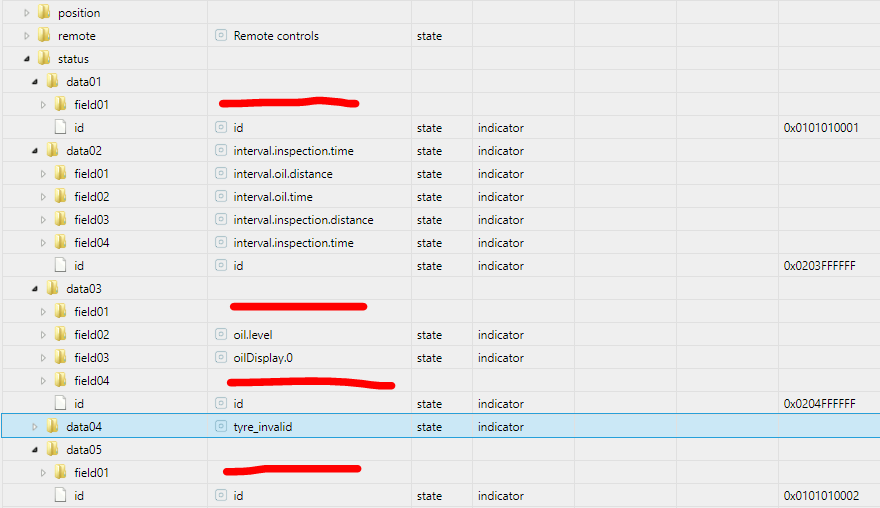
                                      Bei einigen status Datenpunkten fehlt allerdings ein Name um zu wissen was das für ein Datenpunkt ist:
                                      88a5a532-37fc-4cc7-883b-af127be801ff-grafik.png

                                      T 1 Reply Last reply
                                      0
                                      • FredFF FredF

                                        @tombox
                                        Danke für die Anpassung, die Daten kommen nun rein 👍
                                        Bei einigen status Datenpunkten fehlt allerdings ein Name um zu wissen was das für ein Datenpunkt ist:
                                        88a5a532-37fc-4cc7-883b-af127be801ff-grafik.png

                                        T Offline
                                        T Offline
                                        tombox
                                        wrote on last edited by
                                        #226

                                        @FredF also wenn der datenpunkte nicht in der readMe steht dann selber rausfinden

                                        FredFF 1 Reply Last reply
                                        0
                                        • T tombox

                                          @FredF also wenn der datenpunkte nicht in der readMe steht dann selber rausfinden

                                          FredFF Online
                                          FredFF Online
                                          FredF
                                          Most Active Forum Testing
                                          wrote on last edited by
                                          #227

                                          @tombox

                                          1. Wie findet man die nicht beschriebenen heraus?
                                          2. Und wenn vorhanden, was dann? Beipiel:

                                            eabf7461-c280-41dd-9170-f4680e33e064-grafik.png
                                            Ist lt. Readme
                                          "8MAINTENANCE_INTERVAL_AD_BLUE_RANGE",          7, "0x02040C0001"); // 0x0204FFFFFF.0x02040C0001, adBlueInspectionData_km
                                          
                                          T 1 Reply Last reply
                                          0

                                          Hello! It looks like you're interested in this conversation, but you don't have an account yet.

                                          Getting fed up of having to scroll through the same posts each visit? When you register for an account, you'll always come back to exactly where you were before, and choose to be notified of new replies (either via email, or push notification). You'll also be able to save bookmarks and upvote posts to show your appreciation to other community members.

                                          With your input, this post could be even better 💗

                                          Register Login
                                          Reply
                                          • Reply as topic
                                          Log in to reply
                                          • Oldest to Newest
                                          • Newest to Oldest
                                          • Most Votes


                                          Support us

                                          ioBroker
                                          Community Adapters
                                          Donate

                                          457

                                          Online

                                          32.8k

                                          Users

                                          82.7k

                                          Topics

                                          1.3m

                                          Posts
                                          Community
                                          Impressum | Datenschutz-Bestimmungen | Nutzungsbedingungen | Einwilligungseinstellungen
                                          ioBroker Community 2014-2025
                                          logo
                                          • Login

                                          • Don't have an account? Register

                                          • Login or register to search.
                                          • First post
                                            Last post
                                          0
                                          • Home
                                          • Recent
                                          • Tags
                                          • Unread 0
                                          • Categories
                                          • Unreplied
                                          • Popular
                                          • GitHub
                                          • Docu
                                          • Hilfe