
NEWS




Probleme mit ioBroker, js Controller
-
-
@Glasfaser irgendetwas ist jetzt kaputt gegangen beim basteln.
Er nimmt zwar den ganzen kram an, aber passiert nix.
Bekomme keine ausgabe.pi@ioBroker-RasPi:~ $ cd /opt/iobroker/ pi@ioBroker-RasPi:/opt/iobroker $ npm -v pi@ioBroker-RasPi:/opt/iobroker $Das passiert im übrigen auch bei allem anderen.
Stehe grade auf dem Schlauch.
Kann ich mir irgendwie alle Skripte sichern?
Ich denke ich darf den neu machen
-
@Glasfaser irgendetwas ist jetzt kaputt gegangen beim basteln.
Er nimmt zwar den ganzen kram an, aber passiert nix.
Bekomme keine ausgabe.pi@ioBroker-RasPi:~ $ cd /opt/iobroker/ pi@ioBroker-RasPi:/opt/iobroker $ npm -v pi@ioBroker-RasPi:/opt/iobroker $Das passiert im übrigen auch bei allem anderen.
Stehe grade auf dem Schlauch.
Kann ich mir irgendwie alle Skripte sichern?
Ich denke ich darf den neu machen
Schau mal nach ob der Ordner iobroker-data noch da ist , mit Inhalt natürlich .
-
Schau mal nach ob der Ordner iobroker-data noch da ist , mit Inhalt natürlich .
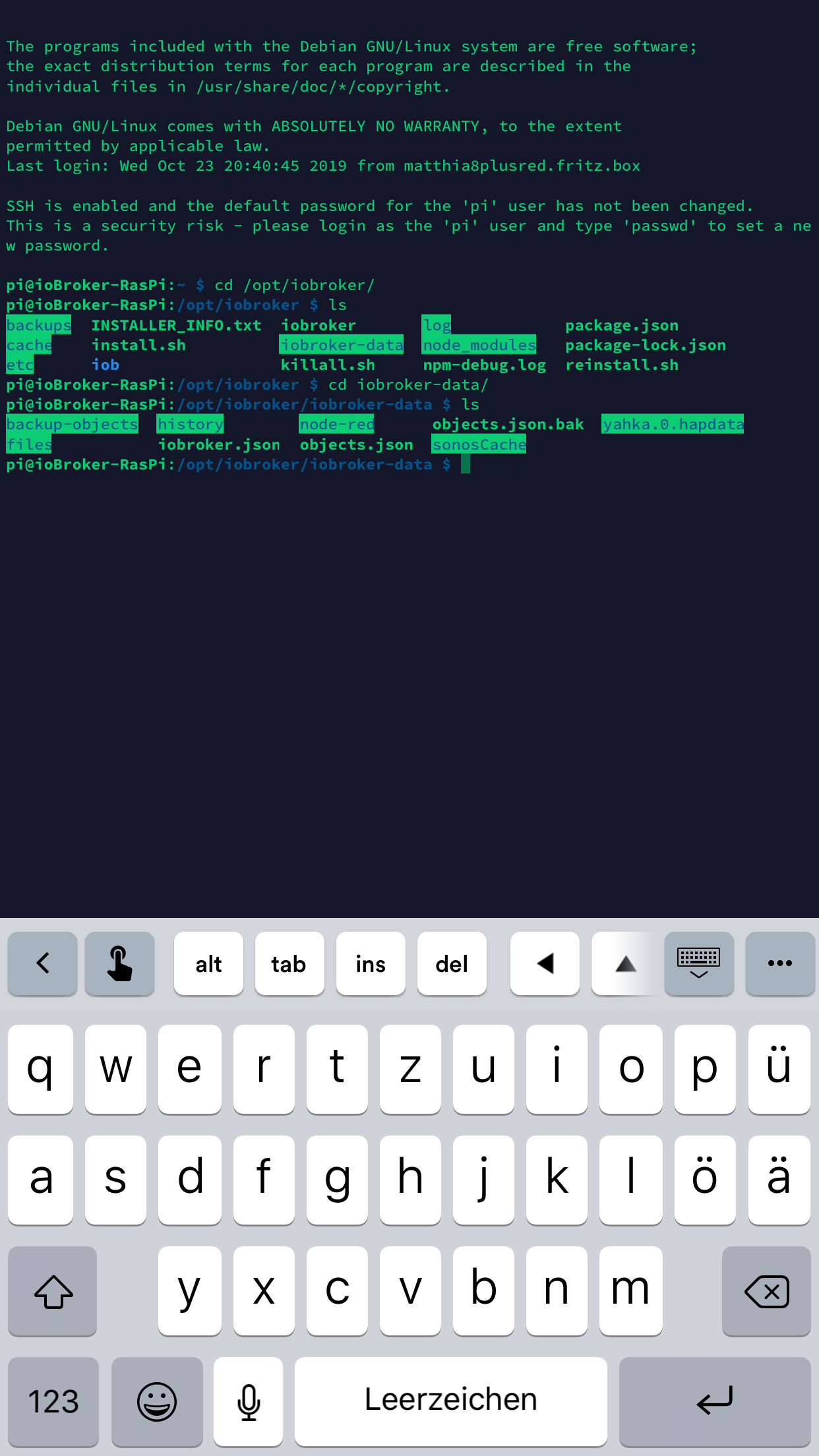
Das hier wäre noch da
pi@ioBroker-RasPi:~ $ cd /opt/iobroker/ pi@ioBroker-RasPi:/opt/iobroker $ cd iobroker-data/ pi@ioBroker-RasPi:/opt/iobroker/iobroker-data $ ls backup-objects history node-red objects.json.bak yahka.0.hapdata files iobroker.json objects.json sonosCache pi@ioBroker-RasPi:/opt/iobroker/iobroker-data $ -
Das hier wäre noch da
pi@ioBroker-RasPi:~ $ cd /opt/iobroker/ pi@ioBroker-RasPi:/opt/iobroker $ cd iobroker-data/ pi@ioBroker-RasPi:/opt/iobroker/iobroker-data $ ls backup-objects history node-red objects.json.bak yahka.0.hapdata files iobroker.json objects.json sonosCache pi@ioBroker-RasPi:/opt/iobroker/iobroker-data $Hast du vielleicht noch ein Backup (backitup) ?
-
Hast du vielleicht noch ein Backup (backitup) ?
@Glasfaser in dem backup Ordner ist einiges drin.
Ein Backit Up habe ich von dem noch nicht
-
Re: [gelöst] - js-controller nach update nicht mehr zu starten
Systemdata Bitte Ausfüllen Hardwaresystem: NUC/Pi3/etc. Arbeitsspeicher: 1GB Festplattenart: SD-Karte/SSD/HDD Betriebssystem: Ubuntu/Windows/Mac Node-Version: 10.x.x Nodejs-Version: 10.x.x NPM-Version: 6.x.x Installationsart: Skript/Manuell Image genutzt: Ja/Nein Ort/Name der Imagedatei: Link Re: [gelöst] - js-controller nach update nicht mehr zu starten Hallo,
ich habe den Fehler das mein ioBroker nach dem Update nicht mehr startet.
Der Fehler der im o.g. Thread gezeigt wird, habe ich auch. Ich hatte dann das versucht, den js Controller zu installieren,Aber da bekomme ich das hier.
pi@ioBroker-RasPi:/opt/iobroker $ sudo npm install iobroker.js-controller --production
npm WARN lifecycle iobroker.js-controller@2.0.35~preinstall: cannot run in wd %s %s (wd=%s) iobroker.js-controller@2.0.35 node lib/preinstallCheck.js /opt/iobroker/node_modules/.staging/iobroker.js-controller-a76002ca

> unix-dgram@2.0.2 install /opt/iobroker/node_modules/unix-dgram
> node-gyp rebuild

gyp WARN EACCES user "root" does not have permission to access the dev dir "/root/.node-gyp/6.17.1"
gyp WARN EACCES attempting to reinstall using temporary dev dir "/opt/iobroker/node_modules/unix-dgram/.node-gyp"
make: Entering directory '/opt/iobroker/node_modules/unix-dgram/build'
  CXX(target) Release/obj.target/unix_dgram/src/unix_dgram.o
../src/unix_dgram.cc: In function ‘void {anonymous}::OnRecv({anonymous}::SocketContext*)’:
../src/unix_dgram.cc:121:25: warning: ‘v8::Local<v8::Value> Nan::MakeCallback(v8::Local<v8::Object>, v8::Local<v8::Function>, int, v8::Local<v8::Value>*)’ is deprecated (declared at ../node_modules/nan/nan.h:1024) [-Wdeprecated-declarations]
                     argv);
                         ^
../src/unix_dgram.cc: In function ‘void {anonymous}::OnWritable({anonymous}::SocketContext*)’:
../src/unix_dgram.cc:129:28: warning: ‘v8::Local<v8::Value> Nan::MakeCallback(v8::Local<v8::Object>, v8::Local<v8::Function>, int, v8::Local<v8::Value>*)’ is deprecated (declared at ../node_modules/nan/nan.h:1024) [-Wdeprecated-declarations]
                     0, NULL);
                            ^
  SOLINK_MODULE(target) Release/obj.target/unix_dgram.node
  COPY Release/unix_dgram.node
make: Leaving directory '/opt/iobroker/node_modules/unix-dgram/build'

> ursa-optional@0.9.10 install /opt/iobroker/node_modules/ursa-optional
> node rebuild.js


> diskusage@1.1.3 install /opt/iobroker/node_modules/diskusage
> node-gyp rebuild

gyp WARN EACCES user "root" does not have permission to access the dev dir "/root/.node-gyp/6.17.1"
gyp WARN EACCES attempting to reinstall using temporary dev dir "/opt/iobroker/node_modules/diskusage/.node-gyp"
make: Entering directory '/opt/iobroker/node_modules/diskusage/build'
  CXX(target) Release/obj.target/diskusage/src/main.o
  CXX(target) Release/obj.target/diskusage/src/diskusage_posix.o
../src/diskusage_posix.cpp: In function ‘DiskUsage GetDiskUsage(const char*)’:
../src/diskusage_posix.cpp:10:28: warning: missing initializer for member ‘statvfs::f_bsize’ [-Wmissing-field-initializers]
     struct statvfs info = {};
                            ^
../src/diskusage_posix.cpp:10:28: warning: missing initializer for member ‘statvfs::f_frsize’ [-Wmissing-field-initializers]
../src/diskusage_posix.cpp:10:28: warning: missing initializer for member ‘statvfs::f_blocks’ [-Wmissing-field-initializers]
../src/diskusage_posix.cpp:10:28: warning: missing initializer for member ‘statvfs::f_bfree’ [-Wmissing-field-initializers]
../src/diskusage_posix.cpp:10:28: warning: missing initializer for member ‘statvfs::f_bavail’ [-Wmissing-field-initializers]
../src/diskusage_posix.cpp:10:28: warning: missing initializer for member ‘statvfs::f_files’ [-Wmissing-field-initializers]
../src/diskusage_posix.cpp:10:28: warning: missing initializer for member ‘statvfs::f_ffree’ [-Wmissing-field-initializers]
../src/diskusage_posix.cpp:10:28: warning: missing initializer for member ‘statvfs::f_favail’ [-Wmissing-field-initializers]
../src/diskusage_posix.cpp:10:28: warning: missing initializer for member ‘statvfs::f_fsid’ [-Wmissing-field-initializers]
../src/diskusage_posix.cpp:10:28: warning: missing initializer for member ‘statvfs::__f_unused’ [-Wmissing-field-initializers]
../src/diskusage_posix.cpp:10:28: warning: missing initializer for member ‘statvfs::f_flag’ [-Wmissing-field-initializers]
../src/diskusage_posix.cpp:10:28: warning: missing initializer for member ‘statvfs::f_namemax’ [-Wmissing-field-initializers]
../src/diskusage_posix.cpp:10:28: warning: missing initializer for member ‘statvfs::__f_spare’ [-Wmissing-field-initializers]
  SOLINK_MODULE(target) Release/obj.target/diskusage.node
  COPY Release/diskusage.node
make: Leaving directory '/opt/iobroker/node_modules/diskusage/build'

> iobroker.js-controller@2.0.35 install /opt/iobroker/node_modules/iobroker.js-controller
> node iobroker.js setup first

/opt/iobroker/node_modules/chokidar/index.js:150
  async remove(item) {
        ^^^^^^

SyntaxError: Unexpected identifier
    at createScript (vm.js:56:10)
    at Object.runInThisContext (vm.js:97:10)
    at Module._compile (module.js:549:28)
    at Object.Module._extensions..js (module.js:586:10)
    at Module.load (module.js:494:32)
    at tryModuleLoad (module.js:453:12)
    at Function.Module._load (module.js:445:3)
    at Module.require (module.js:504:17)
    at require (internal/module.js:20:19)
    at Object.<anonymous> (/opt/iobroker/node_modules/iobroker.js-controller/lib/cli/cliLogs.js:5:18)
npm WARN optional SKIPPING OPTIONAL DEPENDENCY: fsevents@~2.1.1 (node_modules/chokidar/node_modules/fsevents):
npm WARN notsup SKIPPING OPTIONAL DEPENDENCY: Unsupported platform for fsevents@2.1.1: wanted {"os":"darwin","arch":"any"} (current: {"os":"linux","arch":"arm"})
npm WARN enoent ENOENT: no such file or directory, open '/opt/iobroker/node_modules/iobroker.node-red/package.json'
npm WARN enoent ENOENT: no such file or directory, open '/opt/iobroker/node_modules/iobroker.node-red/node_modules/engine.io/package.json'
npm WARN enoent ENOENT: no such file or directory, open '/opt/iobroker/node_modules/iobroker.node-red/node_modules/express/package.json'
npm WARN enoent ENOENT: no such file or directory, open '/opt/iobroker/node_modules/iobroker.node-red/node_modules/engine.io-client/package.json'
npm WARN enoent ENOENT: no such file or directory, open '/opt/iobroker/node_modules/iobroker.node-red/node_modules/socket.io-client/package.json'
npm WARN enoent ENOENT: no such file or directory, open '/opt/iobroker/node_modules/iobroker.node-red/node_modules/socket.io-parser/package.json'
npm ERR! Linux 4.9.35-v7+
npm ERR! argv "/usr/bin/node" "/usr/bin/npm" "install" "iobroker.js-controller" "--production"
npm ERR! node v6.17.1
npm ERR! npm  v3.10.10
npm ERR! code ELIFECYCLE

npm ERR! iobroker.js-controller@2.0.35 install: `node iobroker.js setup first`
npm ERR! Exit status 1
npm ERR!
npm ERR! Failed at the iobroker.js-controller@2.0.35 install script 'node iobroker.js setup first'.
npm ERR! Make sure you have the latest version of node.js and npm installed.
npm ERR! If you do, this is most likely a problem with the iobroker.js-controller package,
npm ERR! not with npm itself.
npm ERR! Tell the author that this fails on your system:
npm ERR!     node iobroker.js setup first
npm ERR! You can get information on how to open an issue for this project with:
npm ERR!     npm bugs iobroker.js-controller
npm ERR! Or if that isn't available, you can get their info via:
npm ERR!     npm owner ls iobroker.js-controller
npm ERR! There is likely additional logging output above.

npm ERR! Please include the following file with any support request:
npm ERR!     /opt/iobroker/npm-debug.log
Was muss ich tun?
@Matze1708 holzhammer Methode
cd /opt/iobroker
sudo -H -u iobroker npm install ioBroker/ioBroker.js-controller
danach direkt
curl -sL https://iobroker.net/fix.sh | bash -danach starten..wenn es nicht startet LOG posten..
-
@Matze1708 holzhammer Methode
cd /opt/iobroker
sudo -H -u iobroker npm install ioBroker/ioBroker.js-controller
danach direkt
curl -sL https://iobroker.net/fix.sh | bash -danach starten..wenn es nicht startet LOG posten..
Danke ihr Lieben für die Hilfe.
Aber das stimmt auf einmal was nicht mit dem Ding, was ich nicht verstehe.
Egal was ich eingebe, es passiert nix, es kommt immer wieder eine frische eingabeaufforderung.Selbst als root sudo su, gleiches Verhalten.
Bei node -v kommt wenigstens Speicherzugriffsverletzung.
😩😩😩
-
Danke ihr Lieben für die Hilfe.
Aber das stimmt auf einmal was nicht mit dem Ding, was ich nicht verstehe.
Egal was ich eingebe, es passiert nix, es kommt immer wieder eine frische eingabeaufforderung.Selbst als root sudo su, gleiches Verhalten.
Bei node -v kommt wenigstens Speicherzugriffsverletzung.
😩😩😩
@Matze1708 mir kommt grade eine Idee.
Ich hatte aus Verdacht, dass es die Speicherkarte ist, ein Image gezogen und auf eine neue Karte geschrieben....
Die war noch nicht so verwurstet wie diese,
Ich könnte mal auf den Stand zurück, da lief zwar der Broker auch nicht mehr, hatte aber noch Befehle angenommen. -
Hi,
Könnt ihr damit was anfangen?
roller > iobroker.js-controller@2.0.36 preinstall /opt/iobroker/node_modules/.staging/iobroker.js-controller-a76002ca > node lib/preinstallCheck.js NPM version: 3.10.10 > unix-dgram@2.0.2 install /opt/iobroker/node_modules/unix-dgram > node-gyp rebuild make: Entering directory '/opt/iobroker/node_modules/unix-dgram/build' CXX(target) Release/obj.target/unix_dgram/src/unix_dgram.o ../src/unix_dgram.cc: In function ‘void {anonymous}::OnRecv({anonymous}::SocketContext*)’: ../src/unix_dgram.cc:121:25: warning: ‘v8::Local<v8::Value> Nan::MakeCallback(v8::Local<v8::Object>, v8::Local<v8::Function>, int, v8::Local<v8::Value>*)’ is deprecated (declared at ../node_modules/nan/nan.h:1024) [-Wdeprecated-declarations] argv); ^ ../src/unix_dgram.cc: In function ‘void {anonymous}::OnWritable({anonymous}::SocketContext*)’: ../src/unix_dgram.cc:129:28: warning: ‘v8::Local<v8::Value> Nan::MakeCallback(v8::Local<v8::Object>, v8::Local<v8::Function>, int, v8::Local<v8::Value>*)’ is deprecated (declared at ../node_modules/nan/nan.h:1024) [-Wdeprecated-declarations] 0, NULL); ^ SOLINK_MODULE(target) Release/obj.target/unix_dgram.node COPY Release/unix_dgram.node make: Leaving directory '/opt/iobroker/node_modules/unix-dgram/build' > ursa-optional@0.9.10 install /opt/iobroker/node_modules/ursa-optional > node rebuild.js > diskusage@1.1.3 install /opt/iobroker/node_modules/diskusage > node-gyp rebuild make: Entering directory '/opt/iobroker/node_modules/diskusage/build' CXX(target) Release/obj.target/diskusage/src/main.o CXX(target) Release/obj.target/diskusage/src/diskusage_posix.o ../src/diskusage_posix.cpp: In function ‘DiskUsage GetDiskUsage(const char*)’: ../src/diskusage_posix.cpp:10:28: warning: missing initializer for member ‘statvfs::f_bsize’ [-Wmissing-field-initializers] struct statvfs info = {}; ^ ../src/diskusage_posix.cpp:10:28: warning: missing initializer for member ‘statvfs::f_frsize’ [-Wmissing-field-initializers] ../src/diskusage_posix.cpp:10:28: warning: missing initializer for member ‘statvfs::f_blocks’ [-Wmissing-field-initializers] ../src/diskusage_posix.cpp:10:28: warning: missing initializer for member ‘statvfs::f_bfree’ [-Wmissing-field-initializers] ../src/diskusage_posix.cpp:10:28: warning: missing initializer for member ‘statvfs::f_bavail’ [-Wmissing-field-initializers] ../src/diskusage_posix.cpp:10:28: warning: missing initializer for member ‘statvfs::f_files’ [-Wmissing-field-initializers] ../src/diskusage_posix.cpp:10:28: warning: missing initializer for member ‘statvfs::f_ffree’ [-Wmissing-field-initializers] ../src/diskusage_posix.cpp:10:28: warning: missing initializer for member ‘statvfs::f_favail’ [-Wmissing-field-initializers] ../src/diskusage_posix.cpp:10:28: warning: missing initializer for member ‘statvfs::f_fsid’ [-Wmissing-field-initializers] ../src/diskusage_posix.cpp:10:28: warning: missing initializer for member ‘statvfs::__f_unused’ [-Wmissing-field-initializers] ../src/diskusage_posix.cpp:10:28: warning: missing initializer for member ‘statvfs::f_flag’ [-Wmissing-field-initializers] ../src/diskusage_posix.cpp:10:28: warning: missing initializer for member ‘statvfs::f_namemax’ [-Wmissing-field-initializers] ../src/diskusage_posix.cpp:10:28: warning: missing initializer for member ‘statvfs::__f_spare’ [-Wmissing-field-initializers] SOLINK_MODULE(target) Release/obj.target/diskusage.node COPY Release/diskusage.node make: Leaving directory '/opt/iobroker/node_modules/diskusage/build' > iobroker.js-controller@2.0.36 install /opt/iobroker/node_modules/iobroker.js-controller > node iobroker.js setup first /opt/iobroker/node_modules/chokidar/index.js:150 async remove(item) { ^^^^^^ SyntaxError: Unexpected identifier at createScript (vm.js:56:10) at Object.runInThisContext (vm.js:97:10) at Module._compile (module.js:549:28) at Object.Module._extensions..js (module.js:586:10) at Module.load (module.js:494:32) at tryModuleLoad (module.js:453:12) at Function.Module._load (module.js:445:3) at Module.require (module.js:504:17) at require (internal/module.js:20:19) at Object.<anonymous> (/opt/iobroker/node_modules/iobroker.js-controller/lib/cli/cliLogs.js:5:18) npm WARN optional SKIPPING OPTIONAL DEPENDENCY: fsevents@~2.1.1 (node_modules/chokidar/node_modules/fsevents): npm WARN notsup SKIPPING OPTIONAL DEPENDENCY: Unsupported platform for fsevents@2.1.1: wanted {"os":"darwin","arch":"any"} (current: {"os":"linux","arch":"arm"}) npm WARN enoent ENOENT: no such file or directory, open '/opt/iobroker/node_modules/iobroker.node-red/package.json' npm WARN enoent ENOENT: no such file or directory, open '/opt/iobroker/node_modules/iobroker.node-red/node_modules/engine.io/package.json' npm WARN enoent ENOENT: no such file or directory, open '/opt/iobroker/node_modules/iobroker.node-red/node_modules/engine.io-client/package.json' npm WARN enoent ENOENT: no such file or directory, open '/opt/iobroker/node_modules/iobroker.node-red/node_modules/express/package.json' npm WARN enoent ENOENT: no such file or directory, open '/opt/iobroker/node_modules/iobroker.node-red/node_modules/socket.io-client/package.json' npm WARN enoent ENOENT: no such file or directory, open '/opt/iobroker/node_modules/iobroker.node-red/node_modules/socket.io-parser/package.json' npm ERR! Linux 4.9.35-v7+ npm ERR! argv "/usr/bin/node" "/usr/bin/npm" "install" "ioBroker/ioBroker.js-controller" npm ERR! node v6.17.1 npm ERR! npm v3.10.10 npm ERR! code ELIFECYCLE npm ERR! iobroker.js-controller@2.0.36 install: `node iobroker.js setup first` npm ERR! Exit status 1 npm ERR! npm ERR! Failed at the iobroker.js-controller@2.0.36 install script 'node iobroker.js setup first'. npm ERR! Make sure you have the latest version of node.js and npm installed. npm ERR! If you do, this is most likely a problem with the iobroker.js-controller package, npm ERR! not with npm itself. npm ERR! Tell the author that this fails on your system: npm ERR! node iobroker.js setup first npm ERR! You can get information on how to open an issue for this project with: npm ERR! npm bugs iobroker.js-controller npm ERR! Or if that isn't available, you can get their info via: npm ERR! npm owner ls iobroker.js-controller npm ERR! There is likely additional logging output above. npm ERR! Please include the following file with any support request: npm ERR! /opt/iobroker/npm-debug.log pi@ioBroker-R -
Hi,
Könnt ihr damit was anfangen?
roller > iobroker.js-controller@2.0.36 preinstall /opt/iobroker/node_modules/.staging/iobroker.js-controller-a76002ca > node lib/preinstallCheck.js NPM version: 3.10.10 > unix-dgram@2.0.2 install /opt/iobroker/node_modules/unix-dgram > node-gyp rebuild make: Entering directory '/opt/iobroker/node_modules/unix-dgram/build' CXX(target) Release/obj.target/unix_dgram/src/unix_dgram.o ../src/unix_dgram.cc: In function ‘void {anonymous}::OnRecv({anonymous}::SocketContext*)’: ../src/unix_dgram.cc:121:25: warning: ‘v8::Local<v8::Value> Nan::MakeCallback(v8::Local<v8::Object>, v8::Local<v8::Function>, int, v8::Local<v8::Value>*)’ is deprecated (declared at ../node_modules/nan/nan.h:1024) [-Wdeprecated-declarations] argv); ^ ../src/unix_dgram.cc: In function ‘void {anonymous}::OnWritable({anonymous}::SocketContext*)’: ../src/unix_dgram.cc:129:28: warning: ‘v8::Local<v8::Value> Nan::MakeCallback(v8::Local<v8::Object>, v8::Local<v8::Function>, int, v8::Local<v8::Value>*)’ is deprecated (declared at ../node_modules/nan/nan.h:1024) [-Wdeprecated-declarations] 0, NULL); ^ SOLINK_MODULE(target) Release/obj.target/unix_dgram.node COPY Release/unix_dgram.node make: Leaving directory '/opt/iobroker/node_modules/unix-dgram/build' > ursa-optional@0.9.10 install /opt/iobroker/node_modules/ursa-optional > node rebuild.js > diskusage@1.1.3 install /opt/iobroker/node_modules/diskusage > node-gyp rebuild make: Entering directory '/opt/iobroker/node_modules/diskusage/build' CXX(target) Release/obj.target/diskusage/src/main.o CXX(target) Release/obj.target/diskusage/src/diskusage_posix.o ../src/diskusage_posix.cpp: In function ‘DiskUsage GetDiskUsage(const char*)’: ../src/diskusage_posix.cpp:10:28: warning: missing initializer for member ‘statvfs::f_bsize’ [-Wmissing-field-initializers] struct statvfs info = {}; ^ ../src/diskusage_posix.cpp:10:28: warning: missing initializer for member ‘statvfs::f_frsize’ [-Wmissing-field-initializers] ../src/diskusage_posix.cpp:10:28: warning: missing initializer for member ‘statvfs::f_blocks’ [-Wmissing-field-initializers] ../src/diskusage_posix.cpp:10:28: warning: missing initializer for member ‘statvfs::f_bfree’ [-Wmissing-field-initializers] ../src/diskusage_posix.cpp:10:28: warning: missing initializer for member ‘statvfs::f_bavail’ [-Wmissing-field-initializers] ../src/diskusage_posix.cpp:10:28: warning: missing initializer for member ‘statvfs::f_files’ [-Wmissing-field-initializers] ../src/diskusage_posix.cpp:10:28: warning: missing initializer for member ‘statvfs::f_ffree’ [-Wmissing-field-initializers] ../src/diskusage_posix.cpp:10:28: warning: missing initializer for member ‘statvfs::f_favail’ [-Wmissing-field-initializers] ../src/diskusage_posix.cpp:10:28: warning: missing initializer for member ‘statvfs::f_fsid’ [-Wmissing-field-initializers] ../src/diskusage_posix.cpp:10:28: warning: missing initializer for member ‘statvfs::__f_unused’ [-Wmissing-field-initializers] ../src/diskusage_posix.cpp:10:28: warning: missing initializer for member ‘statvfs::f_flag’ [-Wmissing-field-initializers] ../src/diskusage_posix.cpp:10:28: warning: missing initializer for member ‘statvfs::f_namemax’ [-Wmissing-field-initializers] ../src/diskusage_posix.cpp:10:28: warning: missing initializer for member ‘statvfs::__f_spare’ [-Wmissing-field-initializers] SOLINK_MODULE(target) Release/obj.target/diskusage.node COPY Release/diskusage.node make: Leaving directory '/opt/iobroker/node_modules/diskusage/build' > iobroker.js-controller@2.0.36 install /opt/iobroker/node_modules/iobroker.js-controller > node iobroker.js setup first /opt/iobroker/node_modules/chokidar/index.js:150 async remove(item) { ^^^^^^ SyntaxError: Unexpected identifier at createScript (vm.js:56:10) at Object.runInThisContext (vm.js:97:10) at Module._compile (module.js:549:28) at Object.Module._extensions..js (module.js:586:10) at Module.load (module.js:494:32) at tryModuleLoad (module.js:453:12) at Function.Module._load (module.js:445:3) at Module.require (module.js:504:17) at require (internal/module.js:20:19) at Object.<anonymous> (/opt/iobroker/node_modules/iobroker.js-controller/lib/cli/cliLogs.js:5:18) npm WARN optional SKIPPING OPTIONAL DEPENDENCY: fsevents@~2.1.1 (node_modules/chokidar/node_modules/fsevents): npm WARN notsup SKIPPING OPTIONAL DEPENDENCY: Unsupported platform for fsevents@2.1.1: wanted {"os":"darwin","arch":"any"} (current: {"os":"linux","arch":"arm"}) npm WARN enoent ENOENT: no such file or directory, open '/opt/iobroker/node_modules/iobroker.node-red/package.json' npm WARN enoent ENOENT: no such file or directory, open '/opt/iobroker/node_modules/iobroker.node-red/node_modules/engine.io/package.json' npm WARN enoent ENOENT: no such file or directory, open '/opt/iobroker/node_modules/iobroker.node-red/node_modules/engine.io-client/package.json' npm WARN enoent ENOENT: no such file or directory, open '/opt/iobroker/node_modules/iobroker.node-red/node_modules/express/package.json' npm WARN enoent ENOENT: no such file or directory, open '/opt/iobroker/node_modules/iobroker.node-red/node_modules/socket.io-client/package.json' npm WARN enoent ENOENT: no such file or directory, open '/opt/iobroker/node_modules/iobroker.node-red/node_modules/socket.io-parser/package.json' npm ERR! Linux 4.9.35-v7+ npm ERR! argv "/usr/bin/node" "/usr/bin/npm" "install" "ioBroker/ioBroker.js-controller" npm ERR! node v6.17.1 npm ERR! npm v3.10.10 npm ERR! code ELIFECYCLE npm ERR! iobroker.js-controller@2.0.36 install: `node iobroker.js setup first` npm ERR! Exit status 1 npm ERR! npm ERR! Failed at the iobroker.js-controller@2.0.36 install script 'node iobroker.js setup first'. npm ERR! Make sure you have the latest version of node.js and npm installed. npm ERR! If you do, this is most likely a problem with the iobroker.js-controller package, npm ERR! not with npm itself. npm ERR! Tell the author that this fails on your system: npm ERR! node iobroker.js setup first npm ERR! You can get information on how to open an issue for this project with: npm ERR! npm bugs iobroker.js-controller npm ERR! Or if that isn't available, you can get their info via: npm ERR! npm owner ls iobroker.js-controller npm ERR! There is likely additional logging output above. npm ERR! Please include the following file with any support request: npm ERR! /opt/iobroker/npm-debug.log pi@ioBroker-R -



Support us
618
Online32.5k
Users81.7k
Topics1.3m
Posts