




URL Request in Blocky funktioniert nicht
-
Hallo,
habe leider noch ein kleines Problem. Ich versuche beim fully browser die Tabs über eine URL Befehl umzuschalten.
Wenn ich die URL im Bowser eingebe geht es ohne Probleme:
Beispiel:
"http://192.168.0.96:2323/?cmd=focusTabByIndex&index=0"
"http://192.168.0.96:2323/?cmd=focusTabByIndex&index=1"
"http://192.168.0.96:2323/?cmd=focusTabByIndex&index=2"Gebe ich die gleiche URL in blocky geht es nicht (keine Reaktion)
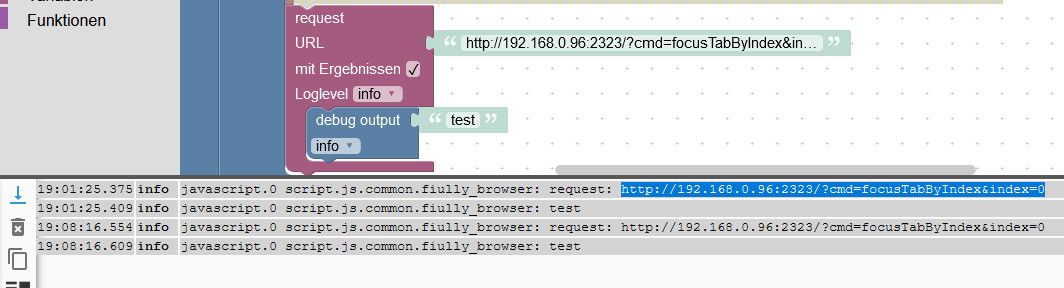
Jemand eine Idee
-
Hallo,
habe leider noch ein kleines Problem. Ich versuche beim fully browser die Tabs über eine URL Befehl umzuschalten.
Wenn ich die URL im Bowser eingebe geht es ohne Probleme:
Beispiel:
"http://192.168.0.96:2323/?cmd=focusTabByIndex&index=0"
"http://192.168.0.96:2323/?cmd=focusTabByIndex&index=1"
"http://192.168.0.96:2323/?cmd=focusTabByIndex&index=2"Gebe ich die gleiche URL in blocky geht es nicht (keine Reaktion)
Jemand eine Idee
Synology 918+ 16GB - ioBroker in Docker v9 , VISO auf Trekstor Primebook C13 13,3" , Hikvision Domkameras mit Surveillance Station .. CCU RaspberryMatic in Synology VM .. Zigbee CC2538+CC2592 .. Sonoff .. KNX .. Modbus ..
-
@Glasfaser sagte:
Im Javascript Adapter , Request eingetragen !?
Das ist nicht nötig !
Der Javascript-Adapter enthält bereits das NPM-Modul "request" und neuere Versionen stellen eine Variable request bereit, so dass auch ein require('request') nicht erforderlich ist. -
@Glasfaser sagte in URL Request in Blocky funktioniert nicht:
Im Javascript Adapter , Request eingetragen !?
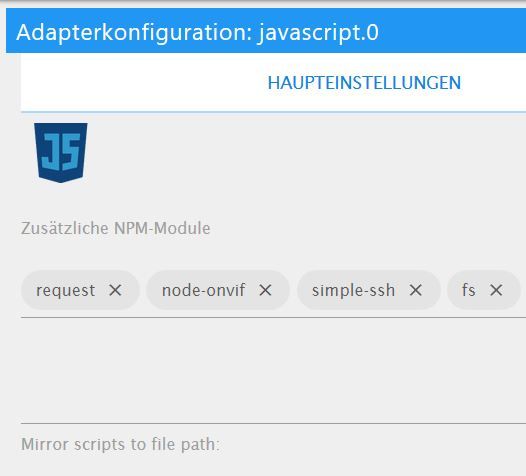
war nicht eingetragen, habe es jetzt nachgetragen, geht aber leider immer noch nicht
-
Hallo,
habe leider noch ein kleines Problem. Ich versuche beim fully browser die Tabs über eine URL Befehl umzuschalten.
Wenn ich die URL im Bowser eingebe geht es ohne Probleme:
Beispiel:
"http://192.168.0.96:2323/?cmd=focusTabByIndex&index=0"
"http://192.168.0.96:2323/?cmd=focusTabByIndex&index=1"
"http://192.168.0.96:2323/?cmd=focusTabByIndex&index=2"Gebe ich die gleiche URL in blocky geht es nicht (keine Reaktion)
Jemand eine Idee
@heinzie sagte:
Gebe ich die gleiche URL in blocky geht es nicht (keine Reaktion)
Wenn der Text "test" an den Debug-Block übergeben wird, sieht man im Log auch nur diesen. Erstelle eine Variable mit dem Bezeichner result und übergebe diese Variable dem Debug-Block.
-
@heinzie sagte:
Gebe ich die gleiche URL in blocky geht es nicht (keine Reaktion)
Wenn der Text "test" an den Debug-Block übergeben wird, sieht man im Log auch nur diesen. Erstelle eine Variable mit dem Bezeichner result und übergebe diese Variable dem Debug-Block.
Ich hoffe ich habe es richtig verstanden:
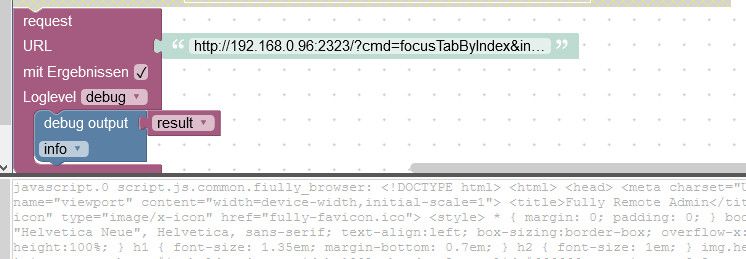
Mit dem Ergebnis bin ich jetzt leider abgehängt.
BlocklyJavascriptTypeScript 19:34:47.383 info javascript.0 script.js.common.fiully_browser: <!DOCTYPE html> <html> <head> <meta charset="UTF-8"> <meta name="viewport" content="width=device-width,initial-scale=1"> <title>Fully Remote Admin</title> <link rel="shortcut icon" type="image/x-icon" href="fully-favicon.ico"> <style> * { margin: 0; padding: 0; } body { font-family: Arial, "Helvetica Neue", Helvetica, sans-serif; text-align:left; box-sizing:border-box; overflow-x:hidden; min-height:100%; } h1 { font-size: 1.35em; margin-bottom: 0.7em; } h2 { font-size: 1em; } img.header { max-width:100%; } img.screenshot, #imgholder { max-width:100%; border:2px solid #666666; margin-top:0.2em; margin-bottom:0.4em; text-align:center; } #imgholder { display:none; min-width:100%; min-height:195px;} form, input, textarea, p, div { font-size: 1.0em; } p {margin-bottom: 1em;} p.buttonline {margin-bottom: 0em; line-height: 1.5em;} .small, .key { font-size: 0.7em; } .key { display: none; } a, a:visited {color: #304ffe; text-decoration:none;} .disabled { color: #808080; } p.error, p.success, p.saving { line-height:1.5em; margin-top:0.5em; } p.error, p.success { margin-left:-1.8em; margin-right:-1.8em; padding-left:1.8em; padding-right:1.8em; } .table-cell p.error, .table-cell p.success, .table-value p.error, .table-value p.success { margin-left: -0.5em; margin-right: -0.5em; padding-left:1.2em; padding-right:1.2em; } p.error { color: #FFFFFF; background:#FF0000; border-top:2px solid #880000;border-bottom:2px solid #880000;} p.success { color: #FFFFFF; background:#00CC00; border-top:2px solid #007700;border-bottom:2px solid #007700;} table.table { width:100%; background-color:#eee; border:1px solid #666666; border-spacing:0.2em; margin-bottom:0.5em; } table.smaller { font-size: 0.9em; } table.spaceafter { margin-bottom:1.5em;} tr.table-row { } td.table-cell { background-color:#ddd; padding:0.3em; margin:0.1em; vertical-align:top; } td.table-head { background-color:#bbb; padding:0.3em; vertical-align:top; font-weight: bold;} td.table-value { background-color:#ccc; padding:0.3em; vertical-align:top; text-align:right;} .editArea { margin-top: 0.4em; margin-bottom: 0.4em; display: none; } .smallicon { height: 0.8em; width: 0.8em; } .button, .smallbutton { color: #ffffff; background: #37474f; font-size: 1.00em; font-weight: bold; border: 1px solid #808080; height: 2em; padding-left: 1em; padding-right: 1em; cursor: pointer; white-space: nowrap; } .button:hover, .smallbutton:hover { color: #ffffff; background: #6a6a6a; } a.button, .smallbutton { color: #ffffff; font-size: 0.9em; height: 1.5em; padding-left: 0.5em; padding-right: 0.5em; text-decoration:none; cursor: pointer; white-space: nowrap; } a.disabled { opacity: 0.4; pointer-events: none; cursor: default; } .formline, .formlinesmall, textarea { border: 1px solid #37474f; min-height: 2em; padding-left: 0.2em; font-size: 0.9em; } .formlinesmall { height: 1.7em; font-size: 0.8em; } .content { width: 90%; min-height:100%; max-width:40em; margin: 0 auto; transition: 0.5s; padding: 5.5em 1.8em 1.8em; background: #ffffff; box-shadow: 0 0 1.2em rgba(0,0,0,0.5); position:absolute; top: 0; left: 0; } @media (min-width:55em) { .banner { margin: 0 auto; /*transition: 0.5s;*/ padding: 5.5em 1.8em 1.8em; background: #ffffff; position:absolute; top: 0; left: 43em; } } @media (max-width:55em) { .banner { display:none; } } .overlay { position: fixed; top: 0; left: 0; width: 100%; background: rgba(0,0,0,0.5); z-index: 1; } #hamburger-checkbox { display: none; } label.hamburger { position: fixed; width: 3.8em; height: 3.8em; cursor: pointer; text-transform: uppercase; font-weight: 700; z-index: 999; } label.hamburger span { display: block; top: 8px; width: 1.5em; height: 0.3em; background-color: #ffffff; position: relative; /*position: absolute;*/ top: 1.6em; left: 1.1em; -webkit-transition-duration: 0; -moz-transition-duration: 0; -ms-transition-duration: 0; -o-transition-duration: 0; transition-duration: 0; -webkit-transition-delay: 0.2s; -moz-transition-delay: 0.2s; -ms-transition-delay: 0.2s; -o-transition-delay: 0.2s; transition-delay: 0.2s; } label.hamburger span::after, label.hamburger span::before { display: block; content: ''; position: absolute; width: 1.5em; height: 0.3em; background-color: #ffffff; -webkit-transition-property: margin, -webkit-transform; -webkit-transition-duration: 0.2s; -moz-transition-duration: 0.2s; -ms-transition-duration: 0.2s; -o-transition-duration: 0.2s; transition-duration: 0.2s; -webkit-transition-delay: 0.2s, 0; -moz-transition-delay: 0.2s, 0; -ms-transition-delay: 0.2s, 0; -o-transition-delay: 0.2s, 0; transition-delay: 0.2s, 0; } label.hamburger span::before { margin-top: -0.5em; } label.hamburger span::after { margin-top: 0.5em; } #hamburger-checkbox:checked ~ label.hamburger span { background-color: transparent; } #hamburger-checkbox:checked ~ label.hamburger span::before, #hamburger-checkbox:checked ~ label.hamburger span::after { margin-top: 0px; -webkit-transition-delay: 0, 0.2s; -moz-transition-delay: 0, 0.2s; -ms-transition-delay: 0, 0.2s; -o-transition-delay: 0, 0.2s; transition-delay: 0, 0.2s; } #hamburger-checkbox:checked ~ label.hamburger span::before { -webkit-transform: rotate(45deg); -moz-transform: rotate(45deg); -ms-transform: rotate(45deg); -o-transform: rotate(45deg); transform: rotate(45deg); } #hamburger-checkbox:checked ~ label.hamburger span::after { -webkit-transform: rotate(-45deg); -moz-transform: rotate(-45deg); -ms-transform: rotate(-45deg); -o-transform: rotate(-45deg); transform: rotate(-45deg); } #hamburger-checkbox:checked ~ nav.off-canvas-menu { -ms-transform: translateX(0); -webkit-transform: translateX(0); transform: translateX(0); transition: 0.5s; } #hamburger-checkbox:checked ~ .content { -ms-transform: translateX(11em); -webkit-transform: translateX(11em); transform: translateX(11em); transition: 0.5s; } #hamburger-checkbox:checked ~ .overlay { height: 100%; opacity: 1; } nav li, label.hamburger { transition: 0.2s; } nav li:hover, label.hamburger:hover, #hamburger-checkbox:checked ~ label.hamburger { background: #207ce5 !important; } .hidden { display: none; } .main-menu { position: fixed; top: 0; left: 0; width: 100%; height: 3.8em; background: #37474f; box-shadow: 0 0 10px rgba(0,0,0,0.9); z-index: 3; } .main-menu header { font-size: 1.35em; font-weight: bold; margin-left: 4em; margin-top: 0.7em; white-space: nowrap; } .main-menu header a { text-decoration:none; color: #ffffff; } .main-menu header a:visited { color: #ffffff; } .main-menu ul.nav-icons { float: right; } .main-menu li { float: left; line-height: 3.8em; list-style: none; transition: 0.3s; } .main-menu li a { display: inline-block; } .main-menu li i { width: 3.8em; font-size: 1em; color: #ffffff; text-align: center; text-decoration: none; vertical-align: middle; } .off-canvas-menu { position: fixed; top: 0; left: 0; width: 11em; height: 100%; background: #37474f; font-size: 1em; -ms-transform: translateX(-11em); -webkit-transform: translateX(-11em); transform: translateX(-100%); box-shadow: 0 0 10px rgba(0,0,0,0.9); transition: 0.5s; z-index: 2; } .off-canvas-menu input[type=checkbox] { position: absolute; top: 0; left: 0; width: 100%; height: 100%; opacity: 0; display: block; cursor: pointer; } .off-canvas-menu ul { margin: 0; padding: 0; } .off-canvas-menu > ul { margin-top: 3.8em; } .off-canvas-menu a { display: block; padding: 1.0em 1.2em; color: #fff; text-decoration: none; } .off-canvas-menu li { position: relative; float: left; width: 100%; list-style: none; color: #ffffff; transition: 0.5s; border-top: 1px solid #555; } .off-canvas-menu > ul > li:last-child { border-bottom: 1px solid #555; } .off-canvas-menu ul li:first-child { border-top: none; } .off-canvas-menu ul > li.sub > a:after { position: relative; float: right; content: '+'; font-size: 1.5em; font-weight: 700; color: #ffffff; vertical-align: middle; transition: 0.5s; } .off-canvas-menu .submenu { max-height: 0; overflow: hidden; transition: max-height 0.5s ease-in-out; border-top: none; } .off-canvas-menu input[type=checkbox]:checked ~ .submenu { border-top: 1px solid #555; max-height: 999px; } .off-canvas-menu input[type=checkbox]:checked ~ a:after { transform: rotate(45deg); } .off-canvas-menu .submenu li { background: #333; } .off-canvas-menu .submenu li a { padding-left: 30px; } .off-canvas-menu .submenu li li a { padding-left: 35px; } .off-canvas-menu .submenu li li li a { padding-left: 40px; } .off-canvas-menu .submenu li.sub { list-style: none; } </style> <link rel="stylesheet" href="jquery.toast.min.css" /> <link rel="stylesheet" href="switch-input.css" /> <script src="jquery.min.js"></script> <script src="jquery.toast.min.js"></script> <script> function htmlEncode(value){ return $('<div/>').text(value).html().replace(/\n/g,"<br>"); } function htmlDecode(value){ return $('<div/>').html(value).text(); } function askAndLoadUrl() { var url=prompt("Enter URL to show in Fully",""); if (url!=null) window.location = "?cmd=loadUrl&url="+encodeURIComponent(url); } function askAndSetMessage() { var text=prompt("Enter overlay message to show in Fully",""); if (text!=null) window.location = "?cmd=setOverlayMessage&text="+encodeURIComponent(text); } function askAndLoadZip() { var url=prompt("Enter ZIP file URL to load and unpack to /sdcard. Be careful, existing files will be overwritten!",""); if (url!=null) window.location = "?cmd=loadZipFile&url="+encodeURIComponent(url); } function askAndLoadApk() { var url=prompt("Enter APK file URL to load and install. Upgrade from APK can fail if the app was installed from Google Play. No downgrade is possible on this way. ATTENTION: Fully WILL STOP and user input is required ON THE DEVICE in order to install the APK file!!!",""); if (url!=null) window.location = "?cmd=loadApkFile&url="+encodeURIComponent(url); } function askAndUnlockKiosk() { if (confirm("Sure want to unlock the remote kiosk?")) window.location = "?cmd=unlockKiosk"; } function toggleImage(url) { var image = document.getElementById("imgholder"); if (image.style.display == "none" || image.style.display == "" || image.src.indexOf(url)<0) { image.style.display = "block"; $("#refreshbutton").show(); var img = new Image(); // Preload img.src = url + "&time="+new Date().getTime(); img.addEventListener('load', function () { var image = document.getElementById("imgholder"); image.src = this.src; }, false); } else { image.style.display = "none"; $("#refreshbutton").hide(); } } function refreshImage(url) { $("#refreshbutton").hide(); if (!document.images) return; var img = new Image(); img.src = url + "&time="+new Date().getTime(); img.addEventListener('load', function () { var image = document.getElementById("imgholder"); image.src = this.src; setTimeout('refreshImage(\''+url+'\')', 100); // refresh after the next 100ms }, false); } function savePref(key) { if (!window.jQuery) { setTimeout(function() { submitForm(key); }, 200); return; } var form = $("#form-"+key); var editArea = $("#edit-"+key); var editButton = $("#edit-button-"+key); var value = $("#value-"+key); var newValue = "", oldValue = ""; if (form.find('input[name="value"]').attr('type')=='radio') { newValue = form.find('input[name="value"]:checked').attr('customValue'); oldValue = htmlDecode(value.html()); } else if (form.find('textarea[name="value"]').length) { if (form.find('textarea[name="value"]').attr('type')=='json') oldValue = newValue = "(JSON)"; else { newValue = form.find('textarea[name="value"]').val(); oldValue = htmlDecode(value.html()); } } else if (form.find('input[name="value"]').attr('type')=='password') oldValue = newValue = "*****"; else { newValue = form.find('input[name="value"]').val(); oldValue = htmlDecode(value.html()); } console.log(" Form data: "+form.serialize()); console.log(" New value: "+newValue); editArea.hide(); value.html(htmlEncode(newValue)); editButton.addClass("disabled"); $.ajax({ dataType: "json", url: "?type=json", method: "POST", data: form.serialize()}) .done(function( json ) { console.log( "JSON Status: " + json.status+", "+json.statustext ); if (json.status == "OK") { editButton.removeClass("disabled"); $.toast({ heading: 'Success', text: json.statustext, showHideTransition: 'slide', icon: 'success' }) } else if (json.status == "Error") { value.html(htmlEncode(oldValue)); editButton.removeClass("disabled"); $.toast({ heading: 'Error', text: json.statustext, showHideTransition: 'slide', icon: 'error' }) } else { value.html(htmlEncode(oldValue)); editButton.removeClass("disabled"); $.toast({ heading: 'Error', text: 'Device communication error', showHideTransition: 'slide', icon: 'error' }) } }) .fail(function( jqxhr, textStatus, error ) { console.log(" Request Failed: " + textStatus + ", " + error); console.log(" Response: "+ jqxhr.responseText); value.html(htmlEncode(oldValue)); editButton.removeClass("disabled"); $.toast({ heading: 'Error', text: 'Device communication error', showHideTransition: 'slide', icon: 'error' }) }); } function saveSwitchPref(input) { var newValue = ($(input).is(':checked')) ? 'true' : 'false'; var oldValue = !($(input).is(':checked')); var sid = $(input).attr('id'); console.log('Attr ' + sid + ' changed to ' + newValue + " from " + oldValue ); $(input).prop("disabled",true); var formData = { 'cmd' : "setBooleanSetting", 'key' : sid, 'value' : newValue }; $.ajax({ dataType: "json", url: "?type=json", method: "POST", data: formData}) .done(function( json ) { console.log( "JSON Status: " + json.status+", "+json.statustext ); if (json.status == "OK") { $.toast({ heading: 'Success', text: json.statustext, showHideTransition: 'slide', icon: 'success' }) $(input).prop("disabled",false); } else if (json.status == "Error") { $.toast({ heading: 'Error', text: json.statustext, showHideTransition: 'slide', icon: 'error' }) $(input).prop("checked",oldValue); $(input).prop("disabled",false); } else { $.toast({ heading: 'Error', text: 'Device communication error', showHideTransition: 'slide', icon: 'error' }) $(input).prop("checked",oldValue); $(input).prop("disabled",false); } }) .fail(function( jqxhr, textStatus, error ) { console.log(" Request Failed: " + textStatus + ", " + error); console.log(" Response: "+ jqxhr.responseText); $.toast({ heading: 'Error', text: 'Device communication error', showHideTransition: 'slide', icon: 'error' }) $(input).prop("checked",oldValue); $(input).prop("disabled",false); }); } </script> </head> <body> <input type="checkbox" id="hamburger-checkbox"> <label for="hamburger-checkbox" class="hamburger"><span></span></label> <div class="overlay"></div> <div class="banner"> <a href="?cmd=home"><img class="header" src="fully-header-web-90.png" /></a> </div><nav class='main-menu'><header><a href='?cmd=home'>Fully Remote Admin </a></header></nav><nav class='off-canvas-menu'><ul> <li><a href='?cmd=home' title='Login'>Login</a></li> </ul></nav> <div class='content'> <h1>Please login</h1> <form action='?' method='post'> <p>Password: <input type='password' name='password' class='formline'> <input type='submit' name='submit' value='OK' class="button"> <input type='hidden' name='cmd' value='login'></p></form> </div></body></html> -
Ich hoffe ich habe es richtig verstanden:
Mit dem Ergebnis bin ich jetzt leider abgehängt.
BlocklyJavascriptTypeScript
19:34:47.383	info	javascript.0 script.js.common.fiully_browser: <!DOCTYPE html> <html> <head> <meta charset="UTF-8"> <meta name="viewport" content="width=device-width,initial-scale=1"> <title>Fully Remote Admin</title> <link rel="shortcut icon" type="image/x-icon" href="fully-favicon.ico"> <style> * { margin: 0; padding: 0; } body { font-family: Arial, "Helvetica Neue", Helvetica, sans-serif; text-align:left; box-sizing:border-box; overflow-x:hidden; min-height:100%; } h1 { font-size: 1.35em; margin-bottom: 0.7em; } h2 { font-size: 1em; } img.header { max-width:100%; } img.screenshot, #imgholder { max-width:100%; border:2px solid #666666; margin-top:0.2em; margin-bottom:0.4em; text-align:center; } #imgholder { display:none; min-width:100%; min-height:195px;} form, input, textarea, p, div { font-size: 1.0em; } p {margin-bottom: 1em;} p.buttonline {margin-bottom: 0em; line-height: 1.5em;} .small, .key { font-size: 0.7em; } .key { display: none; } a, a:visited {color: #304ffe; text-decoration:none;} .disabled { color: #808080; } p.error, p.success, p.saving { line-height:1.5em; margin-top:0.5em; } p.error, p.success { margin-left:-1.8em; margin-right:-1.8em; padding-left:1.8em; padding-right:1.8em; } .table-cell p.error, .table-cell p.success, .table-value p.error, .table-value p.success { margin-left: -0.5em; margin-right: -0.5em; padding-left:1.2em; padding-right:1.2em; } p.error { color: #FFFFFF; background:#FF0000; border-top:2px solid #880000;border-bottom:2px solid #880000;} p.success { color: #FFFFFF; background:#00CC00; border-top:2px solid #007700;border-bottom:2px solid #007700;} table.table { width:100%; background-color:#eee; border:1px solid #666666; border-spacing:0.2em; margin-bottom:0.5em; } table.smaller { font-size: 0.9em; } table.spaceafter { margin-bottom:1.5em;} tr.table-row { } td.table-cell { background-color:#ddd; padding:0.3em; margin:0.1em; vertical-align:top; } td.table-head { background-color:#bbb; padding:0.3em; vertical-align:top; font-weight: bold;} td.table-value { background-color:#ccc; padding:0.3em; vertical-align:top; text-align:right;} .editArea { margin-top: 0.4em; margin-bottom: 0.4em; display: none; } .smallicon { height: 0.8em; width: 0.8em; } .button, .smallbutton { color: #ffffff; background: #37474f; font-size: 1.00em; font-weight: bold; border: 1px solid #808080; height: 2em; padding-left: 1em; padding-right: 1em; cursor: pointer; white-space: nowrap; } .button:hover, .smallbutton:hover { color: #ffffff; background: #6a6a6a; } a.button, .smallbutton { color: #ffffff; font-size: 0.9em; height: 1.5em; padding-left: 0.5em; padding-right: 0.5em; text-decoration:none; cursor: pointer; white-space: nowrap; } a.disabled { opacity: 0.4; pointer-events: none; cursor: default; } .formline, .formlinesmall, textarea { border: 1px solid #37474f; min-height: 2em; padding-left: 0.2em; font-size: 0.9em; } .formlinesmall { height: 1.7em; font-size: 0.8em; } .content { width: 90%; min-height:100%; max-width:40em; margin: 0 auto; transition: 0.5s; padding: 5.5em 1.8em 1.8em; background: #ffffff; box-shadow: 0 0 1.2em rgba(0,0,0,0.5); position:absolute; top: 0; left: 0; } @media (min-width:55em) { .banner { margin: 0 auto; /*transition: 0.5s;*/ padding: 5.5em 1.8em 1.8em; background: #ffffff; position:absolute; top: 0; left: 43em; } } @media (max-width:55em) { .banner { display:none; } } .overlay { position: fixed; top: 0; left: 0; width: 100%; background: rgba(0,0,0,0.5); z-index: 1; } #hamburger-checkbox { display: none; } label.hamburger { position: fixed; width: 3.8em; height: 3.8em; cursor: pointer; text-transform: uppercase; font-weight: 700; z-index: 999; } label.hamburger span { display: block; top: 8px; width: 1.5em; height: 0.3em; background-color: #ffffff; position: relative; /*position: absolute;*/ top: 1.6em; left: 1.1em; -webkit-transition-duration: 0; -moz-transition-duration: 0; -ms-transition-duration: 0; -o-transition-duration: 0; transition-duration: 0; -webkit-transition-delay: 0.2s; -moz-transition-delay: 0.2s; -ms-transition-delay: 0.2s; -o-transition-delay: 0.2s; transition-delay: 0.2s; } label.hamburger span::after, label.hamburger span::before { display: block; content: ''; position: absolute; width: 1.5em; height: 0.3em; background-color: #ffffff; -webkit-transition-property: margin, -webkit-transform; -webkit-transition-duration: 0.2s; -moz-transition-duration: 0.2s; -ms-transition-duration: 0.2s; -o-transition-duration: 0.2s; transition-duration: 0.2s; -webkit-transition-delay: 0.2s, 0; -moz-transition-delay: 0.2s, 0; -ms-transition-delay: 0.2s, 0; -o-transition-delay: 0.2s, 0; transition-delay: 0.2s, 0; } label.hamburger span::before { margin-top: -0.5em; } label.hamburger span::after { margin-top: 0.5em; } #hamburger-checkbox:checked ~ label.hamburger span { background-color: transparent; } #hamburger-checkbox:checked ~ label.hamburger span::before, #hamburger-checkbox:checked ~ label.hamburger span::after { margin-top: 0px; -webkit-transition-delay: 0, 0.2s; -moz-transition-delay: 0, 0.2s; -ms-transition-delay: 0, 0.2s; -o-transition-delay: 0, 0.2s; transition-delay: 0, 0.2s; } #hamburger-checkbox:checked ~ label.hamburger span::before { -webkit-transform: rotate(45deg); -moz-transform: rotate(45deg); -ms-transform: rotate(45deg); -o-transform: rotate(45deg); transform: rotate(45deg); } #hamburger-checkbox:checked ~ label.hamburger span::after { -webkit-transform: rotate(-45deg); -moz-transform: rotate(-45deg); -ms-transform: rotate(-45deg); -o-transform: rotate(-45deg); transform: rotate(-45deg); } #hamburger-checkbox:checked ~ nav.off-canvas-menu { -ms-transform: translateX(0); -webkit-transform: translateX(0); transform: translateX(0); transition: 0.5s; } #hamburger-checkbox:checked ~ .content { -ms-transform: translateX(11em); -webkit-transform: translateX(11em); transform: translateX(11em); transition: 0.5s; } #hamburger-checkbox:checked ~ .overlay { height: 100%; opacity: 1; } nav li, label.hamburger { transition: 0.2s; } nav li:hover, label.hamburger:hover, #hamburger-checkbox:checked ~ label.hamburger { background: #207ce5 !important; } .hidden { display: none; } .main-menu { position: fixed; top: 0; left: 0; width: 100%; height: 3.8em; background: #37474f; box-shadow: 0 0 10px rgba(0,0,0,0.9); z-index: 3; } .main-menu header { font-size: 1.35em; font-weight: bold; margin-left: 4em; margin-top: 0.7em; white-space: nowrap; } .main-menu header a { text-decoration:none; color: #ffffff; } .main-menu header a:visited { color: #ffffff; } .main-menu ul.nav-icons { float: right; } .main-menu li { float: left; line-height: 3.8em; list-style: none; transition: 0.3s; } .main-menu li a { display: inline-block; } .main-menu li i { width: 3.8em; font-size: 1em; color: #ffffff; text-align: center; text-decoration: none; vertical-align: middle; } .off-canvas-menu { position: fixed; top: 0; left: 0; width: 11em; height: 100%; background: #37474f; font-size: 1em; -ms-transform: translateX(-11em); -webkit-transform: translateX(-11em); transform: translateX(-100%); box-shadow: 0 0 10px rgba(0,0,0,0.9); transition: 0.5s; z-index: 2; } .off-canvas-menu input[type=checkbox] { position: absolute; top: 0; left: 0; width: 100%; height: 100%; opacity: 0; display: block; cursor: pointer; } .off-canvas-menu ul { margin: 0; padding: 0; } .off-canvas-menu > ul { margin-top: 3.8em; } .off-canvas-menu a { display: block; padding: 1.0em 1.2em; color: #fff; text-decoration: none; } .off-canvas-menu li { position: relative; float: left; width: 100%; list-style: none; color: #ffffff; transition: 0.5s; border-top: 1px solid #555; } .off-canvas-menu > ul > li:last-child { border-bottom: 1px solid #555; } .off-canvas-menu ul li:first-child { border-top: none; } .off-canvas-menu ul > li.sub > a:after { position: relative; float: right; content: '+'; font-size: 1.5em; font-weight: 700; color: #ffffff; vertical-align: middle; transition: 0.5s; } .off-canvas-menu .submenu { max-height: 0; overflow: hidden; transition: max-height 0.5s ease-in-out; border-top: none; } .off-canvas-menu input[type=checkbox]:checked ~ .submenu { border-top: 1px solid #555; max-height: 999px; } .off-canvas-menu input[type=checkbox]:checked ~ a:after { transform: rotate(45deg); } .off-canvas-menu .submenu li { background: #333; } .off-canvas-menu .submenu li a { padding-left: 30px; } .off-canvas-menu .submenu li li a { padding-left: 35px; } .off-canvas-menu .submenu li li li a { padding-left: 40px; } .off-canvas-menu .submenu li.sub { list-style: none; } </style> <link rel="stylesheet" href="jquery.toast.min.css" /> <link rel="stylesheet" href="switch-input.css" /> <script src="jquery.min.js"></script> <script src="jquery.toast.min.js"></script> <script> function htmlEncode(value){ return $('<div/>').text(value).html().replace(/\n/g,"<br>"); } function htmlDecode(value){ return $('<div/>').html(value).text(); } function askAndLoadUrl() { var url=prompt("Enter URL to show in Fully",""); if (url!=null) window.location = "?cmd=loadUrl&url="+encodeURIComponent(url); } function askAndSetMessage() { var text=prompt("Enter overlay message to show in Fully",""); if (text!=null) window.location = "?cmd=setOverlayMessage&text="+encodeURIComponent(text); } function askAndLoadZip() { var url=prompt("Enter ZIP file URL to load and unpack to /sdcard. Be careful, existing files will be overwritten!",""); if (url!=null) window.location = "?cmd=loadZipFile&url="+encodeURIComponent(url); } function askAndLoadApk() { var url=prompt("Enter APK file URL to load and install. Upgrade from APK can fail if the app was installed from Google Play. No downgrade is possible on this way. ATTENTION: Fully WILL STOP and user input is required ON THE DEVICE in order to install the APK file!!!",""); if (url!=null) window.location = "?cmd=loadApkFile&url="+encodeURIComponent(url); } function askAndUnlockKiosk() { if (confirm("Sure want to unlock the remote kiosk?")) window.location = "?cmd=unlockKiosk"; } function toggleImage(url) { var image = document.getElementById("imgholder"); if (image.style.display == "none" || image.style.display == "" || image.src.indexOf(url)<0) { image.style.display = "block"; $("#refreshbutton").show(); var img = new Image(); // Preload img.src = url + "&time="+new Date().getTime(); img.addEventListener('load', function () { var image = document.getElementById("imgholder"); image.src = this.src; }, false); } else { image.style.display = "none"; $("#refreshbutton").hide(); } } function refreshImage(url) { $("#refreshbutton").hide(); if (!document.images) return; var img = new Image(); img.src = url + "&time="+new Date().getTime(); img.addEventListener('load', function () { var image = document.getElementById("imgholder"); image.src = this.src; setTimeout('refreshImage(\''+url+'\')', 100); // refresh after the next 100ms }, false); } function savePref(key) { if (!window.jQuery) { setTimeout(function() { submitForm(key); }, 200); return; } var form = $("#form-"+key); var editArea = $("#edit-"+key); var editButton = $("#edit-button-"+key); var value = $("#value-"+key); var newValue = "", oldValue = ""; if (form.find('input[name="value"]').attr('type')=='radio') { newValue = form.find('input[name="value"]:checked').attr('customValue'); oldValue = htmlDecode(value.html()); } else if (form.find('textarea[name="value"]').length) { if (form.find('textarea[name="value"]').attr('type')=='json') oldValue = newValue = "(JSON)"; else { newValue = form.find('textarea[name="value"]').val(); oldValue = htmlDecode(value.html()); } } else if (form.find('input[name="value"]').attr('type')=='password') oldValue = newValue = "*****"; else { newValue = form.find('input[name="value"]').val(); oldValue = htmlDecode(value.html()); } console.log(" Form data: "+form.serialize()); console.log(" New value: "+newValue); editArea.hide(); value.html(htmlEncode(newValue)); editButton.addClass("disabled"); $.ajax({ dataType: "json", url: "?type=json", method: "POST", data: form.serialize()}) .done(function( json ) { console.log( "JSON Status: " + json.status+", "+json.statustext ); if (json.status == "OK") { editButton.removeClass("disabled"); $.toast({ heading: 'Success', text: json.statustext, showHideTransition: 'slide', icon: 'success' }) } else if (json.status == "Error") { value.html(htmlEncode(oldValue)); editButton.removeClass("disabled"); $.toast({ heading: 'Error', text: json.statustext, showHideTransition: 'slide', icon: 'error' }) } else { value.html(htmlEncode(oldValue)); editButton.removeClass("disabled"); $.toast({ heading: 'Error', text: 'Device communication error', showHideTransition: 'slide', icon: 'error' }) } }) .fail(function( jqxhr, textStatus, error ) { console.log(" Request Failed: " + textStatus + ", " + error); console.log(" Response: "+ jqxhr.responseText); value.html(htmlEncode(oldValue)); editButton.removeClass("disabled"); $.toast({ heading: 'Error', text: 'Device communication error', showHideTransition: 'slide', icon: 'error' }) }); } function saveSwitchPref(input) { var newValue = ($(input).is(':checked')) ? 'true' : 'false'; var oldValue = !($(input).is(':checked')); var sid = $(input).attr('id'); console.log('Attr ' + sid + ' changed to ' + newValue + " from " + oldValue ); $(input).prop("disabled",true); var formData = { 'cmd' : "setBooleanSetting", 'key' : sid, 'value' : newValue }; $.ajax({ dataType: "json", url: "?type=json", method: "POST", data: formData}) .done(function( json ) { console.log( "JSON Status: " + json.status+", "+json.statustext ); if (json.status == "OK") { $.toast({ heading: 'Success', text: json.statustext, showHideTransition: 'slide', icon: 'success' }) $(input).prop("disabled",false); } else if (json.status == "Error") { $.toast({ heading: 'Error', text: json.statustext, showHideTransition: 'slide', icon: 'error' }) $(input).prop("checked",oldValue); $(input).prop("disabled",false); } else { $.toast({ heading: 'Error', text: 'Device communication error', showHideTransition: 'slide', icon: 'error' }) $(input).prop("checked",oldValue); $(input).prop("disabled",false); } }) .fail(function( jqxhr, textStatus, error ) { console.log(" Request Failed: " + textStatus + ", " + error); console.log(" Response: "+ jqxhr.responseText); $.toast({ heading: 'Error', text: 'Device communication error', showHideTransition: 'slide', icon: 'error' }) $(input).prop("checked",oldValue); $(input).prop("disabled",false); }); } </script> </head> <body> <input type="checkbox" id="hamburger-checkbox"> <label for="hamburger-checkbox" class="hamburger"><span></span></label> <div class="overlay"></div> <div class="banner"> <a href="?cmd=home"><img class="header" src="fully-header-web-90.png" /></a> </div><nav class='main-menu'><header><a href='?cmd=home'>Fully Remote Admin </a></header></nav><nav class='off-canvas-menu'><ul> <li><a href='?cmd=home' title='Login'>Login</a></li> </ul></nav> <div class='content'> <h1>Please login</h1> <form action='?' method='post'> <p>Password: <input type='password' name='password' class='formline'> <input type='submit' name='submit' value='OK' class="button"> <input type='hidden' name='cmd' value='login'></p></form> </div></body></html>


Hey! Du scheinst an dieser Unterhaltung interessiert zu sein, hast aber noch kein Konto.
Hast du es satt, bei jedem Besuch durch die gleichen Beiträge zu scrollen? Wenn du dich für ein Konto anmeldest, kommst du immer genau dorthin zurück, wo du zuvor warst, und kannst dich über neue Antworten benachrichtigen lassen (entweder per E-Mail oder Push-Benachrichtigung). Du kannst auch Lesezeichen speichern und Beiträge positiv bewerten, um anderen Community-Mitgliedern deine Wertschätzung zu zeigen.
Mit deinem Input könnte dieser Beitrag noch besser werden 💗
Registrieren AnmeldenSupport us
193
Online33.0k
Benutzer83.5k
Themen1.3m
Beiträge