




Hue magic erkennt Status von Sensoren nicht mehr
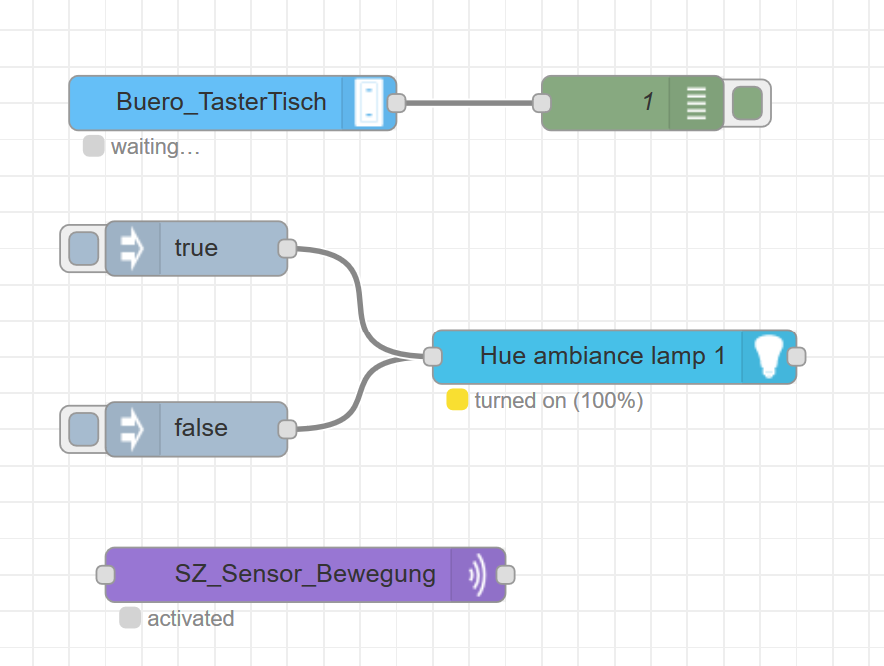
-
@apollon77 sagte in Hue magic erkennt Status von Sensoren nicht mehr:
@Negalein
sudo netstat -tulpnJetzt kann ich mit Infos dienen!

root@iobroker:/opt/iobroker# sudo netstat -tulpn
Aktive Internetverbindungen (Nur Server)
Proto Recv-Q Send-Q Local Address           Foreign Address         State       PID/Program name
tcp        0      0 10.0.1.200:1880         0.0.0.0:*               LISTEN      12626/node-red
tcp        0      0 127.0.0.11:42746        0.0.0.0:*               LISTEN      -
tcp        0      0 10.0.1.200:8100         0.0.0.0:*               LISTEN      1848/io.doorbird.0
tcp        0      0 0.0.0.0:9000            0.0.0.0:*               LISTEN      273/iobroker.js-con
tcp        0      0 0.0.0.0:9001            0.0.0.0:*               LISTEN      273/iobroker.js-con
tcp6       0      0 :::8081                 :::*                    LISTEN      290/io.admin.0
tcp6       0      0 :::8082                 :::*                    LISTEN      314/io.web.0
tcp6       0      0 :::8084                 :::*                    LISTEN      424/io.socketio.0
tcp6       0      0 :::8088                 :::*                    LISTEN      1402/io.terminal.0
tcp6       0      0 :::1883                 :::*                    LISTEN      2239/io.mqtt.0
tcp6       0      0 :::8000                 :::*                    LISTEN      1294/io.upnp.0
tcp6       0      0 :::61991                :::*                    LISTEN      1731/io.harmony.1
udp        0      0 0.0.0.0:61991           0.0.0.0:*                           1731/io.harmony.1
udp        0      0 10.0.1.200:5353         0.0.0.0:*                           1659/io.tr-064.0
udp        0      0 172.17.0.3:5353         0.0.0.0:*                           1659/io.tr-064.0
udp        0      0 127.0.0.11:54634        0.0.0.0:*                           -
udp        0      0 0.0.0.0:46838           0.0.0.0:*                           1294/io.upnp.0
udp        0      0 0.0.0.0:39119           0.0.0.0:*                           1294/io.upnp.0
udp        0      0 0.0.0.0:40707           0.0.0.0:*                           537/io.snmp.0
udp        0      0 0.0.0.0:50005           0.0.0.0:*                           273/iobroker.js-con
udp        0      0 0.0.0.0:50098           0.0.0.0:*                           537/io.snmp.0
udp        0      0 0.0.0.0:58917           0.0.0.0:*                           537/io.snmp.0
udp        0      0 0.0.0.0:9898            0.0.0.0:*                           1378/io.mihome.0
udp        0      0 0.0.0.0:1900            0.0.0.0:*                           1294/io.upnp.0
udp        0      0 0.0.0.0:1900            0.0.0.0:*                           1294/io.upnp.0
udp        0      0 0.0.0.0:44690           0.0.0.0:*                           537/io.snmp.0
° Node.js & System Update ---> sudo apt update, iob stop, sudo apt full-upgrade
° Node.js Fixer ---> iob nodejs-update
° Fixer ---> iob fix -
@apollon77 sagte in Hue magic erkennt Status von Sensoren nicht mehr:
@Negalein
sudo netstat -tulpnJetzt kann ich mit Infos dienen!
root@iobroker:/opt/iobroker# sudo netstat -tulpn Aktive Internetverbindungen (Nur Server) Proto Recv-Q Send-Q Local Address Foreign Address State PID/Program name tcp 0 0 10.0.1.200:1880 0.0.0.0:* LISTEN 12626/node-red tcp 0 0 127.0.0.11:42746 0.0.0.0:* LISTEN - tcp 0 0 10.0.1.200:8100 0.0.0.0:* LISTEN 1848/io.doorbird.0 tcp 0 0 0.0.0.0:9000 0.0.0.0:* LISTEN 273/iobroker.js-con tcp 0 0 0.0.0.0:9001 0.0.0.0:* LISTEN 273/iobroker.js-con tcp6 0 0 :::8081 :::* LISTEN 290/io.admin.0 tcp6 0 0 :::8082 :::* LISTEN 314/io.web.0 tcp6 0 0 :::8084 :::* LISTEN 424/io.socketio.0 tcp6 0 0 :::8088 :::* LISTEN 1402/io.terminal.0 tcp6 0 0 :::1883 :::* LISTEN 2239/io.mqtt.0 tcp6 0 0 :::8000 :::* LISTEN 1294/io.upnp.0 tcp6 0 0 :::61991 :::* LISTEN 1731/io.harmony.1 udp 0 0 0.0.0.0:61991 0.0.0.0:* 1731/io.harmony.1 udp 0 0 10.0.1.200:5353 0.0.0.0:* 1659/io.tr-064.0 udp 0 0 172.17.0.3:5353 0.0.0.0:* 1659/io.tr-064.0 udp 0 0 127.0.0.11:54634 0.0.0.0:* - udp 0 0 0.0.0.0:46838 0.0.0.0:* 1294/io.upnp.0 udp 0 0 0.0.0.0:39119 0.0.0.0:* 1294/io.upnp.0 udp 0 0 0.0.0.0:40707 0.0.0.0:* 537/io.snmp.0 udp 0 0 0.0.0.0:50005 0.0.0.0:* 273/iobroker.js-con udp 0 0 0.0.0.0:50098 0.0.0.0:* 537/io.snmp.0 udp 0 0 0.0.0.0:58917 0.0.0.0:* 537/io.snmp.0 udp 0 0 0.0.0.0:9898 0.0.0.0:* 1378/io.mihome.0 udp 0 0 0.0.0.0:1900 0.0.0.0:* 1294/io.upnp.0 udp 0 0 0.0.0.0:1900 0.0.0.0:* 1294/io.upnp.0 udp 0 0 0.0.0.0:44690 0.0.0.0:* 537/io.snmp.0@Negalein Naja da läuft ein node-red Prozess aber der Adapter läuft nicht - zumindestens sehe ich Ihn nicht. Kill den mal ...
Beitrag hat geholfen? Votet rechts unten im Beitrag :-) https://paypal.me/Apollon77 / https://github.com/sponsors/Apollon77
- Debug-Log für Instanz einschalten? Admin -> Instanzen -> Expertenmodus -> Instanz aufklappen - Loglevel ändern
- Logfiles auf Platte /opt/iobroker/log/… nutzen, Admin schneidet Zeilen ab
-
@Negalein Naja da läuft ein node-red Prozess aber der Adapter läuft nicht - zumindestens sehe ich Ihn nicht. Kill den mal ...
@apollon77 sagte in Hue magic erkennt Status von Sensoren nicht mehr:
@Negalein Naja da läuft ein node-red Prozess aber der Adapter läuft nicht - zumindestens sehe ich Ihn nicht. Kill den mal ...
Danke, läuft wieder alles!
-
@apollon77 hier ist mein Auszug. Ist was iobroker und red node betrifft sehr ähnlich mit dem von @Negalein . Kannst du mir kurz sagen, woran ich sehe, ob der Adapter läuft oder wo man da was auffälliges sieht bzw. wie ich es beheben kann?
pi@raspberrypi:~ $ sudo netstat -tulpn Active Internet connections (only servers) Proto Recv-Q Send-Q Local Address Foreign Address State PID/Program name tcp 0 0 127.0.0.1:9000 0.0.0.0:* LISTEN 446/iobroker.js-con tcp 0 0 127.0.0.1:9001 0.0.0.0:* LISTEN 446/iobroker.js-con tcp 0 0 0.0.0.0:22 0.0.0.0:* LISTEN 476/sshd tcp 0 0 0.0.0.0:1880 0.0.0.0:* LISTEN 17335/node-red tcp 0 0 0.0.0.0:1883 0.0.0.0:* LISTEN 1061/io.sonoff.0 tcp6 0 0 :::8081 :::* LISTEN 769/io.admin.0 tcp6 0 0 :::8082 :::* LISTEN 981/io.web.0 tcp6 0 0 :::22 :::* LISTEN 476/sshd tcp6 0 0 :::8088 :::* LISTEN 1149/io.terminal.0 udp 0 0 0.0.0.0:51740 0.0.0.0:* 340/avahi-daemon: r udp 0 0 0.0.0.0:39967 0.0.0.0:* 1078/io.broadlink2. udp 0 0 0.0.0.0:68 0.0.0.0:* 370/dhcpcd udp 0 0 0.0.0.0:15001 0.0.0.0:* 1078/io.broadlink2. udp 0 0 0.0.0.0:5353 0.0.0.0:* 340/avahi-daemon: r udp6 0 0 :::546 :::* 370/dhcpcd udp6 0 0 :::5353 :::* 340/avahi-daemon: r udp6 0 0 :::46331 :::* 340/avahi-daemon: r -
@apollon77 hier ist mein Auszug. Ist was iobroker und red node betrifft sehr ähnlich mit dem von @Negalein . Kannst du mir kurz sagen, woran ich sehe, ob der Adapter läuft oder wo man da was auffälliges sieht bzw. wie ich es beheben kann?
pi@raspberrypi:~ $ sudo netstat -tulpn Active Internet connections (only servers) Proto Recv-Q Send-Q Local Address Foreign Address State PID/Program name tcp 0 0 127.0.0.1:9000 0.0.0.0:* LISTEN 446/iobroker.js-con tcp 0 0 127.0.0.1:9001 0.0.0.0:* LISTEN 446/iobroker.js-con tcp 0 0 0.0.0.0:22 0.0.0.0:* LISTEN 476/sshd tcp 0 0 0.0.0.0:1880 0.0.0.0:* LISTEN 17335/node-red tcp 0 0 0.0.0.0:1883 0.0.0.0:* LISTEN 1061/io.sonoff.0 tcp6 0 0 :::8081 :::* LISTEN 769/io.admin.0 tcp6 0 0 :::8082 :::* LISTEN 981/io.web.0 tcp6 0 0 :::22 :::* LISTEN 476/sshd tcp6 0 0 :::8088 :::* LISTEN 1149/io.terminal.0 udp 0 0 0.0.0.0:51740 0.0.0.0:* 340/avahi-daemon: r udp 0 0 0.0.0.0:39967 0.0.0.0:* 1078/io.broadlink2. udp 0 0 0.0.0.0:68 0.0.0.0:* 370/dhcpcd udp 0 0 0.0.0.0:15001 0.0.0.0:* 1078/io.broadlink2. udp 0 0 0.0.0.0:5353 0.0.0.0:* 340/avahi-daemon: r udp6 0 0 :::546 :::* 370/dhcpcd udp6 0 0 :::5353 :::* 340/avahi-daemon: r udp6 0 0 :::46331 :::* 340/avahi-daemon: r@123brokerei Wenn der Adater kläuft heisst der normalerweise "io.node-red" und der Startet dann einen "node-red".
Beitrag hat geholfen? Votet rechts unten im Beitrag :-) https://paypal.me/Apollon77 / https://github.com/sponsors/Apollon77
- Debug-Log für Instanz einschalten? Admin -> Instanzen -> Expertenmodus -> Instanz aufklappen - Loglevel ändern
- Logfiles auf Platte /opt/iobroker/log/… nutzen, Admin schneidet Zeilen ab
-
@123brokerei Wenn der Adater kläuft heisst der normalerweise "io.node-red" und der Startet dann einen "node-red".
@apollon77 danke für die Erklärung. Klingt logisch. Bei mir ist es aber aktuell so, dass ich node red über iobroker gestartet habe und tortzdem kein io.node-red erscheint. Jetzt gerade aktualisieren sich sporadisch auch die Sensorwerte (siehe mein erster Post). Der log von node-red wiederholt sich aber immer noch alle paar Sekunden. Mir scheint, wie wenn hier eine hohe Systemlast vorliegt und gelegentlich kommt eben mal ein Status durch, meistens aber nicht.
-
@apollon77 danke für die Erklärung. Klingt logisch. Bei mir ist es aber aktuell so, dass ich node red über iobroker gestartet habe und tortzdem kein io.node-red erscheint. Jetzt gerade aktualisieren sich sporadisch auch die Sensorwerte (siehe mein erster Post). Der log von node-red wiederholt sich aber immer noch alle paar Sekunden. Mir scheint, wie wenn hier eine hohe Systemlast vorliegt und gelegentlich kommt eben mal ein Status durch, meistens aber nicht.
@123brokerei na dann kill doch mal den node-red und starte es sauber per iobroker neu
-
Hi zusammen,
ich wollte nur noch kurz RM geben. Habe es mit meinem begrenzten Wissen nicht wieder gerade biegen können und habe deshalb die Variante "Raspberry komplett neu aufsetzen" gewählt. Zusammen mit BackItUp war das jetzt glaube ich schneller als noch mal ein paar Tage investieren und jetzt läuft es wieder genau so wie es soll. Trotzdem vielen Dank für alle die unterstützt haben. Ist wirklich klasse hier im Forum



Hello! It looks like you're interested in this conversation, but you don't have an account yet.
Getting fed up of having to scroll through the same posts each visit? When you register for an account, you'll always come back to exactly where you were before, and choose to be notified of new replies (either via email, or push notification). You'll also be able to save bookmarks and upvote posts to show your appreciation to other community members.
With your input, this post could be even better 💗
Register LoginSupport us
372
Online32.8k
Users82.7k
Topics1.3m
Posts