
NEWS




Test js-controller v2.0.x (GitHub)

-
Hi All,
auf GitHub wartet die 2.0.22 auf Euch. Das JavaScript ZIP Download sollte damit gefixt sein und ich habe auch etwas an der Performance gearbeitet.
@SBorg Wie lange braucht daswetter jetzt? (Aber nicht zuviel erwarten ...)
@apollon77 sagte in [Aufruf] js-controller 2.0 Beta Test:
Hi All,
auf GitHub wartet die 2.0.22 auf Euch. Das JavaScript ZIP Download sollte damit gefixt sein und ich habe auch etwas an der Performance gearbeitet.
@SBorg Wie lange braucht daswetter jetzt? (Aber nicht zuviel erwarten ...)
Aktualisiert, war extrem langsam danach. Nach einem Neustart ging es aber wieder.
@apollon77 sagte in [Aufruf] js-controller 2.0 Beta Test:
Das JavaScript ZIP Download sollte damit gefixt sein
Ja
@apollon77 sagte in [Aufruf] js-controller 2.0 Beta Test:
auch etwas an der Performance gearbeitet
Ja, kommt mir schneller vor. Die Ram-Auslastung wurde deutlich weniger. Kann das sein?
Bitte benutzt das Voting rechts unten im Beitrag wenn er euch geholfen hat.
Immer Daten sichern! -
@apollon77 sagte in [Aufruf] js-controller 2.0 Beta Test:
Hi All,
auf GitHub wartet die 2.0.22 auf Euch. Das JavaScript ZIP Download sollte damit gefixt sein und ich habe auch etwas an der Performance gearbeitet.
@SBorg Wie lange braucht daswetter jetzt? (Aber nicht zuviel erwarten ...)
Aktualisiert, war extrem langsam danach. Nach einem Neustart ging es aber wieder.
@apollon77 sagte in [Aufruf] js-controller 2.0 Beta Test:
Das JavaScript ZIP Download sollte damit gefixt sein
Ja
@apollon77 sagte in [Aufruf] js-controller 2.0 Beta Test:
auch etwas an der Performance gearbeitet
Ja, kommt mir schneller vor. Die Ram-Auslastung wurde deutlich weniger. Kann das sein?
@sigi234 sagte in [Aufruf] js-controller 2.0 Beta Test:
Ja, kommt mir schneller vor. Die Ram-Auslastung wurde deutlich weniger. Kann das sein?
RAM an sich eher nicht :-) Auch nach aktuellen tests sollten die Geschwindigkeitsgewinne eher klein ausgefallen sein :-(
-
@apollon77 sagte in [Aufruf] js-controller 2.0 Beta Test:
@sven12 tut er noch oder nur "rot?
Ob er noch tut kann ich jetzt gerade nicht testen. Reiche ich aber morgen nach....
Gruß
SvenHier das Logfile
2019-10-03 22:19:06.731 - debug: shelly.0 (20158) objectDB connected 2019-10-03 22:19:06.735 - debug: shelly.0 (20158) Redis States: Use Redis connection: 0.0.0.0:9000 2019-10-03 22:19:06.738 - debug: shelly.0 (20158) Objects connected to redis: 0.0.0.0:9001 2019-10-03 22:19:06.742 - debug: shelly.0 (20158) statesDB connected 2019-10-03 22:19:06.757 - debug: shelly.0 (20158) States connected to redis: 0.0.0.0:9000 2019-10-03 22:19:07.699 - info: shelly.0 (20158) starting. Version 3.1.0 in /opt/iobroker/node_modules/iobroker.shelly, node: v8.16.1 2019-10-03 22:19:07.755 - info: shelly.0 (20158) Stating Shelly adapter in CoAP modus. 2019-10-03 22:19:07.824 - info: host.iobroker-host instance system.adapter.shelly.0 terminated with code 0 (NO_ERROR) 2019-10-03 22:19:07.825 - info: host.iobroker-host Restart adapter system.adapter.shelly.0 because enabled 2019-10-03 22:19:08.676 - info: host.iobroker-host instance system.adapter.shelly.0 started with pid 20387 2019-10-03 22:19:09.600 - debug: shelly.0 (20387) Redis Objects: Use Redis connection: 0.0.0.0:9001 2019-10-03 22:19:09.642 - debug: shelly.0 (20387) objectDB connected 2019-10-03 22:19:09.644 - debug: shelly.0 (20387) Redis States: Use Redis connection: 0.0.0.0:9000 2019-10-03 22:19:09.645 - debug: shelly.0 (20387) Objects connected to redis: 0.0.0.0:9001 2019-10-03 22:19:09.649 - debug: shelly.0 (20387) statesDB connected 2019-10-03 22:19:09.659 - debug: shelly.0 (20387) States connected to redis: 0.0.0.0:9000 2019-10-03 22:19:10.512 - info: shelly.0 (20387) starting. Version 3.1.0 in /opt/iobroker/node_modules/iobroker.shelly, node: v8.16.1 2019-10-03 22:19:10.558 - info: shelly.0 (20387) Stating Shelly adapter in CoAP modus. 2019-10-03 22:19:10.645 - info: host.iobroker-host instance system.adapter.shelly.0 terminated with code 0 (NO_ERROR) 2019-10-03 22:19:10.646 - info: host.iobroker-host Restart adapter system.adapter.shelly.0 because enabled 2019-10-03 22:19:22.846 - info: host.iobroker-host instance system.adapter.poolcontroller.0 terminated with code 0 (NO_ERROR) 2019-10-03 22:19:40.682 - info: host.iobroker-host instance system.adapter.shelly.0 started with pid 21308 2019-10-03 22:19:41.789 - debug: shelly.0 (21308) Redis Objects: Use Redis connection: 0.0.0.0:9001 2019-10-03 22:19:41.834 - debug: shelly.0 (21308) objectDB connected 2019-10-03 22:19:41.835 - debug: shelly.0 (21308) Redis States: Use Redis connection: 0.0.0.0:9000 2019-10-03 22:19:41.837 - debug: shelly.0 (21308) Objects connected to redis: 0.0.0.0:9001 2019-10-03 22:19:41.841 - debug: shelly.0 (21308) statesDB connected 2019-10-03 22:19:41.853 - debug: shelly.0 (21308) States connected to redis: 0.0.0.0:9000 2019-10-03 22:19:43.147 - info: shelly.0 (21308) starting. Version 3.1.0 in /opt/iobroker/node_modules/iobroker.shelly, node: v8.16.1 2019-10-03 22:19:43.884 - info: shelly.0 (21308) Stating Shelly adapter in CoAP modus. 2019-10-03 22:19:44.298 - info: host.iobroker-host instance system.adapter.shelly.0 terminated with code 0 (NO_ERROR) 2019-10-03 22:19:44.298 - info: host.iobroker-host Restart adapter system.adapter.shelly.0 because enabled 2019-10-03 22:20:00.050 - info: host.iobroker-host instance system.adapter.poolcontroller.0 started with pid 21795bin jetzt auf 2.0.22. Shelly am Host immer noch rot und ohne Funktion.
Bei mir läuft ioBroker Host auf Debian 9 in einer VM unter Proxmox.
Ein Multihostclient auf Raspi.
Der Shelly Adapter auf dem Host läuft nicht und ist rot, wenn ich den auf den PI verschiebe funktioniert er dort aber.
Edit: Wobei ich erwähnen sollte, das die ip 192.168.10.57 der debian host ist, der client auf dem es läuft hat 192.168.10.25
Hier das Log vom pi2019-10-04 14:24:08.435 - info: host.ccu2rfdpieasy instance system.adapter.shelly.0 started with pid 30156 2019-10-04 14:24:13.261 - debug: shelly.0 (30156) Redis Objects: Use Redis connection: 192.168.10.57:9001 2019-10-04 14:24:13.691 - debug: shelly.0 (30156) objectDB connected 2019-10-04 14:24:13.701 - debug: shelly.0 (30156) Redis States: Use Redis connection: 192.168.10.57:9000 2019-10-04 14:24:13.711 - debug: shelly.0 (30156) Objects connected to redis: 192.168.10.57:9001 2019-10-04 14:24:13.731 - debug: shelly.0 (30156) statesDB connected 2019-10-04 14:24:13.811 - debug: shelly.0 (30156) States connected to redis: 192.168.10.57:9000 2019-10-04 14:24:14.538 - info: shelly.0 (30156) starting. Version 3.1.0 in /opt/iobroker/node_modules/iobroker.shelly, node: v8.16.1 2019-10-04 14:24:14.768 - info: shelly.0 (30156) Stating Shelly adapter in CoAP modus. 2019-10-04 14:24:15.312 - info: shelly.0 (30156) Listening for Shelly packets in the network 2019-10-04 14:24:19.295 - debug: shelly.0 (30156) CoAP status package received: {"3332":"SHSW-1#5BAC87#1","3412":38400,"3420":1024,"Uri-Path":"cit/s"} / {"G":[[0,112,1],[0,118,0]]} 2019-10-04 14:24:19.298 - debug: shelly.0 (30156) Status update received for SHSW-1#5BAC87#1: {"G":[[0,112,1],[0,118,0]]} 2019-10-04 14:24:19.303 - debug: shelly.0 (30156) CoAP device description request for SHSW-1#5BAC87#1 to 192.168.10.79(0) 2019-10-04 14:24:19.341 - debug: shelly.0 (30156) CoAP response: {"3332":"SHSW-1#5BAC87#1"} 2019-10-04 14:24:19.343 - debug: shelly.0 (30156) Device description received: {"3332":"SHSW-1#5BAC87#1"} / {"blk":[{"I":0,"D":"Relay0"},{"I":118,"T":"S","D":"Input","R":"0/1/2","L":1}],"sen":[{"I":112,"T":"Switch","R":"0/1","L":0}],"act":[{"I":211,"D":"Switch","L":0,"P":[{"I":2011,"D":"ToState","R":"0/1"}]}]} 2019-10-04 14:24:19.352 - info: shelly.0 (30156) Shelly device 192.168.10.79 (shelly1 / shelly1-5BAC87 / SHSW-1#5BAC87#1) with CoAP connected! 2019-10-04 14:24:19.430 - debug: shelly.0 (30156) CoAP Message for SHSW-1#5BAC87#1 : {"G":[[0,112,1],[0,118,0]]} 2019-10-04 14:24:19.432 - debug: shelly.0 (30156) Create State : SHSW-1#5BAC87#1.Relay0.Switch, Payload: {"G":[[0,112,1],[0,118,0]]}for SHSW-1#5BAC87#1 2019-10-04 14:24:19.435 - debug: shelly.0 (30156) State change : SHSW-1#5BAC87#1.Relay0.Switch, Value: true for 192.168.10.79 (shelly1 / shelly1-5BAC87 / SHSW-1#5BAC87#1) 2019-10-04 14:24:19.649 - debug: shelly.0 (30156) Set state SHSW-1#5BAC87#1.Relay0.AutoTimerOff, Value: 0 for 192.168.10.79 (shelly1 / shelly1-5BAC87 / SHSW-1#5BAC87#1) 2019-10-04 14:24:19.654 - debug: shelly.0 (30156) Set state SHSW-1#5BAC87#1.Relay0.AutoTimerOn, Value: 0 for 192.168.10.79 (shelly1 / shelly1-5BAC87 / SHSW-1#5BAC87#1) 2019-10-04 14:24:19.658 - debug: shelly.0 (30156) Set state SHSW-1#5BAC87#1.version, Value: "20190821-094851/v1.5.2@4148d2b7" for 192.168.10.79 (shelly1 / shelly1-5BAC87 / SHSW-1#5BAC87#1) 2019-10-04 14:24:19.749 - debug: shelly.0 (30156) Set state SHSW-1#5BAC87#1.firmware, Value: false for 192.168.10.79 (shelly1 / shelly1-5BAC87 / SHSW-1#5BAC87#1) 2019-10-04 14:24:19.755 - debug: shelly.0 (30156) Set state SHSW-1#5BAC87#1.uptime, Value: "01:31:39" for 192.168.10.79 (shelly1 / shelly1-5BAC87 / SHSW-1#5BAC87#1) 2019-10-04 14:24:19.757 - debug: shelly.0 (30156) Set state SHSW-1#5BAC87#1.hostname, Value: "192.168.10.79" for 192.168.10.79 (shelly1 / shelly1-5BAC87 / SHSW-1#5BAC87#1) 2019-10-04 14:24:19.760 - debug: shelly.0 (30156) Set state SHSW-1#5BAC87#1.rssi, Value: -56 for 192.168.10.79 (shelly1 / shelly1-5BAC87 / SHSW-1#5BAC87#1) 2019-10-04 14:24:24.939 - debug: shelly.0 (30156) Set state SHSW-1#5BAC87#1.uptime, Value: "01:31:44" for 192.168.10.79 (shelly1 / shelly1-5BAC87 / SHSW-1#5BAC87#1) 2019-10-04 14:24:24.942 - debug: shelly.0 (30156) Set state SHSW-1#5BAC87#1.rssi, Value: -57 for 192.168.10.79 (shelly1 / shelly1-5BAC87 / SHSW-1#5BAC87#1) 2019-10-04 14:24:30.121 - debug: shelly.0 (30156) Set state SHSW-1#5BAC87#1.uptime, Value: "01:31:50" for 192.168.10.79 (shelly1 / shelly1-5BAC87 / SHSW-1#5BAC87#1) 2019-10-04 14:24:30.126 - debug: shelly.0 (30156) Set state SHSW-1#5BAC87#1.rssi, Value: -56 for 192.168.10.79 (shelly1 / shelly1-5BAC87 / SHSW-1#5BAC87#1) 2019-10-04 14:24:34.249 - debug: shelly.0 (30156) CoAP data ignored: {"3332":"SHSW-1#5BAC87#1","3412":38400,"3420":1024,"Uri-Path":"cit/s"} / {"G":[[0,112,1],[0,118,0]]} 2019-10-04 14:24:35.308 - debug: shelly.0 (30156) Set state SHSW-1#5BAC87#1.uptime, Value: "01:31:55" for 192.168.10.79 (shelly1 / shelly1-5BAC87 / SHSW-1#5BAC87#1) 2019-10-04 14:24:35.313 - debug: shelly.0 (30156) Set state SHSW-1#5BAC87#1.rssi, Value: -54 for 192.168.10.79 (shelly1 / shelly1-5BAC87 / SHSW-1#5BAC87#1) 2019-10-04 14:24:40.493 - debug: shelly.0 (30156) Set state SHSW-1#5BAC87#1.uptime, Value: "01:32:00" for 192.168.10.79 (shelly1 / shelly1-5BAC87 / SHSW-1#5BAC87#1) 2019-10-04 14:24:40.496 - debug: shelly.0 (30156) Set state SHSW-1#5BAC87#1.rssi, Value: -55 for 192.168.10.79 (shelly1 / shelly1-5BAC87 / SHSW-1#5BAC87#1)@Stuebi könnte also mit Redis zusammen hängen, möglicherweise ist es auf dem Pi drauf und auf dem Debian 9 x64 Host nicht.... Weiß nur nicht wie ich das rausfinden kann
-
@apollon77 update auf 2.0.22 mit Umstellung auf redis/redis sieht jetzt gut aus. Alles ohne Fehler in der Konsole durchgelaufen. web Adapter musste ich einmal neu durchstarten, der blieb rot.
Jetzt sind alle Adapter grün.
Aber es kamen öfter warn Meldungen im Log:hm-rega.0 2019-10-04 16:47:32.742 warn (1855) get state ReplyError: BUSY Redis is busy running a script. You can only call SCRIPT KILL or SHUTDOWN NOSAVE. hm-rega.0 2019-10-04 16:47:32.742 warn (1855) get state ReplyError: BUSY Redis is busy running a script. You can only call SCRIPT KILL or SHUTDOWN NOSAVE. hm-rega.0 2019-10-04 16:47:32.742 warn (1855) get state ReplyError: BUSY Redis is busy running a script. You can only call SCRIPT KILL or SHUTDOWN NOSAVE. hm-rega.0 2019-10-04 16:47:32.742 warn (1855) get state ReplyError: BUSY Redis is busy running a script. You can only call SCRIPT KILL or SHUTDOWN NOSAVE. hm-rega.0 2019-10-04 16:47:32.742 warn (1855) get state ReplyError: BUSY Redis is busy running a script. You can only call SCRIPT KILL or SHUTDOWN NOSAVE. hm-rega.0 2019-10-04 16:47:32.742 warn (1855) get state ReplyError: BUSY Redis is busy running a script. You can only call SCRIPT KILL or SHUTDOWN NOSAVE. hm-rega.0 2019-10-04 16:47:32.742 warn (1855) get state ReplyError: BUSY Redis is busy running a script. You can only call SCRIPT KILL or SHUTDOWN NOSAVE. hm-rega.0 2019-10-04 16:47:32.742 warn (1855) get state ReplyError: BUSY Redis is busy running a script. You can only call SCRIPT KILL or SHUTDOWN NOSAVE. hm-rega.0 2019-10-04 16:47:32.742 warn (1855) get state ReplyError: BUSY Redis is busy running a script. You can only call SCRIPT KILL or SHUTDOWN NOSAVE. hm-rega.0 2019-10-04 16:47:32.742 warn (1855) get state ReplyError: BUSY Redis is busy running a script. You can only call SCRIPT KILL or SHUTDOWN NOSAVE. hm-rega.0 2019-10-04 16:47:32.741 warn (1855) get state ReplyError: BUSY Redis is busy running a script. You can only call SCRIPT KILL or SHUTDOWN NOSAVE. hm-rega.0 2019-10-04 16:47:32.741 warn (1855) get state ReplyError: BUSY Redis is busy running a script. You can only call SCRIPT KILL or SHUTDOWN NOSAVE. hm-rega.0 2019-10-04 16:47:32.741 warn (1855) get state ReplyError: BUSY Redis is busy running a script. You can only call SCRIPT KILL or SHUTDOWN NOSAVE. hm-rega.0 2019-10-04 16:47:32.741 warn (1855) get state ReplyError: BUSY Redis is busy running a script. You can only call SCRIPT KILL or SHUTDOWN NOSAVE. hm-rega.0 2019-10-04 16:47:32.741 warn (1855) get state ReplyError: BUSY Redis is busy running a script. You can only call SCRIPT KILL or SHUTDOWN NOSAVE. hm-rega.0 2019-10-04 16:47:32.741 warn (1855) get state ReplyError: BUSY Redis is busy running a script. You can only call SCRIPT KILL or SHUTDOWN NOSAVE. hm-rega.0 2019-10-04 16:47:32.741 warn (1855) get state ReplyError: BUSY Redis is busy running a script. You can only call SCRIPT KILL or SHUTDOWN NOSAVE. hm-rega.0 2019-10-04 16:47:32.740 warn (1855) get state ReplyError: BUSY Redis is busy running a script. You can only call SCRIPT KILL or SHUTDOWN NOSAVE. hm-rega.0 2019-10-04 16:47:32.725 warn (1855) get state ReplyError: BUSY Redis is busy running a script. You can only call SCRIPT KILL or SHUTDOWN NOSAVE. hm-rega.0 2019-10-04 16:47:32.725 warn (1855) get state ReplyError: BUSY Redis is busy running a script. You can only call SCRIPT KILL or SHUTDOWN NOSAVE. hm-rega.0 2019-10-04 16:47:32.725 warn (1855) get state ReplyError: BUSY Redis is busy running a script. You can only call SCRIPT KILL or SHUTDOWN NOSAVE.Was sagt mir das?
-
bin jetzt auf 2.0.22. Shelly am Host immer noch rot und ohne Funktion.
Bei mir läuft ioBroker Host auf Debian 9 in einer VM unter Proxmox.
Ein Multihostclient auf Raspi.
Der Shelly Adapter auf dem Host läuft nicht und ist rot, wenn ich den auf den PI verschiebe funktioniert er dort aber.
Edit: Wobei ich erwähnen sollte, das die ip 192.168.10.57 der debian host ist, der client auf dem es läuft hat 192.168.10.25
Hier das Log vom pi2019-10-04 14:24:08.435 - info: host.ccu2rfdpieasy instance system.adapter.shelly.0 started with pid 30156 2019-10-04 14:24:13.261 - debug: shelly.0 (30156) Redis Objects: Use Redis connection: 192.168.10.57:9001 2019-10-04 14:24:13.691 - debug: shelly.0 (30156) objectDB connected 2019-10-04 14:24:13.701 - debug: shelly.0 (30156) Redis States: Use Redis connection: 192.168.10.57:9000 2019-10-04 14:24:13.711 - debug: shelly.0 (30156) Objects connected to redis: 192.168.10.57:9001 2019-10-04 14:24:13.731 - debug: shelly.0 (30156) statesDB connected 2019-10-04 14:24:13.811 - debug: shelly.0 (30156) States connected to redis: 192.168.10.57:9000 2019-10-04 14:24:14.538 - info: shelly.0 (30156) starting. Version 3.1.0 in /opt/iobroker/node_modules/iobroker.shelly, node: v8.16.1 2019-10-04 14:24:14.768 - info: shelly.0 (30156) Stating Shelly adapter in CoAP modus. 2019-10-04 14:24:15.312 - info: shelly.0 (30156) Listening for Shelly packets in the network 2019-10-04 14:24:19.295 - debug: shelly.0 (30156) CoAP status package received: {"3332":"SHSW-1#5BAC87#1","3412":38400,"3420":1024,"Uri-Path":"cit/s"} / {"G":[[0,112,1],[0,118,0]]} 2019-10-04 14:24:19.298 - debug: shelly.0 (30156) Status update received for SHSW-1#5BAC87#1: {"G":[[0,112,1],[0,118,0]]} 2019-10-04 14:24:19.303 - debug: shelly.0 (30156) CoAP device description request for SHSW-1#5BAC87#1 to 192.168.10.79(0) 2019-10-04 14:24:19.341 - debug: shelly.0 (30156) CoAP response: {"3332":"SHSW-1#5BAC87#1"} 2019-10-04 14:24:19.343 - debug: shelly.0 (30156) Device description received: {"3332":"SHSW-1#5BAC87#1"} / {"blk":[{"I":0,"D":"Relay0"},{"I":118,"T":"S","D":"Input","R":"0/1/2","L":1}],"sen":[{"I":112,"T":"Switch","R":"0/1","L":0}],"act":[{"I":211,"D":"Switch","L":0,"P":[{"I":2011,"D":"ToState","R":"0/1"}]}]} 2019-10-04 14:24:19.352 - info: shelly.0 (30156) Shelly device 192.168.10.79 (shelly1 / shelly1-5BAC87 / SHSW-1#5BAC87#1) with CoAP connected! 2019-10-04 14:24:19.430 - debug: shelly.0 (30156) CoAP Message for SHSW-1#5BAC87#1 : {"G":[[0,112,1],[0,118,0]]} 2019-10-04 14:24:19.432 - debug: shelly.0 (30156) Create State : SHSW-1#5BAC87#1.Relay0.Switch, Payload: {"G":[[0,112,1],[0,118,0]]}for SHSW-1#5BAC87#1 2019-10-04 14:24:19.435 - debug: shelly.0 (30156) State change : SHSW-1#5BAC87#1.Relay0.Switch, Value: true for 192.168.10.79 (shelly1 / shelly1-5BAC87 / SHSW-1#5BAC87#1) 2019-10-04 14:24:19.649 - debug: shelly.0 (30156) Set state SHSW-1#5BAC87#1.Relay0.AutoTimerOff, Value: 0 for 192.168.10.79 (shelly1 / shelly1-5BAC87 / SHSW-1#5BAC87#1) 2019-10-04 14:24:19.654 - debug: shelly.0 (30156) Set state SHSW-1#5BAC87#1.Relay0.AutoTimerOn, Value: 0 for 192.168.10.79 (shelly1 / shelly1-5BAC87 / SHSW-1#5BAC87#1) 2019-10-04 14:24:19.658 - debug: shelly.0 (30156) Set state SHSW-1#5BAC87#1.version, Value: "20190821-094851/v1.5.2@4148d2b7" for 192.168.10.79 (shelly1 / shelly1-5BAC87 / SHSW-1#5BAC87#1) 2019-10-04 14:24:19.749 - debug: shelly.0 (30156) Set state SHSW-1#5BAC87#1.firmware, Value: false for 192.168.10.79 (shelly1 / shelly1-5BAC87 / SHSW-1#5BAC87#1) 2019-10-04 14:24:19.755 - debug: shelly.0 (30156) Set state SHSW-1#5BAC87#1.uptime, Value: "01:31:39" for 192.168.10.79 (shelly1 / shelly1-5BAC87 / SHSW-1#5BAC87#1) 2019-10-04 14:24:19.757 - debug: shelly.0 (30156) Set state SHSW-1#5BAC87#1.hostname, Value: "192.168.10.79" for 192.168.10.79 (shelly1 / shelly1-5BAC87 / SHSW-1#5BAC87#1) 2019-10-04 14:24:19.760 - debug: shelly.0 (30156) Set state SHSW-1#5BAC87#1.rssi, Value: -56 for 192.168.10.79 (shelly1 / shelly1-5BAC87 / SHSW-1#5BAC87#1) 2019-10-04 14:24:24.939 - debug: shelly.0 (30156) Set state SHSW-1#5BAC87#1.uptime, Value: "01:31:44" for 192.168.10.79 (shelly1 / shelly1-5BAC87 / SHSW-1#5BAC87#1) 2019-10-04 14:24:24.942 - debug: shelly.0 (30156) Set state SHSW-1#5BAC87#1.rssi, Value: -57 for 192.168.10.79 (shelly1 / shelly1-5BAC87 / SHSW-1#5BAC87#1) 2019-10-04 14:24:30.121 - debug: shelly.0 (30156) Set state SHSW-1#5BAC87#1.uptime, Value: "01:31:50" for 192.168.10.79 (shelly1 / shelly1-5BAC87 / SHSW-1#5BAC87#1) 2019-10-04 14:24:30.126 - debug: shelly.0 (30156) Set state SHSW-1#5BAC87#1.rssi, Value: -56 for 192.168.10.79 (shelly1 / shelly1-5BAC87 / SHSW-1#5BAC87#1) 2019-10-04 14:24:34.249 - debug: shelly.0 (30156) CoAP data ignored: {"3332":"SHSW-1#5BAC87#1","3412":38400,"3420":1024,"Uri-Path":"cit/s"} / {"G":[[0,112,1],[0,118,0]]} 2019-10-04 14:24:35.308 - debug: shelly.0 (30156) Set state SHSW-1#5BAC87#1.uptime, Value: "01:31:55" for 192.168.10.79 (shelly1 / shelly1-5BAC87 / SHSW-1#5BAC87#1) 2019-10-04 14:24:35.313 - debug: shelly.0 (30156) Set state SHSW-1#5BAC87#1.rssi, Value: -54 for 192.168.10.79 (shelly1 / shelly1-5BAC87 / SHSW-1#5BAC87#1) 2019-10-04 14:24:40.493 - debug: shelly.0 (30156) Set state SHSW-1#5BAC87#1.uptime, Value: "01:32:00" for 192.168.10.79 (shelly1 / shelly1-5BAC87 / SHSW-1#5BAC87#1) 2019-10-04 14:24:40.496 - debug: shelly.0 (30156) Set state SHSW-1#5BAC87#1.rssi, Value: -55 for 192.168.10.79 (shelly1 / shelly1-5BAC87 / SHSW-1#5BAC87#1)@Stuebi könnte also mit Redis zusammen hängen, möglicherweise ist es auf dem Pi drauf und auf dem Debian 9 x64 Host nicht.... Weiß nur nicht wie ich das rausfinden kann
@sven12 Werden denn die Werte die da im log stehen so aktualisert? Auf was stehen die werte im Admin? Kannst Du schalten? bzw jetzt sag mal bitte ganz genau was "ist rot" bedeutet ... oder kannst Du nichts mehr schalten udn es kommen keine Werte an? Wo geprüft? Admin?
-
@apollon77 update auf 2.0.22 mit Umstellung auf redis/redis sieht jetzt gut aus. Alles ohne Fehler in der Konsole durchgelaufen. web Adapter musste ich einmal neu durchstarten, der blieb rot.
Jetzt sind alle Adapter grün.
Aber es kamen öfter warn Meldungen im Log:hm-rega.0 2019-10-04 16:47:32.742 warn (1855) get state ReplyError: BUSY Redis is busy running a script. You can only call SCRIPT KILL or SHUTDOWN NOSAVE. hm-rega.0 2019-10-04 16:47:32.742 warn (1855) get state ReplyError: BUSY Redis is busy running a script. You can only call SCRIPT KILL or SHUTDOWN NOSAVE. hm-rega.0 2019-10-04 16:47:32.742 warn (1855) get state ReplyError: BUSY Redis is busy running a script. You can only call SCRIPT KILL or SHUTDOWN NOSAVE. hm-rega.0 2019-10-04 16:47:32.742 warn (1855) get state ReplyError: BUSY Redis is busy running a script. You can only call SCRIPT KILL or SHUTDOWN NOSAVE. hm-rega.0 2019-10-04 16:47:32.742 warn (1855) get state ReplyError: BUSY Redis is busy running a script. You can only call SCRIPT KILL or SHUTDOWN NOSAVE. hm-rega.0 2019-10-04 16:47:32.742 warn (1855) get state ReplyError: BUSY Redis is busy running a script. You can only call SCRIPT KILL or SHUTDOWN NOSAVE. hm-rega.0 2019-10-04 16:47:32.742 warn (1855) get state ReplyError: BUSY Redis is busy running a script. You can only call SCRIPT KILL or SHUTDOWN NOSAVE. hm-rega.0 2019-10-04 16:47:32.742 warn (1855) get state ReplyError: BUSY Redis is busy running a script. You can only call SCRIPT KILL or SHUTDOWN NOSAVE. hm-rega.0 2019-10-04 16:47:32.742 warn (1855) get state ReplyError: BUSY Redis is busy running a script. You can only call SCRIPT KILL or SHUTDOWN NOSAVE. hm-rega.0 2019-10-04 16:47:32.742 warn (1855) get state ReplyError: BUSY Redis is busy running a script. You can only call SCRIPT KILL or SHUTDOWN NOSAVE. hm-rega.0 2019-10-04 16:47:32.741 warn (1855) get state ReplyError: BUSY Redis is busy running a script. You can only call SCRIPT KILL or SHUTDOWN NOSAVE. hm-rega.0 2019-10-04 16:47:32.741 warn (1855) get state ReplyError: BUSY Redis is busy running a script. You can only call SCRIPT KILL or SHUTDOWN NOSAVE. hm-rega.0 2019-10-04 16:47:32.741 warn (1855) get state ReplyError: BUSY Redis is busy running a script. You can only call SCRIPT KILL or SHUTDOWN NOSAVE. hm-rega.0 2019-10-04 16:47:32.741 warn (1855) get state ReplyError: BUSY Redis is busy running a script. You can only call SCRIPT KILL or SHUTDOWN NOSAVE. hm-rega.0 2019-10-04 16:47:32.741 warn (1855) get state ReplyError: BUSY Redis is busy running a script. You can only call SCRIPT KILL or SHUTDOWN NOSAVE. hm-rega.0 2019-10-04 16:47:32.741 warn (1855) get state ReplyError: BUSY Redis is busy running a script. You can only call SCRIPT KILL or SHUTDOWN NOSAVE. hm-rega.0 2019-10-04 16:47:32.741 warn (1855) get state ReplyError: BUSY Redis is busy running a script. You can only call SCRIPT KILL or SHUTDOWN NOSAVE. hm-rega.0 2019-10-04 16:47:32.740 warn (1855) get state ReplyError: BUSY Redis is busy running a script. You can only call SCRIPT KILL or SHUTDOWN NOSAVE. hm-rega.0 2019-10-04 16:47:32.725 warn (1855) get state ReplyError: BUSY Redis is busy running a script. You can only call SCRIPT KILL or SHUTDOWN NOSAVE. hm-rega.0 2019-10-04 16:47:32.725 warn (1855) get state ReplyError: BUSY Redis is busy running a script. You can only call SCRIPT KILL or SHUTDOWN NOSAVE. hm-rega.0 2019-10-04 16:47:32.725 warn (1855) get state ReplyError: BUSY Redis is busy running a script. You can only call SCRIPT KILL or SHUTDOWN NOSAVE.Was sagt mir das?
@coyote Wann genau kam das? Beim Start von hm-rega? oder zwischendurch oder wann genau?
Beitrag hat geholfen? Votet rechts unten im Beitrag :-) https://paypal.me/Apollon77 / https://github.com/sponsors/Apollon77
- Debug-Log für Instanz einschalten? Admin -> Instanzen -> Expertenmodus -> Instanz aufklappen - Loglevel ändern
- Logfiles auf Platte /opt/iobroker/log/… nutzen, Admin schneidet Zeilen ab
-
bin jetzt auf 2.0.22. Shelly am Host immer noch rot und ohne Funktion.
Bei mir läuft ioBroker Host auf Debian 9 in einer VM unter Proxmox.
Ein Multihostclient auf Raspi.
Der Shelly Adapter auf dem Host läuft nicht und ist rot, wenn ich den auf den PI verschiebe funktioniert er dort aber.
Edit: Wobei ich erwähnen sollte, das die ip 192.168.10.57 der debian host ist, der client auf dem es läuft hat 192.168.10.25
Hier das Log vom pi2019-10-04 14:24:08.435 - info: host.ccu2rfdpieasy instance system.adapter.shelly.0 started with pid 30156 2019-10-04 14:24:13.261 - debug: shelly.0 (30156) Redis Objects: Use Redis connection: 192.168.10.57:9001 2019-10-04 14:24:13.691 - debug: shelly.0 (30156) objectDB connected 2019-10-04 14:24:13.701 - debug: shelly.0 (30156) Redis States: Use Redis connection: 192.168.10.57:9000 2019-10-04 14:24:13.711 - debug: shelly.0 (30156) Objects connected to redis: 192.168.10.57:9001 2019-10-04 14:24:13.731 - debug: shelly.0 (30156) statesDB connected 2019-10-04 14:24:13.811 - debug: shelly.0 (30156) States connected to redis: 192.168.10.57:9000 2019-10-04 14:24:14.538 - info: shelly.0 (30156) starting. Version 3.1.0 in /opt/iobroker/node_modules/iobroker.shelly, node: v8.16.1 2019-10-04 14:24:14.768 - info: shelly.0 (30156) Stating Shelly adapter in CoAP modus. 2019-10-04 14:24:15.312 - info: shelly.0 (30156) Listening for Shelly packets in the network 2019-10-04 14:24:19.295 - debug: shelly.0 (30156) CoAP status package received: {"3332":"SHSW-1#5BAC87#1","3412":38400,"3420":1024,"Uri-Path":"cit/s"} / {"G":[[0,112,1],[0,118,0]]} 2019-10-04 14:24:19.298 - debug: shelly.0 (30156) Status update received for SHSW-1#5BAC87#1: {"G":[[0,112,1],[0,118,0]]} 2019-10-04 14:24:19.303 - debug: shelly.0 (30156) CoAP device description request for SHSW-1#5BAC87#1 to 192.168.10.79(0) 2019-10-04 14:24:19.341 - debug: shelly.0 (30156) CoAP response: {"3332":"SHSW-1#5BAC87#1"} 2019-10-04 14:24:19.343 - debug: shelly.0 (30156) Device description received: {"3332":"SHSW-1#5BAC87#1"} / {"blk":[{"I":0,"D":"Relay0"},{"I":118,"T":"S","D":"Input","R":"0/1/2","L":1}],"sen":[{"I":112,"T":"Switch","R":"0/1","L":0}],"act":[{"I":211,"D":"Switch","L":0,"P":[{"I":2011,"D":"ToState","R":"0/1"}]}]} 2019-10-04 14:24:19.352 - info: shelly.0 (30156) Shelly device 192.168.10.79 (shelly1 / shelly1-5BAC87 / SHSW-1#5BAC87#1) with CoAP connected! 2019-10-04 14:24:19.430 - debug: shelly.0 (30156) CoAP Message for SHSW-1#5BAC87#1 : {"G":[[0,112,1],[0,118,0]]} 2019-10-04 14:24:19.432 - debug: shelly.0 (30156) Create State : SHSW-1#5BAC87#1.Relay0.Switch, Payload: {"G":[[0,112,1],[0,118,0]]}for SHSW-1#5BAC87#1 2019-10-04 14:24:19.435 - debug: shelly.0 (30156) State change : SHSW-1#5BAC87#1.Relay0.Switch, Value: true for 192.168.10.79 (shelly1 / shelly1-5BAC87 / SHSW-1#5BAC87#1) 2019-10-04 14:24:19.649 - debug: shelly.0 (30156) Set state SHSW-1#5BAC87#1.Relay0.AutoTimerOff, Value: 0 for 192.168.10.79 (shelly1 / shelly1-5BAC87 / SHSW-1#5BAC87#1) 2019-10-04 14:24:19.654 - debug: shelly.0 (30156) Set state SHSW-1#5BAC87#1.Relay0.AutoTimerOn, Value: 0 for 192.168.10.79 (shelly1 / shelly1-5BAC87 / SHSW-1#5BAC87#1) 2019-10-04 14:24:19.658 - debug: shelly.0 (30156) Set state SHSW-1#5BAC87#1.version, Value: "20190821-094851/v1.5.2@4148d2b7" for 192.168.10.79 (shelly1 / shelly1-5BAC87 / SHSW-1#5BAC87#1) 2019-10-04 14:24:19.749 - debug: shelly.0 (30156) Set state SHSW-1#5BAC87#1.firmware, Value: false for 192.168.10.79 (shelly1 / shelly1-5BAC87 / SHSW-1#5BAC87#1) 2019-10-04 14:24:19.755 - debug: shelly.0 (30156) Set state SHSW-1#5BAC87#1.uptime, Value: "01:31:39" for 192.168.10.79 (shelly1 / shelly1-5BAC87 / SHSW-1#5BAC87#1) 2019-10-04 14:24:19.757 - debug: shelly.0 (30156) Set state SHSW-1#5BAC87#1.hostname, Value: "192.168.10.79" for 192.168.10.79 (shelly1 / shelly1-5BAC87 / SHSW-1#5BAC87#1) 2019-10-04 14:24:19.760 - debug: shelly.0 (30156) Set state SHSW-1#5BAC87#1.rssi, Value: -56 for 192.168.10.79 (shelly1 / shelly1-5BAC87 / SHSW-1#5BAC87#1) 2019-10-04 14:24:24.939 - debug: shelly.0 (30156) Set state SHSW-1#5BAC87#1.uptime, Value: "01:31:44" for 192.168.10.79 (shelly1 / shelly1-5BAC87 / SHSW-1#5BAC87#1) 2019-10-04 14:24:24.942 - debug: shelly.0 (30156) Set state SHSW-1#5BAC87#1.rssi, Value: -57 for 192.168.10.79 (shelly1 / shelly1-5BAC87 / SHSW-1#5BAC87#1) 2019-10-04 14:24:30.121 - debug: shelly.0 (30156) Set state SHSW-1#5BAC87#1.uptime, Value: "01:31:50" for 192.168.10.79 (shelly1 / shelly1-5BAC87 / SHSW-1#5BAC87#1) 2019-10-04 14:24:30.126 - debug: shelly.0 (30156) Set state SHSW-1#5BAC87#1.rssi, Value: -56 for 192.168.10.79 (shelly1 / shelly1-5BAC87 / SHSW-1#5BAC87#1) 2019-10-04 14:24:34.249 - debug: shelly.0 (30156) CoAP data ignored: {"3332":"SHSW-1#5BAC87#1","3412":38400,"3420":1024,"Uri-Path":"cit/s"} / {"G":[[0,112,1],[0,118,0]]} 2019-10-04 14:24:35.308 - debug: shelly.0 (30156) Set state SHSW-1#5BAC87#1.uptime, Value: "01:31:55" for 192.168.10.79 (shelly1 / shelly1-5BAC87 / SHSW-1#5BAC87#1) 2019-10-04 14:24:35.313 - debug: shelly.0 (30156) Set state SHSW-1#5BAC87#1.rssi, Value: -54 for 192.168.10.79 (shelly1 / shelly1-5BAC87 / SHSW-1#5BAC87#1) 2019-10-04 14:24:40.493 - debug: shelly.0 (30156) Set state SHSW-1#5BAC87#1.uptime, Value: "01:32:00" for 192.168.10.79 (shelly1 / shelly1-5BAC87 / SHSW-1#5BAC87#1) 2019-10-04 14:24:40.496 - debug: shelly.0 (30156) Set state SHSW-1#5BAC87#1.rssi, Value: -55 for 192.168.10.79 (shelly1 / shelly1-5BAC87 / SHSW-1#5BAC87#1)@Stuebi könnte also mit Redis zusammen hängen, möglicherweise ist es auf dem Pi drauf und auf dem Debian 9 x64 Host nicht.... Weiß nur nicht wie ich das rausfinden kann
-
@apollon77 das kam bei mehreren Adapter beim starten, müsste nochmal nachschauen welche Adapter dabei waren.
Aber momentan alles grün und noch nichts auffälliges -
@sven12 Werden denn die Werte die da im log stehen so aktualisert? Auf was stehen die werte im Admin? Kannst Du schalten? bzw jetzt sag mal bitte ganz genau was "ist rot" bedeutet ... oder kannst Du nichts mehr schalten udn es kommen keine Werte an? Wo geprüft? Admin?
@apollon77 sagte in [Aufruf] js-controller 2.0 Beta Test:
n denn die Werte die da im log stehen so aktualisert? Auf was stehen die werte im Admin? Kannst Du schalten? bzw jetzt sag mal bitte ganz genau was "ist rot
OK ich versuche es nochmal Verständlicher zu erklären.
Normalerweise läuft der Shelly Adapter auf dem Host System. Der grüne Punkt im Admin ist normal ja grün (Punkt vor dem Adapter) wenn der Adapter läuft. Aktuell das nicht der Fall. Dort wird ein roter Punkt angezeigt. Ein schalten über die Objekte (switch true/flase) wird beim shelly nicht ausgeführt. Auch die Zustände unter Objekte ändern sich nicht wenn ich den Shelly über seine Weboberfläche schalte. Fazit Shelly Adapter roter Punkt davor und keine Funktion.Verschiebe ich die Shelly Instanz auf den client (ccu2rfdpieasy) bei mir ein pi3. Wird der Punkt vor dem Adapter grün. Der Shelly lässt sich über Objekte schalten. Änderungen der Schaltzustände am Shelly über die Shelly Weboberfläche werden dann auch unter ioBroker Objekte angezeigt.
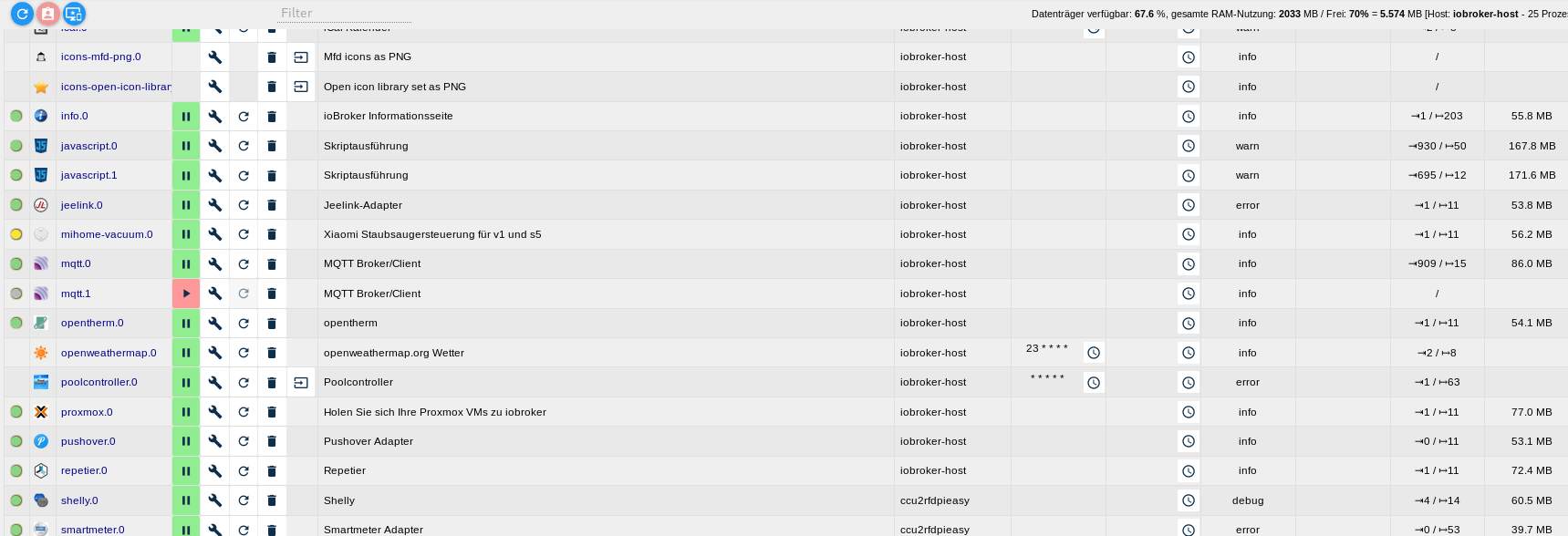
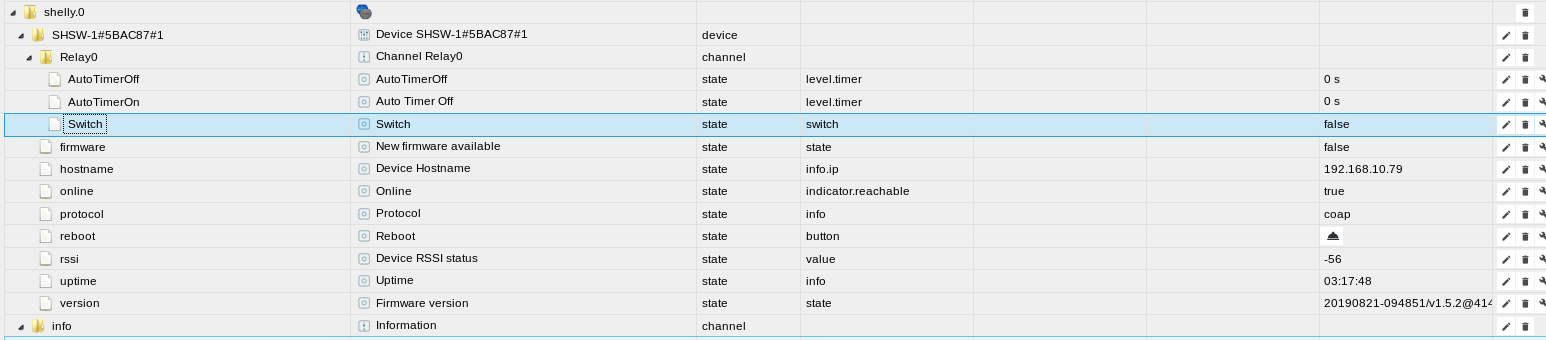
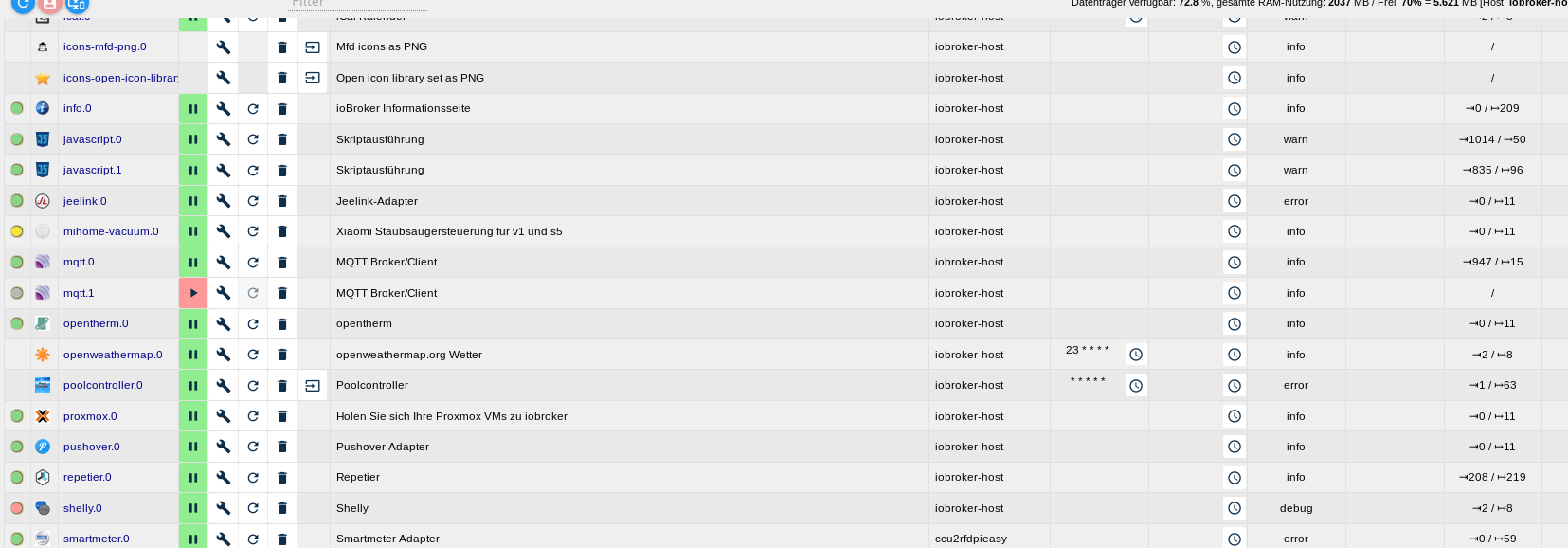
Ich hoffe es ist jetzt verständlich.
Gruß
SvenHier noch die Logs als Ergänzung
Hier keine Funktion beim Start der Instanz auf dem Host 2019-10-04 18:36:23.356 - info: host.iobroker-host instance system.adapter.shelly.0 started with pid 30257 2019-10-04 18:36:24.789 - debug: shelly.0 (30257) Redis Objects: Use Redis connection: 0.0.0.0:9001 2019-10-04 18:36:25.439 - debug: shelly.0 (30257) Objects connected to redis: 0.0.0.0:9001 2019-10-04 18:36:25.444 - debug: shelly.0 (30257) objectDB connected 2019-10-04 18:36:25.446 - debug: shelly.0 (30257) Redis States: Use Redis connection: 0.0.0.0:9000 2019-10-04 18:36:25.450 - debug: shelly.0 (30257) statesDB connected 2019-10-04 18:36:25.461 - debug: shelly.0 (30257) States connected to redis: 0.0.0.0:9000 2019-10-04 18:36:26.416 - info: shelly.0 (30257) starting. Version 3.1.0 in /opt/iobroker/node_modules/iobroker.shelly, node: v8.16.1 2019-10-04 18:36:26.487 - info: shelly.0 (30257) Stating Shelly adapter in CoAP modus. 2019-10-04 18:36:26.561 - info: host.iobroker-host instance system.adapter.shelly.0 terminated with code 0 (NO_ERROR) 2019-10-04 18:36:26.562 - info: host.iobroker-host Restart adapter system.adapter.shelly.0 because enabled Hier ein Startvorgang auf dem Client (Pi) 2019-10-04 16:36:36.813 - info: host.ccu2rfdpieasy instance system.adapter.shelly.0 started with pid 1482 2019-10-04 16:36:41.669 - debug: shelly.0 (1482) Redis Objects: Use Redis connection: 192.168.10.57:9001 2019-10-04 16:36:42.083 - debug: shelly.0 (1482) objectDB connected 2019-10-04 16:36:42.096 - debug: shelly.0 (1482) Redis States: Use Redis connection: 192.168.10.57:9000 2019-10-04 16:36:42.109 - debug: shelly.0 (1482) Objects connected to redis: 192.168.10.57:9001 2019-10-04 16:36:42.133 - debug: shelly.0 (1482) statesDB connected 2019-10-04 16:36:42.246 - debug: shelly.0 (1482) States connected to redis: 192.168.10.57:9000 2019-10-04 16:36:43.103 - info: shelly.0 (1482) starting. Version 3.1.0 in /opt/iobroker/node_modules/iobroker.shelly, node: v8.16.1 2019-10-04 16:36:43.280 - info: shelly.0 (1482) Stating Shelly adapter in CoAP modus. 2019-10-04 16:36:43.783 - info: shelly.0 (1482) Listening for Shelly packets in the network 2019-10-04 16:36:50.340 - debug: shelly.0 (1482) CoAP status package received: {"3332":"SHSW-1#5BAC87#1","3412":38400,"3420":1792,"Uri-Path":"cit/s"} / {"G":[[0,112,0],[0,118,0]]} 2019-10-04 16:36:50.343 - debug: shelly.0 (1482) Status update received for SHSW-1#5BAC87#1: {"G":[[0,112,0],[0,118,0]]} 2019-10-04 16:36:50.346 - debug: shelly.0 (1482) CoAP device description request for SHSW-1#5BAC87#1 to 192.168.10.79(0) 2019-10-04 16:36:50.384 - debug: shelly.0 (1482) CoAP response: {"3332":"SHSW-1#5BAC87#1"} 2019-10-04 16:36:50.386 - debug: shelly.0 (1482) Device description received: {"3332":"SHSW-1#5BAC87#1"} / {"blk":[{"I":0,"D":"Relay0"},{"I":118,"T":"S","D":"Input","R":"0/1/2","L":1}],"sen":[{"I":112,"T":"Switch","R":"0/1","L":0}],"act":[{"I":211,"D":"Switch","L":0,"P":[{"I":2011,"D":"ToState","R":"0/1"}]}]} 2019-10-04 16:36:50.394 - info: shelly.0 (1482) Shelly device 192.168.10.79 (shelly1 / shelly1-5BAC87 / SHSW-1#5BAC87#1) with CoAP connected! 2019-10-04 16:36:50.463 - debug: shelly.0 (1482) CoAP Message for SHSW-1#5BAC87#1 : {"G":[[0,112,0],[0,118,0]]} 2019-10-04 16:36:50.466 - debug: shelly.0 (1482) Create State : SHSW-1#5BAC87#1.Relay0.Switch, Payload: {"G":[[0,112,0],[0,118,0]]}for SHSW-1#5BAC87#1 2019-10-04 16:36:50.468 - debug: shelly.0 (1482) State change : SHSW-1#5BAC87#1.Relay0.Switch, Value: false for 192.168.10.79 (shelly1 / shelly1-5BAC87 / SHSW-1#5BAC87#1) -
@apollon77 sagte in [Aufruf] js-controller 2.0 Beta Test:
n denn die Werte die da im log stehen so aktualisert? Auf was stehen die werte im Admin? Kannst Du schalten? bzw jetzt sag mal bitte ganz genau was "ist rot
OK ich versuche es nochmal Verständlicher zu erklären.
Normalerweise läuft der Shelly Adapter auf dem Host System. Der grüne Punkt im Admin ist normal ja grün (Punkt vor dem Adapter) wenn der Adapter läuft. Aktuell das nicht der Fall. Dort wird ein roter Punkt angezeigt. Ein schalten über die Objekte (switch true/flase) wird beim shelly nicht ausgeführt. Auch die Zustände unter Objekte ändern sich nicht wenn ich den Shelly über seine Weboberfläche schalte. Fazit Shelly Adapter roter Punkt davor und keine Funktion.Verschiebe ich die Shelly Instanz auf den client (ccu2rfdpieasy) bei mir ein pi3. Wird der Punkt vor dem Adapter grün. Der Shelly lässt sich über Objekte schalten. Änderungen der Schaltzustände am Shelly über die Shelly Weboberfläche werden dann auch unter ioBroker Objekte angezeigt.
Ich hoffe es ist jetzt verständlich.
Gruß
SvenHier noch die Logs als Ergänzung
Hier keine Funktion beim Start der Instanz auf dem Host 2019-10-04 18:36:23.356 - info: host.iobroker-host instance system.adapter.shelly.0 started with pid 30257 2019-10-04 18:36:24.789 - debug: shelly.0 (30257) Redis Objects: Use Redis connection: 0.0.0.0:9001 2019-10-04 18:36:25.439 - debug: shelly.0 (30257) Objects connected to redis: 0.0.0.0:9001 2019-10-04 18:36:25.444 - debug: shelly.0 (30257) objectDB connected 2019-10-04 18:36:25.446 - debug: shelly.0 (30257) Redis States: Use Redis connection: 0.0.0.0:9000 2019-10-04 18:36:25.450 - debug: shelly.0 (30257) statesDB connected 2019-10-04 18:36:25.461 - debug: shelly.0 (30257) States connected to redis: 0.0.0.0:9000 2019-10-04 18:36:26.416 - info: shelly.0 (30257) starting. Version 3.1.0 in /opt/iobroker/node_modules/iobroker.shelly, node: v8.16.1 2019-10-04 18:36:26.487 - info: shelly.0 (30257) Stating Shelly adapter in CoAP modus. 2019-10-04 18:36:26.561 - info: host.iobroker-host instance system.adapter.shelly.0 terminated with code 0 (NO_ERROR) 2019-10-04 18:36:26.562 - info: host.iobroker-host Restart adapter system.adapter.shelly.0 because enabled Hier ein Startvorgang auf dem Client (Pi) 2019-10-04 16:36:36.813 - info: host.ccu2rfdpieasy instance system.adapter.shelly.0 started with pid 1482 2019-10-04 16:36:41.669 - debug: shelly.0 (1482) Redis Objects: Use Redis connection: 192.168.10.57:9001 2019-10-04 16:36:42.083 - debug: shelly.0 (1482) objectDB connected 2019-10-04 16:36:42.096 - debug: shelly.0 (1482) Redis States: Use Redis connection: 192.168.10.57:9000 2019-10-04 16:36:42.109 - debug: shelly.0 (1482) Objects connected to redis: 192.168.10.57:9001 2019-10-04 16:36:42.133 - debug: shelly.0 (1482) statesDB connected 2019-10-04 16:36:42.246 - debug: shelly.0 (1482) States connected to redis: 192.168.10.57:9000 2019-10-04 16:36:43.103 - info: shelly.0 (1482) starting. Version 3.1.0 in /opt/iobroker/node_modules/iobroker.shelly, node: v8.16.1 2019-10-04 16:36:43.280 - info: shelly.0 (1482) Stating Shelly adapter in CoAP modus. 2019-10-04 16:36:43.783 - info: shelly.0 (1482) Listening for Shelly packets in the network 2019-10-04 16:36:50.340 - debug: shelly.0 (1482) CoAP status package received: {"3332":"SHSW-1#5BAC87#1","3412":38400,"3420":1792,"Uri-Path":"cit/s"} / {"G":[[0,112,0],[0,118,0]]} 2019-10-04 16:36:50.343 - debug: shelly.0 (1482) Status update received for SHSW-1#5BAC87#1: {"G":[[0,112,0],[0,118,0]]} 2019-10-04 16:36:50.346 - debug: shelly.0 (1482) CoAP device description request for SHSW-1#5BAC87#1 to 192.168.10.79(0) 2019-10-04 16:36:50.384 - debug: shelly.0 (1482) CoAP response: {"3332":"SHSW-1#5BAC87#1"} 2019-10-04 16:36:50.386 - debug: shelly.0 (1482) Device description received: {"3332":"SHSW-1#5BAC87#1"} / {"blk":[{"I":0,"D":"Relay0"},{"I":118,"T":"S","D":"Input","R":"0/1/2","L":1}],"sen":[{"I":112,"T":"Switch","R":"0/1","L":0}],"act":[{"I":211,"D":"Switch","L":0,"P":[{"I":2011,"D":"ToState","R":"0/1"}]}]} 2019-10-04 16:36:50.394 - info: shelly.0 (1482) Shelly device 192.168.10.79 (shelly1 / shelly1-5BAC87 / SHSW-1#5BAC87#1) with CoAP connected! 2019-10-04 16:36:50.463 - debug: shelly.0 (1482) CoAP Message for SHSW-1#5BAC87#1 : {"G":[[0,112,0],[0,118,0]]} 2019-10-04 16:36:50.466 - debug: shelly.0 (1482) Create State : SHSW-1#5BAC87#1.Relay0.Switch, Payload: {"G":[[0,112,0],[0,118,0]]}for SHSW-1#5BAC87#1 2019-10-04 16:36:50.468 - debug: shelly.0 (1482) State change : SHSW-1#5BAC87#1.Relay0.Switch, Value: false for 192.168.10.79 (shelly1 / shelly1-5BAC87 / SHSW-1#5BAC87#1)@sven12 Also jetzt wird das log interessanter (oder ich hatte das vorher übersehen). Der beendet sich auf deinem master als sofort wieder?
Dann mach mal auf dem master folgendes: Starte mal an Kommandozeile. Gehe ins iobroker Verzeichnis,in einer Shell, dann
node node_modules/iobroker.shelly/shelly.js --force --logsKommt da ggf mehr als Ausgabe?
-
Habe folgendes festgestellt.
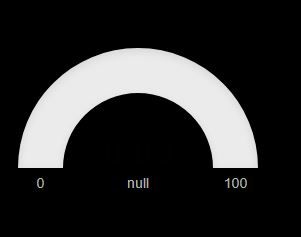
Die Beschriftung des Widget "justGage" wird in der VIS Ansicht nicht korrekt dargestellt.
Im Editor habe ich "TEST" hinterlegt in der Ansicht im Browser wird mir "null" angezeigt.Editor
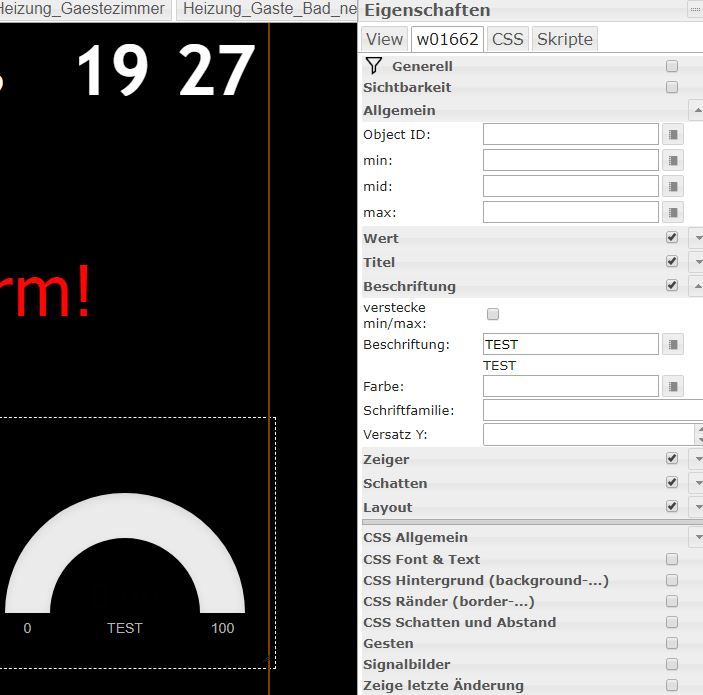
Browser
-
@sven12 Also jetzt wird das log interessanter (oder ich hatte das vorher übersehen). Der beendet sich auf deinem master als sofort wieder?
Dann mach mal auf dem master folgendes: Starte mal an Kommandozeile. Gehe ins iobroker Verzeichnis,in einer Shell, dann
node node_modules/iobroker.shelly/shelly.js --force --logsKommt da ggf mehr als Ausgabe?
@apollon77
Nicht wirklich viel mehr Infos.....iobroker@iobroker-host:/opt/iobroker$ node node_modules/iobroker.shelly/shelly.js --force --logs 2019-10-04 20:27:32.109 - error: shelly.0 (22205) shelly.0 invalid process id scenario 22181 vs. 22205. Stopping 2019-10-04 20:27:44.707 - warn: shelly.0 (22205) Got terminate signal. Checking desired PID: 0 vs own PID 22205 2019-10-04 20:27:44.742 - warn: shelly.0 (22205) Got terminate signal. Checking desired PID: 22651 vs own PID 22205 2019-10-04 20:28:17.631 - warn: shelly.0 (22205) Got terminate signal. Checking desired PID: 0 vs own PID 22205 2019-10-04 20:28:17.640 - warn: shelly.0 (22205) Got terminate signal. Checking desired PID: 23570 vs own PID 22205 2019-10-04 20:28:49.488 - warn: shelly.0 (22205) Got terminate signal. Checking desired PID: 0 vs own PID 22205 2019-10-04 20:28:49.499 - warn: shelly.0 (22205) Got terminate signal. Checking desired PID: 24494 vs own PID 22205 2019-10-04 20:29:21.317 - warn: shelly.0 (22205) Got terminate signal. Checking desired PID: 0 vs own PID 22205 2019-10-04 20:29:21.328 - warn: shelly.0 (22205) Got terminate signal. Checking desired PID: 25431 vs own PID 22205 2019-10-04 20:29:21.486 - info: shelly.0 (22205) Got terminate signal TERMINATE_YOURSELF 2019-10-04 20:29:28.431 - warn: shelly.0 (22205) Got terminate signal. Checking desired PID: 0 vs own PID 22205 2019-10-04 20:29:28.442 - warn: shelly.0 (22205) Got terminate signal. Checking desired PID: 25668 vs own PID 22205 2019-10-04 20:30:00.174 - warn: shelly.0 (22205) Got terminate signal. Checking desired PID: 0 vs own PID 22205 2019-10-04 20:30:00.186 - warn: shelly.0 (22205) Got terminate signal. Checking desired PID: 26586 vs own PID 22205 2019-10-04 20:30:36.686 - warn: shelly.0 (22205) Got terminate signal. Checking desired PID: 0 vs own PID 22205 2019-10-04 20:30:36.697 - warn: shelly.0 (22205) Got terminate signal. Checking desired PID: 27752 vs own PID 22205iobroker Log
2019-10-04 20:29:22.826 - error: shelly.0 (25431) adapter disabled 2019-10-04 20:29:22.880 - warn: shelly.0 (25431) Terminated (NO_ADAPTER_CONFIG_FOUND): Without reason 2019-10-04 20:29:22.898 - info: host.iobroker-host instance system.adapter.shelly.0 terminated with code 3 (NO_ADAPTER_CONFIG_FOUND) 2019-10-04 20:29:23.686 - info: mqtt.0 (27417) Client [WetterStation] connected with secret 1570213763685_8509 2019-10-04 20:29:23.713 - info: mqtt.0 (27417) Client [WetterStation] subscribes on "mqtt.0.WetterStation" 2019-10-04 20:29:23.713 - info: mqtt.0 (27417) Client [WetterStation] publishOnSubscribe 2019-10-04 20:29:24.429 - info: host.iobroker-host instance system.adapter.poolcontroller.0 terminated with code 0 (NO_ERROR) 2019-10-04 20:29:28.427 - info: host.iobroker-host "system.adapter.shelly.0" enabled 2019-10-04 20:29:28.431 - warn: shelly.0 (22205) Got terminate signal. Checking desired PID: 0 vs own PID 22205 2019-10-04 20:29:28.442 - warn: shelly.0 (22205) Got terminate signal. Checking desired PID: 25668 vs own PID 22205 2019-10-04 20:29:28.443 - info: host.iobroker-host instance system.adapter.shelly.0 started with pid 25668 2019-10-04 20:29:29.142 - debug: shelly.0 (25668) Redis Objects: Use Redis connection: 0.0.0.0:9001 2019-10-04 20:29:29.184 - debug: shelly.0 (25668) objectDB connected 2019-10-04 20:29:29.186 - debug: shelly.0 (25668) Redis States: Use Redis connection: 0.0.0.0:9000 2019-10-04 20:29:29.188 - debug: shelly.0 (25668) Objects connected to redis: 0.0.0.0:9001 2019-10-04 20:29:29.192 - debug: shelly.0 (25668) statesDB connected 2019-10-04 20:29:29.205 - debug: shelly.0 (25668) States connected to redis: 0.0.0.0:9000 2019-10-04 20:29:29.969 - info: shelly.0 (25668) starting. Version 3.1.0 in /opt/iobroker/node_modules/iobroker.shelly, node: v8.16.1 2019-10-04 20:29:30.041 - info: shelly.0 (25668) Stating Shelly adapter in CoAP modus. 2019-10-04 20:29:30.162 - info: host.iobroker-host instance system.adapter.shelly.0 terminated with code 0 (NO_ERROR) 2019-10-04 20:29:30.163 - info: host.iobroker-host Restart adapter system.adapter.shelly.0 because enabled -
@apollon77 nochmal kurz ins Log geschaut, also es war wohl bei allen Adapter, ich hänge das Stück vom Log mal an, irgendwann ist dann alles gut...
-
@apollon77
Nicht wirklich viel mehr Infos.....iobroker@iobroker-host:/opt/iobroker$ node node_modules/iobroker.shelly/shelly.js --force --logs 2019-10-04 20:27:32.109 - error: shelly.0 (22205) shelly.0 invalid process id scenario 22181 vs. 22205. Stopping 2019-10-04 20:27:44.707 - warn: shelly.0 (22205) Got terminate signal. Checking desired PID: 0 vs own PID 22205 2019-10-04 20:27:44.742 - warn: shelly.0 (22205) Got terminate signal. Checking desired PID: 22651 vs own PID 22205 2019-10-04 20:28:17.631 - warn: shelly.0 (22205) Got terminate signal. Checking desired PID: 0 vs own PID 22205 2019-10-04 20:28:17.640 - warn: shelly.0 (22205) Got terminate signal. Checking desired PID: 23570 vs own PID 22205 2019-10-04 20:28:49.488 - warn: shelly.0 (22205) Got terminate signal. Checking desired PID: 0 vs own PID 22205 2019-10-04 20:28:49.499 - warn: shelly.0 (22205) Got terminate signal. Checking desired PID: 24494 vs own PID 22205 2019-10-04 20:29:21.317 - warn: shelly.0 (22205) Got terminate signal. Checking desired PID: 0 vs own PID 22205 2019-10-04 20:29:21.328 - warn: shelly.0 (22205) Got terminate signal. Checking desired PID: 25431 vs own PID 22205 2019-10-04 20:29:21.486 - info: shelly.0 (22205) Got terminate signal TERMINATE_YOURSELF 2019-10-04 20:29:28.431 - warn: shelly.0 (22205) Got terminate signal. Checking desired PID: 0 vs own PID 22205 2019-10-04 20:29:28.442 - warn: shelly.0 (22205) Got terminate signal. Checking desired PID: 25668 vs own PID 22205 2019-10-04 20:30:00.174 - warn: shelly.0 (22205) Got terminate signal. Checking desired PID: 0 vs own PID 22205 2019-10-04 20:30:00.186 - warn: shelly.0 (22205) Got terminate signal. Checking desired PID: 26586 vs own PID 22205 2019-10-04 20:30:36.686 - warn: shelly.0 (22205) Got terminate signal. Checking desired PID: 0 vs own PID 22205 2019-10-04 20:30:36.697 - warn: shelly.0 (22205) Got terminate signal. Checking desired PID: 27752 vs own PID 22205iobroker Log
2019-10-04 20:29:22.826 - error: shelly.0 (25431) adapter disabled 2019-10-04 20:29:22.880 - warn: shelly.0 (25431) Terminated (NO_ADAPTER_CONFIG_FOUND): Without reason 2019-10-04 20:29:22.898 - info: host.iobroker-host instance system.adapter.shelly.0 terminated with code 3 (NO_ADAPTER_CONFIG_FOUND) 2019-10-04 20:29:23.686 - info: mqtt.0 (27417) Client [WetterStation] connected with secret 1570213763685_8509 2019-10-04 20:29:23.713 - info: mqtt.0 (27417) Client [WetterStation] subscribes on "mqtt.0.WetterStation" 2019-10-04 20:29:23.713 - info: mqtt.0 (27417) Client [WetterStation] publishOnSubscribe 2019-10-04 20:29:24.429 - info: host.iobroker-host instance system.adapter.poolcontroller.0 terminated with code 0 (NO_ERROR) 2019-10-04 20:29:28.427 - info: host.iobroker-host "system.adapter.shelly.0" enabled 2019-10-04 20:29:28.431 - warn: shelly.0 (22205) Got terminate signal. Checking desired PID: 0 vs own PID 22205 2019-10-04 20:29:28.442 - warn: shelly.0 (22205) Got terminate signal. Checking desired PID: 25668 vs own PID 22205 2019-10-04 20:29:28.443 - info: host.iobroker-host instance system.adapter.shelly.0 started with pid 25668 2019-10-04 20:29:29.142 - debug: shelly.0 (25668) Redis Objects: Use Redis connection: 0.0.0.0:9001 2019-10-04 20:29:29.184 - debug: shelly.0 (25668) objectDB connected 2019-10-04 20:29:29.186 - debug: shelly.0 (25668) Redis States: Use Redis connection: 0.0.0.0:9000 2019-10-04 20:29:29.188 - debug: shelly.0 (25668) Objects connected to redis: 0.0.0.0:9001 2019-10-04 20:29:29.192 - debug: shelly.0 (25668) statesDB connected 2019-10-04 20:29:29.205 - debug: shelly.0 (25668) States connected to redis: 0.0.0.0:9000 2019-10-04 20:29:29.969 - info: shelly.0 (25668) starting. Version 3.1.0 in /opt/iobroker/node_modules/iobroker.shelly, node: v8.16.1 2019-10-04 20:29:30.041 - info: shelly.0 (25668) Stating Shelly adapter in CoAP modus. 2019-10-04 20:29:30.162 - info: host.iobroker-host instance system.adapter.shelly.0 terminated with code 0 (NO_ERROR) 2019-10-04 20:29:30.163 - info: host.iobroker-host Restart adapter system.adapter.shelly.0 because enabled -
@apollon77 nochmal kurz ins Log geschaut, also es war wohl bei allen Adapter, ich hänge das Stück vom Log mal an, irgendwann ist dann alles gut...
@coyote Bitte sei mal etwas grösszügiger mit dem Anfang des Logs ... direkt da zu starten wo die Fehler kommen ist da nicht sehr hilfreich weil irgendwas muss die ja verursachen ... bedeutet: Bitte noch etwas Log von davor
Beitrag hat geholfen? Votet rechts unten im Beitrag :-) https://paypal.me/Apollon77 / https://github.com/sponsors/Apollon77
- Debug-Log für Instanz einschalten? Admin -> Instanzen -> Expertenmodus -> Instanz aufklappen - Loglevel ändern
- Logfiles auf Platte /opt/iobroker/log/… nutzen, Admin schneidet Zeilen ab
-
@sven12 Ok, dann bitte vorher die nroamellaufende shelly instanz stoppen und erst dann an der Kommandozeile ausführen. Doppelt laufen geht kaputt ggf
@apollon77
Wenn ich den Adapter im Admin gestoppt habe, kommt auf der Konsole das hier:iobroker@iobroker-host:/opt/iobroker$ node node_modules/iobroker.shelly/shelly.js --force --logs 2019-10-04 20:45:07.776 - error: shelly.0 (20885) adapter disabled 2019-10-04 20:45:07.779 - info: shelly.0 (20885) starting. Version 3.1.0 in /opt/iobroker/node_modules/iobroker.shelly, node: v8.16.1 2019-10-04 20:45:07.841 - info: shelly.0 (20885) Stating Shelly adapter in CoAP modus. Exception: Error: addMembership EADDRINUSE/Error: addMembership EADDRINUSE 2019-10-04 20:45:07.960 - error: shelly.0 (20885) Exception: Error: addMembership EADDRINUSE 2019-10-04 20:45:07.961 - info: shelly.0 (20885) Closing Adapter -
@apollon77
Wenn ich den Adapter im Admin gestoppt habe, kommt auf der Konsole das hier:iobroker@iobroker-host:/opt/iobroker$ node node_modules/iobroker.shelly/shelly.js --force --logs 2019-10-04 20:45:07.776 - error: shelly.0 (20885) adapter disabled 2019-10-04 20:45:07.779 - info: shelly.0 (20885) starting. Version 3.1.0 in /opt/iobroker/node_modules/iobroker.shelly, node: v8.16.1 2019-10-04 20:45:07.841 - info: shelly.0 (20885) Stating Shelly adapter in CoAP modus. Exception: Error: addMembership EADDRINUSE/Error: addMembership EADDRINUSE 2019-10-04 20:45:07.960 - error: shelly.0 (20885) Exception: Error: addMembership EADDRINUSE 2019-10-04 20:45:07.961 - info: shelly.0 (20885) Closing Adapter -
@sven12 Kann es sein das da irgendwie noch eine Instanz läuft? Schau al mit "ps auxww|grep shelly"
@apollon77 sagte in [Aufruf] js-controller 2.0 Beta Test:
ps auxww|grep shelly
iobroker@iobroker-host:/opt/iobroker$ ps auxww|grep shelly iobroker 26889 0.0 0.0 12780 928 pts/3 S+ 20:48 0:00 grep shelly iobroker@iobroker-host:/opt/iobroker$ node node_modules/iobroker.shelly/shelly.js --force --logs 2019-10-04 20:48:48.376 - error: shelly.0 (27548) shelly.0 invalid process id scenario 25918 vs. 27548. Stopping -
@coyote Bitte sei mal etwas grösszügiger mit dem Anfang des Logs ... direkt da zu starten wo die Fehler kommen ist da nicht sehr hilfreich weil irgendwas muss die ja verursachen ... bedeutet: Bitte noch etwas Log von davor
@apollon77 sorry, klar macht vllt mehr Sinn...
Hier mal ab Start von iobroker bis Anfang der Warnings:
Übrigens habe ich noch ein kleines Problem, es gibt ein Unifi Script von liv-in-the-sky, dass schreibt ein html file nach /opt/iobroker/iobroker-data/files/iqontrol/htmlclients.html
Die Datei ist auch definitiv dort vorhanden und wird auch stetig geändert, nur wird sie mir jetzt nach der Umstellung in iQontrol nicht mehr angezeigt und iQontrol sagt, nicht vorhanden.Muss in iQontrol der Pfad jetzt geändert werden oder woran kann das liegen?



Support us
389
Online32.5k
Users81.7k
Topics1.3m
Posts