
NEWS




Blink Camera System
-
1.) du hast in Deinem blockly das python voran entfernt,
ich würde alle scripte in /opt/iobroker packen, wegen der Rechte
2.) was für eine Kamera ist das
3.) wie sieht die bild.py jetzt genau aus
4.) wird das script jetzt ausgeführt, unabhängig davon ob ein bild in das Verzeichnis gelegt wird@pischleuder said in Blink Camera System:
1.) du hast in Deinem blockly das python voran entfernt
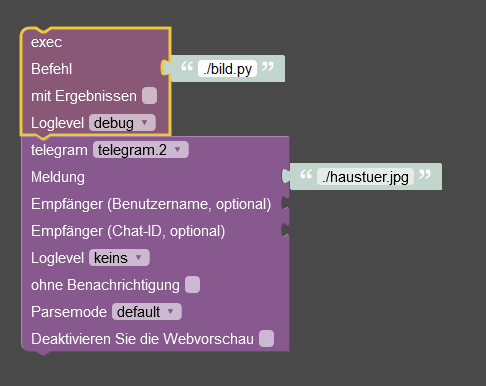
2.) was für eine Kamera ist das
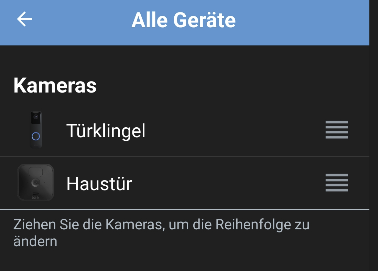
3.) wie sieht die bild.py jetzt genau aus
#!/usr/bin/python3
import requests

from blinkpy.blinkpy import Blink
from blinkpy.auth import Auth
from blinkpy.helpers.util import json_load
from blinkpy.camera import BlinkCamera

blink = Blink()
auth = Auth({"username": 'x', "password": 'x'}, no_prompt=True)
blink.auth = auth
blink.start()

#auth.send_auth_key(blink, "x")
#blink.setup_post_verify()

###### hier den Dateinamen/Pfad eintragen, den das snapshot Bild erhalten soll - bei mir Flur und Garten Kamera  #####

bild = './haustuer.jpg'
#bild2 = '/home/saeko/blinkpy/Tuerklingel.jpg'
#for name, camera in blink.cameras.items(): print(name), print(camera.attributes)

#### hier Eure Kamera 1 eintragen und weitere Einträge für mehr Kameras vornehmen ####

camera = blink.cameras['Haustür']
camera.snap_picture()
blink.refresh()
camera.image_to_file(bild)

#payload = {'value':bild}
#r = requests.get("http://192.168.178.92:8081/set/0_userdata.0.snapcamera1", params=payload)

#### hier Eure Kamera 2 eintragen und weitere Einträge für mehr Kameras vornehmen ####

#camera = blink.cameras['Türklingel']
#camera.snap_picture()
#blink.refresh()
#camera.image_to_file(bild2)

#payload = {'value':bild}
#r = requests.get("http://192.168.178.92:8081/set/0_userdata.0.snapcamera1", params=payload)
4.) wird das script jetzt ausgeführt, unabhängig davon ob ein bild in das Verzeichnis gelegt wird
In der Konsole ja.
das kommt in der konsolesaeko@raspberrypi:/opt/iobroker $ ./bild.py Could not extract camera info: {'message': 'Camera not found', 'code': 500} Expected json response from https://rest-e004.immedia-semi.com/network/unknown/camera/unknown/signals, but received: 406: Not Acceptable Could not retrieve calibrated temperature. Could not find thumbnail for camera unknown Expected json response from https://rest-e004.immedia-semi.com/network/66328/camera/unknown/config, but received: 406: Not Acceptable Could not extract camera info: None Expected json response from https://rest-e004.immedia-semi.com/network/unknown/camera/unknown/signals, but received: 406: Not Acceptable Could not retrieve calibrated temperature. Could not find thumbnail for camera unknownWie prüfe ich es in blockly? Zumindest kommt keine Fehlermeldung in der Konsole

-
@pischleuder said in Blink Camera System:
1.) du hast in Deinem blockly das python voran entfernt
2.) was für eine Kamera ist das
3.) wie sieht die bild.py jetzt genau aus
#!/usr/bin/python3 import requests from blinkpy.blinkpy import Blink from blinkpy.auth import Auth from blinkpy.helpers.util import json_load from blinkpy.camera import BlinkCamera blink = Blink() auth = Auth({"username": 'x', "password": 'x'}, no_prompt=True) blink.auth = auth blink.start() #auth.send_auth_key(blink, "x") #blink.setup_post_verify() ###### hier den Dateinamen/Pfad eintragen, den das snapshot Bild erhalten soll - bei mir Flur und Garten Kamera ##### bild = './haustuer.jpg' #bild2 = '/home/saeko/blinkpy/Tuerklingel.jpg' #for name, camera in blink.cameras.items(): print(name), print(camera.attributes) #### hier Eure Kamera 1 eintragen und weitere Einträge für mehr Kameras vornehmen #### camera = blink.cameras['Haustür'] camera.snap_picture() blink.refresh() camera.image_to_file(bild) #payload = {'value':bild} #r = requests.get("http://192.168.178.92:8081/set/0_userdata.0.snapcamera1", params=payload) #### hier Eure Kamera 2 eintragen und weitere Einträge für mehr Kameras vornehmen #### #camera = blink.cameras['Türklingel'] #camera.snap_picture() #blink.refresh() #camera.image_to_file(bild2) #payload = {'value':bild} #r = requests.get("http://192.168.178.92:8081/set/0_userdata.0.snapcamera1", params=payload)4.) wird das script jetzt ausgeführt, unabhängig davon ob ein bild in das Verzeichnis gelegt wird
In der Konsole ja.
das kommt in der konsolesaeko@raspberrypi:/opt/iobroker $ ./bild.py Could not extract camera info: {'message': 'Camera not found', 'code': 500} Expected json response from https://rest-e004.immedia-semi.com/network/unknown/camera/unknown/signals, but received: 406: Not Acceptable Could not retrieve calibrated temperature. Could not find thumbnail for camera unknown Expected json response from https://rest-e004.immedia-semi.com/network/66328/camera/unknown/config, but received: 406: Not Acceptable Could not extract camera info: None Expected json response from https://rest-e004.immedia-semi.com/network/unknown/camera/unknown/signals, but received: 406: Not Acceptable Could not retrieve calibrated temperature. Could not find thumbnail for camera unknownWie prüfe ich es in blockly? Zumindest kommt keine Fehlermeldung in der Konsole
@soukai sagte in Blink Camera System:
@pischleuder said in Blink Camera System:
1.) du hast in Deinem blockly das python voran entfernt
hier muss auch der Pfad mit angegeben werden:
/opt/iobroker/bild.py ebenso beim jpg -
@soukai sagte in Blink Camera System:
@pischleuder said in Blink Camera System:
1.) du hast in Deinem blockly das python voran entfernt
hier muss auch der Pfad mit angegeben werden:
/opt/iobroker/bild.py ebenso beim jpg -
@pischleuder said in Blink Camera System:
1.) du hast in Deinem blockly das python voran entfernt
2.) was für eine Kamera ist das
3.) wie sieht die bild.py jetzt genau aus
#!/usr/bin/python3 import requests from blinkpy.blinkpy import Blink from blinkpy.auth import Auth from blinkpy.helpers.util import json_load from blinkpy.camera import BlinkCamera blink = Blink() auth = Auth({"username": 'x', "password": 'x'}, no_prompt=True) blink.auth = auth blink.start() #auth.send_auth_key(blink, "x") #blink.setup_post_verify() ###### hier den Dateinamen/Pfad eintragen, den das snapshot Bild erhalten soll - bei mir Flur und Garten Kamera ##### bild = './haustuer.jpg' #bild2 = '/home/saeko/blinkpy/Tuerklingel.jpg' #for name, camera in blink.cameras.items(): print(name), print(camera.attributes) #### hier Eure Kamera 1 eintragen und weitere Einträge für mehr Kameras vornehmen #### camera = blink.cameras['Haustür'] camera.snap_picture() blink.refresh() camera.image_to_file(bild) #payload = {'value':bild} #r = requests.get("http://192.168.178.92:8081/set/0_userdata.0.snapcamera1", params=payload) #### hier Eure Kamera 2 eintragen und weitere Einträge für mehr Kameras vornehmen #### #camera = blink.cameras['Türklingel'] #camera.snap_picture() #blink.refresh() #camera.image_to_file(bild2) #payload = {'value':bild} #r = requests.get("http://192.168.178.92:8081/set/0_userdata.0.snapcamera1", params=payload)4.) wird das script jetzt ausgeführt, unabhängig davon ob ein bild in das Verzeichnis gelegt wird
In der Konsole ja.
das kommt in der konsolesaeko@raspberrypi:/opt/iobroker $ ./bild.py Could not extract camera info: {'message': 'Camera not found', 'code': 500} Expected json response from https://rest-e004.immedia-semi.com/network/unknown/camera/unknown/signals, but received: 406: Not Acceptable Could not retrieve calibrated temperature. Could not find thumbnail for camera unknown Expected json response from https://rest-e004.immedia-semi.com/network/66328/camera/unknown/config, but received: 406: Not Acceptable Could not extract camera info: None Expected json response from https://rest-e004.immedia-semi.com/network/unknown/camera/unknown/signals, but received: 406: Not Acceptable Could not retrieve calibrated temperature. Could not find thumbnail for camera unknownWie prüfe ich es in blockly? Zumindest kommt keine Fehlermeldung in der Konsole
@soukai sagte in Blink Camera System:
#!/usr/bin/python3 import requests from blinkpy.blinkpy import Blink from blinkpy.auth import Auth from blinkpy.helpers.util import json_load from blinkpy.camera import BlinkCamera blink = Blink() auth = Auth({"username": 'x', "password": 'x'}, no_prompt=True) blink.auth = auth blink.start() #auth.send_auth_key(blink, "x") #blink.setup_post_verify() ###### hier den Dateinamen/Pfad eintragen, den das snapshot Bild erhalten soll - bei mir Flur und Garten Kamera ##### bild = './haustuer.jpg' #bild2 = '/home/saeko/blinkpy/Tuerklingel.jpg' #for name, camera in blink.cameras.items(): print(name), print(camera.attributes) #### hier Eure Kamera 1 eintragen und weitere Einträge für mehr Kameras vornehmen #### camera = blink.cameras['Haustür'] camera.snap_picture() blink.refresh() camera.image_to_file(bild)hier wäre es ggf. angeraten, dass zu ergänzen:
time.sleep(10) blink.refresh(force=True)das kann wichtig sein, weil er dir ggf. sonst das alte (vorherige) Bild aufgrund von cache Problemen sendet.
-
@soukai sagte in Blink Camera System:
Gesagt, getan. Das hatte ich dann auch schon versucht... Leider ohne Erfolg...
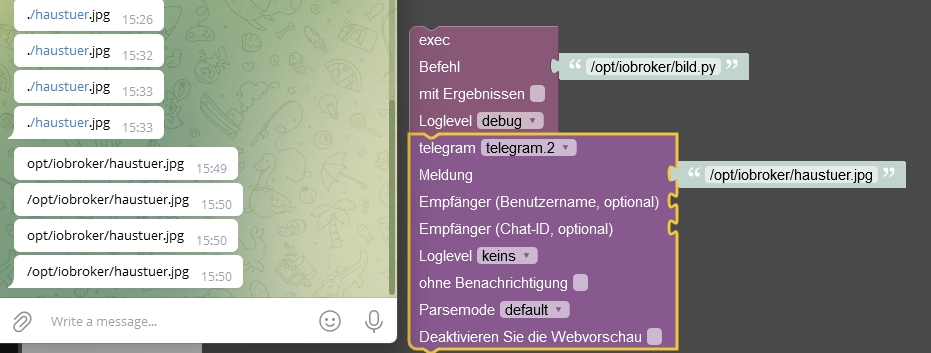
das ist klar, dass per telegramm nur der Text übermittelt wird, weil du ja keine Datei anhängst, es
wird nur das gesendet, was in " bla bla " steht.
Zum Versenden des nun hoffentlich vorhandenem Bildes solltest du ein javascript nehmen und das aus dem blockly aufrufen. -
@soukai sagte in Blink Camera System:
Gesagt, getan. Das hatte ich dann auch schon versucht... Leider ohne Erfolg...
das ist klar, dass per telegramm nur der Text übermittelt wird, weil du ja keine Datei anhängst, es
wird nur das gesendet, was in " bla bla " steht.
Zum Versenden des nun hoffentlich vorhandenem Bildes solltest du ein javascript nehmen und das aus dem blockly aufrufen.@pischleuder Wenn ein Bild drin ist, schickt er mir jedoch das bild
-
@pischleuder Wenn ein Bild drin ist, schickt er mir jedoch das bild
dann solltest du das korrekt anpassen:
bild = './haustuer.jpg'also auf /opt/iobroker/haustuer.jpg
-
@soukai sagte in Blink Camera System:
#!/usr/bin/python3 import requests from blinkpy.blinkpy import Blink from blinkpy.auth import Auth from blinkpy.helpers.util import json_load from blinkpy.camera import BlinkCamera blink = Blink() auth = Auth({"username": 'x', "password": 'x'}, no_prompt=True) blink.auth = auth blink.start() #auth.send_auth_key(blink, "x") #blink.setup_post_verify() ###### hier den Dateinamen/Pfad eintragen, den das snapshot Bild erhalten soll - bei mir Flur und Garten Kamera ##### bild = './haustuer.jpg' #bild2 = '/home/saeko/blinkpy/Tuerklingel.jpg' #for name, camera in blink.cameras.items(): print(name), print(camera.attributes) #### hier Eure Kamera 1 eintragen und weitere Einträge für mehr Kameras vornehmen #### camera = blink.cameras['Haustür'] camera.snap_picture() blink.refresh() camera.image_to_file(bild)hier wäre es ggf. angeraten, dass zu ergänzen:
time.sleep(10) blink.refresh(force=True)das kann wichtig sein, weil er dir ggf. sonst das alte (vorherige) Bild aufgrund von cache Problemen sendet.
time.sleep(10) blink.refresh(force=True)habe das ans Ende angehängt und in der Konsole kommt:
saeko@raspberrypi:/opt/iobroker $ ./bild.py Could not extract camera info: {'message': 'Camera not found', 'code': 500} Expected json response from https://rest-e004.immedia-semi.com/network/unknown/camera/unknown/signals, but received: 406: Not Acceptable Could not retrieve calibrated temperature. Could not find thumbnail for camera unknown Expected json response from https://rest-e004.immedia-semi.com/network/66328/camera/unknown/config, but received: 406: Not Acceptable Could not extract camera info: None Expected json response from https://rest-e004.immedia-semi.com/network/unknown/camera/unknown/signals, but received: 406: Not Acceptable Could not retrieve calibrated temperature. Could not find thumbnail for camera unknown Traceback (most recent call last): File "/opt/iobroker/./bild.py", line 28, in <module> time.sleep(10) NameError: name 'time' is not definedCode bis jetzt:
#!/usr/bin/python3 import requests from blinkpy.blinkpy import Blink from blinkpy.auth import Auth from blinkpy.helpers.util import json_load from blinkpy.camera import BlinkCamera blink = Blink() auth = Auth({"username": 'x', "password": 'x'}, no_prompt=True) blink.auth = auth blink.start() #auth.send_auth_key(blink, "x") #blink.setup_post_verify() ###### hier den Dateinamen/Pfad eintragen, den das snapshot Bild erhalten soll - bei mir Flur und Garten Kamera ##### bild = './haustuer.jpg' #### hier Eure Kamera 1 eintragen und weitere Einträge für mehr Kameras vornehmen #### camera = blink.cameras['Haustür'] camera.snap_picture() blink.refresh() camera.image_to_file(bild) time.sleep(10) blink.refresh(force=True) -
time.sleep(10) blink.refresh(force=True)habe das ans Ende angehängt und in der Konsole kommt:
saeko@raspberrypi:/opt/iobroker $ ./bild.py Could not extract camera info: {'message': 'Camera not found', 'code': 500} Expected json response from https://rest-e004.immedia-semi.com/network/unknown/camera/unknown/signals, but received: 406: Not Acceptable Could not retrieve calibrated temperature. Could not find thumbnail for camera unknown Expected json response from https://rest-e004.immedia-semi.com/network/66328/camera/unknown/config, but received: 406: Not Acceptable Could not extract camera info: None Expected json response from https://rest-e004.immedia-semi.com/network/unknown/camera/unknown/signals, but received: 406: Not Acceptable Could not retrieve calibrated temperature. Could not find thumbnail for camera unknown Traceback (most recent call last): File "/opt/iobroker/./bild.py", line 28, in <module> time.sleep(10) NameError: name 'time' is not definedCode bis jetzt:
#!/usr/bin/python3 import requests from blinkpy.blinkpy import Blink from blinkpy.auth import Auth from blinkpy.helpers.util import json_load from blinkpy.camera import BlinkCamera blink = Blink() auth = Auth({"username": 'x', "password": 'x'}, no_prompt=True) blink.auth = auth blink.start() #auth.send_auth_key(blink, "x") #blink.setup_post_verify() ###### hier den Dateinamen/Pfad eintragen, den das snapshot Bild erhalten soll - bei mir Flur und Garten Kamera ##### bild = './haustuer.jpg' #### hier Eure Kamera 1 eintragen und weitere Einträge für mehr Kameras vornehmen #### camera = blink.cameras['Haustür'] camera.snap_picture() blink.refresh() camera.image_to_file(bild) time.sleep(10) blink.refresh(force=True) -
Wurde eingefügt. Konsole geht. Blockly immer noch nicht...
-
Wurde eingefügt. Konsole geht. Blockly immer noch nicht...
unter javascript adapter hattest du aber "exec" und "send to host" erlauben angeklickt ? Ansonsten weiß ich nun auch nicht mehr weiter, denn es sollte funktionieren.
-
unter javascript adapter hattest du aber "exec" und "send to host" erlauben angeklickt ? Ansonsten weiß ich nun auch nicht mehr weiter, denn es sollte funktionieren.
@pischleuder
Send to host war bei mir nicht drin. Aber leider hat sich da wieder nichts geändert. Bin nochmal alle Cmds durchgegangen und bin da auf etwas gestoßen, wobei ich mir nicht mehr sicher bin, obs egal war oder nicht.Habe den Befehl mal aufgerufen:
saeko@raspberrypi:/opt/iobroker $ sudo -u iobroker python3 /opt/iobroker/bild.pyTraceback (most recent call last):
  File "/opt/iobroker/bild.py", line 5, in <module>
    from blinkpy.blinkpy import Blink
ModuleNotFoundError: No module named 'blinkpy'
und dann bei dem folgenden Befehl, die Meldung erhalten, dass es installiert wurde. Nun ist die Fehlermeldung verschwunden. Jedoch permission denied.
saeko@raspberrypi:~/blinkpy $ sudo -H -u iobroker pip3 install --upgrade dist/*.whl
Looking in indexes: https://pypi.org/simple, https://www.piwheels.org/simple
Processing ./dist/blinkpy-0.20.0.dev0-py3-none-any.whl
Requirement already satisfied: requests>=2.24.0 in /usr/local/lib/python3.9/dist-packages (from blinkpy==0.20.0.dev0) (2.27.1)
Requirement already satisfied: python-slugify>=4.0.1 in /usr/local/lib/python3.9/dist-packages (from blinkpy==0.20.0.dev0) (4.0.1)
Requirement already satisfied: python-dateutil>=2.8.1 in /usr/local/lib/python3.9/dist-packages (from blinkpy==0.20.0.dev0) (2.8.2)
Requirement already satisfied: six>=1.5 in /usr/lib/python3/dist-packages (from python-dateutil>=2.8.1->blinkpy==0.20.0.dev0) (1.16.0)
Requirement already satisfied: text-unidecode>=1.3 in /usr/local/lib/python3.9/dist-packages (from python-slugify>=4.0.1->blinkpy==0.20.0.dev0) (1.3)
Requirement already satisfied: idna<4,>=2.5 in /usr/lib/python3/dist-packages (from requests>=2.24.0->blinkpy==0.20.0.dev0) (2.10)
Requirement already satisfied: certifi>=2017.4.17 in /usr/lib/python3/dist-packages (from requests>=2.24.0->blinkpy==0.20.0.dev0) (2020.6.20)
Requirement already satisfied: charset-normalizer~=2.0.0 in /usr/local/lib/python3.9/dist-packages (from requests>=2.24.0->blinkpy==0.20.0.dev0) (2.0.12)
Requirement already satisfied: urllib3<1.27,>=1.21.1 in /usr/local/lib/python3.9/dist-packages (from requests>=2.24.0->blinkpy==0.20.0.dev0) (1.25.11)
Installing collected packages: blinkpy
Successfully installed blinkpy-0.20.0.dev0
saeko@raspberrypi:~/blinkpy $ sudo -u iobroker python3 /opt/iobroker/bild.py    Could not extract camera info: {'message': 'Camera not found', 'code': 500}
Expected json response from https://rest-e004.immedia-semi.com/network/unknown/camera/unknown/signals, but received: 406: Not Acceptable
Could not retrieve calibrated temperature.
Could not find thumbnail for camera unknown
Expected json response from https://rest-e004.immedia-semi.com/network/66328/camera/unknown/config, but received: 406: Not Acceptable
Could not extract camera info: None
Expected json response from https://rest-e004.immedia-semi.com/network/unknown/camera/unknown/signals, but received: 406: Not Acceptable
Could not retrieve calibrated temperature.
Could not find thumbnail for camera unknown
Traceback (most recent call last):
  File "/opt/iobroker/bild.py", line 27, in <module>
    camera.image_to_file(bild)
  File "/home/iobroker/.local/lib/python3.9/site-packages/blinkpy/camera.py", line 241, in image_to_file
    with open(path, "wb") as imgfile:
PermissionError: [Errno 13] Permission denied: './haustuer.jpg'
Update:
AAAH. Es funktioniert nun. :blush:
Nachdem ich im Script den Pfad zu "/opt/iobroker/haustuer.jpg" geändert hatte, kam keine permission Fehler Meldung mehr. Begreife ich zwar nicht, aber bin Froh, dass es nun tut. Das einzige was ich nun noch machen muss, ist eine Verzögerung in Blockly einbauen, da mein script etwas dauert, bis er durchläuft...
Ich dank dir nochmal vielmals für deine Geduld und kompetente Hilfe!
-
@pischleuder
Send to host war bei mir nicht drin. Aber leider hat sich da wieder nichts geändert. Bin nochmal alle Cmds durchgegangen und bin da auf etwas gestoßen, wobei ich mir nicht mehr sicher bin, obs egal war oder nicht.Habe den Befehl mal aufgerufen:
saeko@raspberrypi:/opt/iobroker $ sudo -u iobroker python3 /opt/iobroker/bild.pyTraceback (most recent call last):
  File "/opt/iobroker/bild.py", line 5, in <module>
    from blinkpy.blinkpy import Blink
ModuleNotFoundError: No module named 'blinkpy'
und dann bei dem folgenden Befehl, die Meldung erhalten, dass es installiert wurde. Nun ist die Fehlermeldung verschwunden. Jedoch permission denied.
saeko@raspberrypi:~/blinkpy $ sudo -H -u iobroker pip3 install --upgrade dist/*.whl
Looking in indexes: https://pypi.org/simple, https://www.piwheels.org/simple
Processing ./dist/blinkpy-0.20.0.dev0-py3-none-any.whl
Requirement already satisfied: requests>=2.24.0 in /usr/local/lib/python3.9/dist-packages (from blinkpy==0.20.0.dev0) (2.27.1)
Requirement already satisfied: python-slugify>=4.0.1 in /usr/local/lib/python3.9/dist-packages (from blinkpy==0.20.0.dev0) (4.0.1)
Requirement already satisfied: python-dateutil>=2.8.1 in /usr/local/lib/python3.9/dist-packages (from blinkpy==0.20.0.dev0) (2.8.2)
Requirement already satisfied: six>=1.5 in /usr/lib/python3/dist-packages (from python-dateutil>=2.8.1->blinkpy==0.20.0.dev0) (1.16.0)
Requirement already satisfied: text-unidecode>=1.3 in /usr/local/lib/python3.9/dist-packages (from python-slugify>=4.0.1->blinkpy==0.20.0.dev0) (1.3)
Requirement already satisfied: idna<4,>=2.5 in /usr/lib/python3/dist-packages (from requests>=2.24.0->blinkpy==0.20.0.dev0) (2.10)
Requirement already satisfied: certifi>=2017.4.17 in /usr/lib/python3/dist-packages (from requests>=2.24.0->blinkpy==0.20.0.dev0) (2020.6.20)
Requirement already satisfied: charset-normalizer~=2.0.0 in /usr/local/lib/python3.9/dist-packages (from requests>=2.24.0->blinkpy==0.20.0.dev0) (2.0.12)
Requirement already satisfied: urllib3<1.27,>=1.21.1 in /usr/local/lib/python3.9/dist-packages (from requests>=2.24.0->blinkpy==0.20.0.dev0) (1.25.11)
Installing collected packages: blinkpy
Successfully installed blinkpy-0.20.0.dev0
saeko@raspberrypi:~/blinkpy $ sudo -u iobroker python3 /opt/iobroker/bild.py    Could not extract camera info: {'message': 'Camera not found', 'code': 500}
Expected json response from https://rest-e004.immedia-semi.com/network/unknown/camera/unknown/signals, but received: 406: Not Acceptable
Could not retrieve calibrated temperature.
Could not find thumbnail for camera unknown
Expected json response from https://rest-e004.immedia-semi.com/network/66328/camera/unknown/config, but received: 406: Not Acceptable
Could not extract camera info: None
Expected json response from https://rest-e004.immedia-semi.com/network/unknown/camera/unknown/signals, but received: 406: Not Acceptable
Could not retrieve calibrated temperature.
Could not find thumbnail for camera unknown
Traceback (most recent call last):
  File "/opt/iobroker/bild.py", line 27, in <module>
    camera.image_to_file(bild)
  File "/home/iobroker/.local/lib/python3.9/site-packages/blinkpy/camera.py", line 241, in image_to_file
    with open(path, "wb") as imgfile:
PermissionError: [Errno 13] Permission denied: './haustuer.jpg'
Update:
AAAH. Es funktioniert nun. :blush:
Nachdem ich im Script den Pfad zu "/opt/iobroker/haustuer.jpg" geändert hatte, kam keine permission Fehler Meldung mehr. Begreife ich zwar nicht, aber bin Froh, dass es nun tut. Das einzige was ich nun noch machen muss, ist eine Verzögerung in Blockly einbauen, da mein script etwas dauert, bis er durchläuft...
Ich dank dir nochmal vielmals für deine Geduld und kompetente Hilfe!
na bestens, manchmal hilft ein wenig experimentieren und eine Nachtschicht - hatte ich auch schon oft :-)
-
Ich habe mir nun nicht alles durchgelesen, ich hoffe ihr verzeiht mir das.
Kann man die Blink mini in den ioBroker integrieren? Also kann ich da nen Stream abfangen?
Morgen ist Prime day und die Kameras sind für 20 Euro drin . -
Ich habe mir nun nicht alles durchgelesen, ich hoffe ihr verzeiht mir das.
Kann man die Blink mini in den ioBroker integrieren? Also kann ich da nen Stream abfangen?
Morgen ist Prime day und die Kameras sind für 20 Euro drin . -
@pischleuder
Aber einzelne Bilder gehen? -
@pischleuder
Aber einzelne Bilder gehen?kommt auf die Kamera an, ich habe nur Erfahrung mit der normalen Blink Kamera.
-
@pischleuder Hast Du es geschafft, mit Blinkpy z.B. auf Motion oder Drücken der Haustürklingel zu triggern und damit einen Datenpunkt im ioB zu schreiben, damit man darauf in ioB triggern kann?
-
@pischleuder Hast Du es geschafft, mit Blinkpy z.B. auf Motion oder Drücken der Haustürklingel zu triggern und damit einen Datenpunkt im ioB zu schreiben, damit man darauf in ioB triggern kann?
-
Hallo zusammen,
ich habe ein Problem und stehe völlig aufm Schlauch....
Der Adapter wird erfolgreich gestartet. und das AddIn geladen.
`
Ich habe auch den Pin auf das Handy erhalten (übrigens erst nachdem ich den Debug Modus aktivert hatte)
Im LOG (Debug Modus an) kann ich auch sehen das er auf meine Blink Instanz zugegriffen hat. Leider werden überhaupt keine DP angelegt.
Noch nicht einmal die Instanz also HAM.0 existiert in den Objekten
Ich habe bereits alles mehrfach deinstalliert und installiert.
Hoffentlcih hat jemand von euch noch einen Tip.

Support us
696
Online32.7k
Users82.4k
Topics1.3m
Posts