



Skip to content
  • Home
  • Recent
  • Tags
  • 0 Unread 0
  • Categories
  • Unreplied
  • Popular
  • GitHub
  • Docu
  • Hilfe
Skins
  • Light
  • Brite
  • Cerulean
  • Cosmo
  • Flatly
  • Journal
  • Litera
  • Lumen
  • Lux
  • Materia
  • Minty
  • Morph
  • Pulse
  • Sandstone
  • Simplex
  • Sketchy
  • Spacelab
  • United
  • Yeti
  • Zephyr
  • Dark
  • Cyborg
  • Darkly
  • Quartz
  • Slate
  • Solar
  • Superhero
  • Vapor

  • Default (No Skin)
  • No Skin
Collapse
ioBroker Logo

Community Forum

donate donate
  1. ioBroker Community Home
  2. Deutsch
  3. ioBroker Allgemein
  4. Sonos-HTTP-API Installation für Newbies, Dummies und mich
NEWS

  • Jahresrückblick 2025 – unser neuer Blogbeitrag ist online! ✨
    BluefoxB
    Bluefox
    17
    1
    2.1k

  • Neuer Blogbeitrag: Monatsrückblick - Dezember 2025 🎄
    BluefoxB
    Bluefox
    13
    1
    936

  • Weihnachtsangebot 2025! 🎄
    BluefoxB
    Bluefox
    25
    1
    2.2k

Sonos-HTTP-API Installation für Newbies, Dummies und mich

Scheduled Pinned Locked Moved ioBroker Allgemein
sonos
438 Posts 50 Posters 125.0k Views 48 Watching
  • Oldest to Newest
  • Newest to Oldest
  • Most Votes
Reply
  • Reply as topic
Log in to reply
This topic has been deleted. Only users with topic management privileges can see it.
  • F Offline
    F Offline
    figodeluxe
    wrote on last edited by
    #274

    Hallo Zusammen,
    ich bin ganz neu im Thema iobroker und würde gerne die Sonos Lautsprecher mit yahka in Homekit integrieren.
    Das einfache Play+Pause habe ich schon hinbekommen. Jetzt würde ich das gerne erweitern und bin auf diesen Thread gestoßen. Mein iobroker läuft als Docker auf meiner Qnap. Kann man die Sonos API einfach per Terminal im iobroker installieren oder brauche ich dafür eine eigenständige maschine?

    S 1 Reply Last reply
    0
    • F figodeluxe

      Hallo Zusammen,
      ich bin ganz neu im Thema iobroker und würde gerne die Sonos Lautsprecher mit yahka in Homekit integrieren.
      Das einfache Play+Pause habe ich schon hinbekommen. Jetzt würde ich das gerne erweitern und bin auf diesen Thread gestoßen. Mein iobroker läuft als Docker auf meiner Qnap. Kann man die Sonos API einfach per Terminal im iobroker installieren oder brauche ich dafür eine eigenständige maschine?

      S Offline
      S Offline
      skokarl
      wrote on last edited by
      #275

      @figodeluxe
      einfach per Terminal auf die Linux Kiste.
      Läuft unabhängig vom IOBroker.
      Ob es im Docker läuft, keine Ahnung.

      IOBroker mit Proxmox auf Celeron Nuc mit 16 GB und Debian11, Sonos API, Echo Show 15 als Wandtablet, Homematic IP, HUE, Sonos, Echos, DS718+ als Backup

      1 Reply Last reply
      0
      • F Offline
        F Offline
        figodeluxe
        wrote on last edited by figodeluxe
        #276

        Also Sonos API läuft jetzt auch. Hat von euch jemand das ganze über yahka am laufen? Wie kann ich in yahka sagen das er eine URL ausführen soll das versteh ich noch nicht ganz oder wie führe ich da ein script aus?

        1 Reply Last reply
        0
        • B Offline
          B Offline
          bishop
          wrote on last edited by
          #277

          meine settings.js sieht so aus

          'use strict';
          const fs = require('fs');
          const path = require('path');
          const logger = require('sonos-discovery/lib/helpers/logger');
          const tryLoadJson = require('./lib/helpers/try-load-json');
          
          function merge(target, source) {
            Object.keys(source).forEach((key) => {
              if ((Object.getPrototypeOf(source[key]) === Object.prototype) && (target[key] !== undefined)) {
                merge(target[key], source[key]);
              } else {
                target[key] = source[key];
              }
            });
          }
          
          var settings = {
            port: 5005,
            ip: "0.0.0.0",
            securePort: 5006,
            cacheDir: path.resolve(__dirname, 'cache'),
            webroot: path.resolve(__dirname, 'static'),
            presetDir: path.resolve(__dirname, 'presets'),
            announceVolume: 40
          };
          
          // load user settings
          const settingsFileFullPath = path.resolve(__dirname, 'settings.json');
          const userSettings = tryLoadJson(settingsFileFullPath);
          merge(settings, userSettings);
          
          logger.debug(settings);
          
          if (!fs.existsSync(settings.webroot + '/tts/')) {
            fs.mkdirSync(settings.webroot + '/tts/');
          }
          
          if (!fs.existsSync(settings.cacheDir)) {
            try {
              fs.mkdirSync(settings.cacheDir);
            } catch (err) {
              logger.warn(`Could not create cache directory ${settings.cacheDir}, please create it manually for all features to work.`);
            }
          }
          module.exports = settings;
          

          wo genau muss ich jetzt ```
          {
          "webhook": "http://localhost:5007/"
          }
          {
          "voicerss": "apikey natürlich der key"
          }

          reinkopieren?
          S 1 Reply Last reply
          0
          • S Offline
            S Offline
            skokarl
            wrote on last edited by skokarl
            #278

            ACHTUNG DAS UPDATE SONOS S2 MACHT DIE API EVTL. UNBRAUCHBAR

            S2 Update

            IOBroker mit Proxmox auf Celeron Nuc mit 16 GB und Debian11, Sonos API, Echo Show 15 als Wandtablet, Homematic IP, HUE, Sonos, Echos, DS718+ als Backup

            1 Reply Last reply
            1
            • B bishop

              meine settings.js sieht so aus

              'use strict';
              const fs = require('fs');
              const path = require('path');
              const logger = require('sonos-discovery/lib/helpers/logger');
              const tryLoadJson = require('./lib/helpers/try-load-json');
              
              function merge(target, source) {
                Object.keys(source).forEach((key) => {
                  if ((Object.getPrototypeOf(source[key]) === Object.prototype) && (target[key] !== undefined)) {
                    merge(target[key], source[key]);
                  } else {
                    target[key] = source[key];
                  }
                });
              }
              
              var settings = {
                port: 5005,
                ip: "0.0.0.0",
                securePort: 5006,
                cacheDir: path.resolve(__dirname, 'cache'),
                webroot: path.resolve(__dirname, 'static'),
                presetDir: path.resolve(__dirname, 'presets'),
                announceVolume: 40
              };
              
              // load user settings
              const settingsFileFullPath = path.resolve(__dirname, 'settings.json');
              const userSettings = tryLoadJson(settingsFileFullPath);
              merge(settings, userSettings);
              
              logger.debug(settings);
              
              if (!fs.existsSync(settings.webroot + '/tts/')) {
                fs.mkdirSync(settings.webroot + '/tts/');
              }
              
              if (!fs.existsSync(settings.cacheDir)) {
                try {
                  fs.mkdirSync(settings.cacheDir);
                } catch (err) {
                  logger.warn(`Could not create cache directory ${settings.cacheDir}, please create it manually for all features to work.`);
                }
              }
              module.exports = settings;
              

              wo genau muss ich jetzt ```
              {
              "webhook": "http://localhost:5007/"
              }
              {
              "voicerss": "apikey natürlich der key"
              }

              reinkopieren?
              S Offline
              S Offline
              skokarl
              wrote on last edited by skokarl
              #279

              @bishop sagte in [gelöst] Sonos-HTTP-API Installation für Newbies, Dummies und mich:

              meine settings.js sieht so aus

              wo genau muss ich jetzt ```
              {
              "webhook": "http://localhost:5007/"
              }
              {
              "voicerss": "apikey natürlich der key"
              }
              reinkopieren?

              Das gehört nicht in die settings.js !!, siehe Post 5

              das gehört in die settings.json, die Du anlegen musst sofern Du sie noch nicht hast.

              Anlegen, Key reinkopieren, Webserver neu booten, fertig.

              192.168.xxx.xxx:5005/namebox/say/hallo welt/de-de/
              
              VoiceRSS
              
              This REQUIRES a registered API key from voiceRSS! See http://www.voicerss.org/ for info.
              
              You need to add this to a file called settings.json (create if it doesn't exist), like this:
              
              {
                "voicerss": "f5e77e1d42063175b9219866129189a3"
              }
              
              Replace the code above (it is just made up) with the api-key you've got after registering.
              

              IOBroker mit Proxmox auf Celeron Nuc mit 16 GB und Debian11, Sonos API, Echo Show 15 als Wandtablet, Homematic IP, HUE, Sonos, Echos, DS718+ als Backup

              1 Reply Last reply
              0
              • S skokarl

                Für die SAY Funktion,

                beispielsweise bei http://www.voicerss.org/default.aspx registrieren,
                und eine kostenlose API erhalten.
                Darauf achten, dass die API bei Voicerss aktiv angezeigt wird.

                ( Amazon PollyAWS geht auch, andere auch noch. )

                Die API in die settings.json eintragen.

                {
                  "voicerss": "xxxxxxxxxxxxxxxxxxxxxxxxxxxxx"
                }
                

                Webserver neu starten.
                Fertig.

                http://192.168.120.20:5005/Sonos/say/hallo Welt/de-de
                

                p.s. es wird. :grinning:
                Ich kann allen Sonos geplagten die Sonos-HTTP-API nur ans Herz legen.

                H Offline
                H Offline
                HoffmannOs
                wrote on last edited by
                #280

                @skokarl said in Sonos-HTTP-API Installation für Newbies, Dummies und mich:

                Amazon PollyAWS

                Den VoiceRss habe ich ans laufen bekommen, wie könnte ich denn nun die Amazon Polly nutzen?

                1 Reply Last reply
                0
                • L Offline
                  L Offline
                  LJSven
                  wrote on last edited by
                  #281

                  @skokarl Gibt es irgendwo ein "How-To" - wie ich mit Say umgehen soll? Ich habe zwar VoiceRSS ans laufen bekommen, allerdings macht er bei mir immer "English mit Deutsch vermischt." Gibt es Erfahrungwerte, was an kosten bei AWS auf einen zukommen?

                  S 2 Replies Last reply
                  0
                  • L LJSven

                    @skokarl Gibt es irgendwo ein "How-To" - wie ich mit Say umgehen soll? Ich habe zwar VoiceRSS ans laufen bekommen, allerdings macht er bei mir immer "English mit Deutsch vermischt." Gibt es Erfahrungwerte, was an kosten bei AWS auf einen zukommen?

                    S Offline
                    S Offline
                    skokarl
                    wrote on last edited by skokarl
                    #282

                    textfehler

                    IOBroker mit Proxmox auf Celeron Nuc mit 16 GB und Debian11, Sonos API, Echo Show 15 als Wandtablet, Homematic IP, HUE, Sonos, Echos, DS718+ als Backup

                    1 Reply Last reply
                    0
                    • L LJSven

                      @skokarl Gibt es irgendwo ein "How-To" - wie ich mit Say umgehen soll? Ich habe zwar VoiceRSS ans laufen bekommen, allerdings macht er bei mir immer "English mit Deutsch vermischt." Gibt es Erfahrungwerte, was an kosten bei AWS auf einen zukommen?

                      S Offline
                      S Offline
                      skokarl
                      wrote on last edited by
                      #283

                      @LJSven sagte in Sonos-HTTP-API Installation für Newbies, Dummies und mich:

                      @skokarl Gibt es irgendwo ein "How-To" - wie ich mit Say umgehen soll? Ich habe zwar VoiceRSS ans laufen bekommen, allerdings macht er bei mir immer "English mit Deutsch vermischt."

                      Action is:
                      
                      /[Room name]/say/[phrase][/[language_code]][/[announce volume]]
                      /sayall/[phrase][/[language_code]][/[announce volume]]
                      
                      Example:
                      
                      /Office/say/Hello, dinner is ready
                      /Office/say/Hej, maten är klar/sv-se
                      /sayall/Hello, dinner is ready
                      /Office/say/Hello, dinner is ready/90
                      /Office/say/Hej, maten är klar/sv-se/90
                      
                      language code needs to be before volume if specified.
                      
                      Sayall will group all players, set 40% volume (by default) and then try and restore everything as the way it where. Please try it out, it will probably contain glitches but please report detailed descriptions on what the problem is (starting state, error that occurs, and the final state of your system).
                      
                      The supported language codes are:
                      Language code 	Language
                      ca-es 	Catalan
                      zh-cn 	Chinese (China)
                      zh-hk 	Chinese (Hong Kong)
                      zh-tw 	Chinese (Taiwan)
                      da-dk 	Danish
                      nl-nl 	Dutch
                      en-au 	English (Australia)
                      en-ca 	English (Canada)
                      en-gb 	English (Great Britain)
                      en-in 	English (India)
                      en-us 	English (United States)
                      fi-fi 	Finnish
                      fr-ca 	French (Canada)
                      fr-fr 	French (France)
                      de-de 	German
                      it-it 	Italian
                      ja-jp 	Japanese
                      ko-kr 	Korean
                      nb-no 	Norwegian
                      pl-pl 	Polish
                      pt-br 	Portuguese (Brazil)
                      pt-pt 	Portuguese (Portugal)
                      ru-ru 	Russian
                      es-mx 	Spanish (Mexico)
                      es-es 	Spanish (Spain)
                      sv-se 	Swedish (Sweden)
                      

                      IOBroker mit Proxmox auf Celeron Nuc mit 16 GB und Debian11, Sonos API, Echo Show 15 als Wandtablet, Homematic IP, HUE, Sonos, Echos, DS718+ als Backup

                      L 1 Reply Last reply
                      0
                      • S skokarl

                        @LJSven sagte in Sonos-HTTP-API Installation für Newbies, Dummies und mich:

                        @skokarl Gibt es irgendwo ein "How-To" - wie ich mit Say umgehen soll? Ich habe zwar VoiceRSS ans laufen bekommen, allerdings macht er bei mir immer "English mit Deutsch vermischt."

                        Action is:
                        
                        /[Room name]/say/[phrase][/[language_code]][/[announce volume]]
                        /sayall/[phrase][/[language_code]][/[announce volume]]
                        
                        Example:
                        
                        /Office/say/Hello, dinner is ready
                        /Office/say/Hej, maten är klar/sv-se
                        /sayall/Hello, dinner is ready
                        /Office/say/Hello, dinner is ready/90
                        /Office/say/Hej, maten är klar/sv-se/90
                        
                        language code needs to be before volume if specified.
                        
                        Sayall will group all players, set 40% volume (by default) and then try and restore everything as the way it where. Please try it out, it will probably contain glitches but please report detailed descriptions on what the problem is (starting state, error that occurs, and the final state of your system).
                        
                        The supported language codes are:
                        Language code 	Language
                        ca-es 	Catalan
                        zh-cn 	Chinese (China)
                        zh-hk 	Chinese (Hong Kong)
                        zh-tw 	Chinese (Taiwan)
                        da-dk 	Danish
                        nl-nl 	Dutch
                        en-au 	English (Australia)
                        en-ca 	English (Canada)
                        en-gb 	English (Great Britain)
                        en-in 	English (India)
                        en-us 	English (United States)
                        fi-fi 	Finnish
                        fr-ca 	French (Canada)
                        fr-fr 	French (France)
                        de-de 	German
                        it-it 	Italian
                        ja-jp 	Japanese
                        ko-kr 	Korean
                        nb-no 	Norwegian
                        pl-pl 	Polish
                        pt-br 	Portuguese (Brazil)
                        pt-pt 	Portuguese (Portugal)
                        ru-ru 	Russian
                        es-mx 	Spanish (Mexico)
                        es-es 	Spanish (Spain)
                        sv-se 	Swedish (Sweden)
                        
                        L Offline
                        L Offline
                        LJSven
                        wrote on last edited by
                        #284

                        @skokarl Wie mache ich das denn mit Blockly?

                        S FredFF 2 Replies Last reply
                        0
                        • L LJSven

                          @skokarl Wie mache ich das denn mit Blockly?

                          S Offline
                          S Offline
                          skokarl
                          wrote on last edited by
                          #285

                          @LJSven sagte in Sonos-HTTP-API Installation für Newbies, Dummies und mich:

                          @skokarl Wie mache ich das denn mit Blockly?

                          antworte heute abend wenn bis dahin keiner geantwortet hat

                          IOBroker mit Proxmox auf Celeron Nuc mit 16 GB und Debian11, Sonos API, Echo Show 15 als Wandtablet, Homematic IP, HUE, Sonos, Echos, DS718+ als Backup

                          1 Reply Last reply
                          0
                          • L LJSven

                            @skokarl Wie mache ich das denn mit Blockly?

                            FredFF Offline
                            FredFF Offline
                            FredF
                            Most Active Forum Testing
                            wrote on last edited by
                            #286

                            @LJSven
                            Schau mal Link Text, Homoran hat da was als Vorlage gemacht

                            1 Reply Last reply
                            0
                            • M Offline
                              M Offline
                              Marty56
                              wrote on last edited by Marty56
                              #287

                              Mittlerweile hat Bluefox wohl etwas an dem Sonos Adapter (V2.0.1) verbessert, so dass man jetzt mit einem Workaround auf die Installation des Sonos-HTTP-API Servers verzichten kann.

                              Ist aber immer noch ein Frickelei. Wer dazu keine Lust hat, kann hoffen, dass Bluefox noch etwas weitermacht und den Sonos Adapter komplett fixt.

                              Bitte beachten, dass Script funktioniert nur, wenn man die entsprechenden Voraussetzungen (siehe Kommentare im Script) erfüllt hat.

                              const fs = require('fs');
                              
                              // Die sayit.2 Instanz ist auf Browser eingestellt und erzeugt unter 
                              // /opt/iobroker/node_modules/iobroker.sayit das File sayit.2.say.mp3
                              
                              setState("sayit.2.tts.text","Hallo Test");
                              
                              // Das Verzeichnis /opt/iobroker/sonostrick muss erzeugt werden und 
                              // auf ein SMB1 zugängliches Share gemountet sein
                              // In meinem Fall ist das ein Share auf einer Fritzbox 
                              // In der Sonos App wird dieses Verzeichnis als Musikbibliothek eingebunden.
                              // Leider unterstützt Sonos nur SMB1.
                              // Außerdem muss in der Sonos App ein Favorit definiert werden mit dem Namen "say",
                              // der das File "sayit.mp3" abspielt.
                              
                              // Das von sayit2 erzeugte mp3 File wird auf das gemountete Verzeichnis,
                              // in meinem Fall auf das Share auf der Fritzbox, kopiert
                              
                              setTimeout(function() {
                                  fs.copyFile('/opt/iobroker/node_modules/iobroker.sayit/sayit.2.say.mp3', '/opt/iobroker/sonostrick/sayit.mp3', (err) => {
                                      if (err) throw err;
                                  });
                              },2500);
                              
                              // Nachdem Kopieren wird der Favorit "say" 
                              // auf der Sonos abgespielt
                              
                              setTimeout(function() {
                                  setState("sonos.0.root.192_168_10_32.favorites_set","say");
                              },3000);


                              HW:NUC (16 GB Ram)
                              OS: Debian Bullseye, Promox V7, node v16.x npm 8.19.3

                              S 1 Reply Last reply
                              0
                              • M Marty56

                                Mittlerweile hat Bluefox wohl etwas an dem Sonos Adapter (V2.0.1) verbessert, so dass man jetzt mit einem Workaround auf die Installation des Sonos-HTTP-API Servers verzichten kann.

                                Ist aber immer noch ein Frickelei. Wer dazu keine Lust hat, kann hoffen, dass Bluefox noch etwas weitermacht und den Sonos Adapter komplett fixt.

                                Bitte beachten, dass Script funktioniert nur, wenn man die entsprechenden Voraussetzungen (siehe Kommentare im Script) erfüllt hat.

                                const fs = require('fs');
                                
                                // Die sayit.2 Instanz ist auf Browser eingestellt und erzeugt unter 
                                // /opt/iobroker/node_modules/iobroker.sayit das File sayit.2.say.mp3
                                
                                setState("sayit.2.tts.text","Hallo Test");
                                
                                // Das Verzeichnis /opt/iobroker/sonostrick muss erzeugt werden und 
                                // auf ein SMB1 zugängliches Share gemountet sein
                                // In meinem Fall ist das ein Share auf einer Fritzbox 
                                // In der Sonos App wird dieses Verzeichnis als Musikbibliothek eingebunden.
                                // Leider unterstützt Sonos nur SMB1.
                                // Außerdem muss in der Sonos App ein Favorit definiert werden mit dem Namen "say",
                                // der das File "sayit.mp3" abspielt.
                                
                                // Das von sayit2 erzeugte mp3 File wird auf das gemountete Verzeichnis,
                                // in meinem Fall auf das Share auf der Fritzbox, kopiert
                                
                                setTimeout(function() {
                                    fs.copyFile('/opt/iobroker/node_modules/iobroker.sayit/sayit.2.say.mp3', '/opt/iobroker/sonostrick/sayit.mp3', (err) => {
                                        if (err) throw err;
                                    });
                                },2500);
                                
                                // Nachdem Kopieren wird der Favorit "say" 
                                // auf der Sonos abgespielt
                                
                                setTimeout(function() {
                                    setState("sonos.0.root.192_168_10_32.favorites_set","say");
                                },3000);
                                
                                
                                S Offline
                                S Offline
                                skokarl
                                wrote on last edited by skokarl
                                #288

                                @Marty56 sagte in Sonos-HTTP-API Installation für Newbies, Dummies und mich:

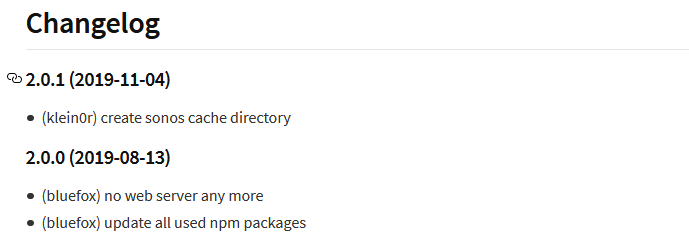
                                Mittlerweile hat Bluefox wohl etwas an dem Sonos Adapter (V2.0.1) verbessert, so dass man jetzt mit einem Workaround auf die Installation des Sonos-HTTP-API Servers verzichten kann.

                                Moin,
                                das ist doch schon etwas älter, oder ?

                                Nicht dass wir uns falsch verstehen, wenn der Adapter wieder gepflegt würde wäre das super.
                                1.PNG

                                IOBroker mit Proxmox auf Celeron Nuc mit 16 GB und Debian11, Sonos API, Echo Show 15 als Wandtablet, Homematic IP, HUE, Sonos, Echos, DS718+ als Backup

                                1 Reply Last reply
                                0
                                • M Offline
                                  M Offline
                                  Marty56
                                  wrote on last edited by
                                  #289

                                  Das stimmt. Ich habe es aber erst jetzt ausprobiert.

                                  HW:NUC (16 GB Ram)
                                  OS: Debian Bullseye, Promox V7, node v16.x npm 8.19.3

                                  1 Reply Last reply
                                  0
                                  • S Offline
                                    S Offline
                                    skokarl
                                    wrote on last edited by skokarl
                                    #290

                                    Update auf S2 wird ausgerollt

                                    Github, scheint weiterhin zu funktionieren

                                    IOBroker mit Proxmox auf Celeron Nuc mit 16 GB und Debian11, Sonos API, Echo Show 15 als Wandtablet, Homematic IP, HUE, Sonos, Echos, DS718+ als Backup

                                    M 1 Reply Last reply
                                    0
                                    • S skokarl

                                      Update auf S2 wird ausgerollt

                                      Github, scheint weiterhin zu funktionieren

                                      M Offline
                                      M Offline
                                      Marty56
                                      wrote on last edited by
                                      #291

                                      Der Entwickler des HTTP API warnt davor, dass diese Version nicht mehr kompatibel ist, gibt es da schon Erfahrungen?

                                      Und außerdem hat die S2 Version immer noch das Schei... SMB 1 Protokoll!

                                      Sonos bekommt es einfach nicht gebacken.
                                      Ich werde diese Version nicht einspielen, so lange ich das verhindern kann.

                                      HW:NUC (16 GB Ram)
                                      OS: Debian Bullseye, Promox V7, node v16.x npm 8.19.3

                                      S 1 Reply Last reply
                                      0
                                      • M Marty56

                                        Der Entwickler des HTTP API warnt davor, dass diese Version nicht mehr kompatibel ist, gibt es da schon Erfahrungen?

                                        Und außerdem hat die S2 Version immer noch das Schei... SMB 1 Protokoll!

                                        Sonos bekommt es einfach nicht gebacken.
                                        Ich werde diese Version nicht einspielen, so lange ich das verhindern kann.

                                        S Offline
                                        S Offline
                                        skokarl
                                        wrote on last edited by
                                        #292

                                        @Marty56 sagte in Sonos-HTTP-API Installation für Newbies, Dummies und mich:

                                        Der Entwickler des HTTP API warnt davor, dass diese Version nicht mehr kompatibel ist, gibt es da schon Erfahrungen?

                                        siehe meinen Beitrag davor, scheint noch zu funktionieren

                                        IOBroker mit Proxmox auf Celeron Nuc mit 16 GB und Debian11, Sonos API, Echo Show 15 als Wandtablet, Homematic IP, HUE, Sonos, Echos, DS718+ als Backup

                                        M 1 Reply Last reply
                                        0
                                        • S skokarl

                                          @Marty56 sagte in Sonos-HTTP-API Installation für Newbies, Dummies und mich:

                                          Der Entwickler des HTTP API warnt davor, dass diese Version nicht mehr kompatibel ist, gibt es da schon Erfahrungen?

                                          siehe meinen Beitrag davor, scheint noch zu funktionieren

                                          M Offline
                                          M Offline
                                          Marty56
                                          wrote on last edited by
                                          #293

                                          @skokarl Danke. Hatte ich nicht angeklickt.

                                          HW:NUC (16 GB Ram)
                                          OS: Debian Bullseye, Promox V7, node v16.x npm 8.19.3

                                          S 1 Reply Last reply
                                          0
                                          Reply
                                          • Reply as topic
                                          Log in to reply
                                          • Oldest to Newest
                                          • Newest to Oldest
                                          • Most Votes


                                          Support us

                                          ioBroker
                                          Community Adapters
                                          Donate
                                          FAQ Cloud / IOT
                                          HowTo: Node.js-Update
                                          HowTo: Backup/Restore
                                          Downloads
                                          BLOG

                                          320

                                          Online

                                          32.6k

                                          Users

                                          82.2k

                                          Topics

                                          1.3m

                                          Posts
                                          Community
                                          Impressum | Datenschutz-Bestimmungen | Nutzungsbedingungen | Einwilligungseinstellungen
                                          ioBroker Community 2014-2025
                                          logo
                                          • Login

                                          • Don't have an account? Register

                                          • Login or register to search.
                                          • First post
                                            Last post
                                          0
                                          • Home
                                          • Recent
                                          • Tags
                                          • Unread 0
                                          • Categories
                                          • Unreplied
                                          • Popular
                                          • GitHub
                                          • Docu
                                          • Hilfe