Skip to content
  • Home
  • Recent
  • Tags
  • 0 Unread 0
  • Categories
  • Unreplied
  • Popular
  • GitHub
  • Docu
  • Hilfe
Skins
  • Light
  • Brite
  • Cerulean
  • Cosmo
  • Flatly
  • Journal
  • Litera
  • Lumen
  • Lux
  • Materia
  • Minty
  • Morph
  • Pulse
  • Sandstone
  • Simplex
  • Sketchy
  • Spacelab
  • United
  • Yeti
  • Zephyr
  • Dark
  • Cyborg
  • Darkly
  • Quartz
  • Slate
  • Solar
  • Superhero
  • Vapor

  • Default (No Skin)
  • No Skin
Collapse
ioBroker Logo

Community Forum

donate donate
  1. ioBroker Community Home
  2. English
  3. Scripting / Logic
  4. Blockly
  5. ASTRO function. Does not work again

NEWS

  • Weihnachtsangebot 2025! 🎄
    BluefoxB
    Bluefox
    22
    1
    1.2k

  • UPDATE 31.10.: Amazon Alexa - ioBroker Skill läuft aus ?
    apollon77A
    apollon77
    48
    3
    9.2k

  • Monatsrückblick – September 2025
    BluefoxB
    Bluefox
    14
    1
    2.5k

ASTRO function. Does not work again

Scheduled Pinned Locked Moved Blockly
blockly
58 Posts 6 Posters 8.2k Views 7 Watching
  • Oldest to Newest
  • Newest to Oldest
  • Most Votes
Reply
  • Reply as topic
Log in to reply
This topic has been deleted. Only users with topic management privileges can see it.
  • A Offline
    A Offline
    ap2017
    wrote on last edited by ap2017
    #1

    Re: Is there problem with Blockly after last update?

    After testing for many weeks I came to a conclusion that ASTRO function does not work continuously, meaning it works ones after controller physical reboot and then never execute, see my simple Blockly script in reference post. I use all latest Linux, controller and adapters updates and 8.16.0 Node.js. Any idea what is going on?

    1 Reply Last reply
    0
    • R Offline
      R Offline
      RappiRN
      Most Active
      wrote on last edited by
      #2

      Please show your Blockly Script here, i think there is an errror in it.
      The Astro funktion works fine in my Blocklys.

      Enrico

      1 Reply Last reply
      0
      • A Offline
        A Offline
        ap2017
        wrote on last edited by
        #3

        Please see my script attachedLight Script.txt Light Script.JPG
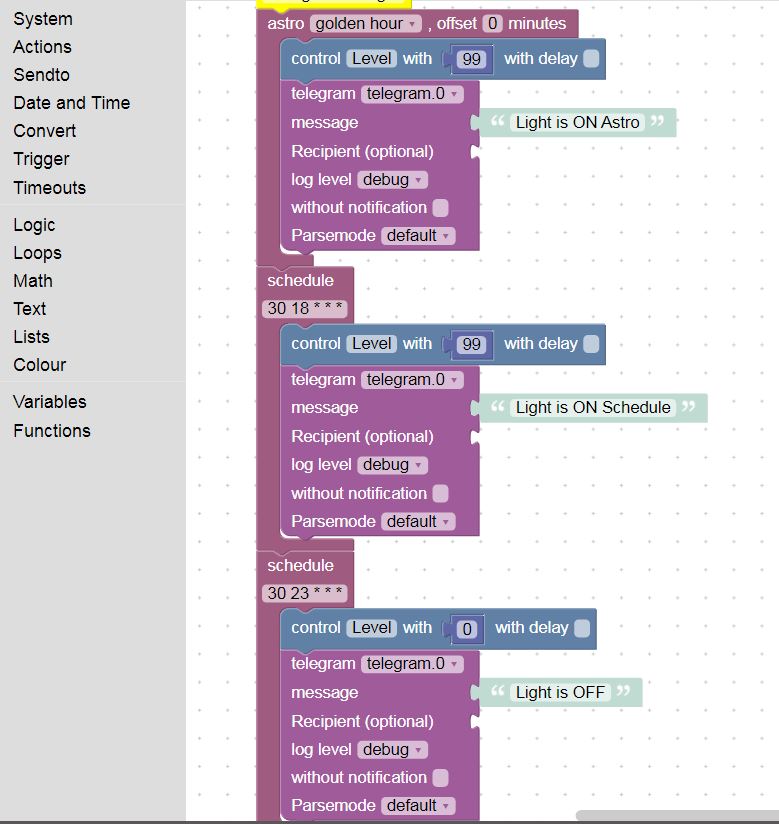
        1 Reply Last reply
        0
        • R Offline
          R Offline
          RappiRN
          Most Active
          wrote on last edited by
          #4

          What does not work, set the control level to 99 or 0, or the telegram message, or both?
          You can use debug-blocks to control the trigger-blocks.

          Enrico

          A 2 Replies Last reply
          0
          • R RappiRN

            What does not work, set the control level to 99 or 0, or the telegram message, or both?
            You can use debug-blocks to control the trigger-blocks.

            Enrico

            A Offline
            A Offline
            ap2017
            wrote on last edited by ap2017
            #5

            @RappiRN As you see, I use telegram for debugging, so schedule block works all the time (the light goes on, then off and I am getting notification from telegram), while astro works only once in a while, it works for sure once after restarting RPI by interrupting the power

            1 Reply Last reply
            0
            • R RappiRN

              What does not work, set the control level to 99 or 0, or the telegram message, or both?
              You can use debug-blocks to control the trigger-blocks.

              Enrico

              A Offline
              A Offline
              ap2017
              wrote on last edited by
              #6

              @RappiRN May be I was not clear in my response. In ASTRO block, both telegram and setting level do not work (to be precise, work once after resetting power to Raspberry PI). In SCHEDULE block telegram and level setting work fine all the time.

              1 Reply Last reply
              0
              • R Offline
                R Offline
                RappiRN
                Most Active
                wrote on last edited by
                #7

                Ok, in the settings from the javascript-Adapter you must set your location, or check to use the ioBroker location.

                Enrico

                A 1 Reply Last reply
                0
                • R RappiRN

                  Ok, in the settings from the javascript-Adapter you must set your location, or check to use the ioBroker location.

                  Enrico

                  A Offline
                  A Offline
                  ap2017
                  wrote on last edited by
                  #8

                  @RappiRN I am aware of this and it was done. Don't forget, in my case ASTRO work right once after fresh power up, it turns up the light in expected time.

                  1 Reply Last reply
                  0
                  • R Offline
                    R Offline
                    RappiRN
                    Most Active
                    wrote on last edited by
                    #9

                    The right once working, is it also at the right time?
                    Which location settings you are using, from the adapter or from ioBroker? Sometimes it was a problem to use the ioBroker settings instead the adapter settings.
                    Sorry i have not really an idea what the matter with your astro-function.

                    Enrico

                    A 1 Reply Last reply
                    0
                    • R RappiRN

                      The right once working, is it also at the right time?
                      Which location settings you are using, from the adapter or from ioBroker? Sometimes it was a problem to use the ioBroker settings instead the adapter settings.
                      Sorry i have not really an idea what the matter with your astro-function.

                      Enrico

                      A Offline
                      A Offline
                      ap2017
                      wrote on last edited by ap2017
                      #10

                      @RappiRN Yes, when I say it works right once, it means the timing is right. I tried both location settings, from the adapter as well as from system with same result.

                      1 Reply Last reply
                      0
                      • A Offline
                        A Offline
                        ap2017
                        wrote on last edited by
                        #11

                        Have brand new ioBroker installation on different platform (x64) with same script as show above, the Astro function still does not work. What am I doing wrong?

                        1 Reply Last reply
                        0
                        • iomountainI Offline
                          iomountainI Offline
                          iomountain
                          wrote on last edited by iomountain
                          #12

                          @ap2017 for debuging use debug, not telegram.
                          substitute telegram whith debug to see what's going on.
                          Look at the LOG.
                          mine works:
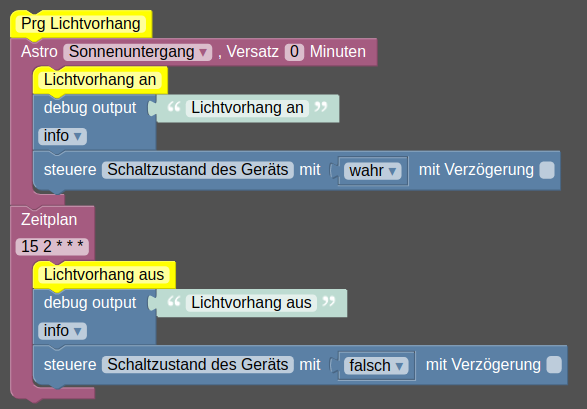
                          c8d8d908-8721-440c-b8e0-f1d21907f888-image.png ,
                          Do you wanna Post an export of your Blockly?

                          A 1 Reply Last reply
                          0
                          • iomountainI iomountain

                            @ap2017 for debuging use debug, not telegram.
                            substitute telegram whith debug to see what's going on.
                            Look at the LOG.
                            mine works:
                            c8d8d908-8721-440c-b8e0-f1d21907f888-image.png ,
                            Do you wanna Post an export of your Blockly?

                            A Offline
                            A Offline
                            ap2017
                            wrote on last edited by
                            #13

                            @iomountain Thank you for your response. I changed my script as you suggested, where do I find debugging log?
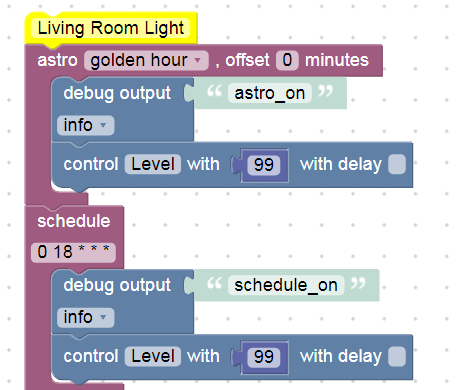
                            1e4c6fe1-d922-40f0-9785-51ad80cee496-image.png

                            1 Reply Last reply
                            0
                            • iomountainI Offline
                              iomountainI Offline
                              iomountain
                              wrote on last edited by
                              #14

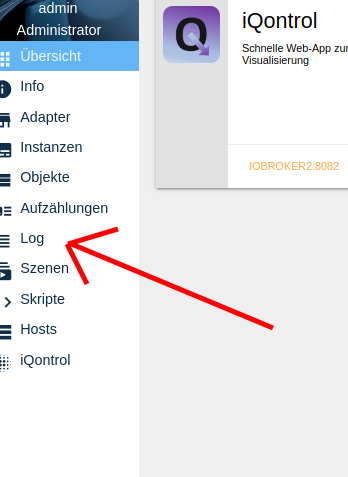
                              Try Log at main screen Admin
                              f48dbde0-adab-4a3e-8643-a33c864a7af0-image.png
                              There you will find your "debug output" Messages

                              A 1 Reply Last reply
                              0
                              • iomountainI iomountain

                                Try Log at main screen Admin
                                f48dbde0-adab-4a3e-8643-a33c864a7af0-image.png
                                There you will find your "debug output" Messages

                                A Offline
                                A Offline
                                ap2017
                                wrote on last edited by
                                #15

                                @iomountain I think that after long time of straggling I am getting close to resolving the issue with ASTRO function that I am experiencing. It looks like ASTRO algorithm does not like GEO coordinates in North America since it started to work fine after I set ASTRO for Berlin, Germany. Maybe negative value of Longitude confuses the algorithm?

                                Could you do me a favor and try your script with GEO set to Hartford CT in USA? Thank you.

                                1 Reply Last reply
                                0
                                • iomountainI Offline
                                  iomountainI Offline
                                  iomountain
                                  wrote on last edited by
                                  #16

                                  It works, United States Hartford 41.76 -72.68
                                  If you wanna see all astro times try the Script

                                  // Astrotime for today - V2.0
                                  
                                  console.log("=====================");
                                  console.log("Astro time for today");
                                  console.log("=====================");
                                  
                                  var nightEnd = getAstroDate("nightEnd");
                                  console.log(" (0) nightEnd (End of night)........................: " + nightEnd.toLocaleTimeString());
                                  var nauticalDawn = getAstroDate("nauticalDawn");
                                  console.log(" (1) nauticalDawn (naut. Dämmerung Morgens)...........: " + nauticalDawn.toLocaleTimeString());
                                  var dawn = getAstroDate("dawn");
                                  console.log(" (2) dawn (Dämmerung Morgens).........................: " + dawn.toLocaleTimeString());
                                  var sunrise = getAstroDate("sunrise");
                                  console.log(" (3) sunrise (Sonnenaufgang)..........................: " + sunrise.toLocaleTimeString());
                                  var sunriseEnd = getAstroDate("sunriseEnd");
                                  console.log(" (4) sunriseEnd (Ende des Sonnenaufgangs).............: " + sunriseEnd.toLocaleTimeString());
                                  var goldenHourEnd = getAstroDate("goldenHourEnd");
                                  console.log(" (5) goldenHourEnd (Ende der Golden Hour VM)..........: " + goldenHourEnd.toLocaleTimeString()); 
                                  var solarNoon = getAstroDate("solarNoon");
                                  console.log(" (6) solarNoon (Mittag)...............................: " + solarNoon.toLocaleTimeString());
                                  var goldenHour = getAstroDate("goldenHour");
                                  console.log(" (7) goldenHour (Start der Golden Hour NM)............: " + goldenHour.toLocaleTimeString());
                                  var sunsetStart = getAstroDate("sunsetStart");
                                  console.log(" (8) sunsetStart (Start des Sonnenuntergangs).........: " + sunsetStart.toLocaleTimeString()); 
                                  var sunset = getAstroDate("sunset");
                                  console.log(" (9) sunset (Sonnenuntergang).........................: " + sunset.toLocaleTimeString());
                                  var dusk = getAstroDate("dusk");
                                  console.log("(10) dusk (Dämmerung Abends)..........................: " + dusk.toLocaleTimeString());
                                  var nauticalDusk = getAstroDate("nauticalDusk");
                                  console.log("(11) nauticalDusk (naut. Dämmerung Abends)............: " + nauticalDusk.toLocaleTimeString());
                                  var night = getAstroDate("night");
                                  console.log("(12) night (Start of night)..........................: " + night.toLocaleTimeString());
                                  var nadir = getAstroDate("nadir");
                                  console.log("(13) nadir (midnight)..............................: " + nadir.toLocaleTimeString());
                                  console.log("=====================");
                                  var today = new Date();
                                  var tomorrow = today.setDate(today.getDate()+1);
                                  var tomorrowNight = getAstroDate("night", tomorrow);
                                  console.log("Night starts tomorrow at " + tomorrowNight.toLocaleTimeString());
                                  
                                  console.log(obj.id);
                                  

                                  @ap2017
                                  Do you wanna Post an export of your Blockly?

                                  A 1 Reply Last reply
                                  0
                                  • iomountainI iomountain

                                    It works, United States Hartford 41.76 -72.68
                                    If you wanna see all astro times try the Script

                                    // Astrotime for today - V2.0
                                    
                                    console.log("=====================");
                                    console.log("Astro time for today");
                                    console.log("=====================");
                                    
                                    var nightEnd = getAstroDate("nightEnd");
                                    console.log(" (0) nightEnd (End of night)........................: " + nightEnd.toLocaleTimeString());
                                    var nauticalDawn = getAstroDate("nauticalDawn");
                                    console.log(" (1) nauticalDawn (naut. Dämmerung Morgens)...........: " + nauticalDawn.toLocaleTimeString());
                                    var dawn = getAstroDate("dawn");
                                    console.log(" (2) dawn (Dämmerung Morgens).........................: " + dawn.toLocaleTimeString());
                                    var sunrise = getAstroDate("sunrise");
                                    console.log(" (3) sunrise (Sonnenaufgang)..........................: " + sunrise.toLocaleTimeString());
                                    var sunriseEnd = getAstroDate("sunriseEnd");
                                    console.log(" (4) sunriseEnd (Ende des Sonnenaufgangs).............: " + sunriseEnd.toLocaleTimeString());
                                    var goldenHourEnd = getAstroDate("goldenHourEnd");
                                    console.log(" (5) goldenHourEnd (Ende der Golden Hour VM)..........: " + goldenHourEnd.toLocaleTimeString()); 
                                    var solarNoon = getAstroDate("solarNoon");
                                    console.log(" (6) solarNoon (Mittag)...............................: " + solarNoon.toLocaleTimeString());
                                    var goldenHour = getAstroDate("goldenHour");
                                    console.log(" (7) goldenHour (Start der Golden Hour NM)............: " + goldenHour.toLocaleTimeString());
                                    var sunsetStart = getAstroDate("sunsetStart");
                                    console.log(" (8) sunsetStart (Start des Sonnenuntergangs).........: " + sunsetStart.toLocaleTimeString()); 
                                    var sunset = getAstroDate("sunset");
                                    console.log(" (9) sunset (Sonnenuntergang).........................: " + sunset.toLocaleTimeString());
                                    var dusk = getAstroDate("dusk");
                                    console.log("(10) dusk (Dämmerung Abends)..........................: " + dusk.toLocaleTimeString());
                                    var nauticalDusk = getAstroDate("nauticalDusk");
                                    console.log("(11) nauticalDusk (naut. Dämmerung Abends)............: " + nauticalDusk.toLocaleTimeString());
                                    var night = getAstroDate("night");
                                    console.log("(12) night (Start of night)..........................: " + night.toLocaleTimeString());
                                    var nadir = getAstroDate("nadir");
                                    console.log("(13) nadir (midnight)..............................: " + nadir.toLocaleTimeString());
                                    console.log("=====================");
                                    var today = new Date();
                                    var tomorrow = today.setDate(today.getDate()+1);
                                    var tomorrowNight = getAstroDate("night", tomorrow);
                                    console.log("Night starts tomorrow at " + tomorrowNight.toLocaleTimeString());
                                    
                                    console.log(obj.id);
                                    

                                    @ap2017
                                    Do you wanna Post an export of your Blockly?

                                    A Offline
                                    A Offline
                                    ap2017
                                    wrote on last edited by
                                    #17

                                    @iomountain I will try to set ASTRO back to US, thanks

                                    1 Reply Last reply
                                    0
                                    • iomountainI Offline
                                      iomountainI Offline
                                      iomountain
                                      wrote on last edited by
                                      #18

                                      @ap2017 don't forget to restart iobroker. Like "iobroker stop" and "iobroker start"

                                      A 2 Replies Last reply
                                      0
                                      • iomountainI iomountain

                                        @ap2017 don't forget to restart iobroker. Like "iobroker stop" and "iobroker start"

                                        A Offline
                                        A Offline
                                        ap2017
                                        wrote on last edited by
                                        #19

                                        @iomountain Day I switched to US the ASTRO stopped working (no ASTRO string in LOG file). I restarted computer after I made a change. I will try your ASTRO script

                                        Here is my script:


                                        // Living Room Light
                                        schedule({astro: "goldenHour", shift: 0}, function () {
                                        console.log('astro_on');
                                        setState("zwave.0.NODE7.SWITCH_MULTILEVEL.Level_1"/Level/, 99);
                                        });
                                        schedule("0 18 * * *", function () {
                                        console.log('schedule_on');
                                        setState("zwave.0.NODE7.SWITCH_MULTILEVEL.Level_1"/Level/, 99);
                                        });
                                        schedule("30 23 * * *", function () {
                                        console.log('schedule_off');
                                        setState("zwave.0.NODE7.SWITCH_MULTILEVEL.Level_1"/Level/, 0);
                                        });

                                        1 Reply Last reply
                                        0
                                        • iomountainI iomountain

                                          @ap2017 don't forget to restart iobroker. Like "iobroker stop" and "iobroker start"

                                          A Offline
                                          A Offline
                                          ap2017
                                          wrote on last edited by
                                          #20

                                          @iomountain Here is the log from running your script Astro Time for Today, if it helps. So, script runs but shows error code at the end of each run.


                                          2019-10-19 18:48:42.414 - info: mysensors.0 (18452) STARTED
                                          2019-10-19 18:48:42.415 - info: mysensors.0 (18452) STARTED
                                          2019-10-19 18:48:55.725 - info: javascript.0 (18920) Stop script script.js.ASTRO
                                          2019-10-19 18:48:55.770 - info: javascript.0 (18920) Start javascript script.js.ASTRO
                                          2019-10-19 18:48:55.773 - info: javascript.0 (18920) script.js.ASTRO: =====================
                                          2019-10-19 18:48:55.773 - info: javascript.0 (18920) script.js.ASTRO: Astro time for today
                                          2019-10-19 18:48:55.773 - info: javascript.0 (18920) script.js.ASTRO: =====================
                                          2019-10-19 18:48:55.773 - info: javascript.0 (18920) script.js.ASTRO: (0) nightEnd (End of night)........................: 5:36:06 AM
                                          2019-10-19 18:48:55.774 - info: javascript.0 (18920) script.js.ASTRO: (1) nauticalDawn (naut. Dämmerung Morgens)...........: 6:08:18 AM
                                          2019-10-19 18:48:55.774 - info: javascript.0 (18920) script.js.ASTRO: (2) dawn (Dämmerung Morgens).........................: 6:40:39 AM
                                          2019-10-19 18:48:55.774 - info: javascript.0 (18920) script.js.ASTRO: (3) sunrise (Sonnenaufgang)..........................: 7:08:50 AM
                                          2019-10-19 18:48:55.774 - info: javascript.0 (18920) script.js.ASTRO: (4) sunriseEnd (Ende des Sonnenaufgangs).............: 7:11:46 AM
                                          2019-10-19 18:48:55.775 - info: javascript.0 (18920) script.js.ASTRO: (5) goldenHourEnd (Ende der Golden Hour VM)..........: 7:46:57 AM
                                          2019-10-19 18:48:55.775 - info: javascript.0 (18920) script.js.ASTRO: (6) solarNoon (Mittag)...............................: 12:37:25 PM
                                          2019-10-19 18:48:55.775 - info: javascript.0 (18920) script.js.ASTRO: (7) goldenHour (Start der Golden Hour NM)............: 5:27:52 PM
                                          2019-10-19 18:48:55.775 - info: javascript.0 (18920) script.js.ASTRO: (8) sunsetStart (Start des Sonnenuntergangs).........: 6:03:04 PM
                                          2019-10-19 18:48:55.775 - info: javascript.0 (18920) script.js.ASTRO: (9) sunset (Sonnenuntergang).........................: 6:06:00 PM
                                          2019-10-19 18:48:55.776 - info: javascript.0 (18920) script.js.ASTRO: (10) dusk (Dämmerung Abends)..........................: 6:34:11 PM
                                          2019-10-19 18:48:55.776 - info: javascript.0 (18920) script.js.ASTRO: (11) nauticalDusk (naut. Dämmerung Abends)............: 7:06:31 PM
                                          2019-10-19 18:48:55.776 - info: javascript.0 (18920) script.js.ASTRO: (12) night (Start of night)..........................: 7:38:44 PM
                                          2019-10-19 18:48:55.776 - info: javascript.0 (18920) script.js.ASTRO: (13) nadir (midnight)..............................: 12:37:25 AM
                                          2019-10-19 18:48:55.776 - info: javascript.0 (18920) script.js.ASTRO: =====================
                                          2019-10-19 18:48:55.777 - info: javascript.0 (18920) script.js.ASTRO: Night starts tomorrow at 7:37:17 PM
                                          2019-10-19 18:48:55.777 - error: javascript.0 (18920) script.js.ASTRO: script.js.ASTRO:41
                                          2019-10-19 18:48:55.777 - error: javascript.0 (18920) console.log(obj.id);
                                          2019-10-19 18:48:55.778 - error: javascript.0 (18920) ^
                                          2019-10-19 18:48:55.778 - error: javascript.0 (18920) ReferenceError: obj is not defined
                                          2019-10-19 18:48:55.778 - error: javascript.0 (18920) at script.js.ASTRO:41:13
                                          2019-10-19 18:48:55.778 - error: javascript.0 (18920) at Script.runInContext (vm.js:133:20)

                                          iomountainI 1 Reply Last reply
                                          0
                                          Reply
                                          • Reply as topic
                                          Log in to reply
                                          • Oldest to Newest
                                          • Newest to Oldest
                                          • Most Votes


                                          Support us

                                          ioBroker
                                          Community Adapters
                                          Donate

                                          773

                                          Online

                                          32.5k

                                          Users

                                          81.7k

                                          Topics

                                          1.3m

                                          Posts
                                          Community
                                          Impressum | Datenschutz-Bestimmungen | Nutzungsbedingungen | Einwilligungseinstellungen
                                          ioBroker Community 2014-2025
                                          logo
                                          • Login

                                          • Don't have an account? Register

                                          • Login or register to search.
                                          • First post
                                            Last post
                                          0
                                          • Home
                                          • Recent
                                          • Tags
                                          • Unread 0
                                          • Categories
                                          • Unreplied
                                          • Popular
                                          • GitHub
                                          • Docu
                                          • Hilfe