



Skip to content
  • Home
  • Recent
  • Tags
  • 0 Unread 0
  • Categories
  • Unreplied
  • Popular
  • GitHub
  • Docu
  • Hilfe
Skins
  • Light
  • Brite
  • Cerulean
  • Cosmo
  • Flatly
  • Journal
  • Litera
  • Lumen
  • Lux
  • Materia
  • Minty
  • Morph
  • Pulse
  • Sandstone
  • Simplex
  • Sketchy
  • Spacelab
  • United
  • Yeti
  • Zephyr
  • Dark
  • Cyborg
  • Darkly
  • Quartz
  • Slate
  • Solar
  • Superhero
  • Vapor

  • Default (No Skin)
  • No Skin
Collapse
ioBroker Logo

Community Forum

donate donate
  1. ioBroker Community Home
  2. Deutsch
  3. Off Topic
  4. Proxmox
  5. proxmox auf NUC wie HDMI Port für VM „aktivieren“?

NEWS

  • Monatsrückblick Januar/Februar 2026 ist online!
    BluefoxB
    Bluefox
    18
    1
    700

  • Jahresrückblick 2025 – unser neuer Blogbeitrag ist online! ✨
    BluefoxB
    Bluefox
    18
    1
    5.8k

  • Neuer Blogbeitrag: Monatsrückblick - Dezember 2025 🎄
    BluefoxB
    Bluefox
    13
    1
    1.5k

proxmox auf NUC wie HDMI Port für VM „aktivieren“?

Scheduled Pinned Locked Moved Proxmox
nuc hdmi
167 Posts 20 Posters 35.4k Views 16 Watching
  • Oldest to Newest
  • Newest to Oldest
  • Most Votes
Reply
  • Reply as topic
Log in to reply
This topic has been deleted. Only users with topic management privileges can see it.
  • H HoffmannOs

    @saeft_2003 aber nur für windows oder?

    S Offline
    S Offline
    saeft_2003
    Most Active
    wrote on last edited by saeft_2003
    #73

    @HoffmannOs sagte in proxmox auf NUC wie HDMI Port für VM „aktivieren“?:

    @saeft_2003 aber nur für windows oder?

    Ja der ist nur für win! Brauchst du für linux?

    1 Reply Last reply
    0
    • H HoffmannOs

      @coyote PVE! Könntest du mir deine genutze Anleitung mal zeigen?
      @saeft_2003 was wäre hiermit ? ```
      https://www.amazon.de/Cable-Matters-Multiport-DisplayPort-Ethernet-Schwarz/dp/B0746R3J5T/ref=sr_1_1?crid=200ZCMJA6099L&dchild=1&keywords=cable+matters&qid=1604862549&sprefix=cable+ma%2Caps%2C210&sr=8-1t

      S Offline
      S Offline
      saeft_2003
      Most Active
      wrote on last edited by
      #74

      @HoffmannOs sagte in proxmox auf NUC wie HDMI Port für VM „aktivieren“?:

      @coyote PVE! Könntest du mir deine genutze Anleitung mal zeigen?
      @saeft_2003 was wäre hiermit ? ```
      https://www.amazon.de/Cable-Matters-Multiport-DisplayPort-Ethernet-Schwarz/dp/B0746R3J5T/ref=sr_1_1?crid=200ZCMJA6099L&dchild=1&keywords=cable+matters&qid=1604862549&sprefix=cable+ma%2Caps%2C210&sr=8-1t

      Ob das auch geht kann ich leider nicht sagen.

      1 Reply Last reply
      0
      • H HoffmannOs

        @coyote PVE! Könntest du mir deine genutze Anleitung mal zeigen?
        @saeft_2003 was wäre hiermit ? ```
        https://www.amazon.de/Cable-Matters-Multiport-DisplayPort-Ethernet-Schwarz/dp/B0746R3J5T/ref=sr_1_1?crid=200ZCMJA6099L&dchild=1&keywords=cable+matters&qid=1604862549&sprefix=cable+ma%2Caps%2C210&sr=8-1t

        coyoteC Offline
        coyoteC Offline
        coyote
        Most Active
        wrote on last edited by
        #75

        @HoffmannOs so ziemlich nach der Anleitung, wobei du ja mittlerweile in der GUI die GraKa direkt anwählen kannst.

        https://forum.proxmox.com/threads/guide-intel-intergrated-graphic-passthrough.30451/

        pve-manager 6.2-15
        pve-kernel 5.4.65-1

        H 1 Reply Last reply
        0
        • coyoteC coyote

          @HoffmannOs so ziemlich nach der Anleitung, wobei du ja mittlerweile in der GUI die GraKa direkt anwählen kannst.

          https://forum.proxmox.com/threads/guide-intel-intergrated-graphic-passthrough.30451/

          pve-manager 6.2-15
          pve-kernel 5.4.65-1

          H Offline
          H Offline
          HoffmannOs
          wrote on last edited by HoffmannOs
          #76

          @coyote ich werde morgen mal mein Glück versuchen....
          @saeft_2003 na es steht ja Linux Support 2 Monitore....

          1 Reply Last reply
          0
          • H Offline
            H Offline
            HoffmannOs
            wrote on last edited by
            #77

            was wäre denn mit der Option?
            https://blog.konpat.me/dev/2019/03/11/setting-up-lxc-for-intel-gpu-proxmox.html

            coyoteC 1 Reply Last reply
            0
            • H HoffmannOs

              was wäre denn mit der Option?
              https://blog.konpat.me/dev/2019/03/11/setting-up-lxc-for-intel-gpu-proxmox.html

              coyoteC Offline
              coyoteC Offline
              coyote
              Most Active
              wrote on last edited by
              #78

              @HoffmannOs warum nicht, probier doch mal, ob es bei dir so läuft

              1 Reply Last reply
              0
              • H Offline
                H Offline
                HoffmannOs
                wrote on last edited by HoffmannOs
                #79

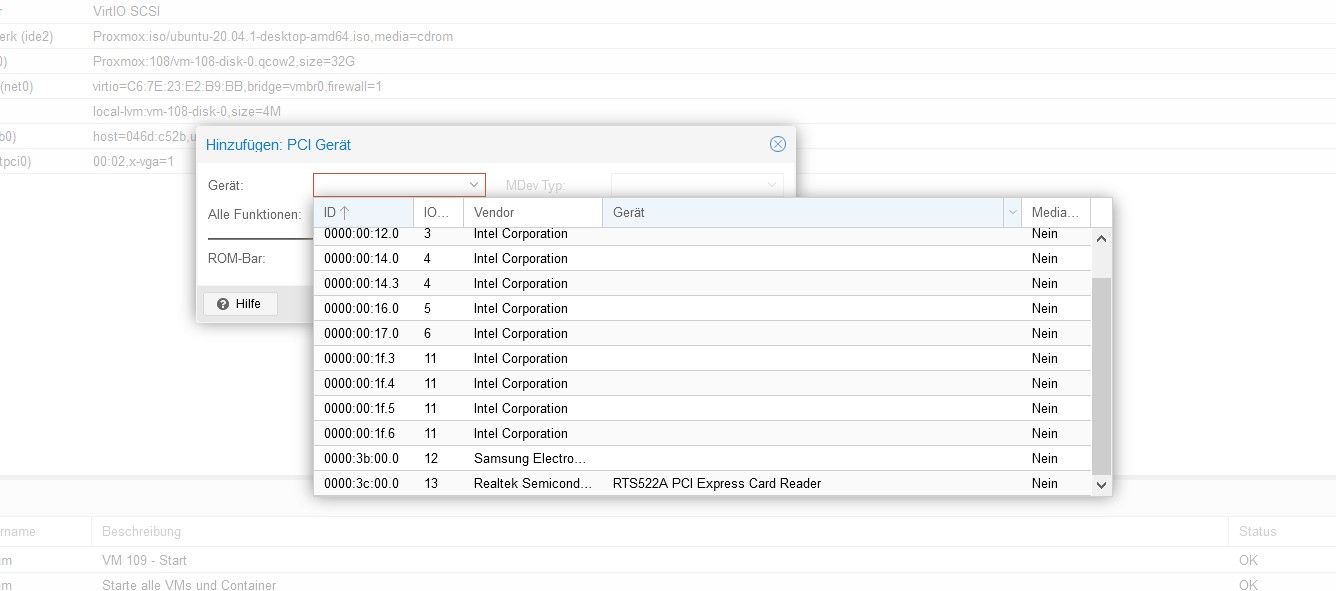
                Ich habe jetzt ein wenig rumgebastelt und unter dem Aktuellsten Proxmox 6.2.15 eine Debian 10.6 als VM sowie Ubuntu20.04.Desktop VM am laufen wird alles auf dem HDMI Port angezeigt. Jedoch sobald ich die Soundkarte hinzufüge friert der Host ein.
                Meine Soundkarte ist in der Iommu Gruppe 11 hier befindet sichauch die Soundkarte, wie kann ich das noch beheben? Screenshot 2020-11-10 141426.jpg
                coyoteC 1 Reply Last reply
                0
                • H HoffmannOs

                  Ich habe jetzt ein wenig rumgebastelt und unter dem Aktuellsten Proxmox 6.2.15 eine Debian 10.6 als VM sowie Ubuntu20.04.Desktop VM am laufen wird alles auf dem HDMI Port angezeigt. Jedoch sobald ich die Soundkarte hinzufüge friert der Host ein.
                  Meine Soundkarte ist in der Iommu Gruppe 11 hier befindet sichauch die Soundkarte, wie kann ich das noch beheben? Screenshot 2020-11-10 141426.jpg

                  coyoteC Offline
                  coyoteC Offline
                  coyote
                  Most Active
                  wrote on last edited by
                  #80

                  @HoffmannOs nach welcher Anleitung bist du jetzt vorgegangen? Kannst du noch ein Bild von deinen Ubuntu VM Einstellungen posten?

                  H 2 Replies Last reply
                  0
                  • coyoteC coyote

                    @HoffmannOs nach welcher Anleitung bist du jetzt vorgegangen? Kannst du noch ein Bild von deinen Ubuntu VM Einstellungen posten?

                    H Offline
                    H Offline
                    HoffmannOs
                    wrote on last edited by
                    #81

                    @coyote klar... Im Bios habe ich es unter Legacy am laufen... wie bekomme ich es denn hin das er mir im Legacy auch durchbootet ohne das ich jedes mal die Quelle auswählen muss weil er mir sagt kein Bootmedium gefunden.

                    Meine Config :
                    Grub

                    GRUB_CMDLINE_LINUX_DEFAULT="quiet intel_iommu=on video=efifb:0ff pcie_acs_override=Downstream vfio_iommu_type1.allow_unsafe_interrupts=1"
                    

                    nano /etc/modprobe.d/vfio.conf

                    options vfio-pci ids=8086:3ea5, disable_vga=1
                    #options vfio-pci ids=8086:9dc8
                    

                    /etc/modules/

                    vfio
                    vfio_iommu_type1
                    vfio_pci
                    vfio_virqfd
                    

                    /etc/modprobe.d/blacklist.conf

                    blacklist snd_hda_intel
                    blacklist snd_soc_skl
                    blacklist snd_hda_codec_hdmi
                    blacklist i915
                    

                    /etc/modprobe.d/pve-blacklist.conf

                    # This file contains a list of modules which are not supported by Proxmox VE
                    
                    # nidiafb see bugreport https://bugzilla.proxmox.com/show_bug.cgi?id=701
                    blacklist amdgpu
                    blacklist snd_hda_intel
                    blacklist xhci_hcd
                    blacklist nouveau
                    blacklist nvidia
                    blacklist nvidiafb
                    

                    /etc/modprobe.d/kvm.conf

                    options kvm ignore_msrs=1
                    

                    ubuntu20.04

                    #audio0: device=intel-hda,driver=spice
                    bios: ovmf
                    bootdisk: scsi0
                    cores: 4
                    cpu: host
                    efidisk0: local-lvm:vm-108-disk-0,size=4M
                    hostpci0: 00:02,x-vga=1
                    ide2: Proxmox:iso/ubuntu-20.04.1-desktop-amd64.iso,media=cdrom
                    memory: 8196
                    name: ubuntu
                    net0: virtio=C6:7E:23:E2:B9:BB,bridge=vmbr0,firewall=1
                    numa: 0
                    ostype: l26
                    scsi0: Proxmox:108/vm-108-disk-0.qcow2,size=32G
                    scsihw: virtio-scsi-pci
                    smbios1: uuid=cc3f140b-2fec-4741-ac16-ace52ae034a3
                    sockets: 1
                    usb0: host=046d:c52b,usb3=1
                    usb1: host=0457:1165,usb3=1
                    vmgenid: xxxxx-bc15-4d5a-9bc9-5fde933576d5
                    

                    Debian 10.6

                    bios: ovmf
                    bootdisk: scsi0
                    cores: 4
                    efidisk0: local-lvm:vm-109-disk-0,size=4M
                    hostpci0: 00:02,pcie=1,x-vga=1
                    ide2: Proxmox:iso/debian-live-10.6.0-amd64-lxde.iso,media=cdrom
                    machine: q35
                    memory: 8196
                    name: debian
                    net0: virtio=B2:1C:89:F4:A1:D2,bridge=vmbr0,firewall=1
                    numa: 0
                    ostype: l26
                    scsi0: Proxmox:109/vm-109-disk-0.qcow2,size=32G
                    scsihw: virtio-scsi-pci
                    smbios1: uuid=bf3dcfb1-bc90-44b0-bf25-f7acd80cacbf
                    sockets: 1
                    usb0: host=046d:c52b,usb3=1
                    vmgenid: xxxxx-86c4-484e-8ade-e38fc67594d7
                    

                    Diese Anleitungen :

                    https://forum.proxmox.com/threads/passhtrough-8gen-intel-nuc.53750/
                    https://ipcamtalk.com/threads/proxmox-virtualization-with-hw-acceleration.33175/
                    https://www.youtube.com/watch?v=_fkKIMF3HZw&t=318s

                    1 Reply Last reply
                    1
                    • coyoteC coyote

                      @HoffmannOs nach welcher Anleitung bist du jetzt vorgegangen? Kannst du noch ein Bild von deinen Ubuntu VM Einstellungen posten?

                      H Offline
                      H Offline
                      HoffmannOs
                      wrote on last edited by
                      #82

                      @coyote Konntest du es erfolgreich Testen? ich habe noch was von Disable Legacy VGA gesehen da gehe ich die Tage mal dran, vorerst sollte erstmal mein Soundproblem behoben werden.

                      coyoteC 1 Reply Last reply
                      0
                      • H HoffmannOs

                        @coyote Konntest du es erfolgreich Testen? ich habe noch was von Disable Legacy VGA gesehen da gehe ich die Tage mal dran, vorerst sollte erstmal mein Soundproblem behoben werden.

                        coyoteC Offline
                        coyoteC Offline
                        coyote
                        Most Active
                        wrote on last edited by
                        #83

                        @HoffmannOs nein, getestet habe ich deine Einstellungen noch nicht. Aber mal die Einstellungen mit meinen verglichen. Sind fast identisch bis auf ein paar Zeilen.

                        z.B. habe ich bei:
                        /etc/modprobe.d/kvm.conf

                        options kvm ignore_msrs=1

                        nicht mit drin. Als Bios habe ich Seabios in den VM's.

                        Hier:

                        options vfio-pci ids=8086:3ea5, disable_vga=1
                        #options vfio-pci ids=8086:9dc8

                        fehlt bei mir disable-vga=1

                        und in der blacklist.conf fehlen bei mir die beiden:

                        blacklist amdgpu
                        blacklist xhci_hcd

                        Keine Ahnung, ob das jetzt viel ausmacht. Wie gesagt, Ubuntu und Mint hab ich so laufen

                        H 1 Reply Last reply
                        0
                        • coyoteC coyote

                          @HoffmannOs nein, getestet habe ich deine Einstellungen noch nicht. Aber mal die Einstellungen mit meinen verglichen. Sind fast identisch bis auf ein paar Zeilen.

                          z.B. habe ich bei:
                          /etc/modprobe.d/kvm.conf

                          options kvm ignore_msrs=1

                          nicht mit drin. Als Bios habe ich Seabios in den VM's.

                          Hier:

                          options vfio-pci ids=8086:3ea5, disable_vga=1
                          #options vfio-pci ids=8086:9dc8

                          fehlt bei mir disable-vga=1

                          und in der blacklist.conf fehlen bei mir die beiden:

                          blacklist amdgpu
                          blacklist xhci_hcd

                          Keine Ahnung, ob das jetzt viel ausmacht. Wie gesagt, Ubuntu und Mint hab ich so laufen

                          H Offline
                          H Offline
                          HoffmannOs
                          wrote on last edited by
                          #84

                          @coyote läuft audio bei dir? Ich meine momentan habe ich das über eine USB Soundkarte am laufen auf Ubuntu da ich dort AlexaSdk laufen lassen möchte.

                          coyoteC 1 Reply Last reply
                          0
                          • H HoffmannOs

                            @coyote läuft audio bei dir? Ich meine momentan habe ich das über eine USB Soundkarte am laufen auf Ubuntu da ich dort AlexaSdk laufen lassen möchte.

                            coyoteC Offline
                            coyoteC Offline
                            coyote
                            Most Active
                            wrote on last edited by
                            #85

                            @HoffmannOs hm, gute Frage. Auch dem Touchscreen nutze ich das nicht. Aber auf dem zweiten NUC habe ich in einer VM Ubuntu mit Kodi laufen, da geht der Ton über HDMI.
                            Mehr als das hier hab ich da aber auch nicht gemacht, um Audio zu nutzen:
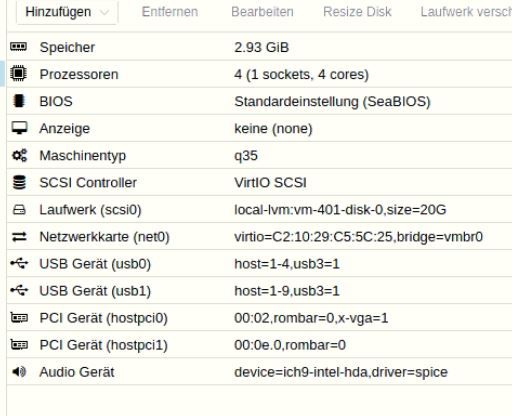
                            vm.JPG

                            H 1 Reply Last reply
                            0
                            • coyoteC coyote

                              @HoffmannOs hm, gute Frage. Auch dem Touchscreen nutze ich das nicht. Aber auf dem zweiten NUC habe ich in einer VM Ubuntu mit Kodi laufen, da geht der Ton über HDMI.
                              Mehr als das hier hab ich da aber auch nicht gemacht, um Audio zu nutzen:

                              vm.JPG

                              H Offline
                              H Offline
                              HoffmannOs
                              wrote on last edited by
                              #86

                              @coyote hast du dann auch keine treiber geblockt für den Sound?

                              coyoteC 1 Reply Last reply
                              0
                              • H HoffmannOs

                                @coyote hast du dann auch keine treiber geblockt für den Sound?

                                coyoteC Offline
                                coyoteC Offline
                                coyote
                                Most Active
                                wrote on last edited by
                                #87

                                @HoffmannOs nein, wie gesagt, mehr als da hab ich nicht gemacht und in der Ubuntu VM mit Kodi hab ich über HDMI Ton

                                D 1 Reply Last reply
                                0
                                • coyoteC coyote

                                  @HoffmannOs nein, wie gesagt, mehr als da hab ich nicht gemacht und in der Ubuntu VM mit Kodi hab ich über HDMI Ton

                                  D Offline
                                  D Offline
                                  dos1973
                                  wrote on last edited by
                                  #88

                                  Hi zusammen,

                                  Ich habe einige grundsätzliche Fragen, wäre nett wenn mit jemand helfen könnte.

                                  Vorab, ich habe noch keinen NUC und auch noch keine Begegnung mit Proxmox. Derzeit läuft iobroker auf meine NAS im Docker und das VIS läuft auf einem Huawei Tab.

                                  Ziel: einen performanten NUC 32GB Ram um diverse Container laufen zu lassen. Unifi, w10, Pihole, iobroker, VIS und KODI, hier brauche ich Bild und TON

                                  Was ich aus eurem Text nicht verstehe, gerade in Bezug zum Weitereichen der Grafikkarte - die Konsole ist nicht erreichbar? Konsole ist dann wahrscheinlich das Proxmox webfrontend zur Administration gemeint - wie macht ihr es dann??

                                  Ursprunglich wollte ich 3 NUCs kaufen
                                  Einen für VIS, einen für KODI und einen für den Rest...

                                  Also nacheinander ;-)
                                  Wenn ich das alles auf einem abbilden kann, wäre das Bombe

                                  D H 2 Replies Last reply
                                  0
                                  • D dos1973

                                    Hi zusammen,

                                    Ich habe einige grundsätzliche Fragen, wäre nett wenn mit jemand helfen könnte.

                                    Vorab, ich habe noch keinen NUC und auch noch keine Begegnung mit Proxmox. Derzeit läuft iobroker auf meine NAS im Docker und das VIS läuft auf einem Huawei Tab.

                                    Ziel: einen performanten NUC 32GB Ram um diverse Container laufen zu lassen. Unifi, w10, Pihole, iobroker, VIS und KODI, hier brauche ich Bild und TON

                                    Was ich aus eurem Text nicht verstehe, gerade in Bezug zum Weitereichen der Grafikkarte - die Konsole ist nicht erreichbar? Konsole ist dann wahrscheinlich das Proxmox webfrontend zur Administration gemeint - wie macht ihr es dann??

                                    Ursprunglich wollte ich 3 NUCs kaufen
                                    Einen für VIS, einen für KODI und einen für den Rest...

                                    Also nacheinander ;-)
                                    Wenn ich das alles auf einem abbilden kann, wäre das Bombe

                                    D Offline
                                    D Offline
                                    dos1973
                                    wrote on last edited by
                                    #89

                                    Entweder meine Frage war zu kompliziert gestellt oder in dem Topic ist nix los ;-)

                                    Ich habe noch eine Frage und versuche es nochmal.

                                    Ich möchte einen gebrauchten Nuc kaufe

                                    NUC8i5BEH
                                    1 TB SSD
                                    16gb RAM

                                    Den Ram würde ich erweitern, aber ich habe kein Gefühl ob der Prozessor ausreichend ist. Möchte nicht in einem Jahr wieder kaufen müssen.

                                    Für eine Antwort Besten Dank im Voraus

                                    da_WoodyD 1 Reply Last reply
                                    0
                                    • D dos1973

                                      Entweder meine Frage war zu kompliziert gestellt oder in dem Topic ist nix los ;-)

                                      Ich habe noch eine Frage und versuche es nochmal.

                                      Ich möchte einen gebrauchten Nuc kaufe

                                      NUC8i5BEH
                                      1 TB SSD
                                      16gb RAM

                                      Den Ram würde ich erweitern, aber ich habe kein Gefühl ob der Prozessor ausreichend ist. Möchte nicht in einem Jahr wieder kaufen müssen.

                                      Für eine Antwort Besten Dank im Voraus

                                      da_WoodyD Online
                                      da_WoodyD Online
                                      da_Woody
                                      wrote on last edited by
                                      #90

                                      @dos1973 said in proxmox auf NUC wie HDMI Port für VM „aktivieren“?:

                                      NUC8i5BEH

                                      da brauchste nix erweitern. mein mini-itx hat das selbe innenleben. proxmox drauf und hüah lisa!

                                      gruß vom Woody
                                      HAPPINESS is not a DESTINATION, it's a WAY of LIFE!

                                      D 1 Reply Last reply
                                      0
                                      • da_WoodyD da_Woody

                                        @dos1973 said in proxmox auf NUC wie HDMI Port für VM „aktivieren“?:

                                        NUC8i5BEH

                                        da brauchste nix erweitern. mein mini-itx hat das selbe innenleben. proxmox drauf und hüah lisa!

                                        D Offline
                                        D Offline
                                        dos1973
                                        wrote on last edited by
                                        #91

                                        @da_woody
                                        Danke, das ist eine Antwort mit er ich arbeiten kann 👍

                                        D 1 Reply Last reply
                                        1
                                        • D dos1973

                                          @da_woody
                                          Danke, das ist eine Antwort mit er ich arbeiten kann 👍

                                          D Offline
                                          D Offline
                                          dos1973
                                          wrote on last edited by
                                          #92

                                          So das Thema Proxmox kann starten. Ich denke um power muss ich mir keine Sorgen machen.

                                          NUC10i7FNH
                                          64gb ram

                                          Auf ebay geschossen...

                                          da_WoodyD 1 Reply Last reply
                                          0

                                          Hello! It looks like you're interested in this conversation, but you don't have an account yet.

                                          Getting fed up of having to scroll through the same posts each visit? When you register for an account, you'll always come back to exactly where you were before, and choose to be notified of new replies (either via email, or push notification). You'll also be able to save bookmarks and upvote posts to show your appreciation to other community members.

                                          With your input, this post could be even better 💗

                                          Register Login
                                          Reply
                                          • Reply as topic
                                          Log in to reply
                                          • Oldest to Newest
                                          • Newest to Oldest
                                          • Most Votes


                                          Support us

                                          ioBroker
                                          Community Adapters
                                          Donate

                                          674

                                          Online

                                          32.7k

                                          Users

                                          82.6k

                                          Topics

                                          1.3m

                                          Posts
                                          Community
                                          Impressum | Datenschutz-Bestimmungen | Nutzungsbedingungen | Einwilligungseinstellungen
                                          ioBroker Community 2014-2025
                                          logo
                                          • Login

                                          • Don't have an account? Register

                                          • Login or register to search.
                                          • First post
                                            Last post
                                          0
                                          • Home
                                          • Recent
                                          • Tags
                                          • Unread 0
                                          • Categories
                                          • Unreplied
                                          • Popular
                                          • GitHub
                                          • Docu
                                          • Hilfe