



Skip to content
  • Home
  • Recent
  • Tags
  • 0 Unread 0
  • Categories
  • Unreplied
  • Popular
  • GitHub
  • Docu
  • Hilfe
Skins
  • Light
  • Brite
  • Cerulean
  • Cosmo
  • Flatly
  • Journal
  • Litera
  • Lumen
  • Lux
  • Materia
  • Minty
  • Morph
  • Pulse
  • Sandstone
  • Simplex
  • Sketchy
  • Spacelab
  • United
  • Yeti
  • Zephyr
  • Dark
  • Cyborg
  • Darkly
  • Quartz
  • Slate
  • Solar
  • Superhero
  • Vapor

  • Default (No Skin)
  • No Skin
Collapse
ioBroker Logo

Community Forum

donate donate
  1. ioBroker Community Home
  2. Deutsch
  3. Error/Bug
  4. Probleme nach dem installieren vom NUC-Monitor Adapter von GitHub
NEWS

  • UPDATE 31.10.: Amazon Alexa - ioBroker Skill läuft aus ?
    apollon77A
    apollon77
    48
    3
    8.8k

  • Monatsrückblick – September 2025
    BluefoxB
    Bluefox
    13
    1
    2.2k

  • Neues Video "KI im Smart Home" - ioBroker plus n8n
    BluefoxB
    Bluefox
    16
    1
    3.4k

Probleme nach dem installieren vom NUC-Monitor Adapter von GitHub

Scheduled Pinned Locked Moved Unsolved Error/Bug
nuc-monitor adapter
15 Posts 3 Posters 542 Views 1 Watching
  • Oldest to Newest
  • Newest to Oldest
  • Most Votes
Reply
  • Reply as topic
Log in to reply
This topic has been deleted. Only users with topic management privileges can see it.
  • S saeft_2003

    @Homoran

    da ich wenig Hintergrundwissen habe, habe ich bis jetzt viel bei learning bei doing gemacht. Teilweise hat das recht gut funktioniert, aber manchmal natürlich auch nicht. Ich habe genau vor einem Jahr mit iobroker und smarhome angefangen und bin selber damit zufrieden was ich in der Zeit geschafft habe als Noob.

    Andere Frage:

    Gibt es einen Befehl den ich in der Konsole eingeben kann um den Adapter wieder zu löschen?

    HomoranH Do not disturb
    HomoranH Do not disturb
    Homoran
    Global Moderator Administrators
    wrote on last edited by
    #6

    @saeft_2003
    Da hast du mich falsch verstanden.
    Versuche ihn ruhig (das meine ich ernst!)

    @saeft_2003 sagte in Probleme nach dem installieren vom NUC-Monitor Adapter von GitHub:

    Gibt es einen Befehl den ich in der Konsole eingeben kann um den Adapter wieder zu löschen?

    Wenn es unbedingt sein muss gäbe es ihn.
    :scream: Wollte gerade nochmal in die Doku verlinken - da fehlt das ja - da muss ich die Doku wohl erweitern ;-)

    mich würde nur interessieren läuft ioBroker bei dir nativ oder in einer VM?

    @saeft_2003 sagte in Probleme nach dem installieren vom NUC-Monitor Adapter von GitHub:

    habe ich bis jetzt viel bei learning bei doing gemacht.

    Das ist eine gesunde Einstellung!

    kein Support per PN! - Fragen im Forum stellen - es gibt fast nichts, was nicht auch für andere interessant ist.

    Benutzt das Voting rechts unten im Beitrag wenn er euch geholfen hat.

    der Installationsfixer: curl -fsL https://iobroker.net/fix.sh | bash -

    1 Reply Last reply
    0
    • S Offline
      S Offline
      saeft_2003
      Most Active
      wrote on last edited by saeft_2003
      #7

      @Homoran

      Kann sein das ich dich da falsch verstanden habe :grinning:

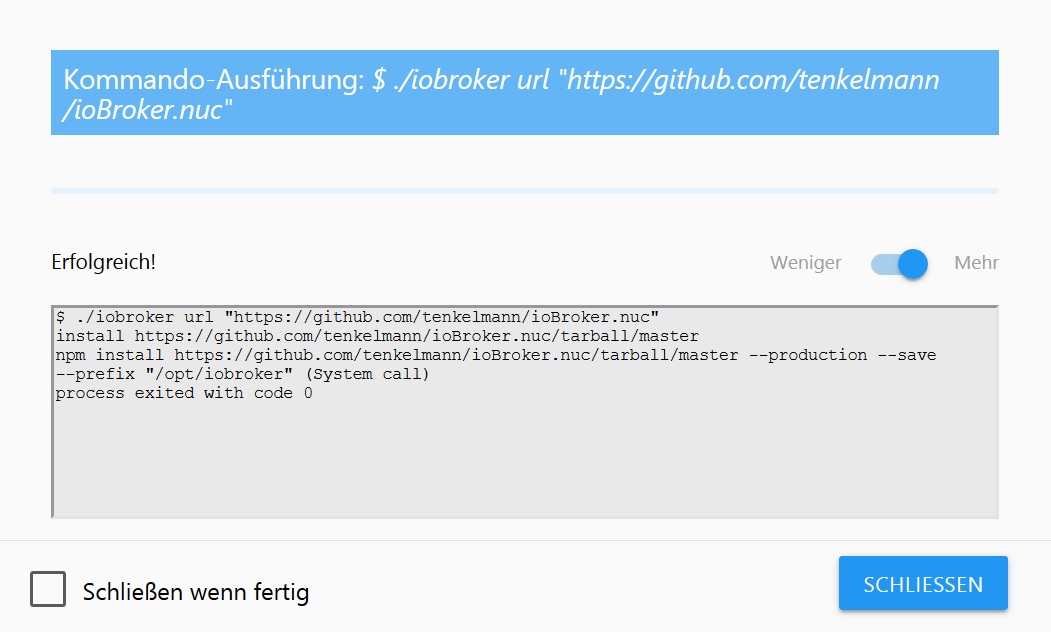
      ich würde den Adapter gerne testen, aber wie gesagt komme ich nicht weiter weil der Adapter nach der installation nicht unter Instanzen angezeigt wird.

      Auf meinem NUC läuft Proxmox dort habe ich eine VM erstellt. In der läuft debian und natürlich der iobroker.

      Und das Kommando zum löschen habe ich glaub ich auch gefunden:
      iobroker del adapterName

      HomoranH 1 Reply Last reply
      0
      • S saeft_2003

        @Homoran

        Kann sein das ich dich da falsch verstanden habe :grinning:

        ich würde den Adapter gerne testen, aber wie gesagt komme ich nicht weiter weil der Adapter nach der installation nicht unter Instanzen angezeigt wird.

        Auf meinem NUC läuft Proxmox dort habe ich eine VM erstellt. In der läuft debian und natürlich der iobroker.

        Und das Kommando zum löschen habe ich glaub ich auch gefunden:
        iobroker del adapterName

        HomoranH Do not disturb
        HomoranH Do not disturb
        Homoran
        Global Moderator Administrators
        wrote on last edited by
        #8

        @saeft_2003 sagte in Probleme nach dem installieren vom NUC-Monitor Adapter von GitHub:

        Auf meinem NUC läuft Proxmox dort habe ich eine VM erstellt. In der läuft debian und natürlich der iobroker.

        Dann wird es schon die ersten Probleme geben, da eine VM keine Hardware besitzt, deren Daten du auslesen kannst.

        @saeft_2003 sagte in Probleme nach dem installieren vom NUC-Monitor Adapter von GitHub:

        weil der Adapter nach der installation nicht unter Instanzen angezeigt wird.

        Dann hast du die Doku nicht gelesen ;-)

        Du musst noch eine Instanz erzeugen (das war der Link)
        im Admin unter Adapter die Kachel aufklappen und das (+) anklicken

        Wofür habe ich da so schöne Filmchen gemacht :cry:

        kein Support per PN! - Fragen im Forum stellen - es gibt fast nichts, was nicht auch für andere interessant ist.

        Benutzt das Voting rechts unten im Beitrag wenn er euch geholfen hat.

        der Installationsfixer: curl -fsL https://iobroker.net/fix.sh | bash -

        1 Reply Last reply
        0
        • S Offline
          S Offline
          saeft_2003
          Most Active
          wrote on last edited by
          #9

          @Homoran

          Ok das die VM ein Problem sein könnte, daran habe ich noch nicht gedacht. Mal schauen ob dein Verdacht richtig ist.

          Jetzt habe ich das ganze kapiert. :sunglasses: Jetzt taucht der NUC-Monitor in den Adapter auf und von dort kann ich den installieren. Sorry war grad völlig auf dem Schlauch gestanden :relieved:

          Danke für deine Hilfe!

          1 Reply Last reply
          0
          • S Offline
            S Offline
            saeft_2003
            Most Active
            wrote on last edited by
            #10

            Schade lässt sich nicht installieren, aber ein versuch wars wert...

            $ ./iobroker add nuc  --host iobroker
            host.iobroker install adapter nuc
            npm install --production (System call) in "/opt/iobroker/node_modules/iobroker.nuc"
            npm WARN
             deprecated jscs-preset-wikimedia@1.0.1: Deprecated in favour of eslint-config-wikimedia. -- https://phabricator.wikimedia.org/T118941
            npm WARN
             deprecated nomnom@1.8.1: Package no longer supported. Contact support@npmjs.com for more info.
            npm WARN 
            deprecated coffee-script@1.12.7: CoffeeScript on NPM has moved to "coffeescript" (no hyphen)
            npm 
            WARN checkPermissions Missing write access to /opt/iobroker/node_modules/iobroker.nuc
            npm ERR!
             path /opt/iobroker/node_modules/iobroker.nucnpm ERR! code EACCES
            npm 
            ERR! errno -13npm ERR! syscall access
            
            npm 
            ERR! Error: EACCES: permission denied, access '/opt/iobroker/node_modules/iobroker.nuc'npm ERR!  { Error: EACCES: permission denied, access '/opt/iobroker/node_modules/iobroker.nuc'
            npm ERR!   stack: 'Error: EACCES: permission denied, access \'/opt/iobroker/node_modules/iobroker.nuc\'',
            npm ERR!   errno: -13,
            npm ERR!   code: 'EACCES',
            npm ERR!
               syscall: 'access',npm ERR!   path: '/opt/iobroker/node_modules/iobroker.nuc' }
            npm ERR! 
            npm ERR!
             The operation was rejected by your operating system.npm ERR! It is likely you do not have the permissions to access this file as the current user
            npm ERR! 
            npm ERR! If you believe this might be a permissions issue, please double-check the
            npm ERR! permissions of the file and its containing directories, or try running
            
            npm ERR! the command again as root/Administrator (though this is not recommended).
            
            npm ERR! A complete log of this run can be found in:npm ERR!     /home/iobroker/.npm/_logs/2019-03-10T20_45_18_253Z-debug.log
            
            Cannot install iobroker.nuc: 243
            ERROR: process exited with code 25
            
            HomoranH 1 Reply Last reply
            0
            • S saeft_2003

              Schade lässt sich nicht installieren, aber ein versuch wars wert...

              $ ./iobroker add nuc  --host iobroker
              host.iobroker install adapter nuc
              npm install --production (System call) in "/opt/iobroker/node_modules/iobroker.nuc"
              npm WARN
               deprecated jscs-preset-wikimedia@1.0.1: Deprecated in favour of eslint-config-wikimedia. -- https://phabricator.wikimedia.org/T118941
              npm WARN
               deprecated nomnom@1.8.1: Package no longer supported. Contact support@npmjs.com for more info.
              npm WARN 
              deprecated coffee-script@1.12.7: CoffeeScript on NPM has moved to "coffeescript" (no hyphen)
              npm 
              WARN checkPermissions Missing write access to /opt/iobroker/node_modules/iobroker.nuc
              npm ERR!
               path /opt/iobroker/node_modules/iobroker.nucnpm ERR! code EACCES
              npm 
              ERR! errno -13npm ERR! syscall access
              
              npm 
              ERR! Error: EACCES: permission denied, access '/opt/iobroker/node_modules/iobroker.nuc'npm ERR!  { Error: EACCES: permission denied, access '/opt/iobroker/node_modules/iobroker.nuc'
              npm ERR!   stack: 'Error: EACCES: permission denied, access \'/opt/iobroker/node_modules/iobroker.nuc\'',
              npm ERR!   errno: -13,
              npm ERR!   code: 'EACCES',
              npm ERR!
                 syscall: 'access',npm ERR!   path: '/opt/iobroker/node_modules/iobroker.nuc' }
              npm ERR! 
              npm ERR!
               The operation was rejected by your operating system.npm ERR! It is likely you do not have the permissions to access this file as the current user
              npm ERR! 
              npm ERR! If you believe this might be a permissions issue, please double-check the
              npm ERR! permissions of the file and its containing directories, or try running
              
              npm ERR! the command again as root/Administrator (though this is not recommended).
              
              npm ERR! A complete log of this run can be found in:npm ERR!     /home/iobroker/.npm/_logs/2019-03-10T20_45_18_253Z-debug.log
              
              Cannot install iobroker.nuc: 243
              ERROR: process exited with code 25
              
              HomoranH Do not disturb
              HomoranH Do not disturb
              Homoran
              Global Moderator Administrators
              wrote on last edited by
              #11

              @saeft_2003
              da kann ich jetzt nicht folgen.

              Du hast den Adapter über die Katze installiert?
              bekommst aber Rechteprobleme beim Erzeugen der Instanz?

              kein Support per PN! - Fragen im Forum stellen - es gibt fast nichts, was nicht auch für andere interessant ist.

              Benutzt das Voting rechts unten im Beitrag wenn er euch geholfen hat.

              der Installationsfixer: curl -fsL https://iobroker.net/fix.sh | bash -

              BBTownB 1 Reply Last reply
              0
              • S Offline
                S Offline
                saeft_2003
                Most Active
                wrote on last edited by
                #12

                @Homoran

                Ja so wie du sagst habe ich es getan. Hast du vielleicht ein Testsystem wo du schauen kannst ob das da auch so ist?

                HomoranH 1 Reply Last reply
                0
                • HomoranH Homoran

                  @saeft_2003
                  da kann ich jetzt nicht folgen.

                  Du hast den Adapter über die Katze installiert?
                  bekommst aber Rechteprobleme beim Erzeugen der Instanz?

                  BBTownB Offline
                  BBTownB Offline
                  BBTown
                  wrote on last edited by
                  #13

                  Ich konnte den Adapter auf meinem NUC ohne Probleme installieren. Da allerdings auch bei mir ioBroker auf dem NUC in einer VM läuft bekomme ich Inhalte (z.B. Speicher verfügbar/belegt) nicht vom NUC sondern von der VM angezeigt :sunglasses:

                  Und dazu entsprechende Fehlermeldungen, da weder CPU noch Temperatur oder ähnliches erreichbar/auslesbar sind :sunglasses:

                  ioBroker auf NUC (VM debian v13 (Trixie ), node v22.21.0 npm v10.9.4, js-controller v7.0.7 jsonl/jsonl / HomeMatic CCU-2 (Wired und Funk) / Philips HUE / echo.DOT / Broadlink RM pro / SONOS

                  1 Reply Last reply
                  0
                  • S saeft_2003

                    @Homoran

                    Ja so wie du sagst habe ich es getan. Hast du vielleicht ein Testsystem wo du schauen kannst ob das da auch so ist?

                    HomoranH Do not disturb
                    HomoranH Do not disturb
                    Homoran
                    Global Moderator Administrators
                    wrote on last edited by
                    #14

                    @saeft_2003
                    Wann und wie hadt du ioBroker installiert.
                    Evtl. Bist du ein Kandidat für den Installationsfixer

                    kein Support per PN! - Fragen im Forum stellen - es gibt fast nichts, was nicht auch für andere interessant ist.

                    Benutzt das Voting rechts unten im Beitrag wenn er euch geholfen hat.

                    der Installationsfixer: curl -fsL https://iobroker.net/fix.sh | bash -

                    1 Reply Last reply
                    0
                    • S Offline
                      S Offline
                      saeft_2003
                      Most Active
                      wrote on last edited by
                      #15

                      @Homoran

                      Ich hab nach dieser Anleitung vor ca. einer Woche den iobroker installiert.

                      http://www.iobroker.net/docu/?page_id=8323&lang=de

                      Die Befehle iobroker start usw. funktionieren bei mir. Allerdings kommt dann keine Rückmeldung.

                      Kann ich mit dem Fixer etwas kaputt machen?

                      1 Reply Last reply
                      0
                      Reply
                      • Reply as topic
                      Log in to reply
                      • Oldest to Newest
                      • Newest to Oldest
                      • Most Votes


                      Support us

                      ioBroker
                      Community Adapters
                      Donate

                      454

                      Online

                      32.4k

                      Users

                      81.5k

                      Topics

                      1.3m

                      Posts
                      Community
                      Impressum | Datenschutz-Bestimmungen | Nutzungsbedingungen | Einwilligungseinstellungen
                      ioBroker Community 2014-2025
                      logo
                      • Login

                      • Don't have an account? Register

                      • Login or register to search.
                      • First post
                        Last post
                      0
                      • Home
                      • Recent
                      • Tags
                      • Unread 0
                      • Categories
                      • Unreplied
                      • Popular
                      • GitHub
                      • Docu
                      • Hilfe
