
NEWS




ioBroker.upnp - please test
-
@TheDuke schau mal hier z.b.
dann bekommst auch Daten
https://forum.iobroker.net/topic/14802/tutorial-vis-fritzbox-status-up-downloadanzeige@crunchip sagte in ioBroker.upnp - please test:
@TheDuke schau mal hier z.b.
dann bekommst auch Daten
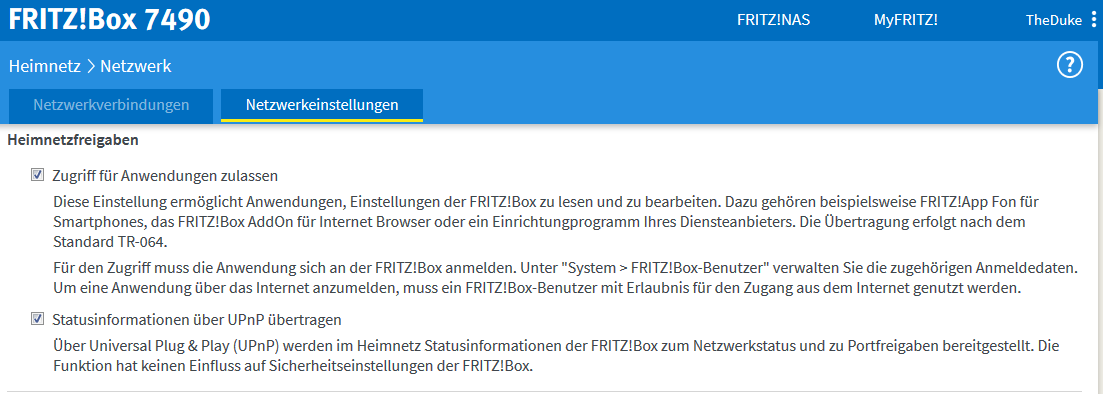
https://forum.iobroker.net/topic/14802/tutorial-vis-fritzbox-status-up-downloadanzeigeDanke, aber war schon aktiv .
-
Hallo,
mit der Version 0.3.9 lief bei mir alles gut. Nun habe ich die 1.0.1 installiert. Nun bekomme ich keine bzw. sehr wenig in der Anzeige.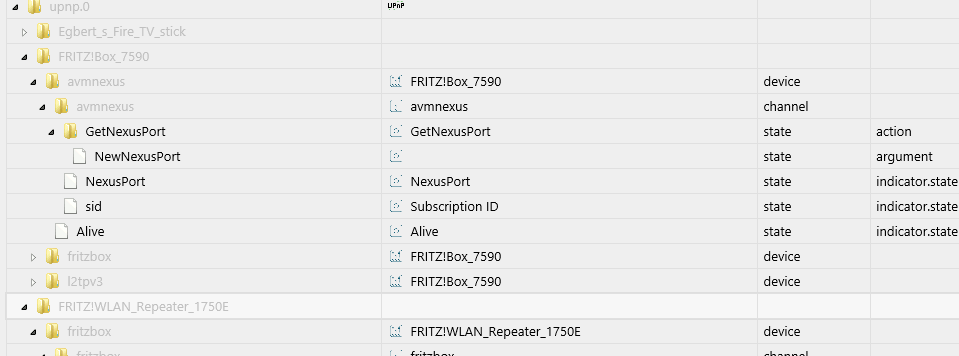
Was ist da bei mir noch nicht korrekt? Muss ich zwingend auf js-controller@1.5.7 updaten? Da bin ich leider ein Newbie. Wie muss ich das machen, sorry für die Frage.
Gruß
opossum -
Hallo,
mit der Version 0.3.9 lief bei mir alles gut. Nun habe ich die 1.0.1 installiert. Nun bekomme ich keine bzw. sehr wenig in der Anzeige.Was ist da bei mir noch nicht korrekt? Muss ich zwingend auf js-controller@1.5.7 updaten? Da bin ich leider ein Newbie. Wie muss ich das machen, sorry für die Frage.
Gruß
opossum@opossum nee, der Adapter hat noch'n Bug und legt nicht alle Objekte an. Ist bei mir das gleiche. Oder das selbe? :-)
-
@ilovegym sagte in ioBroker.upnp - please test:
@sigi234 was ist bei dir anders ? Mit der Version 0.3.9 des upnp Adapter bekomme ich diese Einträge auch, mit der Version 1.0 nicht.
Node 8.15, NPM 6.8, js-controller 1.5.7NPM 6.4.1
@sigi234 Habs auch auf einer Testinstallation ganz frisch ausprobiert, mit Node 8.15 und NPM 6.4.1, da ist das gleiche, er steigert sich bei mehr als 50 Devices in stack overflow und das komplette System schmiert ab, iobroker startet dauernd neu.. etc..
-
@all
Ist ja auch eine Testversion....... :wink: -
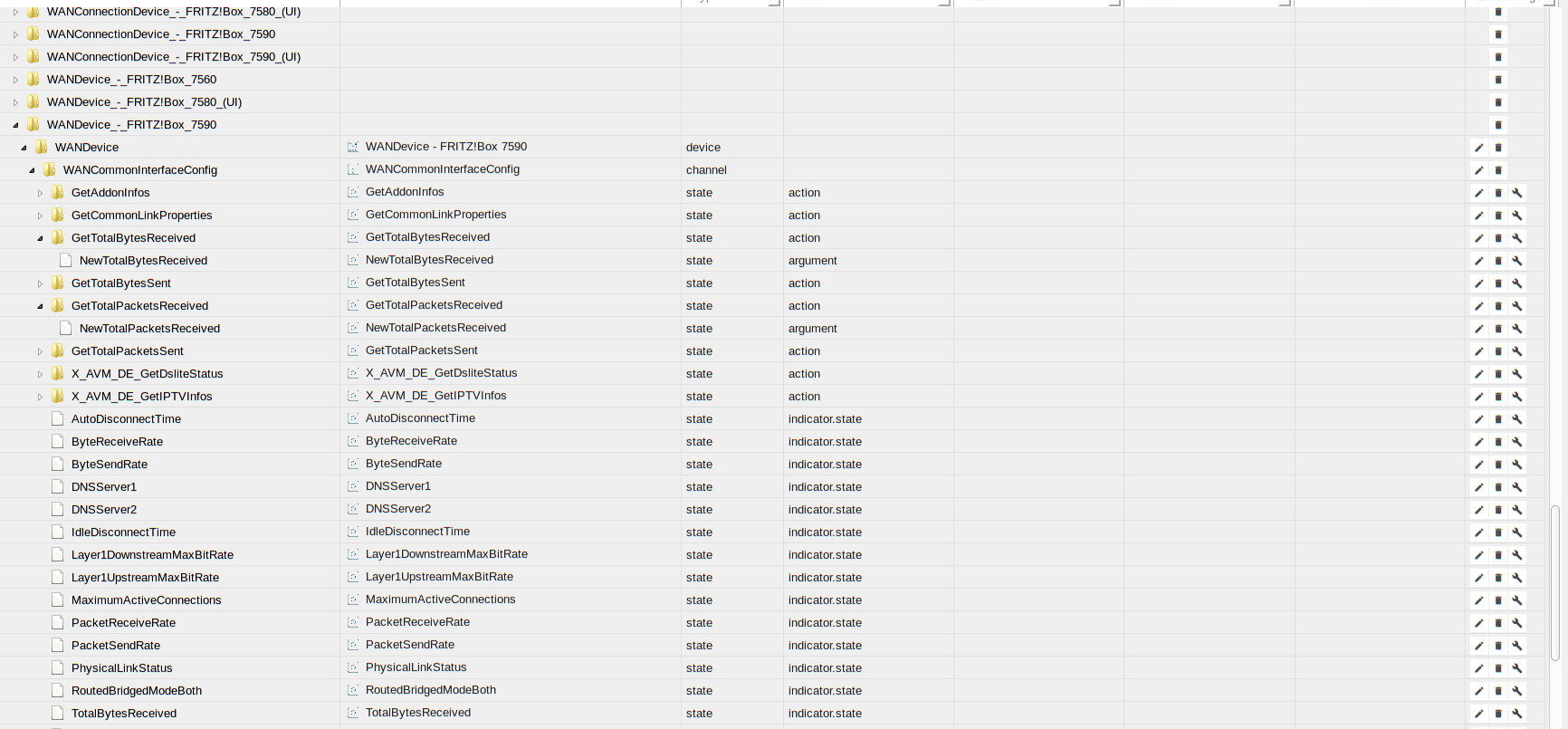
@Bluefox Guten Morgen, hab V1.0.2 auf einem frisch aufgesetztem Testsystem Linux Mint 19.1, Node 8.15, NPM 6.4.1 installiert, und er legt auch jetzt viel mehr Datenpunkte an, setzt in diesen aber keine Werte.. endet dann in einem RangeError, wie gehabt. Musste die Instanz stoppen, iobroker war dann nicht mehr erreichbar über admin.
hier ein Screenshot
-
@Bluefox Guten Morgen, hab V1.0.2 auf einem frisch aufgesetztem Testsystem Linux Mint 19.1, Node 8.15, NPM 6.4.1 installiert, und er legt auch jetzt viel mehr Datenpunkte an, setzt in diesen aber keine Werte.. endet dann in einem RangeError, wie gehabt. Musste die Instanz stoppen, iobroker war dann nicht mehr erreichbar über admin.
hier ein Screenshot
@ilovegym sagte in ioBroker.upnp - please test:
@Bluefox Guten Morgen, hab V1.0.2 auf einem frisch aufgesetztem Testsystem Linux Mint 19.1, Node 8.15, NPM 6.4.1 installiert, und er legt auch jetzt viel mehr Datenpunkte an, setzt in diesen aber keine Werte.. endet dann in einem RangeError, wie gehabt. Musste die Instanz stoppen, iobroker war dann nicht mehr erreichbar über admin.
Dann warte ich noch mit den update....:relaxed:
-
node 8.15.0 + npm 6.8.0 sieht ganz gut aus. Datenpunkte alle wieder da, lassen sich auch befüllen, nur bekomme ich im 10 Minuten-Rhytmus leider noch den call stack:
2019-02-21 09:39:02.485 - info: upnp.0 Found new device: http://192.168.1.1:49000/igd2desc.xml
2019-02-21 09:39:02.505 - info: upnp.0 Found new device: http://192.168.1.1:49000/igd2desc.xml
2019-02-21 09:39:02.510 - info: upnp.0 Found new device: http://192.168.1.1:49000/igd2desc.xml
2019-02-21 09:39:02.535 - info: upnp.0 Found new device: http://192.168.1.1:49000/igd2desc.xml
2019-02-21 09:39:04.301 - error: upnp.0 uncaught exception: Maximum call stack size exceeded
2019-02-21 09:39:04.301 - error: upnp.0 RangeError: Maximum call stack size exceeded
at tryParse (/opt/iobroker/node_modules/socket.io-parser/index.js:336:12)
at decodeString (/opt/iobroker/node_modules/socket.io-parser/index.js:325:9)
at Decoder.add (/opt/iobroker/node_modules/socket.io-parser/index.js:237:14)
at Manager.ondata (/opt/iobroker/node_modules/iobroker.js-controller/node_modules/socket.io-client/lib/manager.js:322:16)
at Socket. (/opt/iobroker/node_modules/component-bind/index.js:21:15)
at Socket.Emitter.emit (/opt/iobroker/node_modules/iobroker.js-controller/node_modules/component-emitter/index.js:133:20)
at Socket.onPacket (/opt/iobroker/node_modules/iobroker.js-controller/node_modules/engine.io-client/lib/socket.js:451:14)
at WS. (/opt/iobroker/node_modules/iobroker.js-controller/node_modules/engine.io-client/lib/socket.js:268:10)
at WS.Emitter.emit (/opt/iobroker/node_modules/iobroker.js-controller/node_modules/component-emitter/index.js:133:20)
at WS.Transport.onPacket (/opt/iobroker/node_modules/iobroker.js-controller/node_modules/engine.io-client/lib/transport.js:145:8)
at WS.Transport.onData (/opt/iobroker/node_modules/iobroker.js-controller/node_modules/engine.io-client/lib/transport.js:137:8)
at WebSocket.ws.onmessage (/opt/iobroker/node_modules/iobroker.js-controller/node_modules/engine.io-client/lib/transports/websocket.js:146:10)
at WebSocket.onMessage (/opt/iobroker/node_modules/iobroker.js-controller/node_modules/ws/lib/WebSocket.js:442:14)
at emitTwo (events.js:126:13)
at WebSocket.emit (events.js:214:7)
at Receiver.ontext (/opt/iobroker/node_modules/iobroker.js-controller/node_modules/ws/lib/WebSocket.js:841:10)
2019-02-21 09:39:04.307 - info: upnp.0 cleaned everything up...
2019-02-21 09:39:04.307 - info: upnp.0 Alive and sid states cleared
2019-02-21 09:39:04.365 - error: Caught by controller[0]: RangeError: Maximum call stack size exceeded
2019-02-21 09:39:04.366 - error: Caught by controller[0]: at tryParse (/opt/iobroker/node_modules/socket.io-parser/index.js:336:12)
2019-02-21 09:39:04.366 - error: Caught by controller[0]: at decodeString (/opt/iobroker/node_modules/socket.io-parser/index.js:325:9)
2019-02-21 09:39:04.366 - error: Caught by controller[0]: at Decoder.add (/opt/iobroker/node_modules/socket.io-parser/index.js:237:14)
2019-02-21 09:39:04.366 - error: Caught by controller[0]: at Manager.ondata (/opt/iobroker/node_modules/iobroker.js-controller/node_modules/socket.io-client/lib/manager.js:322:16)
2019-02-21 09:39:04.366 - error: Caught by controller[0]: at Socket. (/opt/iobroker/node_modules/component-bind/index.js:21:15)
2019-02-21 09:39:04.366 - error: Caught by controller[0]: at Socket.Emitter.emit (/opt/iobroker/node_modules/iobroker.js-controller/node_modules/component-emitter/index.js:133:20)
2019-02-21 09:39:04.366 - error: Caught by controller[0]: at Socket.onPacket (/opt/iobroker/node_modules/iobroker.js-controller/node_modules/engine.io-client/lib/socket.js:451:14)
2019-02-21 09:39:04.367 - error: Caught by controller[0]: at WS. (/opt/iobroker/node_modules/iobroker.js-controller/node_modules/engine.io-client/lib/socket.js:268:10)
2019-02-21 09:39:04.367 - error: Caught by controller[0]: at WS.Emitter.emit (/opt/iobroker/node_modules/iobroker.js-controller/node_modules/component-emitter/index.js:133:20)
2019-02-21 09:39:04.367 - error: Caught by controller[0]: at WS.Transport.onPacket (/opt/iobroker/node_modules/iobroker.js-controller/node_modules/engine.io-client/lib/transport.js:145:8)
2019-02-21 09:39:04.367 - error: Caught by controller[0]: at WS.Transport.onData (/opt/iobroker/node_modules/iobroker.js-controller/node_modules/engine.io-client/lib/transport.js:137:8)
2019-02-21 09:39:04.367 - error: Caught by controller[0]: at WebSocket.ws.onmessage (/opt/iobroker/node_modules/iobroker.js-controller/node_modules/engine.io-client/lib/transports/websocket.js:146:10)
2019-02-21 09:39:04.367 - error: Caught by controller[0]: at WebSocket.onMessage (/opt/iobroker/node_modules/iobroker.js-controller/node_modules/ws/lib/WebSocket.js:442:14)
2019-02-21 09:39:04.367 - error: Caught by controller[0]: at emitTwo (events.js:126:13)
2019-02-21 09:39:04.367 - error: Caught by controller[0]: at WebSocket.emit (events.js:214:7)
2019-02-21 09:39:04.368 - error: Caught by controller[0]: at Receiver.ontext (/opt/iobroker/node_modules/iobroker.js-controller/node_modules/ws/lib/WebSocket.js:841:10)
2019-02-21 09:39:04.368 - error: host.Ubuntu instance system.adapter.upnp.0 terminated with code 0 (OK)
2019-02-21 09:39:04.368 - info: host.Ubuntu Restart adapter system.adapter.upnp.0 because enabled
2019-02-21 09:39:34.386 - info: host.Ubuntu instance system.adapter.upnp.0 started with pid 28606
2019-02-21 09:39:36.420 - info: upnp.0 starting. Version 1.0.2 in /opt/iobroker/node_modules/iobroker.upnp, node: v8.15.0
2019-02-21 09:39:36.467 - info: upnp.0 Auto discover: true
LG SBorg ( SBorg auf GitHub)
Projekte: Lebensmittelwarnung.de | WLAN-Wetterstation | PimpMyStation -
@ilovegym sagte in ioBroker.upnp - please test:
@Bluefox Guten Morgen, hab V1.0.2 auf einem frisch aufgesetztem Testsystem Linux Mint 19.1, Node 8.15, NPM 6.4.1 installiert, und er legt auch jetzt viel mehr Datenpunkte an, setzt in diesen aber keine Werte.. endet dann in einem RangeError, wie gehabt. Musste die Instanz stoppen, iobroker war dann nicht mehr erreichbar über admin.
Dann warte ich noch mit den update....:relaxed:
@sigi234 sagte in ioBroker.upnp - please test:
@ilovegym sagte in ioBroker.upnp - please test:
@Bluefox Guten Morgen, hab V1.0.2 auf einem frisch aufgesetztem Testsystem Linux Mint 19.1, Node 8.15, NPM 6.4.1 installiert, und er legt auch jetzt viel mehr Datenpunkte an, setzt in diesen aber keine Werte.. endet dann in einem RangeError, wie gehabt. Musste die Instanz stoppen, iobroker war dann nicht mehr erreichbar über admin.
Dann warte ich noch mit den update....:relaxed:
Edit 1:
Scheint zu funktionieren.........V 1.0.2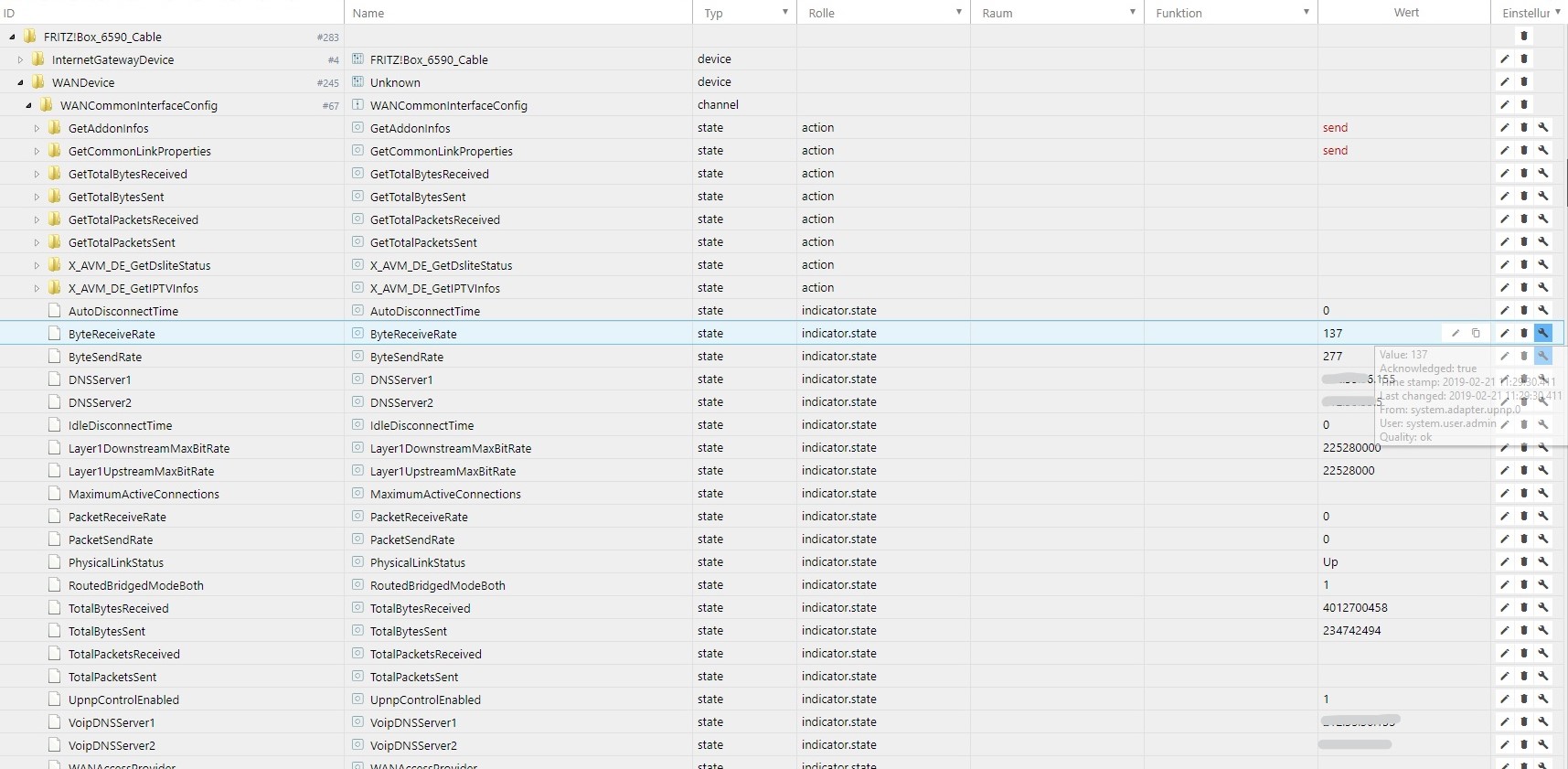
-
node 8.15.0 + npm 6.8.0 sieht ganz gut aus. Datenpunkte alle wieder da, lassen sich auch befüllen, nur bekomme ich im 10 Minuten-Rhytmus leider noch den call stack:
2019-02-21 09:39:02.485 - info: upnp.0 Found new device: http://192.168.1.1:49000/igd2desc.xml 2019-02-21 09:39:02.505 - info: upnp.0 Found new device: http://192.168.1.1:49000/igd2desc.xml 2019-02-21 09:39:02.510 - info: upnp.0 Found new device: http://192.168.1.1:49000/igd2desc.xml 2019-02-21 09:39:02.535 - info: upnp.0 Found new device: http://192.168.1.1:49000/igd2desc.xml 2019-02-21 09:39:04.301 - error: upnp.0 uncaught exception: Maximum call stack size exceeded 2019-02-21 09:39:04.301 - error: upnp.0 RangeError: Maximum call stack size exceeded at tryParse (/opt/iobroker/node_modules/socket.io-parser/index.js:336:12) at decodeString (/opt/iobroker/node_modules/socket.io-parser/index.js:325:9) at Decoder.add (/opt/iobroker/node_modules/socket.io-parser/index.js:237:14) at Manager.ondata (/opt/iobroker/node_modules/iobroker.js-controller/node_modules/socket.io-client/lib/manager.js:322:16) at Socket. (/opt/iobroker/node_modules/component-bind/index.js:21:15) at Socket.Emitter.emit (/opt/iobroker/node_modules/iobroker.js-controller/node_modules/component-emitter/index.js:133:20) at Socket.onPacket (/opt/iobroker/node_modules/iobroker.js-controller/node_modules/engine.io-client/lib/socket.js:451:14) at WS. (/opt/iobroker/node_modules/iobroker.js-controller/node_modules/engine.io-client/lib/socket.js:268:10) at WS.Emitter.emit (/opt/iobroker/node_modules/iobroker.js-controller/node_modules/component-emitter/index.js:133:20) at WS.Transport.onPacket (/opt/iobroker/node_modules/iobroker.js-controller/node_modules/engine.io-client/lib/transport.js:145:8) at WS.Transport.onData (/opt/iobroker/node_modules/iobroker.js-controller/node_modules/engine.io-client/lib/transport.js:137:8) at WebSocket.ws.onmessage (/opt/iobroker/node_modules/iobroker.js-controller/node_modules/engine.io-client/lib/transports/websocket.js:146:10) at WebSocket.onMessage (/opt/iobroker/node_modules/iobroker.js-controller/node_modules/ws/lib/WebSocket.js:442:14) at emitTwo (events.js:126:13) at WebSocket.emit (events.js:214:7) at Receiver.ontext (/opt/iobroker/node_modules/iobroker.js-controller/node_modules/ws/lib/WebSocket.js:841:10) 2019-02-21 09:39:04.307 - info: upnp.0 cleaned everything up... 2019-02-21 09:39:04.307 - info: upnp.0 Alive and sid states cleared 2019-02-21 09:39:04.365 - error: Caught by controller[0]: RangeError: Maximum call stack size exceeded 2019-02-21 09:39:04.366 - error: Caught by controller[0]: at tryParse (/opt/iobroker/node_modules/socket.io-parser/index.js:336:12) 2019-02-21 09:39:04.366 - error: Caught by controller[0]: at decodeString (/opt/iobroker/node_modules/socket.io-parser/index.js:325:9) 2019-02-21 09:39:04.366 - error: Caught by controller[0]: at Decoder.add (/opt/iobroker/node_modules/socket.io-parser/index.js:237:14) 2019-02-21 09:39:04.366 - error: Caught by controller[0]: at Manager.ondata (/opt/iobroker/node_modules/iobroker.js-controller/node_modules/socket.io-client/lib/manager.js:322:16) 2019-02-21 09:39:04.366 - error: Caught by controller[0]: at Socket. (/opt/iobroker/node_modules/component-bind/index.js:21:15) 2019-02-21 09:39:04.366 - error: Caught by controller[0]: at Socket.Emitter.emit (/opt/iobroker/node_modules/iobroker.js-controller/node_modules/component-emitter/index.js:133:20) 2019-02-21 09:39:04.366 - error: Caught by controller[0]: at Socket.onPacket (/opt/iobroker/node_modules/iobroker.js-controller/node_modules/engine.io-client/lib/socket.js:451:14) 2019-02-21 09:39:04.367 - error: Caught by controller[0]: at WS. (/opt/iobroker/node_modules/iobroker.js-controller/node_modules/engine.io-client/lib/socket.js:268:10) 2019-02-21 09:39:04.367 - error: Caught by controller[0]: at WS.Emitter.emit (/opt/iobroker/node_modules/iobroker.js-controller/node_modules/component-emitter/index.js:133:20) 2019-02-21 09:39:04.367 - error: Caught by controller[0]: at WS.Transport.onPacket (/opt/iobroker/node_modules/iobroker.js-controller/node_modules/engine.io-client/lib/transport.js:145:8) 2019-02-21 09:39:04.367 - error: Caught by controller[0]: at WS.Transport.onData (/opt/iobroker/node_modules/iobroker.js-controller/node_modules/engine.io-client/lib/transport.js:137:8) 2019-02-21 09:39:04.367 - error: Caught by controller[0]: at WebSocket.ws.onmessage (/opt/iobroker/node_modules/iobroker.js-controller/node_modules/engine.io-client/lib/transports/websocket.js:146:10) 2019-02-21 09:39:04.367 - error: Caught by controller[0]: at WebSocket.onMessage (/opt/iobroker/node_modules/iobroker.js-controller/node_modules/ws/lib/WebSocket.js:442:14) 2019-02-21 09:39:04.367 - error: Caught by controller[0]: at emitTwo (events.js:126:13) 2019-02-21 09:39:04.367 - error: Caught by controller[0]: at WebSocket.emit (events.js:214:7) 2019-02-21 09:39:04.368 - error: Caught by controller[0]: at Receiver.ontext (/opt/iobroker/node_modules/iobroker.js-controller/node_modules/ws/lib/WebSocket.js:841:10) 2019-02-21 09:39:04.368 - error: host.Ubuntu instance system.adapter.upnp.0 terminated with code 0 (OK) 2019-02-21 09:39:04.368 - info: host.Ubuntu Restart adapter system.adapter.upnp.0 because enabled 2019-02-21 09:39:34.386 - info: host.Ubuntu instance system.adapter.upnp.0 started with pid 28606 2019-02-21 09:39:36.420 - info: upnp.0 starting. Version 1.0.2 in /opt/iobroker/node_modules/iobroker.upnp, node: v8.15.0 2019-02-21 09:39:36.467 - info: upnp.0 Auto discover: true -
@Bluefox Danke für das Update, schon etwas besser, der Adapter läuft durch, allerdings schreibt er keine Werte in die Objekte, und meine 3 Octopi-Raspis mag er einfach nicht, solange diese online sind, hängt er bei den in einer Schleife und erkennt sie jedesmal wieder als neues Device - und kommt dann natürlich zu nix anderes mehr..
Habe die drei jetzt mal runtergefahren, und siehe da, es werden noch mehr Geräte erkannt ( ich hab in den Settings alle 3 Haken an) jetzt keine Schleife mehr, aber noch keine Werte in den Objekten.Logfileauszug von der Schleife:
2019-02-21 23:15:33.713  - debug: upnp.0 Started processTasks with 1 tasks
2019-02-21 23:15:33.713  - debug: upnp.0 firstDevLookup for http://192.168.178.32:80/plugin/discovery/discovery.xml
2019-02-21 23:15:33.745  - debug: upnp.0 Positive answer for request of the XML file for http://192.168.178.32:80/plugin/discovery/discovery.xml
2019-02-21 23:15:33.746  - debug: upnp.0 Parsing the XML file for http://192.168.178.32:80/plugin/discovery/discovery.xml
2019-02-21 23:15:33.746  - debug: upnp.0 Creating objects for http://192.168.178.32:80/plugin/discovery/discovery.xml
2019-02-21 23:15:33.746  - debug: upnp.0 TypeOfDevice Basic
2019-02-21 23:15:33.746  - debug: upnp.0 Can not find a icon for 192.168.178.32
2019-02-21 23:15:33.746  - debug: upnp.0 Creating root element for device: OctoPrint_instance_on_berrymotion
2019-02-21 23:15:33.746  - debug: upnp.0 Cannot parse answer from 192.168.178.32: TypeError: Cannot read property 'length' of undefined
2019-02-21 23:15:33.749  - debug: upnp.0 All tasks processed
2019-02-21 23:15:33.792  - info: upnp.0 Found new device: http://192.168.178.28:80/plugin/discovery/discovery.xml
2019-02-21 23:15:33.792  - debug: upnp.0 Started processTasks with 1 tasks
2019-02-21 23:15:33.792  - debug: upnp.0 firstDevLookup for http://192.168.178.28:80/plugin/discovery/discovery.xml
2019-02-21 23:15:33.817  - debug: upnp.0 Positive answer for request of the XML file for http://192.168.178.28:80/plugin/discovery/discovery.xml
2019-02-21 23:15:33.817  - debug: upnp.0 Parsing the XML file for http://192.168.178.28:80/plugin/discovery/discovery.xml
2019-02-21 23:15:33.817  - debug: upnp.0 Creating objects for http://192.168.178.28:80/plugin/discovery/discovery.xml
2019-02-21 23:15:33.817  - debug: upnp.0 TypeOfDevice Basic
2019-02-21 23:15:33.817  - debug: upnp.0 Can not find a icon for 192.168.178.28
2019-02-21 23:15:33.817  - debug: upnp.0 Creating root element for device: OctoPrint_instance__Octopi
2019-02-21 23:15:33.818  - debug: upnp.0 Cannot parse answer from 192.168.178.28: TypeError: Cannot read property 'length' of undefined
2019-02-21 23:15:33.821  - debug: upnp.0 All tasks processed
2019-02-21 23:15:33.851  - info: upnp.0 Found new device: http://192.168.178.34:80/plugin/discovery/discovery.xml
2019-02-21 23:15:33.851  - debug: upnp.0 Started processTasks with 1 tasks
2019-02-21 23:15:33.851  - debug: upnp.0 firstDevLookup for http://192.168.178.34:80/plugin/discovery/discovery.xml
2019-02-21 23:15:33.904  - debug: upnp.0 Positive answer for request of the XML file for http://192.168.178.34:80/plugin/discovery/discovery.xml
2019-02-21 23:15:33.904  - debug: upnp.0 Parsing the XML file for http://192.168.178.34:80/plugin/discovery/discovery.xml
2019-02-21 23:15:33.904  - debug: upnp.0 Creating objects for http://192.168.178.34:80/plugin/discovery/discovery.xml
2019-02-21 23:15:33.904  - debug: upnp.0 TypeOfDevice Basic
2019-02-21 23:15:33.904  - debug: upnp.0 Can not find a icon for 192.168.178.34
2019-02-21 23:15:33.904  - debug: upnp.0 Creating root element for device: OctoPrint_instance_on_gymberry
2019-02-21 23:15:33.904  - debug: upnp.0 Cannot parse answer from 192.168.178.34: TypeError: Cannot read property 'length' of undefined
2019-02-21 23:15:33.908  - debug: upnp.0 All tasks processed
2019-02-21 23:15:39.112  - debug: upnp.0 Started processTasks with 8 tasks
2019-02-21 23:15:39.127  - debug: upnp.0 All tasks processed
2019-02-21 23:15:43.729  - info: upnp.0 Found new device: http://192.168.178.32:80/plugin/discovery/discovery.xml
2019-02-21 23:15:43.730  - debug: upnp.0 Started processTasks with 1 tasks
2019-02-21 23:15:43.730  - debug: upnp.0 firstDevLookup for http://192.168.178.32:80/plugin/discovery/discovery.xml
2019-02-21 23:15:43.780  - debug: upnp.0 Positive answer for request of the XML file for http://192.168.178.32:80/plugin/discovery/discovery.xml
2019-02-21 23:15:43.782  - debug: upnp.0 Parsing the XML file for http://192.168.178.32:80/plugin/discovery/discovery.xml
2019-02-21 23:15:43.782  - debug: upnp.0 Creating objects for http://192.168.178.32:80/plugin/discovery/discovery.xml
2019-02-21 23:15:43.782  - debug: upnp.0 TypeOfDevice Basic
2019-02-21 23:15:43.782  - debug: upnp.0 Can not find a icon for 192.168.178.32
2019-02-21 23:15:43.783  - debug: upnp.0 Creating root element for device: OctoPrint_instance_on_berrymotion
2019-02-21 23:15:43.783  - debug: upnp.0 Cannot parse answer from 192.168.178.32: TypeError: Cannot read property 'length' of undefined
2019-02-21 23:15:43.785  - debug: upnp.0 All tasks processed
2019-02-21 23:15:43.828  - info: upnp.0 Found new device: http://192.168.178.28:80/plugin/discovery/discovery.xml
2019-02-21 23:15:43.828  - debug: upnp.0 Started processTasks with 1 tasks
2019-02-21 23:15:43.828  - debug: upnp.0 firstDevLookup for http://192.168.178.28:80/plugin/discovery/discovery.xml
2019-02-21 23:15:43.853  - debug: upnp.0 Positive answer for request of the XML file for http://192.168.178.28:80/plugin/discovery/discovery.xml
2019-02-21 23:15:43.853  - debug: upnp.0 Parsing the XML file for http://192.168.178.28:80/plugin/discovery/discovery.xml
2019-02-21 23:15:43.853  - debug: upnp.0 Creating objects for http://192.168.178.28:80/plugin/discovery/discovery.xml
2019-02-21 23:15:43.853  - debug: upnp.0 TypeOfDevice Basic
2019-02-21 23:15:43.853  - debug: upnp.0 Can not find a icon for 192.168.178.28
2019-02-21 23:15:43.853  - debug: upnp.0 Creating root element for device: OctoPrint_instance__Octopi
2019-02-21 23:15:43.853  - debug: upnp.0 Cannot parse answer from 192.168.178.28: TypeError: Cannot read property 'length' of undefined
2019-02-21 23:15:43.857  - debug: upnp.0 All tasks processed
2019-02-21 23:15:43.878  - info: upnp.0 Found new device: http://192.168.178.34:80/plugin/discovery/discovery.xml
2019-02-21 23:15:43.878  - debug: upnp.0 Started processTasks with 1 tasks
und das ging solange so weiter, bis ich die drei runtergefahren hab ( Drucke gerade nicht, daher gings..).
Nehme an, es hat vielleicht damit was zu tun:
019-02-21 23:15:33.818 - debug: upnp.0 Cannot parse answer from 192.168.178.28: TypeError: Cannot read property 'length' of undefined -
@Bluefox Danke für das Update, schon etwas besser, der Adapter läuft durch, allerdings schreibt er keine Werte in die Objekte, und meine 3 Octopi-Raspis mag er einfach nicht, solange diese online sind, hängt er bei den in einer Schleife und erkennt sie jedesmal wieder als neues Device - und kommt dann natürlich zu nix anderes mehr..
Habe die drei jetzt mal runtergefahren, und siehe da, es werden noch mehr Geräte erkannt ( ich hab in den Settings alle 3 Haken an) jetzt keine Schleife mehr, aber noch keine Werte in den Objekten.Logfileauszug von der Schleife:
2019-02-21 23:15:33.713  - debug: upnp.0 Started processTasks with 1 tasks
2019-02-21 23:15:33.713  - debug: upnp.0 firstDevLookup for http://192.168.178.32:80/plugin/discovery/discovery.xml
2019-02-21 23:15:33.745  - debug: upnp.0 Positive answer for request of the XML file for http://192.168.178.32:80/plugin/discovery/discovery.xml
2019-02-21 23:15:33.746  - debug: upnp.0 Parsing the XML file for http://192.168.178.32:80/plugin/discovery/discovery.xml
2019-02-21 23:15:33.746  - debug: upnp.0 Creating objects for http://192.168.178.32:80/plugin/discovery/discovery.xml
2019-02-21 23:15:33.746  - debug: upnp.0 TypeOfDevice Basic
2019-02-21 23:15:33.746  - debug: upnp.0 Can not find a icon for 192.168.178.32
2019-02-21 23:15:33.746  - debug: upnp.0 Creating root element for device: OctoPrint_instance_on_berrymotion
2019-02-21 23:15:33.746  - debug: upnp.0 Cannot parse answer from 192.168.178.32: TypeError: Cannot read property 'length' of undefined
2019-02-21 23:15:33.749  - debug: upnp.0 All tasks processed
2019-02-21 23:15:33.792  - info: upnp.0 Found new device: http://192.168.178.28:80/plugin/discovery/discovery.xml
2019-02-21 23:15:33.792  - debug: upnp.0 Started processTasks with 1 tasks
2019-02-21 23:15:33.792  - debug: upnp.0 firstDevLookup for http://192.168.178.28:80/plugin/discovery/discovery.xml
2019-02-21 23:15:33.817  - debug: upnp.0 Positive answer for request of the XML file for http://192.168.178.28:80/plugin/discovery/discovery.xml
2019-02-21 23:15:33.817  - debug: upnp.0 Parsing the XML file for http://192.168.178.28:80/plugin/discovery/discovery.xml
2019-02-21 23:15:33.817  - debug: upnp.0 Creating objects for http://192.168.178.28:80/plugin/discovery/discovery.xml
2019-02-21 23:15:33.817  - debug: upnp.0 TypeOfDevice Basic
2019-02-21 23:15:33.817  - debug: upnp.0 Can not find a icon for 192.168.178.28
2019-02-21 23:15:33.817  - debug: upnp.0 Creating root element for device: OctoPrint_instance__Octopi
2019-02-21 23:15:33.818  - debug: upnp.0 Cannot parse answer from 192.168.178.28: TypeError: Cannot read property 'length' of undefined
2019-02-21 23:15:33.821  - debug: upnp.0 All tasks processed
2019-02-21 23:15:33.851  - info: upnp.0 Found new device: http://192.168.178.34:80/plugin/discovery/discovery.xml
2019-02-21 23:15:33.851  - debug: upnp.0 Started processTasks with 1 tasks
2019-02-21 23:15:33.851  - debug: upnp.0 firstDevLookup for http://192.168.178.34:80/plugin/discovery/discovery.xml
2019-02-21 23:15:33.904  - debug: upnp.0 Positive answer for request of the XML file for http://192.168.178.34:80/plugin/discovery/discovery.xml
2019-02-21 23:15:33.904  - debug: upnp.0 Parsing the XML file for http://192.168.178.34:80/plugin/discovery/discovery.xml
2019-02-21 23:15:33.904  - debug: upnp.0 Creating objects for http://192.168.178.34:80/plugin/discovery/discovery.xml
2019-02-21 23:15:33.904  - debug: upnp.0 TypeOfDevice Basic
2019-02-21 23:15:33.904  - debug: upnp.0 Can not find a icon for 192.168.178.34
2019-02-21 23:15:33.904  - debug: upnp.0 Creating root element for device: OctoPrint_instance_on_gymberry
2019-02-21 23:15:33.904  - debug: upnp.0 Cannot parse answer from 192.168.178.34: TypeError: Cannot read property 'length' of undefined
2019-02-21 23:15:33.908  - debug: upnp.0 All tasks processed
2019-02-21 23:15:39.112  - debug: upnp.0 Started processTasks with 8 tasks
2019-02-21 23:15:39.127  - debug: upnp.0 All tasks processed
2019-02-21 23:15:43.729  - info: upnp.0 Found new device: http://192.168.178.32:80/plugin/discovery/discovery.xml
2019-02-21 23:15:43.730  - debug: upnp.0 Started processTasks with 1 tasks
2019-02-21 23:15:43.730  - debug: upnp.0 firstDevLookup for http://192.168.178.32:80/plugin/discovery/discovery.xml
2019-02-21 23:15:43.780  - debug: upnp.0 Positive answer for request of the XML file for http://192.168.178.32:80/plugin/discovery/discovery.xml
2019-02-21 23:15:43.782  - debug: upnp.0 Parsing the XML file for http://192.168.178.32:80/plugin/discovery/discovery.xml
2019-02-21 23:15:43.782  - debug: upnp.0 Creating objects for http://192.168.178.32:80/plugin/discovery/discovery.xml
2019-02-21 23:15:43.782  - debug: upnp.0 TypeOfDevice Basic
2019-02-21 23:15:43.782  - debug: upnp.0 Can not find a icon for 192.168.178.32
2019-02-21 23:15:43.783  - debug: upnp.0 Creating root element for device: OctoPrint_instance_on_berrymotion
2019-02-21 23:15:43.783  - debug: upnp.0 Cannot parse answer from 192.168.178.32: TypeError: Cannot read property 'length' of undefined
2019-02-21 23:15:43.785  - debug: upnp.0 All tasks processed
2019-02-21 23:15:43.828  - info: upnp.0 Found new device: http://192.168.178.28:80/plugin/discovery/discovery.xml
2019-02-21 23:15:43.828  - debug: upnp.0 Started processTasks with 1 tasks
2019-02-21 23:15:43.828  - debug: upnp.0 firstDevLookup for http://192.168.178.28:80/plugin/discovery/discovery.xml
2019-02-21 23:15:43.853  - debug: upnp.0 Positive answer for request of the XML file for http://192.168.178.28:80/plugin/discovery/discovery.xml
2019-02-21 23:15:43.853  - debug: upnp.0 Parsing the XML file for http://192.168.178.28:80/plugin/discovery/discovery.xml
2019-02-21 23:15:43.853  - debug: upnp.0 Creating objects for http://192.168.178.28:80/plugin/discovery/discovery.xml
2019-02-21 23:15:43.853  - debug: upnp.0 TypeOfDevice Basic
2019-02-21 23:15:43.853  - debug: upnp.0 Can not find a icon for 192.168.178.28
2019-02-21 23:15:43.853  - debug: upnp.0 Creating root element for device: OctoPrint_instance__Octopi
2019-02-21 23:15:43.853  - debug: upnp.0 Cannot parse answer from 192.168.178.28: TypeError: Cannot read property 'length' of undefined
2019-02-21 23:15:43.857  - debug: upnp.0 All tasks processed
2019-02-21 23:15:43.878  - info: upnp.0 Found new device: http://192.168.178.34:80/plugin/discovery/discovery.xml
2019-02-21 23:15:43.878  - debug: upnp.0 Started processTasks with 1 tasks
und das ging solange so weiter, bis ich die drei runtergefahren hab ( Drucke gerade nicht, daher gings..).
Nehme an, es hat vielleicht damit was zu tun:
019-02-21 23:15:33.818 - debug: upnp.0 Cannot parse answer from 192.168.178.28: TypeError: Cannot read property 'length' of undefinedУчастник @ilovegym написал в ioBroker.upnp - please test:
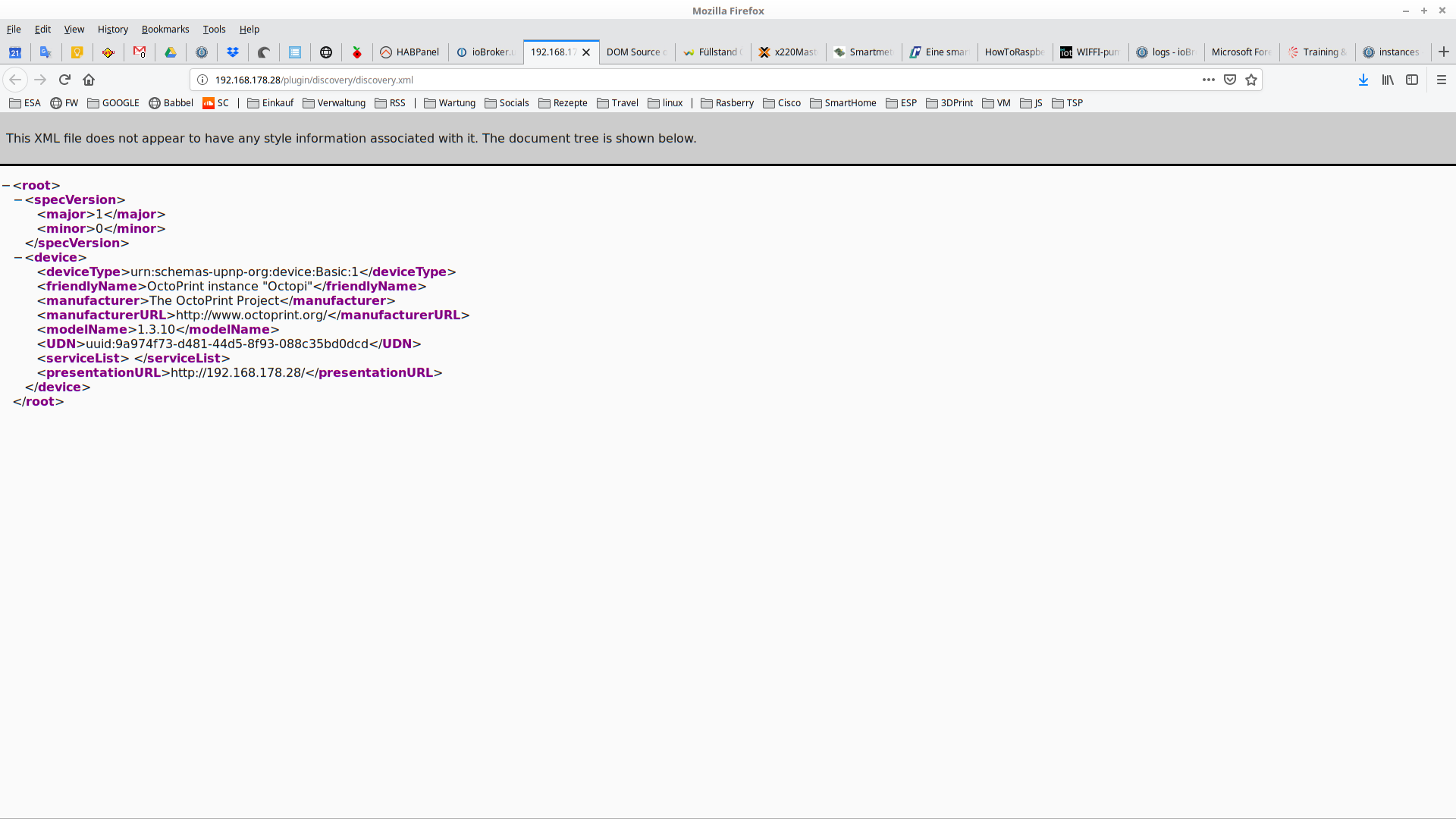
Kannst du http://192.168.178.28:80/plugin/discovery/discovery.xml Datei zeigen?
-
Участник @ilovegym написал в ioBroker.upnp - please test:
Kannst du http://192.168.178.28:80/plugin/discovery/discovery.xml Datei zeigen?
@Bluefox ja, der ist hier im Büro, bei den anderen müsste ich jetzt in den Keller laufen.. sind ja aus.. ;-)
XML:<root><specVersion><major>1</major><minor>0</minor></specVersion><device><deviceType>urn:schemas-upnp-org:device:Basic:1</deviceType><friendlyName>OctoPrint instance "Octopi"</friendlyName><manufacturer>The OctoPrint Project</manufacturer><manufacturerURL>http://www.octoprint.org/</manufacturerURL><modelName>1.3.10</modelName><UDN>uuid:9a974f73-d481-44d5-8f93-088c35bd0dcd</UDN><serviceList> </serviceList><presentationURL>http://192.168.178.28/</presentationURL></device></root>Source:
http://www.w3.org/1999/xhtml" id="top"><link rel="stylesheet" href="chrome://global/content/xml/XMLPrettyPrint.css" /><div id="header" dir="ltr"><p> This XML file does not appear to have any style information associated with it. The document tree is shown below. </p></div><main id="tree" class="highlight"><div><details open="" class="expandable-body"><summary class="expandable-opening"><<span class="start-tag">root</span>></summary><div class="expandable-children"><div><details open="" class="expandable-body"><summary class="expandable-opening"><<span class="start-tag">specVersion</span>></summary><div class="expandable-children"><div><<span class="start-tag">major</span>><span class="text">1</span></<span class="end-tag">major</span>></div><div><<span class="start-tag">minor</span>><span class="text">0</span></<span class="end-tag">minor</span>></div></div></details><span class="expandable-closing"></<span class="end-tag">specVersion</span>></span></div><div><details open="" class="expandable-body"><summary class="expandable-opening"><<span class="start-tag">device</span>></summary><div class="expandable-children"><div><<span class="start-tag">deviceType</span>><span class="text">urn:schemas-upnp-org:device:Basic:1</span></<span class="end-tag">deviceType</span>></div><div><<span class="start-tag">friendlyName</span>><span class="text">OctoPrint instance "Octopi"</span></<span class="end-tag">friendlyName</span>></div><div><<span class="start-tag">manufacturer</span>><span class="text">The OctoPrint Project</span></<span class="end-tag">manufacturer</span>></div><div><<span class="start-tag">manufacturerURL</span>><span class="text">http://www.octoprint.org/</span></<span class="end-tag">manufacturerURL</span>></div><div><<span class="start-tag">modelName</span>><span class="text">1.3.10</span></<span class="end-tag">modelName</span>></div><div><<span class="start-tag">UDN</span>><span class="text">uuid:9a974f73-d481-44d5-8f93-088c35bd0dcd</span></<span class="end-tag">UDN</span>></div><div><<span class="start-tag">serviceList</span>><span class="text"> </span></<span class="end-tag">serviceList</span>></div><div><<span class="start-tag">presentationURL</span>><span class="text">http://192.168.178.28/</span></<span class="end-tag">presentationURL</span>></div></div></details><span class="expandable-closing"></<span class="end-tag">device</span>></span></div></div></details><span class="expandable-closing"></<span class="end-tag">root</span>></span></div></main></div>Screenshot:
-
@Bluefox sagte in ioBroker.upnp - please test:
@SBorg UNd bitte noch mal vom git testen.
:+1: funktioniert supi, call stack ist weg und UPNP läuft wieder ohne Probleme, Danke :)
-
@Bluefox sagte in ioBroker.upnp - please test:
@SBorg UNd bitte noch mal vom git testen.
:+1: funktioniert supi, call stack ist weg und UPNP läuft wieder ohne Probleme, Danke :)
-
@SBorg hast du es gut.. bei mir nicht.. 3 Systeme, überall das Gleiche.. muss an meinen Devices liegen.. :-( vor allem werden die Datenpunkte nicht beschrieben, sind zwar da, aber steht nix drin..
@ilovegym sagte in ioBroker.upnp - please test:
@SBorg ...sind zwar da, aber steht nix drin..
Sollte da überhaupt was drin stehen? IMHO schickt UPNP von Hause aus doch nix von selbst? Ich schick per UPNP eine Anfrage an das Device, dann schickt es mir die gewünschten Daten.
Soll heißen, starte ich UPNP sind z.B. bei meiner FritzBox auch alle DPs leer, schick ich dann ein "send", bekomme ich die gewünschten Daten in die entsprechenden DPs übermittelt.EDIT auch richtig zitieren will gelernt sein...
LG SBorg ( SBorg auf GitHub)
Projekte: Lebensmittelwarnung.de | WLAN-Wetterstation | PimpMyStation -
@ilovegym sagte in ioBroker.upnp - please test:
@SBorg ...sind zwar da, aber steht nix drin..
Sollte da überhaupt was drin stehen? IMHO schickt UPNP von Hause aus doch nix von selbst? Ich schick per UPNP eine Anfrage an das Device, dann schickt es mir die gewünschten Daten.
Soll heißen, starte ich UPNP sind z.B. bei meiner FritzBox auch alle DPs leer, schick ich dann ein "send", bekomme ich die gewünschten Daten in die entsprechenden DPs übermittelt.EDIT auch richtig zitieren will gelernt sein...
@SBorg sagte in ioBroker.upnp - please test:
@ilovegym sagte in ioBroker.upnp - please test:
@SBorg ...sind zwar da, aber steht nix drin..
Sollte da überhaupt was drin stehen? IMHO schickt UPNP von Hause aus doch nix von selbst? Ich schick per UPNP eine Anfrage an das Device, dann schickt es mir die gewünschten Daten.
Soll heißen, starte ich UPNP sind z.B. bei meiner FritzBox auch alle DPs leer, schick ich dann ein "send", bekomme ich die gewünschten Daten in die entsprechenden DPs übermittelt.So ist es, habe ein Skrip laufen das mir die Werte holt.......von der Fritz Box
schedule("*/10 * * * * *",  function () {
   setState( "upnp.0.FRITZ!Box_6590_Cable.WANDevice.WANCommonInterfaceConfig.GetCommonLinkProperties"/*GetCommonLinkProperties*/,'send');
   setState( "upnp.0.FRITZ!Box_6590_Cable.WANDevice.WANCommonInterfaceConfig.GetAddonInfos"/*GetAddonInfos*/,'send');
});





Support us
417
Online32.7k
Users82.4k
Topics1.3m
Posts