



Skip to content
  • Home
  • Recent
  • Tags
  • 0 Unread 0
  • Categories
  • Unreplied
  • Popular
  • GitHub
  • Docu
  • Hilfe
Skins
  • Light
  • Brite
  • Cerulean
  • Cosmo
  • Flatly
  • Journal
  • Litera
  • Lumen
  • Lux
  • Materia
  • Minty
  • Morph
  • Pulse
  • Sandstone
  • Simplex
  • Sketchy
  • Spacelab
  • United
  • Yeti
  • Zephyr
  • Dark
  • Cyborg
  • Darkly
  • Quartz
  • Slate
  • Solar
  • Superhero
  • Vapor

  • Default (No Skin)
  • No Skin
Collapse
ioBroker Logo

Community Forum

donate donate
  1. ioBroker Community Home
  2. Deutsch
  3. ioBroker Allgemein
  4. Hilfe ich kann kein Adapter mehr installieren

NEWS

  • Monatsrückblick Januar/Februar 2026 ist online!
    BluefoxB
    Bluefox
    17
    1
    485

  • Jahresrückblick 2025 – unser neuer Blogbeitrag ist online! ✨
    BluefoxB
    Bluefox
    17
    1
    5.2k

  • Neuer Blogbeitrag: Monatsrückblick - Dezember 2025 🎄
    BluefoxB
    Bluefox
    13
    1
    1.4k

Hilfe ich kann kein Adapter mehr installieren

Scheduled Pinned Locked Moved ioBroker Allgemein
15 Posts 3 Posters 1.8k Views
  • Oldest to Newest
  • Newest to Oldest
  • Most Votes
Reply
  • Reply as topic
Log in to reply
This topic has been deleted. Only users with topic management privileges can see it.
  • L Offline
    L Offline
    leo12318
    wrote on last edited by
    #5

    hab den Fehler im oberen Post eingefügt

    Du meinst das als Admin oder ?

    15409_112.jpg

    1 Reply Last reply
    0
    • wendy2702W Offline
      wendy2702W Offline
      wendy2702
      wrote on last edited by
      #6

      Ist das bei einem anderen Adapter der gleiche Fehler?

      Ja, den Admin meine ich.

      Bitte keine Fragen per PN, die gehören ins Forum!

      Benutzt das Voting rechts unten im Beitrag wenn er euch geholfen hat.

      1 Reply Last reply
      0
      • L Offline
        L Offline
        leo12318
        wrote on last edited by
        #7

        würde sagen ja

        Javascript / Blockly

        ! $ ./iobroker add javascript –host raspberrypi
        ! NPM version: 6.4.1
        ! npm install iobroker.javascript --production --save --prefix "/opt/iobroker" (System call)
        ! npm
        ! WARN deprecated coffee-script@1.12.7: CoffeeScript on NPM has moved to "coffeescript" (no hyphen)
        ! sh: 1: node-pre-gyp: Permission denied
        ! module.js:550 throw err;
        ! ^
        ! Error: Cannot find module '/opt/iobroker/node_modules/iobroker.javascript/install/installTypings.js'
        ! at Function.Module._resolveFilename (module.js:548:15)
        ! at Function.Module._load (module.js:475:25)
        ! at Function.Module.runMain (module.js:694:10)
        ! at startup (bootstrap_node.js:204:16)
        ! at bootstrap_node.js:625:3
        ! npm
        ! WARN optional SKIPPING OPTIONAL DEPENDENCY: fsevents@1.2.4 (node_modules/fsevents):npm WARN notsup SKIPPING OPTIONAL DEPENDENCY: Unsupported platform for fsevents@1.2.4: wanted {"os":"darwin","arch":"any"} (current: {"os":"linux","arch":"arm"})
        ! npm WARN optional SKIPPING OPTIONAL DEPENDENCY: bcrypt@2.0.1 (node_modules/bcrypt):npm WARN optional SKIPPING OPTIONAL DEPENDENCY: bcrypt@2.0.1 install: node-pre-gyp install --fallback-to-build
        ! npm WARN optional
        ! SKIPPING OPTIONAL DEPENDENCY: spawn ENOENT
        ! npm
        ! ERR! code ELIFECYCLEnpm
        ! ERR! errno 1npm ERR! iobroker.javascript@4.0.7 postinstall: node ./install/installTypings.js
        ! npm ERR! Exit status 1
        ! npm ERR! npm ERR! Failed at the iobroker.javascript@4.0.7 postinstall script.
        ! npm ERR! This is probably not a problem with npm. There is likely additional logging output above.
        ! npm ERR! A complete log of this run can be found in:npm ERR! /root/.npm/_logs/2019-01-06T21_21_51_202Z-debug.log
        ! host.raspberrypi install adapter javascript
        ! NPM version: 6.4.1
        ! npm install iobroker.javascript --production --save --prefix "/opt/iobroker" (System call)
        ! npm
        ! WARN
        ! deprecated coffee-script@1.12.7: CoffeeScript on NPM has moved to "coffeescript" (no hyphen)
        ! sh: 1: node-pre-gyp: Permission denied
        ! module.js:550 throw err;
        ! ^
        ! Error: Cannot find module '/opt/iobroker/node_modules/iobroker.javascript/install/installTypings.js'
        ! at Function.Module._resolveFilename (module.js:548:15)
        ! at Function.Module._load (module.js:475:25)
        ! at Function.Module.runMain (module.js:694:10)
        ! at startup (bootstrap_node.js:204:16)
        ! at bootstrap_node.js:625:3
        ! npm
        ! WARN optional SKIPPING OPTIONAL DEPENDENCY: fsevents@1.2.4 (node_modules/fsevents):npm WARN notsup SKIPPING OPTIONAL DEPENDENCY: Unsupported platform for fsevents@1.2.4: wanted {"os":"darwin","arch":"any"} (current: {"os":"linux","arch":"arm"})
        ! npm WARN optional SKIPPING OPTIONAL DEPENDENCY: bcrypt@2.0.1 (node_modules/bcrypt):
        ! npm WARN optional SKIPPING OPTIONAL DEPENDENCY: bcrypt@2.0.1 install: node-pre-gyp install --fallback-to-build
        ! npm WARN optional SKIPPING OPTIONAL DEPENDENCY: spawn ENOENT
        ! npm ERR! code ELIFECYCLEnpm ERR! errno 1
        ! npm ERR! iobroker.javascript@4.0.7 postinstall: node ./install/installTypings.js
        ! npm ERR! Exit status 1
        ! npm
        ! ERR! npm ERR! Failed at the iobroker.javascript@4.0.7 postinstall script.
        ! npm ERR! This is probably not a problem with npm. There is likely additional logging output above.
        ! npm ERR! A complete log of this run can be found in:npm ERR! /root/.npm/_logs/2019-01-06T21_23_21_287Z-debug.log
        ! host.raspberrypi install adapter javascript
        ! NPM version: 6.4.1
        ! npm install iobroker.javascript --production --save --prefix "/opt/iobroker" (System call)
        ! npm
        ! WARN deprecated coffee-script@1.12.7: CoffeeScript on NPM has moved to "coffeescript" (no hyphen)
        ! sh: 1: node-pre-gyp: Permission denied
        ! module.js:550 throw err;
        ! ^
        ! Error: Cannot find module '/opt/iobroker/node_modules/iobroker.javascript/install/installTypings.js'
        ! at Function.Module._resolveFilename (module.js:548:15)
        ! at Function.Module._load (module.js:475:25)
        ! at Function.Module.runMain (module.js:694:10)
        ! at startup (bootstrap_node.js:204:16)
        ! at bootstrap_node.js:625:3
        ! npm WARN optional SKIPPING OPTIONAL DEPENDENCY: fsevents@1.2.4 (node_modules/fsevents):npm WARN notsup SKIPPING OPTIONAL DEPENDENCY: Unsupported platform for fsevents@1.2.4: wanted {"os":"darwin","arch":"any"} (current: {"os":"linux","arch":"arm"})
        ! npm WARN optional SKIPPING OPTIONAL DEPENDENCY: bcrypt@2.0.1 (node_modules/bcrypt):npm WARN optional SKIPPING OPTIONAL DEPENDENCY: bcrypt@2.0.1 install: node-pre-gyp install --fallback-to-build
        ! npm WARN optional SKIPPING OPTIONAL DEPENDENCY: spawn ENOENT
        ! npm
        ! ERR! code ELIFECYCLE
        ! npm ERR! errno 1npm
        ! ERR! iobroker.javascript@4.0.7 postinstall: node ./install/installTypings.jsnpm ERR! Exit status 1
        ! npm
        ! ERR! npm ERR! Failed at the iobroker.javascript@4.0.7 postinstall script.
        ! npm ERR! This is probably not a problem with npm. There is likely additional logging output above.
        ! npm ERR! A complete log of this run can be found in:
        ! npm ERR! /root/.npm/_logs/2019-01-06T21_24_51_674Z-debug.log
        ! host.raspberrypi install adapter javascript
        ! ERROR: host.raspberrypi Cannot install javascript
        ! ERROR: process exited with code 13

        1 Reply Last reply
        0
        • wendy2702W Offline
          wendy2702W Offline
          wendy2702
          wrote on last edited by
          #8

          Darf ich mal fragen wann und wie ioBroker installiert wurde?

          Welcher User?

          Fertiges Image oder selber installiert?

          Bitte keine Fragen per PN, die gehören ins Forum!

          Benutzt das Voting rechts unten im Beitrag wenn er euch geholfen hat.

          1 Reply Last reply
          0
          • L Offline
            L Offline
            leo12318
            wrote on last edited by
            #9

            Vor knapp 1 Woche

            Nach dieser Anleitung

            http://www.iobroker.net/docu/?page_id=8323&lang=de

            Was meinst du mit dem User ?

            1 Reply Last reply
            0
            • wendy2702W Offline
              wendy2702W Offline
              wendy2702
              wrote on last edited by
              #10

              Warst du als root user oder als PI user eingeloggt?

              Bitte keine Fragen per PN, die gehören ins Forum!

              Benutzt das Voting rechts unten im Beitrag wenn er euch geholfen hat.

              1 Reply Last reply
              0
              • AlCalzoneA Offline
                AlCalzoneA Offline
                AlCalzone
                Developer
                wrote on last edited by
                #11

                @wendy2702:

                Warst du als root user oder als PI user eingeloggt? `
                Das wäre wichtig zu wissen, um an der richtigen Stelle anzusetzen.

                Außerdem: Hast du nach der Installation irgendeinen Adapter manuell per <u>sudo npm …</u> installiert?

                Warum `sudo` böse ist: https://forum.iobroker.net/post/17109

                1 Reply Last reply
                0
                • L Offline
                  L Offline
                  leo12318
                  wrote on last edited by
                  #12

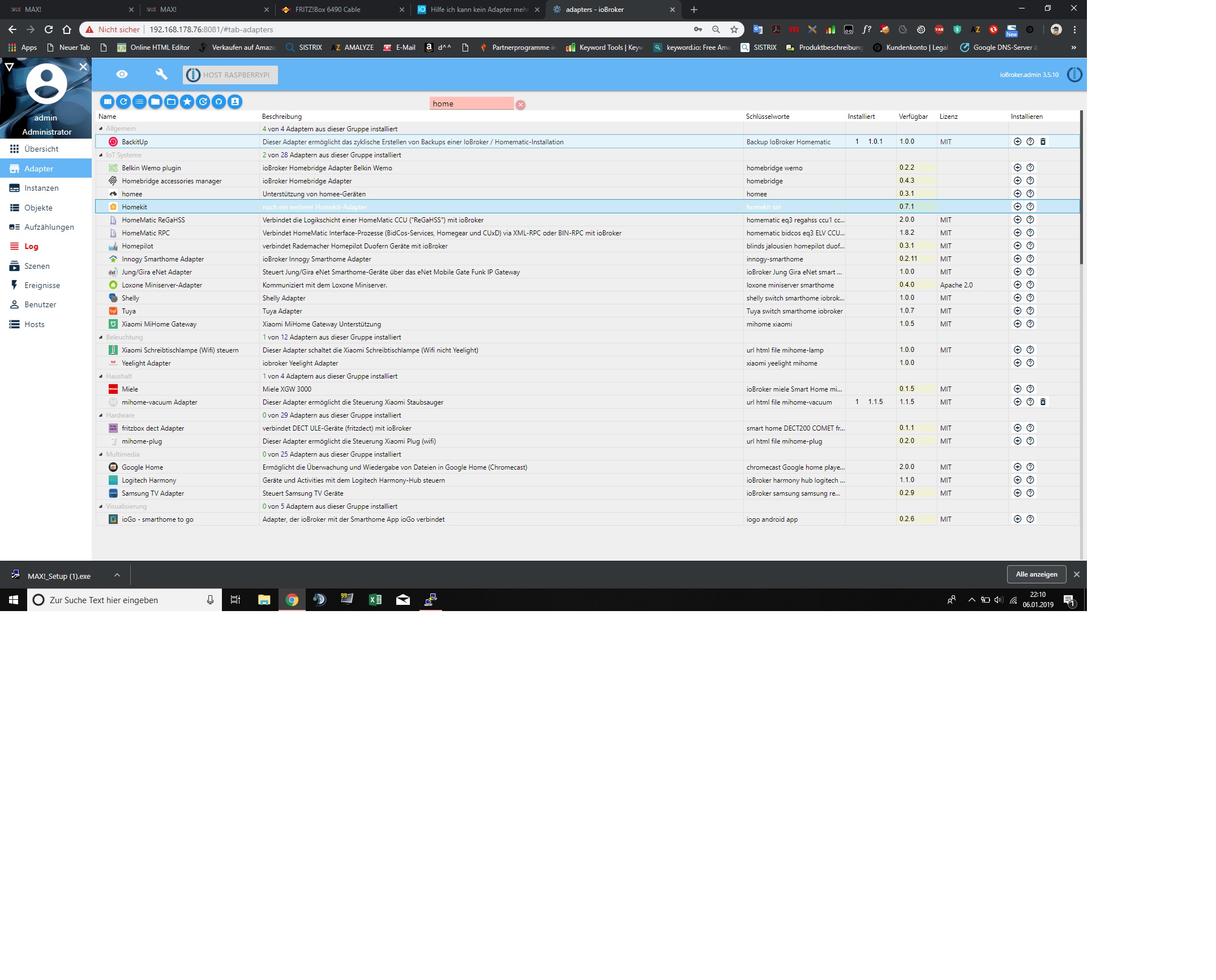
                  Ja hab das Max! Cube probiert zu installieren.

                  Also ich habe auf dem Pi die SSH Datei gespeichert, kann also auf root umstellen, mit sudo -s Dann Hab ich root..

                  Hab natürlich per terminal die Adapter zu installieren

                  1 Reply Last reply
                  0
                  • AlCalzoneA Offline
                    AlCalzoneA Offline
                    AlCalzone
                    Developer
                    wrote on last edited by
                    #13

                    Ich habe dich gefragt, ob du als root installiert hast, nicht ob du das kannst :)

                    Ich schubse dich daher schon mal vorsichtig in die Richtung => viewtopic.php?f=8&t=19209

                    Lesen, verstehen und anwenden.

                    @leo12318:

                    Hab natürlich per terminal die Adapter zu installieren `
                    Die bevorzugte Variante, Adapter zu installieren, ist über den Admin!

                    Bitte auch unbedingt lesen => http://www.iobroker.net/docu/?page_id=8 … n_Adapters

                    Insbesondere, das was fett und rot ist ;)
                    > Achtung! Auf neueren Installationen verursacht die direkte Verwendung von npm install Rechteprobleme nach der Installation oder schlägt fehl. Es wird empfohlen, auf die iobroker-Kommandos zurückzugreifen.!!

                    Warum `sudo` böse ist: https://forum.iobroker.net/post/17109

                    1 Reply Last reply
                    0
                    • L Offline
                      L Offline
                      leo12318
                      wrote on last edited by
                      #14

                      Hab es gelöst :D

                      Hab alles neu aufgesetzte, jetzt läuft alles

                      1 Reply Last reply
                      0
                      • wendy2702W Offline
                        wendy2702W Offline
                        wendy2702
                        wrote on last edited by
                        #15

                        Weißt du denn was du jetzt anders gemacht hast. Wenn ja wäre es nett das hier für andere kurz zu beschreiben.

                        Auch bitte noch den Titel vom ersten Post um ein````
                        Gelöst

                        Bitte keine Fragen per PN, die gehören ins Forum!

                        Benutzt das Voting rechts unten im Beitrag wenn er euch geholfen hat.

                        1 Reply Last reply
                        0
                        Reply
                        • Reply as topic
                        Log in to reply
                        • Oldest to Newest
                        • Newest to Oldest
                        • Most Votes


                        Support us

                        ioBroker
                        Community Adapters
                        Donate
                        FAQ Cloud / IOT
                        HowTo: Node.js-Update
                        HowTo: Backup/Restore
                        Downloads
                        BLOG

                        552

                        Online

                        32.7k

                        Users

                        82.5k

                        Topics

                        1.3m

                        Posts
                        Community
                        Impressum | Datenschutz-Bestimmungen | Nutzungsbedingungen | Einwilligungseinstellungen
                        ioBroker Community 2014-2025
                        logo
                        • Login

                        • Don't have an account? Register

                        • Login or register to search.
                        • First post
                          Last post
                        0
                        • Home
                        • Recent
                        • Tags
                        • Unread 0
                        • Categories
                        • Unreplied
                        • Popular
                        • GitHub
                        • Docu
                        • Hilfe
