




Hilfe ich kann kein Adapter mehr installieren
-
Moin,
was genau bekommst du nicht mehr installiert und warum nutzt du für die Installation nicht wie vorgesehen den "Admin" oder ist es das log nach Admin versuch?
Mal das Wiki gelesen: https://github.com/jensweigele/ioBroker … leshooting
Was ergibt:
node -v npm -v -
Hey sorry für die späte antwort.
node -v
8.15.0
npm -v
6.4.1
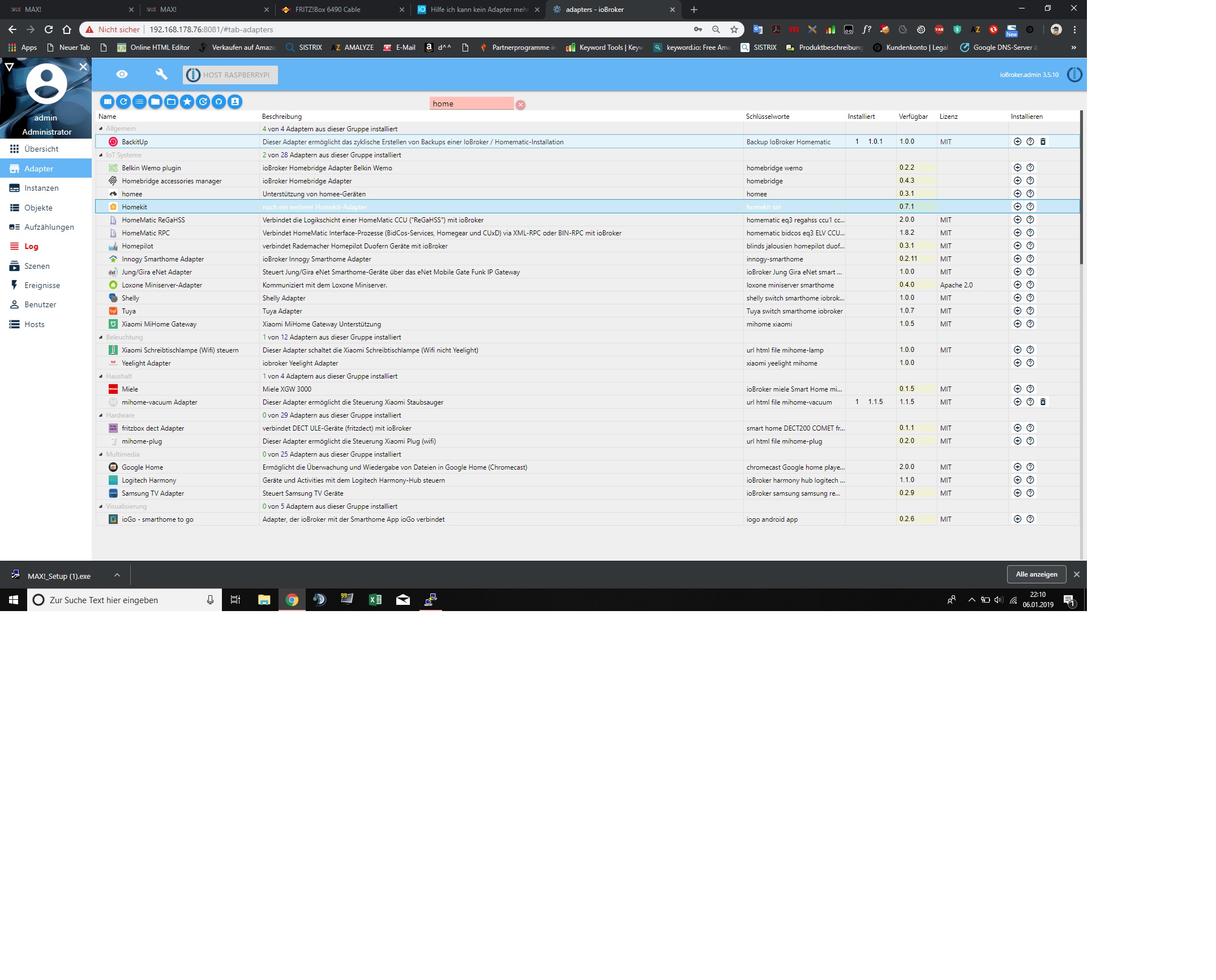
Admin bereich, denke ich ja :)
melde über Adpater versucht es zu installieren, sowie über GitHub direkt Link.
Ich kann Javascript nicht installieren
Note glaube ich
Homekit
alle die Programm kann ich nicht installieren
hier der Fehler bei Installation von HomeKit Adapter über da Feld "Adapter "
! $ ./iobroker add yahka –host raspberrypi
! NPM version: 6.4.1
! npm install iobroker.yahka --production --save --prefix "/opt/iobroker" (System call)
! sh: 1:
! node-pre-gyp: Permission denied
! gyp
! WARN EACCES user "root" does not have permission to access the dev dir "/root/.node-gyp/8.15.0"
! gyp WARN EACCES attempting to reinstall using temporary dev dir "/opt/iobroker/node_modules/curve25519-n/.node-gyp"
! gyp
! WARN install got an error, rolling back install
! gyp WARN
! install got an error, rolling back install
! gyp ERR! configure error gyp
! ERR! stack Error: EACCES: permission denied, stat '/opt/iobroker/node_modules/curve25519-n/.node-gyp/8.15.0'gyp
! ERR! System Linux 4.14.79-v7+gyp ERR! command "/usr/bin/node" "/usr/lib/node_modules/npm/node_modules/node-gyp/bin/node-gyp.js" "rebuild"
! gyp ERR! cwd /opt/iobroker/node_modules/curve25519-n
! gyp ERR!
! node -v v8.15.0gyp ERR! node-gyp -v v3.8.0
! gyp ERR! not ok
! npm
! WARN optional SKIPPING OPTIONAL DEPENDENCY: bcrypt@2.0.1 (node_modules/bcrypt):npm WARN optional SKIPPING OPTIONAL DEPENDENCY: bcrypt@2.0.1 install:node-pre-gyp install --fallback-to-build
! npm WARN optional SKIPPING OPTIONAL DEPENDENCY: spawn ENOENT
! npm ERR! code ELIFECYCLEnpm ERR! errno 1
! npm ERR! curve25519-n@1.4.0 install:node-gyp rebuild
! npm ERR!
! Exit status 1npm ERR!
! npm ERR! Failed at the curve25519-n@1.4.0 install script.
! npm ERR! This is probably not a problem with npm. There is likely additional logging output above.
! npm ERR! A complete log of this run can be found in:
! npm ERR! /root/.npm/_logs/2019-01-06T21_06_11_628Z-debug.log
! host.raspberrypi install adapter yahka
! NPM version: 6.4.1npm install iobroker.yahka --production --save --prefix "/opt/iobroker" (System call)
! sh: 1: node-pre-gyp: Permission denied
! gyp
! WARN EACCES user "root" does not have permission to access the dev dir "/root/.node-gyp/8.15.0"
! gyp
! WARN
! EACCES attempting to reinstall using temporary dev dir "/opt/iobroker/node_modules/curve25519-n/.node-gyp"
! gyp
! WARN
! install
! got an error, rolling back install
! gyp
! WARN
! install got an error, rolling back installgyp ERR! configure error
! gyp ERR! stack Error: EACCES: permission denied, stat '/opt/iobroker/node_modules/curve25519-n/.node-gyp/8.15.0'
! gyp ERR! System Linux 4.14.79-v7+
! gyp ERR! command "/usr/bin/node" "/usr/lib/node_modules/npm/node_modules/node-gyp/bin/node-gyp.js" "rebuild"
! gyp ERR! cwd /opt/iobroker/node_modules/curve25519-n
! gyp ERR! node -v v8.15.0
! gyp
! ERR! node-gyp -v v3.8.0gyp ERR! not ok
! npm
! WARN
! optional
! SKIPPING OPTIONAL DEPENDENCY: bcrypt@2.0.1 (node_modules/bcrypt):npm
! WARN
! optional SKIPPING OPTIONAL DEPENDENCY: bcrypt@2.0.1 install:node-pre-gyp install --fallback-to-build
! npm
! WARN optional SKIPPING OPTIONAL DEPENDENCY: spawn ENOENT
! npm ERR! code ELIFECYCLEnpm ERR! errno 1
! npm ERR! curve25519-n@1.4.0 install:node-gyp rebuild
! npm ERR! Exit status 1
! npm ERR!
! npm ERR! Failed at the curve25519-n@1.4.0 install script.
! npm ERR! This is probably not a problem with npm. There is likely additional logging output above.
! npm ERR! A complete log of this run can be found in:npm ERR! /root/.npm/_logs/2019-01-06T21_07_18_076Z-debug.log
! host.raspberrypi install adapter yahka
! NPM version: 6.4.1
! npm install iobroker.yahka --production --save --prefix "/opt/iobroker" (System call)
! sh: 1: node-pre-gyp: Permission denied
! gyp
! WARN EACCES user "root" does not have permission to access the dev dir "/root/.node-gyp/8.15.0"
! gyp WARN EACCES attempting to reinstall using temporary dev dir "/opt/iobroker/node_modules/curve25519-n/.node-gyp"
! gyp WARN install got an error, rolling back install
! gyp WARN install got an error, rolling back installgyp ERR! configure error
! gyp ERR! stack Error: EACCES: permission denied, stat '/opt/iobroker/node_modules/curve25519-n/.node-gyp/8.15.0'gyp
! ERR! System Linux 4.14.79-v7+gyp ERR! command "/usr/bin/node" "/usr/lib/node_modules/npm/node_modules/node-gyp/bin/node-gyp.js" "rebuild"
! gyp ERR! cwd /opt/iobroker/node_modules/curve25519-ngyp ERR! node -v v8.15.0
! gyp ERR! node-gyp -v v3.8.0gyp ERR! not ok
! npm WARN optional SKIPPING OPTIONAL DEPENDENCY: bcrypt@2.0.1 (node_modules/bcrypt):npm WARN optional SKIPPING OPTIONAL DEPENDENCY: bcrypt@2.0.1 install:node-pre-gyp install --fallback-to-build
! npm WARN optional SKIPPING OPTIONAL DEPENDENCY: spawn ENOENT
! npm ERR! code ELIFECYCLE
! npm ERR! errno 1npm ERR! curve25519-n@1.4.0 install:node-gyp rebuild
! npm ERR! Exit status 1
! npm ERR!
! npm ERR! Failed at the curve25519-n@1.4.0 install script.
! npm ERR! This is probably not a problem with npm. There is likely additional logging output above.
! npm ERR! A complete log of this run can be found in:
! npm ERR! /root/.npm/_logs/2019-01-06T21_08_24_307Z-debug.log
! host.raspberrypi install adapter yahka
! ERROR: host.raspberrypi Cannot install yahka
! ERROR: process exited with code 13 -
würde sagen ja
Javascript / Blockly
! $ ./iobroker add javascript –host raspberrypi
! NPM version: 6.4.1
! npm install iobroker.javascript --production --save --prefix "/opt/iobroker" (System call)
! npm
! WARN deprecated coffee-script@1.12.7: CoffeeScript on NPM has moved to "coffeescript" (no hyphen)
! sh: 1: node-pre-gyp: Permission denied
! module.js:550 throw err;
! ^
! Error: Cannot find module '/opt/iobroker/node_modules/iobroker.javascript/install/installTypings.js'
! at Function.Module._resolveFilename (module.js:548:15)
! at Function.Module._load (module.js:475:25)
! at Function.Module.runMain (module.js:694:10)
! at startup (bootstrap_node.js:204:16)
! at bootstrap_node.js:625:3
! npm
! WARN optional SKIPPING OPTIONAL DEPENDENCY: fsevents@1.2.4 (node_modules/fsevents):npm WARN notsup SKIPPING OPTIONAL DEPENDENCY: Unsupported platform for fsevents@1.2.4: wanted {"os":"darwin","arch":"any"} (current: {"os":"linux","arch":"arm"})
! npm WARN optional SKIPPING OPTIONAL DEPENDENCY: bcrypt@2.0.1 (node_modules/bcrypt):npm WARN optional SKIPPING OPTIONAL DEPENDENCY: bcrypt@2.0.1 install:node-pre-gyp install --fallback-to-build
! npm WARN optional
! SKIPPING OPTIONAL DEPENDENCY: spawn ENOENT
! npm
! ERR! code ELIFECYCLEnpm
! ERR! errno 1npm ERR! iobroker.javascript@4.0.7 postinstall:node ./install/installTypings.js
! npm ERR! Exit status 1
! npm ERR! npm ERR! Failed at the iobroker.javascript@4.0.7 postinstall script.
! npm ERR! This is probably not a problem with npm. There is likely additional logging output above.
! npm ERR! A complete log of this run can be found in:npm ERR! /root/.npm/_logs/2019-01-06T21_21_51_202Z-debug.log
! host.raspberrypi install adapter javascript
! NPM version: 6.4.1
! npm install iobroker.javascript --production --save --prefix "/opt/iobroker" (System call)
! npm
! WARN
! deprecated coffee-script@1.12.7: CoffeeScript on NPM has moved to "coffeescript" (no hyphen)
! sh: 1: node-pre-gyp: Permission denied
! module.js:550 throw err;
! ^
! Error: Cannot find module '/opt/iobroker/node_modules/iobroker.javascript/install/installTypings.js'
! at Function.Module._resolveFilename (module.js:548:15)
! at Function.Module._load (module.js:475:25)
! at Function.Module.runMain (module.js:694:10)
! at startup (bootstrap_node.js:204:16)
! at bootstrap_node.js:625:3
! npm
! WARN optional SKIPPING OPTIONAL DEPENDENCY: fsevents@1.2.4 (node_modules/fsevents):npm WARN notsup SKIPPING OPTIONAL DEPENDENCY: Unsupported platform for fsevents@1.2.4: wanted {"os":"darwin","arch":"any"} (current: {"os":"linux","arch":"arm"})
! npm WARN optional SKIPPING OPTIONAL DEPENDENCY: bcrypt@2.0.1 (node_modules/bcrypt):
! npm WARN optional SKIPPING OPTIONAL DEPENDENCY: bcrypt@2.0.1 install:node-pre-gyp install --fallback-to-build
! npm WARN optional SKIPPING OPTIONAL DEPENDENCY: spawn ENOENT
! npm ERR! code ELIFECYCLEnpm ERR! errno 1
! npm ERR! iobroker.javascript@4.0.7 postinstall:node ./install/installTypings.js
! npm ERR! Exit status 1
! npm
! ERR! npm ERR! Failed at the iobroker.javascript@4.0.7 postinstall script.
! npm ERR! This is probably not a problem with npm. There is likely additional logging output above.
! npm ERR! A complete log of this run can be found in:npm ERR! /root/.npm/_logs/2019-01-06T21_23_21_287Z-debug.log
! host.raspberrypi install adapter javascript
! NPM version: 6.4.1
! npm install iobroker.javascript --production --save --prefix "/opt/iobroker" (System call)
! npm
! WARN deprecated coffee-script@1.12.7: CoffeeScript on NPM has moved to "coffeescript" (no hyphen)
! sh: 1: node-pre-gyp: Permission denied
! module.js:550 throw err;
! ^
! Error: Cannot find module '/opt/iobroker/node_modules/iobroker.javascript/install/installTypings.js'
! at Function.Module._resolveFilename (module.js:548:15)
! at Function.Module._load (module.js:475:25)
! at Function.Module.runMain (module.js:694:10)
! at startup (bootstrap_node.js:204:16)
! at bootstrap_node.js:625:3
! npm WARN optional SKIPPING OPTIONAL DEPENDENCY: fsevents@1.2.4 (node_modules/fsevents):npm WARN notsup SKIPPING OPTIONAL DEPENDENCY: Unsupported platform for fsevents@1.2.4: wanted {"os":"darwin","arch":"any"} (current: {"os":"linux","arch":"arm"})
! npm WARN optional SKIPPING OPTIONAL DEPENDENCY: bcrypt@2.0.1 (node_modules/bcrypt):npm WARN optional SKIPPING OPTIONAL DEPENDENCY: bcrypt@2.0.1 install:node-pre-gyp install --fallback-to-build
! npm WARN optional SKIPPING OPTIONAL DEPENDENCY: spawn ENOENT
! npm
! ERR! code ELIFECYCLE
! npm ERR! errno 1npm
! ERR! iobroker.javascript@4.0.7 postinstall:node ./install/installTypings.jsnpm ERR! Exit status 1
! npm
! ERR! npm ERR! Failed at the iobroker.javascript@4.0.7 postinstall script.
! npm ERR! This is probably not a problem with npm. There is likely additional logging output above.
! npm ERR! A complete log of this run can be found in:
! npm ERR! /root/.npm/_logs/2019-01-06T21_24_51_674Z-debug.log
! host.raspberrypi install adapter javascript
! ERROR: host.raspberrypi Cannot install javascript
! ERROR: process exited with code 13 -
Vor knapp 1 Woche
Nach dieser Anleitung
http://www.iobroker.net/docu/?page_id=8323&lang=de
Was meinst du mit dem User ?
-
Warst du als root user oder als PI user eingeloggt? `
Das wäre wichtig zu wissen, um an der richtigen Stelle anzusetzen.Außerdem: Hast du nach der Installation irgendeinen Adapter manuell per <u>sudo npm …</u> installiert?
-
Ich habe dich gefragt, ob du als root installiert hast, nicht ob du das kannst :)
Ich schubse dich daher schon mal vorsichtig in die Richtung => viewtopic.php?f=8&t=19209
Lesen, verstehen und anwenden.
Hab natürlich per terminal die Adapter zu installieren `
Die bevorzugte Variante, Adapter zu installieren, ist über den Admin!Bitte auch unbedingt lesen => http://www.iobroker.net/docu/?page_id=8 … n_Adapters
Insbesondere, das was fett und rot ist ;)
> Achtung! Auf neueren Installationen verursacht die direkte Verwendung von npm install Rechteprobleme nach der Installation oder schlägt fehl. Es wird empfohlen, auf die iobroker-Kommandos zurückzugreifen.!!


Hey! Du scheinst an dieser Unterhaltung interessiert zu sein, hast aber noch kein Konto.
Hast du es satt, bei jedem Besuch durch die gleichen Beiträge zu scrollen? Wenn du dich für ein Konto anmeldest, kommst du immer genau dorthin zurück, wo du zuvor warst, und kannst dich über neue Antworten benachrichtigen lassen (entweder per E-Mail oder Push-Benachrichtigung). Du kannst auch Lesezeichen speichern und Beiträge positiv bewerten, um anderen Community-Mitgliedern deine Wertschätzung zu zeigen.
Mit deinem Input könnte dieser Beitrag noch besser werden 💗
Registrieren Anmelden331
Online33.0k
Benutzer83.6k
Themen1.3m
Beiträge