



Skip to content
  • Home
  • Recent
  • Tags
  • 0 Unread 0
  • Categories
  • Unreplied
  • Popular
  • GitHub
  • Docu
  • Hilfe
Skins
  • Light
  • Brite
  • Cerulean
  • Cosmo
  • Flatly
  • Journal
  • Litera
  • Lumen
  • Lux
  • Materia
  • Minty
  • Morph
  • Pulse
  • Sandstone
  • Simplex
  • Sketchy
  • Spacelab
  • United
  • Yeti
  • Zephyr
  • Dark
  • Cyborg
  • Darkly
  • Quartz
  • Slate
  • Solar
  • Superhero
  • Vapor

  • Default (No Skin)
  • No Skin
Collapse
ioBroker Logo

Community Forum

donate donate
  1. ioBroker Community Home
  2. Deutsch
  3. Tester
  4. [Aufruf] Xbox Adapter testen

NEWS

  • Monatsrückblick Januar/Februar 2026 ist online!
    BluefoxB
    Bluefox
    12
    1
    132

  • Jahresrückblick 2025 – unser neuer Blogbeitrag ist online! ✨
    BluefoxB
    Bluefox
    17
    1
    4.3k

  • Neuer Blogbeitrag: Monatsrückblick - Dezember 2025 🎄
    BluefoxB
    Bluefox
    13
    1
    1.2k

[Aufruf] Xbox Adapter testen

Scheduled Pinned Locked Moved Tester
adapterxbox
205 Posts 13 Posters 38.0k Views 2 Watching
  • Oldest to Newest
  • Newest to Oldest
  • Most Votes
Reply
  • Reply as topic
Log in to reply
This topic has been deleted. Only users with topic management privileges can see it.
  • NegaleinN Offline
    NegaleinN Offline
    Negalein
    Global Moderator
    wrote on last edited by
    #129

    @foxriver76:

    Probier mal bitte

    npm i iobroker.xbox --unsafe-perm --prefix C:\ioBroker


    irgendwie stöbert er da bei dir in den falschen Verzeichnissen rum und prefix ist genau dafür da, nämlich das Verzeichnis zu setzen in dem installiert werden soll, wenn hinter prefix nix steht, kann er damit nix anfangen. `

    Geht leider auch nicht! :(

    C:\ioBroker>npm i iobroker.xbox --unsafe-perm --prefix C:\ioBroker
    npm ERR! path C:\ioBroker\node_modules\.iobroker.xbox.DELETE\python_modules\Python36\site-packages\_cffi_backend.cp36-win_amd64.pyd
    npm ERR! code EPERM
    npm ERR! errno -4048
    npm ERR! syscall unlink
    npm ERR! Error: EPERM: operation not permitted, unlink 'C:\ioBroker\node_modules\.iobroker.xbox.DELETE\python_modules\Python36\site-packages\_cffi_backend.cp36-win_amd64.pyd'
    npm ERR!  { [Error: EPERM: operation not permitted, unlink 'C:\ioBroker\node_modules\.iobroker.xbox.DELETE\python_modules\Python36\site-packages\_cffi_backend.cp36-win_amd64.pyd']
    npm ERR!   cause:
    npm ERR!    { Error: EPERM: operation not permitted, unlink 'C:\ioBroker\node_modules\.iobroker.xbox.DELETE\python_modules\Python36\site-packages\_cffi_backend.cp36-win_amd64.pyd'
    npm ERR!      errno: -4048,
    npm ERR!      code: 'EPERM',
    npm ERR!      syscall: 'unlink',
    npm ERR!      path:
    npm ERR!       'C:\\ioBroker\\node_modules\\.iobroker.xbox.DELETE\\python_modules\\Python36\\site-packages\\_cffi_backend.cp36-win_amd64.pyd' },
    npm ERR!   stack:
    npm ERR!    "Error: EPERM: operation not permitted, unlink 'C:\\ioBroker\\node_modules\\.iobroker.xbox.DELETE\\python_modules\\Python36\\site-packages\\_cffi_backend.cp36-win_amd64.pyd'",
    npm ERR!   errno: -4048,
    npm ERR!   code: 'EPERM',
    npm ERR!   syscall: 'unlink',
    npm ERR!   path:
    npm ERR!    'C:\\ioBroker\\node_modules\\.iobroker.xbox.DELETE\\python_modules\\Python36\\site-packages\\_cffi_backend.cp36-win_amd64.pyd',
    npm ERR!   parent: 'iobroker.inst' }
    npm ERR!
    npm ERR! The operation was rejected by your operating system.
    npm ERR! It's possible that the file was already in use (by a text editor or antivirus),
    npm ERR! or that you lack permissions to access it.
    npm ERR!
    npm ERR! If you believe this might be a permissions issue, please double-check the
    npm ERR! permissions of the file and its containing directories, or try running
    npm ERR! the command again as root/Administrator (though this is not recommended).
    
    npm ERR! A complete log of this run can be found in:
    npm ERR!     C:\Users\chris\AppData\Roaming\npm-cache\_logs\2018-11-13T22_06_00_570Z-debug.log
    
    C:\ioBroker>npm install https://github.com/foxriver76/ioBroker.xbox/tarball/master --production --save --prefix C:\ioBroker
    npm ERR! path C:\ioBroker\node_modules\.iobroker.xbox.DELETE\python_modules\Python36\site-packages\_cffi_backend.cp36-win_amd64.pyd
    npm ERR! code EPERM
    npm ERR! errno -4048
    npm ERR! syscall unlink
    npm ERR! Error: EPERM: operation not permitted, unlink 'C:\ioBroker\node_modules\.iobroker.xbox.DELETE\python_modules\Python36\site-packages\_cffi_backend.cp36-win_amd64.pyd'
    npm ERR!  { [Error: EPERM: operation not permitted, unlink 'C:\ioBroker\node_modules\.iobroker.xbox.DELETE\python_modules\Python36\site-packages\_cffi_backend.cp36-win_amd64.pyd']
    npm ERR!   cause:
    npm ERR!    { Error: EPERM: operation not permitted, unlink 'C:\ioBroker\node_modules\.iobroker.xbox.DELETE\python_modules\Python36\site-packages\_cffi_backend.cp36-win_amd64.pyd'
    npm ERR!      errno: -4048,
    npm ERR!      code: 'EPERM',
    npm ERR!      syscall: 'unlink',
    npm ERR!      path:
    npm ERR!       'C:\\ioBroker\\node_modules\\.iobroker.xbox.DELETE\\python_modules\\Python36\\site-packages\\_cffi_backend.cp36-win_amd64.pyd' },
    npm ERR!   stack:
    npm ERR!    "Error: EPERM: operation not permitted, unlink 'C:\\ioBroker\\node_modules\\.iobroker.xbox.DELETE\\python_modules\\Python36\\site-packages\\_cffi_backend.cp36-win_amd64.pyd'",
    npm ERR!   errno: -4048,
    npm ERR!   code: 'EPERM',
    npm ERR!   syscall: 'unlink',
    npm ERR!   path:
    npm ERR!    'C:\\ioBroker\\node_modules\\.iobroker.xbox.DELETE\\python_modules\\Python36\\site-packages\\_cffi_backend.cp36-win_amd64.pyd',
    npm ERR!   parent: 'iobroker.inst' }
    npm ERR!
    npm ERR! The operation was rejected by your operating system.
    npm ERR! It's possible that the file was already in use (by a text editor or antivirus),
    npm ERR! or that you lack permissions to access it.
    npm ERR!
    npm ERR! If you believe this might be a permissions issue, please double-check the
    npm ERR! permissions of the file and its containing directories, or try running
    npm ERR! the command again as root/Administrator (though this is not recommended).
    
    npm ERR! A complete log of this run can be found in:
    npm ERR!     C:\Users\chris\AppData\Roaming\npm-cache\_logs\2018-11-13T22_13_07_912Z-debug.log
    

    ° Node.js & System Update ---> sudo apt update, iob stop, sudo apt full-upgrade
    ° Node.js Fixer ---> iob nodejs-update
    ° Fixer ---> iob fix

    1 Reply Last reply
    0
    • NegaleinN Offline
      NegaleinN Offline
      Negalein
      Global Moderator
      wrote on last edited by
      #130

      @DKM:

      npm ERR! path C:\ioBroker\node_modules.iobroker.xbox.DELETE\python_modules\Python36\site-packages_cffi_backend.cp36-win_amd64.py

      Will er da bei der Installation nicht löschen? Evtl. sind auch bei Dir Ordner vorhanden, die das Installationsskript nicht löschen kann. `

      Welche Ordner wären das?

      Kann ich die händisch löschen?

      ° Node.js & System Update ---> sudo apt update, iob stop, sudo apt full-upgrade
      ° Node.js Fixer ---> iob nodejs-update
      ° Fixer ---> iob fix

      1 Reply Last reply
      0
      • D Offline
        D Offline
        DKM
        wrote on last edited by
        #131

        Schau mal im Ordner C:\iobroker\node-modules nach Ordnern die Xbox enthalten.

        Ich vermute, dass durch unsere Installierei Ordnerreste überbleiben. Warte aber sicherheitshalber noch auf die Antwort von foxriver.

        Gesendet von meinem SM-G960F mit Tapatalk

        1 Reply Last reply
        0
        • NegaleinN Offline
          NegaleinN Offline
          Negalein
          Global Moderator
          wrote on last edited by
          #132

          @DKM:

          Schau mal im Ordner C:\iobroker\node-modules nach Ordnern die Xbox enthalten.

          Ich vermute, dass durch unsere Installierei Ordnerreste überbleiben. Warte aber sicherheitshalber noch auf die Antwort von foxriver. `

          Ja, da gibt es 1 Ordner!

          .iobroker.xbox.DELETE

          ° Node.js & System Update ---> sudo apt update, iob stop, sudo apt full-upgrade
          ° Node.js Fixer ---> iob nodejs-update
          ° Fixer ---> iob fix

          1 Reply Last reply
          0
          • foxriver76F Offline
            foxriver76F Offline
            foxriver76
            Developer
            wrote on last edited by
            #133

            @Negalein:

            @DKM:

            npm ERR! path C:\ioBroker\node_modules.iobroker.xbox.DELETE\python_modules\Python36\site-packages_cffi_backend.cp36-win_amd64.py

            Will er da bei der Installation nicht löschen? Evtl. sind auch bei Dir Ordner vorhanden, die das Installationsskript nicht löschen kann. `

            Welche Ordner wären das?

            Kann ich die händisch löschen? `

            Was gibt denn````
            npm -v

            Videotutorials & mehr

            Hier könnt ihr mich unterstützen.

            1 Reply Last reply
            0
            • NegaleinN Offline
              NegaleinN Offline
              Negalein
              Global Moderator
              wrote on last edited by
              #134

              @foxriver76:

              [Was gibt denn `~~[code]~~npm -v` bei dir? `

              6.4.1

              ° Node.js & System Update ---> sudo apt update, iob stop, sudo apt full-upgrade
              ° Node.js Fixer ---> iob nodejs-update
              ° Fixer ---> iob fix

              1 Reply Last reply
              0
              • foxriver76F Offline
                foxriver76F Offline
                foxriver76
                Developer
                wrote on last edited by
                #135

                Führst du die cmd als Admin aus?

                Videotutorials & mehr

                Hier könnt ihr mich unterstützen.

                1 Reply Last reply
                0
                • NegaleinN Offline
                  NegaleinN Offline
                  Negalein
                  Global Moderator
                  wrote on last edited by
                  #136

                  @foxriver76:

                  Führst du die cmd als Admin aus? `

                  Ja

                  ° Node.js & System Update ---> sudo apt update, iob stop, sudo apt full-upgrade
                  ° Node.js Fixer ---> iob nodejs-update
                  ° Fixer ---> iob fix

                  1 Reply Last reply
                  0
                  • foxriver76F Offline
                    foxriver76F Offline
                    foxriver76
                    Developer
                    wrote on last edited by
                    #137

                    Hm dann möchte man fast meinen, dass da irgendwas die Datei in C:\ioBroker\node_modules.iobroker.xbox.DELETE schon nutzt und es deshalb einen Permission error gibt. Wenn du ioB stoppst und es probierst geht es dann? Bzw ist der Ordner existent: C:\ioBroker\node_modules.iobroker.xbox.DELETE weiß nicht ob Windows standardmäßig Ordner mit . Vorne dran anzeigt.

                    Videotutorials & mehr

                    Hier könnt ihr mich unterstützen.

                    1 Reply Last reply
                    0
                    • D Offline
                      D Offline
                      DKM
                      wrote on last edited by
                      #138

                      @foxriver76:

                      Hm dann möchte man fast meinen, dass da irgendwas die Datei in C:\ioBroker\node_modules.iobroker.xbox.DELETE schon nutzt und es deshalb einen Permission error gibt. Wenn du ioB stoppst und es probierst geht es dann? Bzw ist der Ordner existent: C:\ioBroker\node_modules.iobroker.xbox.DELETE weiß nicht ob Windows standardmäßig Ordner mit . Vorne dran anzeigt. ` Nein eigentlich ist das eine reine Unix Sache mit dem Punkt. Mir sind nur Sicherungen bekannt, die das auch nutzen

                      Gesendet von meinem SM-G960F mit Tapatalk

                      1 Reply Last reply
                      0
                      • NegaleinN Offline
                        NegaleinN Offline
                        Negalein
                        Global Moderator
                        wrote on last edited by
                        #139

                        Ja, der Ordner ".iobroker.xbox.DELETE" scheint genau so auf!

                        Im Ordner sind dann noch:
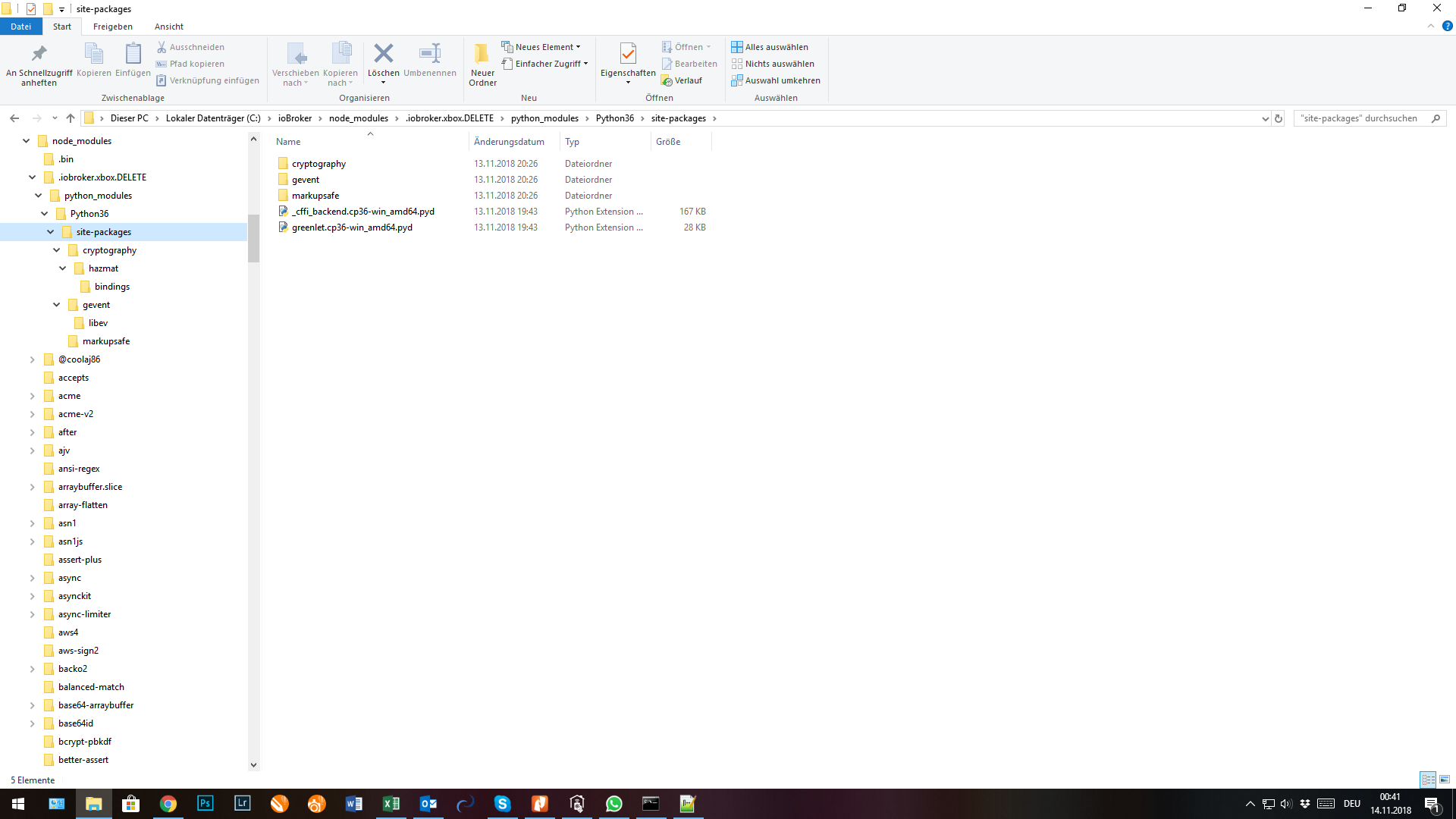
                        9441_screenshot_2018-11-14_00.41.55.png

                        ° Node.js & System Update ---> sudo apt update, iob stop, sudo apt full-upgrade
                        ° Node.js Fixer ---> iob nodejs-update
                        ° Fixer ---> iob fix

                        1 Reply Last reply
                        0
                        • foxriver76F Offline
                          foxriver76F Offline
                          foxriver76
                          Developer
                          wrote on last edited by
                          #140

                          Dann lösch den Ordner mal bitte, dann wird er dir sagen, falls da was in Nutzung ist.

                          Videotutorials & mehr

                          Hier könnt ihr mich unterstützen.

                          1 Reply Last reply
                          0
                          • NegaleinN Offline
                            NegaleinN Offline
                            Negalein
                            Global Moderator
                            wrote on last edited by
                            #141

                            @foxriver76:

                            Dann lösch den Ordner mal bitte, dann wird er dir sagen, falls da was in Nutzung ist. `

                            Verzeichnis hab ich gelöscht und dann alles nochmal lt. DKM installiert.

                            Dürfte geklappt haben.

                            ABER jetzt komm ich nicht mehr in die Adminoberfläche.

                            Er lädt und lädt und …!

                            iobroker start

                            iobroker stop

                            iobroker restart

                            Hab ich alles schon probiert. Dienst läuft.

                            In den VIS-Editor komm ich ohne Probleme und kann auch die VIS starten.

                            ° Node.js & System Update ---> sudo apt update, iob stop, sudo apt full-upgrade
                            ° Node.js Fixer ---> iob nodejs-update
                            ° Fixer ---> iob fix

                            1 Reply Last reply
                            0
                            • foxriver76F Offline
                              foxriver76F Offline
                              foxriver76
                              Developer
                              wrote on last edited by
                              #142

                              Admin lässt sich mit````
                              iobroker start admin

                              Videotutorials & mehr

                              Hier könnt ihr mich unterstützen.

                              1 Reply Last reply
                              0
                              • NegaleinN Offline
                                NegaleinN Offline
                                Negalein
                                Global Moderator
                                wrote on last edited by
                                #143

                                @foxriver76:

                                Admin lässt sich mitiobroker start adminstarten `

                                funktioniert auch noch nicht

                                ° Node.js & System Update ---> sudo apt update, iob stop, sudo apt full-upgrade
                                ° Node.js Fixer ---> iob nodejs-update
                                ° Fixer ---> iob fix

                                1 Reply Last reply
                                0
                                • foxriver76F Offline
                                  foxriver76F Offline
                                  foxriver76
                                  Developer
                                  wrote on last edited by
                                  #144

                                  Ja die Oberfläche ist da, du bekommst jedoch nur diesen bunten Ladekreis zu sehen?

                                  Und mal ne Frage an euch beiden Win-User. Wird bei euch das Unload Event korrekt ausgeführt, also loggt der Adapter am Ende Rest-Server stopped oder nen Error, dass er ihn nicht stoppen kann. Oder auch in anderen Adaptern wird am Ende häufig was geloggt im Unload und bei meiner Windows Installation, wird da nix ausgeführt.

                                  Videotutorials & mehr

                                  Hier könnt ihr mich unterstützen.

                                  1 Reply Last reply
                                  0
                                  • D Offline
                                    D Offline
                                    DKM
                                    wrote on last edited by
                                    #145

                                    @Negalein

                                    Versuch mal in der Konsole

                                    iobroker add admin –port 8089

                                    Dann versuch ob du mit

                                    http://deineIP:8089 auf die Oberfläche kommst.

                                    @foxriver

                                    Es kommt nur der Start, aber keine Nachricht über das beenden. Kann dir gerade kein Log schicken, da ich noch unterwegs bin.

                                    Gesendet von meinem SM-G960F mit Tapatalk

                                    1 Reply Last reply
                                    0
                                    • NegaleinN Offline
                                      NegaleinN Offline
                                      Negalein
                                      Global Moderator
                                      wrote on last edited by
                                      #146

                                      @foxriver76:

                                      Ja die Oberfläche ist da, du bekommst jedoch nur diesen bunten Ladekreis zu sehen? `

                                      Nein, ich komm garnicht auf die Adminoberfläche.

                                      ° Node.js & System Update ---> sudo apt update, iob stop, sudo apt full-upgrade
                                      ° Node.js Fixer ---> iob nodejs-update
                                      ° Fixer ---> iob fix

                                      1 Reply Last reply
                                      0
                                      • foxriver76F Offline
                                        foxriver76F Offline
                                        foxriver76
                                        Developer
                                        wrote on last edited by
                                        #147

                                        @DKM:

                                        @foxriver

                                        Es kommt nur der Start, aber keine Nachricht über das beenden. Kann dir gerade kein Log schicken, da ich noch unterwegs bin.

                                        Gesendet von meinem SM-G960F mit Tapatalk `

                                        Also ich habe jetzt noch was geaddet, damit sollte der Rest-Server (Python Prozess) beim stoppen des Adapters auch unter Windows erfolgreich beendet werden. Jedoch nur wenn das "Unload" Event auch korrekt getriggert wird. Das Event wird vom js-controller aus gesendet, also liegt nicht im Einflussbereich des Adapters, da ich eben unter Win auch bei anderen Adaptern kein Unload erhalte.

                                        Videotutorials & mehr

                                        Hier könnt ihr mich unterstützen.

                                        1 Reply Last reply
                                        0
                                        • NegaleinN Offline
                                          NegaleinN Offline
                                          Negalein
                                          Global Moderator
                                          wrote on last edited by
                                          #148

                                          es funktioniert :D

                                          9441_objects_-_iobroker.png

                                          ° Node.js & System Update ---> sudo apt update, iob stop, sudo apt full-upgrade
                                          ° Node.js Fixer ---> iob nodejs-update
                                          ° Fixer ---> iob fix

                                          1 Reply Last reply
                                          0
                                          Reply
                                          • Reply as topic
                                          Log in to reply
                                          • Oldest to Newest
                                          • Newest to Oldest
                                          • Most Votes


                                          Support us

                                          ioBroker
                                          Community Adapters
                                          Donate

                                          540

                                          Online

                                          32.7k

                                          Users

                                          82.4k

                                          Topics

                                          1.3m

                                          Posts
                                          Community
                                          Impressum | Datenschutz-Bestimmungen | Nutzungsbedingungen | Einwilligungseinstellungen
                                          ioBroker Community 2014-2025
                                          logo
                                          • Login

                                          • Don't have an account? Register

                                          • Login or register to search.
                                          • First post
                                            Last post
                                          0
                                          • Home
                                          • Recent
                                          • Tags
                                          • Unread 0
                                          • Categories
                                          • Unreplied
                                          • Popular
                                          • GitHub
                                          • Docu
                                          • Hilfe


