Skip to content
  • Home
  • Aktuell
  • Tags
  • 0 Ungelesen 0
  • Kategorien
  • Unreplied
  • Beliebt
  • GitHub
  • Docu
  • Hilfe
Skins
  • Light
  • Brite
  • Cerulean
  • Cosmo
  • Flatly
  • Journal
  • Litera
  • Lumen
  • Lux
  • Materia
  • Minty
  • Morph
  • Pulse
  • Sandstone
  • Simplex
  • Sketchy
  • Spacelab
  • United
  • Yeti
  • Zephyr
  • Dark
  • Cyborg
  • Darkly
  • Quartz
  • Slate
  • Solar
  • Superhero
  • Vapor

  • Standard: (Kein Skin)
  • Kein Skin
Einklappen
ioBroker Logo

Community Forum

donate donate
  1. ioBroker Community Home
  2. Deutsch
  3. Visualisierung
  4. Mfd-jqui Anzeige weg

NEWS

  • Jahresrückblick 2025 – unser neuer Blogbeitrag ist online! ✨
    BluefoxB
    Bluefox
    17
    1
    3.7k

  • Neuer Blogbeitrag: Monatsrückblick - Dezember 2025 🎄
    BluefoxB
    Bluefox
    13
    1
    1.2k

  • Weihnachtsangebot 2025! 🎄
    BluefoxB
    Bluefox
    25
    1
    2.5k

Mfd-jqui Anzeige weg

Geplant Angeheftet Gesperrt Verschoben Visualisierung
15 Beiträge 3 Kommentatoren 2.2k Aufrufe
  • Älteste zuerst
  • Neuste zuerst
  • Meiste Stimmen
Antworten
  • In einem neuen Thema antworten
Anmelden zum Antworten
Dieses Thema wurde gelöscht. Nur Nutzer mit entsprechenden Rechten können es sehen.
  • sissiwupS Offline
    sissiwupS Offline
    sissiwup
    schrieb am zuletzt editiert von
    #2

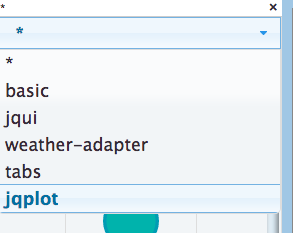
    Leider sind die Adapter noch da, nur VIS zeigt sie nicht mehr an.

    Darunter z.B. auch die hqwidgets

    609_bildschirmfoto_2015-10-19_um_22.07.34.png

    MfG

    Sissi

    –-----------------------------------------

    1 CCU3 1 CCU2-Gateway 1 LanGateway 1 Pi-Gateway 1 I7 für ioBroker/MySQL


    1 Antwort Letzte Antwort
    0
    • sissiwupS Offline
      sissiwupS Offline
      sissiwup
      schrieb am zuletzt editiert von
      #3

      Wie kann ich auf Version 0.7.2 zurück?

      MfG

      Sissi

      –-----------------------------------------

      1 CCU3 1 CCU2-Gateway 1 LanGateway 1 Pi-Gateway 1 I7 für ioBroker/MySQL


      1 Antwort Letzte Antwort
      0
      • BluefoxB Offline
        BluefoxB Offline
        Bluefox
        schrieb am zuletzt editiert von
        #4

        Welche widgets/adapter fehlen doch?

        1 Antwort Letzte Antwort
        0
        • sissiwupS Offline
          sissiwupS Offline
          sissiwup
          schrieb am zuletzt editiert von
          #5

          Alle, bis auf die oben gezeigten:

          609_bildschirmfoto_2015-10-20_um_00.22.50.png

          MfG

          Sissi

          –-----------------------------------------

          1 CCU3 1 CCU2-Gateway 1 LanGateway 1 Pi-Gateway 1 I7 für ioBroker/MySQL


          1 Antwort Letzte Antwort
          0
          • BluefoxB Offline
            BluefoxB Offline
            Bluefox
            schrieb am zuletzt editiert von
            #6

            Was zeigt bei dir?

            cd /opt/iobroker
            iobroker list instances


            4447_iobroker-163902.log

            1 Antwort Letzte Antwort
            0
            • BluefoxB Offline
              BluefoxB Offline
              Bluefox
              schrieb am zuletzt editiert von
              #7

              Warum sind bei dir die Versionsnummer leer?
              48_img_009.png

              1 Antwort Letzte Antwort
              0
              • sissiwupS Offline
                sissiwupS Offline
                sissiwup
                schrieb am zuletzt editiert von
                #8
                <code>Linux raspberrypi 4.1.7-v7+ #817 SMP PREEMPT Sat Sep 19 15:32:00 BST 2015 armv7l
                
                The programs included with the Debian GNU/Linux system are free software;
                the exact distribution terms for each program are described in the
                individual files in /usr/share/doc/*/copyright.
                
                Debian GNU/Linux comes with ABSOLUTELY NO WARRANTY, to the extent
                permitted by applicable law.
                Last login: Tue Oct 20 22:28:02 2015 from whpad.fritz.box
                root@raspberrypi:~# cd /opt/iobroker
                root@raspberrypi:/opt/iobroker# iobroker list instances
                
                ^Croot@raspberrypi:/opt/iobroker# 
                root@raspberrypi:/opt/iobroker# iobroker list instances
                system.adapter.admin.0                 : admin       -  enabled, port: 8081, bind: 0.0.0.0, run as: admin
                system.adapter.web.0                   : web         -  enabled, port: 8082, bind: 0.0.0.0, run as: admin
                system.adapter.vis.0                   : vis         -  enabled
                system.adapter.icons-addictive-flavour-png.0: icons-addictive-flavour-png -  enabled
                system.adapter.icons-material-png.0    : icons-material-png -  enabled
                system.adapter.vis-metro.0             : vis-metro   -  enabled
                system.adapter.vis-lcars.0             : vis-lcars   -  enabled
                system.adapter.vis-hqwidgets.0         : vis-hqwidgets -  enabled
                system.adapter.vis-bars.0              : vis-bars    -  enabled
                system.adapter.vis-plumb.0             : vis-plumb   -  enabled
                system.adapter.hm-rpc.0                : hm-rpc      -  enabled
                system.adapter.hm-rega.0               : hm-rega     -  enabled
                system.adapter.hm-rpc.1                : hm-rpc      -  enabled
                system.adapter.vis-colorpicker.0       : vis-colorpicker -  enabled
                system.adapter.icons-material-svg.0    : icons-material-svg -  enabled
                system.adapter.icons-mfd-png.0         : icons-mfd-png -  enabled
                system.adapter.icons-mfd-svg.0         : icons-mfd-svg -  enabled
                system.adapter.fritzbox.0              : fritzbox    -  enabled
                system.adapter.javascript.0            : javascript  -  enabled
                system.adapter.yr.0                    : yr          -  enabled
                system.adapter.node-red.0              : node-red    -  enabled, port: 1880
                system.adapter.icons-ultimate-png.0    : icons-ultimate-png -  enabled
                system.adapter.history.0               : history     -  enabled
                system.adapter.icons-open-icon-library-png.0: icons-open-icon-library-png -  enabled
                system.adapter.ping.0                  : ping        -  enabled
                system.adapter.rickshaw.0              : rickshaw    -  enabled
                system.adapter.vis-fancyswitch.0       : vis-fancyswitch -  enabled
                system.adapter.vis-timeandweather.0    : vis-timeandweather -  enabled
                system.adapter.vis-rgraph.0            : vis-rgraph  -  enabled
                system.adapter.terminal.0              : terminal    -  enabled, port: 8088, bind: 0.0.0.0, run as: admin
                system.adapter.vis-jqui-mfd.0          : vis-jqui-mfd -  enabled
                root@raspberrypi:/opt/iobroker# 
                
                [/core]</code>
                

                MfG

                Sissi

                –-----------------------------------------

                1 CCU3 1 CCU2-Gateway 1 LanGateway 1 Pi-Gateway 1 I7 für ioBroker/MySQL


                1 Antwort Letzte Antwort
                0
                • sissiwupS Offline
                  sissiwupS Offline
                  sissiwup
                  schrieb am zuletzt editiert von
                  #9
                  Linux raspberrypi 4.1.7-v7+ #817 SMP PREEMPT Sat Sep 19 15:32:00 BST 2015 armv7l
                  
                  The programs included with the Debian GNU/Linux system are free software;
                  the exact distribution terms for each program are described in the
                  individual files in /usr/share/doc/*/copyright.
                  
                  Debian GNU/Linux comes with ABSOLUTELY NO WARRANTY, to the extent
                  permitted by applicable law.
                  Last login: Tue Oct 20 22:28:02 2015 from whpad.fritz.box
                  root@raspberrypi:~# cd /opt/iobroker
                  root@raspberrypi:/opt/iobroker# iobroker list instances
                  
                  ^Croot@raspberrypi:/opt/iobroker# 
                  root@raspberrypi:/opt/iobroker# iobroker list instances
                  system.adapter.admin.0                 : admin       -  enabled, port: 8081, bind: 0.0.0.0, run as: admin
                  system.adapter.web.0                   : web         -  enabled, port: 8082, bind: 0.0.0.0, run as: admin
                  system.adapter.vis.0                   : vis         -  enabled
                  system.adapter.icons-addictive-flavour-png.0: icons-addictive-flavour-png -  enabled
                  system.adapter.icons-material-png.0    : icons-material-png -  enabled
                  system.adapter.vis-metro.0             : vis-metro   -  enabled
                  system.adapter.vis-lcars.0             : vis-lcars   -  enabled
                  system.adapter.vis-hqwidgets.0         : vis-hqwidgets -  enabled
                  system.adapter.vis-bars.0              : vis-bars    -  enabled
                  system.adapter.vis-plumb.0             : vis-plumb   -  enabled
                  system.adapter.hm-rpc.0                : hm-rpc      -  enabled
                  system.adapter.hm-rega.0               : hm-rega     -  enabled
                  system.adapter.hm-rpc.1                : hm-rpc      -  enabled
                  system.adapter.vis-colorpicker.0       : vis-colorpicker -  enabled
                  system.adapter.icons-material-svg.0    : icons-material-svg -  enabled
                  system.adapter.icons-mfd-png.0         : icons-mfd-png -  enabled
                  system.adapter.icons-mfd-svg.0         : icons-mfd-svg -  enabled
                  system.adapter.fritzbox.0              : fritzbox    -  enabled
                  system.adapter.javascript.0            : javascript  -  enabled
                  system.adapter.yr.0                    : yr          -  enabled
                  system.adapter.node-red.0              : node-red    -  enabled, port: 1880
                  system.adapter.icons-ultimate-png.0    : icons-ultimate-png -  enabled
                  system.adapter.history.0               : history     -  enabled
                  system.adapter.icons-open-icon-library-png.0: icons-open-icon-library-png -  enabled
                  system.adapter.ping.0                  : ping        -  enabled
                  system.adapter.rickshaw.0              : rickshaw    -  enabled
                  system.adapter.vis-fancyswitch.0       : vis-fancyswitch -  enabled
                  system.adapter.vis-timeandweather.0    : vis-timeandweather -  enabled
                  system.adapter.vis-rgraph.0            : vis-rgraph  -  enabled
                  system.adapter.terminal.0              : terminal    -  enabled, port: 8088, bind: 0.0.0.0, run as: admin
                  system.adapter.vis-jqui-mfd.0          : vis-jqui-mfd -  enabled
                  root@raspberrypi:/opt/iobroker# 


                  MfG

                  Sissi

                  –-----------------------------------------

                  1 CCU3 1 CCU2-Gateway 1 LanGateway 1 Pi-Gateway 1 I7 für ioBroker/MySQL


                  1 Antwort Letzte Antwort
                  0
                  • sissiwupS Offline
                    sissiwupS Offline
                    sissiwup
                    schrieb am zuletzt editiert von
                    #10

                    Hall,

                    die Versionsnummern sind verschwunden, seitdem die Widgets in so viele kleine Widgets aufgeteilt wurden.

                    MfG

                    Sissi

                    –-----------------------------------------

                    1 CCU3 1 CCU2-Gateway 1 LanGateway 1 Pi-Gateway 1 I7 für ioBroker/MySQL


                    1 Antwort Letzte Antwort
                    0
                    • sissiwupS Offline
                      sissiwupS Offline
                      sissiwup
                      schrieb am zuletzt editiert von
                      #11
                      
                      Linux raspberrypi 4.1.7-v7+ #817 SMP PREEMPT Sat Sep 19 15:32:00 BST 2015 armv7l
                      
                      The programs included with the Debian GNU/Linux system are free software;
                      the exact distribution terms for each program are described in the
                      individual files in /usr/share/doc/*/copyright.
                      
                      Debian GNU/Linux comes with ABSOLUTELY NO WARRANTY, to the extent
                      permitted by applicable law.
                      Last login: Wed Oct 21 00:38:22 2015 from whpad.local
                      root@raspberrypi:~# cd /opt/iobroker
                      root@raspberrypi:/opt/iobroker# iobroker update
                      Cannot download json from https://raw.githubusercontent.com/ioBroker/ioBroker.owfs/master/io-package.json. Error: Error: ETIMEDOUT
                      Cannot download json from https://raw.githubusercontent.com/Jens1809/ioBroker.pushbullet/master/io-package.json. Error: Error: ETIMEDOUT
                      Cannot download json from https://raw.githubusercontent.com/ioBroker/ioBroker.pushover/master/io-package.json. Error: Error: ETIMEDOUT
                      Cannot download json from https://raw.githubusercontent.com/ioBroker/ioBroker.rickshaw/master/io-package.json. Error: Error: ETIMEDOUT
                      Cannot download json from https://raw.githubusercontent.com/ioBroker/ioBroker.sonos/master/io-package.json. Error: Error: ETIMEDOUT
                      Cannot download json from https://raw.githubusercontent.com/ioBroker/ioBroker.vis-bars/master/io-package.json. Error: Error: ETIMEDOUT
                      Cannot download json from https://raw.githubusercontent.com/ioBroker/ioBroker.vis-colorpicker/master/io-package.json. Error: Error: ETIMEDOUT
                      Cannot download json from https://raw.githubusercontent.com/ioBroker/ioBroker.vis-fancyswitch/master/io-package.json. Error: Error: ETIMEDOUT
                      Cannot download json from https://raw.githubusercontent.com/ioBroker/ioBroker.vis-rgraph/master/io-package.json. Error: Error: ETIMEDOUT
                      Cannot download json from https://raw.githubusercontent.com/ioBroker/ioBroker.vis-timeandweather/master/io-package.json. Error: Error: ETIMEDOUT
                      Cannot download json from https://raw.githubusercontent.com/ioBroker/ioBroker.web/master/io-package.json. Error: Error: ETIMEDOUT
                      [Wed Oct 21 2015 00:50:49 GMT+0200 (CEST)] Looks like there is no internet.
                      Cannot download json from https://raw.githubusercontent.com/ioBroker/ioBroker.wolf/master/io-package.json. Error: Error: ETIMEDOUT
                      Cannot download json from https://raw.githubusercontent.com/ioBroker/ioBroker.yr/master/io-package.json. Error: Error: ETIMEDOUT
                      Cannot download json from https://raw.githubusercontent.com/ioBroker/ioBroker.zwave/master/io-package.json. Error: Error: ETIMEDOUT
                      update done
                      Adapter    "zwave"         : 0.2.2    
                      Adapter    "yr"            : 0.1.7    , installed 0.1.7
                      Adapter    "wolf"          : 0.0.6    
                      Adapter    "web"           : 1.0.2    , installed 1.0.2
                      Adapter    "vis-timeandweather": 0.0.2    , installed 0.0.2
                      Adapter    "vis-rgraph"    : 0.0.2    , installed 0.0.2
                      Adapter    "vis-plumb"     : 0.1.5    , installed 0.1.5
                      Adapter    "vis-metro"     : 0.1.9    , installed 0.1.9
                      Adapter    "vis-lcars"     : 0.1.6    , installed 0.1.6
                      Adapter    "vis-jqui-mfd"  : 0.0.1    , installed 0.0.1
                      Adapter    "vis-hqwidgets" : 0.2.1    , installed 0.2.1
                      Adapter    "vis-fancyswitch": 0.1.0    , installed 0.1.0
                      Adapter    "vis-colorpicker": 0.1.1    , installed 0.1.1
                      Adapter    "vis-bars"      : 0.1.1    , installed 0.1.1
                      Adapter    "vis"           : 0.7.3    , installed 0.7.3
                      Adapter    "terminal"      : 0.1.2    , installed 0.1.2
                      Adapter    "sonos"         : 0.1.7    
                      Adapter    "rickshaw"      : 0.2.2    , installed 0.2.2
                      Adapter    "pushover"      : 0.1.1    
                      Adapter    "pushbullet"    : 0.0.11   
                      Adapter    "owfs"          : 0.0.2    
                      Adapter    "onkyo"         : 0.1.9    
                      Adapter    "socketio"      : 1.0.0    
                      Adapter    "simple-api"    : 1.0.0    
                      Adapter    "scenes"        : 0.1.3    
                      Adapter    "sayit"         : 0.3.12   
                      Adapter    "s7"            : 0.2.3    
                      Adapter    "ping"          : 0.1.4    , installed 0.1.4
                      Adapter    "node-red"      : 0.3.5    , installed 0.3.5
                      Adapter    "mqtt"          : 0.2.11   
                      Adapter    "modbus"        : 0.2.5    
                      Adapter    "megad"         : 1.0.1    
                      Adapter    "knx"           : 0.2.10   
                      Controller "js-controller" : 0.7.14   , installed 0.7.14
                      Adapter    "javascript"    : 1.0.2    , installed 1.0.2
                      Adapter    "icons-ultimate-png": 0.1.0    , installed 0.1.0
                      Adapter    "icons-open-icon-library-png": 0.1.1    , installed 0.1.1
                      Adapter    "icons-mfd-svg" : 0.1.2    , installed 0.1.2
                      Adapter    "icons-mfd-png" : 0.1.2    , installed 0.1.2
                      Adapter    "icons-material-svg": 0.1.0    , installed 0.1.0
                      Adapter    "icons-material-png": 0.1.0    , installed 0.1.0
                      Adapter    "icons-addictive-flavour-png": 0.1.0    , installed 0.1.0
                      Adapter    "ical"          : 1.1.1    
                      Adapter    "hmm"           : 1.0.0    
                      Adapter    "hue"           : 0.4.4    
                      Adapter    "hm-rpc"        : 0.5.2    , installed 0.5.2
                      Adapter    "hm-rega"       : 0.2.2    , installed 0.2.2
                      Adapter    "history"       : 0.1.3    , installed 0.1.3
                      Adapter    "harmony"       : 0.5.3    
                      Adapter    "example"       : 0.1.1    , installed 0.1.1
                      Adapter    "fritzbox"      : 0.2.1    , installed 0.2.1
                      Adapter    "flot"          : 0.1.1    
                      Adapter    "email"         : 0.1.2    
                      Adapter    "dwd"           : 0.1.10   
                      Adapter    "cul"           : 0.0.4    
                      Adapter    "b-control-em"  : 0.1.1    
                      Adapter    "artnet"        : 0.0.3    
                      Adapter    "admin"         : 0.6.2    , installed 0.6.2
                      root@raspberrypi:/opt/iobroker# cd /opt/iobroker


                      6558_connected.png
                      6558_gr_n.png
                      6558_-json.pdf
                      6558_log.png
                      6558_para.png
                      6558_setup.png

                      MfG

                      Sissi

                      –-----------------------------------------

                      1 CCU3 1 CCU2-Gateway 1 LanGateway 1 Pi-Gateway 1 I7 für ioBroker/MySQL


                      1 Antwort Letzte Antwort
                      0
                      • R Offline
                        R Offline
                        Ralf H.
                        schrieb am zuletzt editiert von
                        #12

                        Hi,

                        ich habe das gleiche Phänomen, dass nach dem vis-update alle Widgets aus dem tSet "jqui-mfd" einerseits nicht mehr in vis angezeigt und andererseits auch in den views nicht mehr angezeigt werden.

                        Wenn ich die entsprechenden views exportiere, sind sie zwar im Quelltext noch beschrieben werden aber eben nicht dargestellt.

                        Was passiert eigentlich, wenn ich nun im view etwas ändere und damit eine Speicherung des Quelltextes auslöse?

                        Werden die jqui-mfd-widgets dann herausgelöscht?

                        Den WAF steigert das alles nicht wirklich :-)

                        ciao Ralf

                        Edit:

                        Ich hab mal in einem View ein neues basic-Widget eingefügt und eingerichtet. Vorher das View exportiert, nach der Änderung ebenfalls. Bei mir ist die Beschreibung der jqui-mfd-Widgets im der neuen Export-Datei weiter enthalten.

                        Sollte man die jetzt per Hand rauseditieren ?

                        1 Antwort Letzte Antwort
                        0
                        • BluefoxB Offline
                          BluefoxB Offline
                          Bluefox
                          schrieb am zuletzt editiert von
                          #13

                          Ich kann das nicht nachvollziehen.

                          Bitte folgendes probieren:

                          cd /opt/iobroker
                          npm install iobroker.vis
                          iobroker restart vis.0
                          
                          
                          1 Antwort Letzte Antwort
                          0
                          • sissiwupS Offline
                            sissiwupS Offline
                            sissiwup
                            schrieb am zuletzt editiert von
                            #14

                            Ein Update vom js-Controller hat geholfen. Der wurde scheinbar auch geupdated.

                            Anschließend waren die Widgets wieder da.

                            MfG

                            Sissi

                            –-----------------------------------------

                            1 CCU3 1 CCU2-Gateway 1 LanGateway 1 Pi-Gateway 1 I7 für ioBroker/MySQL


                            1 Antwort Letzte Antwort
                            0
                            • R Offline
                              R Offline
                              Ralf H.
                              schrieb am zuletzt editiert von
                              #15

                              moin

                              Updates durchgeführt - keine Änderung - Widgets bleiben weg …

                              Grüße Ralf

                              25.10.15-Edit:

                              Update allein reicht wohl nicht: vis komplett de- und dann wieder neu installiert.

                              Dann habe ich auch mfd-jqui-Widgets in "ioBroker Visualisation - jQuery-UI style Widgets" wieder gefunden und ebenfalls installiert.

                              Nun sind die Widgets wieder da. Übrigens auch in den Views, in denen ich als Notlösung für den WAF andere Widgets eingefügt habe :-)

                              schönes Rest-WE noch - Ralf

                              1 Antwort Letzte Antwort
                              0
                              Antworten
                              • In einem neuen Thema antworten
                              Anmelden zum Antworten
                              • Älteste zuerst
                              • Neuste zuerst
                              • Meiste Stimmen


                              Support us

                              ioBroker
                              Community Adapters
                              Donate

                              692

                              Online

                              32.7k

                              Benutzer

                              82.4k

                              Themen

                              1.3m

                              Beiträge
                              Community
                              Impressum | Datenschutz-Bestimmungen | Nutzungsbedingungen | Einwilligungseinstellungen
                              ioBroker Community 2014-2025
                              logo
                              • Anmelden

                              • Du hast noch kein Konto? Registrieren

                              • Anmelden oder registrieren, um zu suchen
                              • Erster Beitrag
                                Letzter Beitrag
                              0
                              • Home
                              • Aktuell
                              • Tags
                              • Ungelesen 0
                              • Kategorien
                              • Unreplied
                              • Beliebt
                              • GitHub
                              • Docu
                              • Hilfe