



Skip to content
  • Home
  • Aktuell
  • Tags
  • 0 Ungelesen 0
  • Kategorien
  • Unreplied
  • Beliebt
  • GitHub
  • Docu
  • Hilfe
Skins
  • Light
  • Brite
  • Cerulean
  • Cosmo
  • Flatly
  • Journal
  • Litera
  • Lumen
  • Lux
  • Materia
  • Minty
  • Morph
  • Pulse
  • Sandstone
  • Simplex
  • Sketchy
  • Spacelab
  • United
  • Yeti
  • Zephyr
  • Dark
  • Cyborg
  • Darkly
  • Quartz
  • Slate
  • Solar
  • Superhero
  • Vapor

  • Standard: (Kein Skin)
  • Kein Skin
Einklappen
ioBroker Logo

Community Forum

donate donate
  1. ioBroker Community Home
  2. Deutsch
  3. ioBroker Allgemein
  4. Täglicher Absturz ioBroker + Zugriff auf Raspi [gelöst]

NEWS

  • Weihnachtsangebot 2025! 🎄
    BluefoxB
    Bluefox
    23
    1
    1.3k

  • UPDATE 31.10.: Amazon Alexa - ioBroker Skill läuft aus ?
    apollon77A
    apollon77
    48
    3
    9.3k

  • Monatsrückblick – September 2025
    BluefoxB
    Bluefox
    14
    1
    2.5k

Täglicher Absturz ioBroker + Zugriff auf Raspi [gelöst]

Geplant Angeheftet Gesperrt Verschoben ioBroker Allgemein
340 Beiträge 5 Kommentatoren 65.7k Aufrufe 4 Watching
  • Älteste zuerst
  • Neuste zuerst
  • Meiste Stimmen
Antworten
  • In einem neuen Thema antworten
Anmelden zum Antworten
Dieses Thema wurde gelöscht. Nur Nutzer mit entsprechenden Rechten können es sehen.
  • HomoranH Homoran

    @searcher57 sagte in Täglicher Absturz ioBroker + Zugriff auf Raspi:

    @homoran said in Täglicher Absturz ioBroker + Zugriff auf Raspi:

    edrnkrn

    edrnkrn???

    ???
    wo steht das?

    S Offline
    S Offline
    searcher57
    schrieb am zuletzt editiert von
    #311

    @homoran said in Täglicher Absturz ioBroker + Zugriff auf Raspi:

    @searcher57 sagte in Täglicher Absturz ioBroker + Zugriff auf Raspi:

    @homoran said in Täglicher Absturz ioBroker + Zugriff auf Raspi:

    edrnkrn

    edrnkrn???

    ???
    wo steht das?

    Ich denke mein PC hat zuviel Hopfentee gesehen!
    Aber mit Sicherheit kommst du mit deinen 2GB nicht weiter.

    "Spätestens wenn Backitup startet wird es bestenfalls sehr eng." Wie kann ich den erhöhen??

    Thomas BraunT HomoranH 2 Antworten Letzte Antwort
    0
    • S searcher57

      @homoran said in Täglicher Absturz ioBroker + Zugriff auf Raspi:

      @searcher57 sagte in Täglicher Absturz ioBroker + Zugriff auf Raspi:

      @homoran said in Täglicher Absturz ioBroker + Zugriff auf Raspi:

      edrnkrn

      edrnkrn???

      ???
      wo steht das?

      Ich denke mein PC hat zuviel Hopfentee gesehen!
      Aber mit Sicherheit kommst du mit deinen 2GB nicht weiter.

      "Spätestens wenn Backitup startet wird es bestenfalls sehr eng." Wie kann ich den erhöhen??

      Thomas BraunT Online
      Thomas BraunT Online
      Thomas Braun
      Most Active
      schrieb am zuletzt editiert von
      #312

      @searcher57 sagte in Täglicher Absturz ioBroker + Zugriff auf Raspi:

      Wie kann ich den erhöhen??

      Mehr Hopfentee einfüllen...

      Linux-Werkzeugkasten:
      https://forum.iobroker.net/topic/42952/der-kleine-iobroker-linux-werkzeugkasten
      NodeJS Fixer Skript:
      https://forum.iobroker.net/topic/68035/iob-node-fix-skript
      iob_diag: curl -sLf -o diag.sh https://iobroker.net/diag.sh && bash diag.sh

      S 1 Antwort Letzte Antwort
      0
      • Thomas BraunT Thomas Braun

        @searcher57 sagte in Täglicher Absturz ioBroker + Zugriff auf Raspi:

        Wie kann ich den erhöhen??

        Mehr Hopfentee einfüllen...

        S Offline
        S Offline
        searcher57
        schrieb am zuletzt editiert von
        #313

        @thomas-braun said in Täglicher Absturz ioBroker + Zugriff auf Raspi:

        @searcher57 sagte in Täglicher Absturz ioBroker + Zugriff auf Raspi:

        Wie kann ich den erhöhen??

        Mehr Hopfentee einfüllen...

        Wo ist der Einfüllstutzen?

        Thomas BraunT 1 Antwort Letzte Antwort
        0
        • S searcher57

          @thomas-braun said in Täglicher Absturz ioBroker + Zugriff auf Raspi:

          @searcher57 sagte in Täglicher Absturz ioBroker + Zugriff auf Raspi:

          Wie kann ich den erhöhen??

          Mehr Hopfentee einfüllen...

          Wo ist der Einfüllstutzen?

          Thomas BraunT Online
          Thomas BraunT Online
          Thomas Braun
          Most Active
          schrieb am zuletzt editiert von
          #314

          @searcher57

          Größeres Fass besorgen. Die 2GB reichen nicht für die Party aus.

          Linux-Werkzeugkasten:
          https://forum.iobroker.net/topic/42952/der-kleine-iobroker-linux-werkzeugkasten
          NodeJS Fixer Skript:
          https://forum.iobroker.net/topic/68035/iob-node-fix-skript
          iob_diag: curl -sLf -o diag.sh https://iobroker.net/diag.sh && bash diag.sh

          S 2 Antworten Letzte Antwort
          0
          • S searcher57

            @homoran said in Täglicher Absturz ioBroker + Zugriff auf Raspi:

            @searcher57 sagte in Täglicher Absturz ioBroker + Zugriff auf Raspi:

            @homoran said in Täglicher Absturz ioBroker + Zugriff auf Raspi:

            edrnkrn

            edrnkrn???

            ???
            wo steht das?

            Ich denke mein PC hat zuviel Hopfentee gesehen!
            Aber mit Sicherheit kommst du mit deinen 2GB nicht weiter.

            "Spätestens wenn Backitup startet wird es bestenfalls sehr eng." Wie kann ich den erhöhen??

            HomoranH Nicht stören
            HomoranH Nicht stören
            Homoran
            Global Moderator Administrators
            schrieb am zuletzt editiert von
            #315

            @searcher57 sagte in Täglicher Absturz ioBroker + Zugriff auf Raspi:

            Wie kann ich den erhöhen??

            gar nicht, ist festgelötet

            Entweder radikal entschlacken, oder bessere Hardware.
            für ersteres fällt mir spontan eigentlich nur influxdb ein, die soll aber gar nicht sooo ressourcenhungrig sein.

            Aber vielleicht beweist du ja auch das Gegenteil, und es liegt nicht am RAM

            kein Support per PN! - Fragen im Forum stellen - es gibt fast nichts, was nicht auch für andere interessant ist.

            Benutzt das Voting rechts unten im Beitrag wenn er euch geholfen hat.

            der Installationsfixer: curl -fsL https://iobroker.net/fix.sh | bash -

            crunchipC 1 Antwort Letzte Antwort
            0
            • Thomas BraunT Thomas Braun

              @searcher57

              Größeres Fass besorgen. Die 2GB reichen nicht für die Party aus.

              S Offline
              S Offline
              searcher57
              schrieb am zuletzt editiert von
              #316

              @thomas-braun said in Täglicher Absturz ioBroker + Zugriff auf Raspi:

              @searcher57

              Größeres Fass besorgen. Die 2GB reichen nicht für die Party aus.

              Ok, bitte sag mir wie ich ein größeres Fass als 2GB einbinden kann? Mit einer SD Kart ja sicherlich nicht! EVTL externer Speicher??

              1 Antwort Letzte Antwort
              0
              • HomoranH Homoran

                @searcher57 sagte in Täglicher Absturz ioBroker + Zugriff auf Raspi:

                Wie kann ich den erhöhen??

                gar nicht, ist festgelötet

                Entweder radikal entschlacken, oder bessere Hardware.
                für ersteres fällt mir spontan eigentlich nur influxdb ein, die soll aber gar nicht sooo ressourcenhungrig sein.

                Aber vielleicht beweist du ja auch das Gegenteil, und es liegt nicht am RAM

                crunchipC Abwesend
                crunchipC Abwesend
                crunchip
                Forum Testing Most Active
                schrieb am zuletzt editiert von
                #317

                @homoran sagte in Täglicher Absturz ioBroker + Zugriff auf Raspi:

                für ersteres fällt mir spontan eigentlich nur influxdb ein

                Den discovery wäre noch ein Kandidat

                umgestiegen von Proxmox auf Unraid

                S 1 Antwort Letzte Antwort
                0
                • crunchipC crunchip

                  @homoran sagte in Täglicher Absturz ioBroker + Zugriff auf Raspi:

                  für ersteres fällt mir spontan eigentlich nur influxdb ein

                  Den discovery wäre noch ein Kandidat

                  S Offline
                  S Offline
                  searcher57
                  schrieb am zuletzt editiert von
                  #318

                  @crunchip said in Täglicher Absturz ioBroker + Zugriff auf Raspi:

                  @homoran sagte in Täglicher Absturz ioBroker + Zugriff auf Raspi:

                  für ersteres fällt mir spontan eigentlich nur influxdb ein

                  Den discovery wäre noch ein Kandidat

                  Bitte näher erklären!

                  crunchipC HomoranH 2 Antworten Letzte Antwort
                  0
                  • S searcher57

                    @crunchip said in Täglicher Absturz ioBroker + Zugriff auf Raspi:

                    @homoran sagte in Täglicher Absturz ioBroker + Zugriff auf Raspi:

                    für ersteres fällt mir spontan eigentlich nur influxdb ein

                    Den discovery wäre noch ein Kandidat

                    Bitte näher erklären!

                    crunchipC Abwesend
                    crunchipC Abwesend
                    crunchip
                    Forum Testing Most Active
                    schrieb am zuletzt editiert von
                    #319

                    @searcher57 den Adapter hast du doch auch laufen, ist aber eigentlich nicht nötig

                    umgestiegen von Proxmox auf Unraid

                    1 Antwort Letzte Antwort
                    0
                    • S searcher57

                      @crunchip said in Täglicher Absturz ioBroker + Zugriff auf Raspi:

                      @homoran sagte in Täglicher Absturz ioBroker + Zugriff auf Raspi:

                      für ersteres fällt mir spontan eigentlich nur influxdb ein

                      Den discovery wäre noch ein Kandidat

                      Bitte näher erklären!

                      HomoranH Nicht stören
                      HomoranH Nicht stören
                      Homoran
                      Global Moderator Administrators
                      schrieb am zuletzt editiert von
                      #320

                      @searcher57

                      wollte ich dir gerade zitieren, da sehe ich dass deine Ausgabe von top nicht nach MEM sortiert ist!

                      mach das bitte noch mal

                      kein Support per PN! - Fragen im Forum stellen - es gibt fast nichts, was nicht auch für andere interessant ist.

                      Benutzt das Voting rechts unten im Beitrag wenn er euch geholfen hat.

                      der Installationsfixer: curl -fsL https://iobroker.net/fix.sh | bash -

                      S 1 Antwort Letzte Antwort
                      0
                      • HomoranH Homoran

                        @searcher57

                        wollte ich dir gerade zitieren, da sehe ich dass deine Ausgabe von top nicht nach MEM sortiert ist!

                        mach das bitte noch mal

                        S Offline
                        S Offline
                        searcher57
                        schrieb am zuletzt editiert von
                        #321

                        @homoran said in Täglicher Absturz ioBroker + Zugriff auf Raspi:

                        top

                        Bitteschön.

                        
                        pi@raspberrypi:~ $ top
                        top - 22:35:20 up  2:11,  1 user,  load average: 0.12, 0.16, 0.17
                        Tasks: 165 total,   3 running, 162 sleeping,   0 stopped,   0 zombie
                        %Cpu(s): 16.0 us,  3.2 sy,  0.0 ni, 79.4 id,  0.2 wa,  0.0 hi,  1.2 si,  0.0 st
                        MiB Mem :   1849.2 total,    376.9 free,   1101.9 used,    370.5 buff/cache
                        MiB Swap:    100.0 total,    100.0 free,      0.0 used.    683.1 avail Mem
                        
                            PID USER      PR  NI    VIRT    RES    SHR S  %CPU  %MEM     TIME+ COMMAND
                           1947 iobroker  20   0  726704  73480  37132 R  39.9   3.9   0:03.38 io.yr.0
                            588 iobroker  20   0  888892 188188  40764 R  31.6   9.9  12:24.71 iobroker.js-con
                            987 iobroker  20   0  937708  88856  36360 S   7.3   4.7   3:18.30 io.influxdb.0
                            414 influxdb  20   0 1065732 130176  56936 S   1.0   6.9   1:07.91 influxd
                            700 iobroker  20   0  977624 140600  42532 S   1.0   7.4   1:04.39 io.admin.0
                           1018 iobroker  20   0  667000  78456  36196 S   0.7   4.1   0:12.48 io.hm-rpc.0
                           1093 iobroker  20   0  938700  93644  42148 S   0.7   4.9   0:18.24 io.telegram.0
                             30 root      20   0       0      0      0 S   0.3   0.0   0:00.17 ksoftirqd/3
                            910 iobroker  20   0  665124  77712  35956 S   0.3   4.1   0:11.13 io.discovery.0
                           1033 iobroker  20   0  662128  70344  36040 S   0.3   3.7   0:12.82 io.simple-api.0
                           1160 iobroker  20   0  665728  74824  35964 S   0.3   4.0   0:11.53 io.web.0
                           1963 pi        20   0   10188   3292   2688 R   0.3   0.2   0:00.09 top
                              1 root      20   0  165216  10144   7360 S   0.0   0.5   0:02.26 systemd
                              2 root      20   0       0      0      0 S   0.0   0.0   0:00.04 kthreadd
                              3 root       0 -20       0      0      0 I   0.0   0.0   0:00.00 rcu_gp
                              4 root       0 -20       0      0      0 I   0.0   0.0   0:00.00 rcu_par_gp
                              5 root       0 -20       0      0      0 I   0.0   0.0   0:00.00 slub_flushwq
                        pi@raspberrypi:~ $
                        
                        
                        HomoranH 1 Antwort Letzte Antwort
                        0
                        • S searcher57

                          @homoran said in Täglicher Absturz ioBroker + Zugriff auf Raspi:

                          top

                          Bitteschön.

                          
                          pi@raspberrypi:~ $ top
                          top - 22:35:20 up  2:11,  1 user,  load average: 0.12, 0.16, 0.17
                          Tasks: 165 total,   3 running, 162 sleeping,   0 stopped,   0 zombie
                          %Cpu(s): 16.0 us,  3.2 sy,  0.0 ni, 79.4 id,  0.2 wa,  0.0 hi,  1.2 si,  0.0 st
                          MiB Mem :   1849.2 total,    376.9 free,   1101.9 used,    370.5 buff/cache
                          MiB Swap:    100.0 total,    100.0 free,      0.0 used.    683.1 avail Mem
                          
                              PID USER      PR  NI    VIRT    RES    SHR S  %CPU  %MEM     TIME+ COMMAND
                             1947 iobroker  20   0  726704  73480  37132 R  39.9   3.9   0:03.38 io.yr.0
                              588 iobroker  20   0  888892 188188  40764 R  31.6   9.9  12:24.71 iobroker.js-con
                              987 iobroker  20   0  937708  88856  36360 S   7.3   4.7   3:18.30 io.influxdb.0
                              414 influxdb  20   0 1065732 130176  56936 S   1.0   6.9   1:07.91 influxd
                              700 iobroker  20   0  977624 140600  42532 S   1.0   7.4   1:04.39 io.admin.0
                             1018 iobroker  20   0  667000  78456  36196 S   0.7   4.1   0:12.48 io.hm-rpc.0
                             1093 iobroker  20   0  938700  93644  42148 S   0.7   4.9   0:18.24 io.telegram.0
                               30 root      20   0       0      0      0 S   0.3   0.0   0:00.17 ksoftirqd/3
                              910 iobroker  20   0  665124  77712  35956 S   0.3   4.1   0:11.13 io.discovery.0
                             1033 iobroker  20   0  662128  70344  36040 S   0.3   3.7   0:12.82 io.simple-api.0
                             1160 iobroker  20   0  665728  74824  35964 S   0.3   4.0   0:11.53 io.web.0
                             1963 pi        20   0   10188   3292   2688 R   0.3   0.2   0:00.09 top
                                1 root      20   0  165216  10144   7360 S   0.0   0.5   0:02.26 systemd
                                2 root      20   0       0      0      0 S   0.0   0.0   0:00.04 kthreadd
                                3 root       0 -20       0      0      0 I   0.0   0.0   0:00.00 rcu_gp
                                4 root       0 -20       0      0      0 I   0.0   0.0   0:00.00 rcu_par_gp
                                5 root       0 -20       0      0      0 I   0.0   0.0   0:00.00 slub_flushwq
                          pi@raspberrypi:~ $
                          
                          
                          HomoranH Nicht stören
                          HomoranH Nicht stören
                          Homoran
                          Global Moderator Administrators
                          schrieb am zuletzt editiert von
                          #322

                          @searcher57 sagte in Täglicher Absturz ioBroker + Zugriff auf Raspi:

                          Bitteschön

                          nöö, ist nach CPU sortiert.

                          mem geht kreuz und quer

                          kein Support per PN! - Fragen im Forum stellen - es gibt fast nichts, was nicht auch für andere interessant ist.

                          Benutzt das Voting rechts unten im Beitrag wenn er euch geholfen hat.

                          der Installationsfixer: curl -fsL https://iobroker.net/fix.sh | bash -

                          S 1 Antwort Letzte Antwort
                          0
                          • HomoranH Homoran

                            @searcher57 sagte in Täglicher Absturz ioBroker + Zugriff auf Raspi:

                            Bitteschön

                            nöö, ist nach CPU sortiert.

                            mem geht kreuz und quer

                            S Offline
                            S Offline
                            searcher57
                            schrieb am zuletzt editiert von
                            #323

                            @homoran said in Täglicher Absturz ioBroker + Zugriff auf Raspi:

                            @searcher57 sagte in Täglicher Absturz ioBroker + Zugriff auf Raspi:

                            Bitteschön

                            nöö, ist nach CPU sortiert.

                            mem geht kreuz und quer

                            neuer Versuch!

                            pi@raspberrypi:~ $ top
                            top - 22:39:02 up  2:14,  1 user,  load average: 0.06, 0.09, 0.13
                            Tasks: 163 total,   1 running, 162 sleeping,   0 stopped,   0 zombie
                            %Cpu(s):  1.1 us,  0.5 sy,  0.0 ni, 98.3 id,  0.0 wa,  0.0 hi,  0.1 si,  0.0 st
                            MiB Mem :   1849.2 total,    329.6 free,   1148.7 used,    371.0 buff/cache
                            MiB Swap:    100.0 total,    100.0 free,      0.0 used.    636.3 avail Mem
                            
                                PID USER      PR  NI    VIRT    RES    SHR S  %CPU  %MEM     TIME+ COMMAND
                                588 iobroker  20   0  891196 188532  40764 S   3.7  10.0  12:38.29 iobroker.js-con
                                700 iobroker  20   0  973680 137724  42532 S   0.7   7.3   1:06.40 io.admin.0
                                987 iobroker  20   0  937708  89108  36360 S   0.7   4.7   3:21.45 io.influxdb.0
                               1077 iobroker  20   0  928776 165792  37636 S   0.7   8.8   0:21.63 io.tankerkoenig
                               1108 iobroker  20   0  661060  71868  35976 S   0.7   3.8   0:11.06 io.text2command
                               1989 pi        20   0   10184   3280   2676 R   0.7   0.2   0:00.15 top
                                103 root       0 -20       0      0      0 I   0.3   0.0   0:02.63 kworker/0:1H-mmc_complete
                                104 root      20   0       0      0      0 S   0.3   0.0   0:01.74 jbd2/mmcblk0p2-8
                                414 influxdb  20   0 1065732 129644  56936 S   0.3   6.8   1:09.18 influxd
                                925 iobroker  20   0  664292  75836  36036 S   0.3   4.0   0:10.53 io.echarts.0
                                  1 root      20   0  165216  10144   7360 S   0.0   0.5   0:02.26 systemd
                                  2 root      20   0       0      0      0 S   0.0   0.0   0:00.04 kthreadd
                                  3 root       0 -20       0      0      0 I   0.0   0.0   0:00.00 rcu_gp
                                  4 root       0 -20       0      0      0 I   0.0   0.0   0:00.00 rcu_par_gp
                                  5 root       0 -20       0      0      0 I   0.0   0.0   0:00.00 slub_flushwq
                                  6 root       0 -20       0      0      0 I   0.0   0.0   0:00.00 netns
                                 10 root       0 -20       0      0      0 I   0.0   0.0   0:00.00 mm_percpu_wq
                                 11 root      20   0       0      0      0 I   0.0   0.0   0:00.00 rcu_tasks_kthread
                                 12 root      20   0       0      0      0 I   0.0   0.0   0:00.00 rcu_tasks_rude_kthread
                            pi@raspberrypi:~ $
                            pi@raspberrypi:~ $ top
                            top - 22:40:50 up  2:16,  1 user,  load average: 0.01, 0.06, 0.11
                            Tasks: 161 total,   1 running, 160 sleeping,   0 stopped,   0 zombie
                            %Cpu(s):  1.7 us,  0.7 sy,  0.0 ni, 97.6 id,  0.0 wa,  0.0 hi,  0.0 si,  0.0 st
                            MiB Mem :   1849.2 total,    338.4 free,   1139.7 used,    371.2 buff/cache
                            MiB Swap:    100.0 total,    100.0 free,      0.0 used.    645.3 avail Mem
                            
                                PID USER      PR  NI    VIRT    RES    SHR S  %CPU  %MEM     TIME+ COMMAND
                                588 iobroker  20   0  891196 188624  40764 S   4.3  10.0  12:42.84 iobroker.js-con
                                987 iobroker  20   0  937856  88292  36360 S   1.7   4.7   3:22.64 io.influxdb.0
                               1993 pi        20   0   10200   3236   2620 R   1.3   0.2   0:00.21 top
                                700 iobroker  20   0  973680 137724  42532 S   0.7   7.3   1:07.12 io.admin.0
                                910 iobroker  20   0  665380  77912  35956 S   0.7   4.1   0:11.51 io.discovery.0
                                414 influxdb  20   0 1065732 130172  56936 S   0.3   6.9   1:09.74 influxd
                               1018 iobroker  20   0  667000  79036  36196 S   0.3   4.2   0:12.90 io.hm-rpc.0
                                  1 root      20   0  165216  10144   7360 S   0.0   0.5   0:02.26 systemd
                                  2 root      20   0       0      0      0 S   0.0   0.0   0:00.04 kthreadd
                                  3 root       0 -20       0      0      0 I   0.0   0.0   0:00.00 rcu_gp
                                  4 root       0 -20       0      0      0 I   0.0   0.0   0:00.00 rcu_par_gp
                                  5 root       0 -20       0      0      0 I   0.0   0.0   0:00.00 slub_flushwq
                                  6 root       0 -20       0      0      0 I   0.0   0.0   0:00.00 netns
                                 10 root       0 -20       0      0      0 I   0.0   0.0   0:00.00 mm_percpu_wq
                                 11 root      20   0       0      0      0 I   0.0   0.0   0:00.00 rcu_tasks_kthread
                                 12 root      20   0       0      0      0 I   0.0   0.0   0:00.00 rcu_tasks_rude_kthread
                                 13 root      20   0       0      0      0 I   0.0   0.0   0:00.00 rcu_tasks_trace_kthread
                                 14 root      20   0       0      0      0 S   0.0   0.0   0:00.57 ksoftirqd/0
                                 15 root      20   0       0      0      0 I   0.0   0.0   0:04.51 rcu_preempt
                                 16 root      rt   0       0      0      0 S   0.0   0.0   0:00.00 migration/0
                                 17 root      20   0       0      0      0 S   0.0   0.0   0:00.00 cpuhp/0
                                 18 root      20   0       0      0      0 S   0.0   0.0   0:00.00 cpuhp/1
                                 19 root      rt   0       0      0      0 S   0.0   0.0   0:00.00 migration/1
                                 20 root      20   0       0      0      0 S   0.0   0.0   0:00.18 ksoftirqd/1
                                 23 root      20   0       0      0      0 S   0.0   0.0   0:00.00 cpuhp/2
                                 24 root      rt   0       0      0      0 S   0.0   0.0   0:00.00 migration/2
                                 25 root      20   0       0      0      0 S   0.0   0.0   0:00.17 ksoftirqd/2
                                 28 root      20   0       0      0      0 S   0.0   0.0   0:00.00 cpuhp/3
                                 29 root      rt   0       0      0      0 S   0.0   0.0   0:00.00 migration/3
                                 30 root      20   0       0      0      0 S   0.0   0.0   0:00.17 ksoftirqd/3
                                 33 root      20   0       0      0      0 S   0.0   0.0   0:00.01 kdevtmpfs
                                 34 root       0 -20       0      0      0 I   0.0   0.0   0:00.00 inet_frag_wq
                            pi@raspberrypi:~ $
                            
                            
                            HomoranH 1 Antwort Letzte Antwort
                            0
                            • S searcher57

                              @homoran said in Täglicher Absturz ioBroker + Zugriff auf Raspi:

                              @searcher57 sagte in Täglicher Absturz ioBroker + Zugriff auf Raspi:

                              Bitteschön

                              nöö, ist nach CPU sortiert.

                              mem geht kreuz und quer

                              neuer Versuch!

                              pi@raspberrypi:~ $ top
                              top - 22:39:02 up  2:14,  1 user,  load average: 0.06, 0.09, 0.13
                              Tasks: 163 total,   1 running, 162 sleeping,   0 stopped,   0 zombie
                              %Cpu(s):  1.1 us,  0.5 sy,  0.0 ni, 98.3 id,  0.0 wa,  0.0 hi,  0.1 si,  0.0 st
                              MiB Mem :   1849.2 total,    329.6 free,   1148.7 used,    371.0 buff/cache
                              MiB Swap:    100.0 total,    100.0 free,      0.0 used.    636.3 avail Mem
                              
                                  PID USER      PR  NI    VIRT    RES    SHR S  %CPU  %MEM     TIME+ COMMAND
                                  588 iobroker  20   0  891196 188532  40764 S   3.7  10.0  12:38.29 iobroker.js-con
                                  700 iobroker  20   0  973680 137724  42532 S   0.7   7.3   1:06.40 io.admin.0
                                  987 iobroker  20   0  937708  89108  36360 S   0.7   4.7   3:21.45 io.influxdb.0
                                 1077 iobroker  20   0  928776 165792  37636 S   0.7   8.8   0:21.63 io.tankerkoenig
                                 1108 iobroker  20   0  661060  71868  35976 S   0.7   3.8   0:11.06 io.text2command
                                 1989 pi        20   0   10184   3280   2676 R   0.7   0.2   0:00.15 top
                                  103 root       0 -20       0      0      0 I   0.3   0.0   0:02.63 kworker/0:1H-mmc_complete
                                  104 root      20   0       0      0      0 S   0.3   0.0   0:01.74 jbd2/mmcblk0p2-8
                                  414 influxdb  20   0 1065732 129644  56936 S   0.3   6.8   1:09.18 influxd
                                  925 iobroker  20   0  664292  75836  36036 S   0.3   4.0   0:10.53 io.echarts.0
                                    1 root      20   0  165216  10144   7360 S   0.0   0.5   0:02.26 systemd
                                    2 root      20   0       0      0      0 S   0.0   0.0   0:00.04 kthreadd
                                    3 root       0 -20       0      0      0 I   0.0   0.0   0:00.00 rcu_gp
                                    4 root       0 -20       0      0      0 I   0.0   0.0   0:00.00 rcu_par_gp
                                    5 root       0 -20       0      0      0 I   0.0   0.0   0:00.00 slub_flushwq
                                    6 root       0 -20       0      0      0 I   0.0   0.0   0:00.00 netns
                                   10 root       0 -20       0      0      0 I   0.0   0.0   0:00.00 mm_percpu_wq
                                   11 root      20   0       0      0      0 I   0.0   0.0   0:00.00 rcu_tasks_kthread
                                   12 root      20   0       0      0      0 I   0.0   0.0   0:00.00 rcu_tasks_rude_kthread
                              pi@raspberrypi:~ $
                              pi@raspberrypi:~ $ top
                              top - 22:40:50 up  2:16,  1 user,  load average: 0.01, 0.06, 0.11
                              Tasks: 161 total,   1 running, 160 sleeping,   0 stopped,   0 zombie
                              %Cpu(s):  1.7 us,  0.7 sy,  0.0 ni, 97.6 id,  0.0 wa,  0.0 hi,  0.0 si,  0.0 st
                              MiB Mem :   1849.2 total,    338.4 free,   1139.7 used,    371.2 buff/cache
                              MiB Swap:    100.0 total,    100.0 free,      0.0 used.    645.3 avail Mem
                              
                                  PID USER      PR  NI    VIRT    RES    SHR S  %CPU  %MEM     TIME+ COMMAND
                                  588 iobroker  20   0  891196 188624  40764 S   4.3  10.0  12:42.84 iobroker.js-con
                                  987 iobroker  20   0  937856  88292  36360 S   1.7   4.7   3:22.64 io.influxdb.0
                                 1993 pi        20   0   10200   3236   2620 R   1.3   0.2   0:00.21 top
                                  700 iobroker  20   0  973680 137724  42532 S   0.7   7.3   1:07.12 io.admin.0
                                  910 iobroker  20   0  665380  77912  35956 S   0.7   4.1   0:11.51 io.discovery.0
                                  414 influxdb  20   0 1065732 130172  56936 S   0.3   6.9   1:09.74 influxd
                                 1018 iobroker  20   0  667000  79036  36196 S   0.3   4.2   0:12.90 io.hm-rpc.0
                                    1 root      20   0  165216  10144   7360 S   0.0   0.5   0:02.26 systemd
                                    2 root      20   0       0      0      0 S   0.0   0.0   0:00.04 kthreadd
                                    3 root       0 -20       0      0      0 I   0.0   0.0   0:00.00 rcu_gp
                                    4 root       0 -20       0      0      0 I   0.0   0.0   0:00.00 rcu_par_gp
                                    5 root       0 -20       0      0      0 I   0.0   0.0   0:00.00 slub_flushwq
                                    6 root       0 -20       0      0      0 I   0.0   0.0   0:00.00 netns
                                   10 root       0 -20       0      0      0 I   0.0   0.0   0:00.00 mm_percpu_wq
                                   11 root      20   0       0      0      0 I   0.0   0.0   0:00.00 rcu_tasks_kthread
                                   12 root      20   0       0      0      0 I   0.0   0.0   0:00.00 rcu_tasks_rude_kthread
                                   13 root      20   0       0      0      0 I   0.0   0.0   0:00.00 rcu_tasks_trace_kthread
                                   14 root      20   0       0      0      0 S   0.0   0.0   0:00.57 ksoftirqd/0
                                   15 root      20   0       0      0      0 I   0.0   0.0   0:04.51 rcu_preempt
                                   16 root      rt   0       0      0      0 S   0.0   0.0   0:00.00 migration/0
                                   17 root      20   0       0      0      0 S   0.0   0.0   0:00.00 cpuhp/0
                                   18 root      20   0       0      0      0 S   0.0   0.0   0:00.00 cpuhp/1
                                   19 root      rt   0       0      0      0 S   0.0   0.0   0:00.00 migration/1
                                   20 root      20   0       0      0      0 S   0.0   0.0   0:00.18 ksoftirqd/1
                                   23 root      20   0       0      0      0 S   0.0   0.0   0:00.00 cpuhp/2
                                   24 root      rt   0       0      0      0 S   0.0   0.0   0:00.00 migration/2
                                   25 root      20   0       0      0      0 S   0.0   0.0   0:00.17 ksoftirqd/2
                                   28 root      20   0       0      0      0 S   0.0   0.0   0:00.00 cpuhp/3
                                   29 root      rt   0       0      0      0 S   0.0   0.0   0:00.00 migration/3
                                   30 root      20   0       0      0      0 S   0.0   0.0   0:00.17 ksoftirqd/3
                                   33 root      20   0       0      0      0 S   0.0   0.0   0:00.01 kdevtmpfs
                                   34 root       0 -20       0      0      0 I   0.0   0.0   0:00.00 inet_frag_wq
                              pi@raspberrypi:~ $
                              
                              
                              HomoranH Nicht stören
                              HomoranH Nicht stören
                              Homoran
                              Global Moderator Administrators
                              schrieb am zuletzt editiert von Homoran
                              #324

                              @searcher57 sagte in Täglicher Absturz ioBroker + Zugriff auf Raspi:

                              neuer Versuch!

                              dito!
                              siehst du das nicht?

                              hattest du SHIFT-M gedrückt (großes M)

                              gerade getestet
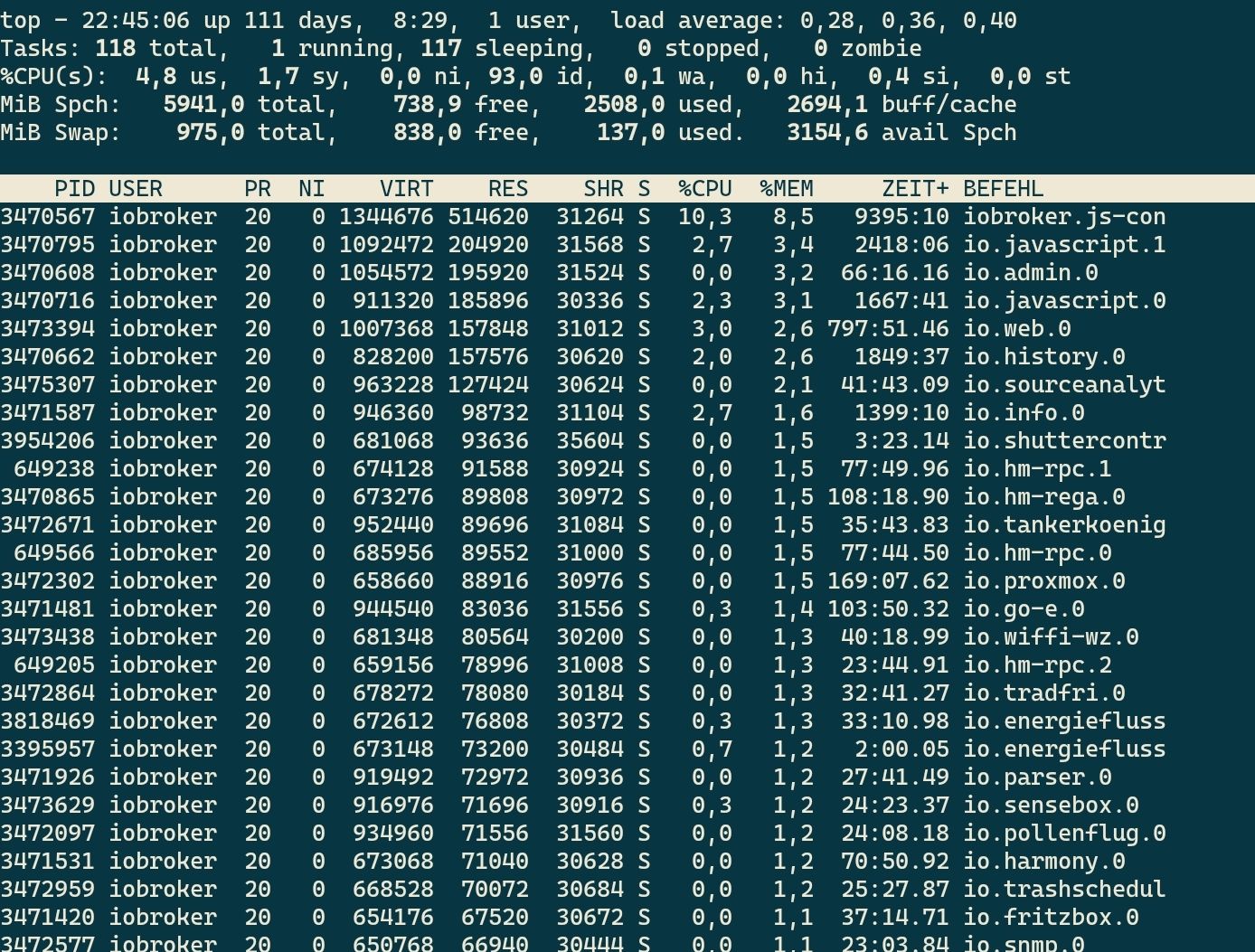
                              Screenshot_20230524-224529_JuiceSSH.jpg

                              nach mem sortiert

                              kein Support per PN! - Fragen im Forum stellen - es gibt fast nichts, was nicht auch für andere interessant ist.

                              Benutzt das Voting rechts unten im Beitrag wenn er euch geholfen hat.

                              der Installationsfixer: curl -fsL https://iobroker.net/fix.sh | bash -

                              S 1 Antwort Letzte Antwort
                              0
                              • HomoranH Homoran

                                @searcher57 sagte in Täglicher Absturz ioBroker + Zugriff auf Raspi:

                                neuer Versuch!

                                dito!
                                siehst du das nicht?

                                hattest du SHIFT-M gedrückt (großes M)

                                gerade getestet
                                Screenshot_20230524-224529_JuiceSSH.jpg

                                nach mem sortiert

                                S Offline
                                S Offline
                                searcher57
                                schrieb am zuletzt editiert von
                                #325

                                @homoran said in Täglicher Absturz ioBroker + Zugriff auf Raspi:

                                @searcher57 sagte in Täglicher Absturz ioBroker + Zugriff auf Raspi:

                                neuer Versuch!

                                dito!
                                siehst du das nicht?

                                hattest du SHIFT-M gedrückt (großes M)

                                gerade getestet
                                Screenshot_20230524-224529_JuiceSSH.jpg

                                nach mem sortiert

                                Maaaaan sag das doch!

                                
                                pi@raspberrypi:~ $ top
                                top - 22:48:30 up  2:24,  1 user,  load average: 0.19, 0.08, 0.08
                                Tasks: 164 total,   1 running, 163 sleeping,   0 stopped,   0 zombie
                                %Cpu(s):  1.6 us,  0.4 sy,  0.0 ni, 97.9 id,  0.0 wa,  0.0 hi,  0.1 si,  0.0 st
                                MiB Mem :   1849.2 total,    339.9 free,   1137.8 used,    371.6 buff/cache
                                MiB Swap:    100.0 total,    100.0 free,      0.0 used.    647.2 avail Mem
                                
                                    PID USER      PR  NI    VIRT    RES    SHR S  %CPU  %MEM     TIME+ COMMAND
                                    588 iobroker  20   0  891196 189176  40764 S   4.3  10.0  13:03.96 iobroker.js-con
                                    700 iobroker  20   0  973680 137196  42532 S   0.7   7.2   1:10.63 io.admin.0
                                    987 iobroker  20   0  937988  88036  36360 S   0.7   4.6   3:28.07 io.influxdb.0
                                   1108 iobroker  20   0  661060  72092  35976 S   0.7   3.8   0:11.77 io.text2command
                                   1191 iobroker  20   0  933088  83636  37252 S   0.7   4.4   0:46.76 io.alexa2.0
                                   2029 pi        20   0   10308   3268   2728 R   0.7   0.2   0:00.13 top
                                    103 root       0 -20       0      0      0 I   0.3   0.0   0:02.67 kworker/0:1H-mmc_complete
                                    894 iobroker  20   0  729136  72724  35864 S   0.3   3.8   0:11.73 io.broadlink2.0
                                   1093 iobroker  20   0  939868  93852  42148 S   0.3   5.0   0:19.86 io.telegram.0
                                   1160 iobroker  20   0  665984  76760  35964 S   0.3   4.1   0:12.43 io.web.0
                                      1 root      20   0  165216  10144   7360 S   0.0   0.5   0:02.26 systemd
                                      2 root      20   0       0      0      0 S   0.0   0.0   0:00.04 kthreadd
                                      3 root       0 -20       0      0      0 I   0.0   0.0   0:00.00 rcu_gp
                                      4 root       0 -20       0      0      0 I   0.0   0.0   0:00.00 rcu_par_gp
                                      5 root       0 -20       0      0      0 I   0.0   0.0   0:00.00 slub_flushwq
                                      6 root       0 -20       0      0      0 I   0.0   0.0   0:00.00 netns
                                     10 root       0 -20       0      0      0 I   0.0   0.0   0:00.00 mm_percpu_wq
                                     11 root      20   0       0      0      0 I   0.0   0.0   0:00.00 rcu_tasks_kthread
                                     12 root      20   0       0      0      0 I   0.0   0.0   0:00.00 rcu_tasks_rude_kthread
                                     13 root      20   0       0      0      0 I   0.0   0.0   0:00.00 rcu_tasks_trace_kthread
                                     14 root      20   0       0      0      0 S   0.0   0.0   0:00.58 ksoftirqd/0
                                     15 root      20   0       0      0      0 I   0.0   0.0   0:04.67 rcu_preempt
                                     16 root      rt   0       0      0      0 S   0.0   0.0   0:00.00 migration/0
                                     17 root      20   0       0      0      0 S   0.0   0.0   0:00.00 cpuhp/0
                                     18 root      20   0       0      0      0 S   0.0   0.0   0:00.00 cpuhp/1
                                     19 root      rt   0       0      0      0 S   0.0   0.0   0:00.00 migration/1
                                     20 root      20   0       0      0      0 S   0.0   0.0   0:00.19 ksoftirqd/1
                                     23 root      20   0       0      0      0 S   0.0   0.0   0:00.00 cpuhp/2
                                     24 root      rt   0       0      0      0 S   0.0   0.0   0:00.00 migration/2
                                     25 root      20   0       0      0      0 S   0.0   0.0   0:00.18 ksoftirqd/2
                                     28 root      20   0       0      0      0 S   0.0   0.0   0:00.00 cpuhp/3
                                     29 root      rt   0       0      0      0 S   0.0   0.0   0:00.00 migration/3
                                     30 root      20   0       0      0      0 S   0.0   0.0   0:00.18 ksoftirqd/3
                                     33 root      20   0       0      0      0 S   0.0   0.0   0:00.01 kdevtmpfs
                                     34 root       0 -20       0      0      0 I   0.0   0.0   0:00.00 inet_frag_wq
                                     36 root      20   0       0      0      0 S   0.0   0.0   0:00.00 kauditd
                                     38 root      20   0       0      0      0 S   0.0   0.0   0:00.00 khungtaskd
                                     40 root      20   0       0      0      0 S   0.0   0.0   0:00.00 oom_reaper
                                     41 root       0 -20       0      0      0 I   0.0   0.0   0:00.00 writeback
                                     42 root      20   0       0      0      0 S   0.0   0.0   0:00.51 kcompactd0
                                     43 root       0 -20       0      0      0 I   0.0   0.0   0:00.00 kintegrityd
                                     44 root       0 -20       0      0      0 I   0.0   0.0   0:00.00 kblockd
                                     45 root       0 -20       0      0      0 I   0.0   0.0   0:00.00 blkcg_punt_bio
                                     46 root     -51   0       0      0      0 S   0.0   0.0   0:00.00 watchdogd
                                     52 root       0 -20       0      0      0 I   0.0   0.0   0:00.00 rpciod
                                     53 root       0 -20       0      0      0 I   0.0   0.0   0:00.00 xprtiod
                                     54 root      20   0       0      0      0 S   0.0   0.0   0:00.00 kswapd0
                                     55 root       0 -20       0      0      0 I   0.0   0.0   0:00.00 nfsiod
                                     56 root       0 -20       0      0      0 I   0.0   0.0   0:00.00 kthrotld
                                     64 root      20   0       0      0      0 S   0.0   0.0   0:00.00 hwrng
                                     65 root       0 -20       0      0      0 I   0.0   0.0   0:00.00 iscsi_conn_clea
                                     66 root       0 -20       0      0      0 I   0.0   0.0   0:00.00 nvme-wq
                                     67 root       0 -20       0      0      0 I   0.0   0.0   0:00.00 nvme-reset-wq
                                     68 root       0 -20       0      0      0 I   0.0   0.0   0:00.00 nvme-delete-wq
                                     70 root       0 -20       0      0      0 I   0.0   0.0   0:00.00 DWC Notificatio
                                pi@raspberrypi:~ $
                                
                                
                                HomoranH 1 Antwort Letzte Antwort
                                0
                                • S searcher57

                                  @homoran said in Täglicher Absturz ioBroker + Zugriff auf Raspi:

                                  @searcher57 sagte in Täglicher Absturz ioBroker + Zugriff auf Raspi:

                                  neuer Versuch!

                                  dito!
                                  siehst du das nicht?

                                  hattest du SHIFT-M gedrückt (großes M)

                                  gerade getestet
                                  Screenshot_20230524-224529_JuiceSSH.jpg

                                  nach mem sortiert

                                  Maaaaan sag das doch!

                                  
                                  pi@raspberrypi:~ $ top
                                  top - 22:48:30 up  2:24,  1 user,  load average: 0.19, 0.08, 0.08
                                  Tasks: 164 total,   1 running, 163 sleeping,   0 stopped,   0 zombie
                                  %Cpu(s):  1.6 us,  0.4 sy,  0.0 ni, 97.9 id,  0.0 wa,  0.0 hi,  0.1 si,  0.0 st
                                  MiB Mem :   1849.2 total,    339.9 free,   1137.8 used,    371.6 buff/cache
                                  MiB Swap:    100.0 total,    100.0 free,      0.0 used.    647.2 avail Mem
                                  
                                      PID USER      PR  NI    VIRT    RES    SHR S  %CPU  %MEM     TIME+ COMMAND
                                      588 iobroker  20   0  891196 189176  40764 S   4.3  10.0  13:03.96 iobroker.js-con
                                      700 iobroker  20   0  973680 137196  42532 S   0.7   7.2   1:10.63 io.admin.0
                                      987 iobroker  20   0  937988  88036  36360 S   0.7   4.6   3:28.07 io.influxdb.0
                                     1108 iobroker  20   0  661060  72092  35976 S   0.7   3.8   0:11.77 io.text2command
                                     1191 iobroker  20   0  933088  83636  37252 S   0.7   4.4   0:46.76 io.alexa2.0
                                     2029 pi        20   0   10308   3268   2728 R   0.7   0.2   0:00.13 top
                                      103 root       0 -20       0      0      0 I   0.3   0.0   0:02.67 kworker/0:1H-mmc_complete
                                      894 iobroker  20   0  729136  72724  35864 S   0.3   3.8   0:11.73 io.broadlink2.0
                                     1093 iobroker  20   0  939868  93852  42148 S   0.3   5.0   0:19.86 io.telegram.0
                                     1160 iobroker  20   0  665984  76760  35964 S   0.3   4.1   0:12.43 io.web.0
                                        1 root      20   0  165216  10144   7360 S   0.0   0.5   0:02.26 systemd
                                        2 root      20   0       0      0      0 S   0.0   0.0   0:00.04 kthreadd
                                        3 root       0 -20       0      0      0 I   0.0   0.0   0:00.00 rcu_gp
                                        4 root       0 -20       0      0      0 I   0.0   0.0   0:00.00 rcu_par_gp
                                        5 root       0 -20       0      0      0 I   0.0   0.0   0:00.00 slub_flushwq
                                        6 root       0 -20       0      0      0 I   0.0   0.0   0:00.00 netns
                                       10 root       0 -20       0      0      0 I   0.0   0.0   0:00.00 mm_percpu_wq
                                       11 root      20   0       0      0      0 I   0.0   0.0   0:00.00 rcu_tasks_kthread
                                       12 root      20   0       0      0      0 I   0.0   0.0   0:00.00 rcu_tasks_rude_kthread
                                       13 root      20   0       0      0      0 I   0.0   0.0   0:00.00 rcu_tasks_trace_kthread
                                       14 root      20   0       0      0      0 S   0.0   0.0   0:00.58 ksoftirqd/0
                                       15 root      20   0       0      0      0 I   0.0   0.0   0:04.67 rcu_preempt
                                       16 root      rt   0       0      0      0 S   0.0   0.0   0:00.00 migration/0
                                       17 root      20   0       0      0      0 S   0.0   0.0   0:00.00 cpuhp/0
                                       18 root      20   0       0      0      0 S   0.0   0.0   0:00.00 cpuhp/1
                                       19 root      rt   0       0      0      0 S   0.0   0.0   0:00.00 migration/1
                                       20 root      20   0       0      0      0 S   0.0   0.0   0:00.19 ksoftirqd/1
                                       23 root      20   0       0      0      0 S   0.0   0.0   0:00.00 cpuhp/2
                                       24 root      rt   0       0      0      0 S   0.0   0.0   0:00.00 migration/2
                                       25 root      20   0       0      0      0 S   0.0   0.0   0:00.18 ksoftirqd/2
                                       28 root      20   0       0      0      0 S   0.0   0.0   0:00.00 cpuhp/3
                                       29 root      rt   0       0      0      0 S   0.0   0.0   0:00.00 migration/3
                                       30 root      20   0       0      0      0 S   0.0   0.0   0:00.18 ksoftirqd/3
                                       33 root      20   0       0      0      0 S   0.0   0.0   0:00.01 kdevtmpfs
                                       34 root       0 -20       0      0      0 I   0.0   0.0   0:00.00 inet_frag_wq
                                       36 root      20   0       0      0      0 S   0.0   0.0   0:00.00 kauditd
                                       38 root      20   0       0      0      0 S   0.0   0.0   0:00.00 khungtaskd
                                       40 root      20   0       0      0      0 S   0.0   0.0   0:00.00 oom_reaper
                                       41 root       0 -20       0      0      0 I   0.0   0.0   0:00.00 writeback
                                       42 root      20   0       0      0      0 S   0.0   0.0   0:00.51 kcompactd0
                                       43 root       0 -20       0      0      0 I   0.0   0.0   0:00.00 kintegrityd
                                       44 root       0 -20       0      0      0 I   0.0   0.0   0:00.00 kblockd
                                       45 root       0 -20       0      0      0 I   0.0   0.0   0:00.00 blkcg_punt_bio
                                       46 root     -51   0       0      0      0 S   0.0   0.0   0:00.00 watchdogd
                                       52 root       0 -20       0      0      0 I   0.0   0.0   0:00.00 rpciod
                                       53 root       0 -20       0      0      0 I   0.0   0.0   0:00.00 xprtiod
                                       54 root      20   0       0      0      0 S   0.0   0.0   0:00.00 kswapd0
                                       55 root       0 -20       0      0      0 I   0.0   0.0   0:00.00 nfsiod
                                       56 root       0 -20       0      0      0 I   0.0   0.0   0:00.00 kthrotld
                                       64 root      20   0       0      0      0 S   0.0   0.0   0:00.00 hwrng
                                       65 root       0 -20       0      0      0 I   0.0   0.0   0:00.00 iscsi_conn_clea
                                       66 root       0 -20       0      0      0 I   0.0   0.0   0:00.00 nvme-wq
                                       67 root       0 -20       0      0      0 I   0.0   0.0   0:00.00 nvme-reset-wq
                                       68 root       0 -20       0      0      0 I   0.0   0.0   0:00.00 nvme-delete-wq
                                       70 root       0 -20       0      0      0 I   0.0   0.0   0:00.00 DWC Notificatio
                                  pi@raspberrypi:~ $
                                  
                                  
                                  HomoranH Nicht stören
                                  HomoranH Nicht stören
                                  Homoran
                                  Global Moderator Administrators
                                  schrieb am zuletzt editiert von Homoran
                                  #326

                                  @searcher57 geht doch!

                                  demnach läuft der Discovery auch nicht.

                                  wie du bei mir siehst sind von den knapp 6 GB RAM noch gut 3 GB verfügbar.
                                  also etwa 3GB in echter Benutzung!

                                  du hast gerade auch wieder 672 MB verfügbar.

                                  spiel noch weiter rum, behalt dabei die available Mem im Auge und die dann korrespondierend mit dem RAM Verbrauch ansteigenden %mem bei den Instanzen

                                  kein Support per PN! - Fragen im Forum stellen - es gibt fast nichts, was nicht auch für andere interessant ist.

                                  Benutzt das Voting rechts unten im Beitrag wenn er euch geholfen hat.

                                  der Installationsfixer: curl -fsL https://iobroker.net/fix.sh | bash -

                                  S 2 Antworten Letzte Antwort
                                  0
                                  • HomoranH Homoran

                                    @searcher57 geht doch!

                                    demnach läuft der Discovery auch nicht.

                                    wie du bei mir siehst sind von den knapp 6 GB RAM noch gut 3 GB verfügbar.
                                    also etwa 3GB in echter Benutzung!

                                    du hast gerade auch wieder 672 MB verfügbar.

                                    spiel noch weiter rum, behalt dabei die available Mem im Auge und die dann korrespondierend mit dem RAM Verbrauch ansteigenden %mem bei den Instanzen

                                    S Offline
                                    S Offline
                                    searcher57
                                    schrieb am zuletzt editiert von
                                    #327

                                    @homoran said in Täglicher Absturz ioBroker + Zugriff auf Raspi:

                                    @searcher57 geht doch!

                                    demnach läuft der Discovery auch nicht.

                                    wie du bei mir siehst sind von den knapp 6 GB RAM noch gut 3 GB verfügbar.
                                    also etwa 3GB in echter Benutzung!

                                    Bitte gib mir verständliche Anweisungen. Der Discovery Adapter läuft, bzw. ist grün!

                                    HomoranH crunchipC 2 Antworten Letzte Antwort
                                    0
                                    • S searcher57

                                      @homoran said in Täglicher Absturz ioBroker + Zugriff auf Raspi:

                                      @searcher57 geht doch!

                                      demnach läuft der Discovery auch nicht.

                                      wie du bei mir siehst sind von den knapp 6 GB RAM noch gut 3 GB verfügbar.
                                      also etwa 3GB in echter Benutzung!

                                      Bitte gib mir verständliche Anweisungen. Der Discovery Adapter läuft, bzw. ist grün!

                                      HomoranH Nicht stören
                                      HomoranH Nicht stören
                                      Homoran
                                      Global Moderator Administrators
                                      schrieb am zuletzt editiert von
                                      #328

                                      @searcher57 sagte in Täglicher Absturz ioBroker + Zugriff auf Raspi:

                                      Der Discovery Adapter läuft, bzw. ist grün!

                                      den seh ich in der Liste nicht
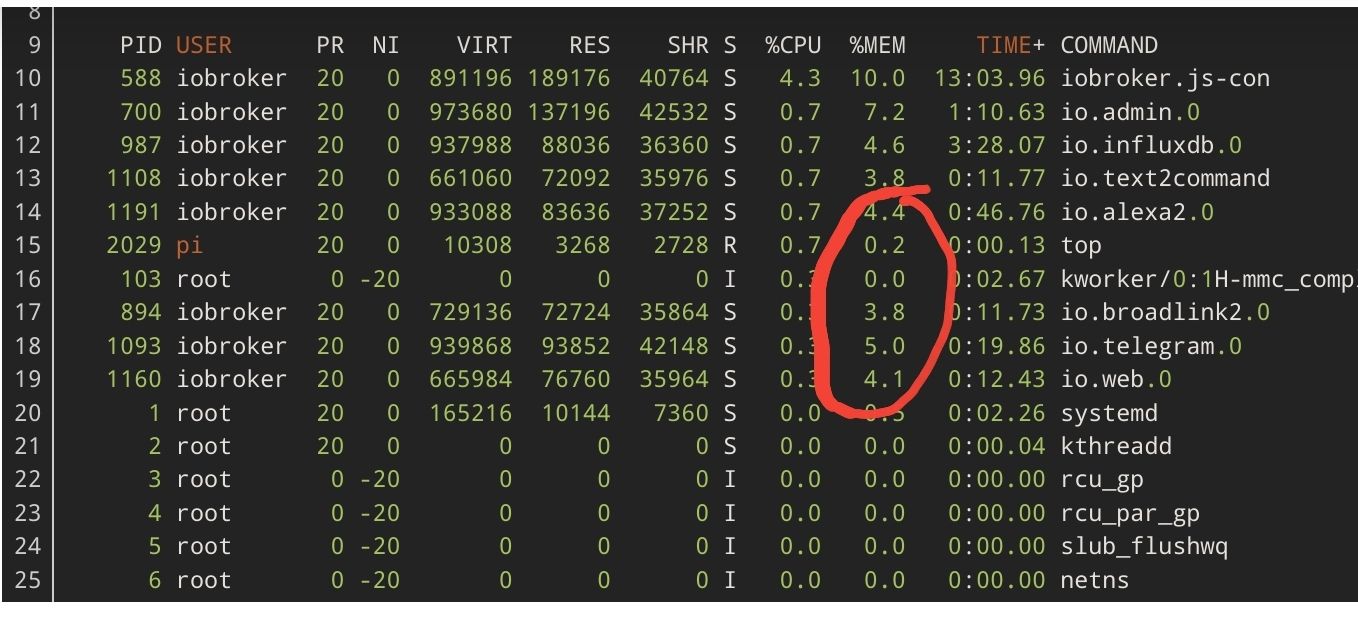
                                      Screenshot_20230524-225555_Firefox.jpg
                                      dafür ist immer noch nicht richtig nach mem sortiert

                                      kein Support per PN! - Fragen im Forum stellen - es gibt fast nichts, was nicht auch für andere interessant ist.

                                      Benutzt das Voting rechts unten im Beitrag wenn er euch geholfen hat.

                                      der Installationsfixer: curl -fsL https://iobroker.net/fix.sh | bash -

                                      S 1 Antwort Letzte Antwort
                                      0
                                      • HomoranH Homoran

                                        @searcher57 geht doch!

                                        demnach läuft der Discovery auch nicht.

                                        wie du bei mir siehst sind von den knapp 6 GB RAM noch gut 3 GB verfügbar.
                                        also etwa 3GB in echter Benutzung!

                                        du hast gerade auch wieder 672 MB verfügbar.

                                        spiel noch weiter rum, behalt dabei die available Mem im Auge und die dann korrespondierend mit dem RAM Verbrauch ansteigenden %mem bei den Instanzen

                                        S Offline
                                        S Offline
                                        searcher57
                                        schrieb am zuletzt editiert von
                                        #329

                                        @homoran said in Täglicher Absturz ioBroker + Zugriff auf Raspi:

                                        @searcher57 geht doch!

                                        demnach läuft der Discovery auch nicht.

                                        wie du bei mir siehst sind von den knapp 6 GB RAM noch gut 3 GB verfügbar.
                                        also etwa 3GB in echter Benutzung!

                                        du hast gerade auch wieder 672 MB verfügbar.

                                        spiel noch weiter rum, behalt dabei die available Mem im Auge und die dann korrespondierend mit dem RAM Verbrauch ansteigenden %mem bei den Instanzen

                                        Tolle Rolle für einen Laien! Danke und gute Nacht!

                                        HomoranH 1 Antwort Letzte Antwort
                                        0
                                        • HomoranH Homoran

                                          @searcher57 sagte in Täglicher Absturz ioBroker + Zugriff auf Raspi:

                                          Der Discovery Adapter läuft, bzw. ist grün!

                                          den seh ich in der Liste nicht
                                          Screenshot_20230524-225555_Firefox.jpg
                                          dafür ist immer noch nicht richtig nach mem sortiert

                                          S Offline
                                          S Offline
                                          searcher57
                                          schrieb am zuletzt editiert von
                                          #330

                                          @homoran said in Täglicher Absturz ioBroker + Zugriff auf Raspi:

                                          @searcher57 sagte in Täglicher Absturz ioBroker + Zugriff auf Raspi:

                                          Der Discovery Adapter läuft, bzw. ist grün!

                                          den seh ich in der Liste nicht
                                          Screenshot_20230524-225555_Firefox.jpg
                                          dafür ist immer noch nicht richtig nach mem sortiert

                                          Was soll ich denn mehr machen, als nach Deinen Anweisungen vor zu gehen?? Wie gesagt, in 4 Wochen lesen wir voneinander. Andere haben mehr Geduld mit mir!!
                                          Gute Nacht!

                                          HomoranH 1 Antwort Letzte Antwort
                                          0
                                          Antworten
                                          • In einem neuen Thema antworten
                                          Anmelden zum Antworten
                                          • Älteste zuerst
                                          • Neuste zuerst
                                          • Meiste Stimmen


                                          Support us

                                          ioBroker
                                          Community Adapters
                                          Donate
                                          FAQ Cloud / IOT
                                          HowTo: Node.js-Update
                                          HowTo: Backup/Restore
                                          Downloads
                                          BLOG

                                          433

                                          Online

                                          32.5k

                                          Benutzer

                                          81.7k

                                          Themen

                                          1.3m

                                          Beiträge
                                          Community
                                          Impressum | Datenschutz-Bestimmungen | Nutzungsbedingungen | Einwilligungseinstellungen
                                          ioBroker Community 2014-2025
                                          logo
                                          • Anmelden

                                          • Du hast noch kein Konto? Registrieren

                                          • Anmelden oder registrieren, um zu suchen
                                          • Erster Beitrag
                                            Letzter Beitrag
                                          0
                                          • Home
                                          • Aktuell
                                          • Tags
                                          • Ungelesen 0
                                          • Kategorien
                                          • Unreplied
                                          • Beliebt
                                          • GitHub
                                          • Docu
                                          • Hilfe
