




Yahka Adapter in iobroker im Docker Container
-
@glasfaser ja
======== Start marking the full check here ========= Skript v.2023-04-16 *** BASE SYSTEM *** Model : Raspberry Pi 4 Model B Rev 1.5 Architecture : aarch64 Docker : v8.0.1 Virtualization : Unknown (buanet/Synology?) Distributor ID: Debian Description: Debian GNU/Linux 11 (bullseye) Release: 11 Codename: bullseye PRETTY_NAME="Debian GNU/Linux 11 (bullseye)" NAME="Debian GNU/Linux" VERSION_ID="11" VERSION="11 (bullseye)" VERSION_CODENAME=bullseye ID=debian HOME_URL="https://www.debian.org/" SUPPORT_URL="https://www.debian.org/support" BUG_REPORT_URL="https://bugs.debian.org/" Systemuptime and Load: 22:00:12 up 33 min, 0 users, load average: 0.40, 1.20, 1.50 CPU threads: 4 *** Time and Time Zones *** Sun May 7 20:00:12 UTC 2023 Sun May 7 22:00:12 CEST 2023 CEST +0200 Etc/UTC *** User and Groups *** root /root root *** X-Server-Setup *** X-Server: false Desktop: Terminal: *** MEMORY *** total used free shared buff/cache available Mem: 7.8G 350M 5.1G 1.0M 2.4G 7.3G Swap: 99M 0B 99M Total: 7.9G 350M 5.2G 7811 M total memory 350 M used memory 516 M active memory 1934 M inactive memory 5098 M free memory 79 M buffer memory 2282 M swap cache 99 M total swap 0 M used swap 99 M free swap *** FILESYSTEM *** Filesystem Type Size Used Avail Use% Mounted on overlay overlay 28G 3.7G 24G 14% / tmpfs tmpfs 64M 0 64M 0% /dev shm tmpfs 64M 0 64M 0% /dev/shm /dev/root ext4 28G 3.7G 24G 14% /opt/iobroker tmpfs tmpfs 3.9G 0 3.9G 0% /proc/asound tmpfs tmpfs 3.9G 0 3.9G 0% /sys/firmware Messages concerning ext4 filesystem in dmesg: sudo: unable to resolve host iobroker: Name or service not known dmesg: read kernel buffer failed: Operation not permitted Show mounted filesystems (real ones only): TARGET SOURCE FSTYPE OPTIONS /opt/iobroker /dev/root[/var/lib/docker/volumes/22418e67230c731b7410855d52aa4469ef889fe65795ad9d5af2fd40b244b4e1/_data] ext4 rw,noatime /etc/resolv.conf /dev/root[/var/lib/docker/containers/80380ce4e22cbb78b41d464a8592c94361c8a0658cfa14bdcc95515edae486f6/resolv.conf] ext4 rw,noatime /etc/hostname /dev/root[/var/lib/docker/containers/80380ce4e22cbb78b41d464a8592c94361c8a0658cfa14bdcc95515edae486f6/hostname] ext4 rw,noatime /etc/hosts /dev/root[/var/lib/docker/containers/80380ce4e22cbb78b41d464a8592c94361c8a0658cfa14bdcc95515edae486f6/hosts] ext4 rw,noatime Files in neuralgic directories: /var: sudo: unable to resolve host iobroker: Name or service not known 16M /var/ 13M /var/lib/dpkg 13M /var/lib 12M /var/lib/dpkg/info 2.0M /var/cache /opt/iobroker/backups: 4.0K /opt/iobroker/backups/ /opt/iobroker/iobroker-data: 18M /opt/iobroker/iobroker-data/ 15M /opt/iobroker/iobroker-data/files 13M /opt/iobroker/iobroker-data/files/admin.admin/custom/static/js 13M /opt/iobroker/iobroker-data/files/admin.admin/custom/static 13M /opt/iobroker/iobroker-data/files/admin.admin/custom The five largest files in iobroker-data are: 6.3M /opt/iobroker/iobroker-data/files/admin.admin/custom/static/js/vendors-node_modules_iobroker_adapter-react-v5_assets_devices_parseNames_js-node_modules_iobr-99c23e.847b8ad9.chunk.js.map 3.3M /opt/iobroker/iobroker-data/objects.jsonl 2.8M /opt/iobroker/iobroker-data/files/admin.admin/custom/static/js/vendors-node_modules_iobroker_adapter-react-v5_assets_devices_parseNames_js-node_modules_iobr-99c23e.847b8ad9.chunk.js 1.6M /opt/iobroker/iobroker-data/files/admin.admin/custom/static/js/vendors-node_modules_mui_material_Accordion_index_js-node_modules_mui_material_AccordionDetai-57e02d.0886b730.chunk.js.map 652K /opt/iobroker/iobroker-data/files/admin.admin/custom/static/js/vendors-node_modules_mui_material_index_js.40e01f69.chunk.js.map *** NodeJS-Installation *** /usr/bin/nodejs v18.16.0 /usr/bin/node v18.16.0 /usr/bin/npm 9.5.1 /usr/bin/npx 9.5.1 nodejs: Installed: 18.16.0-deb-1nodesource1 Candidate: 18.16.0-deb-1nodesource1 Version table: *** 18.16.0-deb-1nodesource1 100 100 /var/lib/dpkg/status Temp directories causing npm8 problem: 0 No problems detected *** ioBroker-Installation *** ioBroker Status iobroker is running on this host. Objects type: jsonl States type: jsonl MULTIHOSTSERVICE/enabled: false Core adapters versions js-controller: 4.0.24 admin: 6.3.5 javascript: "javascript" not found Adapters from github: 0 Adapter State + system.adapter.admin.0 : admin : iobroker - enabled, port: 8081, bind: 0.0.0.0, run as: admin + system.adapter.backitup.0 : backitup : iobroker - enabled + system.adapter.discovery.0 : discovery : iobroker - enabled + instance is alive Enabled adapters with bindings + system.adapter.admin.0 : admin : iobroker - enabled, port: 8081, bind: 0.0.0.0, run as: admin ioBroker-Repositories stable : http://download.iobroker.net/sources-dist.json beta : http://download.iobroker.net/sources-dist-latest.json Active repo(s): stable Installed ioBroker-Instances Used repository: stable Adapter "admin" : 6.3.5 , installed 6.3.5 Adapter "backitup" : 2.6.19 , installed 2.6.19 Adapter "discovery" : 3.1.0 , installed 3.1.0 Controller "js-controller": 4.0.24 , installed 4.0.24 Objects and States Please stand by - This may take a while Objects: 143 States: 104 *** OS-Repositories and Updates *** sudo: unable to resolve host iobroker: Name or service not known sudo: unable to resolve host iobroker: Name or service not known Hit:1 http://deb.debian.org/debian bullseye InRelease Hit:2 http://deb.debian.org/debian-security bullseye-security InRelease Hit:3 http://deb.debian.org/debian bullseye-updates InRelease Hit:4 https://deb.nodesource.com/node_18.x bullseye InRelease Reading package lists... Pending Updates: 0 *** Listening Ports *** sudo: unable to resolve host iobroker: Name or service not known Active Internet connections (only servers) Proto Recv-Q Send-Q Local Address Foreign Address State User Inode PID/Program name tcp 0 0 127.0.0.1:6010 0.0.0.0:* LISTEN 1000 13065 - tcp 0 0 127.0.0.1:9001 0.0.0.0:* LISTEN 1000 55572 - tcp 0 0 127.0.0.1:9000 0.0.0.0:* LISTEN 1000 55579 - tcp 0 0 0.0.0.0:8000 0.0.0.0:* LISTEN 0 24049 - tcp 0 0 0.0.0.0:22 0.0.0.0:* LISTEN 0 15320 - tcp 0 0 0.0.0.0:9443 0.0.0.0:* LISTEN 0 22262 - tcp6 0 0 :::8081 :::* LISTEN 1000 55658 - tcp6 0 0 :::8000 :::* LISTEN 0 24052 - tcp6 0 0 :::22 :::* LISTEN 0 15322 - tcp6 0 0 ::1:6010 :::* LISTEN 1000 13064 - tcp6 0 0 :::9443 :::* LISTEN 0 22265 - udp 0 0 0.0.0.0:5353 0.0.0.0:* 108 3640 - udp 0 0 0.0.0.0:43895 0.0.0.0:* 108 3642 - udp 0 0 0.0.0.0:68 0.0.0.0:* 0 15370 - udp6 0 0 :::41919 :::* 108 3643 - udp6 0 0 :::5353 :::* 108 3641 - *** Log File - Last 25 Lines *** 2023-05-07 21:55:57.118 - info: host.iobroker ip addresses: 192.168.7.39 2a01:598:b1ae:5fa:d6ec:ac55:4f72:b26f fe80::aecb:962d:34de:9047 172.17.0.1 fe80::42:38ff:fe87:f417 169.254.118.22 fe80::1f6f:f0c7:c469:59da fe80::a0d4:75ff:fe52:e950 2023-05-07 21:55:57.542 - info: host.iobroker connected to Objects and States 2023-05-07 21:55:57.572 - info: host.iobroker Node.js version has changed from unknown to 18.16.0 2023-05-07 21:55:57.646 - info: host.iobroker added notifications configuration of host 2023-05-07 21:55:58.016 - info: host.iobroker 3 instances found 2023-05-07 21:55:58.026 - info: host.iobroker starting 3 instances 2023-05-07 21:55:58.088 - info: host.iobroker instance system.adapter.admin.0 started with pid 1850 2023-05-07 21:56:00.382 - info: admin.0 (1850) starting. Version 6.3.5 in /opt/iobroker/node_modules/iobroker.admin, node: v18.16.0, js-controller: 4.0.24 2023-05-07 21:56:00.435 - info: admin.0 (1850) requesting all states 2023-05-07 21:56:00.437 - info: admin.0 (1850) requesting all objects 2023-05-07 21:56:00.611 - info: admin.0 (1850) received all objects 2023-05-07 21:56:00.641 - info: admin.0 (1850) Request actual repository... 2023-05-07 21:56:00.657 - info: host.iobroker Updating repository "stable" under "http://download.iobroker.net/sources-dist.json" 2023-05-07 21:56:00.708 - info: admin.0 (1850) http server listening on port 8081 2023-05-07 21:56:00.709 - info: admin.0 (1850) Use link "http://localhost:8081" to configure. 2023-05-07 21:56:00.718 - info: admin.0 (1850) socket.io server listening on port 8081 2023-05-07 21:56:00.799 - warn: admin.0 (1850) Repository cannot be read: Active repo - stable 2023-05-07 21:56:00.801 - warn: admin.0 (1850) Active repository "stable" cannot be read 2023-05-07 21:56:02.066 - info: host.iobroker instance system.adapter.discovery.0 started with pid 1873 2023-05-07 21:56:04.303 - info: discovery.0 (1873) starting. Version 3.1.0 in /opt/iobroker/node_modules/iobroker.discovery, node: v18.16.0, js-controller: 4.0.24 2023-05-07 21:56:06.056 - info: host.iobroker instance system.adapter.backitup.0 started with pid 1892 2023-05-07 21:56:08.208 - info: backitup.0 (1892) starting. Version 2.6.19 in /opt/iobroker/node_modules/iobroker.backitup, node: v18.16.0, js-controller: 4.0.24 2023-05-07 21:56:08.325 - info: backitup.0 (1892) [iobroker] backup will be activated at 02:40 every 1 day(s) 2023-05-07 21:56:13.804 - info: admin.0 (1850) Repository received successfully. 2023-05-07 21:56:19.540 - info: host.iobroker Successfully updated capabilities "cap_net_admin, cap_net_bind_service, cap_net_raw" for /usr/bin/node ============ Mark until here for C&P ============= iob diag has finished. Press any key for a summary -
@glasfaser ja
======== Start marking the full check here ========= Skript v.2023-04-16 *** BASE SYSTEM *** Model : Raspberry Pi 4 Model B Rev 1.5 Architecture : aarch64 Docker : v8.0.1 Virtualization : Unknown (buanet/Synology?) Distributor ID: Debian Description: Debian GNU/Linux 11 (bullseye) Release: 11 Codename: bullseye PRETTY_NAME="Debian GNU/Linux 11 (bullseye)" NAME="Debian GNU/Linux" VERSION_ID="11" VERSION="11 (bullseye)" VERSION_CODENAME=bullseye ID=debian HOME_URL="https://www.debian.org/" SUPPORT_URL="https://www.debian.org/support" BUG_REPORT_URL="https://bugs.debian.org/" Systemuptime and Load: 22:00:12 up 33 min, 0 users, load average: 0.40, 1.20, 1.50 CPU threads: 4 *** Time and Time Zones *** Sun May 7 20:00:12 UTC 2023 Sun May 7 22:00:12 CEST 2023 CEST +0200 Etc/UTC *** User and Groups *** root /root root *** X-Server-Setup *** X-Server: false Desktop: Terminal: *** MEMORY *** total used free shared buff/cache available Mem: 7.8G 350M 5.1G 1.0M 2.4G 7.3G Swap: 99M 0B 99M Total: 7.9G 350M 5.2G 7811 M total memory 350 M used memory 516 M active memory 1934 M inactive memory 5098 M free memory 79 M buffer memory 2282 M swap cache 99 M total swap 0 M used swap 99 M free swap *** FILESYSTEM *** Filesystem Type Size Used Avail Use% Mounted on overlay overlay 28G 3.7G 24G 14% / tmpfs tmpfs 64M 0 64M 0% /dev shm tmpfs 64M 0 64M 0% /dev/shm /dev/root ext4 28G 3.7G 24G 14% /opt/iobroker tmpfs tmpfs 3.9G 0 3.9G 0% /proc/asound tmpfs tmpfs 3.9G 0 3.9G 0% /sys/firmware Messages concerning ext4 filesystem in dmesg: sudo: unable to resolve host iobroker: Name or service not known dmesg: read kernel buffer failed: Operation not permitted Show mounted filesystems (real ones only): TARGET SOURCE FSTYPE OPTIONS /opt/iobroker /dev/root[/var/lib/docker/volumes/22418e67230c731b7410855d52aa4469ef889fe65795ad9d5af2fd40b244b4e1/_data] ext4 rw,noatime /etc/resolv.conf /dev/root[/var/lib/docker/containers/80380ce4e22cbb78b41d464a8592c94361c8a0658cfa14bdcc95515edae486f6/resolv.conf] ext4 rw,noatime /etc/hostname /dev/root[/var/lib/docker/containers/80380ce4e22cbb78b41d464a8592c94361c8a0658cfa14bdcc95515edae486f6/hostname] ext4 rw,noatime /etc/hosts /dev/root[/var/lib/docker/containers/80380ce4e22cbb78b41d464a8592c94361c8a0658cfa14bdcc95515edae486f6/hosts] ext4 rw,noatime Files in neuralgic directories: /var: sudo: unable to resolve host iobroker: Name or service not known 16M /var/ 13M /var/lib/dpkg 13M /var/lib 12M /var/lib/dpkg/info 2.0M /var/cache /opt/iobroker/backups: 4.0K /opt/iobroker/backups/ /opt/iobroker/iobroker-data: 18M /opt/iobroker/iobroker-data/ 15M /opt/iobroker/iobroker-data/files 13M /opt/iobroker/iobroker-data/files/admin.admin/custom/static/js 13M /opt/iobroker/iobroker-data/files/admin.admin/custom/static 13M /opt/iobroker/iobroker-data/files/admin.admin/custom The five largest files in iobroker-data are: 6.3M /opt/iobroker/iobroker-data/files/admin.admin/custom/static/js/vendors-node_modules_iobroker_adapter-react-v5_assets_devices_parseNames_js-node_modules_iobr-99c23e.847b8ad9.chunk.js.map 3.3M /opt/iobroker/iobroker-data/objects.jsonl 2.8M /opt/iobroker/iobroker-data/files/admin.admin/custom/static/js/vendors-node_modules_iobroker_adapter-react-v5_assets_devices_parseNames_js-node_modules_iobr-99c23e.847b8ad9.chunk.js 1.6M /opt/iobroker/iobroker-data/files/admin.admin/custom/static/js/vendors-node_modules_mui_material_Accordion_index_js-node_modules_mui_material_AccordionDetai-57e02d.0886b730.chunk.js.map 652K /opt/iobroker/iobroker-data/files/admin.admin/custom/static/js/vendors-node_modules_mui_material_index_js.40e01f69.chunk.js.map *** NodeJS-Installation *** /usr/bin/nodejs v18.16.0 /usr/bin/node v18.16.0 /usr/bin/npm 9.5.1 /usr/bin/npx 9.5.1 nodejs: Installed: 18.16.0-deb-1nodesource1 Candidate: 18.16.0-deb-1nodesource1 Version table: *** 18.16.0-deb-1nodesource1 100 100 /var/lib/dpkg/status Temp directories causing npm8 problem: 0 No problems detected *** ioBroker-Installation *** ioBroker Status iobroker is running on this host. Objects type: jsonl States type: jsonl MULTIHOSTSERVICE/enabled: false Core adapters versions js-controller: 4.0.24 admin: 6.3.5 javascript: "javascript" not found Adapters from github: 0 Adapter State + system.adapter.admin.0 : admin : iobroker - enabled, port: 8081, bind: 0.0.0.0, run as: admin + system.adapter.backitup.0 : backitup : iobroker - enabled + system.adapter.discovery.0 : discovery : iobroker - enabled + instance is alive Enabled adapters with bindings + system.adapter.admin.0 : admin : iobroker - enabled, port: 8081, bind: 0.0.0.0, run as: admin ioBroker-Repositories stable : http://download.iobroker.net/sources-dist.json beta : http://download.iobroker.net/sources-dist-latest.json Active repo(s): stable Installed ioBroker-Instances Used repository: stable Adapter "admin" : 6.3.5 , installed 6.3.5 Adapter "backitup" : 2.6.19 , installed 2.6.19 Adapter "discovery" : 3.1.0 , installed 3.1.0 Controller "js-controller": 4.0.24 , installed 4.0.24 Objects and States Please stand by - This may take a while Objects: 143 States: 104 *** OS-Repositories and Updates *** sudo: unable to resolve host iobroker: Name or service not known sudo: unable to resolve host iobroker: Name or service not known Hit:1 http://deb.debian.org/debian bullseye InRelease Hit:2 http://deb.debian.org/debian-security bullseye-security InRelease Hit:3 http://deb.debian.org/debian bullseye-updates InRelease Hit:4 https://deb.nodesource.com/node_18.x bullseye InRelease Reading package lists... Pending Updates: 0 *** Listening Ports *** sudo: unable to resolve host iobroker: Name or service not known Active Internet connections (only servers) Proto Recv-Q Send-Q Local Address Foreign Address State User Inode PID/Program name tcp 0 0 127.0.0.1:6010 0.0.0.0:* LISTEN 1000 13065 - tcp 0 0 127.0.0.1:9001 0.0.0.0:* LISTEN 1000 55572 - tcp 0 0 127.0.0.1:9000 0.0.0.0:* LISTEN 1000 55579 - tcp 0 0 0.0.0.0:8000 0.0.0.0:* LISTEN 0 24049 - tcp 0 0 0.0.0.0:22 0.0.0.0:* LISTEN 0 15320 - tcp 0 0 0.0.0.0:9443 0.0.0.0:* LISTEN 0 22262 - tcp6 0 0 :::8081 :::* LISTEN 1000 55658 - tcp6 0 0 :::8000 :::* LISTEN 0 24052 - tcp6 0 0 :::22 :::* LISTEN 0 15322 - tcp6 0 0 ::1:6010 :::* LISTEN 1000 13064 - tcp6 0 0 :::9443 :::* LISTEN 0 22265 - udp 0 0 0.0.0.0:5353 0.0.0.0:* 108 3640 - udp 0 0 0.0.0.0:43895 0.0.0.0:* 108 3642 - udp 0 0 0.0.0.0:68 0.0.0.0:* 0 15370 - udp6 0 0 :::41919 :::* 108 3643 - udp6 0 0 :::5353 :::* 108 3641 - *** Log File - Last 25 Lines *** 2023-05-07 21:55:57.118 - info: host.iobroker ip addresses: 192.168.7.39 2a01:598:b1ae:5fa:d6ec:ac55:4f72:b26f fe80::aecb:962d:34de:9047 172.17.0.1 fe80::42:38ff:fe87:f417 169.254.118.22 fe80::1f6f:f0c7:c469:59da fe80::a0d4:75ff:fe52:e950 2023-05-07 21:55:57.542 - info: host.iobroker connected to Objects and States 2023-05-07 21:55:57.572 - info: host.iobroker Node.js version has changed from unknown to 18.16.0 2023-05-07 21:55:57.646 - info: host.iobroker added notifications configuration of host 2023-05-07 21:55:58.016 - info: host.iobroker 3 instances found 2023-05-07 21:55:58.026 - info: host.iobroker starting 3 instances 2023-05-07 21:55:58.088 - info: host.iobroker instance system.adapter.admin.0 started with pid 1850 2023-05-07 21:56:00.382 - info: admin.0 (1850) starting. Version 6.3.5 in /opt/iobroker/node_modules/iobroker.admin, node: v18.16.0, js-controller: 4.0.24 2023-05-07 21:56:00.435 - info: admin.0 (1850) requesting all states 2023-05-07 21:56:00.437 - info: admin.0 (1850) requesting all objects 2023-05-07 21:56:00.611 - info: admin.0 (1850) received all objects 2023-05-07 21:56:00.641 - info: admin.0 (1850) Request actual repository... 2023-05-07 21:56:00.657 - info: host.iobroker Updating repository "stable" under "http://download.iobroker.net/sources-dist.json" 2023-05-07 21:56:00.708 - info: admin.0 (1850) http server listening on port 8081 2023-05-07 21:56:00.709 - info: admin.0 (1850) Use link "http://localhost:8081" to configure. 2023-05-07 21:56:00.718 - info: admin.0 (1850) socket.io server listening on port 8081 2023-05-07 21:56:00.799 - warn: admin.0 (1850) Repository cannot be read: Active repo - stable 2023-05-07 21:56:00.801 - warn: admin.0 (1850) Active repository "stable" cannot be read 2023-05-07 21:56:02.066 - info: host.iobroker instance system.adapter.discovery.0 started with pid 1873 2023-05-07 21:56:04.303 - info: discovery.0 (1873) starting. Version 3.1.0 in /opt/iobroker/node_modules/iobroker.discovery, node: v18.16.0, js-controller: 4.0.24 2023-05-07 21:56:06.056 - info: host.iobroker instance system.adapter.backitup.0 started with pid 1892 2023-05-07 21:56:08.208 - info: backitup.0 (1892) starting. Version 2.6.19 in /opt/iobroker/node_modules/iobroker.backitup, node: v18.16.0, js-controller: 4.0.24 2023-05-07 21:56:08.325 - info: backitup.0 (1892) [iobroker] backup will be activated at 02:40 every 1 day(s) 2023-05-07 21:56:13.804 - info: admin.0 (1850) Repository received successfully. 2023-05-07 21:56:19.540 - info: host.iobroker Successfully updated capabilities "cap_net_admin, cap_net_bind_service, cap_net_raw" for /usr/bin/node ============ Mark until here for C&P ============= iob diag has finished. Press any key for a summary@tomme
Copy text starting here:======================= SUMMARY ======================= v.2023-04-16 Operatingsystem: Debian GNU/Linux 11 (bullseye) Kernel: 6.1.21-v8+ Installation: Docker Timezone: Etc/UTC User-ID: 0 X-Server: false Pending OS-Updates: 0 Pending iob updates: 0 Nodejs-Installation: /usr/bin/nodejs v18.16.0 /usr/bin/node v18.16.0 /usr/bin/npm 9.5.1 /usr/bin/npx 9.5.1 Recommended versions are nodejs 18.x.y and npm 9.x.y Your nodejs installation is correct MEMORY: total used free shared buff/cache available Mem: 7.8G 378M 5.1G 1.0M 2.4G 7.3G Swap: 99M 0B 99M Total: 7.9G 378M 5.2G Active iob-Instances: 4 Active repo(s): stable ioBroker Core: js-controller 4.0.24 admin 6.3.5 ioBroker Status: iobroker is running on this host. Objects type: jsonl States type: jsonl Status admin and web instance: + system.adapter.admin.0 : admin : iobroker - enabled, port: 8081, bind: 0.0.0.0, run as: admin Objects: 143 States: 104 Size of iob-Database: 3.3M /opt/iobroker/iobroker-data/objects.jsonl 128K /opt/iobroker/iobroker-data/states.jsonl =================== END OF SUMMARY ====================root@iobroker:/opt/iobroker#
-
@tomme
Copy text starting here:======================= SUMMARY ======================= v.2023-04-16 Operatingsystem: Debian GNU/Linux 11 (bullseye) Kernel: 6.1.21-v8+ Installation: Docker Timezone: Etc/UTC User-ID: 0 X-Server: false Pending OS-Updates: 0 Pending iob updates: 0 Nodejs-Installation: /usr/bin/nodejs v18.16.0 /usr/bin/node v18.16.0 /usr/bin/npm 9.5.1 /usr/bin/npx 9.5.1 Recommended versions are nodejs 18.x.y and npm 9.x.y Your nodejs installation is correct MEMORY: total used free shared buff/cache available Mem: 7.8G 378M 5.1G 1.0M 2.4G 7.3G Swap: 99M 0B 99M Total: 7.9G 378M 5.2G Active iob-Instances: 4 Active repo(s): stable ioBroker Core: js-controller 4.0.24 admin 6.3.5 ioBroker Status: iobroker is running on this host. Objects type: jsonl States type: jsonl Status admin and web instance: + system.adapter.admin.0 : admin : iobroker - enabled, port: 8081, bind: 0.0.0.0, run as: admin Objects: 143 States: 104 Size of iob-Database: 3.3M /opt/iobroker/iobroker-data/objects.jsonl 128K /opt/iobroker/iobroker-data/states.jsonl =================== END OF SUMMARY ====================root@iobroker:/opt/iobroker#
-
@tomme
Copy text starting here:======================= SUMMARY ======================= v.2023-04-16 Operatingsystem: Debian GNU/Linux 11 (bullseye) Kernel: 6.1.21-v8+ Installation: Docker Timezone: Etc/UTC User-ID: 0 X-Server: false Pending OS-Updates: 0 Pending iob updates: 0 Nodejs-Installation: /usr/bin/nodejs v18.16.0 /usr/bin/node v18.16.0 /usr/bin/npm 9.5.1 /usr/bin/npx 9.5.1 Recommended versions are nodejs 18.x.y and npm 9.x.y Your nodejs installation is correct MEMORY: total used free shared buff/cache available Mem: 7.8G 378M 5.1G 1.0M 2.4G 7.3G Swap: 99M 0B 99M Total: 7.9G 378M 5.2G Active iob-Instances: 4 Active repo(s): stable ioBroker Core: js-controller 4.0.24 admin 6.3.5 ioBroker Status: iobroker is running on this host. Objects type: jsonl States type: jsonl Status admin and web instance: + system.adapter.admin.0 : admin : iobroker - enabled, port: 8081, bind: 0.0.0.0, run as: admin Objects: 143 States: 104 Size of iob-Database: 3.3M /opt/iobroker/iobroker-data/objects.jsonl 128K /opt/iobroker/iobroker-data/states.jsonl =================== END OF SUMMARY ====================root@iobroker:/opt/iobroker#
@tomme das sieht doch erstmal gut aus oder?
ich schaue gleich nach dem backup und hoffe das es danach noch gehtdas backup kriege ich jetzt aber nur über /var/lib/docker/volumes/... oder so mit suchen welche Volume Nummer rein kopiert oder?
dazu muss ich aber mit chmod 777 /var/lib/docker die Rechte ändern sonst komme ich da nicht rein mit sftp
-
@tomme das sieht doch erstmal gut aus oder?
ich schaue gleich nach dem backup und hoffe das es danach noch gehtdas backup kriege ich jetzt aber nur über /var/lib/docker/volumes/... oder so mit suchen welche Volume Nummer rein kopiert oder?
dazu muss ich aber mit chmod 777 /var/lib/docker die Rechte ändern sonst komme ich da nicht rein mit sftp
-
-
@glasfaser ich habe noch gewartet keine Sorge ...
kann ich die 2 Zeilen nachtragen im Stack oder muss ich den schnell neu machen?
-
@glasfaser ok das geht ja schnell und danach mache ich nochmal iob diag und wenn fehlerfrei dann hole ich das backup zurück und dann nochmal iob diag?
-
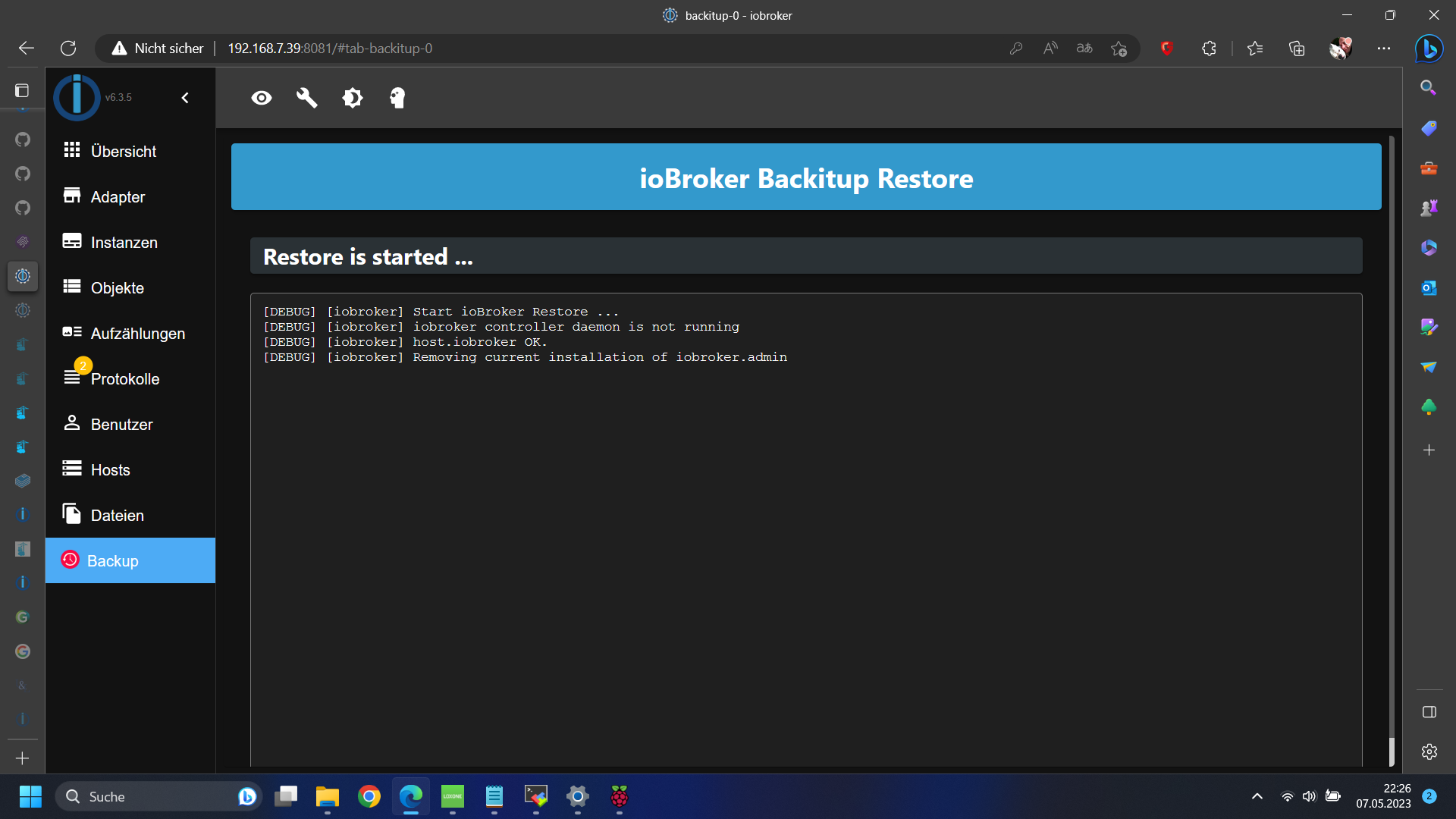
@glasfaser das läuft doch wie ein Länderspiel ;)
-
@glasfaser das läuft doch wie ein Länderspiel ;)
@tomme diag läuft sauber durch aber smbclient findet er nicht
da muss ich erstmal mit lokalen Backups klar kommen das mit "NAS" nehme ich erstmal wieder raus das kam durch das Backup wieder rein
wahrscheinlich muss ich die Source von smbclient registrieren oder?root@iobroker:/opt/iobroker# apt install smbclient Reading package lists... Done Building dependency tree... Done Reading state information... Done Package smbclient is not available, but is referred to by another package. This may mean that the package is missing, has been obsoleted, or is only available from another source E: Package 'smbclient' has no installation candidate root@iobroker:/opt/iobroker# -
@tomme diag läuft sauber durch aber smbclient findet er nicht
da muss ich erstmal mit lokalen Backups klar kommen das mit "NAS" nehme ich erstmal wieder raus das kam durch das Backup wieder rein
wahrscheinlich muss ich die Source von smbclient registrieren oder?root@iobroker:/opt/iobroker# apt install smbclient Reading package lists... Done Building dependency tree... Done Reading state information... Done Package smbclient is not available, but is referred to by another package. This may mean that the package is missing, has been obsoleted, or is only available from another source E: Package 'smbclient' has no installation candidate root@iobroker:/opt/iobroker# -
@glasfaser 230 Nachrichten ... wie kann ich das wieder gut machen?????
wenn ihr mal was habt zwecks KNX, LON, Loxone, Logo oder SPS Programmierung, Honeywell, Saia, Priva oder allgemein Elektrotechnik dann bitte melden da kann ich vielleicht mal helfen.
Vielen Dank ihr seid meine neuen Idole ;) ihr seid echt Klasse!!!
-
@tomme sagte in Yahka Adapter in iobroker im Docker Container:
smbclient registrieren oder?
Brauchst du nicht ..
per Putty über pi
docker exec -ti iobroker /bin/bash@glasfaser sagte in Yahka Adapter in iobroker im Docker Container:
docker exec -ti iobroker /bin/bash
dann bin ich root im iobroker ...
da nochmal apt install smbclient oder was meinst du? -
@glasfaser sagte in Yahka Adapter in iobroker im Docker Container:
docker exec -ti iobroker /bin/bash
dann bin ich root im iobroker ...
da nochmal apt install smbclient oder was meinst du? -
@tomme sagte in Yahka Adapter in iobroker im Docker Container:
dann bin ich root im iobroker ...
Das ist ein "abgespeckter root " ( Docker Container buanet ).... alles gut
@glasfaser ist abgespeichert
-
@tomme sagte in Yahka Adapter in iobroker im Docker Container:
dann bin ich root im iobroker ...
Das ist ein "abgespeckter root " ( Docker Container buanet ).... alles gut
-
woran das nun aber lag weiß man nicht oder?
einziger Unterschied ist das es vorher keine Lite Version vom Image war aber daran kann es ja nicht gelegen haben oder?
-
Mhh ...
Ich schreibe gerade in anderen Threads ... ( du Folgst mir auch / abonniert) -
@glasfaser achso dann kriege ich jedes Mal eine Meldung ok ...

Hey! Du scheinst an dieser Unterhaltung interessiert zu sein, hast aber noch kein Konto.
Hast du es satt, bei jedem Besuch durch die gleichen Beiträge zu scrollen? Wenn du dich für ein Konto anmeldest, kommst du immer genau dorthin zurück, wo du zuvor warst, und kannst dich über neue Antworten benachrichtigen lassen (entweder per E-Mail oder Push-Benachrichtigung). Du kannst auch Lesezeichen speichern und Beiträge positiv bewerten, um anderen Community-Mitgliedern deine Wertschätzung zu zeigen.
Mit deinem Input könnte dieser Beitrag noch besser werden 💗
Registrieren Anmelden186
Online33.0k
Benutzende83.7k
Themen1.3m
Beiträge