Skip to content
  • Home
  • Aktuell
  • Tags
  • 0 Ungelesen 0
  • Kategorien
  • Unreplied
  • Beliebt
  • GitHub
  • Docu
  • Hilfe
Skins
  • Light
  • Brite
  • Cerulean
  • Cosmo
  • Flatly
  • Journal
  • Litera
  • Lumen
  • Lux
  • Materia
  • Minty
  • Morph
  • Pulse
  • Sandstone
  • Simplex
  • Sketchy
  • Spacelab
  • United
  • Yeti
  • Zephyr
  • Dark
  • Cyborg
  • Darkly
  • Quartz
  • Slate
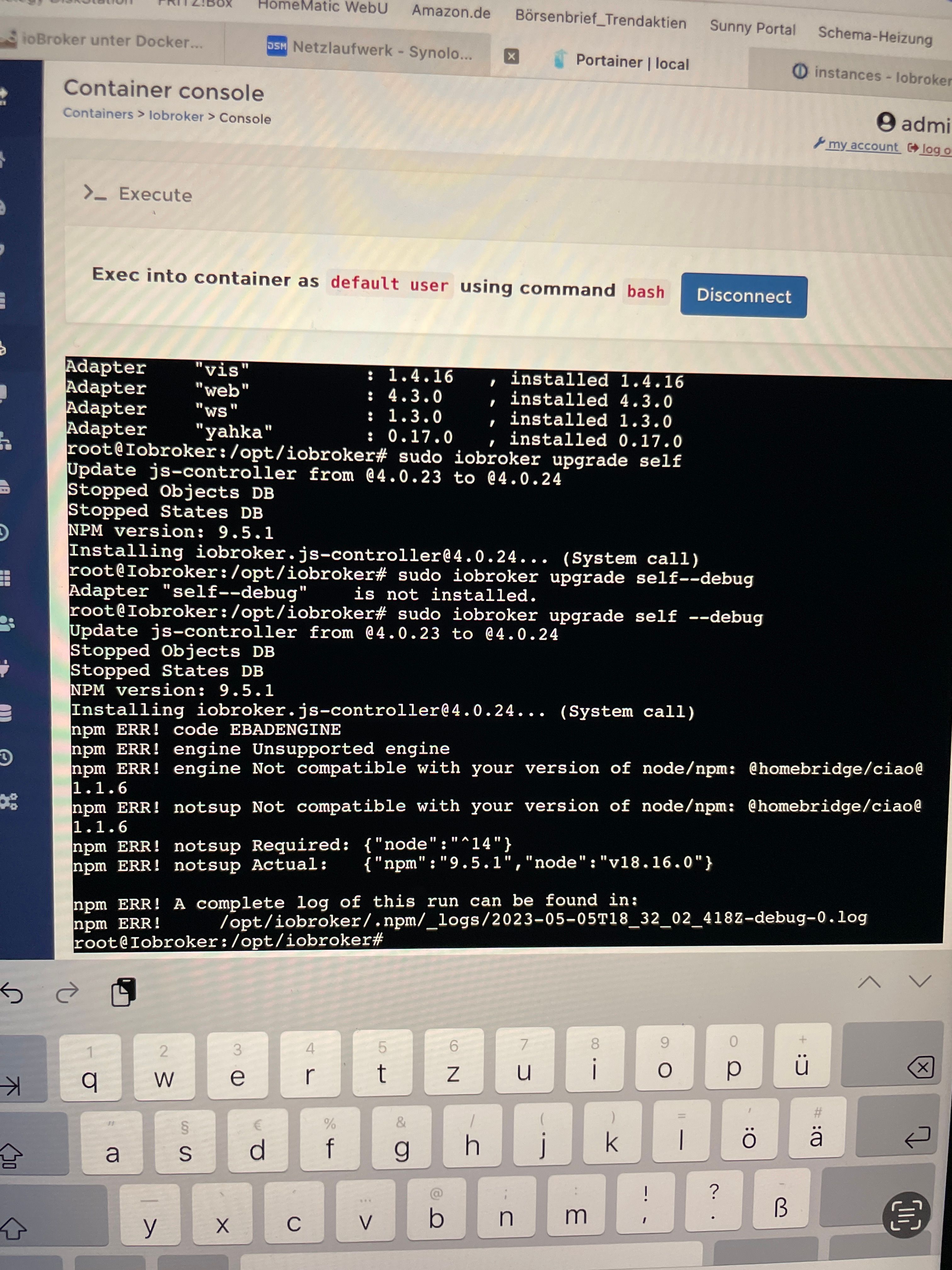
  • Solar
  • Superhero
  • Vapor

  • Standard: (Kein Skin)
  • Kein Skin
Einklappen
ioBroker Logo

Community Forum

donate donate
  1. ioBroker Community Home
  2. Deutsch
  3. ioBroker Allgemein
  4. Adapter Installation und Update nicht möglich
NEWS

  • Jahresrückblick 2025 – unser neuer Blogbeitrag ist online! ✨
    BluefoxB
    Bluefox
    15
    1
    680

  • Neuer Blogbeitrag: Monatsrückblick - Dezember 2025 🎄
    BluefoxB
    Bluefox
    13
    1
    636

  • Weihnachtsangebot 2025! 🎄
    BluefoxB
    Bluefox
    25
    1
    1.9k

Adapter Installation und Update nicht möglich
Geplant Angeheftet Gesperrt Verschoben ioBroker Allgemein
installationupdate
61 Beiträge 4 Kommentatoren 6.6k Aufrufe 2 Watching
  • Älteste zuerst
  • Neuste zuerst
  • Meiste Stimmen
Antworten
  • In einem neuen Thema antworten
Anmelden zum Antworten
Dieses Thema wurde gelöscht. Nur Nutzer mit entsprechenden Rechten können es sehen.
  • GlasfaserG Glasfaser

    @svenh75 sagte in Adapter Installation und Update nicht möglich:

    Nur nicht das dadurch eventuell etwas verändert wird…… passt also?

    Was soll sich da verändern ....

    Ich frage nur Informationen bei dir ab !

    S Offline
    S Offline
    SvenH75
    schrieb am zuletzt editiert von
    #18

    @glasfaser Nein, nicht das sich die Info für dich dadurch verändert

    GlasfaserG 1 Antwort Letzte Antwort
    0
    • S SvenH75

      @glasfaser Nein, nicht das sich die Info für dich dadurch verändert

      GlasfaserG Online
      GlasfaserG Online
      Glasfaser
      schrieb am zuletzt editiert von
      #19

      @svenh75

      Bitte die Full Ausgabe davon hier posten !

      Synology 918+ 16GB - ioBroker in Docker v9 , VISO auf Trekstor Primebook C13 13,3" , Hikvision Domkameras mit Surveillance Station .. CCU RaspberryMatic in Synology VM .. Zigbee CC2538+CC2592 .. Sonoff .. KNX .. Modbus ..

      S 1 Antwort Letzte Antwort
      0
      • GlasfaserG Glasfaser

        @svenh75

        Bitte die Full Ausgabe davon hier posten !

        S Offline
        S Offline
        SvenH75
        schrieb am zuletzt editiert von
        #20

        @glasfaser von was?

        GlasfaserG 1 Antwort Letzte Antwort
        0
        • S SvenH75

          @glasfaser von was?

          GlasfaserG Online
          GlasfaserG Online
          Glasfaser
          schrieb am zuletzt editiert von
          #21

          @svenh75 sagte in Adapter Installation und Update nicht möglich:

          @glasfaser von was?

          siehe hier ... wie die Ausgabe von

          iob diag
          

          aussieht

          https://forum.iobroker.net/post/986813

          Synology 918+ 16GB - ioBroker in Docker v9 , VISO auf Trekstor Primebook C13 13,3" , Hikvision Domkameras mit Surveillance Station .. CCU RaspberryMatic in Synology VM .. Zigbee CC2538+CC2592 .. Sonoff .. KNX .. Modbus ..

          S 1 Antwort Letzte Antwort
          0
          • GlasfaserG Glasfaser

            @svenh75 sagte in Adapter Installation und Update nicht möglich:

            @glasfaser von was?

            siehe hier ... wie die Ausgabe von

            iob diag
            

            aussieht

            https://forum.iobroker.net/post/986813

            S Offline
            S Offline
            SvenH75
            schrieb am zuletzt editiert von
            #22

            @glasfaser es kommt leider wieder nur der Hinweis

            
            *** loBroker Diagnosis ***
            Please stretch the window of your terminal programm (puTTY) as wide as possible or switch to full s
            creen
            The following checks may give hints to potential malconfigurations or errors, please post them in o ur forum:
            https://forum.iobroker.net
            Just copy and paste the Summary Page, including the It helps us to help you!
            characters at start and end
            Press any key to continue```
            GlasfaserG 2 Antworten Letzte Antwort
            0
            • S SvenH75

              @glasfaser es kommt leider wieder nur der Hinweis

              
              *** loBroker Diagnosis ***
              Please stretch the window of your terminal programm (puTTY) as wide as possible or switch to full s
              creen
              The following checks may give hints to potential malconfigurations or errors, please post them in o ur forum:
              https://forum.iobroker.net
              Just copy and paste the Summary Page, including the It helps us to help you!
              characters at start and end
              Press any key to continue```
              GlasfaserG Online
              GlasfaserG Online
              Glasfaser
              schrieb am zuletzt editiert von
              #23

              @svenh75

              Nutze kein Portainer ... eher Putty ( Kitty )

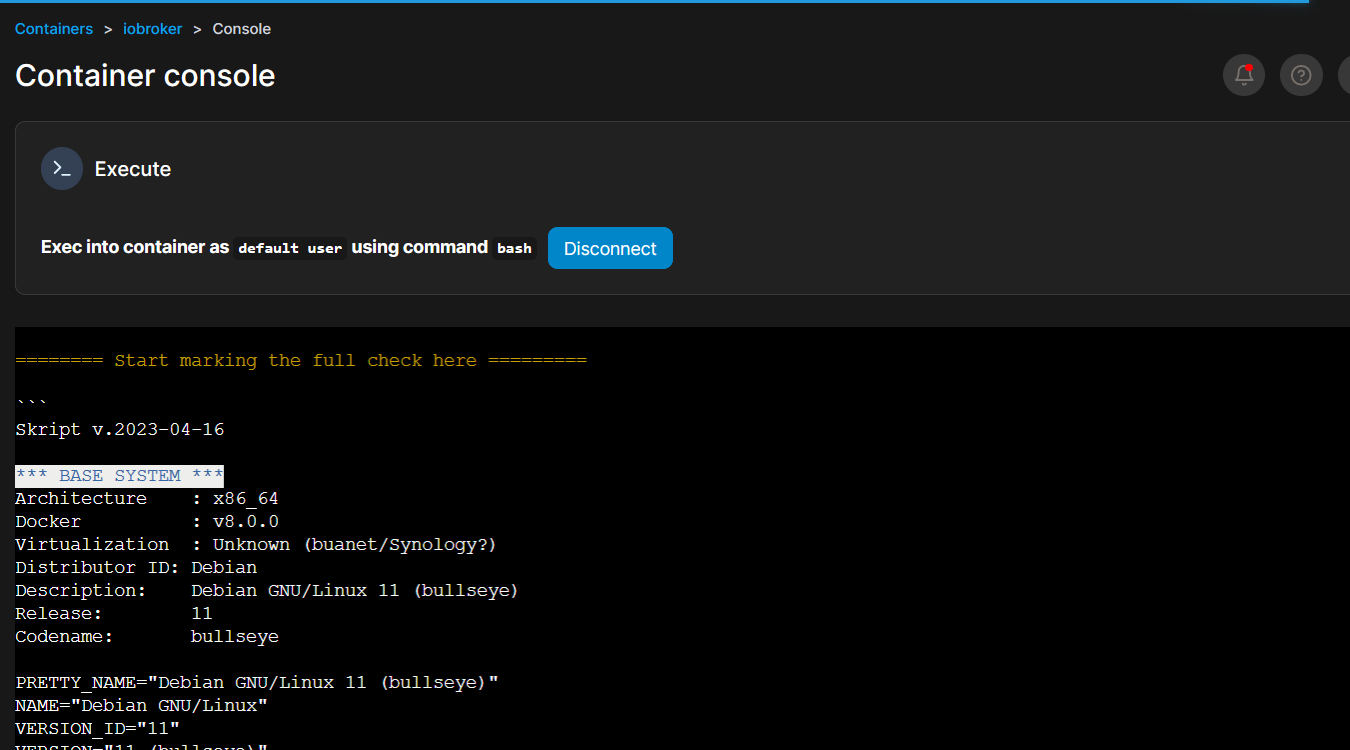
              Bei Portainer kommt bei mir:

              1f7a8d85-0759-4a63-8d23-104842394802-grafik.png .

              Nimm mal die Docker Konsole von Synology

              Synology 918+ 16GB - ioBroker in Docker v9 , VISO auf Trekstor Primebook C13 13,3" , Hikvision Domkameras mit Surveillance Station .. CCU RaspberryMatic in Synology VM .. Zigbee CC2538+CC2592 .. Sonoff .. KNX .. Modbus ..

              1 Antwort Letzte Antwort
              0
              • S SvenH75

                @glasfaser es kommt leider wieder nur der Hinweis

                
                *** loBroker Diagnosis ***
                Please stretch the window of your terminal programm (puTTY) as wide as possible or switch to full s
                creen
                The following checks may give hints to potential malconfigurations or errors, please post them in o ur forum:
                https://forum.iobroker.net
                Just copy and paste the Summary Page, including the It helps us to help you!
                characters at start and end
                Press any key to continue```
                GlasfaserG Online
                GlasfaserG Online
                Glasfaser
                schrieb am zuletzt editiert von
                #24

                @svenh75 sagte in Adapter Installation und Update nicht möglich:

                Press any key to continue```

                Machst du das auch .. Taste drücken !?

                siehe hier ... dort geht es :
                https://forum.iobroker.net/post/952867

                Synology 918+ 16GB - ioBroker in Docker v9 , VISO auf Trekstor Primebook C13 13,3" , Hikvision Domkameras mit Surveillance Station .. CCU RaspberryMatic in Synology VM .. Zigbee CC2538+CC2592 .. Sonoff .. KNX .. Modbus ..

                S 1 Antwort Letzte Antwort
                0
                • GlasfaserG Glasfaser

                  @svenh75 sagte in Adapter Installation und Update nicht möglich:

                  Press any key to continue```

                  Machst du das auch .. Taste drücken !?

                  siehe hier ... dort geht es :
                  https://forum.iobroker.net/post/952867

                  S Offline
                  S Offline
                  SvenH75
                  schrieb am zuletzt editiert von
                  #25

                  @glasfaser Sorry, es ist hier Mist bei mir, hab gerade nur ein iPad da ich unterwegs bin….. muss das verschieben bis ich wieder Zuhause bin (1Woche) Kann ich da mich hier nochmal melden?

                  Trotzdem ganz lieben Dank für deine Zeit

                  GlasfaserG 1 Antwort Letzte Antwort
                  0
                  • S SvenH75

                    @glasfaser Sorry, es ist hier Mist bei mir, hab gerade nur ein iPad da ich unterwegs bin….. muss das verschieben bis ich wieder Zuhause bin (1Woche) Kann ich da mich hier nochmal melden?

                    Trotzdem ganz lieben Dank für deine Zeit

                    GlasfaserG Online
                    GlasfaserG Online
                    Glasfaser
                    schrieb am zuletzt editiert von
                    #26

                    @svenh75 sagte in Adapter Installation und Update nicht möglich:

                    muss das verschieben bis ich wieder Zuhause bin (1Woche) Kann ich da mich hier nochmal melden?

                    Klar geht das ... !

                    hab gerade nur ein iPad

                    deshalb ... nimmt er bestimmt den Tastendruck nicht an .

                    Synology 918+ 16GB - ioBroker in Docker v9 , VISO auf Trekstor Primebook C13 13,3" , Hikvision Domkameras mit Surveillance Station .. CCU RaspberryMatic in Synology VM .. Zigbee CC2538+CC2592 .. Sonoff .. KNX .. Modbus ..

                    S 1 Antwort Letzte Antwort
                    0
                    • GlasfaserG Glasfaser

                      @svenh75 sagte in Adapter Installation und Update nicht möglich:

                      muss das verschieben bis ich wieder Zuhause bin (1Woche) Kann ich da mich hier nochmal melden?

                      Klar geht das ... !

                      hab gerade nur ein iPad

                      deshalb ... nimmt er bestimmt den Tastendruck nicht an .

                      S Offline
                      S Offline
                      SvenH75
                      schrieb am zuletzt editiert von
                      #27

                      @glasfaser ich melde mich in einer Woche, System Zuhause läuft ja erstmal

                      GlasfaserG 2 Antworten Letzte Antwort
                      0
                      • S SvenH75

                        @glasfaser ich melde mich in einer Woche, System Zuhause läuft ja erstmal

                        GlasfaserG Online
                        GlasfaserG Online
                        Glasfaser
                        schrieb am zuletzt editiert von
                        #28

                        @svenh75 sagte in Adapter Installation und Update nicht möglich:

                        @glasfaser ich melde mich in einer Woche,

                        Den Fehler finden wir ( dafür ist das Forum da ) ... ;)

                        Synology 918+ 16GB - ioBroker in Docker v9 , VISO auf Trekstor Primebook C13 13,3" , Hikvision Domkameras mit Surveillance Station .. CCU RaspberryMatic in Synology VM .. Zigbee CC2538+CC2592 .. Sonoff .. KNX .. Modbus ..

                        1 Antwort Letzte Antwort
                        0
                        • S SvenH75

                          @glasfaser ich melde mich in einer Woche, System Zuhause läuft ja erstmal

                          GlasfaserG Online
                          GlasfaserG Online
                          Glasfaser
                          schrieb am zuletzt editiert von
                          #29

                          @svenh75

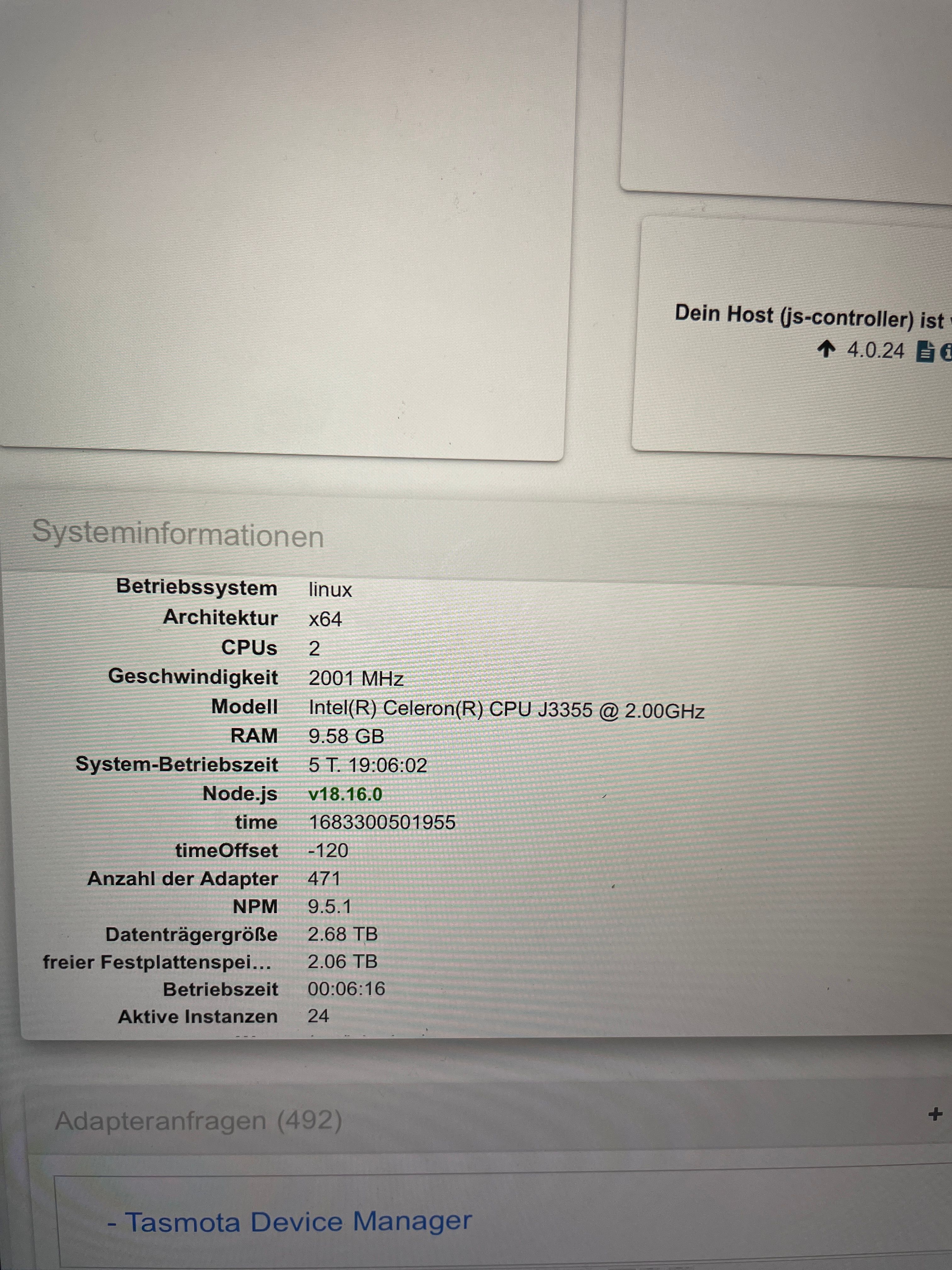
                          Nur ein Hinweis , was ich noch in deiner Briefmarke erkenne :

                          64a4f268-265e-4513-bfc5-5c4a44ccb59e-grafik.png

                          Der js-controller ist schon lange auf 4.0.24

                          @svenh75 sagte in Adapter Installation und Update nicht möglich:
                          Den Container iobroker selber ,habe ich heute bereits komplett neu aufgesetzt.

                          @svenh75 sagte in Adapter Installation und Update nicht möglich:

                          @glasfaser root@Iobroker:/opt/iobroker# cat /opt/scripts/ .docker config/.thisisdocker
                          v8.0.1

                          Das war schonmal ein Fehler auf v8 anzuheben ,

                          Welche Version hattest du vorher ,

                          lese mal hier :

                          https://docs.buanet.de/iobroker-docker-image/docs/#updates-upgrades

                          Synology 918+ 16GB - ioBroker in Docker v9 , VISO auf Trekstor Primebook C13 13,3" , Hikvision Domkameras mit Surveillance Station .. CCU RaspberryMatic in Synology VM .. Zigbee CC2538+CC2592 .. Sonoff .. KNX .. Modbus ..

                          S 3 Antworten Letzte Antwort
                          0
                          • GlasfaserG Glasfaser

                            @svenh75

                            Nur ein Hinweis , was ich noch in deiner Briefmarke erkenne :

                            64a4f268-265e-4513-bfc5-5c4a44ccb59e-grafik.png

                            Der js-controller ist schon lange auf 4.0.24

                            @svenh75 sagte in Adapter Installation und Update nicht möglich:
                            Den Container iobroker selber ,habe ich heute bereits komplett neu aufgesetzt.

                            @svenh75 sagte in Adapter Installation und Update nicht möglich:

                            @glasfaser root@Iobroker:/opt/iobroker# cat /opt/scripts/ .docker config/.thisisdocker
                            v8.0.1

                            Das war schonmal ein Fehler auf v8 anzuheben ,

                            Welche Version hattest du vorher ,

                            lese mal hier :

                            https://docs.buanet.de/iobroker-docker-image/docs/#updates-upgrades

                            S Offline
                            S Offline
                            SvenH75
                            schrieb am zuletzt editiert von
                            #30

                            @glasfaser Hallo, ich hab jetzt doch die Ausgabe von iob diag hinbekommen, kann es nur nicht sauber raus kopieren (ipad, ist dann totales Zeilen Wirrwarr 🙈. Bilder bekomme ich hier nicht sauber rein?

                            Ja, der js-Controller lässt sich aber auch nicht updaten, mit der V8 muss ich mich jetzt erst belesen……hab aber immer nur über den Portainer die Aktualisierung laufen lassen……

                            DJMarc75D 1 Antwort Letzte Antwort
                            0
                            • S SvenH75

                              @glasfaser Hallo, ich hab jetzt doch die Ausgabe von iob diag hinbekommen, kann es nur nicht sauber raus kopieren (ipad, ist dann totales Zeilen Wirrwarr 🙈. Bilder bekomme ich hier nicht sauber rein?

                              Ja, der js-Controller lässt sich aber auch nicht updaten, mit der V8 muss ich mich jetzt erst belesen……hab aber immer nur über den Portainer die Aktualisierung laufen lassen……

                              DJMarc75D Offline
                              DJMarc75D Offline
                              DJMarc75
                              schrieb am zuletzt editiert von
                              #31

                              @svenh75 sagte in Adapter Installation und Update nicht möglich:

                              kann es nur nicht sauber raus kopieren

                              ach komm...als ApfelUser kann man doch anscheinend alles ;)

                              Markieren, Einfügen und gut :)

                              Lehrling seit 1975 !!!
                              Beitrag geholfen ? dann gerne ein upvote rechts unten im Beitrag klicken ;)
                              https://forum.iobroker.net/topic/51555/hinweise-f%C3%BCr-gute-forenbeitr%C3%A4ge

                              S 1 Antwort Letzte Antwort
                              0
                              • DJMarc75D DJMarc75

                                @svenh75 sagte in Adapter Installation und Update nicht möglich:

                                kann es nur nicht sauber raus kopieren

                                ach komm...als ApfelUser kann man doch anscheinend alles ;)

                                Markieren, Einfügen und gut :)

                                S Offline
                                S Offline
                                SvenH75
                                schrieb am zuletzt editiert von
                                #32

                                @djmarc75 ne, im Terminal Fenster will es sich einfach nicht dazu überzeugen lassen……Blödels Teil🙈

                                1 Antwort Letzte Antwort
                                0
                                • GlasfaserG Glasfaser

                                  @svenh75

                                  Nur ein Hinweis , was ich noch in deiner Briefmarke erkenne :

                                  64a4f268-265e-4513-bfc5-5c4a44ccb59e-grafik.png

                                  Der js-controller ist schon lange auf 4.0.24

                                  @svenh75 sagte in Adapter Installation und Update nicht möglich:
                                  Den Container iobroker selber ,habe ich heute bereits komplett neu aufgesetzt.

                                  @svenh75 sagte in Adapter Installation und Update nicht möglich:

                                  @glasfaser root@Iobroker:/opt/iobroker# cat /opt/scripts/ .docker config/.thisisdocker
                                  v8.0.1

                                  Das war schonmal ein Fehler auf v8 anzuheben ,

                                  Welche Version hattest du vorher ,

                                  lese mal hier :

                                  https://docs.buanet.de/iobroker-docker-image/docs/#updates-upgrades

                                  S Offline
                                  S Offline
                                  SvenH75
                                  schrieb am zuletzt editiert von
                                  #33

                                  @glasfaser hm, das wusste ich nicht mit den Versionswechseln……. Hab den Container relativ regelmäßig aktualisiert, alle paar Monate, denke also vorher war die Vorgängerversion. Was ich in letzter Zeit festgestellt hatte (etwa knappes Jahr) war, das Updates und Adapterinstallationen sehr lange gedauert haben und bei Stromausfall der iobroker nicht mehr selbstständig gestartet ist.

                                  1 Antwort Letzte Antwort
                                  0
                                  • GlasfaserG Glasfaser

                                    @svenh75

                                    Nur ein Hinweis , was ich noch in deiner Briefmarke erkenne :

                                    64a4f268-265e-4513-bfc5-5c4a44ccb59e-grafik.png

                                    Der js-controller ist schon lange auf 4.0.24

                                    @svenh75 sagte in Adapter Installation und Update nicht möglich:
                                    Den Container iobroker selber ,habe ich heute bereits komplett neu aufgesetzt.

                                    @svenh75 sagte in Adapter Installation und Update nicht möglich:

                                    @glasfaser root@Iobroker:/opt/iobroker# cat /opt/scripts/ .docker config/.thisisdocker
                                    v8.0.1

                                    Das war schonmal ein Fehler auf v8 anzuheben ,

                                    Welche Version hattest du vorher ,

                                    lese mal hier :

                                    https://docs.buanet.de/iobroker-docker-image/docs/#updates-upgrades

                                    S Offline
                                    S Offline
                                    SvenH75
                                    schrieb am zuletzt editiert von
                                    #34

                                    @glasfaser hab hier die Imageliste aus dem Portainer, denke das waren die Updatezeitpunkte (Zeilen werden durch vorhandene Spalten getrennt, iPad….

                                    sha256:1109371a61a3c9c7dc7e184d29425c...
                                    Unused
                                    sha256:b6ccf386df5716b26267dedb745db7...
                                    Unused
                                    • sha256:03clac99bc14fd4add5d5a3889eefc...
                                    Unused
                                    sha256:9ffa046a0dcfa2bf97a8b39648ccf4...
                                    Unused
                                    sha256:a0a94d3ce3c281b4df5f91afc2c292...
                                    Unused
                                    • sha256:5e370064d36f8d61d92a1f6fd41352...
                                    unused
                                    • sha256:08bd77dc6e94d6a69d202cbde2b7c8...
                                    Unused
                                    sha256: ac3945bc8b91416a603838394eaf78...
                                    Unused
                                    • sha256:909fe75ef56fb982a08fb92ab9597f...
                                    Unuseo
                                    • sha256:87003206842a1c1389423369c021e...
                                    Unused
                                    © Settings
                                    Tags If
                                    buanet/iobroker:<none>
                                    buanet/iobroker:<none>
                                    buanet/iobroker:<none>
                                    buanet/iobroker:<none>
                                    [branet /iobroker.<none>
                                    buanet/iobroker-<none>
                                    buanet/iobroker:<none>
                                    buanet/iobroker:<none>
                                    buanet/obroker-<none>
                                    buanet/iobroker:<none>
                                    Size
                                    Created
                                    1.2 GB 2022-07-05 20:54:39
                                    1.2 GB 2022-06-21 18:57:44
                                    1.2 CB 2022-02-26 00:48:34
                                    1.3 GB 2021-12-17 04:51:29
                                    1.3 GB 2021-10-01 05:48:50
                                    1.5 GB
                                    2021-07-08 09:09:39
                                    1.5 GB 2021-06-10 09:09:15
                                    1.5 GB 2021-04-10 13:26:05
                                    1.3 GB 2021-02-15 13:23:31
                                    1.1 GB 2020-11-16 13:29:53
                                    
                                    GlasfaserG 1 Antwort Letzte Antwort
                                    0
                                    • S SvenH75

                                      @glasfaser hab hier die Imageliste aus dem Portainer, denke das waren die Updatezeitpunkte (Zeilen werden durch vorhandene Spalten getrennt, iPad….

                                      sha256:1109371a61a3c9c7dc7e184d29425c...
                                      Unused
                                      sha256:b6ccf386df5716b26267dedb745db7...
                                      Unused
                                      • sha256:03clac99bc14fd4add5d5a3889eefc...
                                      Unused
                                      sha256:9ffa046a0dcfa2bf97a8b39648ccf4...
                                      Unused
                                      sha256:a0a94d3ce3c281b4df5f91afc2c292...
                                      Unused
                                      • sha256:5e370064d36f8d61d92a1f6fd41352...
                                      unused
                                      • sha256:08bd77dc6e94d6a69d202cbde2b7c8...
                                      Unused
                                      sha256: ac3945bc8b91416a603838394eaf78...
                                      Unused
                                      • sha256:909fe75ef56fb982a08fb92ab9597f...
                                      Unuseo
                                      • sha256:87003206842a1c1389423369c021e...
                                      Unused
                                      © Settings
                                      Tags If
                                      buanet/iobroker:<none>
                                      buanet/iobroker:<none>
                                      buanet/iobroker:<none>
                                      buanet/iobroker:<none>
                                      [branet /iobroker.<none>
                                      buanet/iobroker-<none>
                                      buanet/iobroker:<none>
                                      buanet/iobroker:<none>
                                      buanet/obroker-<none>
                                      buanet/iobroker:<none>
                                      Size
                                      Created
                                      1.2 GB 2022-07-05 20:54:39
                                      1.2 GB 2022-06-21 18:57:44
                                      1.2 CB 2022-02-26 00:48:34
                                      1.3 GB 2021-12-17 04:51:29
                                      1.3 GB 2021-10-01 05:48:50
                                      1.5 GB
                                      2021-07-08 09:09:39
                                      1.5 GB 2021-06-10 09:09:15
                                      1.5 GB 2021-04-10 13:26:05
                                      1.3 GB 2021-02-15 13:23:31
                                      1.1 GB 2020-11-16 13:29:53
                                      
                                      GlasfaserG Online
                                      GlasfaserG Online
                                      Glasfaser
                                      schrieb am zuletzt editiert von
                                      #35

                                      @svenh75 sagte in Adapter Installation und Update nicht möglich:

                                      @glasfaser hab hier die Imageliste aus dem Portainer, denke das waren die Updatezeitpunkte (Zeilen werden durch vorhandene Spalten getrennt, iPad….

                                      Kann damit nichts anfangen !

                                      Es ging darum , bevor du von z.B . Image Version 7... auf 8.. wechselt , alles auf den neuesten Stand hast und nicht einfach ein Image wechsel machst !

                                      Was ich in letzter Zeit festgestellt hatte (etwa knappes Jahr) war, das Updates und Adapterinstallationen sehr lange gedauert haben

                                      Ich kann nur vermuten , das du noch NPM 6 zuvor hatest und da die Probleme hattest , aber das ist hier nur alles Raten .

                                      Deshalb brauchen wir die Ausgabe von

                                      iob diag
                                      

                                      was du überhaupt erstmal hast , dann sehen wir weiter .

                                      Mache alles in Ruhe , so bringt das hier nichts .

                                      Synology 918+ 16GB - ioBroker in Docker v9 , VISO auf Trekstor Primebook C13 13,3" , Hikvision Domkameras mit Surveillance Station .. CCU RaspberryMatic in Synology VM .. Zigbee CC2538+CC2592 .. Sonoff .. KNX .. Modbus ..

                                      S 1 Antwort Letzte Antwort
                                      0
                                      • GlasfaserG Glasfaser

                                        @svenh75 sagte in Adapter Installation und Update nicht möglich:

                                        @glasfaser hab hier die Imageliste aus dem Portainer, denke das waren die Updatezeitpunkte (Zeilen werden durch vorhandene Spalten getrennt, iPad….

                                        Kann damit nichts anfangen !

                                        Es ging darum , bevor du von z.B . Image Version 7... auf 8.. wechselt , alles auf den neuesten Stand hast und nicht einfach ein Image wechsel machst !

                                        Was ich in letzter Zeit festgestellt hatte (etwa knappes Jahr) war, das Updates und Adapterinstallationen sehr lange gedauert haben

                                        Ich kann nur vermuten , das du noch NPM 6 zuvor hatest und da die Probleme hattest , aber das ist hier nur alles Raten .

                                        Deshalb brauchen wir die Ausgabe von

                                        iob diag
                                        

                                        was du überhaupt erstmal hast , dann sehen wir weiter .

                                        Mache alles in Ruhe , so bringt das hier nichts .

                                        S Offline
                                        S Offline
                                        SvenH75
                                        schrieb am zuletzt editiert von
                                        #36

                                        @glasfaser Hallo, so jetzt die Ausgabe, hoffe hab keinen Fehler drin, hab es quasi abgetippt 🙈.
                                        Mir ist noch aufgefallen, dass Adapter aufgeführt werden, die ich in der Vergangenheit eigentlich gelöscht habe (Bei Instanzen auch nicht vorhanden). Diese Adapter (cloud, fritzbox, ham, harmony, hmip, material, mielecloudservice, mobile, panasonic-viera, ping, ring, sayit, simple-api, socketio, sony-bravia, statistics, unifi und ws tauchten in der Vergangenheit auch bei den Updates mit auf, die scheinen nicht komplett gelöscht zu sein.

                                        Dankeschön fürs drüberschauen….

                                        == Start marking the full check here
                                        Skript v. 2023-04-16
                                        *** BASE SYSTEM **
                                        Architecture : x86 64
                                        Docker: v8.0.1
                                        Virtualization: Unknown (buanet/Synology?)
                                        Distributor ID: Debian
                                        Description: Debian GNU/Linux 11 (bullseye)
                                        Release: 11
                                        Codename: bullseye
                                        
                                        PRETTY NAME-"Debian GNU/Linux 11 (bullseye)"
                                        NAME= "Debian GNU/Linux"
                                        VERSION ID="11"
                                        VERSION="11 (bullseye)"
                                        VERSION CODENAME=bullseye
                                        ID=debian
                                        HOME URL-"https://www.debian.org/"
                                        SUPPORT URI="https://www.debian.org/support"
                                        BUG_REPORT_URL "https://bugs.debian.org/"
                                        
                                        Systemuptime and Load:
                                        15:49:56 up 6 days, 17:26,  0users, load average: 0.44, 0.77, 0.82
                                        CPU threads: 2
                                        
                                        Time and Time Zones
                                        Sat May 6 13:49:56 UTC 2023
                                        Sat May 6 15:49:56 CEST 2023
                                        CEST +0200
                                        Etc/UTC
                                        
                                        *** User and Groups *** 
                                        root 
                                        / root
                                        root
                                        
                                        *** X-Server-Setup ***
                                        X-Server: false
                                        Desktop:
                                        Terminal:
                                        
                                        *** MEMORY***
                                                                total        used     free     shared     buff/cache   available
                                        Mem:             9.8G      896M  	4.1G		187M			4.9G			8.4G
                                        Swap:		    7.9G		100M	7.8G
                                        Total:			17G		997M	11G
                                        
                                        9806 M total memory
                                        896 M used memory
                                        1186 M active memory
                                        3839 M inactive memory
                                        3839 M inactive memory
                                        4058 M free memory
                                        323 M buffer memory
                                        4527 M swap cache
                                        7931 M total swap
                                        100 M used swap
                                        7831 M free swap
                                        
                                        ***** Filesystem*****
                                        Filesystem 		Туре		Size	  Used 	Avail 	Uses 	Mounted on
                                        none					aufs		2.7T   640G  2.IT        24%        	/
                                        tmpfs				tmpfs	64M 	0		64M		0% 			/dev
                                        tmpfs				tmpfs	4.8G 	0 		4.8G 	0% 	 /sys/fs/cgroup
                                        shm 					tmpfs	64M 	0 		64M		0% 		/dev/shm
                                        /dev/vg1000/lv  ext4		2.7T	  640G	2.1T 		24%	 	/opt/iobroker
                                        tmpfs				tmpfs	4.8G 	0 		4.8G 	0%  		/proc/acpi
                                        tmpfs				tmpfs	4.8G 	0 		4.8G 	0% 		/proc/scsi
                                        tmpfs				tmpfs	4.8G 	0 		4.8G 	0%  		/sys/firmware
                                        
                                        Messages concerning ext4 filesystem in dmesg:
                                        
                                        Show mounted filesystems (real ones only):
                                        TARGET				SOURCE
                                        																		FSTYPE OPTIONS
                                        /							none
                                        
                                        				aufs	rw,relatime,si=95e1d5c35c5b0b4,dio,dirpermi
                                        
                                        |-/opt/iobroker 		/dev/vg1000/1v(/docker/iobroker_data]
                                        				ext4		rw, nodev, relatime, synoacI, jqfmt=vfsvo,usrjquota=aquot
                                        a.user, grpjquota aquota. group
                                        |-/etc/resolv.conf/dev/vg1000/1v(/@docker/containers 2b5b8f5f660a80f650879e2ce266a48fc92b18c8e1
                                        d174145e5ea6c23c5aecb8/resolv.conf) ext4 rw, nodev, relatime,synoacl, jgfmt=vfsvO,usrjquota=aquot
                                        a.user, grpjquota aquota.group
                                        -/etc/hosts 	/dev/vg1000/1v(/@docker/containers/2b5b8f5f660a80f650879e2ce266a48fc92b18c8e1
                                        a174145e5ea6c23c5aecb8 /hosts]
                                        ext4
                                        rw, nodev, relatime,synoacl, jgfmt=vfsv0,usrjquota=aquot
                                        a.user, grpjquota=aquota.group
                                        -/etc/hosts
                                        /dev/vg1000/1v(/@docker/containers/2b5b8f5f660a80f650879e2ce266a48fc92b18c8e1
                                        d174145e5ea6c23c5aecb8/hosts]
                                        ext4
                                        a. user, grpjquota=aquota. group
                                        rw, nodev, relatime, synoac1, jqfmt=vfsvO, usrjquota=aquot
                                        
                                        Files in neuralgic directories:
                                        
                                        /var:
                                        33M		/var/
                                        31M		/var/lib
                                        18M		/var/lib/apt/lists
                                        18M		/var/lib/apt
                                        13M		/var/lib/dpkg
                                        
                                        
                                        /opt/iobroker/backups:
                                        69M		/opt/iobroker/backups/ /opt/iobroker/backups/
                                        4.0K		/opt/iobroker/backups/ /opt/iobroker/backups/redistmp
                                        
                                        /opt/iobroker/iobroker-data:
                                        755M	/opt/iobroker / iobroker-data/ /opt/iobroker/iobroker-358M 358M	/opt/iobroker / iobroker-data/ /opt/iobroker/iobroker-data
                                        189M		/opt/iobroker/iobroker-data/sonosCache
                                        147M		/opt/iobroker/iobroker-data/backup-objects
                                        
                                        
                                        72M	/opt/iobroker/iobroker-data/backup-objects /opt/iobroker /iobroker-data/files/telegram.admin
                                        
                                        The five largest files in jobroker-data are:
                                        27M		/opt/iobroker/iobroker-data/files/material/static/js 2.73100ba6.chunk.js.map
                                        19M		/opt/iobroker/iobroker-data/files/iot.admin/static/js/main.904d455f.js.map
                                        15M		/opt/iobroker/jobroker-data/files/telegram.admin/rules/static/js/vendors-node_modules_jo
                                        broker_adapter-react-v5_assets_devices_parseNames_d_ts-node_modules_jo-109£06.44fe4a3f.chunk.js.
                                        14M 		/opt/iobroker/iobroker-data/objects.jsonl
                                        14M		/opt/iobroker/iobroker-data/objects.json.migrated
                                        
                                        NodeJS-Installation **:
                                        
                                        /usr/bin/nodejs 		v18.16.0
                                        usr/bin/ node 		v18.16.0
                                        usr/bin/npm 			9.5.1
                                        /usr/bin/npx			9.5.1
                                        
                                        
                                        nodejs:
                                        Installed: 18.16.0-deb-inodesourcel
                                        Candidate: 18.16.0-deb-1nodesourcel
                                        Version table:
                                        ** 18.16.0-deb-Inodesourcel 500
                                        			500 https://deb.nodesource.com/node_18.x bullseye/main 			amd64 Packages
                                        			100 /var/lib/dpkg/status
                                        12.22.12-dfsg-1-deb11u4 500
                                        			500 http://deb.debian.org/debian-security bullseye-					security/main and64 Packages
                                        12.22.12-dfsg-1-deb11u3 500
                                        			500 http: //deb.debian.org/debian-security bullseye-					security/main amd64 Packages
                                        12.22.12~dfsg-1~deb11u3 500
                                        			500 http://deb.debian.org/debian bullseye/main amd64 				Packages
                                        
                                        Temp directories causing npm8 problem: 0
                                        No problems detected
                                        
                                        
                                        *** loBroker-Installation***
                                        ioBroker Status
                                        iobroker is not running on this host.
                                        
                                        Objects type: jsonl
                                        States	type: jsonl
                                        
                                        MULTIHOSTSERVICE/enabled: false
                                        
                                        Core adapters versions 
                                        js-controller:  	4.0..23
                                        admin:				6.3.5
                                        javascript:		6.1.4
                                        
                                        mpm ERR! code ELSPROBLEMS
                                        npm ERR! extraneous: @types/caseless@0.12.2 /opt/iobroker
                                        									node_modules/@types/caseless
                                        npm ERR! extraneous: @types/request@2.48.8 /opt/iobroker/											node_ modules/@types/request
                                        npm ERR! extraneous:@types/tough-cookie@4.0.2_/opt/jobroker/									node_modules/@types/tough-cookie
                                        npm ERR! extraneous: coffeescript@1.12.7 /opt/jobroker/													node_modules/coffeescript
                                        npm ERR! invalid: jobroker.gardena@2.5.2 /opt/iobroker/node 									modules/iobroker.gardena
                                        npm ERR! invalid: iobroker.harmony@1.2.2/opt/iobroker/node 									modules/iobroker.harmony
                                        npm ERR! extraneous: is-nan@1.3.2 /opt/lobroker/node modules / 									is-nan
                                        
                                        npm ERR! exoraneouss: jsonata@1.8.6 /opt/iobroker/node 												modules/jsonata
                                        npm ERR! extraneous: node-inspect@2.0.0 /opt/lobroker/												node_modules/node-inspect
                                        npm ERR! extraneous: picocolors@1.0.0 /opt/iobroker/node_ 											modules/picocolors
                                        npm ERR! extraneous: suncalc2@1.8.1 /opt/iobroker/node 												modules/suncalc2
                                        npm ERR! extrancous: typescript@4.7.4 Topt/lobroker/node 												modules/typescript
                                        npm ERR! extraneous: virtual-tsc@0.6.2 /opt/iobroker/node 												modules/virtual-tsc
                                        npm ERR! extraneous: wake_on_lan@1.0.0 /opt/iobroker/													node_modules/wake_on_lan
                                        
                                        npm ERR! A complete log of this run can be found in:
                                        npm ERR! /root/.npm/_logs/2023-05-06T13_50_38_663Z-						debug-0.log
                                        Adapters from github: 2
                                        
                                        Adapter State
                                        system.adapter.admin.2			: admin						: Iobroker
                                         			- enabled, port: 8081, bind: 192.168.0.126, run as: admin
                                        system.adapter.alexa2.0			: alexa2					: Iobroker
                                                -  enable
                                        system.adapter.backitup.0		: backitup					: Iobroker
                                                - enabled
                                        system.adapter.discovery.o		: discovery				: Iobroker
                                        			- enabled
                                        system.adapter.email.o				: email						: Iobroker
                                                - enabled
                                        system.adapter.history.o			: history					: Iobroker
                                         			- disabled
                                        system.adapter.hm-rega.o		: hm-rega					: Iobroker
                                                - enabled
                                        system.adapter.hm-rpc.o			:hm-rpc					: Iobroker
                                        			- enabled, port: 0
                                        system.adapter.hm-rpc.1			:hm-rpc					: Iobroker
                                        			- enabled, port: 0
                                        system.adapter.hue.o				: hue							: Iobroker
                                        			- enabled, port: 80
                                        system.adapter.info.0				: info							: Iobroker
                                        			- enabled
                                        system.adapter.iot.o					:iot							: Iobroker
                                                - enabled
                                        system.adapter.javascript.0		: javascript				: Iobroker
                                                - enabled
                                        system.adapter.modbus. 0		: modbus					: Iobroker
                                        			- disabled
                                        system.adapter.netatmo.0		: netatmo					: Iobroker
                                                - enabled
                                        system.adapter.nuki-extended.0	:nuki-extended		: Iobroker
                                                - enabled
                                        system.adapter.nuki.o				: nuki: Iobroker
                                        			- disabled
                                        system.adapter.panasonic-comfort-cloud.0: panasonic-comfort-cloud: 	Iobroker
                                        			- disabled
                                        system.adapter.pushover. 0		: pushover					: Iobroker
                                        			- enabled
                                        system.adapter.scenes.0			: scenes					: Iobroker
                                        			- enabled
                                        system.adapter.shelly.0			: shelly						: Iobroker
                                                - enabled, port: 1882, bind: 0.0.0.0
                                        system.adapter.shelly.1				: shelly						:Iobroker
                                        			- enabled, port: 1882, bind: 0.0.0.0
                                        system.adapter.smartgarden.0	: smartgarden			: Iobroker
                                        			- disabled
                                        system.adapter.sonos.0			: sonos						: Iobroker
                                        			- enabled
                                        system.adapter.tado.0				: tado						: Iobroker
                                        			- enabled
                                        system.adapter.telegram.0		: telegram					: Iobroker
                                        			- enabled, port: 8443, bind: 0.0.0.0
                                        system.adapter.terminal.0		: terminal					: Iobroker
                                        			- disabled, port: 8088, bind: 0.0.0.0, run as: admin
                                        system.adapter.text2command. 0	: text2command	: Iobroker
                                                - enabled
                                        system.adapter.tr-064.0			: tr-064					: Iobroker
                                        			- disabled
                                        system.adapter.vis.0					: vis							: Iobroker
                                        			- disabled
                                        system.adapter.web.o				: web 						: Iobroker
                                                - enabled, port: 8082, bind: 192.168.0.126, run as: admin
                                        system.adapter.yahka.o			: yahka						: Iobroker
                                                - enabled
                                        
                                        + instance is alive
                                        
                                        Enabled adapters with bindings 
                                        system.adapter.admin.2			: admin						: Iobroker
                                                - enabled, port: 8081, bind: 192.168.0.126, run as: admin
                                        system.adapter.hm-rpc.0			:hm-rpc					: Iobroker
                                                - enabled, port: 0
                                        system.adapter.hm-rpc.1			:hm-rpc					: Iobroker
                                        			- enabled, port: 0
                                        system.adapter.hue.o				: hue							: Iobroker
                                        			- enabled, port: 80
                                        system.adapter.shelly.0			: shelly						: Iobroker
                                        			- enabled, port: 1882, bind: 0.0.0.0
                                        system.adapter.shelly.1				: shelly						:Iobroker
                                        			- enabled, port: 1882, bind: 0.0.0.0
                                        system.adapter.telegram.0		: telegram					: Iobroker
                                                - enabled, port: 8443, bind: 0.0.0.0
                                        system.adapter.web.o				: web						: Iobroker
                                                - enabled, port: 8082, bind: 192.168.0.126, run as: admin
                                        
                                        loBroker-Repositories
                                        Stable (default): http://download.iobroker.net/sources-dist.json
                                        Beta (latest) : http://download.iobroker.net/sources-dist-latest.json
                                        
                                        Active repo (s): Stable (default)
                                        
                                        Installed ioBroker-Instances
                                        Used repository: Stable (default)
                                        Adapter	"admin"			: 6.3.5		, installed 6.3.5
                                        Adapter	"alexa2"			: 3.23.2		, installed 3.23.2
                                        Adapter	"backitup"		: 2.6.19		, installed 2.6.16 [Updatable]
                                        Adapter	"cloud"				: 4.3.0		, installed 4.3.0
                                        Adapter	"discovery"		: 3.1.0		, installed 3.1.0
                                        Adapter	"email"				: 1.1.4		, installed 1.1.4
                                        Adapter	"fritzbox"			: 0.2.1		, installed 0.2.1
                                        Adapter	"ham"				: 5.3.1		, installed 5.3.1
                                        Adapter	"harmony"		: 1.2.2		, installed 1.2.2
                                        Adapter	"history"			: 2.2.4		, installed 2.2.4
                                        Adapter	"hm-rega"		: 3.0.46		, installed 3.0.46
                                        Adapter	"hm-rpc"			: 1.15.16	, installed 1.15.16
                                        Adapter	"hmip"				: 1.20.0		, installed 1.20.0
                                        Adapter	"hue"				: 3.7.1		, installed 3.7.1
                                        Adapter	"info"				: 1.9.26		, installed 1.9.19 [Updatable]
                                        Adapter	"iot"					: 1.14.2		, installed 1.14.2
                                        Adapter	"javascript"		: 6.1.4		, installed 6.1.4
                                        Controller	"js-controller	: 4.0.24		, installed 4.0.23 [Updatable]
                                        Adapter	"material"			: 1.1.2		, installed 1.1.2
                                        Adapter	"mielecloudservice" : 6.4.0 , installed 6.4.0
                                        Adapter	"mobile"			: 1.0.1		, installed 1.0.1
                                        Adapter	"modbus"			: 5.0.11		, installed 5.0.11
                                        Adapter	"netatmo"			: 2.0.5		, installed 2.0.5
                                        Adapter	"nuki"				: 1.6.0		, installed 1.6.0
                                        Adapter	"nuki-extended" : 2.3.1		, installed 2.6.5
                                        Adapter "panasonic-comfort-cloud" : 2.1.0, installed 2.1.0
                                        Adapter	"panasonic-viera : 2.0.0	, installed 2.0.0
                                        Adapter	"ping"				: 1.5.3		, installed 1.5.3
                                        Adapter	"pushover"		: 3.0.3		, installed 3.0.3
                                        Adapter	"ring"				: 3.2.2		, installed 3.2.2
                                        Adapter	"sayit"				: 1.12.3		, installed 1.12.3
                                        Adapter	"scenes"			: 2.3.9		, installed 2.3.9
                                        Adapter	"shelly"				: 6.3.1		, installed 6.3.1
                                        Adapter	"simple-api"		: 2.7.2		, installed 2.7.2
                                        Adapter	"smartgarden" : 2.0.0		, installed 2.0.0
                                        Adapter	" socketio"		: 4.2.0		, installed 4.2.0
                                        Adapter	"sonos“			: 2.2.3		, installed 2.2.3
                                        Adapter	"sony-bravia"	: 1.0.9		, installed 1.0.9
                                        Adapter	"statistics“		: 2.3.0		, installed 2.3.0
                                        Adapter	"tado"				: 0.4.5		, installed 0.4.5
                                        Adapter	"telegram"		: 1.15.2. 		, installed 1.15.2
                                        Adapter	"terminal"			: 1.0.0		, installed 1.0.0
                                        Adapter	"text2command“ : 2.3.0	, installed 2.3..0
                                        Adapter	"tr-064"			: 4.2.18 		, installed 4.2.18
                                        Adapter	"unifi"				: 0.5.10		, installed 0.5.10
                                        Adapter	"vis"					: 1.4.16		, installed 1.4.16
                                        Adapter	"web"				: 4.3.0		, installed 4.3.0		
                                        Adapter	"ws"					: 1.3.0		, installed 1.3.0
                                        Adapter	"yahka"			: 0.17.0		, installed 0.17.0
                                        
                                        Objects and States
                                        Please stand by - This may take a while
                                        Objects:		9362
                                        States:			8072
                                        
                                        *** OS-Repositories and Updates ***
                                        Hit: 1 http://deb.debian.orq/debian bullseye InRelease
                                        Hit:2 http: //deb.debian.org/debian-security bullseye-security InRelease
                                        Hit:3 http: //deb.debian.org/debian bullseye-updates InRelease Hit:4 https://deb.nodesource.com/node_18. bullseye InRelease
                                        Reading package lists.
                                        Pending Updates: 0
                                        
                                        *** Listening Ports ***
                                        Active Internet connections (only servers)
                                        Proto Recv-QSend-QLocal Address ForeignAddress. State User
                                                    PID/Program name														 Inode
                                        tcp			0 	 0 127.0.0.11:43704.     0.0.0.0:* LISTEN     0    65293
                                        979       - 
                                        udp			0    0 127.0.0.11:57061	    0.0.0.0:*				 0    65293
                                        978	    -
                                        
                                        *** Log File - Last 25 Lines ***
                                        
                                        iobroker.2020-02-20.10g
                                        
                                        ——————-Mark until here for C&P—————
                                        
                                        job diag has finished.
                                        
                                        Press any key for a summary
                                        
                                        ————————SUMMARY——————————
                                        					v.2023-04-16
                                        
                                        Operatingsystem:			Debian GNU/Linux 11 (bullseye)
                                        Kernel:							4.4.180+
                                        Installation:					Docker
                                        Timezone:						Etc/UTC
                                        User-ID:						0
                                        X-Server:						false	
                                        
                                        Pending OS-Updates:	0
                                        Pending iob updates:	3
                                        
                                        Nodejs-Installation:		/usr/bin/nodejs			v18.16.0
                                        									/usr/bin/node			v18.16.0
                                        									/usr/bin/npm				9.5.1
                                        									/usr/bin/npx				9.5.1
                                        
                                        Recommended versions are nodejs 18.x.y and npm 9.x.y
                                        Your nodeis installation is correct
                                        
                                        MEMORY:
                                        					total 	  used	 free	 shared  	buff/cache     available
                                        Mem:			9.8G	 894M  4.0G    187M				4.9G			8.4G
                                        Swap:			7.9G  100M   7.8G
                                        Total:			 17G  995M    11G
                                        
                                        Active job-Instances:     1
                                        Active repo(s): Stable (default)
                                        
                                        ioBroker Core:				js-controller				4.0.23
                                        									adimin						6.3.5
                                        
                                        ioBroker Status:			lobroker is not running on this host.
                                        
                                        Objects type: json1
                                        States type: jsonl
                                        
                                        Status admin and web instance:
                                        system.adapter.admin.2						: admin				: Iobroker
                                            - enabled, port: 8081, bind: 192.168.0.126, run as: admin
                                        system.adapter.web.0							: web				: Iobroker
                                            - enabled, port: 8082, bind: 192.168.0.126, run as: admin
                                        
                                        Objects:			9362
                                        States:				8072
                                        Size of iob-Database:
                                        
                                        19M		/opt/iobroker/iobroker-data/objects.json1
                                        14M		/opt/iobroker/iobroker-data/objects.json.migrated
                                        14M		/opt/iobroker/iobroker-data/objects.json.bak.migrated
                                        6.4M	/opt/iobroker/iobroker-data/states.json.migrated
                                        6.4M	/opt/iobroker/lobroker-data/states.json.bak.migrated
                                        5.4M	/opt/iobroker/iobroker-data/states.json1
                                        
                                        ———————END OF SUMMARY———————————
                                        
                                        root@Iobroker:/opt/iobroker
                                        
                                        1 Antwort Letzte Antwort
                                        0
                                        • GlasfaserG Online
                                          GlasfaserG Online
                                          Glasfaser
                                          schrieb am zuletzt editiert von
                                          #37

                                          @svenh75 sagte in Adapter Installation und Update nicht möglich:

                                          Docker: v8.0.1

                                          Habe ich schonmal oben geschrieben :

                                          ich versteh nicht , wie man auf das Image 8 geht ohne das System vorher auf Stand zu bringen .

                                          Denn die Version :

                                          js-controller: 4.0..23

                                          ist ... Stein alt da gab es noch nicht 8 also hattest du vorher 7 .

                                          https://docs.buanet.de/iobroker-docker-image/docs/#upgrades

                                          Upgrades
                                          
                                          When bringing your ioBroker to an new major version of the ioBroker Docker Image (e.g. from v7.x.x to v8.x.x) you are going to perform an upgrade. While updates should normally have no impact to the function of your ioBroker, upgrades might include some "breaking changes" and the need of performing some additional steps.
                                          So if you are planning to upgrade your Docker Container to a new major version make sure you checked the release notes
                                          of the latest release first.
                                          

                                          Warum ist bei dir der 6.Mai im Log

                                          Time and Time Zones
                                          
                                          Sat May 6 13:49:56 UTC 2023
                                          
                                          Sat May 6 15:49:56 CEST 2023
                                          
                                          CEST +0200
                                          

                                          Wofür 3 x Admin .

                                          system.adapter.admin.2

                                          So nochmal , was geht nicht :

                                          Zeige mal die Ausgabe von :

                                          iobroker upgrade info --debug

                                          

                                          Synology 918+ 16GB - ioBroker in Docker v9 , VISO auf Trekstor Primebook C13 13,3" , Hikvision Domkameras mit Surveillance Station .. CCU RaspberryMatic in Synology VM .. Zigbee CC2538+CC2592 .. Sonoff .. KNX .. Modbus ..

                                          S 1 Antwort Letzte Antwort
                                          0
                                          Antworten
                                          • In einem neuen Thema antworten
                                          Anmelden zum Antworten
                                          • Älteste zuerst
                                          • Neuste zuerst
                                          • Meiste Stimmen


                                          Support us

                                          ioBroker
                                          Community Adapters
                                          Donate
                                          FAQ Cloud / IOT
                                          HowTo: Node.js-Update
                                          HowTo: Backup/Restore
                                          Downloads
                                          BLOG

                                          765

                                          Online

                                          32.6k

                                          Benutzer

                                          81.9k

                                          Themen

                                          1.3m

                                          Beiträge
                                          Community
                                          Impressum | Datenschutz-Bestimmungen | Nutzungsbedingungen | Einwilligungseinstellungen
                                          ioBroker Community 2014-2025
                                          logo
                                          • Anmelden

                                          • Du hast noch kein Konto? Registrieren

                                          • Anmelden oder registrieren, um zu suchen
                                          • Erster Beitrag
                                            Letzter Beitrag
                                          0
                                          • Home
                                          • Aktuell
                                          • Tags
                                          • Ungelesen 0
                                          • Kategorien
                                          • Unreplied
                                          • Beliebt
                                          • GitHub
                                          • Docu
                                          • Hilfe