




Dateimanager aus VIS lässt keine Uploads zu
-
Hallo Community,
mit Tante Google komme ich leider immer nur auf Anleitungen, aber nicht auf eine Problemlösung:Ich möchte im vis-Editor über den Dateimanager ein Bild ins vis.0-Verzeichnis laden. Egal ob per Drag&Drop, oder durch Klicken in der Dropbox, das Pic (ein PNG mit 826 kB) wird mir in der Dropbox angezeigt. Nach einem Klick auf "Upload" geschieht gar nichts. Das Bild selbst taucht nicht im Dateimanager auf. Egal ob Cache löschen, Neustart ioBroker, nichts. Es sieht mir fast so aus, als hätte ich die Berechtigung nicht ein Bild hochzuladen.
Leider finde ich weder in den Docs, noch im Internet irgendetwas das zur Lösung beitragen könnte.Übersehe ich hier etwas ganz banales?
Danke
Stefan -
Hallo Community,
mit Tante Google komme ich leider immer nur auf Anleitungen, aber nicht auf eine Problemlösung:Ich möchte im vis-Editor über den Dateimanager ein Bild ins vis.0-Verzeichnis laden. Egal ob per Drag&Drop, oder durch Klicken in der Dropbox, das Pic (ein PNG mit 826 kB) wird mir in der Dropbox angezeigt. Nach einem Klick auf "Upload" geschieht gar nichts. Das Bild selbst taucht nicht im Dateimanager auf. Egal ob Cache löschen, Neustart ioBroker, nichts. Es sieht mir fast so aus, als hätte ich die Berechtigung nicht ein Bild hochzuladen.
Leider finde ich weder in den Docs, noch im Internet irgendetwas das zur Lösung beitragen könnte.Übersehe ich hier etwas ganz banales?
Danke
Stefan@2u1c1d3 sagte in Dateimanager aus VIS lässt keine Uploads zu:
Leider finde ich
keinen Screenshot, keine Dateiberechtigungen,
keine Dateigröße, keine Informationen zur Installation.....https://forum.iobroker.net/topic/51555/hinweise-für-gute-forenbeiträge/1
-
Hallo Community,
mit Tante Google komme ich leider immer nur auf Anleitungen, aber nicht auf eine Problemlösung:Ich möchte im vis-Editor über den Dateimanager ein Bild ins vis.0-Verzeichnis laden. Egal ob per Drag&Drop, oder durch Klicken in der Dropbox, das Pic (ein PNG mit 826 kB) wird mir in der Dropbox angezeigt. Nach einem Klick auf "Upload" geschieht gar nichts. Das Bild selbst taucht nicht im Dateimanager auf. Egal ob Cache löschen, Neustart ioBroker, nichts. Es sieht mir fast so aus, als hätte ich die Berechtigung nicht ein Bild hochzuladen.
Leider finde ich weder in den Docs, noch im Internet irgendetwas das zur Lösung beitragen könnte.Übersehe ich hier etwas ganz banales?
Danke
Stefan@2u1c1d3 sagte in Dateimanager aus VIS lässt keine Uploads zu:
mit Tante Google
Damit kommst du nicht weit ....
Nutze die Forum´s Suche ..Ich tippe mal auf Thema " Verbindungsfehler " , WS , reinSocket usw.
siehe hier z.b
https://forum.iobroker.net/topic/59023/vis-projekt-übertragen?_=1681490384635
-
Hallo Community,
mit Tante Google komme ich leider immer nur auf Anleitungen, aber nicht auf eine Problemlösung:Ich möchte im vis-Editor über den Dateimanager ein Bild ins vis.0-Verzeichnis laden. Egal ob per Drag&Drop, oder durch Klicken in der Dropbox, das Pic (ein PNG mit 826 kB) wird mir in der Dropbox angezeigt. Nach einem Klick auf "Upload" geschieht gar nichts. Das Bild selbst taucht nicht im Dateimanager auf. Egal ob Cache löschen, Neustart ioBroker, nichts. Es sieht mir fast so aus, als hätte ich die Berechtigung nicht ein Bild hochzuladen.
Leider finde ich weder in den Docs, noch im Internet irgendetwas das zur Lösung beitragen könnte.Übersehe ich hier etwas ganz banales?
Danke
Stefan@2u1c1d3 sagte in Dateimanager aus VIS lässt keine Uploads zu:
Übersehe ich hier etwas ganz banales?
Tja, wie @Homoran schrieb - keine Infos und wie @Glasfaser schrieb könnte das die Lösung sein...
Oder wie ich der Meinung bin dass Deine Dateien einen schrecklichen Dateinamen haben - so mit Sonderzeichen & Leerzeichen !
Das mal alles bitte prüfen !
Lehrling seit 1975 !!!
Beitrag geholfen ? dann gerne ein upvote rechts unten im Beitrag klicken ;)
https://forum.iobroker.net/topic/51555/hinweise-f%C3%BCr-gute-forenbeitr%C3%A4ge -
@2u1c1d3 sagte in Dateimanager aus VIS lässt keine Uploads zu:
Übersehe ich hier etwas ganz banales?
Tja, wie @Homoran schrieb - keine Infos und wie @Glasfaser schrieb könnte das die Lösung sein...
Oder wie ich der Meinung bin dass Deine Dateien einen schrecklichen Dateinamen haben - so mit Sonderzeichen & Leerzeichen !
Das mal alles bitte prüfen !
-
@2u1c1d3 sagte in Dateimanager aus VIS lässt keine Uploads zu:
Übersehe ich hier etwas ganz banales?
Tja, wie @Homoran schrieb - keine Infos und wie @Glasfaser schrieb könnte das die Lösung sein...
Oder wie ich der Meinung bin dass Deine Dateien einen schrecklichen Dateinamen haben - so mit Sonderzeichen & Leerzeichen !
Das mal alles bitte prüfen !
@djmarc75 sagte in Dateimanager aus VIS lässt keine Uploads zu:
so mit Sonderzeichen & Leerzeichen !du schreibst nur :
das Pic (ein PNG mit 826 kB) wird mir in der Dropbox angezeigt.
Ein bestimmtes Pic im Format PNG , was ist mit anderen Bildern !?
-
@2u1c1d3 sagte in Dateimanager aus VIS lässt keine Uploads zu:
Leider finde ich
keinen Screenshot, keine Dateiberechtigungen,
keine Dateigröße, keine Informationen zur Installation.....https://forum.iobroker.net/topic/51555/hinweise-für-gute-forenbeiträge/1
@homoran
ich bin jetzt mal nicht davon ausgegangen, dass es für mein Problem relevant ist Screenshots zu posten...
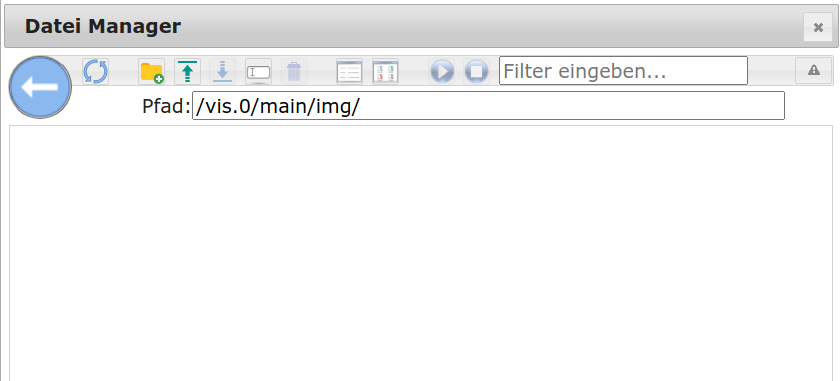
Die Systeminfos:

Plattform: linux
Betriebssystem: linux
Architektur: arm
CPUs: 4
Geschwindigkeit: 1800 MHz
Modell: unknown
RAM: 7.6 GB
System-Betriebszeit: 3 T. 04:08:43
Node.js: v16.19.1
time: 1681497853462
timeOffset: -60
Adapter-Anzahl: 471
NPM: 8.19.3
Datenträgergröße: 28.9 GB
Freier Festplattenspeicher: 26.3 GB
Betriebszeit: 3 T. 06:56:52
Aktive Instanzen: 17
Pfad: /opt/iobroker/
aktiv:
Was soll ich zu den Dateiberechtigungen erzählen?
@Glasfaser : Mit den von dir geposteten Begriffen komme ich nicht weiter. Weder das ich etwas mit diesen Begriffen bei der Suche finde, noch dass das Thema "Verbindungsfehler" mit seinen zahlreichen Ergebnissen irgendwo in der Nähe von meinem Problem landet.
@DJMarc75 : Der Dateiname ist aussen.png und das Problem hat anscheinend weder etwas mit dem Dateityp, der Auflösung des Pics oder der Länge des Dateinamen zu tun. Es lässt sich kein Bild hochladen. Und einen Domainnamen (für das System, bzw. dessen Umgebung) gibt es noch nicht, da ich zunächst an einem eigens dafür gedachten RasbPi teste.Ich hoffe, dass man damit jetzt mehr anfangen kann.
-
Hallo Community,
mit Tante Google komme ich leider immer nur auf Anleitungen, aber nicht auf eine Problemlösung:Ich möchte im vis-Editor über den Dateimanager ein Bild ins vis.0-Verzeichnis laden. Egal ob per Drag&Drop, oder durch Klicken in der Dropbox, das Pic (ein PNG mit 826 kB) wird mir in der Dropbox angezeigt. Nach einem Klick auf "Upload" geschieht gar nichts. Das Bild selbst taucht nicht im Dateimanager auf. Egal ob Cache löschen, Neustart ioBroker, nichts. Es sieht mir fast so aus, als hätte ich die Berechtigung nicht ein Bild hochzuladen.
Leider finde ich weder in den Docs, noch im Internet irgendetwas das zur Lösung beitragen könnte.Übersehe ich hier etwas ganz banales?
Danke
Stefan -
@2u1c1d3 Vor ein paar Tagen hatte ein User ein ähnliches Problem in Discord.
Die Lösung war im Web Adapter diese Option zu aktivieren
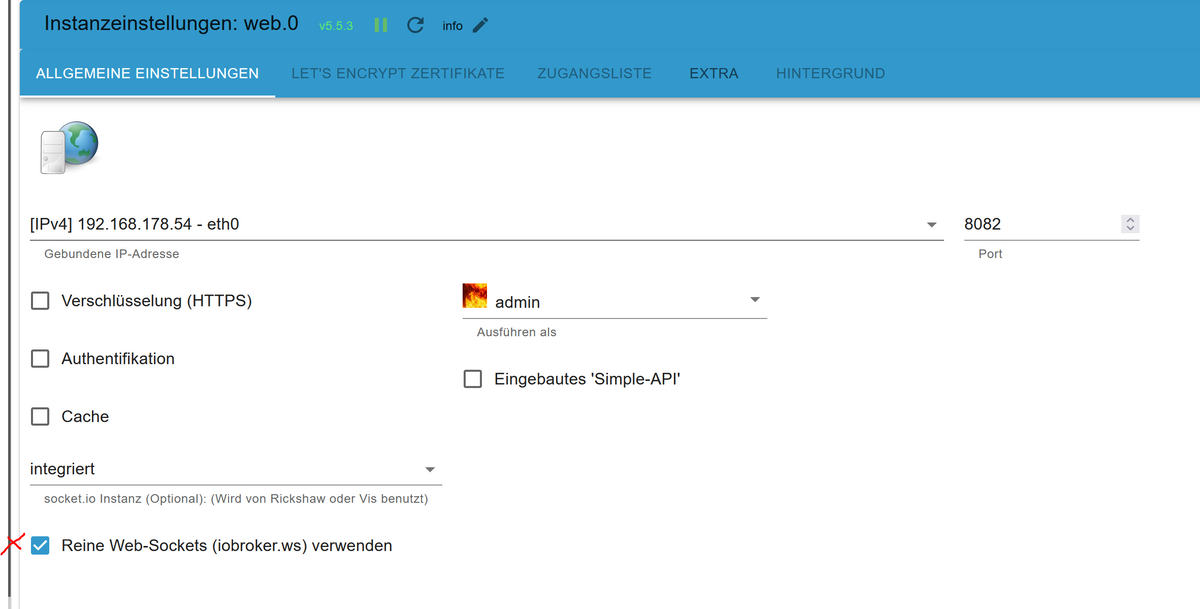
@feuersturm sagte in Dateimanager aus VIS lässt keine Uploads zu:
@2u1c1d3 Vor ein paar Tagen hatte ein User ein ähnliches Problem in Discord.
Die Lösung war im Web Adapter diese Option zu aktivierenund diese " Lösung " steht im gleichen zusammenhang ..
.... als auch im beigefügten Thread Link !
-
@homoran
ich bin jetzt mal nicht davon ausgegangen, dass es für mein Problem relevant ist Screenshots zu posten...
Die Systeminfos:
Plattform: linux
Betriebssystem: linux
Architektur: arm
CPUs: 4
Geschwindigkeit: 1800 MHz
Modell: unknown
RAM: 7.6 GB
System-Betriebszeit: 3 T. 04:08:43
Node.js: v16.19.1
time: 1681497853462
timeOffset: -60
Adapter-Anzahl: 471
NPM: 8.19.3
Datenträgergröße: 28.9 GB
Freier Festplattenspeicher: 26.3 GB
Betriebszeit: 3 T. 06:56:52
Aktive Instanzen: 17
Pfad: /opt/iobroker/
aktiv:
Was soll ich zu den Dateiberechtigungen erzählen?
@Glasfaser : Mit den von dir geposteten Begriffen komme ich nicht weiter. Weder das ich etwas mit diesen Begriffen bei der Suche finde, noch dass das Thema "Verbindungsfehler" mit seinen zahlreichen Ergebnissen irgendwo in der Nähe von meinem Problem landet.
@DJMarc75 : Der Dateiname ist aussen.png und das Problem hat anscheinend weder etwas mit dem Dateityp, der Auflösung des Pics oder der Länge des Dateinamen zu tun. Es lässt sich kein Bild hochladen. Und einen Domainnamen (für das System, bzw. dessen Umgebung) gibt es noch nicht, da ich zunächst an einem eigens dafür gedachten RasbPi teste.Ich hoffe, dass man damit jetzt mehr anfangen kann.
@2u1c1d3 sagte in Dateimanager aus VIS lässt keine Uploads zu:
Plattform: linux
Betriebssystem: linux
Architektur: arm
.
.und mit diesen Angaben kann man nicht viel anfangen ..
deshalb :
@homoran sagte in Dateimanager aus VIS lässt keine Uploads zu:
@2U1C1D3
am besten mal die Ausgabe von iob diag in code-tags posten. -
@homoran
ich bin jetzt mal nicht davon ausgegangen, dass es für mein Problem relevant ist Screenshots zu posten...
Die Systeminfos:
Plattform: linux
Betriebssystem: linux
Architektur: arm
CPUs: 4
Geschwindigkeit: 1800 MHz
Modell: unknown
RAM: 7.6 GB
System-Betriebszeit: 3 T. 04:08:43
Node.js: v16.19.1
time: 1681497853462
timeOffset: -60
Adapter-Anzahl: 471
NPM: 8.19.3
Datenträgergröße: 28.9 GB
Freier Festplattenspeicher: 26.3 GB
Betriebszeit: 3 T. 06:56:52
Aktive Instanzen: 17
Pfad: /opt/iobroker/
aktiv:
Was soll ich zu den Dateiberechtigungen erzählen?
@Glasfaser : Mit den von dir geposteten Begriffen komme ich nicht weiter. Weder das ich etwas mit diesen Begriffen bei der Suche finde, noch dass das Thema "Verbindungsfehler" mit seinen zahlreichen Ergebnissen irgendwo in der Nähe von meinem Problem landet.
@DJMarc75 : Der Dateiname ist aussen.png und das Problem hat anscheinend weder etwas mit dem Dateityp, der Auflösung des Pics oder der Länge des Dateinamen zu tun. Es lässt sich kein Bild hochladen. Und einen Domainnamen (für das System, bzw. dessen Umgebung) gibt es noch nicht, da ich zunächst an einem eigens dafür gedachten RasbPi teste.Ich hoffe, dass man damit jetzt mehr anfangen kann.
@2u1c1d3 sagte in Dateimanager aus VIS lässt keine Uploads zu:
relevant ist Screenshots zu posten...
und wo ist da das png?
@2u1c1d3 sagte in Dateimanager aus VIS lässt keine Uploads zu:
Was soll ich zu den Dateiberechtigungen erzählen?
mit root verbogen?
-
Hallo @Glasfaser ,
ich bitte zu entschuldigen, deine Forderung nach der Ausgabe von iob_diag habe ich überlesen - mea culpa :) Als iobroker-Rookie habe ich jetzt auch erst mal experimentieren müssen, wie ich diese Ausgabe erreiche... Da ist sie:/opt/iobroker$ ./iob_diag TERM environment variable not set. ======== Start marking the full check here ========= Skript v.2023-04-15 107*** BASE SYSTEM *** Model : Raspberry Pi 4 Model B Rev 1.4 Architecture : aarch64 Docker : false Virtualization : none Distributor ID: Raspbian Description: Raspbian GNU/Linux 11 (bullseye) Release: 11 Codename: bullseye PRETTY_NAME="Raspbian GNU/Linux 11 (bullseye)" NAME="Raspbian GNU/Linux" VERSION_ID="11" VERSION="11 (bullseye)" VERSION_CODENAME=bullseye ID=raspbian ID_LIKE=debian HOME_URL="http://www.raspbian.org/" SUPPORT_URL="http://www.raspbian.org/RaspbianForums" BUG_REPORT_URL="http://www.raspbian.org/RaspbianBugs" Systemuptime and Load: 16:36:09 up 5 days, 1:00, 0 users, load average: 0.52, 0.31, 0.22 CPU threads: 4 Raspberry only: throttled=0x0 Other values than 0x0 hint to temperature/voltage problems temp=41.3'C volt=0.9260V 107*** Time and Time Zones *** Local time: Sun 2023-04-16 16:36:09 BST Universal time: Sun 2023-04-16 15:36:09 UTC RTC time: n/a Time zone: Europe/London (BST, +0100) System clock synchronized: yes NTP service: active RTC in local TZ: no 107*** User and Groups *** iobroker /home/iobroker iobroker tty dialout audio video bluetooth gpio i2c 107*** X-Server-Setup *** X-Server: false Desktop: Terminal: unspecified Boot Target: multi-user.target 107*** MEMORY *** total used free shared buff/cache available Mem: 7.9G 1.3G 5.9G 1.0M 671M 6.8G Swap: 99M 0B 99M Total: 8.0G 1.3G 6.0G 7862 M total memory 1263 M used memory 1033 M active memory 752 M inactive memory 5927 M free memory 105 M buffer memory 565 M swap cache 99 M total swap 0 M used swap 99 M free swap Raspberry only: oom events: 0 lifetime oom required: 0 Mbytes total time in oom handler: 0 ms max time spent in oom handler: 0 ms 107*** FILESYSTEM *** Filesystem Type Size Used Avail Use% Mounted on /dev/root ext4 29G 2.8G 25G 10% / devtmpfs devtmpfs 3.6G 0 3.6G 0% /dev tmpfs tmpfs 3.9G 0 3.9G 0% /dev/shm tmpfs tmpfs 1.6G 1.1M 1.6G 1% /run tmpfs tmpfs 5.0M 4.0K 5.0M 1% /run/lock /dev/mmcblk0p1 vfat 255M 51M 205M 20% /boot tmpfs tmpfs 787M 0 787M 0% /run/user/1001 Messages concerning ext4 filesystem in dmesg: We trust you have received the usual lecture from the local System Administrator. It usually boils down to these three things: #1) Respect the privacy of others. #2) Think before you type. #3) With great power comes great responsibility. sudo: a terminal is required to read the password; either use the -S option to read from standard input or configure an askpass helper sudo: a password is required Show mounted filesystems (real ones only): TARGET SOURCE FSTYPE OPTIONS / /dev/mmcblk0p2 ext4 rw,noatime `-/boot /dev/mmcblk0p1 vfat rw,relatime,fmask=0022,dmask=0022,codepage=437,iocharset=ascii,shortname=mixed,errors=remount-ro Files in neuralgic directories: /var: We trust you have received the usual lecture from the local System Administrator. It usually boils down to these three things: #1) Respect the privacy of others. #2) Think before you type. #3) With great power comes great responsibility. sudo: a terminal is required to read the password; either use the -S option to read from standard input or configure an askpass helper sudo: a password is required Hint: You are currently not seeing messages from other users and the system. Users in groups 'adm', 'systemd-journal' can see all messages. Pass -q to turn off this notice. Archived and active journals take up 8.0M in the file system. /opt/iobroker/backups: 9.0M /opt/iobroker/backups/ /opt/iobroker/iobroker-data: 192M /opt/iobroker/iobroker-data/ 153M /opt/iobroker/iobroker-data/files 51M /opt/iobroker/iobroker-data/files/javascript.admin 32M /opt/iobroker/iobroker-data/files/javascript.admin/static/js 32M /opt/iobroker/iobroker-data/files/javascript.admin/static The five largest files in iobroker-data are: 19M /opt/iobroker/iobroker-data/files/iot.admin/static/js/main.904d455f.js.map 11M /opt/iobroker/iobroker-data/files/s7.admin/static/js/main.05e58ebd.js.map 8.1M /opt/iobroker/iobroker-data/files/iot.admin/static/js/main.904d455f.js 7.0M /opt/iobroker/iobroker-data/states.jsonl 6.9M /opt/iobroker/iobroker-data/files/javascript.admin/static/js/610.de0231c9.chunk.js.map 107*** NodeJS-Installation *** ./iob_diag: line 166: nodejs: command not found /usr/bin/node v16.19.1 /usr/bin/npm 8.19.3 /usr/bin/npx 8.19.3 ./iob_diag: line 175: nodejs: command not found *** nodejs is NOT correctly installed *** nodejs: Installed: 16.19.1-deb-1nodesource1 Candidate: 16.19.1-deb-1nodesource1 Version table: *** 16.19.1-deb-1nodesource1 500 500 https://deb.nodesource.com/node_16.x bullseye/main armhf Packages 100 /var/lib/dpkg/status 12.22.12~dfsg-1~deb11u3 500 500 http://raspbian.raspberrypi.org/raspbian bullseye/main armhf Packages Temp directories causing npm8 problem: 0 No problems detected 107*** ioBroker-Installation *** ioBroker Status iobroker is running on this host. Objects type: jsonl States type: jsonl MULTIHOSTSERVICE/enabled: false Core adapters versions js-controller: 4.0.24 admin: 6.3.5 javascript: 6.1.4 Adapters from github: 0 Adapter State + system.adapter.admin.0 : admin : iobroker-pi - enabled, port: 8081, bind: 0.0.0.0 (SSL), run as: admin system.adapter.backitup.0 : backitup : iobroker-pi - disabled + system.adapter.cloud.0 : cloud : iobroker-pi - enabled + system.adapter.discovery.0 : discovery : iobroker-pi - enabled + system.adapter.ecovacs-deebot.0 : ecovacs-deebot : iobroker-pi - enabled + system.adapter.ecovacs-deebot.1 : ecovacs-deebot : iobroker-pi - enabled + system.adapter.homeconnect.0 : homeconnect : iobroker-pi - enabled + system.adapter.hue.0 : hue : iobroker-pi - enabled, port: 443 system.adapter.iot.0 : iot : iobroker-pi - disabled + system.adapter.iqontrol.0 : iqontrol : iobroker-pi - enabled + system.adapter.javascript.0 : javascript : iobroker-pi - enabled + system.adapter.landroid.0 : landroid : iobroker-pi - enabled + system.adapter.net-tools.0 : net-tools : iobroker-pi - enabled + system.adapter.ping.0 : ping : iobroker-pi - enabled + system.adapter.s7.0 : s7 : iobroker-pi - enabled + system.adapter.s7.1 : s7 : iobroker-pi - enabled + system.adapter.s7.2 : s7 : iobroker-pi - enabled + system.adapter.s7.3 : s7 : iobroker-pi - enabled + system.adapter.synology.0 : synology : iobroker-pi - enabled, port: 5001 + system.adapter.terminal.0 : terminal : iobroker-pi - enabled, port: 8088, bind: 0.0.0.0 (SSL), run as: admin system.adapter.vis.0 : vis : iobroker-pi - enabled + system.adapter.web.0 : web : iobroker-pi - enabled, port: 8082, bind: 0.0.0.0, run as: admin + instance is alive Enabled adapters with bindings + system.adapter.admin.0 : admin : iobroker-pi - enabled, port: 8081, bind: 0.0.0.0 (SSL), run as: admin + system.adapter.hue.0 : hue : iobroker-pi - enabled, port: 443 + system.adapter.synology.0 : synology : iobroker-pi - enabled, port: 5001 + system.adapter.terminal.0 : terminal : iobroker-pi - enabled, port: 8088, bind: 0.0.0.0 (SSL), run as: admin + system.adapter.web.0 : web : iobroker-pi - enabled, port: 8082, bind: 0.0.0.0, run as: admin ioBroker-Repositories stable : http://download.iobroker.net/sources-dist.json beta : http://download.iobroker.net/sources-dist-latest.json Active repo(s): stable Installed ioBroker-Instances Used repository: stable Adapter "admin" : 6.3.5 , installed 6.3.5 Adapter "backitup" : 2.6.16 , installed 2.6.16 Adapter "cloud" : 4.3.0 , installed 4.3.0 Adapter "discovery" : 3.1.0 , installed 3.1.0 Adapter "ecovacs-deebot": 1.4.13 , installed 1.4.13 Adapter "homeconnect" : 1.1.1 , installed 1.1.1 Adapter "hue" : 3.7.1 , installed 3.7.1 Adapter "iot" : 1.14.2 , installed 1.14.2 Adapter "iqontrol" : 2.1.0 , installed 2.1.0 Adapter "javascript" : 6.1.4 , installed 6.1.4 Controller "js-controller": 4.0.24 , installed 4.0.24 Adapter "landroid" : 1.0.3 , installed 1.0.3 Adapter "net-tools" : 0.2.0 , installed 0.2.0 Adapter "ping" : 1.5.3 , installed 1.5.3 Adapter "s7" : 1.3.14 , installed 1.3.14 Adapter "simple-api" : 2.7.2 , installed 2.7.2 Adapter "socketio" : 4.2.0 , installed 4.2.0 Adapter "synology" : 2.1.13 , installed 2.1.13 Adapter "terminal" : 1.0.0 , installed 1.0.0 Adapter "vis" : 1.4.16 , installed 1.4.16 Adapter "web" : 4.3.0 , installed 4.3.0 Adapter "ws" : 1.3.0 , installed 1.3.0 Objects and States Please stand by - This may take a while Objects: 2113 States: 1654 107*** OS-Repositories and Updates *** Hit:1 http://archive.raspberrypi.org/debian bullseye InRelease Hit:2 http://raspbian.raspberrypi.org/raspbian bullseye InRelease Hit:3 https://deb.nodesource.com/node_16.x bullseye InRelease Reading package lists... Pending Updates: 10 107*** Listening Ports *** We trust you have received the usual lecture from the local System Administrator. It usually boils down to these three things: #1) Respect the privacy of others. #2) Think before you type. #3) With great power comes great responsibility. sudo: a terminal is required to read the password; either use the -S option to read from standard input or configure an askpass helper sudo: a password is required 107*** Log File - Last 25 Lines *** 2023-04-16 16:23:56.037 - warn: s7.3 (18819) Poll error count: 1 code: 0xa006e 2023-04-16 16:23:56.037 - warn: s7.3 (18819) Poll error Last-Error Info: 655470: ISO : An error occurred during recv TCP : Connection timed out 2023-04-16 16:23:56.038 - error: s7.3 (18819) try reconnection: Disconnect successful: true 2023-04-16 16:24:56.039 - info: s7.3 (18819) Connect in S7 mode to 0 / 0 2023-04-16 16:24:56.059 - info: s7.3 (18819) Successfully connected in S7 mode 2023-04-16 16:26:31.812 - warn: s7.3 (18819) DBRead error[DB 2:1064 - 1065]: code: 0xa006e 2023-04-16 16:26:31.813 - warn: s7.3 (18819) Poll error count: 1 code: 0xa006e 2023-04-16 16:26:31.814 - warn: s7.3 (18819) Poll error Last-Error Info: 0: OK 2023-04-16 16:26:31.814 - error: s7.3 (18819) try reconnection: Disconnect successful: true 2023-04-16 16:26:34.812 - warn: s7.3 (18819) DBRead error[DB 1:400 - 1108]: code: 0xa006e 2023-04-16 16:27:31.815 - info: s7.3 (18819) Connect in S7 mode to 0 / 0 2023-04-16 16:27:31.831 - info: s7.3 (18819) Successfully connected in S7 mode 2023-04-16 16:33:24.146 - warn: s7.3 (18819) DBRead error[DB 1:400 - 1108]: code: 0xa006e 2023-04-16 16:33:24.146 - warn: s7.3 (18819) Poll error count: 1 code: 0xa006e 2023-04-16 16:33:24.146 - warn: s7.3 (18819) Poll error Last-Error Info: 655470: ISO : An error occurred during recv TCP : Connection timed out 2023-04-16 16:33:24.147 - error: s7.3 (18819) try reconnection: Disconnect successful: true 2023-04-16 16:33:25.432 - info: admin.0 (850) failed connection to socket.io from ::ffff:10.10.10.110: Passport was not initialized 2023-04-16 16:33:59.460 - info: admin.0 (850) ==> Connected system.user.admin from ::ffff:10.10.10.110 2023-04-16 16:34:24.148 - info: s7.3 (18819) Connect in S7 mode to 0 / 0 2023-04-16 16:34:24.171 - info: s7.3 (18819) Successfully connected in S7 mode 2023-04-16 16:36:48.776 - warn: s7.3 (18819) DBRead error[DB 2:1064 - 1065]: code: 0xa006e 2023-04-16 16:36:48.777 - warn: s7.3 (18819) Poll error count: 1 code: 0xa006e 2023-04-16 16:36:48.777 - warn: s7.3 (18819) Poll error Last-Error Info: 0: OK 2023-04-16 16:36:48.777 - error: s7.3 (18819) try reconnection: Disconnect successful: true 2023-04-16 16:36:51.777 - warn: s7.3 (18819) DBRead error[DB 1:400 - 1108]: code: 0xa006e ============ Mark until here for C&P ============= iob diag has finished. Press any key for a summary TERM environment variable not set. Copy text starting here: ======================= SUMMARY ======================= v.2023-04-15 Operatingsystem: Raspbian GNU/Linux 11 (bullseye) Kernel: 6.1.19-v8+ Installation: Native Timezone: Europe/London (BST, +0100) User-ID: 1001 X-Server: false Boot Target: multi-user.target Pending OS-Updates: 10 Pending iob updates: 0 ./iob_diag: line 340: nodejs: command not found Nodejs-Installation: /usr/bin/node v16.19.1 /usr/bin/npm 8.19.3 /usr/bin/npx 8.19.3 Recommended versions are nodejs 18.x.y and npm 9.x.y *** nodejs is NOT correctly installed *** MEMORY: total used free shared buff/cache available Mem: 7.9G 1.3G 5.8G 1.0M 791M 6.8G Swap: 99M 0B 99M Total: 8.0G 1.3G 5.9G Active iob-Instances: 20 Active repo(s): stable ioBroker Core: js-controller 4.0.24 admin 6.3.5 ioBroker Status: iobroker is running on this host. Objects type: jsonl States type: jsonl Status admin and web instance: + system.adapter.admin.0 : admin : iobroker-pi - enabled, port: 8081, bind: 0.0.0.0 (SSL), run as: admin + system.adapter.web.0 : web : iobroker-pi - enabled, port: 8082, bind: 0.0.0.0, run as: admin Objects: 2113 States: 1654 Size of iob-Database: 7.4M /opt/iobroker/iobroker-data/objects.jsonl 7.1M /opt/iobroker/iobroker-data/states.jsonl =================== END OF SUMMARY ====================@Homoran :
Auf deine Frage wo das PNG ist: Es ist eben nicht auf dem Screenshot zu sehen, weil ich es nicht hochladen kann. Wenn du mit deiner Frage meintest, dass ich das PNG an sich hier im Forum online stellen soll, dann ein klares NEIN.
Tut mir leid, ich will hier nicht patzig sein, weil ich mir ja von euch Hilfe erwarte. Aber- werde ich aus nachvollziehbaren Gründen den Inhalt des PNGs nicht publik machen, da sowohl personenbezogene Daten in dem Hintergrundbild enthalten sind, als auch geografische Referenzen welche eine eindeutige Zuordnung ermöglichen und
- ich ja bereits von mir gegeben habe, dass es nicht an diesem einen Bild liegt, sondern dass es überhaupt nicht geht, also dateiunabhängig ist.
Zu "mit root verbogen": Ich bin gerne als Root unterwegs und habe mir dabei auch schon das eine oder andere System gekillt :) Allerdings ist iobroker, wie schon erwähnt, für mich totales Neuland. Und ich habe eben den allerersten Befehl auf der Konsole des iobrokers eingegeben (./iob_diag). Also hier auch NEIN, "I didn't root and drink" :)
BTW, auch wenn oT: Wie komme ich den via Terminal von meinem Desktop auf den ioBroker? Alles an PWs und User aus diversen Posts verläuft negativ und mein Terminal gibt mir auch mal ganz klar zur Antwort, ich solle gefälligst erst mal nen ssh-User anlegen. Gerne, aber wo im Admin-Interface?
-
Hallo @Glasfaser ,
ich bitte zu entschuldigen, deine Forderung nach der Ausgabe von iob_diag habe ich überlesen - mea culpa :) Als iobroker-Rookie habe ich jetzt auch erst mal experimentieren müssen, wie ich diese Ausgabe erreiche... Da ist sie:/opt/iobroker$ ./iob_diag TERM environment variable not set. ======== Start marking the full check here ========= Skript v.2023-04-15 107*** BASE SYSTEM *** Model : Raspberry Pi 4 Model B Rev 1.4 Architecture : aarch64 Docker : false Virtualization : none Distributor ID: Raspbian Description: Raspbian GNU/Linux 11 (bullseye) Release: 11 Codename: bullseye PRETTY_NAME="Raspbian GNU/Linux 11 (bullseye)" NAME="Raspbian GNU/Linux" VERSION_ID="11" VERSION="11 (bullseye)" VERSION_CODENAME=bullseye ID=raspbian ID_LIKE=debian HOME_URL="http://www.raspbian.org/" SUPPORT_URL="http://www.raspbian.org/RaspbianForums" BUG_REPORT_URL="http://www.raspbian.org/RaspbianBugs" Systemuptime and Load: 16:36:09 up 5 days, 1:00, 0 users, load average: 0.52, 0.31, 0.22 CPU threads: 4 Raspberry only: throttled=0x0 Other values than 0x0 hint to temperature/voltage problems temp=41.3'C volt=0.9260V 107*** Time and Time Zones *** Local time: Sun 2023-04-16 16:36:09 BST Universal time: Sun 2023-04-16 15:36:09 UTC RTC time: n/a Time zone: Europe/London (BST, +0100) System clock synchronized: yes NTP service: active RTC in local TZ: no 107*** User and Groups *** iobroker /home/iobroker iobroker tty dialout audio video bluetooth gpio i2c 107*** X-Server-Setup *** X-Server: false Desktop: Terminal: unspecified Boot Target: multi-user.target 107*** MEMORY *** total used free shared buff/cache available Mem: 7.9G 1.3G 5.9G 1.0M 671M 6.8G Swap: 99M 0B 99M Total: 8.0G 1.3G 6.0G 7862 M total memory 1263 M used memory 1033 M active memory 752 M inactive memory 5927 M free memory 105 M buffer memory 565 M swap cache 99 M total swap 0 M used swap 99 M free swap Raspberry only: oom events: 0 lifetime oom required: 0 Mbytes total time in oom handler: 0 ms max time spent in oom handler: 0 ms 107*** FILESYSTEM *** Filesystem Type Size Used Avail Use% Mounted on /dev/root ext4 29G 2.8G 25G 10% / devtmpfs devtmpfs 3.6G 0 3.6G 0% /dev tmpfs tmpfs 3.9G 0 3.9G 0% /dev/shm tmpfs tmpfs 1.6G 1.1M 1.6G 1% /run tmpfs tmpfs 5.0M 4.0K 5.0M 1% /run/lock /dev/mmcblk0p1 vfat 255M 51M 205M 20% /boot tmpfs tmpfs 787M 0 787M 0% /run/user/1001 Messages concerning ext4 filesystem in dmesg: We trust you have received the usual lecture from the local System Administrator. It usually boils down to these three things: #1) Respect the privacy of others. #2) Think before you type. #3) With great power comes great responsibility. sudo: a terminal is required to read the password; either use the -S option to read from standard input or configure an askpass helper sudo: a password is required Show mounted filesystems (real ones only): TARGET SOURCE FSTYPE OPTIONS / /dev/mmcblk0p2 ext4 rw,noatime `-/boot /dev/mmcblk0p1 vfat rw,relatime,fmask=0022,dmask=0022,codepage=437,iocharset=ascii,shortname=mixed,errors=remount-ro Files in neuralgic directories: /var: We trust you have received the usual lecture from the local System Administrator. It usually boils down to these three things: #1) Respect the privacy of others. #2) Think before you type. #3) With great power comes great responsibility. sudo: a terminal is required to read the password; either use the -S option to read from standard input or configure an askpass helper sudo: a password is required Hint: You are currently not seeing messages from other users and the system. Users in groups 'adm', 'systemd-journal' can see all messages. Pass -q to turn off this notice. Archived and active journals take up 8.0M in the file system. /opt/iobroker/backups: 9.0M /opt/iobroker/backups/ /opt/iobroker/iobroker-data: 192M /opt/iobroker/iobroker-data/ 153M /opt/iobroker/iobroker-data/files 51M /opt/iobroker/iobroker-data/files/javascript.admin 32M /opt/iobroker/iobroker-data/files/javascript.admin/static/js 32M /opt/iobroker/iobroker-data/files/javascript.admin/static The five largest files in iobroker-data are: 19M /opt/iobroker/iobroker-data/files/iot.admin/static/js/main.904d455f.js.map 11M /opt/iobroker/iobroker-data/files/s7.admin/static/js/main.05e58ebd.js.map 8.1M /opt/iobroker/iobroker-data/files/iot.admin/static/js/main.904d455f.js 7.0M /opt/iobroker/iobroker-data/states.jsonl 6.9M /opt/iobroker/iobroker-data/files/javascript.admin/static/js/610.de0231c9.chunk.js.map 107*** NodeJS-Installation *** ./iob_diag: line 166: nodejs: command not found /usr/bin/node v16.19.1 /usr/bin/npm 8.19.3 /usr/bin/npx 8.19.3 ./iob_diag: line 175: nodejs: command not found *** nodejs is NOT correctly installed *** nodejs: Installed: 16.19.1-deb-1nodesource1 Candidate: 16.19.1-deb-1nodesource1 Version table: *** 16.19.1-deb-1nodesource1 500 500 https://deb.nodesource.com/node_16.x bullseye/main armhf Packages 100 /var/lib/dpkg/status 12.22.12~dfsg-1~deb11u3 500 500 http://raspbian.raspberrypi.org/raspbian bullseye/main armhf Packages Temp directories causing npm8 problem: 0 No problems detected 107*** ioBroker-Installation *** ioBroker Status iobroker is running on this host. Objects type: jsonl States type: jsonl MULTIHOSTSERVICE/enabled: false Core adapters versions js-controller: 4.0.24 admin: 6.3.5 javascript: 6.1.4 Adapters from github: 0 Adapter State + system.adapter.admin.0 : admin : iobroker-pi - enabled, port: 8081, bind: 0.0.0.0 (SSL), run as: admin system.adapter.backitup.0 : backitup : iobroker-pi - disabled + system.adapter.cloud.0 : cloud : iobroker-pi - enabled + system.adapter.discovery.0 : discovery : iobroker-pi - enabled + system.adapter.ecovacs-deebot.0 : ecovacs-deebot : iobroker-pi - enabled + system.adapter.ecovacs-deebot.1 : ecovacs-deebot : iobroker-pi - enabled + system.adapter.homeconnect.0 : homeconnect : iobroker-pi - enabled + system.adapter.hue.0 : hue : iobroker-pi - enabled, port: 443 system.adapter.iot.0 : iot : iobroker-pi - disabled + system.adapter.iqontrol.0 : iqontrol : iobroker-pi - enabled + system.adapter.javascript.0 : javascript : iobroker-pi - enabled + system.adapter.landroid.0 : landroid : iobroker-pi - enabled + system.adapter.net-tools.0 : net-tools : iobroker-pi - enabled + system.adapter.ping.0 : ping : iobroker-pi - enabled + system.adapter.s7.0 : s7 : iobroker-pi - enabled + system.adapter.s7.1 : s7 : iobroker-pi - enabled + system.adapter.s7.2 : s7 : iobroker-pi - enabled + system.adapter.s7.3 : s7 : iobroker-pi - enabled + system.adapter.synology.0 : synology : iobroker-pi - enabled, port: 5001 + system.adapter.terminal.0 : terminal : iobroker-pi - enabled, port: 8088, bind: 0.0.0.0 (SSL), run as: admin system.adapter.vis.0 : vis : iobroker-pi - enabled + system.adapter.web.0 : web : iobroker-pi - enabled, port: 8082, bind: 0.0.0.0, run as: admin + instance is alive Enabled adapters with bindings + system.adapter.admin.0 : admin : iobroker-pi - enabled, port: 8081, bind: 0.0.0.0 (SSL), run as: admin + system.adapter.hue.0 : hue : iobroker-pi - enabled, port: 443 + system.adapter.synology.0 : synology : iobroker-pi - enabled, port: 5001 + system.adapter.terminal.0 : terminal : iobroker-pi - enabled, port: 8088, bind: 0.0.0.0 (SSL), run as: admin + system.adapter.web.0 : web : iobroker-pi - enabled, port: 8082, bind: 0.0.0.0, run as: admin ioBroker-Repositories stable : http://download.iobroker.net/sources-dist.json beta : http://download.iobroker.net/sources-dist-latest.json Active repo(s): stable Installed ioBroker-Instances Used repository: stable Adapter "admin" : 6.3.5 , installed 6.3.5 Adapter "backitup" : 2.6.16 , installed 2.6.16 Adapter "cloud" : 4.3.0 , installed 4.3.0 Adapter "discovery" : 3.1.0 , installed 3.1.0 Adapter "ecovacs-deebot": 1.4.13 , installed 1.4.13 Adapter "homeconnect" : 1.1.1 , installed 1.1.1 Adapter "hue" : 3.7.1 , installed 3.7.1 Adapter "iot" : 1.14.2 , installed 1.14.2 Adapter "iqontrol" : 2.1.0 , installed 2.1.0 Adapter "javascript" : 6.1.4 , installed 6.1.4 Controller "js-controller": 4.0.24 , installed 4.0.24 Adapter "landroid" : 1.0.3 , installed 1.0.3 Adapter "net-tools" : 0.2.0 , installed 0.2.0 Adapter "ping" : 1.5.3 , installed 1.5.3 Adapter "s7" : 1.3.14 , installed 1.3.14 Adapter "simple-api" : 2.7.2 , installed 2.7.2 Adapter "socketio" : 4.2.0 , installed 4.2.0 Adapter "synology" : 2.1.13 , installed 2.1.13 Adapter "terminal" : 1.0.0 , installed 1.0.0 Adapter "vis" : 1.4.16 , installed 1.4.16 Adapter "web" : 4.3.0 , installed 4.3.0 Adapter "ws" : 1.3.0 , installed 1.3.0 Objects and States Please stand by - This may take a while Objects: 2113 States: 1654 107*** OS-Repositories and Updates *** Hit:1 http://archive.raspberrypi.org/debian bullseye InRelease Hit:2 http://raspbian.raspberrypi.org/raspbian bullseye InRelease Hit:3 https://deb.nodesource.com/node_16.x bullseye InRelease Reading package lists... Pending Updates: 10 107*** Listening Ports *** We trust you have received the usual lecture from the local System Administrator. It usually boils down to these three things: #1) Respect the privacy of others. #2) Think before you type. #3) With great power comes great responsibility. sudo: a terminal is required to read the password; either use the -S option to read from standard input or configure an askpass helper sudo: a password is required 107*** Log File - Last 25 Lines *** 2023-04-16 16:23:56.037 - warn: s7.3 (18819) Poll error count: 1 code: 0xa006e 2023-04-16 16:23:56.037 - warn: s7.3 (18819) Poll error Last-Error Info: 655470: ISO : An error occurred during recv TCP : Connection timed out 2023-04-16 16:23:56.038 - error: s7.3 (18819) try reconnection: Disconnect successful: true 2023-04-16 16:24:56.039 - info: s7.3 (18819) Connect in S7 mode to 0 / 0 2023-04-16 16:24:56.059 - info: s7.3 (18819) Successfully connected in S7 mode 2023-04-16 16:26:31.812 - warn: s7.3 (18819) DBRead error[DB 2:1064 - 1065]: code: 0xa006e 2023-04-16 16:26:31.813 - warn: s7.3 (18819) Poll error count: 1 code: 0xa006e 2023-04-16 16:26:31.814 - warn: s7.3 (18819) Poll error Last-Error Info: 0: OK 2023-04-16 16:26:31.814 - error: s7.3 (18819) try reconnection: Disconnect successful: true 2023-04-16 16:26:34.812 - warn: s7.3 (18819) DBRead error[DB 1:400 - 1108]: code: 0xa006e 2023-04-16 16:27:31.815 - info: s7.3 (18819) Connect in S7 mode to 0 / 0 2023-04-16 16:27:31.831 - info: s7.3 (18819) Successfully connected in S7 mode 2023-04-16 16:33:24.146 - warn: s7.3 (18819) DBRead error[DB 1:400 - 1108]: code: 0xa006e 2023-04-16 16:33:24.146 - warn: s7.3 (18819) Poll error count: 1 code: 0xa006e 2023-04-16 16:33:24.146 - warn: s7.3 (18819) Poll error Last-Error Info: 655470: ISO : An error occurred during recv TCP : Connection timed out 2023-04-16 16:33:24.147 - error: s7.3 (18819) try reconnection: Disconnect successful: true 2023-04-16 16:33:25.432 - info: admin.0 (850) failed connection to socket.io from ::ffff:10.10.10.110: Passport was not initialized 2023-04-16 16:33:59.460 - info: admin.0 (850) ==> Connected system.user.admin from ::ffff:10.10.10.110 2023-04-16 16:34:24.148 - info: s7.3 (18819) Connect in S7 mode to 0 / 0 2023-04-16 16:34:24.171 - info: s7.3 (18819) Successfully connected in S7 mode 2023-04-16 16:36:48.776 - warn: s7.3 (18819) DBRead error[DB 2:1064 - 1065]: code: 0xa006e 2023-04-16 16:36:48.777 - warn: s7.3 (18819) Poll error count: 1 code: 0xa006e 2023-04-16 16:36:48.777 - warn: s7.3 (18819) Poll error Last-Error Info: 0: OK 2023-04-16 16:36:48.777 - error: s7.3 (18819) try reconnection: Disconnect successful: true 2023-04-16 16:36:51.777 - warn: s7.3 (18819) DBRead error[DB 1:400 - 1108]: code: 0xa006e ============ Mark until here for C&P ============= iob diag has finished. Press any key for a summary TERM environment variable not set. Copy text starting here: ======================= SUMMARY ======================= v.2023-04-15 Operatingsystem: Raspbian GNU/Linux 11 (bullseye) Kernel: 6.1.19-v8+ Installation: Native Timezone: Europe/London (BST, +0100) User-ID: 1001 X-Server: false Boot Target: multi-user.target Pending OS-Updates: 10 Pending iob updates: 0 ./iob_diag: line 340: nodejs: command not found Nodejs-Installation: /usr/bin/node v16.19.1 /usr/bin/npm 8.19.3 /usr/bin/npx 8.19.3 Recommended versions are nodejs 18.x.y and npm 9.x.y *** nodejs is NOT correctly installed *** MEMORY: total used free shared buff/cache available Mem: 7.9G 1.3G 5.8G 1.0M 791M 6.8G Swap: 99M 0B 99M Total: 8.0G 1.3G 5.9G Active iob-Instances: 20 Active repo(s): stable ioBroker Core: js-controller 4.0.24 admin 6.3.5 ioBroker Status: iobroker is running on this host. Objects type: jsonl States type: jsonl Status admin and web instance: + system.adapter.admin.0 : admin : iobroker-pi - enabled, port: 8081, bind: 0.0.0.0 (SSL), run as: admin + system.adapter.web.0 : web : iobroker-pi - enabled, port: 8082, bind: 0.0.0.0, run as: admin Objects: 2113 States: 1654 Size of iob-Database: 7.4M /opt/iobroker/iobroker-data/objects.jsonl 7.1M /opt/iobroker/iobroker-data/states.jsonl =================== END OF SUMMARY ====================@Homoran :
Auf deine Frage wo das PNG ist: Es ist eben nicht auf dem Screenshot zu sehen, weil ich es nicht hochladen kann. Wenn du mit deiner Frage meintest, dass ich das PNG an sich hier im Forum online stellen soll, dann ein klares NEIN.
Tut mir leid, ich will hier nicht patzig sein, weil ich mir ja von euch Hilfe erwarte. Aber- werde ich aus nachvollziehbaren Gründen den Inhalt des PNGs nicht publik machen, da sowohl personenbezogene Daten in dem Hintergrundbild enthalten sind, als auch geografische Referenzen welche eine eindeutige Zuordnung ermöglichen und
- ich ja bereits von mir gegeben habe, dass es nicht an diesem einen Bild liegt, sondern dass es überhaupt nicht geht, also dateiunabhängig ist.
Zu "mit root verbogen": Ich bin gerne als Root unterwegs und habe mir dabei auch schon das eine oder andere System gekillt :) Allerdings ist iobroker, wie schon erwähnt, für mich totales Neuland. Und ich habe eben den allerersten Befehl auf der Konsole des iobrokers eingegeben (./iob_diag). Also hier auch NEIN, "I didn't root and drink" :)
BTW, auch wenn oT: Wie komme ich den via Terminal von meinem Desktop auf den ioBroker? Alles an PWs und User aus diversen Posts verläuft negativ und mein Terminal gibt mir auch mal ganz klar zur Antwort, ich solle gefälligst erst mal nen ssh-User anlegen. Gerne, aber wo im Admin-Interface?
@2u1c1d3 sagte in Dateimanager aus VIS lässt keine Uploads zu:
Es ist eben nicht auf dem Screenshot zu sehen, weil ich es nicht hochladen kann.
dann muss es doch wenigstens in der Box zu sehen sein.
@2u1c1d3 sagte in Dateimanager aus VIS lässt keine Uploads zu:
werde ich aus nachvollziehbaren Gründen den Inhalt des PNGs nicht publik machen, da sowohl personenbezogene Daten in dem Hintergrundbild enthalten sind, als auch geografische Referenzen welche eine eindeutige Zuordnung ermöglichen
voll d'accord!
@2u1c1d3 sagte in Dateimanager aus VIS lässt keine Uploads zu:
dass es nicht an diesem einen Bild liegt, sondern dass es überhaupt nicht geht, also dateiunabhängig ist.
noch besser, dann nim ein anderes.
@2u1c1d3 sagte in Dateimanager aus VIS lässt keine Uploads zu:
BTW, auch wenn oT: Wie komme ich den via Terminal von meinem Desktop auf den ioBroker? Alles an PWs und User aus diversen Posts verläuft negativ und mein Terminal gibt mir auch mal ganz klar zur Antwort, ich solle gefälligst erst mal nen ssh-User anlegen. Gerne, aber wo im Admin-Interface?
auch durch root verbogen?
den User legt man bei der Installation des OS an.
Username und Passwort legst du dann fest. -
Hallo @Glasfaser ,
ich bitte zu entschuldigen, deine Forderung nach der Ausgabe von iob_diag habe ich überlesen - mea culpa :) Als iobroker-Rookie habe ich jetzt auch erst mal experimentieren müssen, wie ich diese Ausgabe erreiche... Da ist sie:/opt/iobroker$ ./iob_diag TERM environment variable not set. ======== Start marking the full check here ========= Skript v.2023-04-15 107*** BASE SYSTEM *** Model : Raspberry Pi 4 Model B Rev 1.4 Architecture : aarch64 Docker : false Virtualization : none Distributor ID: Raspbian Description: Raspbian GNU/Linux 11 (bullseye) Release: 11 Codename: bullseye PRETTY_NAME="Raspbian GNU/Linux 11 (bullseye)" NAME="Raspbian GNU/Linux" VERSION_ID="11" VERSION="11 (bullseye)" VERSION_CODENAME=bullseye ID=raspbian ID_LIKE=debian HOME_URL="http://www.raspbian.org/" SUPPORT_URL="http://www.raspbian.org/RaspbianForums" BUG_REPORT_URL="http://www.raspbian.org/RaspbianBugs" Systemuptime and Load: 16:36:09 up 5 days, 1:00, 0 users, load average: 0.52, 0.31, 0.22 CPU threads: 4 Raspberry only: throttled=0x0 Other values than 0x0 hint to temperature/voltage problems temp=41.3'C volt=0.9260V 107*** Time and Time Zones *** Local time: Sun 2023-04-16 16:36:09 BST Universal time: Sun 2023-04-16 15:36:09 UTC RTC time: n/a Time zone: Europe/London (BST, +0100) System clock synchronized: yes NTP service: active RTC in local TZ: no 107*** User and Groups *** iobroker /home/iobroker iobroker tty dialout audio video bluetooth gpio i2c 107*** X-Server-Setup *** X-Server: false Desktop: Terminal: unspecified Boot Target: multi-user.target 107*** MEMORY *** total used free shared buff/cache available Mem: 7.9G 1.3G 5.9G 1.0M 671M 6.8G Swap: 99M 0B 99M Total: 8.0G 1.3G 6.0G 7862 M total memory 1263 M used memory 1033 M active memory 752 M inactive memory 5927 M free memory 105 M buffer memory 565 M swap cache 99 M total swap 0 M used swap 99 M free swap Raspberry only: oom events: 0 lifetime oom required: 0 Mbytes total time in oom handler: 0 ms max time spent in oom handler: 0 ms 107*** FILESYSTEM *** Filesystem Type Size Used Avail Use% Mounted on /dev/root ext4 29G 2.8G 25G 10% / devtmpfs devtmpfs 3.6G 0 3.6G 0% /dev tmpfs tmpfs 3.9G 0 3.9G 0% /dev/shm tmpfs tmpfs 1.6G 1.1M 1.6G 1% /run tmpfs tmpfs 5.0M 4.0K 5.0M 1% /run/lock /dev/mmcblk0p1 vfat 255M 51M 205M 20% /boot tmpfs tmpfs 787M 0 787M 0% /run/user/1001 Messages concerning ext4 filesystem in dmesg: We trust you have received the usual lecture from the local System Administrator. It usually boils down to these three things: #1) Respect the privacy of others. #2) Think before you type. #3) With great power comes great responsibility. sudo: a terminal is required to read the password; either use the -S option to read from standard input or configure an askpass helper sudo: a password is required Show mounted filesystems (real ones only): TARGET SOURCE FSTYPE OPTIONS / /dev/mmcblk0p2 ext4 rw,noatime `-/boot /dev/mmcblk0p1 vfat rw,relatime,fmask=0022,dmask=0022,codepage=437,iocharset=ascii,shortname=mixed,errors=remount-ro Files in neuralgic directories: /var: We trust you have received the usual lecture from the local System Administrator. It usually boils down to these three things: #1) Respect the privacy of others. #2) Think before you type. #3) With great power comes great responsibility. sudo: a terminal is required to read the password; either use the -S option to read from standard input or configure an askpass helper sudo: a password is required Hint: You are currently not seeing messages from other users and the system. Users in groups 'adm', 'systemd-journal' can see all messages. Pass -q to turn off this notice. Archived and active journals take up 8.0M in the file system. /opt/iobroker/backups: 9.0M /opt/iobroker/backups/ /opt/iobroker/iobroker-data: 192M /opt/iobroker/iobroker-data/ 153M /opt/iobroker/iobroker-data/files 51M /opt/iobroker/iobroker-data/files/javascript.admin 32M /opt/iobroker/iobroker-data/files/javascript.admin/static/js 32M /opt/iobroker/iobroker-data/files/javascript.admin/static The five largest files in iobroker-data are: 19M /opt/iobroker/iobroker-data/files/iot.admin/static/js/main.904d455f.js.map 11M /opt/iobroker/iobroker-data/files/s7.admin/static/js/main.05e58ebd.js.map 8.1M /opt/iobroker/iobroker-data/files/iot.admin/static/js/main.904d455f.js 7.0M /opt/iobroker/iobroker-data/states.jsonl 6.9M /opt/iobroker/iobroker-data/files/javascript.admin/static/js/610.de0231c9.chunk.js.map 107*** NodeJS-Installation *** ./iob_diag: line 166: nodejs: command not found /usr/bin/node v16.19.1 /usr/bin/npm 8.19.3 /usr/bin/npx 8.19.3 ./iob_diag: line 175: nodejs: command not found *** nodejs is NOT correctly installed *** nodejs: Installed: 16.19.1-deb-1nodesource1 Candidate: 16.19.1-deb-1nodesource1 Version table: *** 16.19.1-deb-1nodesource1 500 500 https://deb.nodesource.com/node_16.x bullseye/main armhf Packages 100 /var/lib/dpkg/status 12.22.12~dfsg-1~deb11u3 500 500 http://raspbian.raspberrypi.org/raspbian bullseye/main armhf Packages Temp directories causing npm8 problem: 0 No problems detected 107*** ioBroker-Installation *** ioBroker Status iobroker is running on this host. Objects type: jsonl States type: jsonl MULTIHOSTSERVICE/enabled: false Core adapters versions js-controller: 4.0.24 admin: 6.3.5 javascript: 6.1.4 Adapters from github: 0 Adapter State + system.adapter.admin.0 : admin : iobroker-pi - enabled, port: 8081, bind: 0.0.0.0 (SSL), run as: admin system.adapter.backitup.0 : backitup : iobroker-pi - disabled + system.adapter.cloud.0 : cloud : iobroker-pi - enabled + system.adapter.discovery.0 : discovery : iobroker-pi - enabled + system.adapter.ecovacs-deebot.0 : ecovacs-deebot : iobroker-pi - enabled + system.adapter.ecovacs-deebot.1 : ecovacs-deebot : iobroker-pi - enabled + system.adapter.homeconnect.0 : homeconnect : iobroker-pi - enabled + system.adapter.hue.0 : hue : iobroker-pi - enabled, port: 443 system.adapter.iot.0 : iot : iobroker-pi - disabled + system.adapter.iqontrol.0 : iqontrol : iobroker-pi - enabled + system.adapter.javascript.0 : javascript : iobroker-pi - enabled + system.adapter.landroid.0 : landroid : iobroker-pi - enabled + system.adapter.net-tools.0 : net-tools : iobroker-pi - enabled + system.adapter.ping.0 : ping : iobroker-pi - enabled + system.adapter.s7.0 : s7 : iobroker-pi - enabled + system.adapter.s7.1 : s7 : iobroker-pi - enabled + system.adapter.s7.2 : s7 : iobroker-pi - enabled + system.adapter.s7.3 : s7 : iobroker-pi - enabled + system.adapter.synology.0 : synology : iobroker-pi - enabled, port: 5001 + system.adapter.terminal.0 : terminal : iobroker-pi - enabled, port: 8088, bind: 0.0.0.0 (SSL), run as: admin system.adapter.vis.0 : vis : iobroker-pi - enabled + system.adapter.web.0 : web : iobroker-pi - enabled, port: 8082, bind: 0.0.0.0, run as: admin + instance is alive Enabled adapters with bindings + system.adapter.admin.0 : admin : iobroker-pi - enabled, port: 8081, bind: 0.0.0.0 (SSL), run as: admin + system.adapter.hue.0 : hue : iobroker-pi - enabled, port: 443 + system.adapter.synology.0 : synology : iobroker-pi - enabled, port: 5001 + system.adapter.terminal.0 : terminal : iobroker-pi - enabled, port: 8088, bind: 0.0.0.0 (SSL), run as: admin + system.adapter.web.0 : web : iobroker-pi - enabled, port: 8082, bind: 0.0.0.0, run as: admin ioBroker-Repositories stable : http://download.iobroker.net/sources-dist.json beta : http://download.iobroker.net/sources-dist-latest.json Active repo(s): stable Installed ioBroker-Instances Used repository: stable Adapter "admin" : 6.3.5 , installed 6.3.5 Adapter "backitup" : 2.6.16 , installed 2.6.16 Adapter "cloud" : 4.3.0 , installed 4.3.0 Adapter "discovery" : 3.1.0 , installed 3.1.0 Adapter "ecovacs-deebot": 1.4.13 , installed 1.4.13 Adapter "homeconnect" : 1.1.1 , installed 1.1.1 Adapter "hue" : 3.7.1 , installed 3.7.1 Adapter "iot" : 1.14.2 , installed 1.14.2 Adapter "iqontrol" : 2.1.0 , installed 2.1.0 Adapter "javascript" : 6.1.4 , installed 6.1.4 Controller "js-controller": 4.0.24 , installed 4.0.24 Adapter "landroid" : 1.0.3 , installed 1.0.3 Adapter "net-tools" : 0.2.0 , installed 0.2.0 Adapter "ping" : 1.5.3 , installed 1.5.3 Adapter "s7" : 1.3.14 , installed 1.3.14 Adapter "simple-api" : 2.7.2 , installed 2.7.2 Adapter "socketio" : 4.2.0 , installed 4.2.0 Adapter "synology" : 2.1.13 , installed 2.1.13 Adapter "terminal" : 1.0.0 , installed 1.0.0 Adapter "vis" : 1.4.16 , installed 1.4.16 Adapter "web" : 4.3.0 , installed 4.3.0 Adapter "ws" : 1.3.0 , installed 1.3.0 Objects and States Please stand by - This may take a while Objects: 2113 States: 1654 107*** OS-Repositories and Updates *** Hit:1 http://archive.raspberrypi.org/debian bullseye InRelease Hit:2 http://raspbian.raspberrypi.org/raspbian bullseye InRelease Hit:3 https://deb.nodesource.com/node_16.x bullseye InRelease Reading package lists... Pending Updates: 10 107*** Listening Ports *** We trust you have received the usual lecture from the local System Administrator. It usually boils down to these three things: #1) Respect the privacy of others. #2) Think before you type. #3) With great power comes great responsibility. sudo: a terminal is required to read the password; either use the -S option to read from standard input or configure an askpass helper sudo: a password is required 107*** Log File - Last 25 Lines *** 2023-04-16 16:23:56.037 - warn: s7.3 (18819) Poll error count: 1 code: 0xa006e 2023-04-16 16:23:56.037 - warn: s7.3 (18819) Poll error Last-Error Info: 655470: ISO : An error occurred during recv TCP : Connection timed out 2023-04-16 16:23:56.038 - error: s7.3 (18819) try reconnection: Disconnect successful: true 2023-04-16 16:24:56.039 - info: s7.3 (18819) Connect in S7 mode to 0 / 0 2023-04-16 16:24:56.059 - info: s7.3 (18819) Successfully connected in S7 mode 2023-04-16 16:26:31.812 - warn: s7.3 (18819) DBRead error[DB 2:1064 - 1065]: code: 0xa006e 2023-04-16 16:26:31.813 - warn: s7.3 (18819) Poll error count: 1 code: 0xa006e 2023-04-16 16:26:31.814 - warn: s7.3 (18819) Poll error Last-Error Info: 0: OK 2023-04-16 16:26:31.814 - error: s7.3 (18819) try reconnection: Disconnect successful: true 2023-04-16 16:26:34.812 - warn: s7.3 (18819) DBRead error[DB 1:400 - 1108]: code: 0xa006e 2023-04-16 16:27:31.815 - info: s7.3 (18819) Connect in S7 mode to 0 / 0 2023-04-16 16:27:31.831 - info: s7.3 (18819) Successfully connected in S7 mode 2023-04-16 16:33:24.146 - warn: s7.3 (18819) DBRead error[DB 1:400 - 1108]: code: 0xa006e 2023-04-16 16:33:24.146 - warn: s7.3 (18819) Poll error count: 1 code: 0xa006e 2023-04-16 16:33:24.146 - warn: s7.3 (18819) Poll error Last-Error Info: 655470: ISO : An error occurred during recv TCP : Connection timed out 2023-04-16 16:33:24.147 - error: s7.3 (18819) try reconnection: Disconnect successful: true 2023-04-16 16:33:25.432 - info: admin.0 (850) failed connection to socket.io from ::ffff:10.10.10.110: Passport was not initialized 2023-04-16 16:33:59.460 - info: admin.0 (850) ==> Connected system.user.admin from ::ffff:10.10.10.110 2023-04-16 16:34:24.148 - info: s7.3 (18819) Connect in S7 mode to 0 / 0 2023-04-16 16:34:24.171 - info: s7.3 (18819) Successfully connected in S7 mode 2023-04-16 16:36:48.776 - warn: s7.3 (18819) DBRead error[DB 2:1064 - 1065]: code: 0xa006e 2023-04-16 16:36:48.777 - warn: s7.3 (18819) Poll error count: 1 code: 0xa006e 2023-04-16 16:36:48.777 - warn: s7.3 (18819) Poll error Last-Error Info: 0: OK 2023-04-16 16:36:48.777 - error: s7.3 (18819) try reconnection: Disconnect successful: true 2023-04-16 16:36:51.777 - warn: s7.3 (18819) DBRead error[DB 1:400 - 1108]: code: 0xa006e ============ Mark until here for C&P ============= iob diag has finished. Press any key for a summary TERM environment variable not set. Copy text starting here: ======================= SUMMARY ======================= v.2023-04-15 Operatingsystem: Raspbian GNU/Linux 11 (bullseye) Kernel: 6.1.19-v8+ Installation: Native Timezone: Europe/London (BST, +0100) User-ID: 1001 X-Server: false Boot Target: multi-user.target Pending OS-Updates: 10 Pending iob updates: 0 ./iob_diag: line 340: nodejs: command not found Nodejs-Installation: /usr/bin/node v16.19.1 /usr/bin/npm 8.19.3 /usr/bin/npx 8.19.3 Recommended versions are nodejs 18.x.y and npm 9.x.y *** nodejs is NOT correctly installed *** MEMORY: total used free shared buff/cache available Mem: 7.9G 1.3G 5.8G 1.0M 791M 6.8G Swap: 99M 0B 99M Total: 8.0G 1.3G 5.9G Active iob-Instances: 20 Active repo(s): stable ioBroker Core: js-controller 4.0.24 admin 6.3.5 ioBroker Status: iobroker is running on this host. Objects type: jsonl States type: jsonl Status admin and web instance: + system.adapter.admin.0 : admin : iobroker-pi - enabled, port: 8081, bind: 0.0.0.0 (SSL), run as: admin + system.adapter.web.0 : web : iobroker-pi - enabled, port: 8082, bind: 0.0.0.0, run as: admin Objects: 2113 States: 1654 Size of iob-Database: 7.4M /opt/iobroker/iobroker-data/objects.jsonl 7.1M /opt/iobroker/iobroker-data/states.jsonl =================== END OF SUMMARY ====================@Homoran :
Auf deine Frage wo das PNG ist: Es ist eben nicht auf dem Screenshot zu sehen, weil ich es nicht hochladen kann. Wenn du mit deiner Frage meintest, dass ich das PNG an sich hier im Forum online stellen soll, dann ein klares NEIN.
Tut mir leid, ich will hier nicht patzig sein, weil ich mir ja von euch Hilfe erwarte. Aber- werde ich aus nachvollziehbaren Gründen den Inhalt des PNGs nicht publik machen, da sowohl personenbezogene Daten in dem Hintergrundbild enthalten sind, als auch geografische Referenzen welche eine eindeutige Zuordnung ermöglichen und
- ich ja bereits von mir gegeben habe, dass es nicht an diesem einen Bild liegt, sondern dass es überhaupt nicht geht, also dateiunabhängig ist.
Zu "mit root verbogen": Ich bin gerne als Root unterwegs und habe mir dabei auch schon das eine oder andere System gekillt :) Allerdings ist iobroker, wie schon erwähnt, für mich totales Neuland. Und ich habe eben den allerersten Befehl auf der Konsole des iobrokers eingegeben (./iob_diag). Also hier auch NEIN, "I didn't root and drink" :)
BTW, auch wenn oT: Wie komme ich den via Terminal von meinem Desktop auf den ioBroker? Alles an PWs und User aus diversen Posts verläuft negativ und mein Terminal gibt mir auch mal ganz klar zur Antwort, ich solle gefälligst erst mal nen ssh-User anlegen. Gerne, aber wo im Admin-Interface?
@2u1c1d3 sagte in Dateimanager aus VIS lässt keine Uploads zu:
Als iobroker-Rookie habe ich jetzt auch erst mal experimentieren müssen, wie ich diese Ausgabe erreiche
Jetzt hast du eine Alpha-Version aus meinem github-Repo gezogen.
Das wird einfach durch Eingabe voniob diagim Terminal aufgerufen.
-
Hallo @Glasfaser ,
ich bitte zu entschuldigen, deine Forderung nach der Ausgabe von iob_diag habe ich überlesen - mea culpa :) Als iobroker-Rookie habe ich jetzt auch erst mal experimentieren müssen, wie ich diese Ausgabe erreiche... Da ist sie:/opt/iobroker$ ./iob_diag TERM environment variable not set. ======== Start marking the full check here ========= Skript v.2023-04-15 107*** BASE SYSTEM *** Model : Raspberry Pi 4 Model B Rev 1.4 Architecture : aarch64 Docker : false Virtualization : none Distributor ID: Raspbian Description: Raspbian GNU/Linux 11 (bullseye) Release: 11 Codename: bullseye PRETTY_NAME="Raspbian GNU/Linux 11 (bullseye)" NAME="Raspbian GNU/Linux" VERSION_ID="11" VERSION="11 (bullseye)" VERSION_CODENAME=bullseye ID=raspbian ID_LIKE=debian HOME_URL="http://www.raspbian.org/" SUPPORT_URL="http://www.raspbian.org/RaspbianForums" BUG_REPORT_URL="http://www.raspbian.org/RaspbianBugs" Systemuptime and Load: 16:36:09 up 5 days, 1:00, 0 users, load average: 0.52, 0.31, 0.22 CPU threads: 4 Raspberry only: throttled=0x0 Other values than 0x0 hint to temperature/voltage problems temp=41.3'C volt=0.9260V 107*** Time and Time Zones *** Local time: Sun 2023-04-16 16:36:09 BST Universal time: Sun 2023-04-16 15:36:09 UTC RTC time: n/a Time zone: Europe/London (BST, +0100) System clock synchronized: yes NTP service: active RTC in local TZ: no 107*** User and Groups *** iobroker /home/iobroker iobroker tty dialout audio video bluetooth gpio i2c 107*** X-Server-Setup *** X-Server: false Desktop: Terminal: unspecified Boot Target: multi-user.target 107*** MEMORY *** total used free shared buff/cache available Mem: 7.9G 1.3G 5.9G 1.0M 671M 6.8G Swap: 99M 0B 99M Total: 8.0G 1.3G 6.0G 7862 M total memory 1263 M used memory 1033 M active memory 752 M inactive memory 5927 M free memory 105 M buffer memory 565 M swap cache 99 M total swap 0 M used swap 99 M free swap Raspberry only: oom events: 0 lifetime oom required: 0 Mbytes total time in oom handler: 0 ms max time spent in oom handler: 0 ms 107*** FILESYSTEM *** Filesystem Type Size Used Avail Use% Mounted on /dev/root ext4 29G 2.8G 25G 10% / devtmpfs devtmpfs 3.6G 0 3.6G 0% /dev tmpfs tmpfs 3.9G 0 3.9G 0% /dev/shm tmpfs tmpfs 1.6G 1.1M 1.6G 1% /run tmpfs tmpfs 5.0M 4.0K 5.0M 1% /run/lock /dev/mmcblk0p1 vfat 255M 51M 205M 20% /boot tmpfs tmpfs 787M 0 787M 0% /run/user/1001 Messages concerning ext4 filesystem in dmesg: We trust you have received the usual lecture from the local System Administrator. It usually boils down to these three things: #1) Respect the privacy of others. #2) Think before you type. #3) With great power comes great responsibility. sudo: a terminal is required to read the password; either use the -S option to read from standard input or configure an askpass helper sudo: a password is required Show mounted filesystems (real ones only): TARGET SOURCE FSTYPE OPTIONS / /dev/mmcblk0p2 ext4 rw,noatime `-/boot /dev/mmcblk0p1 vfat rw,relatime,fmask=0022,dmask=0022,codepage=437,iocharset=ascii,shortname=mixed,errors=remount-ro Files in neuralgic directories: /var: We trust you have received the usual lecture from the local System Administrator. It usually boils down to these three things: #1) Respect the privacy of others. #2) Think before you type. #3) With great power comes great responsibility. sudo: a terminal is required to read the password; either use the -S option to read from standard input or configure an askpass helper sudo: a password is required Hint: You are currently not seeing messages from other users and the system. Users in groups 'adm', 'systemd-journal' can see all messages. Pass -q to turn off this notice. Archived and active journals take up 8.0M in the file system. /opt/iobroker/backups: 9.0M /opt/iobroker/backups/ /opt/iobroker/iobroker-data: 192M /opt/iobroker/iobroker-data/ 153M /opt/iobroker/iobroker-data/files 51M /opt/iobroker/iobroker-data/files/javascript.admin 32M /opt/iobroker/iobroker-data/files/javascript.admin/static/js 32M /opt/iobroker/iobroker-data/files/javascript.admin/static The five largest files in iobroker-data are: 19M /opt/iobroker/iobroker-data/files/iot.admin/static/js/main.904d455f.js.map 11M /opt/iobroker/iobroker-data/files/s7.admin/static/js/main.05e58ebd.js.map 8.1M /opt/iobroker/iobroker-data/files/iot.admin/static/js/main.904d455f.js 7.0M /opt/iobroker/iobroker-data/states.jsonl 6.9M /opt/iobroker/iobroker-data/files/javascript.admin/static/js/610.de0231c9.chunk.js.map 107*** NodeJS-Installation *** ./iob_diag: line 166: nodejs: command not found /usr/bin/node v16.19.1 /usr/bin/npm 8.19.3 /usr/bin/npx 8.19.3 ./iob_diag: line 175: nodejs: command not found *** nodejs is NOT correctly installed *** nodejs: Installed: 16.19.1-deb-1nodesource1 Candidate: 16.19.1-deb-1nodesource1 Version table: *** 16.19.1-deb-1nodesource1 500 500 https://deb.nodesource.com/node_16.x bullseye/main armhf Packages 100 /var/lib/dpkg/status 12.22.12~dfsg-1~deb11u3 500 500 http://raspbian.raspberrypi.org/raspbian bullseye/main armhf Packages Temp directories causing npm8 problem: 0 No problems detected 107*** ioBroker-Installation *** ioBroker Status iobroker is running on this host. Objects type: jsonl States type: jsonl MULTIHOSTSERVICE/enabled: false Core adapters versions js-controller: 4.0.24 admin: 6.3.5 javascript: 6.1.4 Adapters from github: 0 Adapter State + system.adapter.admin.0 : admin : iobroker-pi - enabled, port: 8081, bind: 0.0.0.0 (SSL), run as: admin system.adapter.backitup.0 : backitup : iobroker-pi - disabled + system.adapter.cloud.0 : cloud : iobroker-pi - enabled + system.adapter.discovery.0 : discovery : iobroker-pi - enabled + system.adapter.ecovacs-deebot.0 : ecovacs-deebot : iobroker-pi - enabled + system.adapter.ecovacs-deebot.1 : ecovacs-deebot : iobroker-pi - enabled + system.adapter.homeconnect.0 : homeconnect : iobroker-pi - enabled + system.adapter.hue.0 : hue : iobroker-pi - enabled, port: 443 system.adapter.iot.0 : iot : iobroker-pi - disabled + system.adapter.iqontrol.0 : iqontrol : iobroker-pi - enabled + system.adapter.javascript.0 : javascript : iobroker-pi - enabled + system.adapter.landroid.0 : landroid : iobroker-pi - enabled + system.adapter.net-tools.0 : net-tools : iobroker-pi - enabled + system.adapter.ping.0 : ping : iobroker-pi - enabled + system.adapter.s7.0 : s7 : iobroker-pi - enabled + system.adapter.s7.1 : s7 : iobroker-pi - enabled + system.adapter.s7.2 : s7 : iobroker-pi - enabled + system.adapter.s7.3 : s7 : iobroker-pi - enabled + system.adapter.synology.0 : synology : iobroker-pi - enabled, port: 5001 + system.adapter.terminal.0 : terminal : iobroker-pi - enabled, port: 8088, bind: 0.0.0.0 (SSL), run as: admin system.adapter.vis.0 : vis : iobroker-pi - enabled + system.adapter.web.0 : web : iobroker-pi - enabled, port: 8082, bind: 0.0.0.0, run as: admin + instance is alive Enabled adapters with bindings + system.adapter.admin.0 : admin : iobroker-pi - enabled, port: 8081, bind: 0.0.0.0 (SSL), run as: admin + system.adapter.hue.0 : hue : iobroker-pi - enabled, port: 443 + system.adapter.synology.0 : synology : iobroker-pi - enabled, port: 5001 + system.adapter.terminal.0 : terminal : iobroker-pi - enabled, port: 8088, bind: 0.0.0.0 (SSL), run as: admin + system.adapter.web.0 : web : iobroker-pi - enabled, port: 8082, bind: 0.0.0.0, run as: admin ioBroker-Repositories stable : http://download.iobroker.net/sources-dist.json beta : http://download.iobroker.net/sources-dist-latest.json Active repo(s): stable Installed ioBroker-Instances Used repository: stable Adapter "admin" : 6.3.5 , installed 6.3.5 Adapter "backitup" : 2.6.16 , installed 2.6.16 Adapter "cloud" : 4.3.0 , installed 4.3.0 Adapter "discovery" : 3.1.0 , installed 3.1.0 Adapter "ecovacs-deebot": 1.4.13 , installed 1.4.13 Adapter "homeconnect" : 1.1.1 , installed 1.1.1 Adapter "hue" : 3.7.1 , installed 3.7.1 Adapter "iot" : 1.14.2 , installed 1.14.2 Adapter "iqontrol" : 2.1.0 , installed 2.1.0 Adapter "javascript" : 6.1.4 , installed 6.1.4 Controller "js-controller": 4.0.24 , installed 4.0.24 Adapter "landroid" : 1.0.3 , installed 1.0.3 Adapter "net-tools" : 0.2.0 , installed 0.2.0 Adapter "ping" : 1.5.3 , installed 1.5.3 Adapter "s7" : 1.3.14 , installed 1.3.14 Adapter "simple-api" : 2.7.2 , installed 2.7.2 Adapter "socketio" : 4.2.0 , installed 4.2.0 Adapter "synology" : 2.1.13 , installed 2.1.13 Adapter "terminal" : 1.0.0 , installed 1.0.0 Adapter "vis" : 1.4.16 , installed 1.4.16 Adapter "web" : 4.3.0 , installed 4.3.0 Adapter "ws" : 1.3.0 , installed 1.3.0 Objects and States Please stand by - This may take a while Objects: 2113 States: 1654 107*** OS-Repositories and Updates *** Hit:1 http://archive.raspberrypi.org/debian bullseye InRelease Hit:2 http://raspbian.raspberrypi.org/raspbian bullseye InRelease Hit:3 https://deb.nodesource.com/node_16.x bullseye InRelease Reading package lists... Pending Updates: 10 107*** Listening Ports *** We trust you have received the usual lecture from the local System Administrator. It usually boils down to these three things: #1) Respect the privacy of others. #2) Think before you type. #3) With great power comes great responsibility. sudo: a terminal is required to read the password; either use the -S option to read from standard input or configure an askpass helper sudo: a password is required 107*** Log File - Last 25 Lines *** 2023-04-16 16:23:56.037 - warn: s7.3 (18819) Poll error count: 1 code: 0xa006e 2023-04-16 16:23:56.037 - warn: s7.3 (18819) Poll error Last-Error Info: 655470: ISO : An error occurred during recv TCP : Connection timed out 2023-04-16 16:23:56.038 - error: s7.3 (18819) try reconnection: Disconnect successful: true 2023-04-16 16:24:56.039 - info: s7.3 (18819) Connect in S7 mode to 0 / 0 2023-04-16 16:24:56.059 - info: s7.3 (18819) Successfully connected in S7 mode 2023-04-16 16:26:31.812 - warn: s7.3 (18819) DBRead error[DB 2:1064 - 1065]: code: 0xa006e 2023-04-16 16:26:31.813 - warn: s7.3 (18819) Poll error count: 1 code: 0xa006e 2023-04-16 16:26:31.814 - warn: s7.3 (18819) Poll error Last-Error Info: 0: OK 2023-04-16 16:26:31.814 - error: s7.3 (18819) try reconnection: Disconnect successful: true 2023-04-16 16:26:34.812 - warn: s7.3 (18819) DBRead error[DB 1:400 - 1108]: code: 0xa006e 2023-04-16 16:27:31.815 - info: s7.3 (18819) Connect in S7 mode to 0 / 0 2023-04-16 16:27:31.831 - info: s7.3 (18819) Successfully connected in S7 mode 2023-04-16 16:33:24.146 - warn: s7.3 (18819) DBRead error[DB 1:400 - 1108]: code: 0xa006e 2023-04-16 16:33:24.146 - warn: s7.3 (18819) Poll error count: 1 code: 0xa006e 2023-04-16 16:33:24.146 - warn: s7.3 (18819) Poll error Last-Error Info: 655470: ISO : An error occurred during recv TCP : Connection timed out 2023-04-16 16:33:24.147 - error: s7.3 (18819) try reconnection: Disconnect successful: true 2023-04-16 16:33:25.432 - info: admin.0 (850) failed connection to socket.io from ::ffff:10.10.10.110: Passport was not initialized 2023-04-16 16:33:59.460 - info: admin.0 (850) ==> Connected system.user.admin from ::ffff:10.10.10.110 2023-04-16 16:34:24.148 - info: s7.3 (18819) Connect in S7 mode to 0 / 0 2023-04-16 16:34:24.171 - info: s7.3 (18819) Successfully connected in S7 mode 2023-04-16 16:36:48.776 - warn: s7.3 (18819) DBRead error[DB 2:1064 - 1065]: code: 0xa006e 2023-04-16 16:36:48.777 - warn: s7.3 (18819) Poll error count: 1 code: 0xa006e 2023-04-16 16:36:48.777 - warn: s7.3 (18819) Poll error Last-Error Info: 0: OK 2023-04-16 16:36:48.777 - error: s7.3 (18819) try reconnection: Disconnect successful: true 2023-04-16 16:36:51.777 - warn: s7.3 (18819) DBRead error[DB 1:400 - 1108]: code: 0xa006e ============ Mark until here for C&P ============= iob diag has finished. Press any key for a summary TERM environment variable not set. Copy text starting here: ======================= SUMMARY ======================= v.2023-04-15 Operatingsystem: Raspbian GNU/Linux 11 (bullseye) Kernel: 6.1.19-v8+ Installation: Native Timezone: Europe/London (BST, +0100) User-ID: 1001 X-Server: false Boot Target: multi-user.target Pending OS-Updates: 10 Pending iob updates: 0 ./iob_diag: line 340: nodejs: command not found Nodejs-Installation: /usr/bin/node v16.19.1 /usr/bin/npm 8.19.3 /usr/bin/npx 8.19.3 Recommended versions are nodejs 18.x.y and npm 9.x.y *** nodejs is NOT correctly installed *** MEMORY: total used free shared buff/cache available Mem: 7.9G 1.3G 5.8G 1.0M 791M 6.8G Swap: 99M 0B 99M Total: 8.0G 1.3G 5.9G Active iob-Instances: 20 Active repo(s): stable ioBroker Core: js-controller 4.0.24 admin 6.3.5 ioBroker Status: iobroker is running on this host. Objects type: jsonl States type: jsonl Status admin and web instance: + system.adapter.admin.0 : admin : iobroker-pi - enabled, port: 8081, bind: 0.0.0.0 (SSL), run as: admin + system.adapter.web.0 : web : iobroker-pi - enabled, port: 8082, bind: 0.0.0.0, run as: admin Objects: 2113 States: 1654 Size of iob-Database: 7.4M /opt/iobroker/iobroker-data/objects.jsonl 7.1M /opt/iobroker/iobroker-data/states.jsonl =================== END OF SUMMARY ====================@Homoran :
Auf deine Frage wo das PNG ist: Es ist eben nicht auf dem Screenshot zu sehen, weil ich es nicht hochladen kann. Wenn du mit deiner Frage meintest, dass ich das PNG an sich hier im Forum online stellen soll, dann ein klares NEIN.
Tut mir leid, ich will hier nicht patzig sein, weil ich mir ja von euch Hilfe erwarte. Aber- werde ich aus nachvollziehbaren Gründen den Inhalt des PNGs nicht publik machen, da sowohl personenbezogene Daten in dem Hintergrundbild enthalten sind, als auch geografische Referenzen welche eine eindeutige Zuordnung ermöglichen und
- ich ja bereits von mir gegeben habe, dass es nicht an diesem einen Bild liegt, sondern dass es überhaupt nicht geht, also dateiunabhängig ist.
Zu "mit root verbogen": Ich bin gerne als Root unterwegs und habe mir dabei auch schon das eine oder andere System gekillt :) Allerdings ist iobroker, wie schon erwähnt, für mich totales Neuland. Und ich habe eben den allerersten Befehl auf der Konsole des iobrokers eingegeben (./iob_diag). Also hier auch NEIN, "I didn't root and drink" :)
BTW, auch wenn oT: Wie komme ich den via Terminal von meinem Desktop auf den ioBroker? Alles an PWs und User aus diversen Posts verläuft negativ und mein Terminal gibt mir auch mal ganz klar zur Antwort, ich solle gefälligst erst mal nen ssh-User anlegen. Gerne, aber wo im Admin-Interface?
@2u1c1d3 sagte in Dateimanager aus VIS lässt keine Uploads zu:
Time zone: Europe/London (BST, +0100)
du wohnst in London?
@2u1c1d3 sagte in Dateimanager aus VIS lässt keine Uploads zu:
*** nodejs is NOT correctly installed ***
klingt auch nicht gut.
@2u1c1d3 sagte in Dateimanager aus VIS lässt keine Uploads zu:
Zu "mit root verbogen": Ich bin gerne als Root unterwegs
und der Systemuser iobroker darf dann ggf. nicht auf das zugreifen was du als root angelegt hast.
@2u1c1d3 sagte in Dateimanager aus VIS lässt keine Uploads zu:
107*** User and Groups ***iobroker
/home/iobroker
iobroker tty dialout audio video bluetooth gpio i2cist das der Systemuser, oder heisst dein user auch iobroker?
kein Support per PN! - Fragen im Forum stellen -
Benutzt das Voting rechts unten im Beitrag wenn er euch geholfen hat.
Das Forum freut sich über eine Spende. Benutzt dazu den Spendenbutton oben rechts. Danke!
der Installationsfixer: curl -fsL https://iobroker.net/fix.sh | bash - -
@2u1c1d3 sagte in Dateimanager aus VIS lässt keine Uploads zu:
Time zone: Europe/London (BST, +0100)
du wohnst in London?
@2u1c1d3 sagte in Dateimanager aus VIS lässt keine Uploads zu:
*** nodejs is NOT correctly installed ***
klingt auch nicht gut.
@2u1c1d3 sagte in Dateimanager aus VIS lässt keine Uploads zu:
Zu "mit root verbogen": Ich bin gerne als Root unterwegs
und der Systemuser iobroker darf dann ggf. nicht auf das zugreifen was du als root angelegt hast.
@2u1c1d3 sagte in Dateimanager aus VIS lässt keine Uploads zu:
107*** User and Groups ***iobroker
/home/iobroker
iobroker tty dialout audio video bluetooth gpio i2cist das der Systemuser, oder heisst dein user auch iobroker?
Da stimmt eh was mit den usern nicht.
Die vielen Meldungen zu sudo tauchen in einem regulären Raspberry OS nicht auf. Vermutlich doch durch zuviel 'root & drink' was kaputt gemacht. -
Da stimmt eh was mit den usern nicht.
Die vielen Meldungen zu sudo tauchen in einem regulären Raspberry OS nicht auf. Vermutlich doch durch zuviel 'root & drink' was kaputt gemacht.@thomas-braun
Hey, nein, um Gottes Willen! So war das nicht gemeint!
Ich war auf dem RasPi / ioBroker noch gar nicht als root oder sowas unterwegs!
Ich hab da bei "don't drink & root" von meinem PC gesprochen! :)Ich denke, wenn da einiges im Argen liegt, dann werde ich einfach mal mit einer Neuinstallation des Images auf der SD anfangen. Da ich wirklich noch nichts als root auf dem System gemacht habe, bzw. nichts bei dem ich mich bewusst als root ausgeben musste, wird wohl das Problem nicht im Nachgang verursacht worden sein.
Oder gibt es eurerseits andere Vorschläge als noch mal von vorne anzufangen?
-
@thomas-braun
Hey, nein, um Gottes Willen! So war das nicht gemeint!
Ich war auf dem RasPi / ioBroker noch gar nicht als root oder sowas unterwegs!
Ich hab da bei "don't drink & root" von meinem PC gesprochen! :)Ich denke, wenn da einiges im Argen liegt, dann werde ich einfach mal mit einer Neuinstallation des Images auf der SD anfangen. Da ich wirklich noch nichts als root auf dem System gemacht habe, bzw. nichts bei dem ich mich bewusst als root ausgeben musste, wird wohl das Problem nicht im Nachgang verursacht worden sein.
Oder gibt es eurerseits andere Vorschläge als noch mal von vorne anzufangen?
Dann leg dir zunächst einen ordentlichen user an und stopf den mindestens in die Gruppe 'sudo' und 'iobroker'.
-
Dann leg dir zunächst einen ordentlichen user an und stopf den mindestens in die Gruppe 'sudo' und 'iobroker'.
Also, etz bin ich a bisserl weiter, für mich persönlich ist das Problem jedoch gelöst.
@Thomas-Braun
Einen User konnte ich sowohl über die Adminoberfläche anlegen, als auch über den Terminaladapter. Eine Mitgliedschaft in der Gruppe ioBroker war jedoch nicht möglich. Wird weder angezeigt, noch dass das Terminal mich dort einen User hinzufügen ließ.
Ich habe den RasPi daraufhin flach gemacht, das Image neu gezogen und auf die SD-Karte geschoben. Bei dem anschließenden Start zur Installation gab es keine Fehlermeldungen. Lediglich beim ersten Start des ioBrokers kamen Fehlermeldungen. Er erkannte sowohl nicht alle Adapter (fronius und synology fehlten wieder), als auch das er wegen einem fehlenden node.js meckerte und hier wohl nachinstallierte. Bei vis zeigte sich genau das gleiche Problem wieder.Ich habe nun die SD über den Imager mit Bullseye versehen und dann den ioBroker via Terminal nachinstalliert. Jetzt erkennt er bereits beim ersten Start die beiden Adapter (wobei fronius nicht funktioniert - andere Baustelle), als auch dass der Dateimanager im vis so funktioniert wie er soll. Von node.js war nichts mehr zu lesen.
Für mich somit eigentlich erledigt. Ob das jetzt von einer fehlerhaften Installation des Images kam, oder von einem Fehler im Image selbst, sei dahingestellt. Letzteres vermute ich jedoch weniger, da sich sonst wahrscheinlich noch andere User gemeldet hätten.
Vielen Dank und sorry nochmal, dass das so schleppend mit den Infos angelaufen ist!
GTX
Stefan -
Also, etz bin ich a bisserl weiter, für mich persönlich ist das Problem jedoch gelöst.
@Thomas-Braun
Einen User konnte ich sowohl über die Adminoberfläche anlegen, als auch über den Terminaladapter. Eine Mitgliedschaft in der Gruppe ioBroker war jedoch nicht möglich. Wird weder angezeigt, noch dass das Terminal mich dort einen User hinzufügen ließ.
Ich habe den RasPi daraufhin flach gemacht, das Image neu gezogen und auf die SD-Karte geschoben. Bei dem anschließenden Start zur Installation gab es keine Fehlermeldungen. Lediglich beim ersten Start des ioBrokers kamen Fehlermeldungen. Er erkannte sowohl nicht alle Adapter (fronius und synology fehlten wieder), als auch das er wegen einem fehlenden node.js meckerte und hier wohl nachinstallierte. Bei vis zeigte sich genau das gleiche Problem wieder.Ich habe nun die SD über den Imager mit Bullseye versehen und dann den ioBroker via Terminal nachinstalliert. Jetzt erkennt er bereits beim ersten Start die beiden Adapter (wobei fronius nicht funktioniert - andere Baustelle), als auch dass der Dateimanager im vis so funktioniert wie er soll. Von node.js war nichts mehr zu lesen.
Für mich somit eigentlich erledigt. Ob das jetzt von einer fehlerhaften Installation des Images kam, oder von einem Fehler im Image selbst, sei dahingestellt. Letzteres vermute ich jedoch weniger, da sich sonst wahrscheinlich noch andere User gemeldet hätten.
Vielen Dank und sorry nochmal, dass das so schleppend mit den Infos angelaufen ist!
GTX
Stefan@2u1c1d3 sagte in Dateimanager aus VIS lässt keine Uploads zu:
Eine Mitgliedschaft in der Gruppe ioBroker war jedoch nicht möglich. Wird weder angezeigt, noch dass das Terminal mich dort einen User hinzufügen lässt.
Die User-Verwaltung ist vom iobroker unabhängig. Warum sollten absolute Basis-Kommandos nicht funktionieren?




Hey! Du scheinst an dieser Unterhaltung interessiert zu sein, hast aber noch kein Konto.
Hast du es satt, bei jedem Besuch durch die gleichen Beiträge zu scrollen? Wenn du dich für ein Konto anmeldest, kommst du immer genau dorthin zurück, wo du zuvor warst, und kannst dich über neue Antworten benachrichtigen lassen (entweder per E-Mail oder Push-Benachrichtigung). Du kannst auch Lesezeichen speichern und Beiträge positiv bewerten, um anderen Community-Mitgliedern deine Wertschätzung zu zeigen.
Mit deinem Input könnte dieser Beitrag noch besser werden 💗
Registrieren AnmeldenSupport us
292
Online33.0k
Benutzer83.3k
Themen1.3m
Beiträge