



Skip to content
  • Home
  • Aktuell
  • Tags
  • 0 Ungelesen 0
  • Kategorien
  • Unreplied
  • Beliebt
  • GitHub
  • Docu
  • Hilfe
Skins
  • Light
  • Brite
  • Cerulean
  • Cosmo
  • Flatly
  • Journal
  • Litera
  • Lumen
  • Lux
  • Materia
  • Minty
  • Morph
  • Pulse
  • Sandstone
  • Simplex
  • Sketchy
  • Spacelab
  • United
  • Yeti
  • Zephyr
  • Dark
  • Cyborg
  • Darkly
  • Quartz
  • Slate
  • Solar
  • Superhero
  • Vapor

  • Standard: (Kein Skin)
  • Kein Skin
Einklappen
ioBroker Logo

Community Forum

donate donate
  1. ioBroker Community Home
  2. Deutsch
  3. Off Topic
  4. apt full-upgrade Error

NEWS

  • UPDATE 31.10.: Amazon Alexa - ioBroker Skill läuft aus ?
    apollon77A
    apollon77
    48
    3
    8.9k

  • Monatsrückblick – September 2025
    BluefoxB
    Bluefox
    13
    1
    2.3k

  • Neues Video "KI im Smart Home" - ioBroker plus n8n
    BluefoxB
    Bluefox
    16
    1
    3.4k

apt full-upgrade Error

Geplant Angeheftet Gesperrt Verschoben Off Topic
71 Beiträge 6 Kommentatoren 3.4k Aufrufe 5 Watching
  • Älteste zuerst
  • Neuste zuerst
  • Meiste Stimmen
Antworten
  • In einem neuen Thema antworten
Anmelden zum Antworten
Dieses Thema wurde gelöscht. Nur Nutzer mit entsprechenden Rechten können es sehen.
  • NegaleinN Negalein

    @thomas-braun sagte in apt full-upgrade Error:

    sudo apt remove gnome desktop environment -y

    nega@ubuntu:~$ sudo apt remove gnome desktop environment -y
    [sudo] password for nega:
    Reading package lists... Done
    Building dependency tree
    Reading state information... Done
    E: Unable to locate package desktop
    E: Unable to locate package environment
    
    Thomas BraunT Online
    Thomas BraunT Online
    Thomas Braun
    Most Active
    schrieb am zuletzt editiert von Thomas Braun
    #49

    @negalein

    Hätte mich auch gewundert...

    sudo apt-get install --no-install-recommends ubuntu-desktop
    sudo apt purge ubuntu-desktop -y && sudo apt autoremove -y && sudo apt autoclean
    

    Alternativ:

    sudo apt-get --purge remove libgtk-3-common
    

    Linux-Werkzeugkasten:
    https://forum.iobroker.net/topic/42952/der-kleine-iobroker-linux-werkzeugkasten
    NodeJS Fixer Skript:
    https://forum.iobroker.net/topic/68035/iob-node-fix-skript
    iob_diag: curl -sLf -o diag.sh https://iobroker.net/diag.sh && bash diag.sh

    1 Antwort Letzte Antwort
    0
    • NegaleinN Negalein

      @thomas-braun sagte in apt full-upgrade Error:

      sudo apt remove gnome desktop environment -y

      nega@ubuntu:~$ sudo apt remove gnome desktop environment -y
      [sudo] password for nega:
      Reading package lists... Done
      Building dependency tree
      Reading state information... Done
      E: Unable to locate package desktop
      E: Unable to locate package environment
      
      Thomas BraunT Online
      Thomas BraunT Online
      Thomas Braun
      Most Active
      schrieb am zuletzt editiert von
      #50

      @negalein

      Funktioniert der unifi auch in einem Webfrontend oder über CLI? Nicht das das einen X-Server braucht? Kenn mich damit nicht aus.

      Linux-Werkzeugkasten:
      https://forum.iobroker.net/topic/42952/der-kleine-iobroker-linux-werkzeugkasten
      NodeJS Fixer Skript:
      https://forum.iobroker.net/topic/68035/iob-node-fix-skript
      iob_diag: curl -sLf -o diag.sh https://iobroker.net/diag.sh && bash diag.sh

      NegaleinN 1 Antwort Letzte Antwort
      0
      • Thomas BraunT Thomas Braun

        @negalein

        Funktioniert der unifi auch in einem Webfrontend oder über CLI? Nicht das das einen X-Server braucht? Kenn mich damit nicht aus.

        NegaleinN Offline
        NegaleinN Offline
        Negalein
        Global Moderator
        schrieb am zuletzt editiert von
        #51

        @thomas-braun sagte in apt full-upgrade Error:

        Webfrontend

        Ja, über eine Webseite (per IP)

        ° Node.js: 20.17.0 NPM: 10.8.2
        ° Proxmox, Ubuntu 22.04.3 LTS
        ° Fixer ---> iob fix

        Thomas BraunT 1 Antwort Letzte Antwort
        0
        • NegaleinN Negalein

          @thomas-braun sagte in apt full-upgrade Error:

          Webfrontend

          Ja, über eine Webseite (per IP)

          Thomas BraunT Online
          Thomas BraunT Online
          Thomas Braun
          Most Active
          schrieb am zuletzt editiert von
          #52

          @negalein Dann kannst du auch den ganzen XServer runterkloppen:

          sudo apt remove xserver-xorg-core
          sudo apt autoremove
          

          Linux-Werkzeugkasten:
          https://forum.iobroker.net/topic/42952/der-kleine-iobroker-linux-werkzeugkasten
          NodeJS Fixer Skript:
          https://forum.iobroker.net/topic/68035/iob-node-fix-skript
          iob_diag: curl -sLf -o diag.sh https://iobroker.net/diag.sh && bash diag.sh

          NegaleinN 1 Antwort Letzte Antwort
          0
          • Thomas BraunT Thomas Braun

            @negalein Dann kannst du auch den ganzen XServer runterkloppen:

            sudo apt remove xserver-xorg-core
            sudo apt autoremove
            
            NegaleinN Offline
            NegaleinN Offline
            Negalein
            Global Moderator
            schrieb am zuletzt editiert von
            #53

            @thomas-braun sagte in apt full-upgrade Error:

            Dann kannst du auch den ganzen XServer runterkloppen:

            Ok.
            er arbeitet noch bei sudo apt-get install --no-install-recommends ubuntu-desktop.

            Wenn er da fertig ist, dann noch

            sudo apt purge ubuntu-desktop -y && sudo apt autoremove -y && sudo apt autoclean
            sudo apt remove xserver-xorg-core
            sudo apt autoremove
            

            PS: dauert sudo apt-get install --no-install-recommends ubuntu-desktop immer so lange und was macht er da eigentlich?

            ° Node.js: 20.17.0 NPM: 10.8.2
            ° Proxmox, Ubuntu 22.04.3 LTS
            ° Fixer ---> iob fix

            Thomas BraunT 1 Antwort Letzte Antwort
            0
            • NegaleinN Negalein

              @thomas-braun sagte in apt full-upgrade Error:

              Dann kannst du auch den ganzen XServer runterkloppen:

              Ok.
              er arbeitet noch bei sudo apt-get install --no-install-recommends ubuntu-desktop.

              Wenn er da fertig ist, dann noch

              sudo apt purge ubuntu-desktop -y && sudo apt autoremove -y && sudo apt autoclean
              sudo apt remove xserver-xorg-core
              sudo apt autoremove
              

              PS: dauert sudo apt-get install --no-install-recommends ubuntu-desktop immer so lange und was macht er da eigentlich?

              Thomas BraunT Online
              Thomas BraunT Online
              Thomas Braun
              Most Active
              schrieb am zuletzt editiert von
              #54

              @negalein sagte in apt full-upgrade Error:

              was macht er da eigentlich?

              Es wird ein Desktop ohne zusätzliche Empfehlungen installiert.
              Sorgt für eine saubere Basis.
              Ist aber eigentlich Quatsch das so zu machen, wenn ich drüber nachdenke...
              Säbel den xserver-xorg-core raus, dann fällt der ganze andere Kram der drauf aufsetzt eh runter.

              Linux-Werkzeugkasten:
              https://forum.iobroker.net/topic/42952/der-kleine-iobroker-linux-werkzeugkasten
              NodeJS Fixer Skript:
              https://forum.iobroker.net/topic/68035/iob-node-fix-skript
              iob_diag: curl -sLf -o diag.sh https://iobroker.net/diag.sh && bash diag.sh

              NegaleinN 1 Antwort Letzte Antwort
              0
              • Thomas BraunT Thomas Braun

                @negalein sagte in apt full-upgrade Error:

                was macht er da eigentlich?

                Es wird ein Desktop ohne zusätzliche Empfehlungen installiert.
                Sorgt für eine saubere Basis.
                Ist aber eigentlich Quatsch das so zu machen, wenn ich drüber nachdenke...
                Säbel den xserver-xorg-core raus, dann fällt der ganze andere Kram der drauf aufsetzt eh runter.

                NegaleinN Offline
                NegaleinN Offline
                Negalein
                Global Moderator
                schrieb am zuletzt editiert von
                #55

                @thomas-braun sagte in apt full-upgrade Error:

                Ist aber eigentlich Quatsch das so zu machen, wenn ich drüber nachdenke...

                Ok. Aber muss ich warten bis er mit dem 1. Befehl fertig ist, oder kann ich es (mit Strg+C ???) abbrechen?

                Und dann
                sudo apt remove xserver-xorg-core
                sudo apt autoremove

                ° Node.js: 20.17.0 NPM: 10.8.2
                ° Proxmox, Ubuntu 22.04.3 LTS
                ° Fixer ---> iob fix

                Thomas BraunT 1 Antwort Letzte Antwort
                0
                • NegaleinN Negalein

                  @thomas-braun sagte in apt full-upgrade Error:

                  Ist aber eigentlich Quatsch das so zu machen, wenn ich drüber nachdenke...

                  Ok. Aber muss ich warten bis er mit dem 1. Befehl fertig ist, oder kann ich es (mit Strg+C ???) abbrechen?

                  Und dann
                  sudo apt remove xserver-xorg-core
                  sudo apt autoremove

                  Thomas BraunT Online
                  Thomas BraunT Online
                  Thomas Braun
                  Most Active
                  schrieb am zuletzt editiert von
                  #56

                  @negalein

                  Warte ab, sonst fabrizierst du da u. U. eine inkonsistente Datenbank. Das willst du nicht.

                  Linux-Werkzeugkasten:
                  https://forum.iobroker.net/topic/42952/der-kleine-iobroker-linux-werkzeugkasten
                  NodeJS Fixer Skript:
                  https://forum.iobroker.net/topic/68035/iob-node-fix-skript
                  iob_diag: curl -sLf -o diag.sh https://iobroker.net/diag.sh && bash diag.sh

                  NegaleinN 1 Antwort Letzte Antwort
                  1
                  • Thomas BraunT Thomas Braun

                    @negalein

                    Warte ab, sonst fabrizierst du da u. U. eine inkonsistente Datenbank. Das willst du nicht.

                    NegaleinN Offline
                    NegaleinN Offline
                    Negalein
                    Global Moderator
                    schrieb am zuletzt editiert von
                    #57

                    @thomas-braun sagte in apt full-upgrade Error:

                    Warte ab, sonst fabrizierst du da u. U. eine inkonsistente Datenbank. Das willst du nicht.

                    läuft schon ca. 30 Minuten :(

                    ° Node.js: 20.17.0 NPM: 10.8.2
                    ° Proxmox, Ubuntu 22.04.3 LTS
                    ° Fixer ---> iob fix

                    Thomas BraunT 1 Antwort Letzte Antwort
                    0
                    • NegaleinN Negalein

                      @thomas-braun sagte in apt full-upgrade Error:

                      Warte ab, sonst fabrizierst du da u. U. eine inkonsistente Datenbank. Das willst du nicht.

                      läuft schon ca. 30 Minuten :(

                      Thomas BraunT Online
                      Thomas BraunT Online
                      Thomas Braun
                      Most Active
                      schrieb am zuletzt editiert von
                      #58

                      @negalein
                      Passiert da nix im log? apt ist eigentlich recht gesprächig.

                      Linux-Werkzeugkasten:
                      https://forum.iobroker.net/topic/42952/der-kleine-iobroker-linux-werkzeugkasten
                      NodeJS Fixer Skript:
                      https://forum.iobroker.net/topic/68035/iob-node-fix-skript
                      iob_diag: curl -sLf -o diag.sh https://iobroker.net/diag.sh && bash diag.sh

                      NegaleinN 2 Antworten Letzte Antwort
                      0
                      • Thomas BraunT Thomas Braun

                        @negalein
                        Passiert da nix im log? apt ist eigentlich recht gesprächig.

                        NegaleinN Offline
                        NegaleinN Offline
                        Negalein
                        Global Moderator
                        schrieb am zuletzt editiert von
                        #59

                        @thomas-braun sagte in apt full-upgrade Error:

                        Passiert da nix im log? apt ist eigentlich recht gesprächig.

                        doch, quasselt wie ne Oma ;)

                        ein sehr kurzer Auszug

                        Selecting previously unselected package libcaca0:amd64.
                        Preparing to unpack .../334-libcaca0_0.99.beta19-2.1ubuntu1.20.04.2_amd64.deb ...
                        Unpacking libcaca0:amd64 (0.99.beta19-2.1ubuntu1.20.04.2) ...
                        Selecting previously unselected package libdv4:amd64.
                        Preparing to unpack .../335-libdv4_1.0.0-12_amd64.deb ...
                        Unpacking libdv4:amd64 (1.0.0-12) ...
                        Selecting previously unselected package libgstreamer-plugins-good1.0-0:amd64.
                        Preparing to unpack .../336-libgstreamer-plugins-good1.0-0_1.16.3-0ubuntu1.1_amd64.deb ...
                        Unpacking libgstreamer-plugins-good1.0-0:amd64 (1.16.3-0ubuntu1.1) ...
                        Selecting previously unselected package libiec61883-0:amd64.
                        Preparing to unpack .../337-libiec61883-0_1.2.0-3_amd64.deb ...
                        Unpacking libiec61883-0:amd64 (1.2.0-3) ...
                        Selecting previously unselected package libmp3lame0:amd64.
                        Preparing to unpack .../338-libmp3lame0_3.100-3_amd64.deb ...
                        Unpacking libmp3lame0:amd64 (3.100-3) ...
                        Selecting previously unselected package libmpg123-0:amd64.
                        Preparing to unpack .../339-libmpg123-0_1.25.13-1_amd64.deb ...
                        Unpacking libmpg123-0:amd64 (1.25.13-1) ...
                        Selecting previously unselected package libspeex1:amd64.
                        Preparing to unpack .../340-libspeex1_1.2~rc1.2-1.1ubuntu1.20.04.1_amd64.deb ...
                        Unpacking libspeex1:amd64 (1.2~rc1.2-1.1ubuntu1.20.04.1) ...
                        Selecting previously unselected package libshout3:amd64.
                        Preparing to unpack .../341-libshout3_2.4.3-1_amd64.deb ...
                        Unpacking libshout3:amd64 (2.4.3-1) ...
                        Selecting previously unselected package libtag1v5-vanilla:amd64.
                        Preparing to unpack .../342-libtag1v5-vanilla_1.11.1+dfsg.1-0.3ubuntu2_amd64.deb ...
                        Unpacking libtag1v5-vanilla:amd64 (1.11.1+dfsg.1-0.3ubuntu2) ...
                        Selecting previously unselected package libtag1v5:amd64.
                        Preparing to unpack .../343-libtag1v5_1.11.1+dfsg.1-0.3ubuntu2_amd64.deb ...
                        Unpacking libtag1v5:amd64 (1.11.1+dfsg.1-0.3ubuntu2) ...
                        Selecting previously unselected package libtwolame0:amd64.
                        Preparing to unpack .../344-libtwolame0_0.4.0-2_amd64.deb ...
                        Unpacking libtwolame0:amd64 (0.4.0-2) ...
                        Selecting previously unselected package libv4lconvert0:amd64.
                        Preparing to unpack .../345-libv4lconvert0_1.18.0-2build1_amd64.deb ...
                        Unpacking libv4lconvert0:amd64 (1.18.0-2build1) ...
                        Selecting previously unselected package libv4l-0:amd64.
                        Preparing to unpack .../346-libv4l-0_1.18.0-2build1_amd64.deb ...
                        Unpacking libv4l-0:amd64 (1.18.0-2build1) ...
                        Selecting previously unselected package libvpx6:amd64.
                        Preparing to unpack .../347-libvpx6_1.8.2-1build1_amd64.deb ...
                        Unpacking libvpx6:amd64 (1.8.2-1build1) ...
                        Selecting previously unselected package libwavpack1:amd64.
                        Preparing to unpack .../348-libwavpack1_5.2.0-1ubuntu0.1_amd64.deb ...
                        Unpacking libwavpack1:amd64 (5.2.0-1ubuntu0.1) ...
                        Selecting previously unselected package gstreamer1.0-plugins-good:amd64.
                        Preparing to unpack .../349-gstreamer1.0-plugins-good_1.16.3-0ubuntu1.1_amd64.deb ...
                        Unpacking gstreamer1.0-plugins-good:amd64 (1.16.3-0ubuntu1.1) ...
                        Selecting previously unselected package libxv1:amd64.
                        Preparing to unpack .../350-libxv1_2%3a1.0.11-1_amd64.deb ...
                        Unpacking libxv1:amd64 (2:1.0.11-1) ...
                        Selecting previously unselected package gstreamer1.0-x:amd64.
                        Preparing to unpack .../351-gstreamer1.0-x_1.16.3-0ubuntu1.1_amd64.deb ...
                        Unpacking gstreamer1.0-x:amd64 (1.16.3-0ubuntu1.1) ...
                        Selecting previously unselected package libcheese8:amd64.
                        Preparing to unpack .../352-libcheese8_3.34.0-1ubuntu1_amd64.deb ...
                        Unpacking libcheese8:amd64 (3.34.0-1ubuntu1) ...
                        

                        ° Node.js: 20.17.0 NPM: 10.8.2
                        ° Proxmox, Ubuntu 22.04.3 LTS
                        ° Fixer ---> iob fix

                        1 Antwort Letzte Antwort
                        0
                        • Thomas BraunT Thomas Braun

                          @negalein
                          Passiert da nix im log? apt ist eigentlich recht gesprächig.

                          NegaleinN Offline
                          NegaleinN Offline
                          Negalein
                          Global Moderator
                          schrieb am zuletzt editiert von
                          #60

                          @thomas-braun

                          gleich ist er wieder tot :(

                          Processing triggers for man-db (2.9.1-1) ...
                          /usr/bin/mandb: can't write to /var/cache/man/12626: No space left on device
                          /usr/bin/mandb: can't create index cache /var/cache/man/12626: No space left on device
                          

                          ° Node.js: 20.17.0 NPM: 10.8.2
                          ° Proxmox, Ubuntu 22.04.3 LTS
                          ° Fixer ---> iob fix

                          Thomas BraunT 1 Antwort Letzte Antwort
                          0
                          • NegaleinN Negalein

                            @thomas-braun

                            gleich ist er wieder tot :(

                            Processing triggers for man-db (2.9.1-1) ...
                            /usr/bin/mandb: can't write to /var/cache/man/12626: No space left on device
                            /usr/bin/mandb: can't create index cache /var/cache/man/12626: No space left on device
                            
                            Thomas BraunT Online
                            Thomas BraunT Online
                            Thomas Braun
                            Most Active
                            schrieb am zuletzt editiert von
                            #61

                            @negalein

                            Brech den Prozess ab, lösche den apt cache, hoffe das die Datenbank nicht schief ist und hau den xserver raus.

                            Linux-Werkzeugkasten:
                            https://forum.iobroker.net/topic/42952/der-kleine-iobroker-linux-werkzeugkasten
                            NodeJS Fixer Skript:
                            https://forum.iobroker.net/topic/68035/iob-node-fix-skript
                            iob_diag: curl -sLf -o diag.sh https://iobroker.net/diag.sh && bash diag.sh

                            NegaleinN 1 Antwort Letzte Antwort
                            0
                            • Thomas BraunT Thomas Braun

                              @negalein

                              Brech den Prozess ab, lösche den apt cache, hoffe das die Datenbank nicht schief ist und hau den xserver raus.

                              NegaleinN Offline
                              NegaleinN Offline
                              Negalein
                              Global Moderator
                              schrieb am zuletzt editiert von Negalein
                              #62

                              @thomas-braun sagte in apt full-upgrade Error:

                              Brech den Prozess ab, lösche den apt cache, hoffe das die Datenbank nicht schief ist und hau den xserver raus.

                              war fertig, hab dann das mit dem x-Server gemacht.

                              Dann nochmal sudo apt clean

                              nega@ubuntu:~$ df -h
                              Filesystem                         Size  Used Avail Use% Mounted on
                              udev                               947M     0  947M   0% /dev
                              tmpfs                              199M  1.1M  198M   1% /run
                              /dev/mapper/ubuntu--vg-ubuntu--lv  8.8G  8.4G     0 100% /
                              tmpfs                              992M     0  992M   0% /dev/shm
                              tmpfs                              5.0M     0  5.0M   0% /run/lock
                              tmpfs                              992M     0  992M   0% /sys/fs/cgroup
                              /dev/sda2                          974M  306M  601M  34% /boot
                              /dev/loop3                          64M   64M     0 100% /snap/core20/1852
                              /dev/loop0                          56M   56M     0 100% /snap/core18/2721
                              /dev/loop1                          56M   56M     0 100% /snap/core18/2714
                              /dev/loop2                          64M   64M     0 100% /snap/core20/1828
                              /dev/loop5                          92M   92M     0 100% /snap/lxd/24061
                              /dev/loop4                          92M   92M     0 100% /snap/lxd/23991
                              /dev/loop6                          50M   50M     0 100% /snap/snapd/18596
                              /dev/loop7                          50M   50M     0 100% /snap/snapd/18357
                              tmpfs                              199M     0  199M   0% /run/user/1000
                              

                              Sollten eigentl. 400 MB frei sein.
                              Sagt aber 0 MB verfügbar.

                              Hab jetzt mal einen Reboot gemacht.


                              hat nichts gebracht :(

                              Last login: Tue Mar 28 20:35:34 2023 from 10.0.1.31
                              /usr/bin/xauth:  unable to write authority file /home/nega/.Xauthority-n
                              nega@ubuntu:~$ df -h
                              Filesystem                         Size  Used Avail Use% Mounted on
                              udev                               947M     0  947M   0% /dev
                              tmpfs                              199M  1.1M  198M   1% /run
                              /dev/mapper/ubuntu--vg-ubuntu--lv  8.8G  8.4G     0 100% /
                              tmpfs                              992M     0  992M   0% /dev/shm
                              tmpfs                              5.0M     0  5.0M   0% /run/lock
                              tmpfs                              992M     0  992M   0% /sys/fs/cgroup
                              /dev/sda2                          974M  306M  601M  34% /boot
                              /dev/loop3                          64M   64M     0 100% /snap/core20/1852
                              /dev/loop6                          50M   50M     0 100% /snap/snapd/18357
                              /dev/loop1                          56M   56M     0 100% /snap/core18/2714
                              /dev/loop4                          92M   92M     0 100% /snap/lxd/23991
                              /dev/loop5                          92M   92M     0 100% /snap/lxd/24061
                              /dev/loop7                          50M   50M     0 100% /snap/snapd/18596
                              /dev/loop0                          56M   56M     0 100% /snap/core18/2721
                              /dev/loop2                          64M   64M     0 100% /snap/core20/1828
                              tmpfs                              199M   12K  199M   1% /run/user/117
                              tmpfs                              199M  4.0K  199M   1% /run/user/1000
                              

                              nega@ubuntu:~$ sudo apt remove xserver-xorg-core
                              [sudo] password for nega:
                              Reading package lists... Done
                              Building dependency tree
                              Reading state information... Done
                              Package 'xserver-xorg-core' is not installed, so not removed
                              0 upgraded, 0 newly installed, 0 to remove and 84 not upgraded.
                              nega@ubuntu:~$ sudo apt autoremove
                              Reading package lists... Done
                              Building dependency tree
                              Reading state information... Done
                              0 upgraded, 0 newly installed, 0 to remove and 84 not upgraded.
                              nega@ubuntu:~$
                              

                              ° Node.js: 20.17.0 NPM: 10.8.2
                              ° Proxmox, Ubuntu 22.04.3 LTS
                              ° Fixer ---> iob fix

                              1 Antwort Letzte Antwort
                              0
                              • NegaleinN Offline
                                NegaleinN Offline
                                Negalein
                                Global Moderator
                                schrieb am zuletzt editiert von
                                #63

                                Backup eingespielt und etwas gesäubert

                                nega@ubuntu:~$ sudo apt autoremove
                                Reading package lists... Done
                                Building dependency tree
                                Reading state information... Done
                                The following packages will be REMOVED:
                                  linux-headers-5.4.0-139 linux-headers-5.4.0-139-generic linux-image-5.4.0-139-generic linux-modules-5.4.0-139-generic
                                  linux-modules-extra-5.4.0-139-generic
                                0 upgraded, 0 newly installed, 5 to remove and 96 not upgraded.
                                After this operation, 380 MB disk space will be freed.
                                Do you want to continue? [Y/n] Y
                                (Reading database ... 188197 files and directories currently installed.)
                                Removing linux-headers-5.4.0-139-generic (5.4.0-139.156) ...
                                Removing linux-headers-5.4.0-139 (5.4.0-139.156) ...
                                Removing linux-modules-extra-5.4.0-139-generic (5.4.0-139.156) ...
                                Removing linux-image-5.4.0-139-generic (5.4.0-139.156) ...
                                /etc/kernel/postrm.d/initramfs-tools:
                                update-initramfs: Deleting /boot/initrd.img-5.4.0-139-generic
                                /etc/kernel/postrm.d/zz-update-grub:
                                Sourcing file `/etc/default/grub'
                                Sourcing file `/etc/default/grub.d/init-select.cfg'
                                Generating grub configuration file ...
                                Found linux image: /boot/vmlinuz-5.4.0-146-generic
                                Found initrd image: /boot/initrd.img-5.4.0-146-generic
                                Found linux image: /boot/vmlinuz-5.4.0-144-generic
                                Found initrd image: /boot/initrd.img-5.4.0-144-generic
                                Found linux image: /boot/vmlinuz-5.4.0-137-generic
                                Found initrd image: /boot/initrd.img-5.4.0-137-generic
                                done
                                Removing linux-modules-5.4.0-139-generic (5.4.0-139.156) ...
                                nega@ubuntu:~$ df -h
                                Filesystem                         Size  Used Avail Use% Mounted on
                                udev                               947M     0  947M   0% /dev
                                tmpfs                              199M 1016K  198M   1% /run
                                /dev/mapper/ubuntu--vg-ubuntu--lv  8.8G  7.9G  460M  95% /
                                tmpfs                              992M     0  992M   0% /dev/shm
                                tmpfs                              5.0M     0  5.0M   0% /run/lock
                                tmpfs                              992M     0  992M   0% /sys/fs/cgroup
                                /dev/loop0                          56M   56M     0 100% /snap/core18/2721
                                /dev/sda2                          974M  306M  601M  34% /boot
                                /dev/loop2                          64M   64M     0 100% /snap/core20/1828
                                /dev/loop3                          64M   64M     0 100% /snap/core20/1852
                                /dev/loop1                          56M   56M     0 100% /snap/core18/2714
                                /dev/loop4                          92M   92M     0 100% /snap/lxd/23991
                                /dev/loop5                          92M   92M     0 100% /snap/lxd/24061
                                /dev/loop7                          50M   50M     0 100% /snap/snapd/18596
                                /dev/loop6                          50M   50M     0 100% /snap/snapd/18357
                                tmpfs                              199M     0  199M   0% /run/user/1000
                                

                                Morgen dann mit hier dann vergrößern.

                                ° Node.js: 20.17.0 NPM: 10.8.2
                                ° Proxmox, Ubuntu 22.04.3 LTS
                                ° Fixer ---> iob fix

                                Dr. BakteriusD 1 Antwort Letzte Antwort
                                0
                                • Thomas BraunT Online
                                  Thomas BraunT Online
                                  Thomas Braun
                                  Most Active
                                  schrieb am zuletzt editiert von
                                  #64

                                  @negalein

                                  Gerade nochmal geschaut. Das Paket heißt bei Ubuntu xorg.

                                  sudo apt remove xorg
                                  

                                  Linux-Werkzeugkasten:
                                  https://forum.iobroker.net/topic/42952/der-kleine-iobroker-linux-werkzeugkasten
                                  NodeJS Fixer Skript:
                                  https://forum.iobroker.net/topic/68035/iob-node-fix-skript
                                  iob_diag: curl -sLf -o diag.sh https://iobroker.net/diag.sh && bash diag.sh

                                  1 Antwort Letzte Antwort
                                  0
                                  • Thomas BraunT Thomas Braun

                                    Und der Unifi-Controller ist 8GB schwer?
                                    Keine Ahnung was der alles benötigt und anschleppt.

                                    Dr. BakteriusD Online
                                    Dr. BakteriusD Online
                                    Dr. Bakterius
                                    Most Active
                                    schrieb am zuletzt editiert von
                                    #65

                                    @thomas-braun, @Negalein Bei mir reichen für den Unifi-Controller 3 GB. Da hat es also definitiv etwas anderes.

                                    Thomas BraunT 1 Antwort Letzte Antwort
                                    0
                                    • NegaleinN Negalein

                                      Backup eingespielt und etwas gesäubert

                                      nega@ubuntu:~$ sudo apt autoremove
                                      Reading package lists... Done
                                      Building dependency tree
                                      Reading state information... Done
                                      The following packages will be REMOVED:
                                        linux-headers-5.4.0-139 linux-headers-5.4.0-139-generic linux-image-5.4.0-139-generic linux-modules-5.4.0-139-generic
                                        linux-modules-extra-5.4.0-139-generic
                                      0 upgraded, 0 newly installed, 5 to remove and 96 not upgraded.
                                      After this operation, 380 MB disk space will be freed.
                                      Do you want to continue? [Y/n] Y
                                      (Reading database ... 188197 files and directories currently installed.)
                                      Removing linux-headers-5.4.0-139-generic (5.4.0-139.156) ...
                                      Removing linux-headers-5.4.0-139 (5.4.0-139.156) ...
                                      Removing linux-modules-extra-5.4.0-139-generic (5.4.0-139.156) ...
                                      Removing linux-image-5.4.0-139-generic (5.4.0-139.156) ...
                                      /etc/kernel/postrm.d/initramfs-tools:
                                      update-initramfs: Deleting /boot/initrd.img-5.4.0-139-generic
                                      /etc/kernel/postrm.d/zz-update-grub:
                                      Sourcing file `/etc/default/grub'
                                      Sourcing file `/etc/default/grub.d/init-select.cfg'
                                      Generating grub configuration file ...
                                      Found linux image: /boot/vmlinuz-5.4.0-146-generic
                                      Found initrd image: /boot/initrd.img-5.4.0-146-generic
                                      Found linux image: /boot/vmlinuz-5.4.0-144-generic
                                      Found initrd image: /boot/initrd.img-5.4.0-144-generic
                                      Found linux image: /boot/vmlinuz-5.4.0-137-generic
                                      Found initrd image: /boot/initrd.img-5.4.0-137-generic
                                      done
                                      Removing linux-modules-5.4.0-139-generic (5.4.0-139.156) ...
                                      nega@ubuntu:~$ df -h
                                      Filesystem                         Size  Used Avail Use% Mounted on
                                      udev                               947M     0  947M   0% /dev
                                      tmpfs                              199M 1016K  198M   1% /run
                                      /dev/mapper/ubuntu--vg-ubuntu--lv  8.8G  7.9G  460M  95% /
                                      tmpfs                              992M     0  992M   0% /dev/shm
                                      tmpfs                              5.0M     0  5.0M   0% /run/lock
                                      tmpfs                              992M     0  992M   0% /sys/fs/cgroup
                                      /dev/loop0                          56M   56M     0 100% /snap/core18/2721
                                      /dev/sda2                          974M  306M  601M  34% /boot
                                      /dev/loop2                          64M   64M     0 100% /snap/core20/1828
                                      /dev/loop3                          64M   64M     0 100% /snap/core20/1852
                                      /dev/loop1                          56M   56M     0 100% /snap/core18/2714
                                      /dev/loop4                          92M   92M     0 100% /snap/lxd/23991
                                      /dev/loop5                          92M   92M     0 100% /snap/lxd/24061
                                      /dev/loop7                          50M   50M     0 100% /snap/snapd/18596
                                      /dev/loop6                          50M   50M     0 100% /snap/snapd/18357
                                      tmpfs                              199M     0  199M   0% /run/user/1000
                                      

                                      Morgen dann mit hier dann vergrößern.

                                      Dr. BakteriusD Online
                                      Dr. BakteriusD Online
                                      Dr. Bakterius
                                      Most Active
                                      schrieb am zuletzt editiert von
                                      #66

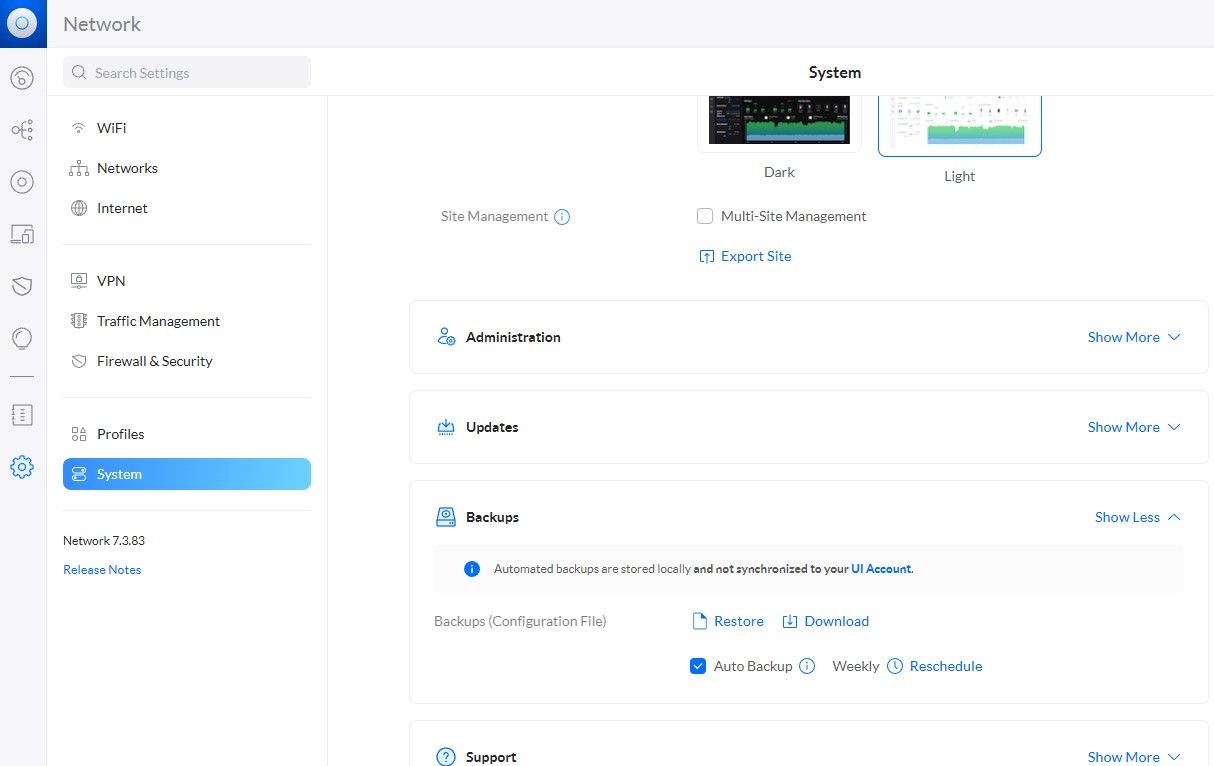
                                      @negalein Warum sicherst du die Einstellungen (und Statistiken) nicht einfach, setzt alles neu auf und spielst das Backup wieder zurück?
                                      unifi.jpg

                                      NegaleinN 2 Antworten Letzte Antwort
                                      0
                                      • Dr. BakteriusD Dr. Bakterius

                                        @thomas-braun, @Negalein Bei mir reichen für den Unifi-Controller 3 GB. Da hat es also definitiv etwas anderes.

                                        Thomas BraunT Online
                                        Thomas BraunT Online
                                        Thomas Braun
                                        Most Active
                                        schrieb am zuletzt editiert von Thomas Braun
                                        #67

                                        @dr-bakterius sagte in apt full-upgrade Error:

                                        Bei mir reichen für den Unifi-Controller 3 GB.

                                        Ja, sowas um den Dreh würde ich in einer 'rohen' VM erwarten, in der sonst nichts anderes noch mitläuft. Ohne Desktop-Overhead dann auch nochmal deutlich weniger.

                                        Linux-Werkzeugkasten:
                                        https://forum.iobroker.net/topic/42952/der-kleine-iobroker-linux-werkzeugkasten
                                        NodeJS Fixer Skript:
                                        https://forum.iobroker.net/topic/68035/iob-node-fix-skript
                                        iob_diag: curl -sLf -o diag.sh https://iobroker.net/diag.sh && bash diag.sh

                                        Dr. BakteriusD 1 Antwort Letzte Antwort
                                        0
                                        • Dr. BakteriusD Dr. Bakterius

                                          @negalein Warum sicherst du die Einstellungen (und Statistiken) nicht einfach, setzt alles neu auf und spielst das Backup wieder zurück?

                                          unifi.jpg

                                          NegaleinN Offline
                                          NegaleinN Offline
                                          Negalein
                                          Global Moderator
                                          schrieb am zuletzt editiert von
                                          #68

                                          @dr-bakterius sagte in apt full-upgrade Error:

                                          Warum sicherst du die Einstellungen (und Statistiken) nicht einfach, setzt alles neu auf und spielst das Backup wieder zurück?

                                          habe ich für heute geplant.
                                          Und dann gleich in einem Proxmox LXC und weg von Synology VM.

                                          ° Node.js: 20.17.0 NPM: 10.8.2
                                          ° Proxmox, Ubuntu 22.04.3 LTS
                                          ° Fixer ---> iob fix

                                          1 Antwort Letzte Antwort
                                          0
                                          Antworten
                                          • In einem neuen Thema antworten
                                          Anmelden zum Antworten
                                          • Älteste zuerst
                                          • Neuste zuerst
                                          • Meiste Stimmen


                                          Support us

                                          ioBroker
                                          Community Adapters
                                          Donate

                                          832

                                          Online

                                          32.5k

                                          Benutzer

                                          81.6k

                                          Themen

                                          1.3m

                                          Beiträge
                                          Community
                                          Impressum | Datenschutz-Bestimmungen | Nutzungsbedingungen | Einwilligungseinstellungen
                                          ioBroker Community 2014-2025
                                          logo
                                          • Anmelden

                                          • Du hast noch kein Konto? Registrieren

                                          • Anmelden oder registrieren, um zu suchen
                                          • Erster Beitrag
                                            Letzter Beitrag
                                          0
                                          • Home
                                          • Aktuell
                                          • Tags
                                          • Ungelesen 0
                                          • Kategorien
                                          • Unreplied
                                          • Beliebt
                                          • GitHub
                                          • Docu
                                          • Hilfe
