




! gelöst ! NUC Proxmox Bluetooth onboard
-
Oh man, da habe ich bestimmt dreimal drauf geschaut und nicht gesehen, trotz neuer Brille, es nimmt leider alles ab, auch die Sehkraft.
Ja stimmt.
Ich habe den jetzt in der VM eingebunden und im iobroker den Adapter ble installiert. Jetzt warte ich mal bis der Hygrometer kommt und dann versuche ich ob ich eine Verbindung aufbauen kann.
-
@dp20eic sagte in NUC Proxmox Bluetooth onboard:
@woupi sagte in NUC Proxmox Bluetooth onboard:
# lsusb
# lspci
Ist denn da Bluetooth zu finden, hast Du mal im
Biosgeschaut ob das angeschaltet ist?VG
Berndroot@server:~# lsusb Bus 004 Device 001: ID 1d6b:0003 Linux Foundation 3.0 root hub Bus 003 Device 001: ID 1d6b:0002 Linux Foundation 2.0 root hub Bus 002 Device 001: ID 1d6b:0003 Linux Foundation 3.0 root hub Bus 001 Device 002: ID 1a86:7523 QinHeng Electronics CH340 serial converter Bus 001 Device 001: ID 1d6b:0002 Linux Foundation 2.0 root hub root@server:~#root@server:~# lspci 00:00.0 Host bridge: Intel Corporation Device 9b71 (rev 0c) 00:02.0 VGA compatible controller: Intel Corporation CometLake-U GT2 [UHD Graphi cs] (rev 02) 00:08.0 System peripheral: Intel Corporation Xeon E3-1200 v5/v6 / E3-1500 v5 / 6 th/7th/8th Gen Core Processor Gaussian Mixture Model 00:12.0 Signal processing controller: Intel Corporation Comet Lake Thermal Subsy tem 00:14.0 USB controller: Intel Corporation Comet Lake PCH-LP USB 3.1 xHCI Host Co ntroller 00:14.2 RAM memory: Intel Corporation Comet Lake PCH-LP Shared SRAM 00:15.0 Serial bus controller: Intel Corporation Serial IO I2C Host Controller 00:15.2 Serial bus controller: Intel Corporation Comet Lake PCH-LP LPSS: I2C Con troller #2 00:16.0 Communication controller: Intel Corporation Comet Lake Management Engine Interface 00:17.0 SATA controller: Intel Corporation Comet Lake SATA AHCI Controller 00:1c.0 PCI bridge: Intel Corporation Comet Lake PCI Express Root Port #5 (rev f 0) 00:1d.0 PCI bridge: Intel Corporation Device 02b5 (rev f0) 00:1f.0 ISA bridge: Intel Corporation Comet Lake PCH-LP LPC Premium Controller/e SPI Controller 00:1f.4 SMBus: Intel Corporation Comet Lake PCH-LP SMBus Host Controller 00:1f.5 Serial bus controller: Intel Corporation Comet Lake SPI (flash) Controll er 00:1f.6 Ethernet controller: Intel Corporation Ethernet Connection (10) I219-V 01:00.0 PCI bridge: Intel Corporation JHL7540 Thunderbolt 3 Bridge [Titan Ridge 2C 2018] (rev 06) 02:00.0 PCI bridge: Intel Corporation JHL7540 Thunderbolt 3 Bridge [Titan Ridge 2C 2018] (rev 06) 02:01.0 PCI bridge: Intel Corporation JHL7540 Thunderbolt 3 Bridge [Titan Ridge 2C 2018] (rev 06) 02:02.0 PCI bridge: Intel Corporation JHL7540 Thunderbolt 3 Bridge [Titan Ridge 2C 2018] (rev 06) 03:00.0 System peripheral: Intel Corporation JHL7540 Thunderbolt 3 NHI [Titan Ri dge 2C 2018] (rev 06) 39:00.0 USB controller: Intel Corporation JHL7540 Thunderbolt 3 USB Controller [ Titan Ridge 2C 2018] (rev 06) 3a:00.0 SD Host controller: Genesys Logic, Inc GL9755 SD Host Controller root@server:~#Moin,
sorry, das ich mich erst jetzt einschalte, aber im Gegensatz zu meiner Frau und CPU, bin ich nur Single Task fähig :)Freut mich, dass Du, mit kompetenter Hilfe, weitergekommen bist.
Du solltest alle Schritte und Erkenntnisse mal kurz zusammenschreiben, kann sicherlich für dasiobrokerWiki interessant sein, als Ergänzung zumiobrokeraufProxmoxinstallieren.Als Tip ob das jetzt schon unter der VM funktioniert, kannst Du mal versuchen irgend ein Bluetooth Gerät zu pairen.
Als Anhalt kann ich dir da
bluetoothctlnennen, must Du evtl. in der VM noch nachinstallieren.16:46:35 dp20eic@ryzen-5 ~ $ bluetoothctl Agent registered [bluetooth]# ? Invalid command in menu main: ? Use "help" for a list of available commands in a menu. Use "menu <submenu>" if you want to enter any submenu. Use "back" if you want to return to menu main. [bluetooth]# help Menu main: Available commands: ------------------- advertise Advertise Options Submenu monitor Advertisement Monitor Options Submenu scan Scan Options Submenu gatt Generic Attribute Submenu admin Admin Policy Submenu player Media Player Submenu endpoint Media Endpoint Submenu transport Media Transport Submenu list List available controllers show [ctrl] Controller information select <ctrl> Select default controller devices [Paired/Bonded/Trusted/Connected] List available devices, with an optional property as the filter system-alias <name> Set controller alias reset-alias Reset controller alias power <on/off> Set controller power pairable <on/off> Set controller pairable mode discoverable <on/off> Set controller discoverable mode discoverable-timeout [value] Set discoverable timeout agent <on/off/capability> Enable/disable agent with given capability default-agent Set agent as the default one advertise <on/off/type> Enable/disable advertising with given type set-alias <alias> Set device alias scan <on/off/bredr/le> Scan for devices info [dev] Device information pair [dev] Pair with device cancel-pairing [dev] Cancel pairing with device trust [dev] Trust device untrust [dev] Untrust device block [dev] Block device unblock [dev] Unblock device remove <dev> Remove device connect <dev> Connect device disconnect [dev] Disconnect device menu <name> Select submenu version Display version quit Quit program exit Quit program help Display help about this program export Print environment variables [bluetooth]# devices Device D4:6D:6D:E6:29:BC VWAGWOLOM0ZO Device 14:3F:A6:67:91:B5 WH-1000XM4 Device F0:41:C8:31:46:6B BT HIFI AUDIO Device DF:BB:70:6C:AC:F2 Nuimo_silbern Device B8:27:EB:A3:AA:24 Moode Bluetooth Device E8:0A:C0:3A:6B:FA Nuimo [bluetooth]#[bluetooth]# pairable Missing on/off argument [bluetooth]# pairable on Changing pairable on succeeded [bluetooth]# scan Missing on/off/bredr/le argument [bluetooth]# scan on Discovery started [CHG] Controller FC:77:74:87:56:44 Discovering: yes [NEW] Device 5C:3F:61:A1:54:BC 5C-3F-61-A1-54-CC [NEW] Device 54:D2:72:DB:B4:B9 Nuki_13DBB4AAAAA9 [DEL] Device 5C:3F:61:A1:54:BC 5C-3F-61-A1-54-CC [DEL] Device 54:D2:72:DB:B4:B9 Nuki_13DBB4AAAAA9VG
Bernd -
Moin,
sorry, das ich mich erst jetzt einschalte, aber im Gegensatz zu meiner Frau und CPU, bin ich nur Single Task fähig :)Freut mich, dass Du, mit kompetenter Hilfe, weitergekommen bist.
Du solltest alle Schritte und Erkenntnisse mal kurz zusammenschreiben, kann sicherlich für dasiobrokerWiki interessant sein, als Ergänzung zumiobrokeraufProxmoxinstallieren.Als Tip ob das jetzt schon unter der VM funktioniert, kannst Du mal versuchen irgend ein Bluetooth Gerät zu pairen.
Als Anhalt kann ich dir da
bluetoothctlnennen, must Du evtl. in der VM noch nachinstallieren.16:46:35 dp20eic@ryzen-5 ~ $ bluetoothctl Agent registered [bluetooth]# ? Invalid command in menu main: ? Use "help" for a list of available commands in a menu. Use "menu <submenu>" if you want to enter any submenu. Use "back" if you want to return to menu main. [bluetooth]# help Menu main: Available commands: ------------------- advertise Advertise Options Submenu monitor Advertisement Monitor Options Submenu scan Scan Options Submenu gatt Generic Attribute Submenu admin Admin Policy Submenu player Media Player Submenu endpoint Media Endpoint Submenu transport Media Transport Submenu list List available controllers show [ctrl] Controller information select <ctrl> Select default controller devices [Paired/Bonded/Trusted/Connected] List available devices, with an optional property as the filter system-alias <name> Set controller alias reset-alias Reset controller alias power <on/off> Set controller power pairable <on/off> Set controller pairable mode discoverable <on/off> Set controller discoverable mode discoverable-timeout [value] Set discoverable timeout agent <on/off/capability> Enable/disable agent with given capability default-agent Set agent as the default one advertise <on/off/type> Enable/disable advertising with given type set-alias <alias> Set device alias scan <on/off/bredr/le> Scan for devices info [dev] Device information pair [dev] Pair with device cancel-pairing [dev] Cancel pairing with device trust [dev] Trust device untrust [dev] Untrust device block [dev] Block device unblock [dev] Unblock device remove <dev> Remove device connect <dev> Connect device disconnect [dev] Disconnect device menu <name> Select submenu version Display version quit Quit program exit Quit program help Display help about this program export Print environment variables [bluetooth]# devices Device D4:6D:6D:E6:29:BC VWAGWOLOM0ZO Device 14:3F:A6:67:91:B5 WH-1000XM4 Device F0:41:C8:31:46:6B BT HIFI AUDIO Device DF:BB:70:6C:AC:F2 Nuimo_silbern Device B8:27:EB:A3:AA:24 Moode Bluetooth Device E8:0A:C0:3A:6B:FA Nuimo [bluetooth]#[bluetooth]# pairable Missing on/off argument [bluetooth]# pairable on Changing pairable on succeeded [bluetooth]# scan Missing on/off/bredr/le argument [bluetooth]# scan on Discovery started [CHG] Controller FC:77:74:87:56:44 Discovering: yes [NEW] Device 5C:3F:61:A1:54:BC 5C-3F-61-A1-54-CC [NEW] Device 54:D2:72:DB:B4:B9 Nuki_13DBB4AAAAA9 [DEL] Device 5C:3F:61:A1:54:BC 5C-3F-61-A1-54-CC [DEL] Device 54:D2:72:DB:B4:B9 Nuki_13DBB4AAAAA9VG
Bernd@dp20eic sagte in NUC Proxmox Bluetooth onboard:
Moin,
sorry, das ich mich erst jetzt einschalte, aber im Gegensatz zu meiner Frau und CPU, bin ich nur Single Task fähig :)Vielen Dank, dass du dich meldest und auch ich bin nicht Multitasking fähig. Normalerweise bin ich auch von 6 bis 18:00 nicht zu Hause, bin bis einschließlich heute aber Arbeitsunfähig. Darum hatte ich überhaupt die Zeit so früh was zu machen.
Freut mich, dass Du, mit kompetenter Hilfe, weitergekommen bist.
mich auch.
Du solltest alle Schritte und Erkenntnisse mal kurz zusammenschreiben, kann sicherlich für das
iobrokerWiki interessant sein, als Ergänzung zumiobrokeraufProxmoxinstallieren.Das werde ich gerne versuchen.
Als Tip ob das jetzt schon unter der VM funktioniert, kannst Du mal versuchen irgend ein Bluetooth Gerät zu pairen.
Als Anhalt kann ich dir da
bluetoothctlnennen, must Du evtl. in der VM noch nachinstallieren.Habe ich gemacht und siehe da, es kommen reichlich Geräte

[bluetooth]# scan on
Discovery started
[CHG] Controller 08:71:90:56:38:C0 Discovering: yes
[NEW] Device 71:9C:11:D5:DF:26 71-9C-11-D5-DF-26
[NEW] Device 40:D5:E8:8E:EF:95 40-D5-E8-8E-EF-95
[NEW] Device CC:33:31:B5:A2:42 CC-33-31-B5-A2-42
[NEW] Device 74:38:B7:D2:1F:71 74-38-B7-D2-1F-71
[CHG] Device CC:33:31:B5:A2:42 TxPower: 0
[CHG] Device CC:33:31:B5:A2:42 Name: Geberit AC PRO
[CHG] Device CC:33:31:B5:A2:42 Alias: Geberit AC PRO
[CHG] Device CC:33:31:B5:A2:42 ManufacturerData Key: 0x0100
[CHG] Device CC:33:31:B5:A2:42 ManufacturerData Value:
  00 31 34 36 32 30                                .14620
[CHG] Device CC:33:31:B5:A2:42 ManufacturerData Key: 0x3200
[CHG] Device CC:33:31:B5:A2:42 ManufacturerData Value:
  34                                               4
[CHG] Device 71:9C:11:D5:DF:26 RSSI: -87
[CHG] Device 40:D5:E8:8E:EF:95 RSSI: -95
[CHG] Device 74:38:B7:D2:1F:71 TxPower: 6
[CHG] Device 74:38:B7:D2:1F:71 Appearance: 0x0200
[CHG] Device 74:38:B7:D2:1F:71 Name: EOS850D_CBC374
[CHG] Device 74:38:B7:D2:1F:71 Alias: EOS850D_CBC374
[CHG] Device 71:9C:11:D5:DF:26 RSSI: -95
[bluetooth]#
Damit würde ich sagen, funktioniert.
Vielen Dank für eure Hilfe.
Ich werde am WE alles zusammenschreiben.
Viel Falsch machen kann ich ja auch nicht, denn es steht ja alle hier drin, nur halt durcheinander und das ist für einen suchenden nicht gut, das musste ich die letzten Monate leider auch wieder feststellen.Wenn ich das habe, werde ich dann mal sehen was Du genau mit dem Wiki meinst, habe ich noch nicht gesehen, muss zu meiner Schade gestehen, habe ich auch noch nicht nach gesucht.
Ich wünsche euch einen schönen Abend, ich bin dann ab morgen auch wieder arbeiten, dann ist es vorbei mit der Zeit für so schöne Dinge.

VG
Sascha -
@dp20eic sagte in NUC Proxmox Bluetooth onboard:
Moin,
sorry, das ich mich erst jetzt einschalte, aber im Gegensatz zu meiner Frau und CPU, bin ich nur Single Task fähig :)Vielen Dank, dass du dich meldest und auch ich bin nicht Multitasking fähig. Normalerweise bin ich auch von 6 bis 18:00 nicht zu Hause, bin bis einschließlich heute aber Arbeitsunfähig. Darum hatte ich überhaupt die Zeit so früh was zu machen.
Freut mich, dass Du, mit kompetenter Hilfe, weitergekommen bist.
mich auch.
Du solltest alle Schritte und Erkenntnisse mal kurz zusammenschreiben, kann sicherlich für das
iobrokerWiki interessant sein, als Ergänzung zumiobrokeraufProxmoxinstallieren.Das werde ich gerne versuchen.
Als Tip ob das jetzt schon unter der VM funktioniert, kannst Du mal versuchen irgend ein Bluetooth Gerät zu pairen.
Als Anhalt kann ich dir da
bluetoothctlnennen, must Du evtl. in der VM noch nachinstallieren.Habe ich gemacht und siehe da, es kommen reichlich Geräte
[bluetooth]# scan on
Discovery started
[CHG] Controller 08:71:90:56:38:C0 Discovering: yes
[NEW] Device 71:9C:11:D5:DF:26 71-9C-11-D5-DF-26
[NEW] Device 40:D5:E8:8E:EF:95 40-D5-E8-8E-EF-95
[NEW] Device CC:33:31:B5:A2:42 CC-33-31-B5-A2-42
[NEW] Device 74:38:B7:D2:1F:71 74-38-B7-D2-1F-71
[CHG] Device CC:33:31:B5:A2:42 TxPower: 0
[CHG] Device CC:33:31:B5:A2:42 Name: Geberit AC PRO
[CHG] Device CC:33:31:B5:A2:42 Alias: Geberit AC PRO
[CHG] Device CC:33:31:B5:A2:42 ManufacturerData Key: 0x0100
[CHG] Device CC:33:31:B5:A2:42 ManufacturerData Value:
  00 31 34 36 32 30                                .14620
[CHG] Device CC:33:31:B5:A2:42 ManufacturerData Key: 0x3200
[CHG] Device CC:33:31:B5:A2:42 ManufacturerData Value:
  34                                               4
[CHG] Device 71:9C:11:D5:DF:26 RSSI: -87
[CHG] Device 40:D5:E8:8E:EF:95 RSSI: -95
[CHG] Device 74:38:B7:D2:1F:71 TxPower: 6
[CHG] Device 74:38:B7:D2:1F:71 Appearance: 0x0200
[CHG] Device 74:38:B7:D2:1F:71 Name: EOS850D_CBC374
[CHG] Device 74:38:B7:D2:1F:71 Alias: EOS850D_CBC374
[CHG] Device 71:9C:11:D5:DF:26 RSSI: -95
[bluetooth]#
Damit würde ich sagen, funktioniert.
Vielen Dank für eure Hilfe.
Ich werde am WE alles zusammenschreiben.
Viel Falsch machen kann ich ja auch nicht, denn es steht ja alle hier drin, nur halt durcheinander und das ist für einen suchenden nicht gut, das musste ich die letzten Monate leider auch wieder feststellen.Wenn ich das habe, werde ich dann mal sehen was Du genau mit dem Wiki meinst, habe ich noch nicht gesehen, muss zu meiner Schade gestehen, habe ich auch noch nicht nach gesucht.
Ich wünsche euch einen schönen Abend, ich bin dann ab morgen auch wieder arbeiten, dann ist es vorbei mit der Zeit für so schöne Dinge.
VG
Sascha@woupi sagte in NUC Proxmox Bluetooth onboard:
@dp20eic sagte in NUC Proxmox Bluetooth onboard:
Du solltest alle Schritte und Erkenntnisse mal kurz zusammenschreiben, kann sicherlich für das
iobrokerWiki interessant sein, als Ergänzung zumiobrokeraufProxmoxinstallieren.Das werde ich gerne versuchen.
Ich habe mich jetzt auf die suche nach dem wiki gemacht.
Ich habe dich bestimmt auch falsch verstanden, denn da gibt es keinen Punkt iobroker auf Proxmox.NUC10i3, Proxmox, VM Ubuntu iobroker, lxc ubuntu influxdb, grafana, lxc ubuntu SAE, lxc ubuntu MotionEye, WP Panasonic Jeisha 5kW mit Heishamon, Shelly 2.5 und 2pm Rolladensteuerung, OpenWB Wallbox
-
@woupi sagte in NUC Proxmox Bluetooth onboard:
@dp20eic sagte in NUC Proxmox Bluetooth onboard:
Du solltest alle Schritte und Erkenntnisse mal kurz zusammenschreiben, kann sicherlich für das
iobrokerWiki interessant sein, als Ergänzung zumiobrokeraufProxmoxinstallieren.Das werde ich gerne versuchen.
Ich habe mich jetzt auf die suche nach dem wiki gemacht.
Ich habe dich bestimmt auch falsch verstanden, denn da gibt es keinen Punkt iobroker auf Proxmox. -
@woupi nimm einfach dass:
https://www.iobroker.net/#de/documentation/install/proxmox.md
@wendy2702 sagte in NUC Proxmox Bluetooth onboard:
@woupi nimm einfach dass:
https://www.iobroker.net/#de/documentation/install/proxmox.md
Es ging darum, dass ich
Du solltest alle Schritte und Erkenntnisse mal kurz zusammenschreiben, kann sicherlich für das iobroker Wiki interessant sein, als Ergänzung zum iobroker auf Proxmox installieren.
das, für ein Wiki zusammentragen sollte. Gut wenn jetzt mit wiki eine Dokumentation gemeint ist, komme ich damit, wenn ich es weiß, parat. Aber eintragen kann ich da doch nichts, oder?
Irgendwie stehe ich auf dem Schlauch.
NUC10i3, Proxmox, VM Ubuntu iobroker, lxc ubuntu influxdb, grafana, lxc ubuntu SAE, lxc ubuntu MotionEye, WP Panasonic Jeisha 5kW mit Heishamon, Shelly 2.5 und 2pm Rolladensteuerung, OpenWB Wallbox
-
@wendy2702 sagte in NUC Proxmox Bluetooth onboard:
@woupi nimm einfach dass:
https://www.iobroker.net/#de/documentation/install/proxmox.md
Es ging darum, dass ich
Du solltest alle Schritte und Erkenntnisse mal kurz zusammenschreiben, kann sicherlich für das iobroker Wiki interessant sein, als Ergänzung zum iobroker auf Proxmox installieren.
das, für ein Wiki zusammentragen sollte. Gut wenn jetzt mit wiki eine Dokumentation gemeint ist, komme ich damit, wenn ich es weiß, parat. Aber eintragen kann ich da doch nichts, oder?
Irgendwie stehe ich auf dem Schlauch.
-
@woupi sagte in NUC Proxmox Bluetooth onboard:
@dp20eic sagte in NUC Proxmox Bluetooth onboard:
Du solltest alle Schritte und Erkenntnisse mal kurz zusammenschreiben, kann sicherlich für das
iobrokerWiki interessant sein, als Ergänzung zumiobrokeraufProxmoxinstallieren.Das werde ich gerne versuchen.
Ich habe mich jetzt auf die suche nach dem wiki gemacht.
Ich habe dich bestimmt auch falsch verstanden, denn da gibt es keinen Punkt iobroker auf Proxmox.Moin,
ja ich meinte das, was @wendy2702 dir gezeigt hat, Danke dafür.
Ja Du darfst da nichts eintragen, aber man kann einen Post machen und der Wiki Beauftragte, kann das dann sicherlich dort einfügen, den richtigen werden wir schon finden :)VG
Bernd -
Dank euch beiden,
ok, dann werde ich das machen, heute allerdings nicht mehr, ich habe mich schon einer anderen Baustelle gewidmet und bin jetzt durch (kann nicht mehr).
VG
SaschaNUC10i3, Proxmox, VM Ubuntu iobroker, lxc ubuntu influxdb, grafana, lxc ubuntu SAE, lxc ubuntu MotionEye, WP Panasonic Jeisha 5kW mit Heishamon, Shelly 2.5 und 2pm Rolladensteuerung, OpenWB Wallbox
-
Dank euch beiden,
ok, dann werde ich das machen, heute allerdings nicht mehr, ich habe mich schon einer anderen Baustelle gewidmet und bin jetzt durch (kann nicht mehr).
VG
Sascha -
Ich habe versucht es so knapp wie möglich zusammen zu schreiben.
NUC-Proxmox-VM-iobroker onBoard Bluetooth durchreichen:
- onBoard Bluetooth im Bios aktivieren, falls deaktiviert
- über z.B. Putty, oder direkt in Proxmox in der VM "iobroker", an der Konsole anmelden
- mit
lsusbüberprüfen ob der onBoard Adapter vorhanden ist (Beispiel)
Bus 001 Device 003: ID 8087:0026 Intel Corp- Wenn der Bluetooth Adapter vorhanden ist, in Proxmox in der VM "iobroker", Hardware --> Hinzufügen --> USB -Gerät-->Hersteller/Geräte ID verwenden --> Gerät Wählen --> das mit lsusb gefundene Gerät auswählen (hier 8087:0026)
- Hinzufügen
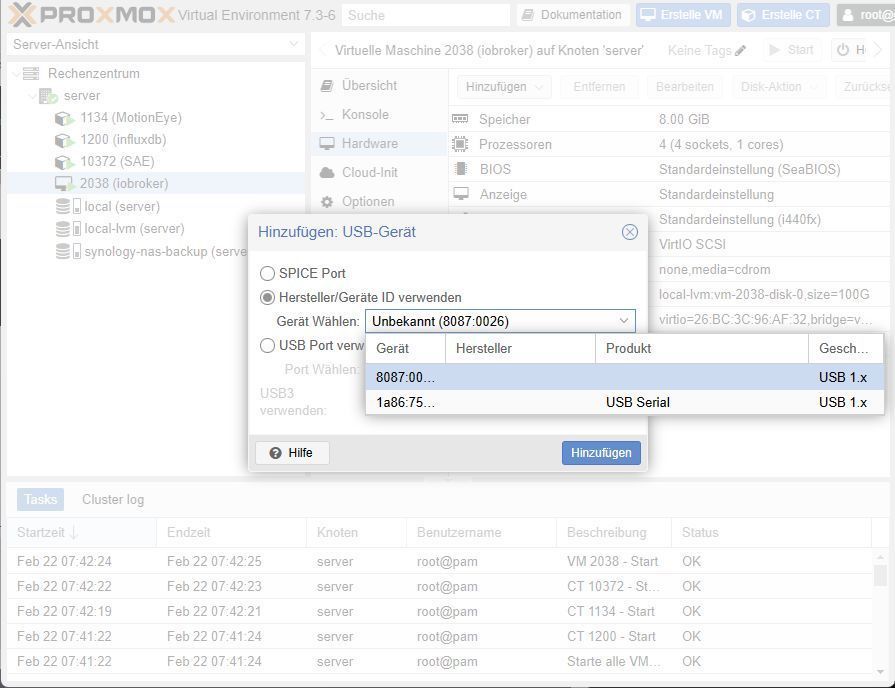
- Wieder auf die Konsole der VM "iobroker" wechseln
BluetoothctlScan -onJetzt sollten Bluetooth Geräte gefunden werden, sofern es aktive Geräte in der Nähe gibt
xxxxxxxx@iobroker:~$ sudo bluetoothctl
[sudo] password for xxxxxxxx:
Agent registered
[CHG] Controller 08:71:90:56:38:C0 Pairable: yes
[bluetooth]# scan on
Discovery started
[CHG] Controller 08:71:90:56:38:C0 Discovering: yes
[NEW] Device 4C:BA:D7:80:3C:59 [LG] webOS TV OLED55G29LA
[bluetooth]#
mit exit wieder beenden.
Nun könnt Ihr in iobroker Bluetooth Geräte einbinden

Hey! Du scheinst an dieser Unterhaltung interessiert zu sein, hast aber noch kein Konto.
Hast du es satt, bei jedem Besuch durch die gleichen Beiträge zu scrollen? Wenn du dich für ein Konto anmeldest, kommst du immer genau dorthin zurück, wo du zuvor warst, und kannst dich über neue Antworten benachrichtigen lassen (entweder per E-Mail oder Push-Benachrichtigung). Du kannst auch Lesezeichen speichern und Beiträge positiv bewerten, um anderen Community-Mitgliedern deine Wertschätzung zu zeigen.
Mit deinem Input könnte dieser Beitrag noch besser werden 💗
Registrieren AnmeldenSupport us
444
Online33.0k
Benutzer83.6k
Themen1.3m
Beiträge