




Humpelstilzchen - IoBroker extrem langsam Redis | JSON | SSD

-
Hey zusammen,
ich nutze den IoBroker seit ein paar Jahren und habe mittlerweile sehr oft das Problem, dass der ab und an mal echt langsam wird.
Besonders beim Laden der Objekte im Admin oder Javascript Adapter, dauerte es teilweise Minuten, bis die Daten aufgebaut sind.
Beim Speichern von javascript blockly scripten, dauerte es sehr oft so lange, dass ich ein Timeout bekommen habe und die geänderten Scripte wieder im ursprünglichem Zustand gewesen sind (das passierte zuletzt eigentlich immer).
Key Spec System Raspberry Pi 4 RAM 4GB Datenträgergröße SSD direkt, 250GB Freier Festplattenspeicher 229.1 GB Aktive Instanzen 47 Node.js v16.19.0 type Master mit 2 slaves DB jetzt Redis Objekte 26480 Zustände 23509
Da der IoBroker immer langsamer geworden ist, dachte ich mit, setze ich den Raspberry noch mal neu auf, demnach habe ich den mit einem sauberen Bullseye 32 aufgesetzt, Restore wieder rein und gefreut, da das System nach vollständigem Restore wieder genau so langsam geworden ist wie vorher,....

Die CPU Auslastung ist im Durchschnitt zwischen 20% und 40% gewesen, der jscontroller hatte lt. htop immer eine Auslastung zwischen 20% und 70% (mehr im Bereich 50%).
Aus diesem Grund hatte ich mich im Forum etwas "Schlau" gelesen und hatte mir das Thema Redis letzte Woche mal angeschaut und habe die Systeme mal auf Redis geändert.
Seit dem hat der IoBroker eine CPU Auslastung (bei den Hosts in der Übersicht) von ca. 0.3% und eine RAM Auslastung von max. 33% und wenn sich eine Seite wie der javascript adapter erstmal aufgebaut hat, kann man jetzt immerhin die Scripts immer speichern, ohne dass man ein Timeout bekommt.
Ich komme aber, wenn ich das admin interface nutze nur jedes dritte mal auf dieses drauf, da dort immer nen Timeout kommt, oder ein leerer IoBroker.

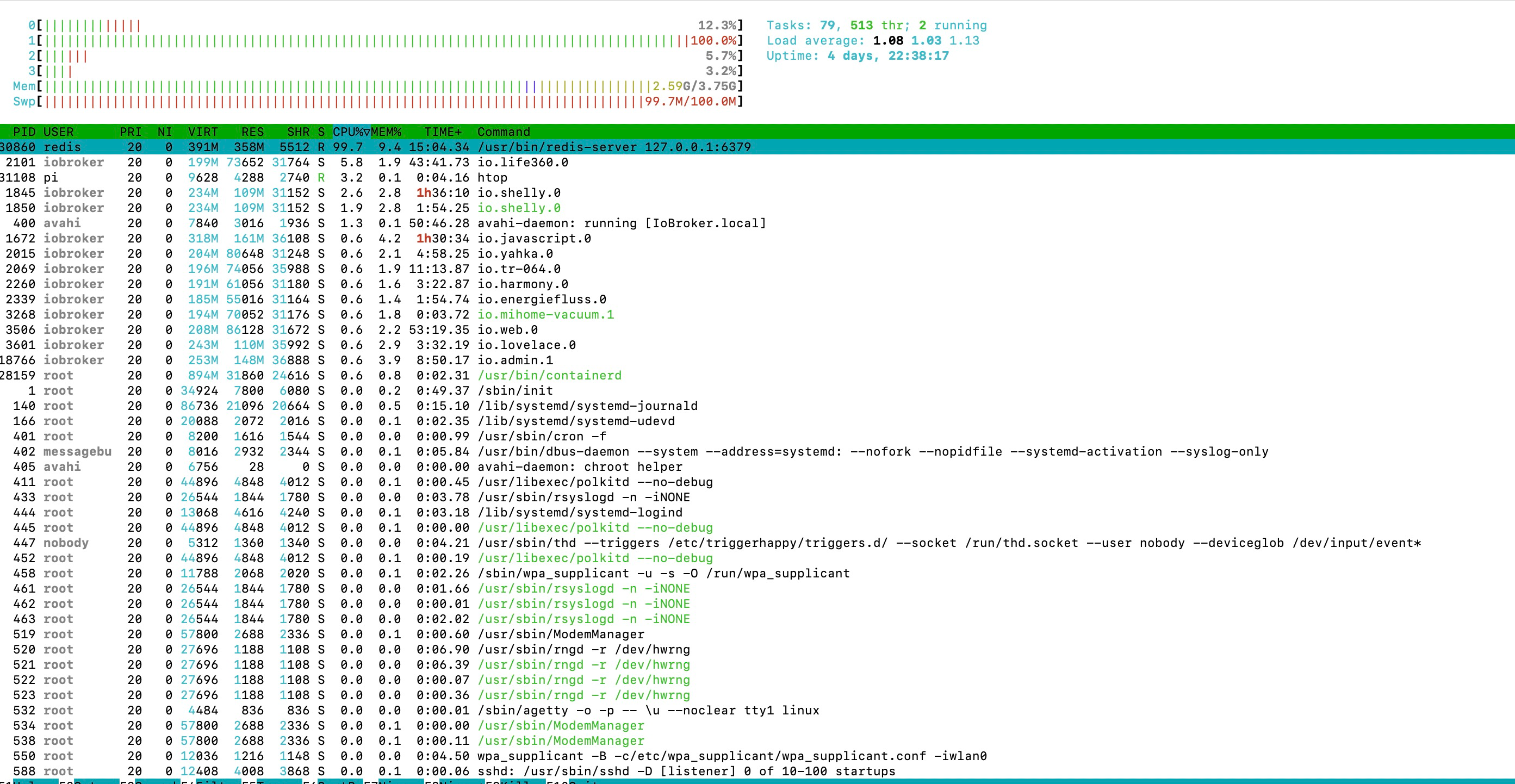
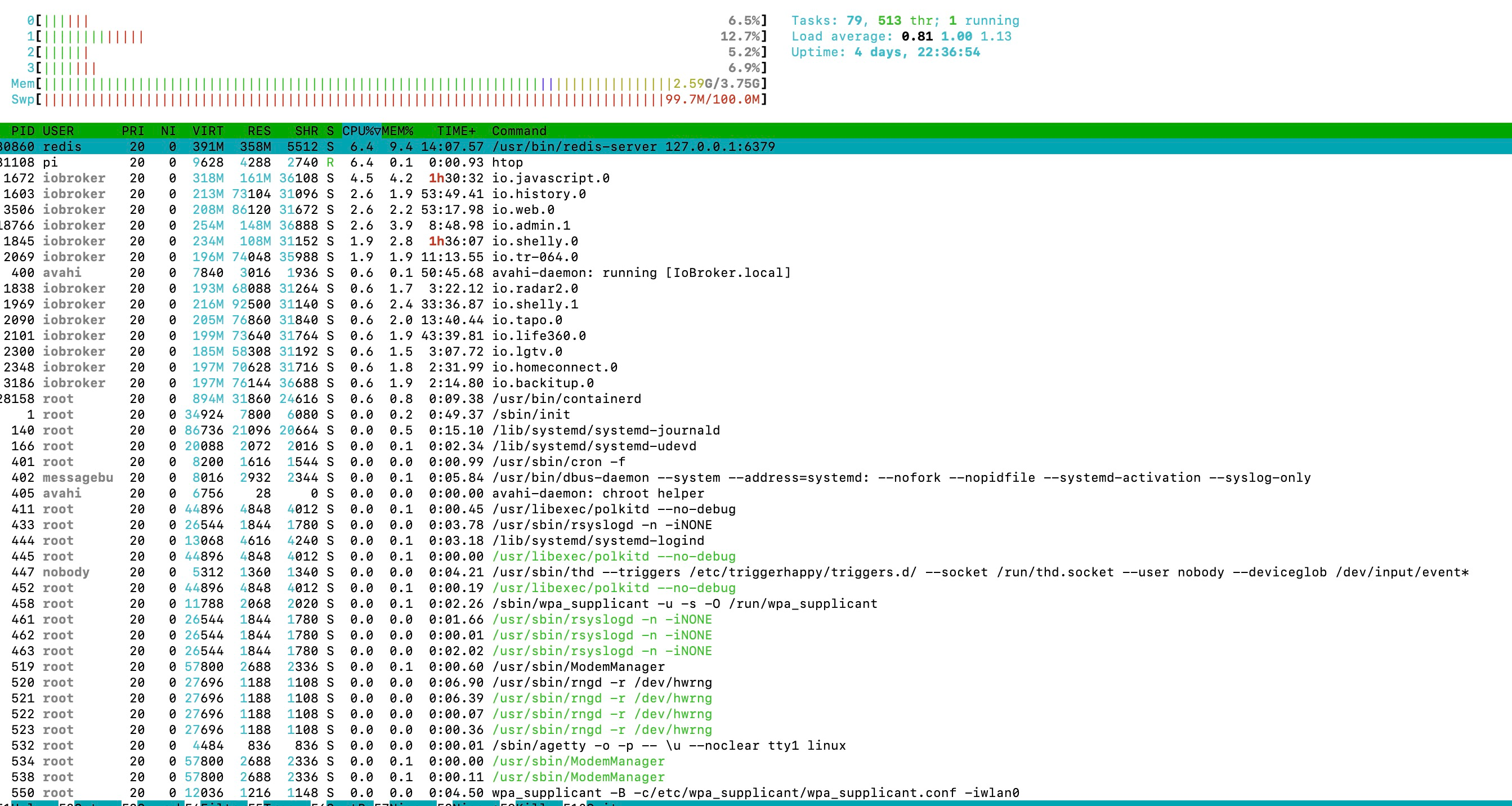
Was mir mit Redis ebenfalls aufgefallen ist, HTOP freut sich immer wenn man das Admin Interface nutzt über eine 100%ige Auslastung bei /usr/bin/redis-server 127.0.0.1:6379 Redis.
Hat einer ggf. eine Idee, was das Problem verursachen kann und noch viel besser, wie man dieses abstellen kann?
Ich würde mich über konstruktive Hilfe freuen :)
pi@IoBroker:/opt/iobroker/iobroker-data/zigbee_0 $ free -m
               total        used        free      shared  buff/cache   available
Mem:            3837        2646         375           1         816        1293
Swap:             99          99           0
pi@IoBroker:/opt/iobroker/iobroker-data/zigbee_0 $ iobroker status all iobroker is running on this host. At least one iobroker host is running. Instance "vis.0" is not running Instance "telegram.0" is running Instance "landroid.0" is not running Instance "admin.1" is running Instance "lgtv.0" is running Instance "mqtt-client.0" is not running Instance "discovery.0" is not running Instance "tr-064.3" is not running Instance "statistics.0" is running Instance "linkeddevices.0" is running Instance "worx.0" is not running Instance "sql.0" is running Instance "node-red.0" is running Instance "web.0" is running Instance "tr-064.7" is not running Instance "iot.0" is running Instance "whatsapp-cmb.0" is running Instance "mobile.0" is not running Instance "life360.0" is running Instance "ical.0" is not running Instance "tapo.0" is running Instance "samsung.0" is running Instance "milight.0" is not running Instance "vis-canvas-gauges.0" is not running Instance "wifilight.0" is not running Instance "sayit.0" is running Instance "jarvis.0" is not running Instance "tr-064.5" is not running Instance "doorbird.0" is running Instance "apple-find-me.0" is not running Instance "tr-064.6" is not running Instance "vis-history.0" is not running Instance "innogy-smarthome.0" is running Instance "javascript.1" is running Instance "miio.0" is running Instance "history.0" is running Instance "radar2.0" is running Instance "vis-lcars.0" is not running Instance "vis-map.0" is not running Instance "backitup.0" is running Instance "javascript.0" is running Instance "vis-rgraph.0" is not running Instance "mqtt.0" is running Instance "mihome-vacuum.1" is running Instance "hue-extended.0" is not running Instance "habpanel.0" is not running Instance "tr-064.1" is not running Instance "yahka.0" is running Instance "withings.0" is running Instance "homeconnect.0" is running Instance "vis-colorpicker.0" is not running Instance "tr-064.8" is not running Instance "mihome-vacuum.2" is running Instance "flot.0" is not running Instance "milight.1" is not running Instance "tr-064.2" is not running Instance "zigbee.0" is running Instance "sourceanalytix.0" is running Instance "mihome-vacuum.0" is running Instance "harmony.0" is running Instance "simple-api.0" is running Instance "ham.0" is running Instance "shelly.1" is running Instance "sonoff.0" is running Instance "openweathermap.0" is not running Instance "vis-hqwidgets.0" is not running Instance "mihome.0" is running Instance "vis-bars.0" is not running Instance "text2command.0" is running Instance "nuki-extended.0" is running Instance "vis-timeandweather.0" is not running Instance "shelly.0" is running Instance "alexa2.0" is running Instance "virtualpowermeter.0" is running Instance "tr-064.9" is not running Instance "admin.2" is running Instance "vis-fancyswitch.0" is not running Instance "pushover.0" is running Instance "places.0" is running Instance "energiefluss.0" is running Instance "terminal.0" is running Instance "lovelace.0" is running Instance "vis-google-fonts.0" is not running Instance "hueemu.0" is not running Instance "daswetter.0" is not running Instance "parser.1" is not running Instance "hueemu.3" is running Instance "tr-064.0" is running Instance "tr-064.4" is not running Instance "smartcontrol.0" is not running Instance "icons-icons8.0" is not running Instance "parser.0" is not running Instance "denon.0" is running Instance "vis-jqui-mfd.0" is not running Instance "feiertage.0" is not running SYSTEM/memoryLimitMB: 0 SYSTEM/hostname: SYSTEM/statisticsInterval: 15000 SYSTEM/checkDiskInterval: 300000 SYSTEM/instanceStartInterval: 2000 SYSTEM/compact: false SYSTEM/allowShellCommands: true SYSTEM/memLimitWarn: 100 SYSTEM/memLimitError: 50 MULTIHOSTSERVICE/enabled: false MULTIHOSTSERVICE/secure: true MULTIHOSTSERVICE/password: $/aes-192-cbc:898275f9ee4d66a4ae8638bad4ec2864:f40833b68b92532a2fcd0019d21c4a85 MULTIHOSTSERVICE/persist: false NETWORK/IPv4: true NETWORK/IPv6: true OBJECTS/type: redis OBJECTS/host: 127.0.0.1 OBJECTS/port: 6379 OBJECTS/user: OBJECTS/pass: OBJECTS/noFileCache: false OBJECTS/connectTimeout: 5000 OBJECTS/BACKUP/disabled: false OBJECTS/BACKUP/files: 24 OBJECTS/BACKUP/hours: 48 OBJECTS/BACKUP/period: 7200000 OBJECTS/BACKUP/path: OBJECTS/OPTIONS/enableReadyCheck: true OBJECTS/OPTIONS/host: 127.0.0.1 OBJECTS/OPTIONS/port: 6379 OBJECTS/OPTIONS/db: 0 OBJECTS/OPTIONS/family: 0 OBJECTS/OPTIONS/autoResubscribe: false OBJECTS/OPTIONS/connectionName: OBJECTS/OPTIONS/retryStrategy: reconnectCount => { if (!ready && initError && ignoreErrors) { return new Error('No more tries'); } if (this.stop) { return new Error('Client has stopped ... no retries anymore'); } if (ready && reconnectCount >= retry_max_count) { return new Error('Stop trying to reconnect'); } // A function that receives an options object as parameter including the retry attempt, // the total_retry_time indicating how much time passed since the last time connected, // the error why the connection was lost and the number of times_connected in total. // If you return a number from this function, the retry will happen exactly after that // time in milliseconds. If you return a non-number, no further retry will happen and // all offline commands are flushed with errors. Return an error to return that // specific error to all offline commands. if (!ready) { return 300; } else { return retry_max_delay; } /*if (options.error.code === 'ECONNREFUSED') { // End reconnecting on a specific error and flush all commands with a individual error return new Error('The server refused the connection'); } if (options.total_retry_time > 1000 * 60 * 60) { // End reconnecting after a specific timeout and flush all commands with a individual error return new Error('Retry time exhausted'); } if (options.times_connected > 10) { // End reconnecting with built in error return undefined; } // reconnect after return Math.max(options.attempt * 100, 3000);*/ } OBJECTS/maxQueue: 1000 OBJECTS/JSONLOPTIONS/AUTOCOMPRESS/sizeFactor: 2 OBJECTS/JSONLOPTIONS/AUTOCOMPRESS/sizeFactorMinimumSize: 25000 OBJECTS/JSONLOPTIONS/THROTTLEFS/intervalMs: 60000 OBJECTS/JSONLOPTIONS/THROTTLEFS/maxBufferedCommands: 1000 STATES/type: redis STATES/host: 127.0.0.1 STATES/port: 6379 STATES/maxQueue: 1000 STATES/OPTIONS/enableReadyCheck: true STATES/OPTIONS/host: 127.0.0.1 STATES/OPTIONS/port: 6379 STATES/OPTIONS/db: 0 STATES/OPTIONS/family: 0 STATES/OPTIONS/autoResubscribe: false STATES/OPTIONS/connectionName: STATES/OPTIONS/retryStrategy: reconnectCount => { if (!ready && initError) { return new Error('No more tries'); } if (this.stop) { return new Error('Client has stopped ... no retries anymore'); } if (ready && reconnectCount >= retry_max_count) { return new Error('Stop trying to reconnect'); } // A function that receives an options object as parameter including the retry attempt, // the total_retry_time indicating how much time passed since the last time connected, // the error why the connection was lost and the number of times_connected in total. // If you return a number from this function, the retry will happen exactly after that // time in milliseconds. If you return a non-number, no further retry will happen and // all offline commands are flushed with errors. Return an error to return that // specific error to all offline commands. if (!ready) { return 300; } return retry_max_delay; /*if (options.error.code === 'ECONNREFUSED') { // End reconnecting on a specific error and flush all commands with a individual error return new Error('The server refused the connection'); } if (options.total_retry_time > 1000 * 60 * 60) { // End reconnecting after a specific timeout and flush all commands with a individual error return new Error('Retry time exhausted'); } if (options.times_connected > 10) { // End reconnecting with built in error return undefined; } // reconnect after return Math.max(options.attempt * 100, 3000);*/ } STATES/BACKUP/disabled: false STATES/BACKUP/files: 24 STATES/BACKUP/hours: 48 STATES/BACKUP/period: 7200000 STATES/BACKUP/path: STATES/JSONLOPTIONS/AUTOCOMPRESS/sizeFactor: 2 STATES/JSONLOPTIONS/AUTOCOMPRESS/sizeFactorMinimumSize: 25000 STATES/JSONLOPTIONS/THROTTLEFS/intervalMs: 60000 STATES/JSONLOPTIONS/THROTTLEFS/maxBufferedCommands: 1000 STATES/connectTimeout: 5000 LOG/level: warn LOG/maxDays: 7 LOG/noStdout: true LOG/TRANSPORT/FILE1/type: file LOG/TRANSPORT/FILE1/enabled: true LOG/TRANSPORT/FILE1/filename: log/iobroker LOG/TRANSPORT/FILE1/fileext: .log LOG/TRANSPORT/FILE1/level: LOG/TRANSPORT/SYSLOG1/type: syslog LOG/TRANSPORT/SYSLOG1/enabled: true LOG/TRANSPORT/SYSLOG1/host: localhost LOG/TRANSPORT/SYSLOG1/protocol: udp4 LOG/TRANSPORT/SYSLOG1/localhost: iobroker LOG/TRANSPORT/SYSLOG1/level: LOG/TRANSPORT/SYSLOG1/facility: dataDir: ../../iobroker-data/pi@IoBroker:/opt/iobroker/iobroker-data/zigbee_0 $ iobroker setup custom Current configuration: - Objects database: - Type: redis - Host/Unix Socket: 127.0.0.1 - Port: 6379 - States database: - Type: redis - Host/Unix Socket: 127.0.0.1 - Port: 6379 Type of objects DB [(j)sonl, (f)ile, (r)edis, ...], default [redis]:pi@IoBroker:/opt/iobroker/iobroker-data/zigbee_0 $ iob info Platform : linux os : linux Architecture : arm CPUs : 4 Speed : 1500 MHz Model : ARMv7 Processor rev 3 (v7l) RAM : 3.7 GB System uptime : 4d. 22:46:56 Node.js : v16.19.0 time : 1675280995864 timeOffset : -60 adapters count : 558 NPM : v8.19.3 Disk size : 234.5 GiB Disk free : 229.0 GiBpi@IoBroker:/opt/iobroker/iobroker-data/zigbee_0 $ redis-cli --bigkeys # Scanning the entire keyspace to find biggest keys as well as # average sizes per key type. You can use -i 0.1 to sleep 0.1 sec # per 100 SCAN commands (not usually needed). [00.00%] Biggest string found so far '"io.alexa2.0.Echo-Devices.G070L80572250ABQ.Player.playingInGroupId"' with 127 bytes [00.00%] Biggest string found so far '"cfg.f.habpanel$%$assets/icons/freepik-household/bookcase.svg$%$meta"' with 189 bytes [00.00%] Biggest string found so far '"cfg.o.alexa2.0.Smart-Home-Devices.17d83c22-b9e4-43ad-a8f8-bd18cda9fd8e.connectivity"' with 463 bytes [00.00%] Biggest string found so far '"cfg.f.vis.0$%$Boom/Adapter_Icons/vis.png$%$data"' with 2104 bytes [00.02%] Biggest string found so far '"cfg.f.text2command.admin$%$static/media/Driveway.fbd31101c5a80a8bb37a.svg$%$data"' with 6972 bytes [00.06%] Biggest string found so far '"cfg.f.admin.admin$%$custom/static/js/src_bootstrap_jsx.6800150f.chunk.js.map$%$data"' with 9051 bytes [00.07%] Biggest string found so far '"cfg.f.vis.0$%$Boom/Tankstellen_logos/classic.png$%$data"' with 61930 bytes [00.19%] Biggest string found so far '"cfg.f.ham.admin$%$static/js/main.1dc953c6.js$%$data"' with 2149763 bytes [00.87%] Biggest string found so far '"cfg.f.yahka.admin$%$yahka.admin.js.map$%$data"' with 4797125 bytes [01.95%] Biggest string found so far '"cfg.f.telegram.admin$%$custom/static/js/vendors-node_modules_iobroker_adapter-react-v5_assets_devices_parseNames_d_ts-node_modules_io-1d9f06.bd111492.chunk.js.map$%$data"' with 5512569 bytes [08.52%] Biggest string found so far '"cfg.f.telegram.admin$%$rules/static/js/vendors-node_modules_iobroker_adapter-react-v5_assets_devices_parseNames_d_ts-node_modules_io-1d9f06.44fe4a3f.chunk.js.map$%$data"' with 15695730 bytes [29.41%] Biggest string found so far '"cfg.f.web.admin$%$static/js/main.1f2fa060.js.map$%$data"' with 18923997 bytes [64.09%] Biggest string found so far '"cfg.f.iot.admin$%$static/js/main.fe83292c.js.map$%$data"' with 19112776 bytes -------- summary ------- Sampled 71285 keys in the keyspace! Total key length in bytes is 4212199 (avg len 59.09) Biggest string found '"cfg.f.iot.admin$%$static/js/main.fe83292c.js.map$%$data"' has 19112776 bytes 0 lists with 0 items (00.00% of keys, avg size 0.00) 0 hashs with 0 fields (00.00% of keys, avg size 0.00) 71285 strings with 348371627 bytes (100.00% of keys, avg size 4887.03) 0 streams with 0 entries (00.00% of keys, avg size 0.00) 0 sets with 0 members (00.00% of keys, avg size 0.00) 0 zsets with 0 members (00.00% of keys, avg size 0.00)Ohne Nutzung vom Admin Interface
Mit Nutzung vom Admin Interface:
-
Hey zusammen,
ich nutze den IoBroker seit ein paar Jahren und habe mittlerweile sehr oft das Problem, dass der ab und an mal echt langsam wird.
Besonders beim Laden der Objekte im Admin oder Javascript Adapter, dauerte es teilweise Minuten, bis die Daten aufgebaut sind.
Beim Speichern von javascript blockly scripten, dauerte es sehr oft so lange, dass ich ein Timeout bekommen habe und die geänderten Scripte wieder im ursprünglichem Zustand gewesen sind (das passierte zuletzt eigentlich immer).
Key Spec System Raspberry Pi 4 RAM 4GB Datenträgergröße SSD direkt, 250GB Freier Festplattenspeicher 229.1 GB Aktive Instanzen 47 Node.js v16.19.0 type Master mit 2 slaves DB jetzt Redis Objekte 26480 Zustände 23509
Da der IoBroker immer langsamer geworden ist, dachte ich mit, setze ich den Raspberry noch mal neu auf, demnach habe ich den mit einem sauberen Bullseye 32 aufgesetzt, Restore wieder rein und gefreut, da das System nach vollständigem Restore wieder genau so langsam geworden ist wie vorher,....
Die CPU Auslastung ist im Durchschnitt zwischen 20% und 40% gewesen, der jscontroller hatte lt. htop immer eine Auslastung zwischen 20% und 70% (mehr im Bereich 50%).
Aus diesem Grund hatte ich mich im Forum etwas "Schlau" gelesen und hatte mir das Thema Redis letzte Woche mal angeschaut und habe die Systeme mal auf Redis geändert.
Seit dem hat der IoBroker eine CPU Auslastung (bei den Hosts in der Übersicht) von ca. 0.3% und eine RAM Auslastung von max. 33% und wenn sich eine Seite wie der javascript adapter erstmal aufgebaut hat, kann man jetzt immerhin die Scripts immer speichern, ohne dass man ein Timeout bekommt.
Ich komme aber, wenn ich das admin interface nutze nur jedes dritte mal auf dieses drauf, da dort immer nen Timeout kommt, oder ein leerer IoBroker.
Was mir mit Redis ebenfalls aufgefallen ist, HTOP freut sich immer wenn man das Admin Interface nutzt über eine 100%ige Auslastung bei /usr/bin/redis-server 127.0.0.1:6379 Redis.
Hat einer ggf. eine Idee, was das Problem verursachen kann und noch viel besser, wie man dieses abstellen kann?
Ich würde mich über konstruktive Hilfe freuen :)
pi@IoBroker:/opt/iobroker/iobroker-data/zigbee_0 $ free -m
               total        used        free      shared  buff/cache   available
Mem:            3837        2646         375           1         816        1293
Swap:             99          99           0
pi@IoBroker:/opt/iobroker/iobroker-data/zigbee_0 $ iobroker status all iobroker is running on this host. At least one iobroker host is running. Instance "vis.0" is not running Instance "telegram.0" is running Instance "landroid.0" is not running Instance "admin.1" is running Instance "lgtv.0" is running Instance "mqtt-client.0" is not running Instance "discovery.0" is not running Instance "tr-064.3" is not running Instance "statistics.0" is running Instance "linkeddevices.0" is running Instance "worx.0" is not running Instance "sql.0" is running Instance "node-red.0" is running Instance "web.0" is running Instance "tr-064.7" is not running Instance "iot.0" is running Instance "whatsapp-cmb.0" is running Instance "mobile.0" is not running Instance "life360.0" is running Instance "ical.0" is not running Instance "tapo.0" is running Instance "samsung.0" is running Instance "milight.0" is not running Instance "vis-canvas-gauges.0" is not running Instance "wifilight.0" is not running Instance "sayit.0" is running Instance "jarvis.0" is not running Instance "tr-064.5" is not running Instance "doorbird.0" is running Instance "apple-find-me.0" is not running Instance "tr-064.6" is not running Instance "vis-history.0" is not running Instance "innogy-smarthome.0" is running Instance "javascript.1" is running Instance "miio.0" is running Instance "history.0" is running Instance "radar2.0" is running Instance "vis-lcars.0" is not running Instance "vis-map.0" is not running Instance "backitup.0" is running Instance "javascript.0" is running Instance "vis-rgraph.0" is not running Instance "mqtt.0" is running Instance "mihome-vacuum.1" is running Instance "hue-extended.0" is not running Instance "habpanel.0" is not running Instance "tr-064.1" is not running Instance "yahka.0" is running Instance "withings.0" is running Instance "homeconnect.0" is running Instance "vis-colorpicker.0" is not running Instance "tr-064.8" is not running Instance "mihome-vacuum.2" is running Instance "flot.0" is not running Instance "milight.1" is not running Instance "tr-064.2" is not running Instance "zigbee.0" is running Instance "sourceanalytix.0" is running Instance "mihome-vacuum.0" is running Instance "harmony.0" is running Instance "simple-api.0" is running Instance "ham.0" is running Instance "shelly.1" is running Instance "sonoff.0" is running Instance "openweathermap.0" is not running Instance "vis-hqwidgets.0" is not running Instance "mihome.0" is running Instance "vis-bars.0" is not running Instance "text2command.0" is running Instance "nuki-extended.0" is running Instance "vis-timeandweather.0" is not running Instance "shelly.0" is running Instance "alexa2.0" is running Instance "virtualpowermeter.0" is running Instance "tr-064.9" is not running Instance "admin.2" is running Instance "vis-fancyswitch.0" is not running Instance "pushover.0" is running Instance "places.0" is running Instance "energiefluss.0" is running Instance "terminal.0" is running Instance "lovelace.0" is running Instance "vis-google-fonts.0" is not running Instance "hueemu.0" is not running Instance "daswetter.0" is not running Instance "parser.1" is not running Instance "hueemu.3" is running Instance "tr-064.0" is running Instance "tr-064.4" is not running Instance "smartcontrol.0" is not running Instance "icons-icons8.0" is not running Instance "parser.0" is not running Instance "denon.0" is running Instance "vis-jqui-mfd.0" is not running Instance "feiertage.0" is not running SYSTEM/memoryLimitMB: 0 SYSTEM/hostname: SYSTEM/statisticsInterval: 15000 SYSTEM/checkDiskInterval: 300000 SYSTEM/instanceStartInterval: 2000 SYSTEM/compact: false SYSTEM/allowShellCommands: true SYSTEM/memLimitWarn: 100 SYSTEM/memLimitError: 50 MULTIHOSTSERVICE/enabled: false MULTIHOSTSERVICE/secure: true MULTIHOSTSERVICE/password: $/aes-192-cbc:898275f9ee4d66a4ae8638bad4ec2864:f40833b68b92532a2fcd0019d21c4a85 MULTIHOSTSERVICE/persist: false NETWORK/IPv4: true NETWORK/IPv6: true OBJECTS/type: redis OBJECTS/host: 127.0.0.1 OBJECTS/port: 6379 OBJECTS/user: OBJECTS/pass: OBJECTS/noFileCache: false OBJECTS/connectTimeout: 5000 OBJECTS/BACKUP/disabled: false OBJECTS/BACKUP/files: 24 OBJECTS/BACKUP/hours: 48 OBJECTS/BACKUP/period: 7200000 OBJECTS/BACKUP/path: OBJECTS/OPTIONS/enableReadyCheck: true OBJECTS/OPTIONS/host: 127.0.0.1 OBJECTS/OPTIONS/port: 6379 OBJECTS/OPTIONS/db: 0 OBJECTS/OPTIONS/family: 0 OBJECTS/OPTIONS/autoResubscribe: false OBJECTS/OPTIONS/connectionName: OBJECTS/OPTIONS/retryStrategy: reconnectCount => { if (!ready && initError && ignoreErrors) { return new Error('No more tries'); } if (this.stop) { return new Error('Client has stopped ... no retries anymore'); } if (ready && reconnectCount >= retry_max_count) { return new Error('Stop trying to reconnect'); } // A function that receives an options object as parameter including the retry attempt, // the total_retry_time indicating how much time passed since the last time connected, // the error why the connection was lost and the number of times_connected in total. // If you return a number from this function, the retry will happen exactly after that // time in milliseconds. If you return a non-number, no further retry will happen and // all offline commands are flushed with errors. Return an error to return that // specific error to all offline commands. if (!ready) { return 300; } else { return retry_max_delay; } /*if (options.error.code === 'ECONNREFUSED') { // End reconnecting on a specific error and flush all commands with a individual error return new Error('The server refused the connection'); } if (options.total_retry_time > 1000 * 60 * 60) { // End reconnecting after a specific timeout and flush all commands with a individual error return new Error('Retry time exhausted'); } if (options.times_connected > 10) { // End reconnecting with built in error return undefined; } // reconnect after return Math.max(options.attempt * 100, 3000);*/ } OBJECTS/maxQueue: 1000 OBJECTS/JSONLOPTIONS/AUTOCOMPRESS/sizeFactor: 2 OBJECTS/JSONLOPTIONS/AUTOCOMPRESS/sizeFactorMinimumSize: 25000 OBJECTS/JSONLOPTIONS/THROTTLEFS/intervalMs: 60000 OBJECTS/JSONLOPTIONS/THROTTLEFS/maxBufferedCommands: 1000 STATES/type: redis STATES/host: 127.0.0.1 STATES/port: 6379 STATES/maxQueue: 1000 STATES/OPTIONS/enableReadyCheck: true STATES/OPTIONS/host: 127.0.0.1 STATES/OPTIONS/port: 6379 STATES/OPTIONS/db: 0 STATES/OPTIONS/family: 0 STATES/OPTIONS/autoResubscribe: false STATES/OPTIONS/connectionName: STATES/OPTIONS/retryStrategy: reconnectCount => { if (!ready && initError) { return new Error('No more tries'); } if (this.stop) { return new Error('Client has stopped ... no retries anymore'); } if (ready && reconnectCount >= retry_max_count) { return new Error('Stop trying to reconnect'); } // A function that receives an options object as parameter including the retry attempt, // the total_retry_time indicating how much time passed since the last time connected, // the error why the connection was lost and the number of times_connected in total. // If you return a number from this function, the retry will happen exactly after that // time in milliseconds. If you return a non-number, no further retry will happen and // all offline commands are flushed with errors. Return an error to return that // specific error to all offline commands. if (!ready) { return 300; } return retry_max_delay; /*if (options.error.code === 'ECONNREFUSED') { // End reconnecting on a specific error and flush all commands with a individual error return new Error('The server refused the connection'); } if (options.total_retry_time > 1000 * 60 * 60) { // End reconnecting after a specific timeout and flush all commands with a individual error return new Error('Retry time exhausted'); } if (options.times_connected > 10) { // End reconnecting with built in error return undefined; } // reconnect after return Math.max(options.attempt * 100, 3000);*/ } STATES/BACKUP/disabled: false STATES/BACKUP/files: 24 STATES/BACKUP/hours: 48 STATES/BACKUP/period: 7200000 STATES/BACKUP/path: STATES/JSONLOPTIONS/AUTOCOMPRESS/sizeFactor: 2 STATES/JSONLOPTIONS/AUTOCOMPRESS/sizeFactorMinimumSize: 25000 STATES/JSONLOPTIONS/THROTTLEFS/intervalMs: 60000 STATES/JSONLOPTIONS/THROTTLEFS/maxBufferedCommands: 1000 STATES/connectTimeout: 5000 LOG/level: warn LOG/maxDays: 7 LOG/noStdout: true LOG/TRANSPORT/FILE1/type: file LOG/TRANSPORT/FILE1/enabled: true LOG/TRANSPORT/FILE1/filename: log/iobroker LOG/TRANSPORT/FILE1/fileext: .log LOG/TRANSPORT/FILE1/level: LOG/TRANSPORT/SYSLOG1/type: syslog LOG/TRANSPORT/SYSLOG1/enabled: true LOG/TRANSPORT/SYSLOG1/host: localhost LOG/TRANSPORT/SYSLOG1/protocol: udp4 LOG/TRANSPORT/SYSLOG1/localhost: iobroker LOG/TRANSPORT/SYSLOG1/level: LOG/TRANSPORT/SYSLOG1/facility: dataDir: ../../iobroker-data/pi@IoBroker:/opt/iobroker/iobroker-data/zigbee_0 $ iobroker setup custom Current configuration: - Objects database: - Type: redis - Host/Unix Socket: 127.0.0.1 - Port: 6379 - States database: - Type: redis - Host/Unix Socket: 127.0.0.1 - Port: 6379 Type of objects DB [(j)sonl, (f)ile, (r)edis, ...], default [redis]:pi@IoBroker:/opt/iobroker/iobroker-data/zigbee_0 $ iob info Platform : linux os : linux Architecture : arm CPUs : 4 Speed : 1500 MHz Model : ARMv7 Processor rev 3 (v7l) RAM : 3.7 GB System uptime : 4d. 22:46:56 Node.js : v16.19.0 time : 1675280995864 timeOffset : -60 adapters count : 558 NPM : v8.19.3 Disk size : 234.5 GiB Disk free : 229.0 GiBpi@IoBroker:/opt/iobroker/iobroker-data/zigbee_0 $ redis-cli --bigkeys # Scanning the entire keyspace to find biggest keys as well as # average sizes per key type. You can use -i 0.1 to sleep 0.1 sec # per 100 SCAN commands (not usually needed). [00.00%] Biggest string found so far '"io.alexa2.0.Echo-Devices.G070L80572250ABQ.Player.playingInGroupId"' with 127 bytes [00.00%] Biggest string found so far '"cfg.f.habpanel$%$assets/icons/freepik-household/bookcase.svg$%$meta"' with 189 bytes [00.00%] Biggest string found so far '"cfg.o.alexa2.0.Smart-Home-Devices.17d83c22-b9e4-43ad-a8f8-bd18cda9fd8e.connectivity"' with 463 bytes [00.00%] Biggest string found so far '"cfg.f.vis.0$%$Boom/Adapter_Icons/vis.png$%$data"' with 2104 bytes [00.02%] Biggest string found so far '"cfg.f.text2command.admin$%$static/media/Driveway.fbd31101c5a80a8bb37a.svg$%$data"' with 6972 bytes [00.06%] Biggest string found so far '"cfg.f.admin.admin$%$custom/static/js/src_bootstrap_jsx.6800150f.chunk.js.map$%$data"' with 9051 bytes [00.07%] Biggest string found so far '"cfg.f.vis.0$%$Boom/Tankstellen_logos/classic.png$%$data"' with 61930 bytes [00.19%] Biggest string found so far '"cfg.f.ham.admin$%$static/js/main.1dc953c6.js$%$data"' with 2149763 bytes [00.87%] Biggest string found so far '"cfg.f.yahka.admin$%$yahka.admin.js.map$%$data"' with 4797125 bytes [01.95%] Biggest string found so far '"cfg.f.telegram.admin$%$custom/static/js/vendors-node_modules_iobroker_adapter-react-v5_assets_devices_parseNames_d_ts-node_modules_io-1d9f06.bd111492.chunk.js.map$%$data"' with 5512569 bytes [08.52%] Biggest string found so far '"cfg.f.telegram.admin$%$rules/static/js/vendors-node_modules_iobroker_adapter-react-v5_assets_devices_parseNames_d_ts-node_modules_io-1d9f06.44fe4a3f.chunk.js.map$%$data"' with 15695730 bytes [29.41%] Biggest string found so far '"cfg.f.web.admin$%$static/js/main.1f2fa060.js.map$%$data"' with 18923997 bytes [64.09%] Biggest string found so far '"cfg.f.iot.admin$%$static/js/main.fe83292c.js.map$%$data"' with 19112776 bytes -------- summary ------- Sampled 71285 keys in the keyspace! Total key length in bytes is 4212199 (avg len 59.09) Biggest string found '"cfg.f.iot.admin$%$static/js/main.fe83292c.js.map$%$data"' has 19112776 bytes 0 lists with 0 items (00.00% of keys, avg size 0.00) 0 hashs with 0 fields (00.00% of keys, avg size 0.00) 71285 strings with 348371627 bytes (100.00% of keys, avg size 4887.03) 0 streams with 0 entries (00.00% of keys, avg size 0.00) 0 sets with 0 members (00.00% of keys, avg size 0.00) 0 zsets with 0 members (00.00% of keys, avg size 0.00)Ohne Nutzung vom Admin Interface
Mit Nutzung vom Admin Interface:
@stolly82 sagte in Humpelstilzchen - IoBroker extrem langsam Redis | JSON | SSD:
demnach habe ich den mit einem sauberen Bullseye 32 aufgesetzt
Ich hätte die 64bit-Version genommen.
-
Hey zusammen,
ich nutze den IoBroker seit ein paar Jahren und habe mittlerweile sehr oft das Problem, dass der ab und an mal echt langsam wird.
Besonders beim Laden der Objekte im Admin oder Javascript Adapter, dauerte es teilweise Minuten, bis die Daten aufgebaut sind.
Beim Speichern von javascript blockly scripten, dauerte es sehr oft so lange, dass ich ein Timeout bekommen habe und die geänderten Scripte wieder im ursprünglichem Zustand gewesen sind (das passierte zuletzt eigentlich immer).
Key Spec System Raspberry Pi 4 RAM 4GB Datenträgergröße SSD direkt, 250GB Freier Festplattenspeicher 229.1 GB Aktive Instanzen 47 Node.js v16.19.0 type Master mit 2 slaves DB jetzt Redis Objekte 26480 Zustände 23509
Da der IoBroker immer langsamer geworden ist, dachte ich mit, setze ich den Raspberry noch mal neu auf, demnach habe ich den mit einem sauberen Bullseye 32 aufgesetzt, Restore wieder rein und gefreut, da das System nach vollständigem Restore wieder genau so langsam geworden ist wie vorher,....
Die CPU Auslastung ist im Durchschnitt zwischen 20% und 40% gewesen, der jscontroller hatte lt. htop immer eine Auslastung zwischen 20% und 70% (mehr im Bereich 50%).
Aus diesem Grund hatte ich mich im Forum etwas "Schlau" gelesen und hatte mir das Thema Redis letzte Woche mal angeschaut und habe die Systeme mal auf Redis geändert.
Seit dem hat der IoBroker eine CPU Auslastung (bei den Hosts in der Übersicht) von ca. 0.3% und eine RAM Auslastung von max. 33% und wenn sich eine Seite wie der javascript adapter erstmal aufgebaut hat, kann man jetzt immerhin die Scripts immer speichern, ohne dass man ein Timeout bekommt.
Ich komme aber, wenn ich das admin interface nutze nur jedes dritte mal auf dieses drauf, da dort immer nen Timeout kommt, oder ein leerer IoBroker.
Was mir mit Redis ebenfalls aufgefallen ist, HTOP freut sich immer wenn man das Admin Interface nutzt über eine 100%ige Auslastung bei /usr/bin/redis-server 127.0.0.1:6379 Redis.
Hat einer ggf. eine Idee, was das Problem verursachen kann und noch viel besser, wie man dieses abstellen kann?
Ich würde mich über konstruktive Hilfe freuen :)
pi@IoBroker:/opt/iobroker/iobroker-data/zigbee_0 $ free -m
               total        used        free      shared  buff/cache   available
Mem:            3837        2646         375           1         816        1293
Swap:             99          99           0
pi@IoBroker:/opt/iobroker/iobroker-data/zigbee_0 $ iobroker status all iobroker is running on this host. At least one iobroker host is running. Instance "vis.0" is not running Instance "telegram.0" is running Instance "landroid.0" is not running Instance "admin.1" is running Instance "lgtv.0" is running Instance "mqtt-client.0" is not running Instance "discovery.0" is not running Instance "tr-064.3" is not running Instance "statistics.0" is running Instance "linkeddevices.0" is running Instance "worx.0" is not running Instance "sql.0" is running Instance "node-red.0" is running Instance "web.0" is running Instance "tr-064.7" is not running Instance "iot.0" is running Instance "whatsapp-cmb.0" is running Instance "mobile.0" is not running Instance "life360.0" is running Instance "ical.0" is not running Instance "tapo.0" is running Instance "samsung.0" is running Instance "milight.0" is not running Instance "vis-canvas-gauges.0" is not running Instance "wifilight.0" is not running Instance "sayit.0" is running Instance "jarvis.0" is not running Instance "tr-064.5" is not running Instance "doorbird.0" is running Instance "apple-find-me.0" is not running Instance "tr-064.6" is not running Instance "vis-history.0" is not running Instance "innogy-smarthome.0" is running Instance "javascript.1" is running Instance "miio.0" is running Instance "history.0" is running Instance "radar2.0" is running Instance "vis-lcars.0" is not running Instance "vis-map.0" is not running Instance "backitup.0" is running Instance "javascript.0" is running Instance "vis-rgraph.0" is not running Instance "mqtt.0" is running Instance "mihome-vacuum.1" is running Instance "hue-extended.0" is not running Instance "habpanel.0" is not running Instance "tr-064.1" is not running Instance "yahka.0" is running Instance "withings.0" is running Instance "homeconnect.0" is running Instance "vis-colorpicker.0" is not running Instance "tr-064.8" is not running Instance "mihome-vacuum.2" is running Instance "flot.0" is not running Instance "milight.1" is not running Instance "tr-064.2" is not running Instance "zigbee.0" is running Instance "sourceanalytix.0" is running Instance "mihome-vacuum.0" is running Instance "harmony.0" is running Instance "simple-api.0" is running Instance "ham.0" is running Instance "shelly.1" is running Instance "sonoff.0" is running Instance "openweathermap.0" is not running Instance "vis-hqwidgets.0" is not running Instance "mihome.0" is running Instance "vis-bars.0" is not running Instance "text2command.0" is running Instance "nuki-extended.0" is running Instance "vis-timeandweather.0" is not running Instance "shelly.0" is running Instance "alexa2.0" is running Instance "virtualpowermeter.0" is running Instance "tr-064.9" is not running Instance "admin.2" is running Instance "vis-fancyswitch.0" is not running Instance "pushover.0" is running Instance "places.0" is running Instance "energiefluss.0" is running Instance "terminal.0" is running Instance "lovelace.0" is running Instance "vis-google-fonts.0" is not running Instance "hueemu.0" is not running Instance "daswetter.0" is not running Instance "parser.1" is not running Instance "hueemu.3" is running Instance "tr-064.0" is running Instance "tr-064.4" is not running Instance "smartcontrol.0" is not running Instance "icons-icons8.0" is not running Instance "parser.0" is not running Instance "denon.0" is running Instance "vis-jqui-mfd.0" is not running Instance "feiertage.0" is not running SYSTEM/memoryLimitMB: 0 SYSTEM/hostname: SYSTEM/statisticsInterval: 15000 SYSTEM/checkDiskInterval: 300000 SYSTEM/instanceStartInterval: 2000 SYSTEM/compact: false SYSTEM/allowShellCommands: true SYSTEM/memLimitWarn: 100 SYSTEM/memLimitError: 50 MULTIHOSTSERVICE/enabled: false MULTIHOSTSERVICE/secure: true MULTIHOSTSERVICE/password: $/aes-192-cbc:898275f9ee4d66a4ae8638bad4ec2864:f40833b68b92532a2fcd0019d21c4a85 MULTIHOSTSERVICE/persist: false NETWORK/IPv4: true NETWORK/IPv6: true OBJECTS/type: redis OBJECTS/host: 127.0.0.1 OBJECTS/port: 6379 OBJECTS/user: OBJECTS/pass: OBJECTS/noFileCache: false OBJECTS/connectTimeout: 5000 OBJECTS/BACKUP/disabled: false OBJECTS/BACKUP/files: 24 OBJECTS/BACKUP/hours: 48 OBJECTS/BACKUP/period: 7200000 OBJECTS/BACKUP/path: OBJECTS/OPTIONS/enableReadyCheck: true OBJECTS/OPTIONS/host: 127.0.0.1 OBJECTS/OPTIONS/port: 6379 OBJECTS/OPTIONS/db: 0 OBJECTS/OPTIONS/family: 0 OBJECTS/OPTIONS/autoResubscribe: false OBJECTS/OPTIONS/connectionName: OBJECTS/OPTIONS/retryStrategy: reconnectCount => { if (!ready && initError && ignoreErrors) { return new Error('No more tries'); } if (this.stop) { return new Error('Client has stopped ... no retries anymore'); } if (ready && reconnectCount >= retry_max_count) { return new Error('Stop trying to reconnect'); } // A function that receives an options object as parameter including the retry attempt, // the total_retry_time indicating how much time passed since the last time connected, // the error why the connection was lost and the number of times_connected in total. // If you return a number from this function, the retry will happen exactly after that // time in milliseconds. If you return a non-number, no further retry will happen and // all offline commands are flushed with errors. Return an error to return that // specific error to all offline commands. if (!ready) { return 300; } else { return retry_max_delay; } /*if (options.error.code === 'ECONNREFUSED') { // End reconnecting on a specific error and flush all commands with a individual error return new Error('The server refused the connection'); } if (options.total_retry_time > 1000 * 60 * 60) { // End reconnecting after a specific timeout and flush all commands with a individual error return new Error('Retry time exhausted'); } if (options.times_connected > 10) { // End reconnecting with built in error return undefined; } // reconnect after return Math.max(options.attempt * 100, 3000);*/ } OBJECTS/maxQueue: 1000 OBJECTS/JSONLOPTIONS/AUTOCOMPRESS/sizeFactor: 2 OBJECTS/JSONLOPTIONS/AUTOCOMPRESS/sizeFactorMinimumSize: 25000 OBJECTS/JSONLOPTIONS/THROTTLEFS/intervalMs: 60000 OBJECTS/JSONLOPTIONS/THROTTLEFS/maxBufferedCommands: 1000 STATES/type: redis STATES/host: 127.0.0.1 STATES/port: 6379 STATES/maxQueue: 1000 STATES/OPTIONS/enableReadyCheck: true STATES/OPTIONS/host: 127.0.0.1 STATES/OPTIONS/port: 6379 STATES/OPTIONS/db: 0 STATES/OPTIONS/family: 0 STATES/OPTIONS/autoResubscribe: false STATES/OPTIONS/connectionName: STATES/OPTIONS/retryStrategy: reconnectCount => { if (!ready && initError) { return new Error('No more tries'); } if (this.stop) { return new Error('Client has stopped ... no retries anymore'); } if (ready && reconnectCount >= retry_max_count) { return new Error('Stop trying to reconnect'); } // A function that receives an options object as parameter including the retry attempt, // the total_retry_time indicating how much time passed since the last time connected, // the error why the connection was lost and the number of times_connected in total. // If you return a number from this function, the retry will happen exactly after that // time in milliseconds. If you return a non-number, no further retry will happen and // all offline commands are flushed with errors. Return an error to return that // specific error to all offline commands. if (!ready) { return 300; } return retry_max_delay; /*if (options.error.code === 'ECONNREFUSED') { // End reconnecting on a specific error and flush all commands with a individual error return new Error('The server refused the connection'); } if (options.total_retry_time > 1000 * 60 * 60) { // End reconnecting after a specific timeout and flush all commands with a individual error return new Error('Retry time exhausted'); } if (options.times_connected > 10) { // End reconnecting with built in error return undefined; } // reconnect after return Math.max(options.attempt * 100, 3000);*/ } STATES/BACKUP/disabled: false STATES/BACKUP/files: 24 STATES/BACKUP/hours: 48 STATES/BACKUP/period: 7200000 STATES/BACKUP/path: STATES/JSONLOPTIONS/AUTOCOMPRESS/sizeFactor: 2 STATES/JSONLOPTIONS/AUTOCOMPRESS/sizeFactorMinimumSize: 25000 STATES/JSONLOPTIONS/THROTTLEFS/intervalMs: 60000 STATES/JSONLOPTIONS/THROTTLEFS/maxBufferedCommands: 1000 STATES/connectTimeout: 5000 LOG/level: warn LOG/maxDays: 7 LOG/noStdout: true LOG/TRANSPORT/FILE1/type: file LOG/TRANSPORT/FILE1/enabled: true LOG/TRANSPORT/FILE1/filename: log/iobroker LOG/TRANSPORT/FILE1/fileext: .log LOG/TRANSPORT/FILE1/level: LOG/TRANSPORT/SYSLOG1/type: syslog LOG/TRANSPORT/SYSLOG1/enabled: true LOG/TRANSPORT/SYSLOG1/host: localhost LOG/TRANSPORT/SYSLOG1/protocol: udp4 LOG/TRANSPORT/SYSLOG1/localhost: iobroker LOG/TRANSPORT/SYSLOG1/level: LOG/TRANSPORT/SYSLOG1/facility: dataDir: ../../iobroker-data/pi@IoBroker:/opt/iobroker/iobroker-data/zigbee_0 $ iobroker setup custom Current configuration: - Objects database: - Type: redis - Host/Unix Socket: 127.0.0.1 - Port: 6379 - States database: - Type: redis - Host/Unix Socket: 127.0.0.1 - Port: 6379 Type of objects DB [(j)sonl, (f)ile, (r)edis, ...], default [redis]:pi@IoBroker:/opt/iobroker/iobroker-data/zigbee_0 $ iob info Platform : linux os : linux Architecture : arm CPUs : 4 Speed : 1500 MHz Model : ARMv7 Processor rev 3 (v7l) RAM : 3.7 GB System uptime : 4d. 22:46:56 Node.js : v16.19.0 time : 1675280995864 timeOffset : -60 adapters count : 558 NPM : v8.19.3 Disk size : 234.5 GiB Disk free : 229.0 GiBpi@IoBroker:/opt/iobroker/iobroker-data/zigbee_0 $ redis-cli --bigkeys # Scanning the entire keyspace to find biggest keys as well as # average sizes per key type. You can use -i 0.1 to sleep 0.1 sec # per 100 SCAN commands (not usually needed). [00.00%] Biggest string found so far '"io.alexa2.0.Echo-Devices.G070L80572250ABQ.Player.playingInGroupId"' with 127 bytes [00.00%] Biggest string found so far '"cfg.f.habpanel$%$assets/icons/freepik-household/bookcase.svg$%$meta"' with 189 bytes [00.00%] Biggest string found so far '"cfg.o.alexa2.0.Smart-Home-Devices.17d83c22-b9e4-43ad-a8f8-bd18cda9fd8e.connectivity"' with 463 bytes [00.00%] Biggest string found so far '"cfg.f.vis.0$%$Boom/Adapter_Icons/vis.png$%$data"' with 2104 bytes [00.02%] Biggest string found so far '"cfg.f.text2command.admin$%$static/media/Driveway.fbd31101c5a80a8bb37a.svg$%$data"' with 6972 bytes [00.06%] Biggest string found so far '"cfg.f.admin.admin$%$custom/static/js/src_bootstrap_jsx.6800150f.chunk.js.map$%$data"' with 9051 bytes [00.07%] Biggest string found so far '"cfg.f.vis.0$%$Boom/Tankstellen_logos/classic.png$%$data"' with 61930 bytes [00.19%] Biggest string found so far '"cfg.f.ham.admin$%$static/js/main.1dc953c6.js$%$data"' with 2149763 bytes [00.87%] Biggest string found so far '"cfg.f.yahka.admin$%$yahka.admin.js.map$%$data"' with 4797125 bytes [01.95%] Biggest string found so far '"cfg.f.telegram.admin$%$custom/static/js/vendors-node_modules_iobroker_adapter-react-v5_assets_devices_parseNames_d_ts-node_modules_io-1d9f06.bd111492.chunk.js.map$%$data"' with 5512569 bytes [08.52%] Biggest string found so far '"cfg.f.telegram.admin$%$rules/static/js/vendors-node_modules_iobroker_adapter-react-v5_assets_devices_parseNames_d_ts-node_modules_io-1d9f06.44fe4a3f.chunk.js.map$%$data"' with 15695730 bytes [29.41%] Biggest string found so far '"cfg.f.web.admin$%$static/js/main.1f2fa060.js.map$%$data"' with 18923997 bytes [64.09%] Biggest string found so far '"cfg.f.iot.admin$%$static/js/main.fe83292c.js.map$%$data"' with 19112776 bytes -------- summary ------- Sampled 71285 keys in the keyspace! Total key length in bytes is 4212199 (avg len 59.09) Biggest string found '"cfg.f.iot.admin$%$static/js/main.fe83292c.js.map$%$data"' has 19112776 bytes 0 lists with 0 items (00.00% of keys, avg size 0.00) 0 hashs with 0 fields (00.00% of keys, avg size 0.00) 71285 strings with 348371627 bytes (100.00% of keys, avg size 4887.03) 0 streams with 0 entries (00.00% of keys, avg size 0.00) 0 sets with 0 members (00.00% of keys, avg size 0.00) 0 zsets with 0 members (00.00% of keys, avg size 0.00)Ohne Nutzung vom Admin Interface
Mit Nutzung vom Admin Interface:
@stolly82 sagte in Humpelstilzchen - IoBroker extrem langsam Redis | JSON | SSD:
ich nutze den IoBroker seit ein paar Jahren
... und BETA Tester
Synology 918+ 16GB - ioBroker in Docker v9 , VISO auf Trekstor Primebook C13 13,3" , Hikvision Domkameras mit Surveillance Station .. CCU RaspberryMatic in Synology VM .. Zigbee CC2538+CC2592 .. Sonoff .. KNX .. Modbus ..
-
Hey zusammen,
ich nutze den IoBroker seit ein paar Jahren und habe mittlerweile sehr oft das Problem, dass der ab und an mal echt langsam wird.
Besonders beim Laden der Objekte im Admin oder Javascript Adapter, dauerte es teilweise Minuten, bis die Daten aufgebaut sind.
Beim Speichern von javascript blockly scripten, dauerte es sehr oft so lange, dass ich ein Timeout bekommen habe und die geänderten Scripte wieder im ursprünglichem Zustand gewesen sind (das passierte zuletzt eigentlich immer).
Key Spec System Raspberry Pi 4 RAM 4GB Datenträgergröße SSD direkt, 250GB Freier Festplattenspeicher 229.1 GB Aktive Instanzen 47 Node.js v16.19.0 type Master mit 2 slaves DB jetzt Redis Objekte 26480 Zustände 23509
Da der IoBroker immer langsamer geworden ist, dachte ich mit, setze ich den Raspberry noch mal neu auf, demnach habe ich den mit einem sauberen Bullseye 32 aufgesetzt, Restore wieder rein und gefreut, da das System nach vollständigem Restore wieder genau so langsam geworden ist wie vorher,....
Die CPU Auslastung ist im Durchschnitt zwischen 20% und 40% gewesen, der jscontroller hatte lt. htop immer eine Auslastung zwischen 20% und 70% (mehr im Bereich 50%).
Aus diesem Grund hatte ich mich im Forum etwas "Schlau" gelesen und hatte mir das Thema Redis letzte Woche mal angeschaut und habe die Systeme mal auf Redis geändert.
Seit dem hat der IoBroker eine CPU Auslastung (bei den Hosts in der Übersicht) von ca. 0.3% und eine RAM Auslastung von max. 33% und wenn sich eine Seite wie der javascript adapter erstmal aufgebaut hat, kann man jetzt immerhin die Scripts immer speichern, ohne dass man ein Timeout bekommt.
Ich komme aber, wenn ich das admin interface nutze nur jedes dritte mal auf dieses drauf, da dort immer nen Timeout kommt, oder ein leerer IoBroker.
Was mir mit Redis ebenfalls aufgefallen ist, HTOP freut sich immer wenn man das Admin Interface nutzt über eine 100%ige Auslastung bei /usr/bin/redis-server 127.0.0.1:6379 Redis.
Hat einer ggf. eine Idee, was das Problem verursachen kann und noch viel besser, wie man dieses abstellen kann?
Ich würde mich über konstruktive Hilfe freuen :)
pi@IoBroker:/opt/iobroker/iobroker-data/zigbee_0 $ free -m
               total        used        free      shared  buff/cache   available
Mem:            3837        2646         375           1         816        1293
Swap:             99          99           0
pi@IoBroker:/opt/iobroker/iobroker-data/zigbee_0 $ iobroker status all iobroker is running on this host. At least one iobroker host is running. Instance "vis.0" is not running Instance "telegram.0" is running Instance "landroid.0" is not running Instance "admin.1" is running Instance "lgtv.0" is running Instance "mqtt-client.0" is not running Instance "discovery.0" is not running Instance "tr-064.3" is not running Instance "statistics.0" is running Instance "linkeddevices.0" is running Instance "worx.0" is not running Instance "sql.0" is running Instance "node-red.0" is running Instance "web.0" is running Instance "tr-064.7" is not running Instance "iot.0" is running Instance "whatsapp-cmb.0" is running Instance "mobile.0" is not running Instance "life360.0" is running Instance "ical.0" is not running Instance "tapo.0" is running Instance "samsung.0" is running Instance "milight.0" is not running Instance "vis-canvas-gauges.0" is not running Instance "wifilight.0" is not running Instance "sayit.0" is running Instance "jarvis.0" is not running Instance "tr-064.5" is not running Instance "doorbird.0" is running Instance "apple-find-me.0" is not running Instance "tr-064.6" is not running Instance "vis-history.0" is not running Instance "innogy-smarthome.0" is running Instance "javascript.1" is running Instance "miio.0" is running Instance "history.0" is running Instance "radar2.0" is running Instance "vis-lcars.0" is not running Instance "vis-map.0" is not running Instance "backitup.0" is running Instance "javascript.0" is running Instance "vis-rgraph.0" is not running Instance "mqtt.0" is running Instance "mihome-vacuum.1" is running Instance "hue-extended.0" is not running Instance "habpanel.0" is not running Instance "tr-064.1" is not running Instance "yahka.0" is running Instance "withings.0" is running Instance "homeconnect.0" is running Instance "vis-colorpicker.0" is not running Instance "tr-064.8" is not running Instance "mihome-vacuum.2" is running Instance "flot.0" is not running Instance "milight.1" is not running Instance "tr-064.2" is not running Instance "zigbee.0" is running Instance "sourceanalytix.0" is running Instance "mihome-vacuum.0" is running Instance "harmony.0" is running Instance "simple-api.0" is running Instance "ham.0" is running Instance "shelly.1" is running Instance "sonoff.0" is running Instance "openweathermap.0" is not running Instance "vis-hqwidgets.0" is not running Instance "mihome.0" is running Instance "vis-bars.0" is not running Instance "text2command.0" is running Instance "nuki-extended.0" is running Instance "vis-timeandweather.0" is not running Instance "shelly.0" is running Instance "alexa2.0" is running Instance "virtualpowermeter.0" is running Instance "tr-064.9" is not running Instance "admin.2" is running Instance "vis-fancyswitch.0" is not running Instance "pushover.0" is running Instance "places.0" is running Instance "energiefluss.0" is running Instance "terminal.0" is running Instance "lovelace.0" is running Instance "vis-google-fonts.0" is not running Instance "hueemu.0" is not running Instance "daswetter.0" is not running Instance "parser.1" is not running Instance "hueemu.3" is running Instance "tr-064.0" is running Instance "tr-064.4" is not running Instance "smartcontrol.0" is not running Instance "icons-icons8.0" is not running Instance "parser.0" is not running Instance "denon.0" is running Instance "vis-jqui-mfd.0" is not running Instance "feiertage.0" is not running SYSTEM/memoryLimitMB: 0 SYSTEM/hostname: SYSTEM/statisticsInterval: 15000 SYSTEM/checkDiskInterval: 300000 SYSTEM/instanceStartInterval: 2000 SYSTEM/compact: false SYSTEM/allowShellCommands: true SYSTEM/memLimitWarn: 100 SYSTEM/memLimitError: 50 MULTIHOSTSERVICE/enabled: false MULTIHOSTSERVICE/secure: true MULTIHOSTSERVICE/password: $/aes-192-cbc:898275f9ee4d66a4ae8638bad4ec2864:f40833b68b92532a2fcd0019d21c4a85 MULTIHOSTSERVICE/persist: false NETWORK/IPv4: true NETWORK/IPv6: true OBJECTS/type: redis OBJECTS/host: 127.0.0.1 OBJECTS/port: 6379 OBJECTS/user: OBJECTS/pass: OBJECTS/noFileCache: false OBJECTS/connectTimeout: 5000 OBJECTS/BACKUP/disabled: false OBJECTS/BACKUP/files: 24 OBJECTS/BACKUP/hours: 48 OBJECTS/BACKUP/period: 7200000 OBJECTS/BACKUP/path: OBJECTS/OPTIONS/enableReadyCheck: true OBJECTS/OPTIONS/host: 127.0.0.1 OBJECTS/OPTIONS/port: 6379 OBJECTS/OPTIONS/db: 0 OBJECTS/OPTIONS/family: 0 OBJECTS/OPTIONS/autoResubscribe: false OBJECTS/OPTIONS/connectionName: OBJECTS/OPTIONS/retryStrategy: reconnectCount => { if (!ready && initError && ignoreErrors) { return new Error('No more tries'); } if (this.stop) { return new Error('Client has stopped ... no retries anymore'); } if (ready && reconnectCount >= retry_max_count) { return new Error('Stop trying to reconnect'); } // A function that receives an options object as parameter including the retry attempt, // the total_retry_time indicating how much time passed since the last time connected, // the error why the connection was lost and the number of times_connected in total. // If you return a number from this function, the retry will happen exactly after that // time in milliseconds. If you return a non-number, no further retry will happen and // all offline commands are flushed with errors. Return an error to return that // specific error to all offline commands. if (!ready) { return 300; } else { return retry_max_delay; } /*if (options.error.code === 'ECONNREFUSED') { // End reconnecting on a specific error and flush all commands with a individual error return new Error('The server refused the connection'); } if (options.total_retry_time > 1000 * 60 * 60) { // End reconnecting after a specific timeout and flush all commands with a individual error return new Error('Retry time exhausted'); } if (options.times_connected > 10) { // End reconnecting with built in error return undefined; } // reconnect after return Math.max(options.attempt * 100, 3000);*/ } OBJECTS/maxQueue: 1000 OBJECTS/JSONLOPTIONS/AUTOCOMPRESS/sizeFactor: 2 OBJECTS/JSONLOPTIONS/AUTOCOMPRESS/sizeFactorMinimumSize: 25000 OBJECTS/JSONLOPTIONS/THROTTLEFS/intervalMs: 60000 OBJECTS/JSONLOPTIONS/THROTTLEFS/maxBufferedCommands: 1000 STATES/type: redis STATES/host: 127.0.0.1 STATES/port: 6379 STATES/maxQueue: 1000 STATES/OPTIONS/enableReadyCheck: true STATES/OPTIONS/host: 127.0.0.1 STATES/OPTIONS/port: 6379 STATES/OPTIONS/db: 0 STATES/OPTIONS/family: 0 STATES/OPTIONS/autoResubscribe: false STATES/OPTIONS/connectionName: STATES/OPTIONS/retryStrategy: reconnectCount => { if (!ready && initError) { return new Error('No more tries'); } if (this.stop) { return new Error('Client has stopped ... no retries anymore'); } if (ready && reconnectCount >= retry_max_count) { return new Error('Stop trying to reconnect'); } // A function that receives an options object as parameter including the retry attempt, // the total_retry_time indicating how much time passed since the last time connected, // the error why the connection was lost and the number of times_connected in total. // If you return a number from this function, the retry will happen exactly after that // time in milliseconds. If you return a non-number, no further retry will happen and // all offline commands are flushed with errors. Return an error to return that // specific error to all offline commands. if (!ready) { return 300; } return retry_max_delay; /*if (options.error.code === 'ECONNREFUSED') { // End reconnecting on a specific error and flush all commands with a individual error return new Error('The server refused the connection'); } if (options.total_retry_time > 1000 * 60 * 60) { // End reconnecting after a specific timeout and flush all commands with a individual error return new Error('Retry time exhausted'); } if (options.times_connected > 10) { // End reconnecting with built in error return undefined; } // reconnect after return Math.max(options.attempt * 100, 3000);*/ } STATES/BACKUP/disabled: false STATES/BACKUP/files: 24 STATES/BACKUP/hours: 48 STATES/BACKUP/period: 7200000 STATES/BACKUP/path: STATES/JSONLOPTIONS/AUTOCOMPRESS/sizeFactor: 2 STATES/JSONLOPTIONS/AUTOCOMPRESS/sizeFactorMinimumSize: 25000 STATES/JSONLOPTIONS/THROTTLEFS/intervalMs: 60000 STATES/JSONLOPTIONS/THROTTLEFS/maxBufferedCommands: 1000 STATES/connectTimeout: 5000 LOG/level: warn LOG/maxDays: 7 LOG/noStdout: true LOG/TRANSPORT/FILE1/type: file LOG/TRANSPORT/FILE1/enabled: true LOG/TRANSPORT/FILE1/filename: log/iobroker LOG/TRANSPORT/FILE1/fileext: .log LOG/TRANSPORT/FILE1/level: LOG/TRANSPORT/SYSLOG1/type: syslog LOG/TRANSPORT/SYSLOG1/enabled: true LOG/TRANSPORT/SYSLOG1/host: localhost LOG/TRANSPORT/SYSLOG1/protocol: udp4 LOG/TRANSPORT/SYSLOG1/localhost: iobroker LOG/TRANSPORT/SYSLOG1/level: LOG/TRANSPORT/SYSLOG1/facility: dataDir: ../../iobroker-data/pi@IoBroker:/opt/iobroker/iobroker-data/zigbee_0 $ iobroker setup custom Current configuration: - Objects database: - Type: redis - Host/Unix Socket: 127.0.0.1 - Port: 6379 - States database: - Type: redis - Host/Unix Socket: 127.0.0.1 - Port: 6379 Type of objects DB [(j)sonl, (f)ile, (r)edis, ...], default [redis]:pi@IoBroker:/opt/iobroker/iobroker-data/zigbee_0 $ iob info Platform : linux os : linux Architecture : arm CPUs : 4 Speed : 1500 MHz Model : ARMv7 Processor rev 3 (v7l) RAM : 3.7 GB System uptime : 4d. 22:46:56 Node.js : v16.19.0 time : 1675280995864 timeOffset : -60 adapters count : 558 NPM : v8.19.3 Disk size : 234.5 GiB Disk free : 229.0 GiBpi@IoBroker:/opt/iobroker/iobroker-data/zigbee_0 $ redis-cli --bigkeys # Scanning the entire keyspace to find biggest keys as well as # average sizes per key type. You can use -i 0.1 to sleep 0.1 sec # per 100 SCAN commands (not usually needed). [00.00%] Biggest string found so far '"io.alexa2.0.Echo-Devices.G070L80572250ABQ.Player.playingInGroupId"' with 127 bytes [00.00%] Biggest string found so far '"cfg.f.habpanel$%$assets/icons/freepik-household/bookcase.svg$%$meta"' with 189 bytes [00.00%] Biggest string found so far '"cfg.o.alexa2.0.Smart-Home-Devices.17d83c22-b9e4-43ad-a8f8-bd18cda9fd8e.connectivity"' with 463 bytes [00.00%] Biggest string found so far '"cfg.f.vis.0$%$Boom/Adapter_Icons/vis.png$%$data"' with 2104 bytes [00.02%] Biggest string found so far '"cfg.f.text2command.admin$%$static/media/Driveway.fbd31101c5a80a8bb37a.svg$%$data"' with 6972 bytes [00.06%] Biggest string found so far '"cfg.f.admin.admin$%$custom/static/js/src_bootstrap_jsx.6800150f.chunk.js.map$%$data"' with 9051 bytes [00.07%] Biggest string found so far '"cfg.f.vis.0$%$Boom/Tankstellen_logos/classic.png$%$data"' with 61930 bytes [00.19%] Biggest string found so far '"cfg.f.ham.admin$%$static/js/main.1dc953c6.js$%$data"' with 2149763 bytes [00.87%] Biggest string found so far '"cfg.f.yahka.admin$%$yahka.admin.js.map$%$data"' with 4797125 bytes [01.95%] Biggest string found so far '"cfg.f.telegram.admin$%$custom/static/js/vendors-node_modules_iobroker_adapter-react-v5_assets_devices_parseNames_d_ts-node_modules_io-1d9f06.bd111492.chunk.js.map$%$data"' with 5512569 bytes [08.52%] Biggest string found so far '"cfg.f.telegram.admin$%$rules/static/js/vendors-node_modules_iobroker_adapter-react-v5_assets_devices_parseNames_d_ts-node_modules_io-1d9f06.44fe4a3f.chunk.js.map$%$data"' with 15695730 bytes [29.41%] Biggest string found so far '"cfg.f.web.admin$%$static/js/main.1f2fa060.js.map$%$data"' with 18923997 bytes [64.09%] Biggest string found so far '"cfg.f.iot.admin$%$static/js/main.fe83292c.js.map$%$data"' with 19112776 bytes -------- summary ------- Sampled 71285 keys in the keyspace! Total key length in bytes is 4212199 (avg len 59.09) Biggest string found '"cfg.f.iot.admin$%$static/js/main.fe83292c.js.map$%$data"' has 19112776 bytes 0 lists with 0 items (00.00% of keys, avg size 0.00) 0 hashs with 0 fields (00.00% of keys, avg size 0.00) 71285 strings with 348371627 bytes (100.00% of keys, avg size 4887.03) 0 streams with 0 entries (00.00% of keys, avg size 0.00) 0 sets with 0 members (00.00% of keys, avg size 0.00) 0 zsets with 0 members (00.00% of keys, avg size 0.00)Ohne Nutzung vom Admin Interface
Mit Nutzung vom Admin Interface:
@stolly82 sagte in Humpelstilzchen - IoBroker extrem langsam Redis | JSON | SSD:
Instance "admin.1" is running
Instance "admin.2" is runningWarum 2x Admin und wo ist die instanz 0
Auch die anderen Instanzen sehen auch durcheinander aus
Synology 918+ 16GB - ioBroker in Docker v9 , VISO auf Trekstor Primebook C13 13,3" , Hikvision Domkameras mit Surveillance Station .. CCU RaspberryMatic in Synology VM .. Zigbee CC2538+CC2592 .. Sonoff .. KNX .. Modbus ..
-
Vergrößere mal den SWAP-Bereich. RAM und SWAP sind oberste Obergrenze. Als bei mir noch ein Raspi mit 4 GB werkelte, hatte ich bei mir auch eine SWAP von 4 GB eingerichtet. Dann lief es auch.
SERVER = Beelink U59 16GB DDR4 RAM 512GB SSD, FB 7490, FritzDect 200+301+440, ConBee II, Zigbee Aqara Sensoren + NOUS A1Z, NOUS A1T, Philips Hue ** ioBroker, REDIS, influxdb2, Grafana, PiHole, Plex-Mediaserver, paperless-ngx (Docker), MariaDB + phpmyadmin *** VIS-Runtime = Intel NUC 8GB RAM 128GB SSD + 24" Touchscreen
-
@stolly82 sagte in Humpelstilzchen - IoBroker extrem langsam Redis | JSON | SSD:
demnach habe ich den mit einem sauberen Bullseye 32 aufgesetzt
Ich hätte die 64bit-Version genommen.
@thomas-braun said in Humpelstilzchen - IoBroker extrem langsam Redis | JSON | SSD:
Ich hätte die 64bit-Version genommen.
Die hatte ich tatsächlich installiert (da u.a. ESPHome mit der 32er nicht mehr lief).
Damit ist das gesamte BS bei Nutzung des Admin Interfaces tatsächlich komplett abgestützt.
PING auf die IO Broker IP ging noch, allerdings war SSH und alles andere tot.
Das ganze hatte ich dann 5 Tage lang neu aufgesetzt und dann bin ich zurück auf die 32er Version.
,... Gab hier schon ärger da jeden Abend auf mal irgendwer die Treppe runtergefallen ist da das Licht nicht mehr ging,...

-
@stolly82 sagte in Humpelstilzchen - IoBroker extrem langsam Redis | JSON | SSD:
Instance "admin.1" is running
Instance "admin.2" is runningWarum 2x Admin und wo ist die instanz 0
Auch die anderen Instanzen sehen auch durcheinander aus
@glasfaser said in Humpelstilzchen - IoBroker extrem langsam Redis | JSON | SSD:
Warum 2x Admin und wo ist die instanz 0
Auch die anderen Instanzen sehen auch durcheinander ausIst eigentlich alles sauber.
admin.0 war mal "defekt" und ich hatte vom Slave admin.2 aus installiert, dann admin.0 runter geworfen.
Das ist aber Jahre her.
Ansonsten ist fast alles auf 0 ausser "hueemu" glaube ich auf 1 und 3, wobei ich nur die 3 nutze.
tr64 etc. ist alles off (ausser die 0er)
-
@stolly82 sagte in Humpelstilzchen - IoBroker extrem langsam Redis | JSON | SSD:
ich nutze den IoBroker seit ein paar Jahren
... und BETA Tester
@glasfaser sagte in Humpelstilzchen - IoBroker extrem langsam Redis | JSON | SSD:
@stolly82 sagte in Humpelstilzchen - IoBroker extrem langsam Redis | JSON | SSD:ich nutze den IoBroker seit ein paar Jahren
... und BETA Tester
und dazu !?
Synology 918+ 16GB - ioBroker in Docker v9 , VISO auf Trekstor Primebook C13 13,3" , Hikvision Domkameras mit Surveillance Station .. CCU RaspberryMatic in Synology VM .. Zigbee CC2538+CC2592 .. Sonoff .. KNX .. Modbus ..
-
Vergrößere mal den SWAP-Bereich. RAM und SWAP sind oberste Obergrenze. Als bei mir noch ein Raspi mit 4 GB werkelte, hatte ich bei mir auch eine SWAP von 4 GB eingerichtet. Dann lief es auch.
@ro75 said in Humpelstilzchen - IoBroker extrem langsam Redis | JSON | SSD:
Vergrößere mal den SWAP-Bereich. RAM und SWAP sind oberste Obergrenze. Als bei mir noch ein Raspi mit 4 GB werkelte, hatte ich bei mir auch eine SWAP von 4 GB eingerichtet. Dann lief es auch.
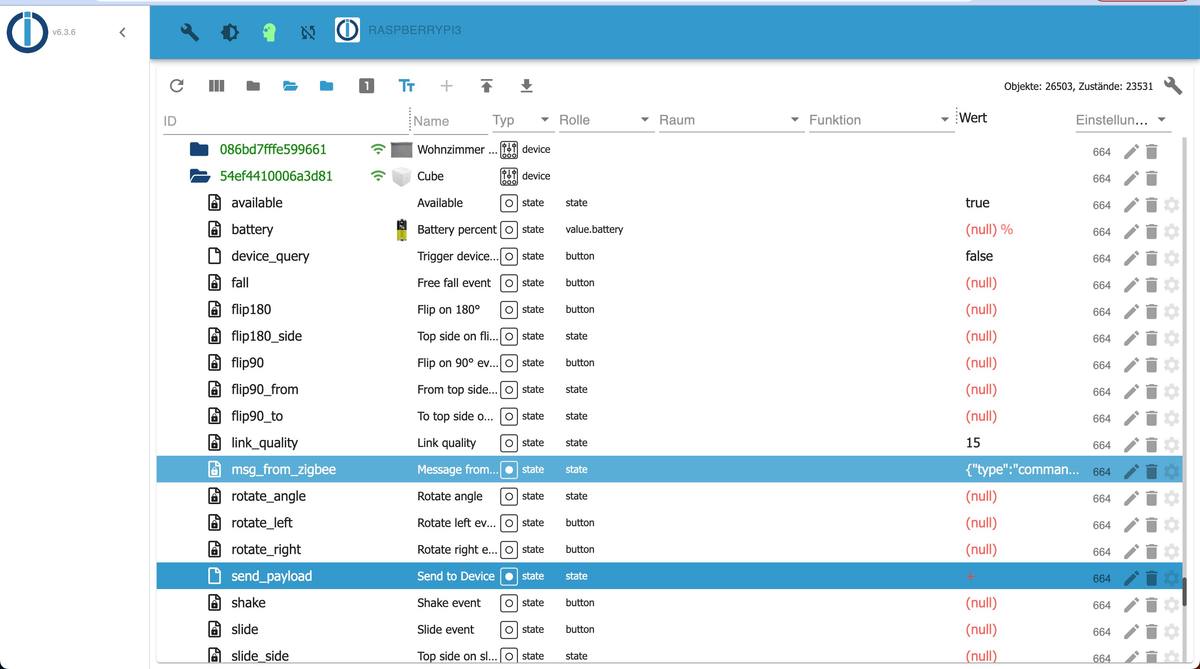
Zufall, hatte ich vor einer Stunden gerade gemacht, da mit die 100MB aufgefallen sind beim Abtippen für hier.
Allerdings hatte der IoBroker auch danach direkt wieder das wunderschöne "minimal" Design geladen,...
-
@ro75 said in Humpelstilzchen - IoBroker extrem langsam Redis | JSON | SSD:
Vergrößere mal den SWAP-Bereich. RAM und SWAP sind oberste Obergrenze. Als bei mir noch ein Raspi mit 4 GB werkelte, hatte ich bei mir auch eine SWAP von 4 GB eingerichtet. Dann lief es auch.
Zufall, hatte ich vor einer Stunden gerade gemacht, da mit die 100MB aufgefallen sind beim Abtippen für hier.
Allerdings hatte der IoBroker auch danach direkt wieder das wunderschöne "minimal" Design geladen,...
-
@glasfaser sagte in Humpelstilzchen - IoBroker extrem langsam Redis | JSON | SSD:
@stolly82 sagte in Humpelstilzchen - IoBroker extrem langsam Redis | JSON | SSD:ich nutze den IoBroker seit ein paar Jahren
... und BETA Tester
und dazu !?
@glasfaser said in Humpelstilzchen - IoBroker extrem langsam Redis | JSON | SSD:
@glasfaser sagte in Humpelstilzchen - IoBroker extrem langsam Redis | JSON | SSD:
@stolly82 sagte in Humpelstilzchen - IoBroker extrem langsam Redis | JSON | SSD:ich nutze den IoBroker seit ein paar Jahren
... und BETA Tester
und dazu !?
Ich bin tatsächlich wegen der ganzen Abstürze auf die Beta gegangen und dachte, dann wird es besser.
Ist aber nicht so,...

-
======================= SUMMARY =======================
		     v.2023-01-02


Operatingsystem: 	Raspbian GNU/Linux 11 (bullseye)
Installation: 		Native
Timezone: 		Europe/Berlin
User-ID: 		1000
X-Server: 		false
Boot Target: 		multi-user.target

Pending OS-Updates: 	0

Nodejs-Installation: 	/usr/bin/nodejs 	v16.19.0
			/usr/bin/node 		v16.19.0
			/usr/bin/npm 		8.19.3
			/usr/bin/npx 		8.19.3

ioBroker Core: 		js-controller 		4.0.24
			admin 			6.3.6

ioBroker Status: 	iobroker is running on this host.

At least one iobroker host is running.

Objects type: redis
States  type: redis

Status admin:
+ system.adapter.admin.1                  : admin                 : IoBroker                                 -  enabled, port: 8081, bind: 0.0.0.0, run as: admin
+ system.adapter.admin.2                  : admin                 : raspberryPi2                             -  enabled, port: 8082, bind: 0.0.0.0, run as: admin

Pending iob updates: 	1

Active repo(s): beta

Objects: 		26498
States: 		23086

Size of iob-Database:

51M	/opt/iobroker/iobroker-data/objects.jsonl
7.2M	/opt/iobroker/iobroker-data/states.jsonl


=================== END OF SUMMARY ====================
Du meinst mit mit voller Ausgabe die 3km vor der Summary?
-
======================= SUMMARY =======================
		     v.2023-01-02


Operatingsystem: 	Raspbian GNU/Linux 11 (bullseye)
Installation: 		Native
Timezone: 		Europe/Berlin
User-ID: 		1000
X-Server: 		false
Boot Target: 		multi-user.target

Pending OS-Updates: 	0

Nodejs-Installation: 	/usr/bin/nodejs 	v16.19.0
			/usr/bin/node 		v16.19.0
			/usr/bin/npm 		8.19.3
			/usr/bin/npx 		8.19.3

ioBroker Core: 		js-controller 		4.0.24
			admin 			6.3.6

ioBroker Status: 	iobroker is running on this host.

At least one iobroker host is running.

Objects type: redis
States  type: redis

Status admin:
+ system.adapter.admin.1                  : admin                 : IoBroker                                 -  enabled, port: 8081, bind: 0.0.0.0, run as: admin
+ system.adapter.admin.2                  : admin                 : raspberryPi2                             -  enabled, port: 8082, bind: 0.0.0.0, run as: admin

Pending iob updates: 	1

Active repo(s): beta

Objects: 		26498
States: 		23086

Size of iob-Database:

51M	/opt/iobroker/iobroker-data/objects.jsonl
7.2M	/opt/iobroker/iobroker-data/states.jsonl


=================== END OF SUMMARY ====================
Du meinst mit mit voller Ausgabe die 3km vor der Summary?
Skript v.2023-01-02 *** BASE SYSTEM *** Model : Raspberry Pi 4 Model B Rev 1.2 Architecture: armv7l Docker: false Virtualization: none Distributor ID: Raspbian Description: Raspbian GNU/Linux 11 (bullseye) Release: 11 Codename: bullseye PRETTY_NAME="Raspbian GNU/Linux 11 (bullseye)" NAME="Raspbian GNU/Linux" VERSION_ID="11" VERSION="11 (bullseye)" VERSION_CODENAME=bullseye ID=raspbian ID_LIKE=debian HOME_URL="http://www.raspbian.org/" SUPPORT_URL="http://www.raspbian.org/RaspbianForums" BUG_REPORT_URL="http://www.raspbian.org/RaspbianBugs" Systemuptime and Load: 22:05:03 up 5 days, 2 min, 1 user, load average: 0.71, 1.04, 1.08 CPU threads: 4 *** Time and Time Zones *** Wed Feb 1 21:05:03 UTC 2023 Wed Feb 1 22:05:03 CET 2023 CET +0100 Europe/Berlin *** User and Groups *** pi /home/pi pi adm dialout cdrom sudo audio video plugdev games users input render netdev gpio i2c spi iobroker *** X-Server-Setup *** X-Server: false Desktop: Terminal: tty Boot Target: multi-user.target *** MEMORY *** total used free shared buff/cache available Mem: 3.8G 2.6G 282M 1.0M 918M 1.3G Swap: 4.2G 105M 4.1G Total: 8.0G 2.7G 4.4G 3837 M total memory 2637 M used memory 558 M active memory 2810 M inactive memory 282 M free memory 109 M buffer memory 809 M swap cache 4195 M total swap 105 M used swap 4090 M free swap *** FILESYSTEM *** Filesystem Type Size Used Avail Use% Mounted on /dev/root ext4 235G 9.5G 216G 5% / devtmpfs devtmpfs 1.8G 0 1.8G 0% /dev tmpfs tmpfs 1.9G 0 1.9G 0% /dev/shm tmpfs tmpfs 768M 1.2M 767M 1% /run tmpfs tmpfs 5.0M 4.0K 5.0M 1% /run/lock /dev/sda1 vfat 255M 50M 206M 20% /boot tmpfs tmpfs 384M 0 384M 0% /run/user/1000 Messages in dmesg: [Fri Jan 27 22:02:59 2023] Kernel command line: coherent_pool=1M 8250.nr_uarts=0 snd_bcm2835.enable_compat_alsa=0 snd_bcm2835.enable_hdmi=1 smsc95xx.macaddr=DC:A6:32:52:F6:16 vc_mem.mem_base=0x3eb00000 vc_mem.mem_size=0x3ff00000 console=ttyS0,115200 console=tty1 root=PARTUUID=21e2e596-02 rootfstype=ext4 fsck.repair=yes rootwait [Fri Jan 27 22:03:01 2023] EXT4-fs (sda2): mounted filesystem with ordered data mode. Opts: (null). Quota mode: none. [Fri Jan 27 22:03:01 2023] VFS: Mounted root (ext4 filesystem) readonly on device 8:2. [Fri Jan 27 22:03:03 2023] EXT4-fs (sda2): re-mounted. Opts: (null). Quota mode: none. Show mounted filesystems (real ones only): TARGET SOURCE FSTYPE OPTIONS / /dev/sda2 ext4 rw,noatime `-/boot /dev/sda1 vfat rw,relatime,fmask=0022,dmask=0022,codepage=437,iocharset=ascii,shortname=mixed,errors=remount-ro Files in neuralgic directories: /var: 916M /var/ 506M /var/cache 500M /var/cache/apt 436M /var/cache/apt/archives 252M /var/lib /opt/iobroker/backups: 145M /opt/iobroker/backups/ 4.0K /opt/iobroker/backups/redistmp /opt/iobroker/iobroker-data: 517M /opt/iobroker/iobroker-data/ 334M /opt/iobroker/iobroker-data/files 121M /opt/iobroker/iobroker-data/backup-objects 51M /opt/iobroker/iobroker-data/files/javascript.admin 48M /opt/iobroker/iobroker-data/files/telegram.admin The five largest files in iobroker-data are: 51M /opt/iobroker/iobroker-data/objects.jsonl 19M /opt/iobroker/iobroker-data/files/web.admin/static/js/main.806bf48a.js.map 19M /opt/iobroker/iobroker-data/files/iot.admin/static/js/main.fe83292c.js.map 15M /opt/iobroker/iobroker-data/files/telegram.admin/rules/static/js/vendors-node_modules_iobroker_adapter-react-v5_assets_devices_parseNames_d_ts-node_modules_io-1d9f06.44fe4a3f.chunk.js.map 9.7M /opt/iobroker/iobroker-data/files/text2command.admin/static/js/main.bbfeb1bf.js.map *** NodeJS-Installation *** /usr/bin/nodejs v16.19.0 /usr/bin/node v16.19.0 /usr/bin/npm 8.19.3 /usr/bin/npx 8.19.3 nodejs: Installed: 16.19.0-deb-1nodesource1 Candidate: 16.19.0-deb-1nodesource1 Version table: *** 16.19.0-deb-1nodesource1 500 500 https://deb.nodesource.com/node_16.x bullseye/main armhf Packages 100 /var/lib/dpkg/status 12.22.12~dfsg-1~deb11u3 500 500 http://raspbian.raspberrypi.org/raspbian bullseye/main armhf Packages Temp directories causing npm8 problem: 0 *** ioBroker-Installation *** ioBroker Status iobroker is running on this host. At least one iobroker host is running. Objects type: redis States type: redis Core adapters versions js-controller: 4.0.24 admin: 6.3.6 javascript: 6.1.4 Adapters from github: 6 Adapter State + system.adapter.admin.1 : admin : IoBroker - enabled, port: 8081, bind: 0.0.0.0, run as: admin + system.adapter.admin.2 : admin : raspberryPi2 - enabled, port: 8082, bind: 0.0.0.0, run as: admin + system.adapter.alexa2.0 : alexa2 : IoBroker - enabled system.adapter.apple-find-me.0 : apple-find-me : IoBroker - disabled + system.adapter.backitup.0 : backitup : IoBroker - enabled system.adapter.daswetter.0 : daswetter : IoBroker - enabled + system.adapter.denon.0 : denon : IoBroker - enabled system.adapter.discovery.0 : discovery : raspberryPi2 - disabled + system.adapter.doorbird.0 : doorbird : IoBroker - enabled + system.adapter.energiefluss.0 : energiefluss : IoBroker - enabled system.adapter.feiertage.0 : feiertage : IoBroker - enabled system.adapter.flot.0 : flot : IoBroker - disabled system.adapter.habpanel.0 : habpanel : IoBroker - disabled + system.adapter.ham.0 : ham : raspberryPi2 - enabled + system.adapter.harmony.0 : harmony : IoBroker - enabled + system.adapter.history.0 : history : IoBroker - enabled + system.adapter.homeconnect.0 : homeconnect : IoBroker - enabled system.adapter.hue-extended.0 : hue-extended : IoBroker - disabled system.adapter.hueemu.0 : hueemu : IoBroker - disabled, port: 8070 + system.adapter.hueemu.3 : hueemu : raspberryPi3 - enabled, port: 8070 system.adapter.ical.0 : ical : IoBroker - enabled system.adapter.icons-icons8.0 : icons-icons8 : IoBroker - disabled + system.adapter.innogy-smarthome.0 : innogy-smarthome : IoBroker - enabled + system.adapter.iot.0 : iot : IoBroker - enabled system.adapter.jarvis.0 : jarvis : IoBroker - disabled + system.adapter.javascript.0 : javascript : IoBroker - enabled + system.adapter.javascript.1 : javascript : raspberryPi3 - enabled system.adapter.landroid.0 : landroid : IoBroker - disabled + system.adapter.lgtv.0 : lgtv : IoBroker - enabled + system.adapter.life360.0 : life360 : IoBroker - enabled + system.adapter.linkeddevices.0 : linkeddevices : IoBroker - enabled + system.adapter.lovelace.0 : lovelace : IoBroker - enabled, port: 8091, bind: 0.0.0.0, run as: admin + system.adapter.mihome-vacuum.0 : mihome-vacuum : IoBroker - enabled, port: 54321, bind: 0.0.0.0 + system.adapter.mihome-vacuum.1 : mihome-vacuum : IoBroker - enabled, port: 54321, bind: 0.0.0.0 + system.adapter.mihome-vacuum.2 : mihome-vacuum : IoBroker - enabled, port: 54321, bind: 0.0.0.0 + system.adapter.mihome.0 : mihome : IoBroker - enabled, port: 9898, bind: 0.0.0.0 + system.adapter.miio.0 : miio : IoBroker - enabled system.adapter.milight.0 : milight : IoBroker - disabled, port: 8899 system.adapter.milight.1 : milight : raspberryPi2 - disabled, port: 5987 system.adapter.mobile.0 : mobile : IoBroker - disabled system.adapter.mqtt-client.0 : mqtt-client : IoBroker - disabled, port: 1883, bind: 0.0.0.0 + system.adapter.mqtt.0 : mqtt : IoBroker - enabled, port: 1883, bind: 0.0.0.0 + system.adapter.node-red.0 : node-red : IoBroker - enabled, port: 1880, bind: 0.0.0.0 + system.adapter.nuki-extended.0 : nuki-extended : IoBroker - enabled system.adapter.openweathermap.0 : openweathermap : IoBroker - enabled system.adapter.parser.0 : parser : IoBroker - disabled system.adapter.parser.1 : parser : IoBroker - disabled + system.adapter.places.0 : places : IoBroker - enabled + system.adapter.pushover.0 : pushover : IoBroker - enabled + system.adapter.radar2.0 : radar2 : IoBroker - enabled + system.adapter.samsung.0 : samsung : IoBroker - enabled + system.adapter.sayit.0 : sayit : IoBroker - enabled, port: 0 + system.adapter.shelly.0 : shelly : IoBroker - enabled, port: 1885, bind: 0.0.0.0 + system.adapter.shelly.1 : shelly : IoBroker - enabled, port: 1886, bind: 192.168.20.10 + system.adapter.simple-api.0 : simple-api : IoBroker - enabled, port: 8087, bind: 0.0.0.0, run as: admin system.adapter.smartcontrol.0 : smartcontrol : IoBroker - disabled + system.adapter.sonoff.0 : sonoff : IoBroker - enabled, port: 1884, bind: 0.0.0.0 + system.adapter.sourceanalytix.0 : sourceanalytix : IoBroker - enabled + system.adapter.sql.0 : sql : IoBroker - enabled, port: 0 + system.adapter.statistics.0 : statistics : IoBroker - enabled + system.adapter.tapo.0 : tapo : IoBroker - enabled + system.adapter.telegram.0 : telegram : IoBroker - enabled, port: 8443, bind: 0.0.0.0 + system.adapter.terminal.0 : terminal : IoBroker - enabled, port: 8088, bind: 0.0.0.0, run as: admin + system.adapter.text2command.0 : text2command : IoBroker - enabled + system.adapter.tr-064.0 : tr-064 : IoBroker - enabled system.adapter.tr-064.1 : tr-064 : raspberryPi3 - disabled system.adapter.tr-064.2 : tr-064 : raspberryPi3 - disabled system.adapter.tr-064.3 : tr-064 : raspberryPi3 - disabled system.adapter.tr-064.4 : tr-064 : raspberryPi3 - disabled system.adapter.tr-064.5 : tr-064 : raspberryPi3 - disabled system.adapter.tr-064.6 : tr-064 : raspberryPi3 - disabled system.adapter.tr-064.7 : tr-064 : raspberryPi3 - disabled system.adapter.tr-064.8 : tr-064 : raspberryPi3 - disabled system.adapter.tr-064.9 : tr-064 : raspberryPi3 - disabled + system.adapter.virtualpowermeter.0 : virtualpowermeter : IoBroker - enabled system.adapter.vis-bars.0 : vis-bars : IoBroker - disabled system.adapter.vis-canvas-gauges.0 : vis-canvas-gauges : IoBroker - disabled system.adapter.vis-colorpicker.0 : vis-colorpicker : IoBroker - disabled system.adapter.vis-fancyswitch.0 : vis-fancyswitch : IoBroker - disabled system.adapter.vis-google-fonts.0 : vis-google-fonts : IoBroker - enabled system.adapter.vis-history.0 : vis-history : IoBroker - disabled system.adapter.vis-hqwidgets.0 : vis-hqwidgets : IoBroker - disabled system.adapter.vis-jqui-mfd.0 : vis-jqui-mfd : IoBroker - disabled system.adapter.vis-lcars.0 : vis-lcars : IoBroker - disabled system.adapter.vis-map.0 : vis-map : IoBroker - disabled system.adapter.vis-rgraph.0 : vis-rgraph : IoBroker - disabled system.adapter.vis-timeandweather.0 : vis-timeandweather : IoBroker - disabled system.adapter.vis.0 : vis : IoBroker - enabled + system.adapter.web.0 : web : IoBroker - enabled, port: 8082, bind: 192.168.20.10, run as: admin + system.adapter.whatsapp-cmb.0 : whatsapp-cmb : IoBroker - enabled system.adapter.wifilight.0 : wifilight : IoBroker - disabled + system.adapter.withings.0 : withings : IoBroker - enabled system.adapter.worx.0 : worx : IoBroker - disabled + system.adapter.yahka.0 : yahka : IoBroker - enabled + system.adapter.zigbee.0 : zigbee : IoBroker - enabled, port: /dev/ttyACM0 + instance is alive Enabled adapters with bindings + system.adapter.admin.1 : admin : IoBroker - enabled, port: 8081, bind: 0.0.0.0, run as: admin + system.adapter.admin.2 : admin : raspberryPi2 - enabled, port: 8082, bind: 0.0.0.0, run as: admin + system.adapter.hueemu.3 : hueemu : raspberryPi3 - enabled, port: 8070 + system.adapter.lovelace.0 : lovelace : IoBroker - enabled, port: 8091, bind: 0.0.0.0, run as: admin + system.adapter.mihome-vacuum.0 : mihome-vacuum : IoBroker - enabled, port: 54321, bind: 0.0.0.0 + system.adapter.mihome-vacuum.1 : mihome-vacuum : IoBroker - enabled, port: 54321, bind: 0.0.0.0 + system.adapter.mihome-vacuum.2 : mihome-vacuum : IoBroker - enabled, port: 54321, bind: 0.0.0.0 + system.adapter.mihome.0 : mihome : IoBroker - enabled, port: 9898, bind: 0.0.0.0 + system.adapter.mqtt.0 : mqtt : IoBroker - enabled, port: 1883, bind: 0.0.0.0 + system.adapter.node-red.0 : node-red : IoBroker - enabled, port: 1880, bind: 0.0.0.0 + system.adapter.sayit.0 : sayit : IoBroker - enabled, port: 0 + system.adapter.shelly.0 : shelly : IoBroker - enabled, port: 1885, bind: 0.0.0.0 + system.adapter.shelly.1 : shelly : IoBroker - enabled, port: 1886, bind: 192.168.20.10 + system.adapter.simple-api.0 : simple-api : IoBroker - enabled, port: 8087, bind: 0.0.0.0, run as: admin + system.adapter.sonoff.0 : sonoff : IoBroker - enabled, port: 1884, bind: 0.0.0.0 + system.adapter.sql.0 : sql : IoBroker - enabled, port: 0 + system.adapter.telegram.0 : telegram : IoBroker - enabled, port: 8443, bind: 0.0.0.0 + system.adapter.terminal.0 : terminal : IoBroker - enabled, port: 8088, bind: 0.0.0.0, run as: admin + system.adapter.web.0 : web : IoBroker - enabled, port: 8082, bind: 192.168.20.10, run as: admin + system.adapter.zigbee.0 : zigbee : IoBroker - enabled, port: /dev/ttyACM0 ioBroker-Repositories stable : http://download.iobroker.net/sources-dist.json beta : http://download.iobroker.net/sources-dist-latest.json Active repo(s): beta Installed ioBroker-Instances Used repository: beta Adapter "admin" : 6.3.6 , installed 6.3.6 Adapter "alexa2" : 3.23.2 , installed 3.23.2 Adapter "apple-find-me": 0.0.15 , installed 0.0.15 Adapter "backitup" : 2.5.12 , installed 2.5.12 Adapter "daswetter" : 3.1.7 , installed 3.1.6 [Updatable] Adapter "denon" : 1.13.4 , installed 1.13.4 Adapter "doorbird" : 0.1.5 , installed 0.1.5 Adapter "feiertage" : 1.1.0 , installed 1.1.0 Adapter "flot" : 1.12.0 , installed 1.12.0 Adapter "habpanel" : 0.5.0 , installed 0.5.0 Adapter "ham" : 5.3.1 , installed 5.3.1 Adapter "harmony" : 1.2.2 , installed 1.2.2 Adapter "history" : 2.2.4 , installed 2.2.4 Adapter "homeconnect" : 1.1.1 , installed 1.1.1 Adapter "hue-extended" : 2.0.0 , installed 2.0.0 Adapter "ical" : 1.13.2 , installed 1.13.2 Adapter "icons-icons8" : 0.0.1 , installed 0.0.1 Adapter "innogy-smarthome": 1.2.6 , installed 1.2.6 Adapter "iot" : 1.14.3 , installed 1.14.3 Adapter "jarvis" : 3.1.2 , installed 3.1.2 Adapter "javascript" : 6.1.4 , installed 6.1.4 Controller "js-controller": 4.0.24 , installed 4.0.24 Adapter "landroid" : 1.0.3 , installed 1.0.3 Adapter "lgtv" : 1.1.10 , installed 1.1.10 Adapter "linkeddevices": 1.5.5 , installed 1.5.5 Adapter "lovelace" : 3.0.1 , installed 3.0.1 Adapter "mihome" : 1.4.0 , installed 1.4.0 Adapter "mihome-vacuum": 3.9.5 , installed 3.9.5 Adapter "miio" : 0.0.13 , installed 0.0.14 Adapter "milight" : 0.4.0 , installed 0.4.0 Adapter "mobile" : 1.0.1 , installed 1.0.1 Adapter "mqtt" : 4.0.7 , installed 4.0.7 Adapter "mqtt-client" : 1.6.3 , installed 1.6.3 Adapter "node-red" : 4.0.0 , installed 4.0.0 Adapter "nuki-extended": 2.6.5 , installed 2.6.5 Adapter "openweathermap": 0.3.3 , installed 0.3.3 Adapter "parser" : 1.3.2 , installed 1.3.2 Adapter "places" : 1.1.2 , installed 1.1.2 Adapter "pushover" : 3.0.3 , installed 3.0.3 Adapter "radar2" : 2.0.7 , installed 2.0.7 Adapter "samsung" : 0.5.11 , installed 0.5.11 Adapter "sayit" : 1.12.6 , installed 1.12.6 Adapter "shelly" : 6.3.1 , installed 6.3.1 Adapter "simple-api" : 2.7.2 , installed 2.7.2 Adapter "smartcontrol" : 1.3.2 , installed 1.3.2 Adapter "socketio" : 6.3.3 , installed 6.3.3 Adapter "sonoff" : 2.5.1 , installed 2.5.1 Adapter "sourceanalytix": 0.4.14 , installed 0.4.14 Adapter "sql" : 2.2.0 , installed 2.2.0 Adapter "statistics" : 2.3.0 , installed 2.3.0 Adapter "tapo" : 0.0.8 , installed 0.0.8 Adapter "telegram" : 1.15.2 , installed 1.15.2 Adapter "terminal" : 1.0.0 , installed 1.0.0 Adapter "text2command" : 2.3.0 , installed 2.3.0 Adapter "tr-064" : 4.2.18 , installed 4.2.18 Adapter "virtualpowermeter": 1.4.6, installed 1.4.6 Adapter "vis" : 1.4.16 , installed 1.4.16 Adapter "vis-bars" : 0.1.4 , installed 0.1.4 Adapter "vis-canvas-gauges": 1.0.1, installed 1.0.1 Adapter "vis-colorpicker": 1.2.0 , installed 1.2.0 Adapter "vis-fancyswitch": 1.1.0 , installed 1.1.0 Adapter "vis-google-fonts": 1.0.4 , installed 1.0.4 Adapter "vis-history" : 1.0.0 , installed 1.0.0 Adapter "vis-hqwidgets": 1.3.1 , installed 1.3.1 Adapter "vis-jqui-mfd" : 1.0.12 , installed 1.0.12 Adapter "vis-lcars" : 1.0.4 , installed 1.0.4 Adapter "vis-map" : 1.0.4 , installed 1.0.4 Adapter "vis-rgraph" : 0.0.2 , installed 0.0.2 Adapter "vis-timeandweather": 1.2.2, installed 1.2.2 Adapter "web" : 5.4.3 , installed 5.4.3 Adapter "whatsapp-cmb" : 0.2.3 , installed 0.2.3 Adapter "wifilight" : 1.1.4 , installed 1.1.4 Adapter "withings" : 0.0.13 , installed 0.0.13 Adapter "worx" : 2.0.3 , installed 2.0.3 Adapter "ws" : 2.3.5 , installed 2.3.5 Adapter "yahka" : 0.17.0 , installed 0.17.0 Adapter "zigbee" : 1.8.10 , installed 1.8.10 Objects and States Please stand by - This may take a while Objects: 26498 States: 23086 *** OS-Repositories and Updates *** Hit:1 http://raspbian.raspberrypi.org/raspbian bullseye InRelease Hit:2 http://archive.raspberrypi.org/debian bullseye InRelease Hit:3 https://download.docker.com/linux/raspbian bullseye InRelease Hit:4 https://deb.nodesource.com/node_16.x bullseye InRelease Reading package lists... Pending Updates: 0 *** Listening Ports *** Active Internet connections (only servers) Proto Recv-Q Send-Q Local Address Foreign Address State User Inode PID/Program name tcp 0 0 192.168.20.10:1886 0.0.0.0:* LISTEN 1001 1963743 1969/io.shelly.1 tcp 0 0 0.0.0.0:1884 0.0.0.0:* LISTEN 1001 1961850 2039/io.sonoff.0 tcp 0 0 0.0.0.0:1880 0.0.0.0:* LISTEN 1001 1959241 1756/node-red tcp 0 0 0.0.0.0:1883 0.0.0.0:* LISTEN 1001 1959318 1782/io.mqtt.0 tcp 0 0 192.168.20.10:8082 0.0.0.0:* LISTEN 1001 1994453 3506/io.web.0 tcp 0 0 192.168.20.10:8100 0.0.0.0:* LISTEN 1001 1963783 2191/io.doorbird.0 tcp 0 0 127.0.0.1:6379 0.0.0.0:* LISTEN 110 3184155 30860/redis-server tcp 0 0 0.0.0.0:22 0.0.0.0:* LISTEN 0 15389 588/sshd: /usr/sbin tcp 0 0 127.0.0.1:46081 0.0.0.0:* LISTEN 1001 1957539 2015/io.yahka.0 tcp 0 0 192.168.20.10:6379 0.0.0.0:* LISTEN 110 3184156 30860/redis-server tcp 0 0 0.0.0.0:43231 0.0.0.0:* LISTEN 1001 1957535 2015/io.yahka.0 tcp6 0 0 :::51989 :::* LISTEN 1001 1960415 1879/io.nuki-extend tcp6 0 0 :::8087 :::* LISTEN 1001 1966178 2367/io.simple-api. tcp6 0 0 :::8081 :::* LISTEN 1001 2728969 18766/io.admin.1 tcp6 0 0 :::8088 :::* LISTEN 1001 1966401 2423/io.terminal.0 tcp6 0 0 :::8091 :::* LISTEN 1001 1998379 3601/io.lovelace.0 tcp6 0 0 :::61991 :::* LISTEN 1001 1963825 2260/io.harmony.0 tcp6 0 0 :::22 :::* LISTEN 0 15391 588/sshd: /usr/sbin udp 0 0 0.0.0.0:42115 0.0.0.0:* 1001 1961260 2069/io.tr-064.0 udp 0 0 0.0.0.0:54920 0.0.0.0:* 1001 1962422 2191/io.doorbird.0 udp 0 0 0.0.0.0:35472 0.0.0.0:* 1001 1962893 2385/io.denon.0 udp 0 0 0.0.0.0:59541 0.0.0.0:* 1001 1962666 2293/io.miio.0 udp 0 0 0.0.0.0:9898 0.0.0.0:* 1001 1967786 1763/io.mihome.0 udp 0 0 0.0.0.0:33451 0.0.0.0:* 1001 1961158 2015/io.yahka.0 udp 0 0 0.0.0.0:53421 0.0.0.0:* 1001 2650938 17137/io.mihome-vac udp 0 0 0.0.0.0:53422 0.0.0.0:* 1001 1992023 3258/io.mihome-vacu udp 0 704 0.0.0.0:53424 0.0.0.0:* 1001 1992022 3264/io.mihome-vacu udp 0 0 0.0.0.0:44731 0.0.0.0:* 1001 1963543 2367/io.simple-api. udp 0 0 0.0.0.0:59069 0.0.0.0:* 1001 1998374 3601/io.lovelace.0 udp 0 0 0.0.0.0:56006 0.0.0.0:* 1001 2005935 3785/io.withings.0 udp 0 0 0.0.0.0:41167 0.0.0.0:* 1001 1992600 3506/io.web.0 udp 0 0 0.0.0.0:35535 0.0.0.0:* 1001 1963795 2423/io.terminal.0 udp 0 0 0.0.0.0:38610 0.0.0.0:* 1001 1962322 2149/io.statistics. udp 0 0 0.0.0.0:48857 0.0.0.0:* 1001 1961363 2101/io.life360.0 udp 0 0 0.0.0.0:34524 0.0.0.0:* 108 11514 400/avahi-daemon: r udp 0 0 0.0.0.0:58597 0.0.0.0:* 1001 1991439 3264/io.mihome-vacu udp 0 0 0.0.0.0:57575 0.0.0.0:* 1001 1957137 1672/io.javascript. udp 0 0 192.168.20.45:5353 0.0.0.0:* 1001 1962595 2069/io.tr-064.0 udp 0 0 192.168.20.10:5353 0.0.0.0:* 1001 1962594 2069/io.tr-064.0 udp 0 0 0.0.0.0:5353 0.0.0.0:* 108 11512 400/avahi-daemon: r udp 0 0 0.0.0.0:59116 0.0.0.0:* 1001 1961285 2090/io.tapo.0 udp 0 0 0.0.0.0:49938 0.0.0.0:* 1001 1945397 1576/io.whatsapp-cm udp 0 0 0.0.0.0:48413 0.0.0.0:* 1001 1956540 1596/io.node-red.0 udp 0 0 0.0.0.0:40236 0.0.0.0:* 1001 1960463 2039/io.sonoff.0 udp 0 0 0.0.0.0:39213 0.0.0.0:* 1001 1953745 1485/iobroker.js-co udp 0 0 0.0.0.0:53551 0.0.0.0:* 1001 1991460 3258/io.mihome-vacu udp 0 0 0.0.0.0:43838 0.0.0.0:* 1001 1991769 3186/io.backitup.0 udp 0 0 0.0.0.0:41321 0.0.0.0:* 1001 1958074 1763/io.mihome.0 udp 0 0 0.0.0.0:38764 0.0.0.0:* 1001 1957005 1797/io.samsung.0 udp 0 0 0.0.0.0:33133 0.0.0.0:* 1001 1960548 2128/io.text2comman udp 0 0 0.0.0.0:49016 0.0.0.0:* 1001 3216499 31581/io.zigbee.0 udp 0 0 0.0.0.0:59790 0.0.0.0:* 1001 2725586 18766/io.admin.1 udp 0 0 0.0.0.0:36238 0.0.0.0:* 1001 1961383 2112/io.sayit.0 udp 0 0 0.0.0.0:40350 0.0.0.0:* 1001 1960829 2286/io.iot.0 udp 0 0 0.0.0.0:46497 0.0.0.0:* 1001 1962788 2300/io.lgtv.0 udp 0 0 0.0.0.0:43979 0.0.0.0:* 1001 1956372 1549/io.pushover.0 udp 0 0 0.0.0.0:55758 0.0.0.0:* 1001 1958027 1730/io.sql.0 udp 0 0 0.0.0.0:59855 0.0.0.0:* 1001 1963430 2339/io.energieflus udp 0 0 0.0.0.0:34773 0.0.0.0:* 1001 1959387 1838/io.radar2.0 udp 0 0 0.0.0.0:37336 0.0.0.0:* 1001 1958270 1756/node-red udp 0 0 0.0.0.0:55269 0.0.0.0:* 1001 1960336 1890/io.alexa2.0 udp 0 0 0.0.0.0:42479 0.0.0.0:* 1001 2775959 19932/io.telegram.0 udp 0 0 0.0.0.0:38900 0.0.0.0:* 1001 2677009 17703/io.sourceanal udp 0 0 0.0.0.0:40450 0.0.0.0:* 1001 1977882 1782/io.mqtt.0 udp 0 0 0.0.0.0:44040 0.0.0.0:* 1001 1960348 1969/io.shelly.1 udp 0 0 0.0.0.0:33812 0.0.0.0:* 1001 1980566 1845/io.shelly.0 udp 0 0 0.0.0.0:58391 0.0.0.0:* 1001 1965213 2400/io.virtualpowe udp 0 0 0.0.0.0:61991 0.0.0.0:* 1001 1963828 2260/io.harmony.0 udp 0 0 0.0.0.0:5683 0.0.0.0:* 1001 1958574 1845/io.shelly.0 udp 0 0 0.0.0.0:53815 0.0.0.0:* 1001 1960467 2046/io.places.0 udp 0 0 0.0.0.0:49723 0.0.0.0:* 1001 1955513 1603/io.history.0 udp 0 0 0.0.0.0:57405 0.0.0.0:* 1001 1963437 2348/io.homeconnect udp 0 0 0.0.0.0:43587 0.0.0.0:* 1001 1962303 2140/io.linkeddevic udp 0 0 0.0.0.0:67 0.0.0.0:* 1001 1960101 1838/io.radar2.0 udp 0 0 0.0.0.0:68 0.0.0.0:* 0 11735 690/dhcpcd udp 0 0 0.0.0.0:34375 0.0.0.0:* 1001 1958884 1879/io.nuki-extend udp 0 0 0.0.0.0:52808 0.0.0.0:* 1001 1957318 1949/io.innogy-smar udp 0 0 0.0.0.0:39006 0.0.0.0:* 1001 1960755 2260/io.harmony.0 udp6 0 0 :::5353 :::* 108 11513 400/avahi-daemon: r udp6 0 0 :::46495 :::* 108 11515 400/avahi-daemon: r *** Log File - Last 25 Lines *** at listOnTimeout (node:internal/timers:559:17) at processTimers (node:internal/timers:502:7)) 2023-02-01 21:45:10.682 - info: daswetter.0 (31848) starting. Version 3.1.6 in /opt/iobroker/node_modules/iobroker.daswetter, node: v16.19.0, js-controller: 4.0.24 2023-02-01 21:45:31.134 - info: daswetter.0 (31848) still wrong data structure from server received! repaired... 2023-02-01 21:45:49.903 - info: daswetter.0 (31848) Terminated (ADAPTER_REQUESTED_TERMINATION): All data handled, adapter stopped until next scheduled moment 2023-02-01 21:45:50.420 - info: daswetter.0 (31848) cleaned everything up... 2023-02-01 21:48:08.391 - error: iot.0 (2286) [GHOME] device innogy-smarthome.0.Küche-klein.Raumklima.Actual-Temperature.Temperature is unknown to google home 2023-02-01 21:48:54.262 - error: iot.0 (2286) [GHOME] device innogy-smarthome.0.Kind-2.Raumklima.Actual-Temperature.Temperature is unknown to google home 2023-02-01 21:57:00.979 - error: iot.0 (2286) [GHOME] device innogy-smarthome.0.Chilling.Raumklima.Actual-Temperature.Temperature is unknown to google home 2023-02-01 21:58:17.414 - error: iot.0 (2286) [GHOME] device innogy-smarthome.0.Wäscheraum.Raumklima.Actual-Temperature.Temperature is unknown to google home 2023-02-01 22:00:02.799 - info: daswetter.0 (32003) starting. Version 3.1.6 in /opt/iobroker/node_modules/iobroker.daswetter, node: v16.19.0, js-controller: 4.0.24 2023-02-01 22:00:07.869 - info: ical.0 (32018) starting. Version 1.13.2 in /opt/iobroker/node_modules/iobroker.ical, node: v16.19.0, js-controller: 4.0.24 2023-02-01 22:00:08.474 - warn: ical.0 (32018) Error reading from URL "http://11111.ics" 2023-02-01 22:00:08.477 - warn: ical.0 (32018) Error reading "http://11111.ics": Cannot read URL: "http://11111.ics" 2023-02-01 22:00:08.479 - info: ical.0 (32018) All calenders could not be processed, Do not clean up events 2023-02-01 22:00:13.517 - info: ical.0 (32018) Terminated (NO_ERROR): Without reason 2023-02-01 22:00:20.134 - info: daswetter.0 (32003) still wrong data structure from server received! repaired... 2023-02-01 22:00:41.475 - info: daswetter.0 (32003) Terminated (ADAPTER_REQUESTED_TERMINATION): All data handled, adapter stopped until next scheduled moment 2023-02-01 22:00:41.986 - info: daswetter.0 (32003) cleaned everything up... 2023-02-01 22:01:05.401 - error: iot.0 (2286) [GHOME] device innogy-smarthome.0.Küche-klein.Raumklima.Actual-Temperature.Temperature is unknown to google home 2023-02-01 22:01:31.762 - error: iot.0 (2286) [GHOME] device shelly.0.SHDM-2#483FDA91A509#1.lights.Switch is unknown to google home 2023-02-01 22:02:58.616 - error: iot.0 (2286) [GHOME] device innogy-smarthome.0.Michis-Schlafzimmer.Raumklima.Actual-Temperature.Temperature is unknown to google home 2023-02-01 22:04:25.841 - error: iot.0 (2286) [GHOME] device innogy-smarthome.0.Büro-Jan-Dachboden.Raumklima.Actual-Temperature.Temperature is unknown to google home 2023-02-01 22:06:05.307 - error: life360.0 (2101) Connection established but failed to authenticate. Check your credentials! 2023-02-01 22:06:32.603 - error: iot.0 (2286) [GHOME] device innogy-smarthome.0.Kind-2.Raumklima.Actual-Temperature.Temperature is unknown to google home -
Skript v.2023-01-02 *** BASE SYSTEM *** Model : Raspberry Pi 4 Model B Rev 1.2 Architecture: armv7l Docker: false Virtualization: none Distributor ID: Raspbian Description: Raspbian GNU/Linux 11 (bullseye) Release: 11 Codename: bullseye PRETTY_NAME="Raspbian GNU/Linux 11 (bullseye)" NAME="Raspbian GNU/Linux" VERSION_ID="11" VERSION="11 (bullseye)" VERSION_CODENAME=bullseye ID=raspbian ID_LIKE=debian HOME_URL="http://www.raspbian.org/" SUPPORT_URL="http://www.raspbian.org/RaspbianForums" BUG_REPORT_URL="http://www.raspbian.org/RaspbianBugs" Systemuptime and Load: 22:05:03 up 5 days, 2 min, 1 user, load average: 0.71, 1.04, 1.08 CPU threads: 4 *** Time and Time Zones *** Wed Feb 1 21:05:03 UTC 2023 Wed Feb 1 22:05:03 CET 2023 CET +0100 Europe/Berlin *** User and Groups *** pi /home/pi pi adm dialout cdrom sudo audio video plugdev games users input render netdev gpio i2c spi iobroker *** X-Server-Setup *** X-Server: false Desktop: Terminal: tty Boot Target: multi-user.target *** MEMORY *** total used free shared buff/cache available Mem: 3.8G 2.6G 282M 1.0M 918M 1.3G Swap: 4.2G 105M 4.1G Total: 8.0G 2.7G 4.4G 3837 M total memory 2637 M used memory 558 M active memory 2810 M inactive memory 282 M free memory 109 M buffer memory 809 M swap cache 4195 M total swap 105 M used swap 4090 M free swap *** FILESYSTEM *** Filesystem Type Size Used Avail Use% Mounted on /dev/root ext4 235G 9.5G 216G 5% / devtmpfs devtmpfs 1.8G 0 1.8G 0% /dev tmpfs tmpfs 1.9G 0 1.9G 0% /dev/shm tmpfs tmpfs 768M 1.2M 767M 1% /run tmpfs tmpfs 5.0M 4.0K 5.0M 1% /run/lock /dev/sda1 vfat 255M 50M 206M 20% /boot tmpfs tmpfs 384M 0 384M 0% /run/user/1000 Messages in dmesg: [Fri Jan 27 22:02:59 2023] Kernel command line: coherent_pool=1M 8250.nr_uarts=0 snd_bcm2835.enable_compat_alsa=0 snd_bcm2835.enable_hdmi=1 smsc95xx.macaddr=DC:A6:32:52:F6:16 vc_mem.mem_base=0x3eb00000 vc_mem.mem_size=0x3ff00000 console=ttyS0,115200 console=tty1 root=PARTUUID=21e2e596-02 rootfstype=ext4 fsck.repair=yes rootwait [Fri Jan 27 22:03:01 2023] EXT4-fs (sda2): mounted filesystem with ordered data mode. Opts: (null). Quota mode: none. [Fri Jan 27 22:03:01 2023] VFS: Mounted root (ext4 filesystem) readonly on device 8:2. [Fri Jan 27 22:03:03 2023] EXT4-fs (sda2): re-mounted. Opts: (null). Quota mode: none. Show mounted filesystems (real ones only): TARGET SOURCE FSTYPE OPTIONS / /dev/sda2 ext4 rw,noatime `-/boot /dev/sda1 vfat rw,relatime,fmask=0022,dmask=0022,codepage=437,iocharset=ascii,shortname=mixed,errors=remount-ro Files in neuralgic directories: /var: 916M /var/ 506M /var/cache 500M /var/cache/apt 436M /var/cache/apt/archives 252M /var/lib /opt/iobroker/backups: 145M /opt/iobroker/backups/ 4.0K /opt/iobroker/backups/redistmp /opt/iobroker/iobroker-data: 517M /opt/iobroker/iobroker-data/ 334M /opt/iobroker/iobroker-data/files 121M /opt/iobroker/iobroker-data/backup-objects 51M /opt/iobroker/iobroker-data/files/javascript.admin 48M /opt/iobroker/iobroker-data/files/telegram.admin The five largest files in iobroker-data are: 51M /opt/iobroker/iobroker-data/objects.jsonl 19M /opt/iobroker/iobroker-data/files/web.admin/static/js/main.806bf48a.js.map 19M /opt/iobroker/iobroker-data/files/iot.admin/static/js/main.fe83292c.js.map 15M /opt/iobroker/iobroker-data/files/telegram.admin/rules/static/js/vendors-node_modules_iobroker_adapter-react-v5_assets_devices_parseNames_d_ts-node_modules_io-1d9f06.44fe4a3f.chunk.js.map 9.7M /opt/iobroker/iobroker-data/files/text2command.admin/static/js/main.bbfeb1bf.js.map *** NodeJS-Installation *** /usr/bin/nodejs v16.19.0 /usr/bin/node v16.19.0 /usr/bin/npm 8.19.3 /usr/bin/npx 8.19.3 nodejs: Installed: 16.19.0-deb-1nodesource1 Candidate: 16.19.0-deb-1nodesource1 Version table: *** 16.19.0-deb-1nodesource1 500 500 https://deb.nodesource.com/node_16.x bullseye/main armhf Packages 100 /var/lib/dpkg/status 12.22.12~dfsg-1~deb11u3 500 500 http://raspbian.raspberrypi.org/raspbian bullseye/main armhf Packages Temp directories causing npm8 problem: 0 *** ioBroker-Installation *** ioBroker Status iobroker is running on this host. At least one iobroker host is running. Objects type: redis States type: redis Core adapters versions js-controller: 4.0.24 admin: 6.3.6 javascript: 6.1.4 Adapters from github: 6 Adapter State + system.adapter.admin.1 : admin : IoBroker - enabled, port: 8081, bind: 0.0.0.0, run as: admin + system.adapter.admin.2 : admin : raspberryPi2 - enabled, port: 8082, bind: 0.0.0.0, run as: admin + system.adapter.alexa2.0 : alexa2 : IoBroker - enabled system.adapter.apple-find-me.0 : apple-find-me : IoBroker - disabled + system.adapter.backitup.0 : backitup : IoBroker - enabled system.adapter.daswetter.0 : daswetter : IoBroker - enabled + system.adapter.denon.0 : denon : IoBroker - enabled system.adapter.discovery.0 : discovery : raspberryPi2 - disabled + system.adapter.doorbird.0 : doorbird : IoBroker - enabled + system.adapter.energiefluss.0 : energiefluss : IoBroker - enabled system.adapter.feiertage.0 : feiertage : IoBroker - enabled system.adapter.flot.0 : flot : IoBroker - disabled system.adapter.habpanel.0 : habpanel : IoBroker - disabled + system.adapter.ham.0 : ham : raspberryPi2 - enabled + system.adapter.harmony.0 : harmony : IoBroker - enabled + system.adapter.history.0 : history : IoBroker - enabled + system.adapter.homeconnect.0 : homeconnect : IoBroker - enabled system.adapter.hue-extended.0 : hue-extended : IoBroker - disabled system.adapter.hueemu.0 : hueemu : IoBroker - disabled, port: 8070 + system.adapter.hueemu.3 : hueemu : raspberryPi3 - enabled, port: 8070 system.adapter.ical.0 : ical : IoBroker - enabled system.adapter.icons-icons8.0 : icons-icons8 : IoBroker - disabled + system.adapter.innogy-smarthome.0 : innogy-smarthome : IoBroker - enabled + system.adapter.iot.0 : iot : IoBroker - enabled system.adapter.jarvis.0 : jarvis : IoBroker - disabled + system.adapter.javascript.0 : javascript : IoBroker - enabled + system.adapter.javascript.1 : javascript : raspberryPi3 - enabled system.adapter.landroid.0 : landroid : IoBroker - disabled + system.adapter.lgtv.0 : lgtv : IoBroker - enabled + system.adapter.life360.0 : life360 : IoBroker - enabled + system.adapter.linkeddevices.0 : linkeddevices : IoBroker - enabled + system.adapter.lovelace.0 : lovelace : IoBroker - enabled, port: 8091, bind: 0.0.0.0, run as: admin + system.adapter.mihome-vacuum.0 : mihome-vacuum : IoBroker - enabled, port: 54321, bind: 0.0.0.0 + system.adapter.mihome-vacuum.1 : mihome-vacuum : IoBroker - enabled, port: 54321, bind: 0.0.0.0 + system.adapter.mihome-vacuum.2 : mihome-vacuum : IoBroker - enabled, port: 54321, bind: 0.0.0.0 + system.adapter.mihome.0 : mihome : IoBroker - enabled, port: 9898, bind: 0.0.0.0 + system.adapter.miio.0 : miio : IoBroker - enabled system.adapter.milight.0 : milight : IoBroker - disabled, port: 8899 system.adapter.milight.1 : milight : raspberryPi2 - disabled, port: 5987 system.adapter.mobile.0 : mobile : IoBroker - disabled system.adapter.mqtt-client.0 : mqtt-client : IoBroker - disabled, port: 1883, bind: 0.0.0.0 + system.adapter.mqtt.0 : mqtt : IoBroker - enabled, port: 1883, bind: 0.0.0.0 + system.adapter.node-red.0 : node-red : IoBroker - enabled, port: 1880, bind: 0.0.0.0 + system.adapter.nuki-extended.0 : nuki-extended : IoBroker - enabled system.adapter.openweathermap.0 : openweathermap : IoBroker - enabled system.adapter.parser.0 : parser : IoBroker - disabled system.adapter.parser.1 : parser : IoBroker - disabled + system.adapter.places.0 : places : IoBroker - enabled + system.adapter.pushover.0 : pushover : IoBroker - enabled + system.adapter.radar2.0 : radar2 : IoBroker - enabled + system.adapter.samsung.0 : samsung : IoBroker - enabled + system.adapter.sayit.0 : sayit : IoBroker - enabled, port: 0 + system.adapter.shelly.0 : shelly : IoBroker - enabled, port: 1885, bind: 0.0.0.0 + system.adapter.shelly.1 : shelly : IoBroker - enabled, port: 1886, bind: 192.168.20.10 + system.adapter.simple-api.0 : simple-api : IoBroker - enabled, port: 8087, bind: 0.0.0.0, run as: admin system.adapter.smartcontrol.0 : smartcontrol : IoBroker - disabled + system.adapter.sonoff.0 : sonoff : IoBroker - enabled, port: 1884, bind: 0.0.0.0 + system.adapter.sourceanalytix.0 : sourceanalytix : IoBroker - enabled + system.adapter.sql.0 : sql : IoBroker - enabled, port: 0 + system.adapter.statistics.0 : statistics : IoBroker - enabled + system.adapter.tapo.0 : tapo : IoBroker - enabled + system.adapter.telegram.0 : telegram : IoBroker - enabled, port: 8443, bind: 0.0.0.0 + system.adapter.terminal.0 : terminal : IoBroker - enabled, port: 8088, bind: 0.0.0.0, run as: admin + system.adapter.text2command.0 : text2command : IoBroker - enabled + system.adapter.tr-064.0 : tr-064 : IoBroker - enabled system.adapter.tr-064.1 : tr-064 : raspberryPi3 - disabled system.adapter.tr-064.2 : tr-064 : raspberryPi3 - disabled system.adapter.tr-064.3 : tr-064 : raspberryPi3 - disabled system.adapter.tr-064.4 : tr-064 : raspberryPi3 - disabled system.adapter.tr-064.5 : tr-064 : raspberryPi3 - disabled system.adapter.tr-064.6 : tr-064 : raspberryPi3 - disabled system.adapter.tr-064.7 : tr-064 : raspberryPi3 - disabled system.adapter.tr-064.8 : tr-064 : raspberryPi3 - disabled system.adapter.tr-064.9 : tr-064 : raspberryPi3 - disabled + system.adapter.virtualpowermeter.0 : virtualpowermeter : IoBroker - enabled system.adapter.vis-bars.0 : vis-bars : IoBroker - disabled system.adapter.vis-canvas-gauges.0 : vis-canvas-gauges : IoBroker - disabled system.adapter.vis-colorpicker.0 : vis-colorpicker : IoBroker - disabled system.adapter.vis-fancyswitch.0 : vis-fancyswitch : IoBroker - disabled system.adapter.vis-google-fonts.0 : vis-google-fonts : IoBroker - enabled system.adapter.vis-history.0 : vis-history : IoBroker - disabled system.adapter.vis-hqwidgets.0 : vis-hqwidgets : IoBroker - disabled system.adapter.vis-jqui-mfd.0 : vis-jqui-mfd : IoBroker - disabled system.adapter.vis-lcars.0 : vis-lcars : IoBroker - disabled system.adapter.vis-map.0 : vis-map : IoBroker - disabled system.adapter.vis-rgraph.0 : vis-rgraph : IoBroker - disabled system.adapter.vis-timeandweather.0 : vis-timeandweather : IoBroker - disabled system.adapter.vis.0 : vis : IoBroker - enabled + system.adapter.web.0 : web : IoBroker - enabled, port: 8082, bind: 192.168.20.10, run as: admin + system.adapter.whatsapp-cmb.0 : whatsapp-cmb : IoBroker - enabled system.adapter.wifilight.0 : wifilight : IoBroker - disabled + system.adapter.withings.0 : withings : IoBroker - enabled system.adapter.worx.0 : worx : IoBroker - disabled + system.adapter.yahka.0 : yahka : IoBroker - enabled + system.adapter.zigbee.0 : zigbee : IoBroker - enabled, port: /dev/ttyACM0 + instance is alive Enabled adapters with bindings + system.adapter.admin.1 : admin : IoBroker - enabled, port: 8081, bind: 0.0.0.0, run as: admin + system.adapter.admin.2 : admin : raspberryPi2 - enabled, port: 8082, bind: 0.0.0.0, run as: admin + system.adapter.hueemu.3 : hueemu : raspberryPi3 - enabled, port: 8070 + system.adapter.lovelace.0 : lovelace : IoBroker - enabled, port: 8091, bind: 0.0.0.0, run as: admin + system.adapter.mihome-vacuum.0 : mihome-vacuum : IoBroker - enabled, port: 54321, bind: 0.0.0.0 + system.adapter.mihome-vacuum.1 : mihome-vacuum : IoBroker - enabled, port: 54321, bind: 0.0.0.0 + system.adapter.mihome-vacuum.2 : mihome-vacuum : IoBroker - enabled, port: 54321, bind: 0.0.0.0 + system.adapter.mihome.0 : mihome : IoBroker - enabled, port: 9898, bind: 0.0.0.0 + system.adapter.mqtt.0 : mqtt : IoBroker - enabled, port: 1883, bind: 0.0.0.0 + system.adapter.node-red.0 : node-red : IoBroker - enabled, port: 1880, bind: 0.0.0.0 + system.adapter.sayit.0 : sayit : IoBroker - enabled, port: 0 + system.adapter.shelly.0 : shelly : IoBroker - enabled, port: 1885, bind: 0.0.0.0 + system.adapter.shelly.1 : shelly : IoBroker - enabled, port: 1886, bind: 192.168.20.10 + system.adapter.simple-api.0 : simple-api : IoBroker - enabled, port: 8087, bind: 0.0.0.0, run as: admin + system.adapter.sonoff.0 : sonoff : IoBroker - enabled, port: 1884, bind: 0.0.0.0 + system.adapter.sql.0 : sql : IoBroker - enabled, port: 0 + system.adapter.telegram.0 : telegram : IoBroker - enabled, port: 8443, bind: 0.0.0.0 + system.adapter.terminal.0 : terminal : IoBroker - enabled, port: 8088, bind: 0.0.0.0, run as: admin + system.adapter.web.0 : web : IoBroker - enabled, port: 8082, bind: 192.168.20.10, run as: admin + system.adapter.zigbee.0 : zigbee : IoBroker - enabled, port: /dev/ttyACM0 ioBroker-Repositories stable : http://download.iobroker.net/sources-dist.json beta : http://download.iobroker.net/sources-dist-latest.json Active repo(s): beta Installed ioBroker-Instances Used repository: beta Adapter "admin" : 6.3.6 , installed 6.3.6 Adapter "alexa2" : 3.23.2 , installed 3.23.2 Adapter "apple-find-me": 0.0.15 , installed 0.0.15 Adapter "backitup" : 2.5.12 , installed 2.5.12 Adapter "daswetter" : 3.1.7 , installed 3.1.6 [Updatable] Adapter "denon" : 1.13.4 , installed 1.13.4 Adapter "doorbird" : 0.1.5 , installed 0.1.5 Adapter "feiertage" : 1.1.0 , installed 1.1.0 Adapter "flot" : 1.12.0 , installed 1.12.0 Adapter "habpanel" : 0.5.0 , installed 0.5.0 Adapter "ham" : 5.3.1 , installed 5.3.1 Adapter "harmony" : 1.2.2 , installed 1.2.2 Adapter "history" : 2.2.4 , installed 2.2.4 Adapter "homeconnect" : 1.1.1 , installed 1.1.1 Adapter "hue-extended" : 2.0.0 , installed 2.0.0 Adapter "ical" : 1.13.2 , installed 1.13.2 Adapter "icons-icons8" : 0.0.1 , installed 0.0.1 Adapter "innogy-smarthome": 1.2.6 , installed 1.2.6 Adapter "iot" : 1.14.3 , installed 1.14.3 Adapter "jarvis" : 3.1.2 , installed 3.1.2 Adapter "javascript" : 6.1.4 , installed 6.1.4 Controller "js-controller": 4.0.24 , installed 4.0.24 Adapter "landroid" : 1.0.3 , installed 1.0.3 Adapter "lgtv" : 1.1.10 , installed 1.1.10 Adapter "linkeddevices": 1.5.5 , installed 1.5.5 Adapter "lovelace" : 3.0.1 , installed 3.0.1 Adapter "mihome" : 1.4.0 , installed 1.4.0 Adapter "mihome-vacuum": 3.9.5 , installed 3.9.5 Adapter "miio" : 0.0.13 , installed 0.0.14 Adapter "milight" : 0.4.0 , installed 0.4.0 Adapter "mobile" : 1.0.1 , installed 1.0.1 Adapter "mqtt" : 4.0.7 , installed 4.0.7 Adapter "mqtt-client" : 1.6.3 , installed 1.6.3 Adapter "node-red" : 4.0.0 , installed 4.0.0 Adapter "nuki-extended": 2.6.5 , installed 2.6.5 Adapter "openweathermap": 0.3.3 , installed 0.3.3 Adapter "parser" : 1.3.2 , installed 1.3.2 Adapter "places" : 1.1.2 , installed 1.1.2 Adapter "pushover" : 3.0.3 , installed 3.0.3 Adapter "radar2" : 2.0.7 , installed 2.0.7 Adapter "samsung" : 0.5.11 , installed 0.5.11 Adapter "sayit" : 1.12.6 , installed 1.12.6 Adapter "shelly" : 6.3.1 , installed 6.3.1 Adapter "simple-api" : 2.7.2 , installed 2.7.2 Adapter "smartcontrol" : 1.3.2 , installed 1.3.2 Adapter "socketio" : 6.3.3 , installed 6.3.3 Adapter "sonoff" : 2.5.1 , installed 2.5.1 Adapter "sourceanalytix": 0.4.14 , installed 0.4.14 Adapter "sql" : 2.2.0 , installed 2.2.0 Adapter "statistics" : 2.3.0 , installed 2.3.0 Adapter "tapo" : 0.0.8 , installed 0.0.8 Adapter "telegram" : 1.15.2 , installed 1.15.2 Adapter "terminal" : 1.0.0 , installed 1.0.0 Adapter "text2command" : 2.3.0 , installed 2.3.0 Adapter "tr-064" : 4.2.18 , installed 4.2.18 Adapter "virtualpowermeter": 1.4.6, installed 1.4.6 Adapter "vis" : 1.4.16 , installed 1.4.16 Adapter "vis-bars" : 0.1.4 , installed 0.1.4 Adapter "vis-canvas-gauges": 1.0.1, installed 1.0.1 Adapter "vis-colorpicker": 1.2.0 , installed 1.2.0 Adapter "vis-fancyswitch": 1.1.0 , installed 1.1.0 Adapter "vis-google-fonts": 1.0.4 , installed 1.0.4 Adapter "vis-history" : 1.0.0 , installed 1.0.0 Adapter "vis-hqwidgets": 1.3.1 , installed 1.3.1 Adapter "vis-jqui-mfd" : 1.0.12 , installed 1.0.12 Adapter "vis-lcars" : 1.0.4 , installed 1.0.4 Adapter "vis-map" : 1.0.4 , installed 1.0.4 Adapter "vis-rgraph" : 0.0.2 , installed 0.0.2 Adapter "vis-timeandweather": 1.2.2, installed 1.2.2 Adapter "web" : 5.4.3 , installed 5.4.3 Adapter "whatsapp-cmb" : 0.2.3 , installed 0.2.3 Adapter "wifilight" : 1.1.4 , installed 1.1.4 Adapter "withings" : 0.0.13 , installed 0.0.13 Adapter "worx" : 2.0.3 , installed 2.0.3 Adapter "ws" : 2.3.5 , installed 2.3.5 Adapter "yahka" : 0.17.0 , installed 0.17.0 Adapter "zigbee" : 1.8.10 , installed 1.8.10 Objects and States Please stand by - This may take a while Objects: 26498 States: 23086 *** OS-Repositories and Updates *** Hit:1 http://raspbian.raspberrypi.org/raspbian bullseye InRelease Hit:2 http://archive.raspberrypi.org/debian bullseye InRelease Hit:3 https://download.docker.com/linux/raspbian bullseye InRelease Hit:4 https://deb.nodesource.com/node_16.x bullseye InRelease Reading package lists... Pending Updates: 0 *** Listening Ports *** Active Internet connections (only servers) Proto Recv-Q Send-Q Local Address Foreign Address State User Inode PID/Program name tcp 0 0 192.168.20.10:1886 0.0.0.0:* LISTEN 1001 1963743 1969/io.shelly.1 tcp 0 0 0.0.0.0:1884 0.0.0.0:* LISTEN 1001 1961850 2039/io.sonoff.0 tcp 0 0 0.0.0.0:1880 0.0.0.0:* LISTEN 1001 1959241 1756/node-red tcp 0 0 0.0.0.0:1883 0.0.0.0:* LISTEN 1001 1959318 1782/io.mqtt.0 tcp 0 0 192.168.20.10:8082 0.0.0.0:* LISTEN 1001 1994453 3506/io.web.0 tcp 0 0 192.168.20.10:8100 0.0.0.0:* LISTEN 1001 1963783 2191/io.doorbird.0 tcp 0 0 127.0.0.1:6379 0.0.0.0:* LISTEN 110 3184155 30860/redis-server tcp 0 0 0.0.0.0:22 0.0.0.0:* LISTEN 0 15389 588/sshd: /usr/sbin tcp 0 0 127.0.0.1:46081 0.0.0.0:* LISTEN 1001 1957539 2015/io.yahka.0 tcp 0 0 192.168.20.10:6379 0.0.0.0:* LISTEN 110 3184156 30860/redis-server tcp 0 0 0.0.0.0:43231 0.0.0.0:* LISTEN 1001 1957535 2015/io.yahka.0 tcp6 0 0 :::51989 :::* LISTEN 1001 1960415 1879/io.nuki-extend tcp6 0 0 :::8087 :::* LISTEN 1001 1966178 2367/io.simple-api. tcp6 0 0 :::8081 :::* LISTEN 1001 2728969 18766/io.admin.1 tcp6 0 0 :::8088 :::* LISTEN 1001 1966401 2423/io.terminal.0 tcp6 0 0 :::8091 :::* LISTEN 1001 1998379 3601/io.lovelace.0 tcp6 0 0 :::61991 :::* LISTEN 1001 1963825 2260/io.harmony.0 tcp6 0 0 :::22 :::* LISTEN 0 15391 588/sshd: /usr/sbin udp 0 0 0.0.0.0:42115 0.0.0.0:* 1001 1961260 2069/io.tr-064.0 udp 0 0 0.0.0.0:54920 0.0.0.0:* 1001 1962422 2191/io.doorbird.0 udp 0 0 0.0.0.0:35472 0.0.0.0:* 1001 1962893 2385/io.denon.0 udp 0 0 0.0.0.0:59541 0.0.0.0:* 1001 1962666 2293/io.miio.0 udp 0 0 0.0.0.0:9898 0.0.0.0:* 1001 1967786 1763/io.mihome.0 udp 0 0 0.0.0.0:33451 0.0.0.0:* 1001 1961158 2015/io.yahka.0 udp 0 0 0.0.0.0:53421 0.0.0.0:* 1001 2650938 17137/io.mihome-vac udp 0 0 0.0.0.0:53422 0.0.0.0:* 1001 1992023 3258/io.mihome-vacu udp 0 704 0.0.0.0:53424 0.0.0.0:* 1001 1992022 3264/io.mihome-vacu udp 0 0 0.0.0.0:44731 0.0.0.0:* 1001 1963543 2367/io.simple-api. udp 0 0 0.0.0.0:59069 0.0.0.0:* 1001 1998374 3601/io.lovelace.0 udp 0 0 0.0.0.0:56006 0.0.0.0:* 1001 2005935 3785/io.withings.0 udp 0 0 0.0.0.0:41167 0.0.0.0:* 1001 1992600 3506/io.web.0 udp 0 0 0.0.0.0:35535 0.0.0.0:* 1001 1963795 2423/io.terminal.0 udp 0 0 0.0.0.0:38610 0.0.0.0:* 1001 1962322 2149/io.statistics. udp 0 0 0.0.0.0:48857 0.0.0.0:* 1001 1961363 2101/io.life360.0 udp 0 0 0.0.0.0:34524 0.0.0.0:* 108 11514 400/avahi-daemon: r udp 0 0 0.0.0.0:58597 0.0.0.0:* 1001 1991439 3264/io.mihome-vacu udp 0 0 0.0.0.0:57575 0.0.0.0:* 1001 1957137 1672/io.javascript. udp 0 0 192.168.20.45:5353 0.0.0.0:* 1001 1962595 2069/io.tr-064.0 udp 0 0 192.168.20.10:5353 0.0.0.0:* 1001 1962594 2069/io.tr-064.0 udp 0 0 0.0.0.0:5353 0.0.0.0:* 108 11512 400/avahi-daemon: r udp 0 0 0.0.0.0:59116 0.0.0.0:* 1001 1961285 2090/io.tapo.0 udp 0 0 0.0.0.0:49938 0.0.0.0:* 1001 1945397 1576/io.whatsapp-cm udp 0 0 0.0.0.0:48413 0.0.0.0:* 1001 1956540 1596/io.node-red.0 udp 0 0 0.0.0.0:40236 0.0.0.0:* 1001 1960463 2039/io.sonoff.0 udp 0 0 0.0.0.0:39213 0.0.0.0:* 1001 1953745 1485/iobroker.js-co udp 0 0 0.0.0.0:53551 0.0.0.0:* 1001 1991460 3258/io.mihome-vacu udp 0 0 0.0.0.0:43838 0.0.0.0:* 1001 1991769 3186/io.backitup.0 udp 0 0 0.0.0.0:41321 0.0.0.0:* 1001 1958074 1763/io.mihome.0 udp 0 0 0.0.0.0:38764 0.0.0.0:* 1001 1957005 1797/io.samsung.0 udp 0 0 0.0.0.0:33133 0.0.0.0:* 1001 1960548 2128/io.text2comman udp 0 0 0.0.0.0:49016 0.0.0.0:* 1001 3216499 31581/io.zigbee.0 udp 0 0 0.0.0.0:59790 0.0.0.0:* 1001 2725586 18766/io.admin.1 udp 0 0 0.0.0.0:36238 0.0.0.0:* 1001 1961383 2112/io.sayit.0 udp 0 0 0.0.0.0:40350 0.0.0.0:* 1001 1960829 2286/io.iot.0 udp 0 0 0.0.0.0:46497 0.0.0.0:* 1001 1962788 2300/io.lgtv.0 udp 0 0 0.0.0.0:43979 0.0.0.0:* 1001 1956372 1549/io.pushover.0 udp 0 0 0.0.0.0:55758 0.0.0.0:* 1001 1958027 1730/io.sql.0 udp 0 0 0.0.0.0:59855 0.0.0.0:* 1001 1963430 2339/io.energieflus udp 0 0 0.0.0.0:34773 0.0.0.0:* 1001 1959387 1838/io.radar2.0 udp 0 0 0.0.0.0:37336 0.0.0.0:* 1001 1958270 1756/node-red udp 0 0 0.0.0.0:55269 0.0.0.0:* 1001 1960336 1890/io.alexa2.0 udp 0 0 0.0.0.0:42479 0.0.0.0:* 1001 2775959 19932/io.telegram.0 udp 0 0 0.0.0.0:38900 0.0.0.0:* 1001 2677009 17703/io.sourceanal udp 0 0 0.0.0.0:40450 0.0.0.0:* 1001 1977882 1782/io.mqtt.0 udp 0 0 0.0.0.0:44040 0.0.0.0:* 1001 1960348 1969/io.shelly.1 udp 0 0 0.0.0.0:33812 0.0.0.0:* 1001 1980566 1845/io.shelly.0 udp 0 0 0.0.0.0:58391 0.0.0.0:* 1001 1965213 2400/io.virtualpowe udp 0 0 0.0.0.0:61991 0.0.0.0:* 1001 1963828 2260/io.harmony.0 udp 0 0 0.0.0.0:5683 0.0.0.0:* 1001 1958574 1845/io.shelly.0 udp 0 0 0.0.0.0:53815 0.0.0.0:* 1001 1960467 2046/io.places.0 udp 0 0 0.0.0.0:49723 0.0.0.0:* 1001 1955513 1603/io.history.0 udp 0 0 0.0.0.0:57405 0.0.0.0:* 1001 1963437 2348/io.homeconnect udp 0 0 0.0.0.0:43587 0.0.0.0:* 1001 1962303 2140/io.linkeddevic udp 0 0 0.0.0.0:67 0.0.0.0:* 1001 1960101 1838/io.radar2.0 udp 0 0 0.0.0.0:68 0.0.0.0:* 0 11735 690/dhcpcd udp 0 0 0.0.0.0:34375 0.0.0.0:* 1001 1958884 1879/io.nuki-extend udp 0 0 0.0.0.0:52808 0.0.0.0:* 1001 1957318 1949/io.innogy-smar udp 0 0 0.0.0.0:39006 0.0.0.0:* 1001 1960755 2260/io.harmony.0 udp6 0 0 :::5353 :::* 108 11513 400/avahi-daemon: r udp6 0 0 :::46495 :::* 108 11515 400/avahi-daemon: r *** Log File - Last 25 Lines *** at listOnTimeout (node:internal/timers:559:17) at processTimers (node:internal/timers:502:7)) 2023-02-01 21:45:10.682 - info: daswetter.0 (31848) starting. Version 3.1.6 in /opt/iobroker/node_modules/iobroker.daswetter, node: v16.19.0, js-controller: 4.0.24 2023-02-01 21:45:31.134 - info: daswetter.0 (31848) still wrong data structure from server received! repaired... 2023-02-01 21:45:49.903 - info: daswetter.0 (31848) Terminated (ADAPTER_REQUESTED_TERMINATION): All data handled, adapter stopped until next scheduled moment 2023-02-01 21:45:50.420 - info: daswetter.0 (31848) cleaned everything up... 2023-02-01 21:48:08.391 - error: iot.0 (2286) [GHOME] device innogy-smarthome.0.Küche-klein.Raumklima.Actual-Temperature.Temperature is unknown to google home 2023-02-01 21:48:54.262 - error: iot.0 (2286) [GHOME] device innogy-smarthome.0.Kind-2.Raumklima.Actual-Temperature.Temperature is unknown to google home 2023-02-01 21:57:00.979 - error: iot.0 (2286) [GHOME] device innogy-smarthome.0.Chilling.Raumklima.Actual-Temperature.Temperature is unknown to google home 2023-02-01 21:58:17.414 - error: iot.0 (2286) [GHOME] device innogy-smarthome.0.Wäscheraum.Raumklima.Actual-Temperature.Temperature is unknown to google home 2023-02-01 22:00:02.799 - info: daswetter.0 (32003) starting. Version 3.1.6 in /opt/iobroker/node_modules/iobroker.daswetter, node: v16.19.0, js-controller: 4.0.24 2023-02-01 22:00:07.869 - info: ical.0 (32018) starting. Version 1.13.2 in /opt/iobroker/node_modules/iobroker.ical, node: v16.19.0, js-controller: 4.0.24 2023-02-01 22:00:08.474 - warn: ical.0 (32018) Error reading from URL "http://11111.ics" 2023-02-01 22:00:08.477 - warn: ical.0 (32018) Error reading "http://11111.ics": Cannot read URL: "http://11111.ics" 2023-02-01 22:00:08.479 - info: ical.0 (32018) All calenders could not be processed, Do not clean up events 2023-02-01 22:00:13.517 - info: ical.0 (32018) Terminated (NO_ERROR): Without reason 2023-02-01 22:00:20.134 - info: daswetter.0 (32003) still wrong data structure from server received! repaired... 2023-02-01 22:00:41.475 - info: daswetter.0 (32003) Terminated (ADAPTER_REQUESTED_TERMINATION): All data handled, adapter stopped until next scheduled moment 2023-02-01 22:00:41.986 - info: daswetter.0 (32003) cleaned everything up... 2023-02-01 22:01:05.401 - error: iot.0 (2286) [GHOME] device innogy-smarthome.0.Küche-klein.Raumklima.Actual-Temperature.Temperature is unknown to google home 2023-02-01 22:01:31.762 - error: iot.0 (2286) [GHOME] device shelly.0.SHDM-2#483FDA91A509#1.lights.Switch is unknown to google home 2023-02-01 22:02:58.616 - error: iot.0 (2286) [GHOME] device innogy-smarthome.0.Michis-Schlafzimmer.Raumklima.Actual-Temperature.Temperature is unknown to google home 2023-02-01 22:04:25.841 - error: iot.0 (2286) [GHOME] device innogy-smarthome.0.Büro-Jan-Dachboden.Raumklima.Actual-Temperature.Temperature is unknown to google home 2023-02-01 22:06:05.307 - error: life360.0 (2101) Connection established but failed to authenticate. Check your credentials! 2023-02-01 22:06:32.603 - error: iot.0 (2286) [GHOME] device innogy-smarthome.0.Kind-2.Raumklima.Actual-Temperature.Temperature is unknown to google home@stolly82
Das Betriebssystem ist sauber.
Ich würde aber mal versuchen bei den Instanzen aufzuräumen. -
@thomas-braun said in Humpelstilzchen - IoBroker extrem langsam Redis | JSON | SSD:
Ich hätte die 64bit-Version genommen.
Die hatte ich tatsächlich installiert (da u.a. ESPHome mit der 32er nicht mehr lief).
Damit ist das gesamte BS bei Nutzung des Admin Interfaces tatsächlich komplett abgestützt.
PING auf die IO Broker IP ging noch, allerdings war SSH und alles andere tot.
Das ganze hatte ich dann 5 Tage lang neu aufgesetzt und dann bin ich zurück auf die 32er Version.
,... Gab hier schon ärger da jeden Abend auf mal irgendwer die Treppe runtergefallen ist da das Licht nicht mehr ging,...
@stolly82 sagte in Humpelstilzchen - IoBroker extrem langsam Redis | JSON | SSD:
PING auf die IO Broker IP ging noch, allerdings war SSH und alles andere tot.
Das, ein großteil deiner Beschreibung und die Tatsache dass das Problem trotz neuem OS weiterhin besteht legen nahe das du ein Netzwerk Problem hast.
Die 2te Möglichkeit wäre ein Hardware Defekt, aber die Pi`s selber sind recht Robust und nur die SD Karten machen Probleme. Da du ne SSD verwendest scheidet das aus.
Untersuch mal dein Netzwerk, schau vor allem drauf ob ein anderes Netzwerkgerät die selbe IP Adresse hat und falls du Pi Hole oder sowas hast, schalte es Testweise ab.
Persönlicher Support
Spenden -> paypal.me/J3YC33 -
@stolly82 sagte in Humpelstilzchen - IoBroker extrem langsam Redis | JSON | SSD:
PING auf die IO Broker IP ging noch, allerdings war SSH und alles andere tot.
Das, ein großteil deiner Beschreibung und die Tatsache dass das Problem trotz neuem OS weiterhin besteht legen nahe das du ein Netzwerk Problem hast.
Die 2te Möglichkeit wäre ein Hardware Defekt, aber die Pi`s selber sind recht Robust und nur die SD Karten machen Probleme. Da du ne SSD verwendest scheidet das aus.
Untersuch mal dein Netzwerk, schau vor allem drauf ob ein anderes Netzwerkgerät die selbe IP Adresse hat und falls du Pi Hole oder sowas hast, schalte es Testweise ab.
@jey-cee sagte in Humpelstilzchen - IoBroker extrem langsam Redis | JSON | SSD:
Da du ne SSD verwendest scheidet das aus.
@stolly82
und die hängt am USB3??? -
@stolly82
Das Betriebssystem ist sauber.
Ich würde aber mal versuchen bei den Instanzen aufzuräumen.@thomas-braun said in Humpelstilzchen - IoBroker extrem langsam Redis | JSON | SSD:
@stolly82
Das Betriebssystem ist sauber.
Ich würde aber mal versuchen bei den Instanzen aufzuräumen.Die Instanzen sind leider alle genutzt, da ist nicht viel aufzuräumen :-(
@homoran said in Humpelstilzchen - IoBroker extrem langsam Redis | JSON | SSD:
@jey-cee sagte in Humpelstilzchen - IoBroker extrem langsam Redis | JSON | SSD:
Da du ne SSD verwendest scheidet das aus.
@stolly82
und die hängt am USB3???USB3,... und die Schreibgeschwindigkeit ist sehr gut (Image war nach 20 Sek vom .img auf der SSD).
@jey-cee said in Humpelstilzchen - IoBroker extrem langsam Redis | JSON | SSD:
@stolly82 sagte in Humpelstilzchen - IoBroker extrem langsam Redis | JSON | SSD:
PING auf die IO Broker IP ging noch, allerdings war SSH und alles andere tot.
Das, ein großteil deiner Beschreibung und die Tatsache dass das Problem trotz neuem OS weiterhin besteht legen nahe das du ein Netzwerk Problem hast.
Die 2te Möglichkeit wäre ein Hardware Defekt, aber die Pi`s selber sind recht Robust und nur die SD Karten machen Probleme. Da du ne SSD verwendest scheidet das aus.
Untersuch mal dein Netzwerk, schau vor allem drauf ob ein anderes Netzwerkgerät die selbe IP Adresse hat und falls du Pi Hole oder sowas hast, schalte es Testweise ab.
Also mit dem Netzwerk kann ich ausschließen (zumindest mit der IP).
FritzBox > DHCP ab 192.168.20.20, der Master läuft auf einer festen IP 20.10.An einen Hardware defekt hatte ich auch schon gedacht, ich hatte darauf hin von der Arbeit einen anderen Raspberry Pi 4 mitgenommen und die mal getauscht, selbes Problem. Kann also auch ausgeschlossen werden.
Pi Hole habe ich tatsächlich aktiviert, das währe jetzt so das einzige, was ich nicht ausprobiert hatte. Das drehe ich heute mal ab und prüfe, wie es sich dann verhält.
Danke schon mal vorab :)
-
@thomas-braun said in Humpelstilzchen - IoBroker extrem langsam Redis | JSON | SSD:
@stolly82
Das Betriebssystem ist sauber.
Ich würde aber mal versuchen bei den Instanzen aufzuräumen.Die Instanzen sind leider alle genutzt, da ist nicht viel aufzuräumen :-(
@homoran said in Humpelstilzchen - IoBroker extrem langsam Redis | JSON | SSD:
@jey-cee sagte in Humpelstilzchen - IoBroker extrem langsam Redis | JSON | SSD:
Da du ne SSD verwendest scheidet das aus.
@stolly82
und die hängt am USB3???USB3,... und die Schreibgeschwindigkeit ist sehr gut (Image war nach 20 Sek vom .img auf der SSD).
@jey-cee said in Humpelstilzchen - IoBroker extrem langsam Redis | JSON | SSD:
@stolly82 sagte in Humpelstilzchen - IoBroker extrem langsam Redis | JSON | SSD:
PING auf die IO Broker IP ging noch, allerdings war SSH und alles andere tot.
Das, ein großteil deiner Beschreibung und die Tatsache dass das Problem trotz neuem OS weiterhin besteht legen nahe das du ein Netzwerk Problem hast.
Die 2te Möglichkeit wäre ein Hardware Defekt, aber die Pi`s selber sind recht Robust und nur die SD Karten machen Probleme. Da du ne SSD verwendest scheidet das aus.
Untersuch mal dein Netzwerk, schau vor allem drauf ob ein anderes Netzwerkgerät die selbe IP Adresse hat und falls du Pi Hole oder sowas hast, schalte es Testweise ab.
Also mit dem Netzwerk kann ich ausschließen (zumindest mit der IP).
FritzBox > DHCP ab 192.168.20.20, der Master läuft auf einer festen IP 20.10.An einen Hardware defekt hatte ich auch schon gedacht, ich hatte darauf hin von der Arbeit einen anderen Raspberry Pi 4 mitgenommen und die mal getauscht, selbes Problem. Kann also auch ausgeschlossen werden.
Pi Hole habe ich tatsächlich aktiviert, das währe jetzt so das einzige, was ich nicht ausprobiert hatte. Das drehe ich heute mal ab und prüfe, wie es sich dann verhält.
Danke schon mal vorab :)
@stolly82 sagte in Humpelstilzchen - IoBroker extrem langsam Redis | JSON | SSD:
USB3,... und die Schreibgeschwindigkeit ist sehr gut
die Schreibgeschwindigkeit ist sekjbdär.
Der Raspi 4 hat wegen HF Interferenzen deutliche Probleme in der USB3 Kommunikation.häng die Platte testweise mal an USB2
kein Support per PN! - Fragen im Forum stellen - Benutzt das Voting rechts unten im Beitrag wenn er euch geholfen hat.
Das Forum freut sich über eine Spende. Benutzt dazu den Spendenbutton oben rechts. Danke!
der Installationsfixer: curl -fsL https://iobroker.net/fix.sh | bash - -
@stolly82 sagte in Humpelstilzchen - IoBroker extrem langsam Redis | JSON | SSD:
USB3,... und die Schreibgeschwindigkeit ist sehr gut
die Schreibgeschwindigkeit ist sekjbdär.
Der Raspi 4 hat wegen HF Interferenzen deutliche Probleme in der USB3 Kommunikation.häng die Platte testweise mal an USB2
@homoran said in Humpelstilzchen - IoBroker extrem langsam Redis | JSON | SSD:
@stolly82 sagte in Humpelstilzchen - IoBroker extrem langsam Redis | JSON | SSD:
USB3,... und die Schreibgeschwindigkeit ist sehr gut
die Schreibgeschwindigkeit ist sekjbdär.
Der Raspi 4 hat wegen HF Interferenzen deutliche Probleme in der USB3 Kommunikation.häng die Platte testweise mal an USB2
Hey,
ich hatte die SSD jetzt mal von USB3 auf USB2 gesteckt, leider keine Verbesserung.
Ich habe jetzt erstmal von Redis wieder auf JSON DB gewechselt. Das läuft deutlich besser und schneller,... sehr merkwürdig.
CPU vom js-controller läuft natürlich jetzt wieder dementsprechend bei 60-80% :/
Aber immerhin humpelt jetzt das Frontend nicht mehr und die Bewegungsmelder lösen wieder sofort aus, was bei der Humpelnen Redis Lösung nicht der Fall war.
Ich checke es nicht was das Problem ist,...
Meine Vermutung ist ja, dass irgendein Adapter zu viel auf der DB rum hackt, der einzige Adapter der allerdings regelmäßig lt. htop überhaupt eine CPU Last erzeugt ist shelly.0 (CoAP, der shelly.1 ist MQTT und erzeugt gar keine Last,.. da hängen aber nur die neuen Shellys Gen2 dran).





Hey! Du scheinst an dieser Unterhaltung interessiert zu sein, hast aber noch kein Konto.
Hast du es satt, bei jedem Besuch durch die gleichen Beiträge zu scrollen? Wenn du dich für ein Konto anmeldest, kommst du immer genau dorthin zurück, wo du zuvor warst, und kannst dich über neue Antworten benachrichtigen lassen (entweder per E-Mail oder Push-Benachrichtigung). Du kannst auch Lesezeichen speichern und Beiträge positiv bewerten, um anderen Community-Mitgliedern deine Wertschätzung zu zeigen.
Mit deinem Input könnte dieser Beitrag noch besser werden 💗
Registrieren Anmelden432
Online33.0k
Benutzer83.5k
Themen1.3m
Beiträge