




Check if an element contains a class in JavaScript?
-
Hi
I'm not a big fan of dynamic programming languages, although I've written a lot of JavaScript code. I never quite understood the concept of prototype-based programming; does anyone know how it works?
I was working on a JavaScript project with the source checking if an element contains a class.
I'm currently doing this:code_text var test = document.getElementById("test"); var testClass = test.className; switch (testClass) { case "class1": test.innerHTML = "I have class1"; break; case "class2": test.innerHTML = "I have class2"; break; case "class3": test.innerHTML = "I have class3"; break; case "class4": test.innerHTML = "I have class4"; break; default: test.innerHTML = ""; } <div id="test" class="class1"></div>The problem is when I change the HTML code to...
<div id="test" class="class1 class5"></div>
There is no longer an exact match, so I get the standard output of nothing (""). But I still want the output to be I have class1 because <div> still contains class .class1 .
Can someone help me -
Hi
I'm not a big fan of dynamic programming languages, although I've written a lot of JavaScript code. I never quite understood the concept of prototype-based programming; does anyone know how it works?
I was working on a JavaScript project with the source checking if an element contains a class.
I'm currently doing this:code_text var test = document.getElementById("test"); var testClass = test.className; switch (testClass) { case "class1": test.innerHTML = "I have class1"; break; case "class2": test.innerHTML = "I have class2"; break; case "class3": test.innerHTML = "I have class3"; break; case "class4": test.innerHTML = "I have class4"; break; default: test.innerHTML = ""; } <div id="test" class="class1"></div>The problem is when I change the HTML code to...
<div id="test" class="class1 class5"></div>
There is no longer an exact match, so I get the standard output of nothing (""). But I still want the output to be I have class1 because <div> still contains class .class1 .
Can someone help me@roshan-sharma
I have tried this in a standard html widget:
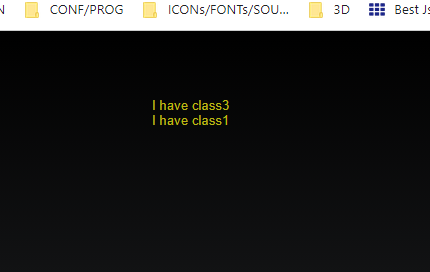
<div id="test" class="class1 class3"></div>

<script>
var test = document.getElementById("test");
var testClass = test.className;
console.log(test.className);
console.log(test.getAttribute('class'));


switch (testClass) {
  case "class1":
    test.innerHTML = "I have class1";
    break;
  case "class2":
    test.innerHTML = "I have class2";
    break;
  case "class3":
    test.innerHTML = "I have class3";
    break;
  case "class4":
    test.innerHTML = "I have class4";
    break;
  default:
    test.innerHTML = "";
}

if (test.classList.contains("class3")) {console.log("with class3");
                                        test.innerHTML = "I have class3";}
if (test.classList.contains("class1")) {console.log("with class1");
                                        test.innerHTML += "<br> I have class1";}


</script>
the result is:
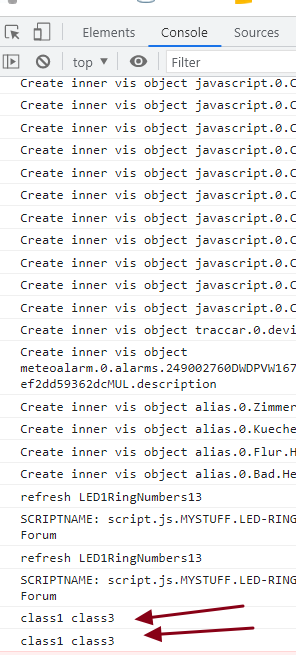
the problem is the switch command !
-
Hi
I'm not a big fan of dynamic programming languages, although I've written a lot of JavaScript code. I never quite understood the concept of prototype-based programming; does anyone know how it works?
I was working on a JavaScript project with the source checking if an element contains a class.
I'm currently doing this:code_text var test = document.getElementById("test"); var testClass = test.className; switch (testClass) { case "class1": test.innerHTML = "I have class1"; break; case "class2": test.innerHTML = "I have class2"; break; case "class3": test.innerHTML = "I have class3"; break; case "class4": test.innerHTML = "I have class4"; break; default: test.innerHTML = ""; } <div id="test" class="class1"></div>The problem is when I change the HTML code to...
<div id="test" class="class1 class5"></div>
There is no longer an exact match, so I get the standard output of nothing (""). But I still want the output to be I have class1 because <div> still contains class .class1 .
Can someone help me@roshan-sharma
better is to use jquery
https://api.jquery.com/hasclass/
var test = $("#test");
if ($(test).hasClass("class1")) {
   $(test).html("I have class1");
}
if ($(test).hasClass("class2")) {
   $(test).html("I have class2");
}
jquery is in vis already loaded


Hey! Du scheinst an dieser Unterhaltung interessiert zu sein, hast aber noch kein Konto.
Hast du es satt, bei jedem Besuch durch die gleichen Beiträge zu scrollen? Wenn du dich für ein Konto anmeldest, kommst du immer genau dorthin zurück, wo du zuvor warst, und kannst dich über neue Antworten benachrichtigen lassen (entweder per E-Mail oder Push-Benachrichtigung). Du kannst auch Lesezeichen speichern und Beiträge positiv bewerten, um anderen Community-Mitgliedern deine Wertschätzung zu zeigen.
Mit deinem Input könnte dieser Beitrag noch besser werden 💗
Registrieren AnmeldenSupport us
425
Online33.0k
Benutzer83.6k
Themen1.3m
Beiträge