




Iot : Fehler Meldung *** Gelöst mit backup einspielen ***
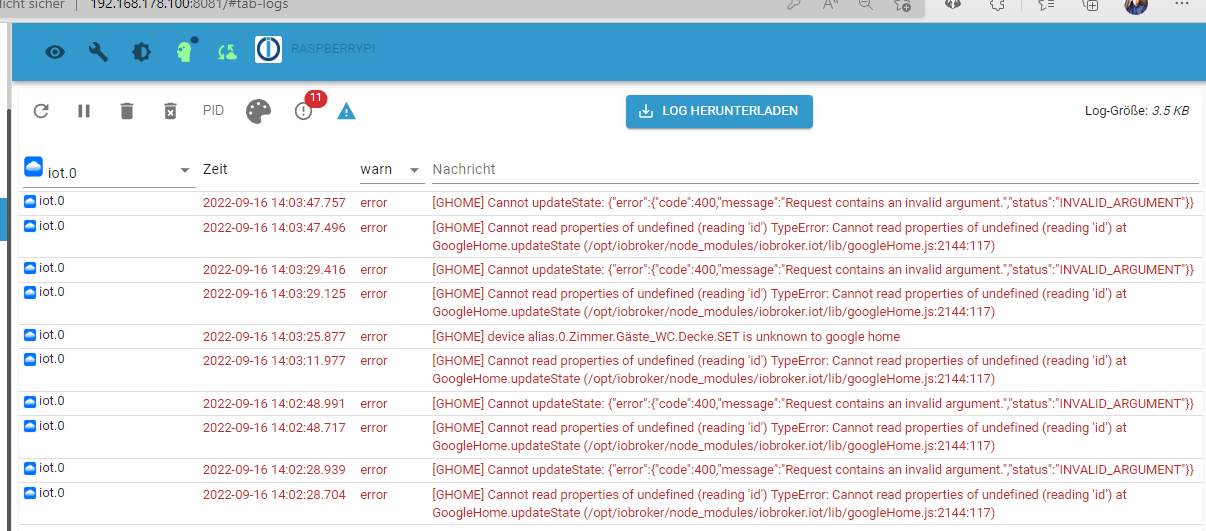
-
Habe jetzt den ganzen Iot Adapter gelöscht und den Datenbank baum sowie auch alles Alias rausgeschmissen
Iot Neu installiert damit er sauber ist
es sind jetzt nur noch deconz Geräte drin wie vorher aber immer noch dasselbe Problem
Ich hab auch alle blocklys gestoppt die was mit google zu tun habeniot.0 2022-09-16 15:10:21.905 error [GHOME] Cannot updateState: {"error":{"code":400,"message":"Request contains an invalid argument.","status":"INVALID_ARGUMENT"}} iot.0 2022-09-16 15:10:21.602 error [GHOME] Cannot read properties of undefined (reading 'id') TypeError: Cannot read properties of undefined (reading 'id') at GoogleHome.updateState (/opt/iobroker/node_modules/iobroker.iot/lib/googleHome.js:2144:117) iot.0 2022-09-16 15:10:01.758 error [GHOME] Cannot updateState: {"error":{"code":400,"message":"Request contains an invalid argument.","status":"INVALID_ARGUMENT"}} iot.0 2022-09-16 15:10:01.523 error [GHOME] Cannot read properties of undefined (reading 'id') TypeError: Cannot read properties of undefined (reading 'id') at GoogleHome.updateState (/opt/iobroker/node_modules/iobroker.iot/lib/googleHome.js:2144:117) iot.0 2022-09-16 15:09:41.756 error [GHOME] Cannot updateState: {"error":{"code":400,"message":"Request contains an invalid argument.","status":"INVALID_ARGUMENT"}} iot.0 2022-09-16 15:09:41.501 error [GHOME] Cannot read properties of undefined (reading 'id') TypeError: Cannot read properties of undefined (reading 'id') at GoogleHome.updateState (/opt/iobroker/node_modules/iobroker.iot/lib/googleHome.js:2144:117) iot.0 2022-09-16 15:09:21.559 error [GHOME] Cannot read properties of undefined (reading 'id') TypeError: Cannot read properties of undefined (reading 'id') at GoogleHome.updateState (/opt/iobroker/node_modules/iobroker.iot/lib/googleHome.js:2144:117) iot.0 2022-09-16 15:09:01.535 error [GHOME] Cannot read properties of undefined (reading 'id') TypeError: Cannot read properties of undefined (reading 'id') at GoogleHome.updateState (/opt/iobroker/node_modules/iobroker.iot/lib/googleHome.js:2144:117) iot.0 2022-09-16 15:08:41.538 error [GHOME] Cannot read properties of undefined (reading 'id') TypeError: Cannot read properties of undefined (reading 'id') at GoogleHome.updateState (/opt/iobroker/node_modules/iobroker.iot/lib/googleHome.js:2144:117) iot.0 2022-09-16 15:08:21.756 error [GHOME] Cannot updateState: {"error":{"code":400,"message":"Request contains an invalid argument.","status":"INVALID_ARGUMENT"}} iot.0 2022-09-16 15:08:21.500 error [GHOME] Cannot read properties of undefined (reading 'id') TypeError: Cannot read properties of undefined (reading 'id') at GoogleHome.updateState (/opt/iobroker/node_modules/iobroker.iot/lib/googleHome.js:2144:117) iot.0 2022-09-16 15:07:55.846 error [GHOME] Cannot updateState: {"error":{"code":400,"message":"Request contains an invalid argument.","status":"INVALID_ARGUMENT"}} iot.0 2022-09-16 15:07:55.600 error [GHOME] Cannot read properties of undefined (reading 'id') TypeError: Cannot read properties of undefined (reading 'id') at GoogleHome.updateState (/opt/iobroker/node_modules/iobroker.iot/lib/googleHome.js:2144:117) iot.0 2022-09-16 15:07:48.521 error [GHOME] Cannot updateState: {"error":{"code":400,"message":"Request contains an invalid argument.","status":"INVALID_ARGUMENT"}} iot.0 2022-09-16 15:07:48.204 error [GHOME] Cannot read properties of undefined (reading 'id') TypeError: Cannot read properties of undefined (reading 'id') at GoogleHome.updateState (/opt/iobroker/node_modules/iobroker.iot/lib/googleHome.js:2144:117) iot.0 2022-09-16 15:07:28.795 error [GHOME] Cannot read properties of undefined (reading 'id') TypeError: Cannot read properties of undefined (reading 'id') at GoogleHome.updateState (/opt/iobroker/node_modules/iobroker.iot/lib/googleHome.js:2144:117) iot.0 2022-09-16 15:07:20.418 warn [GHOME] alias.0.Zimmer.Wohnzimmer.Tv_Schrank_Links is ignored because the property smartName is false or ignore. To use this state again, remove the property smartName in Object explorer or add it manually under Google Devices iot.0 2022-09-16 15:07:20.418 warn [GHOME] alias.0.Zimmer.Wohnzimmer.Terrarium is ignored because the property smartName is false or ignore. To use this state again, remove the property smartName in Object explorer or add it manually under Google Devices iot.0 2022-09-16 15:07:20.401 warn [GHOME] alias.0.Zimmer.Wohnzimmer.TV_Schrank_Rechts is ignored because the property smartName is false or ignore. To use this state again, remove the property smartName in Object explorer or add it manually under Google Devices iot.0 2022-09-16 15:07:20.400 warn [GHOME] alias.0.Zimmer.Wohnzimmer.Steinlampe is ignored because the property smartName is false or ignore. To use this state again, remove the property smartName in Object explorer or add it manually under Google Devices iot.0 2022-09-16 15:07:20.400 warn [GHOME] alias.0.Zimmer.Wohnzimmer.Duftlampe is ignored because the property smartName is false or ignore. To use this state again, remove the property smartName in Object explorer or add it manually under Google Devices iot.0 2022-09-16 15:07:20.399 warn [GHOME] alias.0.Zimmer.Wohnzimmer.Deckenlicht is ignored because the property smartName is false or ignore. To use this state again, remove the property smartName in Object explorer or add it manually under Google Devices iot.0 2022-09-16 15:07:20.398 warn [GHOME] alias.0.Zimmer.Wohnzimmer.Brunnen is ignored because the property smartName is false or ignore. To use this state again, remove the property smartName in Object explorer or add it manually under Google Devices iot.0 2022-09-16 15:07:20.398 warn [GHOME] alias.0.Zimmer.Küche.Spühlmaschine is ignored because the property smartName is false or ignore. To use this state again, remove the property smartName in Object explorer or add it manually under Google Devices iot.0 2022-09-16 15:07:20.397 warn [GHOME] alias.0.Zimmer.Küche.Deckenlampe_2 is ignored because the property smartName is false or ignore. To use this state again, remove the property smartName in Object explorer or add it manually under Google Devices iot.0 2022-09-16 15:07:20.396 warn [GHOME] alias.0.Zimmer.Küche.Deckenlampe_1 is ignored because the property smartName is false or ignore. To use this state again, remove the property smartName in Object explorer or add it manually under Google Devices iot.0 2022-09-16 15:07:20.395 warn [GHOME] alias.0.Zimmer.Gäste_WC.Decke is ignored because the property smartName is false or ignore. To use this state again, remove the property smartName in Object explorer or add it manually under Google Devices iot.0 2022-09-16 15:07:20.393 warn [GHOME] alias.0.Zimmer.Flur_Vorne.Eingangstür is ignored because the property smartName is false or ignore. To use this state again, remove the property smartName in Object explorer or add it manually under Google Devices iot.0 2022-09-16 15:07:20.392 warn [GHOME] alias.0.Zimmer.Flur_Vorne.Deckenlampe is ignored because the property smartName is false or ignore. To use this state again, remove the property smartName in Object explorer or add it manually under Google Devices iot.0 2022-09-16 15:07:20.392 warn [GHOME] alias.0.Zimmer.Flur_Hinten.Decke_ is ignored because the property smartName is false or ignore. To use this state again, remove the property smartName in Object explorer or add it manually under Google Devices iot.0 2022-09-16 15:07:20.391 warn [GHOME] alias.0.Zimmer.Computer_Raum.PC_Licht_Monitor is ignored because the property smartName is false or ignore. To use this state again, remove the property smartName in Object explorer or add it manually under Google Devices iot.0 2022-09-16 15:07:20.390 warn [GHOME] alias.0.Zimmer.Computer_Raum.Decke is ignored because the property smartName is false or ignore. To use this state again, remove the property smartName in Object explorer or add it manually under Google Devices iot.0 2022-09-16 15:07:20.389 warn [GHOME] alias.0.Zimmer.Computer_Raum.Computer_Horst is ignored because the property smartName is false or ignore. To use this state again, remove the property smartName in Object explorer or add it manually under Google Devices iot.0 2022-09-16 15:07:20.384 info [GHOME] deconz.0.Lights.9 is auto added with type ct. iot.0 2022-09-16 15:07:20.366 info [GHOME] deconz.0.Lights.8 is auto added with type hue. iot.0 2022-09-16 15:07:20.347 info [GHOME] deconz.0.Lights.6 is auto added with type ct. iot.0 2022-09-16 15:07:20.329 info [GHOME] deconz.0.Lights.5 is auto added with type ct. iot.0 2022-09-16 15:07:20.310 info [GHOME] deconz.0.Lights.4 is auto added with type ct. iot.0 2022-09-16 15:07:20.292 info [GHOME] deconz.0.Lights.3 is auto added with type dimmer. iot.0 2022-09-16 15:07:20.273 info [GHOME] deconz.0.Lights.26 is auto added with type hue. iot.0 2022-09-16 15:07:20.255 info [GHOME] deconz.0.Lights.20 is auto added with type dimmer. iot.0 2022-09-16 15:07:20.238 info [GHOME] deconz.0.Lights.19 is auto added with type dimmer. iot.0 2022-09-16 15:07:20.220 info [GHOME] deconz.0.Lights.18 is auto added with type ct. iot.0 2022-09-16 15:07:20.202 info [GHOME] deconz.0.Lights.17 is auto added with type dimmer. iot.0 2022-09-16 15:07:20.183 info [GHOME] deconz.0.Lights.16 is auto added with type dimmer. iot.0 2022-09-16 15:07:20.162 info [GHOME] deconz.0.Lights.11 is auto added with type ct. iot.0 2022-09-16 15:07:20.136 info [GHOME] deconz.0.Lights.10 is auto added with type ct. iot.0 2022-09-16 15:07:20.105 info [GHOME] deconz.0.Lights.1 is auto added with type ct. iot.0 2022-09-16 15:07:20.084 warn [GHOME] alias.0.Zimmer.Wohnzimmer.Tv_Schrank_Links is ignored because the property smartName is false or ignore. To use this state again, remove the property smartName in Object explorer or add it manually under Google Devices iot.0 2022-09-16 15:07:20.083 warn [GHOME] alias.0.Zimmer.Wohnzimmer.Terrarium is ignored because the property smartName is false or ignore. To use this state again, remove the property smartName in Object explorer or add it manually under Google Devices iot.0 2022-09-16 15:07:20.083 warn [GHOME] alias.0.Zimmer.Wohnzimmer.TV_Schrank_Rechts is ignored because the property smartName is false or ignore. To use this state again, remove the property smartName in Object explorer or add it manually under Google Devices iot.0 2022-09-16 15:07:20.082 warn [GHOME] alias.0.Zimmer.Wohnzimmer.Steinlampe is ignored because the property smartName is false or ignore. To use this state again, remove the property smartName in Object explorer or add it manually under Google Devices iot.0 2022-09-16 15:07:20.082 warn [GHOME] alias.0.Zimmer.Wohnzimmer.Duftlampe is ignored because the property smartName is false or ignore. To use this state again, remove the property smartName in Object explorer or add it manually under Google Devices iot.0 2022-09-16 15:07:20.081 warn [GHOME] alias.0.Zimmer.Wohnzimmer.Brunnen is ignored because the property smartName is false or ignore. To use this state again, remove the property smartName in Object explorer or add it manually under Google Devices iot.0 2022-09-16 15:07:20.081 warn [GHOME] alias.0.Zimmer.Küche.Deckenlampe_2 is ignored because the property smartName is false or ignore. To use this state again, remove the property smartName in Object explorer or add it manually under Google Devices iot.0 2022-09-16 15:07:20.080 warn [GHOME] alias.0.Zimmer.Küche.Deckenlampe_1 is ignored because the property smartName is false or ignore. To use this state again, remove the property smartName in Object explorer or add it manually under Google Devices iot.0 2022-09-16 15:07:20.080 warn [GHOME] alias.0.Zimmer.Gäste_WC.Decke is ignored because the property smartName is false or ignore. To use this state again, remove the property smartName in Object explorer or add it manually under Google Devices iot.0 2022-09-16 15:07:20.079 warn [GHOME] alias.0.Zimmer.Gäste_WC.Decke is ignored because the property smartName is false or ignore. To use this state again, remove the property smartName in Object explorer or add it manually under Google Devices iot.0 2022-09-16 15:07:20.078 warn [GHOME] alias.0.Zimmer.Flur_Vorne.Deckenlampe is ignored because the property smartName is false or ignore. To use this state again, remove the property smartName in Object explorer or add it manually under Google Devices iot.0 2022-09-16 15:07:20.078 warn [GHOME] alias.0.Zimmer.Flur_Hinten.Decke_ is ignored because the property smartName is false or ignore. To use this state again, remove the property smartName in Object explorer or add it manually under Google Devices iot.0 2022-09-16 15:07:20.077 warn [GHOME] alias.0.Zimmer.Computer_Raum.PC_Licht_Monitor is ignored because the property smartName is false or ignore. To use this state again, remove the property smartName in Object explorer or add it manually under Google Devices iot.0 2022-09-16 15:07:20.066 warn [GHOME] alias.0.Zimmer.Computer_Raum.Decke is ignored because the property smartName is false or ignore. To use this state again, remove the property smartName in Object explorer or add it manually under Google Devices iot.0 2022-09-16 15:07:18.740 info Request google home devices iot.0 2022-09-16 15:07:04.454 error [GHOME] Cannot read properties of undefined (reading 'id') TypeError: Cannot read properties of undefined (reading 'id') at GoogleHome.updateState (/opt/iobroker/node_modules/iobroker.iot/lib/googleHome.js:2144:117) iot.0 2022-09-16 15:06:57.993 error [GHOME] Cannot read properties of undefined (reading 'id') TypeError: Cannot read properties of undefined (reading 'id') at GoogleHome.updateState (/opt/iobroker/node_modules/iobroker.iot/lib/googleHome.js:2144:117) iot.0 2022-09-16 15:06:38.296 error [GHOME] Cannot read properties of undefined (reading 'id') TypeError: Cannot read properties of undefined (reading 'id') at GoogleHome.updateState (/opt/iobroker/node_modules/iobroker.iot/lib/googleHome.js:2144:117) iot.0 2022-09-16 15:06:18.574 error [GHOME] Cannot updateState: {"error":{"code":400,"message":"Request contains an invalid argument.","status":"INVALID_ARGUMENT"}} iot.0 2022-09-16 15:06:18.246 error [GHOME] Cannot read properties of undefined (reading 'id') TypeError: Cannot read properties of undefined (reading 'id') at GoogleHome.updateState (/opt/iobroker/node_modules/iobroker.iot/lib/googleHome.js:2144:117) iot.0 2022-09-16 15:06:13.315 error [GHOME] Cannot updateState: {"error":{"code":400,"message":"Request contains an invalid argument.","status":"INVALID_ARGUMENT"}} iot.0 2022-09-16 15:06:13.306 error [GHOME] Cannot updateState: {"error":{"code":400,"message":"Request contains an invalid argument.","status":"INVALID_ARGUMENT"}} iot.0 2022-09-16 15:06:13.040 error [GHOME] Cannot read properties of undefined (reading 'id') TypeError: Cannot read properties of undefined (reading 'id') at GoogleHome.updateState (/opt/iobroker/node_modules/iobroker.iot/lib/googleHome.js:2144:117) iot.0 2022-09-16 15:05:59.653 warn [GHOME] alias.0.Zimmer.Wohnzimmer.Tv_Schrank_Links is ignored because the property smartName is false or ignore. To use this state again, remove the property smartName in Object explorer or add it manually under Google Devices iot.0 2022-09-16 15:05:59.652 warn [GHOME] alias.0.Zimmer.Wohnzimmer.Terrarium is ignored because the property smartName is false or ignore. To use this state again, remove the property smartName in Object explorer or add it manually under Google Devices iot.0 2022-09-16 15:05:59.635 warn [GHOME] alias.0.Zimmer.Wohnzimmer.Steinlampe is ignored because the property smartName is false or ignore. To use this state again, remove the property smartName in Object explorer or add it manually under Google Devices iot.0 2022-09-16 15:05:59.634 warn [GHOME] alias.0.Zimmer.Wohnzimmer.Duftlampe is ignored because the property smartName is false or ignore. To use this state again, remove the property smartName in Object explorer or add it manually under Google Devices iot.0 2022-09-16 15:05:59.635 warn [GHOME] alias.0.Zimmer.Wohnzimmer.TV_Schrank_Rechts is ignored because the property smartName is false or ignore. To use this state again, remove the property smartName in Object explorer or add it manually under Google Devices iot.0 2022-09-16 15:05:59.633 warn [GHOME] alias.0.Zimmer.Wohnzimmer.Deckenlicht is ignored because the property smartName is false or ignore. To use this state again, remove the property smartName in Object explorer or add it manually under Google Devices iot.0 2022-09-16 15:05:59.632 warn [GHOME] alias.0.Zimmer.Wohnzimmer.Brunnen is ignored because the property smartName is false or ignore. To use this state again, remove the property smartName in Object explorer or add it manually under Google Devices iot.0 2022-09-16 15:05:59.632 warn [GHOME] alias.0.Zimmer.Küche.Spühlmaschine is ignored because the property smartName is false or ignore. To use this state again, remove the property smartName in Object explorer or add it manually under Google DevicesioBroker auf Proxmox (Debian) auf LENOVO PC Thinkcentre als Produktivsystem
-
Habe jetzt den ganzen Iot Adapter gelöscht und den Datenbank baum sowie auch alles Alias rausgeschmissen
Iot Neu installiert damit er sauber ist
es sind jetzt nur noch deconz Geräte drin wie vorher aber immer noch dasselbe Problem
Ich hab auch alle blocklys gestoppt die was mit google zu tun habeniot.0 2022-09-16 15:10:21.905 error [GHOME] Cannot updateState: {"error":{"code":400,"message":"Request contains an invalid argument.","status":"INVALID_ARGUMENT"}} iot.0 2022-09-16 15:10:21.602 error [GHOME] Cannot read properties of undefined (reading 'id') TypeError: Cannot read properties of undefined (reading 'id') at GoogleHome.updateState (/opt/iobroker/node_modules/iobroker.iot/lib/googleHome.js:2144:117) iot.0 2022-09-16 15:10:01.758 error [GHOME] Cannot updateState: {"error":{"code":400,"message":"Request contains an invalid argument.","status":"INVALID_ARGUMENT"}} iot.0 2022-09-16 15:10:01.523 error [GHOME] Cannot read properties of undefined (reading 'id') TypeError: Cannot read properties of undefined (reading 'id') at GoogleHome.updateState (/opt/iobroker/node_modules/iobroker.iot/lib/googleHome.js:2144:117) iot.0 2022-09-16 15:09:41.756 error [GHOME] Cannot updateState: {"error":{"code":400,"message":"Request contains an invalid argument.","status":"INVALID_ARGUMENT"}} iot.0 2022-09-16 15:09:41.501 error [GHOME] Cannot read properties of undefined (reading 'id') TypeError: Cannot read properties of undefined (reading 'id') at GoogleHome.updateState (/opt/iobroker/node_modules/iobroker.iot/lib/googleHome.js:2144:117) iot.0 2022-09-16 15:09:21.559 error [GHOME] Cannot read properties of undefined (reading 'id') TypeError: Cannot read properties of undefined (reading 'id') at GoogleHome.updateState (/opt/iobroker/node_modules/iobroker.iot/lib/googleHome.js:2144:117) iot.0 2022-09-16 15:09:01.535 error [GHOME] Cannot read properties of undefined (reading 'id') TypeError: Cannot read properties of undefined (reading 'id') at GoogleHome.updateState (/opt/iobroker/node_modules/iobroker.iot/lib/googleHome.js:2144:117) iot.0 2022-09-16 15:08:41.538 error [GHOME] Cannot read properties of undefined (reading 'id') TypeError: Cannot read properties of undefined (reading 'id') at GoogleHome.updateState (/opt/iobroker/node_modules/iobroker.iot/lib/googleHome.js:2144:117) iot.0 2022-09-16 15:08:21.756 error [GHOME] Cannot updateState: {"error":{"code":400,"message":"Request contains an invalid argument.","status":"INVALID_ARGUMENT"}} iot.0 2022-09-16 15:08:21.500 error [GHOME] Cannot read properties of undefined (reading 'id') TypeError: Cannot read properties of undefined (reading 'id') at GoogleHome.updateState (/opt/iobroker/node_modules/iobroker.iot/lib/googleHome.js:2144:117) iot.0 2022-09-16 15:07:55.846 error [GHOME] Cannot updateState: {"error":{"code":400,"message":"Request contains an invalid argument.","status":"INVALID_ARGUMENT"}} iot.0 2022-09-16 15:07:55.600 error [GHOME] Cannot read properties of undefined (reading 'id') TypeError: Cannot read properties of undefined (reading 'id') at GoogleHome.updateState (/opt/iobroker/node_modules/iobroker.iot/lib/googleHome.js:2144:117) iot.0 2022-09-16 15:07:48.521 error [GHOME] Cannot updateState: {"error":{"code":400,"message":"Request contains an invalid argument.","status":"INVALID_ARGUMENT"}} iot.0 2022-09-16 15:07:48.204 error [GHOME] Cannot read properties of undefined (reading 'id') TypeError: Cannot read properties of undefined (reading 'id') at GoogleHome.updateState (/opt/iobroker/node_modules/iobroker.iot/lib/googleHome.js:2144:117) iot.0 2022-09-16 15:07:28.795 error [GHOME] Cannot read properties of undefined (reading 'id') TypeError: Cannot read properties of undefined (reading 'id') at GoogleHome.updateState (/opt/iobroker/node_modules/iobroker.iot/lib/googleHome.js:2144:117) iot.0 2022-09-16 15:07:20.418 warn [GHOME] alias.0.Zimmer.Wohnzimmer.Tv_Schrank_Links is ignored because the property smartName is false or ignore. To use this state again, remove the property smartName in Object explorer or add it manually under Google Devices iot.0 2022-09-16 15:07:20.418 warn [GHOME] alias.0.Zimmer.Wohnzimmer.Terrarium is ignored because the property smartName is false or ignore. To use this state again, remove the property smartName in Object explorer or add it manually under Google Devices iot.0 2022-09-16 15:07:20.401 warn [GHOME] alias.0.Zimmer.Wohnzimmer.TV_Schrank_Rechts is ignored because the property smartName is false or ignore. To use this state again, remove the property smartName in Object explorer or add it manually under Google Devices iot.0 2022-09-16 15:07:20.400 warn [GHOME] alias.0.Zimmer.Wohnzimmer.Steinlampe is ignored because the property smartName is false or ignore. To use this state again, remove the property smartName in Object explorer or add it manually under Google Devices iot.0 2022-09-16 15:07:20.400 warn [GHOME] alias.0.Zimmer.Wohnzimmer.Duftlampe is ignored because the property smartName is false or ignore. To use this state again, remove the property smartName in Object explorer or add it manually under Google Devices iot.0 2022-09-16 15:07:20.399 warn [GHOME] alias.0.Zimmer.Wohnzimmer.Deckenlicht is ignored because the property smartName is false or ignore. To use this state again, remove the property smartName in Object explorer or add it manually under Google Devices iot.0 2022-09-16 15:07:20.398 warn [GHOME] alias.0.Zimmer.Wohnzimmer.Brunnen is ignored because the property smartName is false or ignore. To use this state again, remove the property smartName in Object explorer or add it manually under Google Devices iot.0 2022-09-16 15:07:20.398 warn [GHOME] alias.0.Zimmer.Küche.Spühlmaschine is ignored because the property smartName is false or ignore. To use this state again, remove the property smartName in Object explorer or add it manually under Google Devices iot.0 2022-09-16 15:07:20.397 warn [GHOME] alias.0.Zimmer.Küche.Deckenlampe_2 is ignored because the property smartName is false or ignore. To use this state again, remove the property smartName in Object explorer or add it manually under Google Devices iot.0 2022-09-16 15:07:20.396 warn [GHOME] alias.0.Zimmer.Küche.Deckenlampe_1 is ignored because the property smartName is false or ignore. To use this state again, remove the property smartName in Object explorer or add it manually under Google Devices iot.0 2022-09-16 15:07:20.395 warn [GHOME] alias.0.Zimmer.Gäste_WC.Decke is ignored because the property smartName is false or ignore. To use this state again, remove the property smartName in Object explorer or add it manually under Google Devices iot.0 2022-09-16 15:07:20.393 warn [GHOME] alias.0.Zimmer.Flur_Vorne.Eingangstür is ignored because the property smartName is false or ignore. To use this state again, remove the property smartName in Object explorer or add it manually under Google Devices iot.0 2022-09-16 15:07:20.392 warn [GHOME] alias.0.Zimmer.Flur_Vorne.Deckenlampe is ignored because the property smartName is false or ignore. To use this state again, remove the property smartName in Object explorer or add it manually under Google Devices iot.0 2022-09-16 15:07:20.392 warn [GHOME] alias.0.Zimmer.Flur_Hinten.Decke_ is ignored because the property smartName is false or ignore. To use this state again, remove the property smartName in Object explorer or add it manually under Google Devices iot.0 2022-09-16 15:07:20.391 warn [GHOME] alias.0.Zimmer.Computer_Raum.PC_Licht_Monitor is ignored because the property smartName is false or ignore. To use this state again, remove the property smartName in Object explorer or add it manually under Google Devices iot.0 2022-09-16 15:07:20.390 warn [GHOME] alias.0.Zimmer.Computer_Raum.Decke is ignored because the property smartName is false or ignore. To use this state again, remove the property smartName in Object explorer or add it manually under Google Devices iot.0 2022-09-16 15:07:20.389 warn [GHOME] alias.0.Zimmer.Computer_Raum.Computer_Horst is ignored because the property smartName is false or ignore. To use this state again, remove the property smartName in Object explorer or add it manually under Google Devices iot.0 2022-09-16 15:07:20.384 info [GHOME] deconz.0.Lights.9 is auto added with type ct. iot.0 2022-09-16 15:07:20.366 info [GHOME] deconz.0.Lights.8 is auto added with type hue. iot.0 2022-09-16 15:07:20.347 info [GHOME] deconz.0.Lights.6 is auto added with type ct. iot.0 2022-09-16 15:07:20.329 info [GHOME] deconz.0.Lights.5 is auto added with type ct. iot.0 2022-09-16 15:07:20.310 info [GHOME] deconz.0.Lights.4 is auto added with type ct. iot.0 2022-09-16 15:07:20.292 info [GHOME] deconz.0.Lights.3 is auto added with type dimmer. iot.0 2022-09-16 15:07:20.273 info [GHOME] deconz.0.Lights.26 is auto added with type hue. iot.0 2022-09-16 15:07:20.255 info [GHOME] deconz.0.Lights.20 is auto added with type dimmer. iot.0 2022-09-16 15:07:20.238 info [GHOME] deconz.0.Lights.19 is auto added with type dimmer. iot.0 2022-09-16 15:07:20.220 info [GHOME] deconz.0.Lights.18 is auto added with type ct. iot.0 2022-09-16 15:07:20.202 info [GHOME] deconz.0.Lights.17 is auto added with type dimmer. iot.0 2022-09-16 15:07:20.183 info [GHOME] deconz.0.Lights.16 is auto added with type dimmer. iot.0 2022-09-16 15:07:20.162 info [GHOME] deconz.0.Lights.11 is auto added with type ct. iot.0 2022-09-16 15:07:20.136 info [GHOME] deconz.0.Lights.10 is auto added with type ct. iot.0 2022-09-16 15:07:20.105 info [GHOME] deconz.0.Lights.1 is auto added with type ct. iot.0 2022-09-16 15:07:20.084 warn [GHOME] alias.0.Zimmer.Wohnzimmer.Tv_Schrank_Links is ignored because the property smartName is false or ignore. To use this state again, remove the property smartName in Object explorer or add it manually under Google Devices iot.0 2022-09-16 15:07:20.083 warn [GHOME] alias.0.Zimmer.Wohnzimmer.Terrarium is ignored because the property smartName is false or ignore. To use this state again, remove the property smartName in Object explorer or add it manually under Google Devices iot.0 2022-09-16 15:07:20.083 warn [GHOME] alias.0.Zimmer.Wohnzimmer.TV_Schrank_Rechts is ignored because the property smartName is false or ignore. To use this state again, remove the property smartName in Object explorer or add it manually under Google Devices iot.0 2022-09-16 15:07:20.082 warn [GHOME] alias.0.Zimmer.Wohnzimmer.Steinlampe is ignored because the property smartName is false or ignore. To use this state again, remove the property smartName in Object explorer or add it manually under Google Devices iot.0 2022-09-16 15:07:20.082 warn [GHOME] alias.0.Zimmer.Wohnzimmer.Duftlampe is ignored because the property smartName is false or ignore. To use this state again, remove the property smartName in Object explorer or add it manually under Google Devices iot.0 2022-09-16 15:07:20.081 warn [GHOME] alias.0.Zimmer.Wohnzimmer.Brunnen is ignored because the property smartName is false or ignore. To use this state again, remove the property smartName in Object explorer or add it manually under Google Devices iot.0 2022-09-16 15:07:20.081 warn [GHOME] alias.0.Zimmer.Küche.Deckenlampe_2 is ignored because the property smartName is false or ignore. To use this state again, remove the property smartName in Object explorer or add it manually under Google Devices iot.0 2022-09-16 15:07:20.080 warn [GHOME] alias.0.Zimmer.Küche.Deckenlampe_1 is ignored because the property smartName is false or ignore. To use this state again, remove the property smartName in Object explorer or add it manually under Google Devices iot.0 2022-09-16 15:07:20.080 warn [GHOME] alias.0.Zimmer.Gäste_WC.Decke is ignored because the property smartName is false or ignore. To use this state again, remove the property smartName in Object explorer or add it manually under Google Devices iot.0 2022-09-16 15:07:20.079 warn [GHOME] alias.0.Zimmer.Gäste_WC.Decke is ignored because the property smartName is false or ignore. To use this state again, remove the property smartName in Object explorer or add it manually under Google Devices iot.0 2022-09-16 15:07:20.078 warn [GHOME] alias.0.Zimmer.Flur_Vorne.Deckenlampe is ignored because the property smartName is false or ignore. To use this state again, remove the property smartName in Object explorer or add it manually under Google Devices iot.0 2022-09-16 15:07:20.078 warn [GHOME] alias.0.Zimmer.Flur_Hinten.Decke_ is ignored because the property smartName is false or ignore. To use this state again, remove the property smartName in Object explorer or add it manually under Google Devices iot.0 2022-09-16 15:07:20.077 warn [GHOME] alias.0.Zimmer.Computer_Raum.PC_Licht_Monitor is ignored because the property smartName is false or ignore. To use this state again, remove the property smartName in Object explorer or add it manually under Google Devices iot.0 2022-09-16 15:07:20.066 warn [GHOME] alias.0.Zimmer.Computer_Raum.Decke is ignored because the property smartName is false or ignore. To use this state again, remove the property smartName in Object explorer or add it manually under Google Devices iot.0 2022-09-16 15:07:18.740 info Request google home devices iot.0 2022-09-16 15:07:04.454 error [GHOME] Cannot read properties of undefined (reading 'id') TypeError: Cannot read properties of undefined (reading 'id') at GoogleHome.updateState (/opt/iobroker/node_modules/iobroker.iot/lib/googleHome.js:2144:117) iot.0 2022-09-16 15:06:57.993 error [GHOME] Cannot read properties of undefined (reading 'id') TypeError: Cannot read properties of undefined (reading 'id') at GoogleHome.updateState (/opt/iobroker/node_modules/iobroker.iot/lib/googleHome.js:2144:117) iot.0 2022-09-16 15:06:38.296 error [GHOME] Cannot read properties of undefined (reading 'id') TypeError: Cannot read properties of undefined (reading 'id') at GoogleHome.updateState (/opt/iobroker/node_modules/iobroker.iot/lib/googleHome.js:2144:117) iot.0 2022-09-16 15:06:18.574 error [GHOME] Cannot updateState: {"error":{"code":400,"message":"Request contains an invalid argument.","status":"INVALID_ARGUMENT"}} iot.0 2022-09-16 15:06:18.246 error [GHOME] Cannot read properties of undefined (reading 'id') TypeError: Cannot read properties of undefined (reading 'id') at GoogleHome.updateState (/opt/iobroker/node_modules/iobroker.iot/lib/googleHome.js:2144:117) iot.0 2022-09-16 15:06:13.315 error [GHOME] Cannot updateState: {"error":{"code":400,"message":"Request contains an invalid argument.","status":"INVALID_ARGUMENT"}} iot.0 2022-09-16 15:06:13.306 error [GHOME] Cannot updateState: {"error":{"code":400,"message":"Request contains an invalid argument.","status":"INVALID_ARGUMENT"}} iot.0 2022-09-16 15:06:13.040 error [GHOME] Cannot read properties of undefined (reading 'id') TypeError: Cannot read properties of undefined (reading 'id') at GoogleHome.updateState (/opt/iobroker/node_modules/iobroker.iot/lib/googleHome.js:2144:117) iot.0 2022-09-16 15:05:59.653 warn [GHOME] alias.0.Zimmer.Wohnzimmer.Tv_Schrank_Links is ignored because the property smartName is false or ignore. To use this state again, remove the property smartName in Object explorer or add it manually under Google Devices iot.0 2022-09-16 15:05:59.652 warn [GHOME] alias.0.Zimmer.Wohnzimmer.Terrarium is ignored because the property smartName is false or ignore. To use this state again, remove the property smartName in Object explorer or add it manually under Google Devices iot.0 2022-09-16 15:05:59.635 warn [GHOME] alias.0.Zimmer.Wohnzimmer.Steinlampe is ignored because the property smartName is false or ignore. To use this state again, remove the property smartName in Object explorer or add it manually under Google Devices iot.0 2022-09-16 15:05:59.634 warn [GHOME] alias.0.Zimmer.Wohnzimmer.Duftlampe is ignored because the property smartName is false or ignore. To use this state again, remove the property smartName in Object explorer or add it manually under Google Devices iot.0 2022-09-16 15:05:59.635 warn [GHOME] alias.0.Zimmer.Wohnzimmer.TV_Schrank_Rechts is ignored because the property smartName is false or ignore. To use this state again, remove the property smartName in Object explorer or add it manually under Google Devices iot.0 2022-09-16 15:05:59.633 warn [GHOME] alias.0.Zimmer.Wohnzimmer.Deckenlicht is ignored because the property smartName is false or ignore. To use this state again, remove the property smartName in Object explorer or add it manually under Google Devices iot.0 2022-09-16 15:05:59.632 warn [GHOME] alias.0.Zimmer.Wohnzimmer.Brunnen is ignored because the property smartName is false or ignore. To use this state again, remove the property smartName in Object explorer or add it manually under Google Devices iot.0 2022-09-16 15:05:59.632 warn [GHOME] alias.0.Zimmer.Küche.Spühlmaschine is ignored because the property smartName is false or ignore. To use this state again, remove the property smartName in Object explorer or add it manually under Google Devices@horst-böttcher
Hast du bei den Einstellungen vom IOT den Haken bei Google Home draussen?Synology DS218+ & 2 x Fujitsu Esprimo (VM/Container) + FritzBox7590 + 2 AVM 3000 Repeater & Homematic & HUE & Osram & Xiaomi, NPM 10.9.8, Nodejs 22.23.2 ,JS Controller 7.2.2 ,Admin 8.0.4
-
@horst-böttcher
Hast du bei den Einstellungen vom IOT den Haken bei Google Home draussen?@haselchen nein aber das kann ich gleich mal probieren
-
@horst-böttcher
Hast du bei den Einstellungen vom IOT den Haken bei Google Home draussen?@haselchen wenn der harken raus ist ist fehler weg
sobald ich den Hacken reinmache ist er wieder daWas habe ich schon getan ?
Chromecast Adapter Deaktiviert
Java Scripte Deaktiviert
iot.0 + Datenbaum gelöscht und neu installiert
iobroker fix curl -sL https://iobroker.net/fix.sh | bash - durchlaufenlassen
Chromecast Adapter gelöschtalles nix geholfen
Gerade dabei altes Backup einzuspielen mal sehn ob das was hilft
-
@haselchen wenn der harken raus ist ist fehler weg
sobald ich den Hacken reinmache ist er wieder daWas habe ich schon getan ?
Chromecast Adapter Deaktiviert
Java Scripte Deaktiviert
iot.0 + Datenbaum gelöscht und neu installiert
iobroker fix curl -sL https://iobroker.net/fix.sh | bash - durchlaufenlassen
Chromecast Adapter gelöschtalles nix geholfen
Gerade dabei altes Backup einzuspielen mal sehn ob das was hilft
@horst-böttcher
Ich hab genau das gleiche Problem.
Ich habe nur die Google Home App installiert und ioBroker als Gerät hinzugefügt. Außerdem habe ich im iot-Adapter den Haken bei Google Home gesetzt.
Ich kann die Geräte in ioBroker mittels der Sprachsteuerung "Hello Google, schalte Bürolicht an" schalten. Nur wird eben der Log vollgeschrieben.
Wenn ich den Haken bei "Google Home" im iot-Adapter wieder wegmache, kommen keine Fehlermeldungen mehr (also gleiches Verhalten wie bei horst-böttcher.Gibt es da mittlerweile weitere Erkenntnisse?
-
@horst-böttcher
Ich hab genau das gleiche Problem.
Ich habe nur die Google Home App installiert und ioBroker als Gerät hinzugefügt. Außerdem habe ich im iot-Adapter den Haken bei Google Home gesetzt.
Ich kann die Geräte in ioBroker mittels der Sprachsteuerung "Hello Google, schalte Bürolicht an" schalten. Nur wird eben der Log vollgeschrieben.
Wenn ich den Haken bei "Google Home" im iot-Adapter wieder wegmache, kommen keine Fehlermeldungen mehr (also gleiches Verhalten wie bei horst-böttcher.Gibt es da mittlerweile weitere Erkenntnisse?
@blade-of-fire sagte in Iot : Fehler Meldung *** Gelöst mit backup einspielen ***:
Nur wird eben der Log vollgeschrieben.
mit was?
sind vllt Geräte nicht richtig angelegt/eingebunden? -
@blade-of-fire sagte in Iot : Fehler Meldung *** Gelöst mit backup einspielen ***:
Nur wird eben der Log vollgeschrieben.
mit was?
sind vllt Geräte nicht richtig angelegt/eingebunden?@crunchip
Es sind exakt die gleichen Fehlermeldungungen wie beim Thread-Ersteller:iot.0 2022-11-11 13:03:48.248 error [GHOME] Cannot read properties of undefined (reading 'id') TypeError: Cannot read properties of undefined (reading 'id') at GoogleHome.updateState (/opt/iobroker/node_modules/iobroker.iot/lib/googleHome.js:2144:117) iot.0 2022-11-11 13:03:00.378 error [GHOME] Cannot read properties of undefined (reading 'id') TypeError: Cannot read properties of undefined (reading 'id') at GoogleHome.updateState (/opt/iobroker/node_modules/iobroker.iot/lib/googleHome.js:2144:117) iot.0 2022-11-11 13:02:48.249 error [GHOME] Cannot read properties of undefined (reading 'id') TypeError: Cannot read properties of undefined (reading 'id') at GoogleHome.updateState (/opt/iobroker/node_modules/iobroker.iot/lib/googleHome.js:2144:117) -
@crunchip
Es sind exakt die gleichen Fehlermeldungungen wie beim Thread-Ersteller:iot.0 2022-11-11 13:03:48.248 error [GHOME] Cannot read properties of undefined (reading 'id') TypeError: Cannot read properties of undefined (reading 'id') at GoogleHome.updateState (/opt/iobroker/node_modules/iobroker.iot/lib/googleHome.js:2144:117) iot.0 2022-11-11 13:03:00.378 error [GHOME] Cannot read properties of undefined (reading 'id') TypeError: Cannot read properties of undefined (reading 'id') at GoogleHome.updateState (/opt/iobroker/node_modules/iobroker.iot/lib/googleHome.js:2144:117) iot.0 2022-11-11 13:02:48.249 error [GHOME] Cannot read properties of undefined (reading 'id') TypeError: Cannot read properties of undefined (reading 'id') at GoogleHome.updateState (/opt/iobroker/node_modules/iobroker.iot/lib/googleHome.js:2144:117)@blade-of-fire und wie wurden die Geräte eingebunden?
- Manuell
- Automatik per Enums(Intelligente Aufzählung)
-
@blade-of-fire und wie wurden die Geräte eingebunden?
- Manuell
- Automatik per Enums(Intelligente Aufzählung)
@crunchip
Da habe ich gar nichts weiter gemacht.
Ich benutze schon seit langem die Alexa-Geräte.
Das einzige, was ich gemacht habe, war google Home aufs Smartphone zu laden und unter Geräte hinzufügen "ioBroker" auszuwählen und anzumelden.
Die Geräte wurden direkt unter Google-Geräte angezeigt.
Ich nehme mal, dass dann der Automatik Modus ist. -
@crunchip
Da habe ich gar nichts weiter gemacht.
Ich benutze schon seit langem die Alexa-Geräte.
Das einzige, was ich gemacht habe, war google Home aufs Smartphone zu laden und unter Geräte hinzufügen "ioBroker" auszuwählen und anzumelden.
Die Geräte wurden direkt unter Google-Geräte angezeigt.
Ich nehme mal, dass dann der Automatik Modus ist.@blade-of-fire sagte in Iot : Fehler Meldung *** Gelöst mit backup einspielen ***:
dass dann der Automatik Modus ist.
hast du hier was aktiv? dann ja
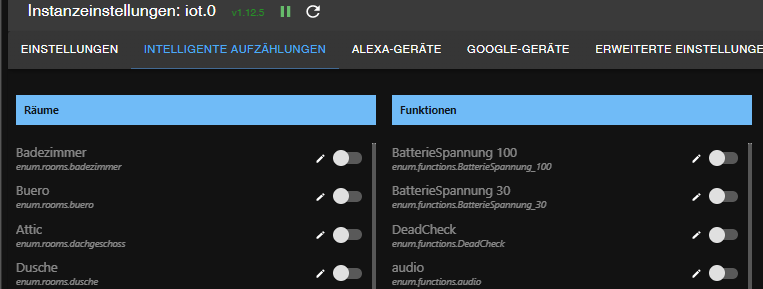
dann sind Möglicherweise Geräte dabei, die in google nicht richtig erkannt werden.
Ich hatte damals auch lange herum gemacht, letztendlich die intelligente Aufzählung deaktiviert und meine Geräte in google manuell angelegt. -
@blade-of-fire sagte in Iot : Fehler Meldung *** Gelöst mit backup einspielen ***:
dass dann der Automatik Modus ist.
hast du hier was aktiv? dann ja
dann sind Möglicherweise Geräte dabei, die in google nicht richtig erkannt werden.
Ich hatte damals auch lange herum gemacht, letztendlich die intelligente Aufzählung deaktiviert und meine Geräte in google manuell angelegt. -
@crunchip
Ja, da sind einige aktiviert.
Wenn ich die jetzt deaktiviere, verliere ich aber nicht alle Alexa-Geräte, oder? Da geht es nur um die automatische Erkennung, oder?@blade-of-fire sagte in Iot : Fehler Meldung *** Gelöst mit backup einspielen ***:
Da geht es nur um die automatische Erkennung
ja
-
@blade-of-fire sagte in Iot : Fehler Meldung *** Gelöst mit backup einspielen ***:
Da geht es nur um die automatische Erkennung
ja
@crunchip
Das Deaktivieren hatte leider nicht geholfen.
Allerdings ist mir aufgefallen, dass bei einigen automatisch erkannten Google-Geräten der Raum gefehlt hat.
Ich nehme an, dass da tatsächlich Geräte von Google nicht richtig erkannt werden, wie du schon geschrieben hattest.Ich habe jetzt alle Google-Geräte gelöscht und lege sie manuell an. Bisher ist der log wieder ruhig.
Vielen Dank für die schnelle Hilfe :)
-
@crunchip
Das Deaktivieren hatte leider nicht geholfen.
Allerdings ist mir aufgefallen, dass bei einigen automatisch erkannten Google-Geräten der Raum gefehlt hat.
Ich nehme an, dass da tatsächlich Geräte von Google nicht richtig erkannt werden, wie du schon geschrieben hattest.Ich habe jetzt alle Google-Geräte gelöscht und lege sie manuell an. Bisher ist der log wieder ruhig.
Vielen Dank für die schnelle Hilfe :)
@blade-of-fire das deaktivieren allein hilft natürlich nicht, die bereits angelegten sind ja schon drin und falsch, logischerweise musst du diese manuell löschen und neu anlegen



Hey! Du scheinst an dieser Unterhaltung interessiert zu sein, hast aber noch kein Konto.
Hast du es satt, bei jedem Besuch durch die gleichen Beiträge zu scrollen? Wenn du dich für ein Konto anmeldest, kommst du immer genau dorthin zurück, wo du zuvor warst, und kannst dich über neue Antworten benachrichtigen lassen (entweder per E-Mail oder Push-Benachrichtigung). Du kannst auch Lesezeichen speichern und Beiträge positiv bewerten, um anderen Community-Mitgliedern deine Wertschätzung zu zeigen.
Mit deinem Input könnte dieser Beitrag noch besser werden 💗
Registrieren AnmeldenSupport us
426
Online33.0k
Benutzer83.6k
Themen1.3m
Beiträge