




Adminoberfläche nicht aufrufbar, Admin 6.2.17
-
@thomas-braun sagte in Adminoberfläche nicht aufrufbar, Admin 6.2.17:
@axelf1977
Nicht die nächste Version nach Hirsute sondern die aktuelle LTS:
Ubuntu 22.04 LTSUnd autoremove VOR irgendwas anderem laufen lassen.
Erledigt
Distributor ID: Ubuntu
Description:    Ubuntu 22.04.1 LTS
Release:        22.04
Codename:       jammy
Nochmal laufen lassen
sudo apt update
sudo apt full-upgrade
ergibt nun
gordon@iobroker-prod:~$ sudo apt update sudo apt full-upgrade Hit:1 https://deb.nodesource.com/node_16.x hirsute InRelease Hit:2 http://archive.ubuntu.com/ubuntu jammy InRelease Get:3 http://archive.ubuntu.com/ubuntu jammy-updates InRelease [114 kB] Get:4 http://archive.ubuntu.com/ubuntu jammy-security InRelease [110 kB] Fetched 224 kB in 1s (246 kB/s) Reading package lists... Done Building dependency tree... Done Reading state information... Done 42 packages can be upgraded. Run 'apt list --upgradable' to see them. Reading package lists... Done Building dependency tree... Done Reading state information... Done Calculating upgrade... Done The following packages were automatically installed and are no longer required: g++-10 libasn1-8-heimdal libevent-2.1-7 libgssapi3-heimdal libhcrypto4-heimdal libheimbase1-heimdal libheimntlm0-heimdal libhx509-5-heimdal libjsoncpp24 libkrb5-26-heimdal libldap-2.4-2 libllvm12 libpcre2-posix2 libperl5.32 libroken18-heimdal libstdc++-10-dev libwebp6 libwind0-heimdal perl-modules-5.32 x11proto-xext-dev Use 'sudo apt autoremove' to remove them. The following packages will be REMOVED: fuse libffi8ubuntu1 libnfsidmap2 libsemanage1 libsepol1-dev The following NEW packages will be installed: fuse3 libevent-core-2.1-7 libffi8 libfuse3-3 libgl1-amber-dri libllvm13 libnfsidmap1 libntfs-3g89 libpython3.10-minimal libpython3.10-stdlib libsemanage2 libsepol-dev libsepol2 python3.10 python3.10-minimal The following packages will be upgraded: gir1.2-freedesktop gir1.2-glib-2.0 libffi-dev libfuse2 libgirepository-1.0-1 libgl1-mesa-dri libglapi-mesa libglib2.0-0 libglib2.0-bin libglib2.0-dev libglib2.0-dev-bin libglx-mesa0 libllvm11 libllvm12 libnetplan0 libp11-kit0 libpython2.7 libpython2.7-dev libpython2.7-minimal libpython2.7-stdlib libpython3-stdlib libselinux1 libselinux1-dev libsemanage-common netplan.io nfs-common ntfs-3g passwd python2.7 python2.7-dev python2.7-minimal python3 python3-apt python3-dbus python3-distutils python3-gdbm python3-gi python3-lib2to3 python3-minimal python3-netifaces python3-yaml 41 upgraded, 15 newly installed, 5 to remove and 0 not upgraded. 8 standard security updates Need to get 96.5 MB of archives. After this operation, 129 MB of additional disk space will be used. Do you want to continue? [Y/n] y Get:1 http://archive.ubuntu.com/ubuntu jammy/main amd64 libfuse3-3 amd64 3.10.5-1build1 [81.2 kB] Get:2 http://archive.ubuntu.com/ubuntu jammy/main amd64 fuse3 amd64 3.10.5-1build1 [24.7 kB] Get:3 http://archive.ubuntu.com/ubuntu jammy-updates/main amd64 ntfs-3g amd64 1:2021.8.22-3ubuntu1.1 [408 kB] Get:4 http://archive.ubuntu.com/ubuntu jammy/main amd64 libffi-dev amd64 3.4.2-4 [63.7 kB] Get:5 http://archive.ubuntu.com/ubuntu jammy/main amd64 libglib2.0-dev-bin amd64 2.72.1-1 [117 kB] Get:6 http://archive.ubuntu.com/ubuntu jammy/main amd64 libglib2.0-dev amd64 2.72.1-1 [1732 kB] Get:7 http://archive.ubuntu.com/ubuntu jammy/main amd64 libglib2.0-bin amd64 2.72.1-1 [80.8 kB] Get:8 http://archive.ubuntu.com/ubuntu jammy/main amd64 libglib2.0-0 amd64 2.72.1-1 [1460 kB] Get:9 http://archive.ubuntu.com/ubuntu jammy-updates/main amd64 libpython3.10-minimal amd64 3.10.4-3ubuntu0.1 [809 kB] Get:10 http://archive.ubuntu.com/ubuntu jammy-updates/main amd64 python3.10-minimal amd64 3.10.4-3ubuntu0.1 [2258 kB] Get:11 http://archive.ubuntu.com/ubuntu jammy/main amd64 python3-minimal amd64 3.10.4-0ubuntu2 [24.4 kB] Get:12 http://archive.ubuntu.com/ubuntu jammy/main amd64 python3-gdbm amd64 3.10.4-0ubuntu1 [14.7 kB] Get:13 http://archive.ubuntu.com/ubuntu jammy/main amd64 python3-distutils all 3.10.4-0ubuntu1 [138 kB] Get:14 http://archive.ubuntu.com/ubuntu jammy/main amd64 python3-lib2to3 all 3.10.4-0ubuntu1 [76.2 kB] Get:15 http://archive.ubuntu.com/ubuntu jammy-updates/main amd64 libpython3.10-stdlib amd64 3.10.4-3ubuntu0.1 [1830 kB] Get:16 http://archive.ubuntu.com/ubuntu jammy-updates/main amd64 python3.10 amd64 3.10.4-3ubuntu0.1 [488 kB] Get:17 http://archive.ubuntu.com/ubuntu jammy/main amd64 libpython3-stdlib amd64 3.10.4-0ubuntu2 [6990 B] Get:18 http://archive.ubuntu.com/ubuntu jammy/main amd64 python3-yaml amd64 5.4.1-1ubuntu1 [129 kB] Get:19 http://archive.ubuntu.com/ubuntu jammy/main amd64 python3-netifaces amd64 0.11.0-1build2 [18.3 kB] Get:20 http://archive.ubuntu.com/ubuntu jammy/main amd64 python3-dbus amd64 1.2.18-3build1 [99.5 kB] Get:21 http://archive.ubuntu.com/ubuntu jammy-updates/main amd64 python3-apt amd64 2.3.0ubuntu2.1 [165 kB] Get:22 http://archive.ubuntu.com/ubuntu jammy/main amd64 python3 amd64 3.10.4-0ubuntu2 [22.8 kB] Get:23 http://archive.ubuntu.com/ubuntu jammy-updates/main amd64 python3-gi amd64 3.42.1-0ubuntu1 [229 kB] Get:24 http://archive.ubuntu.com/ubuntu jammy/main amd64 libgirepository-1.0-1 amd64 1.72.0-1 [55.6 kB] Get:25 http://archive.ubuntu.com/ubuntu jammy-updates/universe amd64 libpython2.7 amd64 2.7.18-13ubuntu1.1 [1159 kB] Get:26 http://archive.ubuntu.com/ubuntu jammy-updates/universe amd64 libpython2.7-dev amd64 2.7.18-13ubuntu1.1 [2515 kB] Get:27 http://archive.ubuntu.com/ubuntu jammy-updates/universe amd64 python2.7-dev amd64 2.7.18-13ubuntu1.1 [286 kB] Get:28 http://archive.ubuntu.com/ubuntu jammy-updates/universe amd64 python2.7 amd64 2.7.18-13ubuntu1.1 [250 kB] Get:29 http://archive.ubuntu.com/ubuntu jammy-updates/universe amd64 python2.7-minimal amd64 2.7.18-13ubuntu1.1 [1394 kB] Get:30 http://archive.ubuntu.com/ubuntu jammy-updates/universe amd64 libpython2.7-minimal amd64 2.7.18-13ubuntu1.1 [347 kB] Get:31 http://archive.ubuntu.com/ubuntu jammy-updates/universe amd64 libpython2.7-stdlib amd64 2.7.18-13ubuntu1.1 [1977 kB] Get:32 http://archive.ubuntu.com/ubuntu jammy/main amd64 libffi8 amd64 3.4.2-4 [22.3 kB] Get:33 http://archive.ubuntu.com/ubuntu jammy/main amd64 libp11-kit0 amd64 0.24.0-6build1 [252 kB] Get:34 http://archive.ubuntu.com/ubuntu jammy/universe amd64 libllvm12 amd64 1:12.0.1-19ubuntu3 [21.3 MB] Get:35 http://archive.ubuntu.com/ubuntu jammy/universe amd64 libllvm11 amd64 1:11.1.0-6 [19.6 MB] Get:36 http://archive.ubuntu.com/ubuntu jammy/main amd64 libevent-core-2.1-7 amd64 2.1.12-stable-1build3 [93.9 kB] Get:37 http://archive.ubuntu.com/ubuntu jammy/main amd64 nfs-common amd64 1:2.6.1-1ubuntu1 [241 kB] Get:38 http://archive.ubuntu.com/ubuntu jammy/main amd64 libnfsidmap1 amd64 1:2.6.1-1ubuntu1 [43.5 kB] Get:39 http://archive.ubuntu.com/ubuntu jammy/main amd64 libsepol2 amd64 3.3-1build1 [282 kB] Get:40 http://archive.ubuntu.com/ubuntu jammy/main amd64 libsepol-dev amd64 3.3-1build1 [378 kB] Get:41 http://archive.ubuntu.com/ubuntu jammy/main amd64 libselinux1-dev amd64 3.3-1build2 [158 kB] Get:42 http://archive.ubuntu.com/ubuntu jammy/main amd64 libselinux1 amd64 3.3-1build2 [74.6 kB] Get:43 http://archive.ubuntu.com/ubuntu jammy/main amd64 gir1.2-freedesktop amd64 1.72.0-1 [22.3 kB] Get:44 http://archive.ubuntu.com/ubuntu jammy/main amd64 gir1.2-glib-2.0 amd64 1.72.0-1 [164 kB] Get:45 http://archive.ubuntu.com/ubuntu jammy/main amd64 libsemanage-common all 3.3-1build2 [9874 B] Get:46 http://archive.ubuntu.com/ubuntu jammy/main amd64 libsemanage2 amd64 3.3-1build2 [92.6 kB] Get:47 http://archive.ubuntu.com/ubuntu jammy/main amd64 passwd amd64 1:4.8.1-2ubuntu2 [767 kB] Get:48 http://archive.ubuntu.com/ubuntu jammy-updates/main amd64 libntfs-3g89 amd64 1:2021.8.22-3ubuntu1.1 [161 kB] Get:49 http://archive.ubuntu.com/ubuntu jammy-updates/main amd64 libnetplan0 amd64 0.104-0ubuntu2.1 [90.2 kB] Get:50 http://archive.ubuntu.com/ubuntu jammy-updates/main amd64 netplan.io amd64 0.104-0ubuntu2.1 [90.9 kB] Get:51 http://archive.ubuntu.com/ubuntu jammy/universe amd64 libfuse2 amd64 2.9.9-5ubuntu3 [90.3 kB] Get:52 http://archive.ubuntu.com/ubuntu jammy-updates/main amd64 libglx-mesa0 amd64 22.0.5-0ubuntu0.1 [156 kB] Get:53 http://archive.ubuntu.com/ubuntu jammy-updates/main amd64 libgl1-mesa-dri amd64 22.0.5-0ubuntu0.1 [7471 kB] Get:54 http://archive.ubuntu.com/ubuntu jammy-updates/main amd64 libglapi-mesa amd64 22.0.5-0ubuntu0.1 [35.3 kB] Get:55 http://archive.ubuntu.com/ubuntu jammy-updates/main amd64 libllvm13 amd64 1:13.0.1-2ubuntu2.1 [22.2 MB] Get:56 http://archive.ubuntu.com/ubuntu jammy/main amd64 libgl1-amber-dri amd64 21.3.7-0ubuntu1 [4433 kB] Fetched 96.5 MB in 10s (9710 kB/s) Extracting templates from packages: 100% Selecting previously unselected package libfuse3-3:amd64. (Reading database ... 38534 files and directories currently installed.) Preparing to unpack .../libfuse3-3_3.10.5-1build1_amd64.deb ... Unpacking libfuse3-3:amd64 (3.10.5-1build1) ... dpkg: fuse: dependency problems, but removing anyway as you requested: ntfs-3g depends on fuse. (Reading database ... 38541 files and directories currently installed.) Removing fuse (2.9.9-4ubuntu2) ... Selecting previously unselected package fuse3. (Reading database ... 38532 files and directories currently installed.) Preparing to unpack .../fuse3_3.10.5-1build1_amd64.deb ... Unpacking fuse3 (3.10.5-1build1) ... Setting up libfuse3-3:amd64 (3.10.5-1build1) ... Setting up fuse3 (3.10.5-1build1) ... Installing new version of config file /etc/fuse.conf ... (Reading database ... 38544 files and directories currently installed.) Preparing to unpack .../0-ntfs-3g_1%3a2021.8.22-3ubuntu1.1_amd64.deb ... Unpacking ntfs-3g (1:2021.8.22-3ubuntu1.1) over (1:2017.3.23AR.3-3ubuntu4.1) ... Preparing to unpack .../1-libffi-dev_3.4.2-4_amd64.deb ... Unpacking libffi-dev:amd64 (3.4.2-4) over (3.4~20200819gead65ca871-0ubuntu5) ... Preparing to unpack .../2-libglib2.0-dev-bin_2.72.1-1_amd64.deb ... Unpacking libglib2.0-dev-bin (2.72.1-1) over (2.68.1-1~ubuntu21.04.1) ... Preparing to unpack .../3-libglib2.0-dev_2.72.1-1_amd64.deb ... Unpacking libglib2.0-dev:amd64 (2.72.1-1) over (2.68.1-1~ubuntu21.04.1) ... Preparing to unpack .../4-libglib2.0-bin_2.72.1-1_amd64.deb ... Unpacking libglib2.0-bin (2.72.1-1) over (2.68.1-1~ubuntu21.04.1) ... Preparing to unpack .../5-libglib2.0-0_2.72.1-1_amd64.deb ... Unpacking libglib2.0-0:amd64 (2.72.1-1) over (2.68.1-1~ubuntu21.04.1) ... Selecting previously unselected package libpython3.10-minimal:amd64. Preparing to unpack .../6-libpython3.10-minimal_3.10.4-3ubuntu0.1_amd64.deb ... Unpacking libpython3.10-minimal:amd64 (3.10.4-3ubuntu0.1) ... Selecting previously unselected package python3.10-minimal. Preparing to unpack .../7-python3.10-minimal_3.10.4-3ubuntu0.1_amd64.deb ... Unpacking python3.10-minimal (3.10.4-3ubuntu0.1) ... Setting up libpython3.10-minimal:amd64 (3.10.4-3ubuntu0.1) ... Setting up python3.10-minimal (3.10.4-3ubuntu0.1) ... (Reading database ... 38838 files and directories currently installed.) Preparing to unpack .../00-python3-minimal_3.10.4-0ubuntu2_amd64.deb ... Unpacking python3-minimal (3.10.4-0ubuntu2) over (3.9.4-1) ... Preparing to unpack .../01-python3-gdbm_3.10.4-0ubuntu1_amd64.deb ... Unpacking python3-gdbm:amd64 (3.10.4-0ubuntu1) over (3.9.5-0ubuntu3~21.04) ... Preparing to unpack .../02-python3-distutils_3.10.4-0ubuntu1_all.deb ... Unpacking python3-distutils (3.10.4-0ubuntu1) over (3.9.5-0ubuntu3~21.04) ... Preparing to unpack .../03-python3-lib2to3_3.10.4-0ubuntu1_all.deb ... Unpacking python3-lib2to3 (3.10.4-0ubuntu1) over (3.9.5-0ubuntu3~21.04) ... Selecting previously unselected package libpython3.10-stdlib:amd64. Preparing to unpack .../04-libpython3.10-stdlib_3.10.4-3ubuntu0.1_amd64.deb ... Unpacking libpython3.10-stdlib:amd64 (3.10.4-3ubuntu0.1) ... Selecting previously unselected package python3.10. Preparing to unpack .../05-python3.10_3.10.4-3ubuntu0.1_amd64.deb ... Unpacking python3.10 (3.10.4-3ubuntu0.1) ... Preparing to unpack .../06-libpython3-stdlib_3.10.4-0ubuntu2_amd64.deb ... Unpacking libpython3-stdlib:amd64 (3.10.4-0ubuntu2) over (3.9.4-1) ... Preparing to unpack .../07-python3-yaml_5.4.1-1ubuntu1_amd64.deb ... Unpacking python3-yaml (5.4.1-1ubuntu1) over (5.3.1-3ubuntu1) ... Preparing to unpack .../08-python3-netifaces_0.11.0-1build2_amd64.deb ... Unpacking python3-netifaces:amd64 (0.11.0-1build2) over (0.10.9-0.2) ... Preparing to unpack .../09-python3-dbus_1.2.18-3build1_amd64.deb ... Unpacking python3-dbus (1.2.18-3build1) over (1.2.16-5) ... Preparing to unpack .../10-python3-apt_2.3.0ubuntu2.1_amd64.deb ... Unpacking python3-apt (2.3.0ubuntu2.1) over (2.2.0~ubuntu0.21.04.1) ... Setting up python3-minimal (3.10.4-0ubuntu2) ... (Reading database ... 39070 files and directories currently installed.) Preparing to unpack .../0-python3_3.10.4-0ubuntu2_amd64.deb ... running python pre-rtupdate hooks for python3.10... Unpacking python3 (3.10.4-0ubuntu2) over (3.9.4-1) ... Preparing to unpack .../1-python3-gi_3.42.1-0ubuntu1_amd64.deb ... Unpacking python3-gi (3.42.1-0ubuntu1) over (3.38.0-4) ... Preparing to unpack .../2-libgirepository-1.0-1_1.72.0-1_amd64.deb ... Unpacking libgirepository-1.0-1:amd64 (1.72.0-1) over (1.66.1-1build1) ... Preparing to unpack .../3-libpython2.7_2.7.18-13ubuntu1.1_amd64.deb ... Unpacking libpython2.7:amd64 (2.7.18-13ubuntu1.1) over (2.7.18-6) ... Preparing to unpack .../4-libpython2.7-dev_2.7.18-13ubuntu1.1_amd64.deb ... Unpacking libpython2.7-dev:amd64 (2.7.18-13ubuntu1.1) over (2.7.18-6) ... Preparing to unpack .../5-python2.7-dev_2.7.18-13ubuntu1.1_amd64.deb ... Unpacking python2.7-dev (2.7.18-13ubuntu1.1) over (2.7.18-6) ... Preparing to unpack .../6-python2.7_2.7.18-13ubuntu1.1_amd64.deb ... Unpacking python2.7 (2.7.18-13ubuntu1.1) over (2.7.18-6) ... Preparing to unpack .../7-python2.7-minimal_2.7.18-13ubuntu1.1_amd64.deb ... Unpacking python2.7-minimal (2.7.18-13ubuntu1.1) over (2.7.18-6) ... Preparing to unpack .../8-libpython2.7-minimal_2.7.18-13ubuntu1.1_amd64.deb ... Unpacking libpython2.7-minimal:amd64 (2.7.18-13ubuntu1.1) over (2.7.18-6) ... Preparing to unpack .../9-libpython2.7-stdlib_2.7.18-13ubuntu1.1_amd64.deb ... Unpacking libpython2.7-stdlib:amd64 (2.7.18-13ubuntu1.1) over (2.7.18-6) ... dpkg: libffi8ubuntu1:amd64: dependency problems, but removing anyway as you requested: libpython3.9-stdlib:amd64 depends on libffi8ubuntu1 (>= 3.4~20200819). libp11-kit0:amd64 depends on libffi8ubuntu1 (>= 3.4~20200819). libllvm12:amd64 depends on libffi8ubuntu1 (>= 3.4~20200819). libllvm11:amd64 depends on libffi8ubuntu1 (>= 3.4~20200819). (Reading database ... 39068 files and directories currently installed.) Removing libffi8ubuntu1:amd64 (3.4~20200819gead65ca871-0ubuntu5) ... Selecting previously unselected package libffi8:amd64. (Reading database ... 39064 files and directories currently installed.) Preparing to unpack .../libffi8_3.4.2-4_amd64.deb ... Unpacking libffi8:amd64 (3.4.2-4) ... Setting up libffi8:amd64 (3.4.2-4) ... (Reading database ... 39068 files and directories currently installed.) Preparing to unpack .../libp11-kit0_0.24.0-6build1_amd64.deb ... Unpacking libp11-kit0:amd64 (0.24.0-6build1) over (0.23.22-1) ... Setting up libp11-kit0:amd64 (0.24.0-6build1) ... (Reading database ... 39068 files and directories currently installed.) Preparing to unpack .../libllvm12_1%3a12.0.1-19ubuntu3_amd64.deb ... Unpacking libllvm12:amd64 (1:12.0.1-19ubuntu3) over (1:12.0.0-3ubuntu1~21.04.2) ... Preparing to unpack .../libllvm11_1%3a11.1.0-6_amd64.deb ... Unpacking libllvm11:amd64 (1:11.1.0-6) over (1:11.0.1-2ubuntu4) ... Selecting previously unselected package libevent-core-2.1-7:amd64. Preparing to unpack .../libevent-core-2.1-7_2.1.12-stable-1build3_amd64.deb ... Unpacking libevent-core-2.1-7:amd64 (2.1.12-stable-1build3) ... Preparing to unpack .../nfs-common_1%3a2.6.1-1ubuntu1_amd64.deb ... Unpacking nfs-common (1:2.6.1-1ubuntu1) over (1:1.3.4-4ubuntu2.1) ... (Reading database ... 39080 files and directories currently installed.) Removing libnfsidmap2:amd64 (0.25-6) ... Selecting previously unselected package libnfsidmap1:amd64. (Reading database ... 39071 files and directories currently installed.) Preparing to unpack .../libnfsidmap1_1%3a2.6.1-1ubuntu1_amd64.deb ... Unpacking libnfsidmap1:amd64 (1:2.6.1-1ubuntu1) ... Selecting previously unselected package libsepol2:amd64. Preparing to unpack .../libsepol2_3.3-1build1_amd64.deb ... Unpacking libsepol2:amd64 (3.3-1build1) ... Setting up libsepol2:amd64 (3.3-1build1) ... dpkg: libsepol1-dev:amd64: dependency problems, but removing anyway as you requested: libselinux1-dev:amd64 depends on libsepol1-dev (>= 3.1). (Reading database ... 39086 files and directories currently installed.) Removing libsepol1-dev:amd64 (3.1-1ubuntu1) ... Selecting previously unselected package libsepol-dev:amd64. (Reading database ... 39031 files and directories currently installed.) Preparing to unpack .../libsepol-dev_3.3-1build1_amd64.deb ... Unpacking libsepol-dev:amd64 (3.3-1build1) ... Preparing to unpack .../libselinux1-dev_3.3-1build2_amd64.deb ... Unpacking libselinux1-dev:amd64 (3.3-1build2) over (3.1-3build1) ... Preparing to unpack .../libselinux1_3.3-1build2_amd64.deb ... Unpacking libselinux1:amd64 (3.3-1build2) over (3.1-3build1) ... Setting up libselinux1:amd64 (3.3-1build2) ... (Reading database ... 39086 files and directories currently installed.) Preparing to unpack .../gir1.2-freedesktop_1.72.0-1_amd64.deb ... Unpacking gir1.2-freedesktop:amd64 (1.72.0-1) over (1.66.1-1build1) ... Preparing to unpack .../gir1.2-glib-2.0_1.72.0-1_amd64.deb ... Unpacking gir1.2-glib-2.0:amd64 (1.72.0-1) over (1.66.1-1build1) ... Preparing to unpack .../libsemanage-common_3.3-1build2_all.deb ... Unpacking libsemanage-common (3.3-1build2) over (3.1-1ubuntu1) ... Setting up libsemanage-common (3.3-1build2) ... Selecting previously unselected package libsemanage2:amd64. (Reading database ... 39086 files and directories currently installed.) Preparing to unpack .../libsemanage2_3.3-1build2_amd64.deb ... Unpacking libsemanage2:amd64 (3.3-1build2) ... Setting up libsemanage2:amd64 (3.3-1build2) ... (Reading database ... 39090 files and directories currently installed.) Preparing to unpack .../passwd_1%3a4.8.1-2ubuntu2_amd64.deb ... Unpacking passwd (1:4.8.1-2ubuntu2) over (1:4.8.1-1ubuntu8.1) ... Setting up passwd (1:4.8.1-2ubuntu2) ... (Reading database ... 39096 files and directories currently installed.) Removing libsemanage1:amd64 (3.1-1ubuntu1) ... Selecting previously unselected package libntfs-3g89. (Reading database ... 39093 files and directories currently installed.) Preparing to unpack .../0-libntfs-3g89_1%3a2021.8.22-3ubuntu1.1_amd64.deb ... Unpacking libntfs-3g89 (1:2021.8.22-3ubuntu1.1) ... Preparing to unpack .../1-libnetplan0_0.104-0ubuntu2.1_amd64.deb ... Unpacking libnetplan0:amd64 (0.104-0ubuntu2.1) over (0.103-0ubuntu5~21.04.4) ... Preparing to unpack .../2-netplan.io_0.104-0ubuntu2.1_amd64.deb ... Unpacking netplan.io (0.104-0ubuntu2.1) over (0.103-0ubuntu5~21.04.4) ... Preparing to unpack .../3-libfuse2_2.9.9-5ubuntu3_amd64.deb ... Unpacking libfuse2:amd64 (2.9.9-5ubuntu3) over (2.9.9-4ubuntu2) ... Preparing to unpack .../4-libglx-mesa0_22.0.5-0ubuntu0.1_amd64.deb ... Unpacking libglx-mesa0:amd64 (22.0.5-0ubuntu0.1) over (21.0.3-0ubuntu0.3) ... Preparing to unpack .../5-libgl1-mesa-dri_22.0.5-0ubuntu0.1_amd64.deb ... Unpacking libgl1-mesa-dri:amd64 (22.0.5-0ubuntu0.1) over (21.0.3-0ubuntu0.3) ... Preparing to unpack .../6-libglapi-mesa_22.0.5-0ubuntu0.1_amd64.deb ... Unpacking libglapi-mesa:amd64 (22.0.5-0ubuntu0.1) over (21.0.3-0ubuntu0.3) ... Selecting previously unselected package libllvm13:amd64. Preparing to unpack .../7-libllvm13_1%3a13.0.1-2ubuntu2.1_amd64.deb ... Unpacking libllvm13:amd64 (1:13.0.1-2ubuntu2.1) ... Selecting previously unselected package libgl1-amber-dri:amd64. Preparing to unpack .../8-libgl1-amber-dri_21.3.7-0ubuntu1_amd64.deb ... Unpacking libgl1-amber-dri:amd64 (21.3.7-0ubuntu1) ... Setting up libnfsidmap1:amd64 (1:2.6.1-1ubuntu1) ... Setting up libglib2.0-0:amd64 (2.72.1-1) ... No schema files found: doing nothing. Setting up libglib2.0-bin (2.72.1-1) ... Setting up libnetplan0:amd64 (0.104-0ubuntu2.1) ... Setting up libntfs-3g89 (1:2021.8.22-3ubuntu1.1) ... Setting up libfuse2:amd64 (2.9.9-5ubuntu3) ... Setting up libffi-dev:amd64 (3.4.2-4) ... Setting up ntfs-3g (1:2021.8.22-3ubuntu1.1) ... Setting up libpython3.10-stdlib:amd64 (3.10.4-3ubuntu0.1) ... Setting up libpython2.7-minimal:amd64 (2.7.18-13ubuntu1.1) ... Setting up libllvm11:amd64 (1:11.1.0-6) ... Setting up python2.7-minimal (2.7.18-13ubuntu1.1) ... Setting up libllvm12:amd64 (1:12.0.1-19ubuntu3) ... Setting up libevent-core-2.1-7:amd64 (2.1.12-stable-1build3) ... Setting up libllvm13:amd64 (1:13.0.1-2ubuntu2.1) ... Setting up libsepol-dev:amd64 (3.3-1build1) ... Setting up libglapi-mesa:amd64 (22.0.5-0ubuntu0.1) ... Setting up libgirepository-1.0-1:amd64 (1.72.0-1) ... Setting up libpython3-stdlib:amd64 (3.10.4-0ubuntu2) ... Setting up libgl1-amber-dri:amd64 (21.3.7-0ubuntu1) ... Setting up python3.10 (3.10.4-3ubuntu0.1) ... Setting up libselinux1-dev:amd64 (3.3-1build2) ... Setting up libgl1-mesa-dri:amd64 (22.0.5-0ubuntu0.1) ... Setting up python3 (3.10.4-0ubuntu2) ... running python rtupdate hooks for python3.10... running python post-rtupdate hooks for python3.10... Setting up nfs-common (1:2.6.1-1ubuntu1) ... Installing new version of config file /etc/default/nfs-common ... Replacing config file /etc/idmapd.conf with new version Creating config file /etc/nfs.conf with new version auth-rpcgss-module.service is a disabled or a static unit not running, not starting it. nfs-idmapd.service is a disabled or a static unit not running, not starting it. nfs-utils.service is a disabled or a static unit not running, not starting it. proc-fs-nfsd.mount is a disabled or a static unit not running, not starting it. rpc-gssd.service is a disabled or a static unit not running, not starting it. rpc-statd-notify.service is a disabled or a static unit not running, not starting it. rpc-statd.service is a disabled or a static unit not running, not starting it. rpc-svcgssd.service is a disabled or a static unit not running, not starting it. rpc_pipefs.target is a disabled or a static unit not running, not starting it. var-lib-nfs-rpc_pipefs.mount is a disabled or a static unit not running, not starting it. Setting up libpython2.7-stdlib:amd64 (2.7.18-13ubuntu1.1) ... Setting up gir1.2-glib-2.0:amd64 (1.72.0-1) ... Setting up python3-netifaces:amd64 (0.11.0-1build2) ... Setting up python3-lib2to3 (3.10.4-0ubuntu1) ... Setting up python3-distutils (3.10.4-0ubuntu1) ... Setting up libglib2.0-dev-bin (2.72.1-1) ... Setting up python3-dbus (1.2.18-3build1) ... Setting up libpython2.7:amd64 (2.7.18-13ubuntu1.1) ... Setting up libpython2.7-dev:amd64 (2.7.18-13ubuntu1.1) ... Setting up gir1.2-freedesktop:amd64 (1.72.0-1) ... Setting up libglx-mesa0:amd64 (22.0.5-0ubuntu0.1) ... Setting up python2.7 (2.7.18-13ubuntu1.1) ... Setting up python3-gdbm:amd64 (3.10.4-0ubuntu1) ... Setting up python3-apt (2.3.0ubuntu2.1) ... Setting up python3-yaml (5.4.1-1ubuntu1) ... Setting up netplan.io (0.104-0ubuntu2.1) ... Setting up libglib2.0-dev:amd64 (2.72.1-1) ... Setting up python3-gi (3.42.1-0ubuntu1) ... Setting up python2.7-dev (2.7.18-13ubuntu1.1) ... Processing triggers for man-db (2.10.2-1) ... Processing triggers for dbus (1.12.20-2ubuntu4) ... Processing triggers for install-info (6.8-4build1) ... Processing triggers for mailcap (3.70+nmu1ubuntu1) ... Processing triggers for libc-bin (2.35-0ubuntu3.1) ... gordon@iobroker-prod:~$ sudo apt full-upgrade Reading package lists... Done Building dependency tree... Done Reading state information... Done Calculating upgrade... Done The following packages were automatically installed and are no longer required: g++-10 libasn1-8-heimdal libevent-2.1-7 libgssapi3-heimdal libhcrypto4-heimdal libheimbase1-heimdal libheimntlm0-heimdal libhx509-5-heimdal libjsoncpp24 libkrb5-26-heimdal libldap-2.4-2 libllvm12 libpcre2-posix2 libperl5.32 libroken18-heimdal libstdc++-10-dev libwebp6 libwind0-heimdal perl-modules-5.32 x11proto-xext-dev Use 'sudo apt autoremove' to remove them. 0 upgraded, 0 newly installed, 0 to remove and 0 not upgraded.@axelf1977 sagte in Adminoberfläche nicht aufrufbar, Admin 6.2.17:
sudo apt autoremove
sudo reboot
Dann iobroker installieren und Backup einspielen.
-
@axelf1977 sagte in Adminoberfläche nicht aufrufbar, Admin 6.2.17:
sudo apt autoremove
sudo reboot
Dann iobroker installieren und Backup einspielen.
@thomas-braun sagte in Adminoberfläche nicht aufrufbar, Admin 6.2.17:
@axelf1977 sagte in Adminoberfläche nicht aufrufbar, Admin 6.2.17:
sudo apt autoremove
sudo reboot
Dann iobroker installieren und Backup einspielen.
Nee, das ist gerade keine Option
 Das schaffe ich im Moment zeitlich nicht. Backup ist zwar vorhanden von heute Nacht. Aber jetzt wieder alles neu? Na dann weiß ich ja, was ich am Wochenende mache
ASROCK Deskmini Intel I3 8100 16GB mit Proxmox VM ioBroker VM DIYHue| CCU piVCCU + FHEM auf Raspberry | Maria DB mit Grafana und Prometheus auf Tinker Board
-
@thomas-braun sagte in Adminoberfläche nicht aufrufbar, Admin 6.2.17:
@axelf1977 sagte in Adminoberfläche nicht aufrufbar, Admin 6.2.17:
sudo apt autoremove
sudo reboot
Dann iobroker installieren und Backup einspielen.
Nee, das ist gerade keine Option
Das schaffe ich im Moment zeitlich nicht. Backup ist zwar vorhanden von heute Nacht. Aber jetzt wieder alles neu? Na dann weiß ich ja, was ich am Wochenende macheDie
/etc/apt/sources.list.d/nodesource.listist noch falsch:Hit:1 https://deb.nodesource.com/node_16.x hirsute InReleaseStatt hirsute muss da jammy rein.
-
@thomas-braun sagte in Adminoberfläche nicht aufrufbar, Admin 6.2.17:
@axelf1977 sagte in Adminoberfläche nicht aufrufbar, Admin 6.2.17:
sudo apt autoremove
sudo reboot
Dann iobroker installieren und Backup einspielen.
Nee, das ist gerade keine Option
Das schaffe ich im Moment zeitlich nicht. Backup ist zwar vorhanden von heute Nacht. Aber jetzt wieder alles neu? Na dann weiß ich ja, was ich am Wochenende mache@axelf1977 sagte in Adminoberfläche nicht aufrufbar, Admin 6.2.17:
Aber jetzt wieder alles neu?
Hast du ubuntu nicht komplett neuinstalliert sondern 'irgendwie' ein dist-upgrade gemacht?
-
Die
/etc/apt/sources.list.d/nodesource.listist noch falsch:Hit:1 https://deb.nodesource.com/node_16.x hirsute InReleaseStatt hirsute muss da jammy rein.
@thomas-braun sagte in Adminoberfläche nicht aufrufbar, Admin 6.2.17:
/etc/apt/sources.list.d/nodesource.list
@thomas-braun sagte in Adminoberfläche nicht aufrufbar, Admin 6.2.17:
Die
/etc/apt/sources.list.d/nodesource.listist noch falsch:Hit:1 https://deb.nodesource.com/node_16.x hirsute InReleaseStatt hirsute muss da jammy rein.
Ändere ich das in der Datei von Hand? Oder geht das per Befehl?
Sorry, wie Du gemerkt hast, binb ich einer der ioBroker user, dir von Linux keine Ahnung haben.
ASROCK Deskmini Intel I3 8100 16GB mit Proxmox VM ioBroker VM DIYHue| CCU piVCCU + FHEM auf Raspberry | Maria DB mit Grafana und Prometheus auf Tinker Board
-
@thomas-braun sagte in Adminoberfläche nicht aufrufbar, Admin 6.2.17:
/etc/apt/sources.list.d/nodesource.list
@thomas-braun sagte in Adminoberfläche nicht aufrufbar, Admin 6.2.17:
Die
/etc/apt/sources.list.d/nodesource.listist noch falsch:Hit:1 https://deb.nodesource.com/node_16.x hirsute InReleaseStatt hirsute muss da jammy rein.
Ändere ich das in der Datei von Hand? Oder geht das per Befehl?
Sorry, wie Du gemerkt hast, binb ich einer der ioBroker user, dir von Linux keine Ahnung haben.
@axelf1977 sagte in Adminoberfläche nicht aufrufbar, Admin 6.2.17:
Ändere ich das in der Datei von Hand?
Ich würde es flugs von Hand machen.
sudo nano /etc/apt/sources.list.d/nodesource.listund ändern.
-
@thomas-braun sagte in Adminoberfläche nicht aufrufbar, Admin 6.2.17:
/etc/apt/sources.list.d/nodesource.list
@thomas-braun sagte in Adminoberfläche nicht aufrufbar, Admin 6.2.17:
Die
/etc/apt/sources.list.d/nodesource.listist noch falsch:Hit:1 https://deb.nodesource.com/node_16.x hirsute InReleaseStatt hirsute muss da jammy rein.
Ändere ich das in der Datei von Hand? Oder geht das per Befehl?
Sorry, wie Du gemerkt hast, binb ich einer der ioBroker user, dir von Linux keine Ahnung haben.
Und final nochmal:
sudo ln -s /usr/bin/node /usr/bin/nodejs uname -m && type -P nodejs node npm && nodejs -v && node -v && npm -v && whoami && pwd && sudo apt update &> /dev/null && sudo apt update && apt policy nodejs -
Und final nochmal:
sudo ln -s /usr/bin/node /usr/bin/nodejs uname -m && type -P nodejs node npm && nodejs -v && node -v && npm -v && whoami && pwd && sudo apt update &> /dev/null && sudo apt update && apt policy nodejsirgendwie ist das jetzt echt ein scheiß Flickwerk (sorry für das böse Wort).
Ich kann zwar Ubuntu updaten, aber das läuft nicht stabil, und ich muss ständig einen Rollback des Snapshots machen.
Also den Container unter Proxmox löschen und ganz neu.
Da Du ja wegen unbuntu etwas die Augen gerollt hast, was würdest Du als Basis empfehlen?
Dann mache ich es jetrt ganz neu
ASROCK Deskmini Intel I3 8100 16GB mit Proxmox VM ioBroker VM DIYHue| CCU piVCCU + FHEM auf Raspberry | Maria DB mit Grafana und Prometheus auf Tinker Board
-
irgendwie ist das jetzt echt ein scheiß Flickwerk (sorry für das böse Wort).
Ich kann zwar Ubuntu updaten, aber das läuft nicht stabil, und ich muss ständig einen Rollback des Snapshots machen.
Also den Container unter Proxmox löschen und ganz neu.
Da Du ja wegen unbuntu etwas die Augen gerollt hast, was würdest Du als Basis empfehlen?
Dann mache ich es jetrt ganz neu
Ich würde 'die Mutter' von Ubuntu nehmen. Gerade im Serverbetrieb meine erste Wahl:
Debian 11 'Bullseye' -
Ich würde 'die Mutter' von Ubuntu nehmen. Gerade im Serverbetrieb meine erste Wahl:
Debian 11 'Bullseye'@thomas-braun sagte in Adminoberfläche nicht aufrufbar, Admin 6.2.17:
Ich würde 'die Mutter' von Ubuntu nehmen. Gerade im Serverbetrieb meine erste Wahl:
Debian 11 'Bullseye'Danke,
dann werde ich einen neuen Container damit aufsetzen. Ich werde berichten -
Ich würde 'die Mutter' von Ubuntu nehmen. Gerade im Serverbetrieb meine erste Wahl:
Debian 11 'Bullseye'so, alles erledigt. ioBroker läuft nun auf Debain 11 und soweit alles gut.
Leider machen einige Adapter Probleme, unter anderem VIS. VIS ist nicht installiert, und ich kann es auch nicht neu installieren, wird mit Code 25 abgebrochen.
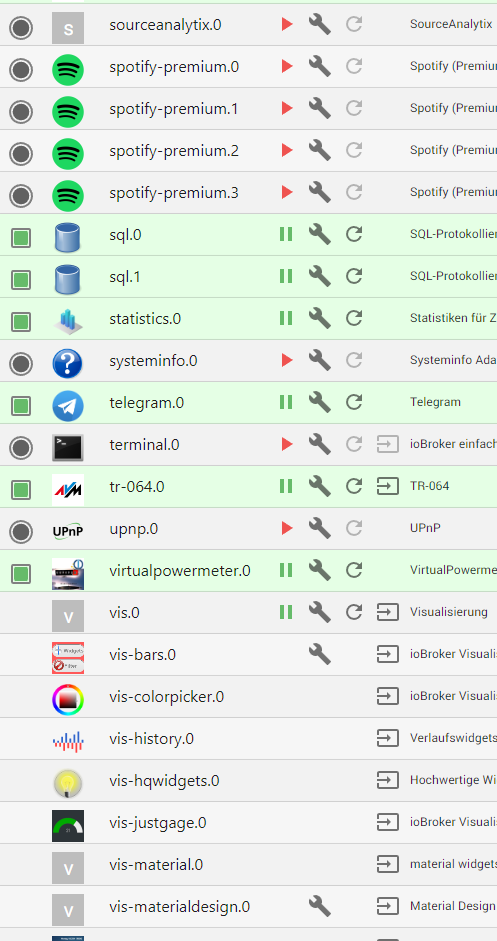
Wie kann ich das gerade ziehen?
ASROCK Deskmini Intel I3 8100 16GB mit Proxmox VM ioBroker VM DIYHue| CCU piVCCU + FHEM auf Raspberry | Maria DB mit Grafana und Prometheus auf Tinker Board
-
so, alles erledigt. ioBroker läuft nun auf Debain 11 und soweit alles gut.
Leider machen einige Adapter Probleme, unter anderem VIS. VIS ist nicht installiert, und ich kann es auch nicht neu installieren, wird mit Code 25 abgebrochen.
Wie kann ich das gerade ziehen?
@axelf1977 sagte in Adminoberfläche nicht aufrufbar, Admin 6.2.17:
Wie kann ich das gerade ziehen?
Eine Vorversion installieren, Backup drüber, updaten.
-
@axelf1977 sagte in Adminoberfläche nicht aufrufbar, Admin 6.2.17:
Wie kann ich das gerade ziehen?
Eine Vorversion installieren, Backup drüber, updaten.
@thomas-braun sagte in Adminoberfläche nicht aufrufbar, Admin 6.2.17:
@axelf1977 sagte in Adminoberfläche nicht aufrufbar, Admin 6.2.17:
Wie kann ich das gerade ziehen?
Eine Vorversion installieren, Backup drüber, updaten.
Ich hatte heute alles frisch über den Installer
curl -sL https://iobroker.net/install.sh | bash -installiert und dann das Backup eingespielt
ASROCK Deskmini Intel I3 8100 16GB mit Proxmox VM ioBroker VM DIYHue| CCU piVCCU + FHEM auf Raspberry | Maria DB mit Grafana und Prometheus auf Tinker Board
-
@thomas-braun sagte in Adminoberfläche nicht aufrufbar, Admin 6.2.17:
@axelf1977 sagte in Adminoberfläche nicht aufrufbar, Admin 6.2.17:
Wie kann ich das gerade ziehen?
Eine Vorversion installieren, Backup drüber, updaten.
Ich hatte heute alles frisch über den Installer
curl -sL https://iobroker.net/install.sh | bash -installiert und dann das Backup eingespielt
@axelf1977 sagte in Adminoberfläche nicht aufrufbar, Admin 6.2.17:
installiert und dann das Backup eingespielt
Das funktioniert für vis nicht.
Daher: Alte vis-Version installieren (Ich glaube 1.4.1 oder so funktioniert und dann das Backup drauf. Anschließend vis auf die aktuelle Version bringen). Bekannte Macke. -
@axelf1977 sagte in Adminoberfläche nicht aufrufbar, Admin 6.2.17:
installiert und dann das Backup eingespielt
Das funktioniert für vis nicht.
Daher: Alte vis-Version installieren (Ich glaube 1.4.1 oder so funktioniert und dann das Backup drauf. Anschließend vis auf die aktuelle Version bringen). Bekannte Macke.@thomas-braun sagte in Adminoberfläche nicht aufrufbar, Admin 6.2.17:
@axelf1977 sagte in Adminoberfläche nicht aufrufbar, Admin 6.2.17:
installiert und dann das Backup eingespielt
Das funktioniert für vis nicht.
Daher: Alte vis-Version installieren (Ich glaube 1.4.1 oder so funktioniert und dann das Backup drauf. Anschließend vis auf die aktuelle Version bringen). Bekannte Macke.Ah, ok, das galt nur VIS. Mache ich so, danke Dir!
Danke nochmal für Deinem Super Support!
-
@thomas-braun sagte in Adminoberfläche nicht aufrufbar, Admin 6.2.17:
@axelf1977 sagte in Adminoberfläche nicht aufrufbar, Admin 6.2.17:
installiert und dann das Backup eingespielt
Das funktioniert für vis nicht.
Daher: Alte vis-Version installieren (Ich glaube 1.4.1 oder so funktioniert und dann das Backup drauf. Anschließend vis auf die aktuelle Version bringen). Bekannte Macke.Das macht mich gerade irre... Ich habe alles mögliche ausprobiert.
Den von Dir beschriebenen Weg. VIS auf 1.4.1 gebracht, dann das backup erneut eingespielt, da ging gar nichts mehr mit VIS. Kein update auf 1.4.15, kein Downgrade mehr, keine Deinstallation. Vis lies sich nicht öffnen.
Jetzt habe ich von einem Snapshot ein Rollback gemacht. Hier war VIS 1.4.1 drauf
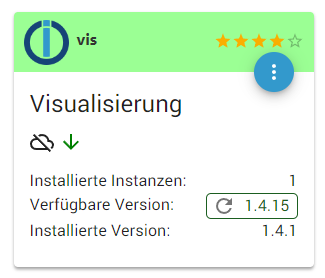
in den Instanzen zeigt er aber die Version 1.4.15 als installierte an.
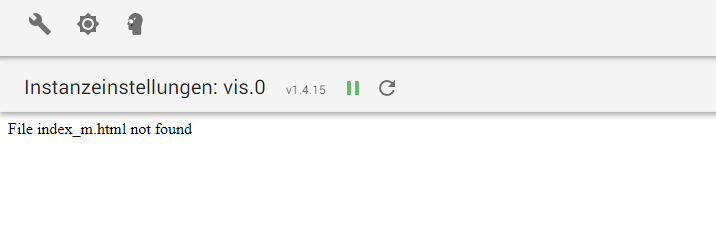
Daher geht weiterhin nichts. Ich konnte auch die ganze Zeit auf den System auf Debian keine VIS importieren. Hätte aber meine VIS schon gerne zurück :-(
ASROCK Deskmini Intel I3 8100 16GB mit Proxmox VM ioBroker VM DIYHue| CCU piVCCU + FHEM auf Raspberry | Maria DB mit Grafana und Prometheus auf Tinker Board
-
@thomas-braun sagte in Adminoberfläche nicht aufrufbar, Admin 6.2.17:
@axelf1977 sagte in Adminoberfläche nicht aufrufbar, Admin 6.2.17:
installiert und dann das Backup eingespielt
Das funktioniert für vis nicht.
Daher: Alte vis-Version installieren (Ich glaube 1.4.1 oder so funktioniert und dann das Backup drauf. Anschließend vis auf die aktuelle Version bringen). Bekannte Macke.Das macht mich gerade irre... Ich habe alles mögliche ausprobiert.
Den von Dir beschriebenen Weg. VIS auf 1.4.1 gebracht, dann das backup erneut eingespielt, da ging gar nichts mehr mit VIS. Kein update auf 1.4.15, kein Downgrade mehr, keine Deinstallation. Vis lies sich nicht öffnen.
Jetzt habe ich von einem Snapshot ein Rollback gemacht. Hier war VIS 1.4.1 drauf
in den Instanzen zeigt er aber die Version 1.4.15 als installierte an.
Daher geht weiterhin nichts. Ich konnte auch die ganze Zeit auf den System auf Debian keine VIS importieren. Hätte aber meine VIS schon gerne zurück :-(
@axelf1977
Ich hab keine vis laufen, kann da nicht viel zu sagen.sudo ln -s /usr/bin/node /usr/bin/nodejs uname -m && type -P nodejs node npm && nodejs -v && node -v && npm -v && whoami && pwd && sudo apt update &> /dev/null && sudo apt update && apt policy nodejs iobroker update -i iobroker list instancessagt?
-
@axelf1977
Ich hab keine vis laufen, kann da nicht viel zu sagen.sudo ln -s /usr/bin/node /usr/bin/nodejs uname -m && type -P nodejs node npm && nodejs -v && node -v && npm -v && whoami && pwd && sudo apt update &> /dev/null && sudo apt update && apt policy nodejs iobroker update -i iobroker list instancessagt?
@thomas-braun sagte in Adminoberfläche nicht aufrufbar, Admin 6.2.17:
sudo ln -s /usr/bin/node /usr/bin/nodejs
uname -m && type -P nodejs node npm && nodejs -v && node -v && npm -v && whoami && pwd && sudo apt update &> /dev/null && sudo apt update && apt policy nodejs
iobroker update -i
iobroker list instances
x86_64 /usr/bin/nodejs /usr/bin/node /usr/bin/npm v16.17.0 v16.17.0 8.15.0 gordon /opt/iobroker Hit:1 http://security.debian.org bullseye-security InRelease Hit:2 http://ftp.debian.org/debian bullseye InRelease Hit:3 https://deb.nodesource.com/node_16.x bullseye InRelease Hit:4 http://ftp.debian.org/debian bullseye-updates InRelease Reading package lists... Done Building dependency tree... Done Reading state information... Done All packages are up to date. nodejs: Installed: 16.17.0-deb-1nodesource1 Candidate: 16.17.0-deb-1nodesource1 Version table: *** 16.17.0-deb-1nodesource1 500 500 https://deb.nodesource.com/node_16.x bullseye/main amd64 Packages 100 /var/lib/dpkg/status 12.22.12~dfsg-1~deb11u1 500 500 http://security.debian.org bullseye-security/main amd64 Packages 12.22.5~dfsg-2~11u1 500 500 http://ftp.debian.org/debian bullseye/main amd64 Packages Used repository: stable Adapter "admin" : 6.2.20 , installed 6.2.20 Adapter "alexa2" : 3.11.2 , installed 3.12.0 Adapter "backitup" : 2.4.10 , installed 2.4.10 Adapter "cloud" : 4.2.2 , installed 4.2.2 Adapter "daswetter" : 3.1.2 , installed 3.1.3 Adapter "denon" : 1.13.4 , installed 1.13.4 Adapter "devices" : 1.0.12 , installed 1.0.12 Adapter "discovery" : 3.0.5 , installed 3.0.5 Adapter "dwd" : 2.8.3 , installed 2.8.3 Adapter "dysonairpurifier": 2.5.1 , installed 2.5.1 Adapter "feiertage" : 1.1.0 , installed 1.1.0 Adapter "fhem" : 1.6.3 , installed 1.5.3 [Updatable] Adapter "firetv" : 1.0.0 , installed 1.0.0 Adapter "flot" : 1.11.0 , installed 1.11.0 Adapter "fullybrowser" : 2.1.2 , installed 2.1.2 Adapter "ham" : 4.0.2 , installed 4.0.2 Adapter "harmony" : 1.2.2 , installed 1.2.2 Adapter "heatingcontrol": 2.8.6 , installed 2.8.7 Adapter "history" : 2.2.0 , installed 2.2.0 Adapter "hm-rega" : 3.0.40 , installed 3.0.40 Adapter "hm-rpc" : 1.15.12 , installed 1.15.12 Adapter "homeconnect" : 1.0.1 , installed 1.0.1 Adapter "hue-extended" : 2.0.0 , installed 2.0.0 Adapter "ical" : 1.13.1 , installed 1.13.1 Adapter "icons-icons8" : 0.0.1 , installed 0.0.1 Adapter "icons-material-png": 0.1.0, installed 0.1.0 Adapter "icons-mfd-svg": 1.1.0 , installed 1.1.0 Adapter "info" : 1.9.19 , installed 1.9.19 Adapter "iot" : 1.11.8 , installed 1.11.8 Controller "js-controller": 4.0.23 , installed 4.0.23 Adapter "kodi" : 2.0.8 , installed 2.0.8 Adapter "lgtv" : 1.1.10 , installed 1.1.10 Adapter "mihome" : 1.4.0 , installed 1.4.0 Adapter "mihome-vacuum": 3.4.2 , installed 3.4.2 Adapter "mobile" : 1.0.1 , installed 1.0.1 Adapter "pollenflug" : 1.0.6 , installed 1.0.6 Adapter "proxmox" : 1.3.4 , installed 1.3.4 Adapter "rpi2" : 1.3.2 , installed 1.3.2 Adapter "scenes" : 2.3.9 , installed 2.3.9 Adapter "simple-api" : 2.7.0 , installed 2.7.0 Adapter "socketio" : 4.2.0 , installed 4.2.0 Adapter "sonoff" : 2.5.1 , installed 2.5.1 Adapter "spotify-premium": 1.2.1 , installed 1.2.1 Adapter "sql" : 2.1.7 , installed 2.1.7 Adapter "statistics" : 2.2.0 , installed 2.2.0 Adapter "systeminfo" : 0.3.1 , installed 0.3.1 Adapter "telegram" : 1.14.1 , installed 1.14.1 Adapter "terminal" : 0.2.6 , installed 0.2.6 Adapter "tr-064" : 4.2.16 , installed 4.2.16 Adapter "upnp" : 1.0.21 , installed 1.0.21 Adapter "virtualpowermeter": 1.4.6, installed 1.4.6 Adapter "vis" : 1.4.15 , installed 1.4.1 [Updatable] Adapter "vis-bars" : 0.1.4 , installed 0.1.4 Adapter "vis-colorpicker": 1.2.0 , installed 1.2.0 Adapter "vis-history" : 1.0.0 , installed 1.0.0 Adapter "vis-hqwidgets": 1.2.0 , installed 1.2.0 Adapter "vis-justgage" : 1.0.2 , installed 1.0.2 Adapter "vis-metro" : 1.2.0 , installed 1.2.0 Adapter "vis-timeandweather": 1.2.2, installed 1.1.7 [Updatable] Adapter "weatherunderground": 3.4.2, installed 3.4.2 Adapter "web" : 4.3.0 , installed 4.3.0 Adapter "ws" : 1.3.0 , installed 1.3.0 + system.adapter.admin.0 : admin : gordiobroker - enabled, port: 8081, bind: 0.0.0.0, run as: admin + system.adapter.alexa2.0 : alexa2 : gordiobroker - enabled + system.adapter.backitup.0 : backitup : gordiobroker - enabled system.adapter.cloud.0 : cloud : gordiobroker - disabled system.adapter.daswetter.0 : daswetter : gordiobroker - disabled system.adapter.denon.0 : denon : gordiobroker - disabled system.adapter.devices.0 : devices : gordiobroker - disabled system.adapter.discovery.0 : discovery : gordiobroker - disabled system.adapter.dwd.0 : dwd : gordiobroker - enabled system.adapter.dwd.1 : dwd : gordiobroker - enabled + system.adapter.dysonairpurifier.0 : dysonairpurifier : gordiobroker - enabled system.adapter.feiertage.0 : feiertage : gordiobroker - disabled + system.adapter.fhem.0 : fhem : gordiobroker - enabled, port: 7072 system.adapter.firetv.0 : firetv : gordiobroker - disabled system.adapter.flot.0 : flot : gordiobroker - disabled + system.adapter.fullybrowser.0 : fullybrowser : gordiobroker - enabled system.adapter.ham.0 : ham : gordiobroker - disabled + system.adapter.harmony.0 : harmony : gordiobroker - enabled + system.adapter.heatingcontrol.0 : heatingcontrol : gordiobroker - enabled + system.adapter.history.0 : history : gordiobroker - enabled + system.adapter.hm-rega.1 : hm-rega : gordiobroker - enabled + system.adapter.hm-rpc.1 : hm-rpc : gordiobroker - enabled, port: 18701 + system.adapter.hm-rpc.2 : hm-rpc : gordiobroker - enabled, port: 12001 + system.adapter.hm-rpc.3 : hm-rpc : gordiobroker - enabled, port: 12010 system.adapter.homeconnect.0 : homeconnect : gordiobroker - disabled + system.adapter.hue-extended.0 : hue-extended : gordiobroker - enabled system.adapter.hue-extended.1 : hue-extended : gordiobroker - disabled system.adapter.hue-extended.2 : hue-extended : gordiobroker - disabled system.adapter.ical.0 : ical : gordiobroker - enabled system.adapter.ical.1 : ical : gordiobroker - enabled system.adapter.ical.2 : ical : gordiobroker - enabled system.adapter.icons-icons8.0 : icons-icons8 : gordiobroker - disabled system.adapter.icons-material-png.0 : icons-material-png : gordiobroker - disabled system.adapter.icons-mfd-svg.0 : icons-mfd-svg : gordiobroker - disabled + system.adapter.info.0 : info : gordiobroker - enabled + system.adapter.iot.0 : iot : gordiobroker - enabled system.adapter.kodi.0 : kodi : gordiobroker - disabled, port: 9090 system.adapter.lgtv.0 : lgtv : gordiobroker - disabled + system.adapter.mihome-vacuum.0 : mihome-vacuum : gordiobroker - enabled, port: 54321 + system.adapter.mihome.0 : mihome : gordiobroker - enabled, port: 9898, bind: 0.0.0.0 system.adapter.mobile.0 : mobile : gordiobroker - disabled + system.adapter.pollenflug.0 : pollenflug : gordiobroker - enabled system.adapter.proxmox.0 : proxmox : gordiobroker - disabled, port: 8006 system.adapter.rpi2.0 : rpi2 : gordiobroker - disabled + system.adapter.scenes.0 : scenes : gordiobroker - enabled system.adapter.simple-api.0 : simple-api : gordiobroker - disabled, port: 8087, bind: 0.0.0.0, run as: admin system.adapter.socketio.0 : socketio : gordiobroker - disabled, port: 8084, bind: 192.168.178.xx, run as: admin + system.adapter.sonoff.0 : sonoff : gordiobroker - enabled, port: 1884, bind: 0.0.0.0 system.adapter.sourceanalytix.0 : sourceanalytix : gordiobroker - disabled system.adapter.spotify-premium.0 : spotify-premium : gordiobroker - disabled system.adapter.spotify-premium.1 : spotify-premium : gordiobroker - disabled system.adapter.spotify-premium.2 : spotify-premium : gordiobroker - disabled system.adapter.spotify-premium.3 : spotify-premium : gordiobroker - disabled + system.adapter.sql.0 : sql : gordiobroker - enabled, port: 3306 + system.adapter.sql.1 : sql : gordiobroker - enabled + system.adapter.statistics.0 : statistics : gordiobroker - enabled system.adapter.systeminfo.0 : systeminfo : gordiobroker - disabled + system.adapter.telegram.0 : telegram : gordiobroker - enabled, port: 8443, bind: 0.0.0.0 system.adapter.terminal.0 : terminal : gordiobroker - disabled, port: 8088, bind: 0.0.0.0, run as: admin + system.adapter.tr-064.0 : tr-064 : gordiobroker - enabled system.adapter.upnp.0 : upnp : gordiobroker - disabled + system.adapter.virtualpowermeter.0 : virtualpowermeter : gordiobroker - enabled system.adapter.vis-bars.0 : vis-bars : gordiobroker - disabled system.adapter.vis-colorpicker.0 : vis-colorpicker : gordiobroker - disabled system.adapter.vis-history.0 : vis-history : gordiobroker - disabled system.adapter.vis-hqwidgets.0 : vis-hqwidgets : gordiobroker - disabled system.adapter.vis-justgage.0 : vis-justgage : gordiobroker - disabled system.adapter.vis-material.0 : vis-material : gordiobroker - disabled system.adapter.vis-materialdesign.0 : vis-materialdesign : gordiobroker - disabled system.adapter.vis-metro.0 : vis-metro : gordiobroker - disabled system.adapter.vis-timeandweather.0 : vis-timeandweather : gordiobroker - disabled system.adapter.vis.0 : vis : gordiobroker - enabled system.adapter.weatherunderground.0 : weatherunderground : gordiobroker - enabled + system.adapter.web.0 : web : gordiobroker - enabled, port: 8082, bind: 0.0.0.0, run as: admin + instance is aliveASROCK Deskmini Intel I3 8100 16GB mit Proxmox VM ioBroker VM DIYHue| CCU piVCCU + FHEM auf Raspberry | Maria DB mit Grafana und Prometheus auf Tinker Board
-
@thomas-braun sagte in Adminoberfläche nicht aufrufbar, Admin 6.2.17:
sudo ln -s /usr/bin/node /usr/bin/nodejs
uname -m && type -P nodejs node npm && nodejs -v && node -v && npm -v && whoami && pwd && sudo apt update &> /dev/null && sudo apt update && apt policy nodejs
iobroker update -i
iobroker list instances
x86_64 /usr/bin/nodejs /usr/bin/node /usr/bin/npm v16.17.0 v16.17.0 8.15.0 gordon /opt/iobroker Hit:1 http://security.debian.org bullseye-security InRelease Hit:2 http://ftp.debian.org/debian bullseye InRelease Hit:3 https://deb.nodesource.com/node_16.x bullseye InRelease Hit:4 http://ftp.debian.org/debian bullseye-updates InRelease Reading package lists... Done Building dependency tree... Done Reading state information... Done All packages are up to date. nodejs: Installed: 16.17.0-deb-1nodesource1 Candidate: 16.17.0-deb-1nodesource1 Version table: *** 16.17.0-deb-1nodesource1 500 500 https://deb.nodesource.com/node_16.x bullseye/main amd64 Packages 100 /var/lib/dpkg/status 12.22.12~dfsg-1~deb11u1 500 500 http://security.debian.org bullseye-security/main amd64 Packages 12.22.5~dfsg-2~11u1 500 500 http://ftp.debian.org/debian bullseye/main amd64 Packages Used repository: stable Adapter "admin" : 6.2.20 , installed 6.2.20 Adapter "alexa2" : 3.11.2 , installed 3.12.0 Adapter "backitup" : 2.4.10 , installed 2.4.10 Adapter "cloud" : 4.2.2 , installed 4.2.2 Adapter "daswetter" : 3.1.2 , installed 3.1.3 Adapter "denon" : 1.13.4 , installed 1.13.4 Adapter "devices" : 1.0.12 , installed 1.0.12 Adapter "discovery" : 3.0.5 , installed 3.0.5 Adapter "dwd" : 2.8.3 , installed 2.8.3 Adapter "dysonairpurifier": 2.5.1 , installed 2.5.1 Adapter "feiertage" : 1.1.0 , installed 1.1.0 Adapter "fhem" : 1.6.3 , installed 1.5.3 [Updatable] Adapter "firetv" : 1.0.0 , installed 1.0.0 Adapter "flot" : 1.11.0 , installed 1.11.0 Adapter "fullybrowser" : 2.1.2 , installed 2.1.2 Adapter "ham" : 4.0.2 , installed 4.0.2 Adapter "harmony" : 1.2.2 , installed 1.2.2 Adapter "heatingcontrol": 2.8.6 , installed 2.8.7 Adapter "history" : 2.2.0 , installed 2.2.0 Adapter "hm-rega" : 3.0.40 , installed 3.0.40 Adapter "hm-rpc" : 1.15.12 , installed 1.15.12 Adapter "homeconnect" : 1.0.1 , installed 1.0.1 Adapter "hue-extended" : 2.0.0 , installed 2.0.0 Adapter "ical" : 1.13.1 , installed 1.13.1 Adapter "icons-icons8" : 0.0.1 , installed 0.0.1 Adapter "icons-material-png": 0.1.0, installed 0.1.0 Adapter "icons-mfd-svg": 1.1.0 , installed 1.1.0 Adapter "info" : 1.9.19 , installed 1.9.19 Adapter "iot" : 1.11.8 , installed 1.11.8 Controller "js-controller": 4.0.23 , installed 4.0.23 Adapter "kodi" : 2.0.8 , installed 2.0.8 Adapter "lgtv" : 1.1.10 , installed 1.1.10 Adapter "mihome" : 1.4.0 , installed 1.4.0 Adapter "mihome-vacuum": 3.4.2 , installed 3.4.2 Adapter "mobile" : 1.0.1 , installed 1.0.1 Adapter "pollenflug" : 1.0.6 , installed 1.0.6 Adapter "proxmox" : 1.3.4 , installed 1.3.4 Adapter "rpi2" : 1.3.2 , installed 1.3.2 Adapter "scenes" : 2.3.9 , installed 2.3.9 Adapter "simple-api" : 2.7.0 , installed 2.7.0 Adapter "socketio" : 4.2.0 , installed 4.2.0 Adapter "sonoff" : 2.5.1 , installed 2.5.1 Adapter "spotify-premium": 1.2.1 , installed 1.2.1 Adapter "sql" : 2.1.7 , installed 2.1.7 Adapter "statistics" : 2.2.0 , installed 2.2.0 Adapter "systeminfo" : 0.3.1 , installed 0.3.1 Adapter "telegram" : 1.14.1 , installed 1.14.1 Adapter "terminal" : 0.2.6 , installed 0.2.6 Adapter "tr-064" : 4.2.16 , installed 4.2.16 Adapter "upnp" : 1.0.21 , installed 1.0.21 Adapter "virtualpowermeter": 1.4.6, installed 1.4.6 Adapter "vis" : 1.4.15 , installed 1.4.1 [Updatable] Adapter "vis-bars" : 0.1.4 , installed 0.1.4 Adapter "vis-colorpicker": 1.2.0 , installed 1.2.0 Adapter "vis-history" : 1.0.0 , installed 1.0.0 Adapter "vis-hqwidgets": 1.2.0 , installed 1.2.0 Adapter "vis-justgage" : 1.0.2 , installed 1.0.2 Adapter "vis-metro" : 1.2.0 , installed 1.2.0 Adapter "vis-timeandweather": 1.2.2, installed 1.1.7 [Updatable] Adapter "weatherunderground": 3.4.2, installed 3.4.2 Adapter "web" : 4.3.0 , installed 4.3.0 Adapter "ws" : 1.3.0 , installed 1.3.0 + system.adapter.admin.0 : admin : gordiobroker - enabled, port: 8081, bind: 0.0.0.0, run as: admin + system.adapter.alexa2.0 : alexa2 : gordiobroker - enabled + system.adapter.backitup.0 : backitup : gordiobroker - enabled system.adapter.cloud.0 : cloud : gordiobroker - disabled system.adapter.daswetter.0 : daswetter : gordiobroker - disabled system.adapter.denon.0 : denon : gordiobroker - disabled system.adapter.devices.0 : devices : gordiobroker - disabled system.adapter.discovery.0 : discovery : gordiobroker - disabled system.adapter.dwd.0 : dwd : gordiobroker - enabled system.adapter.dwd.1 : dwd : gordiobroker - enabled + system.adapter.dysonairpurifier.0 : dysonairpurifier : gordiobroker - enabled system.adapter.feiertage.0 : feiertage : gordiobroker - disabled + system.adapter.fhem.0 : fhem : gordiobroker - enabled, port: 7072 system.adapter.firetv.0 : firetv : gordiobroker - disabled system.adapter.flot.0 : flot : gordiobroker - disabled + system.adapter.fullybrowser.0 : fullybrowser : gordiobroker - enabled system.adapter.ham.0 : ham : gordiobroker - disabled + system.adapter.harmony.0 : harmony : gordiobroker - enabled + system.adapter.heatingcontrol.0 : heatingcontrol : gordiobroker - enabled + system.adapter.history.0 : history : gordiobroker - enabled + system.adapter.hm-rega.1 : hm-rega : gordiobroker - enabled + system.adapter.hm-rpc.1 : hm-rpc : gordiobroker - enabled, port: 18701 + system.adapter.hm-rpc.2 : hm-rpc : gordiobroker - enabled, port: 12001 + system.adapter.hm-rpc.3 : hm-rpc : gordiobroker - enabled, port: 12010 system.adapter.homeconnect.0 : homeconnect : gordiobroker - disabled + system.adapter.hue-extended.0 : hue-extended : gordiobroker - enabled system.adapter.hue-extended.1 : hue-extended : gordiobroker - disabled system.adapter.hue-extended.2 : hue-extended : gordiobroker - disabled system.adapter.ical.0 : ical : gordiobroker - enabled system.adapter.ical.1 : ical : gordiobroker - enabled system.adapter.ical.2 : ical : gordiobroker - enabled system.adapter.icons-icons8.0 : icons-icons8 : gordiobroker - disabled system.adapter.icons-material-png.0 : icons-material-png : gordiobroker - disabled system.adapter.icons-mfd-svg.0 : icons-mfd-svg : gordiobroker - disabled + system.adapter.info.0 : info : gordiobroker - enabled + system.adapter.iot.0 : iot : gordiobroker - enabled system.adapter.kodi.0 : kodi : gordiobroker - disabled, port: 9090 system.adapter.lgtv.0 : lgtv : gordiobroker - disabled + system.adapter.mihome-vacuum.0 : mihome-vacuum : gordiobroker - enabled, port: 54321 + system.adapter.mihome.0 : mihome : gordiobroker - enabled, port: 9898, bind: 0.0.0.0 system.adapter.mobile.0 : mobile : gordiobroker - disabled + system.adapter.pollenflug.0 : pollenflug : gordiobroker - enabled system.adapter.proxmox.0 : proxmox : gordiobroker - disabled, port: 8006 system.adapter.rpi2.0 : rpi2 : gordiobroker - disabled + system.adapter.scenes.0 : scenes : gordiobroker - enabled system.adapter.simple-api.0 : simple-api : gordiobroker - disabled, port: 8087, bind: 0.0.0.0, run as: admin system.adapter.socketio.0 : socketio : gordiobroker - disabled, port: 8084, bind: 192.168.178.xx, run as: admin + system.adapter.sonoff.0 : sonoff : gordiobroker - enabled, port: 1884, bind: 0.0.0.0 system.adapter.sourceanalytix.0 : sourceanalytix : gordiobroker - disabled system.adapter.spotify-premium.0 : spotify-premium : gordiobroker - disabled system.adapter.spotify-premium.1 : spotify-premium : gordiobroker - disabled system.adapter.spotify-premium.2 : spotify-premium : gordiobroker - disabled system.adapter.spotify-premium.3 : spotify-premium : gordiobroker - disabled + system.adapter.sql.0 : sql : gordiobroker - enabled, port: 3306 + system.adapter.sql.1 : sql : gordiobroker - enabled + system.adapter.statistics.0 : statistics : gordiobroker - enabled system.adapter.systeminfo.0 : systeminfo : gordiobroker - disabled + system.adapter.telegram.0 : telegram : gordiobroker - enabled, port: 8443, bind: 0.0.0.0 system.adapter.terminal.0 : terminal : gordiobroker - disabled, port: 8088, bind: 0.0.0.0, run as: admin + system.adapter.tr-064.0 : tr-064 : gordiobroker - enabled system.adapter.upnp.0 : upnp : gordiobroker - disabled + system.adapter.virtualpowermeter.0 : virtualpowermeter : gordiobroker - enabled system.adapter.vis-bars.0 : vis-bars : gordiobroker - disabled system.adapter.vis-colorpicker.0 : vis-colorpicker : gordiobroker - disabled system.adapter.vis-history.0 : vis-history : gordiobroker - disabled system.adapter.vis-hqwidgets.0 : vis-hqwidgets : gordiobroker - disabled system.adapter.vis-justgage.0 : vis-justgage : gordiobroker - disabled system.adapter.vis-material.0 : vis-material : gordiobroker - disabled system.adapter.vis-materialdesign.0 : vis-materialdesign : gordiobroker - disabled system.adapter.vis-metro.0 : vis-metro : gordiobroker - disabled system.adapter.vis-timeandweather.0 : vis-timeandweather : gordiobroker - disabled system.adapter.vis.0 : vis : gordiobroker - enabled system.adapter.weatherunderground.0 : weatherunderground : gordiobroker - enabled + system.adapter.web.0 : web : gordiobroker - enabled, port: 8082, bind: 0.0.0.0, run as: admin + instance is aliveiob start vis -
iob start vis@thomas-braun sagte in Adminoberfläche nicht aufrufbar, Admin 6.2.17:
iob start vis
vis läuft ja, das ist nicht das Problem.
Aber ich schau mal ob ich ein Thema dazu finde. Muss ja nicht hier rein.Danke
ASROCK Deskmini Intel I3 8100 16GB mit Proxmox VM ioBroker VM DIYHue| CCU piVCCU + FHEM auf Raspberry | Maria DB mit Grafana und Prometheus auf Tinker Board


Hey! Du scheinst an dieser Unterhaltung interessiert zu sein, hast aber noch kein Konto.
Hast du es satt, bei jedem Besuch durch die gleichen Beiträge zu scrollen? Wenn du dich für ein Konto anmeldest, kommst du immer genau dorthin zurück, wo du zuvor warst, und kannst dich über neue Antworten benachrichtigen lassen (entweder per E-Mail oder Push-Benachrichtigung). Du kannst auch Lesezeichen speichern und Beiträge positiv bewerten, um anderen Community-Mitgliedern deine Wertschätzung zu zeigen.
Mit deinem Input könnte dieser Beitrag noch besser werden 💗
Registrieren AnmeldenSupport us
415
Online33.0k
Benutzer83.6k
Themen1.3m
Beiträge