




Adapter lässt sich nicht löschen
-
@thomas-braun sagte in Adapter lässt sich nicht löschen:
mount | sort
/dev/mapper/pve-vm--100--disk--0 on / type ext4 (rw,relatime,stripe=16) 10.0.1.21:/volume1/Backups on /opt/iobroker/backups type nfs4 (rw,relatime,vers=4.1,rsize=131072,wsize=131072,namlen=255,hard,proto=tcp,timeo=600,retrans=2,sec=sys,clientaddr=10.0.1.201,local_lock=none,addr=10.0.1.21) binfmt_misc on /proc/sys/fs/binfmt_misc type binfmt_misc (rw,nosuid,nodev,noexec,relatime) debugfs on /sys/kernel/debug type debugfs (rw,nosuid,nodev,noexec,relatime) devpts on /dev/console type devpts (rw,nosuid,noexec,relatime,gid=100005,mode=620,ptmxmode=666,max=1026) devpts on /dev/ptmx type devpts (rw,nosuid,noexec,relatime,gid=100005,mode=620,ptmxmode=666,max=1026) devpts on /dev/pts type devpts (rw,nosuid,noexec,relatime,gid=100005,mode=620,ptmxmode=666,max=1026) devpts on /dev/tty1 type devpts (rw,nosuid,noexec,relatime,gid=100005,mode=620,ptmxmode=666,max=1026) devpts on /dev/tty2 type devpts (rw,nosuid,noexec,relatime,gid=100005,mode=620,ptmxmode=666,max=1026) efivarfs on /sys/firmware/efi/efivars type efivarfs (rw,nosuid,nodev,noexec,relatime) fusectl on /sys/fs/fuse/connections type fusectl (rw,nosuid,nodev,noexec,relatime) lxcfs on /proc/cpuinfo type fuse.lxcfs (rw,nosuid,nodev,relatime,user_id=0,group_id=0,allow_other) lxcfs on /proc/diskstats type fuse.lxcfs (rw,nosuid,nodev,relatime,user_id=0,group_id=0,allow_other) lxcfs on /proc/loadavg type fuse.lxcfs (rw,nosuid,nodev,relatime,user_id=0,group_id=0,allow_other) lxcfs on /proc/meminfo type fuse.lxcfs (rw,nosuid,nodev,relatime,user_id=0,group_id=0,allow_other) lxcfs on /proc/stat type fuse.lxcfs (rw,nosuid,nodev,relatime,user_id=0,group_id=0,allow_other) lxcfs on /proc/swaps type fuse.lxcfs (rw,nosuid,nodev,relatime,user_id=0,group_id=0,allow_other) lxcfs on /proc/uptime type fuse.lxcfs (rw,nosuid,nodev,relatime,user_id=0,group_id=0,allow_other) lxcfs on /sys/devices/system/cpu/online type fuse.lxcfs (rw,nosuid,nodev,relatime,user_id=0,group_id=0,allow_other) mqueue on /dev/mqueue type mqueue (rw,relatime) none on /dev type tmpfs (rw,relatime,size=492k,mode=755,uid=100000,gid=100000,inode64) none on /proc/sys/kernel/random/boot_id type tmpfs (ro,nosuid,nodev,noexec,relatime,size=492k,mode=755,uid=100000,gid=100000,inode64) none on /sys/fs/cgroup type cgroup2 (rw,nosuid,nodev,noexec,relatime) proc on /proc type proc (rw,nosuid,nodev,noexec,relatime) proc on /proc/sys type proc (ro,relatime) proc on /proc/sys/net type proc (rw,nosuid,nodev,noexec,relatime) proc on /proc/sysrq-trigger type proc (ro,relatime) pstore on /sys/fs/pstore type pstore (rw,nosuid,nodev,noexec,relatime) securityfs on /sys/kernel/security type securityfs (rw,nosuid,nodev,noexec,relatime) sysfs on /sys type sysfs (ro,nosuid,nodev,noexec,relatime) sysfs on /sys/devices/virtual/net type sysfs (rw,nosuid,nodev,noexec,relatime) tmpfs on /dev/shm type tmpfs (rw,nosuid,nodev,uid=100000,gid=100000,inode64) tmpfs on /run type tmpfs (rw,nosuid,nodev,size=1626516k,mode=755,uid=100000,gid=100000,inode64) tmpfs on /run/lock type tmpfs (rw,nosuid,nodev,noexec,relatime,size=5120k,uid=100000,gid=100000,inode64) tmpfs on /run/user/1001 type tmpfs (rw,nosuid,nodev,relatime,size=1626512k,mode=700,uid=101001,gid=101001,inode64) udev on /dev/full type devtmpfs (rw,nosuid,relatime,size=8098220k,nr_inodes=2024555,mode=755,inode64) udev on /dev/null type devtmpfs (rw,nosuid,relatime,size=8098220k,nr_inodes=2024555,mode=755,inode64) udev on /dev/random type devtmpfs (rw,nosuid,relatime,size=8098220k,nr_inodes=2024555,mode=755,inode64) udev on /dev/tty type devtmpfs (rw,nosuid,relatime,size=8098220k,nr_inodes=2024555,mode=755,inode64) udev on /dev/urandom type devtmpfs (rw,nosuid,relatime,size=8098220k,nr_inodes=2024555,mode=755,inode64) udev on /dev/zero type devtmpfs (rw,nosuid,relatime,size=8098220k,nr_inodes=2024555,mode=755,inode64)@negalein
Das scheint mit auf dem nfs-client korrekt zu sein.
Wie sind die Einstellungen auf dem nfs-Server? -
@negalein
Das scheint mit auf dem nfs-client korrekt zu sein.
Wie sind die Einstellungen auf dem nfs-Server?@thomas-braun sagte in Adapter lässt sich nicht löschen:
Wie sind die Einstellungen auf dem nfs-Server?
° Node.js & System Update ---> sudo apt update, iob stop, sudo apt full-upgrade
° Node.js Fixer ---> iob nodejs-update
° Fixer ---> iob fix -
@thomas-braun sagte in Adapter lässt sich nicht löschen:
Wie sind die Einstellungen auf dem nfs-Server?
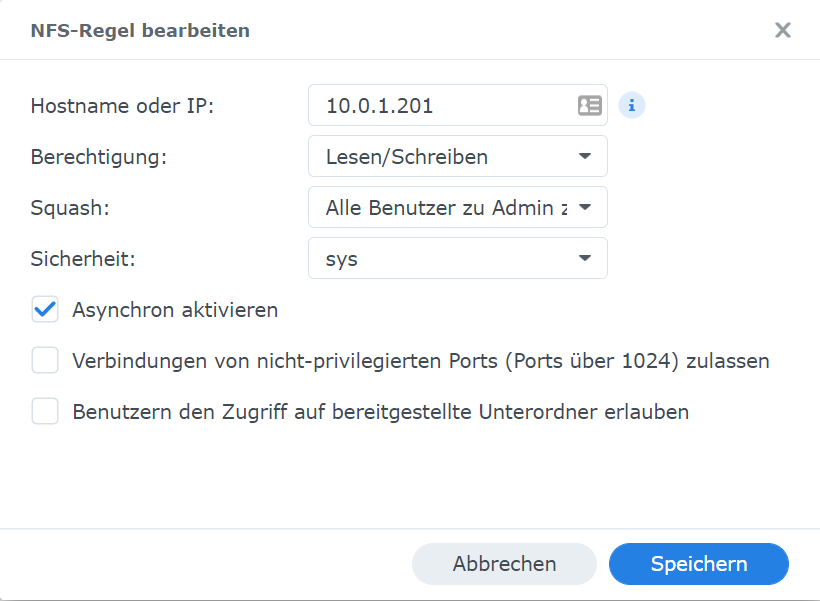
Der Squash dürfte so falsch sein. Die UID/GID sollten eigentlich 1:1 auf dem nfs-Server durchlaufen.
Wem gehört denn z. B.ls -la /opt/iobroker/backups/iobroker_2022_08_19-23_00_10_Standard_backupiobroker.tar.gz getfacl /opt/iobroker/backups/iobroker_2022_08_19-23_00_10_Standard_backupiobroker.tar.gz -
Der Squash dürfte so falsch sein. Die UID/GID sollten eigentlich 1:1 auf dem nfs-Server durchlaufen.
Wem gehört denn z. B.ls -la /opt/iobroker/backups/iobroker_2022_08_19-23_00_10_Standard_backupiobroker.tar.gz getfacl /opt/iobroker/backups/iobroker_2022_08_19-23_00_10_Standard_backupiobroker.tar.gz@thomas-braun sagte in Adapter lässt sich nicht löschen:
Wem gehört denn z. B.
nega@ioBroker:/opt/iobroker$ ls -la /opt/iobroker/backups/iobroker_2022_08_19-23_00_10_Standard_backupiobroker.tar.gz
-rwxrwxrwx 1 nobody nogroup 438757824 Aug 19 23:01 /opt/iobroker/backups/iobroker_2022_08_19-23_00_10_Standard_backupiobroker.tar.gz
nega@ioBroker:/opt/iobroker$ getfacl /opt/iobroker/backups/iobroker_2022_08_19-23_00_10_Standard_backupiobroker.tar.gz
getfacl: Removing leading '/' from absolute path names
# file: opt/iobroker/backups/iobroker_2022_08_19-23_00_10_Standard_backupiobroker.tar.gz
# owner: nobody
# group: nogroup
user::rwx
group::rwx
other::rwx
° Node.js & System Update ---> sudo apt update, iob stop, sudo apt full-upgrade
° Node.js Fixer ---> iob nodejs-update
° Fixer ---> iob fix -
@thomas-braun sagte in Adapter lässt sich nicht löschen:
Wem gehört denn z. B.
nega@ioBroker:/opt/iobroker$ ls -la /opt/iobroker/backups/iobroker_2022_08_19-23_00_10_Standard_backupiobroker.tar.gz -rwxrwxrwx 1 nobody nogroup 438757824 Aug 19 23:01 /opt/iobroker/backups/iobroker_2022_08_19-23_00_10_Standard_backupiobroker.tar.gz nega@ioBroker:/opt/iobroker$ getfacl /opt/iobroker/backups/iobroker_2022_08_19-23_00_10_Standard_backupiobroker.tar.gz getfacl: Removing leading '/' from absolute path names # file: opt/iobroker/backups/iobroker_2022_08_19-23_00_10_Standard_backupiobroker.tar.gz # owner: nobody # group: nogroup user::rwx group::rwx other::rwx@negalein sagte in Adapter lässt sich nicht löschen:
Statt 'nobody/nogroup' muss das natürlich weiterhin dem 'iobroker/iobroker' gehören.
-
@negalein sagte in Adapter lässt sich nicht löschen:
Statt 'nobody/nogroup' muss das natürlich weiterhin dem 'iobroker/iobroker' gehören.
@thomas-braun sagte in Adapter lässt sich nicht löschen:
Statt 'nobody/nogroup' muss das natürlich weiterhin dem 'iobroker/iobroker' gehören.
dann leg ich also auf der Synology den Benutzer iobroker und die Gruppe iobroker an.
Und gebe auf der Syno dem Backupordner dem Benutzer iobroker Vollzugriff?° Node.js & System Update ---> sudo apt update, iob stop, sudo apt full-upgrade
° Node.js Fixer ---> iob nodejs-update
° Fixer ---> iob fix -
@thomas-braun sagte in Adapter lässt sich nicht löschen:
Statt 'nobody/nogroup' muss das natürlich weiterhin dem 'iobroker/iobroker' gehören.
dann leg ich also auf der Synology den Benutzer iobroker und die Gruppe iobroker an.
Und gebe auf der Syno dem Backupordner dem Benutzer iobroker Vollzugriff?@negalein sagte in Adapter lässt sich nicht löschen:
dann leg ich also auf der Synology den Benutzer iobroker und die Gruppe iobroker an.
Ja, mit der gleichen gid (groupID) und uid (userID) wie auf dem ioBroker-System.
-
@negalein sagte in Adapter lässt sich nicht löschen:
dann leg ich also auf der Synology den Benutzer iobroker und die Gruppe iobroker an.
Ja, mit der gleichen gid (groupID) und uid (userID) wie auf dem ioBroker-System.
@thomas-braun sagte in Adapter lässt sich nicht löschen:
Ja, mit der gleichen gid (groupID) und uid (userID) wie auf dem ioBroker-System.
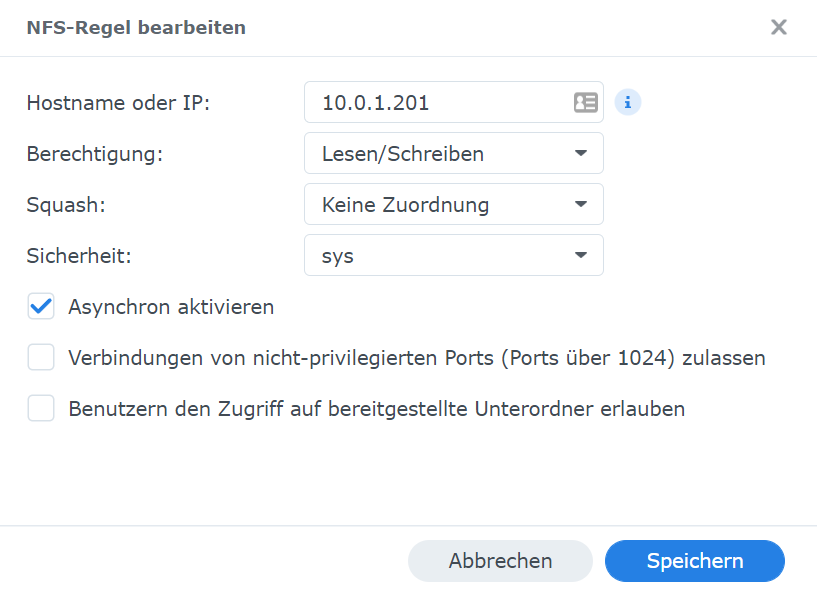
Ok, hab dem User iobroker und Gruppe iobroker dem Ordner zugewiesen.
Squash dann
keine Zuordnung?
° Node.js & System Update ---> sudo apt update, iob stop, sudo apt full-upgrade
° Node.js Fixer ---> iob nodejs-update
° Fixer ---> iob fix -
@thomas-braun sagte in Adapter lässt sich nicht löschen:
Ja, mit der gleichen gid (groupID) und uid (userID) wie auf dem ioBroker-System.
Ok, hab dem User iobroker und Gruppe iobroker dem Ordner zugewiesen.
Squash dann
keine Zuordnung?
@negalein sagte in Adapter lässt sich nicht löschen:
Squash dann keine Zuordnung
Welche anderen Optionen werden für Squash angeboten?
-
@negalein sagte in Adapter lässt sich nicht löschen:
Squash dann keine Zuordnung
Welche anderen Optionen werden für Squash angeboten?
@thomas-braun sagte in Adapter lässt sich nicht löschen:
Welche anderen Optionen werden für Squash angeboten?
jetzt kommt bei ls -la
nega@ioBroker:/opt/iobroker$ ls -la /opt/iobroker/backups/iobroker_2022_08_19-23_00_10_Standard_backupiobroker.tar.gz
ls: cannot access '/opt/iobroker/backups/iobroker_2022_08_19-23_00_10_Standard_backupiobroker.tar.gz': Permission denied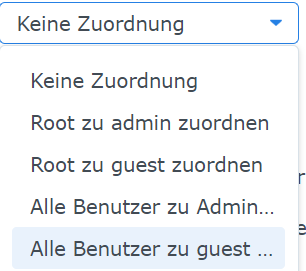
° Node.js & System Update ---> sudo apt update, iob stop, sudo apt full-upgrade
° Node.js Fixer ---> iob nodejs-update
° Fixer ---> iob fix -
@thomas-braun sagte in Adapter lässt sich nicht löschen:
Welche anderen Optionen werden für Squash angeboten?
jetzt kommt bei ls -la
nega@ioBroker:/opt/iobroker$ ls -la /opt/iobroker/backups/iobroker_2022_08_19-23_00_10_Standard_backupiobroker.tar.gz ls: cannot access '/opt/iobroker/backups/iobroker_2022_08_19-23_00_10_Standard_backupiobroker.tar.gz': Permission denied@negalein sagte in Adapter lässt sich nicht löschen:
jetzt kommt bei ls -la
Das ist klar, die gehören ja dem root/root (vermutlich). Kannst du die mit chown auf den user/gruppe iobroker biegen?
-
@negalein sagte in Adapter lässt sich nicht löschen:
jetzt kommt bei ls -la
Das ist klar, die gehören ja dem root/root (vermutlich). Kannst du die mit chown auf den user/gruppe iobroker biegen?
@thomas-braun sagte in Adapter lässt sich nicht löschen:
chown auf den user/gruppe iobroker
wie genau?
chown iobroker:iobroker /opt/iobroker/backupsso richtig?
° Node.js & System Update ---> sudo apt update, iob stop, sudo apt full-upgrade
° Node.js Fixer ---> iob nodejs-update
° Fixer ---> iob fix -
@thomas-braun sagte in Adapter lässt sich nicht löschen:
chown auf den user/gruppe iobroker
wie genau?
chown iobroker:iobroker /opt/iobroker/backupsso richtig?
sudo chown -R iobroker:iobroker /opt/iobroker/backups -
sudo chown -R iobroker:iobroker /opt/iobroker/backups@thomas-braun sagte in Adapter lässt sich nicht löschen:
sudo chown -R iobroker:iobroker /opt/iobroker/backups
nega@ioBroker:/opt/iobroker$ sudo chown -R iobroker:iobroker /opt/iobroker/backups
chown: changing ownership of '/opt/iobroker/backups/homematic_2022_08_13-01_30_11_3.65.6_backupiobroker.tar.sbk': Operation not permitted
chown: changing ownership of '/opt/iobroker/backups/homematic_2022_08_16-01_30_11_3.65.6_backupiobroker.tar.sbk': Operation not permitted
chown: changing ownership of '/opt/iobroker/backups/iobroker_2022_08_18-23_00_10_Standard_backupiobroker.tar.gz': Operation not permitted
chown: changing ownership of '/opt/iobroker/backups/historyDB_2022_08_18-23_01_23_Standard_backupiobroker.tar.gz': Operation not permitted
chown: changing ownership of '/opt/iobroker/backups/grafana_2022_08_18-23_02_17_Standard_backupiobroker.tar.gz': Operation not permitted
chown: changing ownership of '/opt/iobroker/backups/javascripts_2022_08_18-23_02_23_Standard_backupiobroker.tar.gz': Operation not permitted
chown: changing ownership of '/opt/iobroker/backups/homematic_2022_08_19-01_30_11_3.65.8_backupiobroker.tar.sbk': Operation not permitted
chown: changing ownership of '/opt/iobroker/backups/iobroker_2022_08_19-23_00_10_Standard_backupiobroker.tar.gz': Operation not permitted
chown: changing ownership of '/opt/iobroker/backups/historyDB_2022_08_19-23_01_19_Standard_backupiobroker.tar.gz': Operation not permitted
chown: changing ownership of '/opt/iobroker/backups/grafana_2022_08_19-23_02_12_Standard_backupiobroker.tar.gz': Operation not permitted
chown: changing ownership of '/opt/iobroker/backups/javascripts_2022_08_19-23_02_18_Standard_backupiobroker.tar.gz': Operation not permitted
chown: changing ownership of '/opt/iobroker/backups/iobroker_2022_08_20-23_00_10_Standard_backupiobroker.tar.gz': Operation not permitted
chown: changing ownership of '/opt/iobroker/backups/historyDB_2022_08_20-23_01_08_Standard_backupiobroker.tar.gz': Operation not permitted
chown: changing ownership of '/opt/iobroker/backups/grafana_2022_08_20-23_02_02_Standard_backupiobroker.tar.gz': Operation not permitted
chown: changing ownership of '/opt/iobroker/backups/javascripts_2022_08_20-23_02_08_Standard_backupiobroker.tar.gz': Operation not permitted
chown: changing ownership of '/opt/iobroker/backups': Operation not permitted
° Node.js & System Update ---> sudo apt update, iob stop, sudo apt full-upgrade
° Node.js Fixer ---> iob nodejs-update
° Fixer ---> iob fix -
@thomas-braun sagte in Adapter lässt sich nicht löschen:
sudo chown -R iobroker:iobroker /opt/iobroker/backups
nega@ioBroker:/opt/iobroker$ sudo chown -R iobroker:iobroker /opt/iobroker/backups chown: changing ownership of '/opt/iobroker/backups/homematic_2022_08_13-01_30_11_3.65.6_backupiobroker.tar.sbk': Operation not permitted chown: changing ownership of '/opt/iobroker/backups/homematic_2022_08_16-01_30_11_3.65.6_backupiobroker.tar.sbk': Operation not permitted chown: changing ownership of '/opt/iobroker/backups/iobroker_2022_08_18-23_00_10_Standard_backupiobroker.tar.gz': Operation not permitted chown: changing ownership of '/opt/iobroker/backups/historyDB_2022_08_18-23_01_23_Standard_backupiobroker.tar.gz': Operation not permitted chown: changing ownership of '/opt/iobroker/backups/grafana_2022_08_18-23_02_17_Standard_backupiobroker.tar.gz': Operation not permitted chown: changing ownership of '/opt/iobroker/backups/javascripts_2022_08_18-23_02_23_Standard_backupiobroker.tar.gz': Operation not permitted chown: changing ownership of '/opt/iobroker/backups/homematic_2022_08_19-01_30_11_3.65.8_backupiobroker.tar.sbk': Operation not permitted chown: changing ownership of '/opt/iobroker/backups/iobroker_2022_08_19-23_00_10_Standard_backupiobroker.tar.gz': Operation not permitted chown: changing ownership of '/opt/iobroker/backups/historyDB_2022_08_19-23_01_19_Standard_backupiobroker.tar.gz': Operation not permitted chown: changing ownership of '/opt/iobroker/backups/grafana_2022_08_19-23_02_12_Standard_backupiobroker.tar.gz': Operation not permitted chown: changing ownership of '/opt/iobroker/backups/javascripts_2022_08_19-23_02_18_Standard_backupiobroker.tar.gz': Operation not permitted chown: changing ownership of '/opt/iobroker/backups/iobroker_2022_08_20-23_00_10_Standard_backupiobroker.tar.gz': Operation not permitted chown: changing ownership of '/opt/iobroker/backups/historyDB_2022_08_20-23_01_08_Standard_backupiobroker.tar.gz': Operation not permitted chown: changing ownership of '/opt/iobroker/backups/grafana_2022_08_20-23_02_02_Standard_backupiobroker.tar.gz': Operation not permitted chown: changing ownership of '/opt/iobroker/backups/javascripts_2022_08_20-23_02_08_Standard_backupiobroker.tar.gz': Operation not permitted chown: changing ownership of '/opt/iobroker/backups': Operation not permittedAuf dem nfs-Server die Rechte setzen. Der sudo/root vom Client reicht natürlich nicht auf der Server rüber.
-
@thomas-braun sagte in Adapter lässt sich nicht löschen:
sudo chown -R iobroker:iobroker /opt/iobroker/backups
nega@ioBroker:/opt/iobroker$ sudo chown -R iobroker:iobroker /opt/iobroker/backups chown: changing ownership of '/opt/iobroker/backups/homematic_2022_08_13-01_30_11_3.65.6_backupiobroker.tar.sbk': Operation not permitted chown: changing ownership of '/opt/iobroker/backups/homematic_2022_08_16-01_30_11_3.65.6_backupiobroker.tar.sbk': Operation not permitted chown: changing ownership of '/opt/iobroker/backups/iobroker_2022_08_18-23_00_10_Standard_backupiobroker.tar.gz': Operation not permitted chown: changing ownership of '/opt/iobroker/backups/historyDB_2022_08_18-23_01_23_Standard_backupiobroker.tar.gz': Operation not permitted chown: changing ownership of '/opt/iobroker/backups/grafana_2022_08_18-23_02_17_Standard_backupiobroker.tar.gz': Operation not permitted chown: changing ownership of '/opt/iobroker/backups/javascripts_2022_08_18-23_02_23_Standard_backupiobroker.tar.gz': Operation not permitted chown: changing ownership of '/opt/iobroker/backups/homematic_2022_08_19-01_30_11_3.65.8_backupiobroker.tar.sbk': Operation not permitted chown: changing ownership of '/opt/iobroker/backups/iobroker_2022_08_19-23_00_10_Standard_backupiobroker.tar.gz': Operation not permitted chown: changing ownership of '/opt/iobroker/backups/historyDB_2022_08_19-23_01_19_Standard_backupiobroker.tar.gz': Operation not permitted chown: changing ownership of '/opt/iobroker/backups/grafana_2022_08_19-23_02_12_Standard_backupiobroker.tar.gz': Operation not permitted chown: changing ownership of '/opt/iobroker/backups/javascripts_2022_08_19-23_02_18_Standard_backupiobroker.tar.gz': Operation not permitted chown: changing ownership of '/opt/iobroker/backups/iobroker_2022_08_20-23_00_10_Standard_backupiobroker.tar.gz': Operation not permitted chown: changing ownership of '/opt/iobroker/backups/historyDB_2022_08_20-23_01_08_Standard_backupiobroker.tar.gz': Operation not permitted chown: changing ownership of '/opt/iobroker/backups/grafana_2022_08_20-23_02_02_Standard_backupiobroker.tar.gz': Operation not permitted chown: changing ownership of '/opt/iobroker/backups/javascripts_2022_08_20-23_02_08_Standard_backupiobroker.tar.gz': Operation not permitted chown: changing ownership of '/opt/iobroker/backups': Operation not permitted -
Auf dem nfs-Server die Rechte setzen. Der sudo/root vom Client reicht natürlich nicht auf der Server rüber.
@thomas-braun sagte in Adapter lässt sich nicht löschen:
Auf dem nfs-Server die Rechte setzen
hab auf der Syno dem Verzeichnis und den Datein den User:Gruppe iobroker zugeordnet.
Wie werden denn neue Backups angelegt?
mit Backitup
Nfs-Server mal neugestartet?
ja
° Node.js & System Update ---> sudo apt update, iob stop, sudo apt full-upgrade
° Node.js Fixer ---> iob nodejs-update
° Fixer ---> iob fix -
@thomas-braun sagte in Adapter lässt sich nicht löschen:
Auf dem nfs-Server die Rechte setzen
hab auf der Syno dem Verzeichnis und den Datein den User:Gruppe iobroker zugeordnet.
Wie werden denn neue Backups angelegt?
mit Backitup
Nfs-Server mal neugestartet?
ja
@negalein sagte in Adapter lässt sich nicht löschen:
Wie werden denn neue Backups angelegt?
mit Backitup
Ich meine wem gehören neue Backups. Immer noch Nobody/nogroup?
-
@negalein sagte in Adapter lässt sich nicht löschen:
Wie werden denn neue Backups angelegt?
mit Backitup
Ich meine wem gehören neue Backups. Immer noch Nobody/nogroup?
@thomas-braun sagte in Adapter lässt sich nicht löschen:
Immer noch Nobody/nogroup?
Ja, leider
nega@ioBroker:/opt/iobroker$ ls -la /opt/iobroker/backups/iobroker_2022_08_21-23_52_40_Standard_backupiobroker.tar.gz
-rwxrwxrwx 1 nobody nogroup 438763309 Aug 21 23:53 /opt/iobroker/backups/iobroker_2022_08_21-23_52_40_Standard_backupiobroker.tar.gz


Hey! Du scheinst an dieser Unterhaltung interessiert zu sein, hast aber noch kein Konto.
Hast du es satt, bei jedem Besuch durch die gleichen Beiträge zu scrollen? Wenn du dich für ein Konto anmeldest, kommst du immer genau dorthin zurück, wo du zuvor warst, und kannst dich über neue Antworten benachrichtigen lassen (entweder per E-Mail oder Push-Benachrichtigung). Du kannst auch Lesezeichen speichern und Beiträge positiv bewerten, um anderen Community-Mitgliedern deine Wertschätzung zu zeigen.
Mit deinem Input könnte dieser Beitrag noch besser werden 💗
Registrieren AnmeldenSupport us
214
Online33.0k
Benutzer83.6k
Themen1.3m
Beiträge