




Update System iobroker failed
-
@tiger I cant help you with alexa - as I personally do not use it. The only node - which I help for support was this node:
node-red-contrib-virtual-smart-home. The message which you log are specific to nodes that you have installed. -
@mickym
how can i solved it?
as i can't access to node-red now...
when trying to open node-red message appearThis site is not accessible
192.168.1.16 don't allow the connexion -
@tiger Try to start node-red in secure mode - then the flows do not start and you can delete all alexa stuff.
-
@tiger As I said - I have no alexa - however when users used it they had good experience .
https://flows.nodered.org/node/node-red-contrib-virtual-smart-home
You need to register it.But to be honest - if there are only problems with alexa and the other flows work - you may should ask for help from users who work with alexa. So if all your other nodes work - then you should open a separate thread to solve your alexa issues.
-
@tiger As I said - I have no alexa - however when users used it they had good experience .
https://flows.nodered.org/node/node-red-contrib-virtual-smart-home
You need to register it.But to be honest - if there are only problems with alexa and the other flows work - you may should ask for help from users who work with alexa. So if all your other nodes work - then you should open a separate thread to solve your alexa issues.
-
@tiger As I said - I have no alexa - however when users used it they had good experience .
https://flows.nodered.org/node/node-red-contrib-virtual-smart-home
You need to register it.But to be honest - if there are only problems with alexa and the other flows work - you may should ask for help from users who work with alexa. So if all your other nodes work - then you should open a separate thread to solve your alexa issues.
-
@tiger As I said - I have no alexa - however when users used it they had good experience .
https://flows.nodered.org/node/node-red-contrib-virtual-smart-home
You need to register it.But to be honest - if there are only problems with alexa and the other flows work - you may should ask for help from users who work with alexa. So if all your other nodes work - then you should open a separate thread to solve your alexa issues.
Hy,
everything is update...
The only problem is node-red, on the left, when I click On Node-Red icon, I have to login,
But it failed and I don't know why..
Is there another user or password? I out the usernam and password written in the configuration of Node-redThanks
-
Hy,
everything is update...
The only problem is node-red, on the left, when I click On Node-Red icon, I have to login,
But it failed and I don't know why..
Is there another user or password? I out the usernam and password written in the configuration of Node-redThanks
-
@tiger sagte in Update System iobroker failed:
is it possible to place the SDcard on my windows desktop pc and save it
I'm pretty sure windows won't see it :-(
@homoran
@Thomas-Braun
@mickym
@crunchipTHanks a lot for your help !
My system is completely as before but with all update !!! (just the problem of login in node red)Last question, to stay up to date, I've only to check if there is update on Iobroker?
As I don't go very often in the page of iobroker, is it possible to send all the update available via notification on vis?Thanks a lot for all!
-
@tiger I do not work with authentication. May be you should disable it in the adapter config.
-
@homoran
@Thomas-Braun
@mickym
@crunchipTHanks a lot for your help !
My system is completely as before but with all update !!! (just the problem of login in node red)Last question, to stay up to date, I've only to check if there is update on Iobroker?
As I don't go very often in the page of iobroker, is it possible to send all the update available via notification on vis?Thanks a lot for all!
@tiger sagte in Update System iobroker failed:
As I don't go very often in the page of iobroker,
as you've learned the last days, you should keep your system up to date.
so you surely will open puTTY at least all 2 weeks and upgrade the system with
sudo apt updatefollowed by asudo apt upgradeafter finishing upgrading the OS you can upgrade iobroker the same way with
iobroker updatefollowed by aiobroker upgradeI know, this isn't any new information for you :-)
How to display existing upgrades in the vis, you should ask in another thread, as I don't know
-
@tiger sagte in Update System iobroker failed:
As I don't go very often in the page of iobroker,
as you've learned the last days, you should keep your system up to date.
so you surely will open puTTY at least all 2 weeks and upgrade the system with
sudo apt updatefollowed by asudo apt upgradeafter finishing upgrading the OS you can upgrade iobroker the same way with
iobroker updatefollowed by aiobroker upgradeI know, this isn't any new information for you :-)
How to display existing upgrades in the vis, you should ask in another thread, as I don't know
-
@homoran
@Thomas-Braun
@mickym
@crunchipTHanks a lot for your help !
My system is completely as before but with all update !!! (just the problem of login in node red)Last question, to stay up to date, I've only to check if there is update on Iobroker?
As I don't go very often in the page of iobroker, is it possible to send all the update available via notification on vis?Thanks a lot for all!
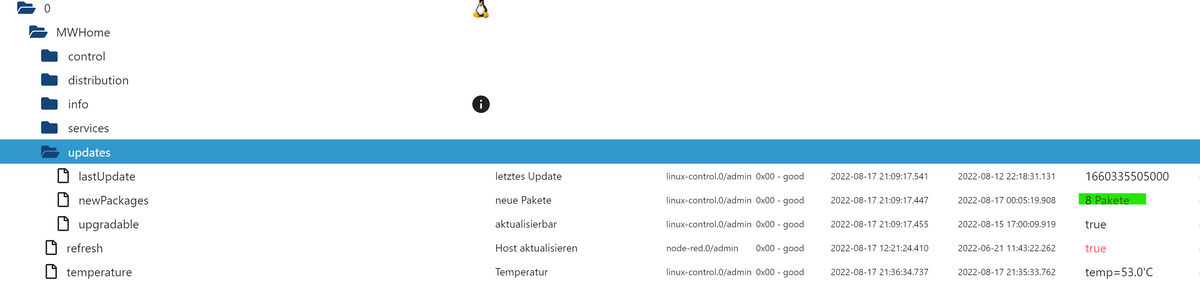
@tiger For the nodes within Node-Red you need to look to the palette manager. If you use the linux device adapter, you get automatically states where you can see if update packages are available.

Hey! Du scheinst an dieser Unterhaltung interessiert zu sein, hast aber noch kein Konto.
Hast du es satt, bei jedem Besuch durch die gleichen Beiträge zu scrollen? Wenn du dich für ein Konto anmeldest, kommst du immer genau dorthin zurück, wo du zuvor warst, und kannst dich über neue Antworten benachrichtigen lassen (entweder per E-Mail oder Push-Benachrichtigung). Du kannst auch Lesezeichen speichern und Beiträge positiv bewerten, um anderen Community-Mitgliedern deine Wertschätzung zu zeigen.
Mit deinem Input könnte dieser Beitrag noch besser werden 💗
Registrieren AnmeldenSupport us
464
Online33.0k
Benutzer83.6k
Themen1.3m
Beiträge