



Skip to content
  • Home
  • Aktuell
  • Tags
  • 0 Ungelesen 0
  • Kategorien
  • Unreplied
  • Beliebt
  • GitHub
  • Docu
  • Hilfe
Skins
  • Light
  • Brite
  • Cerulean
  • Cosmo
  • Flatly
  • Journal
  • Litera
  • Lumen
  • Lux
  • Materia
  • Minty
  • Morph
  • Pulse
  • Sandstone
  • Simplex
  • Sketchy
  • Spacelab
  • United
  • Yeti
  • Zephyr
  • Dark
  • Cyborg
  • Darkly
  • Quartz
  • Slate
  • Solar
  • Superhero
  • Vapor

  • Standard: (Kein Skin)
  • Kein Skin
Einklappen
ioBroker Logo

Community Forum

donate donate
  1. ioBroker Community Home
  2. Deutsch
  3. ioBroker Allgemein
  4. [gelöst] Jeelink funktioniert nach Update nicht mehr

NEWS

  • Jahresrückblick 2025 – unser neuer Blogbeitrag ist online! ✨
    BluefoxB
    Bluefox
    14
    1
    231

  • Neuer Blogbeitrag: Monatsrückblick - Dezember 2025 🎄
    BluefoxB
    Bluefox
    13
    1
    581

  • Weihnachtsangebot 2025! 🎄
    BluefoxB
    Bluefox
    25
    1
    1.8k

[gelöst] Jeelink funktioniert nach Update nicht mehr

Geplant Angeheftet Gesperrt Verschoben ioBroker Allgemein
jeelink-adapterupdates
78 Beiträge 3 Kommentatoren 6.7k Aufrufe 3 Watching
  • Älteste zuerst
  • Neuste zuerst
  • Meiste Stimmen
Antworten
  • In einem neuen Thema antworten
Anmelden zum Antworten
Dieses Thema wurde gelöscht. Nur Nutzer mit entsprechenden Rechten können es sehen.
  • GregorSG GregorS

    @glasfaser

    Hier der Log:

    Would you like to upgrade sourceanalytix from @0.4.8 to @0.4.14 now? [(y)es, (n)o]: y
    Update sourceanalytix from @0.4.8 to @0.4.14
    NPM version: 8.11.0
    Installing iobroker.sourceanalytix@0.4.14... (System call)
    npm ERR! code ENOTEMPTY
    npm ERR! syscall rename
    npm ERR! path /opt/iobroker/node_modules/@colors/colors
    npm ERR! dest /opt/iobroker/node_modules/@colors/.colors-Zv02J9SN
    npm ERR! errno -39
    npm ERR! ENOTEMPTY: directory not empty, rename '/opt/iobroker/node_modules/@colors/colors' -> '/opt/iobroker/node_modules/@colors/.colors-Zv02J9SN'
    
    npm ERR! A complete log of this run can be found in:
    npm ERR!     /home/iobroker/.npm/_logs/2022-08-16T12_32_44_939Z-debug-0.log
    host.TinkerboardS Cannot install iobroker.sourceanalytix@0.4.14: 217
    pi@TinkerboardS:~$ cd /opt/iobroker/node_modules/@colors/
    pi@TinkerboardS:/opt/iobroker/node_modules/@colors$ for i in $(ls -d .[^.]*-*/); do rm -rf ${i%%/}; done
    pi@TinkerboardS:/opt/iobroker/node_modules/@colors$ iobroker upgrade sourceanalytix@0.4.14 --debug
    
    
    Would you like to upgrade sourceanalytix from @0.4.8 to @0.4.14 now? [(y)es, (n)o]: y
    Update sourceanalytix from @0.4.8 to @0.4.14
    NPM version: 8.11.0
    Installing iobroker.sourceanalytix@0.4.14... (System call)
    npm ERR! code ENOTEMPTY
    npm ERR! syscall rename
    npm ERR! path /opt/iobroker/node_modules/@dabh/diagnostics
    npm ERR! dest /opt/iobroker/node_modules/@dabh/.diagnostics-LBJVuZ6t
    npm ERR! errno -39
    npm ERR! ENOTEMPTY: directory not empty, rename '/opt/iobroker/node_modules/@dabh/diagnostics' -> '/opt/iobroker/node_modules/@dabh/.diagnostics-LBJVuZ6t'
    
    npm ERR! A complete log of this run can be found in:
    npm ERR!     /home/iobroker/.npm/_logs/2022-08-16T12_39_01_396Z-debug-0.log
    host.TinkerboardS Cannot install iobroker.sourceanalytix@0.4.14: 217
    pi@TinkerboardS:/opt/iobroker/node_modules/@colors$ cd
    pi@TinkerboardS:~$ cd /opt/iobroker/node_modules/@dabh/
    pi@TinkerboardS:/opt/iobroker/node_modules/@dabh$ for i in $(ls -d .[^.]*-*/); do rm -rf ${i%%/}; done
    pi@TinkerboardS:/opt/iobroker/node_modules/@dabh$ iobroker upgrade sourceanalytix@0.4.14 --debug
    
    
    Would you like to upgrade sourceanalytix from @0.4.8 to @0.4.14 now? [(y)es, (n)o]: y
    Update sourceanalytix from @0.4.8 to @0.4.14
    NPM version: 8.11.0
    Installing iobroker.sourceanalytix@0.4.14... (System call)
    npm ERR! code ENOTEMPTY
    npm ERR! syscall rename
    npm ERR! path /opt/iobroker/node_modules/@datalust/winston-seq
    npm ERR! dest /opt/iobroker/node_modules/@datalust/.winston-seq-NYIlhsqy
    npm ERR! errno -39
    npm ERR! ENOTEMPTY: directory not empty, rename '/opt/iobroker/node_modules/@datalust/winston-seq' -> '/opt/iobroker/node_modules/@datalust/.winston-seq-NYIlhsqy'
    
    npm ERR! A complete log of this run can be found in:
    npm ERR!     /home/iobroker/.npm/_logs/2022-08-16T12_41_32_253Z-debug-0.log
    host.TinkerboardS Cannot install iobroker.sourceanalytix@0.4.14: 217
    pi@TinkerboardS:/opt/iobroker/node_modules/@dabh$


    Habe es mehrfach versucht, aber immer wieder andere Verzeichnisse zum löschen.

    GlasfaserG Offline
    GlasfaserG Offline
    Glasfaser
    schrieb am zuletzt editiert von
    #59

    @gregors sagte in [gelöst] Jeelink funktioniert nach Update nicht mehr:

    Habe es mehrfach versucht, aber immer wieder andere Verzeichnisse zum löschen.

    Da können schon einige dabei sein ... wird schon bald zu Ende sein :)

    Synology 918+ 16GB - ioBroker in Docker v9 , VISO auf Trekstor Primebook C13 13,3" , Hikvision Domkameras mit Surveillance Station .. CCU RaspberryMatic in Synology VM .. Zigbee CC2538+CC2592 .. Sonoff .. KNX .. Modbus ..

    1 Antwort Letzte Antwort
    0
    • GregorSG GregorS

      @glasfaser

      Hier der Log:

      Would you like to upgrade sourceanalytix from @0.4.8 to @0.4.14 now? [(y)es, (n)o]: y
      Update sourceanalytix from @0.4.8 to @0.4.14
      NPM version: 8.11.0
      Installing iobroker.sourceanalytix@0.4.14... (System call)
      npm ERR! code ENOTEMPTY
      npm ERR! syscall rename
      npm ERR! path /opt/iobroker/node_modules/@colors/colors
      npm ERR! dest /opt/iobroker/node_modules/@colors/.colors-Zv02J9SN
      npm ERR! errno -39
      npm ERR! ENOTEMPTY: directory not empty, rename '/opt/iobroker/node_modules/@colors/colors' -> '/opt/iobroker/node_modules/@colors/.colors-Zv02J9SN'
      
      npm ERR! A complete log of this run can be found in:
      npm ERR!     /home/iobroker/.npm/_logs/2022-08-16T12_32_44_939Z-debug-0.log
      host.TinkerboardS Cannot install iobroker.sourceanalytix@0.4.14: 217
      pi@TinkerboardS:~$ cd /opt/iobroker/node_modules/@colors/
      pi@TinkerboardS:/opt/iobroker/node_modules/@colors$ for i in $(ls -d .[^.]*-*/); do rm -rf ${i%%/}; done
      pi@TinkerboardS:/opt/iobroker/node_modules/@colors$ iobroker upgrade sourceanalytix@0.4.14 --debug
      
      
      Would you like to upgrade sourceanalytix from @0.4.8 to @0.4.14 now? [(y)es, (n)o]: y
      Update sourceanalytix from @0.4.8 to @0.4.14
      NPM version: 8.11.0
      Installing iobroker.sourceanalytix@0.4.14... (System call)
      npm ERR! code ENOTEMPTY
      npm ERR! syscall rename
      npm ERR! path /opt/iobroker/node_modules/@dabh/diagnostics
      npm ERR! dest /opt/iobroker/node_modules/@dabh/.diagnostics-LBJVuZ6t
      npm ERR! errno -39
      npm ERR! ENOTEMPTY: directory not empty, rename '/opt/iobroker/node_modules/@dabh/diagnostics' -> '/opt/iobroker/node_modules/@dabh/.diagnostics-LBJVuZ6t'
      
      npm ERR! A complete log of this run can be found in:
      npm ERR!     /home/iobroker/.npm/_logs/2022-08-16T12_39_01_396Z-debug-0.log
      host.TinkerboardS Cannot install iobroker.sourceanalytix@0.4.14: 217
      pi@TinkerboardS:/opt/iobroker/node_modules/@colors$ cd
      pi@TinkerboardS:~$ cd /opt/iobroker/node_modules/@dabh/
      pi@TinkerboardS:/opt/iobroker/node_modules/@dabh$ for i in $(ls -d .[^.]*-*/); do rm -rf ${i%%/}; done
      pi@TinkerboardS:/opt/iobroker/node_modules/@dabh$ iobroker upgrade sourceanalytix@0.4.14 --debug
      
      
      Would you like to upgrade sourceanalytix from @0.4.8 to @0.4.14 now? [(y)es, (n)o]: y
      Update sourceanalytix from @0.4.8 to @0.4.14
      NPM version: 8.11.0
      Installing iobroker.sourceanalytix@0.4.14... (System call)
      npm ERR! code ENOTEMPTY
      npm ERR! syscall rename
      npm ERR! path /opt/iobroker/node_modules/@datalust/winston-seq
      npm ERR! dest /opt/iobroker/node_modules/@datalust/.winston-seq-NYIlhsqy
      npm ERR! errno -39
      npm ERR! ENOTEMPTY: directory not empty, rename '/opt/iobroker/node_modules/@datalust/winston-seq' -> '/opt/iobroker/node_modules/@datalust/.winston-seq-NYIlhsqy'
      
      npm ERR! A complete log of this run can be found in:
      npm ERR!     /home/iobroker/.npm/_logs/2022-08-16T12_41_32_253Z-debug-0.log
      host.TinkerboardS Cannot install iobroker.sourceanalytix@0.4.14: 217
      pi@TinkerboardS:/opt/iobroker/node_modules/@dabh$


      Habe es mehrfach versucht, aber immer wieder andere Verzeichnisse zum löschen.

      GlasfaserG Offline
      GlasfaserG Offline
      Glasfaser
      schrieb am zuletzt editiert von
      #60

      @gregors sagte in [gelöst] Jeelink funktioniert nach Update nicht mehr:

      /opt/iobroker/node_modules/@datalust/.winston-seq-NYIlhsqy

      Du kannst auch nur das angemekerte immer nur löschen , dann bracust du nicht in den Verzeichnissen immer umher springen ..

      rm -r /opt/iobroker/node_modules/@datalust/.winston-seq-NYIlhsqy
      

      Synology 918+ 16GB - ioBroker in Docker v9 , VISO auf Trekstor Primebook C13 13,3" , Hikvision Domkameras mit Surveillance Station .. CCU RaspberryMatic in Synology VM .. Zigbee CC2538+CC2592 .. Sonoff .. KNX .. Modbus ..

      GregorSG 1 Antwort Letzte Antwort
      0
      • GlasfaserG Glasfaser

        @gregors sagte in [gelöst] Jeelink funktioniert nach Update nicht mehr:

        /opt/iobroker/node_modules/@datalust/.winston-seq-NYIlhsqy

        Du kannst auch nur das angemekerte immer nur löschen , dann bracust du nicht in den Verzeichnissen immer umher springen ..

        rm -r /opt/iobroker/node_modules/@datalust/.winston-seq-NYIlhsqy
        
        GregorSG Offline
        GregorSG Offline
        GregorS
        schrieb am zuletzt editiert von
        #61

        @glasfaser
        Ist schonmal eine Erleichterung.
        Habe ich das Prozedre jetzt jedesmal wenn ich ein Update mache?

        INTEL NUC i7, Sonoff, hmIP, AVM, Jeelink, T-Link, Alexa, Saia-Burgess, uvm.

        GlasfaserG Thomas BraunT 2 Antworten Letzte Antwort
        0
        • GregorSG GregorS

          @glasfaser
          Ist schonmal eine Erleichterung.
          Habe ich das Prozedre jetzt jedesmal wenn ich ein Update mache?

          GlasfaserG Offline
          GlasfaserG Offline
          Glasfaser
          schrieb am zuletzt editiert von
          #62

          @gregors sagte in [gelöst] Jeelink funktioniert nach Update nicht mehr:

          Habe ich das Prozedre jetzt jedesmal wenn ich ein Update mache?

          Nein nur jetzt .

          Synology 918+ 16GB - ioBroker in Docker v9 , VISO auf Trekstor Primebook C13 13,3" , Hikvision Domkameras mit Surveillance Station .. CCU RaspberryMatic in Synology VM .. Zigbee CC2538+CC2592 .. Sonoff .. KNX .. Modbus ..

          GregorSG 1 Antwort Letzte Antwort
          0
          • GregorSG GregorS

            @glasfaser
            Ist schonmal eine Erleichterung.
            Habe ich das Prozedre jetzt jedesmal wenn ich ein Update mache?

            Thomas BraunT Online
            Thomas BraunT Online
            Thomas Braun
            Most Active
            schrieb am zuletzt editiert von
            #63

            @gregors sagte in [gelöst] Jeelink funktioniert nach Update nicht mehr:

            Habe ich das Prozedre jetzt jedesmal wenn ich ein Update mache?

            Nicht mehr für diese Verzeichnisse.
            Andere Adapter = andere Verzeichnisse. Kann also auch in Zukunft nochmal auftauchen.

            Linux-Werkzeugkasten:
            https://forum.iobroker.net/topic/42952/der-kleine-iobroker-linux-werkzeugkasten
            NodeJS Fixer Skript:
            https://forum.iobroker.net/topic/68035/iob-node-fix-skript
            iob_diag: curl -sLf -o diag.sh https://iobroker.net/diag.sh && bash diag.sh

            GregorSG 1 Antwort Letzte Antwort
            0
            • Thomas BraunT Thomas Braun

              @gregors sagte in [gelöst] Jeelink funktioniert nach Update nicht mehr:

              Habe ich das Prozedre jetzt jedesmal wenn ich ein Update mache?

              Nicht mehr für diese Verzeichnisse.
              Andere Adapter = andere Verzeichnisse. Kann also auch in Zukunft nochmal auftauchen.

              GregorSG Offline
              GregorSG Offline
              GregorS
              schrieb am zuletzt editiert von
              #64

              @thomas-braun
              :cry: :cry: :cry:

              INTEL NUC i7, Sonoff, hmIP, AVM, Jeelink, T-Link, Alexa, Saia-Burgess, uvm.

              Thomas BraunT 1 Antwort Letzte Antwort
              0
              • GregorSG GregorS

                @thomas-braun
                :cry: :cry: :cry:

                Thomas BraunT Online
                Thomas BraunT Online
                Thomas Braun
                Most Active
                schrieb am zuletzt editiert von
                #65

                @gregors

                Wird aber mit jedem Update weniger.

                Linux-Werkzeugkasten:
                https://forum.iobroker.net/topic/42952/der-kleine-iobroker-linux-werkzeugkasten
                NodeJS Fixer Skript:
                https://forum.iobroker.net/topic/68035/iob-node-fix-skript
                iob_diag: curl -sLf -o diag.sh https://iobroker.net/diag.sh && bash diag.sh

                GregorSG 1 Antwort Letzte Antwort
                0
                • Thomas BraunT Thomas Braun

                  @gregors

                  Wird aber mit jedem Update weniger.

                  GregorSG Offline
                  GregorSG Offline
                  GregorS
                  schrieb am zuletzt editiert von
                  #66

                  @thomas-braun
                  Woran liegt das?
                  Habe bis dato regelmässig Updates gemacht. Allerdings über die Oberfläche.
                  INTEL NUC i7, Sonoff, hmIP, AVM, Jeelink, T-Link, Alexa, Saia-Burgess, uvm.

                  Thomas BraunT GlasfaserG 2 Antworten Letzte Antwort
                  0
                  • GregorSG GregorS

                    @thomas-braun
                    Woran liegt das?
                    Habe bis dato regelmässig Updates gemacht. Allerdings über die Oberfläche.

                    Thomas BraunT Online
                    Thomas BraunT Online
                    Thomas Braun
                    Most Active
                    schrieb am zuletzt editiert von
                    #67

                    @gregors sagte in [gelöst] Jeelink funktioniert nach Update nicht mehr:

                    Woran liegt das?

                    Ich weiß es nicht.
                    Vielleicht mit den falschen Rechten / Usern / Befehlen mal herumgezaubert.

                    Linux-Werkzeugkasten:
                    https://forum.iobroker.net/topic/42952/der-kleine-iobroker-linux-werkzeugkasten
                    NodeJS Fixer Skript:
                    https://forum.iobroker.net/topic/68035/iob-node-fix-skript
                    iob_diag: curl -sLf -o diag.sh https://iobroker.net/diag.sh && bash diag.sh

                    GregorSG 1 Antwort Letzte Antwort
                    0
                    • Thomas BraunT Thomas Braun

                      @gregors sagte in [gelöst] Jeelink funktioniert nach Update nicht mehr:

                      Woran liegt das?

                      Ich weiß es nicht.
                      Vielleicht mit den falschen Rechten / Usern / Befehlen mal herumgezaubert.

                      GregorSG Offline
                      GregorSG Offline
                      GregorS
                      schrieb am zuletzt editiert von
                      #68

                      @thomas-braun
                      Das habe ich bestimmt. :angry:

                      INTEL NUC i7, Sonoff, hmIP, AVM, Jeelink, T-Link, Alexa, Saia-Burgess, uvm.

                      1 Antwort Letzte Antwort
                      0
                      • GregorSG GregorS

                        @thomas-braun
                        Woran liegt das?
                        Habe bis dato regelmässig Updates gemacht. Allerdings über die Oberfläche.

                        GlasfaserG Offline
                        GlasfaserG Offline
                        Glasfaser
                        schrieb am zuletzt editiert von
                        #69

                        @gregors

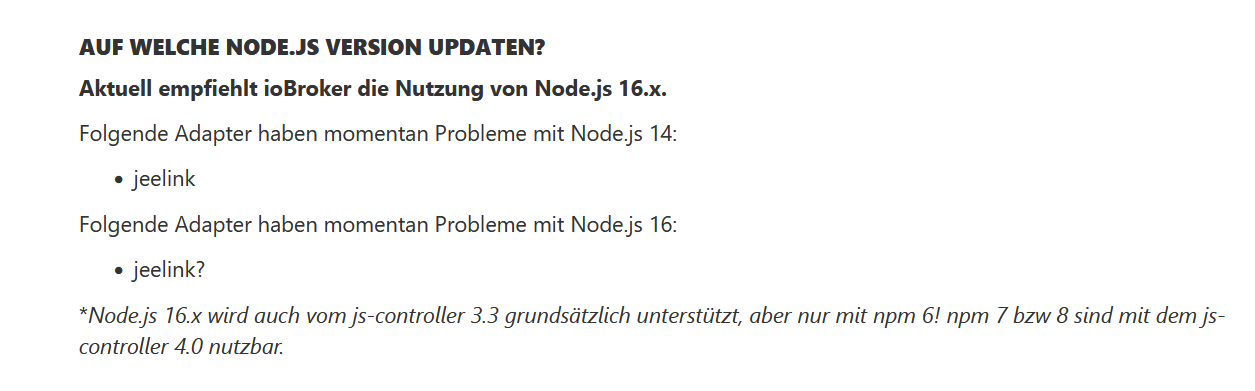
                        9f66eb61-6678-4018-9bd0-7bc97e546f63-grafik.png

                        schau mal , ehrlich gesagt auch überlesen :)

                        https://forum.iobroker.net/topic/44566/how-to-node-js-iobroker-richtig-updaten-2021-22-edition

                        Synology 918+ 16GB - ioBroker in Docker v9 , VISO auf Trekstor Primebook C13 13,3" , Hikvision Domkameras mit Surveillance Station .. CCU RaspberryMatic in Synology VM .. Zigbee CC2538+CC2592 .. Sonoff .. KNX .. Modbus ..

                        GregorSG 2 Antworten Letzte Antwort
                        0
                        • GlasfaserG Glasfaser

                          @gregors

                          9f66eb61-6678-4018-9bd0-7bc97e546f63-grafik.png

                          schau mal , ehrlich gesagt auch überlesen :)

                          https://forum.iobroker.net/topic/44566/how-to-node-js-iobroker-richtig-updaten-2021-22-edition

                          GregorSG Offline
                          GregorSG Offline
                          GregorS
                          schrieb am zuletzt editiert von
                          #70

                          @glasfaser
                          Jeelink läuft aber seit gestern absturzfrei und ohne Probleme

                          INTEL NUC i7, Sonoff, hmIP, AVM, Jeelink, T-Link, Alexa, Saia-Burgess, uvm.

                          GlasfaserG 1 Antwort Letzte Antwort
                          0
                          • GregorSG GregorS

                            @glasfaser
                            Jeelink läuft aber seit gestern absturzfrei und ohne Probleme

                            GlasfaserG Offline
                            GlasfaserG Offline
                            Glasfaser
                            schrieb am zuletzt editiert von
                            #71

                            @gregors

                            Ja ... alles gut ...

                            Das haben wir hinbekommen .

                            War nur ein Hinweis von mir ...

                            Synology 918+ 16GB - ioBroker in Docker v9 , VISO auf Trekstor Primebook C13 13,3" , Hikvision Domkameras mit Surveillance Station .. CCU RaspberryMatic in Synology VM .. Zigbee CC2538+CC2592 .. Sonoff .. KNX .. Modbus ..

                            GregorSG 1 Antwort Letzte Antwort
                            0
                            • GlasfaserG Glasfaser

                              @gregors

                              Ja ... alles gut ...

                              Das haben wir hinbekommen .

                              War nur ein Hinweis von mir ...

                              GregorSG Offline
                              GregorSG Offline
                              GregorS
                              schrieb am zuletzt editiert von
                              #72

                              @glasfaser
                              War eine Top-Hilfe von Euch
                              Ich wäre daran verzweifelt und hätte die Sensoren entsorgt.

                              INTEL NUC i7, Sonoff, hmIP, AVM, Jeelink, T-Link, Alexa, Saia-Burgess, uvm.

                              1 Antwort Letzte Antwort
                              0
                              • GlasfaserG Glasfaser

                                @gregors sagte in [gelöst] Jeelink funktioniert nach Update nicht mehr:

                                Habe ich das Prozedre jetzt jedesmal wenn ich ein Update mache?

                                Nein nur jetzt .

                                GregorSG Offline
                                GregorSG Offline
                                GregorS
                                schrieb am zuletzt editiert von
                                #73

                                @glasfaser

                                Nach 89 Versuchen ist es durchgelaufen, aber keine Installation

                                
                                Update sourceanalytix from @0.4.8 to @0.4.14
                                NPM version: 8.11.0
                                Installing iobroker.sourceanalytix@0.4.14... (System call)
                                npm WARN deprecated dgram@1.0.1: npm is holding this package for security reasons. As it's a core Node module, we will not transfer it over to other users. You may safely remove the package from your dependencies.
                                npm WARN deprecated har-validator@5.1.5: this library is no longer supported
                                npm WARN deprecated request-promise@4.2.6: request-promise has been deprecated because it extends the now deprecated request package, see https://github.com/request/request/issues/3142
                                npm WARN deprecated querystring@0.2.1: The querystring API is considered Legacy. new code should use the URLSearchParams API instead.
                                npm WARN deprecated node-inspect@2.0.0: This module is part of Node.js core and does not need to be installed separately. It is now unmaintained.
                                npm WARN deprecated debug@4.1.1: Debug versions >=3.2.0 <3.2.7 || >=4 <4.3.1 have a low-severity ReDos regression when used in a Node.js environment. It is recommended you upgrade to 3.2.7 or 4.3.1. (https://github.com/visionmedia/debug/issues/797)
                                npm WARN deprecated debug@4.1.1: Debug versions >=3.2.0 <3.2.7 || >=4 <4.3.1 have a low-severity ReDos regression when used in a Node.js environment. It is recommended you upgrade to 3.2.7 or 4.3.1. (https://github.com/visionmedia/debug/issues/797)
                                npm WARN deprecated debug@4.1.1: Debug versions >=3.2.0 <3.2.7 || >=4 <4.3.1 have a low-severity ReDos regression when used in a Node.js environment. It is recommended you upgrade to 3.2.7 or 4.3.1. (https://github.com/visionmedia/debug/issues/797)
                                npm WARN deprecated uuid@3.4.0: Please upgrade  to version 7 or higher.  Older versions may use Math.random() in certain circumstances, which is known to be problematic.  See https://v8.dev/blog/math-random for details.
                                npm WARN deprecated request@2.88.2: request has been deprecated, see https://github.com/request/request/issues/3142
                                npm WARN deprecated coffee-script@1.12.7: CoffeeScript on NPM has moved to "coffeescript" (no hyphen)
                                npm ERR! code ENOMEM
                                npm ERR! syscall spawn
                                npm ERR! errno -12
                                npm ERR! spawn ENOMEM
                                
                                npm ERR! A complete log of this run can be found in:
                                npm ERR!     /home/iobroker/.npm/_logs/2022-08-16T13_58_27_978Z-debug-0.log
                                host.TinkerboardS Cannot install iobroker.sourceanalytix@0.4.14: 244


                                INTEL NUC i7, Sonoff, hmIP, AVM, Jeelink, T-Link, Alexa, Saia-Burgess, uvm.

                                Thomas BraunT 1 Antwort Letzte Antwort
                                0
                                • GregorSG GregorS

                                  @glasfaser

                                  Nach 89 Versuchen ist es durchgelaufen, aber keine Installation

                                  
                                  Update sourceanalytix from @0.4.8 to @0.4.14
                                  NPM version: 8.11.0
                                  Installing iobroker.sourceanalytix@0.4.14... (System call)
                                  npm WARN deprecated dgram@1.0.1: npm is holding this package for security reasons. As it's a core Node module, we will not transfer it over to other users. You may safely remove the package from your dependencies.
                                  npm WARN deprecated har-validator@5.1.5: this library is no longer supported
                                  npm WARN deprecated request-promise@4.2.6: request-promise has been deprecated because it extends the now deprecated request package, see https://github.com/request/request/issues/3142
                                  npm WARN deprecated querystring@0.2.1: The querystring API is considered Legacy. new code should use the URLSearchParams API instead.
                                  npm WARN deprecated node-inspect@2.0.0: This module is part of Node.js core and does not need to be installed separately. It is now unmaintained.
                                  npm WARN deprecated debug@4.1.1: Debug versions >=3.2.0 <3.2.7 || >=4 <4.3.1 have a low-severity ReDos regression when used in a Node.js environment. It is recommended you upgrade to 3.2.7 or 4.3.1. (https://github.com/visionmedia/debug/issues/797)
                                  npm WARN deprecated debug@4.1.1: Debug versions >=3.2.0 <3.2.7 || >=4 <4.3.1 have a low-severity ReDos regression when used in a Node.js environment. It is recommended you upgrade to 3.2.7 or 4.3.1. (https://github.com/visionmedia/debug/issues/797)
                                  npm WARN deprecated debug@4.1.1: Debug versions >=3.2.0 <3.2.7 || >=4 <4.3.1 have a low-severity ReDos regression when used in a Node.js environment. It is recommended you upgrade to 3.2.7 or 4.3.1. (https://github.com/visionmedia/debug/issues/797)
                                  npm WARN deprecated uuid@3.4.0: Please upgrade  to version 7 or higher.  Older versions may use Math.random() in certain circumstances, which is known to be problematic.  See https://v8.dev/blog/math-random for details.
                                  npm WARN deprecated request@2.88.2: request has been deprecated, see https://github.com/request/request/issues/3142
                                  npm WARN deprecated coffee-script@1.12.7: CoffeeScript on NPM has moved to "coffeescript" (no hyphen)
                                  npm ERR! code ENOMEM
                                  npm ERR! syscall spawn
                                  npm ERR! errno -12
                                  npm ERR! spawn ENOMEM
                                  
                                  npm ERR! A complete log of this run can be found in:
                                  npm ERR!     /home/iobroker/.npm/_logs/2022-08-16T13_58_27_978Z-debug-0.log
                                  host.TinkerboardS Cannot install iobroker.sourceanalytix@0.4.14: 244
                                  
                                  
                                  Thomas BraunT Online
                                  Thomas BraunT Online
                                  Thomas Braun
                                  Most Active
                                  schrieb am zuletzt editiert von
                                  #74

                                  @gregors

                                  ENOMEM

                                  Scheint eng zu werden was Speicher angeht.

                                  Linux-Werkzeugkasten:
                                  https://forum.iobroker.net/topic/42952/der-kleine-iobroker-linux-werkzeugkasten
                                  NodeJS Fixer Skript:
                                  https://forum.iobroker.net/topic/68035/iob-node-fix-skript
                                  iob_diag: curl -sLf -o diag.sh https://iobroker.net/diag.sh && bash diag.sh

                                  GregorSG 1 Antwort Letzte Antwort
                                  0
                                  • Thomas BraunT Thomas Braun

                                    @gregors

                                    ENOMEM

                                    Scheint eng zu werden was Speicher angeht.

                                    GregorSG Offline
                                    GregorSG Offline
                                    GregorS
                                    schrieb am zuletzt editiert von
                                    #75

                                    @thomas-braun
                                    Reicht das nicht?
                                    freier Festplattenspeicher: 53%, Gesamte RAM-Auslastung: 802 Mb / Frei: 43% = 870 Mb [Server: TinkerboardS - 37 Prozesse]

                                    INTEL NUC i7, Sonoff, hmIP, AVM, Jeelink, T-Link, Alexa, Saia-Burgess, uvm.

                                    Thomas BraunT 1 Antwort Letzte Antwort
                                    0
                                    • GregorSG GregorS

                                      @thomas-braun
                                      Reicht das nicht?
                                      freier Festplattenspeicher: 53%, Gesamte RAM-Auslastung: 802 Mb / Frei: 43% = 870 Mb [Server: TinkerboardS - 37 Prozesse]

                                      Thomas BraunT Online
                                      Thomas BraunT Online
                                      Thomas Braun
                                      Most Active
                                      schrieb am zuletzt editiert von
                                      #76

                                      @gregors
                                      Kann auch für einen einzelnen Prozess eng werden.

                                      free -ht
                                      

                                      sagt? Und im Log steht?

                                      Linux-Werkzeugkasten:
                                      https://forum.iobroker.net/topic/42952/der-kleine-iobroker-linux-werkzeugkasten
                                      NodeJS Fixer Skript:
                                      https://forum.iobroker.net/topic/68035/iob-node-fix-skript
                                      iob_diag: curl -sLf -o diag.sh https://iobroker.net/diag.sh && bash diag.sh

                                      GregorSG 1 Antwort Letzte Antwort
                                      0
                                      • Thomas BraunT Thomas Braun

                                        @gregors
                                        Kann auch für einen einzelnen Prozess eng werden.

                                        free -ht
                                        

                                        sagt? Und im Log steht?

                                        GregorSG Offline
                                        GregorSG Offline
                                        GregorS
                                        schrieb am zuletzt editiert von
                                        #77

                                        @thomas-braun

                                        
                                        pi@TinkerboardS:~$ free -ht
                                                      total        used        free      shared  buff/cache   available
                                        Mem:           2,0G        1,6G        168M        3,0M        235M        427M
                                        Swap:          1,0G        134M        867M
                                        Total:         2,9G        1,7G        1,0G


                                        INTEL NUC i7, Sonoff, hmIP, AVM, Jeelink, T-Link, Alexa, Saia-Burgess, uvm.

                                        1 Antwort Letzte Antwort
                                        0
                                        • GlasfaserG Glasfaser

                                          @gregors

                                          9f66eb61-6678-4018-9bd0-7bc97e546f63-grafik.png

                                          schau mal , ehrlich gesagt auch überlesen :)

                                          https://forum.iobroker.net/topic/44566/how-to-node-js-iobroker-richtig-updaten-2021-22-edition

                                          GregorSG Offline
                                          GregorSG Offline
                                          GregorS
                                          schrieb am zuletzt editiert von
                                          #78

                                          @glasfaser

                                          Ich glaube, ich habe den Übeltäter für den Jeelink-Fehler.

                                          Im Log stand drin, dass man den Fixer laufen lassen soll.
                                          Habe ich gemacht, danach der geliche Fehler mit dem serialport binding.
                                          Die Schritte von gestern wiederholt, jetz läuft er wieder.
                                          INTEL NUC i7, Sonoff, hmIP, AVM, Jeelink, T-Link, Alexa, Saia-Burgess, uvm.

                                          1 Antwort Letzte Antwort
                                          0
                                          Antworten
                                          • In einem neuen Thema antworten
                                          Anmelden zum Antworten
                                          • Älteste zuerst
                                          • Neuste zuerst
                                          • Meiste Stimmen


                                          Support us

                                          ioBroker
                                          Community Adapters
                                          Donate
                                          FAQ Cloud / IOT
                                          HowTo: Node.js-Update
                                          HowTo: Backup/Restore
                                          Downloads
                                          BLOG

                                          401

                                          Online

                                          32.5k

                                          Benutzer

                                          81.9k

                                          Themen

                                          1.3m

                                          Beiträge
                                          Community
                                          Impressum | Datenschutz-Bestimmungen | Nutzungsbedingungen | Einwilligungseinstellungen
                                          ioBroker Community 2014-2025
                                          logo
                                          • Anmelden

                                          • Du hast noch kein Konto? Registrieren

                                          • Anmelden oder registrieren, um zu suchen
                                          • Erster Beitrag
                                            Letzter Beitrag
                                          0
                                          • Home
                                          • Aktuell
                                          • Tags
                                          • Ungelesen 0
                                          • Kategorien
                                          • Unreplied
                                          • Beliebt
                                          • GitHub
                                          • Docu
                                          • Hilfe
