




Anbindung IP-Symcon
-
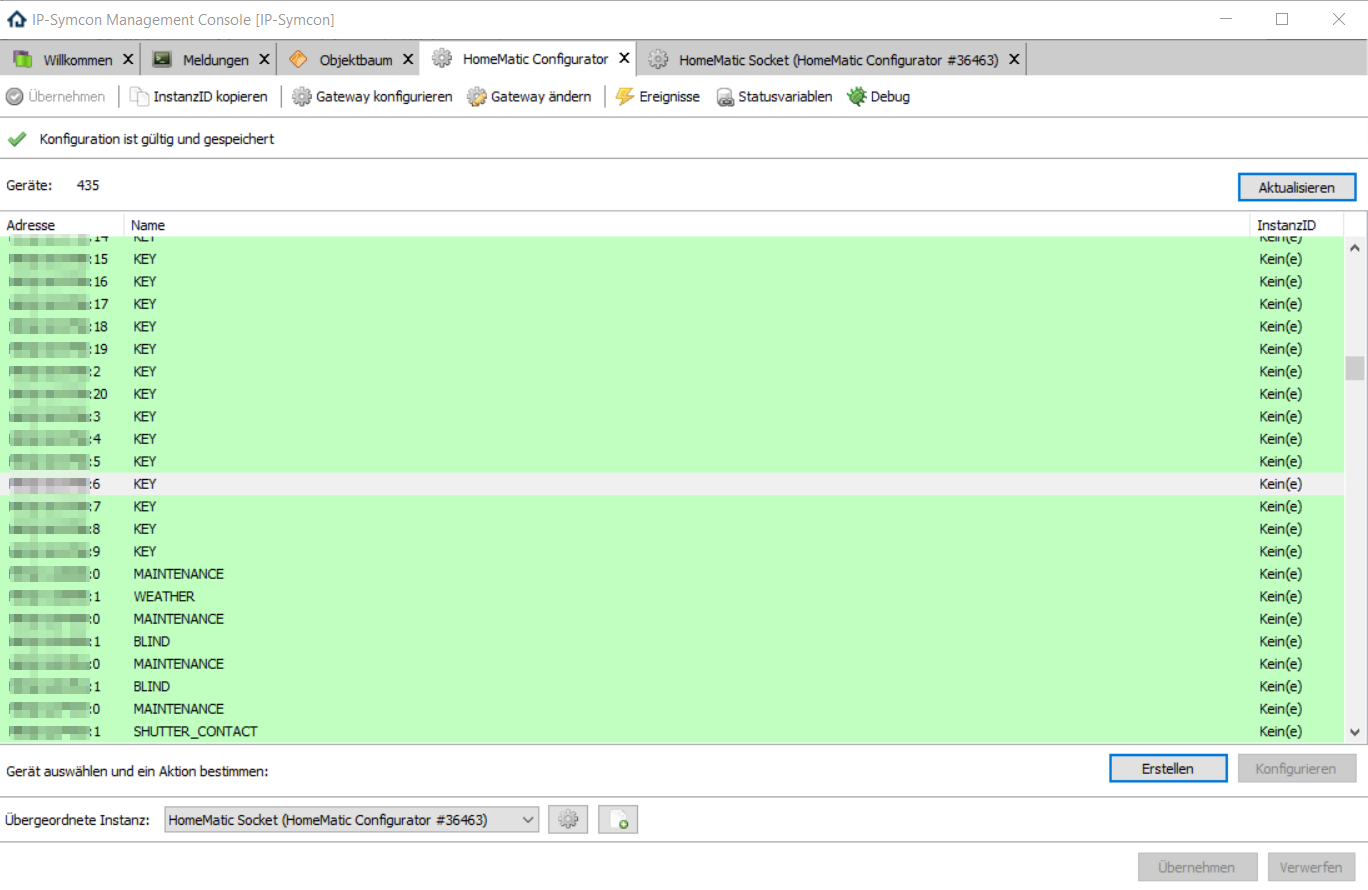
Ich will nicht wissen, wie viel Zeit das mit meinen 130 Geräten und 300 Kanälen nimmt. `
Wenn Du es in dem Fall einfacher haben willst zu testen nimmhttps://github.com/Nall-chan/HomematicEasyInstall
Aber das ist ein Punkt der mich selber gestört hat, da hat IP-Symcon sicher noch Nachbesserungs Bedarf. Aber mit einem Skript ist das dennoch in 1 Minute erledigt. Der Punkt ist in dem Fall das bis auf die Professional Nutzer sowieso keiner sämtliche Variablen in IP-Symcon anlegt, den die Anzahl der Variablen kostet ja Geld. Dies ist sicher mit ioBroker simpler da kann man einfach alles importieren ohne sich Gedanken zu machen was man genau braucht. Ich habe dennoch bei mir alles drinnen aber das muss jeder selbst wissen.
-
@Fonzo, kannst du ip-symcon adapter testen?
cd /opt/iobroker
npm i https://github.com/ioBroker/ioBroker.ip-symcon/tarball/master --production
iobroker a ip-symcon
Leider schick IP-Symcon keine Benachrichtigungen. Deswegen muss man die Variablen pollen.
2017-06-11 11_15_47-ioBroker.admin.png
Es sind noch nicht alle Profile unterstützt, aber alle wichtigsten sind dabei. `
Das kann ich machen. Aber IP-Symcon kann auch was Schicken wenn Du willst. Die Frage ist nur wann bei einem Event, einer Variablenänderung und vor allem in welcher Form? Als Webhook, MQTT oder was schwebt Dir da vor?
-
@Fonzo, kannst du ip-symcon adapter testen?
cd /opt/iobroker
npm i https://github.com/ioBroker/ioBroker.ip-symcon/tarball/master --production
iobroker a ip-symcon
Leider schick IP-Symcon keine Benachrichtigungen. Deswegen muss man die Variablen pollen.
2017-06-11 11_15_47-ioBroker.admin.png
Es sind noch nicht alle Profile unterstützt, aber alle wichtigsten sind dabei. `
Das kann ich machen. Aber IP-Symcon kann auch was Schicken wenn Du willst. Die Frage ist nur wann bei einem Event, einer Variablenänderung und vor allem in welcher Form? Als Webhook, MQTT oder was schwebt Dir da vor? `
Webhook ist besser.Wo kann ich nachlesen?
-
Webhook ist besser.
Wo kann ich nachlesen? `
Ich überlege gerade, Du willst also bei jeder Variablenänderung eine Benachrichtigung nach ioBroker richtig? Am einfachsten wäre es wohl ein Mini PHP Modul zu schreiben. Wenn Du das nicht machen willst kann ich mir das gerne überlegen brauche da nur Zeit für die ist gerade knapp. Ein Anbindung von IP-Symcon besteht dann also auf der einen Seite auf einem Adapter in ioBroker der über die JSON RPC Daten schickt bzw. ausliest. Und auf der anderen Seite aus einem PHP Modul, dort gibt man dann ioBroker IP Adresse, Webkook User und Passwort an.Am einfachsten geht dies mit
bzw.
https://www.symcon.de/service/dokumentation/entwicklerbereich/sdk-tools/sdk-php/nachrichten/
da suchst Du Dir dann aus was genau was triggern soll bzw. wann eine Nachricht verschickt wird.
Aber prinzipiell finde ich das den richtigen Ansatz die Software genauso wie FHEM oder OpenHAB auch nicht als Konkurrenz zu sehen sondern als Ergänzung. Nutzer haben nun mal unterschiedliche Bedürfnisse und nutzten unterschiedliche Systeme. Wenn es am Schluss aber möglich ist das alles in ioBroker zu vereinen und da dann z.B. eine Visualisierung zu bauen ist dies sicher ein großer Mehrwert für alle Nutzer die nicht schon Alternative Visualisierung Möglichkeiten nutzten. Außerdem kann man sich so gegenseitig besser an Modulen, Adaptern bedienen die bei anderen Systemen verfügbar sind in dem Hauptsystem was man selber nutzt aber z.B. nicht.
-
-
Sagen wir es so: nimm 4.x oder besser 6.x. Bestimmte Warnungen kommen wegen optionaler Module die nicht so wild sind. Also mach mal mit neuer Node Version und schick gern die Warnungen zur Prüfung. Aber alles was "Opt deps" Warnungen sind kannst du ignorieren.
-
@Fonzo, kannst du ip-symcon adapter testen?
cd /opt/iobroker
npm i https://github.com/ioBroker/ioBroker.ip-symcon/tarball/master --production
iobroker a ip-symcon
```` `
So keine Ahnung was ich falsch mache das kommt im Debug
! ````
0 info it worked if it ends with ok
1 verbose cli [ '/usr/bin/nodejs',
1 verbose cli '/usr/bin/npm',
1 verbose cli 'i',
1 verbose cli 'https://github.com/ioBroker/ioBroker.ip-symcon/tarball/master',
1 verbose cli '--production',
1 verbose cli 'iobroker',
1 verbose cli 'a',
1 verbose cli 'ip-symcon' ]
2 info using npm@3.10.10
3 info using node@v6.11.0
4 silly loadCurrentTree Starting
5 silly install loadCurrentTree
6 silly install readLocalPackageData
7 silly fetchPackageMetaData https://github.com/ioBroker/ioBroker.ip-symcon/tarball/master
8 silly fetchPackageMetaData iobroker
9 silly fetchPackageMetaData a
10 silly fetchPackageMetaData ip-symcon
11 silly fetchOtherPackageData https://github.com/ioBroker/ioBroker.ip-symcon/tarball/master
12 silly cache add args [ 'https://github.com/ioBroker/ioBroker.ip-symcon/tarball/master',
12 silly cache add null ]
13 verbose cache add spec https://github.com/ioBroker/ioBroker.ip-symcon/tarball/master
14 silly fetchOtherPackageData iobroker
15 silly cache add args [ 'iobroker', null ]
16 verbose cache add spec iobroker
17 silly fetchNamedPackageData a
18 silly mapToRegistry name a
19 silly mapToRegistry using default registry
20 silly mapToRegistry registry https://registry.npmjs.org/
21 silly mapToRegistry data Result {
21 silly mapToRegistry raw: 'a',
21 silly mapToRegistry scope: null,
21 silly mapToRegistry escapedName: 'a',
21 silly mapToRegistry name: 'a',
21 silly mapToRegistry rawSpec: '',
21 silly mapToRegistry spec: 'latest',
21 silly mapToRegistry type: 'tag' }
22 silly mapToRegistry uri https://registry.npmjs.org/a
23 silly fetchNamedPackageData ip-symcon
24 silly mapToRegistry name ip-symcon
25 silly mapToRegistry using default registry
26 silly mapToRegistry registry https://registry.npmjs.org/
27 silly mapToRegistry data Result {
27 silly mapToRegistry raw: 'ip-symcon',
27 silly mapToRegistry scope: null,
27 silly mapToRegistry escapedName: 'ip-symcon',
27 silly mapToRegistry name: 'ip-symcon',
27 silly mapToRegistry rawSpec: '',
27 silly mapToRegistry spec: 'latest',
27 silly mapToRegistry type: 'tag' }
28 silly mapToRegistry uri https://registry.npmjs.org/ip-symcon
29 silly cache add parsed spec Result {
29 silly cache add raw: 'https://github.com/ioBroker/ioBroker.ip-symcon/tarball/master',
29 silly cache add scope: null,
29 silly cache add escapedName: null,
29 silly cache add name: null,
29 silly cache add rawSpec: 'https://github.com/ioBroker/ioBroker.ip-symcon/tarball/master',
29 silly cache add spec: 'https://github.com/ioBroker/ioBroker.ip-symcon/tarball/master',
29 silly cache add type: 'remote' }
30 silly mapToRegistry name https://github.com/ioBroker/ioBroker.ip-symcon/tarball/master
31 silly mapToRegistry using default registry
32 silly mapToRegistry registry https://registry.npmjs.org/
33 silly mapToRegistry data Result {
33 silly mapToRegistry raw: 'https://github.com/ioBroker/ioBroker.ip-symcon/tarball/master',
33 silly mapToRegistry scope: null,
33 silly mapToRegistry escapedName: null,
33 silly mapToRegistry name: null,
33 silly mapToRegistry rawSpec: 'https://github.com/ioBroker/ioBroker.ip-symcon/tarball/master',
33 silly mapToRegistry spec: 'https://github.com/ioBroker/ioBroker.ip-symcon/tarball/master',
33 silly mapToRegistry type: 'remote' }
34 silly mapToRegistry uri https://github.com/ioBroker/ioBroker.ip-symcon/tarball/master
35 verbose addRemoteTarball https://github.com/ioBroker/ioBroker.ip-symcon/tarball/master not in flight; adding
36 verbose addRemoteTarball [ 'https://github.com/ioBroker/ioBroker.ip-symcon/tarball/master',
36 verbose addRemoteTarball null ]
37 silly cache add parsed spec Result {
37 silly cache add raw: 'iobroker',
37 silly cache add scope: null,
37 silly cache add escapedName: 'iobroker',
37 silly cache add name: null,
37 silly cache add rawSpec: 'iobroker',
37 silly cache add spec: '/opt/iobroker/iobroker',
37 silly cache add type: 'local' }
38 verbose request uri https://registry.npmjs.org/a
39 verbose request no auth needed
40 info attempt registry request try #1 at 12:31:50
41 verbose request id be6a7dcefd9a4a5c
42 http request GET https://registry.npmjs.org/a
43 verbose request uri https://registry.npmjs.org/ip-symcon
44 verbose request no auth needed
45 info attempt registry request try #1 at 12:31:51
46 http request GET https://registry.npmjs.org/ip-symcon
47 silly addLocalTarball shasum (computed) 172d89ea6df6ab508c7b69dc0540b583db07e40c
48 verbose addTmpTarball /opt/iobroker/iobroker not in flight; adding
49 verbose correctMkdir /root/.npm correctMkdir not in flight; initializing
50 verbose addTmpTarball validating metadata from /opt/iobroker/iobroker
51 verbose tar unpack /opt/iobroker/iobroker
52 verbose tar unpacking to /tmp/npm-2981-65c4f999/unpack-99bbeb48
53 silly gentlyRm /tmp/npm-2981-65c4f999/unpack-99bbeb48 is being purged
54 verbose gentlyRm don't care about contents; nuking /tmp/npm-2981-65c4f999/unpack-99bbeb48
55 silly gunzTarPerm modes [ '755', '644' ]
56 info retry fetch attempt 1 at 12:31:51
57 info attempt registry request try #1 at 12:31:51
58 http fetch GET https://github.com/ioBroker/ioBroker.ip-symcon/tarball/master
59 http 200 https://registry.npmjs.org/a
60 verbose headers { server: 'nginx/1.10.1',
60 verbose headers 'content-type': 'application/json',
60 verbose headers 'last-modified': 'Fri, 19 Aug 2016 09:29:31 GMT',
60 verbose headers etag: 'W/"57b6d17b-15dcf"',
60 verbose headers 'content-encoding': 'gzip',
60 verbose headers 'cache-control': 'max-age=300',
60 verbose headers 'content-length': '11046',
60 verbose headers 'accept-ranges': 'bytes',
60 verbose headers date: 'Sun, 11 Jun 2017 10:31:51 GMT',
60 verbose headers via: '1.1 varnish',
60 verbose headers age: '0',
60 verbose headers connection: 'keep-alive',
60 verbose headers 'x-served-by': 'cache-hhn1527-HHN',
60 verbose headers 'x-cache': 'HIT',
60 verbose headers 'x-cache-hits': '1',
60 verbose headers 'x-timer': 'S1497177112.539526,VS0,VE2',
60 verbose headers vary: 'Accept-Encoding' }
61 silly get cb [ 200,
61 silly get { server: 'nginx/1.10.1',
61 silly get 'content-type': 'application/json',
61 silly get 'last-modified': 'Fri, 19 Aug 2016 09:29:31 GMT',
61 silly get etag: 'W/"57b6d17b-15dcf"',
61 silly get 'content-encoding': 'gzip',
61 silly get 'cache-control': 'max-age=300',
61 silly get 'content-length': '11046',
61 silly get 'accept-ranges': 'bytes',
61 silly get date: 'Sun, 11 Jun 2017 10:31:51 GMT',
61 silly get via: '1.1 varnish',
61 silly get age: '0',
61 silly get connection: 'keep-alive',
61 silly get 'x-served-by': 'cache-hhn1527-HHN',
61 silly get 'x-cache': 'HIT',
61 silly get 'x-cache-hits': '1',
61 silly get 'x-timer': 'S1497177112.539526,VS0,VE2',
61 silly get vary: 'Accept-Encoding' } ]
62 verbose get saving a to /root/.npm/registry.npmjs.org/a/.cache.json
63 verbose correctMkdir /root/.npm correctMkdir not in flight; initializing
64 error not a package /opt/iobroker/iobroker
65 error addLocal Could not install /opt/iobroker/iobroker
66 silly fetchPackageMetaData Error: ENOENT: no such file or directory, open '/tmp/npm-2981-65c4f999/unpack-99bbeb48/package.json'
66 silly fetchPackageMetaData at Error (native)
66 silly fetchPackageMetaData error for iobroker { Error: ENOENT: no such file or directory, open '/tmp/npm-2981-65c4f999/unpack-99bbeb48/package.json'
66 silly fetchPackageMetaData at Error (native)
66 silly fetchPackageMetaData errno: -2,
66 silly fetchPackageMetaData code: 'ENOENT',
66 silly fetchPackageMetaData syscall: 'open',
66 silly fetchPackageMetaData path: '/tmp/npm-2981-65c4f999/unpack-99bbeb48/package.json' }
67 http 404 https://registry.npmjs.org/ip-symcon
68 verbose headers { 'content-type': 'application/json',
68 verbose headers 'cache-control': 'max-age=0',
68 verbose headers 'content-length': '2',
68 verbose headers 'accept-ranges': 'bytes',
68 verbose headers date: 'Sun, 11 Jun 2017 10:31:51 GMT',
68 verbose headers via: '1.1 varnish',
68 verbose headers age: '0',
68 verbose headers connection: 'keep-alive',
68 verbose headers 'x-served-by': 'cache-hhn1551-HHN',
68 verbose headers 'x-cache': 'MISS',
68 verbose headers 'x-cache-hits': '0',
68 verbose headers 'x-timer': 'S1497177112.546321,VS0,VE440',
68 verbose headers vary: 'Accept-Encoding' }
69 silly get cb [ 404,
69 silly get { 'content-type': 'application/json',
69 silly get 'cache-control': 'max-age=0',
69 silly get 'content-length': '2',
69 silly get 'accept-ranges': 'bytes',
69 silly get date: 'Sun, 11 Jun 2017 10:31:51 GMT',
69 silly get via: '1.1 varnish',
69 silly get age: '0',
69 silly get connection: 'keep-alive',
69 silly get 'x-served-by': 'cache-hhn1551-HHN',
69 silly get 'x-cache': 'MISS',
69 silly get 'x-cache-hits': '0',
69 silly get 'x-timer': 'S1497177112.546321,VS0,VE440',
69 silly get vary: 'Accept-Encoding' } ]
70 silly fetchPackageMetaData Error: Registry returned 404 for GET on https://registry.npmjs.org/ip-symcon
70 silly fetchPackageMetaData at makeError (/usr/lib/node_modules/npm/node_modules/npm-registry-client/lib/request.js:302:12)
70 silly fetchPackageMetaData at CachingRegistryClient. <anonymous>(/usr/lib/node_modules/npm/node_modules/npm-registry-client/lib/request.js:280:14)
70 silly fetchPackageMetaData at Request._callback (/usr/lib/node_modules/npm/node_modules/npm-registry-client/lib/request.js:210:14)
70 silly fetchPackageMetaData at Request.self.callback (/usr/lib/node_modules/npm/node_modules/request/request.js:187:22)
70 silly fetchPackageMetaData at emitTwo (events.js:106:13)
70 silly fetchPackageMetaData at Request.emit (events.js:191:7)
70 silly fetchPackageMetaData at Request. <anonymous>(/usr/lib/node_modules/npm/node_modules/request/request.js:1048:10)
70 silly fetchPackageMetaData at emitOne (events.js:96:13)
70 silly fetchPackageMetaData at Request.emit (events.js:188:7)
70 silly fetchPackageMetaData at IncomingMessage. <anonymous>(/usr/lib/node_modules/npm/node_modules/request/request.js:969:12)
70 silly fetchPackageMetaData error for ip-symcon { Error: Registry returned 404 for GET on https://registry.npmjs.org/ip-symcon
70 silly fetchPackageMetaData at makeError (/usr/lib/node_modules/npm/node_modules/npm-registry-client/lib/request.js:302:12)
70 silly fetchPackageMetaData at CachingRegistryClient. <anonymous>(/usr/lib/node_modules/npm/node_modules/npm-registry-client/lib/request.js:280:14)
70 silly fetchPackageMetaData at Request._callback (/usr/lib/node_modules/npm/node_modules/npm-registry-client/lib/request.js:210:14)
70 silly fetchPackageMetaData at Request.self.callback (/usr/lib/node_modules/npm/node_modules/request/request.js:187:22)
70 silly fetchPackageMetaData at emitTwo (events.js:106:13)
70 silly fetchPackageMetaData at Request.emit (events.js:191:7)
70 silly fetchPackageMetaData at Request. <anonymous>(/usr/lib/node_modules/npm/node_modules/request/request.js:1048:10)
70 silly fetchPackageMetaData at emitOne (events.js:96:13)
70 silly fetchPackageMetaData at Request.emit (events.js:188:7)
70 silly fetchPackageMetaData at IncomingMessage. <anonymous>(/usr/lib/node_modules/npm/node_modules/request/request.js:969:12) pkgid: 'ip-symcon', statusCode: 404, code: 'E404' }
71 http fetch 200 https://github.com/ioBroker/ioBroker.ip-symcon/tarball/master
72 silly fetchAndShaCheck shasum 845a3a20899905496c63a47dfdbc0f325804f6f3
73 verbose addTmpTarball /tmp/npm-2981-65c4f999/github.com/ioBroker/ioBroker.ip-symcon/tarball/master not in flight; adding
74 verbose correctMkdir /root/.npm correctMkdir not in flight; initializing
75 verbose addTmpTarball validating metadata from /tmp/npm-2981-65c4f999/github.com/ioBroker/ioBroker.ip-symcon/tarball/master
76 verbose tar unpack /tmp/npm-2981-65c4f999/github.com/ioBroker/ioBroker.ip-symcon/tarball/master
77 verbose tar unpacking to /tmp/npm-2981-65c4f999/unpack-086b810a
78 silly gentlyRm /tmp/npm-2981-65c4f999/unpack-086b810a is being purged
79 verbose gentlyRm don't care about contents; nuking /tmp/npm-2981-65c4f999/unpack-086b810a
80 silly gunzTarPerm modes [ '755', '644' ]
81 silly gunzTarPerm extractEntry
82 silly gunzTarPerm modified mode [ '', 509, 493 ]
83 silly gunzTarPerm extractEntry .gitignore
84 silly gunzTarPerm modified mode [ '.gitignore', 436, 420 ]
85 silly gunzTarPerm extractEntry .npmignore
86 silly gunzTarPerm modified mode [ '.npmignore', 436, 420 ]
87 silly gunzTarPerm extractEntry .travis.yml
88 silly gunzTarPerm modified mode [ '.travis.yml', 436, 420 ]
89 silly gunzTarPerm extractEntry Gruntfile.js
90 silly gunzTarPerm modified mode [ 'Gruntfile.js', 436, 420 ]
91 silly gunzTarPerm extractEntry LICENSE
92 silly gunzTarPerm modified mode [ 'LICENSE', 436, 420 ]
93 silly gunzTarPerm extractEntry README.md
94 silly gunzTarPerm modified mode [ 'README.md', 436, 420 ]
95 silly gunzTarPerm extractEntry admin/
96 silly gunzTarPerm modified mode [ 'admin/', 509, 493 ]
97 silly gunzTarPerm extractEntry admin/index.html
98 silly gunzTarPerm modified mode [ 'admin/index.html', 436, 420 ]
99 silly gunzTarPerm extractEntry admin/ip-symcon.png
100 silly gunzTarPerm modified mode [ 'admin/ip-symcon.png', 436, 420 ]
101 silly gunzTarPerm extractEntry admin/words.js
102 silly gunzTarPerm modified mode [ 'admin/words.js', 436, 420 ]
103 silly gunzTarPerm extractEntry appveyor.yml
104 silly gunzTarPerm modified mode [ 'appveyor.yml', 436, 420 ]
105 silly gunzTarPerm extractEntry io-package.json
106 silly gunzTarPerm modified mode [ 'io-package.json', 436, 420 ]
107 silly gunzTarPerm extractEntry lib/
108 silly gunzTarPerm modified mode [ 'lib/', 509, 493 ]
109 silly gunzTarPerm extractEntry lib/functions.js
110 silly gunzTarPerm modified mode [ 'lib/functions.js', 436, 420 ]
111 silly gunzTarPerm extractEntry lib/ipsymconTypes.js
112 silly gunzTarPerm modified mode [ 'lib/ipsymconTypes.js', 436, 420 ]
113 silly gunzTarPerm extractEntry lib/rooms.js
114 silly gunzTarPerm modified mode [ 'lib/rooms.js', 436, 420 ]
115 silly gunzTarPerm extractEntry lib/types.js
116 silly gunzTarPerm modified mode [ 'lib/types.js', 436, 420 ]
117 silly gunzTarPerm extractEntry lib/utils.js
118 silly gunzTarPerm modified mode [ 'lib/utils.js', 436, 420 ]
119 silly gunzTarPerm extractEntry main.js
120 silly gunzTarPerm modified mode [ 'main.js', 436, 420 ]
121 silly gunzTarPerm extractEntry package.json
122 silly gunzTarPerm modified mode [ 'package.json', 436, 420 ]
123 silly gunzTarPerm extractEntry tasks/
124 silly gunzTarPerm modified mode [ 'tasks/', 509, 493 ]
125 silly gunzTarPerm extractEntry tasks/jscs.js
126 silly gunzTarPerm modified mode [ 'tasks/jscs.js', 436, 420 ]
127 silly gunzTarPerm extractEntry tasks/jscsRules.js
128 silly gunzTarPerm modified mode [ 'tasks/jscsRules.js', 436, 420 ]
129 silly gunzTarPerm extractEntry tasks/jshint.js
130 silly gunzTarPerm modified mode [ 'tasks/jshint.js', 436, 420 ]
131 silly gunzTarPerm extractEntry test/
132 silly gunzTarPerm modified mode [ 'test/', 509, 493 ]
133 silly gunzTarPerm extractEntry test/lib/
134 silly gunzTarPerm modified mode [ 'test/lib/', 509, 493 ]
135 silly gunzTarPerm extractEntry test/lib/setup.js
136 silly gunzTarPerm modified mode [ 'test/lib/setup.js', 436, 420 ]
137 silly gunzTarPerm extractEntry test/testAdapter.js
138 silly gunzTarPerm modified mode [ 'test/testAdapter.js', 436, 420 ]
139 silly gunzTarPerm extractEntry test/testPackageFiles.js
140 silly gunzTarPerm modified mode [ 'test/testPackageFiles.js', 436, 420 ]
141 verbose correctMkdir /root/.npm correctMkdir not in flight; initializing
142 silly cache afterAdd iobroker.ip-symcon@0.1.3
143 verbose afterAdd /root/.npm/iobroker.ip-symcon/0.1.3/package/package.json not in flight; writing
144 verbose correctMkdir /root/.npm correctMkdir not in flight; initializing
145 verbose afterAdd /root/.npm/iobroker.ip-symcon/0.1.3/package/package.json written
146 silly rollbackFailedOptional Starting
147 silly rollbackFailedOptional Finishing
148 silly runTopLevelLifecycles Finishing
149 silly install printInstalled
150 verbose stack Error: ENOENT: no such file or directory, open '/tmp/npm-2981-65c4f999/unpack-99bbeb48/package.json'
150 verbose stack at Error (native)
151 verbose cwd /opt/iobroker
152 error Linux 4.9.24-v7+
153 error argv "/usr/bin/nodejs" "/usr/bin/npm" "i" "https://github.com/ioBroker/ioBroker.ip-symcon/tarball/master" "--production" "iobroker" "a" "ip-symcon"
154 error node v6.11.0
155 error npm v3.10.10
156 error path /tmp/npm-2981-65c4f999/unpack-99bbeb48/package.json
157 error code ENOENT
158 error errno -2
159 error syscall open
160 error enoent ENOENT: no such file or directory, open '/tmp/npm-2981-65c4f999/unpack-99bbeb48/package.json'
161 error enoent ENOENT: no such file or directory, open '/tmp/npm-2981-65c4f999/unpack-99bbeb48/package.json'
161 error enoent This is most likely not a problem with npm itself
161 error enoent and is related to npm not being able to find a file.
162 verbose exit [ -2, true ]</anonymous></anonymous></anonymous></anonymous></anonymous></anonymous> -
@Fonzo, kannst du ip-symcon adapter testen?
cd /opt/iobroker
npm i https://github.com/ioBroker/ioBroker.ip-symcon/tarball/master --production
iobroker a ip-symcon
```` `
So keine Ahnung was ich falsch mache das kommt im Debug `
Ich kann den Fehler nicht nachvollziehen.Empfehle aber so was auszuführen:
cd /opt/iobroker <== Ich glaube bei dir es in /opt/iobroker/iobroker npm cache clean npm i node-gyp -g npm i https://github.com/ioBroker/ioBroker.ip-symcon/tarball/master --production -
Ich kann den Fehler nicht nachvollziehen.
Empfehle aber so was auszuführen: `
Jetzt lies ich das installieren, Adapter ist auch installiert. Jetzt komme ich bis zum Konfigurationsscreen. Was muss ich da bei IP-Symcon Path eintragen?Bei User, Password wohl der Fernzugriff User und Passwort oder? Ansonsten habe ich https gewählt bekomme aber noch keine Verbindung.
ip-symcon.0 2017-06-11 21:16:04.678 info cleaned everything up... ip-symcon.0 2017-06-11 21:16:04.674 error at request (/opt/iobroker/node_modules/iobroker.ip-symcon/node_modules/request/index.js:54:10) ip-symcon.0 2017-06-11 21:16:04.674 error at new Request (/opt/iobroker/node_modules/iobroker.ip-symcon/node_modules/request/request.js:130:8) ip-symcon.0 2017-06-11 21:16:04.674 error at Request.init (/opt/iobroker/node_modules/iobroker.ip-symcon/node_modules/request/request.js:378:10) ip-symcon.0 2017-06-11 21:16:04.674 error at Request.auth (/opt/iobroker/node_modules/iobroker.ip-symcon/node_modules/request/request.js:1360:14) ip-symcon.0 2017-06-11 21:16:04.674 error at Auth.onRequest (/opt/iobroker/node_modules/iobroker.ip-symcon/node_modules/request/lib/auth.js:133:18) ip-symcon.0 2017-06-11 21:16:04.674 error at Request.emit (events.js:188:7) ip-symcon.0 2017-06-11 21:16:04.674 error at emitOne (events.js:96:13) ip-symcon.0 2017-06-11 21:16:04.674 error at self.callback (/opt/iobroker/node_modules/iobroker.ip-symcon/node_modules/request/request.js:188:22) ip-symcon.0 2017-06-11 21:16:04.674 error at Request._callback (/opt/iobroker/node_modules/iobroker.ip-symcon/main.js:208:13) ip-symcon.0 2017-06-11 21:16:04.674 error at /opt/iobroker/node_modules/iobroker.ip-symcon/main.js:223:33 ip-symcon.0 2017-06-11 21:16:04.674 error TypeError: Cannot read property 'length' of undefined ip-symcon.0 2017-06-11 21:16:04.673 error uncaught exception: Cannot read property 'length' of undefined ip-symcon.0 2017-06-11 21:16:04.629 error error posting json: -
Ich kann den Fehler nicht nachvollziehen.
Empfehle aber so was auszuführen: `
Jetzt lies ich das installieren, Adapter ist auch installiert. Jetzt komme ich bis zum Konfigurationsscreen. Was muss ich da bei IP-Symcon Path eintragen?Bei User, Password wohl der Fernzugriff User und Passwort oder? Ansonsten habe ich https gewählt bekomme aber noch keine Verbindung.
ip-symcon.0	2017-06-11 21:16:04.678	info	cleaned everything up...
ip-symcon.0	2017-06-11 21:16:04.674	error	at request (/opt/iobroker/node_modules/iobroker.ip-symcon/node_modules/request/index.js:54:10)
ip-symcon.0	2017-06-11 21:16:04.674	error	at new Request (/opt/iobroker/node_modules/iobroker.ip-symcon/node_modules/request/request.js:130:8)
ip-symcon.0	2017-06-11 21:16:04.674	error	at Request.init (/opt/iobroker/node_modules/iobroker.ip-symcon/node_modules/request/request.js:378:10)
ip-symcon.0	2017-06-11 21:16:04.674	error	at Request.auth (/opt/iobroker/node_modules/iobroker.ip-symcon/node_modules/request/request.js:1360:14)
ip-symcon.0	2017-06-11 21:16:04.674	error	at Auth.onRequest (/opt/iobroker/node_modules/iobroker.ip-symcon/node_modules/request/lib/auth.js:133:18)
ip-symcon.0	2017-06-11 21:16:04.674	error	at Request.emit (events.js:188:7)
ip-symcon.0	2017-06-11 21:16:04.674	error	at emitOne (events.js:96:13)
ip-symcon.0	2017-06-11 21:16:04.674	error	at self.callback (/opt/iobroker/node_modules/iobroker.ip-symcon/node_modules/request/request.js:188:22)
ip-symcon.0	2017-06-11 21:16:04.674	error	at Request._callback (/opt/iobroker/node_modules/iobroker.ip-symcon/main.js:208:13)
ip-symcon.0	2017-06-11 21:16:04.674	error	at /opt/iobroker/node_modules/iobroker.ip-symcon/main.js:223:33
ip-symcon.0	2017-06-11 21:16:04.674	error	TypeError: Cannot read property 'length' of undefined
ip-symcon.0	2017-06-11 21:16:04.673	error	uncaught exception: Cannot read property 'length' of undefined
ip-symcon.0	2017-06-11 21:16:04.629	error	error posting json:

```` `
Ich habe NICHTS geändert. Da IP_Symcon lokal läuft.
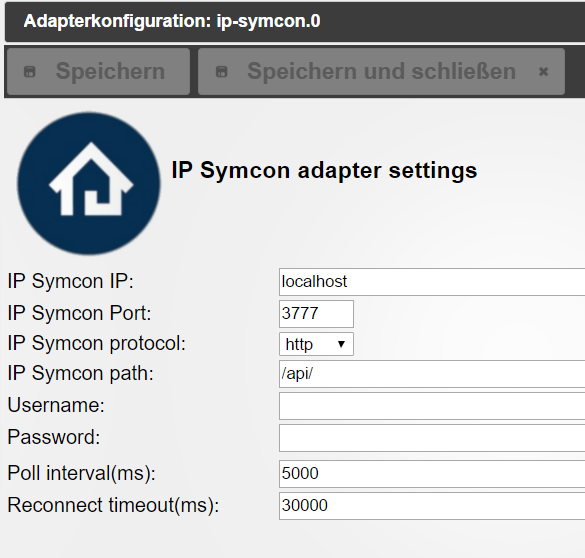
Ich weiß doch nicht, ob man by IPS den Pfad ändern darf oder nicht, deswegen habe ich das einstellbar gemacht.
-
Ich weiß doch nicht, ob man by IPS den Pfad ändern darf oder nicht, deswegen habe ich das einstellbar gemacht. `
Welcher Pfad ist da denn genau mit gemeint? Das Verzeichnis in dem IP-Symcon liegt?
hab das auch mal lokal probiert mit einem zweiten IPS auf dem gleichen Rechner wie ioBroker. Kommt das gleiche
host.raspberryhomebridge	2017-06-11 21:40:50.718	info	instance system.adapter.ip-symcon.0 started with pid 9072
host.raspberryhomebridge	2017-06-11 21:40:20.697	info	Restart adapter system.adapter.ip-symcon.0 because enabled
host.raspberryhomebridge	2017-06-11 21:40:20.696	error	instance system.adapter.ip-symcon.0 terminated with code 0 (OK)
ip-symcon.0	2017-06-11 21:40:20.609	info	cleaned everything up...
ip-symcon.0	2017-06-11 21:40:20.605	error	at request (/opt/iobroker/node_modules/iobroker.ip-symcon/node_modules/request/index.js:54:10)
ip-symcon.0	2017-06-11 21:40:20.605	error	at new Request (/opt/iobroker/node_modules/iobroker.ip-symcon/node_modules/request/request.js:130:8)
ip-symcon.0	2017-06-11 21:40:20.605	error	at Request.init (/opt/iobroker/node_modules/iobroker.ip-symcon/node_modules/request/request.js:378:10)
ip-symcon.0	2017-06-11 21:40:20.605	error	at Request.auth (/opt/iobroker/node_modules/iobroker.ip-symcon/node_modules/request/request.js:1360:14)
ip-symcon.0	2017-06-11 21:40:20.605	error	at Auth.onRequest (/opt/iobroker/node_modules/iobroker.ip-symcon/node_modules/request/lib/auth.js:133:18)
ip-symcon.0	2017-06-11 21:40:20.605	error	at Request.emit (events.js:188:7)
ip-symcon.0	2017-06-11 21:40:20.605	error	at emitOne (events.js:96:13)
ip-symcon.0	2017-06-11 21:40:20.605	error	at self.callback (/opt/iobroker/node_modules/iobroker.ip-symcon/node_modules/request/request.js:188:22)
ip-symcon.0	2017-06-11 21:40:20.605	error	at Request._callback (/opt/iobroker/node_modules/iobroker.ip-symcon/main.js:208:13)
ip-symcon.0	2017-06-11 21:40:20.605	error	at /opt/iobroker/node_modules/iobroker.ip-symcon/main.js:223:33
ip-symcon.0	2017-06-11 21:40:20.605	error	TypeError: Cannot read property 'length' of undefined
ip-symcon.0	2017-06-11 21:40:20.604	error	uncaught exception: Cannot read property 'length' of undefined
ip-symcon.0	2017-06-11 21:40:20.532	error	error posting json:
ip-symcon.0	2017-06-11 21:40:20.387	info	starting. Version 0.1.3 in /opt/iobroker/node_modules/iobroker.ip-symcon, node: v6.11.0
Mal eine Gegenfrage. Wenn ich Datenpunkte aus ioBroker in IPS einlesen will oder z.B. Teile der VIS in IP-Symcon darstellen will. Wie gehe ich dazu am besten vor? Gibt es da eine Dokumentation zu den Schnittstellen?
-
> Mal eine Gegenfrage. Wenn ich Datenpunkte aus ioBroker in IPS einlesen will oder z.B. Teile der VIS in IP-Symcon darstellen will. Wie gehe ich dazu am besten vor? Gibt es da eine Dokumentation zu den Schnittstellen?Hier ist die Beschreibung:
https://github.com/ioBroker/ioBroker.socketio
und hier ist ein Beispiel:
https://github.com/ioBroker/ioBroker.so … er/example
vis kann man über iframe einbinden.
> Welcher Pfad ist da denn genau mit gemeint? Das Verzeichnis in dem IP-Symcon liegt?
Du hast doch gefragt: "Was muss ich da bei IP-Symcon Path eintragen?"Ich habe die Version auf dem git upgedated. Bitte:
cd /opt/iobroker
npm i https://github.com/ioBroker/ioBroker.ip-symcon/tarball/master --production
iobroker restart ip-symcon
ausführen.
Einscheidend gibt IPS keine Objekte zurück.
Wenn du im Browser "http://localhost:3777/api/" aufrufst, kommt was?
Bei mir````
{"API":"0.1","IP-Symcon":"4.20","JSON-RPC":"2.0"} -
Einscheidend gibt IPS keine Objekte zurück.
Wenn du im Browser "http://localhost:3777/api/" aufrufst, kommt was?
Bei mir
{"API":"0.1","IP-Symcon":"4.20","JSON-RPC":"2.0"}`
Ich habe das mal schnell im IPS System auf IOBroker Rechner getestet da ist das zweite IPS erreichbar mit$rpc = new JSONRPC("http://".$user.":".$password."@".$ip.":3777/api/"); $result = $rpc->IPS_GetKernelVersion(); var_dump($result); echo "KernelVersion: ".$result;Auf die Abfrage im Browser bekomme ich auch
{"API":"0.1","IP-Symcon":"4.30","JSON-RPC":"2.0"}Aber zum weiteren Zugriff muss der User und Passwort logischerweise mit übergeben werden s.o. Ich probiere gleich mal die neue Version aus.
-
Ich habe die Version auf dem git upgedated. Bitte:
cd /opt/iobroker
npm i https://github.com/ioBroker/ioBroker.ip-symcon/tarball/master --production
iobroker restart ip-symcon
ausführen.
Einscheidend gibt IPS keine Objekte zurück. `
So der Adapter startet jetzt, Adapter Webseite ruft den Webfront auf.Allerdings kommen nach wie vor keine Datenpunkte an.
ip-symcon.0 2017-06-11 22:42:28.282 warn IP Symcon returned no variables ip-symcon.0 2017-06-11 22:42:28.280 error error posting json: ip-symcon.0 2017-06-11 22:42:28.272 info connected ip-symcon.0 2017-06-11 22:42:28.269 warn IP Symcon returned no objects ip-symcon.0 2017-06-11 22:42:28.264 error error posting json: ip-symcon.0 2017-06-11 22:42:28.109 info starting. Version 0.1.3 in /opt/iobroker/node_modules/iobroker.ip-symcon, node: v6.11.0 -
Ich habe die Version auf dem git upgedated. Bitte:
cd /opt/iobroker
npm i https://github.com/ioBroker/ioBroker.ip-symcon/tarball/master --production
iobroker restart ip-symcon
ausführen.
Einscheidend gibt IPS keine Objekte zurück. `
So der Adapter startet jetzt, Adapter Webseite ruft den Webfront auf.Allerdings kommen nach wie vor keine Datenpunkte an.
ip-symcon.0	2017-06-11 22:42:28.282	warn	IP Symcon returned no variables
ip-symcon.0	2017-06-11 22:42:28.280	error	error posting json:
ip-symcon.0	2017-06-11 22:42:28.272	info	connected
ip-symcon.0	2017-06-11 22:42:28.269	warn	IP Symcon returned no objects
ip-symcon.0	2017-06-11 22:42:28.264	error	error posting json:
ip-symcon.0	2017-06-11 22:42:28.109	info	starting. Version 0.1.3 in /opt/iobroker/node_modules/iobroker.ip-symcon, node: v6.11.0

```` `
Ist bei dir http oder https eingestellt?
-
Vielleicht einfach nur mal die Kernelversion zum Test auslesen und in ioBroker ablegen bevor der ganze Objektbaum ausgelesen wird dann sieht man zumindest ob der Datenaustausch grundsätzlich geht
$result = $rpc->IPS_GetKernelVersion();

```` `
Heute nicht mehr :) aber danke für den Hinweis.
Ich brauche noch Webhook Skript ;)

Hey! Du scheinst an dieser Unterhaltung interessiert zu sein, hast aber noch kein Konto.
Hast du es satt, bei jedem Besuch durch die gleichen Beiträge zu scrollen? Wenn du dich für ein Konto anmeldest, kommst du immer genau dorthin zurück, wo du zuvor warst, und kannst dich über neue Antworten benachrichtigen lassen (entweder per E-Mail oder Push-Benachrichtigung). Du kannst auch Lesezeichen speichern und Beiträge positiv bewerten, um anderen Community-Mitgliedern deine Wertschätzung zu zeigen.
Mit deinem Input könnte dieser Beitrag noch besser werden 💗
Registrieren Anmelden378
Online33.0k
Benutzer83.5k
Themen1.3m
Beiträge