




Zigbee adapter stopped running

-
@ap2017 sagte in Zigbee adapter stopped running:
what is Extended PAN-Id?
The DDDDDDDDDDDDD setting. Extended PAN-Id written next to it...
If the two entries in /dev/serial/by-id are not your zigbee-stick, then it is completely unrecognized by your system. Maybe a hardware defect?
Checkdmesg -Tfor any USB related messages.
@thomas-braun
Plugged Zigbee adapter to a different USB port on controller, now can see all three USB ports:ap@AP-Tiny:~$ ls -l /dev/serial/by-id total 0 lrwxrwxrwx 1 root root 13 Jul 14 13:34 usb-0658_0200-if00 -> ../../ttyACM0 lrwxrwxrwx 1 root root 13 Jul 14 13:33 usb-1a86_USB2.0-Serial-if00-port0 -> ../../ttyUSB0 lrwxrwxrwx 1 root root 13 Jul 14 13:37 usb-Texas_Instruments_TI_CC2531_USB_CDC___0X00124B0018E2EC73-if00 -> ../../ttyACM1Zigbee adapter still does not work after reboot:
2022-07-14 13:46:08.303 - info: zigbee.0 (2610) Starting Zigbee npm ... 2022-07-14 13:46:08.524 - info: zigbee.0 (2610) Installed Version: iobroker.zigbee@1.7.5 2022-07-14 13:46:14.661 - info: mysensors.0 (2275) disconnected 2022-07-14 13:46:21.257 - info: mysensors.0 (2275) Connected 2022-07-14 13:46:21.258 - info: mysensors.0 (2275) STARTED 2022-07-14 13:46:21.258 - info: mysensors.0 (2275) STARTED 2022-07-14 13:46:28.818 - error: zigbee.0 (2610) Starting zigbee-herdsman problem : "Failed to connect to the adapter (Error: SRSP - SYS - ping after 6000ms)" 2022-07-14 13:46:28.820 - error: zigbee.0 (2610) Failed to start Zigbee 2022-07-14 13:46:28.820 - error: zigbee.0 (2610) Error herdsman start 2022-07-14 13:46:38.821 - info: zigbee.0 (2610) Try to reconnect. 1 attempts left 2022-07-14 13:46:38.822 - info: zigbee.0 (2610) Starting Zigbee npm ... 2022-07-14 13:46:38.833 - info: zigbee.0 (2610) Installed Version: iobroker.zigbee@1.7.5 2022-07-14 13:46:38.920 - error: zigbee.0 (2610) Starting zigbee-herdsman problem : "Error while opening serialport 'Error: Error Resource temporarily unavailable Cannot lock port'" 2022-07-14 13:46:38.921 - error: zigbee.0 (2610) Failed to start Zigbee 2022-07-14 13:46:38.921 - error: zigbee.0 (2610) Error herdsman start -
@thomas-braun
Plugged Zigbee adapter to a different USB port on controller, now can see all three USB ports:ap@AP-Tiny:~$ ls -l /dev/serial/by-id total 0 lrwxrwxrwx 1 root root 13 Jul 14 13:34 usb-0658_0200-if00 -> ../../ttyACM0 lrwxrwxrwx 1 root root 13 Jul 14 13:33 usb-1a86_USB2.0-Serial-if00-port0 -> ../../ttyUSB0 lrwxrwxrwx 1 root root 13 Jul 14 13:37 usb-Texas_Instruments_TI_CC2531_USB_CDC___0X00124B0018E2EC73-if00 -> ../../ttyACM1Zigbee adapter still does not work after reboot:
2022-07-14 13:46:08.303 - info: zigbee.0 (2610) Starting Zigbee npm ... 2022-07-14 13:46:08.524 - info: zigbee.0 (2610) Installed Version: iobroker.zigbee@1.7.5 2022-07-14 13:46:14.661 - info: mysensors.0 (2275) disconnected 2022-07-14 13:46:21.257 - info: mysensors.0 (2275) Connected 2022-07-14 13:46:21.258 - info: mysensors.0 (2275) STARTED 2022-07-14 13:46:21.258 - info: mysensors.0 (2275) STARTED 2022-07-14 13:46:28.818 - error: zigbee.0 (2610) Starting zigbee-herdsman problem : "Failed to connect to the adapter (Error: SRSP - SYS - ping after 6000ms)" 2022-07-14 13:46:28.820 - error: zigbee.0 (2610) Failed to start Zigbee 2022-07-14 13:46:28.820 - error: zigbee.0 (2610) Error herdsman start 2022-07-14 13:46:38.821 - info: zigbee.0 (2610) Try to reconnect. 1 attempts left 2022-07-14 13:46:38.822 - info: zigbee.0 (2610) Starting Zigbee npm ... 2022-07-14 13:46:38.833 - info: zigbee.0 (2610) Installed Version: iobroker.zigbee@1.7.5 2022-07-14 13:46:38.920 - error: zigbee.0 (2610) Starting zigbee-herdsman problem : "Error while opening serialport 'Error: Error Resource temporarily unavailable Cannot lock port'" 2022-07-14 13:46:38.921 - error: zigbee.0 (2610) Failed to start Zigbee 2022-07-14 13:46:38.921 - error: zigbee.0 (2610) Error herdsman start@ap2017 sagte in Zigbee adapter stopped running:
@thomas-braun
Plugged Zigbee adapter to a different USB port on controller, now can see all three USB ports:ap@AP-Tiny:~$ ls -l /dev/serial/by-id total 0 lrwxrwxrwx 1 root root 13 Jul 14 13:34 usb-0658_0200-if00 -> ../../ttyACM0 lrwxrwxrwx 1 root root 13 Jul 14 13:33 usb-1a86_USB2.0-Serial-if00-port0 -> ../../ttyUSB0 lrwxrwxrwx 1 root root 13 Jul 14 13:37 usb-Texas_Instruments_TI_CC2531_USB_CDC___0X00124B0018E2EC73-if00 -> ../../ttyACM1Zigbee adapter still does not work after reboot:
2022-07-14 13:46:08.303 - info: zigbee.0 (2610) Starting Zigbee npm ...
2022-07-14 13:46:08.524 - info: zigbee.0 (2610) Installed Version: iobroker.zigbee@1.7.5
2022-07-14 13:46:14.661 - info: mysensors.0 (2275) disconnected
2022-07-14 13:46:21.257 - info: mysensors.0 (2275) Connected
2022-07-14 13:46:21.258 - info: mysensors.0 (2275) STARTED
2022-07-14 13:46:21.258 - info: mysensors.0 (2275) STARTED
2022-07-14 13:46:28.818 - error: zigbee.0 (2610) Starting zigbee-herdsman problem : "Failed to connect to the adapter (Error: SRSP - SYS - ping after 6000ms)"
2022-07-14 13:46:28.820 - error: zigbee.0 (2610) Failed to start Zigbee
2022-07-14 13:46:28.820 - error: zigbee.0 (2610) Error herdsman start
2022-07-14 13:46:38.821 - info: zigbee.0 (2610) Try to reconnect. 1 attempts left
2022-07-14 13:46:38.822 - info: zigbee.0 (2610) Starting Zigbee npm ...
2022-07-14 13:46:38.833 - info: zigbee.0 (2610) Installed Version: iobroker.zigbee@1.7.5
2022-07-14 13:46:38.920 - error: zigbee.0 (2610) Starting zigbee-herdsman problem : "Error while opening serialport 'Error: Error Resource temporarily unavailable Cannot lock port'"
2022-07-14 13:46:38.921 - error: zigbee.0 (2610) Failed to start Zigbee
2022-07-14 13:46:38.921 - error: zigbee.0 (2610) Error herdsman start
You have an issue with the stick. The port is opened but the firmware does not respond (as per this message)
2022-07-14 13:46:28.818 - error: zigbee.0 (2610) Starting zigbee-herdsman problem : "Failed to connect to the adapter (Error: SRSP - SYS - ping after 6000ms)"The message about not being able to open the port is from a later start attempt which fails as the previous attempt did not manage to close the port after the firmware did not respond.
You need to check:
- which USB port the stick is plugged into (USB2 or USB3)
- do you have any disks or SSD's plugged into a USB3 port ?
- does the Stick have the correct firmware flashed
A.
-
@ap2017 sagte in Zigbee adapter stopped running:
@thomas-braun
Plugged Zigbee adapter to a different USB port on controller, now can see all three USB ports:ap@AP-Tiny:~$ ls -l /dev/serial/by-id total 0 lrwxrwxrwx 1 root root 13 Jul 14 13:34 usb-0658_0200-if00 -> ../../ttyACM0 lrwxrwxrwx 1 root root 13 Jul 14 13:33 usb-1a86_USB2.0-Serial-if00-port0 -> ../../ttyUSB0 lrwxrwxrwx 1 root root 13 Jul 14 13:37 usb-Texas_Instruments_TI_CC2531_USB_CDC___0X00124B0018E2EC73-if00 -> ../../ttyACM1Zigbee adapter still does not work after reboot:
2022-07-14 13:46:08.303 - info: zigbee.0 (2610) Starting Zigbee npm ...
2022-07-14 13:46:08.524 - info: zigbee.0 (2610) Installed Version: iobroker.zigbee@1.7.5
2022-07-14 13:46:14.661 - info: mysensors.0 (2275) disconnected
2022-07-14 13:46:21.257 - info: mysensors.0 (2275) Connected
2022-07-14 13:46:21.258 - info: mysensors.0 (2275) STARTED
2022-07-14 13:46:21.258 - info: mysensors.0 (2275) STARTED
2022-07-14 13:46:28.818 - error: zigbee.0 (2610) Starting zigbee-herdsman problem : "Failed to connect to the adapter (Error: SRSP - SYS - ping after 6000ms)"
2022-07-14 13:46:28.820 - error: zigbee.0 (2610) Failed to start Zigbee
2022-07-14 13:46:28.820 - error: zigbee.0 (2610) Error herdsman start
2022-07-14 13:46:38.821 - info: zigbee.0 (2610) Try to reconnect. 1 attempts left
2022-07-14 13:46:38.822 - info: zigbee.0 (2610) Starting Zigbee npm ...
2022-07-14 13:46:38.833 - info: zigbee.0 (2610) Installed Version: iobroker.zigbee@1.7.5
2022-07-14 13:46:38.920 - error: zigbee.0 (2610) Starting zigbee-herdsman problem : "Error while opening serialport 'Error: Error Resource temporarily unavailable Cannot lock port'"
2022-07-14 13:46:38.921 - error: zigbee.0 (2610) Failed to start Zigbee
2022-07-14 13:46:38.921 - error: zigbee.0 (2610) Error herdsman start
You have an issue with the stick. The port is opened but the firmware does not respond (as per this message)
2022-07-14 13:46:28.818 - error: zigbee.0 (2610) Starting zigbee-herdsman problem : "Failed to connect to the adapter (Error: SRSP - SYS - ping after 6000ms)"The message about not being able to open the port is from a later start attempt which fails as the previous attempt did not manage to close the port after the firmware did not respond.
You need to check:
- which USB port the stick is plugged into (USB2 or USB3)
- do you have any disks or SSD's plugged into a USB3 port ?
- does the Stick have the correct firmware flashed
A.
@asgothian
Not sure how to check which USB port is which, don't know Linux enough.Nothing is connected to USB ports except MySensors gateway, Zwave adapter and Zigbee adapter.
There is certainly a chance that Zigbee adapter failed, but it was working fine for many months, this is not new setup. I think that it uses firmware version 20190608.
-
It the other way round...
Setting ACM1 in the adapter means nothing in the 'real world' of the Operating System.
The linux kernel and/or systemd decides where your devices end up in /dev/tty* and sets the correct link in /dev/serial/by-id pointing to the device.So you need to find out which of your two devices in /dev/serial/by-id is the ZigBee Adapter. Try and Error. I think it is the second entry.
BTW: Set da different Extended PAN-Id. The one you use is too simple and only a place holder for an individual Id .
@thomas-braun
Thank you found where is PAN-id, changing it caused many new error messages even after reboot, so I restored the default one. -
@ap2017 sagte in Zigbee adapter stopped running:
This 'problem' is exactly the reason why you should never set /dev/ttyDEVICE but always the link that you find in /dev/serial/by-id
/dev/ttyDEVICE is generated during system start and may change at anytime, the link in /dev/serial/by-id will always point to the correct hardware.
@thomas-braun
I changed all serial ports definitions with /dev/serial/by-id settings. MySensors and Zwave (USB) adapters work, but Zwave still does not2022-07-14 20:45:46.201 - error: zigbee.0 (3605) Starting zigbee-herdsman problem : "Failed to connect to the adapter (Error: SRSP - SYS - ping after 6000ms)" 2022-07-14 20:45:46.202 - error: zigbee.0 (3605) Failed to start Zigbee 2022-07-14 20:45:46.202 - error: zigbee.0 (3605) Error herdsman startap@AP-Tiny:~$ ls -l /dev/serial/by-id total 0 lrwxrwxrwx 1 root root 13 Jul 14 18:07 usb-0658_0200-if00 -> ../../ttyACM0 lrwxrwxrwx 1 root root 13 Jul 14 20:38 usb-1a86_USB2.0-Serial-if00-port0 -> ../../ttyUSB0 lrwxrwxrwx 1 root root 13 Jul 14 20:43 usb-Texas_Instruments_TI_CC2531_USB_CDC___0X00124B0018E2EC73-if00 -> ../.. /ttyACM1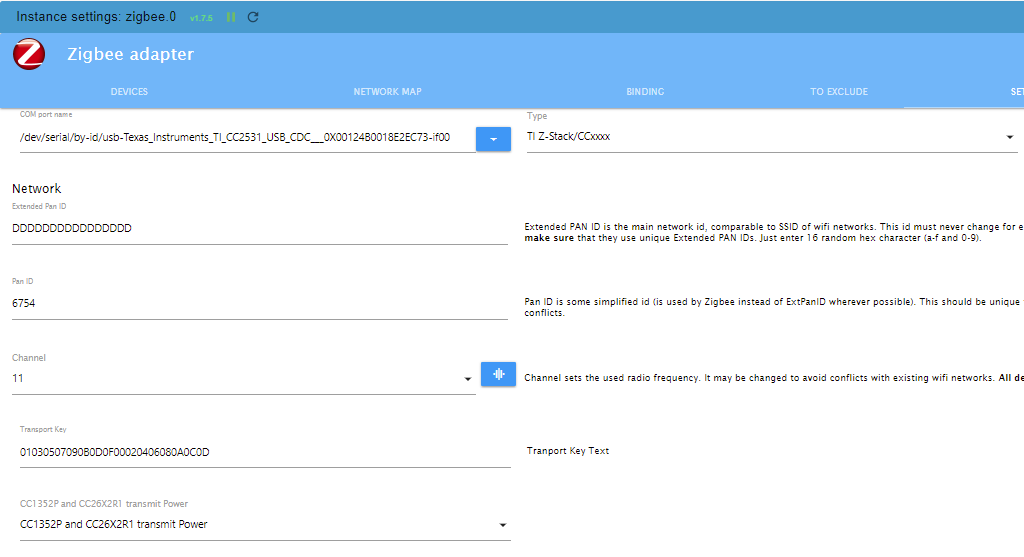
-
@ap2017 sagte in Zigbee adapter stopped running:
This 'problem' is exactly the reason why you should never set /dev/ttyDEVICE but always the link that you find in /dev/serial/by-id
/dev/ttyDEVICE is generated during system start and may change at anytime, the link in /dev/serial/by-id will always point to the correct hardware.
@thomas-braun
Nobody responded if it is important that serialport version of Zigbee is older than serialport of other adapters (assuming that 9.2.8 is a version number)ap@AP-Tiny:/opt/iobroker$ npm list serialport [sudo] password for ap: iobroker.inst@2.0.3 /opt/iobroker ├─┬ iobroker.discovery@3.0.5 │ └── serialport@10.4.0 ├─┬ iobroker.mysensors@3.0.0 │ └── serialport@10.4.0 deduped ├─┬ iobroker.zigbee@1.7.5 │ └─┬ zigbee-herdsman@0.14.34 │ └── serialport@9.2.8 └─┬ iobroker.zwave2@2.6.0 └─┬ zwave-js@9.6.0 ├─┬ @zwave-js/serial@9.6.0 │ └── serialport@10.4.0 deduped └── serialport@10.4.0 deduped -
@asgothian
Not sure how to check which USB port is which, don't know Linux enough.Nothing is connected to USB ports except MySensors gateway, Zwave adapter and Zigbee adapter.
There is certainly a chance that Zigbee adapter failed, but it was working fine for many months, this is not new setup. I think that it uses firmware version 20190608.
@ap2017 sagte in Zigbee adapter stopped running:
@asgothian
Not sure how to check which USB port is which, don't know Linux enough.Nothing is connected to USB ports except MySensors gateway, Zwave adapter and Zigbee adapter.
There is certainly a chance that Zigbee adapter failed, but it was working fine for many months, this is not new setup. I think that it uses firmware version 20190608.
Please test:
remove the MySensors gateway and the Zwave adapter and see if the zigbee adapter starts. Please be on the lookout for the first log message containing
Starting zigbee-herdsman problem :, ignoring all messages afterinfo: zigbee.0 (2610) Try to reconnect.as they will point you to a wrong direction.If the zigbee adapter starts in this configuration there might be some interference between either the mysensors gateway and the zigbee stick or the zwave stick and the zigbee stick. If it does not start in this configuration, the firmware on the stick has become corrupted and should be refreshed.
The Zigbee-Herdsman Library which is used by the zigbee adapter requires a specific serialport library version, which is why it is completely normal to have a separate installation of the serial port library.
A.
-
@ap2017 sagte in Zigbee adapter stopped running:
@asgothian
Not sure how to check which USB port is which, don't know Linux enough.Nothing is connected to USB ports except MySensors gateway, Zwave adapter and Zigbee adapter.
There is certainly a chance that Zigbee adapter failed, but it was working fine for many months, this is not new setup. I think that it uses firmware version 20190608.
Please test:
remove the MySensors gateway and the Zwave adapter and see if the zigbee adapter starts. Please be on the lookout for the first log message containing
Starting zigbee-herdsman problem :, ignoring all messages afterinfo: zigbee.0 (2610) Try to reconnect.as they will point you to a wrong direction.If the zigbee adapter starts in this configuration there might be some interference between either the mysensors gateway and the zigbee stick or the zwave stick and the zigbee stick. If it does not start in this configuration, the firmware on the stick has become corrupted and should be refreshed.
The Zigbee-Herdsman Library which is used by the zigbee adapter requires a specific serialport library version, which is why it is completely normal to have a separate installation of the serial port library.
A.
@asgothian
I disabled MySensors and Zwave then restarted controller. Here is what I am getting:2022-07-15 15:49:58.005 - error: zigbee.0 (20495) Starting zigbee-herdsman problem : "Error while opening serialport 'Error: Error Resource temporarily unavailable Cannot lock port'" 2022-07-15 15:49:58.006 - error: zigbee.0 (20495) Failed to start Zigbee 2022-07-15 15:49:58.006 - error: zigbee.0 (20495) Error herdsman start -
@asgothian
I disabled MySensors and Zwave then restarted controller. Here is what I am getting:2022-07-15 15:49:58.005 - error: zigbee.0 (20495) Starting zigbee-herdsman problem : "Error while opening serialport 'Error: Error Resource temporarily unavailable Cannot lock port'" 2022-07-15 15:49:58.006 - error: zigbee.0 (20495) Failed to start Zigbee 2022-07-15 15:49:58.006 - error: zigbee.0 (20495) Error herdsman start -
@ap2017 Please reread my previous post and check for the correct message. I am 99% certain that this message is the one i explicitly told you was a false flag.
A.
2022-07-15 18:26:04.695 - info: zigbee.0 (25872) Starting Zigbee npm ... 2022-07-15 18:26:04.921 - info: zigbee.0 (25872) Installed Version: iobroker.zigbee@1.7.5 2022-07-15 18:26:09.726 - info: mysensors.0 (21245) STARTED 2022-07-15 18:26:09.726 - info: mysensors.0 (21245) STARTED 2022-07-15 18:26:24.873 - error: zigbee.0 (25872) Starting zigbee-herdsman problem : "Failed to connect to the adapter (Error: SRSP - SYS - ping after 6000ms)" 2022-07-15 18:26:24.875 - error: zigbee.0 (25872) Failed to start Zigbee 2022-07-15 18:26:24.875 - error: zigbee.0 (25872) Error herdsman start 2022-07-15 18:26:34.876 - info: zigbee.0 (25872) Try to reconnect. 1 attempts left 2022-07-15 18:26:34.877 - info: zigbee.0 (25872) Starting Zigbee npm ... 2022-07-15 18:26:34.889 - info: zigbee.0 (25872) Installed Version: iobroker.zigbee@1.7.5 2022-07-15 18:26:34.989 - error: zigbee.0 (25872) Starting zigbee-herdsman problem : "Error while opening serialport 'Error: Error Resource temporarily unavailable Cannot lock port'" 2022-07-15 18:26:34.990 - error: zigbee.0 (25872) Failed to start Zigbee 2022-07-15 18:26:34.990 - error: zigbee.0 (25872) Error herdsman start -
2022-07-15 18:26:04.695 - info: zigbee.0 (25872) Starting Zigbee npm ... 2022-07-15 18:26:04.921 - info: zigbee.0 (25872) Installed Version: iobroker.zigbee@1.7.5 2022-07-15 18:26:09.726 - info: mysensors.0 (21245) STARTED 2022-07-15 18:26:09.726 - info: mysensors.0 (21245) STARTED 2022-07-15 18:26:24.873 - error: zigbee.0 (25872) Starting zigbee-herdsman problem : "Failed to connect to the adapter (Error: SRSP - SYS - ping after 6000ms)" 2022-07-15 18:26:24.875 - error: zigbee.0 (25872) Failed to start Zigbee 2022-07-15 18:26:24.875 - error: zigbee.0 (25872) Error herdsman start 2022-07-15 18:26:34.876 - info: zigbee.0 (25872) Try to reconnect. 1 attempts left 2022-07-15 18:26:34.877 - info: zigbee.0 (25872) Starting Zigbee npm ... 2022-07-15 18:26:34.889 - info: zigbee.0 (25872) Installed Version: iobroker.zigbee@1.7.5 2022-07-15 18:26:34.989 - error: zigbee.0 (25872) Starting zigbee-herdsman problem : "Error while opening serialport 'Error: Error Resource temporarily unavailable Cannot lock port'" 2022-07-15 18:26:34.990 - error: zigbee.0 (25872) Failed to start Zigbee 2022-07-15 18:26:34.990 - error: zigbee.0 (25872) Error herdsman startI quote:
If it does not start in this configuration, the firmware on the stick has become corrupted and should be refreshed.
So try to reflash the Firmware.
-
I quote:
If it does not start in this configuration, the firmware on the stick has become corrupted and should be refreshed.
So try to reflash the Firmware.
@thomas-braun After reflashing the firmware Zigbeee adapter started to behave differently. It works for some seconds then shuts down with error code. After restarting the adapter is does it again - works for a short time then shuts down with error code. I received another stick, reflashed it as well, but system behaves same way.
2022-07-17 21:10:10.373 - info: zigbee.0 (2538) Zigbee started 2022-07-17 21:10:12.539 - info: admin.0 (1256) ==> Connected system.user.admin from ::ffff:192.168.1.244 2022-07-17 21:10:21.356 - warn: zigbee.0 (2538) DeviceAvailability:Failed to ping 0x90fd9ffffe2bad6b TRADFRI bulb E26 W opal 1000lm 2022-07-17 21:10:40.020 - warn: zigbee.0 (2538) Device '0x90fd9ffffe2baf88' announced itself 2022-07-17 21:10:40.023 - error: zigbee.0 (2538) Unhandled promise rejection. This error originated either by throwing inside of an async function without a catch block, or by rejecting a promise which was not handled with .catch(). 2022-07-17 21:10:40.024 - error: zigbee.0 (2538) unhandled promise rejection: Cannot read properties of undefined (reading 'color_options') 2022-07-17 21:10:40.024 - error: zigbee.0 (2538) TypeError: Cannot read properties of undefined (reading 'color_options') at Object.bulbOnEvent [as onEvent] (/opt/iobroker/node_modules/zigbee-herdsman-converters/devices/ikea.js:39:19) at DeviceEvent.callOnEvent (/opt/iobroker/node_modules/iobroker.zigbee/lib/zbDeviceEvent.js:44:26) at DeviceEvent.onZigbeeEvent (/opt/iobroker/node_modules/iobroker.zigbee/lib/zbDeviceEvent.js:26:18) at ZigbeeController.callExtensionMethod (/opt/iobroker/node_modules/iobroker.zigbee/lib/zigbeecontroller.js:236:54) at ZigbeeController.handleDeviceAnnounce (/opt/iobroker/node_modules/iobroker.zigbee/lib/zigbeecontroller.js:560:18) 2022-07-17 21:10:40.025 - error: zigbee.0 (2538) Cannot read properties of undefined (reading 'color_options') 2022-07-17 21:10:40.028 - info: zigbee.0 (2538) cleaned everything up... 2022-07-17 21:10:40.056 - info: zigbee.0 (2538) Zigbee: disabling joining new devices. 2022-07-17 21:10:40.528 - info: zigbee.0 (2538) terminating 2022-07-17 21:10:40.529 - warn: zigbee.0 (2538) Terminated (UNCAUGHT_EXCEPTION): Without reason 2022-07-17 21:10:41.035 - warn: zigbee.0 (2538) get state error: Connection is closed. 2022-07-17 21:10:41.101 - error: host.AP-Tiny instance system.adapter.zigbee.0 terminated with code 6 (UNCAUGHT_EXCEPTION) 2022-07-17 21:10:41.102 - info: host.AP-Tiny Restart adapter system.adapter.zigbee.0 because enabled 2022-07-17 21:10:41.102 - warn: host.AP-Tiny Do not restart adapter system.adapter.zigbee.0 because restart loop detected 2022-07-17 21:10:43.459 - info: mysensors.0 (2199) STARTED 2022-07-17 21:10:43.460 - info: mysensors.0 (2199) STARTED 2022-07-17 21:10:48.629 - info: admin.0 (1256) <== Disconnect system.user.admin from ::ffff:192.168.1.244 -
@thomas-braun After reflashing the firmware Zigbeee adapter started to behave differently. It works for some seconds then shuts down with error code. After restarting the adapter is does it again - works for a short time then shuts down with error code. I received another stick, reflashed it as well, but system behaves same way.
2022-07-17 21:10:10.373 - info: zigbee.0 (2538) Zigbee started 2022-07-17 21:10:12.539 - info: admin.0 (1256) ==> Connected system.user.admin from ::ffff:192.168.1.244 2022-07-17 21:10:21.356 - warn: zigbee.0 (2538) DeviceAvailability:Failed to ping 0x90fd9ffffe2bad6b TRADFRI bulb E26 W opal 1000lm 2022-07-17 21:10:40.020 - warn: zigbee.0 (2538) Device '0x90fd9ffffe2baf88' announced itself 2022-07-17 21:10:40.023 - error: zigbee.0 (2538) Unhandled promise rejection. This error originated either by throwing inside of an async function without a catch block, or by rejecting a promise which was not handled with .catch(). 2022-07-17 21:10:40.024 - error: zigbee.0 (2538) unhandled promise rejection: Cannot read properties of undefined (reading 'color_options') 2022-07-17 21:10:40.024 - error: zigbee.0 (2538) TypeError: Cannot read properties of undefined (reading 'color_options') at Object.bulbOnEvent [as onEvent] (/opt/iobroker/node_modules/zigbee-herdsman-converters/devices/ikea.js:39:19) at DeviceEvent.callOnEvent (/opt/iobroker/node_modules/iobroker.zigbee/lib/zbDeviceEvent.js:44:26) at DeviceEvent.onZigbeeEvent (/opt/iobroker/node_modules/iobroker.zigbee/lib/zbDeviceEvent.js:26:18) at ZigbeeController.callExtensionMethod (/opt/iobroker/node_modules/iobroker.zigbee/lib/zigbeecontroller.js:236:54) at ZigbeeController.handleDeviceAnnounce (/opt/iobroker/node_modules/iobroker.zigbee/lib/zigbeecontroller.js:560:18) 2022-07-17 21:10:40.025 - error: zigbee.0 (2538) Cannot read properties of undefined (reading 'color_options') 2022-07-17 21:10:40.028 - info: zigbee.0 (2538) cleaned everything up... 2022-07-17 21:10:40.056 - info: zigbee.0 (2538) Zigbee: disabling joining new devices. 2022-07-17 21:10:40.528 - info: zigbee.0 (2538) terminating 2022-07-17 21:10:40.529 - warn: zigbee.0 (2538) Terminated (UNCAUGHT_EXCEPTION): Without reason 2022-07-17 21:10:41.035 - warn: zigbee.0 (2538) get state error: Connection is closed. 2022-07-17 21:10:41.101 - error: host.AP-Tiny instance system.adapter.zigbee.0 terminated with code 6 (UNCAUGHT_EXCEPTION) 2022-07-17 21:10:41.102 - info: host.AP-Tiny Restart adapter system.adapter.zigbee.0 because enabled 2022-07-17 21:10:41.102 - warn: host.AP-Tiny Do not restart adapter system.adapter.zigbee.0 because restart loop detected 2022-07-17 21:10:43.459 - info: mysensors.0 (2199) STARTED 2022-07-17 21:10:43.460 - info: mysensors.0 (2199) STARTED 2022-07-17 21:10:48.629 - info: admin.0 (1256) <== Disconnect system.user.admin from ::ffff:192.168.1.244 -
@ap2017 Please see here for cause and temporary fix:
A.
-
@asgothian
Thanks if I can figure out how to edit file in terminal mode... -
@ap2017 you should be able to use the "nano" command. You may have to use sudo to be able to write the file, or have to modify the access rights via sudo chmod a+w
A.
@asgothian I did not have a chance to manually change the code, but noticed new version of adapter just released with fixed IKEA interface. Unfortunately it does not work for me, see log. It starts fine adapter is operational but it is not able to ping devices
2022-07-24 18:48:09.741 - info: host.AP-Tiny stopInstance system.adapter.zigbee.0 (force=false, process=true) 2022-07-24 18:48:09.745 - info: zigbee.0 (2399) Got terminate signal TERMINATE_YOURSELF 2022-07-24 18:48:09.746 - info: zigbee.0 (2399) cleaned everything up... 2022-07-24 18:48:09.755 - info: zigbee.0 (2399) Zigbee: disabling joining new devices. 2022-07-24 18:48:09.792 - info: host.AP-Tiny stopInstance system.adapter.zigbee.0 send kill signal 2022-07-24 18:48:10.237 - info: zigbee.0 (2399) terminating 2022-07-24 18:48:10.238 - info: zigbee.0 (2399) Terminated (ADAPTER_REQUESTED_TERMINATION): Without reason 2022-07-24 18:48:10.795 - info: host.AP-Tiny instance system.adapter.zigbee.0 terminated with code 11 (ADAPTER_REQUESTED_TERMINATION) 2022-07-24 18:48:12.834 - info: host.AP-Tiny instance system.adapter.zigbee.0 started with pid 2431 2022-07-24 18:48:14.205 - info: zigbee.0 (2431) Plugin sentry Sentry Plugin disabled for this process because sending of statistic data is disabled for the system 2022-07-24 18:48:14.356 - info: zigbee.0 (2431) starting. Version 1.7.6 in /opt/iobroker/node_modules/iobroker.zigbee, node: v16.16.0, js-controller: 4.0.23 2022-07-24 18:48:14.401 - info: zigbee.0 (2431) delete old Backup files. keep only last 10 2022-07-24 18:48:14.402 - info: zigbee.0 (2431) Starting Zigbee npm ... 2022-07-24 18:48:14.633 - info: zigbee.0 (2431) Installed Version: iobroker.zigbee@1.7.6 2022-07-24 18:48:15.005 - info: zigbee.0 (2431) Coordinator firmware version: {"type":"zStack12","meta":{"transportrev":2,"product":0,"majorrel":2,"minorrel":6,"maintrel":3,"revision":20190608}} 2022-07-24 18:48:15.009 - info: zigbee.0 (2431) Disable LED 2022-07-24 18:48:15.010 - info: zigbee.0 (2431) Unable to disable LED, unsupported function. 2022-07-24 18:48:15.011 - info: zigbee.0 (2431) --> transmitPower : normal 2022-07-24 18:48:15.018 - info: zigbee.0 (2431) Currently 15 devices are joined: 2022-07-24 18:48:15.037 - info: zigbee.0 (2431) 0x90fd9ffffe2bad6b (addr 43852): LED1622G12 - IKEA TRADFRI LED bulb E26 1000 lumen, dimmable, opal white (Router) 2022-07-24 18:48:15.041 - info: zigbee.0 (2431) 0x00158d00044678ff (addr 48528): WXKG12LM - Xiaomi Aqara wireless switch (with gyroscope) (EndDevice) 2022-07-24 18:48:15.041 - info: zigbee.0 (2431) 0x00124b001f90ed15 (addr 54998): SA-003-Zigbee - eWeLink Zigbee smart plug (Router) 2022-07-24 18:48:15.042 - info: zigbee.0 (2431) 0xd0cf5efffedaa37c (addr 43246): LED1622G12 - IKEA TRADFRI LED bulb E26 1000 lumen, dimmable, opal white (Router) 2022-07-24 18:48:15.042 - info: zigbee.0 (2431) 0x000b57fffebcfc39 (addr 38662): LED1622G12 - IKEA TRADFRI LED bulb E26 1000 lumen, dimmable, opal white (Router) 2022-07-24 18:48:15.043 - info: zigbee.0 (2431) 0x00124b0022658a2b (addr 33323): SNZB-01 - SONOFF Wireless button (EndDevice) 2022-07-24 18:48:15.043 - info: zigbee.0 (2431) 0xd0cf5efffe7d475c (addr 30129): LED1622G12 - IKEA TRADFRI LED bulb E26 1000 lumen, dimmable, opal white (Router) 2022-07-24 18:48:15.044 - info: zigbee.0 (2431) 0x00158d00045a362e (addr 24701): SJCGQ11LM - Xiaomi Aqara water leak sensor (EndDevice) 2022-07-24 18:48:15.045 - info: zigbee.0 (2431) 0xbc33acfffeff263f (addr 65507): SM-AZ713 - UseeLink Smart water/gas valve (Router) 2022-07-24 18:48:15.046 - info: zigbee.0 (2431) 0x90fd9ffffe2baf88 (addr 53737): LED1622G12 - IKEA TRADFRI LED bulb E26 1000 lumen, dimmable, opal white (Router) 2022-07-24 18:48:15.046 - info: zigbee.0 (2431) 0x000b57fffe8b9e9c (addr 56023): LED1650R5 - IKEA TRADFRI LED bulb GU10 400 lumen, dimmable (Router) 2022-07-24 18:48:15.047 - info: zigbee.0 (2431) 0x00124b0022419f47 (addr 23822): SA-003-Zigbee - eWeLink Zigbee smart plug (Router) 2022-07-24 18:48:15.047 - info: zigbee.0 (2431) 0xccccccfffe939035 (addr 18190): E1525/E1745 - IKEA TRADFRI motion sensor (EndDevice) 2022-07-24 18:48:15.048 - info: zigbee.0 (2431) 0x04cf8cdf3c79009e (addr 52418): GZCGQ01LM - Xiaomi MiJia light intensity sensor (EndDevice) 2022-07-24 18:48:15.048 - info: zigbee.0 (2431) 0x00158d0006ea578f (addr 63873): SJCGQ11LM - Xiaomi Aqara water leak sensor (EndDevice) 2022-07-24 18:48:15.049 - info: zigbee.0 (2431) Zigbee started 2022-07-24 18:48:38.963 - info: mysensors.0 (2339) STARTED 2022-07-24 18:48:38.963 - info: mysensors.0 (2339) STARTED 2022-07-24 18:49:01.024 - info: admin.0 (1527) ==> Connected system.user.admin from ::ffff:192.168.1.244 2022-07-24 18:49:19.328 - info: admin.0 (1527) <== Disconnect system.user.admin from ::ffff:192.168.1.244 2022-07-24 18:49:23.126 - warn: zigbee.0 (2431) DeviceAvailability:Failed to ping 0x00124b001f90ed15 SA-003-Zigbee 2022-07-24 18:49:23.750 - warn: zigbee.0 (2431) DeviceAvailability:Failed to ping 0xd0cf5efffedaa37c TRADFRI bulb E26 W opal 1000lm 2022-07-24 18:49:24.226 - warn: zigbee.0 (2431) DeviceAvailability:Failed to ping 0x000b57fffebcfc39 TRADFRI bulb E26 W opal 1000lm 2022-07-24 18:49:33.874 - warn: zigbee.0 (2431) DeviceAvailability:Failed to ping 0xd0cf5efffe7d475c TRADFRI bulb E26 W opal 1000lm 2022-07-24 18:49:34.415 - warn: zigbee.0 (2431) DeviceAvailability:Failed to ping 0x000b57fffe8b9e9c TRADFRI bulb GU10 W 400lm 2022-07-24 18:49:34.858 - warn: zigbee.0 (2431) DeviceAvailability:Failed to ping 0x90fd9ffffe2baf88 TRADFRI bulb E26 W opal 1000lm 2022-07-24 18:49:35.014 - warn: zigbee.0 (2431) DeviceAvailability:Failed to ping 0x00124b0022419f47 SA-003-Zigbee -
@ap2017 you should be able to use the "nano" command. You may have to use sudo to be able to write the file, or have to modify the access rights via sudo chmod a+w
A.
-
@asgothian Do you still recommend to manually edit the file or the latest adapter update incorporate all the changes?
-
@asgothian It does not work for me see my message from July 24
@ap2017 Please check if you have duplicate zigbee-herdsman-converters libraries installed, or if their permissions do not allow overwriting.
if need be, follow this method:
- stop the zigbee adapter
- remove the zigbee-herdsman-converters library
- remove the zigbee-herdsman library
- reinstall the zigbee adapter.
A.


Hey! Du scheinst an dieser Unterhaltung interessiert zu sein, hast aber noch kein Konto.
Hast du es satt, bei jedem Besuch durch die gleichen Beiträge zu scrollen? Wenn du dich für ein Konto anmeldest, kommst du immer genau dorthin zurück, wo du zuvor warst, und kannst dich über neue Antworten benachrichtigen lassen (entweder per E-Mail oder Push-Benachrichtigung). Du kannst auch Lesezeichen speichern und Beiträge positiv bewerten, um anderen Community-Mitgliedern deine Wertschätzung zu zeigen.
Mit deinem Input könnte dieser Beitrag noch besser werden 💗
Registrieren AnmeldenSupport us
458
Online33.0k
Benutzer83.6k
Themen1.3m
Beiträge