




Zigbee Adapter bleibt nach Update auf rot
-
Vielen Dank euch beiden. Das hat geholfen und der Adapter funktioniert wieder, wie er soll :)
@t0bster @arteck @Thomas-Braun
Ich habe diesen Thread gefunden und er hat mir viel Arbeit erspart, danke!
Gruß daNick
ps, Ich füge nur ein bisschen Text für Suchmaschinen hinzu, falls jemand in das gleiche Problem läuft wie ich, vielleicht findet er das hier schneller.
iobroker - Zigbee Adapter rot / Update nodejs auf 14
Zigbee Problem Node - NodeJs Update -
Darf ich mich hier auch einmal einklinken?
Ich hatte auch auf Node 16 geupdated - jedoch läuft der Zigbee Adapter nicht (mehr).
Habe die Verzeichnisse wie angegeben gelöscht und den Adapter über die Katze wieder installiert.
Schaue ich mit WinSCP während der Installation in das Verzeichnis /opt/iobroker/node_modules, sehe ich, wie die Verzeichnisse wiederkommen. Nach dem das Installationsfenster geschlossen wurde, sind die Ordner jedoch wieder weg.
Auch komisch: Auf der Konsole:
pi@ioBroker:/opt/iobroker $ sudo -H -u iobroker npm install iobroker.js-controllerbringt:
npm ERR! code 1
npm ERR! path /opt/iobroker/node_modules/@serialport/bindings
npm ERR! command failed
npm ERR! command sh -c prebuild-install --tag-prefix @serialport/bindings@ || node-gyp rebuild
npm ERR! prebuild-install WARN install No prebuilt binaries found (target=16.16.0 runtime=node arch=arm libc= platform=linux)
npm ERR! node:internal/modules/cjs/loader:936
npm ERR!   throw err;
npm ERR!   ^
npm ERR!
npm ERR! Error: Cannot find module 'object-assign'
npm ERR! Require stack:
npm ERR! - /usr/lib/node_modules/npm/node_modules/node-gyp/node_modules/gauge/render-template.js
npm ERR! - /usr/lib/node_modules/npm/node_modules/node-gyp/node_modules/gauge/plumbing.js
npm ERR! - /usr/lib/node_modules/npm/node_modules/node-gyp/node_modules/gauge/index.js
npm ERR! - /usr/lib/node_modules/npm/node_modules/node-gyp/node_modules/npmlog/log.js
npm ERR! - /usr/lib/node_modules/npm/node_modules/node-gyp/lib/node-gyp.js
npm ERR! - /usr/lib/node_modules/npm/node_modules/node-gyp/bin/node-gyp.js
npm ERR!     at Function.Module._resolveFilename (node:internal/modules/cjs/loader:933:15)
npm ERR!     at Function.Module._load (node:internal/modules/cjs/loader:778:27)
npm ERR!     at Module.require (node:internal/modules/cjs/loader:1005:19)
npm ERR!     at require (node:internal/modules/cjs/helpers:102:18)
npm ERR!     at Object.<anonymous> (/usr/lib/node_modules/npm/node_modules/node-gyp/node_modules/gauge/render-template.js:4:20)
npm ERR!     at Module._compile (node:internal/modules/cjs/loader:1105:14)
npm ERR!     at Object.Module._extensions..js (node:internal/modules/cjs/loader:1159:10)
npm ERR!     at Module.load (node:internal/modules/cjs/loader:981:32)
npm ERR!     at Function.Module._load (node:internal/modules/cjs/loader:822:12)
npm ERR!     at Module.require (node:internal/modules/cjs/loader:1005:19) {
npm ERR!   code: 'MODULE_NOT_FOUND',
npm ERR!   requireStack: [
npm ERR!     '/usr/lib/node_modules/npm/node_modules/node-gyp/node_modules/gauge/render-template.js',
npm ERR!     '/usr/lib/node_modules/npm/node_modules/node-gyp/node_modules/gauge/plumbing.js',
npm ERR!     '/usr/lib/node_modules/npm/node_modules/node-gyp/node_modules/gauge/index.js',
npm ERR!     '/usr/lib/node_modules/npm/node_modules/node-gyp/node_modules/npmlog/log.js',
npm ERR!     '/usr/lib/node_modules/npm/node_modules/node-gyp/lib/node-gyp.js',
npm ERR!     '/usr/lib/node_modules/npm/node_modules/node-gyp/bin/node-gyp.js'
npm ERR!   ]
npm ERR! }

npm ERR! A complete log of this run can be found in:
npm ERR!     /home/iobroker/.npm/_logs/2022-07-15T07_00_18_111Z-debug-0.log
... wer nicht mit der Zeit geht, geht mit der Zeit ...
Aktuelle Entwicklung: Energiefluss - erweitert (https://forum.iobroker.net/topic/64734)
-
Darf ich mich hier auch einmal einklinken?
Ich hatte auch auf Node 16 geupdated - jedoch läuft der Zigbee Adapter nicht (mehr).
Habe die Verzeichnisse wie angegeben gelöscht und den Adapter über die Katze wieder installiert.
Schaue ich mit WinSCP während der Installation in das Verzeichnis /opt/iobroker/node_modules, sehe ich, wie die Verzeichnisse wiederkommen. Nach dem das Installationsfenster geschlossen wurde, sind die Ordner jedoch wieder weg.
Auch komisch: Auf der Konsole:
pi@ioBroker:/opt/iobroker $ sudo -H -u iobroker npm install iobroker.js-controllerbringt:
npm ERR! code 1 npm ERR! path /opt/iobroker/node_modules/@serialport/bindings npm ERR! command failed npm ERR! command sh -c prebuild-install --tag-prefix @serialport/bindings@ || node-gyp rebuild npm ERR! prebuild-install WARN install No prebuilt binaries found (target=16.16.0 runtime=node arch=arm libc= platform=linux) npm ERR! node:internal/modules/cjs/loader:936 npm ERR! throw err; npm ERR! ^ npm ERR! npm ERR! Error: Cannot find module 'object-assign' npm ERR! Require stack: npm ERR! - /usr/lib/node_modules/npm/node_modules/node-gyp/node_modules/gauge/render-template.js npm ERR! - /usr/lib/node_modules/npm/node_modules/node-gyp/node_modules/gauge/plumbing.js npm ERR! - /usr/lib/node_modules/npm/node_modules/node-gyp/node_modules/gauge/index.js npm ERR! - /usr/lib/node_modules/npm/node_modules/node-gyp/node_modules/npmlog/log.js npm ERR! - /usr/lib/node_modules/npm/node_modules/node-gyp/lib/node-gyp.js npm ERR! - /usr/lib/node_modules/npm/node_modules/node-gyp/bin/node-gyp.js npm ERR! at Function.Module._resolveFilename (node:internal/modules/cjs/loader:933:15) npm ERR! at Function.Module._load (node:internal/modules/cjs/loader:778:27) npm ERR! at Module.require (node:internal/modules/cjs/loader:1005:19) npm ERR! at require (node:internal/modules/cjs/helpers:102:18) npm ERR! at Object.<anonymous> (/usr/lib/node_modules/npm/node_modules/node-gyp/node_modules/gauge/render-template.js:4:20) npm ERR! at Module._compile (node:internal/modules/cjs/loader:1105:14) npm ERR! at Object.Module._extensions..js (node:internal/modules/cjs/loader:1159:10) npm ERR! at Module.load (node:internal/modules/cjs/loader:981:32) npm ERR! at Function.Module._load (node:internal/modules/cjs/loader:822:12) npm ERR! at Module.require (node:internal/modules/cjs/loader:1005:19) { npm ERR! code: 'MODULE_NOT_FOUND', npm ERR! requireStack: [ npm ERR! '/usr/lib/node_modules/npm/node_modules/node-gyp/node_modules/gauge/render-template.js', npm ERR! '/usr/lib/node_modules/npm/node_modules/node-gyp/node_modules/gauge/plumbing.js', npm ERR! '/usr/lib/node_modules/npm/node_modules/node-gyp/node_modules/gauge/index.js', npm ERR! '/usr/lib/node_modules/npm/node_modules/node-gyp/node_modules/npmlog/log.js', npm ERR! '/usr/lib/node_modules/npm/node_modules/node-gyp/lib/node-gyp.js', npm ERR! '/usr/lib/node_modules/npm/node_modules/node-gyp/bin/node-gyp.js' npm ERR! ] npm ERR! } npm ERR! A complete log of this run can be found in: npm ERR! /home/iobroker/.npm/_logs/2022-07-15T07_00_18_111Z-debug-0.log -
Darf ich mich hier auch einmal einklinken?
Ich hatte auch auf Node 16 geupdated - jedoch läuft der Zigbee Adapter nicht (mehr).
Habe die Verzeichnisse wie angegeben gelöscht und den Adapter über die Katze wieder installiert.
Schaue ich mit WinSCP während der Installation in das Verzeichnis /opt/iobroker/node_modules, sehe ich, wie die Verzeichnisse wiederkommen. Nach dem das Installationsfenster geschlossen wurde, sind die Ordner jedoch wieder weg.
Auch komisch: Auf der Konsole:
pi@ioBroker:/opt/iobroker $ sudo -H -u iobroker npm install iobroker.js-controllerbringt:
npm ERR! code 1 npm ERR! path /opt/iobroker/node_modules/@serialport/bindings npm ERR! command failed npm ERR! command sh -c prebuild-install --tag-prefix @serialport/bindings@ || node-gyp rebuild npm ERR! prebuild-install WARN install No prebuilt binaries found (target=16.16.0 runtime=node arch=arm libc= platform=linux) npm ERR! node:internal/modules/cjs/loader:936 npm ERR! throw err; npm ERR! ^ npm ERR! npm ERR! Error: Cannot find module 'object-assign' npm ERR! Require stack: npm ERR! - /usr/lib/node_modules/npm/node_modules/node-gyp/node_modules/gauge/render-template.js npm ERR! - /usr/lib/node_modules/npm/node_modules/node-gyp/node_modules/gauge/plumbing.js npm ERR! - /usr/lib/node_modules/npm/node_modules/node-gyp/node_modules/gauge/index.js npm ERR! - /usr/lib/node_modules/npm/node_modules/node-gyp/node_modules/npmlog/log.js npm ERR! - /usr/lib/node_modules/npm/node_modules/node-gyp/lib/node-gyp.js npm ERR! - /usr/lib/node_modules/npm/node_modules/node-gyp/bin/node-gyp.js npm ERR! at Function.Module._resolveFilename (node:internal/modules/cjs/loader:933:15) npm ERR! at Function.Module._load (node:internal/modules/cjs/loader:778:27) npm ERR! at Module.require (node:internal/modules/cjs/loader:1005:19) npm ERR! at require (node:internal/modules/cjs/helpers:102:18) npm ERR! at Object.<anonymous> (/usr/lib/node_modules/npm/node_modules/node-gyp/node_modules/gauge/render-template.js:4:20) npm ERR! at Module._compile (node:internal/modules/cjs/loader:1105:14) npm ERR! at Object.Module._extensions..js (node:internal/modules/cjs/loader:1159:10) npm ERR! at Module.load (node:internal/modules/cjs/loader:981:32) npm ERR! at Function.Module._load (node:internal/modules/cjs/loader:822:12) npm ERR! at Module.require (node:internal/modules/cjs/loader:1005:19) { npm ERR! code: 'MODULE_NOT_FOUND', npm ERR! requireStack: [ npm ERR! '/usr/lib/node_modules/npm/node_modules/node-gyp/node_modules/gauge/render-template.js', npm ERR! '/usr/lib/node_modules/npm/node_modules/node-gyp/node_modules/gauge/plumbing.js', npm ERR! '/usr/lib/node_modules/npm/node_modules/node-gyp/node_modules/gauge/index.js', npm ERR! '/usr/lib/node_modules/npm/node_modules/node-gyp/node_modules/npmlog/log.js', npm ERR! '/usr/lib/node_modules/npm/node_modules/node-gyp/lib/node-gyp.js', npm ERR! '/usr/lib/node_modules/npm/node_modules/node-gyp/bin/node-gyp.js' npm ERR! ] npm ERR! } npm ERR! A complete log of this run can be found in: npm ERR! /home/iobroker/.npm/_logs/2022-07-15T07_00_18_111Z-debug-0.logWie schaut die node-Umgebung da nun aus?
sudo ln -s /usr/bin/node /usr/bin/nodejs uname -m && which nodejs node npm && nodejs -v && node -v && npm -v && whoami && pwd && sudo apt update &> /dev/null && sudo apt update && apt policy nodejs -
@arteck sagte in Zigbee Adapter bleibt nach Update auf rot:
rm -r /opt/iobroker/node_modules/@serialport
rm -r /opt/iobroker/node_modules/serialport
rm -r /opt/iobroker/node_modules/zigbee-herdsman
rm -r /opt/iobroker/node_modules/zigbee-herdsman-converterIch hatte diese gelöscht.
Die Umgebung sieht wie folgt aus:
pi@ioBroker:/opt/iobroker $ sudo ln -s /usr/bin/node /usr/bin/nodejs
ln: die symbolische Verknüpfung '/usr/bin/nodejs' konnte nicht angelegt werden: Die Datei existiert bereits
pi@ioBroker:/opt/iobroker $ uname -m && which nodejs node npm && nodejs -v && node -v && npm -v && whoami && pwd && sudo apt update &> /dev/null && sudo apt update && apt policy nodejs armv7l /usr/bin/nodejs /usr/bin/node /usr/bin/npm v16.16.0 v16.16.0 8.11.0 pi /opt/iobroker OK:1 http://archive.raspberrypi.org/debian buster InRelease OK:2 https://packages.grafana.com/enterprise/deb stable InRelease OK:3 http://raspbian.raspberrypi.org/raspbian buster InRelease OK:4 https://www.pivccu.de/piVCCU stable InRelease OK:5 https://deb.nodesource.com/node_16.x buster InRelease Paketlisten werden gelesen... Fertig Abhängigkeitsbaum wird aufgebaut. Statusinformationen werden eingelesen.... Fertig Aktualisierung für 1 Paket verfügbar. Führen Sie »apt list --upgradable« aus, um es anzuzeigen. nodejs: Installiert: 16.16.0-deb-1nodesource1 Installationskandidat: 16.16.0-deb-1nodesource1 Versionstabelle: *** 16.16.0-deb-1nodesource1 500 500 https://deb.nodesource.com/node_16.x buster/main armhf Packages 100 /var/lib/dpkg/status 10.24.0~dfsg-1~deb10u1 500 500 http://raspbian.raspberrypi.org/raspbian buster/main armhf Packages... wer nicht mit der Zeit geht, geht mit der Zeit ...
Aktuelle Entwicklung: Energiefluss - erweitert (https://forum.iobroker.net/topic/64734)
-
@arteck sagte in Zigbee Adapter bleibt nach Update auf rot:
rm -r /opt/iobroker/node_modules/@serialport
rm -r /opt/iobroker/node_modules/serialport
rm -r /opt/iobroker/node_modules/zigbee-herdsman
rm -r /opt/iobroker/node_modules/zigbee-herdsman-converterIch hatte diese gelöscht.
Die Umgebung sieht wie folgt aus:
pi@ioBroker:/opt/iobroker $ sudo ln -s /usr/bin/node /usr/bin/nodejs
ln: die symbolische Verknüpfung '/usr/bin/nodejs' konnte nicht angelegt werden: Die Datei existiert bereits
pi@ioBroker:/opt/iobroker $ uname -m && which nodejs node npm && nodejs -v && node -v && npm -v && whoami && pwd && sudo apt update &> /dev/null && sudo apt update && apt policy nodejs armv7l /usr/bin/nodejs /usr/bin/node /usr/bin/npm v16.16.0 v16.16.0 8.11.0 pi /opt/iobroker OK:1 http://archive.raspberrypi.org/debian buster InRelease OK:2 https://packages.grafana.com/enterprise/deb stable InRelease OK:3 http://raspbian.raspberrypi.org/raspbian buster InRelease OK:4 https://www.pivccu.de/piVCCU stable InRelease OK:5 https://deb.nodesource.com/node_16.x buster InRelease Paketlisten werden gelesen... Fertig Abhängigkeitsbaum wird aufgebaut. Statusinformationen werden eingelesen.... Fertig Aktualisierung für 1 Paket verfügbar. Führen Sie »apt list --upgradable« aus, um es anzuzeigen. nodejs: Installiert: 16.16.0-deb-1nodesource1 Installationskandidat: 16.16.0-deb-1nodesource1 Versionstabelle: *** 16.16.0-deb-1nodesource1 500 500 https://deb.nodesource.com/node_16.x buster/main armhf Packages 100 /var/lib/dpkg/status 10.24.0~dfsg-1~deb10u1 500 500 http://raspbian.raspberrypi.org/raspbian buster/main armhf Packages -
Dort kommt:
iobroker url https://github.com/ioBroker/ioBroker.zigbee --host ioBroker

node:internal/modules/cjs/loader:936 throw err; ^Error: Cannot find module 'axios'Require stack:
... wer nicht mit der Zeit geht, geht mit der Zeit ...
Aktuelle Entwicklung: Energiefluss - erweitert (https://forum.iobroker.net/topic/64734)
-
Möchte ich das Modul installieren kommt:
pi@ioBroker:/opt/iobroker $ sudo -H -u iobroker npm install axios npm ERR! code ENOTEMPTY npm ERR! syscall rename npm ERR! path /opt/iobroker/node_modules/iobroker.admin/node_modules/follow-redirects npm ERR! dest /opt/iobroker/node_modules/iobroker.admin/node_modules/.follow-redirects-Sy4Ytt5j npm ERR! errno -39 npm ERR! ENOTEMPTY: directory not empty, rename '/opt/iobroker/node_modules/iobroker.admin/node_modules/follow-redirects' -> '/opt/iobroker/node_modules/iobroker.admin/node_modules/.follow-redirects-Sy4Ytt5j' npm ERR! A complete log of this run can be found in: npm ERR! /home/iobroker/.npm/_logs/2022-07-15T07_17_02_339Z-debug-0.log -
Dort kommt:
iobroker url https://github.com/ioBroker/ioBroker.zigbee --host ioBroker node:internal/modules/cjs/loader:936 throw err; ^Error: Cannot find module 'axios'Require stack:@skb da stimmt mit deiner installation was nicht
rm -R /opt/iobroker/node_modules/iobroker.admin/node_modules/.follow-redirects-Sy4Ytt5jein npm hat nicht aufgeräumt
du musst alle . ordner manuell löschendann nochmal
sudo -H -u iobroker npm install axios -
@arteck Nachdem ich nun in vielen Verzeichnissen diese Ordner gelöscht habe, kommt via Git-Cat
$ iobroker url https://github.com/ioBroker/ioBroker.zigbee --host ioBroker
install ioBroker/ioBroker.zigbee#6754927e89f94d7b395a94c3b3bbc9e9a78a2340
NPM version: 8.11.0
Installing ioBroker/ioBroker.zigbee#6754927e89f94d7b395a94c3b3bbc9e9a78a2340... (System call)
host.ioBroker Cannot install ioBroker/ioBroker.zigbee#6754927e89f94d7b395a94c3b3bbc9e9a78a2340: 1
ERROR: Process exited with code 25
Versuche ich es via Command Prompt:
pi@ioBroker:/opt/iobroker $ sudo -H -u iobroker npm install iobroker.zigbee
npm ERR! code 1
npm ERR! path /opt/iobroker/node_modules/@serialport/bindings
npm ERR! command failed
npm ERR! command sh -c prebuild-install --tag-prefix @serialport/bindings@ || node-gyp rebuild
npm ERR! prebuild-install warn install No prebuilt binaries found (target=16.16.0 runtime=node arch=arm libc= platform=linux)
npm ERR! node:internal/modules/cjs/loader:936
npm ERR!   throw err;
npm ERR!   ^
npm ERR!
npm ERR! Error: Cannot find module 'object-assign'
npm ERR! Require stack:
npm ERR! - /usr/lib/node_modules/npm/node_modules/node-gyp/node_modules/gauge/render-template.js
npm ERR! - /usr/lib/node_modules/npm/node_modules/node-gyp/node_modules/gauge/plumbing.js
npm ERR! - /usr/lib/node_modules/npm/node_modules/node-gyp/node_modules/gauge/index.js
npm ERR! - /usr/lib/node_modules/npm/node_modules/node-gyp/node_modules/npmlog/log.js
npm ERR! - /usr/lib/node_modules/npm/node_modules/node-gyp/lib/node-gyp.js
npm ERR! - /usr/lib/node_modules/npm/node_modules/node-gyp/bin/node-gyp.js
npm ERR!     at Function.Module._resolveFilename (node:internal/modules/cjs/loader:933:15)
npm ERR!     at Function.Module._load (node:internal/modules/cjs/loader:778:27)
npm ERR!     at Module.require (node:internal/modules/cjs/loader:1005:19)
npm ERR!     at require (node:internal/modules/cjs/helpers:102:18)
npm ERR!     at Object.<anonymous> (/usr/lib/node_modules/npm/node_modules/node-gyp/node_modules/gauge/render-template.js:4:20)
npm ERR!     at Module._compile (node:internal/modules/cjs/loader:1105:14)
npm ERR!     at Object.Module._extensions..js (node:internal/modules/cjs/loader:1159:10)
npm ERR!     at Module.load (node:internal/modules/cjs/loader:981:32)
npm ERR!     at Function.Module._load (node:internal/modules/cjs/loader:822:12)
npm ERR!     at Module.require (node:internal/modules/cjs/loader:1005:19) {
npm ERR!   code: 'MODULE_NOT_FOUND',
npm ERR!   requireStack: [
npm ERR!     '/usr/lib/node_modules/npm/node_modules/node-gyp/node_modules/gauge/render-template.js',
npm ERR!     '/usr/lib/node_modules/npm/node_modules/node-gyp/node_modules/gauge/plumbing.js',
npm ERR!     '/usr/lib/node_modules/npm/node_modules/node-gyp/node_modules/gauge/index.js',
npm ERR!     '/usr/lib/node_modules/npm/node_modules/node-gyp/node_modules/npmlog/log.js',
npm ERR!     '/usr/lib/node_modules/npm/node_modules/node-gyp/lib/node-gyp.js',
npm ERR!     '/usr/lib/node_modules/npm/node_modules/node-gyp/bin/node-gyp.js'
npm ERR!   ]
npm ERR! }

npm ERR! A complete log of this run can be found in:
npm ERR!     /home/iobroker/.npm/_logs/2022-07-15T07_30_08_521Z-debug-0.log
Läuft aber durch:
pi@ioBroker:/opt/iobroker $ sudo -H -u iobroker npm install object-assign

changed 1 package in 9s

61 packages are looking for funding
  run `npm fund` for details
... wer nicht mit der Zeit geht, geht mit der Zeit ...
Aktuelle Entwicklung: Energiefluss - erweitert (https://forum.iobroker.net/topic/64734)
-
@arteck Nachdem ich nun in vielen Verzeichnissen diese Ordner gelöscht habe, kommt via Git-Cat
$ iobroker url https://github.com/ioBroker/ioBroker.zigbee --host ioBroker
install ioBroker/ioBroker.zigbee#6754927e89f94d7b395a94c3b3bbc9e9a78a2340
NPM version: 8.11.0
Installing ioBroker/ioBroker.zigbee#6754927e89f94d7b395a94c3b3bbc9e9a78a2340... (System call)
host.ioBroker Cannot install ioBroker/ioBroker.zigbee#6754927e89f94d7b395a94c3b3bbc9e9a78a2340: 1
ERROR: Process exited with code 25
Versuche ich es via Command Prompt:
pi@ioBroker:/opt/iobroker $ sudo -H -u iobroker npm install iobroker.zigbee
npm ERR! code 1
npm ERR! path /opt/iobroker/node_modules/@serialport/bindings
npm ERR! command failed
npm ERR! command sh -c prebuild-install --tag-prefix @serialport/bindings@ || node-gyp rebuild
npm ERR! prebuild-install warn install No prebuilt binaries found (target=16.16.0 runtime=node arch=arm libc= platform=linux)
npm ERR! node:internal/modules/cjs/loader:936
npm ERR!   throw err;
npm ERR!   ^
npm ERR!
npm ERR! Error: Cannot find module 'object-assign'
npm ERR! Require stack:
npm ERR! - /usr/lib/node_modules/npm/node_modules/node-gyp/node_modules/gauge/render-template.js
npm ERR! - /usr/lib/node_modules/npm/node_modules/node-gyp/node_modules/gauge/plumbing.js
npm ERR! - /usr/lib/node_modules/npm/node_modules/node-gyp/node_modules/gauge/index.js
npm ERR! - /usr/lib/node_modules/npm/node_modules/node-gyp/node_modules/npmlog/log.js
npm ERR! - /usr/lib/node_modules/npm/node_modules/node-gyp/lib/node-gyp.js
npm ERR! - /usr/lib/node_modules/npm/node_modules/node-gyp/bin/node-gyp.js
npm ERR!     at Function.Module._resolveFilename (node:internal/modules/cjs/loader:933:15)
npm ERR!     at Function.Module._load (node:internal/modules/cjs/loader:778:27)
npm ERR!     at Module.require (node:internal/modules/cjs/loader:1005:19)
npm ERR!     at require (node:internal/modules/cjs/helpers:102:18)
npm ERR!     at Object.<anonymous> (/usr/lib/node_modules/npm/node_modules/node-gyp/node_modules/gauge/render-template.js:4:20)
npm ERR!     at Module._compile (node:internal/modules/cjs/loader:1105:14)
npm ERR!     at Object.Module._extensions..js (node:internal/modules/cjs/loader:1159:10)
npm ERR!     at Module.load (node:internal/modules/cjs/loader:981:32)
npm ERR!     at Function.Module._load (node:internal/modules/cjs/loader:822:12)
npm ERR!     at Module.require (node:internal/modules/cjs/loader:1005:19) {
npm ERR!   code: 'MODULE_NOT_FOUND',
npm ERR!   requireStack: [
npm ERR!     '/usr/lib/node_modules/npm/node_modules/node-gyp/node_modules/gauge/render-template.js',
npm ERR!     '/usr/lib/node_modules/npm/node_modules/node-gyp/node_modules/gauge/plumbing.js',
npm ERR!     '/usr/lib/node_modules/npm/node_modules/node-gyp/node_modules/gauge/index.js',
npm ERR!     '/usr/lib/node_modules/npm/node_modules/node-gyp/node_modules/npmlog/log.js',
npm ERR!     '/usr/lib/node_modules/npm/node_modules/node-gyp/lib/node-gyp.js',
npm ERR!     '/usr/lib/node_modules/npm/node_modules/node-gyp/bin/node-gyp.js'
npm ERR!   ]
npm ERR! }

npm ERR! A complete log of this run can be found in:
npm ERR!     /home/iobroker/.npm/_logs/2022-07-15T07_30_08_521Z-debug-0.log
Läuft aber durch:
pi@ioBroker:/opt/iobroker $ sudo -H -u iobroker npm install object-assign changed 1 package in 9s 61 packages are looking for funding run `npm fund` for details -
Das System stört sich an "object-assign".
pi@ioBroker:/opt/iobroker $ iobroker url https://github.com/ioBroker/ioBroker.zigbee --host ioBroker --debug

install ioBroker/ioBroker.zigbee#6754927e89f94d7b395a94c3b3bbc9e9a78a2340
NPM version: 8.11.0
Installing ioBroker/ioBroker.zigbee#6754927e89f94d7b395a94c3b3bbc9e9a78a2340... (System call)
npm WARN skipping integrity check for git dependency ssh://git@github.com/ioBroker/ioBroker.zigbee.git
npm ERR! code 1
npm ERR! path /opt/iobroker/node_modules/@serialport/bindings
npm ERR! command failed
npm ERR! command sh -c prebuild-install --tag-prefix @serialport/bindings@ || node-gyp rebuild
npm ERR! prebuild-install warn install No prebuilt binaries found (target=16.16.0 runtime=node arch=arm libc= platform=linux)
npm ERR! node:internal/modules/cjs/loader:936
npm ERR!   throw err;
npm ERR!   ^
npm ERR!
npm ERR! Error: Cannot find module 'object-assign'
npm ERR! Require stack:
npm ERR! - /usr/lib/node_modules/npm/node_modules/node-gyp/node_modules/gauge/render-template.js
npm ERR! - /usr/lib/node_modules/npm/node_modules/node-gyp/node_modules/gauge/plumbing.js
npm ERR! - /usr/lib/node_modules/npm/node_modules/node-gyp/node_modules/gauge/index.js
npm ERR! - /usr/lib/node_modules/npm/node_modules/node-gyp/node_modules/npmlog/log.js
npm ERR! - /usr/lib/node_modules/npm/node_modules/node-gyp/lib/node-gyp.js
npm ERR! - /usr/lib/node_modules/npm/node_modules/node-gyp/bin/node-gyp.js
npm ERR!     at Function.Module._resolveFilename (node:internal/modules/cjs/loader:933:15)
npm ERR!     at Function.Module._load (node:internal/modules/cjs/loader:778:27)
npm ERR!     at Module.require (node:internal/modules/cjs/loader:1005:19)
npm ERR!     at require (node:internal/modules/cjs/helpers:102:18)
npm ERR!     at Object.<anonymous> (/usr/lib/node_modules/npm/node_modules/node-gyp/node_modules/gauge/render-template.js:4:20)
npm ERR!     at Module._compile (node:internal/modules/cjs/loader:1105:14)
npm ERR!     at Object.Module._extensions..js (node:internal/modules/cjs/loader:1159:10)
npm ERR!     at Module.load (node:internal/modules/cjs/loader:981:32)
npm ERR!     at Function.Module._load (node:internal/modules/cjs/loader:822:12)
npm ERR!     at Module.require (node:internal/modules/cjs/loader:1005:19) {
npm ERR!   code: 'MODULE_NOT_FOUND',
npm ERR!   requireStack: [
npm ERR!     '/usr/lib/node_modules/npm/node_modules/node-gyp/node_modules/gauge/render-template.js',
npm ERR!     '/usr/lib/node_modules/npm/node_modules/node-gyp/node_modules/gauge/plumbing.js',
npm ERR!     '/usr/lib/node_modules/npm/node_modules/node-gyp/node_modules/gauge/index.js',
npm ERR!     '/usr/lib/node_modules/npm/node_modules/node-gyp/node_modules/npmlog/log.js',
npm ERR!     '/usr/lib/node_modules/npm/node_modules/node-gyp/lib/node-gyp.js',
npm ERR!     '/usr/lib/node_modules/npm/node_modules/node-gyp/bin/node-gyp.js'
npm ERR!   ]
npm ERR! }

npm ERR! A complete log of this run can be found in:
npm ERR!     /home/iobroker/.npm/_logs/2022-07-15T07_46_19_129Z-debug-0.log
host.ioBroker Cannot install ioBroker/ioBroker.zigbee#6754927e89f94d7b395a94c3b3bbc9e9a78a2340: 1
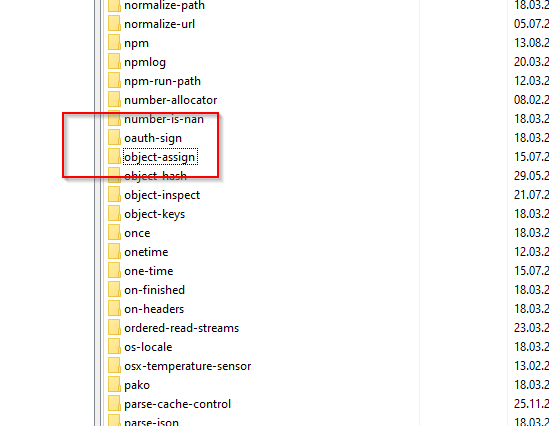
Obwohl der Ordner unter /opt/iobroker/node_modules/ vorhanden ist:
... wer nicht mit der Zeit geht, geht mit der Zeit ...
Aktuelle Entwicklung: Energiefluss - erweitert (https://forum.iobroker.net/topic/64734)
-
Das System stört sich an "object-assign".
pi@ioBroker:/opt/iobroker $ iobroker url https://github.com/ioBroker/ioBroker.zigbee --host ioBroker --debug

install ioBroker/ioBroker.zigbee#6754927e89f94d7b395a94c3b3bbc9e9a78a2340
NPM version: 8.11.0
Installing ioBroker/ioBroker.zigbee#6754927e89f94d7b395a94c3b3bbc9e9a78a2340... (System call)
npm WARN skipping integrity check for git dependency ssh://git@github.com/ioBroker/ioBroker.zigbee.git
npm ERR! code 1
npm ERR! path /opt/iobroker/node_modules/@serialport/bindings
npm ERR! command failed
npm ERR! command sh -c prebuild-install --tag-prefix @serialport/bindings@ || node-gyp rebuild
npm ERR! prebuild-install warn install No prebuilt binaries found (target=16.16.0 runtime=node arch=arm libc= platform=linux)
npm ERR! node:internal/modules/cjs/loader:936
npm ERR!   throw err;
npm ERR!   ^
npm ERR!
npm ERR! Error: Cannot find module 'object-assign'
npm ERR! Require stack:
npm ERR! - /usr/lib/node_modules/npm/node_modules/node-gyp/node_modules/gauge/render-template.js
npm ERR! - /usr/lib/node_modules/npm/node_modules/node-gyp/node_modules/gauge/plumbing.js
npm ERR! - /usr/lib/node_modules/npm/node_modules/node-gyp/node_modules/gauge/index.js
npm ERR! - /usr/lib/node_modules/npm/node_modules/node-gyp/node_modules/npmlog/log.js
npm ERR! - /usr/lib/node_modules/npm/node_modules/node-gyp/lib/node-gyp.js
npm ERR! - /usr/lib/node_modules/npm/node_modules/node-gyp/bin/node-gyp.js
npm ERR!     at Function.Module._resolveFilename (node:internal/modules/cjs/loader:933:15)
npm ERR!     at Function.Module._load (node:internal/modules/cjs/loader:778:27)
npm ERR!     at Module.require (node:internal/modules/cjs/loader:1005:19)
npm ERR!     at require (node:internal/modules/cjs/helpers:102:18)
npm ERR!     at Object.<anonymous> (/usr/lib/node_modules/npm/node_modules/node-gyp/node_modules/gauge/render-template.js:4:20)
npm ERR!     at Module._compile (node:internal/modules/cjs/loader:1105:14)
npm ERR!     at Object.Module._extensions..js (node:internal/modules/cjs/loader:1159:10)
npm ERR!     at Module.load (node:internal/modules/cjs/loader:981:32)
npm ERR!     at Function.Module._load (node:internal/modules/cjs/loader:822:12)
npm ERR!     at Module.require (node:internal/modules/cjs/loader:1005:19) {
npm ERR!   code: 'MODULE_NOT_FOUND',
npm ERR!   requireStack: [
npm ERR!     '/usr/lib/node_modules/npm/node_modules/node-gyp/node_modules/gauge/render-template.js',
npm ERR!     '/usr/lib/node_modules/npm/node_modules/node-gyp/node_modules/gauge/plumbing.js',
npm ERR!     '/usr/lib/node_modules/npm/node_modules/node-gyp/node_modules/gauge/index.js',
npm ERR!     '/usr/lib/node_modules/npm/node_modules/node-gyp/node_modules/npmlog/log.js',
npm ERR!     '/usr/lib/node_modules/npm/node_modules/node-gyp/lib/node-gyp.js',
npm ERR!     '/usr/lib/node_modules/npm/node_modules/node-gyp/bin/node-gyp.js'
npm ERR!   ]
npm ERR! }

npm ERR! A complete log of this run can be found in:
npm ERR!     /home/iobroker/.npm/_logs/2022-07-15T07_46_19_129Z-debug-0.log
host.ioBroker Cannot install ioBroker/ioBroker.zigbee#6754927e89f94d7b395a94c3b3bbc9e9a78a2340: 1
Obwohl der Ordner unter /opt/iobroker/node_modules/ vorhanden ist:
-
@arteck Gerade mal geschaut. Im iob Verzeichnis ist es da.
Im NPM Verzeichnis aber nicht:
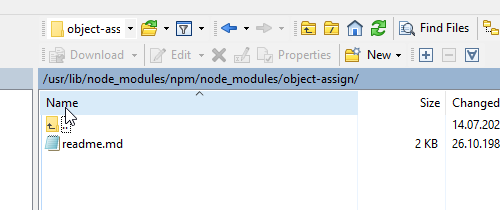
Eine Idee, wie man es dort verfügbar macht? Vielleicht liegt hier das Problem?
... wer nicht mit der Zeit geht, geht mit der Zeit ...
Aktuelle Entwicklung: Energiefluss - erweitert (https://forum.iobroker.net/topic/64734)
-
@arteck Gerade mal geschaut. Im iob Verzeichnis ist es da.
Im NPM Verzeichnis aber nicht:
Eine Idee, wie man es dort verfügbar macht? Vielleicht liegt hier das Problem?
Keine Ahnung wer oder was das Modul dort sucht, aber in meinem System ist es dort auch nicht:
echad@chet:~ $ locate object-assign /opt/iobroker/node_modules/appium-logger/node_modules/core-js/library/modules/$.object-assign.js /opt/iobroker/node_modules/appium-logger/node_modules/core-js/modules/$.object-assign.js /opt/iobroker/node_modules/core-js/library/modules/_object-assign.js /opt/iobroker/node_modules/core-js/modules/_object-assign.js /opt/iobroker/node_modules/object-assign /opt/iobroker/node_modules/object-assign/index.js /opt/iobroker/node_modules/object-assign/license /opt/iobroker/node_modules/object-assign/package.json /opt/iobroker/node_modules/object-assign/readme.md echad@chet:~ $ -
Keine Ahnung wer oder was das Modul dort sucht, aber in meinem System ist es dort auch nicht:
echad@chet:~ $ locate object-assign /opt/iobroker/node_modules/appium-logger/node_modules/core-js/library/modules/$.object-assign.js /opt/iobroker/node_modules/appium-logger/node_modules/core-js/modules/$.object-assign.js /opt/iobroker/node_modules/core-js/library/modules/_object-assign.js /opt/iobroker/node_modules/core-js/modules/_object-assign.js /opt/iobroker/node_modules/object-assign /opt/iobroker/node_modules/object-assign/index.js /opt/iobroker/node_modules/object-assign/license /opt/iobroker/node_modules/object-assign/package.json /opt/iobroker/node_modules/object-assign/readme.md echad@chet:~ $@thomas-braun Das ist schonma gut :)
Wie könnte ich nun weitermachen?
-
Habe jetzt das Module object-assign nochmal installiert, jedoch kommt beim nächsten Versuch, Zigbee via Git zu installieren erneut der Fehler, dass das Modul nicht gefunden wurde.
Aktuell bin ich etwas ratlos ...
... wer nicht mit der Zeit geht, geht mit der Zeit ...
Aktuelle Entwicklung: Energiefluss - erweitert (https://forum.iobroker.net/topic/64734)
-
Habe jetzt das Module object-assign nochmal installiert, jedoch kommt beim nächsten Versuch, Zigbee via Git zu installieren erneut der Fehler, dass das Modul nicht gefunden wurde.
Aktuell bin ich etwas ratlos ...
Was passiert denn mit einer Installation über ein Repo?
-
Was passiert denn mit einer Installation über ein Repo?
@thomas-braun Über das Admin kommt:
$ iobroker add zigbee auto --host ioBroker
NPM version: 8.11.0
Installing iobroker.zigbee@1.7.5... (System call)
host.ioBroker Cannot install iobroker.zigbee@1.7.5: 1
ERROR: Process exited with code 25
Über die Kommando Zeile mit debug kommt:
pi@ioBroker:/opt/iobroker $ iobroker add zigbee auto --host ioBroker --debug
NPM version: 8.11.0
Installing iobroker.zigbee@1.7.5... (System call)
npm ERR! code 1
npm ERR! path /opt/iobroker/node_modules/@serialport/bindings
npm ERR! command failed
npm ERR! command sh -c prebuild-install --tag-prefix @serialport/bindings@ || node-gyp rebuild
npm ERR! prebuild-install warn install No prebuilt binaries found (target=16.16.0 runtime=node arch=arm libc= platform=linux)
npm ERR! node:internal/modules/cjs/loader:936
npm ERR!   throw err;
npm ERR!   ^
npm ERR!
npm ERR! Error: Cannot find module 'object-assign'
npm ERR! Require stack:
npm ERR! - /usr/lib/node_modules/npm/node_modules/node-gyp/node_modules/gauge/render-template.js
npm ERR! - /usr/lib/node_modules/npm/node_modules/node-gyp/node_modules/gauge/plumbing.js
npm ERR! - /usr/lib/node_modules/npm/node_modules/node-gyp/node_modules/gauge/index.js
npm ERR! - /usr/lib/node_modules/npm/node_modules/node-gyp/node_modules/npmlog/log.js
npm ERR! - /usr/lib/node_modules/npm/node_modules/node-gyp/lib/node-gyp.js
npm ERR! - /usr/lib/node_modules/npm/node_modules/node-gyp/bin/node-gyp.js
npm ERR!     at Function.Module._resolveFilename (node:internal/modules/cjs/loader:933:15)
npm ERR!     at Function.Module._load (node:internal/modules/cjs/loader:778:27)
npm ERR!     at Module.require (node:internal/modules/cjs/loader:1005:19)
npm ERR!     at require (node:internal/modules/cjs/helpers:102:18)
npm ERR!     at Object.<anonymous> (/usr/lib/node_modules/npm/node_modules/node-gyp/node_modules/gauge/render-template.js:4:20)
npm ERR!     at Module._compile (node:internal/modules/cjs/loader:1105:14)
npm ERR!     at Object.Module._extensions..js (node:internal/modules/cjs/loader:1159:10)
npm ERR!     at Module.load (node:internal/modules/cjs/loader:981:32)
npm ERR!     at Function.Module._load (node:internal/modules/cjs/loader:822:12)
npm ERR!     at Module.require (node:internal/modules/cjs/loader:1005:19) {
npm ERR!   code: 'MODULE_NOT_FOUND',
npm ERR!   requireStack: [
npm ERR!     '/usr/lib/node_modules/npm/node_modules/node-gyp/node_modules/gauge/render-template.js',
npm ERR!     '/usr/lib/node_modules/npm/node_modules/node-gyp/node_modules/gauge/plumbing.js',
npm ERR!     '/usr/lib/node_modules/npm/node_modules/node-gyp/node_modules/gauge/index.js',
npm ERR!     '/usr/lib/node_modules/npm/node_modules/node-gyp/node_modules/npmlog/log.js',
npm ERR!     '/usr/lib/node_modules/npm/node_modules/node-gyp/lib/node-gyp.js',
npm ERR!     '/usr/lib/node_modules/npm/node_modules/node-gyp/bin/node-gyp.js'
npm ERR!   ]
npm ERR! }

npm ERR! A complete log of this run can be found in:
npm ERR!     /home/iobroker/.npm/_logs/2022-07-16T10_08_13_532Z-debug-0.log
host.ioBroker Cannot install iobroker.zigbee@1.7.5: 1
Quasi der gleiche Fehler wie vorher.
pi@ioBroker:/opt/iobroker $ ls /opt/iobroker/node_modules/@serialport/bindings
ls: Zugriff auf '/opt/iobroker/node_modules/@serialport/bindings' nicht möglich: Datei oder Verzeichnis nicht gefunden
... wer nicht mit der Zeit geht, geht mit der Zeit ...
Aktuelle Entwicklung: Energiefluss - erweitert (https://forum.iobroker.net/topic/64734)
-
@thomas-braun Über das Admin kommt:
$ iobroker add zigbee auto --host ioBroker
NPM version: 8.11.0
Installing iobroker.zigbee@1.7.5... (System call)
host.ioBroker Cannot install iobroker.zigbee@1.7.5: 1
ERROR: Process exited with code 25
Über die Kommando Zeile mit debug kommt:
pi@ioBroker:/opt/iobroker $ iobroker add zigbee auto --host ioBroker --debug
NPM version: 8.11.0
Installing iobroker.zigbee@1.7.5... (System call)
npm ERR! code 1
npm ERR! path /opt/iobroker/node_modules/@serialport/bindings
npm ERR! command failed
npm ERR! command sh -c prebuild-install --tag-prefix @serialport/bindings@ || node-gyp rebuild
npm ERR! prebuild-install warn install No prebuilt binaries found (target=16.16.0 runtime=node arch=arm libc= platform=linux)
npm ERR! node:internal/modules/cjs/loader:936
npm ERR!   throw err;
npm ERR!   ^
npm ERR!
npm ERR! Error: Cannot find module 'object-assign'
npm ERR! Require stack:
npm ERR! - /usr/lib/node_modules/npm/node_modules/node-gyp/node_modules/gauge/render-template.js
npm ERR! - /usr/lib/node_modules/npm/node_modules/node-gyp/node_modules/gauge/plumbing.js
npm ERR! - /usr/lib/node_modules/npm/node_modules/node-gyp/node_modules/gauge/index.js
npm ERR! - /usr/lib/node_modules/npm/node_modules/node-gyp/node_modules/npmlog/log.js
npm ERR! - /usr/lib/node_modules/npm/node_modules/node-gyp/lib/node-gyp.js
npm ERR! - /usr/lib/node_modules/npm/node_modules/node-gyp/bin/node-gyp.js
npm ERR!     at Function.Module._resolveFilename (node:internal/modules/cjs/loader:933:15)
npm ERR!     at Function.Module._load (node:internal/modules/cjs/loader:778:27)
npm ERR!     at Module.require (node:internal/modules/cjs/loader:1005:19)
npm ERR!     at require (node:internal/modules/cjs/helpers:102:18)
npm ERR!     at Object.<anonymous> (/usr/lib/node_modules/npm/node_modules/node-gyp/node_modules/gauge/render-template.js:4:20)
npm ERR!     at Module._compile (node:internal/modules/cjs/loader:1105:14)
npm ERR!     at Object.Module._extensions..js (node:internal/modules/cjs/loader:1159:10)
npm ERR!     at Module.load (node:internal/modules/cjs/loader:981:32)
npm ERR!     at Function.Module._load (node:internal/modules/cjs/loader:822:12)
npm ERR!     at Module.require (node:internal/modules/cjs/loader:1005:19) {
npm ERR!   code: 'MODULE_NOT_FOUND',
npm ERR!   requireStack: [
npm ERR!     '/usr/lib/node_modules/npm/node_modules/node-gyp/node_modules/gauge/render-template.js',
npm ERR!     '/usr/lib/node_modules/npm/node_modules/node-gyp/node_modules/gauge/plumbing.js',
npm ERR!     '/usr/lib/node_modules/npm/node_modules/node-gyp/node_modules/gauge/index.js',
npm ERR!     '/usr/lib/node_modules/npm/node_modules/node-gyp/node_modules/npmlog/log.js',
npm ERR!     '/usr/lib/node_modules/npm/node_modules/node-gyp/lib/node-gyp.js',
npm ERR!     '/usr/lib/node_modules/npm/node_modules/node-gyp/bin/node-gyp.js'
npm ERR!   ]
npm ERR! }

npm ERR! A complete log of this run can be found in:
npm ERR!     /home/iobroker/.npm/_logs/2022-07-16T10_08_13_532Z-debug-0.log
host.ioBroker Cannot install iobroker.zigbee@1.7.5: 1
Quasi der gleiche Fehler wie vorher.
pi@ioBroker:/opt/iobroker $ ls /opt/iobroker/node_modules/@serialport/bindings ls: Zugriff auf '/opt/iobroker/node_modules/@serialport/bindings' nicht möglich: Datei oder Verzeichnis nicht gefundenFällt mir nichts sinnvolles zu ein, sorry.
Schau aber mal wie das bei dir aussieht:
echad@chet:/opt/iobroker $ npm ls object-assign
iobroker.inst@3.0.0 /opt/iobroker
├─┬ iobroker.echarts@1.0.12
│ └─┬ canvas@2.9.3
│   └─┬ @mapbox/node-pre-gyp@1.0.9
│     └─┬ npmlog@5.0.1
│       └─┬ gauge@3.0.2
│         └── object-assign@4.1.1 deduped
└─┬ iobroker.zigbee@1.7.5
  └─┬ zigbee-herdsman@0.14.34
    └─┬ mz@2.7.0
      └── object-assign@4.1.1



Hey! Du scheinst an dieser Unterhaltung interessiert zu sein, hast aber noch kein Konto.
Hast du es satt, bei jedem Besuch durch die gleichen Beiträge zu scrollen? Wenn du dich für ein Konto anmeldest, kommst du immer genau dorthin zurück, wo du zuvor warst, und kannst dich über neue Antworten benachrichtigen lassen (entweder per E-Mail oder Push-Benachrichtigung). Du kannst auch Lesezeichen speichern und Beiträge positiv bewerten, um anderen Community-Mitgliedern deine Wertschätzung zu zeigen.
Mit deinem Input könnte dieser Beitrag noch besser werden 💗
Registrieren AnmeldenSupport us
244
Online33.0k
Benutzer83.6k
Themen1.3m
Beiträge